tow AUDI Q3 2016 User Guide
[x] Cancel search | Manufacturer: AUDI, Model Year: 2016, Model line: Q3, Model: AUDI Q3 2016Pages: 252, PDF Size: 62.81 MB
Page 88 of 252
Automatic transmission
Shifting with the shift paddle s*
You can operate the shift padd les in the D, Sor M
selector lever posit ions.
• To sh ift up one gear, tap the
0 shift paddle
¢fig. 93.
• To shift down one gea r, tap the O sh ift paddle.
• If you do not press a shift button within a short
time whi le in the D/S position, the transmission
will return to automatic mode. To keep shifting
using the shift buttons, move the selector lever
to the right out of the D/S position.
The transmission automatically shifts up or down
before critical engine speed is reached.
The transm ission only a llows manual shift ing
when the engine speed is within the permitted
range.
@ Tips
- When you shift into the next lower gear, the
transmission wi ll downshift only when there
is no possibility of over-revving the engine.
- When the kick-down comes on, the trans
mission will shift down to a lower gear, de
pending on vehicle and engine speeds.
- Tiptronic is inoperative when the transmis
sion is in the fai l-safe mode .
Kick-down
Kick-down enables maximum acceleration.
When you press the accelerator peda l down be
yond the resistance point (called kick-down), the
automatic transmission downshifts into a lower
gear, depending on vehicle speed and engine RPM. It shifts up into the next higher gear once
the maximum specified engine RPM is reached.
A WARNING
Please note that the wheels could spin on
slick or slippery roads when kick-down is ac
tive.
Transmission malfunction
• Transmission overheating! Please stop the
vehicle!
86
The transmission is too hot and can become dam
aged. Stop and let the transmission coo l with the
engine running (at idle) in the P se lector lever po
sition. Then the indicator light and the message
turn off, drive to an authorized Audi dealer or au
thorized Audi Service Facility immediately to have
the malfunct ion corrected.
If the indicator light
and the driver message do not turn off, do not
continue driving. See an authorized Audi dea ler
or authorized Audi Service Facility fo r assistance.
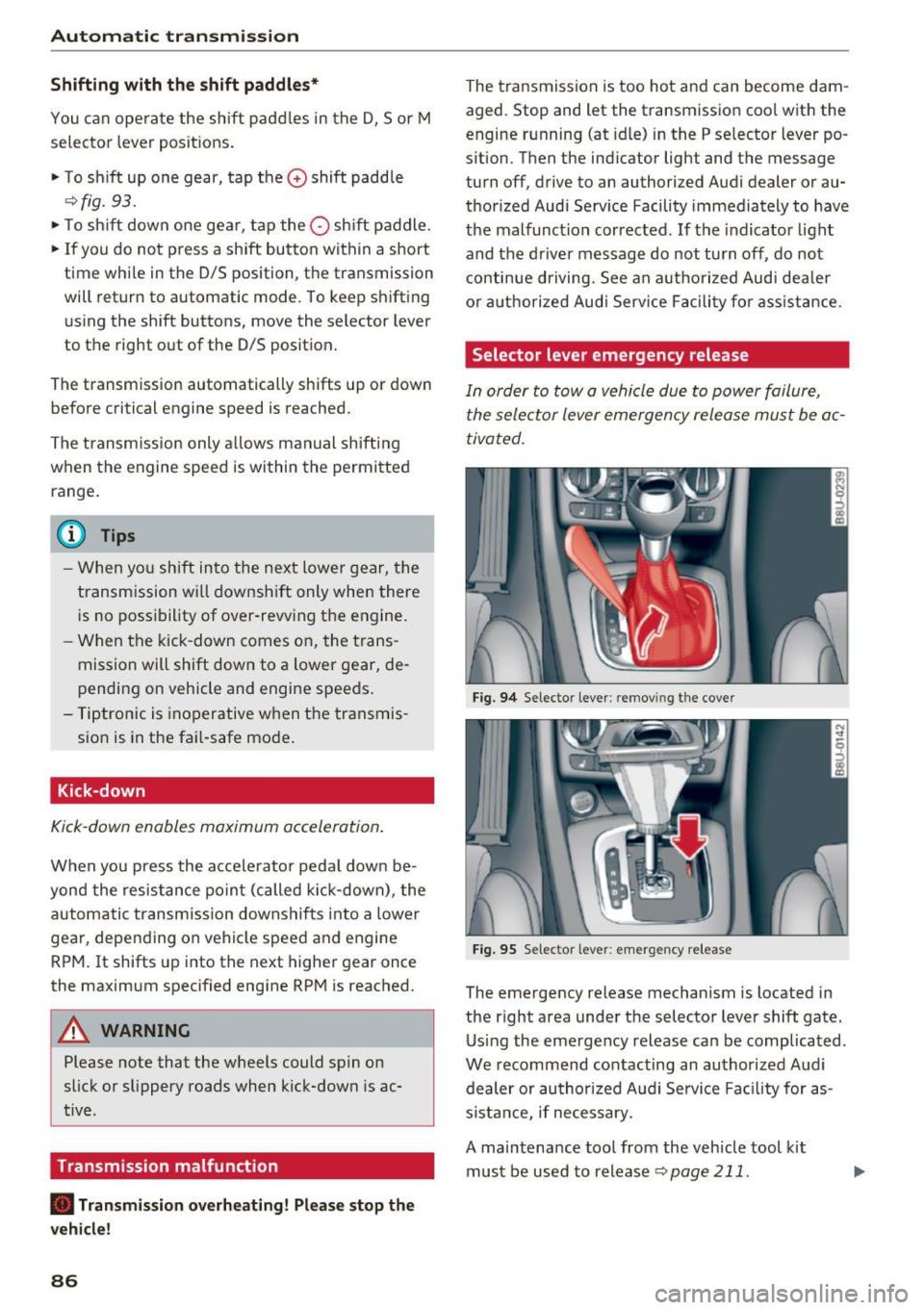
Selector lever emergency release
In order to tow a vehicle due to power failure,
the selector lever emergency release must be ac
tivated .
Fig. 94 Selector lever: remov ing t he cover
Fig. 95 Selector lever: emergency release
The emergency release mechanism is located in
the right area under the selector lever shift gate.
Using the emergency release can be complicated .
We recommend contacting an authorized Audi
dealer or authorized Audi Service Facility for as
s istance, if necessary.
A maintenance tool from the vehicle tool kit
must be used to release
¢ page 211 .
Page 90 of 252
Parking systems
Parking systems
General information
Applies to vehicles: with rear parking system/parking system
p lus/rear v iew camera
Depending on your vehicle 's equipment , various
parking aids will help you when parking and ma
neuvering.
The
rear park ing system is an audible parking aid
that warns you of obstacles
behind the vehicle
~ page 88.
The parking system plus assists you when park
ing by audibly and visually indicating objects de
tected
in front of and behind the vehicle
~ page 89.
The rear view camera shows the area behind the
vehicle in the Infotainment display . This display
assists you when you are cross or parallel parking
~ page 90. In addition, you are assisted by the
functions from the park ing system plus
~ page 89.
& WARNING
-Always look for traffic and check the area
around your vehicle by looking at it directly
as well. The parking system cannot replace
the driver's attention. The driver is always
responsible for safety during parking and
for all other maneuvers.
- Please note that some surfaces , such as
clothing, are not detected by the system .
- Sensors and cameras have blind spots in
which people and objects cannot be detect
ed . Be especially cautious of children and
animals.
- The sensors can be displaced by impacts or
damage to the radiator gr ille, bumper,
wheel housing and the underbody . The park
ing systems may become impa ired as a re
sult . Have your authorized Audi dealer or
qualified workshop check their function.
- Make sure the sensors are not covered by
stickers, deposits o r any other obstructions
as
it may impair the sensor function . For in
formation on cleaning, refer to
~ page 168.
88
(D Note
-Some objects are not detected by the sys
tem under certain circumstances:
-Objects such as barrier chains, trailer draw
bars, vertical poles or fences
- Objects above the sensors such as wall ex
tensions
- Objects with specific surfaces or struc
tures such as chain link fences or powder
snow.
- If you continue driving closer to a low-lying
object, it may disappear from the sensor
range. Note that you will no longer be
warned about this obstacle.
(D Tips
-The system may provide a warning even
though there are no obstacles in the cover
age area in some situations, such as:
- certain road surfaces or for long grass.
- external ultrasonic sources e.g. from cleaning vehicles .
- heavy rain, snow or thick vehicle exhaust .
- We recommend that you practice parking in
a traffic-free location or parking lot to be
come familiar with the system . When doing
this, there should be good light and weath
er conditions.
- You can change the volume and pitch of the
signals as well as the display
~ page 93.
- Please refer to the instructions for towing a
trailer ~
page 94 .
-What appears in the infotainment display is
somewhat time-delayed.
Rear parking system
Description
Applies to veh icles : with rear parking system
The rear parking syst em is an audible parking
aid .
There is a sensor in the rear bumpe r cover. If
these detect an obstacle, audible signals warn
you.
Make sure the sensors are not covered by stick -
ers , deposits or any other obstructions as it may ""'
Page 93 of 252
can affect the function of the parking system. For information on cleaning, refer to¢
page 168.
The rearview camera coverage area includes (!)
¢ fig. 101. Only this area is shown in the Info
tainment display. Objects that are outside of this
area @are not displayed.
The accuracy of the orientation lines and blue
surfaces diminishes if the
Dynamic mode is acti
vated
¢ page 80.
~ WARNING
- Always read and follow the applicable warn
ings
¢ &. in General information on
page 88.
- If the position and the installation angle of
the rearview camera was changed, for ex ample, after a collision, do not continue to
use the system for safety reasons. Have it
checked by your authorized Audi dealer or
authorized Audi Service Facility .
- Only use the rearview camera to assist you if
it shows a good, clear picture. For example,
the image may be affected by the sun shin
ing into the lens, dirt on the lens or if there
is a defect.
- Use the rearview camera only if the luggage
compartment lid is completely closed. Make
sure any objects you may have mounted on
the luggage compartment lid do not block
the rearview camera.
- The camera lens enlarges and distorts the
field of vision. The object appears both al
tered and inaccurate on the screen.
- In certain situations, people or objects in
the display appear closer or farther away:
- For objects that do not touch the ground,
such as the bumper of a parked vehicle, a
trailer hitch or the rear of a truck . Do not
use the help lines in this case.
- If driven from a level surface onto an in
cline, or a downward slope.
- If driven toward protruding objects.
- If the vehicle is carrying too much load in
the rear .
Parking systems
(D Note
-Always read and follow the applicable warn
ings
¢ (D in General information on
page 88.
- Th e orange colored orientation lines in the
In fotainment display show the vehicle path
depending on the steering wheel angle. The
front of the vehicle swings out more than
the rear of the vehicle. Maintain plenty of
distance so that your outside mirror or a
corner of your vehicle does not collide with
any obstacles.
Switching on/off
Appl ies to vehicles: with parking system plus with rearview
camera
Switching on
• Shift into reverse, or
• Press the
PwA button in the center console
¢ page 89, fig. 97. A short confirmation tone
sounds and the LED in the button turns on.
Switching between the rearview camera and
optical display
• Press the Graphic control button ®
¢ page 92, fig. 103 to see the optical display.
• Press the
Rear view control button to see the
rearview camera image.
Switching off
• Drive faster than 6 mph (10 km/h), or
• press the
P•lj A button, or
• Switch the ignition off.
@ Tips
The visual display in the left part of the dis
play should help you detect the critical vehicle
areas.
91
Page 96 of 252
Parking sy stem s
alarm for a few seconds a fter switching on the
parking system or when the parking system is al
ready act ivated .
If the error is not corrected be
fore you switch off the ign it ion, the LED in the
p ,,1A
button will b link the next t ime you sw itch on the
parking system by sh ift ing into reverse.
If a sensor is faulty, the
J;l4 symbol will appear in
front of/behind the vehicle in the Infotainment
d isp lay. If a rear sensor is faulty, only obstacles
that are in areas @and @ are shown
c> page 89,
fig. 96 . If a front sensor is faulty, o nly obstacles
that are in areas © and @are shown .
Drive to an authorized Aud i dea ler or authori zed
Aud i Serv ice Facility immediately to have the
malfunct ion corrected.
Trailer hitch
Applies to vehicles: with parking system plus with rearview
camera
F or vehicles using the trailer socket, t he parking
system rear sensors do not turn on when you
shift into reverse gear or when you press the
p,, 1A
button . This results in the follow ing restrictions .
There is no distance warning fo r the rear. The
front sensors remain activated. The visual display
sw itches to the trailer towing mode. The rearview
camera image will not show the or ientat ion lines
and the blue s urfaces .
(D Tips
Trailer h itches that are not installed at the
factory may cause the pa rking system to mal
function o r they may res trict its funct ion .
94
Page 99 of 252
For detailed information on how to adjust the
driver's seat, see
¢ page 50.
A WARNING
Drivers who are unbelted, out of position or
too close to the airbag can be seriously in
jured by an airbag as it unfolds. To help re
duce the risk of serious personal injury:
- Always adjust the driver's seat and the
steering wheel so that there are at least 10 inches (25 cm) between your breastbone
and the steering wheel.
- Always hold the steer ing wheel on the out
side of the steering wheel rim with your
hands at the 9 o'clock and 3 o'clock posi
tions to help reduce the r isk of persona l in
jury if the driver's airbag inflates.
- Never hold the steer ing whee l at the
12 o'clock position or w ith your hands at
other pos it ions inside the steering wheel
rim or on the steering wheel hub. Holding
the steering wheel the wrong way can cause
serious injuries to the hands, arms and head if the driver's airbag deploys.
- Pointing the steering wheel toward your
face decreases the ability of the supplemen
tal driver's airbag to protect you in a colli sion.
- Always sit in an upright position and never lean against or place any part of your body
too close to the area where the airbags are
located .
- Before driving, always adjust the front seats
and head restraints properly and make sure
that all passengers are properly restrained.
- Never adjust the seats while the vehicle is
moving . Your seat may move unexpectedly
and you could lose control of the vehicle .
- Never drive with the backrest reclined or
t il ted far back! The farther the backrests are
tilted back, the greater the risk of injury due
to incorrect positioning of the safety belt
and improper seating position.
- Children must always ride in child safety
seats¢
page 132 . Special precaut ions ap
ply when installing a ch ild safety seat on the
front passenger seat
c:::;, page 112.
Driving safety
Proper seating position for the front
passenger
The proper front passenger seating position is
important for safe, relaxed driving.
For your own safety and to reduce the risk of in
jury in the event of an acc ident, we recommend
that you adjust the seat for the front passenger
to the follow ing position:
"' Adjust the angle of the seatback so that it is in
an upright position and your back comes in full
contact with it whenever the vehicle is moving.
"' Adjust the head restraint so the upper edge is
as even as possible with the top of your head. If
that is not possible, try to adjust the head re
straint so that it is as close to this position as
possible
¢ page 51.
"' Keep both feet flat on the floor in front of the
front passenger seat.
"' Fasten and wear safety belts correctly
c:::;, page 107.
For detailed information on how to adjust the
front passenger's seat, see
c:::;, page 50.
A WARNING
--
Front seat passengers who are unbelted, out
of position or too close to the airbag can be
seriously injured or killed by the airbag as it
unfolds. To help reduce the risk of serious
personal injury:
- Passengers must always sit in an upright po
sition and never lean against or place any
part of their body too close to the area
where the airbags are located.
- Passengers who are unbelted, out of posi
tion or too close to the airbag can be seri
ously injured by an airbag as it unfolds with
great force in the blink of an eye.
- Always make sure that there are at least
10 inches (25 cm) between the front pas
senger's breastbone and the instrument
panel.
- E ach passenger must always sit on a seat of
their own and properly fasten and wear the
safety belt belonging to that seat .
- Before driving, always adjust the front pas
senger seat and head restraint properly.
97
Page 102 of 252
Driving safety
-Never place any objects in the driver's foot
well. An object could get into the pedal area
and interfere with pedal function . In case of
sudden braking or an accident, you would not be able to brake or accelerate!
- Always make sure that nothing can fall or
move into the driver 's footwell.
Floor mats on the driver side
Always use floor mots that con be securely at
t ached to the floor mo t fas teners and do no t in
terfere with the free movement of the pedals .
• Make sure that the floor mats are properly se
cured and cannot move and interfere with the
pedals
c> _& .
Use only floor mats that leave th e pedal area un
obstructed and that are firmly secured so that
they cannot slip out of position. You can obtain
suitable floor mats from your authorized Audi
dealer .
Floor mat fasteners are installed in your Audi.
Floor mats used in your vehicle must be attached
to these fasteners. Properly securing the floor mats will prevent them from sliding into posi
tions that could interfere with the pedals or im pair safe operation of your vehicle in other ways.
A WARNING
Pedals that cannot move freely can result in a
loss of vehicle control and increase the risk of
serious personal injury .
- Always make sure that floor mats are prop
erly secured .
- Never place or install floor mats or other
floor coverings in the vehicle that cannot be
properly secured in place to prevent them
from slipping and interfering with the ped
als or the ability to control the vehicle.
- Never place or install floor mats or other
floor coverings on top of already installed
floor mats. Additional floor mats and other
coverings will reduce the size of the peda l
area and interfere with the pedals .
- Always properly reinstall and secure floor
mats that have been taken out for cleaning .
100
-Always make sure that objects cannot fall
into the driver footwell while the vehicle is
moving. Objects can become trapped under
the brake pedal and accelerator pedal caus
ing a loss of vehicle control.
Storing cargo correctly
Loading the luggage compartment
All luggage and other objects must be properly stowed and secured in the luggage comport
ment.
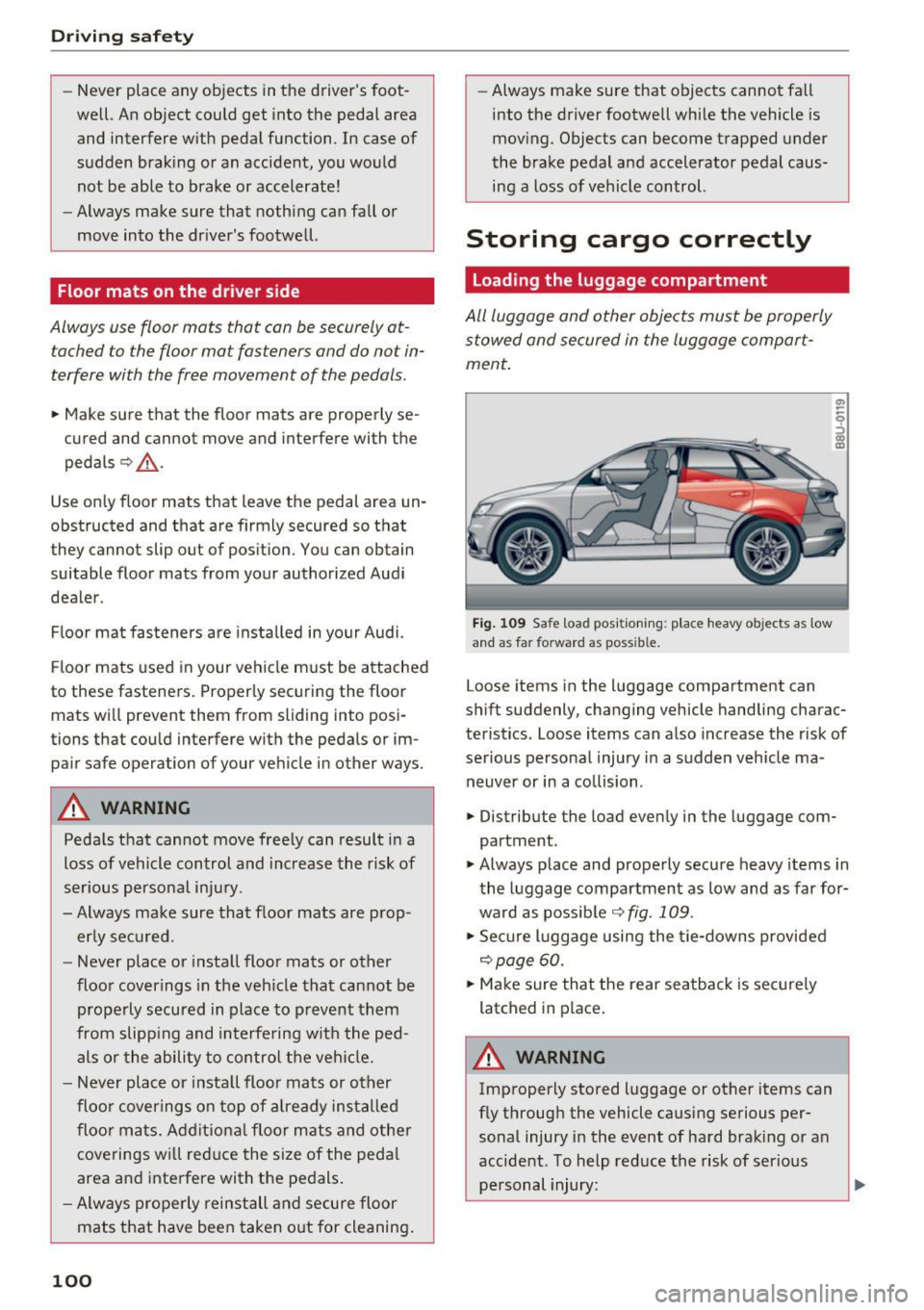
Fig. 109 Safe load positioning: place heavy ob jects as low
and as fa r forward as poss ib le.
Loose items in the luggage compartment can
shift suddenly, changing vehicle handling charac
teristics . Loose items can also increase the risk of
serious personal injury in a sudden vehicle ma
neuver or in a collision .
• Distribute the load evenly in the luggage com
partment .
• Always place and properly secure heavy items in
the luggage compartment as low and as far for
ward as possible
c> fig. 109 .
• Secure luggage using the t ie-downs provided
c> poge 60.
• Make sure that the rear seatback is securely
latched in place .
A WARNING
Improperly stored luggage or other items can
fly through the vehicle causing serious per sonal injury in the event of hard braking or an
accident . To help reduce the risk of serious
personal injury: ..,.
Page 111 of 252
.... N
c:i ::J CX)
.... I.Cl U"I
N I.Cl ......
from the strong bones to more vulnerable,
soft tissue and cause serious injury.
- Always read and heed all WARNINGS and
other important information
c;> page 106.
Pregnant women must also be correctly
restrained
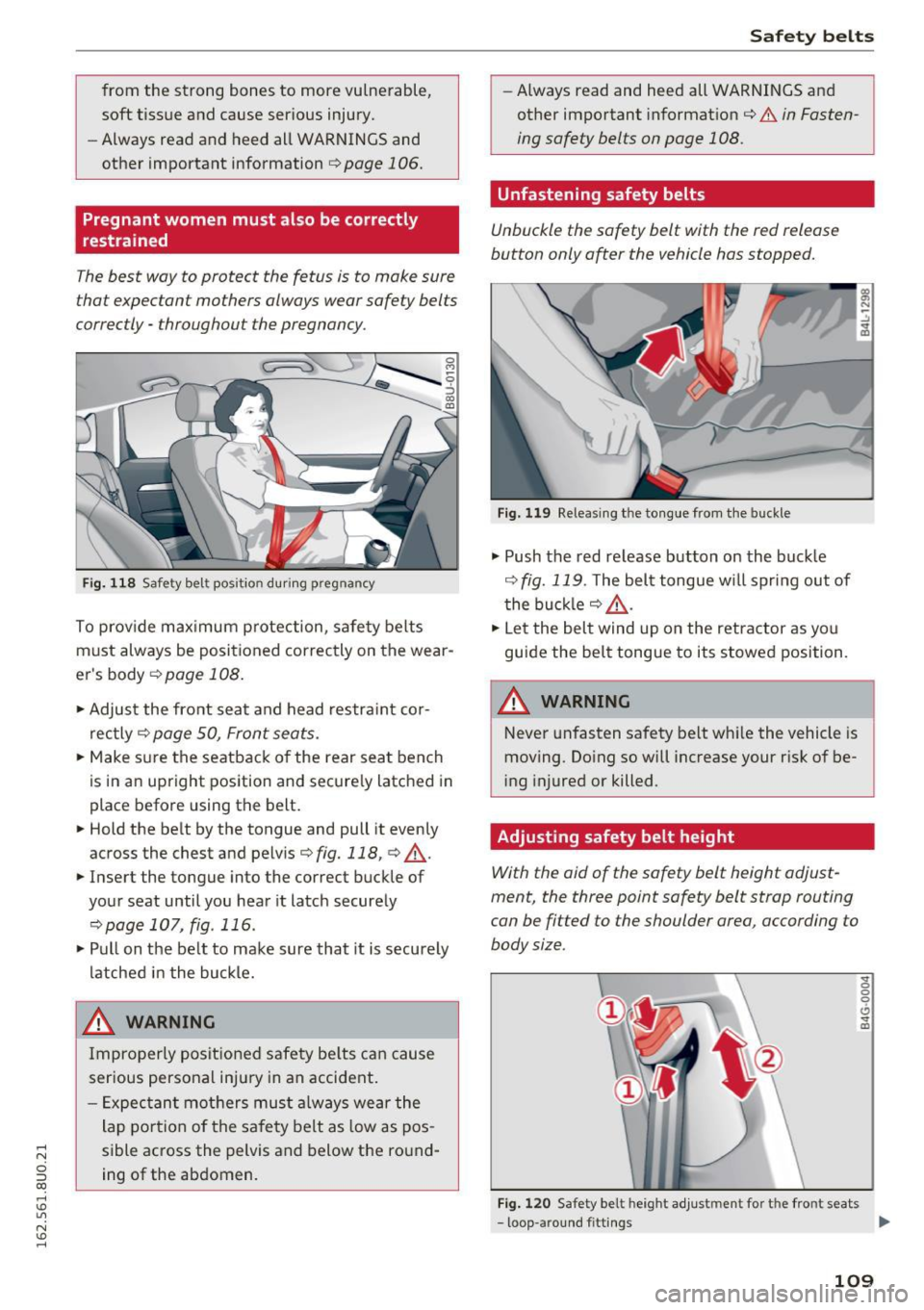
The best way to protect the fetus is to make sure
that expectant mothers always wear safety belts
correctly -throughout the pregnancy .
Fig. 11 8 Safety belt position d urin g pregnancy
To p rov ide max imum p rotection, safety belts
must always be posi tioned correctly on the wear
e r's body
c::> page 108 .
• Adjus t the front seat and head restra int cor
rec tly
c::> page 50, Front seats .
• Make s ure the seatback of the rear seat bench
is in a n upright pos ition and secure ly latched in
place before using the belt.
• Hold the be lt by the tongue and pull it evenly
across the chest and pelv is
c::> fig. 118, c::> ,&. .
• Insert the tongue into the correct buckle of
your seat until you hear it latch securely
c::> page 107, fig . 116 .
• Pul l on the be lt to make sure that it is securely
la tched i n the bu ck le.
_& WARNING ,..__
Improperly po sit ione d safety be lts ca n cause
ser ious persona l inj ury in an accident .
- E xpec tan t m others mus t always wear the
lap po rtion of the sa fe ty belt as low as pos
sible ac ross the pelvis and below the round
ing of the ab domen.
Safet y bel ts
-Always read and heed all WARNINGS and
other important informat ion
c::> A in Fasten
ing safety belts on page 108.
Unfastening safety belts
Unbuckle the safety belt with the red release
button only o~er the vehicle has stopped.
Fig. 1 19 Releasi ng the to ngue from t he buckle
.,. Push the red re lease but ton on the buck le
c::> fig. 119 . The belt tongue w ill spr ing out of
t he buck le
c::> ,&. .
• Let the belt wind up on the retra ctor as yo u
guide the belt tongue to its stowed position.
_& WARNING
Never unfasten safety belt whi le the vehicle is
moving. Do ing so will increase your r isk of be
i ng injured or killed.
Adjusting safety belt height
With the aid of the safety belt height adjust
ment, the three point safety belt strap routing
can be fitted to the shoulder area, according to
body size .
Fig. 1 20 Safety belt height a djustment for the front seats
... 0 0
0
6 ... a,
- loop -aro und fitt ings Ill>
109
Page 122 of 252
Airbag syste m
restraints or occupants on the front passen
ger seat and prevent the side airbag in the
seat backrest from deploying properly.
- Never use cushions, pillows, blankets or
similar items on the front passenger seat.
The additional padding will prevent the
weight-sens ing mat in the seat from accu
rately reg istering the ch ild restraint or per
son on the seat and prevent the Advanced
Airbag System from funct ioning prope rly.
- If you must use a child restraint on the front
passenge r seat and the child restraint man
ufact urer's instructions require the use of a
towel, foam cushion or something else to properly position the chi ld restraint, make
certain that the
PASSENGER AIR BAG O FF
light comes on and stays on whenever the
child restraint is installed on the front pas
senger seat.
- If the
PASSENGER AIR BAG O FF light does
not come on and stay on, immediately in
stall child restrai nt in a rear seating position
and have the airbag system inspected by
you r authorized Aud i deale r.
How the Advanced Airbag System
components work together
The front Advanced Airbag System and the side
ai rbags supplement the protection offered by the
front three-point safety belts with pretensioners and load limiters and the adjustable head re
stra ints to help reduce the r isk of injury in a wide
range of accident and crash situations. Be sure to
read the important information about safety and heed the WARNINGS in th is chapter .
Dep loyment of the Advanced Airbag System and
the activation of the safety belt pretensioners de
pend on the deceleration measured by the crash
sensors and registered by the electronic control
unit . Crash severity depends on speed and decel
era tion as we ll as the mass and stiffness of the
vehicle or object invo lved in the crash.
On the passenger s ide, regardless of safety belt
use, the a irbag will be t urned off if the weight on
the passenge r seat is less than the amount p ro
g rammed in the e lectron ic cont rol unit . T he front
120
airbag on the passenger side will also be turned
off if one of the child safety seats that has been
certified under Federal Motor Vehicle Safety
Standard 208 has been recogn ized on the seat.
The
PAS SEN GER AI R BA G OFF light comes on
and stays on to te ll you when the front Advanced
Airbag on the passenger side has been turned off
¢ page 113, Child restraints on the front seat
some important things to know .
.&_ WARNING
To reduce the risk of injury when an airbag in
f lates, always wear safety belts properly.
- I f you are un restrained, leaning forward, sit
ting sideways or ou t of position i n any way,
your ris k of injury is much highe r.
- You will a lso receive ser ious injuries and
could even be killed if yo u are up against the
airbag or too close to i t when it inflates -
even with an Advanced Airbag
r::!;>page 112.
More important things to know about front
airbags
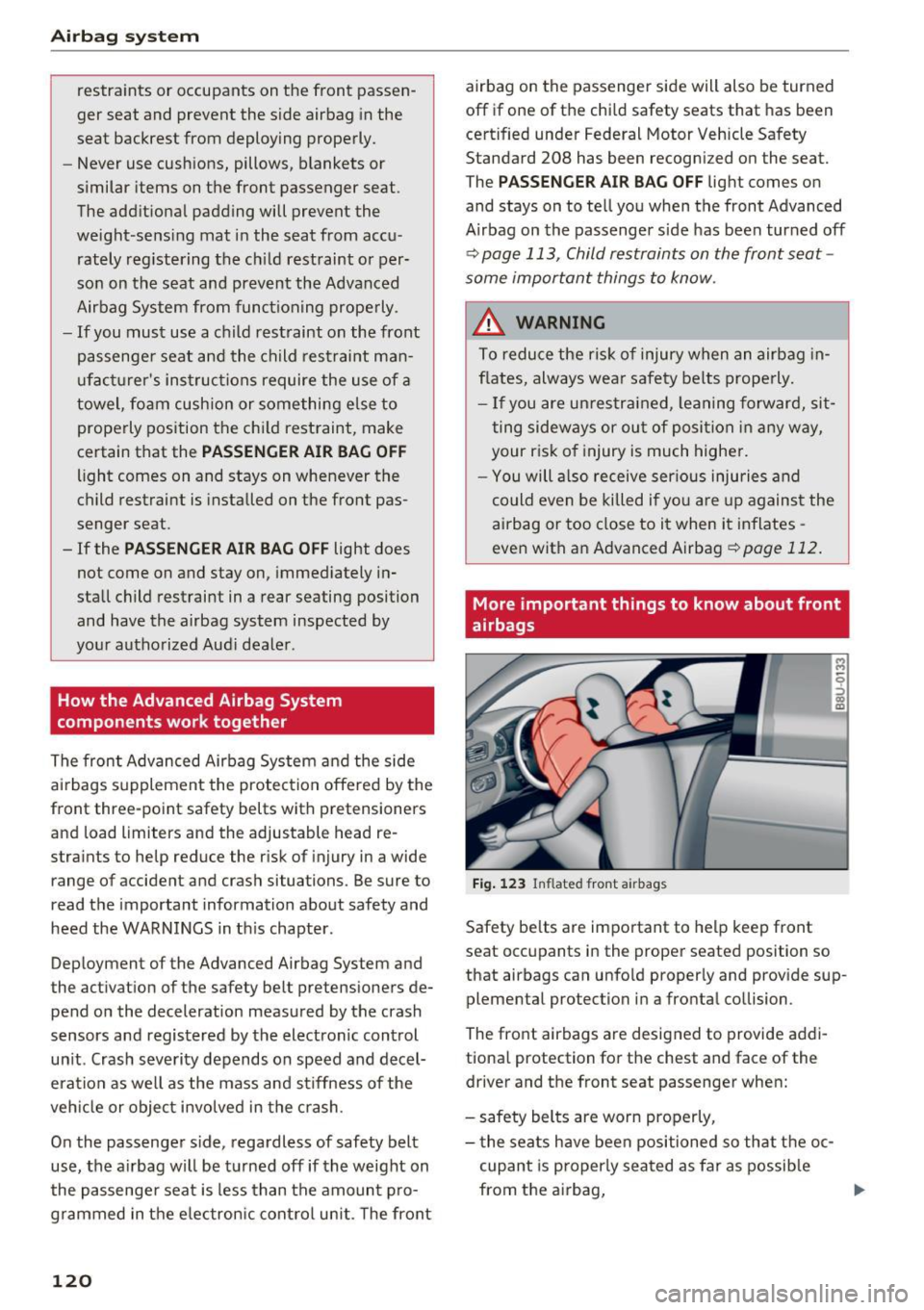
Fig. 123 Inflated front a irbags
Safety be lts are important to help keep front
seat occupants in the proper seated position so
that airbags can unfo ld properly and prov ide sup
plemental protection in a fronta l co llision.
The front airbags a re designed to provide addi
tional protection for the chest and face of the driver and the front seat passenger when:
- safety belts are worn properly,
- t he seats have been positioned so that t he oc-
cupant is properly seated as far as possib le
from the airbag,
Ill-
Page 146 of 252
Child safety
-Always make sure the seat backrest to which
the child restraint is installed is in an up
right position and securely latched into
place and cannot fold forward. Otherwise,
the seatback with the child safety seat at
tached to it could fly forward in the event of
an accident or other emergency situation.
- Always read and heed all WARNINGS when
ever using a child restrained in a vehicle is
being used
c:::>page 132. Special precautions
apply when installing a child safety seat on
the front passenger seat¢
page 113, Child
restraints on the front seat -some impor
tant things to know.
Deactivating the convertible locking
retractor
The convertible Locking retractor for child re
straints will be deactivated automatically when the belt is wound all the way bock into the re
tractor .
~ Press the red button on the safety belt buckle.
Th@ belt tongue will pop out of the buckle.
~ Guide the safety belt all the way back into its
stowed position .
Always let the safety belt retract completely into
its stowed position . The safety belt can now be
used as an ordinary safety belt without the con
vertible locking retractor for child restraints .
If the convertible locking retractor should be ac
tivated inadvertently, the safety belt must be un
fastened and guided completely back into its
stowed position to deactivate this feature. If the
convertible lock ing retractor is not deactivated,
the safety belt will gradually become tighter and
uncomfortable to wear.
A WARNING
-
Improperly installed child safety seats in
crease the risk of serious personal injury and
death in a collision.
- Never unfasten the safety belt to deactivate
the convertible locking retractor for child re straints while the vehicle is moving . You
144
would not be restrained and could be seri
ously injured in an accident.
- Always read and heed all WARNINGS when
ever using a child restrained in a vehicle is
being used¢
page 132. Special precautions
apply when installing a child safety seat on
the front passenger seat
c:::> page 113, Child
restraints on the front seat -some impor
tant things to know.
LATCH system (Lower
anchorages and tethers
for children)
' Child Restraint System anchors and how
are they related to child safety
To provide a simpler and more practicable way to
attach the child restraint on the vehicle seat, Federal regulations require special lower ancho
rages in vehicles and devices on new child re
straints to attach to the vehicle anchorages .
In the United States, the combination of the
tether anchorages and the lower anchorages is
now generally called the LATCH system for
"Lower Anchorages and Tethers for Children" . In
Canada, the terms "top tether" with "lower uni
versal anchorages" (or "lower universal anchor
age bars") are used to describe the system .
In other countries the term "ISOFIX" is used to
describe the lower anchorages .
Forward-facing child restraints manufactured af
ter September 1, 1999, are required by U.S. fed
eral regulations to comply with new child head
movement performance requirements . These
new performance requirements make a tether
necessary on most new child seats.
Installing a child restraint that requires a top
tether without one can seriously impair the per
formance of the child restraint and its ab ility to
protect the child in a collision. Installing a child
restraint that requires a top tether without the
top tether may be a violation of state law.
Child restraint manufacturers offer LATCH lower
anchorages on their child seats with hook-on or ...
Page 153 of 252
shared, please see your contract with the
wireless telecommunications provider and the
"About Aud i connect" tab in your vehicle's
MMI:
! MENUI button> Audi connect > About
Audi conn ect.
Electronic Stabilization
Control (ESC)
Description
ESC helps to improve road ho ld ing and vehicle
dynamics to help reduce the probability of skid
d ing and loss of vehicle control. It works only
when the engine is runn ing . E SC detects certain
d ifficult dr iving sit uat ions, including when t he
ve hicl e is begin ning to spin (yaw) out of contro l
and helps you to ge t the veh icle back under con
tro l by se lective ly braking the wheels, and/or re
ducing engine powe r and provid ing steering as
sistance to help hold the vehicle on the dr iver's
intended course. The indicator light
GJ in the in
strument cluster blinks when ESC is taking action
to help you co ntrol the vehicle.
ESC has limitations. It is important to remember
that ESC cannot overcome the laws of physics. It
will not a lways be able to help out under all con
d itions you may come up aga inst. For example,
ESC may not always be able to help you master
situations where there is a sudden change in the
coeff icient of friction of the road surface. When
there is a section of dry road that is sudde nly cov
e red with water, slush o r snow, ESC cannot pe r
form the same way it wo uld on the dry s urface . If
the vehicle hydrop lanes (rides on a cushion of wa
ter i nstead of the road su rface), ESC wi ll not be
ab le to he lp you steer the veh icle because contact
with the pavement has been interrupted and the
ve hicle cannot be braked or steered. Dur ing fast
cornering, pa rticula rly on w inding roads, ESC
cannot always deal as effect ively w it h difficult
d riving si tuations tha n at lowe r speeds. When
tow ing a t raile r, ESC is not able to help you re
ga in con trol as it would if you we re not towing a
tra iler .
A lways adjust yo ur speed and driving sty le to
road, traffic and weathe r cond itions. ESC cannot
override the vehicle's physical lim its, increase the
Intellig ent Technology
available t ract ion, or keep a vehicle on the road if
road departure is a resu lt of driver inattention .
Instead, ESC improves the possib ility o f keeping
the vehicle under contro l and on the road d uring
extreme maneuvers by us ing the driver's steer ing
i nputs to help keep the veh icle go ing in the in
tended direction.
If you are traveling at a speed
that causes you to run off the road before ESC c an p rovide any assistance, you may not exper i
en ce the benefi ts of ESC.
ESC is switched o n all the time . In certa in s itua
t ions when you need less tract ion, you can sw itch
off AS R by press ing the button
[fil c:> page 152,
fig. 141. B e sure to switc h ASR on again whe n
you no longer need less tract ion .
T he following systems are integrated in the ESC:
Anti-lock brak ing system (ABS )
ABS prevents the wheels from locking when brak ing . The vehicle can still be steered even dur ing
hard braking. Apply steady pressure to the brake
pedal. Do not pump the pedal. A pulsing in the
brake pedal ind icates that the system is acting to
stab ilize the ve hicle.
Brake assist system
The brake assist system can decrease braking dis
tance. It increases braking powe r when the dr iver
presses the brake peda l quickly in emergency sit
uat io ns. You must press a nd ho ld the bra ke pedal
u nt il the dange rous situation is over.
Anti-slip regulation (ASR)
ASR reduces engine power whe n the dr ive wheels
begin spin ning and adapts the force to the road
co ndit ions. This makes it eas ier to s tart, acce ler
ate and d rive up incl ines.
Electronic differential lock (EDL)
The EDL brakes wheels that are spinning and
transfers the drive power to the other dr ive
wheel or wheels if the vehicle is equ ipped with all
whee l drive*) . This function is not available a t
highe r speeds .
In extreme cases, EDL automat ica lly switches off
to keep t he brake o n the braked wheel from over
hea ting . T he veh icle is still working co rrectly. EDL.,.
151