warning AUDI Q3 2016 User Guide
[x] Cancel search | Manufacturer: AUDI, Model Year: 2016, Model line: Q3, Model: AUDI Q3 2016Pages: 252, PDF Size: 62.81 MB
Page 28 of 252
Driver information system
On-Board Diagnostics
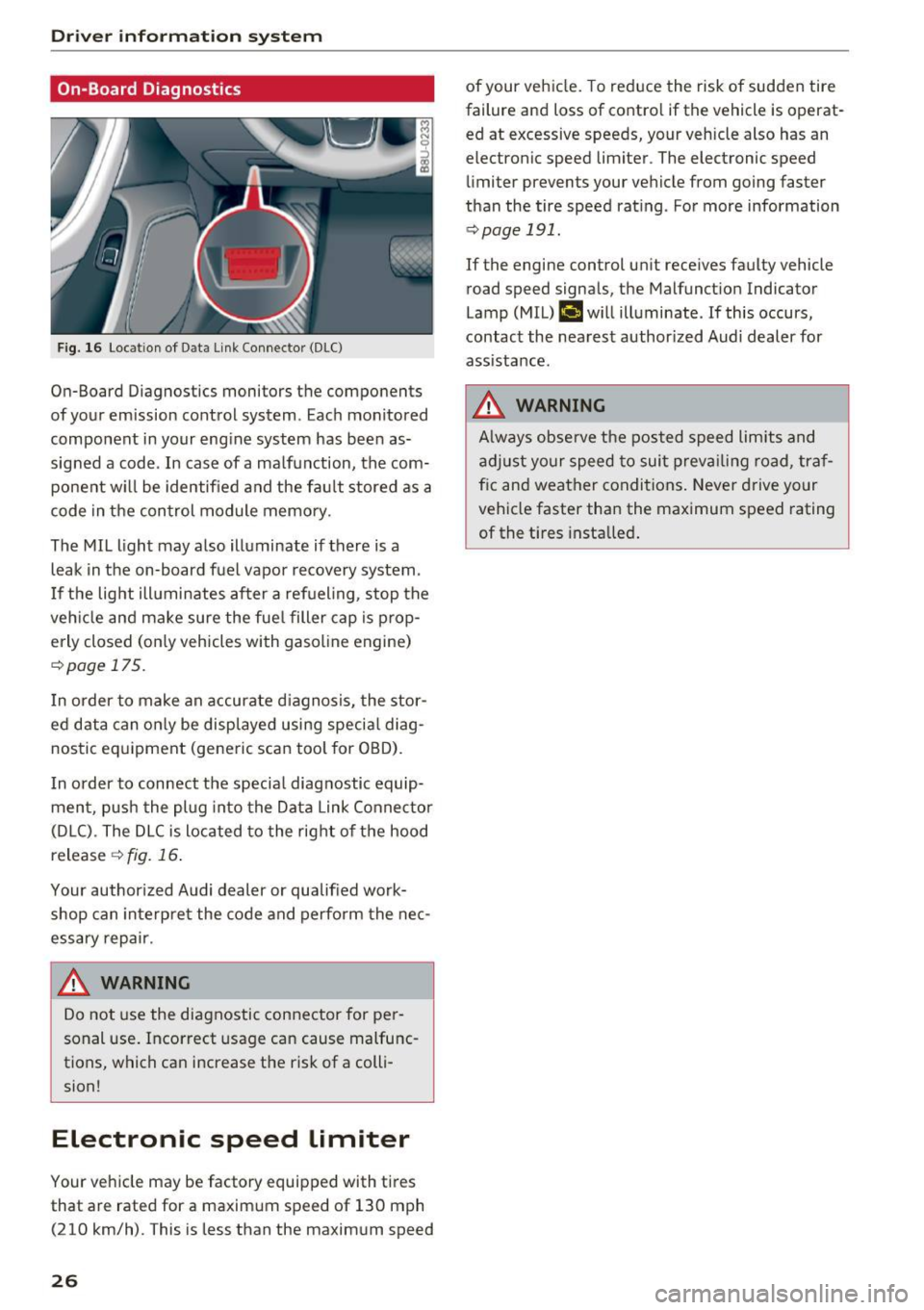
F ig. 16 Locat ion of Data Link Connector (DLC)
On-Board Diagnostics monitors the components
of your emission control system. Eac h monitored
component in your engine system has been as
signed a code. In case of a ma lfunction, the com
ponent w ill be identified and the fault stored as a
code in the control module memory.
The MIL light may also illuminate if there is a
leak in the on-board fuel vapor recovery system.
I f the light ill uminates after a refueling, stop the
veh icle and make sure the fuel filler cap is prop
erly closed (on ly vehicles with gasol ine engine)
r::!> page 17 5.
I n order to make an accurate diagnosis, the stor
ed data can only be displayed using special diag
nostic equipment (generic scan tool for OBD).
I n order to connect the specia l diagnostic equip
ment, push the plug into the Data Link Connector
(D LC). The DLC is located to the right of the hood
release
¢ fig. 16.
Your author ized Audi dealer or qualified work
shop can interpre t the code and perform the nec
essary repair .
.&_ WARNING
-
Do not use the diagnostic connector for pe r
sonal use. Incorrect usage can cause malfunc
tions, which can increase the risk of a colli
sion!
Electronic speed Limiter
Your vehicle may be factory equipped with tires
that are rated for a maximum speed of 130 mph (210 km/h). This is less than the maximum speed
26
of your veh icle. To reduce the risk of sudden tire
failure and loss of contro l if the vehicle is operat
ed at excessive speeds, your vehicle also has an
electronic speed limiter . The electronic speed
limiter prevents your vehicle from going faster
than the tire speed rating . For more information
r::!> page 191.
If the engine control un it receives faulty vehicle
road speed signals, the Malfunct ion Indicator
Lamp (MIL)
(,ij will illuminate. If this occurs,
contact the nearest author ized Audi dealer for
assistance.
.&_ WARNING
A lways observe the posted speed limits and
adjust your speed to suit prevailing road, traf
f ic and weather conditions. Never drive your
vehicle faster than the maximum speed rating
of the t i res installed .
-
Page 29 of 252
Opening and closing
Central locking
General description
The power locking system locks or unlocks all
doors and the rear lid simultaneously.
You can lock and unlock the vehicle centrally. You
have the following choices:
- Remote master key¢
page 29,
- Sensors in the front door handle on vehicles
with convenience key *
¢ page 30,
-Power locking switch insid e¢ page 31, oder
- Lock cylinder at the driver's door~
page 32.
Automatic locking
The automatic locking feature locks all the vehi cle doors and the rear lid when you drive faster
than
9 mph (15 km/h) .
The car is un locked again once the ignition key is
removed. In addition, the vehicle can be unlocked
if the opening function in the power locking sys
tem switch or at one of the door levers is actuat
ed.
Addit ionally, in the event of a crash with airbag
deployment the doors are automatically un
locked to allow access to the veh icle .
Selective unlocking
When you lock the vehicle, the power locking sys
tem will lock the doors and the rear lid. When
unlocking, you can set in the rad io or MMI*
whether
only the driver's door or the entire vehi
cle should be un locked ¢
page 31 .
Anti-theft alarm warning system
If the anti-theft alarm warn ing system detects a
break-in into the vehicle, acoustic and visua l
warn ing s ignals are triggered .
The anti-theft alarm system turns on automati
cally when you lock the vehicle. It deactivates
when unlocking using the remote control key or
~ by touc hing the sensor on the door handle (con-
ci ~ venience key).
Opening and closing
To switch the alarm off, p ress the@ button on
the remote contro l key or convenience key or
switch the ign ition on. The alarm also stops auto
matically after a certa in amount of t ime.
You can also trigger the alarm by pressing the
PANIC button on your remote-control key. This
will a lert other people in case of emergency .
Press the
PANIC button again to turn off the
alarm.
Turn signals
When you unlock the vehicle, the turn signals
flash twice, when you lock it once . If they do not
flash, one of the doors or the luggage compart
ment lid is not locked, the ign ition is still switch
ed on or the selector lever is not in position
P.
Unintentionally locking yourself out
In the following cases there are safeguards to
prevent you from locking your remote master key
in the veh icle:
- The vehicle does not lock with the central lock
ing switch if the driver's door is open
¢page 31.
-On vehicles with convenience key*, if the most
recent ly used master key is in the luggage com
partment, the rear lid is automatically unlocked
aga in after it is closed.
Do not lock your veh icle with the remote master
key or convenience key* until all doors and the
rear lid are closed. In this way yo u avoid locking
yourself out acc identally.
A WARNING
-- When you leave the vehicle, always remove
the ignition key and take it with you . This
will prevent passengers (children, for exam
p le ) from accidenta lly being locked in the
veh icle should they accidentally press the
power locking switch in the front doors.
- Do not leave children inside the vehicle un
supervised. In an emergency it would be im
possible to open the doors from the outside
without the key. .,.
27
Page 30 of 252
Opening and closin g
(D Tips
- In the event of a crash with airbag deploy
ment all locked doors will be automat ica lly
unlocked to give access to the vehicle occu
pants from the outside.
- If the power locking system should mal
funct ion, you can lock the driver's door us
ing the ignit ion key
¢ page 32.
- If the power lock ing system should fail, you
can still open the fuel tank flap in an emer
gency ¢
page 176.
-You are well adv ised not to keep valuables
i nside an unattended vehicle, vis ible or not.
Even a properly locked vehicle cannot pro
v ide the secur ity of a safe .
- If the LED in the upper edge of the driver's
door panel comes on for about 30 seconds
after the vehicle is locked, there is a mal
funct ion in the power lock ing o r the anti
theft warning system. Have the malfunct ion
correc ted by an authorized Audi dea lership
or q ualified repair facility .
Key set
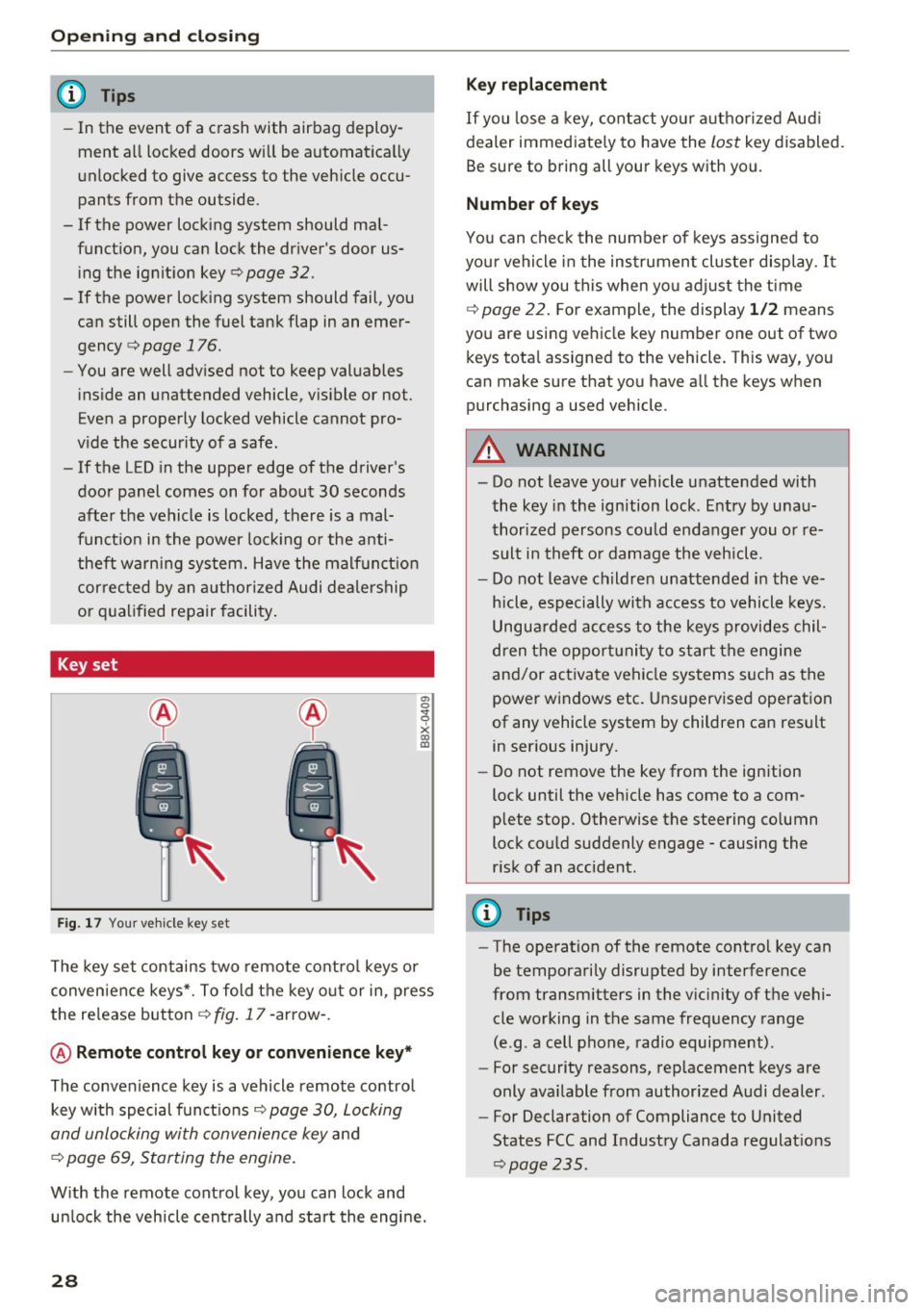
Fig . 17 You r ve hicle key set
a, 0
~
x (X) Cll
The key set contains two remote co ntro l keys or
conven ience keys*. To fold the key o ut or in, press
the re lease button
¢ fig . 17 -arrow -.
@ Remote control key or convenience key *
The convenience key is a vehicle remote contro l
key with special funct ions
Q page 30, Locking
and unlocking with convenience key
and
¢ page 69, Starting the engine .
With the remote control key, yo u can lock and
un lock the vehicle cent rally and start the engine.
28
Key replacement
If you lose a key, contact you r autho rized Aud i
dealer immed iate ly to have the
lost key disabled.
Be sure to bring all your keys w ith you.
Number of keys
You can chec k the numbe r of keys assigned to
you r vehicle in the ins trument cluster display .
It
will show you this when yo u adjust the t ime
¢
page 22. F or example, the display 1 /2 means
you are us ing vehicle key number one out of two
keys tota l assigned to the vehicle. This way, you
can make sure that you have a ll the keys when
purchasing a used vehicle .
.&, WARNING
-Do not leave your vehicle unatte nded with
the key in the ignition lock . E ntry by u nau
thori zed persons cou ld endanger you or re
sult in theft o r damage the vehicle.
- Do not leave childre n unattended i n the ve
h icle, especially with access to vehicle keys.
Ungua rded access to the keys provides chil
dren t he oppor tunity to start the engine
and/or activate vehicle systems s uch as the
power windows etc . Uns upervised ope ration
of any vehicle system by children can result in ser ious injury.
- Do not remove the key from the ign ition
lock until the veh icle has come to a com
plete stop. Otherwise the steering co lumn
lock cou ld suddenly engage -causing the
r isk of an accident.
(D Tips
- The operation of the remote contro l key can
be temporarily disrupted by interference
from transmitters in the v icinity of the vehi
cle working in the same frequency range
(e.g . a cell phone, radio equipment) .
- For security reasons, rep lacement keys are
only ava ilable from authorized Audi dealer .
- For Declaration of Compliance to United
States FCC and Industry Canada regulat ions
~ page 235.
Page 32 of 252
Opening and clo sin g
If the vehicle is unlocked and no doo r or the rear
lid is opened within 30 seconds, the vehicle locks
itself again automatically . This feature prevents
the vehicle from being accidentally left unlocked
over a long period of time. This does not apply
when you push the©~ button for at least one
second.
It depends on the settings in the radio or MM!*
whether the entire veh icle is unlocked or only cer
tain doors
¢ page 31.
A WARNING
Read and heed all WARNINGS c::> _.&. in General
description on page 2
7.
{!) Tips
- In order to make sure the locking function is
working, you should always keep your eye
on the vehicle to make sure it is properly l ocked.
- Do not use the remote co ntrol if you are in
side the car, otherwise you may un inten
tiona lly lock the veh icle, and then yo u wo uld
set off the anti-theft alarm when you try to
start the engine or open a doo r. In case this
happe ns anyhow, push the unlo ck button
cfi.
- Use t he panic funct ion only if you are in a n
emergency s ituation.
- Additional remote contro l key f unct ions
c::>page37.
Locking and unlocking with convenience
key
A ppl ies to veh icles: with conve nience key
The doors and the rear lid can be unlocked and
locked without operating the master key.
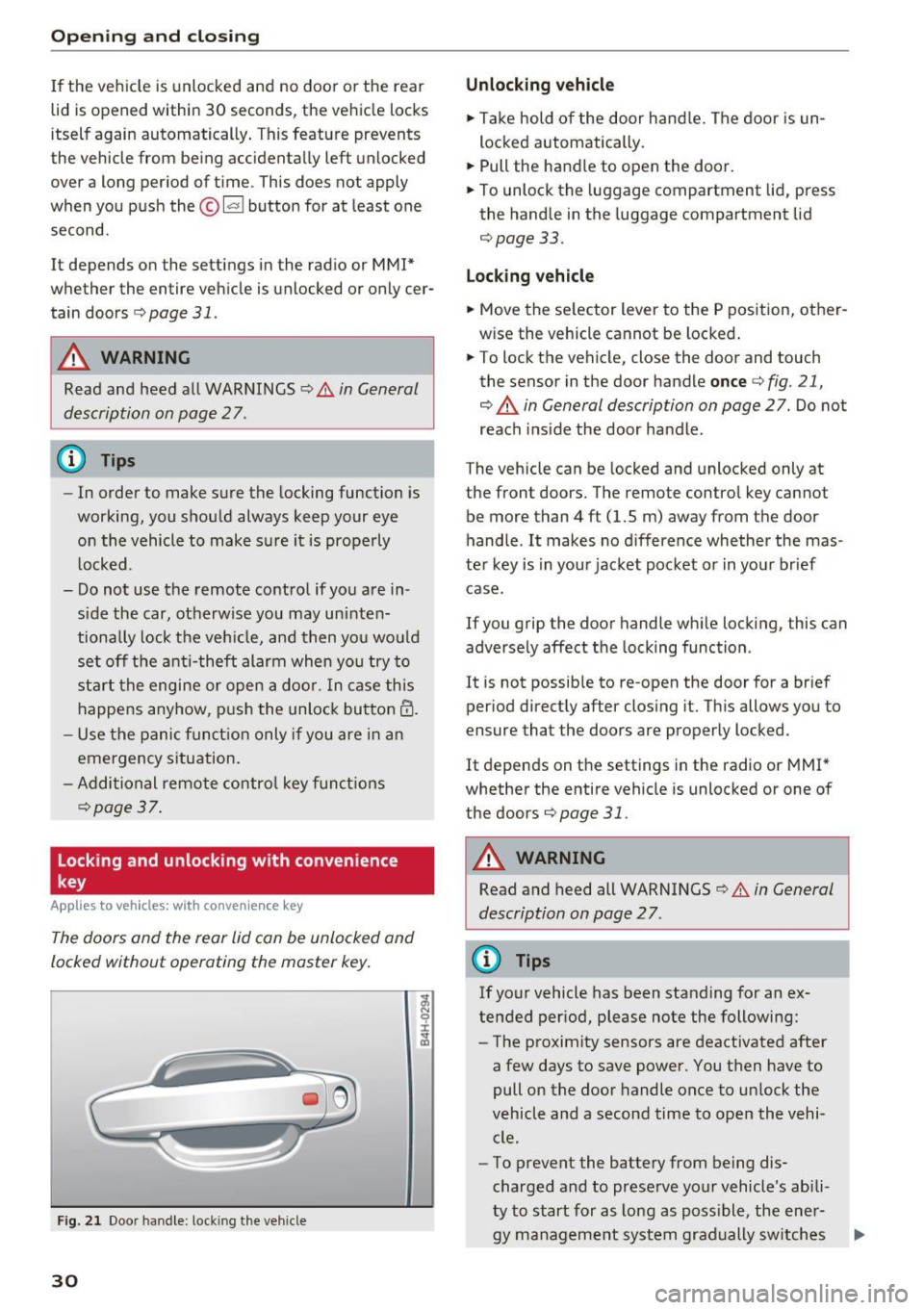
F ig . 2 1 Door handle: lock ing the vehicle
30
Unlocking vehicle
.. Ta ke hold of the door hand le. The door is un
lo cked automatically.
.. Pull the handle to open the door.
.. To unlock the luggage compartment lid, press
the handle in the luggage compartment lid
¢page 33.
Locking vehicle
.. Move the se lector lever to the P position, other
w ise the vehicle cannot be locked .
.. To lock the vehicle, close the door and touch
the senso r in the door handle
once ¢ fig. 21,
¢ .&. in General description on page
27. Do not
reach i nside the door handle .
The vehicle can be locked and unlocked only at
the front doors. The remote control key cannot
be more than
4 ft (1.5 m) away from the door
handle .
It makes no d ifference whether the mas
ter key is in you r jacket poc ket o r in you r brief
case.
If you grip the door handle whi le locking, this can
adversely affect the locking function .
It is not possib le to re-open the door for a br ief
period direct ly after closing it. Th is allows you to
ensure that the doors are properly locked.
It depends on the settings in the radio or MMI *
whether the entire vehicle is unlocked or one of
the doors
¢page 31.
A WARNING
Read and heed all WARNINGS¢.&. in General
description on page 2
7 .
(D Tips
If your vehicle has been standing for an ex
tended per iod, please note the following:
- The proximity sensors are deactivated after
a few days to save power. You then have to
pull on the door handle once to unlock the
vehicle and a second time to open the vehi cle.
- To prevent the battery from being dis
charged and to preserve your vehicle's abili
ty to start for as long as poss ible, the ener-
gy management system gradually sw itches .,..
Page 33 of 252
..... N
c:i ::J CX)
..... I.Cl U"I
N I.Cl ......
off unnecessary convenience functions. It is
possible that you will not be able to unlock
your vehicle using these convenience func tions .
- For Declaration of Compliance to United
States FCC and Industry Canada regulations
¢ page 235.
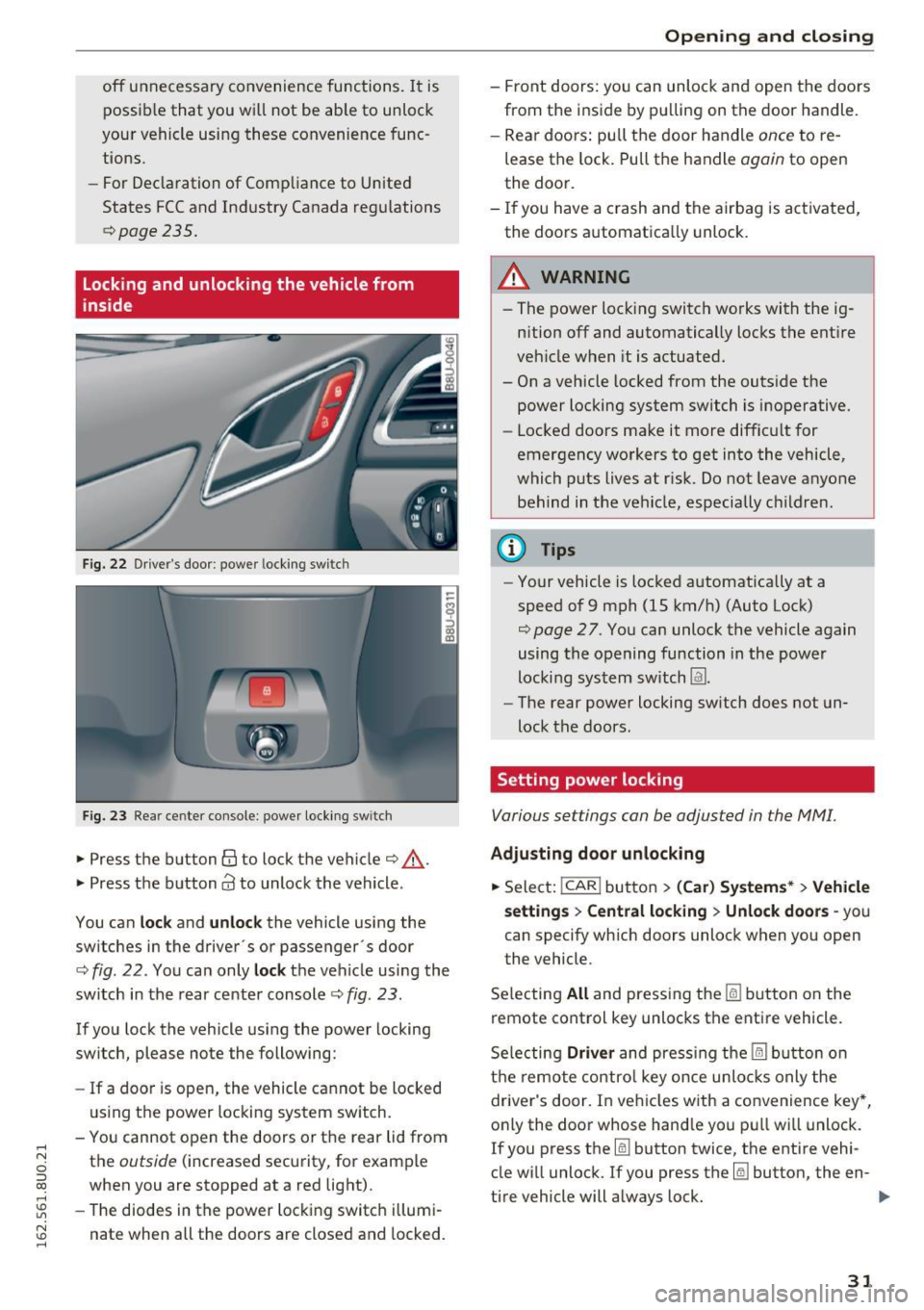
Locking and unlocking the vehicle from
inside
Fig. 22 Driver's door : power locking switc h
Fig. 23 Rear ce nter console: power locking switc h
• Press the button@ to lock the vehicle¢.&_.
• Press the button
Cd to unlock the vehicle .
You can
lock and unlock the vehicle using the
switches in the driver's or passenger· s door
¢
fig. 22. You can only lock the vehicle using the
switch in the rear center console
c:> fig. 23 .
If you lock the vehicle using the power locking
switch , please note the following:
- If a door is open, the vehicle cannot be locked
using the power locking system switch.
- You cannot open the doors or the rear lid from
the
outside (increased security, for example
when you are stopped at a red light).
- The diodes in the power locking switch illumi
nate when all the doors are closed and locked.
Opening and closing
-Front doors: you can unlock and open the doors
from the inside by pulling on the door handle.
- Rear doors: pull the door handle
once to re
lease the lock. Pull the handle
again to open
the door.
- If you have a crash and the airbag is activated,
the doors automatically unlock.
A WARNING
-- The power locking switch works with the ig-
nition off and automatically locks the entire
vehicle when it is actuated.
- On a vehicle locked from the outside the power locking system switch is inoperative.
- Locked doors make it more difficult for
emergency workers to get into the vehicle,
which puts lives at risk. Do not leave anyone
behind in the vehicle, especially children.
(D Tips
-Your vehicle is locked automatically at a
speed of 9 mph (1S km/h) (Auto Lock)
¢
page 27. You can unlock the vehicle again
using the opening function in the power
locking system switch
Im.
- The rear power locking switch does not un
lock the doors.
Setting power locking
Various settings can be adjusted in the MM!.
Adjusting door unlocking
• Select: !CAR ! button> (Car) Systems*> Vehicle
settings
> Central locking > Unlock doors -you
can specify which doors unlock when you open
the vehicle .
Selecting
All and pressing the~ button on the
remote control key unlocks the entire vehicle.
Selecting
Driver and pressing the~ button on
the remote control key once unlocks only the
driver's door. In vehicles with a convenience key*,
only the door whose handle you pull will unlock.
If you press the
[ru button twice, the entire vehi
cle will unlock. If you press the~ button, the en-
tire vehicle will always lock. ..,.
31
Page 34 of 252
Opening and closing
Tone when locking
.. Select : ICARI button> (Car) Systems *> Vehicle
settings> Central locking > Tone when locking
If you select On , a tone will sound when you lock
the vehicle .
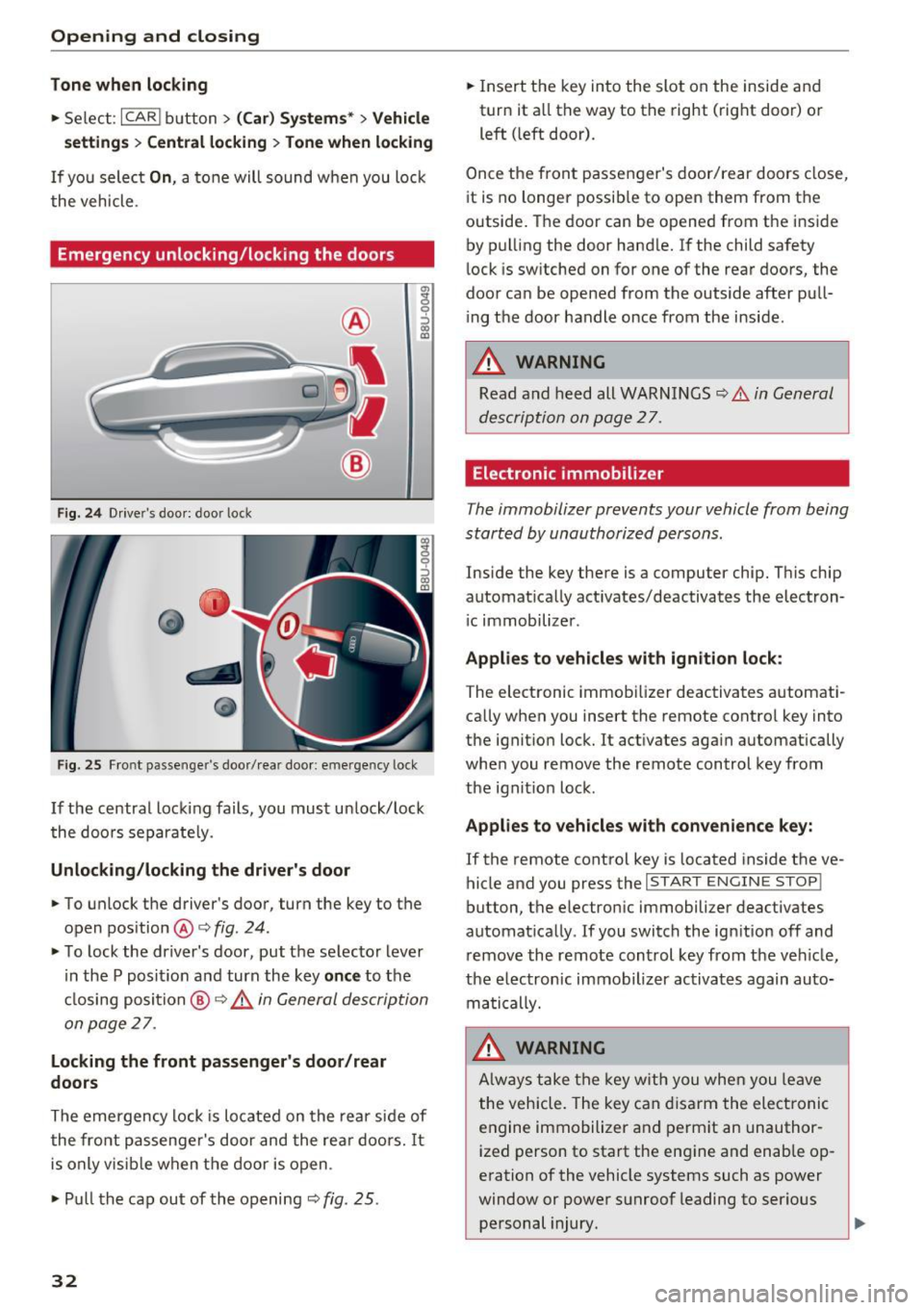
Emergency unlo cking /locking the door s
Fig. 24 Drive r's doo r: door lock
Fig . 25 Front passenger 's door/ rear door: emergency lock
g
9 :::> a, QJ
If the central locking fails, you must unlock/lock
the doors separate ly.
Unlocking/locking the driver's door
.,. To unlock the driver 's door, turn the key to the
open position @<=>
fig. 24.
.,. To lock the driver's door , put the selector lever
in the P posit ion and turn the key
once to the
cl osing position
@ ¢ &. in General description
on page
27 .
Locking the front passenger's door/rear
doors
The emergency lock is located on the rear side of
the front passenge r's door and the rear doors.
It
is only visible when the door is open .
.,. Pu ll the cap out of the opening ~
fig. 25.
32
.,. Insert the key into the slot on the inside and
turn it a ll the way to the right (right door) or
left ( left door).
Once the front passenger's door/rear doors close,
i t is no longer possible to open them from the
outside. The door can be opened from the inside
by pulling the door handle.
If the child safety
lock is switched on for one of the rear doors, the
door can be opened from the outside after pull
ing th e door handle once from the inside .
_&. WARNING
Read and heed all WARNINGS~ .&. in General
description on page
27.
Electronic immobilizer
The immobilizer prevents your vehicle from being
started by unauthorized persons.
Inside the key there is a computer chip. This chip
automatically act ivates/deactivates the electron
i c immobilizer .
Applies to vehicles with ignition lock:
The electronic immobilizer deactivates automat i
cally when you insert the remote control key into
the ignit ion lock. It act ivates again automatically
whe n you remove the remote control key from
the ignit ion lock .
Applies to vehicles with convenience key:
If the remote control key is located inside the ve
hicle and you press the
I START ENGINE STOP!
button, the e lectron ic immobilizer deactivates
automat ically .
If you switch the ign ition off and
remove the remote control key from the veh icle,
the electronic immobilizer activates again auto
matically.
_&. WARNING
Always take the key with you when you leave
the vehicle. The key can disarm the electronic
engine immobilizer and perm it an unauthor
ized person to start the eng ine and enab le op
eration of the vehicle systems such as power
window or power sunroof leading to serious personal injury.
Page 35 of 252
..... N
c:i ::J CX)
..... I.Cl U"I
N I.Cl ......
@ Tips
-The vehicle cannot be started if an unau
thorized key is used. The vehicle may not
start if another radio device such as a key
for another vehicle or a transponder is lo
cated on the key ring.
- For Declaration of Compliance to Un ited
States FCC and Industry Canada regulations
r:=> page235.
Luggage compartment
lid
Opening/closing the luggage compartment
lid
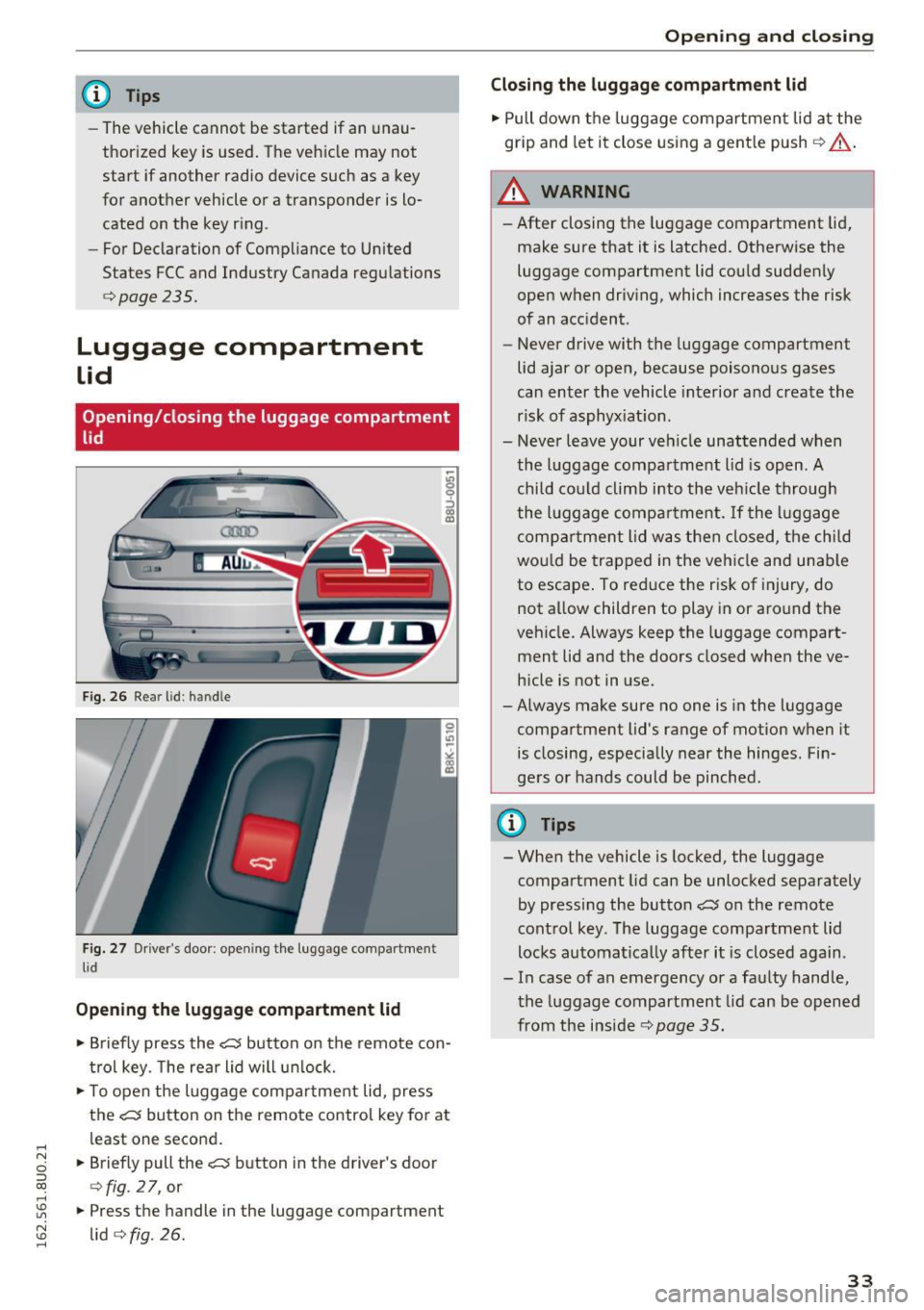
Fig. 26 Re ar lid: han dle
Fig. 27 Drive r's door : opening the luggage com partment
lid
Opening the luggage compartment lid
• Briefly press the ,t:::5 button on the remote con
t rol key. The rear lid will unlock.
• To open the luggage compartment lid, press
the
,t:::5 button on the remote control key for at
least one second .
• Briefly pull the
,t:::5 button in the driver's door
<=> fig . 2 7, or
• Press the handle in the luggage compartment
lid
<=> fig. 26.
Open ing and closing
Closing the luggage compartment lid
• Pull down the luggage compartment lid at the
grip and let it close using a gent le push ¢&, .
A WARNING
-After closing the luggage compartment lid,
make sure that it is latched. Otherwise the
luggage compartment lid could suddenly
open when driving, which increases the risk
of an accident.
- Never drive with the luggage compartment
lid ajar or open, because poisonous gases
can enter the vehicle interior and create the
risk of asphyx iat ion.
- Never leave your vehicle unattended when
the luggage compartment lid is open. A
child cou ld climb into the vehicle through
the luggage compartment . If the luggage
compartment lid was then closed, the child
would be trapped in the vehicle and unable
to escape . To reduce the risk of injury, do
not allow children to play in or around the
veh icle. Always keep the luggage compart
ment lid and the doors closed when the ve
hicle is not in use.
-Always make sure no one is in the luggage
compartment lid's range of motion when it
is closing, especially near the hinges . Fin
gers or hands could be pinched .
(D Tips
- When the vehicle is locked, the luggage
compartment lid can be unlocked separately
by pressing the button
,t:::5 on the remote
control key . The luggage compartment lid
locks automatically after it is closed again .
- In case of an emergency or a faulty handle,
the luggage compartment lid can be opened
from the inside ¢
page 35.
33
Page 36 of 252
Opening and clo sin g
Automatic luggage compartment lid
Applies to veh icles: w ith automat ic luggage compartme nt lid
The luggage compartment lid can be opened and
closed automatically .
•
~ al
--
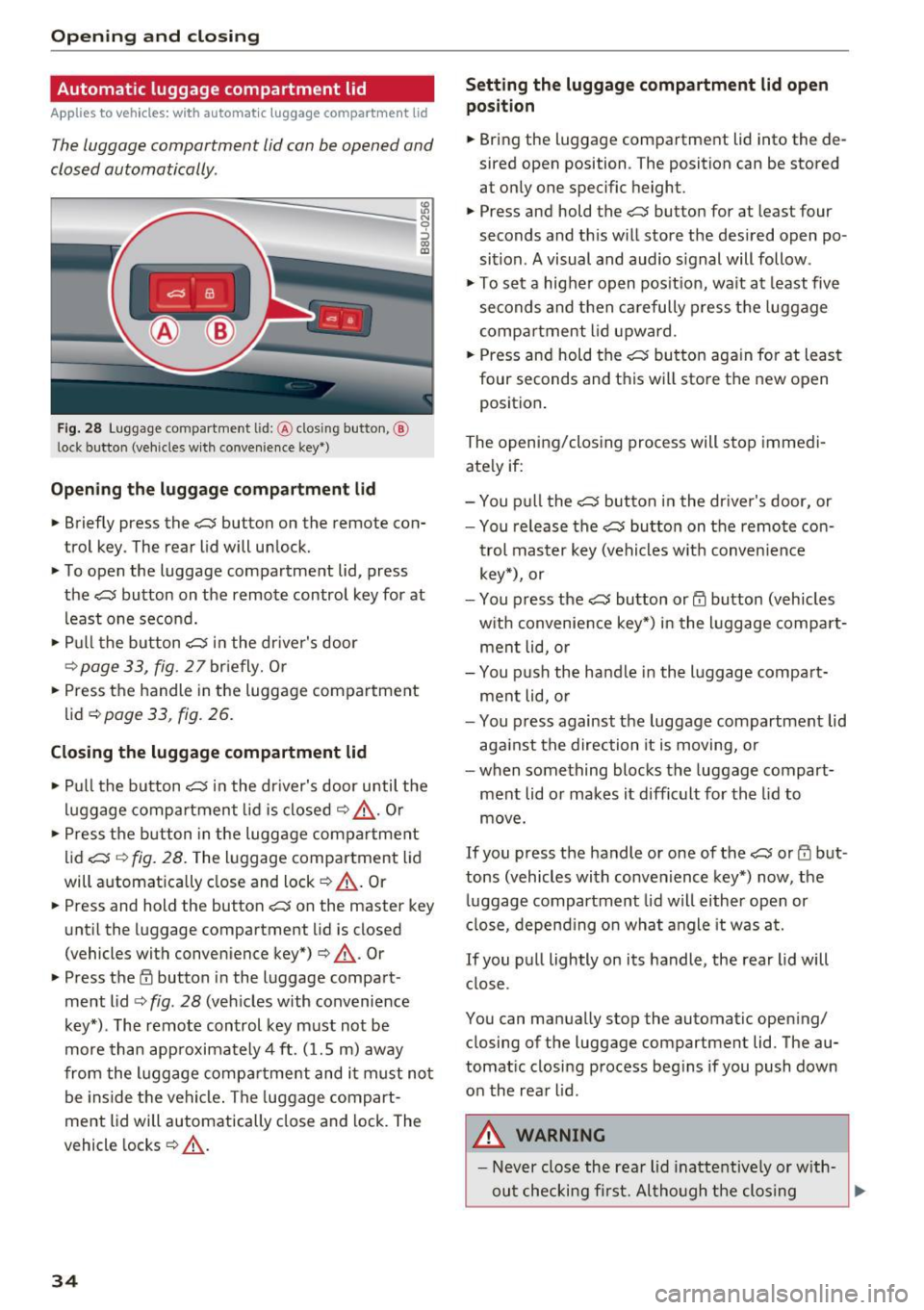
F ig . 28 Luggage co mpartment lid: @clos ing button, @
l ock button (vehicles w ith conve nience key *)
Open ing th e lug gage comp artment lid
N 9 :::, GO ID
.. Briefly press the c:;; button on the remote con
trol key . The rear lid will unlock.
.. To open the luggage compartment lid, press
the
c:J button on the remote control key for at
least one second.
.. Pull the button
c:;; in the dr iver's door
r::::> page33, fig. 27briefly. Or
.. Press the handle in the luggage compartment
lid ¢
page 33, fig . 26.
Closing the lugg age compartment lid
.. Pu ll the button c:J in the dr iver's door until the
luggage compartment lid is closed
r::::> &_ . Or
.. Press the b utton in the luggage compartment
lid
c:;; r::::> fig. 28. The luggage compartment lid
will automat ically close and lock
r::::> _A . Or
.. Press and hold the button
c::; on the master key
unt il the luggage compartment lid is closed
(vehicles with conven ience key*) ¢
_A. Or
.. Press t he
E'.l button in the luggage compart
ment lid
r::::> fig . 28 (veh icles with convenience
key*) . The remote control key must not be
more than app roximately 4 ft. (1.5 m) away
from the l uggage compartme nt and i t must not
be inside the vehicle . The luggage compart
ment lid will automatically close and lock. The
vehicle locks ¢
_A.
34
Setting the luggage c omp artment lid open
posit ion
.. Bring the luggage compartment lid into the de
sired open position . The position can be stored
at only one specific height .
.. Press and hold the
c:;; button for at least four
seconds and th is will store the des ired open po
sition . A visual and audio s ignal will follow .
.,. To se t a higher open pos it ion, wa it at least
five
seconds and then carefully press the luggage
compa rtment lid upward .
.. Press and hold the
c:;; bu tton again fo r at least
four seconds and this will sto re the new open
position .
The opening/clos ing process will stop immedi
ate ly if:
- You p ull the
c::; button in the dr iver's door, or
- You release the
c:;; button on the remote co n-
trol master key (vehicles w it h convenience
key*), or
- You press the
c:;; button or@ button (vehicles
w ith convenience key*) in the luggage compa rt
ment lid, o r
- You p ush the handle in the l uggage compa rt
ment lid, o r
- You p ress against the luggage compartment lid
aga inst the direction it is moving, or
- when something blocks the luggage compart ment lid or makes it difficult for the lid to
move .
If you press the handle or one of the c:;; or rfl but
tons (vehicles with convenience key*) now, the
luggage compartment lid will either open or
close, depend ing on wha t angle it was at.
If you pull lightly on its handle, the rear lid will close .
You can manually stop the automatic open ing/
closing of the luggage compartment lid. The au
tomat ic closing process beg ins if you push down
on the rear lid .
,8. WARNING
- Never close the rear lid inattentive ly or w ith-
out checking fi rst. Al tho ugh the clos ing
~
Page 38 of 252
Opening and clo sin g
Power child safety lock
Applies to veh icles: W it h power c hild safety lock
The child safety locks t prevent the rear doors
from opening from the inside .
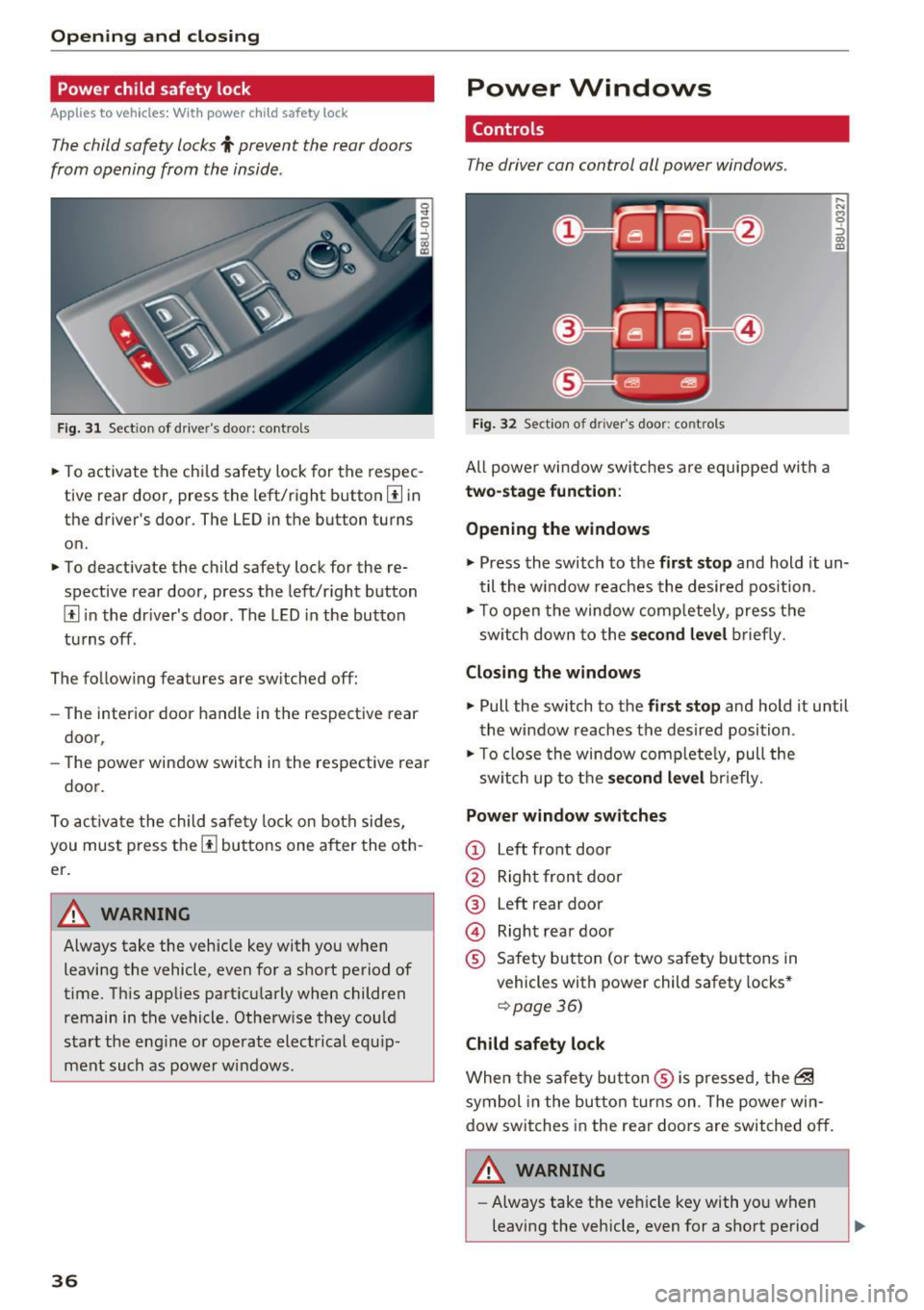
Fig. 31 Sect ion of dr iver's door: controls
.,. To activate the ch ild safety lock for the respec
tive rear door, press the left/right button
[I in
the driver's door. The LED in the button turns
on.
.,. To deactivate the child safety lock for the re
spective rear door , press the left/r ight button
[I i n the dr iver's door . The LED in the button
tu rns off .
The follow ing features are switched off:
- The interior door handle in the respective rear
door,
- The power window switch in the respective rear
door.
To act iva te the child sa fety lock on both sides,
you must press the
[I buttons one after the oth
er.
A WARNING
Always take the vehicle key with you when leaving the vehicle, even for a short period of
time. T his applies part icularly when children
remain in the vehicle. Otherw ise they could
start the eng ine o r operate elect rical equ ip
ment such as power windows.
36
-
Power Windows
Controls
The driver can control all power windows .
Fig. 32 Sect ion of driver 's door: controls
All powe r window swi tches a re equipped with a
two-stage funct ion :
Opening the windows
,.._ N M 0 ::, co m
.,. Press the switch to the fir st stop and hold it un
til the w indow reaches the desired position .
.,. To open the window comp letely, press the
sw itch down to the
s econd level b rief ly.
Closing the windows
.,. Pull the sw itch to the first stop and hold it until
the window reaches the desired position .
.,. To close the window complete ly, pull the
sw itch up to the
s econd level br iefly.
Power window switches
(D Left front door
@ Right front door
@ Left rear door
@ Right rear door
® Safety button (or two safety buttons in
vehicles with power child safety locks *
¢page 36)
Child safety lock
When the safe ty b utton ® is pressed, the~
symbol in the button turns on . The powe r win
dow switches in the rear doors are switched off .
./1. WARNING
- Always take the veh icle key with yo u when
leaving the vehicle, even for a short period
-
Page 39 of 252
.... N
c:i ::J CX)
.... I.Cl U"I
N I.Cl ......
of time. This applies particularly when chil
dren rema in in the vehicle. Otherwise the
children could start the engine or operate
electrical equipment such as power win
dows. The power windows continue to func
tion until the driver's door or front passeng er's door has been opened.
- Pay carefu l attention when closing the win
dows.
It could cause injury by pinching.
- When locking the veh icle from outside, the
vehicle must be unoccupied since the win
dows can no longer be opened in an emer
gency.
@ Tips
After switch ing the ignit ion off, you can still
open and close the windows for approximate
ly 10 minutes. The power windows a re not
switched off until the driver's door or fron t
passenger's door has been opened.
Convenience opening/closing
All of the windows and the panorama roof can be opened/closed at the same time .
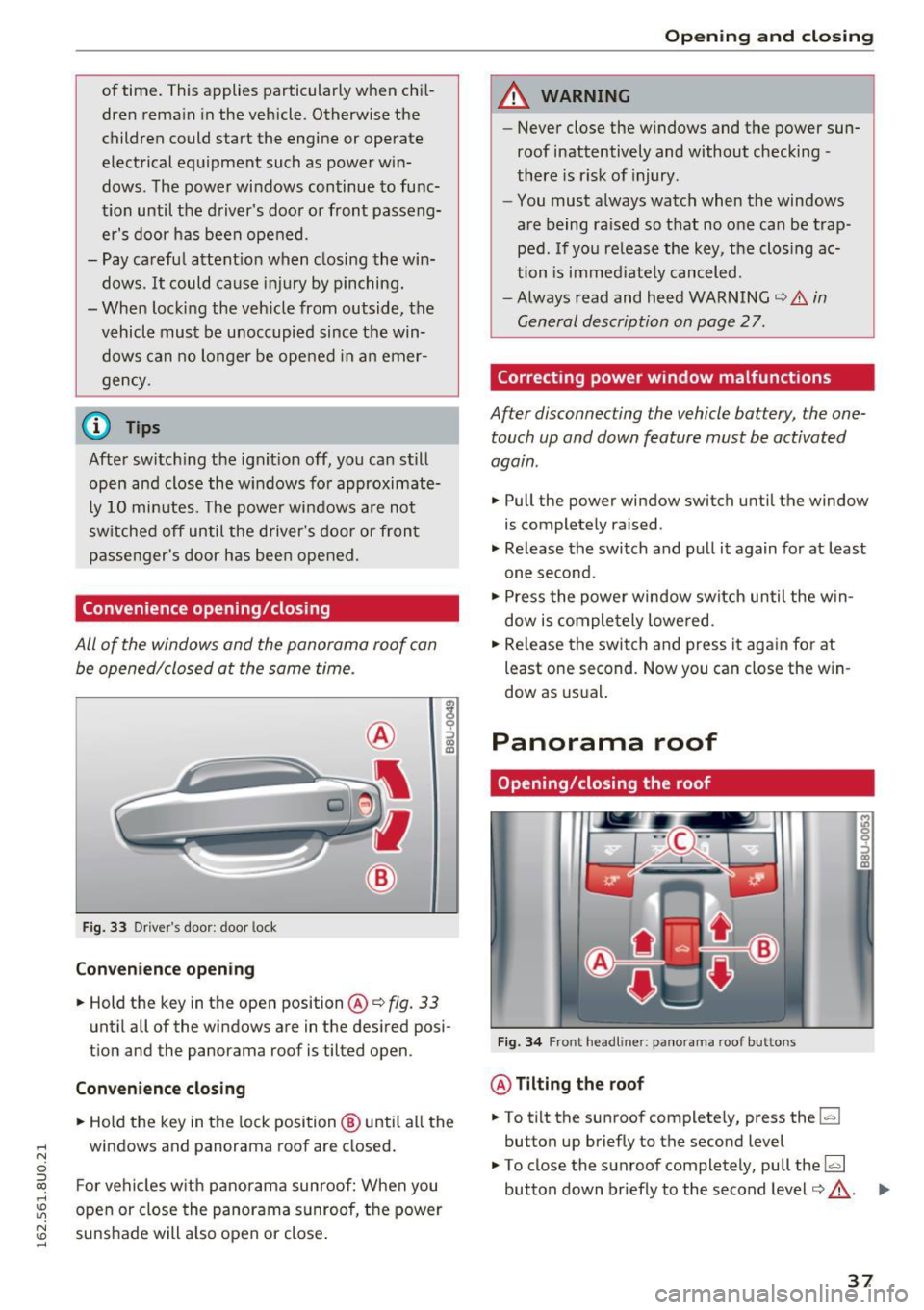
Fig. 33 Driver's door: door lock
Con venie nce op ening
.. Hold the key in the open position @Q fig. 33
until all of the windows are in the desired posi
tion and the panorama roof is tilted open.
Conveni enc e closi ng
.. Hold the key in the lock position ® until all the
windows and panorama roof are closed .
F or vehicles w ith panorama sunroof: When you
open or close the panorama sunroof, the power
sunshade will also open or close .
Openin g an d clos ing
A WARNING
--Never close the windows and the power sun-
roof inattentively and without checking -
there is risk of injury.
- You must always watch when the windows
are being raised so that no one can be trap
ped. If you release the key, the closing ac
tion is immed iate ly canceled.
-Always read and heed WARNING Q
& in
General description on page 2
7.
Correcting power window malfunctions
After disconnecting the vehicle battery, the one
touch up and down feature must be activated
again .
.. Pull the power window switch until the window
is completely raised .
"' Release the switch and pull it again for at least
one second.
"' Press the power window switch until the w in
dow is comple tely lowered .
.. Release the switch and press it again for at
least one second . Now you can close the w in
dow as usual.
Panorama roof
Opening/closing the roof
F ig. 3 4 Front headliner: panorama roof buttons
@ Tilting the roof
.. To tilt the sunroof complete ly, press the~
button up briefly to the second level
"' To close the sunroof completely, pull the~
button down briefly to the second level¢,&. . ...
37