warning AUDI Q3 2017 Owner´s Manual
[x] Cancel search | Manufacturer: AUDI, Model Year: 2017, Model line: Q3, Model: AUDI Q3 2017Pages: 236, PDF Size: 58.93 MB
Page 84 of 236
Ass is t
@ Tips
- If the window g lass in the driver's door or
front passenger's door has been tinted, the
display in the exterior mirror may be incor rect.
- For an explanation on conformity with the FCC regulations in the United States and the
Industry Canada regu lations, see
¢ page 221.
Switching on and off
A pp lies to: ve hicles w ith Aud i side ass ist
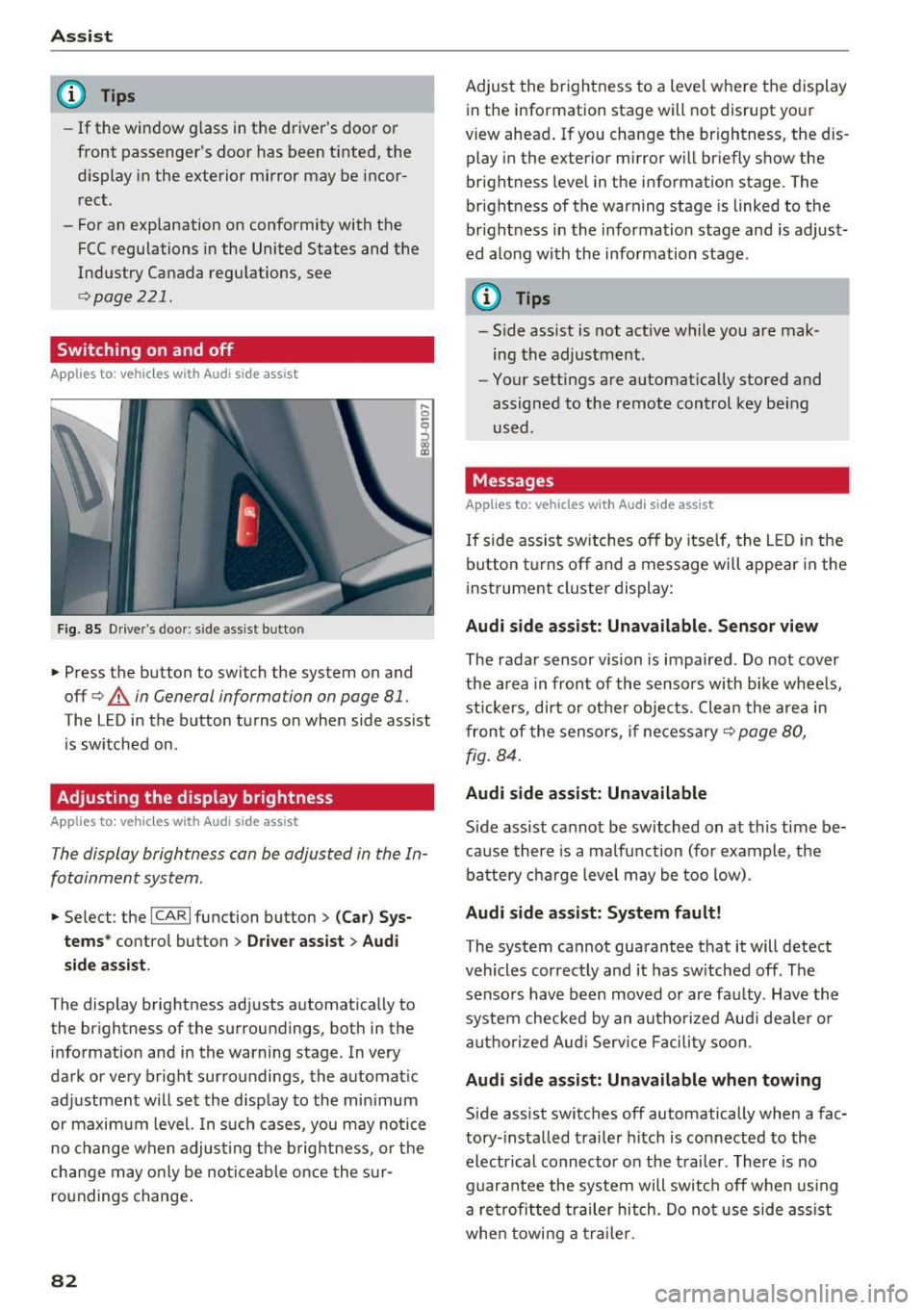
F ig. 85 Drive r's door : side assist b utto n
.... 0
I
.. Press the button to switch the system on and
off ¢
A in General information on page 81 .
The LED in the button turns on when side assist
is sw itched on .
Adjusting the display brightness
Applies to: ve hicles w ith Aud i side ass ist
The display brightness can be adjusted in the In
fotainment system .
.. Se lect : the ICARI function button> (Ca r) Sys
t e m s*
control button > Dr ive r assi st> Audi
sid e assi st.
The display brightness adjusts automatically to
the brightness of the surroundings, both in the
information and in the warning stage . In very
dark or very bright surroundings, the automat ic
adjustment will set the disp lay to the min imum
or maximum level. In such cases, you may notice
no change when adjust ing the b rightness, o r the
cha nge may only be no ticeable once the s ur
roundings change .
82
Adjust the brightness to a level where the display
in the information stage will not disrupt your
view ahead . If you change the br ightness, the dis
play in the exterior mirror w ill br iefly show the
brightness level in the information stage . The
brightness of the warning stage is linked to the
br ight ness in the information stage and is adjust
ed along with the information stage .
(D Tips
-Side ass ist is not act ive while you are mak
ing the adjustment .
- Your settings are automat ically stored and
assigned to the remote control key be ing
used .
Messages
Applies to : vehicles wi th Audi side ass ist
If side assist sw itches off by itse lf, the L ED in the
b utton t urns off and a message will appea r in the
i nstrument cluster display:
Audi s ide assi st: Unavailable. S ensor view
The radar sensor vision is impaired . Do not cover
the area in front of the sensors with bike whee ls,
stickers, dirt or other objects. Clean the a rea in
front of the sensors, if necessary¢
page 80,
fig . 84.
Audi side assist: Unavailable
Side assist cannot be switched on at this time be
ca use there is a ma lfunction (for example, the
battery c ha rge level may be too low).
Audi side assist: System f ault!
The system cannot guarantee that it will detect
vehicles correctly and it has sw itched off . The
sensors have been moved or are faulty . Have the
system checked by an autho rized Aud i dealer o r
aut ho rized Aud i Serv ice Facility soon.
Audi s ide assist: Unavailable when towing
Side assist switches off automatically when a fac
tory- installed trailer h itch is connected to the
electr ical connec tor on the t railer . There is no
guarantee the system will switc h off when using
a ret rofi tted trailer hitch . Do not use side assist
whe n towi ng a traile r.
Page 86 of 236

Assist
A WARNING
Pay attention to traffic when operating the
dr ive se lect to reduce the risk of an accident.
84
Page 87 of 236
00
00
....
"' ,....
"' .... 0 0 :::,
00
Parking systems
General information
Applies to: ve hicles with a rea r parking sys te m /pa rking sys
tem plus/rearv iew camera
Depending on your vehicle's equipment, va rious
pa rking aids wi ll help you when parki ng and ma
ne uveri ng.
The
r e ar parki ng sy stem is an a udible parking a id
that warns you of obstacles
behind t he vehicle
¢ page 85.
The parking sy stem plus ass ists you when park
i ng by aud ibly and v isually indicating objects de
tected
in front of and behind the veh icle
¢ page 86.
The re ar view camer a shows the area beh ind the
ve hicle in the Infotainment system d isplay . This
d isp lay assists you when you are cross or parallel
pa rking . Th e pa rking system pl us functions are
a lso available
¢ page 87.
A WARNING ,~ -
- Always look for traff ic and check the area
around your veh icle by looking at it directly
as well . The parking system cannot replace
the driver's attent ion. The driver is always
responsible when enter ing or leav ing a pa rk
ing space and dur ing similar maneuvers.
- Please note that some surfaces, such as
clothing, are not detected by the system .
- Senso rs and cameras have blind spots in
wh ich peop le and objects cannot be detect
ed . Be especia lly caut ious of small children
and animals .
- The sensors can be displaced by impacts or
damage to the radiator gr ille, bumper,
wheel housing and the unde rbody . The park
ing system may be impa ired as a result .
H ave an author ized Audi dealer or au thor
ized Audi Serv ice Facili ty check their func
t io n.
- Make s ure the senso rs a re not o bstruc ted by
st ickers, deposits o r othe r ma ter ial s. If they
are, the senso r funct ion could be impa ired.
F or additiona l information on cleaning, see
¢ page 191 .
Parking system s
(D Note
- Some objects are not detected or displayed
by the system under certain circumstances:
- Objects such as barrier chains, trailer draw
bars, vertical poles o r fe nces
- Objects above the sensors such as wall ex
tensions
- Objects w ith certai n surfaces or structures
such as c ha in li nk fe nces or powder snow
- If you conti nue driving closer to a low ob
ject , it may disappear from the sensor
range . Note that you will no longer be
wa rned about t his obstacle.
(D Tips
- The system may p rovide a warning even
tho ugh the re are no obstacles in the cover
age area in some situa tions, such as:
- certain road s urfaces or when there is tall
g rass.
- externa l ultrasonic sources such as from
clean ing vehicles .
- in heavy rain, snow, o r th ick vehicle ex
ha ust.
- We recommen d that you practice par king in
a traff ic -free loca tion or pa rking lot to be
come fam iliar with the system . When doing
this, there shou ld be good light and weath
er conditions .
- You can change the vol ume and pitch of the
signa ls as well as the display ¢
page 90.
- Please refer to the instructions for towing a
trai ler located in
¢ page 91.
-What appea rs in the infotainment display is
somewhat time- delayed.
Rear parking system
Description
Applies to : vehicles wit h rear parking system
The rear parking system is an audible parking
aid .
There is a sen sor in the rea r bumper cover. If
these detect an obstacle, audible s ignals warn
you .
85
Page 88 of 236
Parking system s
Make sure the sensors are not covered by stick
ers, deposits or any other obstructions as it may
impair the sensor function. For informat ion on
cleaning , refer to¢
page 191.
The range at which the sensors begin to measure
is approximate ly:
side 3 ft (0.90 m)
rear center 5.2 ft (1.60 m)
The closer you get to the obsta cle, the sho rter
the interval between the audible signals . A con
tinuous tone sounds when the obstacle is less
than approximately 1 foot (0 .30 meters) away .
Do not continue backing up¢.&
in General infor
mation on page 85,
¢ {!) in General information
on page
85!
If the d istance to an obstacle remains constant,
the volume of the distance warning gradually
drops after about four seconds (this does not ap
ply in the continuous tone range) .
The parking system activates automatically when
the reverse gear is selected. A brief confirmation
tone will sound.
Parking system plus
Description
App lies to : ve hicles with pa rking system plus
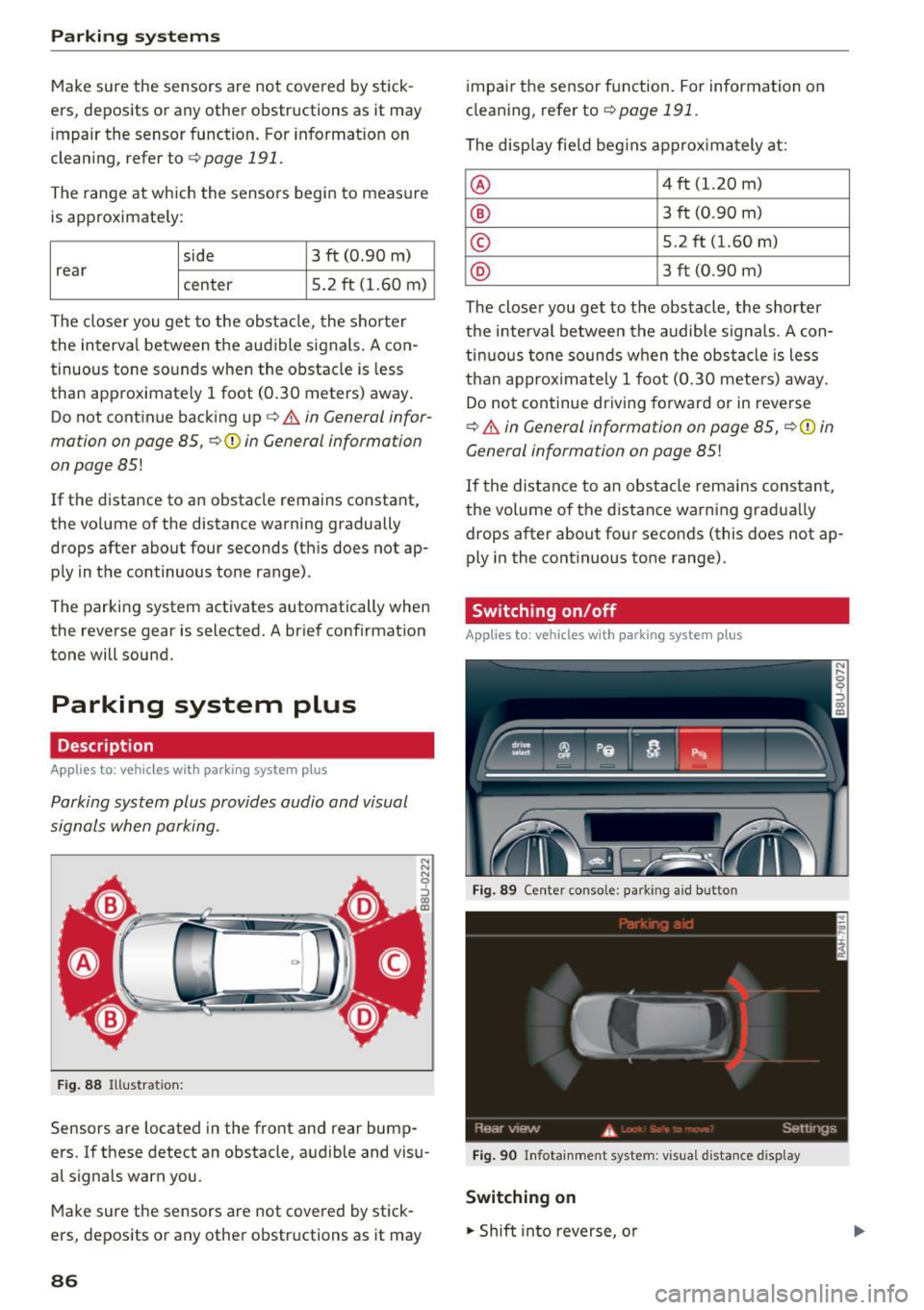
Parking system plus provides audio and visual
signals when parking .
Fig . 88 Illustrat ion:
Sensors are located in the front and rear bump
ers. If these detect an obstacle, audible and visu
al signals warn you.
Make sure the sensors are not covered by stick
ers, deposits or any other obstructions as it may
86
impai r the sensor function. For information on
cleaning, refer to ¢
page 191.
The display field beg ins approx imately at:
® 4 ft (1.20 m)
® 3 ft (0 .90 m)
© 5.2 ft (1.60 m)
@ 3 ft (0 .90 m)
The closer you get to the obstacle, the shorter
the interval between the audible signals . A con
tinuous tone sounds when the obstacle is less
than approx imately 1 foot (0.30 meters) away.
Do not continue driving forward or in reverse
¢.&. in General information on page 85, ¢(i) in
General information on page
85!
If the distance to an obstacle rema ins constant,
the volume of the distance warning gradua lly
drops after about four seconds (this does not ap
ply in the continuous tone range).
Switching on/off
App lies to: vehicles wit h parking system plus
Fig. 89 Center conso le: parkin g a id button
Fig . 90 Infotainment system: visual d istance d isplay
Switching on
.. Shift into reverse, o r
Page 89 of 236
a:,
a:,
...... N r--. N .... 0 0 ::, a:,
.. Press the P1#A button in the center console
Q fig. 89. A short confirmation tone sounds and
the LED in the button turns on.
Switching off
.. Drive faster than 6 mph (10 km/h), or
.. Press the
P"IA button, or
.. Switch the ignition off.
Segments in the visual display
The red segments in front of and behind the vehi
cle ¢
fig. 90 help you to determine the distance
between you and a detected obstacle . As your ve
hicle comes closer to the obstacle, the segments
move closer to the vehicle . The collision area has
been reached when the next to last segment is
d isplayed. Do not cont inue driv ing forward or in
reverse¢
& in General information on page 85,
¢ ©in General information on page
85!
Rearview camera
Introduction
Applies to: veh icles with parking system plus with rearv iew
camera
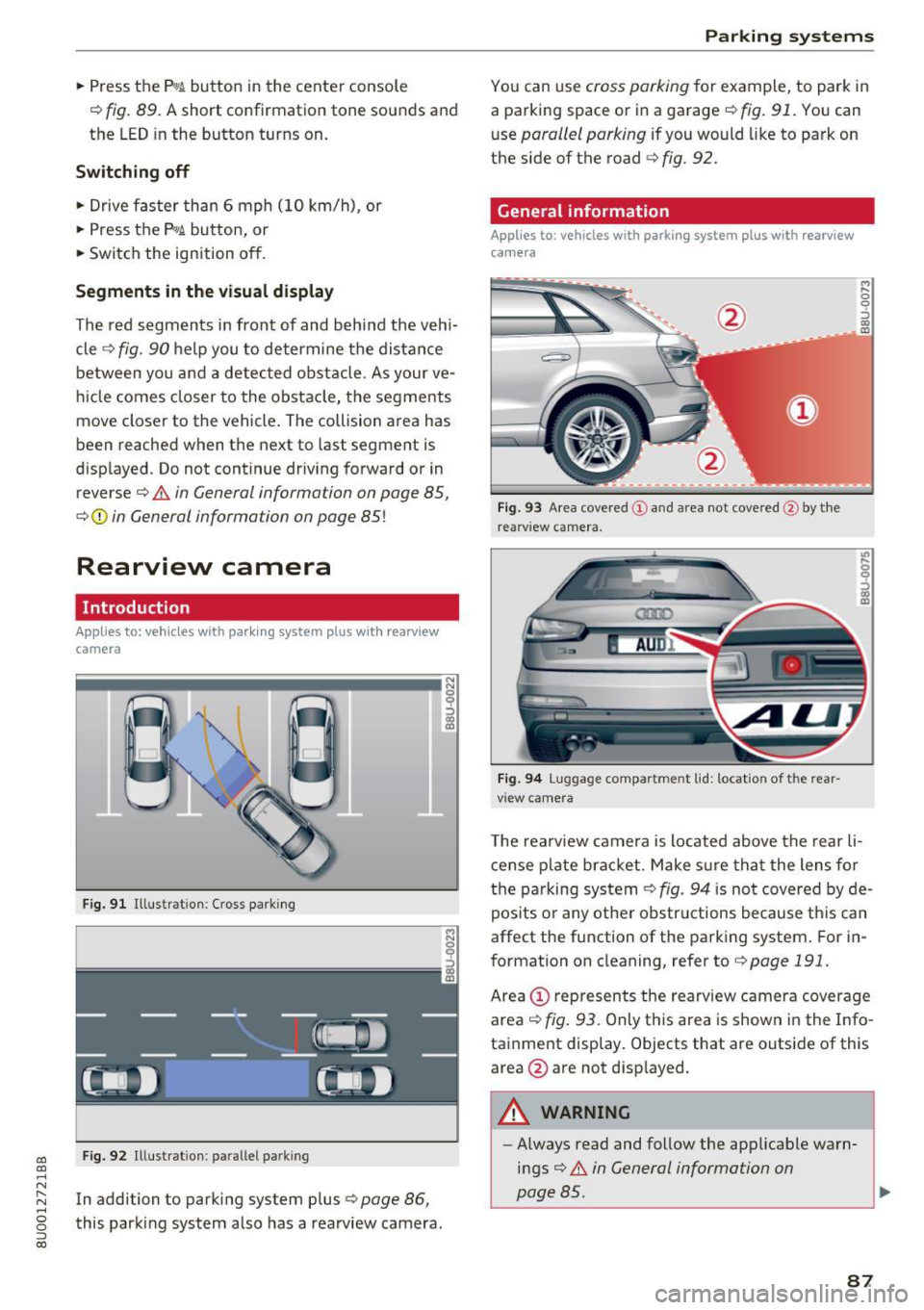
F ig. 91 Illustr ation : Cross parking
Fig. 92 Illustrat ion : pa ra llel pa rking
In addition to parking system plus¢ page 86,
this parking system also has a rea rview camera .
9 ::,
ffl Parking
systems
You can use cross parking for
example, to park in
a parking space or in a garage ¢
fig. 91. You can
use
parallel parking if you would like to park on
the side of the road
¢fig . 92.
General information
Applies to: vehicles with parking system plus with rearview
came ra
Fig. 93 Area covered (!) and area not covered @by the
rearv iew camera.
Fig. 94 Luggage compartme nt lid: locat io n of t he rea r
vi ew came ra
..,
" 0
0
'.) 0) - ID
.,..
" 0 '?
~ ID
The rearview camera is located above the rear li
cense plate bracket. Make sure that the lens for
the parking system
Q fig. 94 is not covered by de
posits or any other obstructions because this can
affect the function of the parking system. For in
formation on cleaning, refer to¢
page 191 .
Area@ represents the rearview camera coverage
area¢
fig. 93. Only this area is shown in the Info
tainment display. Objects that are outside of this
area @are not disp layed.
A WARNING
--
- Always read and follow the applicable warn
i ng s¢
& in General information on
page 85.
87
Page 92 of 236
Parking sy stems
behind you o r on the parking space line c:> A in
General information on page 87 ,
c:>(D in Gen
eral information on page 88 .
The blue area rep
resents an extension of the vehicle 's outline by
approximately 16
ft (5 meters) to the rear . The
long side of the b lue area shou ld be on the
curb . T he entire blue area mus t fit into the
parking space .
• With the veh icle stopped, turn the steer ing
whee l to the right as far as it w ill go.
• Back into the par king space until the b lue curve
c:> fig. 98 touches the curb c:> A in General in
formation on page 87,
c:> (D in General infor
mation on page 88.
Stop the vehicle.
• With the veh icle stopped, turn the steer ing
whee l to the left as far as it will go.
• Cont inue to back into the pa rking space unt il
the ve hicle is parked parallel to the curb
c:> A
in General information on page 87, c:> (D in
General information on page 88. @
marks the
re ar bumpe r. At the ve ry latest, stop the vehicle
whe n the re d or ientat ion line @ borders an ob
ject. Keep an eye on the front of your vehicle whi le doing this.
Parking next to obstacles
I f t here is an obstacle (such as a wall) next to the
p ar king sp ace, pos ition the vehicle so there is
mo re spa ce on that side . Position the long s ide of
the blue surface so that there is sufficient space
from the obstacle. The s urface m ust not be
touch ing. Yo u wi ll also need to start turn ing the
steer ing whee l earlier. The blue curve
c:> fig. 98
must not to uch the obstacle and should have suf
ficient room .
(};) Note
Keep enough distance from the curb to re
duce the risk of damage to the rims.
(D Tips
The left or right orientation lines and s urfaces
w ill be displayed, depending on the turn sig
nal being used.
90
Adjusting the display and the warning tones
App lies to: vehicles with parking system plus/rearv iew cam
era
T he display and warning tones can be adjusted in
the Infotainment.
• Select: the I CAR I fu nct ion button > (Car) Sys
tems*
cont rol b utton > Driver assi st > Par king
system .
Display
On* -an optical display is shown for the park ing
system p lus, a rearview camera image is shown
fo r par kin g system p lus with rea rview camera*.
Off -When t he p arking system is sw itche d off,
on ly aud ible signals are g iven.
Signal tones
Front volume -volume for the front area
Rear vo lume -volume for the rear area
Front frequency -frequency for the front area
Rear frequency -frequency for the rear a rea
In -car entertainment fader -when the parking
system is tu rned on, the volume of the a udio/vid
eo source is lowe red .
The newly selected level is demonstrated briefly
by the sound generator .
(D Tips
-The warn ing tones can also be adjusted di
rectly from the vis ual d isp lay or the rearview
camera image* . Simply p ress t he
Settings
co ntrol button .
- Changed settings are activated w hen the
park ing system is switched on again .
- The settings are automatically sto red and
assigned to the remote con trol key that is in
use .
Error messages
Applies to: vehicles with parking system plus/rearv iew cam
era
There is an error in the system if the LED in the
P wJ\. button is blinking and you hear a contin uous .,.
Page 93 of 236
00
00
......
"' ,-...
"' ...... 0 0 :::,
00
alarm for a few seconds after switching on the
parking system or when the parking system is al
ready act ivated. If the error is not corrected be
fore you switch off the ignit ion, the LED in the P'J/Ji
button will b link the next t ime you sw itch on the
parking system by s hift ing into reverse .
If a sensor is fau lty, the
J;l4 symbol will appear in
front of/behind the vehicle in the Infotainment d isplay. If a rear sensor is faulty, only obstacles
that are in areas @ and @ are displayed
c::> page 86, fig. 88. If a front se nsor is faulty , only
obstacles that a re in areas © and @are dis
p layed.
Drive to an authorized Aud i dealer or authorized
Aud i Service Facility immediately to have the
malfunct ion corrected .
Trailer hitch
Applies to: vehicles with parking system plus/rearview cam
era and trailer hitch
For vehicles using the trailer socket, the parking
system rear sensors are not activated when you
shift into reverse gear or when you press the P'J/Ji
button . This results in the follow ing restr ictions .
Parking sy stem plus *
There is no distance warning for the rear . The
front sensors remain activated . The visual display
switches to tra iler mode.
Par king sy ste m plus and rea rvie w camera*
There is no d istance warn ing fo r the rear. The
front sensors remain activated. The visual display
sw itches to tra iler mode. The rearview camera
image will not show the orientation lines and the
b lue surfaces.
(D Tips
Trailer h itches that are not installed at the
factory may cause the parking system to ma l
function or they may restrict its function.
Parking system s
91
Page 94 of 236
Intelligent Technology
Intelligent Technology
Electronic Stabilization
Control (ESC)
Description
Elect ronic Stabilization Control (ESC) suppo rts
driver safety.
It red uces the risk of slipping and
improves dr iving stability. ESC detects crit ica l sit
uations such as the veh icle oversteering and un
dersteering or the wheels are sp inning. The vehi
cle is stabilized by app lying the brakes or reduc
ing engine torque. When ESC engages, the
G1 i n
d icator light blinks in the inst rument cluste r.
The fo llow ing systems are integrated in the ESC:
Anti -lock b raking system (ABS)
ABS prevents the whee ls from loc king when brak
i n g . The vehicle can sti ll be steered even d uring
hard brak ing. Apply steady press ure to the brake
pedal. Do not pump the pedal. A puls ing in the
brake pedal indicates that the system is acting to
stabilize the vehicle .
Brake assi st sy stem
The brake assist system can dec rease braking dis
tance. It increases brak ing power when the driver
presses the brake pedal quick ly in emergency sit
uations . You must press and hold the brake pedal
until the dangerous situat io n is over .
Anti- s lip regulation (ASR )
ASR reduces eng ine power when the drive w heels
begin spinning and adapts the force to the road
conditions. This makes it easier to start, acceler
ate and dr ive up h ills .
Electron ic differential lock (EDL)
The ED L bra kes wheels that a re spinning and
transfers the drive power to the other drive
wheel or wheels if the ve hicle is equipped with a ll
wheel drive*) . This funct ion is not ava ilable at
h igher speeds.
In extreme cases, EDL automatically switches off
to keep the brake on the braked wheel from over heating. The vehicle is still work ing correctly. EDL
92
will switch on again au tomatically when condi
tions have returned to normal.
Steering recommendation
The ESC he lps to s tabili ze the vehicle by cha ng ing
t h e s teer ing torque .
Selective wheel torque control
Selective wheel to rque cont rol is used when d riv
i ng o n curves . The front whee l on the inside of
t h e curve or both wheels on the i nside of th e
cu rve are braked se lective ly as needed. This al
l ows mo re pre cise driving in curves .
Automatic post -collision braking system
The "automat ic post -coll is io n braking system"
can help to reduce the risk of sl iding and of addi
tiona l co llisions after an acc ident. If the a irbag
c ontro l modu le detects a collision above a cert ain
vehicle speed, the veh icle is braked by the ESC.
The veh icle does n ot brake automatically if:
- the drive r presses the accelerator pedal, or
- the bra king force generate d by the pressed
brake pedal is greater than the b raking force
that would be in itiated by the system, or
- the ESC, the bra ke system or the vehicle elect ri
cal system are not functioning.
A WARNING
- The ESC and its integ rated systems can not
overcome the lim its imposed by natura l
p hys ica l laws. This is es pec ially impo rtan t
on sl ippery or wet roads. If the systems be
gi n a cting to stabili ze yo ur vehicle, you
s hould immedi ately alte r your speed to
match the road and tra ffic conditions . Do
not let t he in creased safety provi ded tempt
you into taking risks . This could increase
your r is k of a coll is ion.
- Please note the r is k of a coll is ion increases
when dr iv ing fast, especially th rough c urves
and on slippery or wet roa ds, and when dr iv
ing too close to objects ahead. The ESC and
its integrated systems cannot always pre
ve nt co llisions - there is st ill a risk of acci
dents!
Page 95 of 236
a:,
a:,
...... N r--. N .... 0 0 ::, a:,
-Press the accelerator pedal carefully when
accelerating on smooth, slippery surfaces
such as ice and snow. The drive wheels can
spin even when these control systems are
installed and this can affect driving stability
and increase the risk of a collision.
(D Tips
- The ABS and ASR only function correctly
when all four wheels have a similar wear
Switching on/off
Intelligent Technology
condition. Different tire sizes can lead to a
reduction in engine power.
- You may hear noises when the systems de
scribed are working .
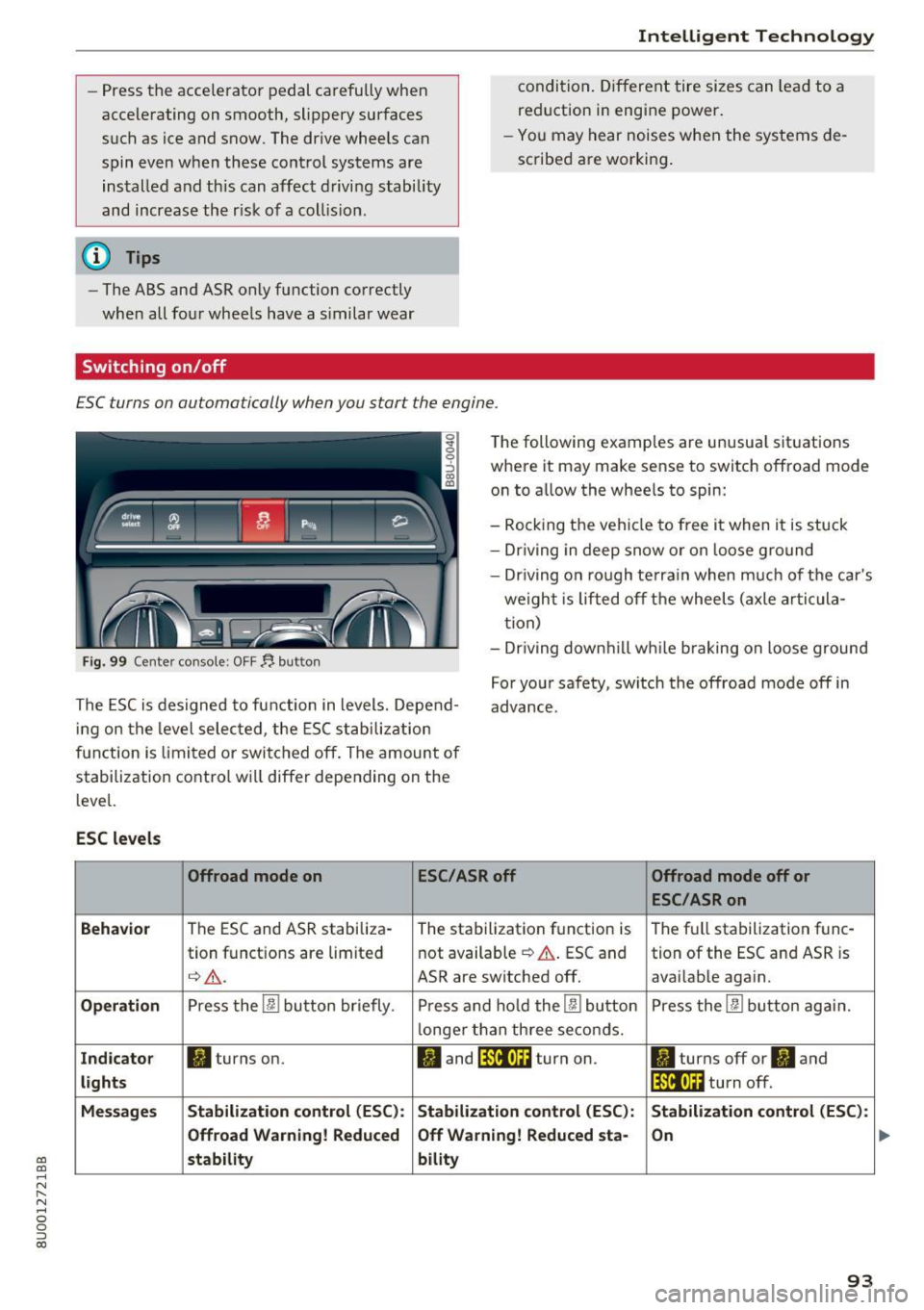
ESC turns on automatically when you start the engine .
Fig. 99 Center console: OFF~ button
The following examples are unusual situations
where it may make sense to switch offroad mode
on to allow the wheels to spin:
- Rocking the vehicle to free it when it is stuck
- Dr iving in deep snow or on loose ground
- Driving on rough terrain when much of the car's
weight is lifted off the wheels (axle articula
tion)
- Dr iving downh ill wh ile braking on loose ground
The ESC is designed to function in levels. Depend
ing on the level selected , the ESC stabilization
function is limited or switched off. The amount of
stabilization control will differ depending on the
level. For your safety, switch the offroad mode off in
advance.
ESC
levels
Offroad mode on ESC/ASRoff Offroad mode off or
ESC/ASRon
Behavior
The ESC and ASR stabiliza- The stabilization function is The full stabilization func-
tion functions are limited not available
~ A. ESC and tion of the ESC and ASR is
q_,& _ ASR are switched off. avai lable again.
Operation Press the 00 button briefly. Press and hold the 00 button Press the 00 button again.
l onger than three seconds.
Indicator II turns on. II and lf'tii•Ui turn on. ltl turns off or II and
lights lfilf•l~i turn off.
Messages Stabilization control (ESC): Stabilization
control (ESC): Stabilization control (ESC):
Offroad Warning! Reduced Off Warning! Reduced
sta-
On
stability bility
93
Page 96 of 236
Intelligent Technology
_&. WARNING
You should only switch offroad mode on or
switch ESC/ ASR off if your driving abilities
and the traff ic conditions perm it. There is a
r isk of slid ing.
- The stabilization function is limited when
offroad mode is switched on. The driving
wheels co uld spin and the vehicle could
swerve , especially on slick or slippery road
surfaces.
- T here is no vehicle stab ilizat ion when ESC/
ASR are switched off .
Hill descent assist
Applies to: vehicles with hill hold assist
Hill descent assist makes it possible to drive
down a hill at a constant speed.
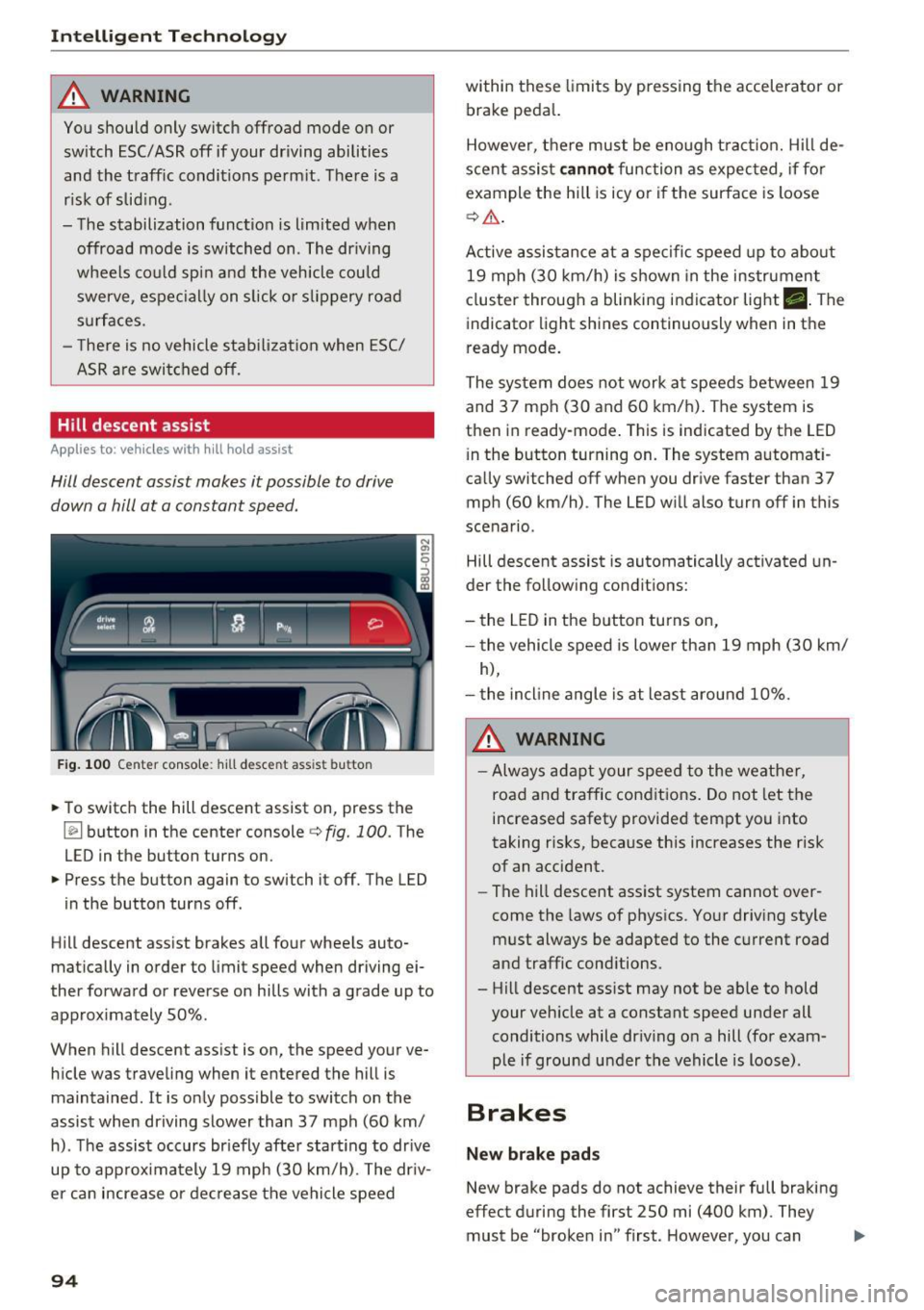
Fig . 100 Center console: hill descent assist button
.,. To switch the hill descent assist on, press the
~ button in the center console c:> fig. 100. The
LED in the button turns on.
.,. Press the button again to switch it off. The LED
in the button turns off.
Hill descent assist brakes all four wheels auto
matically in order to limit speed when driving ei
ther forward or reverse on hills with a grade up to
approx imately 50%.
When hill descent assist is on, the speed your ve hicle was traveling when it entered the hill is
maintained. It is only possible to switch on the
assist when driving slower than 37 mph (60 km/
h). The assist occurs br iefly after start ing to drive
up to approximately 19 mph (30 km/h). The driv
er can increase or decrease the vehicle speed
94
within these limits by pressing the accelerator or
brake peda l.
However, there must be enough tract ion. Hill de
scent assist
cannot function as expec ted, if fo r
example the hill is icy or if the surface is loose
c:>,& .
Active assistance at a specific speed up to about
19 mph (30 km/h) is shown in the instrument
cluster through a blinking indicator light •. The
indicator light shines continuously when in the
ready mode.
The system does not work at speeds between 19
and 37 mph (30 and 60 km/h). The system is
then in ready-mode . This is indicated by the LED
i n the button turning on. The system automat i
ca lly switched off when you drive faster than 37
mph (60 km/h) . The LED will also turn off in this
scenario.
Hill descent assist is automatically activated un
der the following conditions:
- the LED in the button turns on,
- the vehicle speed is lower than 19 mph (30 km/
h),
- the incline angle is at least around 10%.
_&. WARNING
-Always adapt your speed to the weather,
road and traffic conditions. Do not let the
increased safety provided tempt you into
taking risks, because this increases the risk
of an accident .
-
-The hill descent ass ist system cannot over
come the laws of physics. Your driving style
must always be adapted to the current road
and traffic conditions.
- Hill descent ass ist may not be ab le to hold
your vehicle at a constant speed under all
conditions while dr iv ing on a hill (for exam
ple if ground u nder the vehicle is loose).
Brakes
New brake pads
New brake pads do not achieve their full braking
effect during the first 250 mi (400 km). They
must be "broken in" first. However, you can ..,.