brake light AUDI Q3 2018 User Guide
[x] Cancel search | Manufacturer: AUDI, Model Year: 2018, Model line: Q3, Model: AUDI Q3 2018Pages: 230, PDF Size: 57.03 MB
Page 64 of 230
Driving
reached operating temperature yet. Yo u could
damage the engine .
@ For the sake of the environment
Do not let the engine r un while par ked to
warm up . Begin driving immediately . This re
duces unnecessary emissions .
@ Tips
Some noise after starting the engine is nor
mal and is no cause for concern.
Stopping the engine
A pp lie s to: ve hicles w ith conve nien ce key
~ Bring the vehicle to a fu ll stop.
~ Move the selector lever into the P position.
~ Press the I STAR T ENGINE ST OPI button
¢ page 61, fig. 69 .
Engaging the stee ring lock1
)
The steering locks when you turn the engine off
using the !STAR T ENGINE ST OP I button and
open the dr iver's door.
The locked steering he lps prevent vehicle theft.
Emergency off function*
If it is absolutely necessary, the engine can also
be turned
off while driv ing at speeds starting at
4 mph (7 km/h). To switch the engine
off, press
the lS T AR T
ENGINE ST OPlbutton twice in a row
b riefly or press and hold for longer than two sec
onds .
.8_ WARNING
- Never turn off the engine before the veh icle
has come to a complete stop. The brake
booster and power steering only work when
the engine is running. If the engine is
off,
you have to use more force when steer ing or
braking . Because you cannot steer and brake
as you usually wou ld, this could lead to acci
dents and serious injuries.
- Always ta ke the key with you whenever you
leave you r vehicle. Othe rw ise, the engine
l) This fun ction is not availab le in all coun tries.
62
could be started or electrical equipment
such as the power windows could be operat
ed. Th is can lead to serious injury.
- For safety reasons, always park the vehicle
with the selector lever in the P position.
Otherwise, there is the risk that the vehicle
could roll unintentionally .
(D Note
If the engine has been under heavy load for
an extended period of time, heat builds up in
the eng ine compartment after the engine is
switched
off and there is a r isk of damag ing
the eng ine . For th is reason, let the engine run
for at idle for approximately two minutes be
fo re shutti ng it
off.
(D Tips
For up to 10 minutes after stopping the en
gine, the radiator fan may turn on again auto
matically or it may continue to run (even if
the ign ition is switched off) for the following
r easons:
- The coolant temperature is increas ing due
to trapped heat.
-If the eng ine is warm and the engine com
partment a lso heats up from strong sun
light.
Page 65 of 230

a
co
...... N r--. N
'"' 0 0 ::, co
Starting the engine when there is a
malfunction
Applies to: vehicles with conven ience key
Other circumstances can cause the engine not to
start, such as the battery in the remote control key has drained , there is interference with the
key or there is a system malfunction .
Fig . 7 0 Steering co lumn /remote co ntro l key: st arting t he
en gine if there is a malfunc tion
Req uiremen t: the message No k ey identified .
See owne r's manual
must be disp layed and the
II indicator light m ust be on.
.,. Hold the remo te contro l key ve rtic ally in the lo
c ation ind ic a ted
y>l) c::> fig. 70 .
.,. Press the brake peda l.
.,. Press the
I ST AR T ENGINE STOP I button. The
engine will start.
.,. Drive to an authorized Audi dealer or author
iz ed Audi Service Facility immediately to have
the mal function corrected .
@ Tips
You can view the message again by pressing
the
I START ENGINE STOP ! button.
Messages
Turn off ignit io n. Battery discharging
This message appears and a warning tone sounds
if you open the driver's doo r when the ignition is
switched on .
Press brake pedal to start engine
This message appears if you do not step on the
b rake pedal to sta rt the eng ine o n a vehicle wi th
a n autom atic transm ission.
D rivi ng
Plea se engage Nor P.
This message appears when sta rt ing o r stopping
t h e e ngine if t he se lecto r lever is no t in the Nor P
pos ition. The e ngine will not star t/stop.
IS Is key in the vehicle?
The ind icator light turns on and this message ap
pears if the convenience key* was removed from
t h e veh icle when the e ngine was ru nning. If the
convenience key is no longer in the veh icle , you
c annot sw itch the ignition on or sta rt the eng ine
o nce you stop i t. You also canno t loc k the vehicle
from the o utside.
Shift to P, vehicle can roll away . Doors c an only
be lo cked in P .
This message appears for safety reasons if the
selector lever for the au tomatic transm ission is
not in the P position after the ignition is switched
off . M ove the selector leve r to the P posi tion.
Otherwise the ve hicle is not pro tec ted from ro ll
ing and i t cannot be locked .
II No key identified. See owner's manual.
This message appears if there is no conven ience
key* inside the vehicle or if the system does not
recognize the key . The co nvenience key may not
be recognized, for example, if it is covered by an
obje ct tha t
disrup ts the signa l (such as a br ief
c ase), or if the key b attery is we ak. El ectro nic de
vi ces such as cell phones c an also inte rfe re wi th
the signal.
T o still be ab le to start or stop the engine, refer
to
i=:> page 63 .
Electromechanical
parking brake
Fig. 71 Cen te r conso le : pa rk in g b rake
63
Page 66 of 230

Driving
Your vehicle is equipped with an electromechani
cal parking brake @
c> fig. 71. The parking brake
is designed to prevent the vehicle from rolling
un intent ionally and replaces the hand brake .
Setting/manuall y releasing the pa rking
brake
... Pull the(®) switch to set the parking brake . The
LED in the sw itch turns on. The -(USA mod
els) . (Canada models) indicator light also
turns on in the instrument cluster display .
.,. To release the parking brake manually, press
the b rake o r accelerato r pedal whi le the igni
tion is switched on and p ress t he
C®) switch a t
the same time. The L ED in t he b utton and t he
i ndica tor light in the display turn off .
Releasing the parking brake automatically
Requirement: the dr iver's door must be closed,
the dr iver's safety be lt must be latched and the
pa rking brake must be set.
... To start driving and re lease the park ing brake
automat ica lly, press the accele rato r pedal as
us ua l.
In addi tion to releasing the park ing brake auto
mat ically, other convenience and safety funct ions
are available whe n you start driving
c> page 65,
Starting from a stop .
Preventing the automatic parking brake
release
The vehicle could begin rolling unintentionally ,
dependi ng on the h ill or if towing a trailer .
... To preve nt the parking brake from releasing au
tomat ica lly, pull and hold the®) sw itch and
press the accelerator pedal. The park ing b rake
remains set and prevents the veh icle from ro ll
in g backward.
.,. Yo u can re le ase the(®) switch aga in once you
are sure that you are g iv ing eno ugh dr iv ing
force to the wheels by pressing the accele rator
pedal.
Emergency braking function
You can use the emergency bra king f unct ion in an
emergen cy situ ation , or if the stand ard bra ke op
era tion mal func tions or is disabled.
64
... Pull and ho ld the C®) swi tc h.
... As soon as you re lease the
C®> switch or acceler-
ate, the braking stops.
P ulli ng and ho ld ing t he
C®) switch wh ile driving
the veh icle activates the eme rgency braking func
tion . The ve hicle is bra ked at a ll four wheels by
activating the hydraulic b rake system . The bra k
i ng effect is sim ilar to heavy brak ing
c> ,&. .
To reduce the risk of act ivat ing t he emergency
bra kin g by mista ke, a warning tone (buzzer)
sounds when the
C®) sw itch is p ulled . Eme rgency
braking stops as soon as the© switch is released
or the accelerator pedal is pressed.
Park ing
... Press the brake peda l to stop the ve hicle.
... Pull the
C®> switch to set the par king brake .
... Place the selecto r lever in the P position .
... Turn the engine off
c> ,&. .
... Turn the steering w heel when parking on in
clines so that the w heels w ill roll into the curb
if the vehicle starts moving.
8,,. WARNING
- Do not press the a ccele ra to r peda l inadve r
tently if a ge ar i s selected whe n the vehicle
is st ationary an d th e engine is running . Oth
erwise, the vehicle will s tart to move imme
diate ly and this could result i n an accident.
- Eme rgency brak ing s hou ld only be used i n
an emergency, when the norma l bra ke pe dal
has failed or the bra ke peda l is obstructed .
During eme rgency brak ing, your vehicle will
brake s imilar to heavy braking. ESC and the
associated components (ABS, ASR, EDL)
cannot ove rcome the laws of physics .
Around curves a nd whe n road or wea ther
conditions a re bad, a full brake applicat io n
can ca use the veh icle to skid or the rear end
to swerve, w hich incr eases the ris k of an ac
cident.
- I f th e power s upply fail s, you cannot set the
parking br ake if it is released. In this case,
pa rk the vehicle on leve l ground and secure
it by p lacing the selector leve r in the P posi
tion. See an authorized A udi dealer or au -
thorized A udi Service Fac ility for assistance.
IIJ.
Page 68 of 230
Driving
the vehicle and maintains a constant speed as a
result
r=> page 91 .
However, your Audi i s no t an offroad vehi cle.
Only dri ve in terrain th at i s s uit a ble for th e vehi
cle and your dri ving abilit y. Ne ver tak e an y un
ne ce ss ary risks!
After driving offroad
- After dr iving offroad, remove branches and
other debr is from the radiator gr ille, unde r
body, and whee ls. Look espec ially for foreign
objects (such as stones) that may be stuck in
the tire tread.
- Clean the vehicle body and underbody and in
spect the vehicle for possib le damage.
- Clean the windows, headlights, tail lig hts and
the license plate if they are dirty.
- Perfo rm a brake test (especially after dr iv ing
through water).
A WARNING
- Be especia lly aware and attent ive when driv
ing under difficult conditions. Vehicle dam
age and injuries may occur when driv ing at
excessively high speeds or with incorrect
dr iv ing maneuvers .
- Always adjust your speed and driving style
to the roads, terra in , traffic and weather
condit ions. Drive espec ially slowly if there is
low v is ibility when offroad .
- Please note that the wheels can spin more
and the vehicle can swerve when i n ESC off
road mode, especially when the road is slip
pery or has loose surface mate rial.
- Driving stability is reduced in the ESC Off
road mode .
@ For the sake of the environment
Avoid harming the environment and show
consideration for nature.
(D Tips
On ly dr ive where it is a llowed and always stay
on the provided roads and paths.
66
Driving information
Applies to: vehicles with offroad mode
T here is only one right way to drive in difficult
conditions: slo wly and with caution!
Observe the following when driving on unpaved
roads :
.,. On ly driv e in terrain that is suitable for the ve
hicle and your driving ability. Never take any
unnecessary risks!
.,. Dr ive slowly and caut iously!
.,. Pay attent ion to the
g round cl earan ce of your
veh icle . The clearance may va ry depending on
the load, ground compos ition and the environ
ment. The g round clearance is reduced for spe
cial suspension systems, such as sport s uspen
sion. The dr iver is therefore responsible for de
ciding whether a vehicle can handle a specif ic
situation .
.,. Activate the
ESC offroad mode as needed
r=>page90 .
.,. Use the hill de sce nt ass ist when driving down
steep hills
r=> page 91 .
Difficult terrain
When driving in unfamiliar areas and offroad,
drive slowly and keep on the watch for unexpect
ed obstacles (such as potholes, rocks, tree
stumps , etc .) .
T o prevent th e vehicl e from bottoming out and to
reduce the risk of underbody damage, you should
drive across uneven ground on only one side of
the veh icle so that only two of your wheels cross
the uneven area, instead of driving across the cente r of the uneven area with all four wheels .
Drive quickly through sandy or marshy off-ro ad
sections and do not stop, if at all possible.
Driving through wat er on road s
Also read the information found in r=> page 57.
Automatic transmission
Introduction
The automatic transmission is controlled elec
troni cally. Upshifting a nd downshifting o ccu r au -
tomat ically . ..,.
Page 71 of 230
0 co ......
"' ,....
"' ...... 0 0 :::,
00
wait for the engine to slow down to idle
before selecting Dor S.
- If there is a power failure, the selector lever
will not move out of the P position. The
emergency release can be used if this hap
pens
¢ page 72.
Driving tips
Starting the engine
~ The selector lever must be in the P or the N po
sition.
Starting from a stop
~ Press and hold the brake pedal.
~ Press and hold the lock button in the selector
lever handle, select the desired selector lever
position such as D ¢
page 67 and release the
lock button.
~ Wait a moment until the transmission shifts .
You will notice a slight movement when the gear engages .
~ Release the brake pedal and press the accelera-
tor pedal ¢,&. .
Various convenience functions are available for
starting on hills
¢ page 65 .
Stopping temporarily
~ Press the brake pedal to stop the vehicle, for
example at a traffic light. Do not press the ac
celerator pedal when doing this .
~ To prevent the vehicle from rolling when you
start driving, set the parking brake when stop
ping on steep hills ¢
8. and ¢0.
~ The parking brake will release automatically
and the vehicle will start moving once you press
the accelerator pedal.
Stopping/parking
If the selector lever is not in the P position when
you open the driver's door, the vehicle could roll.
In vehicles with a convenience key*, the message
Shift to P and turn off ignition, or vehicle can
roll away
appears.
~ Press and hold the brake pedal¢,&. .
~ Set the parking brake .
~ Select the P selector lever position .
Driving
Under certain circumstances, (such as driving in
the mountains or towing a trailer), it may be use
ful to switch temporarily to the manual shift pro
gram in order to adjust the gears to the driving
conditions by hand
¢page 70.
On inclines, activate the parking brake first and
then move the selector lever to the P position
¢
page 64. This prevents the locking mechanism
from being loaded too heavily and will make it
easier to move the selector lever out of the P po
sition.
A WARNING
= -- The vehicle can roll even when the engine is
switched off.
- Unintended vehicle movement can lead to
serious injuries .
- Never leave your vehicle with the engine
running while in gear. If you must leave
your vehicle when the engine is running, set
the parking brake and move the selector lev
er to the P position.
- Power is still transmitted to the wheels
when the engine is running at idle. To pre
vent the vehicle from "creeping", you must
keep your foot on the brake in all selector
lever positions (except P) when the engine is
running.
- Do not inadvertently press the accelerator
pedal when the vehicle is stopped if a gear is
engaged. Otherwise the risk of an accident
increases because the vehicle will start to
move immediately, even if the parking brake
is set.
- To reduce the risk of an accident, do not
press the accelerator pedal when changing
the selector lever position while the vehicle
is stationary and the engine is running.
- Never engage the R or P selector level posi
tions while driving. It could cause a crash.
- Before driving down a steep slope, reduce your speed and shift into a lower gear in tiptronic mode.
- Do not ride the brakes or press the brake
pedal too often or too long when driving
downhill. Constant braking causes the
brakes to overheat and substantially ..,.
69
Page 72 of 230
Driving
reduces braking performance, increases
braking distance or causes complete failure
of the brake system.
- If you must stop on an incline, always hold
the vehicle in place with the foot brake or
parking brake to prevent it from rolling
back.
- Never hold the vehicle on an incline with a
slipping clutch. The clutch opens automati
cally when it becomes too hot from the
overload . The . indicator light turns on
and a message appears~
page 71 when
the clutch is overloaded.
- Read and following all WARNINGS
9 &, .
(D Note
-When stopping on an incline, do not try to
hold the vehicle in place by pressing the ac
celerator pedal while a driving gear is se lected . This can cause the automatic trans
mission to overheat and can damage it. Set
the parking brake or press the brake pedal
to prevent the vehicle from rolling.
- Allowing the vehicle to roll when the engine
is stopped while the selector lever is in the
N position will damage the automatic trans
mission, because it is not lubricated under
those circumstances ~
page 205, Towing
with a tow truck.
- The transmission can overheat and be dam
aged under certain driving and traffic condi
tions su ch as frequent starts, creeping for a
long time, or stop-and-go traffic. If the.
indicator light turns on, stop the vehicle at
the next opportunity and let the transmis
sion cool down
~ page 71.
H ill descent contr ol
The hill descent control system assists the driver
when driving down hills .
Hill descent contro l is activated when the selec
tor lever is in the Dor S position and you press
the brake pedal. The transmission automatically
selects a gear that is suitable for the hill. Hill de
scent control tries to maintain the speed ach
ieve d at the time of braking, within physical and
70
technical limitations. If may still be necessary to
adjust the speed with the brake pedal.
Hill descent control switches off once the hill lev
els out or you press the accelerator pedal.
&_ WARNING
Hill descent control cannot overcome physical
limitations, so it may not be able to maintain
a constant speed under all conditions. Always
be ready to apply the brakes .
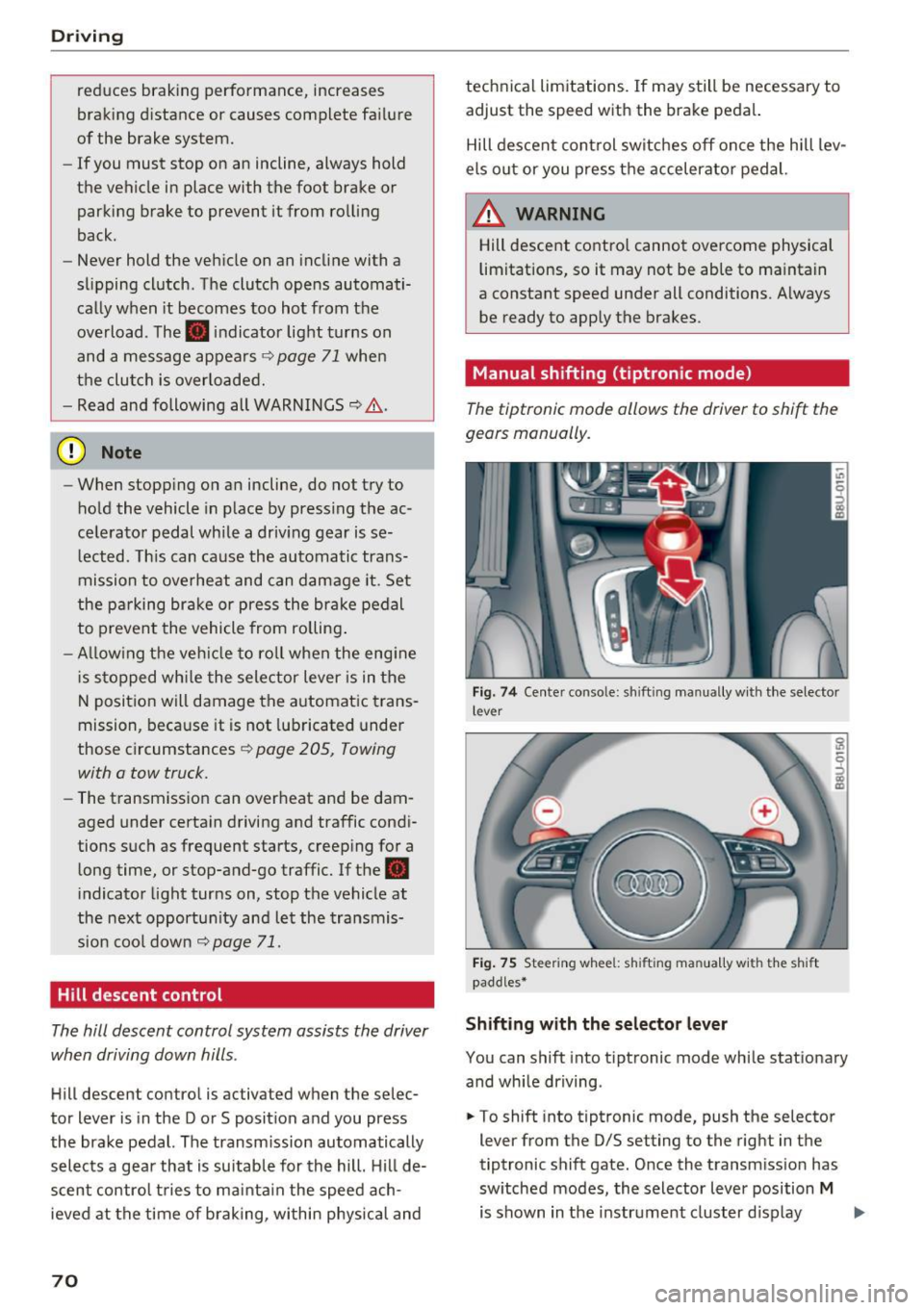
Manual shifting (tiptronic mode }
The tiptronic mode allows the driver to shi~ the
gears manually .
Fig. 7 4 Center console: sh ift ing manually w ith the selector
l ever
Fig. 75 Steering whee l: sh ift ing ma nuall y wi th th e s hift
paddles*
Shifting with the selector lever
You can shift into tiptronic mode while stationary
and while driving .
.. To shift into tiptronic mode, push the selector
lever from the 0/S setting to the right in the
tiptronic shift gate. Once the transmission has
switched modes, the selector lever position
M
is shown in the instrument cluster display .,..
Page 74 of 230
Driving
Selector lever emergency release
Applies to: ve hicles w ith a utomat ic tra nsm iss io ns
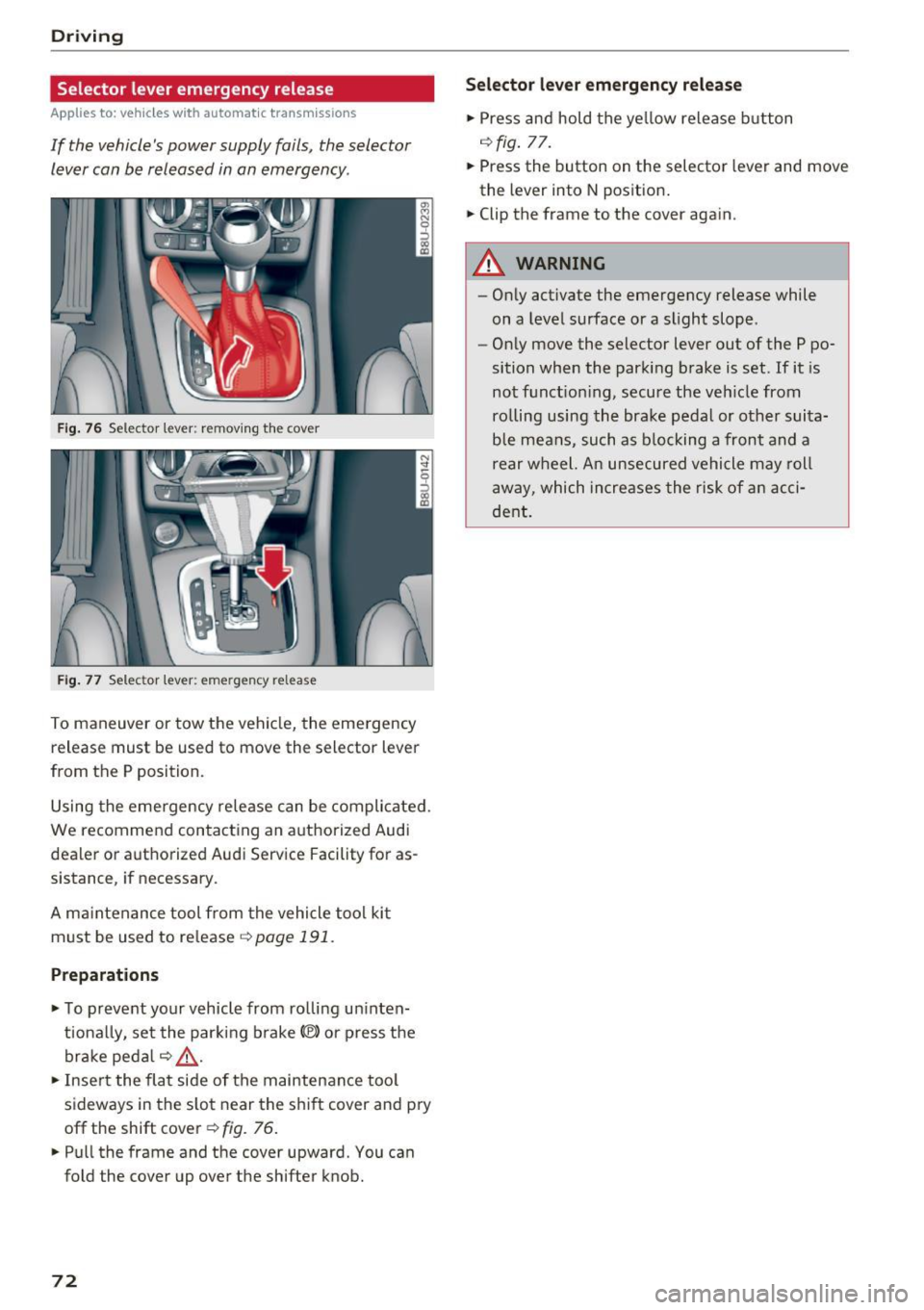
If the vehicle's power supply fails, the selector
Lever can be released in an emergency.
F ig. 76 Selector leve r: remov ing th e cover
Fig. 77 Selec tor lever: eme rgency re lease
To maneuver or tow the vehi cle, the emergency
release must be used to move the selector lever
from the P position.
Using the emergency rele ase can be compli cated.
We recommend contacting an a uthorized Audi
dealer or authorized Audi Service Facility for as
sistance , if necessary .
A ma intenance tool from the vehicle tool ki t
must be used to re lease ¢
page 191 .
Preparations
.,. To preve nt yo ur vehicle from ro lli ng u ninten
t iona lly, se t the par king b rake(®) or press the
brake peda l r:!.>
,& .
.,. Inse rt the fla t side of the maintenance too l
sideways in the s lot near the s hif t cover and pry
off the shift cover¢ fig. 76 .
.. Pull the frame and the cover upward. You can
fold the cover up over the shifter knob.
72
S ele cto r lev er emergenc y re lease
.,. Press and hold the ye llow release b utton
r:!.> fig. 77.
.,. Press the button on the selector lever and move
the lever into N pos ition .
.,. Clip the frame to the cover again.
A WARNING
- On ly activate the emergency release while
on a level surface or a slight slope .
- Only move the selector lever out of the P po
sition when the parking brake is set. If it is
not f unct io ni ng, secu re the ve hicle from
ro lling using the bra ke pedal or other suita
ble mea ns, such as b locking a front and a
rear w heel. An unsecured vehicle may roll
away, which increases the risk of a n acci
de nt.
Page 91 of 230
Intelligent Technology Electronic stabilization
control (ESC)
Description
Ele ctronic stabilization control (ESC) supports
driver safety . It reduces the risk of slipping and
improves d riving stability. ESC detects critica l sit
uations such as the vehicle oversteering and un
dersteer ing or the wheels are spinning. The vehi
cle is stabilized by apply ing the brakes or reduc
ing engine torque . When the ESC engages, the
G1 indicator light b links in the instrument clus
ter.
T he follow ing systems are integrated in the ESC:
Ant i-loc k bra king s ystem (ABS)
ABS prevents the whee ls from locking when brak
ing. The vehicle can still be steered even during
hard brak ing. Apply steady pressure to the brake
pedal. Do not pump the pedal. A pulsing in the
b rake pedal indicates that the system is act ing to
stabilize the vehicle .
Brak e a ssist s ystem
The brake assist system can decrease braking dis
tance. It increases brak ing power when the driver
presses the brake pedal quickly in emergency sit
uations . You must press and hold the brake pedal
unti l the dangerous sit uat io n is ove r.
Anti-Slip Regulation (ASR )
ASR reduces eng ine power when the drive wheels
begin spinning and ad apts the force to the road
conditions . This makes it easier to start, acceler
ate and dr ive up hills .
Electronic differential lock (EDL )
The EDL applies the brakes to a whee l that starts
spinning and transfers the drive power to the
other driving wheel or wheels ( if the veh icle is
equ ipped w ith all wheel dr ive*) . This function is
n ot available at higher speeds .
0 ~ In extreme cases, EDL automatically switches off
~ to keep the brake on the braked wheel from over-N
8 heat ing . The vehicle is still work ing correctly . EDL 0
:::,
00
Intellig ent Technology
will swi tch on again automatically when condi
tions have returned to normal.
Steering recommendation
T he ESC he lps to s tabilize the vehicle by cha nging
t h e steer ing torque .
Selective wheel torque control
Se lective wheel torque control is used when driv
i ng on curves . The front whee l on the ins ide of
t h e curve or both wheels on the i nside of the
c ur ve are braked se lectively as needed. This al
lows mo re prec ise dr iving in c urves .
Automatic post -collision braking system
The "automat ic post -collis ion braking system"
can help to reduce the risk of sliding and of addi
tiona l co llisions after an accident.
If the a irbag
contro l modu le detects a collision above a certa in
vehicle speed, the ve hicle is br ake d by the ESC.
The vehicle does not brake automatically if:
- the dr iver presses the acce lerator pedal, or
- the bra king fo rc e generated by the pressed
brake pedal is greater than the braking force
that would be in itiated by the system, or
- the ESC, the brake system or the veh icle electri
cal system are not functioning.
A WARNING
- The ESC and its integrated systems cannot
overcome the lim its imposed by natura l
phys ica l laws. This is especially impo rtant
on slippery or wet roads. If the systems be
gi n a cting to s tabilize yo ur vehicle, you
should immedi ately alter your speed to
match the road and traffic conditions. Do
not let the inc reased safety provided tempt
you into taking risks. This could increase
your r isk o f a collis ion.
- Please note the r isk of a coll is ion increases
when dr iv ing fast, especially t hrough curves
and on slippery or wet roads, and when dr iv
ing too close to objects ahead. The ESC and
its integrated systems cannot always pre
vent co llisions - there is st ill a risk of acci
dents!
89
Page 93 of 230
A WARNING
You should only switch offroad mode on or
switch ESC/ ASR off if your driving abilities
and the traffic conditions perm it. There is a
risk of s lid ing .
- The stabilization function is limited when
offroad mode is switched on . The driving
wheels could spin and the vehicle could
swerve, especially on slick or s lippery road
surfaces.
- There is no vehicle stabilization when ESC/
ASR are switched off.
Hill descent assist
Appl ies to: vehicles with hill hold assist
Hill descent assist makes it possible to drive
down a hill at a constant speed.
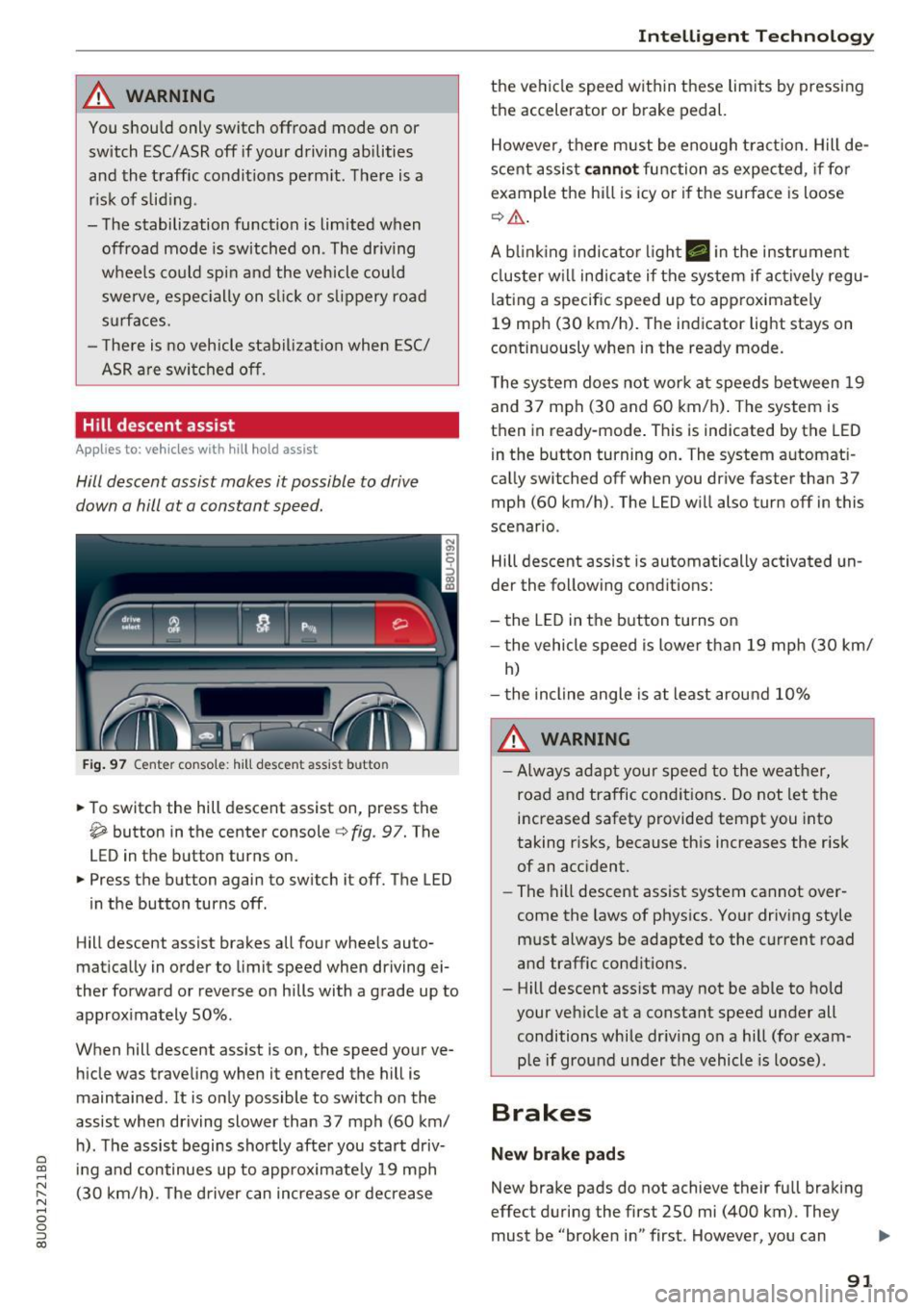
Fig. 97 Center console : hill descent assist butto n
• To switch the hill descent assist on, press the
~ button in the center console c} fig. 97. The
LED in the button turns on.
• Press the button again to switch it off. The LED
in the button turns off .
Hill descent assist brakes all four whee ls auto
matically in order to limit speed when driving ei
ther forward or reverse on hills with a grade up to
approximately 50% .
When hill descent assist is on, the speed your ve hicle was traveling when it entered the hill is
maintained . It is only possible to switch on the
assist when driving slower than 37 mph (60 km/
h). The assist begins shortly after you start driv-
e '.:: ing and continues up to approximate ly 19 mph
N r--. (30 km/h) . T he driver can increase or decrease N .... 0 0 ::, (X)
Intelligent Technology
the vehicle speed within these limits by pressing
the accelerator or brake pedal.
However, there must be enough tract ion. Hill de
scent assist
cannot function as expected, if for
example the hill is icy or if the surface is loose
¢,&. .
A blinking indicato r light. in the instrument
cluster will indicate if the system if actively regu
lating a specific speed up to approximately
19 mph (30 km/h). The indicator light stays on
continuously when in the ready mode.
The system does not work at speeds between 19
and 37 mph (30 and 60 km/h) . The system is
then in ready-mode . This is indicated by the LED
in the button turning on. The system automat i
cally switched off when you drive faster than 37
mph (60 km/h) . The LED will also turn off in this
scenario .
Hill descent assist is automatically activated un
der the following conditions:
- the LED in the button turns on
- the vehicle speed is lowe r than 19 mph (30 km/
h)
- the incline angle is at least around 10%
A WARNING
-
-Always adapt your speed to the weather,
road and traffic conditions. Do not let the
increased safety provided tempt you into
taking risks, because this increases the risk
of an accident.
- The hill descent assist system cannot over
come the laws of physics. Your driving style
must always be adapted to the current road
and traffic conditions .
- Hill descent ass ist may not be able to hold
your vehicle at a constant speed under all
conditions while dr iving on a hill (for exam
p le if ground under the vehicle is loose).
Brakes
New brake pads
New brake pads do not achieve their full braking
effect during the first 250 mi (400 km) . They
must be "broken in" first . However, you can
IJ,,
91
Page 94 of 230
Intelligent Technology
compensate for the slightly reduced brak ing
force by pressing firmly on the brake peda l. Avoid
heavy b raking during the break -in per iod .
Wear
Brake pad wear depends largely on the way the
veh icle is driven and on operat ing cond it ions.
This is especially t rue if you are driving frequently
in the city and on c urves or with a sporty driving
style.
Operating noise
Noises may occur when br aking depend ing on the
speed, b raking force and outs ide cond itions such
as temperature and humidity.
Effect of water or road salt
I n ce rtain s ituations, fo r example after driving
through water, in heavy ra in, afte r ove rnig ht con
densat ion or after washing your car, the braking
effe ct can be red uced by moisture or ice on the
b rake rotors and brake pads. The brakes must be
"dr ied" first with a few careful brake applica
tions.
At highe r speeds and with the windshie ld wipers
turned on, the brake pads press against the brake rotors for a short amount of time . This action,
which is not felt by the driver, happens at regular
intervals and ensures a better reaction time for
the brakes in wet weather.
The braking effect can also be reduced if you are
driving on salted roads and you do not apply the brakes for long periods of time. The laye r of salt
on the brake rotors and brake pads must be worn
off first when t he brakes a re applied ¢ ,& .
Corros ion
L eaving the vehicle par ked for long periods of
time, low mi leage and avo id ing heavy brak ing
can contribute to corrosion on the brake rotors
and to d irty b rake pads .
If you usually avoid heavy b raking or if there is
corros ion present, occasional heavy braking at
h igh speeds is recommended to clean the brake
rotors and pads¢,&.
92
Brake system malfunction
if you no tic e th at the b rake peda l t ravel has sud
denly gotten larger, then a brake ci rc u it may have
failed ¢.&. .
Low brake fluid level
When the b rake fluid level is low, malfunctions in
t h e b rake system may occur. The b rake fl uid leve l
i s e lec tron ically moni to red.
Brake booster
The brake booster amplifies the pressure you ap
ply to the brake pedal. It only works when the en
gine is runni ng ¢ ,& .
.8, WARNING
-On ly app ly the bra kes for the p urpose o f
cleaning the brake sys tem w hen road and
t raffic conditions permi t. You mus t not en
danger other roa d users . This increases the
risk of an accident.
-
- Never let the ve hicl e roll whi le the engine is
stopped because t his increases the risk of an
accident .
(D Note
- Never let the brakes "rub'' by pressing the
peda l lightly when braking is not actually
necessary . This causes t he b rakes to over
heat and increases braking distance and
causes wear.
- Be fore driving downhill a long d istance on a
steep hill, decrease your speed and select a lower gear. This makes use of the engine
brak ing effect and relieves the brakes . If
you need to bra ke add itiona lly, bra ke in in
te rvals and not cont inuous ly.
(D Tips
- If the brake booster is not working, you
must press the b rake peda l with much more
forc e than normal.
- If you retrofit your veh icle with a front spo il
er , wheel covers or sim ila r i tems, make su re
t h at the air flow to the fro nt wheels is not
inter rup ted. O therwise t he b rake system
c an be come too hot.