bulb AUDI Q3 2019 Owners Manual
[x] Cancel search | Manufacturer: AUDI, Model Year: 2019, Model line: Q3, Model: AUDI Q3 2019Pages: 280, PDF Size: 72.73 MB
Page 6 of 280
Table of contents
216
216
233
Care and cleaning................ 236
Generalinformation..............00. 236
Carwashes « seis « s wwon 2s ewe eo meee oo 236
Cleaning and care information......... 237
Placing your vehicle out of service...... 241
Do Tt YOurselt ices 6 csccie 6 ceccce es waren 242
Emergency assistance........... 242
General information................. 242
Equipment scarecs « arses « seams we enenams a « sae 242
Changing atire...................000- 242
Spare tir wc = s eeu = ¢ news + ¢ aus 5 eee 245
JUMP StArbING « ciswsos ow cessae oo esusnee o a ewes 246
TOWING «061s 248
Fuses and bulbs.................. 251
Fuses... 0... eee eee eee eee 251
BUlDSiac s « caw & ¥ Rove & & Senne 2 F RaPOR 3 ga 253
Customer information........... 255
Data privacy..................000. 255
Image recording............-..2+-+5- 255
DatasmMemoOries’. . vase + waves m 6 emcees o 6 on 255
Transmitted information.............. 256
Accessories and technical
CHangeS......... eee eee ee eee 258
Waltrant)’: = sess < seen sy emem ce eee ee 258
Audi Literature Shop................. 258
Driving in other countries 258
Maintenance, repairs, and technical
MOCITFICATIONS secre x & meme 6 DEKE we er 258
Accessories and parts................ 260
Reporting Safety Defects.............. 260
Declaration of compliance for
telecommunications equipment and
electronic systems ............--0000- 261
TWeCHnicalidatal. « «cess sec oo essen 263
Identification data................00. 263
Vehiclé datates ss news =v sews vv eee ces 263
Index ...... 0... cece eee 265
Page 11 of 280
83A012721BA
Quick access
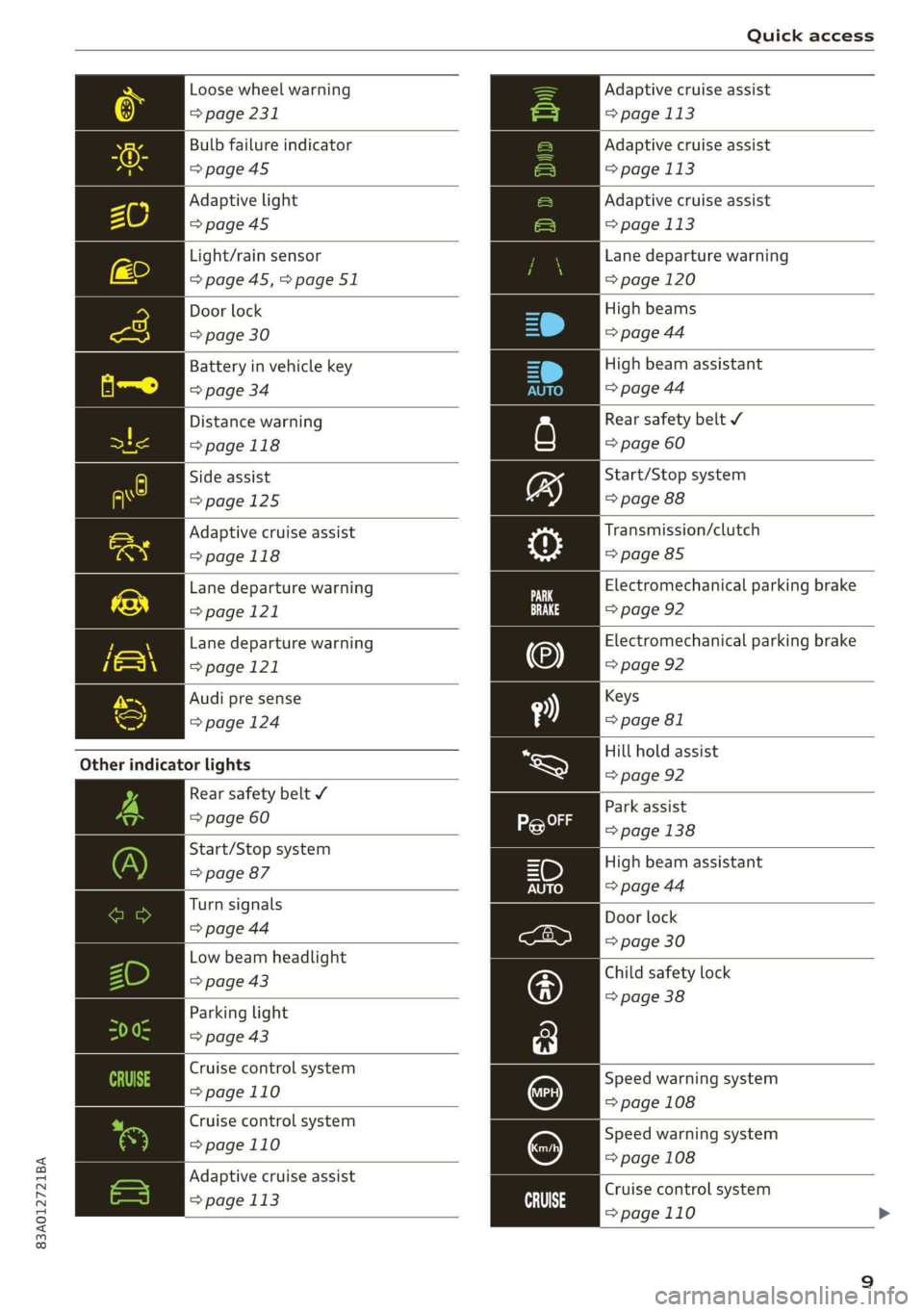
Loose wheel warning
> page 231
Bulb failure indicator
>page 45
Adaptive light
=>page45
Light/rain sensor
=> page 45,>page 51
Door lock
=> page 30
Battery in vehicle key
> page 34
Distance warning
>page 118
Side assist
>page 125
Adaptive cruise assist
=>page 118
Lane departure warning
=>page 121
Lane departure warning
>page 121
Audi pre sense
=> page 124
Other indicator lights
Rear safety belt ¥
=> page 60
Start/Stop system
=> page 87
Turn signals
=> page 44
Low beam headlight
=> page 43
Parking light
=> page 43
Cruise control system
=>page 110
Cruise control system
=>page
110
Adaptive cruise assist
=> page 113 ai
Adaptive cruise assist
= page 113
Adaptive cruise assist
= page 113
Adaptive cruise assist
= page 113
Lane departure warning
= page 120
High beams
=> page 44
High beam assistant
=> page 44
Rear safety belt ¥
=> page 60
Start/Stop system
=> page 88
Transmission/clutch
=> page 85
Electromechanical parking brake
=> page 92
Electromechanical parking brake
=> page 92
Keys
=> page 81
Hill hold assist
=> page 92
Park
assist
> page 138
High beam assistant
=> page 44
Door lock
=> page 30
Child safety lock
=> page 38
Speed warning system
= page 108
Speed warning system
= page 108
Cruise control system
=>page 110
Page 46 of 280
Lights and Vision
fog over due to the temperature difference
between the inside and outside. They will
clear shortly after switching them on. This
does not affect the service life of the light-
ing.
— When the parking lights are switched on
and the ignition is switched off, the 200: sym-
bol appears in the light switch module.
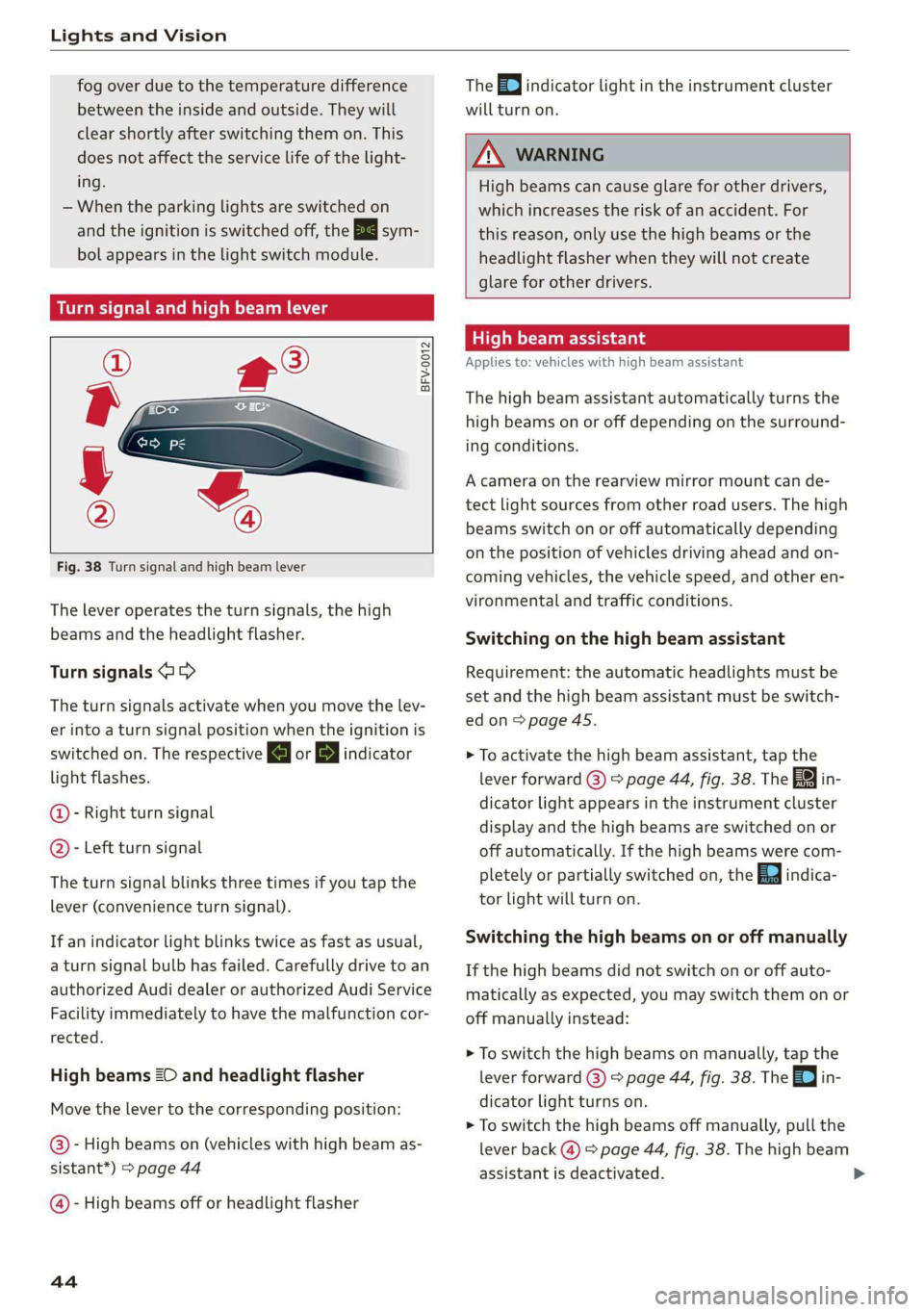
Turn signal and high beam lever
©
-
!
®
Fig. 38 Turn signal and high beam lever
The lever operates the turn signals, the high
beams and the headlight flasher.
Turn signals @ >
The turn signals activate when you move the lev-
er into a turn signal position when the ignition is
switched on. The respective a or B indicator
light flashes.
@- Right turn signal
@- Left turn signal
The turn signal blinks three times if you tap the
lever
(convenience turn signal).
If an indicator light blinks twice as fast as usual,
a turn signal bulb has failed. Carefully drive to an
authorized Audi dealer or authorized Audi Service
Facility immediately to have the malfunction cor-
rected.
High beams 2D and headlight flasher
Move the lever to the corresponding position:
@)- High beams on (vehicles with high beam as-
sistant*) > page 44
@ - High beams off or headlight flasher
44
The =0) indicator light in the instrument cluster
will turn on.
ZX WARNING
High beams can cause glare for other drivers,
which increases the risk of an accident. For
this reason, only use the high beams or the
headlight flasher when they will not create
glare for other drivers.
teh Meola
Applies to: vehicles with high beam assistant
The high beam assistant automatically turns the
high beams on or off depending on the surround-
ing conditions.
A camera on the rearview mirror mount can de-
tect light sources from other road users. The high
beams switch on or off automatically depending
on the position of vehicles driving ahead and on-
coming vehicles, the vehicle speed, and other en-
vironmental and traffic conditions.
Switching on the high beam assistant
Requirement: the automatic headlights must be
set and the high beam assistant must be switch-
edon>
page 45.
> To activate the high beam assistant, tap the
lever forward (@) > page 44, fig. 38. The 5%
dicator light appears in the instrument cluster
display and the high beams are switched on or
off automatically. If the high beams were com-
pletely or partially switched on, the Ea indica-
tor light will turn on.
in-
Switching the high beams on or off manually
If the high beams did not switch on or off auto-
matically as expected, you may switch them on or
off manually instead:
> To switch the high beams on manually, tap the
lever
forward (3) > page 44, fig. 38. The =| in-
dicator light turns on.
> To switch the high beams off manually, pull the
lever
back @) > page 44, fig. 38. The high beam
assistant is deactivated.
Page 47 of 280
83A012721BA
Lights and Vision
Operating the headlight flasher
> To operate the headlight flashers, pull the lever
back @) > page 44, fig. 38. If the high beam as-
sistant is activated, but the high beams were
not turned off, the high beam assistant remains
activated.
Z\ WARNING
— Follow the safety precautions and note the
limits of the assist systems, sensors, and
cameras = page 104.
— High beam assistant is only intended to as-
sist the driver. The driver is still responsible
for controlling the headlights and may need
to switch them on and off manually depend-
ing on light and visibility conditions.
— High beams can cause glare for other driv-
ers, which increases the risk of an accident.
For this reason, only use the high beams or
the headlight flasher when they will not cre-
ate glare for other drivers.
Adjusting the exterior lighting
You can adjust the exterior lighting separately.
The settings depend on the vehicle equipment.
> Applies to: MMI: Select on the home screen:
VEHICLE > Light & Visibility > Exterior light-
ing.
Automatic headlights
You can adjust the following settings in the Auto-
matic
headlights menu:
Activation time - You can adjust if the headlights
switch on Early, Medium, or Late based on the
sensitivity of the light sensor.
High beam assistant - You can switch the high
beam assistant on and off.
Entry/exit lighting
When it is dark, selecting Entry/exit lighting will
illuminate the area around the vehicle when un-
locking the vehicle and after switching off the ig-
nition and opening the driver's door. The entry/
exit lighting only works when it is dark and the
light switch is in the AUTO light function.
Daytime running lights
USA models: The daytime running lights can be
turned on and off.
Canada models: this function cannot be switched
off. They activate automatically each time the ig-
nition is switched on.
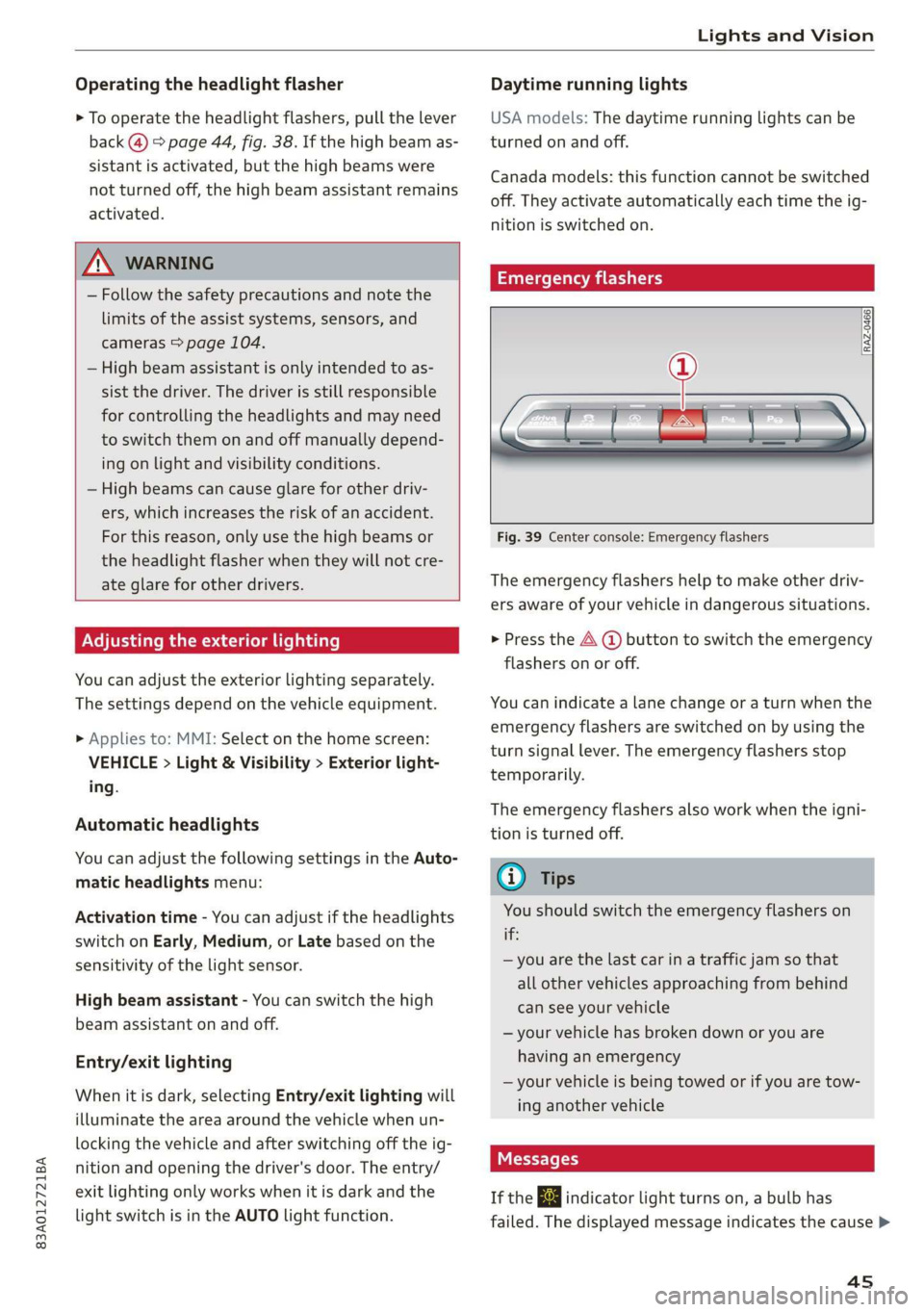
Emergency flashers
[RAZ.0469
Fig. 39 Center console: Emergency flashers
The emergency flashers help to make other driv-
ers aware of your vehicle in dangerous situations.
» Press the A @ button to switch the emergency
flashers on or off.
You can indicate a lane change or a turn when the
emergency flashers are switched on by using the
turn signal lever. The emergency flashers stop
temporarily.
The emergency flashers also work when the igni-
tion is turned off.
@ Tips
You should switch the emergency flashers on
this
— you are the last car in a traffic jam so that
all other vehicles approaching from behind
can see your vehicle
— your vehicle has broken down or you are
having an emergency
— your vehicle is being towed or if you are tow-
ing another vehicle
If the 2} indicator light turns on, a bulb has
failed. The displayed message indicates the cause >
4s
Page 253 of 280
83A012721BA
Fuses and bulbs
Fuses and bulbs
Fuses
Seale mie
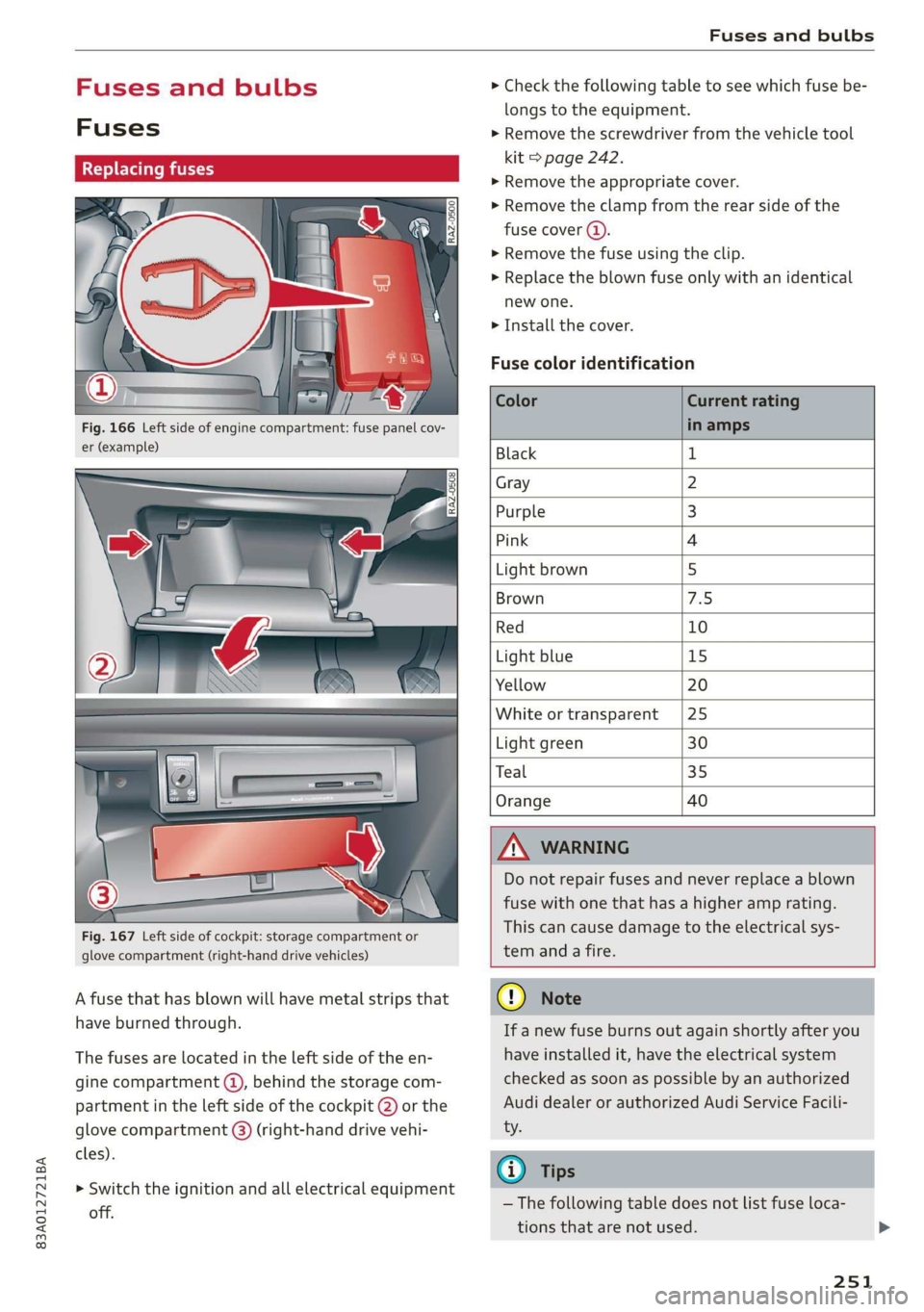
Fig. 166 Left side of engine compartment: fuse panel cov-
er (example)
Fig. 167 Left side of cockpit: storage compartment or
glove compartment (right-hand drive vehicles)
A fuse that has blown will have metal strips that
have burned through.
The fuses are located in the left side of the en-
gine compartment @), behind the storage com-
partment in the left side of the cockpit @) or the
glove compartment (@) (right-hand drive vehi-
cles).
> Switch the ignition and all electrical equipment
off.
> Check the following table to see which fuse be-
longs to the equipment.
> Remove the screwdriver from the vehicle tool
kit > page 242.
> Remove the appropriate cover.
> Remove the clamp from the rear side of the
fuse cover ().
> Remove the fuse using the clip.
>» Replace the blown fuse only with an identical
new one.
> Install the cover.
Fuse color identification
Black 1
Gray 2
Purple 3
Pink 4
Light brown 5
Brown AS:
Red 10
Light blue 15
Yellow 20
White or transparent |25
Light green 30
Teal 35
Orange 40
) Do not repair fuses and never replace a blown
fuse with one that has a higher amp rating.
This can cause damage to the electrical sys-
tem anda fire.
@)
If a new fuse burns out again shortly after you
have installed it, have the electrical system
checked as soon as possible by an authorized
Audi dealer or authorized Audi Service Facili-
— The following table does not list fuse loca-
tions that are not used.
251
Page 254 of 280
Fuses and bulbs
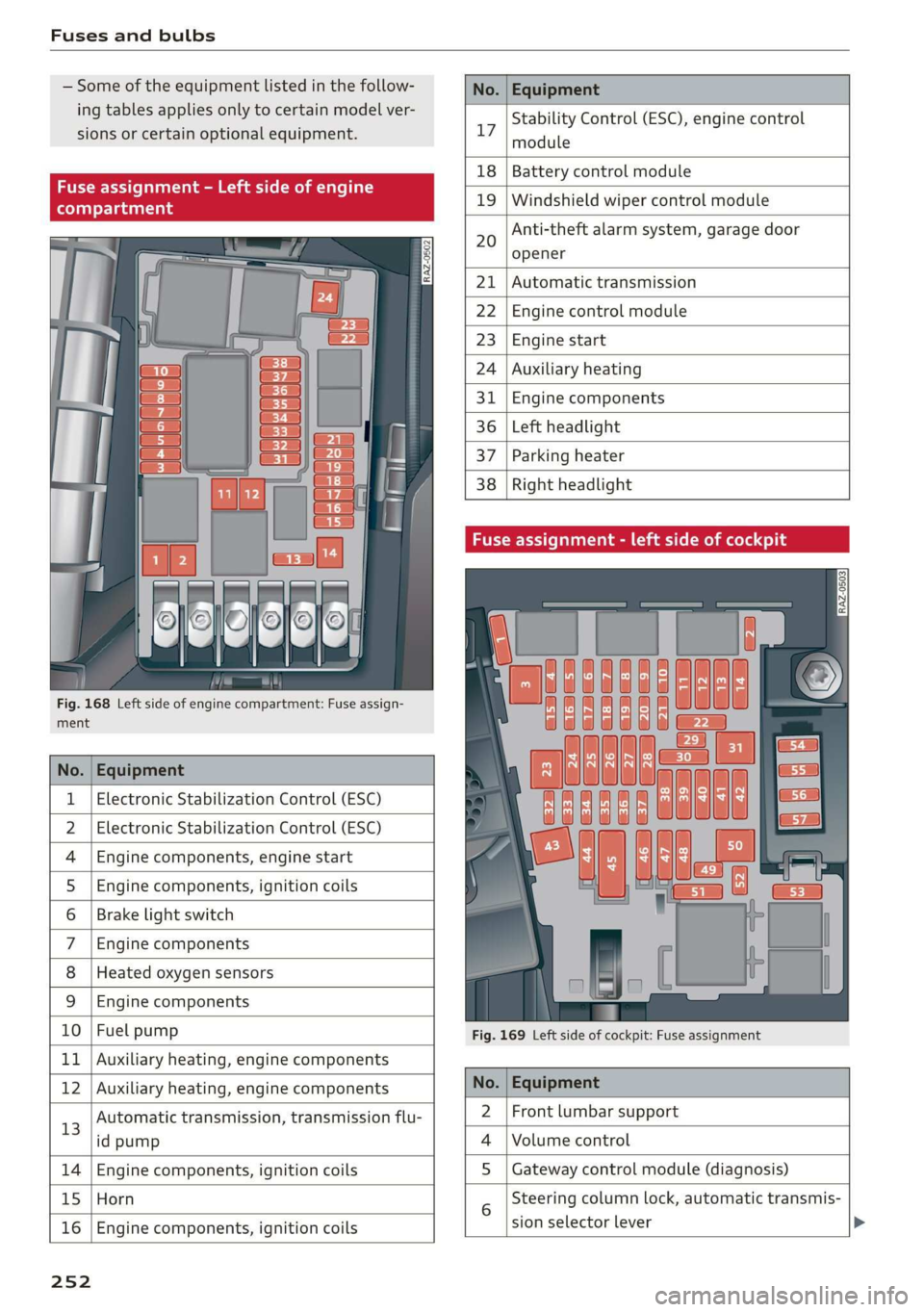
Some of the equipment listed in the follow-
ing tables applies only to certain model ver-
sions or certain optional equipment.
No. | Equipment
Stability Control (ESC), engine control
17
module
le of e
OVye OVOVO
Fig. 168 Left side of engine compartment: Fuse assign-
RAZ-0502
18 | Battery control module
19 | Windshield wiper control module
Anti-theft alarm system, garage door
opener
20
Automatic transmission
Engine control module
Engine start
Auxiliary heating
Engine components
Left headlight
Parking heater
Right headlight
ment
No. | Equipment
1 | Electronic Stabilization Control (ESC)
2 | Electronic Stabilization Control (ESC)
4 |Engine components, engine start
5 |Engine components, ignition coils
6 | Brake light switch
7 |Engine components
8 | Heated oxygen sensors
9 | Engine components
10 | Fuel pump
11 | Auxiliary heating, engine components
Fig. 169 Left side of cockpit: Fuse assignment
bh N Auxiliary heating, engine components No. | Equipment
13
Automatic transmission, transmission flu-
id pump
2 |Front lumbar support
Volume control
14 Engine components, ignition coils S | Gateway control module (diagnosis)
15 Horn
16
Engine components, ignition coils
sion selector lever
25 2
Steering column lock, automatic transmis-
Page 255 of 280
83A012721BA
Fuses and bulbs
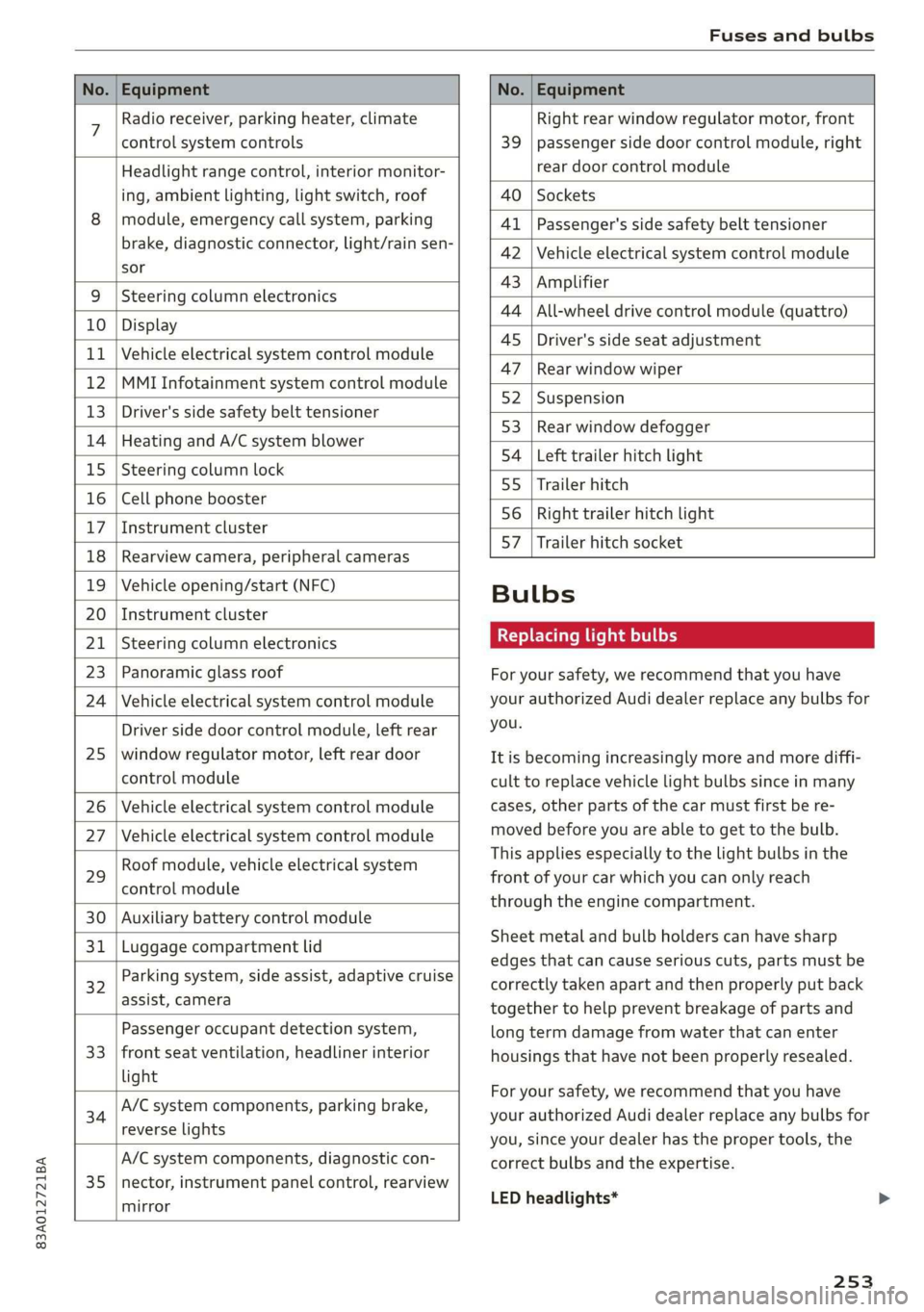
No. | Equipment No. | Equipment
7 Radio receiver, parking heater, climate Right rear window regulator motor, front
control system controls 39 | passenger side door control module, right
Headlight range control, interior monitor- rear door control module
ing, ambient lighting, light switch, roof 40 | Sockets
8 | module, emergency call system, parking 41 |Passenger's side safety belt tensioner
brake, diagnostic connector, light/raih'sen- 42 |Vehicle electrical system control module
sor
= - 43 |Amplifier
9 |Steering column electronics
- 44 | All-wheel drive control module (quattro)
10 | Display
- - 4S | Driver's side seat adjustment
11 | Vehicle electrical system control module
: 47 | Rear window wiper
12 |MMI Infotainment system control module
- ; - 52 | Suspension
13 | Driver's side safety belt tensioner
- 53 | Rear window defogger
14 | Heating and A/C system blower
: 54 | Left trailer hitch light
15 | Steering column lock
55 | Trailer hitch
16 | Cell phone booster
56 | Right trailer hitch light
17
|Instrument cluster
- - 57 | Trailer hitch socket
18 | Rearview camera, peripheral cameras
19 | Vehicle opening/start (NFC) Bulbs
20 | Instrument cluster
21 | Steering column electronics BETS Ae ha tele
23 | Panoramic glass roof For your safety, we recommend that you have
24 | Vehicle electrical system control module your authorized Audi dealer replace any bulbs for
Driver side door control module, left rear YOU
25 | window regulator motor, left rear door It is becoming increasingly more and more diffi-
control module cult to replace vehicle light bulbs since in many
26 | Vehicle electrical system control module cases, other parts of the car must first be re-
27 | Vehicle electrical system control module meved before youre able to get to the bulb:
HooFmodule,vehieleeleckrical system This applies especially to the light bulbs in the
29 front of your car which you can only reach
control module :
through the engine compartment.
30 | Auxiliary battery control module
: Sheet metal and bulb holders can have sharp
31 | Luggage compartment lid .
: - - - - edges that can cause serious cuts, parts must be
ey) Rarking system, side assist, adaptive cruise correctly taken apart and then properly put back
assist, Cameta together to help prevent breakage of parts and
Passenger occupant detection system, long term damage from water that can enter
33 | front seat ventilation, headliner interior housings that have not been properly resealed.
light
; ingbrak For your safety, we recommend that you have
34 aa io tll Deeg renee your authorized Audi dealer replace any bulbs for
reverseilights you, since your dealer has the proper tools, the
A/C system components, diagnostic con- correct bulbs and the expertise.
35 |nector, instrument panel control, rearview
mirror
LED headlights*
253
Page 256 of 280
Fuses and bulbs
LED headlights require no maintenance. Please
contact your authorized Audi dealer if a bulb
needs to be replaced.
—If you still prefer to replace the light bulbs
yourself, be aware that the engine compart-
ment is a hazardous area to work in > A\ in
General information on page 203.
—Itis best to ask your authorized Audi dealer
whenever you want to change a bulb.
254
Page 268 of 280
Index
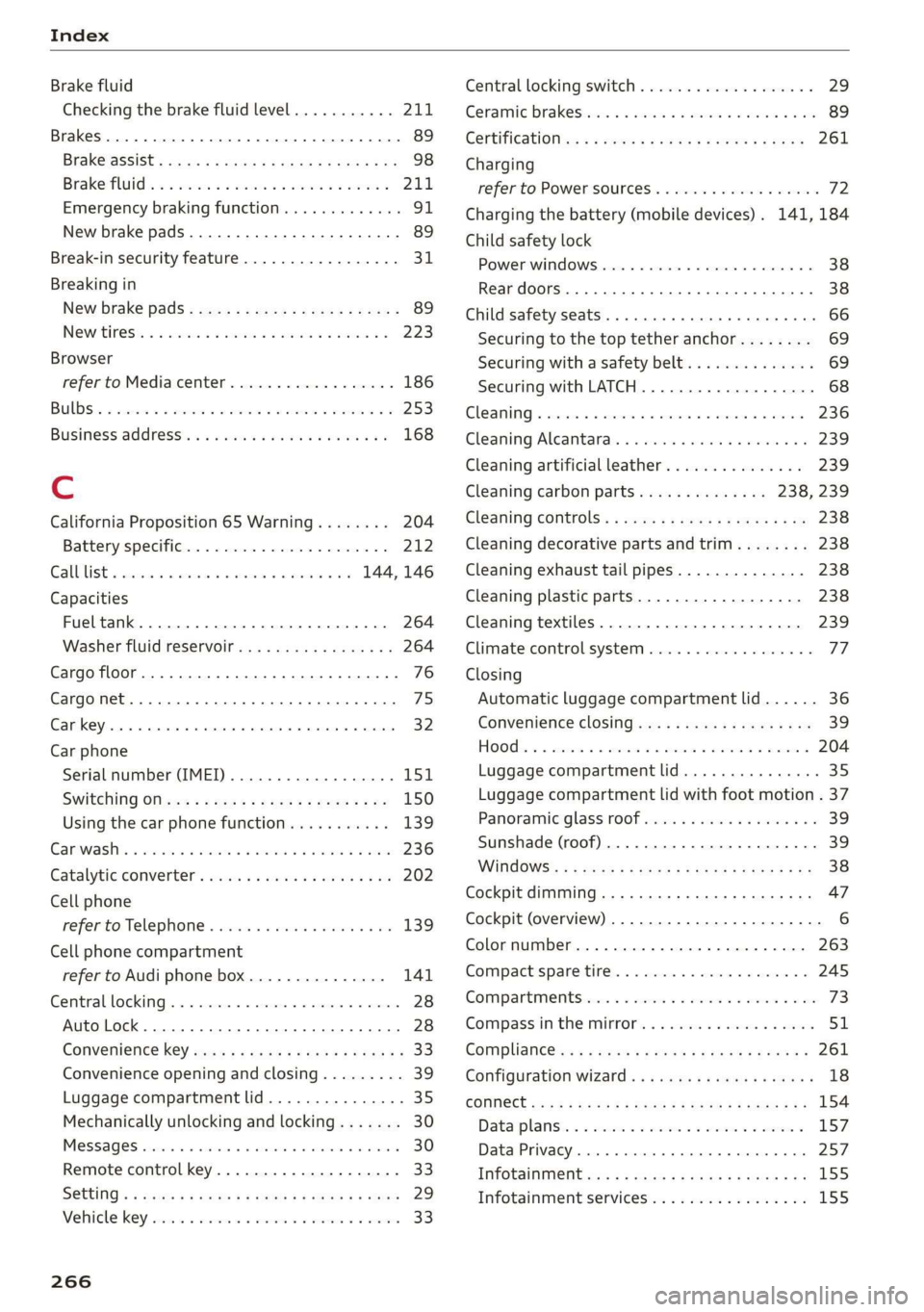
Brake fluid
Checking the brake fluid level........... 211
Brakes... 2... eee eee 89
BrakevassiSt': scase < « seme 2s ae a eee eB: 98
Brakerflidl: «2 cso 2 assim 2 a conse oo emai 9 2A,
Emergency braking function............. 91
New brake pads..............---000-0- 89
Break-in security feature...........-....- 31
Breaking in
New brake pads « sews ss aemy ss ese : eam « 89
New tires: si iwi 2s amie 4 amiss ao oriee a a 223
Browser
refer to Mediacenter................4. 186
BULBS. asceone 2 o seems 2 a cuasenie wo weviens Eww we 253
BUSINESS. Address wie ss aren os ams a oo 168
Cc
California Proposition 65 Warning........ 204
Battery specific...............00.000. 212
Calllist. 00.0... cece eee ene 144, 146
Capacities
Fueltank.....................000005 264
Washer fluid reservoir...............-. 264
Cargo floor... 2.2... eee 76
Cargo net... .... eee eee eee eee ee eee 75
Car key... icc eeeeeeeee 32
Car phone
Serial number (IMEI) ...............05- 151
SWitching Oficws : s sesa s pave a i demas ere 150
Using the car phone function........... 139
GCarwashiss « wes 2 2 awe so wae oo een oe cee 236
Gatalyticconverter', env = s weve sv eewe x vow 202
Cell phone
refer to Telephone ...........eeeee eens 139
Cell phone compartment
refer to Audi phone box............... 141
Central locking.............0 eee eee eee 28
Auto Lock... 2... 0. eee eee eee 28
Convenience key..........-: cece eee ees 33
Convenience opening and closing......... 39
Luggage compartment lid............... 35
Mechanically unlocking and locking....... 30
MeSSAGES wissians oo severe » o scwnare oo acatave ow owen 30
Remote control key.............--.0005 33
SGtting « = sews ¢ o neves ¢ e fewS & e Eetes xo ees 29
Vehicle Key) cress i 2 sccue o 2 eseueve © v eweaue ov erecene 33
266
Central locking switch.................0. 29
Ceramic brakeSrisscs «oases x » owen & 8 averse «0 ae 89
Certificationia: « 2 mews «x enw «2 mews 4 2 eR 261
Charging
refer to Power sourceS...........-000005 72
Charging the battery (mobile devices). 141, 184
Child safety lock
Power windows.........--.00 eee eee ee 38
Rear doors... .... 2... cece ee eee eee 38
Child
safety seats ......... cc cece eee eee ee 66
Securing to the top tether anchor........ 69
Securing with a safety belt.............. 69
Securing with LATCH.................-. 68
Cleaning... ... cece eee eee eee 236
Cleaning Alcantara...............000005 239
Cleaning artificial leather............... 239
Cleaning carbon parts.............. 238, 239
Clédning controls’: « sess << esas x ¥ oes go oe 238
Cleaning decorative parts andtrim........ 238
Cleaning exhaust tail pipes.............. 238
Cleaning plastic parts.................. 238
Cleaning textiles..................000. 239
Climate control system............-..0-- 77
Closing
Automatic luggage compartment lid...... 36
Convenience closing..........0.eeeeees
HOGG sw = aosune x 3 casas 2 smawesce w cuaangos o aeRees
Luggage compartment lid
Luggage compartment lid with foot motion . 37
PanoramicglassirOof wsi« 6 2 susie « e sowsere 9 & 3 39
Sunshade (roof) ..............000000 eee 39
WiTidOWS%: + © sees x ¢ sees co eR i 8 ee Ee 38
Cockpit dimming ..............000e sees 47
Cockpit (overview) .........--.00 022 e eee ee 6
Colornumber..............00c eee e eens 263
Compact:sparestire:. . « sesces so comin ov cesta» 245
COMPArLtMeNtSccses vs ssc ve ees vo meeT vw oes 7
Compass inthe mirror...............0005 51
Compliance:ss + ¢ saws ss eee se cas s ewes 261
Configuration wizard « « « wwe se eee ae came x 18
COMMECE ccscg s Haws ss Here sy HeeE FE ORE Ee 154
Data plans: «= sssen ss cen ov ewan eo crn o 157
Data Privacy..... 0.0... cece eee eee eee 257
INfOtaiiMeNtsen « 3 scam x x em as Ree FS 155
Infotainment services..............0048 155
Page 275 of 280
83A012721BA
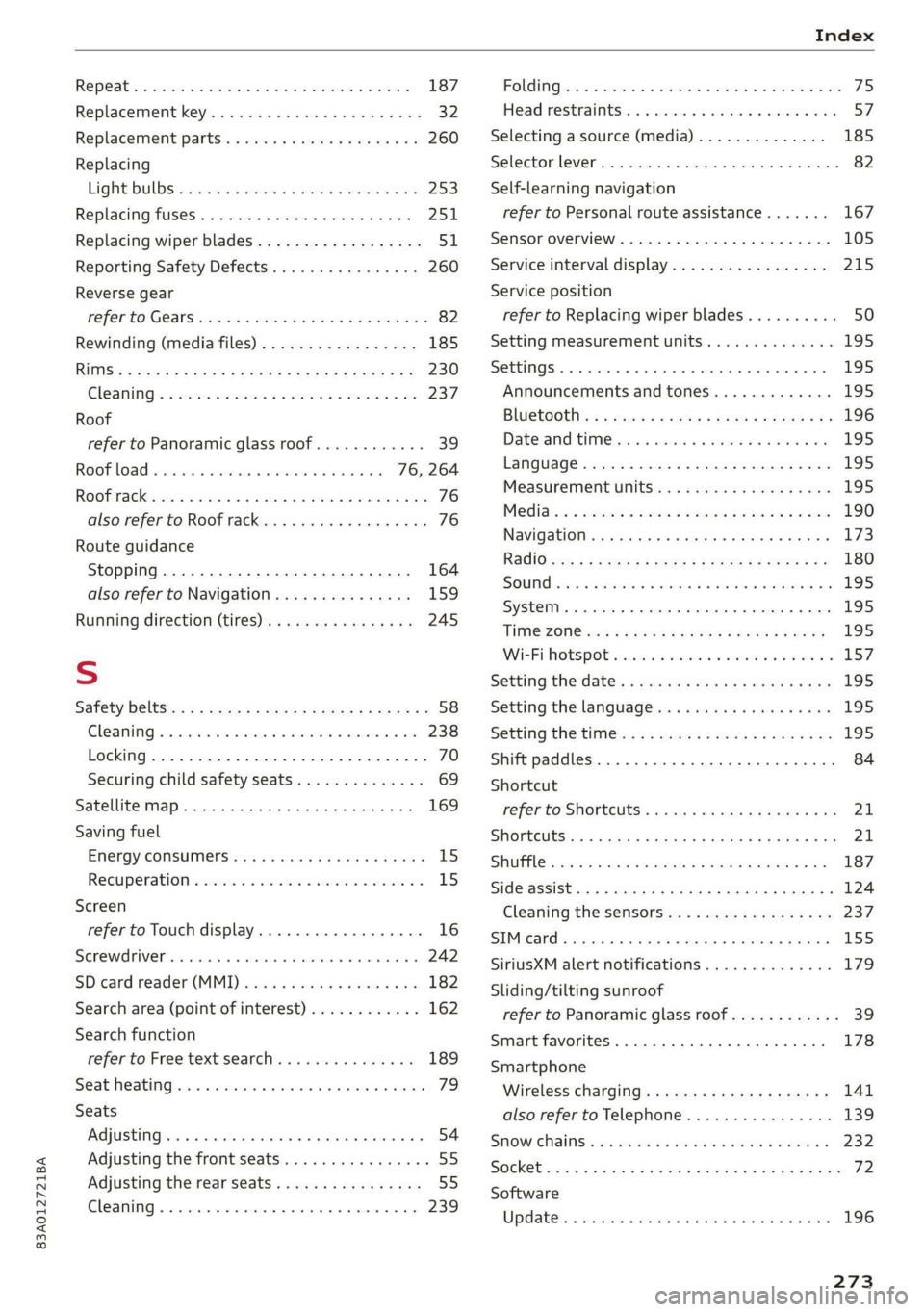
Repeatix « sscemes v & sxcssus os anasaus oo aeeuens v stevens a 187
Replacement key........ 000s eee en eee eee 32
Replacement parts... .....-0secceeeevees 260
Replacing
Light BULBS « seems: swe © 2 aeawoe ¥ evens © 2 253
Replacing fuses. « csv. se even ae nen oo eee 251
Replacing wiper blades................0. 51
Reporting Safety Defects................ 260
Reverse gear
Fefer to Gears seiws «5 sw so wow eo wee 2 Oe 82
Rewinding (media files)................. 185
RUMS*: « aasay = & Qame 2 BREE s BRE Ze OE ees 230
Cleaning « « cessie: a x cnn
Roof
refer to Panoramic glass roof............ 39
Roof load... . 2... cc eee ee eee eee 76, 264
Rooftrackices » 2 sexes #0 waa 6% wii ¥ wenn © © ee 76
also refer to Roof rack..........--...--- 76
Route guidance
Stopping...............0....000000. 164
also refer to Navigation............... 159
Running direction (tires)...........00005 245
S
Safety beltSis:: « s seas 5 « xeme « pews 2 v wees es 58
Cleaning « « ssiws x 6 seis ow sees 2 a oneneen & © ae 238
Locking... .. 0... cece eee eee eee 70
Securing child safety seats.............. 69
Satellite map... .. 22... ee eee eee 169
Saving fuel
EMGtGYy CONSUMERS es: sx wsen 2 wae so Be 8 15
Recuperation « ssc wo cece «vores ow smn vs 15
Screen
refer to Touch display...............005 16
SErEWRIVERs = eveswos 2 5 wise wo aemsnme 6 4 axons © 242
SDicard reader (MMI) swewise © scm ao arene a a ao 182
Search area (point of interest)............ 162
Search function
refer to Free text search............... 189
SEAPMEALING sci 6 & sensine a w sxawere @ w saa @ & aerEOR 79
Seats
Adjusting... 0.0.0... cece cece ee eee 54
Adjusting the front seats................ 55
Adjusting the rearseats................ 55
Cleaning........ 0... cece eee ee eee 239
FOlGIMG secs «wo cnewess oo commen vw aneeens ¥ & commu wo ave 75
Head restraints. ........... 00 cece eee 57
Selecting a source (media).............. 185
Selector lever... 0.0.2... cece eee eee 82
Self-learning navigation
refer to Personal route assistance....... 167
Sensor overvieW.. 1... 0... eee eee 105
Service interval display................. 215
Service position
refer to Replacing wiper blades.......... 50
Setting measurement units.............. 195
SOCEMGS. 6 « snsnane a o wmmnaus wo orawiss % 6 cuienae a a ams 195
Announcements and tones............. 195
BlUGtOOth’s = s cues = seee se pew es deme eee 196
Datezand times «a cessive o ¥ arene 6 2 orevene 4 2 195
Language
Measurement units...........00.0 eee 195
Medias: « 3 scien x o ansane o cenne so ema 2 2 aes 190
Navigation ..... 0... c cece ee eee eee eee 173
RadiOis: s ¢ sees 2 e ees ee es ae eee gee 180
SOUNGb sem: «wena x x anne 3 2 seonee oH MUA oS ¥ 195
System... 2. ee eee eee 195
TiMGZOGinex s 2 eemK oy eees x BoeES eb ES 195
Wi-Fi Hotspot wise ss cso se sere oo oes 2 157
Setting the date’. « ¢ cas ¢ < new 4 e news s ¢ oe 195
Setting the language..........eeee scene 195
Setting the time. ¢ ¢ sees se eens ee ese eee 195
Shift paddles........... 0... cscs eee eee 84
Shortcut
réferto SHOrtcuts « wesa ss eews so wees sa ew 21
SHOFtCUtS:: « = aneu ¢ s qaaw 2 e Sewe sb ee EE ss 21
Shuffle... 2... ee eee eee 187
Side assist... 6... eee eee 124
Cleaning the sensors...............-.. 237
SIMGatd = scios + = S008 4 BERS ¥ BROS FB ORS 155
SiriusXM alert notifications.............. 179
Sliding/tilting sunroof
refer to Panoramic glass roof............ 39
Smart favorites................000000- 178
Smartphone
Wirelessicharging@’s « swiss « 2 gown 2 x same se 141
also refer to Telephone.............065 139
Snow chains: « + sis 2 6 sean so een ee eww 232
SOCKEb ss ss wane 5 x wae & EES & F RoUER XB HEHE 72
Software
Updates « esses ea ciaunee s scare» wenser ao sssoee 196
273