service AUDI Q3 2019 Service Manual
[x] Cancel search | Manufacturer: AUDI, Model Year: 2019, Model line: Q3, Model: AUDI Q3 2019Pages: 280, PDF Size: 72.73 MB
Page 120 of 280
Driver assistance
ZA WARNING
Follow the safety precautions and note the
limits of the assist systems, sensors, and
cameras > page 104.
Adjusting the adaptive cruise assist
Applies to: vehicles with adaptive cruise assist
You can adjust the adaptive cruise assist to your
own preferences. The settings depend on the ve-
hicle equipment.
> Applies to: MMI: Select on the home screen:
VEHICLE > Driver assistance > Adaptive cruise
assist.
Possible settings:
Applies to: vehicles without Audi drive select
Driving program - Depending on the selected
driving program and distance, the vehicle han-
dling will be adjusted from Sport to Moderate.
Applies to: vehicles with Audi drive select
Vehicle handling will be adjusted based on the
set distance and the selected Audi drive select
mode > page 96.
Store last distance - The last distance that was
set will be stored after the ignition is switched
off. If the distance is not stored, distance [fz
(time distance of approximately 1.8 seconds) is
automatically preset every time the ignition is
switched on.
Messages
Applies to: vehicles with adaptive cruise assist
If or fal is displayed when there is a malfunc-
tion, the adaptive cruise assist functions may be
unavailable or limited.
A message that indicates the cause and possible
solution may appear with some displays. The
weather conditions may be too poor or a sensor
may be covered. Clean the area in front of the
sensors > page 105, fig. 87 and try to turn on
the systems again later.
118
If the malfunction remains, drive to an author-
ized Audi dealer or authorized Audi Service Facili-
ty immediately to have the malfunction correct-
ed.
Please take over!
This message appears if the vehicle rolls back
when starting on a slight incline, even though the
systems are active. Press the brake pedal to pre-
vent the vehicle from rolling or starting to move.
G) Tips
Always keep your hands on the steering
wheel. The driver is always responsible for ad-
hering to the regulations applicable in the
country where the vehicle is being operated.
Distance warning
Applies to: vehicles with distance warning
S| 3 1?) IN| Iz jac
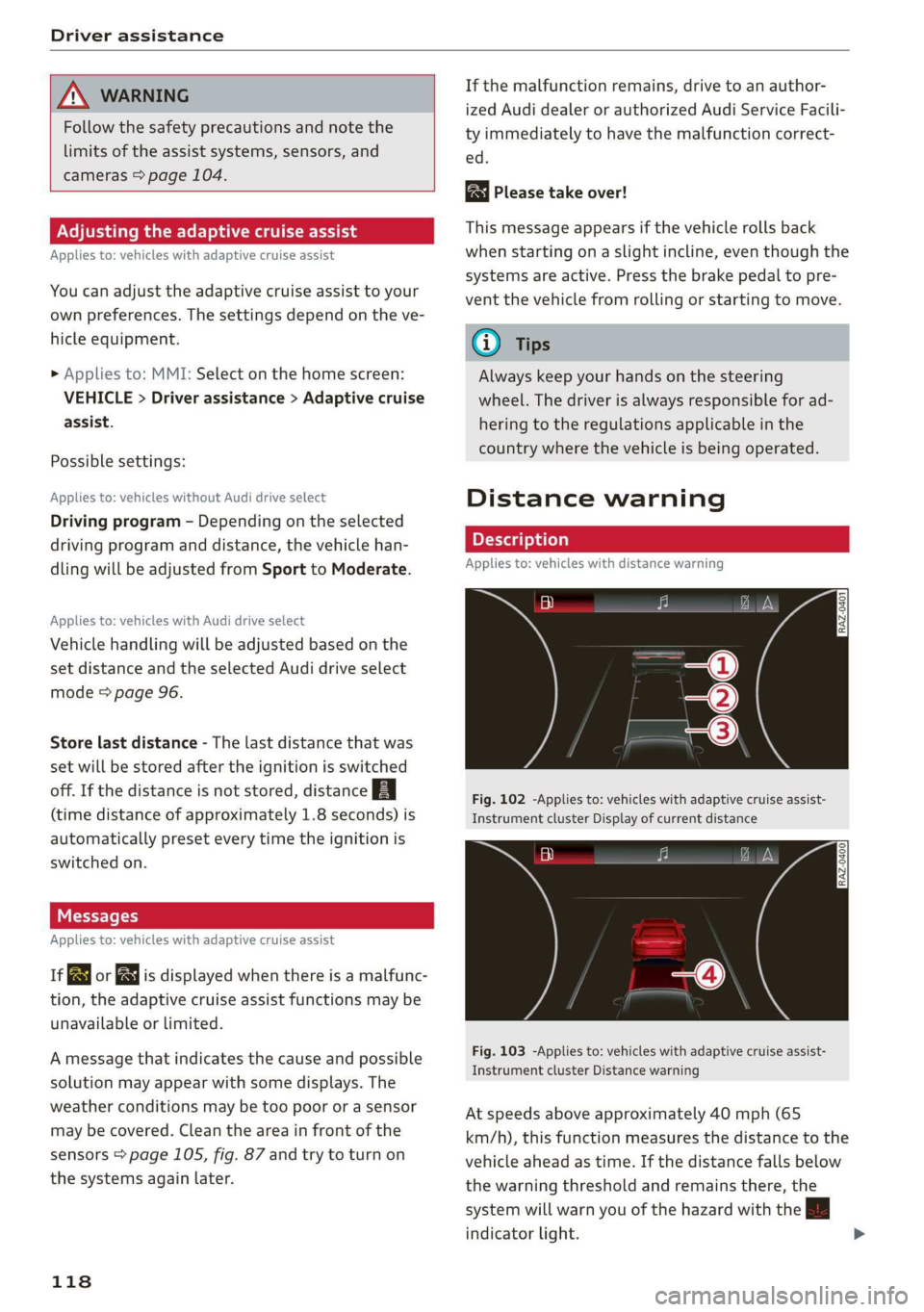
Fig. 102 -Applies to: vehicles with adaptive cruise assist-
Instrument cluster Display of current distance
RAZ-0400
Fig. 103 -Applies to: vehicles with adaptive cruise assist-
Instrument cluster Distance warning
At speeds above approximately 40 mph (65
km/h), this function measures the distance to the
vehicle ahead as time. If the distance falls below
the warning threshold and remains there, the
system will warn you of the hazard with the BB
indicator light.
Page 121 of 280
83A012721BA
Driver assistance
Image in the Driver assistance display
Applies to: vehicles with adaptive cruise assist
The display only appears if the Driver assistance
display is selected on the on-board computer
= page 14 and the adaptive cruise assist is not
actively controlling the vehicle.
@ Detected vehicle driving ahead
@ Use the markings to help you estimate the
distance to an obstacle. Each marking repre-
sents approximately one second.
@®) Set warning threshold. Depending on the set-
tings, the display will be colored in from the
bottom to the top.
@ You will be warned as soon as you fall below
the set distance.
Adjusting the distance warning
The system can be switched on or off in the MMI
and you can customize the distance warning
threshold. The settings depend on the vehicle
equipment.
— Applies to: MMI: Select on the home screen:
VEHICLE > Driver assistance > Distance warn-
ing.
Messages
irk or is displayed when there is a malfunc-
tion, the distance warning functions may be un-
available or may be limited.
A message that indicates the cause and possible
solution may appear with some displays. The
weather conditions may be too poor or a sensor
may be covered. Clean the area in front of the
sensors > page 105, fig. 87 and try to turn on
the systems again later.
If the malfunction remains, drive to an author-
ized Audi dealer or authorized Audi Service Facili-
ty immediately to have the malfunction correct-
ed.
Z\ WARNING
Follow the safety precautions and note the
limits of the assist systems, sensors, and
cameras > page 104.
@) Tips
— The driver is always responsible for adhering
to the regulations applicable in the country
where the vehicle is being operated.
— You may fall below the warning threshold
briefly when passing or when quickly ap-
proaching a vehicle driving ahead. There is
no warning in this scenario. A warning is giv-
en only if you fall below the warning thresh-
old for an extended period of time.
Lane departure warning
General information
Applies to: vehicles with lane departure warning
The lane departure warning can detect lane
marker lines within the limits of the system. If
you are approaching a detected lane marker and
it appears likely that you will leave the lane, the
system can warn you with corrective steering and
a steering wheel vibration, if necessary.
The system functions in the speed range of ap-
proximately 40 mph - 155 mph (65 km/h -
250 km/h).
Applies to: vehicles with lane departure warning
and without side assist: The system will not warn
you before crossing a lane marker line if you have
activated the turn signal. In this case, it assumes
that you are changing lanes intentionally.
Applies to: vehicles with lane departure warning
combined with side assist: A noticeable corrective
steering movement will occur briefly before the
vehicle exits the lane if the turn signal is activat-
ed, the lane departure warning is ready, and a
lane change has been classified as critical by the
system due to vehicles traveling beside you or
due to approaching vehicles. This will attempt to
keep your vehicle in the lane.
Z\ WARNING
Follow the safety precautions and note the
limits of the assist systems, sensors, and
cameras > page 104.
119
Page 123 of 280
83A012721BA
Driver assistance
@) Tips
— Always keep your hands on the steering
wheel. The driver is always responsible for
adhering to the regulations applicable in
the country where the vehicle is being oper-
ated.
— The system does not provide any corrective
steering or steering wheel vibrations if it de-
tects that you are passing another vehicle.
ONT em MT Me() Sade em ea Tale)
Applies to: vehicles with lane departure warning
You can switch the optional steering wheel vibra-
tion warning for the lane departure warning on
and off. The settings depend on the vehicle
equipment.
— Applies to: MMI: Select on the home screen:
VEHICLE > Driver assistance > Lane departure
warning > Vibration warning.
Messages
Applies to: vehicles with lane departure warning
ir or is displayed when there is a malfunc-
tion, the lane assist/lane departure warning may
be unavailable or may be limited.
A message that indicates the cause and possible
solution may appear with some displays. The
weather conditions may be too poor or the cam-
era may be covered. Clean the area in front of the
camera > page 106, fig. 88 and try to turn on the
systems again later.
If the malfunction remains, drive to an author-
ized Audi dealer or authorized Audi Service Facili-
ty immediately to have the malfunction correct-
ed.
Lane departure warning: please drive in the cen-
ter of the lane!
This message appears and an audio signal sounds
if the lane departure warning must intervene for
a long period of time.
& Please take over steering!
This message appears if steering activity is no
longer detected and the vehicle comes close to
leaving the lane multiple times. Always keep your
hands on the steering wheel so you can be ready
to steer at any time. The lane departure warning
is switched on but not ready to provide warnings.
G@) Tips
Always keep your hands on the steering
wheel. The driver is always responsible for ad-
hering to the regulations applicable in the
country where the vehicle is being operated.
Audi pre sense
Introduction
Applies to: vehicles with Audi pre sense
Within the limits of the system, the Audi pre
sense functions can initiate measures in certain
driving situations to protect the vehicle occu-
pants and other road users. Depending on the ve-
hicle equipment, various Audi pre sense systems
may
be installed:
— Audi pre sense basic can react during emergen-
cy and dangerous braking maneuvers and un-
stable driving situations (such as oversteering
or understeering).
— Audi pre sense front can detect an impending
frontal impact and react with warnings, braking
interventions, and preemptive safety measures
for the vehicle occupants.
Audi pre sense preemptive safety measures
Applies to: vehicles with Audi pre sense
Depending on the vehicle speed and the vehicle
equipment, the following functions may be initi-
ated in certain situations:
— Visual and audio warnings
— Reversible tensioning of the front safety belts
— Closing the windows and panoramic glass roof
ZA\ WARNING
Follow the safety precautions and note the
limits of the assist systems, sensors, and
cameras > page 104. >
121
Page 126 of 280
Driver assistance
vehicle onto a vehicle carrier, train, ship, or
other type of transportation, or when tow-
ing the vehicle. This can help to prevent an
undesired intervention from the Audi pre
sense system.
Messages
Applies to: vehicles with Audi pre sense
ry ° is displayed when there is a malfunc-
tion, the Audi pre sense functions may be un-
available or may be limited.
A message that indicates the cause and possible
solution may appear with some displays. The
weather conditions may be too poor or a sensor
may be covered. Clean the area in front of the
sensors > page 105, fig. 87 and try to turn on
the systems again later.
If the malfunction remains, drive to an author-
ized Audi dealer or authorized Audi Service Facili-
ty immediately to have the malfunction correct-
ed.
Side assist
pled foda Coda)
Applies to: vehicles with side assist
RAZ-0169|
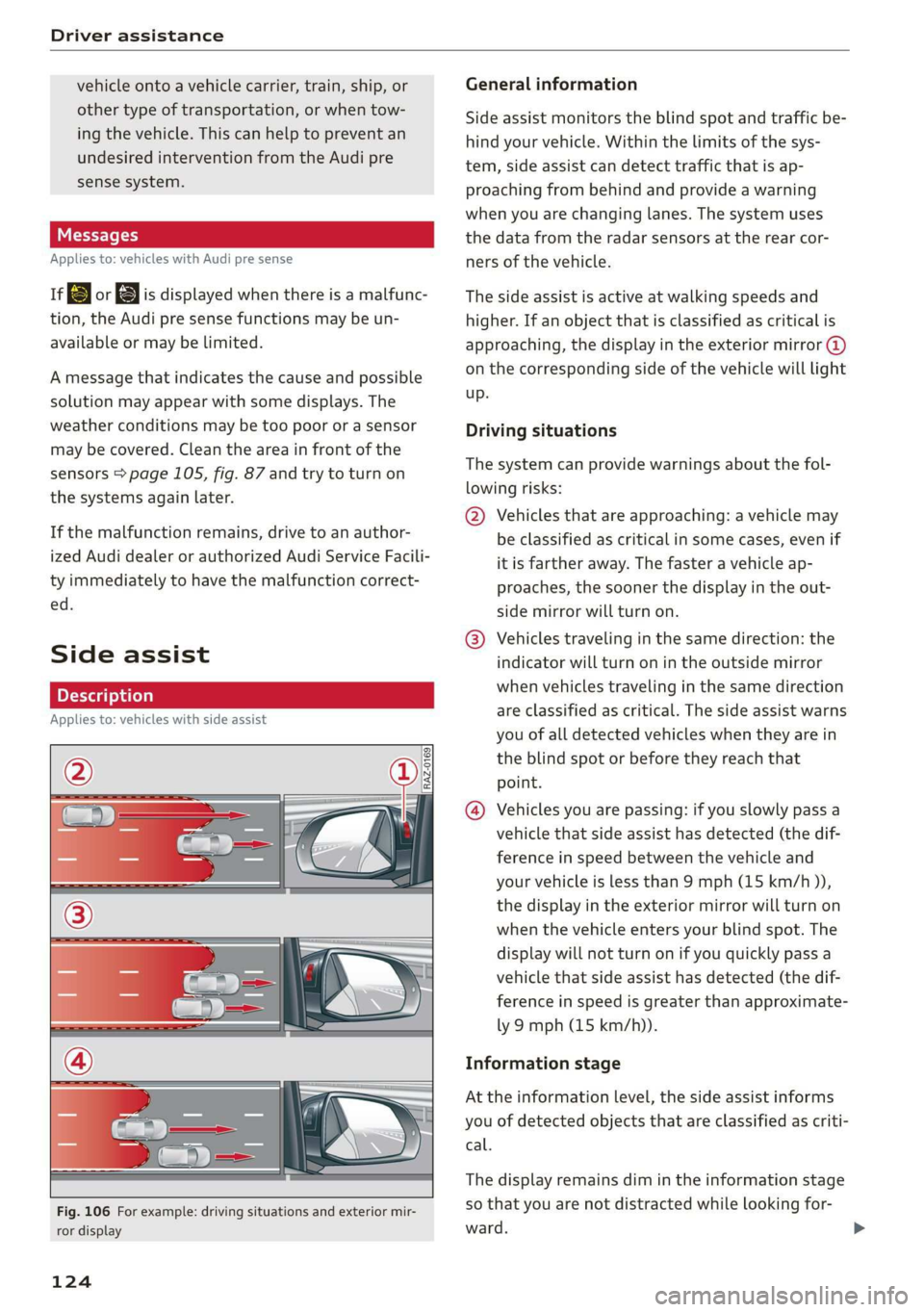
Fig. 106 For example: driving situations and exterior mir-
ror display
124
General information
Side assist monitors the blind spot and traffic be-
hind your vehicle. Within the limits of the sys-
tem, side assist can detect traffic that is ap-
proaching from behind and provide a warning
when you are changing lanes. The system uses
the data from the radar sensors at the rear cor-
ners of the vehicle.
The side assist is active at walking speeds and
higher. If an object that is classified as critical is
approaching, the display in the exterior mirror @)
on the corresponding side of the vehicle will light
up.
Driving situations
The system can provide warnings about the fol-
lowing risks:
@ Vehicles that are approaching: a vehicle may
be classified as critical in some cases, even if
it is farther away. The faster a vehicle ap-
proaches, the sooner the display in the out-
side mirror will turn on.
@® Vehicles traveling in the same direction: the
indicator will turn on in the outside mirror
when vehicles traveling in the same direction
are classified as critical. The side assist warns
you of all detected vehicles when they are in
the blind spot or before they reach that
point.
@ Vehicles you are passing: if you slowly pass a
vehicle that side assist has detected (the dif-
ference in speed between the vehicle and
your vehicle is less than 9 mph (15 km/h )),
the display in the exterior mirror will turn on
when the vehicle enters your blind spot. The
display will not turn on if you quickly pass a
vehicle that side assist has detected (the dif-
ference in speed is greater than approximate-
ly 9 mph (15 km/h)).
Information stage
At the information level, the side assist informs
you of detected objects that are classified as criti-
cal.
The display remains dim in the information stage
so that you are not distracted while looking for-
ward.
Page 128 of 280
Driver assistance
If the malfunction remains, drive to an author-
ized Audi dealer or authorized Audi Service Facili-
ty immediately to have the malfunction correct-
ed.
126
Page 130 of 280
Parking and maneuvering
ZA WARNING
Follow the safety precautions and note the
limits of the assist systems, sensors, and
cameras > page 104.
@) Note
Keep enough distance from the curb to avoid
damage to the rims.
G) Tips
If the parking aid is switched off, it can only
be reactivated automatically when one of the
following conditions is met:
— The vehicle speed exceeds 6 mph (10 km/h)
— The ignition is switched off and back on
again
— The parking brake is set and then released
— The "P" gear is engaged and released again
Applies to: vehicles with parking system plus
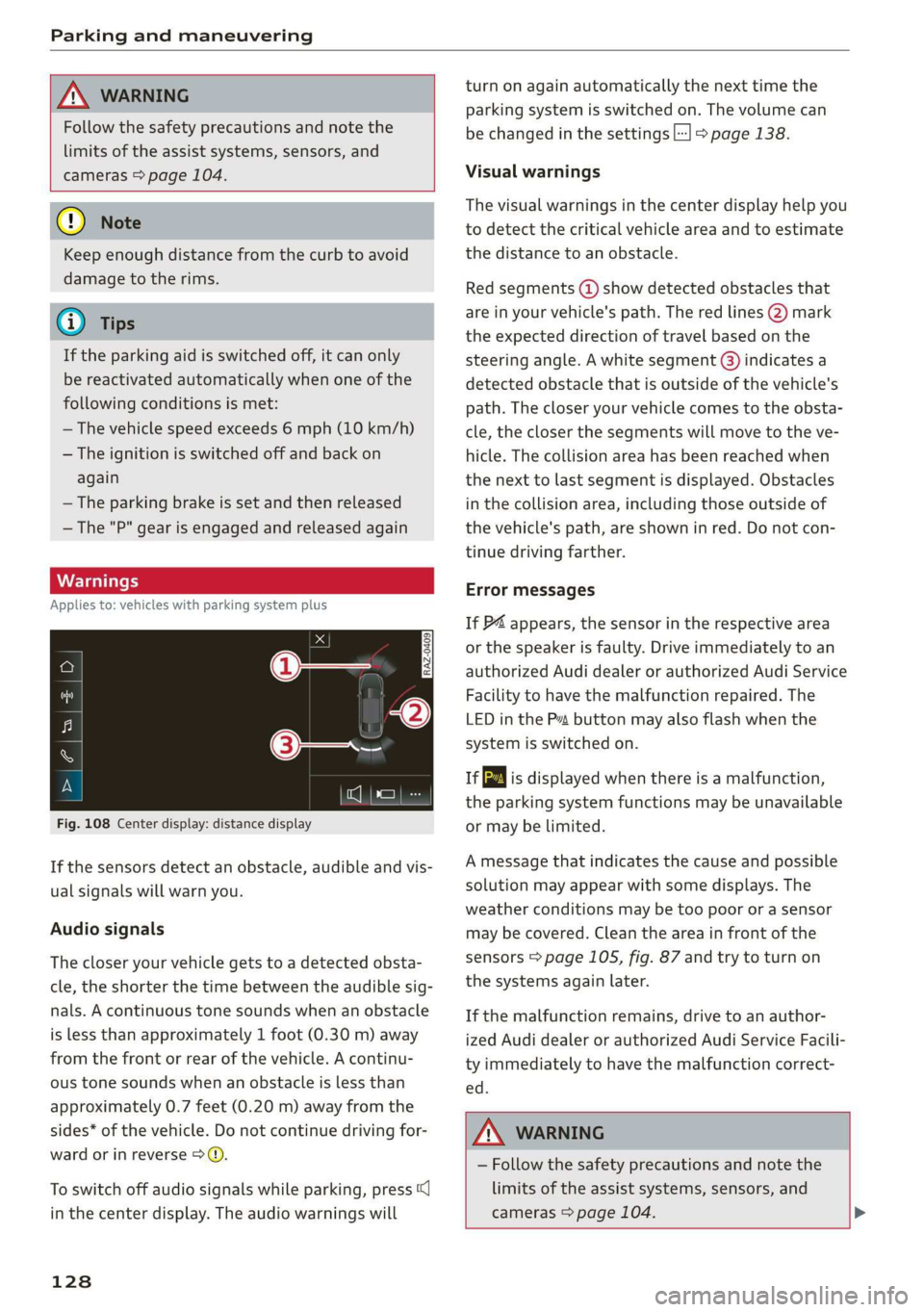
Fig. 108 Center display: distance display
If the sensors detect an obstacle, audible and vis-
ual signals will warn you.
Audio signals
The closer your vehicle gets to a detected obsta-
cle, the shorter the time between the audible sig-
nals. A continuous tone sounds when an obstacle
is less than approximately 1 foot (0.30 m) away
from the front or rear of the vehicle. A continu-
ous tone sounds when an obstacle is less than
approximately 0.7 feet (0.20 m) away from the
sides* of the vehicle. Do not continue driving for-
ward or in reverse >.
To switch off audio signals while parking, press
in the center display. The audio warnings will
128
turn on again automatically the next time the
parking system is switched on. The volume can
be changed in the settings |] > page 138.
Visual warnings
The visual warnings in the center display help you
to detect the critical vehicle area and to estimate
the distance to an obstacle.
Red segments (2) show detected obstacles that
are in your vehicle's path. The red lines (2) mark
the expected direction of travel based on the
steering angle. A white segment @) indicates a
detected obstacle that is outside of the vehicle's
path. The closer your vehicle comes to the obsta-
cle, the closer the segments will move to the ve-
hicle. The collision area has been reached when
the next to last segment is displayed. Obstacles
in the collision area, including those outside of
the vehicle's path, are shown in red. Do not con-
tinue driving farther.
Error messages
If P4 appears, the sensor in the respective area
or the speaker is faulty. Drive immediately to an
authorized Audi dealer or authorized Audi Service
Facility to have the malfunction repaired. The
LED
in the Ps button may also flash when the
system is switched on.
ff is displayed when there is a malfunction,
the parking system functions may be unavailable
or may be limited.
A message that indicates the cause and possible
solution may appear with some displays. The
weather conditions may be too poor or a sensor
may be covered. Clean the area in front of the
sensors > page 105, fig. 87 and try to turn on
the systems again later.
If the malfunction remains, drive to an author-
ized Audi dealer or authorized Audi Service Facili-
ty immediately to have the malfunction correct-
ed.
Z\ WARNING
— Follow the safety precautions and note the
limits of the assist systems, sensors, and
cameras > page 104. >
Page 133 of 280
83A012721BA
Parking and maneuvering
or a door or the luggage compartment lid may
have been opened.
If # is displayed, there is a system malfunction
and the display area represented by that symbol
is not available. The camera is not working in this
area.
If one of the symbols continues to be displayed,
drive immediately to an authorized Audi dealer or
authorized Audi Service Facility to have the mal-
function repaired.
IX WARNING
— Follow the safety precautions and note the
limits of the assist systems, sensors, and
cameras > page 104.
— Sensors and cameras have spots in which
the surrounding area cannot be detected.
Objects, animals, and people may only be
detected with limitations may not be detect-
ed at all. Always monitor the traffic and the
vehicle's surroundings directly and do not
become distracted.
@) Note
— The orange orientation lines @ show the di-
rection the rear of the vehicle will be travel-
ing, based on the steering wheel angle. The
front of the vehicle swings out more than
the rear of the vehicle. Maintain plenty of
distance so that an exterior mirror or a cor-
ner of the vehicle does not collide with any
obstacles.
— Keep enough distance from the curb to
avoid damage to the rims.
— Only use the images provided by the camera
on the rear of the vehicle when the luggage
compartment lid is completely closed. Make
sure any objects you may have mounted on
the luggage compartment lid do not block
the rearview camera.
@) Tips
There is no distance warning for the rear and
the sides* when trailer towing mode is detect-
ed. The front sensors remain activated. The
visual display switches to trailer mode. The
rearview camera image will not show the ori-
entation lines and the blue surfaces. There is
no guarantee the functions will switch off
when using a retrofitted trailer hitch.
CO) eee mat eel ee
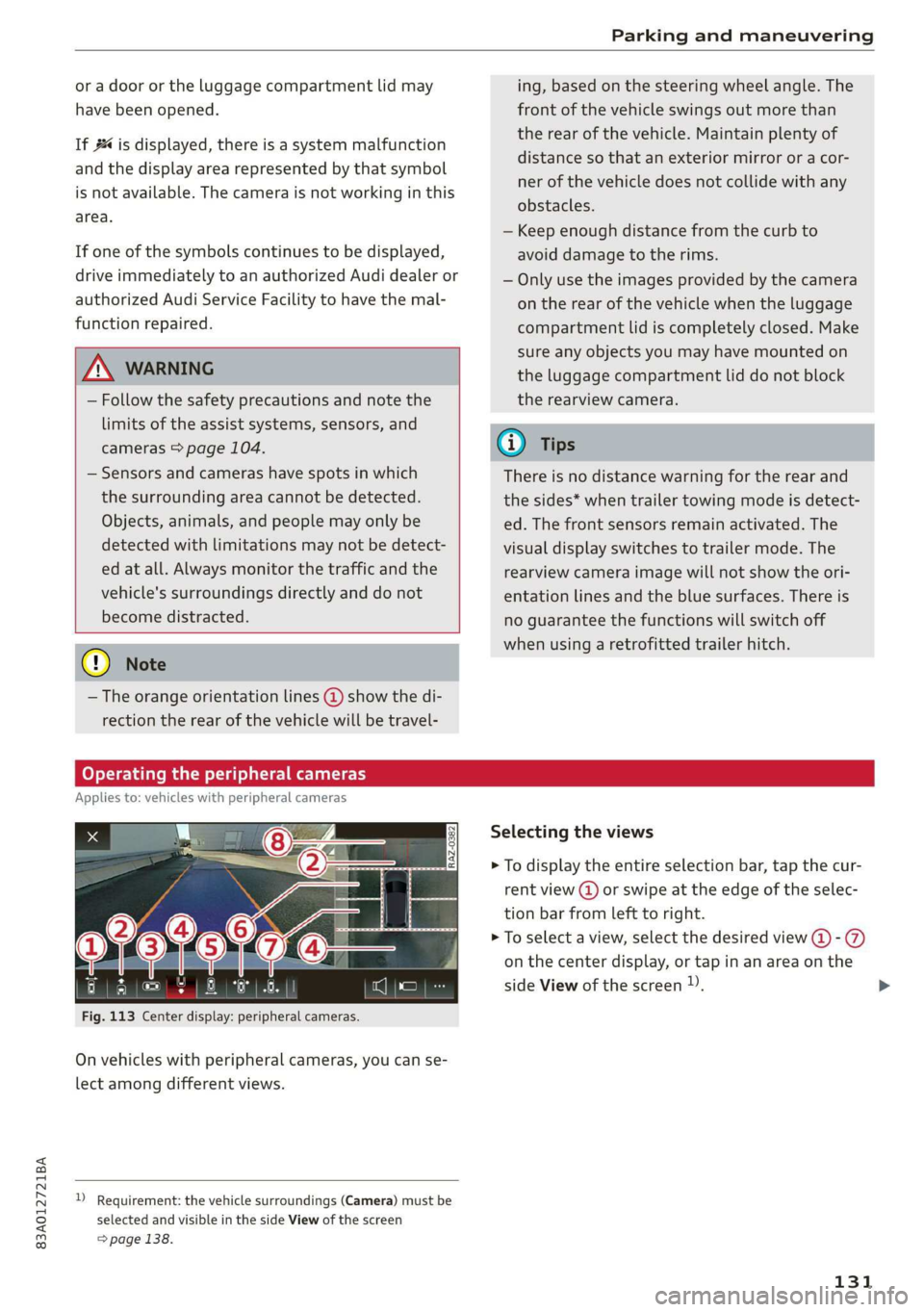
Applies to: vehicles with peripheral cameras
Fig. 113 Center display: peripheral cameras.
On vehicles with peripheral cameras, you can se-
lect among different views.
) Requirement: the vehicle surroundings (Camera) must be
selected and visible in the side View of the screen
=> page 138.
Selecting the views
> To display the entire selection bar, tap the cur-
rent view (@) or swipe at the edge of the selec-
tion bar from left to right.
> To select a view, select the desired view @-@
on the center display, or tap in an area on the
side View of the screen )).
131
Page 135 of 280
83A012721BA
Parking and maneuvering
Rear cross-traffic assist
Applies to: vehicles with rear cross-traffic assist
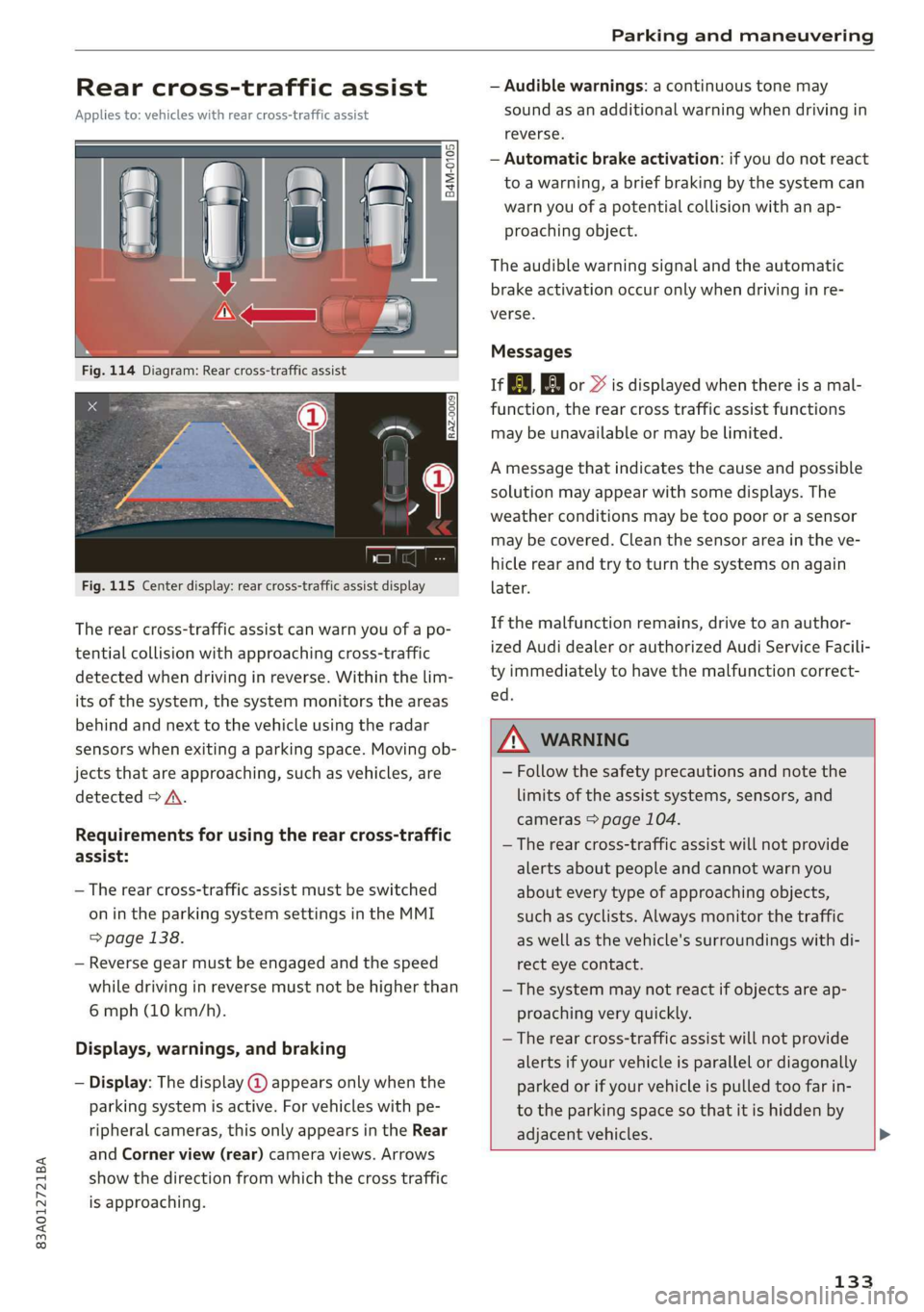
Fig. 115 Center display: rear cross-traffic assist display
The rear cross-traffic assist can warn you of a po-
tential collision with approaching cross-traffic
detected when driving in reverse. Within the lim-
its of the system, the system monitors the areas
behind and next to the vehicle using the radar
sensors when exiting a parking space. Moving ob-
jects that are approaching, such as vehicles, are
detected > A.
Requirements for using the rear cross-traffic
assist:
— The rear cross-traffic assist must be switched
on in the parking system settings in the MMI
> page 138.
— Reverse gear must be engaged and the speed
while driving in reverse must not be higher than
6 mph (10 km/h).
Displays, warnings, and braking
— Display: The display @ appears only when the
parking system is active. For vehicles with pe-
ripheral cameras, this only appears in the Rear
and Corner view (rear) camera views. Arrows
show the direction from which the cross traffic
is approaching.
— Audible warnings: a continuous tone may
sound as an additional warning when driving in
reverse.
— Automatic brake activation: if you do not react
to a warning, a brief braking by the system can
warn you of a potential collision with an ap-
proaching object.
The audible warning signal and the automatic
brake activation occur only when driving in re-
verse.
Messages
if or > is displayed when there is a mal-
function, the rear cross traffic assist functions
may be unavailable or may be limited.
A message that indicates the cause and possible
solution may appear with some displays. The
weather conditions may be too poor or a sensor
may be covered. Clean the sensor area in the ve-
hicle rear and try to turn the systems on again
later.
If the malfunction remains, drive to an author-
ized Audi dealer or authorized Audi Service Facili-
ty immediately to have the malfunction correct-
ed.
ZX WARNING
— Follow the safety precautions and note the
limits of the assist systems, sensors, and
cameras > page 104.
— The rear cross-traffic assist will not provide
alerts about people and cannot warn you
about every type of approaching objects,
such as cyclists. Always monitor the traffic
as well as the vehicle's surroundings with di-
rect eye contact.
— The system may not react if objects are ap-
proaching very quickly.
— The rear cross-traffic assist will not provide
alerts if your vehicle is parallel or diagonally
parked or if your vehicle is pulled too far in-
to the parking space so that it is hidden by
adjacent vehicles.
133
Page 140 of 280
Parking and maneuvering
Interrupting the park assists
Applies to: vehicles with park assist
Park assist will be canceled automatically in the
following scenarios:
— You switch the system off.
— You start steering.
— The speed is too high.
— The time limit is exceeded.
— An obstacle is detected.
— ESC intervenes.
Resume control of the vehicle, end the parking
Process manually, or:
— You can resume the parking process in some sit-
uations. Press the Pe button.
— To continue exiting the parking space, switch
the engine off and on. Press the Pe button.
Z\ WARNING
Follow the safety precautions and note the
limits of the assist systems, sensors, and
cameras > page 104.
Applies to: vehicles with park assist
If the roe" indicator light turns on, the park
assist is not available or was interrupted. The dis-
played message indicates the cause and possible
solutions. Try switching the systems on again lat-
er. If one of the messages does not turn off, drive
immediately to an authorized Audi dealer or au-
thorized Audi Service Facility to have the mal-
function repaired.
Adjusting the parking
aids
You can adjust the parking aid to your preferen-
ces. The settings depend on the vehicle equip-
ment.
> Applies to: MMI: Select on the home screen:
VEHICLE > Parking aid.
> Applies to: MMI: Select L-] in the center display
when the parking system is active.
Possible settings:
138
Activating automatically
Trailer view - Shows the trailer view. In vehicles
with peripheral cameras, this can only be opened
in the Rear view.
View - Switches between the visual display
(Graphic) and vehicle surroundings (Camera) in
the side view on the screen.
Front volume - Volume for the front and side*
area.
Rear volume - Volume for the rear area.
Entertainment fader - The volume of the audio/
video source is lowered when the parking system
is turned on.
Rear cross-traffic assist
@) Tips
The new level is demonstrated briefly* when
the volume is adjusted.
Page 141 of 280
83A012721BA
Telephone
Telephone
Introduction
Applies to: vehicles with telephone
You can make calls in your vehicle using the MMI.
You have various options for this depending on
the vehicle equipment and the range of functions
on your cell phone.
Handsfree
Once you have connected your mobile device to
the MMI via Bluetooth, you can use the hands-
free system. You can make calls using the anten-
na on your mobile device.
Car
phone function
Applies to: vehicles with car phone
In conjunction with Audi connect Infotainment*,
the car phone function ) is available via an em-
bedded SIM card.
With the car phone function and the Audi phone
box*, calls are made using the exterior antenna
on the vehicle. Using the external antenna helps
when there is a low signal and also provides bet-
ter reception quality > page 141.
or may not be able to dial it at all. Dial the
emergency number manually.
— Switch your mobile device off in areas where
there is a risk of an explosion. These loca-
tions are not always clearly marked. This
may include gas stations, fuel and chemical
storage facilities or transport vehicles, or lo-
cations where fuel vapors (such as propane
or gasoline vapor in vehicles or buildings),
chemicals or large quantities of dust parti-
cles (such as flour, sawdust or metal) may
be present in the air. This also applies to all
other locations where you would normally
turn your vehicle engine off.
— The demands of traffic require your full at-
tention. Always read the chapter > page 18,
Traffic safety information.
Z\ WARNING
— Medical experts warn that mobile devices
can interfere with the function of pacemak-
ers. Always maintain a minimum distance of
about 7.9 inches (20 cm) between the mo-
bile device antennas and the pacemaker.
— Do not carry the mobile device in a pocket
directly over the pacemaker when the
phone is switched on.
— Switch the mobile device off immediately
if you suspect it may be interfering with
the pacemaker.
— Do not use the voice recognition system*
= page 24 in emergencies because your
voice may change in stressful situations. The
system may take longer to dial the number
1) Not available in all countries. Only in conjunction with Au-
di connect Infotainment* and Audi phone box*.
2) SIM card installed in the vehicle at the factory.
3) Not available in all countries.
q@) Note
Read the information about Audi connect, and
be sure to note the connectivity costs section
=> page 154.
(Gi) Tips
— The Bluetooth connection range is limited
to inside the vehicle. It can also be affected
by local conditions and interference with
other devices.
—To learn which Bluetooth connections and
which of the functions in your mobile device
are supported, check with your mobile de-
vice service provider or the database for mo-
bile devices at www.audiusa.com/
bluetooth.
— If you use the car phone function’, it is rec-
ommended to use the Wi-Fi hotspot* in the
vehicle > page 155 so that the apps on your
mobile device continue to have Internet ac-
cess.
— When the car phone function* is active, Audi
connect Infotainment* is available through
the embedded SIM card2)3).
139