ECU AUDI Q5 2013 User Guide
[x] Cancel search | Manufacturer: AUDI, Model Year: 2013, Model line: Q5, Model: AUDI Q5 2013Pages: 316, PDF Size: 78.89 MB
Page 80 of 316
78 Seats and storage
@ Tips
Other accessories or objects such as an
umbrella from the Audi accessories pro
grams can be secured on the multi-use at
tachment.
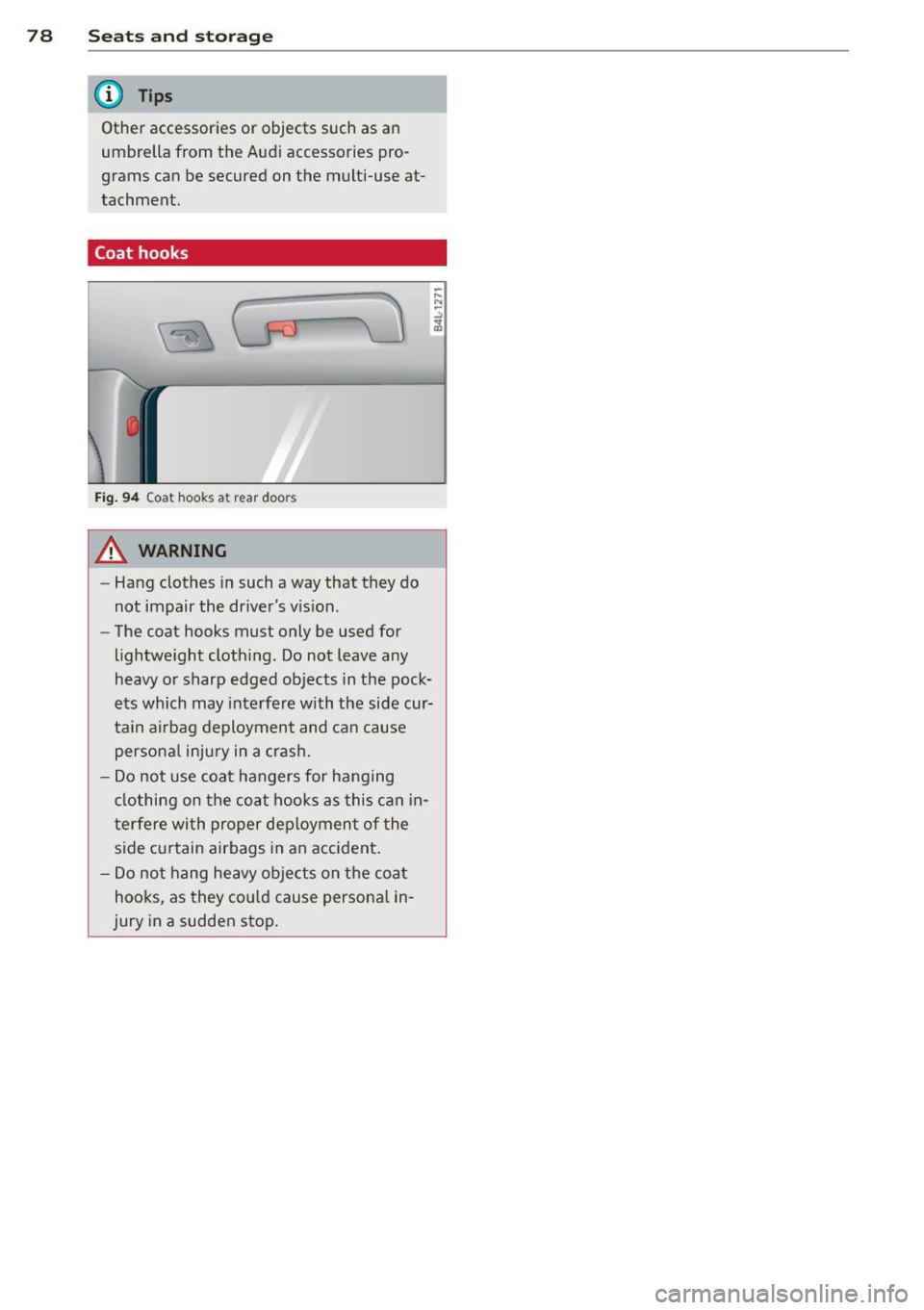
Coat hooks
Fig. 94 Coat hooks at rear doors
A WARNING
-Hang clothes in such a way that they do
not impair the driver's vis ion.
- The coat hooks must only be used for
lightweight clothing. Do not leave any
heavy or sharp edged objects in the pock
ets which may interfere with the side cur
tain airbag deployment and can cause
personal injury in a crash.
- Do not use coat hangers for hanging
clothing on the coat hooks as this can in
terfere with proper deployment of the
side curtain airbags in an accident.
- Do not hang heavy objects on the coat
hooks, as they could cause personal in
jury in a sudden stop.
Page 100 of 316
98 Hybrid -Do not transport fluids in open contain
ers in the luggage compartment. Spilled
fluids can seep underneath the cargo
floor. This can damage the high voltage
system.
Starting the vehicle
App lies to vehicles: with hybrid drive
The vehicle is started and turned off either
with the ignition key~
page 83 or with the
I START ENGIN E STOP ! button* ~ page 86 in
the same way as a conventional vehicle .
When starting the vehicle, the needles in the instrument cluster move upward briefly .
When the vehicle enters drive ready mode,
the status message
hybrid ready appears
briefly in the instrument cluster display and
the needle in the power meter points to
READY ~ page 98.
Depending on the operation mode of the hy
brid system, there are two possible drive
ready modes after the vehicle has been start
ed:
Power meter overview
Applies to vehicles: with hybrid dr ive
Drive ready mode with combustion engine
If the operating requirements~ page 100 for
electric drive mode are
not met, the combus
tion engine starts the vehicle as usual. You can start driving as usual.
Drive ready mode with the electric motor
If the operating requirements~ page 100 for
the electric drive mode are met, the combus
tion engine remains off after starting the ve
hicle.
(0 Tips
To prevent the 12 volt battery from dis
charging, never leave the vehicle parked in
the drive ready mode. Remove the key
from the ignition or press the
I START ENGINE STOP! button* . When
leaving the vehicle always take the key
with you.
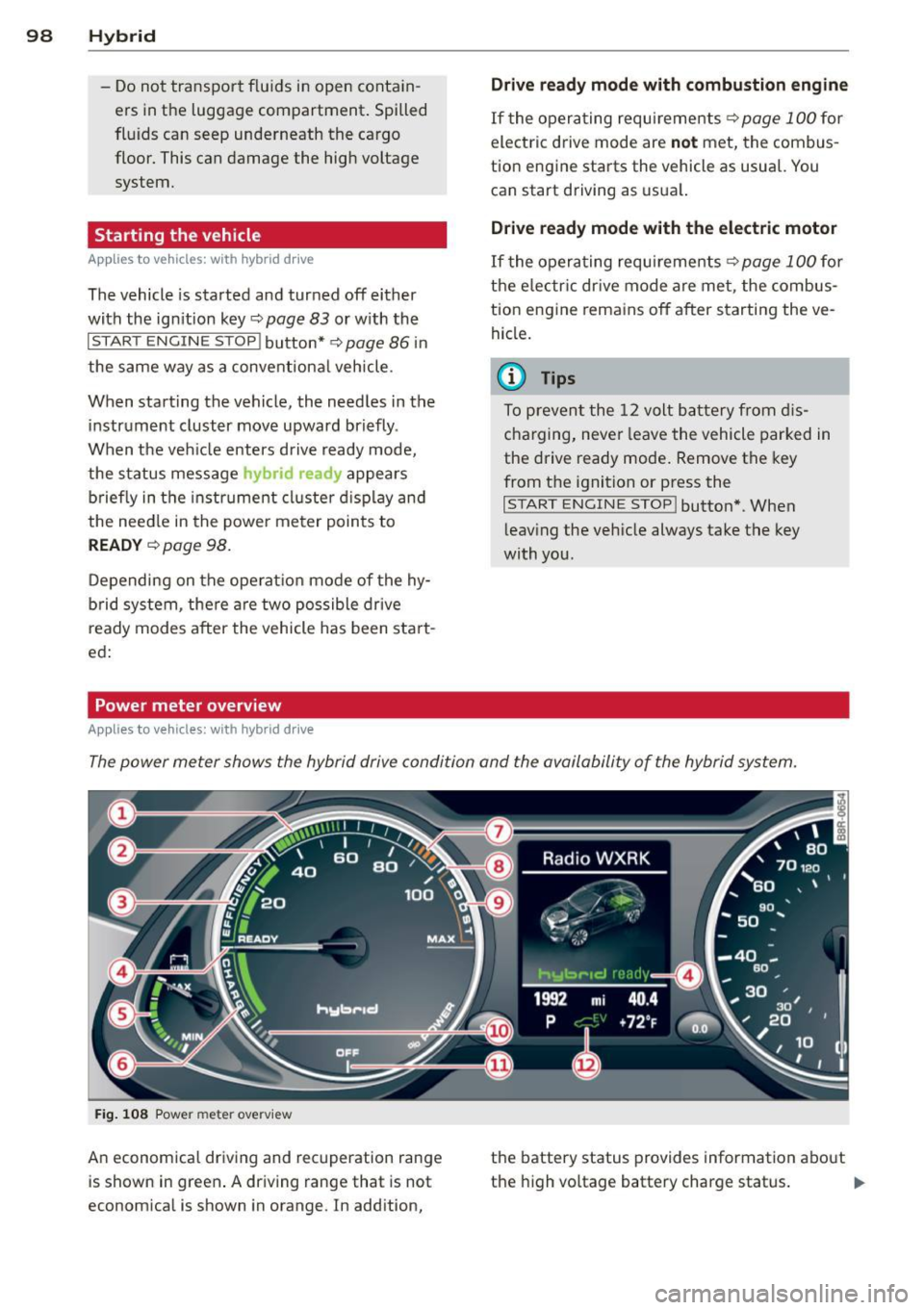
The power meter shows the hybrid drive condition and the availability of the hybrid system.
Fig. 108 Power meter overv iew
An economical driving and recuperation range
is shown in green. A driving range that is not
economical is shown in orange. In addition, the battery status
provides information about
the high voltage battery charge status.
lill-
Page 101 of 316
(!) Fuel efficient driv ing within the
comb ustion engine's partia l
l oad range
@ System limits fo r electric d riving
i n the EV mode
® Elect ric driving or d riving w it h
the combustion engine (EFFI -
CI ENCY)
© Vehicle d rive ready (READY)
® H igh vo ltage bat tery c ha rge sta -
tus
® Recuperation (CHARGE)
0 Dr iving w it hi n the combus tion
engine's fu ll loa d range
® 100% combust io n engine
® Boost ing -the elect ric e ngine
assists the combus tion engine
( B OOST)
@ Engaging the conventiona l
brakes w ith recuperat ion
@ Vehicle not drive ready ( OFF)
@ EV mode active
The needle rema ins at
OFF when the igni tion
is tur ned on. W hen the veh icle en ters drive
ready mode, t he stat us message
hybrid ready
ap pears briefly in the instrument cluster dis
p lay and the needle in the power meter po ints
to
READY .
Indicator lights and messages
Applies to vehicles: with hybrid drive
The indicator lights in the instrument cluste r
b link or t urn on . Th ey i ndicate fu nctions o r
malfunct ions .
W ith some ind icator lights, messages may ap
pear and a warning tone may sound. Also note
the indicator lights in c::,;,
pag e 27.
Press brake pedal to start vehicle
This message appea rs if you do not press the
brake peda l when starting the vehicle.
Hybrid 99
Shift to N or P to start vehicle
T his mess age appears if the se lector lever for
the automatic t ransmission is not in t he N or
P positions when starting the vehicle.
- Hybrid drive: System fault! Power
brakes, steering malfunction possible
I f the indica tor ligh t turns on and this mes
sage a ppears, t here is a ma lf u nction in the hy
bri d system. The brake booster and the power
steering may stop working. Stop the vehicle i n
a safe l ocat io n as soo n as poss ible.
You may cont in ue dr iving if the indicator light
turns
off afte r start ing the ve hicle severa l
times. Dr ive to an a uthorized repa ir facility
immediately to have the malfunct ion correct
ed .
EHithjj,j Hybrid drive : Sy stem fault!
Contact dealer
If the indicator light turns on and this mes
sage appears , there is a malfunct ion in the hy
br id system . Drive to a n author ized repair fa
c ili ty immediat ely to hav e th e m alfunc tion
corrected.
Ill Hybrid system: Performance
restricted. Please contact dealer
If th e i ndica to r light turns on and this mes
sag e appea rs, there is an engine contro l ma l
f unct io n .
The @B indi cator light in t he instr u
m ent cluster also tur ns on. The engine ou tput
i s re duced. Drive to yo ur autho rize d Au di dea l
er or qualifie d repair facility immediately to
have the malfunct io n corrected .
Hybrid drive deactivated. Please restart
engine manually.
Th is message ap pears if the high vo ltage bat
te ry charge leve l has fallen below a certa in
range or if the ignition key is no longer inside
the ve hicle for ve hicles with the convenience
key *.
Start the eng ine with e it h er the ignitio n key
¢page 83 or with the !STAR T EN GINE STOPI
button* c::> page 86.
Page 103 of 316
-ESC offroad mode and hill descent assist
must not be turned on¢
page 198 .
The combust ion eng ine tu rns on and inter
rupts
the enhanced electric d rive mode when
the vehicle is accelerated. The gray indicator
light
l!I also turns on in the disp lay. The en
hanced electric drive mode resumes automati
cally once acceleration stops.
The enhanced e lectric drive mode is
deactivat
ed if at least one of the following conditions is
met :
- The ign ition is turned
off.
- Th e 1.:1"1 button is pressed again.
- The high voltage battery charge level is low .
- The vehicle speed is higher than approxi -
mately 62 mph (100 km/h).
- The S selector lever position or tiptronic
mode is selected .
- ESC offroad mode or hill descent assist is
switched on .
T he
ld" I button must be pressed to reactivate
it .
Start-Stop function
The combustion engine is operated on ly as
needed. Generally, the combustion engine
turns
off when the vehicle is stationary and
the high voltage battery powers the electrical
vehicle systems.
The purpose of automatica lly shutting the
combustion engine
off in hybrid drive mode is
to save fuel. All of the important veh icle sys
tems, such as steering, brakes and the A/C
system, cont inue to remain active. In some
cases , systems may require the combustion
engine to cont inue running when the vehicle
is stationary. When dr iv ing in congested traf
fic for long per iods of time, the comb ustion
engine w ill cycle on when the vehicle is sta
tionary to keep the high voltage battery
charged.
Gliding
I f the gas pedal is not pressed and the D posi
tion is selec ted, the combustion engine re-
Hybrid 101
mains turned off up to speeds of approxi
mately 99 mph (160 km/h). Driving conserva
tive ly like this can reduce fuel consumption.
Energy recovery (recuperation)
When braking, the electric motor will act as a
generator creating e lectric energy that is then
stored in the high voltage battery. This also
occurs when the ve hicle is coasting or driving
downhi ll. The combustion engine is automati
cally turned
off i n this case.
The vehicle is braked with the electric motor
by applying ear ly and even pressure to the
brakes and using short pedal movements
¢
page 98, fig. 108 @. By doing this, a large
amount of the kinetic energy is recovered and
may be stored as electric energy in the high
voltage battery . During heavy braking, the
convent ional brakes are also act ivated
¢ page 98, fig. 108 @.
The energy recovery is shown in the MMI dis
play ¢
page 104.
Automatic start of the combustion engine
Various operating conditions cause the com
bust ion engine to start automat ically :
- The high voltage battery charge leve l is low.
- The temperature of the combustion engine
is low.
- The temperature of the catalytic converter is
low .
- The power output needed for the A/C sys-
t em is high.
- The vehicle speed is high.
- The vehicle acceleration is high.
- The inclin e is steep.
- High charge level for the high voltage bat-
tery when coasting. In th is case, the h igh
voltage battery cannot absorb any more en
ergy and so the electric motor cannot slow
down the veh icle. The combustion engine
tu rns on (engine brake). In this situation the
h igh voltage battery will show a Max charge.
Page 104 of 316
102 Hybrid
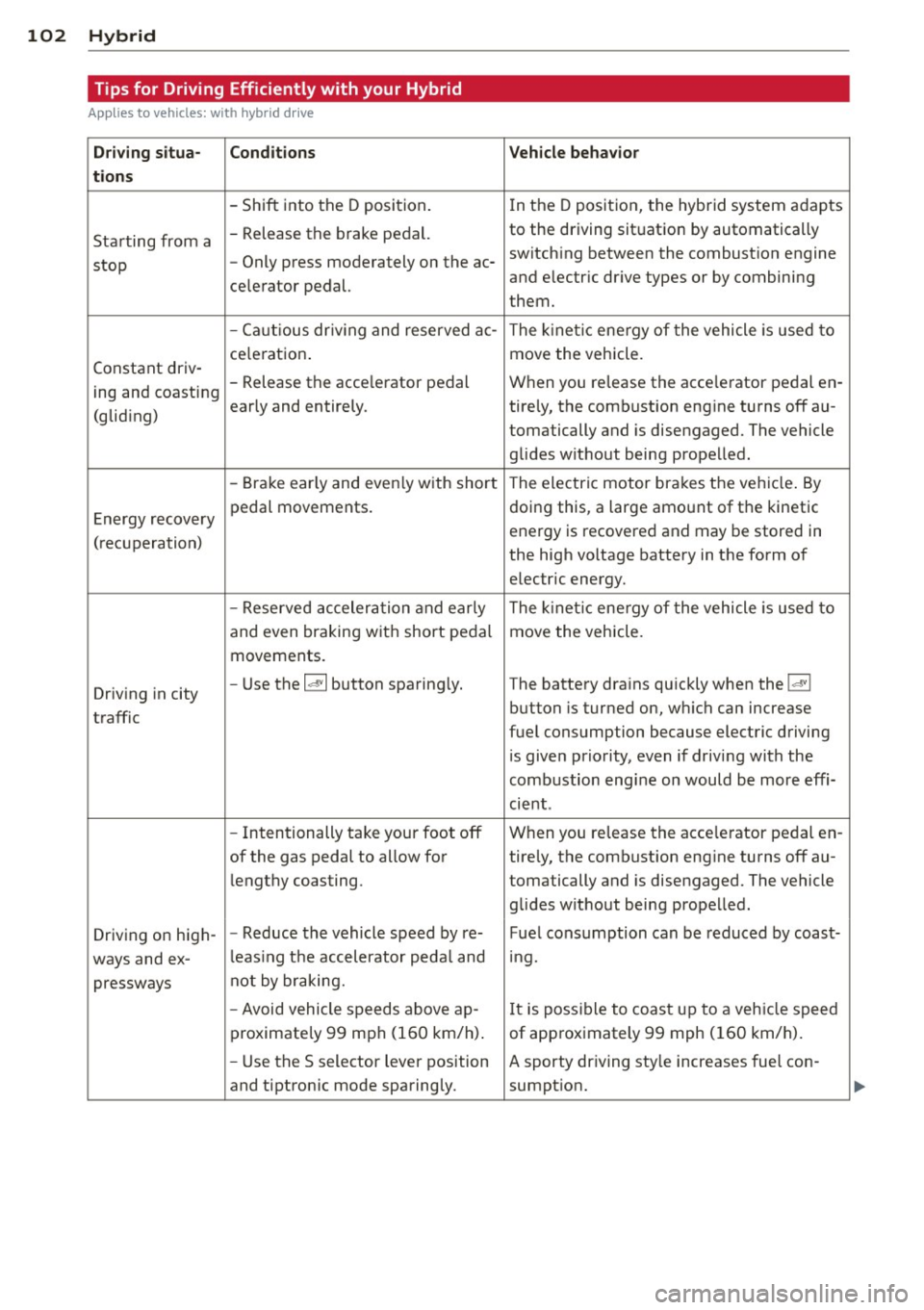
Tips for Driving Efficiently with your Hybrid
Applies to vehicles: with hybrid drive
Driving situa- Conditions Vehicle behavior
tions
- Shift into the D position.
In the D position, the hybrid system adapts
Starting from a -
Release the brake pedal. to the driving situation by automatically
stop -
Only press moderately on the ac- switching between the combustion engine
and electric drive types or by combining
celerator pedal.
them.
- Ca utious dr iv ing and reserved ac-
The kinetic energy of the vehicle is used to
ce leration . move the vehicle.
Constant driv-
ing and coasting -
Release the acce lerator pedal When you release the acce lerator pedal en -
early and entirely. ti rely, the combustion engine turns off au-
(gliding)
tomatically and is disengaged. The vehicle
glides without being propelled.
- Brake early and even ly with short The electric motor brakes the vehicle . By
Energy recovery pedal
movements. doing this, a large amount of the
kinetic
energy is recovered and may be stored in
( recuperation)
the high voltage battery in the form of
electric energy.
- Reserved acceleration and early The kinet ic energy of the vehicle is used to
and even braking w ith short pedal move the vehicle.
movements .
Driving in city -
Use the
la• I button sparing ly. The battery drains quickly when the laVI
button is turned on, which can increase
traffic
fuel consumption because electric driving
is given priority, even if driving with the
combustion engine on would be more effi-
cient .
- Intentionally take your foot off When you release the acce lerator pedal en-
of the gas pedal to allow for ti rely, the combustion engine turns off au-
lengthy coasting . tomatically and is disengaged. The vehicle
glides without being propelled.
Driv ing on high- -
Reduce the vehicle speed by re-Fuel consumption can be reduced by coast-
ways and ex-l
eas ing the accelerator peda l and mg.
pressways not by
braking.
- Avoid vehicle speeds above ajp-
It is possible to coast up to a veh icle speed
proximately 99 mph (160 km/h) . of approximately 99 mph (160 km/h).
- Use the S selector lever position A sporty driving sty le increases fuel con -
and tiptron ic mode sparingly. sumption.
Page 105 of 316
Hybrid 103
Driving situa -Condition s Vehicle behavior
ti ons
- Do not r un the combustion en- The temperature of the comb ustion eng ine
gine wh ile the vehicle is parked to rises very slowly and the fuel consumption
warm the engine . increases considerably.
- Use the rear w indow/exter ior This conserves the energy in the h igh vo lt-
Driv ing in cold mirro
r defroster and the seat heat- age battery so that it is ava ilab le to r un the
weather i
ng s par ingly. vehicl e in ele ct ric mode .
- Park the vehicle in a garage over-
This reduces ex pos ure of the hig h voltage
night.
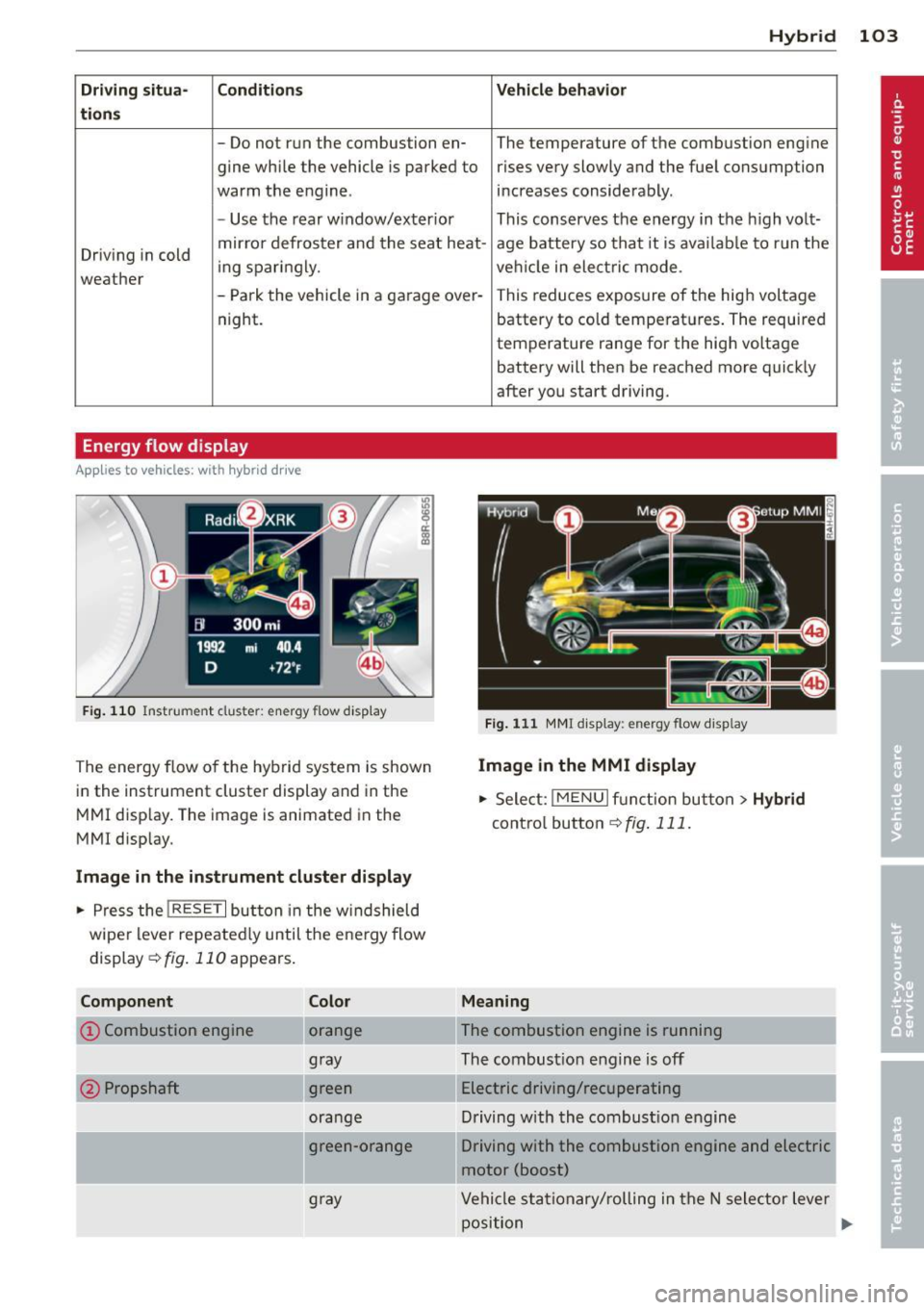
Energy flow display
Applies to vehicles: with hybrid dr ive
F ig. 110 Instrument cluster: e nergy flow disp lay
The energy flow o f the hybrid system is shown
i n the instrument cluster display and in the
M MI disp lay. The image is animated in the
MMI disp lay.
Image in the instrument cluster display
.. Pres s the !RESET I but ton in the w indshield
wipe r lever repeate dly until the e ne rgy flow
di splay
c::> fig . 110 appears .
Component
@Propshaft
Color
orange
gray
green
ora nge
g ra y battery to co
ld temperat ures . The required
temperature range for the high voltage
battery will then be reached more quick ly
after you start driving.
Fig. 1 11 M MI d isp lay: energy flow display
Image in the MMI display
.,. Select: I ME NU I fu ncti on bu tton > Hybrid
cont ro l button c::> fig . 111.
Meaning
The combustion engine Is running
The combust io n engin e is off
E lectric driving/recuperating
D riving w ith th e combus tion en gin e
Driving with the combustion engine and electric
motor (boost)
Vehi cle s ta tio nary/ rolling in the N sele ctor lever
p osition
Page 106 of 316
104 Hybrid
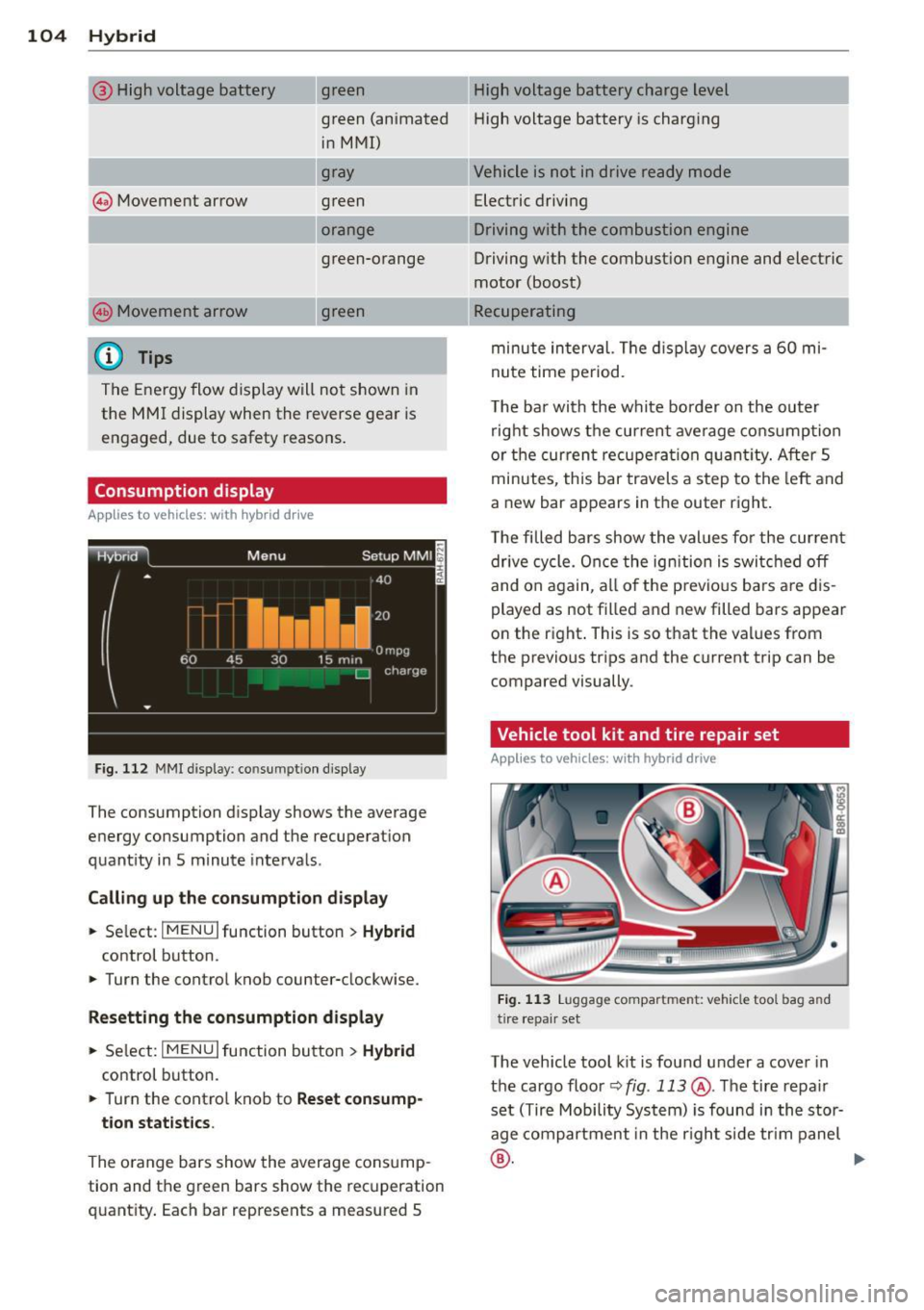
@ High voltage battery green High voltage battery charge level
green (animated High voltage battery is charging
@ Movement arrow in MMI)
gray
green
orange
---.. ,
green-orange
@ Movement arrow g
reen
@ Tips
The Energy flow display will not shown in
the MMI display when the reverse gear is engaged, due to safety reasons .
Consumption display
Applies to vehicles: with hybrid drive
Fig. 1 12 MM! display: consumpt ion disp lay
The consumption display shows the average
energy consumption and the recuperat ion
quantity in S minute interva ls.
Call ing up th e co nsumption displa y
.. Se lect: I MENU I function button > H ybrid
control button .
.. Turn the control knob counter-clockwise.
Res etting the con sumption display
.. Se lect: I MENU I function button> H ybrid
control button.
.. Turn the contro l knob to
Reset consump-
tion stat istics.
The o range bars show the average cons ump
tion and the green bars show the recuperation
quantity . Each bar represents a measured S Vehicle is not in drive ready mode
Electric driving
Driving with the combustion engine
Driving w ith the combust ion engine and electric
motor (boost)
Recuperating
minute interval. The d isplay
covers a 60 mi
nute time period.
The bar with the white border on the outer right shows the current ave rage consumption
or the cur ren t recupera tion quan tity. After 5
minutes, th is bar travels a step to the left and
a new bar appears in the outer right.
T he filled bars show the values fo r the current
drive cycle. Once the ignition is switc hed off
and on again, all o f the p revio us ba rs a re d is
played as not filled and new filled bars appear
on the right . This is so that the values from
the previous tr ips and the current trip can be
compared visually.
Vehicle tool kit and tire repair set
Applies to vehicles: with hybrid drive
Fig. 11 3 Luggage compartment: vehicle tool bag and
tire repair se t
The vehicle tool k it is found under a cove r in
the cargo floo r<=>
fig . 113 @. The tire repair
set (Tire Mobility System) is found in the stor
age compartment in the r ight s ide tr im panel
® · ~
Page 116 of 316
114 Audi adaptive cruise control and bra king guard
- Always remember t hat t he radar sens or
fo r the braking guard wo rks only within
defined detection and range limits that
may preve nt the proper detection of oth
er v eh icles.
- The radar senso r's fu nction and range
can be reduced by rain, s now a nd heavy
spray. Mo ving v ehicl es u p ahead may not
b e promptly det ecte d or may not be de
te cte d at al l.
- Reflective surfaces in cl udi ng c ras h barri
ers or tu nnel ent ran ces may impair the
f unc tion of the r ad ar sen sor.
(D Tips
- You can cance l th e braking tha t is initiat
ed by the system by braking yours elf, by
a cce lerati ng noticeab ly o r by swerving.
- Brak ing guard er ror m essages
Qpag e
114.
- Keep in mi nd that braking gua rd can
brake u nexpect edly . Always secure any
ca rgo or objects that you are tr ansport
i ng to reduce the risk of d amage or in
ju ry.
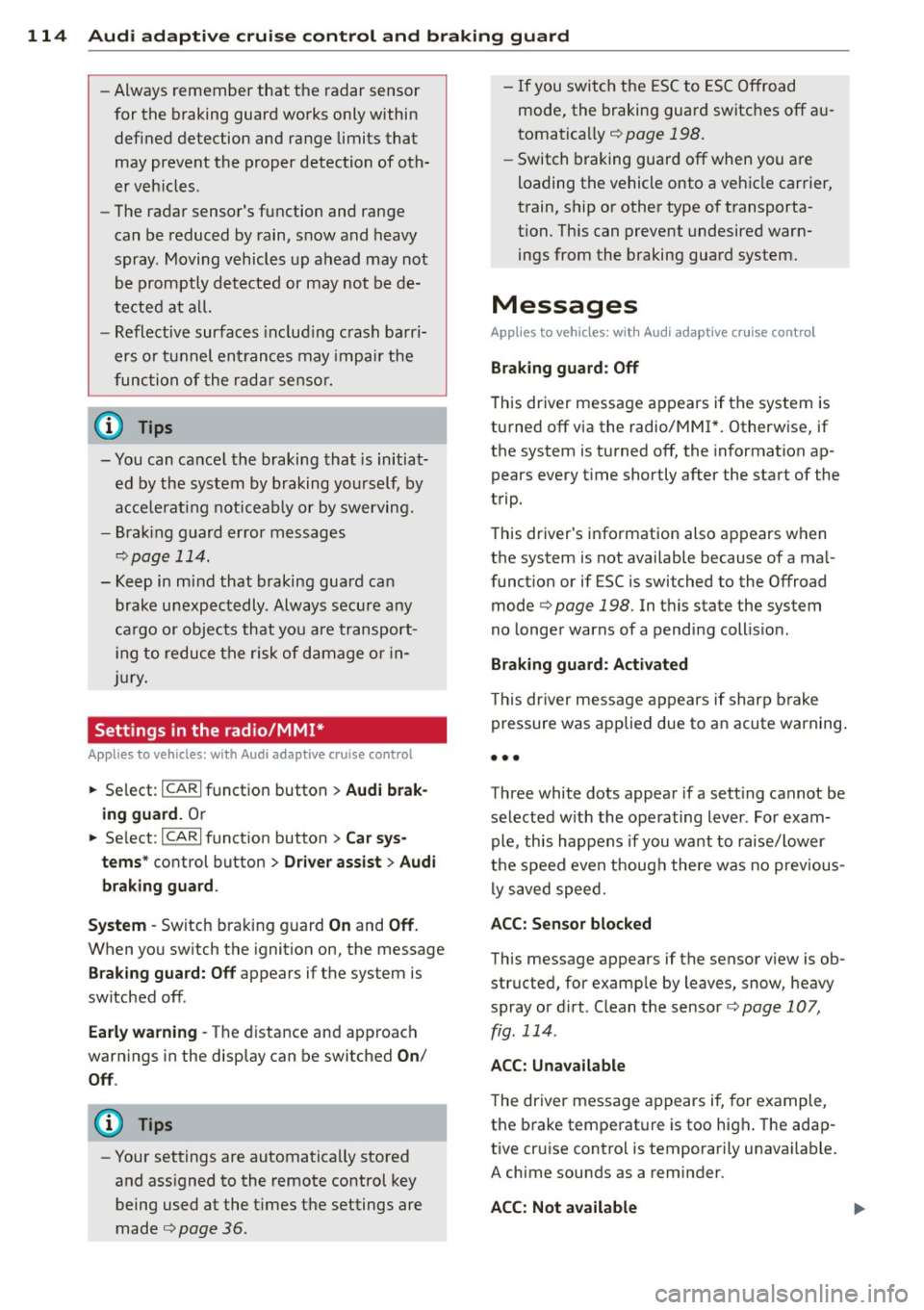
Settings in the radio/MM!*
Applies to vehicles: with Audi adaptive cruise control
• Se lect: ICARI f u nct io n button > Audi brak
ing guard.
O r
• Se lect :
ICARI fu nct ion button > Car sys
tems *
control button > Driver assist > Audi
braking guard .
System -
Switch bra king g uard On and Off .
When you sw itch the ignition on, the message
Brak ing guard: Off appears if the system is
switched off .
Early warning -The d istance and approach
warn ings in the display can be switched
On /
Off .
(D Tips
-Your settings are automatica lly sto red
and ass igned to the remote control key
being used at the t imes t he settings are
made¢ page
36.
- If you switch the ESC to ESC O ff road
mode, the braking guar d switches off a u
toma tically¢ page
198.
-Swit ch braking guar d off when you a re
loading the vehicle onto a veh icle carrier,
train, ship o r other type of t ransporta
tion. This can prevent undesired warn ings from the braking gua rd system .
Messages
Applies to vehicles: wit h Aud i adapt ive cru ise control
Braking guard : Off
T his dr iver message a ppears if t he system is
tu rned off via the radio/M M!* . Otherw ise, if
the system is turned off, the in formation ap
pears every t ime sho rtly after the start of the
trip .
T his dr iver's i nfo rmation also ap pears w hen
the system is not available because of a ma l
funct ion or if ESC is switched to the Offroad
m ode
Q page 198. In t his state the system
no longe r warns of a pend ing coll is io n.
Braking guard : Activated
T his dr iver mess age a ppears if shar p brake
p ressure was applie d due to a n acute warning.
•••
Three white dots appea r if a sett ing cannot be
selected w ith the operating lev er. For exam
ple, this happens if you want to raise/lower
t h e speed even thoug h there was no prev ious
l y saved speed.
ACC: Sensor blocked
Th is message appears if the senso r view is ob
structed, for examp le by leaves, snow, heavy
spray or d irt. Clean the sensor¢ page
107,
fig. 114.
ACC: Unavailable
The driver message appears if, for example,
t h e b rake temperat ure is too high . The ada p
tive cru ise contro l is temporarily unava ilable.
A ch ime sounds as a rem inder .
ACC: Not available
Page 128 of 316
126 Automatic transmission
8_ WARNING
-Unintended vehicle movement can cause
serious injury .
- Never leave your vehicle with the engine
running while in gear. If you must leave
your vehicle when the engine is running,
activate the parking brake and move the
selector lever to P.
- Power is still transmitted to the wheels
when the engine is running at idle. To
prevent the vehicle from "creeping", you
must keep your foot on the brake when
the engine is running and the selector lever is in D/S or R or "tiptronic" mode is
selected.
- Do not press the accelerator pedal when
changing the selector lever position
while the vehicle is stationary and the
engine is running.
- Never shift into
R or P while driving.
- Before driving down a steep slope, re-
duce your speed and shift into a lower
gear with "tiptronic".
- Do not ride the brakes or press the brake
pedal too often or too long when driving
down a hill. Constant braking causes the
brakes to overheat and substantially re
duces braking performance, increases
braking distance or causes complete fail
ure of the brake system .
- To preven t the vehicle from rolling back
when stopping on inclines, always hold it
in place with the brake pedal or parking
brake.
- Never hold the vehicle on an incline with
a slipping clutch . The clutch opens auto
matically when it becomes too hot from
the overload. An indicator lamp
[O] illu
minates and a driver message appears
Q page 128when the clutch is overload
ed.
- If the engine must remain running, never
have any driving position engaged when
checking under the hood. Make sure the
selector lever has securely engaged and
is locked in P with the parking brake set
Q page 226, Engine compartment . 0th-erwise, any increase in engine speed may
set the vehicle in motion, even with the
parking brake applied.
(D Note
- When stopping on an incline , do not try
to hold the vehicle in place by pressing
the accelerator pedal while a driving gear is selected. This can cause the transmis
sion to overheat and can damage it. Acti
vate the parking brake or press the brake
pedal to prevent the vehicle from rolling .
- Allowing the vehicle to roll when the en
gine is stopped and the selector lever is
in N will damage the transmission be
cause it is not lubricated under those cir
cumstances.
@ Tips
For safety reasons, the parking brake is re
leased automatically only when the driv
er's safety belt is engaged in the buckle.
Hill descent control
The hill descent control system assists the
driver when driving down declines.
Hill descent control is activated when these
lector lever is in D /S and you press the brake
pedal. The transmission automatically selects
a gear that is suitable for the incline. Hill de
scent control tries to maintain the speed ach
ieved at the time of braking, within physical
and technical limitations. If may still be nec
essary to adjust the speed with the brakes .
Hill descent control switches off once the de
cline levels out or you press the accelerator
pedal.
When the speed is set in the cruise control
system
q page 95, hill descent control is also
activated.
A WARNING
-
Hill descent control cannot overcome
physical limitations, so it may not be able
to maintain a constant speed under all
Page 137 of 316
Homelink®
Universal remote
control
Description
Applies to vehicles: with Home link
The HomeLink universal remote control con
be programmed with the remo te control for
devices that ore already present.
With Home Link, you can control devices such
as the garage door, secu rity systems, ho use
lights , etc. comfortably from the inside of you
veh icle .
H omelink makes it poss ible for you to rep lace
t hree different remote controls from dev ices
in your home with one un ive rsal remo te. Th is
featu re works for most garage door and exte
rior door motor signals. Programming the in
d ividual remote control for your remote con
trol takes p lace near the center of the radiator
grille. There is a control module attached at
this location .
A one-t ime programm ing of the sensor must
be performed before you are able to use sys
tems with Homelink. If the system does not activate after performing the one-t ime pro
gramming, check whether the system uses a rolling code ¢
page 138 for vehicles without
the MMI*.
& WARNING
-
- Never use the Homelink ® transmi tter
with any garage door opener that does have not the sa fety stop and reverse fea
ture as requ ired by federa l safety stand
ards. Th is includes any garage door open
er mode l manufactured before April 1,
1982.
- A garage door opener which cannot de
tect an object, signaling the door to stop
and reverse does not meet current feder
al safety standards . Us ing
a garage door
opener without these features increases
r isk of serious inj ury or death.
Homelink ® 135
-For safety reasons never re lease the
parking brake or start the eng ine while
anyone is standing in front of the vehicle .
- A garage door or an estate gate may
sometimes be set in motion when the
Homelink ® remote control is being pro
grammed. If the device is repeatedly ac
tivated, th is can overstrain motor and
damage its e lectrical compon ents -an
overheated mo to r i s
a fire hazard!
- To avo id possib le injuries or property
damage, please always make abso lutely
certa in that no person s or objects are lo
cated in the range of motion of any
equ ipment being operated .
(0 Tips
-If you would like more information on
Homelink ®, where to purchase the
Home link ® compatib le products, or
would like to purchase the Homelink ®
Home Lighting Package, please ca ll toll
free: l-800-355-3515.
- For Declaration of Compliance to United
States FCC and Industry Canada reg ula
tions
¢ page 298.
- For security reasons, we recommend that
you clear the programmed b uttons be
fore selling the veh icle.
Operation
App lies to vehicles : with Homeli nk
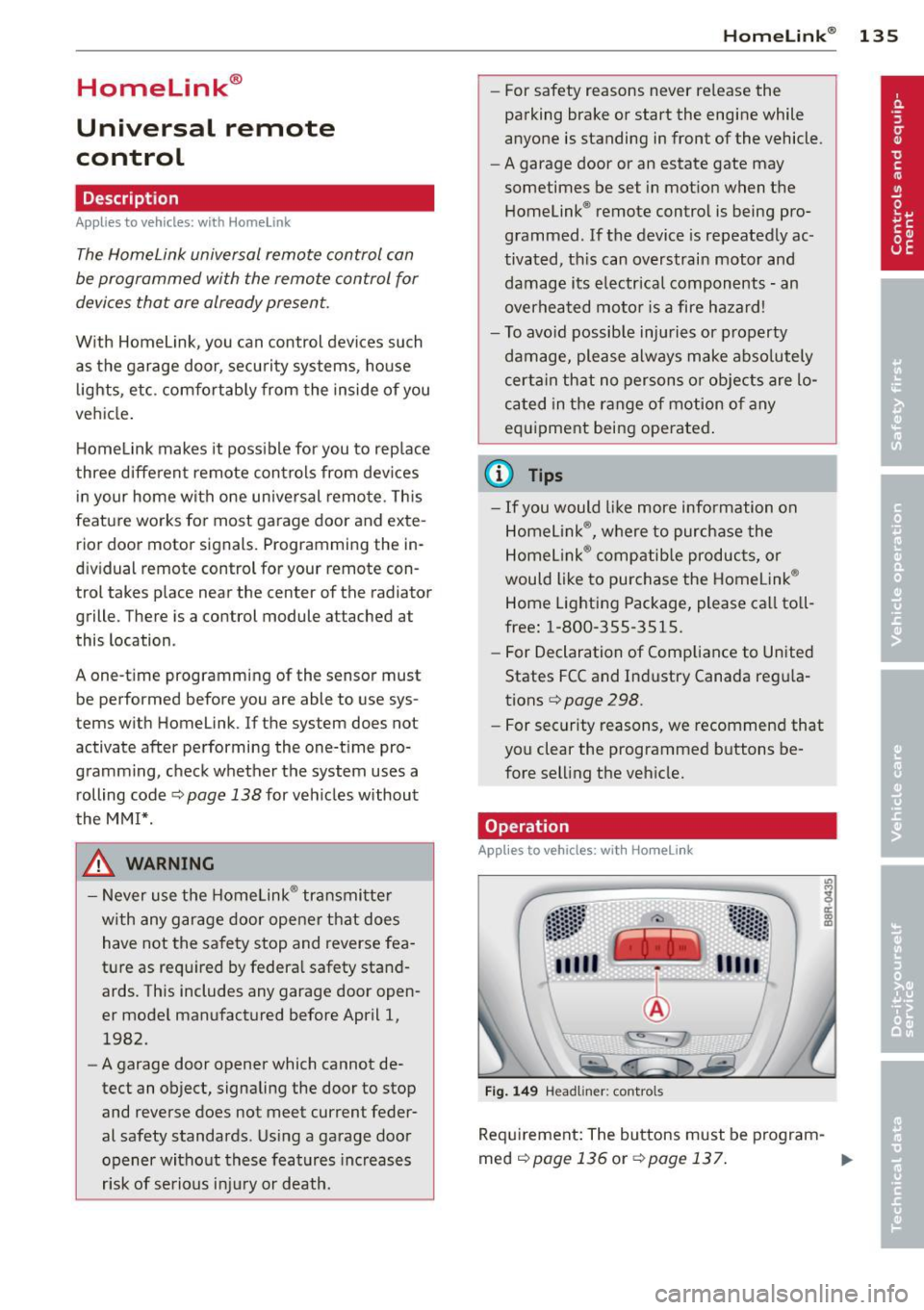
Fig . 14 9 Head li ner: controls
Req uirement : The buttons must be program-
med
<:!)page 136 or ¢page 137. ..,_