wheel AUDI Q5 2013 User Guide
[x] Cancel search | Manufacturer: AUDI, Model Year: 2013, Model line: Q5, Model: AUDI Q5 2013Pages: 316, PDF Size: 78.89 MB
Page 92 of 316
90 On the road
-When the vehicle is locked, no one - par
t icu larly not ch ildren should remain in
the vehicle. Locked doors make it more
difficult for emergency workers to get in
to the vehicle - putt ing lives at risk .
Starting from rest
The starting assist function ensures that the
parking brake is released automatically upon
starting .
Stopp ing and ap plyin g park ing b rake
.. Pu ll the switch to apply the parking brake.
Starting and automatically relea sing the
par king brake
.. When you start to drive as usua l, the park
ing brake is automatically re leased and your
vehicle begins to move.
When stopping at a traffic signa l or stopping
in city traffic on vehicles with an automatic
transmission, the park ing brake can be ap
plied . The veh icle does not have to be held
with the footbrake. The park ing brake elimi
nates the tendency to creep with a drive range
engaged. As soon as you dr ive off as usual,
the park ing brake is released automatically
and the veh icle sta rts to move.
Starting on slope s
When starting on inclines, the start ing ass ist
prevents the vehicle from unintentionally roll
i ng back . The braking force of the pa rking
brake is not released until sufficient dr iv ing
fo rce has been bu ilt up at the whee ls.
(D Tips
For safety reasons, the park ing brake is re
leased automatically only when the dr iv
er 's safety belt is engaged in the bu ck le.
Starting off with a trailer
To prevent rolling back unintentionally on an
incline, do the following:
• Keep the switch pulled and depress the ac
celerator . The parking brake stays applied
and prevents the vehicle from roll ing back
ward .
• Yo u can re lease the switch once you a re su re
tha t you are deve lopi ng enough d riving
force a t th e wheels by depressing the acce l
erator.
Depend ing on the we igh t of the rig (vehi cle
and t railer) and the severity of the incline, yo u
may ro ll backwa rds as yo u start . You can pre
vent rolling backwa rds by holding the parking
brake switc h pulled out and accelerating - just
as you would when starting on a hill with a
convent ional hand brake.
Emergency braking
In the event that the conventional brake sys
tem fails or locks.
.. In an emergency, pull the switch and con
tinue to pull it to slow your vehicle down
w ith the park ing brake.
• As soon as you release the switch or acceler-
ate, the brak ing process stops.
If you p ull the switch and ho ld it above a
speed of abo ut 5 mph (8 km/h), the emergen
cy brak ing funct ion is initiated . The ve hicle is
braked at all four whee ls by activating the hy
draulic b rake system . The brake performa nce
i s sim ilar to making an emergency stop~& .
In order not to act ivate the emergency brak
i ng by mistake, an audib le warning tone (buz
zer) sounds when the switch is pu lled. As soon
as the switch is re leased, or the accele rato r
peda l is depressed, eme rgency b raking stops .
A WARNING
Emergency braking should only be used in
an emergency, when the norma l foot bra ke
has fai led or the brake pedal is obs tructed. .,..
Page 94 of 316
92 On the road
Starting/stopping the engine
Applies to vehicles: with Start-Stop-Syste m
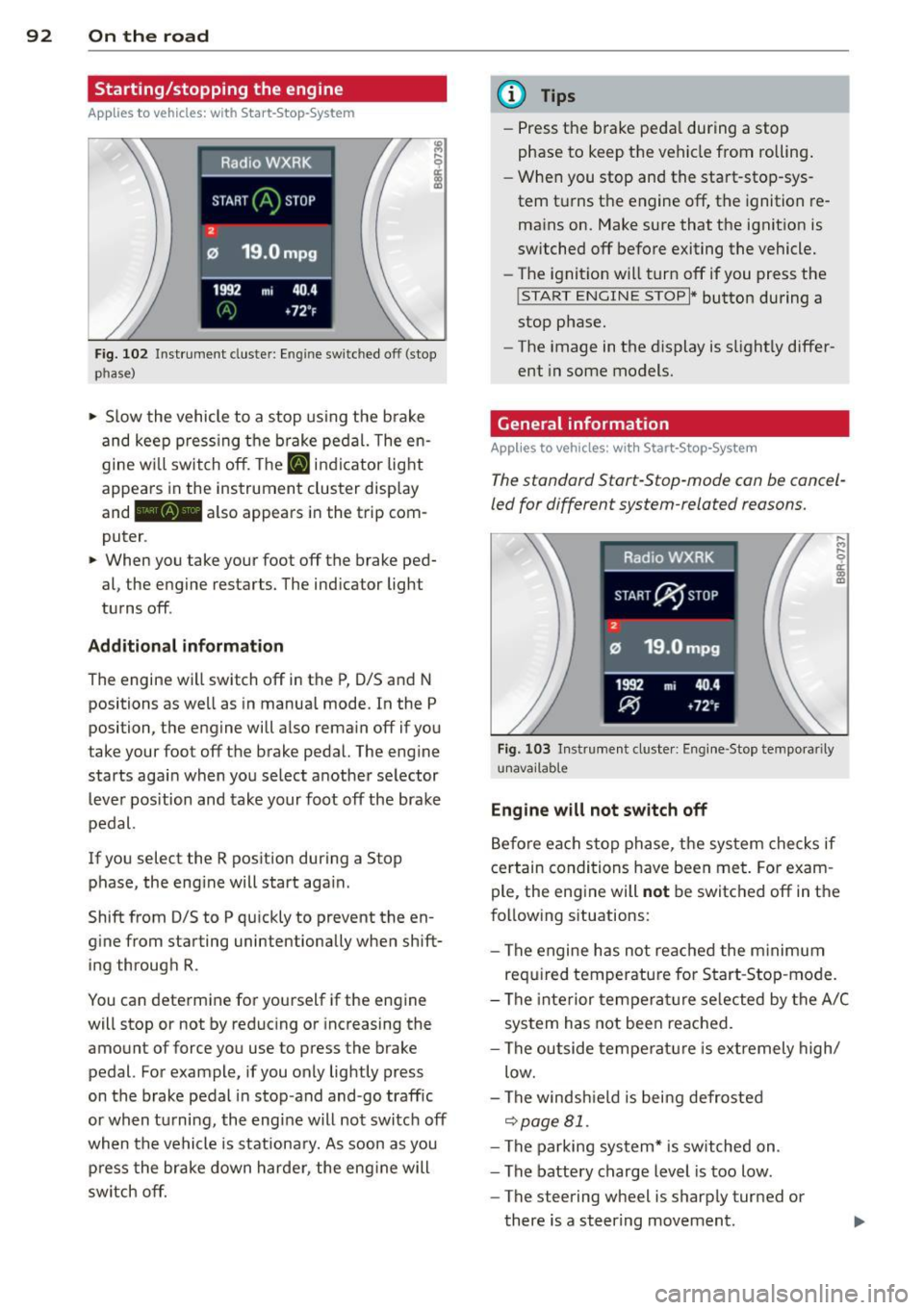
Fig. 102 Instrument cluste r: Eng ine switched off (stop
phase)
.. Slow the vehicle to a stop using the brake
and keep pressing the brake pedal. The en
gine w ill switch off. The
[IJ indic ator light
appears in the instrument cluster display
and - also appears in the trip com
puter .
.. When you take your foot off the brake ped
al, the engine restarts. The indicator light
turns off .
Additional information
The engine will switch off in the P, 0/5 and N
positions as well as in manual mode. In the P
position, the engine will also remain off if you
take your foot off the brake pedal. The engine
starts again when you select another selector
lever position and take your foot off the brake
pedal.
If you select the R position during a Stop phase, the eng ine will start aga in .
Shift from 0/5 to P qu ickly to prevent the en
g ine from starting unintentionally when shift
ing through R.
You can determine for yourself if the engine
will stop or not by reduc ing or increasing the
amount of force you use to press the brake
pedal. For example, if you only lightly press
on the brake pedal in stop-and and-go traffic
or when tu rning, the eng ine will not switch off
when the vehicle is stationary. As soon as you
press the brake down harder, the engine will
switch off.
(D Tips
-Press the brake pedal during a stop
phase to keep the vehicle from rolling.
- When you stop and the start-stop-sys
tem turns the engine off, the ignition re
mains on. Make sure that the ignition is
switched off before exiting the vehicle.
- The ignition will turn off if you press the
!START ENGINE STOPI * button during a
stop phase.
- The image in the display is slightly differ
ent in some models.
General information
Applies to vehicles: with Start-Stop-System
The standard Start-Stop-mode can be cancel
led for different system-related reasons.
Fig. 103 Instrument cluster: Engi ne-Stop tempora rily
unavailable
Engine will not switch off
Before each stop phase, the system checks if
certain conditions have been met. For exam
ple , the eng ine will
not be switched off in the
following sit uations:
- The engine has not reached the minimum
required temperature for Start-Stop -mode.
- The interior temperature selected by the A/C
system has not been reached.
- The outside temperature is extremely high/
low.
- The windsh ield is being defrosted
~page 81.
-The parking system* is switched on .
- The battery charge level is too low .
- The steering wheel is sharply turned or
there is a steering movement.
Page 119 of 316
General information
Applies to vehicles: with Audi side assist
®
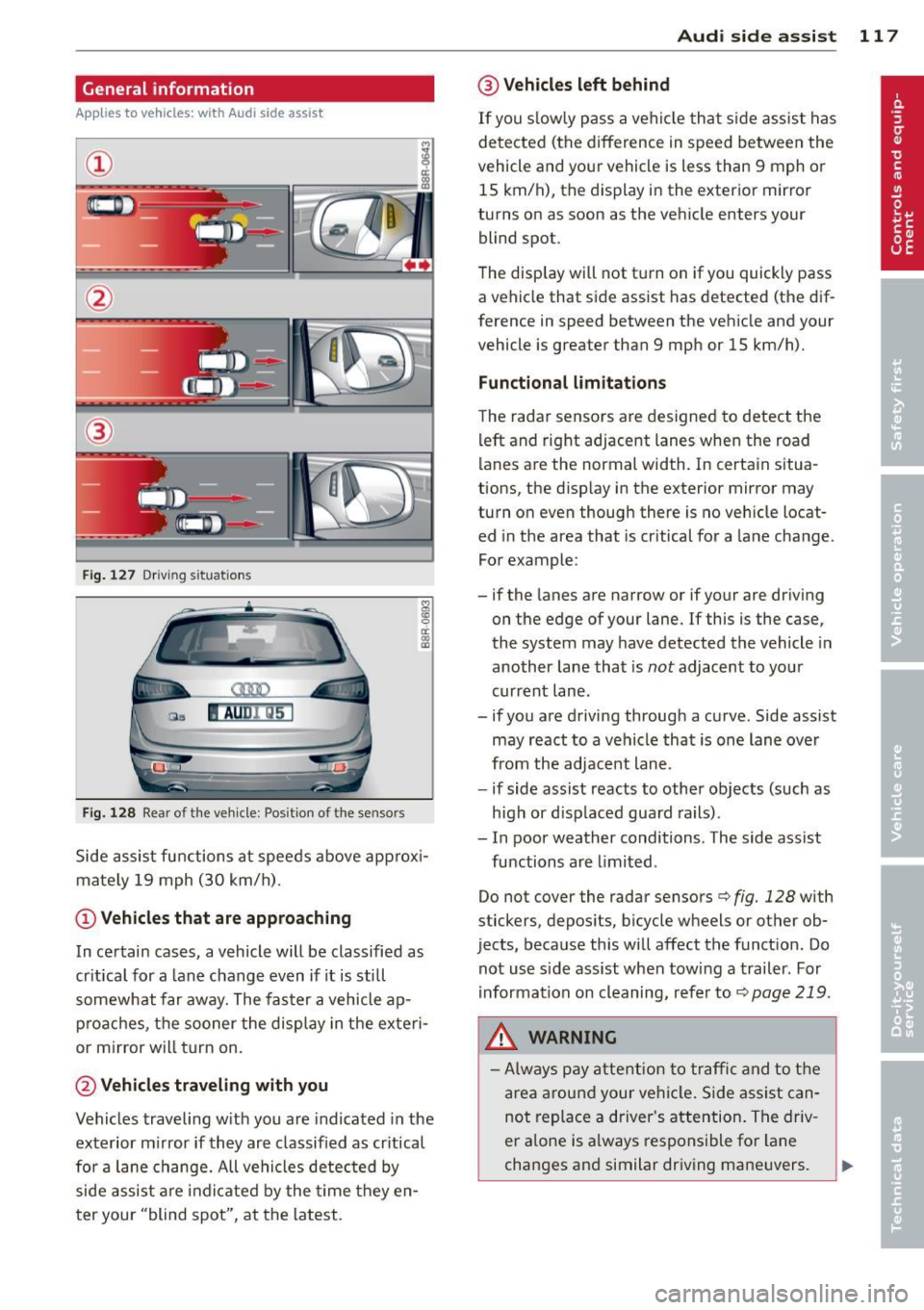
Fig . 127 Driving situations
Fi g. 1 28 Rear of t he ve hicle: Pos it ion of the sensors
M
m 0 ci: .. a,
Side assist functions at speeds above approx i
mately 19 mph (30 km/h).
@ Vehicl es th at ar e approaching
In certain cases, a vehicle will be classified as
cr itical for a lane change even if it is still
somewhat far away. The fas ter a vehicle ap
p roaches, the sooner the display in the exteri
or m irror will t urn on.
@ Vehicles traveling with you
Vehicles traveling w ith you are indicated in the
exterior m irror if they are classified as cr itical
for a lane change. All vehicles detec ted by
side assist are indicated by the time they en
ter your "blind spot", at the latest.
Audi side assist 11 7
@ Vehicle s left behind
If you s low ly pass a vehi cle that s ide assist has
detected (the difference in speed between the
vehicle and you r vehicle is less than 9 mph or
15 km/h), the display in the exterio r mir ror
turns on as soon as the vehicle enters your blind spot.
T he disp lay will not t urn on if you quickly pass
a vehicle that side assist has detected (the dif
ference in speed between the veh icle and your
vehicle is greater than 9 mph or 15 km/h).
Functi onal limitations
The radar sensors are designed to detect the
left and right adjacent lanes when the road
lanes are the normal width. In certain situa
tions, the d isp lay in the exterior mirror may
turn on even though there is no veh icle locat
ed in the area that is cr itical for a lane change.
For example:
- if the lanes are narrow or if your are dr iving
on the edge of your lane.
If this is the case,
the system may have detected the vehicle in
another lane that is
not adjacent to you r
current lane .
- if you a re driving through a curve. Side assist
may react to a vehicle that is one lan e ove r
from the adjacent lane.
- if side assist reacts to other objects (such as
high or d isp laced guard rails) .
- In poor weather conditions. The side assist
functions are l imited .
Do not
cover the radar sensors c> fig. 128 with
stickers, depos its, bicycle wheels or other ob
jects, because this will affect the funct ion. Do
not use s ide ass ist when towing a trailer. For
i nformation on cleaning, refer to
c> page 219 .
_&. WARNING
-Always pay attention to traffic and to t he
area a round your ve hicl e. S ide assist can
not replace a driver's attention. T he driv
er a lone is always responsible fo r lane
changes and similar driving mane uvers.
Page 120 of 316
118 Audi sid e as sist
- Improper reliance on the side ass ist sys
tem can cause co llisions and serious
persona l injury:
- Never rely only o n side assist when
ch anging lanes.
- Always check rear view m irrors to make
sure that it is safe to change lanes.
- Side ass ist cannot detect a ll vehicles un
der all cond it ions -danger of ac cident!
- Please note that side assist indicates
there are approachi ng veh icles, o r
vehicles in your blind spot, on ly afte r
yo ur vehicle has rea ched a driving speed
of at least 19 mph (30 km/h).
- In certain s ituations, the system may not
f unc tion o r its fun ct io n may be lim ite d.
For example:
- if veh icles are approaching or being left
behind very quick ly . The display may
not turn on in time.
- in poor weather co ndit ions such as
heavy ra in, snow or heavy m ist .
- on very wide lanes, in tight curves or if
there is a rise in the road surface.
Vehicles in the adjacent lane may not be detected because they are outside
of the sensor range.
(D Note
The sensors ca n be displaced by impacts or
damage to the bumpe r, wheel housing and
unde rbody . This can affect the system.
Have your author ized Audi dealer or au
thori zed A udi Se rvice Facility check the ir
function.
@ Tips
- If the window g lass in the driver 's door
o r fro nt passenger's door has been tin t
ed, the disp lay in the exterior mirror may
be misinterp reted.
- Fo r De clarat ion of Compliance to Uni ted
Sta tes FCC and Industry Canada regu la
tions¢
page 298.
Activating and deactivating
Applies to vehicles: with A udi side assist
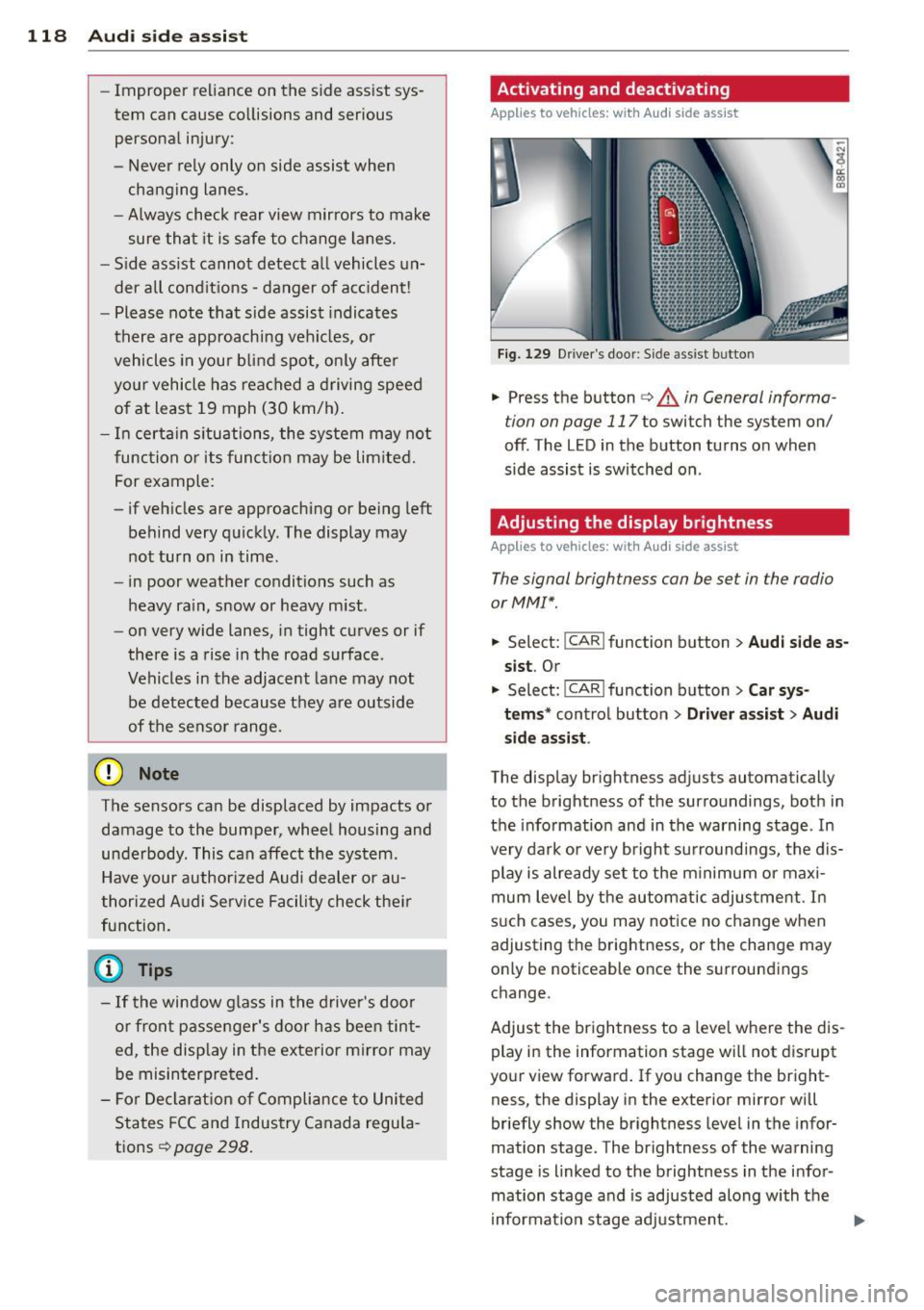
Fig. 129 D river 's doo r: Side ass ist butto n
-"' ~ a: co a,
.. Press the button c> & in General informa
tion on page 117
to switch the system on/
off. The LED in the button turns on when
side assist is switched on .
Adjusting the display brightness
Applies to vehicles: wit h Audi s ide assist
The signal brightness con be set in the radio
or MM!* .
.. Select: !CAR ! function b utton> Aud i side a s
s ist .
Or
.. Select:~ , C~ A~ R~ I function button > Car sy s
t e m s*
control button > Dri ver a ssis t > Au di
s id e a ss is t .
The display br ightness adjusts automatical ly
to the brightness of the surroundings, both in
the info rmation and in the warning stage . In
very dark or very bright su rroundi ngs, the dis
play is already se t to the m inimum or maxi
mum leve l by the automatic adjus tme nt. In
s u ch cases, you may notice no change when
adjusting the brightness, or the change may only be noticeable once the surroundings
change.
Adjust the br ightness to a leve l whe re the dis
play in the information stage wi ll not d isrupt
your view forward. If you change the bright
ness, the display in the exterior mirror will
briefly show the br ightness level in the infor
mation stage. The brightness of the warning
stage is linked to the brightness in the infor
mation stage and is adjusted along with the
i nformation stage adjustment.
Page 121 of 316
@ Tips
-Side assist is not active whi le you are
making the adjustment.
- Your settings are automatically stored
and assigned to the remote control key
being used.
Driver messages
App lies to vehicles: with Audi side assist
If side ass ist switches off by itself, the LED in
the button turns off and a message will ap
pear in the instrument cluster d isplay:
Aud i side assist unavail able: S en sors
blocked
The radar sensors' vision is affected . Do not
cover the area in front of the senso rs with bike
wheels, st ickers, dirt or other objects . Clean
the area in front of the sensors, if necessary
~page 117, fig. 128.
Aud i side assi st: Currently un avail able
Side assist cannot be switched o n temporarily
because there is a malfunction (for example,
the battery charge leve l may be too low) .
Audi side assi st: S ystem fault!
The system cannot guarantee that it will de
tect vehicles correctly and it is switched off.
The sensors have been displaced or are faulty.
H ave the system checked by an authorized
Aud i dealer or authorized Aud i Service Fac ility
soon.
Audi side assist: Unav ailab le when towing
Side assist sw itches off automatically when a
factory- installed trailer h itch is connected to
the electrical connector on the trailer. There is n o guarantee the system will switc h off when
using a retrofitted tra iler hitch. Do not use
side assis t when towing a t railer.
Audi side a ssis t 119
Page 128 of 316
126 Automatic transmission
8_ WARNING
-Unintended vehicle movement can cause
serious injury .
- Never leave your vehicle with the engine
running while in gear. If you must leave
your vehicle when the engine is running,
activate the parking brake and move the
selector lever to P.
- Power is still transmitted to the wheels
when the engine is running at idle. To
prevent the vehicle from "creeping", you
must keep your foot on the brake when
the engine is running and the selector lever is in D/S or R or "tiptronic" mode is
selected.
- Do not press the accelerator pedal when
changing the selector lever position
while the vehicle is stationary and the
engine is running.
- Never shift into
R or P while driving.
- Before driving down a steep slope, re-
duce your speed and shift into a lower
gear with "tiptronic".
- Do not ride the brakes or press the brake
pedal too often or too long when driving
down a hill. Constant braking causes the
brakes to overheat and substantially re
duces braking performance, increases
braking distance or causes complete fail
ure of the brake system .
- To preven t the vehicle from rolling back
when stopping on inclines, always hold it
in place with the brake pedal or parking
brake.
- Never hold the vehicle on an incline with
a slipping clutch . The clutch opens auto
matically when it becomes too hot from
the overload. An indicator lamp
[O] illu
minates and a driver message appears
Q page 128when the clutch is overload
ed.
- If the engine must remain running, never
have any driving position engaged when
checking under the hood. Make sure the
selector lever has securely engaged and
is locked in P with the parking brake set
Q page 226, Engine compartment . 0th-erwise, any increase in engine speed may
set the vehicle in motion, even with the
parking brake applied.
(D Note
- When stopping on an incline , do not try
to hold the vehicle in place by pressing
the accelerator pedal while a driving gear is selected. This can cause the transmis
sion to overheat and can damage it. Acti
vate the parking brake or press the brake
pedal to prevent the vehicle from rolling .
- Allowing the vehicle to roll when the en
gine is stopped and the selector lever is
in N will damage the transmission be
cause it is not lubricated under those cir
cumstances.
@ Tips
For safety reasons, the parking brake is re
leased automatically only when the driv
er's safety belt is engaged in the buckle.
Hill descent control
The hill descent control system assists the
driver when driving down declines.
Hill descent control is activated when these
lector lever is in D /S and you press the brake
pedal. The transmission automatically selects
a gear that is suitable for the incline. Hill de
scent control tries to maintain the speed ach
ieved at the time of braking, within physical
and technical limitations. If may still be nec
essary to adjust the speed with the brakes .
Hill descent control switches off once the de
cline levels out or you press the accelerator
pedal.
When the speed is set in the cruise control
system
q page 95, hill descent control is also
activated.
A WARNING
-
Hill descent control cannot overcome
physical limitations, so it may not be able
to maintain a constant speed under all
Page 129 of 316
conditions. Always be ready to apply the
brakes.
Manual shift program
Using the manual shift program you can
manually select gears.
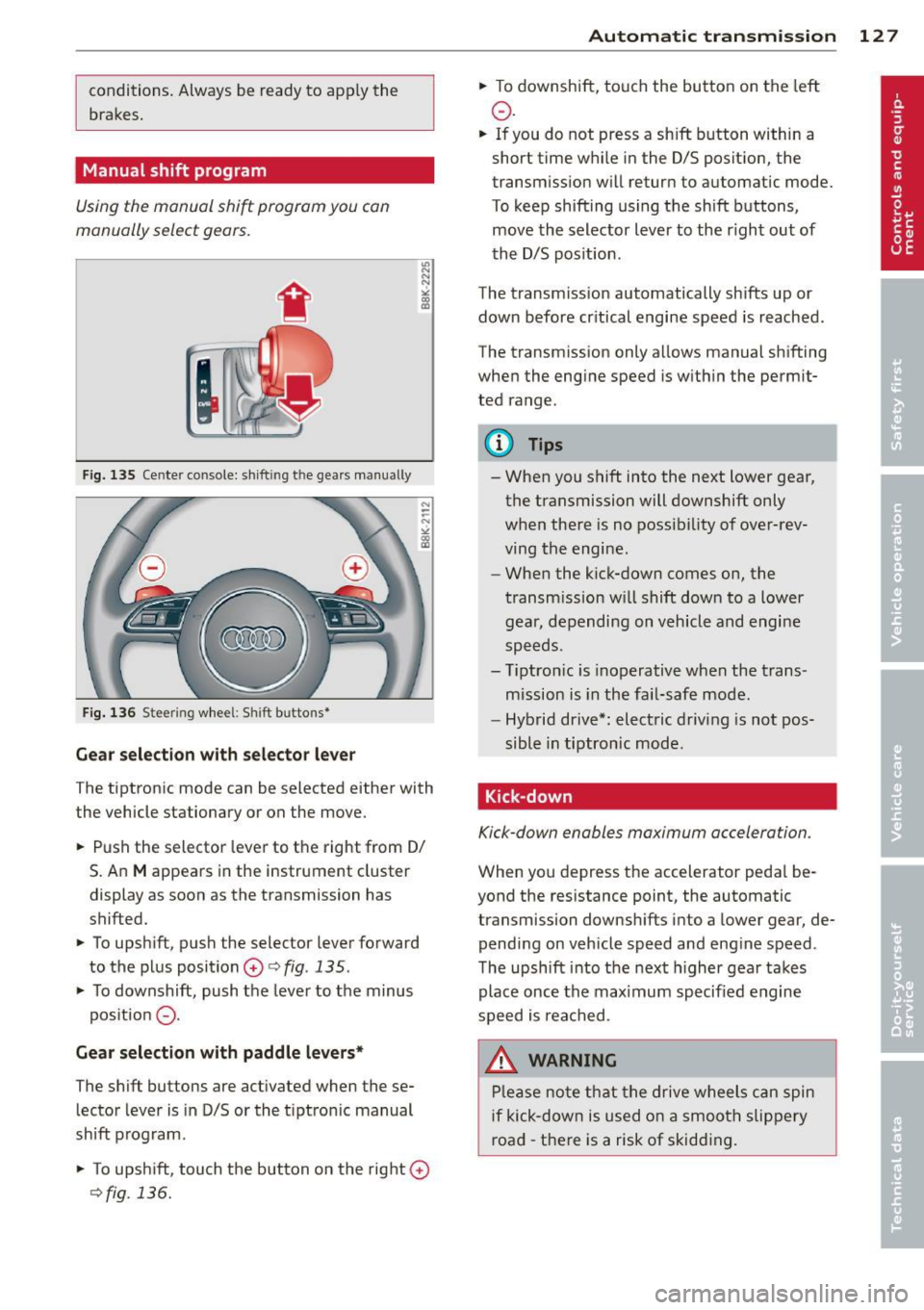
F ig. 135 Cente r console: sh ift in g t he gears manual ly
Fig. 136 S tee rin g wheel: S hift b utto ns*
Gear selection with selector lever
The tiptronic mode can be selected either with
the vehicle stationary or on the move.
.. Push the selector lever to the right from 0/
S. An
M appears in the instrument cluster
display as soon as the transmission has
shifted.
.. To upshift, push the selector lever forward
to the plus position
0 c:> fig. 135 .
.. To downshift, push the lever to the minus
pos ition
0 -
Gear selection with paddle levers*
The shift buttons are activated when these
lector lever is in D/S or the t iptron ic manual
shift program.
.. To upshift, touch the button on the right
0
c>fig . 136.
Autom atic transm ission 12 7
.. To downshift, touch the button on the left
0 .
.. If you do not press a sh ift button within a
short time while in the D/S position, the
transmission will return to automatic mode.
To keep shifting using the shift buttons,
move the selector lever to the r ight out of
the D/S position .
The transm iss ion automatically shifts up or
down before cr itical engine speed is reached.
The transmission only allows manual shifting
when the eng ine speed is with in the permit
ted range .
@ Tips
-When you shift into the next lower gear,
the transmission will downshift only
when there is no possibility of over-rev
ving the engine.
- When the kick-down comes on, the
transmission will shift down to a lower
gear, depending on vehicle and engine
speeds.
- Tiptron ic is inoperative when the trans
mission is in the fail-safe mode.
- Hybrid drive*: electric driving is not pos
sible in tiptronic mode.
Kick-down
Kick-down enables maximum acceleration .
When you depress the accelerator pedal be
yond the resistance point, the automatic
transmission downsh ifts into a lower gear, de
pending on vehicle speed and engine speed .
The upshift into the next higher gear takes
place once the max imum specified engine
speed is reached .
_& WARNING
Please note that the drive wheels can spin
if kick-down is used on a smooth slippery
road -there is a risk of skidding .
Page 134 of 316
132 Parking system
Reverse Parking
App lies to vehicles: with Audi parking system p lus w ith
rea rview camera
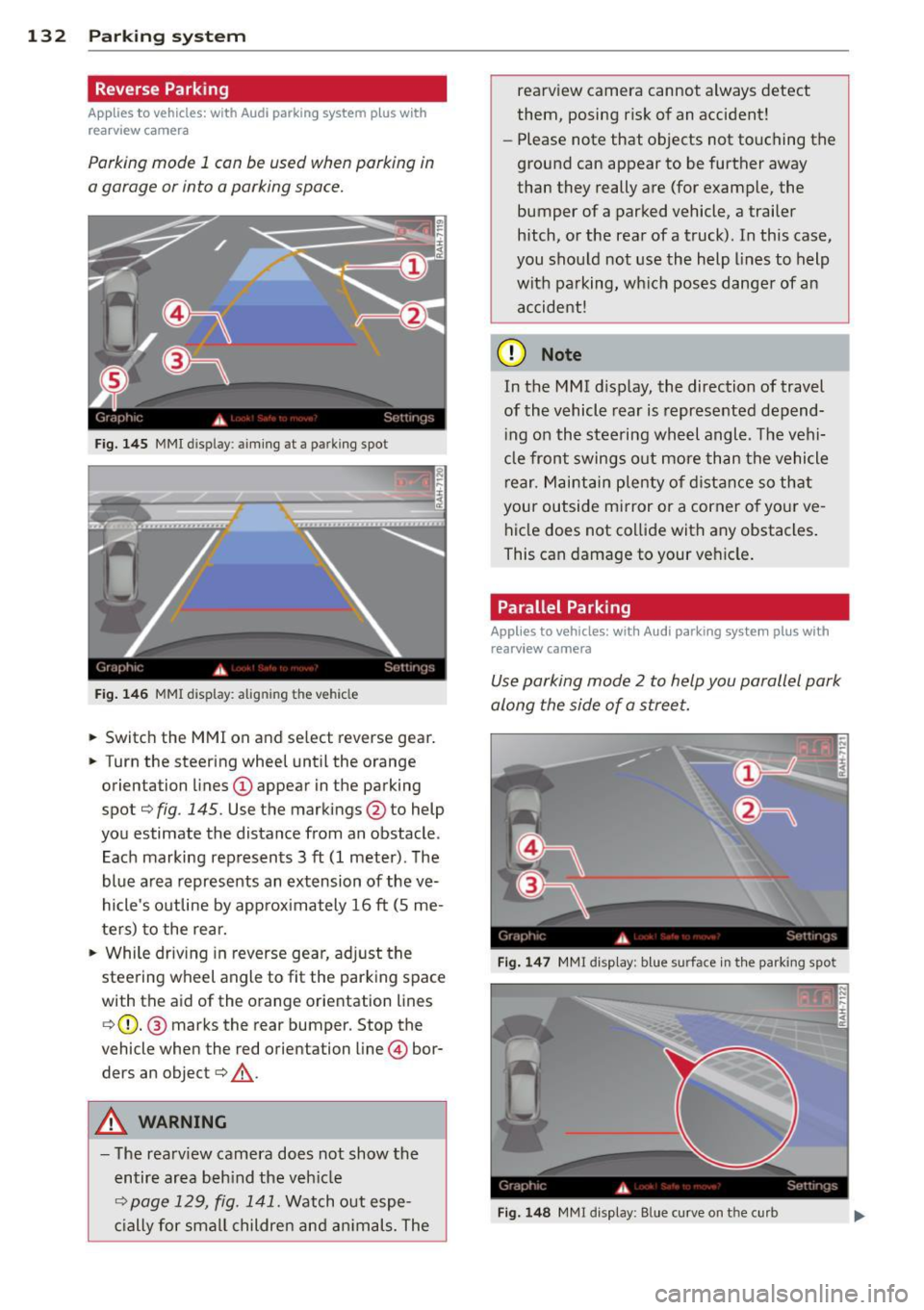
Parking mode 1 con be used when parking in
a garage or into a parking space.
Fig. 145 MMI disp lay : aiming at a pa rking spot
Fig. 146 MMI display: alig nin g th e veh icle
... Switch the MMI on and select reverse gear .
... Turn the steering wheel until the orange
orientation lines
(D appear in the parking
spot¢
fig . 145. Use the markings @to help
you estimate the distance from an obstacle .
Each marking represents 3
ft (1 meter). The
blue area represents an extension of the
ve
hicle's outline by approximately 16 ft (5 me
ters) to the rear.
"' While driving in reverse gear, adjust the
steering wheel angle to fit the parking space
with the aid of the orange orientation lines ¢ (D. @ marks the rear bumper. Stop the
vehicle when the red orientation line © bor
ders an object¢ _&..
A WARNING
-The rearview camera does not show the
entire area behind the vehicle
¢ page 129, fig. 141. Watch out espe
cially for small children and animals. The rearview camera cannot always detect
them, posing risk of an accident!
- Please note that objects not touching the
ground can appear to be further away
than they really are (for example, the
bumper of a parked vehicle, a trailer
hitch, or the rear of a truck). In this case,
you should not use the help lines to help
with parking, which poses danger of an accident!
(D Note
In the M MI dis play , the direction of travel
of the vehicle rear is represented depend
ing on the steering wheel angle . The vehi
cle front swings out more than the vehicle
rear. Maintain plenty of distance so that
your outside mirror or a corner of your
ve
hicle does not collide with any obstacles.
This can damage to your vehicle.
Parallel Parking
Applies to vehicles: with Aud i parking system plus with
rearv i ew camera
Use parking mode 2 to help you parallel park
along the side of a street .
Fig. 147 MMI disp lay: blue surface in th e parking spot
Fig. 148 MM! display : B lue curve on th e curb
Page 135 of 316
The following steps apply only when there is
no obstacle such as a wall near the parking
spot. Otherwise, please read the information
prov ided in the "Parking Next to Obstacles"
section.
~ Activate the turn signal.
~ Position your vehicle parallel to the edge of
the street, approxim ately 3 ft (1 meter)
from a parked vehicle .
~ Switch the MMI on and se lect reverse gear .
The parking aid tu rns o n and parking mode
1 appears on the display .
~ Press the contro l button (D ¢ fig. 147 on
the MMI contro l conso le. Parking mode
2
appea rs .
~ Back up and align yo ur vehicle so t he b lue
area @ borders on the rear end of the vehi
cle or on the parking spot line. The bl ue area
represents an extension of the veh icle's out
line by approximate ly
16 ft (S meters) to the
rear . The long side of the blue area should
be o n the curb . The entire blue area must fit
i nto the parking spot .
~ With the vehicle stopped, turn the steer ing
whee l to the right as far as it w ill go.
~ Back into the park ing spot until the blue
cu rve to uches the curb¢
fig. 148. Stop the
vehicle.
~ With the veh icle stopped, turn the steer ing
wheel to the left as far as it will go .
~ Continue to back into the park ing spot until
the vehicle is parked parallel to the curb .@
marks the rear bumper. Stop the vehicle
when the red orientation line@ borde rs an
object ¢.&, . Keep an eye o n the fron t of
yo ur vehicle while do ing this ¢Ci) .
Parking n ext to obstacles
When t here is an obstacle (such as a wall)
next to the pa rking spot, choose a spot w ith
mo re space on t he sides. Position the long
side of the b lue a rea so that there is sufficient
space from the curb. The a rea m ust no t be on
the c urb. You w ill also need to start turn ing
the steering wheel much earlie r. T he re should
be a suffic ient amo unt of space between the
curb and the blue curve, and the blue c urve
¢ fig. 148 must not touch the curb.
Par king system 133
A WARNING
- The rearview camera does not show the
entire area behind the vehicle
¢ page 129, fig. 141 . Watch out espe
cially fo r small children and anima ls . The
rea rv iew camera cannot always detect
them, posing r is k of an a ccident!
- P lease note that objects not touching the
g rou nd can appear to be further away
than they really are (for example, the
bumper of a parked vehicle, a trai ler
hitch, or the rea r of a truck) . In this case,
you shou ld not use the help lines to help
with parking, wh ich poses danger of an
accident!
(D Note
In the MMI display, the direction of travel
of the vehicle rear is represented depend
i ng on the steering wheel angle . The vehi
cle front swings out more than the vehicle rear. Maintain ple nty of d istance so that
your outside mirror or a corner of your ve
hicle does not col lide with any obstacles.
T his can damage to your ve hicle.
(0 Tips
The left o r right orientation lines and su r
faces will be disp layed, depending on the
turn s ignal being used .
Adjusting the display
and warning tones
App lies to v ehicl es: wi th Audi parking sys te m plus wi th
rearv iew camera
The display and warning tones can be adjust
ed in the MMI .
~ Select: !CAR ! function button> Parking sys
tem .
Or
~ Select: ~I C- A- R~I func tion button > Car sy s
tems *
contro l bu tton > Driver a ssist > Park
ing aid.
Display
- Off -when the par king system is switched
off, only a udible s ignal s are given .
Page 142 of 316
140 Driving Safely
• Sit properly in your seat and make sure that
your passengers do the same¢
page 61,
Gen eral recomm endations.
• Fasten your safety belt and wear it properly.
Also instruct your passenge rs to fasten their
safety belts properly¢
page 149 .
What impairs driving safety?
Safe driving is directly related to the condi
t ion of the vehicle, the driver as well as the
driver's ability to concentrate on the road
without being distracted.
The driver is responsible for the safety of the
vehicle and all of its occupants . If your ability
to drive is impaired, safety risks for everybody
in the vehicle increase and you also become a
hazard to everyone else on the road
9 .&,.
Therefore:
• Do not let yourself be distracted by passen
gers or by using a cellular telephone.
• NEVER drive when your driving ability is im
paired (by medications, alcohol, drugs, etc.).
• Observe all traffic laws, rules of the road
and speed limits and plain common sense.
• ALWAYS adjust your speed to road, traffic
and weather conditions .
• Take frequent breaks on Long trips. Do not
drive for more than two hours at a stretch.
> Do NOT drive when you are tired, under
pressure or when you are stressed .
A WARNING
Impaired driving safety increases the risk
of serious personal injury and death when
ever a veh icle is being used.
Proper occupant
seating positions
Proper seating position for the driver
The proper driver seating position is impor
tant for safe, relaxed driving.
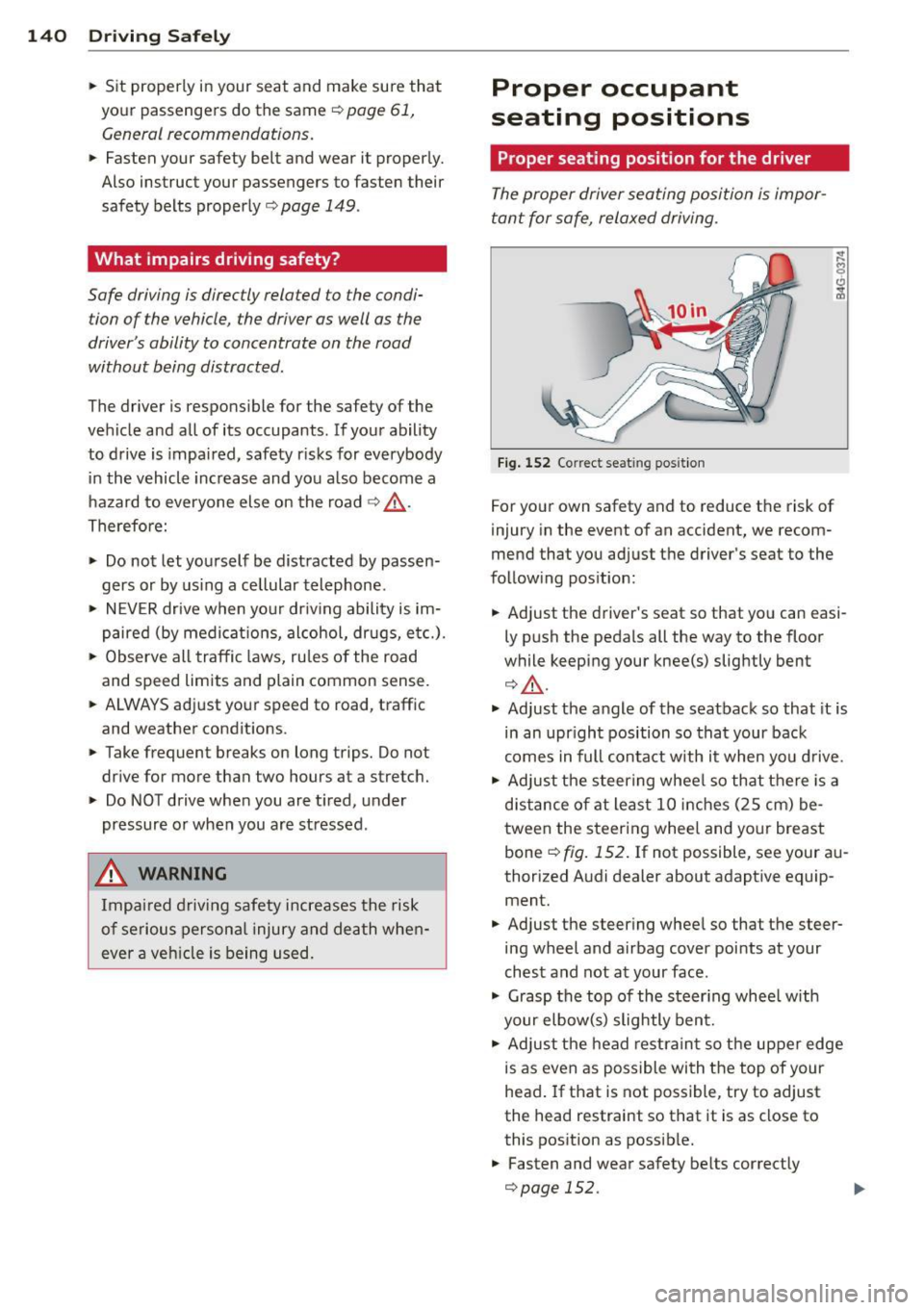
Fig. 152 Correc t seat ing position
For your own safety and to reduce the risk of
injury in the event of an accident, we recom
mend that you adjust the driver's seat to the
following position:
• Adjust the driver's seat so that you can easi
ly push the pedals all the way to the floor
while keeping your knee(s) slightly bent
¢,&. .
• Adjust the angle of the seatback so that it is
in an upright position so that your back
comes in full contact with it when you drive .
• Adjust the steering wheel so that there is a
distance of at least 10 inches (25 cm) be
tween the steering wheel and your breast
bone ¢
fig. 152. If not possible, see your au
thorized Audi dealer about adaptive equip ment.
• Adjust the steering wheel so that the steer
ing wheel and airbag cover points at your
chest and not at your face .
• Grasp the top of the steering wheel with
your elbow(s) slightly bent.
• Adjust the head restraint so the upper edge
is as even as possible with the top of your
head. If that is not possible, try to adjust
the head restraint so that it is as close to
this position as possible.
• Fasten and wear safety belts correctly
¢page 152.