radio AUDI Q5 2014 User Guide
[x] Cancel search | Manufacturer: AUDI, Model Year: 2014, Model line: Q5, Model: AUDI Q5 2014Pages: 316, PDF Size: 78.41 MB
Page 43 of 316
Locking v ehicle
• Move the selector lever to the P position
(automatic transmission), otherwise the ve
hicle cannot be locked.
• Touch the sensor at the door handle
c:> fig . 30 to lock the vehicle c:> A in General
description on page 39.
Do not reach inside
the door handle .
T he vehicle can be locked and unlocked at any
door. It depends on the settings in the radio
or in the
MM!* whether the entire vehicle is
unlocked or one of the doors
c:> page 39 . The
master key must be within a range of about
5 feet (1.5 meters) from the appropr iate door
or the rear lid .
It makes no difference whether
the master key is in your jacket pocket or in
your brief case.
If you grip the door handle while locking, this
can adversely affect the lock ing funct ion.
It is not possible to re -open the door for a
brief period directly after closing it . Th is al
l ows you to ensure that the doors are properly
l ocked.
& WARNING
Read and follow a ll WARN INGS c:> &. in
General description on page 39.
@ Tips
-
If your vehicle has been standing for an ex
tended period, please note the follow ing:
- The proximity sensors are deactivated af-
ter a few days to save power. You then
have to pull on the door handle once to
u nlock the veh icle and a second time to
open the veh icle.
- To prevent the battery from being dis
charged and to preserve your vehicle's
ability to start for as long as possible,
the energy management system gradu
ally switches off unnecessary conven
ience funct ions. It is possible t hat you
will not be able to unlock your vehicle us i ng these conven ience functions .
Openin g an d clos ing 41
-For Declaration of Compliance to United
States FCC and Industry Canada reg ula·
t ions
c:> page 296.
Operating locks with the mechanical key
In the event of o failure of the power locking
system, the driver's door can locked and un
locked with the mechanical key at the lock
cylinder.
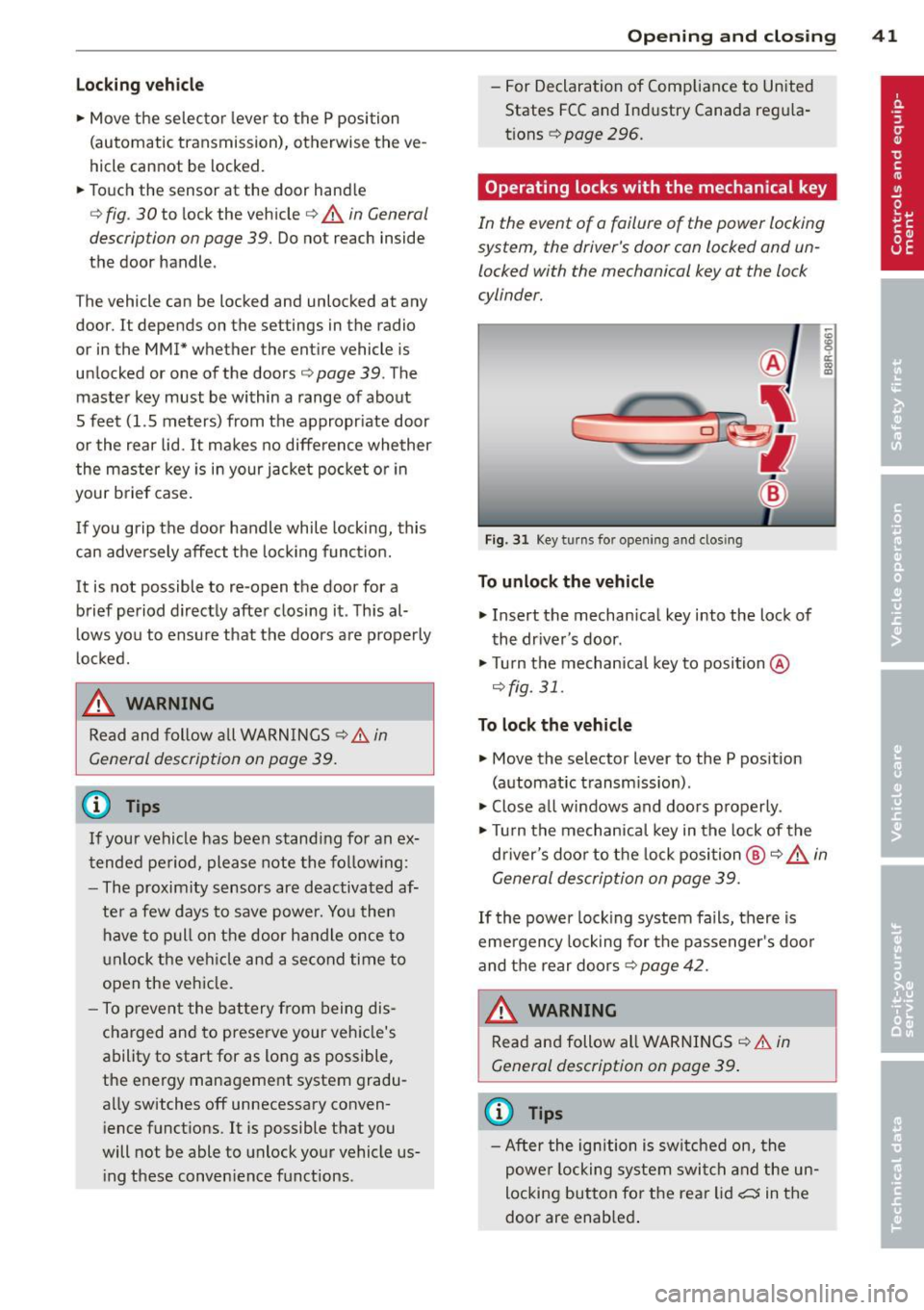
Fig. 31 Key turns fo r open ing and clos ing
To unlo ck the vehicle
• Insert the mechan ical key into the lock of
the dr iver's door .
• Turn the mechanica l key to position @
c:>fig. 31 .
To lock th e vehicl e
• Move the selector lever to the P pos ition
(automat ic t ransm ission) .
• Close all windows and doors proper ly.
• Tu rn the mechanical key in the lock of the
d river's door to the lock position @
c:> A in
General description on page 39.
If the power lock ing system fails, there is
emergency lock ing for the passenger's doo r
and the rear doors
c:> page 42.
WARNING
Read and follow all WARNINGS c:> &. in
General description on page 39 .
(D Tips
-After the ignition is switched on, the
powe r locking system swit ch and the un
locking button fo r th e rear lid~ in the
door are enab led .
Page 52 of 316
50 Clear vis ion
stickers to the windshield in this area in
or der to prevent malfunctions or fai l
u res .
- Some exte rior lig hti ng f unctions can be
adjusted
c> page 50 .
-When yo u remove yo ur key from the igni
tion while the vehicle's lights are turned
on, a buzze r sounds as long as the driv
er's door is open .
- In coo l or damp weather , the ins ide of
the headlights, t urn signa ls and tail
li ghts can fog over due to the tempera
ture difference between the inside and
outside. They will clea r sho rtly after
switching them on . T his does not affect
the service life of the lighting .
- In the even t of a light sensor malfunc
t ion, the d river is no tified in th e inst ru
ment cluster disp lay
c> page 33.
Fog lights
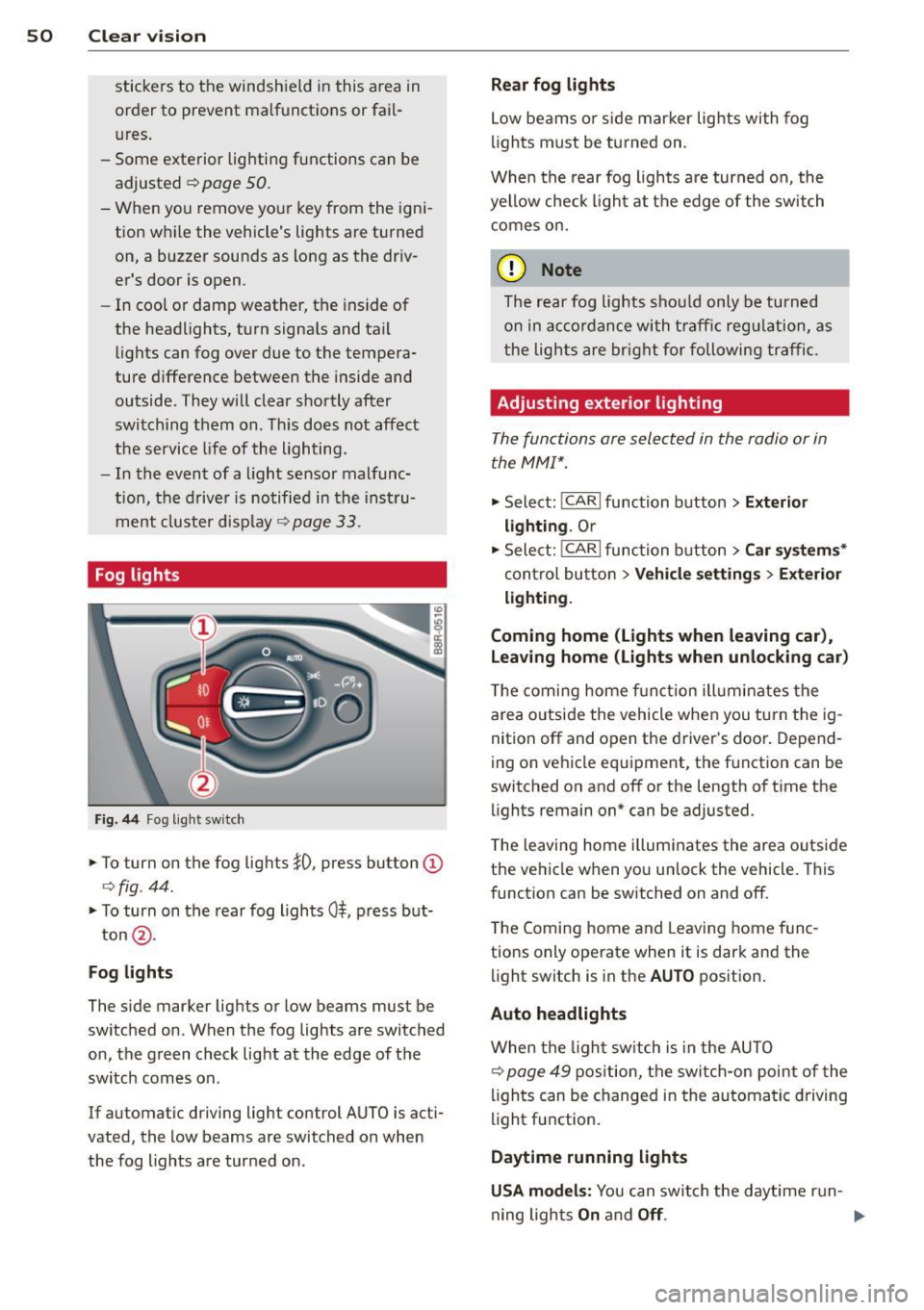
Fig . 44 Fog light sw it c h
.,. To turn on the fog lights }D, press button @
c>fig . 44 .
.,. To turn on the rear fog ligh ts 0$, p ress but-
ton @.
Fog lights
The s ide marker lig hts or low beams must be
switched on . When the fog lights a re switched
on, the green check light at the edge of the
sw itch comes on.
If automatic driving light control AUTO is act i
vated, the low beams are switched on when
the fog lights are tur ned on .
Rear fog lights
Low be ams o r sid e mar ker lig hts wi th fog
li gh ts m ust be t urned on .
When the rear fog lights a re turned on, the
yellow check ligh t a t the edge of the switch
comes on.
(D Note
The rear fog lights s houl d only b e turned
o n in acc ord ance wi th t raff ic reg ulation, a s
the lights are brig ht for following tra ffic.
Adjusting exterior lighting
The functions are sele cted in the radio or in
the MM I*.
.,. Select: I CAR I function button > Ext erior
lighting .
Or
.,. Sele ct: !CARlfunc tion button>
Car sy stem s*
contro l butto n > Vehicle setting s > Exterior
light ing .
Coming home (Lights when leaving car ),
Leaving home (Lights when unlocking car )
The coming home f unct ion ill umin ates the
are a outside the vehicle when you tu rn t he ig
nit ion off and o pen the d river's doo r. Depend
ing on vehicle equ ipment, the f unction can be
switched on and off or the length of t i me the
lights remain on* can be adjusted .
T he leaving home illum inates the area o utside
the ve hicle when you un lock the vehicle . This
funct ion can be switched on and off .
T he Comi ng home and Leaving home f unc
tio ns only ope rate when it is dark and the
light switch is in the
AUTO position .
Auto headlights
When the lig ht sw itch i s in the AU TO
c> page 49 position, the switc h-on point of the
li gh ts can be changed i n the automa tic driving
light function.
Daytime running lights
USA models: You can swi tch the daytime run-
ning lights
On and Off . .,..
Page 58 of 316
56 Clear vis ion
Wiper servi ce po sition /blade rep lacem ent
po sit ion
• Switch the ignition
off and move the wind
shield wiper lever to position @¢
page 54,
fig. 53. The windshield wipers move into the
service position.
• To bring the wipers back into the original
pos ition, switch the ignition on and press
the windshie ld wiper lever.
You can also turn the service position on or off
in the radio or
MMI*:
• Switch the w indshield wipers off (posit ion
@ ¢page 54, fig. 53).
• Se lect : I CAR I funct ion button> Wind shi eld
wiper s > Se rvice positio n > On/Off .
Or
• Se lect :
I CAR I function button> Car sys te m s*
control button > Servicing & check s > W iper
s e rv ic e po sition > On/ Off .
Removing the wip er blade
• Lift the windshie ld wiper arm up from the
windshield .
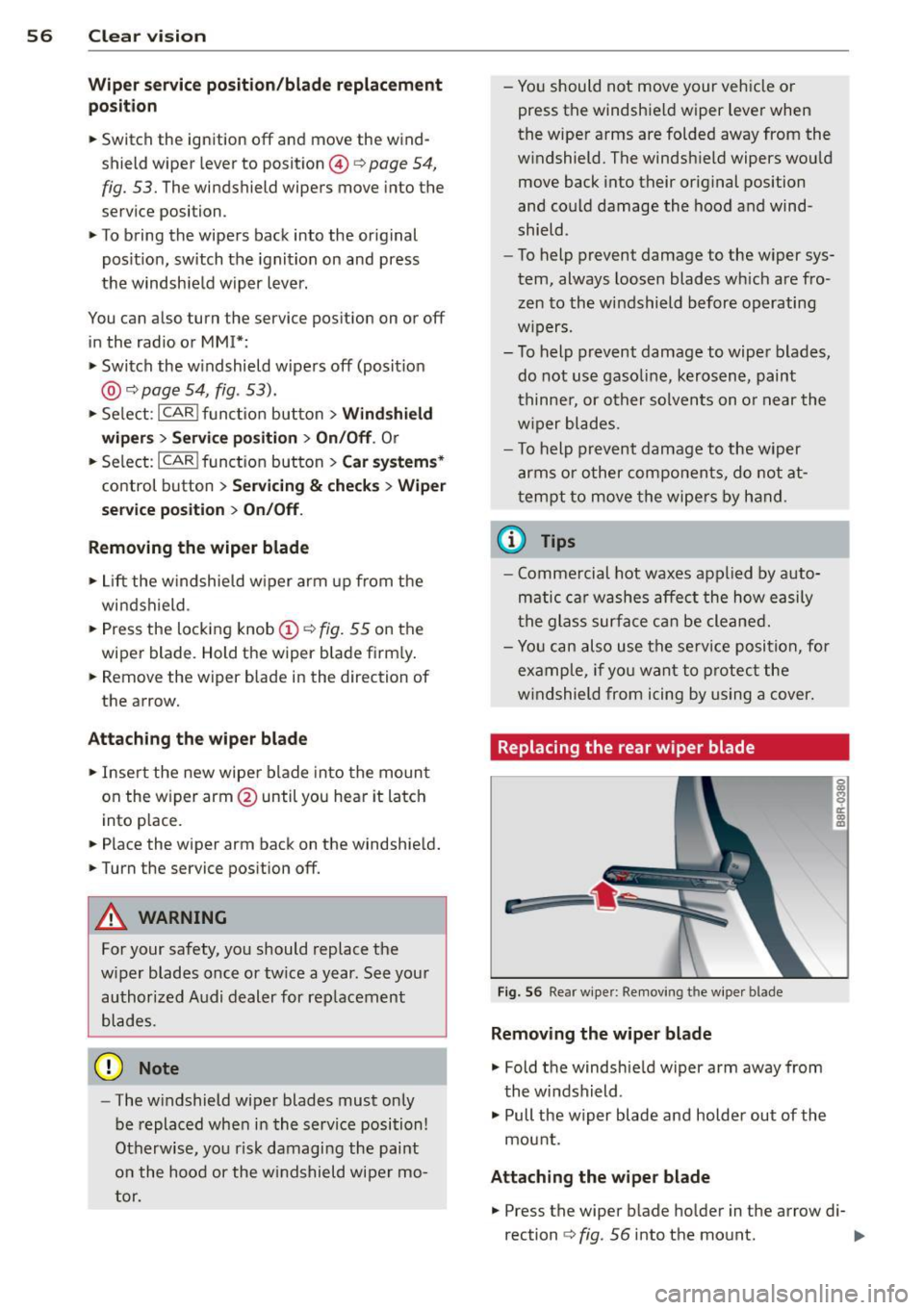
• Press the locking knob@~
fig. 55 on the
wiper blade. Hold the wiper blade firm ly.
• Remove the wiper blade in the direction of
the arrow.
Attach ing th e wiper bl ade
• Inse rt the new wiper blade into the moun t
on the w iper arm @until you hear it latch
into place.
• Place the wiper arm back on the windshield.
• Turn the service position
off.
A WARNING
-
For your safety, you should replace the
w iper blades once or tw ice a year. See your
author ized Audi dealer for rep lacement
blades.
(D Note
- The windshield wiper blades must only
be replaced when in the service position!
Otherwise, yo u risk damaging the paint
on the hood or the w indshield wiper mo
tor. -
You should not
move your veh icle or
press the windshield wiper lever when
the wiper arms are folded away from the
windshield. The windshie ld wipers wou ld
move back into their original position
and could damage the hood and wind
shield.
- To help prevent damage to the wiper sys
tem, always loosen blades wh ich are fro
zen to the windshield before operating
w ipers.
- To help prevent damage to wiper blades,
do not use gaso line, kerosene, paint
t hinner, or o ther solven ts on o r near the
w iper blades.
- To help prevent damage to the wiper
arms o r other components, do not at
tempt to
move t he wipe rs by hand.
© Tips
- Commercial hot waxes applied by auto
matic car washes affec t the how easily
the glass surfa ce ca n be cleaned.
- Yo u can also use the se rvice position, for
examp le, if yo u want to protect the
w indshield from icing by us ing a
cover.
Replacing the rear wiper blade
&:
F ig . 56 Rear wiper: Removing t he wipe r blade
Removing the wiper blade
• Fold the windshie ld wiper arm away from
the windshield .
• Pull the w iper blade and holder out of the
mount.
Attaching the wipe r blade
g
8 rr. ., II)
• Press the wiper blade holder in the arrow di-
rection ~
fig. 56 into the mount. ..,.
Page 66 of 316
64 Seats and storage
Activating remote control key memory
Applies to vehicles: with seat memory
To assign the drive r's sea t settings to the re
mote contro l key when locking the vehicle, the
function must be activated in the radio or
MMI* .
• Se lect : I C AR I func tion button > Seat adjust
m ent > Driver's seat > Ke y mem . profile
>
O n. Or
· • Se lect :
~ I C- A - R-! funct ion button > Car system s*
control button > Vehicle setting s > Seat s >
Driver' s seat > Remote control key > On .
@ Tips
If you do not want another driver's set
tings to be assigned to the remote control
key, switch off the memory f unction using
the radio o r
MM!* or the IO FF I button
¢page 63.
Rear seats
General information
Safe transportation of pa ssengers on the rear
seats requires proper safe ty precautions.
All passenge rs on the rear seats must be seat
ed i n complia nce w ith the safety guidelines
explained in
i=:;, page 149 and¢ page 157.
The corre ct seating posi tion is critical fo r th e
safety o f fron t
and rear seat passengers alike
¢page 142.
~ WARNING
- Occ upants in the front and rear seats
must a lways be properly restrained.
- Do not let anyone ride i n the vehicle
without the head restraints provided.
Head restra ints help to reduce injuries.
-
- Loose items inside the passenger com
partment, can f ly forward in a crash or
sudden maneuver and i njure occupants.
Always store art icles in the luggage com
partment and use the fasten ing eyes, es
pecially when the rear seatbacks have
bee n folded down. -
Read and heed all WARNINGS
¢ page 142 , Proper seating positions
for passengers in rear seats.
Adjusting seat
The fore-and-a~ adjustment of the seat cush
ion and the seatback angle can be adjusted.
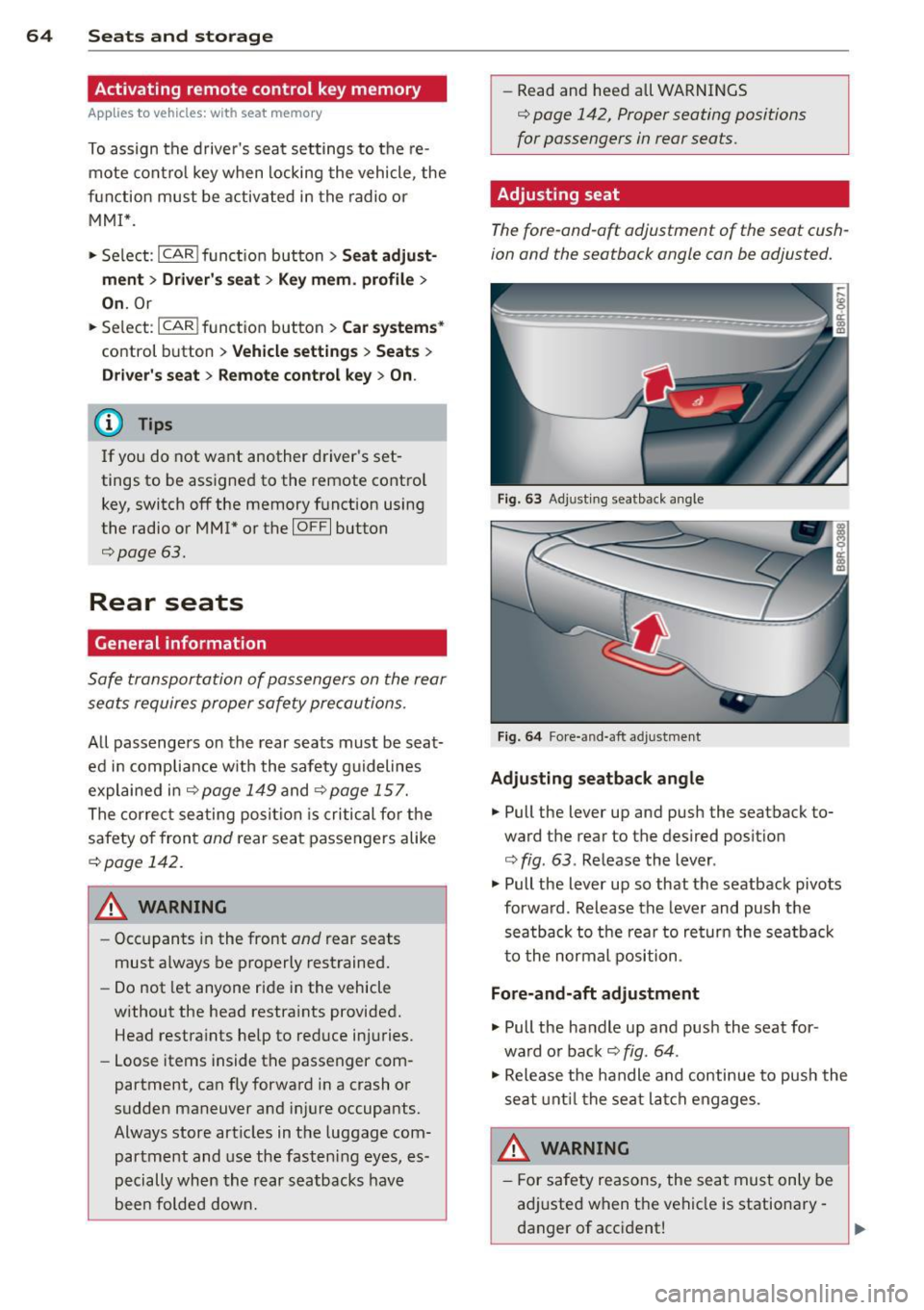
F ig . 63 Adjus ting seatback a ngle
Fig. 6 4 Fore-and-aft adjust ment
Adjusting seatback angle
• Pull the lever up and pus h the seatback to
ward the rear to the desired posit io n
¢
fig . 63 . Release the lever .
• Pull the lever up so that the seatback pivots
forwa rd . Rel ease the lever and push the
seatb ack to the rear to re turn the sea tba ck
t o the normal position .
Fore-and-aft adjustment
• Pull the handle up and pus h the seat for
wa rd o r back ¢
fig. 64 .
• Release the handle and continue to push the
seat unt il t he seat lat ch engages .
_&. WARNING
- For safety reasons, the sea t must on ly be
a dj usted when t he vehicle is stationary
danger of acc ident!
Page 82 of 316
80 Warm and cold
Operation
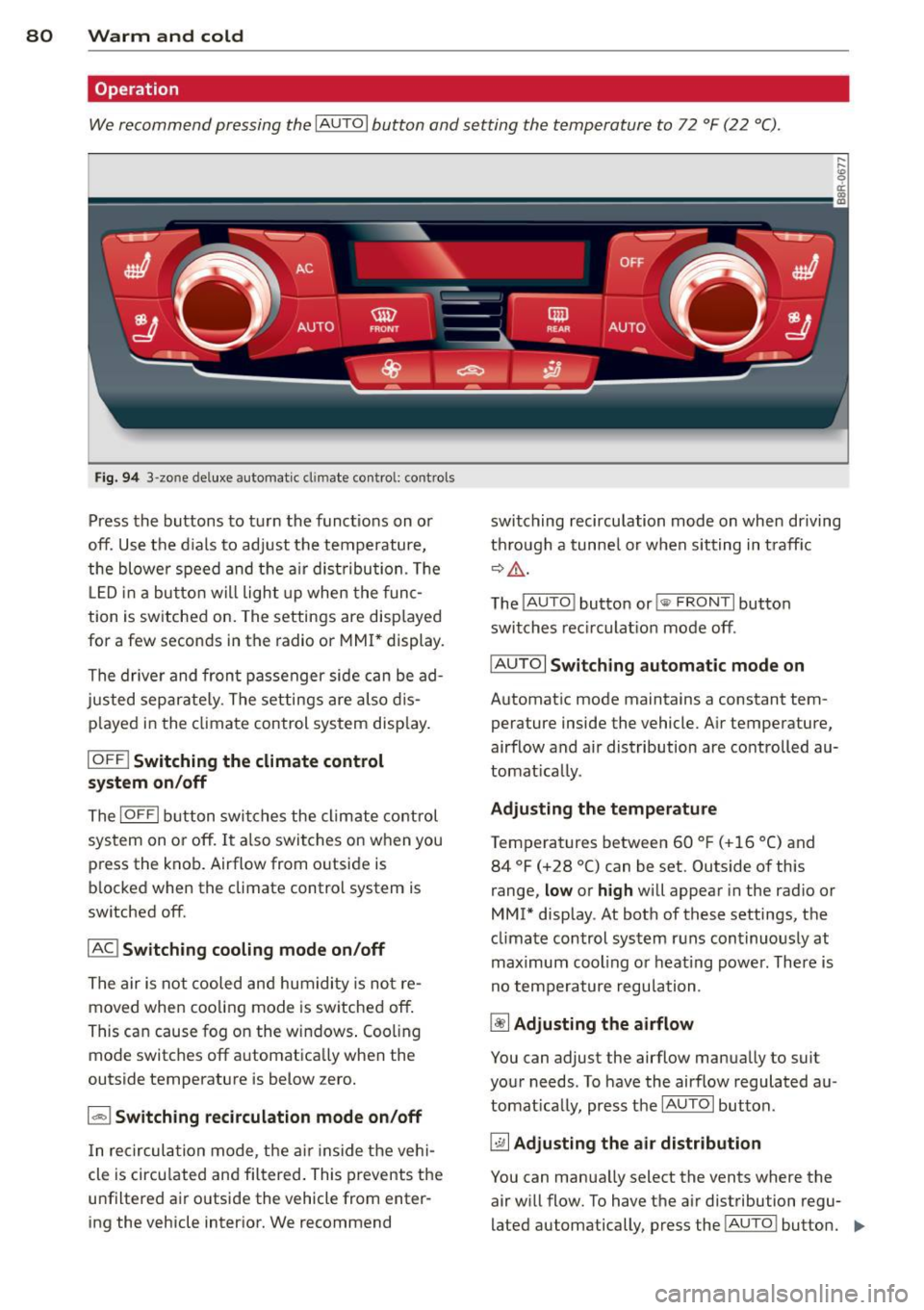
We recommend pressing the IAUTOI button and setting the temperature to 72 °F (22 °C) .
Fig. 94 3 -zo ne de luxe automat ic cl imate contro l: controls
Press the buttons to turn the functions on or
off. Use the d ials to adjust the temperature,
the blower speed and the air dist ribution . Th e
L ED in a button wi ll light up when the func
tion is switched on. The settings are disp layed
for a few seconds in the radio or MMI* display.
The driver and front passenger side can be ad
justed separately. The settings are also dis
p layed in the climate control system disp lay.
IOFF I Switching the climate control
system on/off
The IOFFI button switches the climate control
sys tem on or off. It also switches on when you
press the knob. Airflow from o utside is
b locked when the climate control system is
switched off.
IAC ! Switching cooling mode on/off
The air is not cooled and humidity is not re
moved when cooling mode is switched off.
This can cause fog on the windows . Cooling
mode switches off a utomatica lly when the
outside temperature is below zero.
1 - 1 Switching recirculation mode on/off
In recirculation mode, the air inside the vehi
cle is circu lated and filtered . This prevents the
u nfiltered air outside the vehicle from enter
ing the vehicle interior. We recommend switching
recirculation mode on when driving
th rough a tunnel or when sitting in traff ic
~&. -
The IAU TO I button or!@ FR ONT I button
switches recirculation mode off.
IAU TOI
Switching automatic mode on
Automatic mode maintains a constant tem
perature inside the vehicle. Air temperature,
airflow and air distribution are controlled au
tomatically.
Adjusting the temperature
Temperatures between 60 °F (+16 °C) and 84 °F (+28 °C) can be set. Outside of this
range,
low or high will appear in the radio or
MMI* display . At both of these settings, the
climate control system runs continuously at
maximum cooling o r heating power. There is
no temperature regulation .
~ Adjusting the airflow
You can adjust the airflow manually to suit
your needs . To have the airflow regulated au
tomatically, press the IAUTOI button .
~ Adjusting the air distribution
You can manua lly select the vents where the
air will flow. To have the a ir distribution regu
lated automatically, press the !AU TO ! button.
IIJ,,
Page 83 of 316
![AUDI Q5 2014 User Guide [i] Adj ustin g seat h eat ing *
Press ing the button switches the seat heating
on at the highest setting ( leve l 3) . The LEDs
indicate the temperature leve l. To reduce the
t e](/img/6/57636/w960_57636-82.png "AUDI Q5 2014 User Guide [i] Adj ustin g seat h eat ing *
Press ing the button switches the seat heating
on at the highest setting ( leve l 3) . The LEDs
indicate the temperature leve l. To reduce the
t e")
[i] Adj ustin g seat h eat ing *
Press ing the button switches the seat heating
on at the highest setting ( leve l 3) . The LEDs
indicate the temperature leve l. To reduce the
t e mperature, press the button again. To
switch the seat heating off, press the button
repeatedly unt il the LED turns off .
After 10 minutes, the seat heating automati
cally switches from leve l 3 to leve l 2.
lil Adjusting seat ventilation *
Press ing the button switches the seat venti la
tion on at the h ighest set ting (level 3) . The
L EDs indicate the ventilation leve l. To reduce
the ventilation leve l, press the button agai n.
T o switch the seat v entilat ion off, pr ess the
button repeatedly until the L ED turns off.
I.., F RON T I Switch th e defro ster on /off
The windshield and side windows are defrost
ed or cleared of condensat ion as quickly as
poss ib le. Th e maximum amo unt of air flows
mainly from the vents below the windshield.
Rec irculation mode sw itches off . The tempera
ture should be se t to 72 ° F (22 °C) or higher .
T he temperature is controlled automatically .
T he
IAU TO I button switches the defroster off.
llliil REAR I Switching rear window heat er
o n/o ff
The r ear window heater only operates when
the engine is running.
It switches off auto
mat ically after a few minutes , depend ing on
t he outside tempera ture.
To prevent the rear window heater from
switch ing off automatica lly, press and hold
the
IQil) REAR I button for more than 2 seconds.
This remains stored unt il the ignition is
switched off .
Air vent s
You can open and close the center and rear air
vents using the thumbwheels. The levers ad
just the d irection of the airflow from the
vents .
Warm and c old 81
You can adjust the air temperature in the rear
by turning the thumbwheel toward the red
s ide to make it warmer or toward the blue
s ide to make it cooler.
A WARNING
- Do not use the recircu lation for extended
periods of time. The windows could fog
up since no fresh a ir can enter the vehi
cle . If the windows fog up, p ress the air
recirc ulation button aga in immediately
to switch off the air reci rc u lation func
tion or se lect defrost .
- I ndividuals w ith reduced sensitivity to
pa in or temperature cou ld deve lop burns
when using the seat heating* funct ion .
To reduce the risk of injury, these individ uals sho uld not use seat heating.
(D Note
To avoid damage to the heat ing e lements *
in the seats, do not kneel on the seats or
place heavy loads on a small area of the
seat.
Setup
The basic climate control settings can be ad
justed in the radio or MMI*.
.. Select: !CAR I function button> A /C cont ro l
button . Or
.. Select:
!CAR I function button > Car sy stem s*
contro l button > AC.
Automat ic recirculation
When sw itched on, a utomat ic recircu lation
controls the recircu lation mode automatically.
If the windows fog up , press the
I~ F RON T!
button.
Synch ronization
When synchronization is swi tched o n, the
same sett ings are appl ied to both the dr iver
and fron t passenger, except for the seat heat
ing/venti lation* . Synchronization switches off
when you adjust the settings on the front pas-
senger's s ide . .,.
Page 90 of 316
88 On the road
case) which screens the radio sig nal. Electron
ic devices such as ce ll phones can also inter
fere with the rad io signa l.
Press brake pedal to start engine
This message appea rs if you do not press the
brake pedal to start the engine.
Shift to N or P to start engine
This message appears when attempting to
start the engine if the selector lever for the
automatic transmission is not in the P or N
position . The engine can o nly be started w ith
the selector in these pos itions.
I!) Is the key in the vehicle?
This message appears in a veh icle with Con
venience key* if the master key is removed
from the vehicle w ith the engine running . If
the master key is no longer in the vehicle, you
cannot switch on the ignition after stopping
the eng ine and you also cannot start the en
g in e again. Moreover, you cannot lock the ve
hicle from the o utside with the key .
Shift to P otherwise vehicle can roll away.
Doors do not lock if lever is not in P.
This message appears fo r safety reasons
a long w ith a warning signa l. It appears if the
selector lever for the automatic transm iss ion
is not in the P position when switch ing off the
ig nit ion. Move the selector lever to the P pos i
tion, otherwise the veh icle is not sec ured
against rolling away. You also cannot lock the
vehi cle using the locking button* on the door
handle or using the remote key.
Turn off ignition before leaving car
This message appears if the driver's door is
opened while the ignition is switched on . Al
ways sw itch off the ignition if you are leaving
the vehicl e. See also
~ page 92 .
Shift to P and turn off ignition, otherwise ve
hicle can roll away
This message appears if the driver's door is
opened while the ignition is switched on and
the selector lever is not in the P position. Shift
the selector lever into the P position and switch off the
ignition when you exit the vehi
cle. Otherwise the vehicle could roll . See also
~ page 92.
Convenience key defective! Use ignition lock
This message appears if the engine must be
sta rted o r stopped using the ign ition key and
not the
I START ENGINE STOP I* button .
Electromechanical
parking brake
' Operation
The electromechanical parking brake replaces
the hand brake.
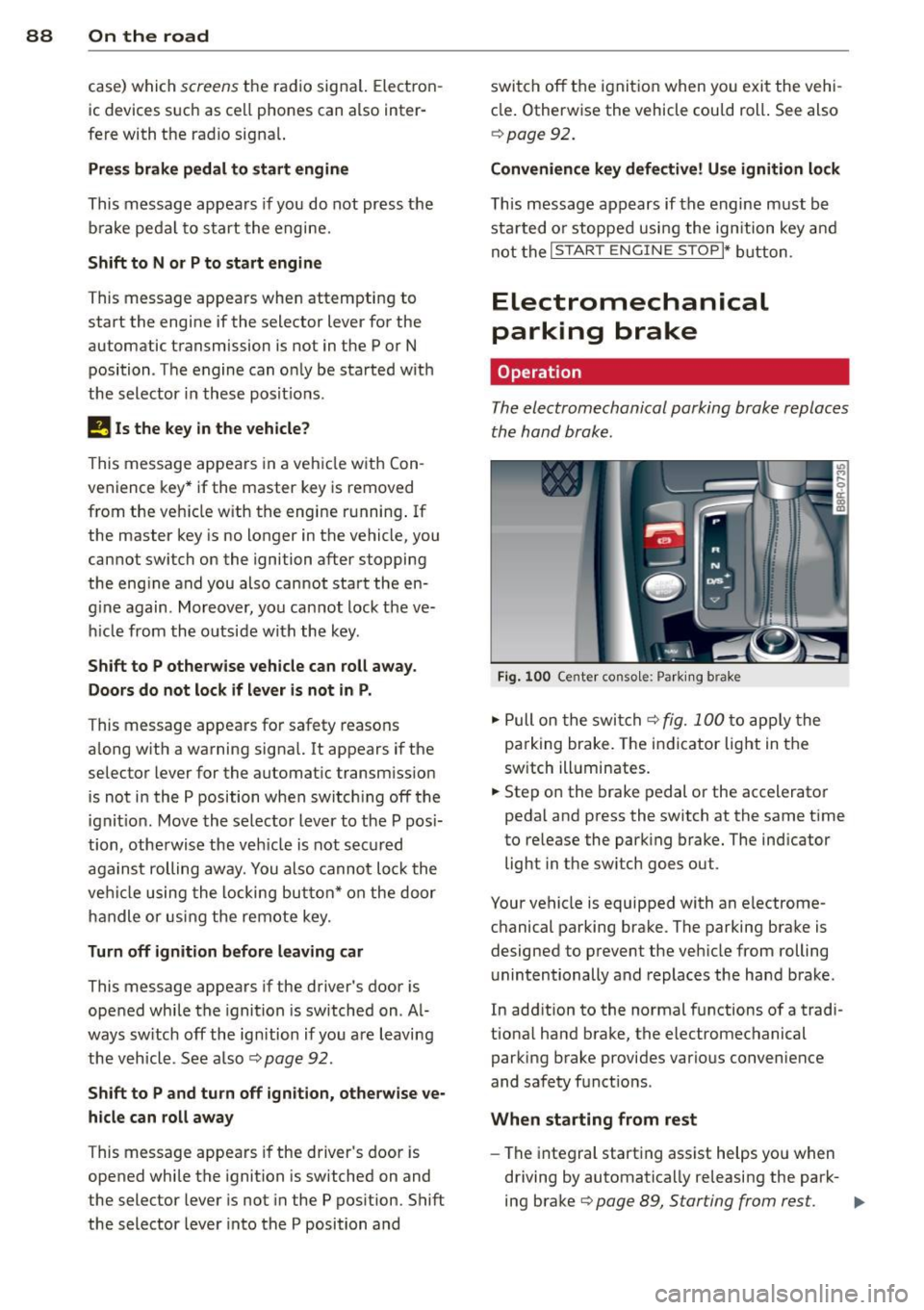
Fig. 100 Center conso le: Par king brake
.,. Pull on the switch~ fig. 100 to apply the
parking brake. The indicator light in the
sw itch ill uminates.
.,. Step on the brake pedal or the accelerator
pedal and press the switch at the same time
to re lease the parking brake. The ind icator
light in the sw itch goes out.
Your vehicle is equipped with an electrome
chanical parking brake. The parking brake is
designed to prevent the vehicle from rolling
unintentionally and replaces the hand brake.
In add ition to the normal functions of a tradi
tiona l hand brake, the electromechanical
parking brake provides various convenience
and safety funct ions .
When starting from rest
-The integral starting assist helps yo u when
driving by automatica lly releasing the park-
ing brake
~ page 89, Starting from rest. .,.
Page 96 of 316
94 On the road
will remain in effect until you turn off the igni
tion, assuming that you have not changed or reset the setting .
The speed warning symbol. (USA models)/
• (Canada mode ls) in the warning 1 display
appears when you exceed the maximum
speed. It goes out when the speed falls below
the stored maximum speed.
The speed warning symbol wi ll also go out i f
the speed exceeds the stored maximum speed
by more than about
25 mph (40 km/h) for at
least
10 seconds. The stored maximum speed
is deleted.
Setting speed warning
1 9 page 94.
Speed warn ing 2
Sto ring warning 2 is recomme nded if you al
ways
want to be reminded of a certa in speed,
for example when yo u are traveling i n a cou n
try that has a general maximum speed limit,
or if you do not want to exceed a specified
speed for winter tires.
The speed warning
2 symbol ,. (USA mod
e ls)/ . (Canada models) appears in the dis
p lay when you exceed the stored speed limit.
Unlike warning
1, it will not go out until the
vehicle speed drops below the stored speed limit.
Setting speed warning
2 9 page 94.
(D Tips
Even tho ugh your vehicle is equipped with
a speed warning system, you shou ld still
watch the speedomete r to make sure you
are not driving faster than the speed lim it.
Speed warning 1: setting a speed limit
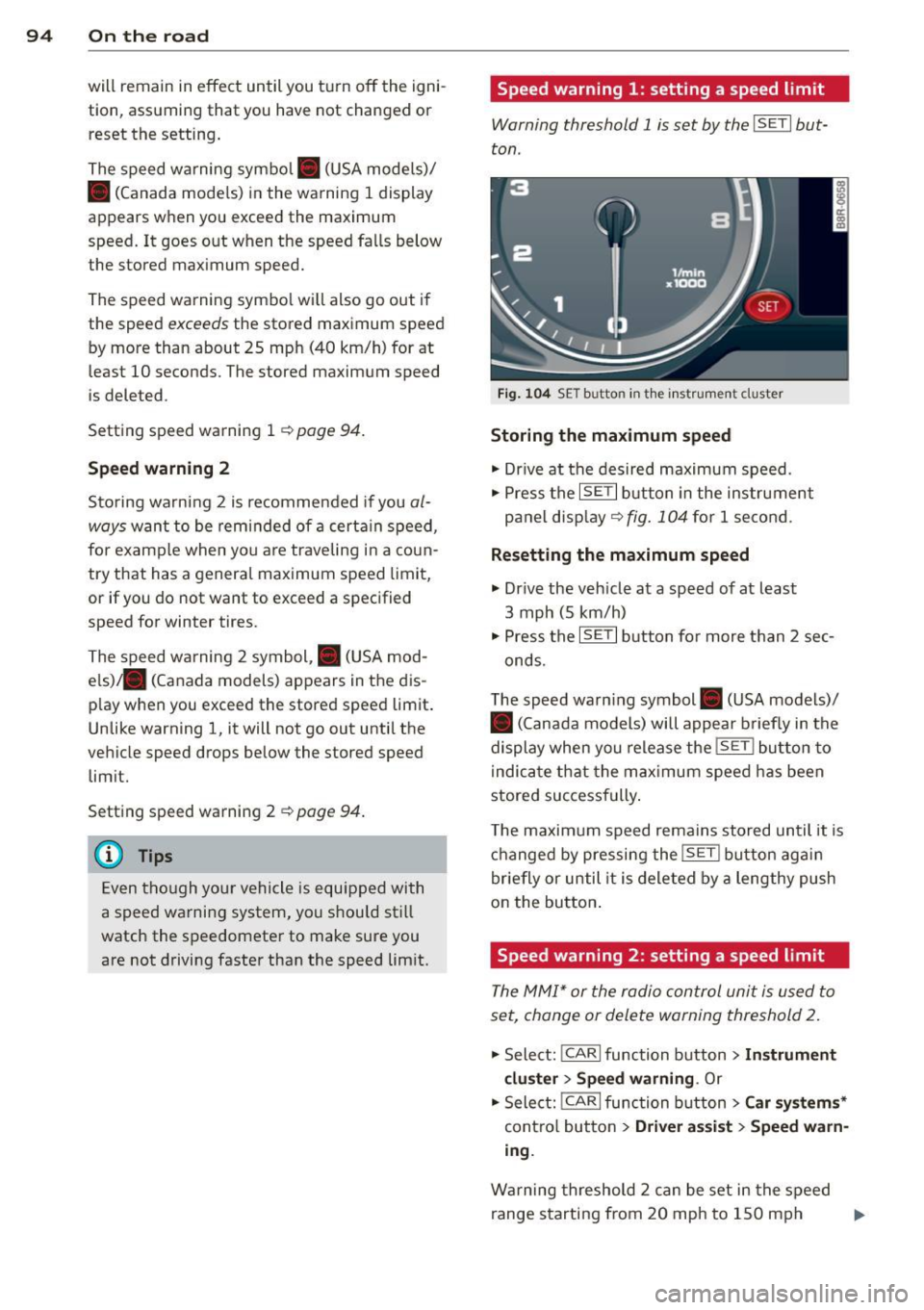
Warning threshold 1 is set by the I SET I but
ton .
Fig . 1 04 SET butto n in th e ins trume nt cluster
Storing the maximum speed
• Drive at the desired maximum speed.
• Press the
ISE TI b utton in the instrument
panel display ~
fig. 104 for 1 second .
Resett ing the m aximum spe ed
• Drive the vehicle at a speed of at least
3 mph (5 km/h)
• Press the
IS ET I button for more than 2 sec-
onds.
T he speed warn ing symbol . (USA models)/
• (Canada models) will appear b riefly in the
display when you release the
! SE T! bu tton to
i ndica te that the max imum speed has been
stored successfully .
T he maximum speed remains stored until it is
changed by pressing the
! SE T! bu tton aga in
briefly or until it is deleted by a lengthy push
on the button .
Speed warning 2: setting a speed limit
The MM!* or the radio control unit is used to
set, change or delete warning threshold 2.
• Select: !CARlfunction button>
In strum ent
cl us te r > Spee d warning .
Or
.. Select: !CAR I function button> C ar sys te m s*
contro l button > Dri ver a ssist > Speed w arn
i n g .
Warning threshold 2 can be set in the speed
range starting from
20 mph to 150 mph ..,.
Page 114 of 316

112 Audi adaptive cruise control and braking guard
<:::::> ___ <:::::>_ Distance 3: This setting cor re-
sponds to a distance of 164 feet/SO meters
when traveling at 62 mph (100 km/h), or a
time interval of 1.8 seconds.
<:::::> ____ <:::::> Distance 4: This setting cor re-
sponds to a distance of 210 feet/64 meters
when traveling at 62 mph (100 km/h), or a
time interva l of 2 .3 seconds.
A WARNING
Following other vehicles too closely in
creases the risk of collisions and serious
personal injury.
- Setting short distances to the traffic
ahead reduces the t ime and distance
available to br ing your vehicle to a safe
stop and makes it even more necessary
to pay close attention to traffic.
- Always obey applicable traffic laws, use
good judgment, and select a safe follow
ing distance for the traffic, road and
weather conditions.
(0 Tips
- Distance 3
is set automatically each time
you sw itch the ignition on.
- Your standa rd settings are automatically
stored and assigned to the remote con
trol key being used
c:::> page 36.
Setting the driving program
Ap plies to vehicles: with Audi adaptive cruise co ntrol
Depending on the selected dr iving program
and distance, driving behavior when accelerat
ing will vary from dynamic to comfortable.
Setting the driving program for vehicles
without Audi drive select*
• In the radio/MM I*, select: I CAR ! function
button >
adaptive cruise control > Driving
program
> Comfort, Standard or Dynamic .
Or
• Select :
I CAR I function button> Car systems *
control button > Driver assist > Adaptive
cruise control
> Driv ing program > Com
fort, Standard
or Dynamic . Setting the driving mode for vehicles with
Audi drive
select*
Refer to c:::> page 121.
(D Tips
Your settings are automatical ly stored and
assigned to the remote control key being
used
c:::> page 36 .
· Request for driver intervention
App lies to vehicles: wit h Audi adapt ive c ruise contro l
Fig. 122 Instr umen t cluster: request for dr iver inter
vent ion
In certain situations, the system will prompt
you to take action . This could happen, for ex
ample, if braking by the adaptive cruise con
trol system is not enough to mai ntai n enough
distance to the vehicle ahead.
The instrument cluster will warn you about
the danger
c:::> fig. 122:
- A red vehicle is p ictured in the display.
- The text
DISTANCE! appears in the stat us
bar .
- The red indicator light
I blinks.
- In addition, a warning tone sounds.
Page 115 of 316

Audi adaptive cruise control and braking guard 113
Audi braking guard
Description
Applies to vehicles: with Audi adaptive cruise control
Fig. 123 Instrument cluste r: approac h warn ing
Braking guard uses a radar sensor. It also
functions within the limits of the system
when adaptive cruise control is switched off.
What can braking guard do?
When detected in time, the system can assess
situations when a vehicle ahead brakes sud
denly or if your own vehicle is traveling at a
high speed and approaching a vehicle up
ahead that is moving more slowly . Braking
gua rd does not react if it cannot detect the
situation .
The system advises you of various situations:
- The
distance warning is given if you are too
close to the vehicle ahead for a long time. If
the vehicle ahead brakes sharply, you wi ll
not be able to avoid a collision. The indicator
light
I in the display comes on .
- The
approach warning is given when a de
tected vehicle up ahead in your lane is mov
ing much more slowly than you are or if it
brakes sharply . When this warning is given,
it may only be possible to avoid a collision
by swerving or braking sharply. The indicator
light
I and indicator in the display will warn
you about the danger
c:> fig. 123. You will al
so hear an acoustic signal.
If you do not react fast enough or do not react
at all to the situation, braking guard will inter-
ll Th is is not ava ilable in som e coun tri es.
vene by braking and the message Braking
guard: Activated
will appear.
- If a coll ision is imminent , the system will
first provide an
acute warning by briefly and
sharply applying the brakes.
- If you do not react to the acute warning,
braking guard can brake within the limits of
the system. This reduces the vehicle speed
in the event of a collision.
- At speeds under 20 mph (30 km/h), the sys
tem can initiate a complete deceleration shortly before a collision
ll.
- If the braking guard senses that you are not
braking hard enough when a collision is im
minent, it can increase the braking force .
Which functions can be controlled?
You can switch braking guard and the dis
tance/approach warning on or off in the radio/
MMI* i::!> page 114, Settings in the radio/
MMI *.
A WARNING
--==
Lack of attention can cause collisions, oth-
er accidents and serious personal injuries.
The braking guard is an assist system and
cannot prevent a collision by itself. The
driver must always intervene. The driver is
always respons ible for braking at the cor
r ect time .
- Always pay close attention to traffic,
even when the braking guard is switched
on . Be ready to intervene and be ready to
take comp lete control whenever necessa
ry. Always keep the safe and legal dis
tance between your vehicle and vehicles
up ahead.
- Braking guard works within limits and
will not respond outside the system lim
its, for examp le when approaching a
stopped vehicle or stationary obstacle (end of a traffic jam or vehicle that has
broken down in traff ic).