mmi AUDI Q5 2015 User Guide
[x] Cancel search | Manufacturer: AUDI, Model Year: 2015, Model line: Q5, Model: AUDI Q5 2015Pages: 302, PDF Size: 75.01 MB
Page 52 of 302
Opening and closing
Programming the buttons (version 8)
Applies to vehicles: with garage door opener (Homelink)
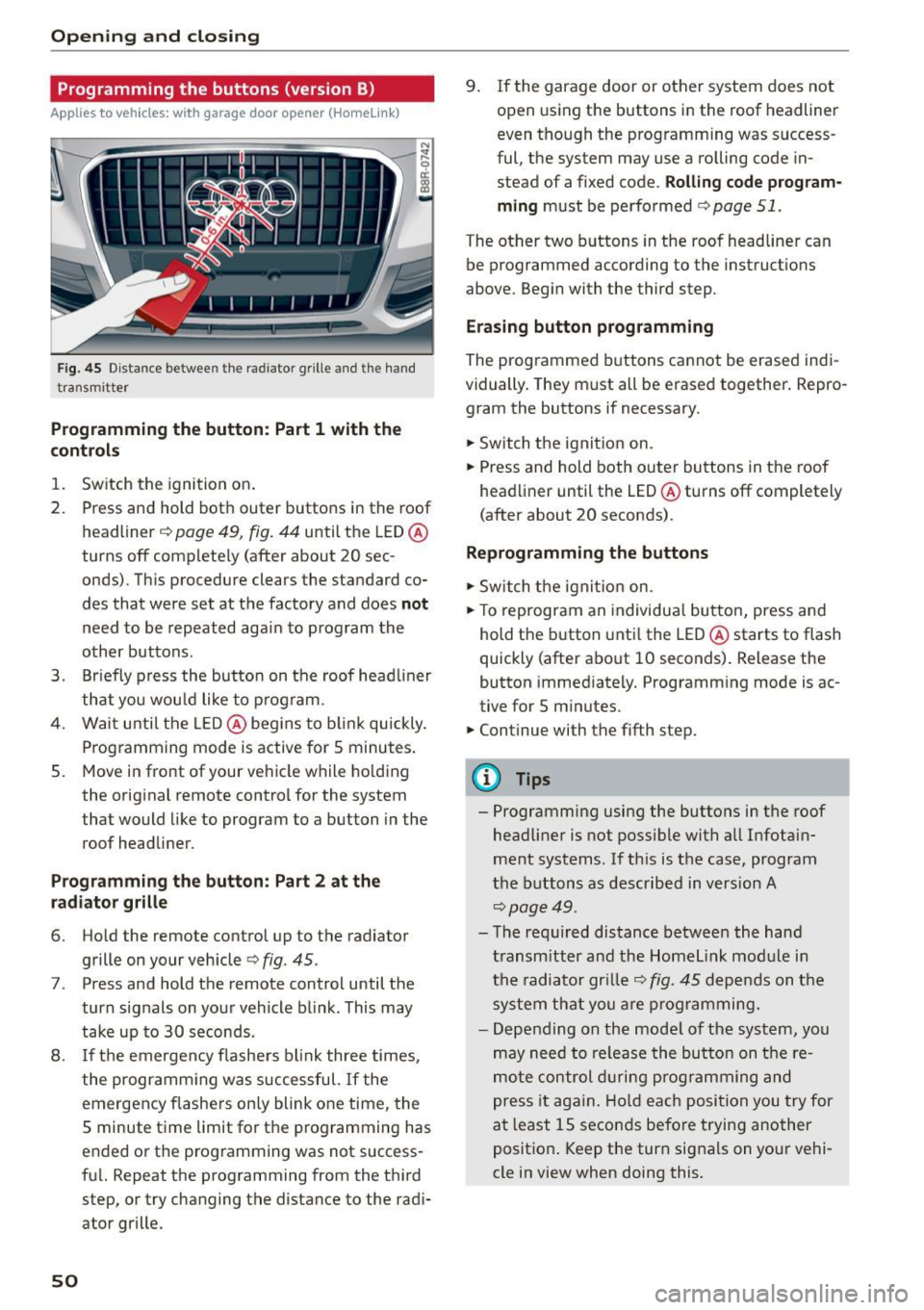
Fig . 4 5 Dis tan ce betwee n th e ra diato r grille a nd the hand
t ra n sm itter
Programming the button : Part 1 with th e
controls
1. Switch the ignition on .
2. Press and hold both outer buttons in the roof headliner
c;, page 49, fig. 44 until the LED @
turns off comp lete ly (after about 20 sec
onds). This procedure clears the standard co
des that were set at the factory and does
not
need to be repeated again to p rogram the
other buttons .
3. Br iefly p ress the button on the roof head liner
that you wou ld like to p rog ram.
4. Wai t unti l the LED @ beg ins to b link quickly.
P rog ramming mode is active for S minutes .
5. Move in front of your ve hicle while ho ld ing
the orig inal remote control for the system
that would like to program to a button in the
roof headliner.
P rogramming the button : Part 2 at the
radiator grille
6. Ho ld the remote control up to the radiator
grille on your vehicle
c;, fig . 45.
7. Press and hold the remote control until the
turn sig nals on yo ur vehicle b link . This may
take up to 30 seconds .
8 . If th e emergen cy flashe rs bl ink three times,
the programm ing was s uccessful.
If the
emergency flashers on ly blink one time, the
5 minute t ime limit for t he p rogramming has
e nded o r the p rog ramming was not success
fu l. Repeat the programming from the t hird
step, or try changing t he distance to the radi
ator grille.
50
9 . If the garage door or other system does not
open using the buttons i n the roof headliner
even tho ugh the programming was success
ful, the system may use a rolling code in
stead of a fixed code.
Rolling code program
ming
must be perfo rmed c;, page 51.
The other two b uttons in the roof headliner can
be programmed according to the instruct io ns
above. Beg in with the third step.
Erasing button programming
The programmed buttons cannot be erased indi
vidually. They m ust all be erased together . Repro
gram the buttons if necessary .
.,.. Sw itch t he ignit io n on.
.,.. Press and hold both outer buttons in the roof
head liner until the LED @turns off completely
(after about 20 seconds) .
Reprogramming the buttons
.,.. Switch the ignit io n o n.
.,.. To reprogram an individua l bu tto n, press and
hold the button unti l the LED @starts to flash
quickly (after a bout 10 seconds) . Release the
button immed iately . Programm ing mode is ac
tive for S m inutes .
.,.. Continue with the fifth step.
@ Tips
- Programming using the buttons in the roof
headliner is not poss ible with all Infotain
ment systems. If th is is the case, program
t he b uttons as descr ibe d in version A
c;, page 49 .
-Th e re quired dis tance between the hand
t ransm itt er an d th e H ome link mo dule i n
t h e radiator gr ille
c;, fig. 45 dep end s on t he
s y st em t hat you are pr ogra mming.
- Depen ding on the mode l of the sys tem, you
m ay need to re lease the bu tton on t he re
m ote co nt rol dur ing p rog ramming an d
p ress i t ag ain. H old ea ch posi tion you try for
a t l east 15 seco nds be fo re trying another
p osit io n. K eep the tur n signa ls on you r vehi
cle in view when doing this .
Page 53 of 302
M N
co
a:
co
,...., \!) 1.1'1
N 1.1'1 ,....,
Rolling code programming
Applies to vehicles: with garage door opener (Homelink)
Rolling code programming is also needed for
some systems .
Identifying a rolling code
~ Press and hold the button in the roof head liner
that was already programmed .
~ Watch the LED@ Q page 49, fig. 44. If the LED
blinks qu ickly, the systems (such as a garage
door) is equ ipped with a rolling code.
~ Program the rolling code as follows:
Activating the motor unit in a system
~ Locate the programming button on the sys
tem's motor unit. The exact location and color of the button may vary depending on the brand
of the system.
~ Press the programm ing button on the garage
door opener motor unit (this will usually acti
vate an "indicator" on the motor unit). You now
have approximately
30 seconds to program the
button in the roof headliner.
Programming the button in the roof
headliner
~ Press and hold the previously programmed but
ton in the roof head liner for 2 seconds .
~ To end rolling code programming, press and
ho ld the button again for two seconds.
~ With some systems, the button may need to be
pressed a th ird time to end the programming
process .
After programming, the system should detect
the signal and beg in mov ing when the button in
the roof headliner is pressed. Now you may pro
gram the other buttons as needed .
(D Tips
-The roll ing code can be programmed more
quick ly and more easily with the help of a
second person .
- If you have difficulty programming the roll
i ng code, referring to the user guide for the
system may help.
Opening and closing
51
Page 55 of 302
M N
co ~ co
rl I.O
"' N
"' rl
-Some exterior lighting functions can be ad
j u sted
¢page 53.
-W hen yo u remove your key from the ignition
while the vehicle 's lights are turned on, a
buzzer sounds as Long as the driver 's doo r is
open.
- In coo l or damp weather, t he inside of the
headlig hts, turn signals and tail lights can
fog over d ue to the temperature difference
between the inside and outs ide. They will
clea r sho rtly after sw itching them on. This
does not affect t he service life of the light
ing .
- In the event of a light sensor malfunct ion,
the driver is not ified in the instr ument clus
te r d is play ¢
pag e 32.
Fog lights
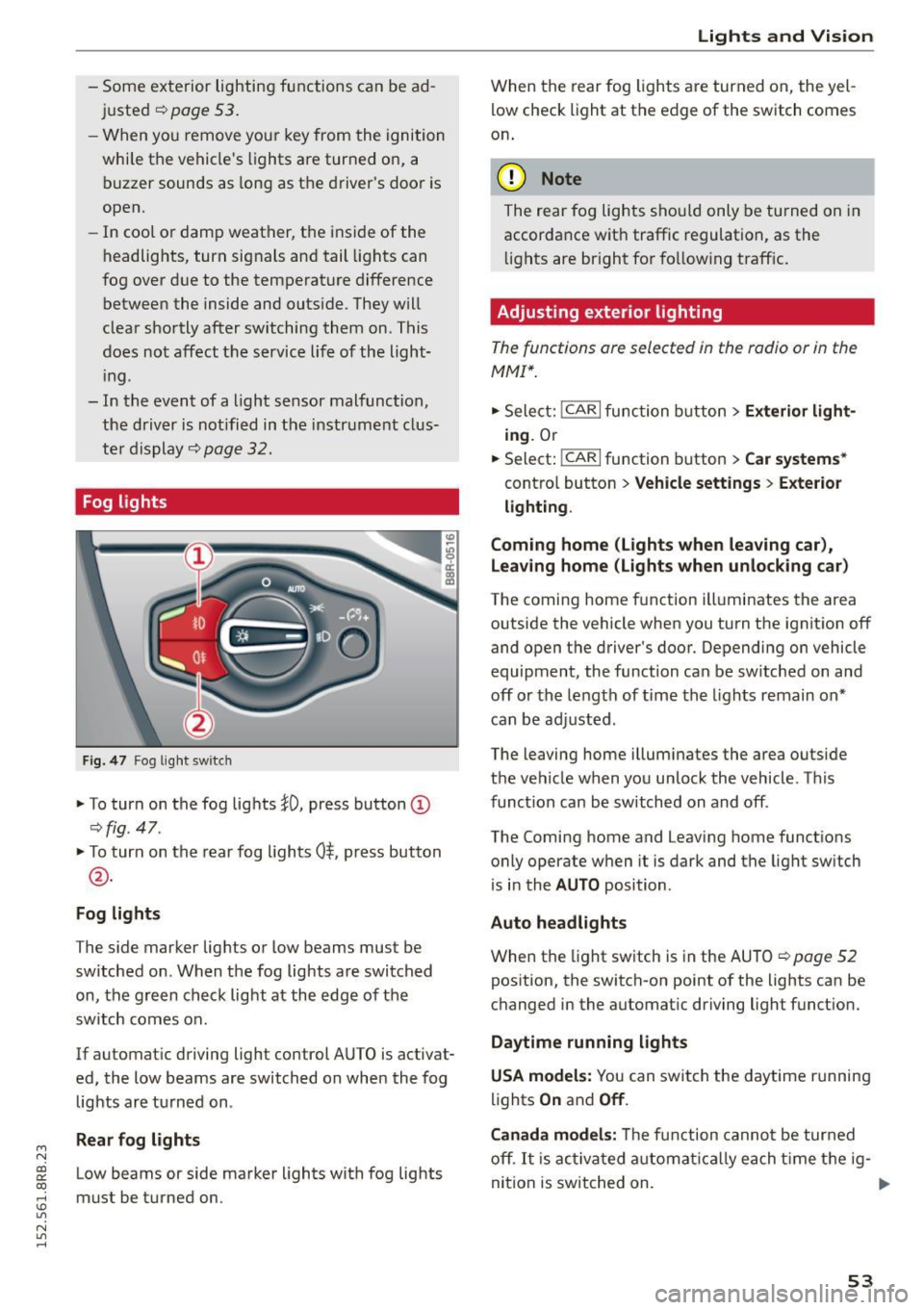
Fig . 4 7 Fog lig ht sw itch
" To turn on the fog lights }D, press button (D
¢fig. 47.
"To turn on the rear fog lights 0$. p ress button
@ .
Fog lights
The s ide marker lights or Low beams must be
switched on. When the fog lights are swi tched
on, the g re e n check light at the edge of the
sw itch comes on.
If automat ic driving light control AUTO is activat
ed, the low beams are switched on whe n the fog
lights a re turned on .
Rear fog light s
Low beams or side marker lights with fog lights
must be turned on.
Lights and Vis ion
W hen the rear fog ligh ts are turned on, the yel
low check light at the edge of the s witch comes
o n.
(D Note
The rear fog lights sho uld only be turned on in
accorda nce with traffic regulation, as the
li g hts are bright fo r fo llow ing traff ic .
Adjusting exterior lighting
The functions are selected in the radio or in the
MMI* .
"Sele ct: !CARI func tion button> Exterior light
ing.
Or
.. Select:
~,c- A- R~ I function button > Car systems *
contro l button > Vehicle settings > Exterior
lighting .
Coming home (Lights when leaving car) ,
Leav ing home (Lights when unlocking car )
The coming home function ill uminates the area
outside the vehicle when you turn the ignit io n off
and open t he d river 's doo r. Depending on vehicle
equipment, the function ca n be sw itched on an d
off or the le ngth of time the lights remain on"
can be ad justed .
The leaving home i llum inates the area outside
t h e ve hicle w hen you un lock the vehicle. T his
func tion can be switched on and off .
The Comi ng home and Leaving home funct ions
o nly operate w hen it is dark and t he lig ht sw itch
is i n the
AUTO position .
Auto headlights
When the light sw itch is in the AU TO ¢ page 52
pos ition, the switch-on point of the lights can be
c h anged in the automat ic dr iving light funct ion.
Daytime running lights
USA models: Y ou can swit ch the d aytime r unning
lig hts
On and Off .
Canada models:
Th e f unc tion cann ot be tur ned
off .
It is acti vat ed a utom aticall y each t ime t he ig-
ni tion is switched on. .,,_
53
Page 59 of 302

M N
co ~ co
rl I.O
"' N
"' rl
Windshield wipers
Switching the windshield wipers on
Fig. S6 Windshie ld wiper lever
Fig. S7 Rear w ipe r act uation
Move the windshield wiper lever to the corre
spond ing pos ition:
@ -Windshield wiper off
(D-Interval mode. The windshield w iper auto
matical ly activates when you drive 2 mph (4 km/
h). The higher the sensitivity of the rain sensor is
set (switch @ to the right), the earlier the wind
shield w ipers react to moisture on the wind
shield. In some models, you can switch rain sen
sor mode off and switch intermittent mode on in
the MMI* . Select:
!CARI function button> Car
systems*
contro l button > Driver assist > Rain
sensor.
In i nterm ittent mode, you can adjust the
interval time using the@ switch .
@-Slow wiping
®-Fast wiping
©-Single wipe
® -Clean the windshield . To eliminate water
d roplets , the w indshield wiper performs one af
terwipe operat ion after several seconds while
dr iving . You can switch this function off by mov-
Lights and Vision
ing the lever to position® within 10 seconds of
the afterwipe operation. The afterwipe function is reactivated the next t ime the ignition is switch
ed on.
T he rear wiper automat ica lly switches on when
the reverse gear is engaged and the front wind shield wipers are on and in operation.
Cleaning the headlights*. The headlight washer
system * operates only when the headlights are
on . If you move the lever to position ®, the
headlights are washed in interva ls .
@ -Wipe the rear window. The rear wipe r moves
about every 4 seconds.
(!) -Clean the rear window . Th e number of wiping
operations depends on how long the lever is held
in position 7.
_&. WARNING
-
- The rain sensor is only intended to assist the
driver . The driver is still responsible for
manually switching the wipers on according
to the visibility condit ions.
- The windshield may not be treated with wa
ter-repelling windshield coating agents. Un
favorable conditions, such as wetness, dark ness, low sun, can result in increased glare.
W iper blade chatter is also possible .
- Properly funct ion ing windshield wiper
blades are requ ired for a clear view and safe
driving.
(D Note
- In the case of frost, check whether the windshield wiper blades are frozen to the
windshield . Switching on the w indshield
wipers can damage the wiper blades!
- Prior to using a car wash, the windshield
w iper system must be sw itched off (lever in
position 0). This helps to prevent un inten
tional switching on and damage to the
w indshield wiper system.
(D Tips
-The windshie ld wipers are switched off
when the ignit ion is turned off. Activate the
w indshield wipers after the ignition is ..,
57
Page 60 of 302

Lights and Vision
switched back on by moving the windshield
wiper lever to any position .
- Worn or dirty windshie ld wiper blades result
in streaking . This can affect the rain sensor
function . Check your windshield wiper
blades regularly.
- The washer fluid nozzles of the windshield
washer system are heated at low tempera
tures when the ignit ion is on.
- When stopp ing temporarily, e.g. at a traffic
light, the set speed of the windshield wipers
i s automatically reduced by one speed.
Cleaning windshield wiper blades
Clean the windshield wiper blades when they be
g in to leave streaks. Use a soft cloth and glass
cleane r to clean the windshield wiper blades .
Front wiper
.,. Place the windshield wiper arms in the service
position. Refer to
c> page 58.
.,. Lift the w iper arm away from the front w indow.
Rear wiper
.,. Lift the wiper arm away from the rear window.
A WARNING
Dirty w indshield wiper blades can impair your
view. This can lead to acc idents.
Replacing windshield wiper blades
Fig. 58 Removing the w iper blade
Wiper service position/blade replacement
posit ion
"' ij
a: CX) ID
.,. Switch the ignition off and move the windshield
wiper lever to posit ion ©
c> page 57, fig. 56.
58
The windshie ld wipers move into the service po
sition .
.,. To bring the wipers back into the origina l posi
tion, switch the ignition on and press the wind
shield w iper lever.
You can also turn the service position on or off in
the radio or MMI*:
.,. Switch the windshie ld wipers off (position @
c>page 57, fig. 56).
.,. Select: !CAR I function button> Windshield
wipers
> Service position > On /Off . Or
.,. Select:
!CAR I function button> Car systems*
cont rol butto n > Servicing
& checks > Wiper
s ervice position
> On/Off .
Removing the wiper blade
.,. Lift the windsh ield wiper arm up from the wind
shield .
.,. Press the locking knob@
c> fig. 58 on the wiper
blade. Ho ld the wiper blade firmly .
.,. Remove the wiper blade in the direction of the
arrow .
Attaching the wiper blade .,. Insert the new wiper blade into the mount on
the wipe r arm @until you hear it latch into
place .
.,. Place the wiper arm back on the winds hield.
.,. Tur n the se rvice position off.
A WARNING
F or your safety, you shou ld rep lace the wiper
b lades once or twice a year. See your author
ized Audi dealer for rep lacement blades.
(D Note
- Th e windshie ld wiper blades must only be
replaced when in the service position! Oth
erwise, you risk damaging the paint on the
hood or the w indshield wiper motor.
- Yo u should not move your vehicle or press
the windsh ield wiper lever when the wiper
arms are fo lded away from the windshield.
The windshield w ipers would move back in
to their original position and could damage
the hood and windshie ld .
Page 62 of 302

Lights and Vision
The mirror returns to its initia l position as soon
as reverse gear is disengaged and vehicle speed is
above about 9 mph (15 km/h). The mirror a lso
returns to its initial position if the switch is
moved to the driver's exterior mirror
(0 or the ig
nition is switched off .
If the position of the mirror surface is changed
on a tilted mirror , this new position will be auto
matically assigned to the remote key when the
vehicle is taken out of reverse gear .
(D Note
- Curved mirror surfaces (convex or spheri cal*) increase your field of view. Remember
that vehicles or other objects will appear
smaller and farther away than when seen in
a f lat mirror .
If you use this mirror to esti
mate distances of following vehicles when
changing lanes, you could estimate incor
rectly and cause an accident.
- If the mirro r housing is moved un intent ion
al ly (for example, while parking yo ur vehi
cle), then you must first fold the mirror
electrical ly. Do not readjust the mirror hous
i ng manua lly. You could damage the motor
which controls the mirror.
- If you wash the vehicle in an automatic car
wash, you must fold the exterior mirrors in
to reduce the risk of damage to the mirrors.
Never fold power folding exterior mirrors*
by hand . Only fold them in and out using
the power controls.
(D Tips
If there should be a malfunction in the elec
trical system, you can still adjust the exter ior
m irrors by pressing the edge of the mirror.
60
Dimming the mirrors
Fig. 61 Auto matic d immin g rearv iew mirror*
Manual anti-glare adjustment
.. Move the small lever (located on the bottom
edge of the mirror) to the rear .
Automatically dimming mirrors* .. To dim the rearview m irror and both exterior
mirrors*, press the® button. The diode @
turns on . The rearview and exterior mirrors*
dim automatically when light shines on them,
for example from headlights on a vehicle to the
rear.
& WARNING
Electrolyte fluid can leak from automatic dim
ming mirrors if the glass is b roken. Electrolyte
fluid can irritate skin, eyes and respiratory
system.
- Repeated or prolonged exposure to electro
lyte can cause irritat ion to the respiratory
system, especially among people with asth
ma or other respiratory conditions. Get
fresh air immediately by leaving the vehicle
or, if that is not possible, open windows and
doors all the way.
- If electrolyte gets into the eyes, f lush them
thoroughly with large amounts of clean wa
ter for at least 15 minutes; medical atten
tion is recommended .
- If electrolyte contacts skin, fl ush affected
area with clean water for at least 15 mi
nutes and then wash affected area with
soap and water; medical attention is recom
mended. Thoroughly wash affected clothing
and shoes before reuse.
Page 63 of 302

M N
co ~ co
rl I.O
"' N
"' rl
-If swallowed and person is conscious, rinse
mouth with water for at least 15 minutes.
Do not induce vomiting unless instructed to
do so by medical professional. Get medical
attent ion immed iately .
(D Note
Liquid electrolyte leaking from broken mirror
glass will damage any plastic surfaces it
comes in contact with . C lean up spilled elec
trolyte immed iately w ith clean water and a
sponge.
@ Tips
- Switching off the dimming function of the
i nside rear view mirror also deactivates the
automat ic dimming function of the exterior
mir rors*.
- The automatic dimming mirrors do not d im
when the interior lighting is turned on or
the reverse gear is selected.
-Automatic dimming for the m irror only op
erates properly if the light striking the in
side mirror is not hindered by other objects.
Digital compass
Activating or deactivating the compass
App lies to vehicles: with dig ital compass
The direction is displayed on the interior rear
view mirror.
Fig. 62 Inside rea r view m irror: digital compa ss activated
.,. To activate or deactivate, hold the@ button
down until the red display appears or disap
pears .
Lights and Vision
The digital compass on ly works with the ignition
turned on. The directions are displayed as initials:
N (North), NE (Northeast), E (East), SE (South
east),
S (South), SW (Southwest), W (West), NW
(Northwest) .
(!_) Tips
To avoid inaccurate directions, do not allow
any remote controls, electrical systems, or
metal parts close to the mirror.
Setting the magnetic deflection zone
Applies to vehicles: wit h dig ita l compass
The correct magnetic deflection zone must be
set in order to display the directions correctly.
®
Fig. 63 North Ame rica: magne tic deflection zo ne bo unda
ri es
.,. Hold the@~ page 61, fig . 62 button down un
til the number of the set magnet ic deflection
zone appears on the inter io r r ear view mirror .
.,. Adjust the magnetic deflection zone by repeat
ed ly pressing on the @button . The set mode
automatically deactivates after a few seconds .
61
Page 67 of 302
M N
co
a:
co
,...., \!) ..,.,
N ..,., ,....,
In addition to the setting for the drive r's seat ,
the exterior rear view mirror setting can be stor
ed and reca lled through seat memory if the veh i
cle is properly equipped.
Storin g and recallin g se tting s
With the help of the memory buttons 1 and 2
¢ fig. 65 the settings for two different drivers
can be stored and reca lled
r::!> page 65.
The cu rrent settings are also a utomat ica lly as
signed to the remote control key being used
when the vehicle is locked . When the vehicle is
un locked, the settings assigned to the remote
contro l key being used are automatica lly recalled .
Turnin g seat m emo ry on and off
If the IO FF I sw itch is depressed, the seat memory
is inoperative . When the Memory function is off,
the LED in the button lights up.
All the stored settings a re retained. We recom
mend using the
I O FF I sw itch and de activating the
seat memory if the vehicle is only go ing to be
used
temporarily by a driver whose settings are
not going to be stored .
Storing and recalling settings
Applies to vehicles: with seat memory
Storing settings
~ Adjust the driv er's seat.
~ Adjust the two exter ior mirrors.
~ Press the !SET I button. The light in the button
will come on.
~ Now p ress a memory button (III or~). If the
stor ing procedure is correct, a confirmation
tone w ill sound .
Recall ing setting s
~ If the dr iver 's door is open and the ignit ion is
switched off, tap the correspond ing memory
button br iefly .
~ If the dr iver's door is closed or the ignit ion is
switched on, p ress the approp riate memo ry
button until the s to red pos ition is rea ched .
Successful storage is confirmed audibly and by
the light in the
ISET I button illum inat ing
r::!> page 64, fig . 65.
S eat s and stor age
When the vehicle is lo cked , the current settings
are stored and assigned to the remote contro l
key . But the settings stored on memory buttons
1 to 2 are not deleted . They can be recalled at
any time . When the vehicle is
unlocked , the set
t ings assigned to the remote control key a re re
stored .
If your vehicle is driven by other persons using
your remote control key, you should save your in
dividua l seat position on one of the memory but
tons . You can recall your settings again simply
and conveniently by p ress ing the corresponding
memo ry butto n. When the vehicle is locked,
these settings are automatica lly re-assigned to
the remote control key and stored .
& WARNING
- For safety reasons, the seat setting can only
be recalled when the vehicle is stationary -
otherwise you risk hav ing an accident.
- In an emergency the recall proced ure can be
cancelled by pressing the
I OFF I switch or by
tapp ing of the memory buttons.
Activating remote control key memory
Applies to vehicles: wit h seat memory
To assign the dr iver 's seat settings to the remote
control key when locking the vehicle, the function
must be activated in the radio or MMI*.
~ Select: ! CAR I function button > Seat adju st
ment > Dri ver's seat > Key mem. p ro fi le > On .
Or
~ Select: !CARI function button> Car sy ste ms*
cont ro l butto n > Vehicl e se tting s > Seats >
Driver 's seat > Remote control ke y> On .
(j) Tips
If you do not want anothe r driver's sett ings to
be assigned to the remote control key, switch
off the memory function usi ng the rad io or
M MI* or t he
I OFF I button r::!> page 64.
65
Page 84 of 302
![AUDI Q5 2015 User Guide Warm and cold
[i] Adjusting seat heating*
Pressing the but ton switches the seat heating on
at the highest setting (level 3). The LEDs indicate
the temperat ure leve l. To red](/img/6/57635/w960_57635-83.png "AUDI Q5 2015 User Guide Warm and cold
[i] Adjusting seat heating*
Pressing the but ton switches the seat heating on
at the highest setting (level 3). The LEDs indicate
the temperat ure leve l. To red")
Warm and cold
[i] Adjusting seat heating*
Pressing the but ton switches the seat heating on
at the highest setting (level 3). The LEDs indicate
the temperat ure leve l. To red uce the tempera
ture, press the button again. To switch the seat heating off, press the button repeatedly until the
LED turns off.
After
10 minutes, the seat heating automatica lly
switches from leve l
3 to leve l 2.
lil Adjusting seat ventilation*
Press ing the button switches the seat ventilation
on at the highest setting ( leve l
3). The LEDs ind i
cate the venti lation level. To reduce the venti la
tion level, press the button aga in. To switch the
seat ventilation off, press the button repeatedly
until the L ED turns off.
l(;I> FRONT I S w itch the d efroster on/off
The windshield and s ide windows are defrosted
or cleared of condensation as quickly as possible.
The maximum amo unt of air flows mainly from
the vents below the windshield. Recirculation
mode switches off. The temperature should be
set to 72 °F (22 °C) or higher. The temperature is
cont ro lled automatically .
The
IAUTOI button switches the defroster off.
I Qiil REAR I Switching rear window heater on /
o ff
The rear window heater only operates when the
engine is running. It switches off automatically
after a few m inutes, depending on the outs ide
temperature .
To prevent the rear window heater from switch
ing off automatically, press and hold the
!lliD REARI
button for more than 2 seconds. This rema ins
stored unt il the ignition is switched off.
Air vent s
You can open and close the center and rea r air
vents using the thumbwheels. The levers adjust
the direction of the airflow from the vents .
You can adjust the air temperatu re in the rear by
turning the thumbwheel toward the red side to
82
make it wa rmer or towa rd the blue side to make
it coo ler .
A WARNING
- Do not use the recircu lation for extended
periods of time. The windows could fog up
since no fresh air can enter the vehicle. If
the windows fog up, press the air rec ircula
tion button again immed iately to sw itch off
the air recircu lation function or se lect de
frost.
- Individuals w ith reduced sensitivity to pain
or temperatu re could develop burns when
using the seat heating* function . T o reduce
the r isk of in ju ry, these indiv iduals should
no t use seat hea ting.
(D Note
To avoid damage to the heat ing e lements* in
the seats, do not kneel on the sea ts or place
h eavy loads on a sma ll are a of the seat .
Setup
-
The basic climate control settings can be adjust
ed in the radio or MMI".
"'Select : !CAR I function button> A/C control but
ton. O r
"' Sele ct:
I CAR I function b utton > Car sy stem s*
cont ro l bu tton
> A /C.
Automatic recirculation
When switched on, automat ic recirculation con
trols the recirculation mode automatically . If the
windows fog up , p ress the!@
F RON T! butto n.
Synchronization
When synchronization is switched on, the same
settings are applied to both the driver and front passenger, except for the seat heating/ventila
t ion* . Synchron izat ion switches off when you ad
just the settings on the front passenge r's side.
You can also switch synchronization on by press -
i ng and holding the knob on t he d river 's side . ..,_
Page 96 of 302
Driving
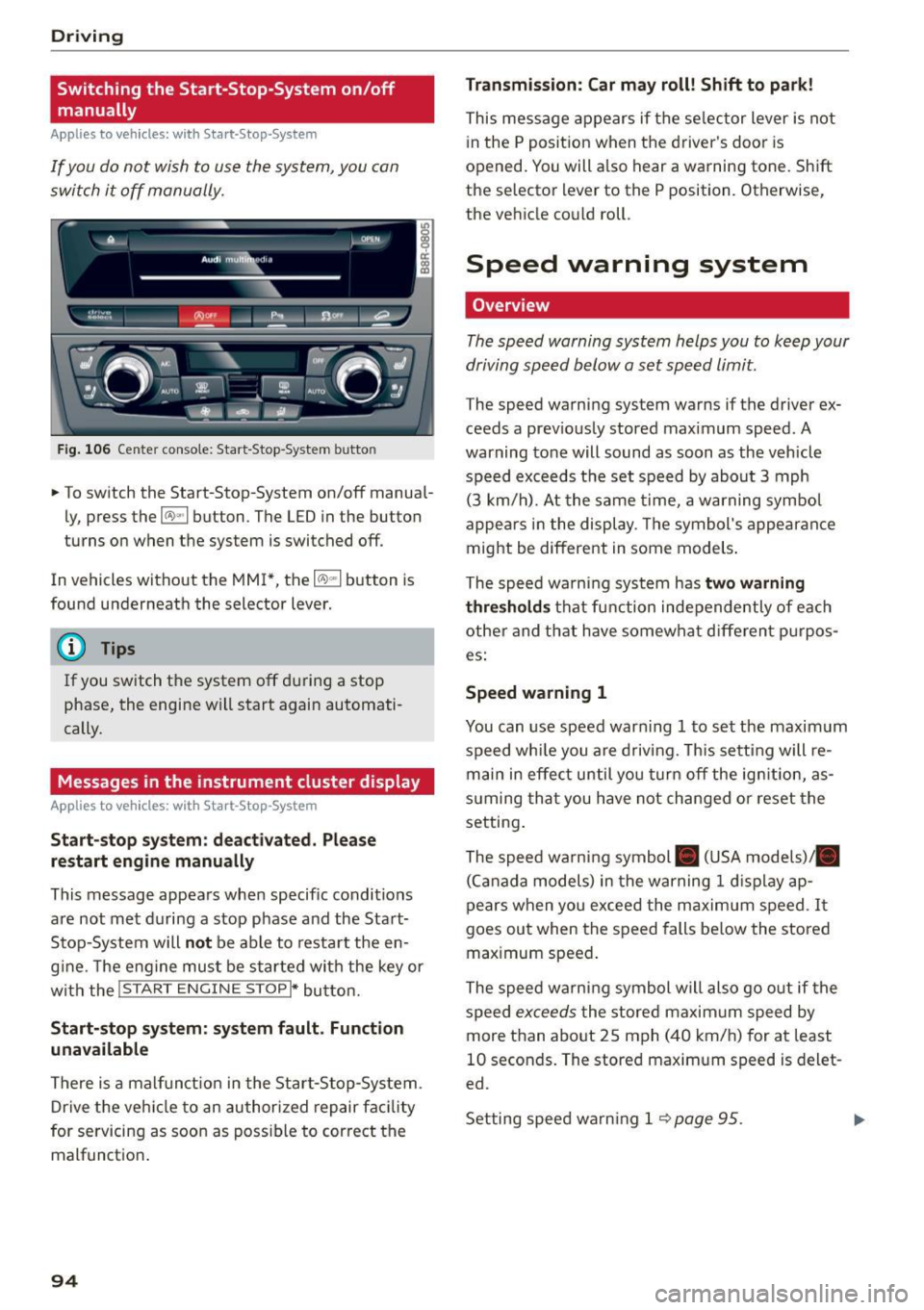
Switching the Start-Stop-System on/off
manually
Applies to veh icles: with Sta rt-Stop-System
If you do not wish to use the system, you can
switch it off manually.
F ig . 10 6 Ce nter co nsole : Start -S top -System butto n
• To switch the Start-Stop-System on/off manua l
ly, press the
1 0 ••1 button . The LED in the button
turns on when t he system is switched off .
In vehicles without the MMI*, the
10 ~1 b utton is
found underneath the selector lever.
@ Tips
If you switch t he system off du ring a stop
phase, the engine will start again automati
cally.
Messages in the instrument cluster display
Applies to veh icles: with Start-Stop-System
Start-stop system: deactivated. Plea se
restart engine manually
This message appea rs whe n specific conditions
are not met du ring a stop phase and the Sta rt
Stop-System will
not be able to resta rt the en
g ine. The e ngine mu st be started with the key or
w ith the !S TAR T
ENGINE STOPI* button.
Start-stop system: system fault. Function
unavailable
There is a malf unct ion in the Star t-Stop -System .
Dr ive the veh icle to an author ized repair fac ility
for servicing as soon as poss ible to cor rect the
malfunct ion .
94 Transmission
: Car may roll! Shift to park!
This message appears if the se lector lever is not
i n the
P posit ion when the driver 's door is
opened. You will a lso hear a warning tone. Sh ift
the selector lever to the
P position. Otherwise,
the vehicle could roll .
Speed warning system
Overview
The speed warning system helps you to keep your
driving speed below a set speed limit.
The speed warning sys tem warns if the driver ex
ceeds a prev iously stored maximum speed. A
warning tone will sound as soon as the vehicle
speed exceeds t he set speed by abo ut
3 mph
(3 km/h). At the same time, a warning sym bol
appe ars in t he display . Th e symbol's appea ran ce
might be different in some models .
The spe ed wa rni ng system has
two warning
thre sholds
that fu nction inde pendently of eac h
other and tha t have somewha t diffe ren t p urpos
es:
Speed warning 1
You can use speed war ning 1 to set the maxim um
speed wh ile you are d riv ing. This setting will re
main in effec t until yo u turn off the ig nition, as
s u ming tha t you have not changed or reset the
setting .
The speed wa rn ing symbol . (USA models)/ .
(C an ada model s) in the warning
1 d is pla y ap
pears when yo u exceed the maximum speed . It
goes ou t when the speed falls be low the stored
max imum speed .
The speed warni ng symbol will also go o ut if the
speed
excee ds the stored maxim um speed by
more than abo ut
2 5 mph (4 0 km/h) for at least
10 seconds . The stored maxim um speed is delet
ed.
Set ting spee d warn ing 1
<=? page 95 . .,._