mmi AUDI Q5 2015 Owners Manual
[x] Cancel search | Manufacturer: AUDI, Model Year: 2015, Model line: Q5, Model: AUDI Q5 2015Pages: 302, PDF Size: 75.01 MB
Page 11 of 302
M N
co
a:
co
,...., \!) 1.1"1
N 1.1"1 ,....,
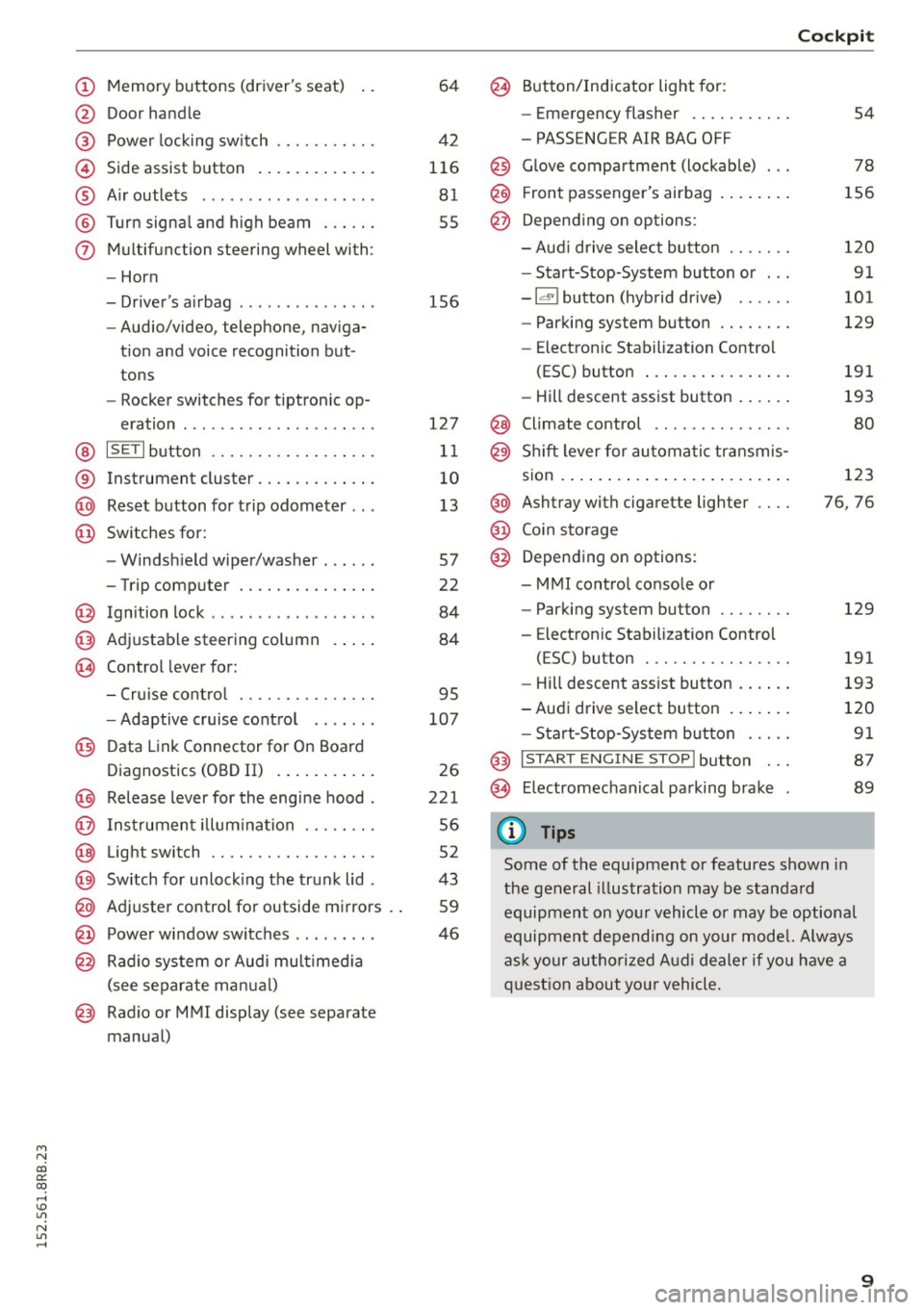
(!) Memory buttons (driver's seat)
@ Door handle
@ Power locking switch ........ .. .
© Side assist button ............ .
® Air outlets ............ .. .. .. .
@ Turn signal and high beam ..... .
(j) Multifunction steering wheel with:
- Horn
- Driver's airbag ........ .. .. .. .
- Audio/video, telephone, naviga-
tion and voice recognition but
tons
- Rocker switches for tiptron ic op-
eration ... ........... .. .. .. .
@ ISETI button ............... .. .
® Instrument cluster ............ .
@ Reset button for trip odometer .. .
@ Switches for:
- Windshield wiper/washer ..... .
- Trip computer .............. .
@ Ignition lock ........... .. .. .. .
@ Adjustable steering column
~ Control lever for: 64
42
116
81
55
156
127
11
10
13
57
22
84
84
- Cruise control . . . . . . . . . . . . . . . 95
- Adaptive cruise control . . . . . . . 107
@ Data Link Connector for On Board
Diagnostics (OBD II) . . . . . . . . . . . 26
@ Release lever for the engine hood . 221
@ Instrument illumination . . . . . . . . 56
@ Light switch . . . . . . . . . . . . . . . . . . 52
@ Switch for unlocking the trunk lid . 43
@ Adjuster control for outside mirrors . . 59
@ Power window switches . . . . . . . . . 46
@ Radio system or Audi multimedia
(see separate manual)
@ Radio or MMI display (see separate
manual)
@ Button/Indicator light for:
- Emergency flasher .......... .
- PASSENGER AIR BAG OFF
@ Glove compartment (lockable) .. .
@ Front passenger's airbag ....... .
@ Depending on options:
- Audi drive select button ...... .
- Start-Stop-System button or .. .
- Id'! button (hybrid drive) .... . .
- Parking system button ....... .
- Electron ic Stabilization Control
(ESC) button ............... .
- Hill descent assist button ..... .
@ Climate control ............. . .
@ Shift lever for automatic transmis-
sion ........................ .
@ Ashtray with cigarette lighter
@ Coin storage
@ Depending on options:
- MMI control console or
- Parking system button ....... .
- Electron ic Stabilization Control
(ESC) button ............... .
Cockpit
54
78
156
120 91
101
129
191
193
80
123
76, 76
129
191
- Hill descent assist button . . . . . . 193
-Audi drive select button . . . . . . . 120
- Start-Stop-System button . . . . . 91
@ I START ENGINE STOPI button . . . 87
@> Electromechanical parking brake 89
(D Tips
Some of the equipment or features shown in
the general illustration may be standard
equipment on your vehicle or may be optional
equipment depending on your model. Always
ask your authorized Audi dealer if you have a
question about your vehicle.
9
Page 15 of 302
M N
co ~ co
rl I.O
"' N
"' rl
Odometer
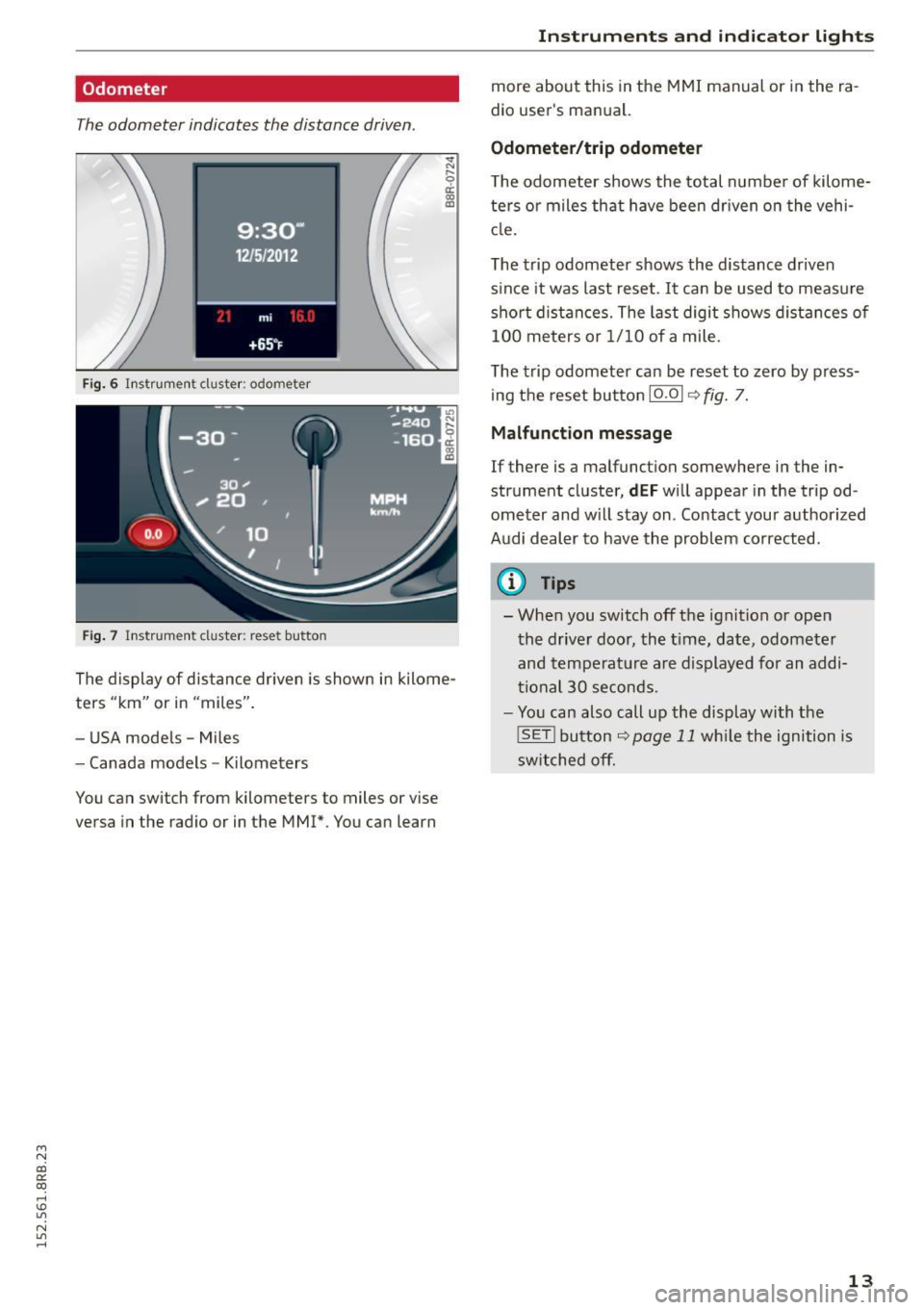
The odometer indicates the distance driven.
Fig. 6 I nstrument cluster: odometer
Fig . 7 Instrument cluster: reset button
.,. N r;
ci: a, al
The display of distance driven is shown in kilome
ters "km" or in "miles" .
- USA models -Miles
- Canada models -Kilometers
You can switch from kilometers to miles or vise
versa in the radio or in the MMI*. You can learn
Instrument s and indi cator ligh ts
more about this in the MMI manual or in the ra
dio user's manual.
Odometer /trip odometer
T he odometer shows the total number of kilome
ters o r miles that have been dr iven on the vehi
cle .
The trip odometer shows the distance driven s ince it was last reset. It can be used to measu re
short distances. The last digit shows distances of
100 meters or 1/10 of a mile.
The trip odometer can be reset to zero by press
ing the reset butto n
10.01 ¢ fig. 7.
Ma lfunct ion me ssage
If there is a malfunct ion somewhere in the in
strument cluster,
dEF will appear in the tripod
ometer and w ill stay on . Contact your author ized
Audi dealer to have the problem corrected .
(D Tips
- When you switch off the ignition or open
the driver door, the t ime, date, odometer
and temperat ure are displayed for an addi
tional 30 seconds.
- You can also call up the display with the
!SET ! button¢ page 11 wh ile the ignition is
switched off.
13
Page 22 of 302
Driver information system
Driver information
system
Introduction
General notes
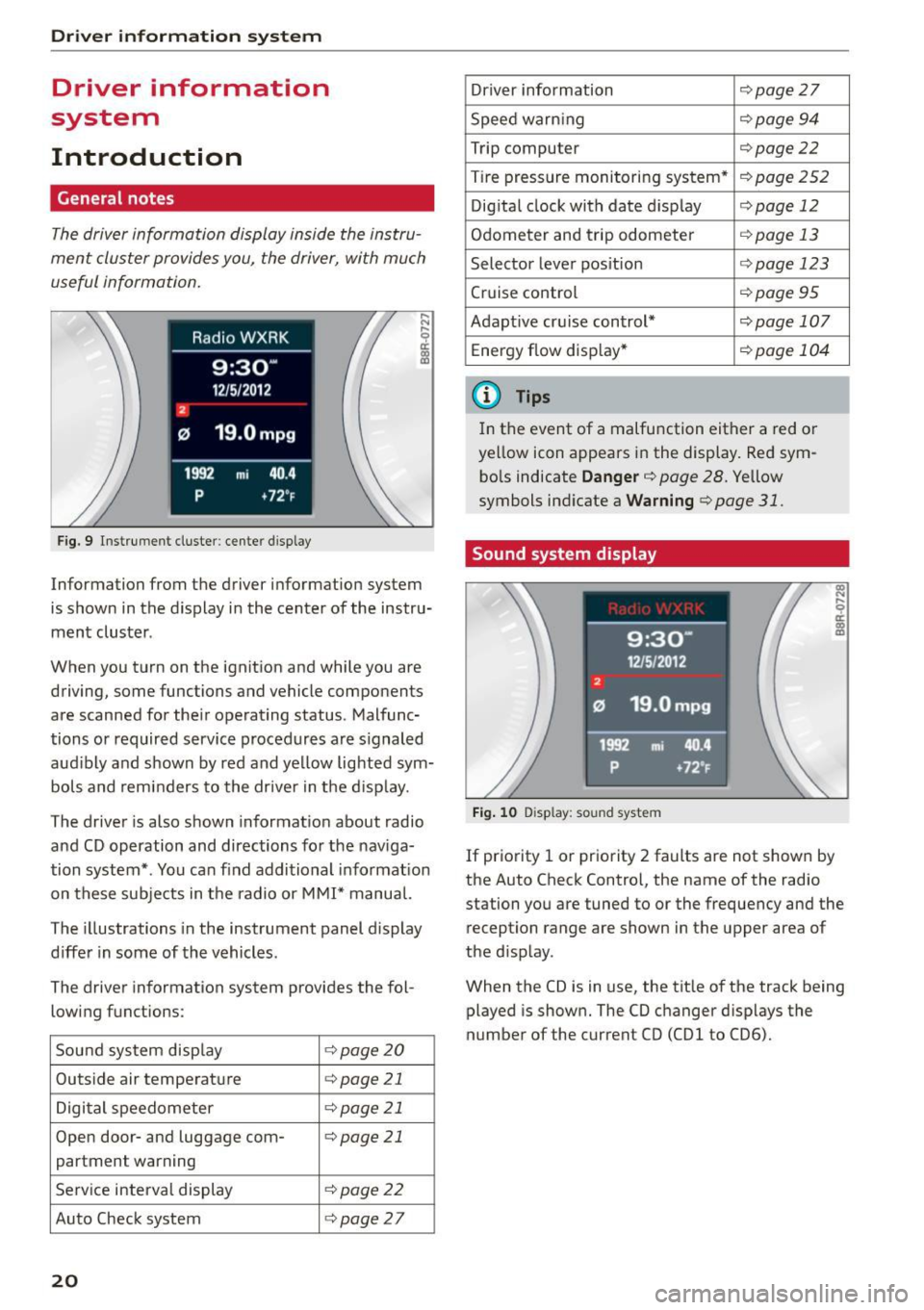
The driver information display inside the instru
ment cluster provides you, the driver, with much
useful information .
Fig. 9 Instrument cluster: center display
Information from the driver information system
is shown in the display in the center of the instru
ment cluster .
When you turn on the ignition and while you are driving, some functions and vehicle components
are scanned for their operating status. Malfunc
tions or required service procedures are s ignaled
aud ibly and shown by red and yellow lighted sym
bols and reminders to the driver in the display.
The driver is also shown information about radio
and CD operation and directions for the nav iga
tion system* . You can find additional informat ion
on these subjects in the radio or
MMI" manual.
The illustrations in the instrument panel display
differ in some of the vehicles.
The driver information system provides the fol
lowing functions :
Sound system disp lay ¢
page20
Outside air temperature ¢page 21
Digital speedometer ¢
page 21
Open door- and luggage com- ¢page 21
partment warning
Service interval display ¢page22
Auto Check system ¢page27
20
Driver information ¢
page 27
Speed warn ing ¢
page94
Trip computer ¢page22
Tire pressure monitoring system* ¢page
252
Digital clock with date display ¢page 12
Odometer and trip odometer ¢
page 13
Selector lever position r::>page 123
Cruise control ¢
page95
Adapt ive cruise control* ¢page 107
Energy flow disp lay* r::>
page 104
@ Tips
In the event of a malfunction either a red or
ye llow icon appears in the display. Red sym
bols indicate
Danger¢ page 28. Yellow
symbols ind icate a
Warning r::>page 31.
Sound system display
Fig. 10 D isplay: sou nd system
If priority 1 or priority 2 faults are not shown by
the Auto Check Contro l, the name of the radio
station you are tuned to or the frequency and the
reception range are shown in the upper area of
the d isplay .
When the CD is in use, the tit le of the track being
played is shown. The CO changer d isplays the
number of the current CO (CDl to CD6).
Page 23 of 302
M N
co ~ co
rl I.O
"' N
"' rl
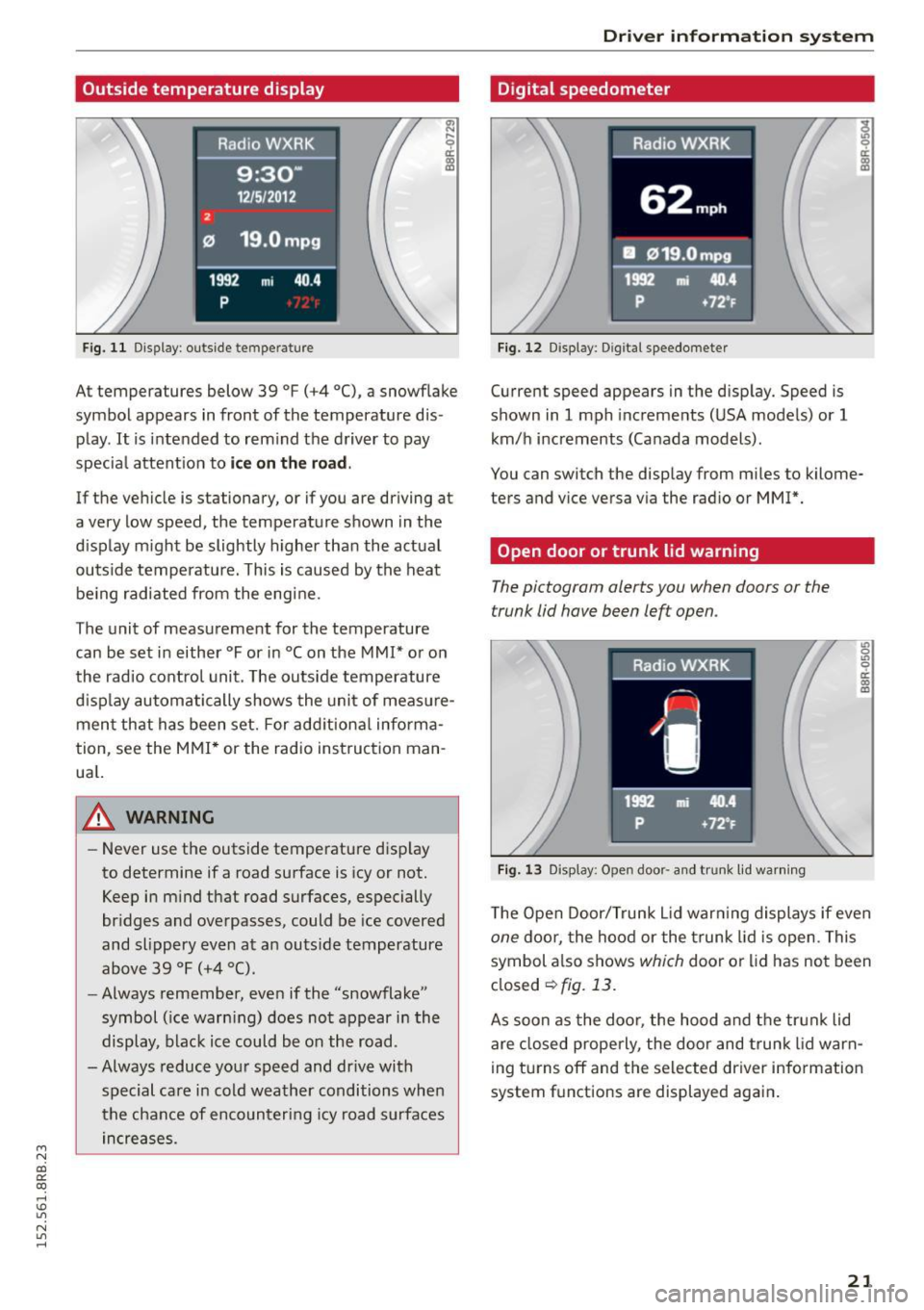
Outside temperature display
Fig. 11 Display: outside temperature
~ ,.._
9 a:
lll
At temperatures below 39 °F (+4 °C), a snowf lake
symbol appears in front of the temperature dis
play.
It is intended to rem ind the driver to pay
specia l attent ion to
ic e on the r oad .
If the vehicle is stationary, or if you are driving at
a very low speed, the temperature shown in the
d isplay m ight be slightly higher than the actual
outside temperature. This is caused by the heat be ing radiated from the eng ine.
The unit of measurement for the temperature
can be set in either °For in °Con the
MMI* or on
the radio control unit. The outs ide temperature
d isp lay automatically shows the unit of meas ure
ment that has been set. For add itional info rma
tion, see the
MMI * or the radio instruction man
ua l.
_& WARNING
-Never use the outside temperature d isp lay
to determine if a road surface is icy or not.
Keep in m ind that road surfaces, especially
br idges and overpasses, could be ice covered
and slippery even at an outs ide temperature
above 39 °F (+4 °C).
- Always remember, even if the "snowflake"
symbol ( ice warn ing) does not appear in the
display, black ice could be on the road.
-Always reduce your speed and dr ive with
special care in cold weather conditions when
the chance of encounteri ng icy road surfaces
in creases.
Dr iver inform atio n sy stem
Digital speedometer
Fig. 12 Display: Digital speedometer
Current speed appears in the display. Speed is
shown in
1 mph increme nts (USA models) or 1
km/h increments (Canada models).
You can switch the display from miles to kilome
ters and vice versa via the radio or
MMI*.
Open door or trunk lid warning
The pictogram alerts you when doors or the
trunk lid have been left open.
Fig. 13 Display: Open door· a nd trunk lid wa rning
~.., 0 .,, 0 er. 0) m
The Open Door/Trunk L id war ning displays if even
one doo r, the hood or the t runk lid is open. This
symbol a lso shows
which door or lid has no t been
closed
~fig. 13.
As soon as the doo r, the hood and the trun k lid
are closed properly, the door and trunk lid warn
ing turns off and the selected driver information
system f unctions are displayed aga in .
21
Page 26 of 302
Driver information system
Operation
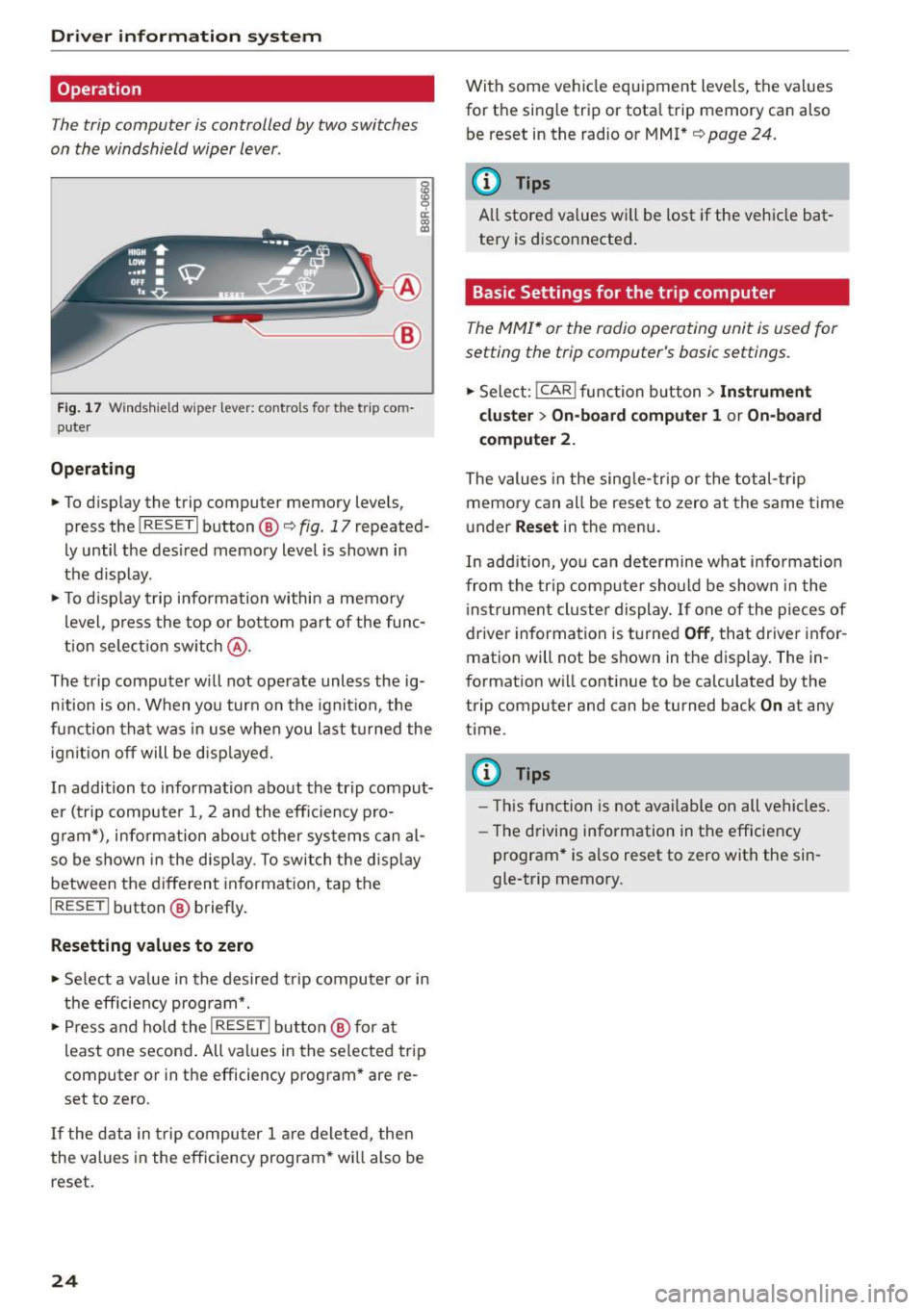
The trip computer is controlled by two switches
on the windshield wiper lever.
g
~ a: (0 a,
~-- @
Fig. 17 Windshield w iper lever: controls fo r the trip co m
puter
Operating
.. To display the trip computer memory levels,
press the
I RESET I button ®<=> fig. 17 repeated·
Ly until the desired memory level is shown in
the display.
.. To display trip information within a memory
level , press the top or bottom part of the func
tion selection switch @.
The trip computer will not operate unless the ig·
nition is on. When you turn on the ignition , the
f unc tion that was in use when you last turned the
ignit ion off will be displayed.
In addition to information about the trip comput
er (trip computer 1, 2 and the efficiency pro
g ram*), information about other systems can al
so be shown in the display. To switch the display
between the different information, tap the
I RESET I button® briefly.
Resetting values to zero
.. Select a value in the desired trip computer or in
the efficiency program* .
.,. Press and hold the
I RESE T I button @ for at
least one second. All values in the selected trip
computer or in the efficiency program* are re
set to zero .
If the data in trip computer 1 are deleted, then
the values in the efficiency program * wi ll also be
reset.
24
With some vehicle equipment levels, the values
for the single trip or tota l trip memory can also
be reset in the radio or MMI*
¢page 24.
(D Tips
All stored values wi ll be lost if the vehicle bat
tery is disconnected.
Basic Settings for the trip computer
The MMI* or the radio operating unit is used for
setting the trip computer's basic settings .
.. Select: !CAR ! function button > Instrument
cluster > On-board computer 1
or On-board
computer
2.
The values in the single-trip or the total-trip
memory can all be reset to zero at the same time
under
Reset in the menu.
In add ition, you can determine wha t infor mation
from the trip computer should be shown in the
i nst rument cluster display. If one of the pieces of
driver information is turned
Off, that driver infor
mation will not be shown in the display. The in
formation will continue to be calculated by the
trip computer and can be turned back
On at any
time .
(D Tips
-Th is function is not available on all vehicles.
- Th e driving information in the efficiency
program* is also reset to zero with the sin
gle-trip memory.
Page 40 of 302
Opening and closing
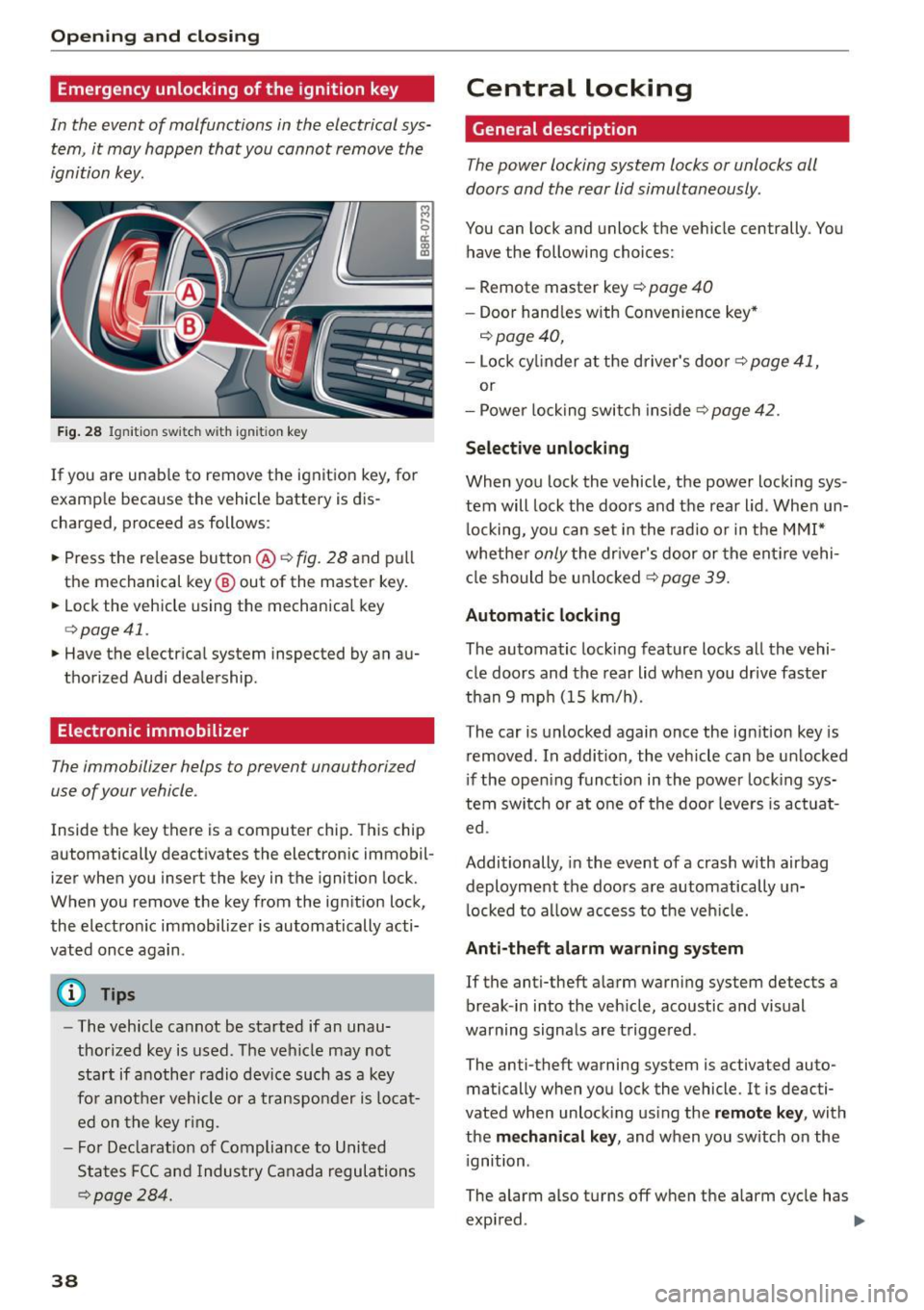
Emergency unlocking of the ignition key
In th e event of malfunctions in the electrical sys
tem, it may happen that you cannot remove the
ignition key.
F ig. 28 Ig nit io n sw it ch w it h ig nition key
If you are unab le to remove the ignition key, for
examp le because the vehicle battery is d is
charged, proceed as follows:
.. Press the re lease button @~
fig. 28 and pull
the mechanical key @ out of the master key .
.. Lock the vehicle using the mechanical key
q poge 41.
.. Have the electr ical system inspected by an au
thorized Audi dealership .
Electronic immobilizer
The immobilizer helps to prevent unauthorized
use of your vehicle .
Inside the key there is a computer chip . This ch ip
automatically deact ivates the electronic immobil
izer when you insert the key in the ignition lock.
When you remove the key from the ig nition lock,
the electro nic immobilizer is automatically acti
vated once again .
(D Tips
-The vehicle cannot be started if an unau
thorized key is used . T he vehicle may no t
start if another radio device such as a key
fo r anot her vehicle o r a transpo nder is locat
ed on the key r ing.
- F or De clarat io n of Compliance to United
States FCC and Indus try Canada regula tio ns
~ page 28 4 .
38
Central locking
General description
The power locking system locks or unlocks oil
doors and the rear lid simultaneously .
You can lock and unlock the ve hicle centrally . You
have the following choices:
- Remote master key
c::> page 40
- Doo r hand les with Convenie nce key *
c::> page 40,
-Lock cy linder at the d river's doo r c::> page 41,
or
- Power lo ck ing swit ch inside
~page 42.
Selective unlocking
When you lock the vehicle, the power locki ng sys
tem will lock the doors and t he rear lid . When un
l ocking, yo u can set in the rad io or in the MMI*
whethe r
only the dr iver's door or the ent ire vehi
cl e should be u nlocked
c::> page 39.
Automatic locking
The automatic locking feature locks all the vehi
cle doors and the rear lid whe n you drive faster
than
9 mp h (15 km/h).
The car is unlocked again once the ig nition key is
removed . In a ddi tion, the vehicle can be un locked
i f the open ing funct ion in th e power lock ing sys
tem swit ch or at o ne of the door leve rs is act uat
ed .
Additionally , in the event of a crash with airbag
deployment the doors a re automatically un
l ocked to a llow access to t he veh icle.
Anti-theft alarm w arning system
If the anti-theft a larm warning system detects a
break -in i nto the veh icle, acoustic and visual
warning signals are t rigge red .
The anti-theft warning system is activated auto ma tically when you lock the vehicle. It is deacti
vated when unloc king us ing the
remote key , with
the
me chanical key , and when you switch on the
i gnition .
The alarm also turns off w hen the alarm cycle has
expi red. ..,.
Page 41 of 302
M N
co
a:
co
...... \!) 1.1'1
N 1.1'1 ......
Turn signals
When you unlock the vehicle, the turn signa ls
flash twice. When you lock the vehicle, the turn
signals flash once. If they do not flash, one of the
doors, the rear lid or the hood is not locked.
Unintentionally locking yourself out
In the following cases there safeguards to pre
vent yo u locking yo ur remote master key in the
vehicle:
- Th e veh icle does not lock with the power lock
ing switch ~
page 42 if the dr iver's door is
open .
- On vehicles with Convenience key*, if the most
recently used master key is in the luggage com
partment, the rear lid is automatically un locked
again after it is closed.
Do not lock your vehicle with the
remote master
key or Convenience key*
until all doors and the
rear lid are closed . In this way you avoid locking
yourself out accidenta lly.
& WARNING
- When you leave the vehicle, always remove
the ignition key and take it with you. This
will prevent passengers (children, for exam
ple) from accidentally being locked in the
vehicle should they acc identally press the
power locking switch in the front doors .
- Do not leave children ins ide the veh icle un
supervised . In an emergency it wou ld be im
poss ible to open the doors from the outside
without the key.
(D Tips
-In the event of a crash with airbag deploy
ment all locked doors will be automatically
unlocked to give access to the vehicle occu
pants from the outside.
- If the power locking system should mal
function, you can lock the dr iver's door us
in g the mechanical key~
page 42.
-If the power locking system should fail, you
can still open the fuel tank flap in an emer
gency~
page 217.
- You are we ll advised not to keep valuables
insi de an unattended vehicle, vis ible or not.
Opening and closing
Even a properly locked vehicle cannot pro
vide the security of a safe.
- If the LED in the upper edge of the driver's
door pane l comes on for about 30 seconds
after the vehicle is locked, there is a mal
function in the power locking or the ant i
theft warning system. Have the malfunction corrected by an authorized Audi dealership
or qualified repair facility .
Setting power locking
The driver can determine the functions for power
locking in the radio or in the MMI*.
.. Select: !CARI function button> Cent ral locking .
Or
.,. Select:
!CARI function button > Car systems*
control button > Vehicle settings > (Central
locking )*.
Unlocking single door/Unlock doors -
you can
specify wh ich doors unlock when you open the ve
hicle .
- Select ing Off /All and press ing the ~ button on
the remote control key unlocks the entire vehi
cle .
- Select ing
On /Driver and press ing the ~ button
on the remote control key once unlocks only the
driver's door. In vehicles with a convenience
key*, only the door whose handle you pull will
unlock. If you press the
[ru butto n twice, the en
tire vehicle will unlock. If you p ress the~ but
ton, the entire vehicle will always lock.
Trunk lid/tailgate /Lock exterior trunk handle -if
you select
On , the rear lid handle locks
~ page 43, fig. 35. In this case, the rear lid can
be opened with the
l""'I button on the master key
Q page 40, fig. 29 or with the~ button in the
driver's door~
page 43, fig . 34.
Fold mirrors * -if you select On , the outside mir
rors will fold in automatically when you press the
~ button on the remote control key Q page 59.
Confirmation tone /Tone when locking -if you
select
On , a tone w ill sound when you lock the ve
hicle.
39
Page 42 of 302
Opening and closing
Unlocking and locking the vehicle with the
remote control
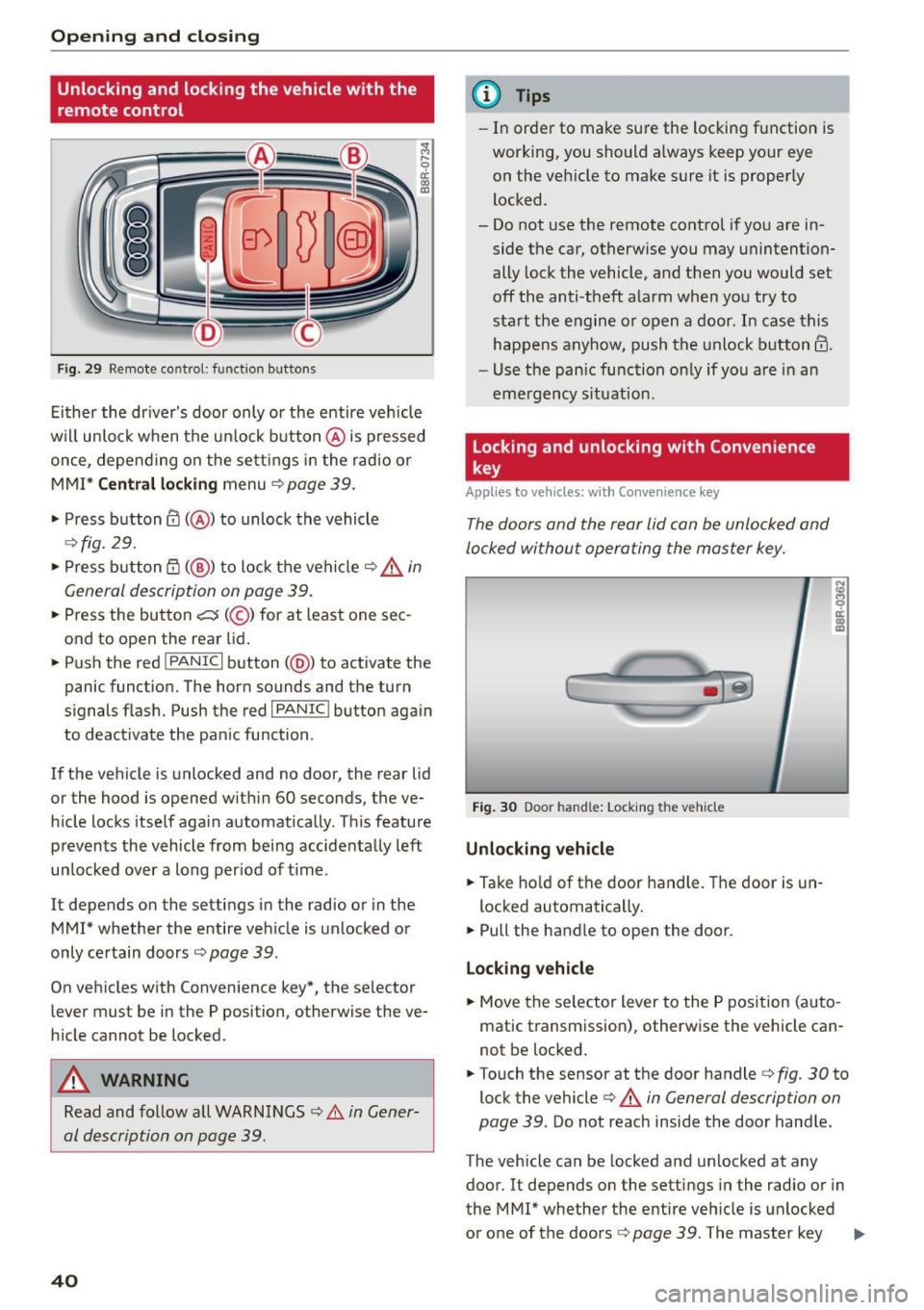
Fig. 29 Remote co n trol: fun ctio n but ton s
Either the driver's door only or the entire veh icle
will unlock when the un lock button @ is pressed
once, depend ing on the sett ings in the radio or
MMI*
Central locking menu c::> page 39.
• Press button @(@ ) to unlock the vehicle
¢fig. 29.
• Press button CT) (@ ) to lock the vehicle c::> &_ in
General description on page 39.
• Press the button c:5 (@ ) for at least one sec
ond to open the rear lid.
• Push the red
l PAN ICI button( @) to activate the
panic function. The horn sounds and the turn
signals flash. Push the red
I PANIC I button again
to deactivate the pan ic function .
If the vehicle is unlocked and no door, the rear lid
or the hood is opened within 60 seconds, the ve
h icle locks itself again automatically . T his feature
prevents the vehicle from being accidentally left
un locked over a long per iod of time .
It depends on the settings in the radio or in the
MMI* whether the entire veh icle is unlocked or
only ce rtain doors
¢ page 39 .
On vehicles w ith Convenience key*, the selector
lever must be in the P posi tion, otherwise the ve
h icle cannot be locked .
A WARNING
Read and follow all WARNINGS c::> Li::. in Gener
al description on page 39.
40
@ Tips
- In order to make sure the locking function is
working, you should a lways keep your eye
on the vehicle to make sure it is properly
locked .
- Do not use the remote contro l if you are in
side the car, otherwise you may unintention
ally lock the vehicle, and then you would set
off the anti -theft alarm when you try to
start the engine o r open a door. In case this
happens anyhow, push the unlock button@.
- Use the panic function on ly if you are in an
emergency situation.
Locking and unlocking with Convenience
key
Applies to vehicles: wi th Convenience key
The doors and the rear lid can be unlocked and
locked without operating the master key.
Fig. 30 Door handle: Locking th e vehicle
Unlocking vehicle
• Take hold of the door handle. The door is un-
locked automatically.
• Pull the handle to open the door .
Locking vehicle
• Move the selector lever to the P position (auto
matic transmission), otherwise the vehicle can
not be locked .
• Touch the sensor at the door handle¢
fig. 30 to
lock the vehicle
c::> .&. in General description on
page 39 .
Do not reach inside the door handle .
The vehicle can be locked and unlocked at any
door. It depends on the settings in the radio or in
the MMI* whether the entire vehicle is unlocked
or one of the doors
c::> page 39 . The master key .,,_
Page 50 of 302
Open ing a nd clos ing
Op en ing and cl osing th e s unshade
.. To automatically open the sunshade comp lete
ly, briefly press th e switch @ in the desired ar
row direction.
.. To stop the sunshad e in an intermediate posi
tion, press the switch again, or
.. Press and hold the swi tch in the desired arrow
direction .
.. Release the switch when sunshade is at desired
pos ition .
After the ignit ion is switched off, you can st ill op
erate the Panoramic sliding sunroof for about 10
minutes . As soon as the driver's or passenger's
door is opened, the switch is inoperative .
The power sunshade can also be closed when the Panoramic sliding sunroof is open .
A WARNING
Pay careful attention when closing the Panor
amic sliding sunroof -otherwise serious injury
cou ld result! For th is reason, always remove
the ignition key when leaving the vehicle .
(D Note
Always close your Panoram ic sliding sunroof
when leav ing you r vehicle. Sudden rain can
cause damage to the interior equipment of
your veh icle, particularly the electron ic equ ip
ment.
(j) Tips
I nformat ion regarding convenience opening/
closing
¢ page 47.
Emergency closing of the Panoramic sliding
sunroof
Applies to veh icles: w ith Panora mic slidi ng sunroo f
If the Panoramic sliding sunroof detects an ob
ject in its path when it is clos ing , it will open
aga in automatically . In this case, you can close
the roof with the power emergency closing func
tion .
.. Within
five seconds after the sunroof opens au
tomat ically, pull the switch until the roof
closes .
48
Garage door opener
(Homelink)
Description
App lies to vehicles: wit h garage door opener (Homelink)
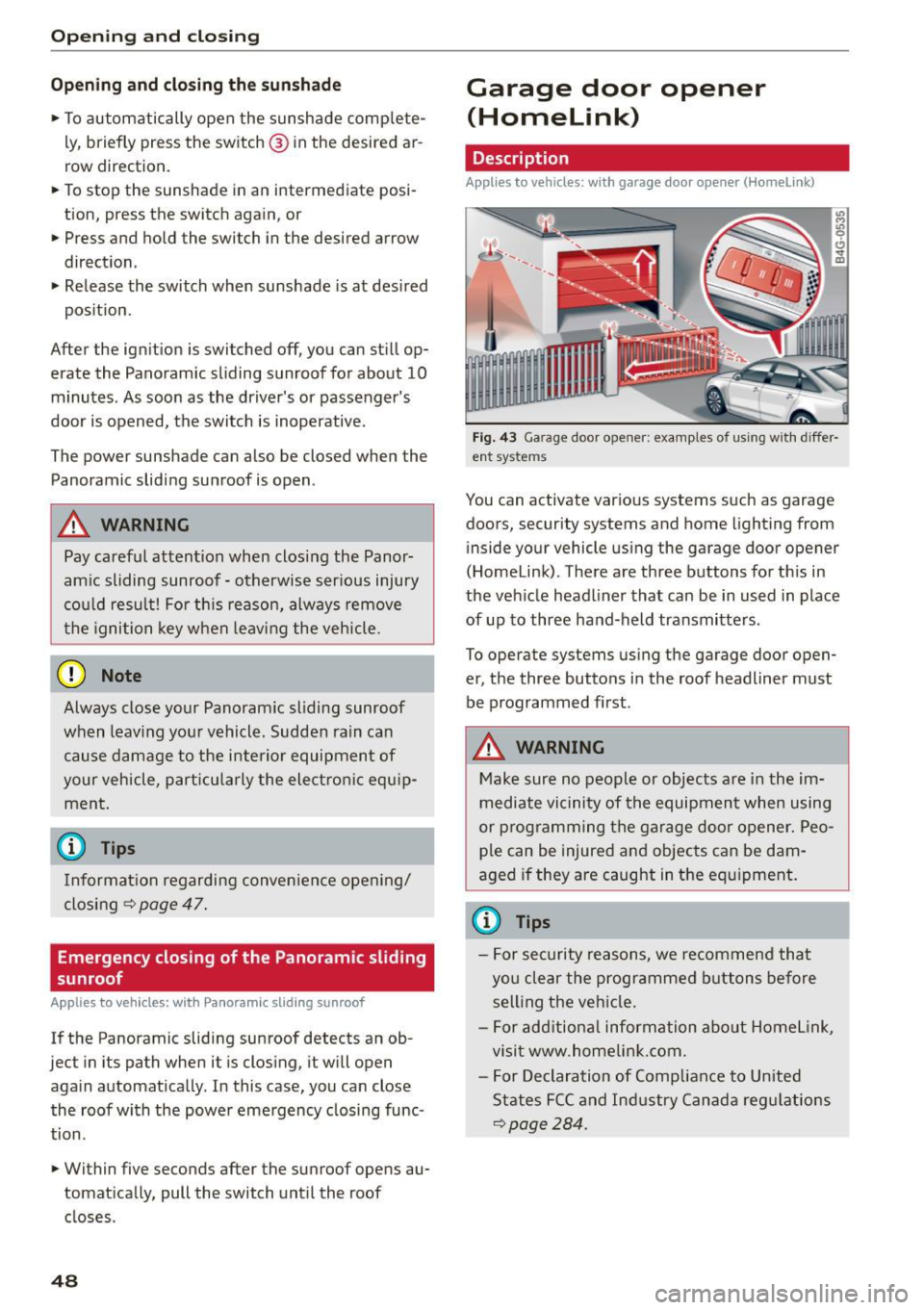
Fig. 43 Ga rage door o pen er: examples of us in g w ith differ·
ent syste ms
You can activate var ious systems such as garage
doors, security systems and home lighting from in side your vehicle using the garage door opener
(Homelink). There are three buttons for th is in
the vehicle headliner that can be in used in place
of up to three hand-held transmitters.
To operate systems using the garage door open
er, the three buttons in the roof headliner must
be programmed first .
A WARNING
Make sure no people or objects are in the im
mediate vicinity of the equipment when using
or programming the garage door opener. Peo ple can be injured and objects can be dam
aged if they are caught in the equipment.
(D Tips
- For security reasons, we recommend that
you clear the programmed buttons before
selling the vehicle.
- For add itiona l information about Homel ink,
visit www.homelin k.com .
- For Declaration of Compliance to United
States FCC and Industry Canada regulations
~page 284.
-
Page 51 of 302
M N
co ~ co
rl I.O
"' N
"' rl
Operation
Applies to vehicles: with garage door opener (Homelink)
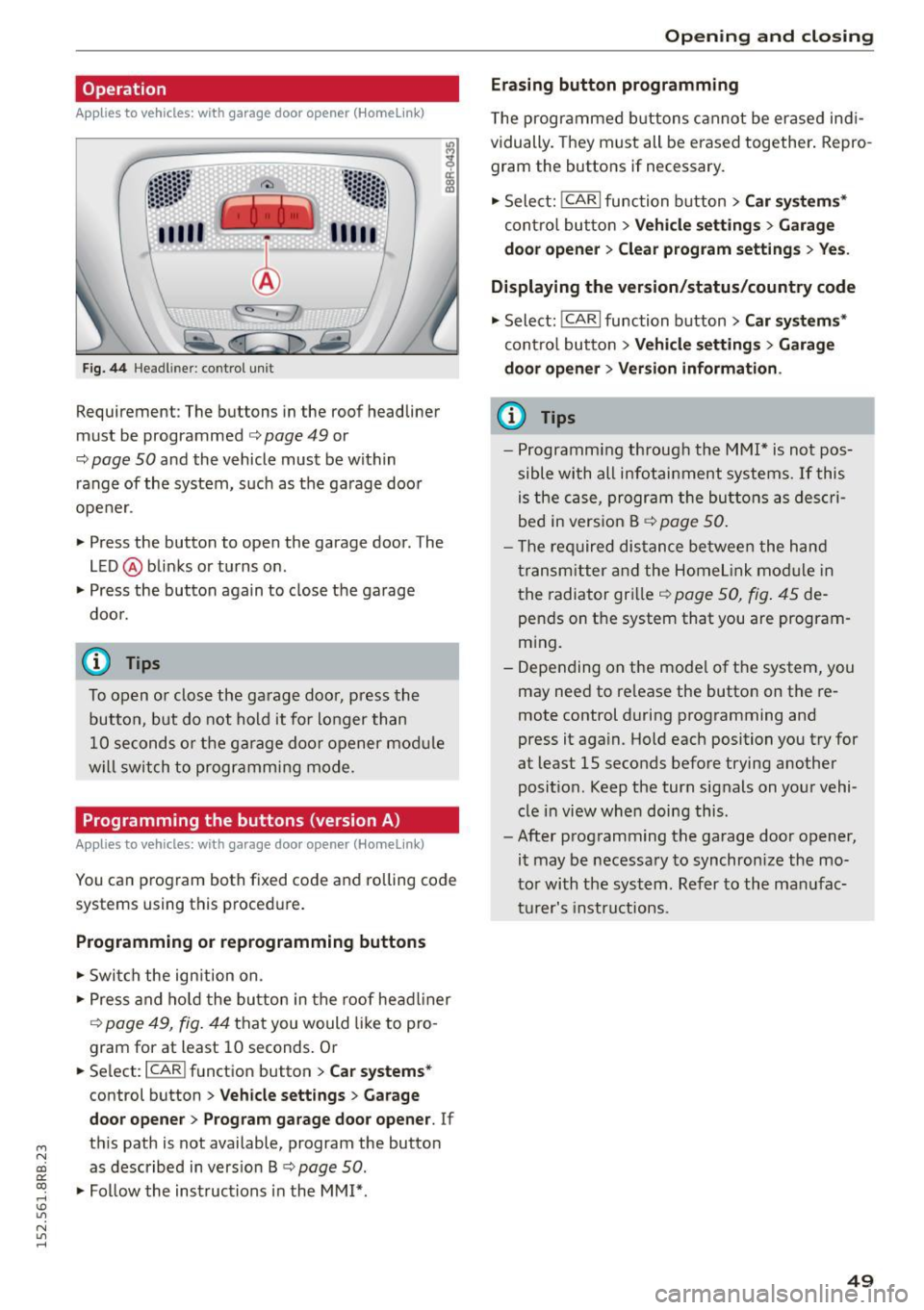
Fig. 44 Hea dlin er: co ntrol un it
Requirement : The but tons in the roof headliner
mu st be programmed
c:> page 49 or
c::> page SO and the vehicle must be within
range of the system, such as the garage door
opener .
" Press the button to open the garage door . T he
LED @ blinks or turns on .
" Press the button again to clos e the garage
doo r.
@ Tips
To open o r close the ga rage doo r, press the
button, but do not hold it fo r longer than
10 seconds o r the g arage doo r opener mod ule
w ill switch to programm ing mode .
Programming the buttons (version A )
Applies to vehicles: with garage door opener (Ho meli nk)
You can p rogram both fixed code and roll ing code
systems using this proced ure.
Programming or reprogramming buttons
" Swi tch the ign ition on .
" Press and ho ld the bu tton in the roof head liner
c::> page 49, fig. 44 that you would like to pro
gram for at least 10 seconds . Or
.. Se lect:
I CAR I function button > Car sy stem s*
control button > Vehicle sett ing s > Garage
door opene r> Program gar age door opener .
If
th is path is not available, program the button
as described in vers io n B
c::> page SO .
"Fo llow the instructions in the MMI* .
Opening and clo sing
Erasing button programming
The programmed b uttons cannot be er ased ind i
vidually. They must all be erased together . Repro
gram the buttons if necessary .
" Select:
!CARI function button> Car sy ste m s*
contro l butto n > Vehicle settin gs > Garag e
d oo r opener
> Clear program setting s > Yes.
Displaying the version /status /country code
" Select: !CARI function button> Car sy ste ms *
cont ro l button > Vehicle s etting s> Garage
d o or open er > Version information .
(D Tips
-Programm ing throug h the MMI* is not pos
sible with all infotai nment systems. If this
is the ca se, program the buttons as des cri
bed in vers ion B
c::> page 50 .
- T he req uired dis tance be twee n the h and
transm itter and the Home link mo dule in
the radiator gr ille
c::> page 50, fig . 45 de
pends on t he system that you are program
m ing.
- Depending on the mode l of the system, you
may need to re lease the button on the re
mote control during programming and
press it aga in. Hold each position you try for
at least 15 seconds before trying another
posit ion . Keep the turn signals on your vehi
cle i n view when doing this.
- After programm ing the garage door opener,
it may be necessary to synchronize the mo
to r wi th the sys tem. Ref er to the man ufac
t ur e r's instru ct ions .
49