mmi AUDI Q5 2015 Owner's Manual
[x] Cancel search | Manufacturer: AUDI, Model Year: 2015, Model line: Q5, Model: AUDI Q5 2015Pages: 302, PDF Size: 75.01 MB
Page 97 of 302
M N
co ~ co
rl I.O
"' N
"' rl
Speed warning 2
Storing wa rning 2 is recomme nded if you always
want to be reminded of a certa in speed, for ex
ample when you are trave ling in a co untry that
has a genera l maxim um speed limit, or if you do
not want to exceed a specified speed fo r w inter
ti res.
The speed warning 2 symbol ,. (USA mode ls)/
• (Canada models) app ears in the display when
you exceed the stored speed lim it . Unlike warning
1, it w ill not go out until the vehicle speed d rops
be low the stored speed limit .
Sett ing speed warning 2
~ page 95 .
@ Tips
Even tho ugh you r vehicle is equipped with a
spee d warn ing system, you sho uld still watch
the speedomete r to make s ure you are not
driving faster than the speed limit.
Speed warning 1: setting a speed limit
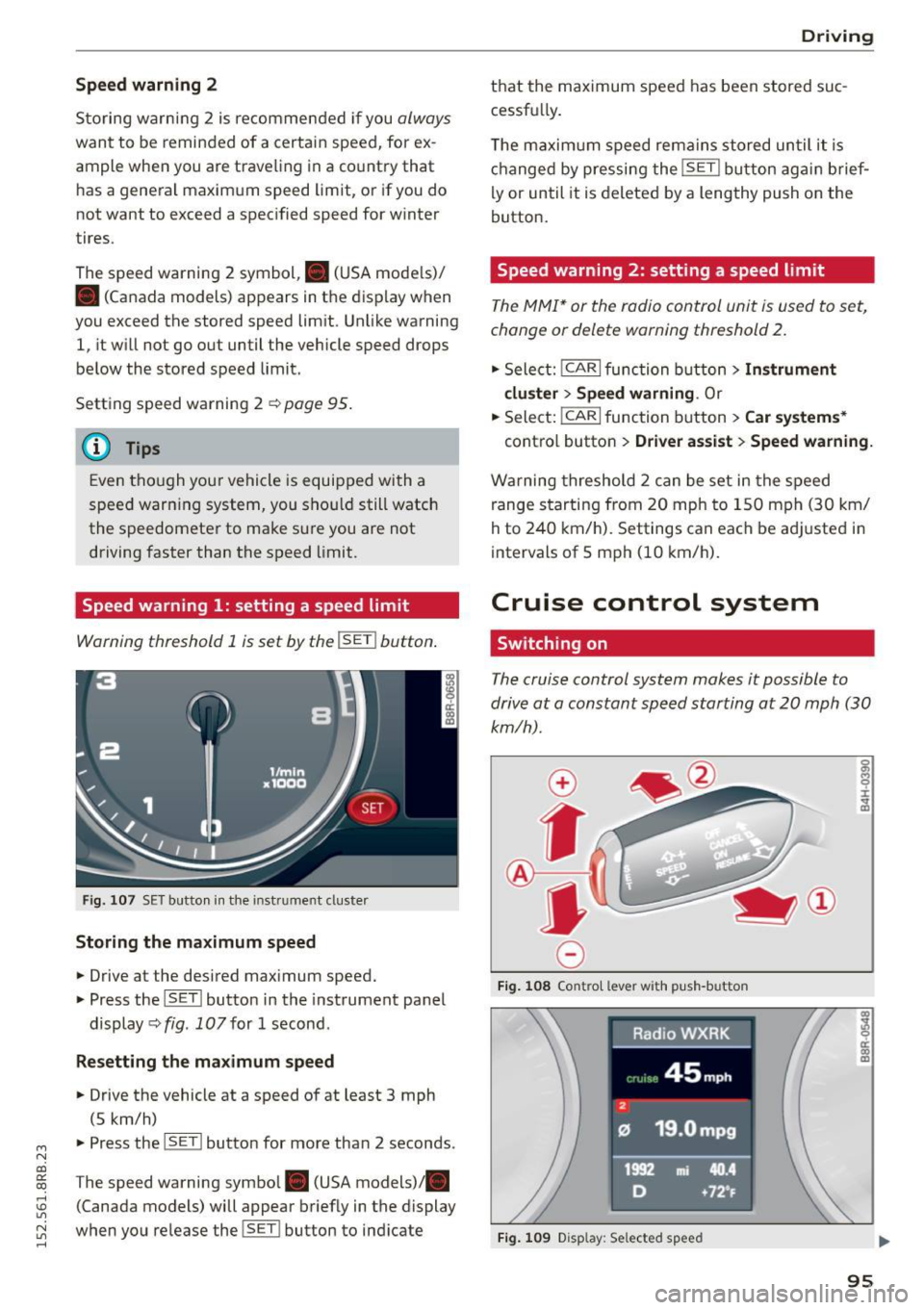
Warning threshold 1 is set by the !SET I button .
Fig. 10 7 SET butto n in t he in st ru me nt cl uster
Storing the maximum speed
.,. Drive at the desired max imum speed.
.,. Press the ISET l button in the instrument panel
display ~fig .
107for 1 second .
Resetting the maximum speed
.,. Drive the vehicle at a speed of at least 3 mph
(5 km/h)
.,. Press the l~S -ET~ ! butto n for more than 2 seconds.
T he speed warning symbol. (USA models) .
(Canada models) will appear briefly in the display
when you release the !SET l button to ind icate
D riv ing
th at the maximum speed has been stored suc
cessfu lly.
T he maxim um s peed rema ins stored un til i t is
ch anged by pressing the !SE T! button ag ain brief
ly or until it is deleted by a lengthy push on the
button.
Speed warning 2: setting a speed limit
T he MMI* or the radio control unit is u sed to s et,
change or delete warning threshold
2.
.,. Sele ct: !CAR!func tion butt on> Instrument
cluster > Speed warning .
Or
.,. Select: I CAR I function button > Car systems *
contro l butto n > Driver as sist > Speed warning.
W arning threshold 2 can be set in the speed
range s tarting from 20 mph to 1 50 mph (3 0 km/
h to 240 km/ h). Settings can each be ad justed i n
intervals of 5 mph (10 km/h).
Cruise control system
Switching on
The cruise control system makes it possible to
drive at a constant speed starting at
20 mph (30
km/h).
0
f
®t
0
F ig. 1 08 Co ntr ol leve r w ith p ush -b u tto n
Fig. 1 09 Disp lay : Se lected speed
a)
8 ci: a) m
95
Page 104 of 302
Hybrid
St art-Stop function
The combust ion engine is operated only as need
ed . Genera lly, the combustion engine turns
off
when the vehicle is stationary and the high volt
age battery powers the electrical vehicle sys
tems .
The purpose o f automatica lly shutting the com
bustion engine
off in hybrid drive mode is to save
fue l. All of the important vehicle systems, such
as steering, brakes and the A/C system, contin ue
to remain active. In some cases, systems may re
qu ire the combustion engine to continue running
when the vehicle is stationary. When driv ing in
congested traffic for long periods of t i me, the
combustion engine will cycle on when the veh icle
is stationa ry to keep the h igh voltage battery
charged .
Gliding
If the gas pedal is not pressed and the D position
is selected, the combustion engine rema ins
turned
off up to speeds of approximate ly 99 mph
(160 km/h). Dr iving conse rvative ly like this can
r educe fue l consumpt ion.
Energy recovery (recup eration )
When braking, the e lectr ic motor will act as a
generator creating electric energy that is then
s to red in the h igh voltage batte ry. This also oc
curs when the ve hicle is coas ting or dr iv ing down
hi ll. The combust ion engine is automatically
turned
off in t his case.
Tips for Driving Efficiently with your Hybrid
Applies to veh icles: w ith hybrid drive
Driving situa- Conditions
tions
- Shift into the D pos ition .
Starting from a -
Release the brake pedal.
stop -
Only press mode rate ly on the ac-
celer ator peda l.
102
The vehicle is braked with the electric motor by
applying early and even press ure to t he brakes
and us ing short pedal movements¢
page 99,
fig. 110@. By do ing th is, a large amount of the
k inet ic energy is recovered and may be stored as
electric energy in the high voltage batte ry. Dur
i ng heavy braking, the convent ional brakes are al
so act ivated
¢ page 99, fig . 110 @.
The energy recovery is shown in the MMI display
¢page 105 .
Automatic start of the combu stion engine
Various operating conditions cause the combus
tion eng ine to start a utomatica lly :
- T he high vo ltage battery charge leve l is low.
- T he temperature of the combustion engi ne is
low.
- Th e temperature of the cataly tic converte r is
low.
- T he power output needed for the A/C system is
high.
- T he veh icle speed is high .
- The vehicle acceleration is h igh .
- The incline is steep.
- High charge level for the high voltage battery
when coasting. In this case, the hig h voltage
battery cannot absorb any more ene rgy and so
the electric motor cannot s low down the veh i
cle. The combustion engine tur ns on (eng ine
brake) . In this situation the high voltage bat
tery will show a Max cha rge.
Vehicle behavior
In the D posit io n, the hybrid system adapts
to the driving s ituat ion by automatically
sw itch ing between the combust io n engine
a nd e lectr ic dr ive types or by combini ng
them.
Page 106 of 302
Hybrid Energy flow display
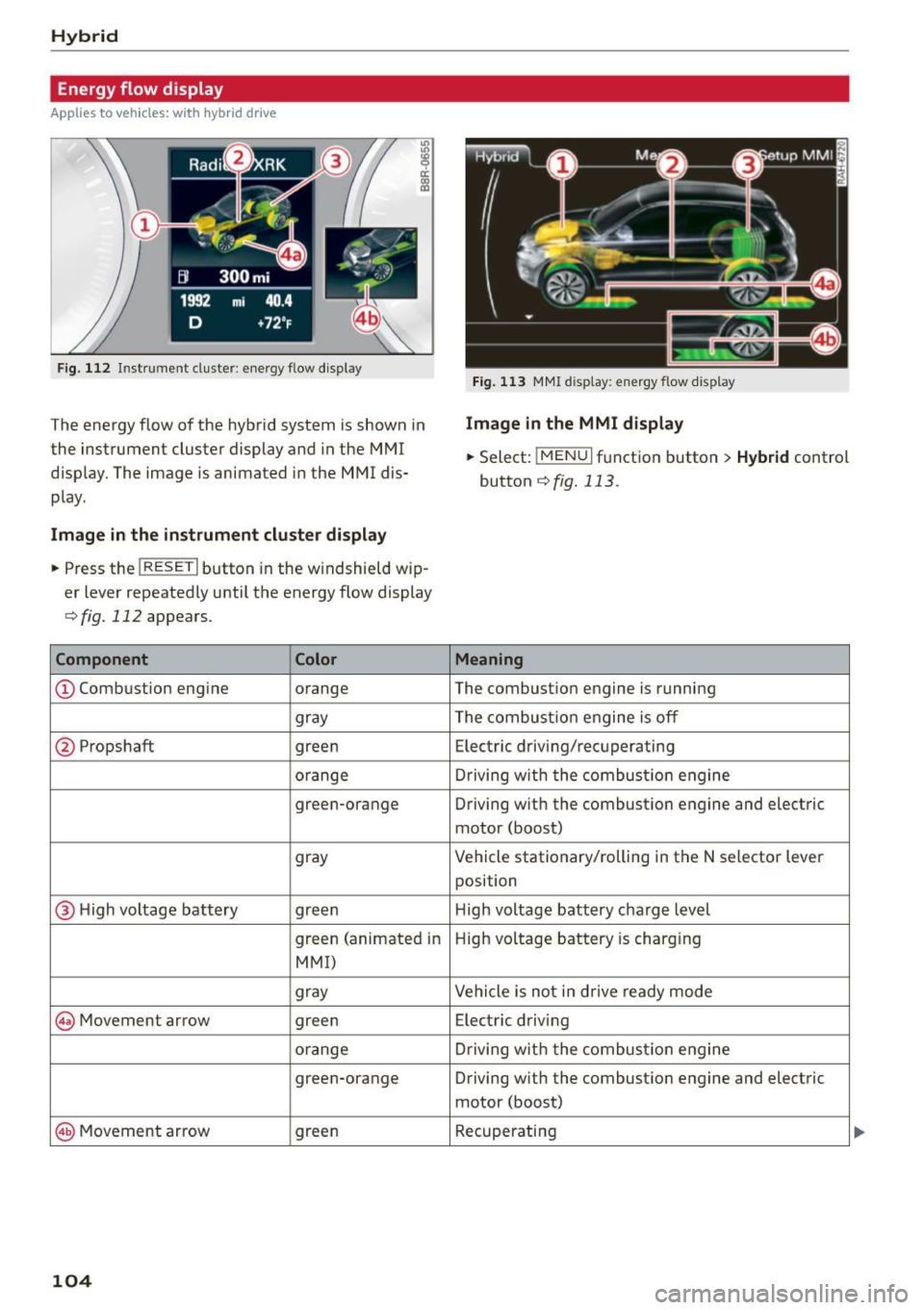
App lies to vehicles: with hybrid drive
Fig. 112 Instrument cluster: ene rgy flow display
The energy flow of the hybrid system is shown in
the instrument cluster display and in the MMI
d isplay. The image is animated in the MMI dis·
play.
Image in the instrument cluster di splay
.. Press the !RESET I button in the windshield wip
er lever repeatedly until the energy flow display
r::>fig. 112 appears.
Component Color
@Combustion engine orange
gray
@ Propshaft green
orange
green-orange
gray
@ H
igh voltage battery green
green (animated in
MMI)
gray
@ Movement arrow green
o
range
green-orange
@ Movement arrow green
104
Fig. 113 MMI disp lay: energy flow display
Image in the MMI display
.,. Select: I MEN u I function button > Hybrid control
button
r::!) fig. 113 .
Meaning
The combustion engine is running
The combustion engine is off
Electric driving/recuperating
Driving with t he combustion engine
Driving w ith the combust ion engine and electric
motor (boost)
Vehicle stationary/rolling in the N selector lever
position
H igh voltage batt ery charge level
High voltage battery is charging
Vehicle is not in d rive ready mode
Electric driving
Driving with the comb ustion engine
Driving with the combustion engine and electric
motor (boost)
Recuperating
Page 107 of 302
M N
co ~ co
rl I.O
"' N
"' rl
@ Tips
The Energy flow display will not shown in the
MMI display when the reverse gear is engag-
ed, due to safety reasons.
Consumption display
App lies to vehicles: with hybri d dr ive
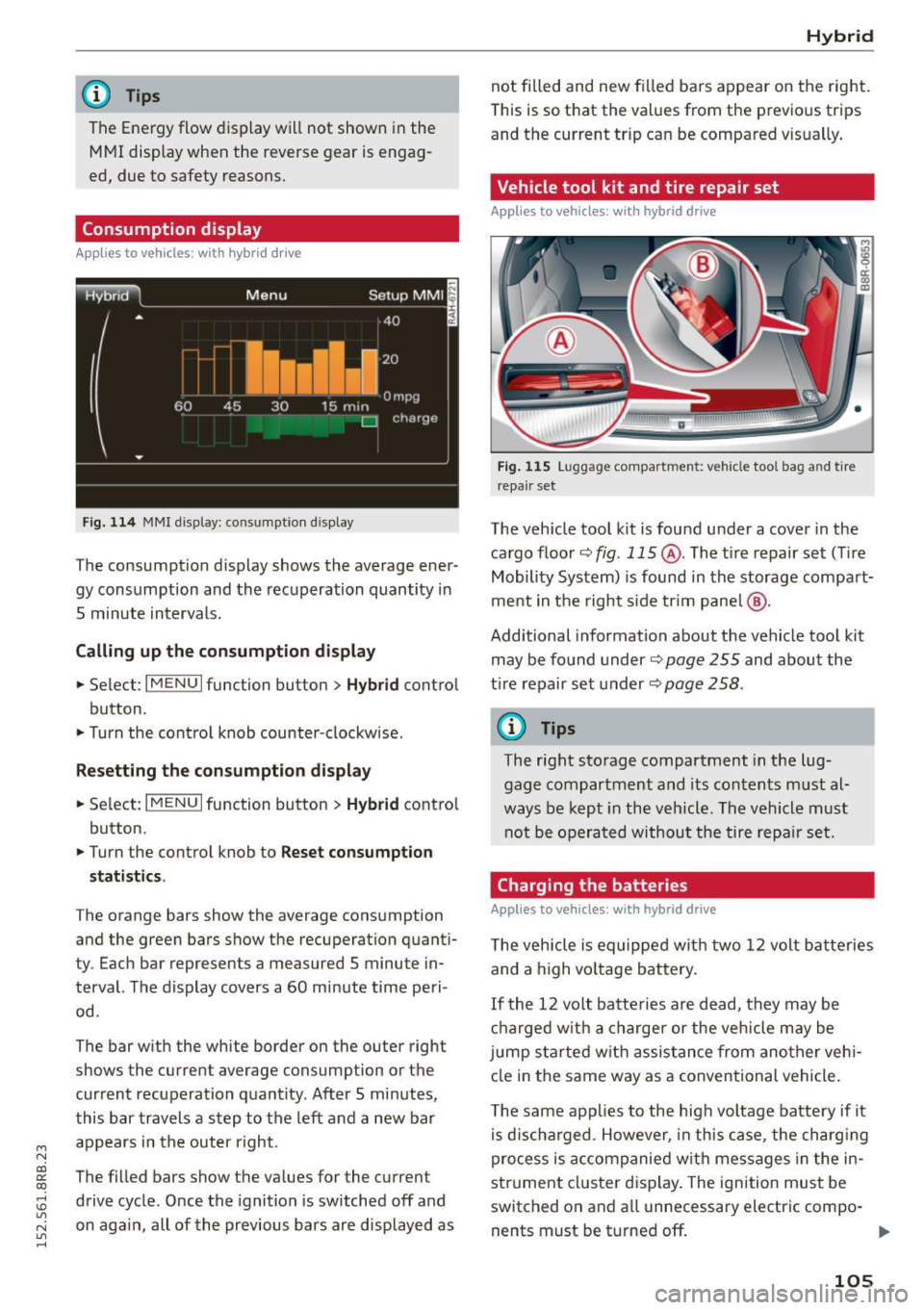
Fig. 114 MMI display: consumptio n dis play
The consumption display shows the average ener
gy consumption and the recuperation quantity in
5 minute intervals.
Calling up the consumption display
... Select : I MENU I function button> Hybrid control
button .
... Turn the control knob counter-clockwise .
Resetting the consumption display
... Select: I MENU I function button > Hybrid contro l
button .
... Turn the control knob to
Reset consumpt ion
statistics .
The orange bars show the average consumption
and the green bars show the recuperation quanti
ty. Each bar represents a measured
5 minute in
terval. The display covers a
60 minute time peri
od .
The bar with the white border on the outer right
shows the current average consumption or the
current recuperation quantity. After 5 minutes,
this bar travels a step to the left and a new bar
appears in the outer right.
The filled bars show the values for the current
drive cycle . Once the ignition is switched off and
on again, all of the previous bars are displayed as
Hybrid
not filled and new filled bars appear on the right.
This is so that the values from the previous trips
and the current tr ip can be compared vis ually .
Vehicle tool kit and tire repair set
Applies to vehicles: wit h hybrid drive
Fig. 115 Luggage compart ment: vehicle tool bag an d tir e
r epa ir set
The veh icle tool kit is found under a cover in the
cargo floor
~ fig . 115 @. The t i re repair set (Ti re
Mobility System) is found in the storage compart
ment in the right s ide trim pane l@ .
Additional information about the vehicle tool kit
may be found under~
page 255 and about the
t ir e repair set under ~
page 258 .
@ Tips
The right storage compartment in the lug
gage compartment and its contents must al
ways be kept in the vehicle. The vehicle must
not be operated without the tire repair set.
Charging the batteries
Applies to vehicles: wit h hybrid drive
The vehicle is equipped with two 12 volt batteries
and a high vo ltage battery.
If the
12 volt batteries are dead, they may be
charged with a charger or the vehicle may be
j u mp started with assistance from another veh i
cle in the same way as a conventional vehicle .
The same applies to the high voltage battery if it
is d ischarged . However, in this case, the charging
process is accompanied w ith messages in the in
strument cluster display. The ignition must be
switched on and a ll unnecessary electric compo -
nents must be turned off.
ll>
105
Page 115 of 302

Audi adapt ive crui se cont rol and bra king gu ard
Audi braking guard
Description
Applies to vehicles: with Audi adaptive cruise co ntrol
F ig. 126 Instrument cluste r: app roac h warn ing
Braking guard uses a radar sensor. It also func
tions within the limits of the system when adap tive cruise control is switched off .
What can bra king gu ard do ?
When detected in time, the system can assess
situations when a vehicle ahead brakes suddenly
or if your own veh icle is traveling at a high speed
and approaching a vehicle up ahead that is mov
ing more slowly . Braking guard does not react if it
cannot detect the s ituation.
The system advises you of various situations:
- The
di sta nce wa rning is given if you are too
close to the vehicle ahead for a long time.
If the
vehicle ahead brakes sharply, you will not be
able to avoid a collision. The indicator light .
in the d isplay comes o n.
- The
app roach warning is g iven when a detected
vehicle up ahead in your lane is moving much
more slowly than you are or if it brakes sharply .
When this warning is g iven, it may only be pos
s ible to avoid a co llision by swerving or braki ng
sharp ly. The indicator light . and indicator in
t h e d isplay w ill warn yo u about the danger
¢ fig. 126. You wi ll also hear an acoust ic signa l.
If you do not react fast enough or do not react at
all to the situation, braking guard will intervene by bra king and the message
Br aking guard : A cti-
~ vat ed will appear. co ~ co
rl I.O
"' N "' 11
This is not ava ilable in som e count ries. rl
- If a collision is imminent, the system wi ll first
provide an
a cute war ning by brief ly and sharply
app ly ing the brakes.
- If you do not react to the acute warning, brak
ing guard can brake within the limits of the sys
tem. This reduces the veh icle speed in the event
of a collision.
- At speeds under 20 mph (30 km/h), the system
can initiate a comp lete deceleration shortly be
fore a collisionl).
- If the braking guard senses that you are not
braking hard enough when a collision is immi
nent, it can increase the braking force.
Which function s can b e cont roll ed ?
You can switch braking guard and the distance/
approach warning on or off in the radio/MMI*
¢ page 114, Settings in the radio/MM!*.
A WARNING
-
Lack of attention can cause collisions, other
accidents and serious personal injuries. The b raking guard is an ass ist system and cannot
p revent a coll is ion by itself. The dr iver must
a lways intervene. The driver is always respon
s ib le for b ra ki ng at the corre ct time.
- Always pay close attent ion to traffic, even
when the b rak ing guard is switched on. Be
ready to intervene and be ready to take com
p lete control whenever necessary . Always
keep the safe a nd legal distance between
your vehicle and vehicles up ahead.
- Braking guard works within limits and will not respond outside the system limits, for
examp le when approaching a stopped vehi
cle or stationary obstacle (end of a traffic
jam or vehicle that has broken down in traf f ic).
- Always remember that the radar sensor for
the braking guard works on ly w ithin defined
detection and range limits that may prevent
the prope r detection of other vehicles.
- The radar sensor's funct ion and range can
be reduced by ra in, snow and heavy spray.
Moving vehicles up ahead may not be
,.
113
Page 116 of 302

Audi adaptive cru ise control and b ra king guard
promptly detected or may not be detected
at all.
- Reflective surfaces including cras h barriers
or tunnel entrances may impair the function
of the radar sensor.
(D Tips
- You can cance l the braking that is initiated
by the system by braking yourself, by accel
erating noticeably or by swerving.
- Braking g uard error messages ¢page
114 .
-Keep in mind that braking guard can brake
unexpected ly . Always sec ure any cargo or
objects that you are transporting to red uce
the risk of damage or injury.
Settings in the radio/MMI*
Applies to veh icles: with Audi adaptive cruise control
.,. Se lect : I CAR I funct ion button > Audi brak ing
guard .
Or
.,. Select :
~ I C~ A~ R~ I funct ion button > Car sy stem s*
control button > Drive r ass is t> Audi braking
guard .
Syst em -
Sw itch braking guard On and Off . When
you switch the ign ition on, the message
Braking
guard : Off
appears if the system is switched off.
Earl y warning -The dis tance and appro ach war n
ing s in the display can be sw itched
On/ Off.
(D Tips
-Your settings are automat ica lly stored and
assigned to the remote control key being used at the times the sett ings are made
¢ page
36 .
-If you restrict the ESC, the b raking guard al
so switches itself off¢ page
192 .
-Switch brak ing guard off when you are load
i ng the veh icle onto a vehicle carr ier, tra in ,
sh ip or other type of transpo rtation . Th is
can prevent undesired wa rnings from the
braking guard system.
Messages
Applies to vehicles: w ith Aud i adaptive cruise control
B raking guard: Off
114
This driver message appears if the system is
turned off via the radio/MM I *. Otherwise, if th e
system is turned off, the information appears ev
ery time short ly after the s tart of the tr ip .
The driver message a lso appears if the system is
not available due to a malfunction or if the ESC is
not switched on ¢ page
192 . If th is is the case,
the system w ill not provide warn ings about a
poss ible collis ion.
B raking gu ard: Ac tivat ed
This dr iver message appears if sharp b rake pres
sure was applied due to an a cute warn ing.
•••
Th ree white dots appear if a sett ing cannot be se
l ected w ith the operating lever . For example, th is
happens if you want to raise/lower the speed
even though there was no prev ious ly saved
speed .
ACC: Sensor block ed
This messag e appears if th e sensor v iew is ob
structed, for examp le by leaves, snow, heavy
spray or d i rt . Cle an the sensor ¢ page
10 7,
fig. 116 .
ACC: Una vailable
The driver message appears if, for example, the
brake temperature is too h igh. The adaptive
cru ise control is temporarily unavailable. A chime
sounds as a r emind er.
ACC: Not avail able
The driver message appears if there is a malfunc
tion. The adaptive cruise cont ro l tu rns off . A
c hi me so unds as a rem inder. Have the system
che cked by an a utho riz ed Aud i dealer o r auth o r
i zed Audi Serv ice Facility.
Shift lev er po sition!
T he driver message appears if the selector lever
i s sh ifted to the N pos it ion . The adaptive cru ise
control is not ava ilable while in this posit io n .
Stab ilizat ion control (ESC )
This message appears if the Elect ronic Stabiliza
tion Contro l (ESC) is taking act ion to stabilize the .,..
Page 120 of 302

Audi side a ssist
- Improper reliance on the side assist system
can cause collisions and serious personal in
jury:
- Never rely only on side assist when chang
ing lanes.
- Always check rear view mirrors to make sure that it is safe to change lanes.
- Side assist cannot detect a ll vehicles under
all conditions -danger of accident!
- Please note that side assist indicates there
are approaching vehicles, o r vehicles in your
blind spot, only after your vehicle has
reached a dr iv ing speed of at least 19 mph
(30 km/h).
- In certa in situations, the system may not
func tion or its funct ion may be lim ited. For
example:
- if vehicles are approaching or be ing left
behind very qu ickly. The display may not
turn on in time .
- in poor weather condit ions such as heavy
ra in, snow or heavy m ist .
- on very wide lanes, in tight curves or if
there is a rise in the road surface . Vehicles
in the adjacent lane may not be detected
because they ar e outside of the sensor
range.
(D Note
The sensors can be displaced by impacts or damage to the bumpe r, wheel housing and
unde rbody. This ca n affect the system. Have
your author ized A udi dealer or authori zed
Audi Service Facility c hec k their fu nction.
(D Tips
- If the window g lass in the d river's doo r or
front passenger's door has been tinted, the
display in the exterio r mirror may be misin
terpreted.
- F or De clarat ion of Compliance to United
Sta tes FCC and Indus try Canada regula tions
q poge 284 .
118
Activating and deactivating
App lies to vehicles: wit h Aud i side assist
Fig. 131 Driver 's door : S ide assist button
.,. Press the button q A in General information
on page 117
to sw itch the system on/off . The
LED in the button tu rns on when side assist is
sw itched on .
Adjusting the display brightness
Applies to vehicles: with A udi side ass ist
The signal brightness can be set in the radio or
MMI*.
.,. Select: I CAR I function button > Audi s ide as sist .
Or
.,. Select: I CAR I function button > Car sy ste m s*
cont ro l button > Driv er a ssi st> Audi sid e as
s is t.
The display br ightness adjusts au tomatically to
the b rightness of the surroundings, both in the
i nforma tion and in the wa rni ng stage. I n ve ry
dark or very b rig ht s urround ings, the display is al
ready set to the m inimum or maximum level by
the automatic adjustme nt. In such cases, yo u
may notice no change when ad justing the bright
ness, or the change may on ly be noticeable once
the surroundings change.
Adjust the brightness to a level where the d isp lay
in the information stage will not disrupt yo ur
view forward . If yo u change the brightness, the
display in the exterior mirror will briefly show the brightness level in the information stage. The
brightness of the warning stage is linked to the
brightness in the information stage and is adjust
ed along with the information stage adjustment .
liJI,
Page 123 of 302
M N
co ~ co
rl I.O
"' N
"' rl
Selecting the driving mode
Applies to vehicles: with Audi drive select
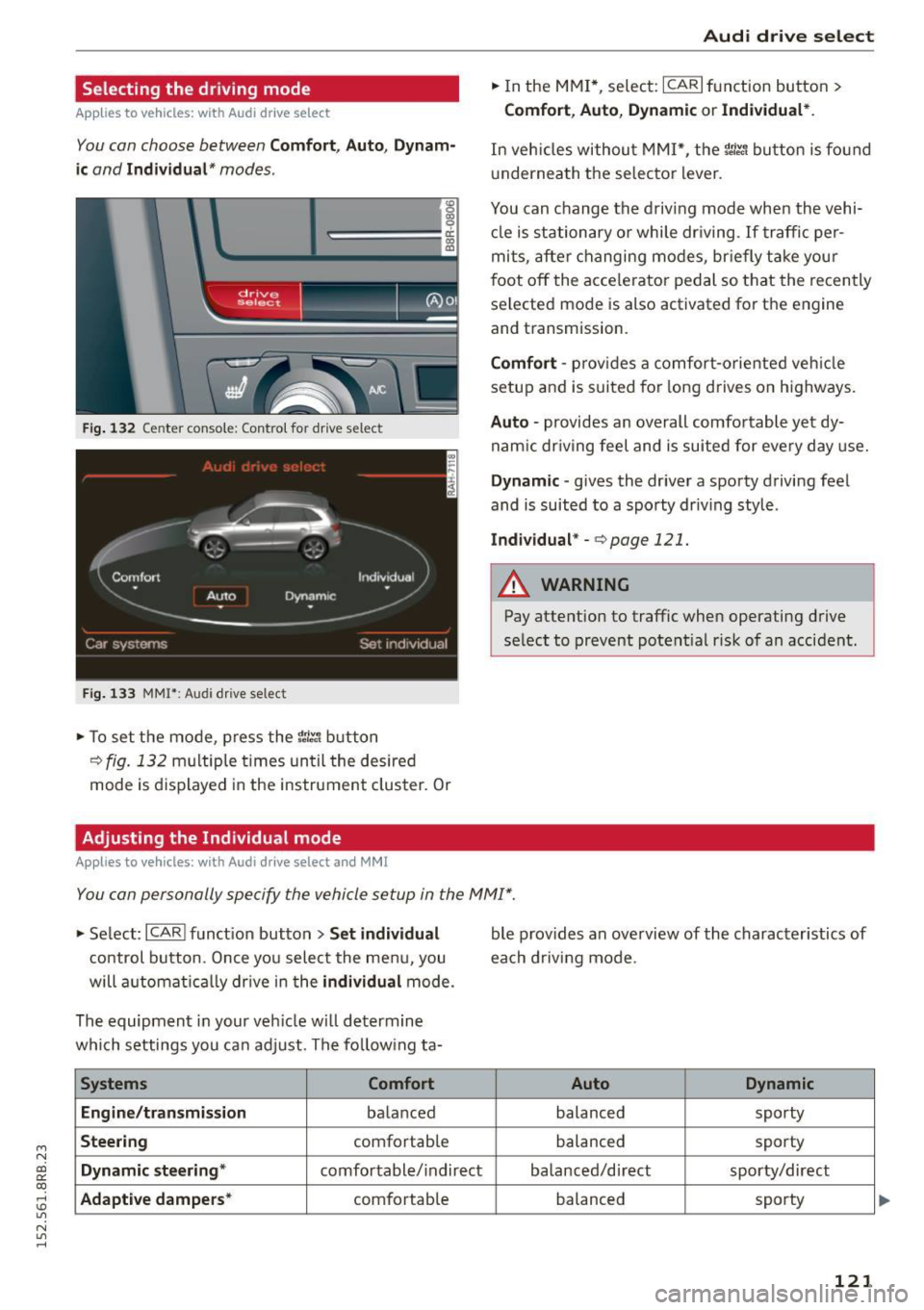
You con choose between Comfort, Auto, Dynam
ic
and Individual* modes .
«>
~ 9
c:=====::::;: ~ a,
drive I I r.,. select _ - ~
Fig. 132 Center console: Contro l for drive select
Fig. 133 MMI": Audi drive select
.. To set the mode, press the r:i.r., button
c>fig. 132 multiple times until the desired
mode is displayed in the instrument cluster. Or
Adjusting the Individual mode
Applies to vehicles: with Audi drive select and M MI
Audi drive select
.. In the MMI*, select: ICARI function button>
Comfort , Auto, Dynamic or Individual* .
In veh ides without M MI*, the r~~, button is found
und ernea th the selector lever .
You can change the driving mode when the vehi cle is stationary or while driving . If traffic per
mits, after changing modes, briefly take your
foot off the accelerator pedal so that the recently
selected mode is also activated for th e engine
and transmission.
Comfort -provides a comfort-oriented vehicle
setup and is suited for long drives on highways.
Auto -provides an overall comfortable yet dy
namic driving feel and is suited for every day use.
Dynamic -gives the driver a sporty driving feel
and is suited to a spo rty driving style .
Individual* -c> page 121.
A WARNING
-Pay attention to traffic when operating drive
select to prevent potential risk of an accident.
You can personally specify the vehicle setup in the MMI" .
.. Select: I CARI function button > Set individual
control button. Once you select the menu, you
will automatically drive in the
individual mode.
The equipment in your vehicle will determine
which settings you can adjust . The following ta-
Systems Comfort
Engine/transmission
balanced
Steering comfortable
Dynamic steering * comfortable/indirect
Adaptive dampers* comfortable ble
provides an overview of the characteristics of
each driving mode.
Auto Dynamic
balanced sporty
balanced sporty
balanced/direct sporty/direct
balanced sporty
121
Page 132 of 302
Parkin g sys tem
Rearview camera cover age area
The MM I disp lay shows the area cove red by the
rearview camera
c::> fig . 143 (D. Objects that are
not in the area covered @are not shown on the
MMI disp lay.
We recommend that yo u practice par king with
the rearview camera in a traffic-free location o r
parking lot to become familiar with the system,
the orientation lines, and their f unction . When
doing this, there should be good light and weath
er cond itions.
I n the MMI disp lay, objects or vehicles appear
closer o r further away if:
- yo u are driving in reverse gear from a level su r
face onto an incl ine, or a downward slope,
- you are driving in reverse gear toward protrud
ing obje cts,
- the ve hicl e i s ca rrying too much load in the
rear.
The accuracy of the or ientat ion lines and blue
surfac es dimin ishes if:
- the rearv iew camera does not provide a reliab le
image, for examp le, in poor visibility cond itions
or if the lens is d irty,
- the image on the screen is not visible due to
su n g la re and reflect ion .
Caring for the rearview camera lens
The rearview camera is located above the rear li
cense plate bracket. For the parking system to
operate, the lens
c::> fig. 144 must be kept clean:
- Dampen the lens with a house ho ld alcoho l-
based glass cleaner, and then wipe the lens
clean with a dry cloth
c::> Q) .
-Remove snow with a hand brush and ice pref
erably with a de- ic ing spray
c::> Q).
A WARNING
-The parking system ca nnot rep lace the driv
er's attenti on . T he d rive r alone is responsi
ble fo r parki ng a nd s imilar dr iv ing ma neu
vers.
- Senso rs have b lind spots in which objects
cannot be detected . Pay special atte ntion to
130
sma ll children and an imals beca use the sen
sors cannot always detect them.
- Always keep your eyes on the vehicle 's s ur
round ings, using the rearview mirror as
wel l.
- Do not allow yourself to be distracted from
traffic by the rearview camera pict ures.
- If the position and t he installation angle of
the camera has changed, for e xamp le, after
a rear end collision, do not continue to use
the system for safety reaso ns. Have it
checked by a qualified dealersh ip.
(D Note
- Low obstacles a lready s ignaled by a warn ing
can disappear from the system's detection
range as they are approached and w ill n ot
cont in ue to be signaled. Objects such as
bar rier cha ins, trailer draw ba rs, thi n pa int
ed vert ica l poles or fences may not be de
t e cted by the system, posi ng ris k of dam
a ge.
- N ever use wa rm o r hot wate r to remove
s now or ice from the rea rv iew came ra lens ·
t h is could cause the lens to crac k!
- Whe n cleani ng the len s, neve r use produ cts
th at ar e abra s ive.
Page 133 of 302
M N
co ~ co
rl I.O
"' N
"' rl
Switching on and off
Applies to vehicles: with Audi parking system p lus w ith rear
view came ra
The reorview camera switches on automatically
together with the acoustic and visual park assist
when you put the vehicle in reverse.
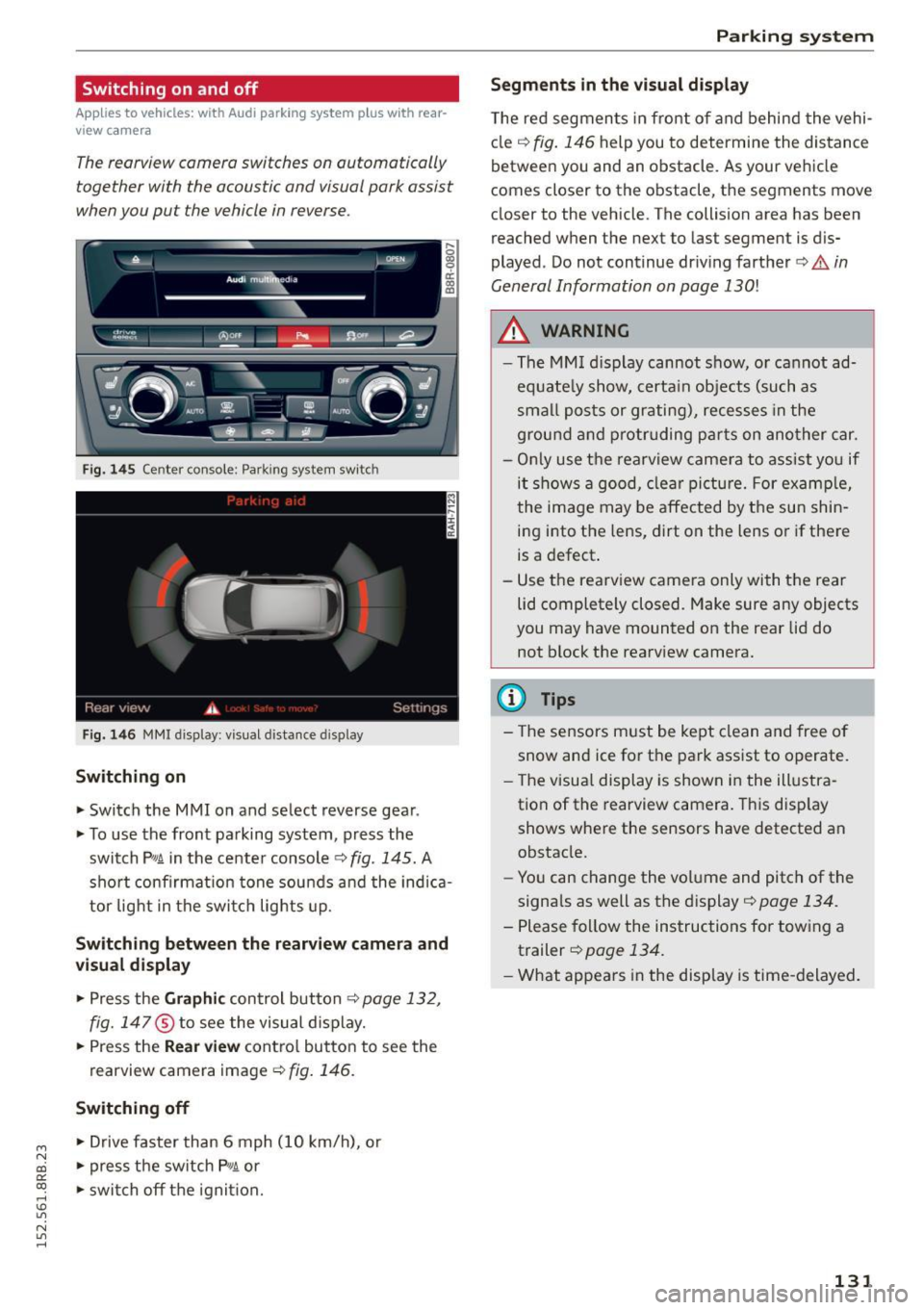
Fig. 145 Center console: Parking system switch
Fig. 1 46 MMI display: visual dista nce display
Switching on
.. Switch the MMI on and select reverse gea r.
.. To use the front parking system, press the
switch
P' "A in the center console c::> fig . 145. A
sho rt confirmat ion tone sou nds a nd the indica
tor light in the switc h lights up.
Switching betwe en th e re arview camera and
v is ual display
.. Press the Gr aphic control button c::> page 132,
fig. 147
® to see the visual d isplay .
.. Press the
Rear view cont ro l button to see the
rearview camera image
c::> fig . 146 .
Switching off
.. Drive faster than 6 mph ( 10 km/h), or
.. press the sw itch P
11JA or
.. swi tch off the ignit ion.
Par king system
Segm ents in th e vi sual display
T he red segmen ts in front of and behind the vehi
cle
c::> fig. 146 help you to determine the distance
between you and an obstacle. As your vehicle
comes closer to the obstacle, the segments move
closer to the vehicle. The collision area has been
reached when the next to last segment is dis
played. Do not continue dr iv ing farther ¢.&.
in
General Information on page 130!
A WARNING
--The MM I display cannot show, or cannot ad-
equate ly show, certa in objects (such as
smal l posts or grating), reces ses in the
ground a nd protr uding p arts on ano ther car.
- Only use t he rearview came ra to ass ist you if
it shows a good, clear picture. For examp le,
the image may be affected by the su n shin
ing into the lens, dirt on the lens or if there
is a defect.
- Use the rearv iew camera only with the rear
lid completely closed. Make sure any objects
you may have mounted on the rear lid do
not block the rearview camera.
(D Tips
-The sensors m ust be kept clean and free o f
snow and ice for t he park assist to operate.
- The visua l display is shown in the ill ustra
tion of the rearview camera. This disp lay
shows whe re the sensors have detected an
obstacle.
- Yo u can change the volume and pitch of the
signa ls as well as the display ¢
page 134.
-Please fo llow the instruc tions for tow ing a
trailer ¢
page 134.
-What appears in the disp lay is time -delayed .
131