mmi AUDI Q5 2015 Owner's Guide
[x] Cancel search | Manufacturer: AUDI, Model Year: 2015, Model line: Q5, Model: AUDI Q5 2015Pages: 302, PDF Size: 75.01 MB
Page 134 of 302
Parking syste m
Reverse Parking
App lies to veh icles: w ith Audi park ing system p lus w ith rear
view ca mera
Parking mode 1 can be used when parking in a
garage or into a parking space.
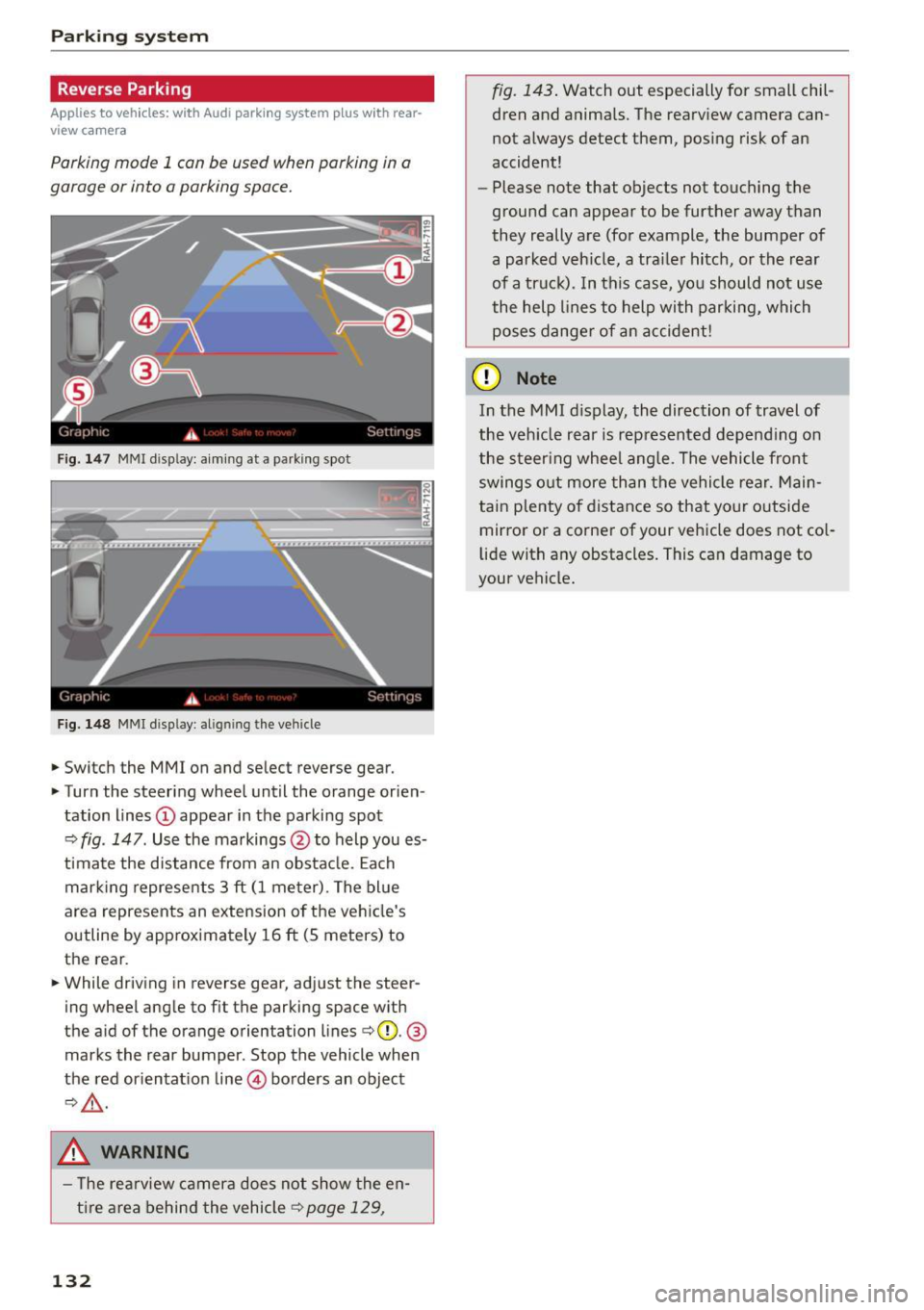
Fig. 147 MMI display: aiming at a parking spot
Fig. 148 MMI d isplay: align ing the vehicle
.,. Switch the MMI on and select reverse gear .
.,. Turn the steering wheel until the orange orien
tation lines
(D appear in the parking spot
c::> fig. 147. Use the markings @to help you es
t imate the d istance from an obsta cle. Each
mar king represents 3
ft (1 meter). The bl ue
area represents an extension o f the ve hicle's
outline by approximately 16
ft (5 meters) to
the rear .
.,. While driving in reverse gear, adjust the steer
ing wheel angle to fit the parking space with
the aid of the orange orientation lines
c::>@. @
marks the rear bumper. Stop the vehicle when
the red or ientat ion line @ borders an object
c::>,&. .
.&_ WARNING
- T he re arview camera does not show the en
t i re area behind the vehicle
c::> page 129,
132
fig. 143 . Watch out especially for small chil
dren and anima ls. The rearview camera can
not always detect them, posing risk of an
accident!
- Please note that objects not touching the
ground can appear to be further away than
they really are (for example, the bumper of
a parked veh icle, a trai ler hitch, or the rear
of a truck). In this case, you should not use
the help lines to help with parking, which
poses dange r of an accident!
(D Note
In the MMI display, the direction of travel of
the veh icle rear is represented depend ing on
the steer ing whee l ang le. The vehicle front
swings o ut more than the vehicle rear. Main
tain plenty o f distance so that yo ur outside
mirror or a corner of your vehicle does not co l
li de with any obstacles. This can damage to
your vehicle.
Page 135 of 302
M N
co ~ co
rl I.O
"'
Parallel Parking
Applies to vehicles: with Audi parking system p lus w ith rear
view came ra
Use parking mode 2 to help you parallel pork
along the side of o street.
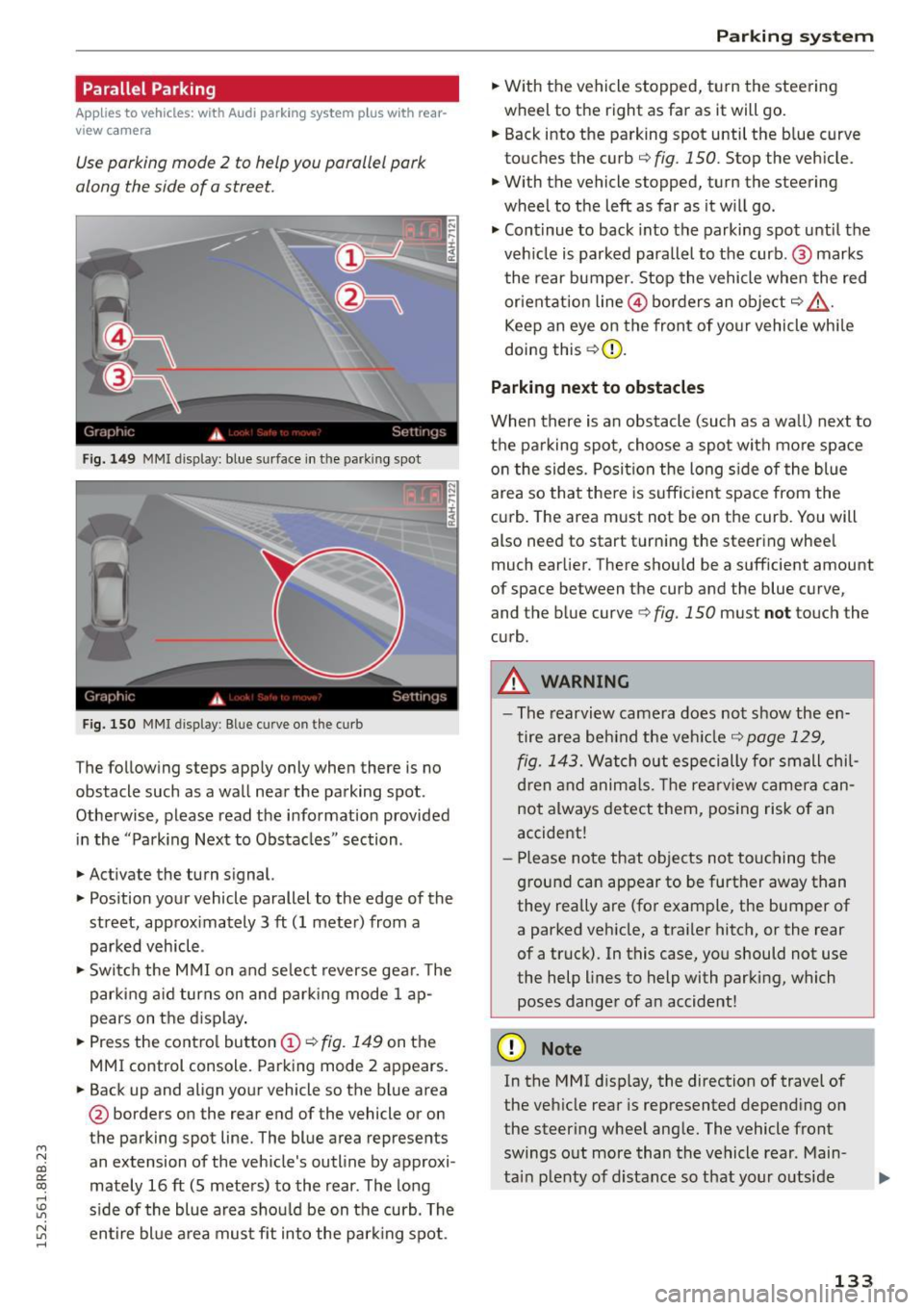
Fig. 149 MMI disp lay: blue surface in th e parking spot
Fig. 150 MMI display: Blue curve on th e curb
The follow ing steps app ly only when there is no
obstacle such as a wall near the parking spot.
Othe rwise, please read the informat ion provided
in the "Parking Next to Obstacles" section .
.,. Activate the turn s ignal.
.,. Position your vehicle parallel to the edge of the
street, approx imately 3 ft (1 meter) from a
parked vehicle .
.,. Swi tch the M MI on and se lect reverse gea r. T he
park ing a id turns on and park ing mode 1 ap
pears on the d isplay .
.,. Press the contro l button (!)¢
fig. 149 on the
MMI control console. Parking mode 2 appears.
.,. Back up and align your vehicle so the b lue area
@ borders on the rear end of the vehicle or on
the parking spot line. The blue area represents
an extension of the vehicle's outline by approxi
mately 16 ft (S meters) to the rear . The long
s ide of the blue area should be on the curb. The
~ entire bl ue a rea mus t fit into the par king spot .
Parking system
.,. With the vehicle stopped, t urn the steering
wheel to the right as far as it will go.
... Back into the parking spot until the b lue curve
to uches the curb
q fig. 150. Stop the vehicle.
.,. With the vehicle stopped, turn the steering
wheel to th e left as far as it w ill go .
.,. Cont inue to back into the parking spot until the
veh icle is parked para llel to the curb .@ marks
the rear bumper. Stop the vehicle when the red
or ientation line@ borders an obje ct
q .&, .
Keep an eye on the front of yo ur vehicle whi le
doing this ¢(D.
Parking next to obstacles
When there is an obstacle (such as a wall) next to
t h e pa rking spot, choose a spot with mo re space
o n the sides. Posi tion the long s ide of the blue
area so tha t the re is suff icient space from the
cu rb . T he area m ust not be on the curb. You will
also need to start t urn ing the steering wheel
much earlier. There should be a sufficient amount
of space between the curb and the blue curve
'
and the blue curve 9 fig. 150 must not touch the
c u rb .
A WARNING
-The rearvi ew camera does no t show the en
tire area be hind the veh icle
q page 129,
fig. 1 43.
Watch out especi ally for small chil
d ren and anima ls. The rearv iew camer a ca n
not always detect t hem, posing risk of a n
accident!
- Pl ease no te that objects no t to uch ing the
g round can appear to be further away than
they really are (for example, the bumper of
a parked vehicle, a traile r hitc h, or the rear
of a truck). In this case, you should not use
the help lines to help with parking, which
poses danger of an accident!
(D Note
In the MMI d isplay, the direction of travel of
the veh icle rear is represented depend ing on
the steer ing whee l ang le. The vehicle front
swings o ut more than the vehicle rear . Main
ta in plenty of d istance so that your o utside
133
Page 136 of 302
Parkin g system
mirror or a corner of yo ur vehicle does not col
lide with any obstacles. This can damage to
your vehicle.
(D Tips
The left or right orientation lines and sur faces
wi ll be displayed, depending on the turn sig
nal being used .
Adjusting the display
and warning tones
A pp lies to veh icles: w ith Audi park ing system p lus w ith rear
view ca mera
The display and warning tones can be adjusted in
the MMI.
~ Select: I CARI function button > Pa rking system .
Or
~ Select: ICARI funct ion button > Car s ystem s*
control button> Driver ass ist > Par king aid .
D is pl ay
- Off -when the parking system is switched on,
only audib le signals are given .
-On -when the parking system is switched on,
either the visual disp lay or the picture from the
rearview camera is disp layed.
Warning tones
- Front volum e -
front sensor volume
- Front frequency -front sensor frequency
-Rea r volume -rear sensor volume
-Rear fre quenc y -rear sensor frequency
- In -ca r entertainment fader /M usic volume
w hile pa rking -
when the parking system is
switched on, the volume of the active audio
source is lowered.
The newly adjusted value is briefly heard from
the signal generator.
(D Tips
- The warning tones can also be adjusted d i
rectly by the visual display or the picture
from the rearview camera. Simply press the
S ett ing s control button.
- Changed settings are activated when park
i ng system is switched on again .
134
-The settings are automatica lly stored and
assigned to the remote contro l key .
Trailer hitch
App lies to vehicles : wi th Audi parking sys te m plus wi th rea r
v iew camera a nd t railer hitch
For vehicles with a factory installed trailer hitch,
o r a trai ler h itch installed accord ing to factory
spec ifications, the parking sys tem rear sensors
do not come on whenever you shift into reverse
gear or when you press the
P" 1A switch. Remem
ber, there is no warning for distances to the rear.
The front sensors remain activated . The visua l
display switches to the trailer towing mode. The
picture from the rearv iew camera w ill not show
the or ientat ion lines nor the blue surfaces.
If you insta ll a hitch yourse lf, this function may
not work.
Error messages
App lies to vehicles: wi th Audi parking sys te m plus with rea r·
v iew camera
There is an error in the system if the LED on the
PwA switch is b linking and you hear a continuous
a larm for a few seconds after switching on the
parking system or when the parking system is al
ready act ivated. Have your authori zed Audi dealer
correct the error.
(D Tips
If the error is not corrected before you switch
off the ignition, when you switch on the park i ng system again, the LED in the
Pw.o. sw itch
will blink.
Page 177 of 302
M N
co
a:
co
,...., \!) 1.1'1
N 1.1'1 ,....,
Model Manufactured on or
a fter
Cosco Summit Deluxe September 25, 2007
High Back Booster
22-262
Cosco High Back Boos -September 25, 2007
ter 22-209
Evenflo Tribute V September 25, 2007
379xxxx
Evenflo Medallion 254 December 1, 1999
Evenflo Generations September 25, 2007
3S2xxxx
Graco ComfortSport September 25, 2007
Graco Toddler Safety September 25, 2007
Seat Step 2
Graco Platinum Cargo September 25, 2007
.&, WARNING
To reduce the risk of serious injury, make sure
that the
PASS ENGER AIR BAG OFF light
comes on and stays on whenever a child re
straint is installed on the front passenger seat
and the ignition is switched on.
- Take the child restraint off the front passen ger seat and install it properly at one of the
rear seat positions if the
PASSENGER AIR
BA G OFF
light does not stay on.
- Have the airbag system inspected by your
authorized Audi dealer immediately.
(D Tips
The ch ild seats listed in categories A to C have
been statically tested by Audi on ly for the Ad
vanced Airbag function.
Important safety instructions for using
child safety seats
Correct use of child safety seats substantially re
duces the risk of injury in an accident!
As the driver, you are responsible for the safety of
everybody in the vehicle, especially children:
.,. Always use the right child safe ty seat for each
child and a lways use it properly ¢
page 177.
Child sa fety
.,. Always carefully follow the child safety seat
manufacturer's instructio ns on how to route
the safety belt properly through the child safe
ty seat.
.,. When using the vehicle safety belt to install a
child safety seat, you must first activate the
convert ible lock ing retractor on the safety belt
to prevent the child safety seat from mov ing
r::) page 181 .
.,. Push the ch ild safety sea t down with yo ur full
weight to get the safety belt rea lly tight so that
the seat cannot move forward or sideways more
than one inch (2.5 cm).
.,. If a strap or tether is being used to tie the child
safety seat to the front passenger seat, make
sure that it is not so tight that it causes the
weight -sensing mat to measure more we ight
than is actually on the seat .
.,. Secure unused safety belts on the rear seat
r::) page 177 .
Always remember : Even though your vehicle is
equipped with an Advanced Airbag system, all
c hi ld ren, especially those 12 years and younge r,
shou ld a lways r ide in the back seat prope rly re
stra ined for their age and size.
A WARNING
=
Not using a child sa fety seat, us ing the wrong
chi ld safety seat or improperly installing a
chi ld restraint increases the risk of serious
personal injury and death.
- All vehicle occ upants and especially children
must always be restrained properly whenev
er riding in a vehicle .
- An unrest rained or improperly restrained
ch ild can be injured or killed by being
thrown against the ins ide of the vehicle o r
b y being ejected from it du ring a s udden
maneuver or impact.
- An unrestrained or improperly res trained
child is at much greater risk of injury or
death by being struck by an inflating air
bag.
- Commercia lly available child safety seats
are req uired to comply with U.S. Federa l Mo
tor Vehicle Safety Standard (FMVSS) 213 (in
Canada CMVSS 213). .,_
175
Page 193 of 302
M N
co
a:
co
,...., \!) 1.1"1
N 1.1"1 ,....,
shared, please see your contract with the
wireless telecommunications provider and the
"About Aud i connect" tab in your vehicle's
MMI*:
IMENU I button> Audi connect > About
Audi connect .
Electronic Stabilization
Control (ESC)
Description
The Electronic Stabilization Control (ESC) reinfor
ces driver safety. It reduces the risk of slipping
and improves driving stability. ESC detects criti
cal s ituations such as the vehicle oversteering
and understeering or the wheels sp inning. The
veh icle is stab ilized by applying the brakes or re
ducing engine torque. Once the ESC is act ive, the
indicator light
m blinks in the instrument clus
ter.
The fol low ing systems a re integrated in the ESC:
Anti-lock brake system (ABS)
ABS prevents the wheels from locking up when
brak ing . The vehicle can still be steered even dur
ing hard braking. Apply steady pressure to the
brake pedal. Do not pump the pedal. A pulsing in
the brake pedal indicates that the system is help
ing you to brake the vehicle.
Brake assist system
The brake assist system can decrease braking d is
tance . It increases braking power when the dr iver
presses the brake pedal quick ly in emergency s it
uations. You must press and hold the brake pedal
unti l the situation is over. In vehicles w ith adap
tive cruise control*, the brake assist system is
more sensitive if the distance detected to the ve
hicle ahead is too small.
Anti-slip regulation (ASR)
ASR reduces engine power when the drive whee ls
begin to spin and adapts the force to the road
conditions. This makes it easier to start, acceler
ate and drive up hills.
Smart Technology
Electronic differential lock (EDL)
The EDL brakes whee ls that are spinning and
trans fers the drive power to the other whee ls.
This function is not avai lable at higher speeds .
In extreme cases, EDL automatically sw itches off
to help keep the brake on the braked wheel from
overheating. EDL will switch on again automati
ca lly when conditions have returned to normal.
Steering recommendation
The ESC helps to stabilize the vehicle by changing
the steering torque.
On vehicles with dynam ic steering*, ESC helps
stab ilize the steer ing in crit ical situat ions .
Selective wheel torque control
Selective wheel torque control is used when driv
ing on curves. The front wheel on the inside of
the curve or both wheels on the inside of the
curve are braked select ively as needed. This al
lows more precise driving in curves. The applica
ble system may not activate when driving in wet
o r snowy conditions .
A WARNING
-
-The ESC and its integrated systems cannot
overcome the laws of physics. This is espe
cially important on slippery or wet roads. If
the systems begin acting to stabilize your
vehicle, you should immediately change
your speed to match the road and traffic conditions . Do not let the increased safety
provided by these systems tempt you to
take risks. Doing so will increase the risk of a
loss of vehicle control, collision and serious
personal injuries.
- Always adapt your speed to road, traffic and
weather conditions. The risk of los ing con
trol of the vehicle increases when driving
too fast, especially through curves and on
slippery or wet roads, and when driving too
close to vehicles up ahead . The ESC and its
integrated systems cannot a lways prevent
coll isions - there is st ill a risk of acc idents!
- Always accelerate with special care on even,
smooth surfaces such as those that are wet
or covered with ice and snow. The drive
191
Page 199 of 302
M N
co
a:
co
,...., \!) ..,.,
N ..,., ,....,
electrical energy is not being used than is being
generated and ensures an optimal state of
charge for the battery.
(D Tips
- But even energy management cannot neg
ate the limits of physics. Consider that the power and life of a battery are limited.
- If starting ability is threatened, the indica
tor light (•] appears ~
page 33.
What you should know
The highest priority is given to maintaining start
ing capability.
The battery is severely taxed in short-distance
driving, in city traffic and during the co ld time of
year. Abundant electrical energy is required, but
only a little is generated. It is also critical if the
engine is not running and electrical components
are turned on. In this instance energy is being
consumed but none is being generated.
It is in precisely these situations that you wi ll no
tice energy management actively regulating the
d istribution of energy.
Vehicl e stands fo r an e xte nded p eriod
If you do not drive your vehicle over a period of
several days or weeks , e lectrica l components are
gradually cut back or switched off . This reduces
energy consumption and maintains starting ca
pability over a longer period . Some of the con
ve nience funct ions may not operate, such as the
interior lights or the power seat adjustment. The
conven ience functions wi ll be available again
when you switch on the ignit io n and start the en
g ine.
With the engine turned off
If you listen to the radio, for example, with the
engine turned off or use other MMI* functions ,
the battery is being d ischarged .
If starting capability is jeopardized due to energy
consumption, a message appears in the radio or MMI* display . The message indicates that the
system w ill be switched off automatically in a
Smart T echno log y
moment . If you wish to continue using the func
tions, you have to start the engine.
With the engin e running
Although electrical energy is generated when the
vehicle is be ing driven, the battery can become
discharged . This happens mostly when litt le en
ergy is being generated and a great dea l con
s u med and the batte ry's state of charge is not
opt imal.
T o bring the energy ba lance back into equilibri
u m, consumers which require especially large
amounts of ene rgy are temporarily cut back or
switched off. Heating systems in particu lar re
quire a great deal of energy. If you notice, for ex
amp le, that the heated seats* or the heated rear
window are not heating, they have been tempo
rar ily cut back or switched off . These systems w il l
be available again as soon as the energy ba lance
has been restored.
You w ill also notice that engi ne idle speed has
been increased slightly . T h is is normal and not a
cause for concern. By increasing eng ine idle
speed the additional energy requi red is generated
and the battery is ch arged .
197
Page 227 of 302
M N
co ~ co
rl I.O
"' N
"' rl
@ Tips
-The oil pressure warning display. is not
an indicator of the oil level. Do not rely on
it. Instead, check the oil level in your en
gine at regular intervals, preferably each
time you refuel , and always before going
on a long trip .
-If you have the impression your engine con
sumes excess ive amounts of o il, we recom
m end th at you cons ult an a uthorized Aud i
deal er to have th e cau se of yo ur co nc ern
p ro perly di ag no se d . Keep i n mi nd th at the
a ccurate meas ureme nt o f oil c onsu mpti on
r equires great care and m ay ta ke some time.
An a uthorized Audi dea ler has i nstr uctions
abo ut how to meas ure o il cons umption ac
curate ly.
Checking the engine oil level
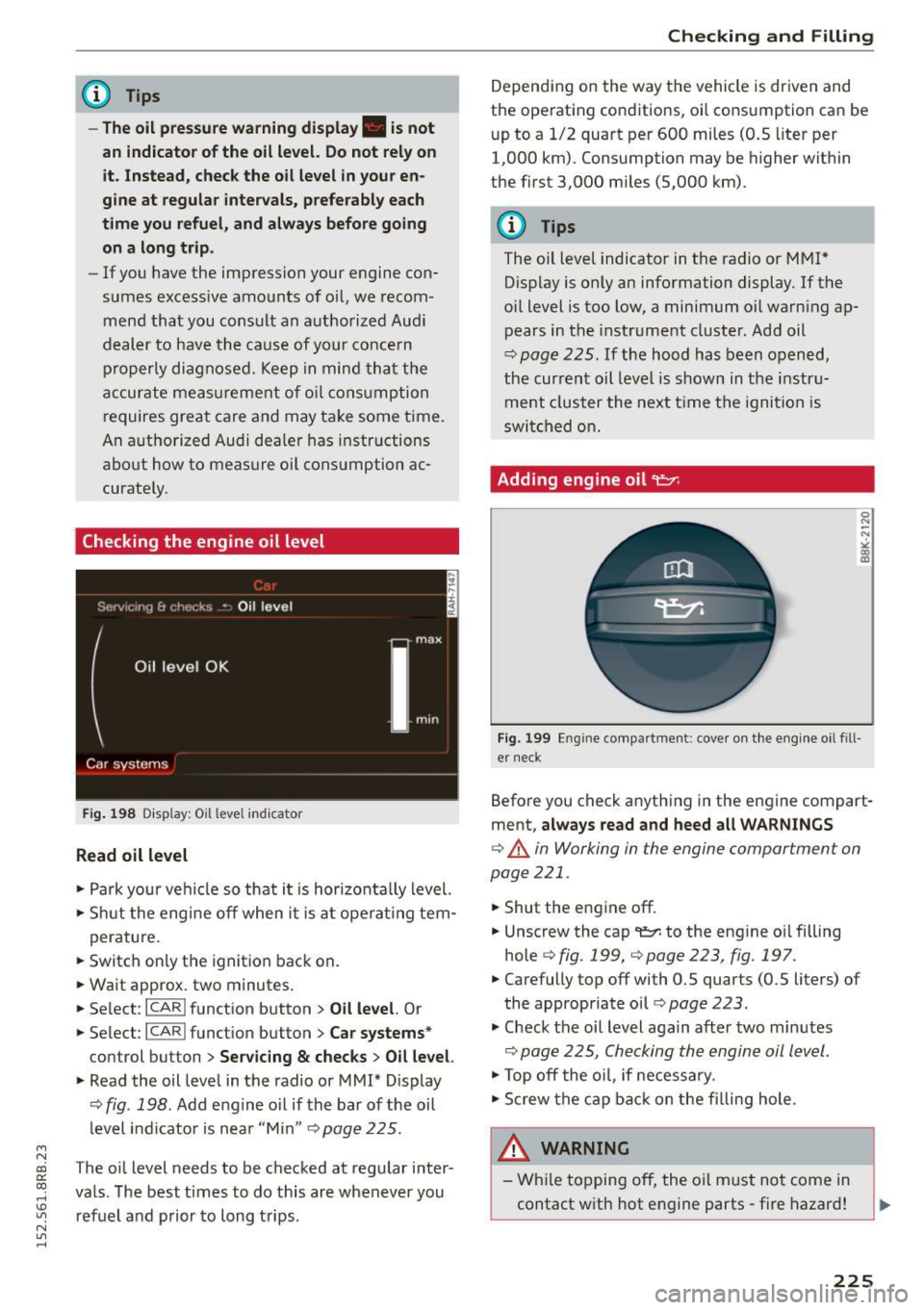
F ig. 19 8 Disp lay: O il level indicator
Read oil level
.. Pa rk your vehicle so that i t is hor izont ally level.
.. Shu t the engine off when i t is at oper ating te m-
perature.
.. Switc h on ly the ignition back on.
.. Wa it approx. two minutes .
.. Se lect:
I CARI funct ion button > Oil level. Or
.. Select:
ICARI funct ion button> Car systems *
control button > Servicing & checks > Oil level.
.. Read the oil leve l in the radio or MMI* Display
¢ fig . 198. Add e ng in e oil if the bar of the oil
l evel i ndicator is nea r "M in"
9page 225.
The oil level needs to be c hec ked at regular inter
va ls. The best t im es to do this are whenever you
ref uel and prior to long t rips.
Checking and Filling
D epend ing on the way t he vehicle is dr iven and
the ope rat ing cond itions, oil consumption ca n be
u p to a 1/2 quart pe r 600 miles (0 .5 liter per
1,000 km). Consumption may be higher within
the fi rst 3,000 mi les (5,000 km).
(D Tips
The oil leve l indicator in t he ra dio or MMI*
D isp lay is only an information display. If t he
o il level is too low , a minimum oi l warn ing ap
p ears in the instrume nt cl uster. Add oil
¢ page 225. If the hood has been o pen ed,
t h e cur ren t oil leve l is shown in t he instru
m ent cl uster the n ext tim e the ig niti on i s
sw itch ed on.
Adding engine oil
Fig . 199
Engine compa rtment: cove r on th e e ng in e oi l fill
er neck
Befo re you check a nyth ing in the engine compart
ment ,
always read and heed all WARNINGS
¢ & in Working in the engine compartment on
page 221 .
.. Shut the eng ine off .
.. Unscrew the cap
'l!:7-to the eng ine o il filling
hole
¢ fig. 199, 9page223, fig.197 .
.. Carefully top off with 0.5 quarts (0.5 liters) of
the appropriate oil ¢
page 223 .
.. Check t he oil level aga in after two m inutes
<:> page 225, Checking th e e ngin e oil l eve l.
.. Top off the o il, if necess ary .
.. Scr ew the cap back on the filling hole.
& WARNING
-
- W hile to p pin g off , the o il m ust not come in
contact w ith hot e ngine parts - fire hazar d!
225
Page 228 of 302
Checking and F ill in g
- The oi l fi ller cap mus t be pr operly secured to
p re vent oil from being sprayed on the hot
engine and exhaust system when the engine
is running - fire hazard!
- If your skin has come in contact with the en
gine oil, you must subsequently clea nse it
tho roughly .
CD Note
-Check the o il level using the radio or the
MMI*. If the message
Please reduce oil lev
el
appears, contact your authorized Audi
dealer or other qualified wo rkshop to have
excess oil ext racted if necessa ry .
- Audi does not recommend the use of oil
additive s. They may damage the engine
and adversely affect your New Vehicle War
ranty .
@ For the sake of the environment
- Under no circ umstances ca n the o il come in
contact w ith the sewage network o r the soil.
- Observe and fo llow lega l regu lations whe n
dispos ing of empty oil co ntaine rs .
Changing the engine oil
We recommend that have your oil changed by an
authorized Audi dealer or a qualified service sta
tion .
Before you check any thing in the engine compart
ment,
always read and heed all WARNINGS c> .&.
in Working in the engine compartment on
page 221 .
The engine oil must be changed according to the i n terva ls specified in your Warranty
& Mainte
nance booklet . This is ve ry impo rtant because the
lubricat ing propert ies of o il diminish gradua lly
du ring normal ve hicl e use.
Unde r some circumstances the eng ine o il should
be changed more frequent ly. Change oil more of
ten if yo u drive most ly short distances, operate
t he vehicle in d usty areas or unde r predom inan tly
s top-and-go traff ic co ndit io ns, o r have you r vehi
cle where tem peratures rema in be low freezing
for extended periods .
226
Detergent additives in the oil will make fresh oil
l ook dark after the engine has been running fo r a
short time. Th is is norma l and is not a reason to
c h ange the oi l more often than recommended.
Beca use o f the p rob lem of p roper disposal, along
with t he specia l too ls and necessary expertise re
quired, we strongly recommend that yo u have
your oi l changed by an authori zed
Audi dealer or
a q ua lified service station.
If you choose to change your oil yourself , please
note the fo llow ing important info rmat ion:
_& WARNING
To reduce the risk of personal inj ur y if you
must change the eng ine oil in your vehicle
yourself:
- Wear eye protect ion.
- To reduce t he risk of burns from hot eng ine
oil, let the engine coo l d own to the to uch.
-
- W hen removing the o il dra in p lug with your
fingers, stay as far away as possible. Always
keep you r forearm parallel t o the ground to
he lp prevent hot o il from running down your
arm .
- Dra in the oil i nto a container designed for
this purpose , one large enough to hold at
l e ast the tota l amount o f oil in you r engine.
- Engine oil is poisonous. Keep it we ll out of
the reach of ch ildren .
- Continuous contact w it h used eng ine oi l is
ha rmf ul to your skin . Always protect your
skin by washi ng oil off tho roughly wi th soap
a nd wate r.
CD Note
N eve r mix oil additives with you r engine oil.
These add itives can damage your engine and
adverse ly affec t your Aud i Lim ited New Vehi
cle Warranty.
@ For the sake of the environment
-Before changi ng your oil , first make sure
you know wh ere you ca n prope rly dispose of
t h e us ed oil.
- Always disp ose of used eng ine oil properly.
Do not dump it o n garden soi l, wooded
Page 269 of 302

M N
co ~ co
rl I.O
"' N
"' rl
Left cockpit fuse assignment
Fig. 224 Left side of the cockpit: fuse panel with plastic
clip
Fuse panel @ (black )
No. Equipment
1 Dynamic steering
2 ESC control module
A/C system pressure sensor, electrome-
3 chanical park
ing brake, Homelink, auto-
matic dimming interior rearview mirror, air
quality/outside air sensor, ESC button
5 Sound
actuator/exhaust sound tuning
6 Headlight range contro l/cornering light
7 Headlight (cornering light)
Control modu les (e lectromechanical park-
8 ing brake, shock absorber, quattro Sport,
trailer hitch), DCDC converter
9
Adaptive cruise control or high voltage
battery (hybrid drive)
11 Side assist
12 Headlight range control, parking system
13 Airbag
14 Rear w iper
15 Auxi
liary fuse (instrument panel)
1 6 Auxiliary fuse terminal 15 (engine area) Fuses
and bulbs
Fuse panel @ (brown)
No . Equipment
1 Electric exhaust door
2 Brake light sensor or brake pedal
move-
ment sensor (hybr id drive)
3 Fuel pump
4 AdBlue pumps
or brake booster power
supply (hybrid dr ive)
5 Left seat heating with/without seat venti-
lation
6 ESC
7 Horn
8 Left
front door (window regulator, central
locking, mirror, switch, lighting)
9 Wiper motor
10 ESC
11 Left
rear door (window regu lator, switch,
lighting)
12 Rain and light sensor
Fu
se panel © (re d)
No . Equipment
3 Lumbar support
4 Dynamic steering
5 Climatized cupholder
6 Windshie
ld washer system, headlamp
washer system
7 Vehicle electr ical system control module 1
8 Vehicle e
lectrica l system control module 1
9 Panorama sunroof
10 Vehicle e lectrica l system control module 1
11 Sun shade (pano rama sunroof)
12 Anti-theft a
larm system
267
Page 271 of 302
M N
co
a:
co
,...., \!) 1.1'1
N 1.1'1 ,....,
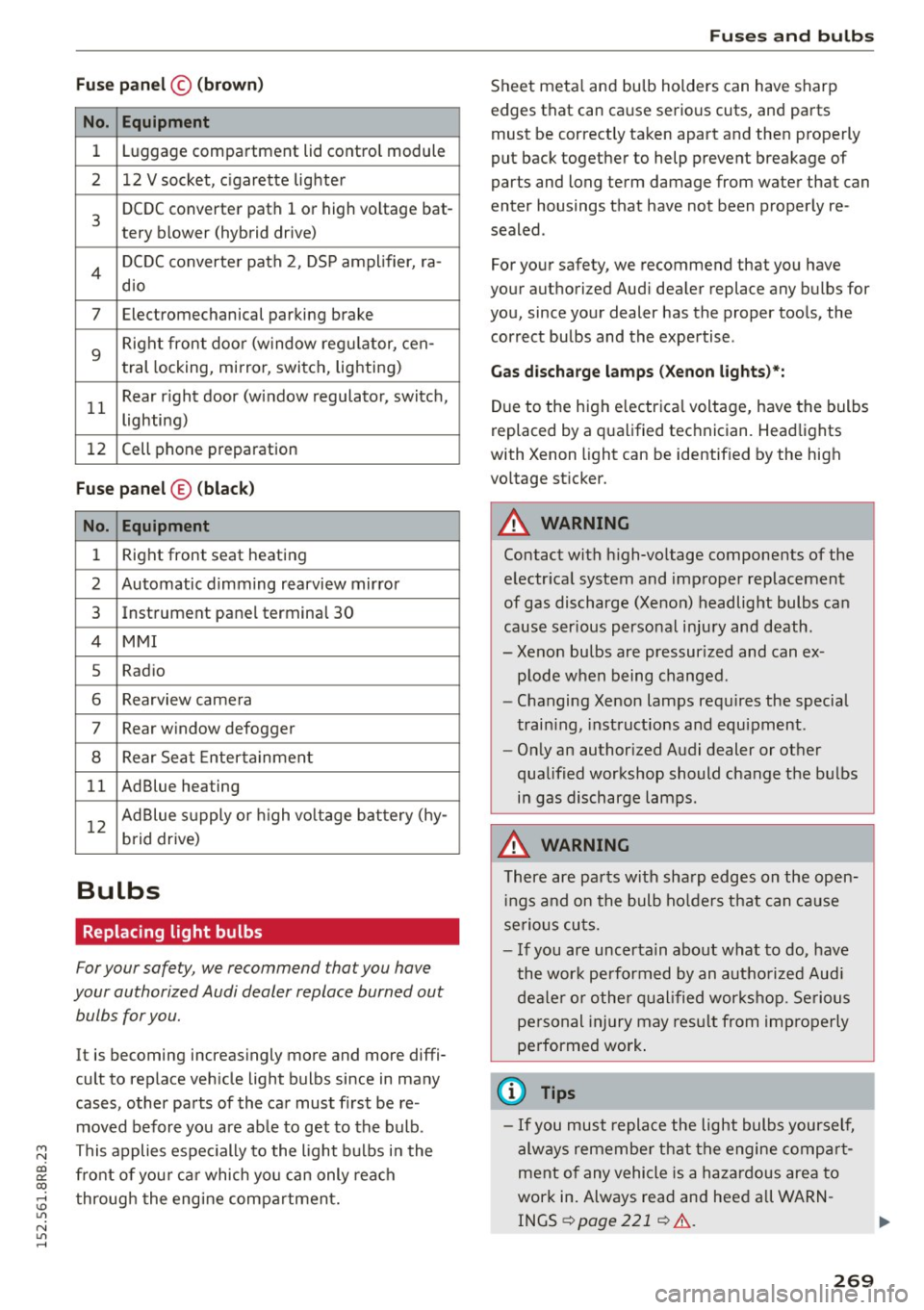
Fuse panel© (brown)
No. Equipment
1 Luggage compartment lid control module
2 12 V socket, c igarette lighter
3
DCDC converter path 1 or high vo ltage bat-
tery blower (hybrid drive)
4 DCDC converter path 2, DSP amplifier, ra-
dio
7 Electromechanical parking brake
9
Right front doo r (window reg ulator, cen-
tral locking, mirror, switch, lighting)
11 Rear r
ight door (window regulator, switch,
lighting)
12 Cell phone
preparation
Fuse panel ® (black)
No. Equipment
1 Right front seat heating
2 Automatic dimming rearview mirror
3 Instrument panel terminal 30
4 MMI
5 Radio
6 Rearview came
ra
7 Rear window defogger
8 Rear Seat Entertainment
11 AdBlue heating
12 Ad
Blue supply or high voltage battery (hy-
brid drive)
Bulbs
Replacing light bulbs
For your safety, we recommend that you have
your authorized Audi dealer replace burned out bulbs for you.
It is becoming increasingly more and more diffi
cult to replace vehicle light bulbs since in many
cases, other parts of the car must first be re
moved before you are ab le to get to the bulb.
This applies espec ially to the light bulbs in the
front of you r car which you can only reach
through the engine compartment.
Fuses and bulbs
Sheet metal and bulb holders can have sharp
edges that can cause serious cuts, and parts
must be correctly taken apart and then properly
put back together to help prevent breakage of
parts and long term damage from water that can
enter housings that have not been proper ly re
sealed .
For your safety, we recommend that you have
your authorized Aud i dealer replace any bulbs for
you, since your dealer has the proper too ls, the
correct bulbs and the expertise .
Gas discharge lamps (Xenon lights )*:
Due to the high e lectrica l voltage, have the bulbs
replaced by a qualified technician. Headlights
with Xenon light can be identif ied by the high
vo ltage sticker.
A WARNING
Contact with high-voltage components of the
electr ical system and improper replacement
of gas discharge (Xenon) headlight bulbs can
cause ser ious personal injury and death.
- Xenon bulbs are pressur ized and can ex-
plode when being changed.
- Changing Xenon lamps requ ires the special
train ing, instructions and equipment.
- Only an authorized Audi dealer or other
qualified workshop should change the bulbs
in gas discharge lamps.
A WARNING "'--
There are parts with sharp edges on the open-
in gs and on the bulb holders that can cause
serious cuts.
- If you are uncertain about what to do, have
the wor k performed by an authorized Aud i
dealer or other qualified workshop. Serious
personal injury may resu lt from improperly
performed work .
(D Tips
-If you must replace the light bulbs yourself,
always remember that the engine compart
ment of any vehicle is a hazardous area to
work in . Always read and heed all WARN
INGS¢ page 221 ¢ .&,.
269