start stop button AUDI Q5 2015 User Guide
[x] Cancel search | Manufacturer: AUDI, Model Year: 2015, Model line: Q5, Model: AUDI Q5 2015Pages: 302, PDF Size: 75.01 MB
Page 101 of 302
Starting the vehicle
Applies to vehicles: with hybrid drive
The vehicle is started and turned off either w ith
the ign ition key
q page 84 or with the
IS TAR T ENGINE STOP I button* ¢page 87 in the
same way as a conventional vehicle .
When starting the vehicle, the need les in the in
strument cluster
move upward br iefly. When the
vehicle enters d rive ready mode, the status mes
sage
hybrid ready appears briefly in the instru
ment cluster display and the needl e in the power
meter points to READY
q page 99.
Depending on the operation mode of the hybr id
system, there are two possib le drive ready modes
after the vehicle has been started:
Drive r eady mode with combustion engine
If the ope rat ing requirements q page 101 for
e lec tric dr ive mode are
not met, the combustion
Power meter overview
Applies to vehicles: with hybrid drive
H ybri d
engine starts the vehicle as usual. You can start
driving as usual.
Drive ready m ode with th e el ectric motor
If the operating requi rements 9 page 101 for
the e lectr ic dr ive mode are met , the combustion
engi ne remains off after starting the vehicle.
(j) Tips
To p reven t the 12 volt batte ry from d ischarg
i ng, never leave t he veh icle parked in the dr ive
ready mode. Remove the key from the igni tion
or press the
! S T AR T ENGINE ST OP I button *.
When leaving the vehicle always take the key
with you.
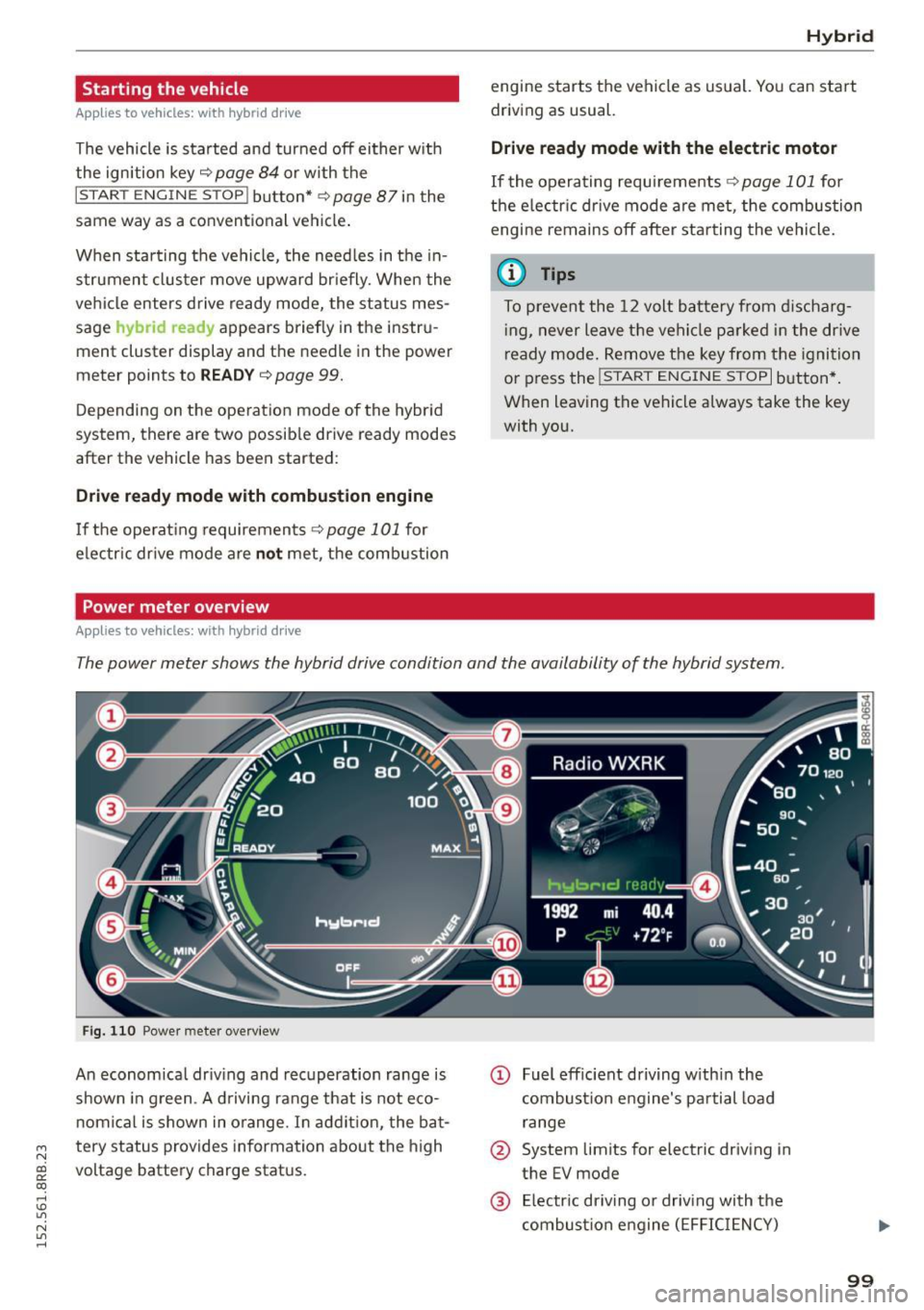
The power meter shows the hybrid drive condition and the availability of the hybrid system.
F ig. 1 10 Powe r meter overview
An economical dr iv ing and recuperation range is
shown in g reen . A d riving range that is not eco
n omical is shown in o range. In addi tion, the ba t-
"' tery status provides information about the high
N
~ voltage battery charge stat us.
co
rl I.O
"' N
"' rl
@ Fuel eff icient driving with in the
combust ion engine 's pa rtial load
range
@ System limits for electric driving in
the EV mode
@ El ectric dr iving or driv ing with the
combust ion engine (EFFIC IENCY)
99
Page 103 of 302
M N
co
a:
co
,...., \!) 1.1"1
N 1.1"1 ,....,
Hybrid functions and operating modes
Appl ies to vehicles: with hybri d drive
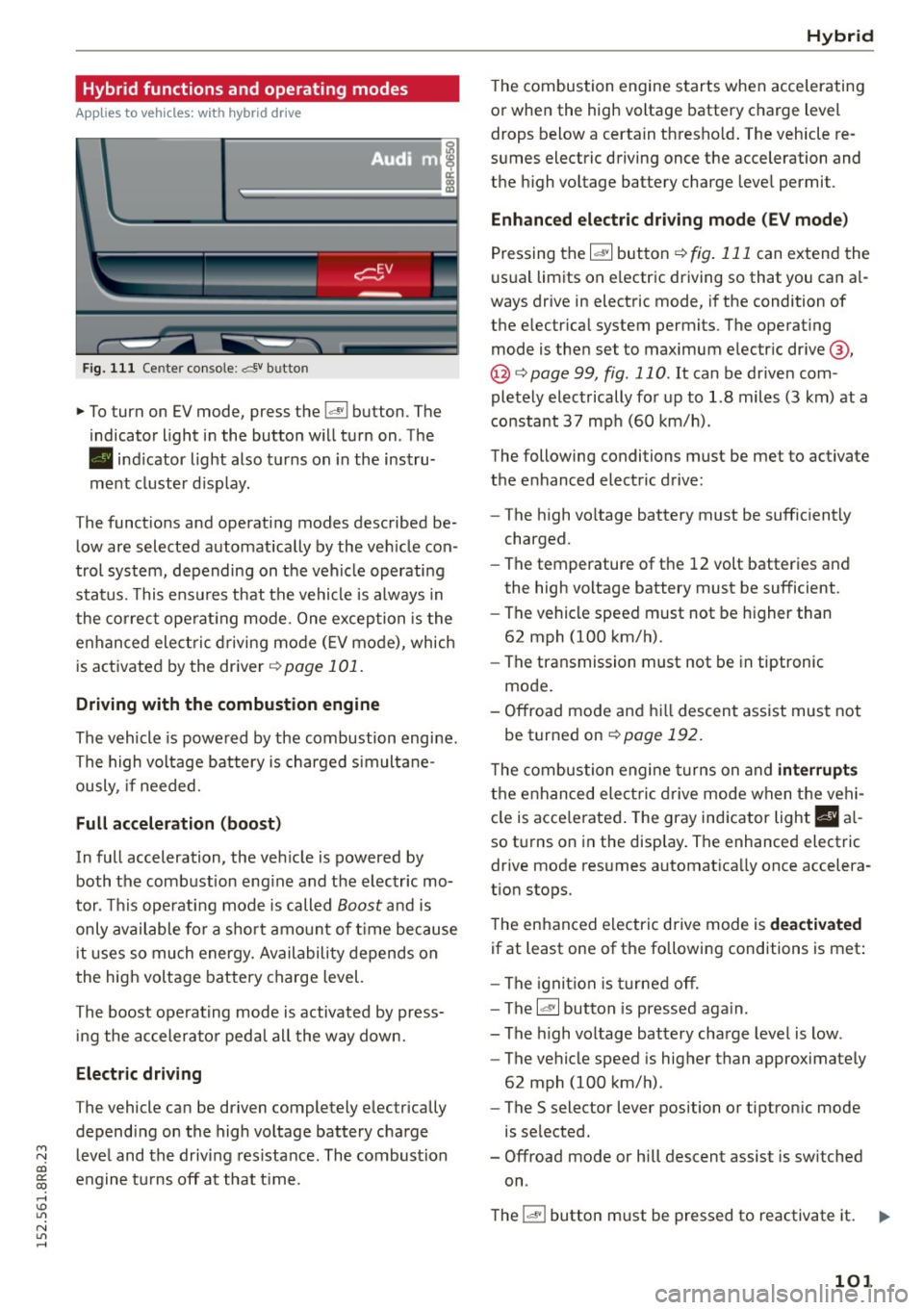
Fig. 111 Center console: av bu tton
.,. To turn on EV mode, press the l.,,;v l button. The
indicator light in the button will turn on. The
• indicator light also turns on in the instru
ment cluster display.
The functions and operating modes described be
low are selected automatically by the veh icle con
trol system, depending on the vehicle operating
status. This ensures that the vehicle is always in
the correct operating mode. One exception is the
enhanced elect ric driving mode
(E V mode), which
is activated by the driver ¢
page 101.
Driving with the combustion engine
The vehicle is powered by the combustion engine.
The high voltage battery is charged simultane
ously, if needed.
Full acceleration (boost)
In full acceleration, the vehicle is powered by
both the combustion eng ine and the electric mo
tor . This operating mode is called
Boost and is
only available for a short amount of time because
i t uses so much energy. Availability depends on
the high voltage battery charge level.
The boost operating mode is activated by press in g the accelerator peda l all the way down.
Electric driving
The vehicle can be driven completely electrically
depending on the high voltage battery charge
level and the driving res istance . The combustion
engine turns off at that t ime .
Hybrid
The combustion engine starts when accelerating
or when the high voltage battery charge level drops below a certain thresho ld. The vehicle re
sumes electric driving once the acceleration and
the high voltage battery charge level permit .
Enhanced electric driving mode (EV mode)
Pressing the 1~· 1 button r::!> fig. 111 can extend the
usual limits on e lectric driving so that you can a l
ways drive in electric mode, if the condition of
the electrical system permits. The operating
mode is then set to maximum electric drive @,
@ <:!> page 99, fig . 110. It can be driven com
pletely electrically for up to 1.8 miles (3 km) at a
constant
37 mph (60 km/h).
The following conditions must be met to activate
the enhanced electric drive:
- The high voltage battery must be sufficiently
charged.
- The temperature of the
12 volt batteries and
the high voltage battery must be sufficient.
- The vehicle speed must not be higher than
62 mph (100 km/h).
- The transmission must not be in tiptronic
mode.
- Offroad mode and hill descent assist must not
be turned on
r::!;>page 192.
T he combustion engine turns on and interrupt s
the enhanced ele ctric drive mode when the vehi
cle is acce lerated. The gray ind icator light
I§ a l
so turns on in the display. The enhanced electric
drive mode resumes automatica lly once accelera
tion stops.
The enhanced electric drive mode is
deactivated
if at least one of the following conditions is met :
- The ignition is turned off.
- The
l~ ·I button is pressed aga in.
- The high voltage battery charge level is low .
- The vehicle speed is higher than approximately
62 mph (100 km/h) .
- The
S selector lever position or tiptronic mode
is selected.
- Offroad mode or hill descent assist is switched
on .
The
l "'-'' I button must be pressed to reactivate it. 1iJ11-
101
Page 122 of 302
Audi drive select
Audi drive select
Driving settings
Introduction
Applies to veh icles: w ith Audi drive select
Drive select provides the possibility to experience
d ifferent types of vehicle settings in one vehicle.
F or instance, using the three
Comfort, Auto and
Dynamic modes, the driver can switch from a
sporty to a comfortable driving mode with the press of a button.
Addit ionally, in vehicles with MM I*, the vehicle
setup for
Individual* mode can be customized by
you. This makes it possible to combine settings
such as a sporty engine tuning with comfortable
steering .
A WARNING
-
Improper use of the drive select can cause
collisions, other accidents and serious person
al injury.
Description
Applies to veh icles: w ith Audi dr ive select
The vehicle setup in each mode depends on the
veh icle's features . However, the engine, automat
ic transmission and steering are always involved.
Engine and automatic transmission
Depending on the mode, the engine and the au
tomatic transmission respond quicker or in a
more balanced manner to accelerator pedal
movements. In the sporty dynamic mode, the au
tomatic transmission shifts at higher RPMs.
Steering
The steering adapts in terms of steering effort and steering ratios. Indirect steer ing that moves
easily, like the steering in comfort mode, is best
suited to long drives on a highway. In contrast,
dynamic mode provides sporty, direct stee ring.
The follow ing applies to vehicles with dynam ic
steer ing*: the steering ratio changes based on ve
h icle speed in order to maintain optimum steer
ing effort for the dr iver at all times. This sets the
s teer ing to be less sensitive at higher speeds in
120
order to provide improved vehicle control. At re
duced speeds, however, steering is more direct in
order to keep the steer ing effort as m inima l as
possib le when the driver is maneuvering the vehi
cle. At low and average speeds, dynamic steering
additionally provides more responsive steering
performance.
Adaptive dampers*
The adaptive dampers* use sensors to record in
formation regarding steering movements, brak ing and acceleration operations by the driver,
road surface, driving speed, and load. This makes
i t possible to adapt damp ing to the driving situa
tion virtually in real t ime . Drive select also makes
i t possible to sat isfy the desire fo r sporty suspen
s ion (Dynamic) and comfortable suspension
(Comfo rt) without giving up ba lanced tuning (Au
to).
Engine sound*
T he sound of the engine is adapted to the select
ed mode and ranges from subtle to sporty.
Adaptive cruise control*
The behavior when accelerating can be adjusted
from comfortable to sporty, depending on the
drive select mode . Adaptive cruise control a lso
r esponds to the driving behavior of the vehicle
ahead in a more conse rvative or sporty manner.
@ Tips
- In some models, the maximum vehicle
speed can only be reached in the
Auto and
Dynamic modes.
- Selecting the
Dynamic mode resu lts in spor
ty shifting characteristics. The 5 gear pos i
tion engages automatical ly.
- In vehicl es that have dynamic stee ring*, op
erating noise is heard when starting or stop
ping the engine. This does not indicate a
problem .
Page 127 of 302
M N
co
a:
co
,...., \!) 1.1"1
N 1.1"1 ,....,
(Neutral) for more than approximately 1 second,
without the brake pedal being pressed.
Release button
The release button on the selector lever prevents
the lever from be ing acc identally shifted into cer
tain positions. Pressing this button deactivates
the selector lever lock . Depending on the direc
tion of the shift, the se lector lever locks at differ
ent positions. The positions are highlighted in
the illustration¢
fig. 135.
Ignition key safety interlock
The key cannot be removed from the igni tion un
l ess the se lector lever is in the P park position .
When the ignition key is removed, the selector
l ever will be locked in the P position.
Driving the automatic transmission
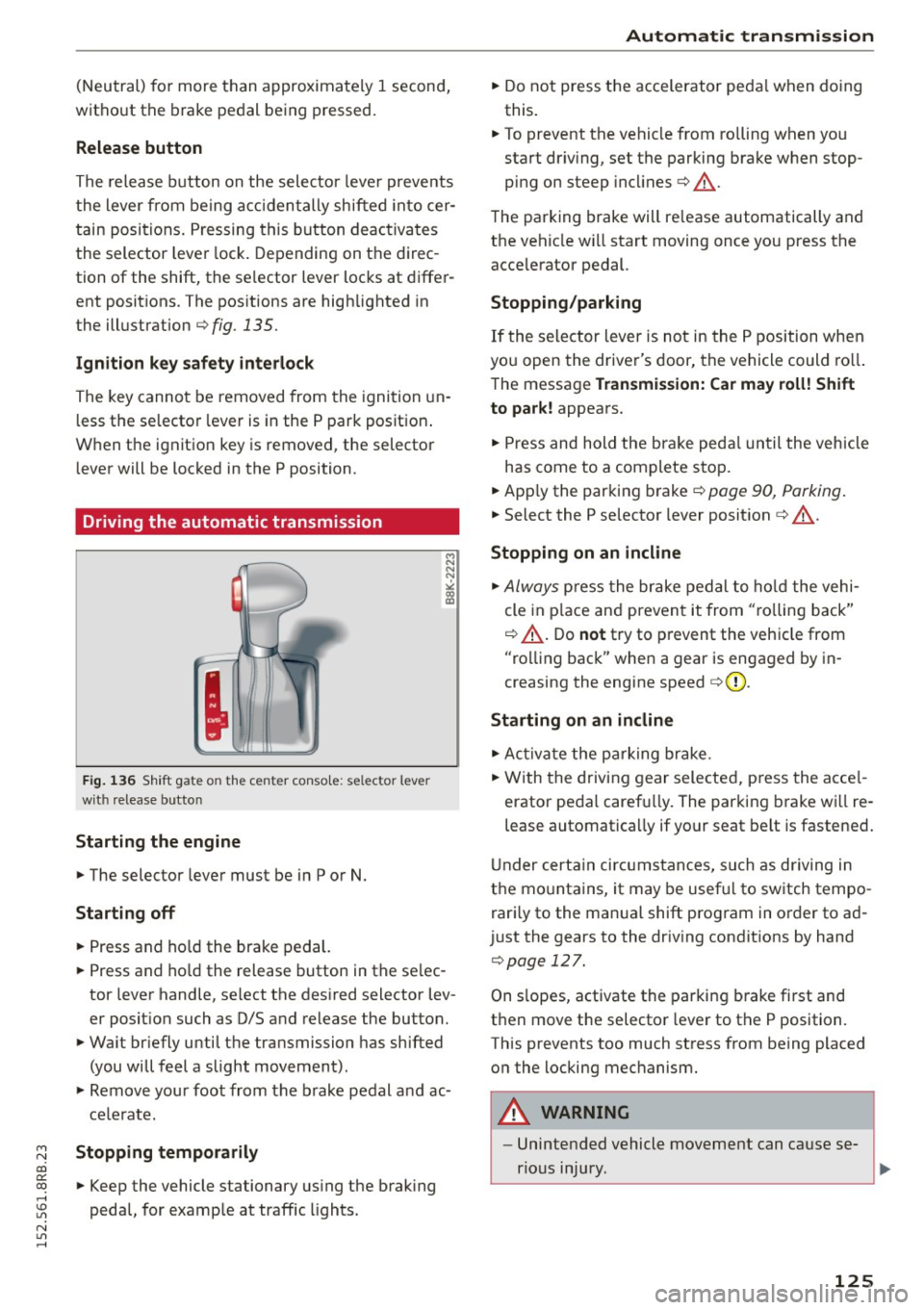
Fig. 136 Shift gate on the center conso le: selector lever
with release button
Starting the engine
.,. The selector lever must be in P or N.
Starting off
.,. Press and hold the brake pedal.
.,. Press and ho ld the release button in the se lec
tor lever handle, select the desired selector lev
er position such as D/S and release the button.
.,. Wait br iefly until the transmission has shifted
(you will feel a slight movement).
.,. Remove your foot from the brake pedal and ac
celerate.
Stopping temporarily
.,. Keep the vehicle stationary using the brak ing
pedal, for example at traffic lights.
Automatic transmission
.,. Do not press the accelerator peda l when doing
this.
.,. To prevent the vehicle from rolling when you
start dr iv ing, set the parking brake when stop
ping on steep incl ines¢ &_.
The parking brake will re lease automatically and
the vehicle wi ll start moving once you press the
acce lerator pedal.
Stopping/parking
If the selector lever is not in the P position when
you open the driver's door, the vehicle could roll.
The message
Transmission: Car may roll! Shift
to park!
appears.
.,. Press and hold the brake pedal until the vehicle
has come to a complete stop.
.,. App ly the parking brake¢
page 90, Parking .
.,. Select the P se lector lever position ¢ &_ .
Stopping on an incline
.,. Always press the brake pedal to hold the vehi
cle in place and prevent it from "ro lling back"
¢ &_ . Do
not try to prevent the vehicle from
"rolling back" when a gear is engaged by in
creasing the engine speed
c> (D .
Starting on an incline
.,. Activate the parking brake .
.,. With the driving gear selected, press the acce l
erator pedal carefu lly. The parking brake wi ll re
lease automatically if your seat belt is fastened.
Under certain circumstances, such as driving in
the mountains, it may be usefu l to switch tempo
rari ly to the manual shift program in order to ad
just the gears to the driving conditions by hand
¢page 127 .
On s lopes, activate the parking brake first and
then move the selector lever to the P position .
This prevents too much stress from being placed on the locking mechanism .
A WARNING ,_
-Unintended vehicle movement can cause se-
rious injury.
~
125
Page 135 of 302
M N
co ~ co
rl I.O
"'
Parallel Parking
Applies to vehicles: with Audi parking system p lus w ith rear
view came ra
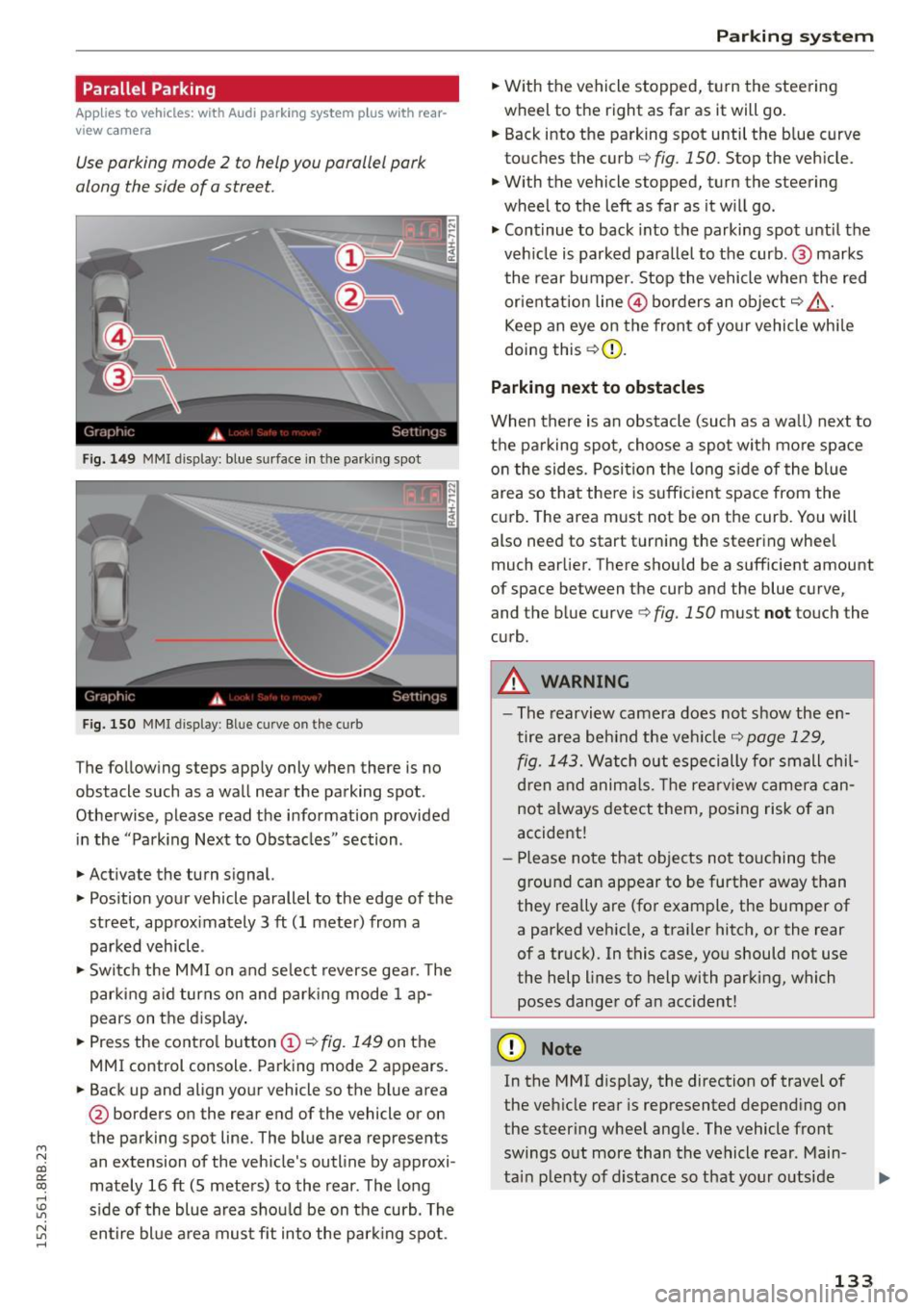
Use parking mode 2 to help you parallel pork
along the side of o street.
Fig. 149 MMI disp lay: blue surface in th e parking spot
Fig. 150 MMI display: Blue curve on th e curb
The follow ing steps app ly only when there is no
obstacle such as a wall near the parking spot.
Othe rwise, please read the informat ion provided
in the "Parking Next to Obstacles" section .
.,. Activate the turn s ignal.
.,. Position your vehicle parallel to the edge of the
street, approx imately 3 ft (1 meter) from a
parked vehicle .
.,. Swi tch the M MI on and se lect reverse gea r. T he
park ing a id turns on and park ing mode 1 ap
pears on the d isplay .
.,. Press the contro l button (!)¢
fig. 149 on the
MMI control console. Parking mode 2 appears.
.,. Back up and align your vehicle so the b lue area
@ borders on the rear end of the vehicle or on
the parking spot line. The blue area represents
an extension of the vehicle's outline by approxi
mately 16 ft (S meters) to the rear . The long
s ide of the blue area should be on the curb. The
~ entire bl ue a rea mus t fit into the par king spot .
Parking system
.,. With the vehicle stopped, t urn the steering
wheel to the right as far as it will go.
... Back into the parking spot until the b lue curve
to uches the curb
q fig. 150. Stop the vehicle.
.,. With the vehicle stopped, turn the steering
wheel to th e left as far as it w ill go .
.,. Cont inue to back into the parking spot until the
veh icle is parked para llel to the curb .@ marks
the rear bumper. Stop the vehicle when the red
or ientation line@ borders an obje ct
q .&, .
Keep an eye on the front of yo ur vehicle whi le
doing this ¢(D.
Parking next to obstacles
When there is an obstacle (such as a wall) next to
t h e pa rking spot, choose a spot with mo re space
o n the sides. Posi tion the long s ide of the blue
area so tha t the re is suff icient space from the
cu rb . T he area m ust not be on the curb. You will
also need to start t urn ing the steering wheel
much earlier. There should be a sufficient amount
of space between the curb and the blue curve
'
and the blue curve 9 fig. 150 must not touch the
c u rb .
A WARNING
-The rearvi ew camera does no t show the en
tire area be hind the veh icle
q page 129,
fig. 1 43.
Watch out especi ally for small chil
d ren and anima ls. The rearv iew camer a ca n
not always detect t hem, posing risk of a n
accident!
- Pl ease no te that objects no t to uch ing the
g round can appear to be further away than
they really are (for example, the bumper of
a parked vehicle, a traile r hitc h, or the rear
of a truck). In this case, you should not use
the help lines to help with parking, which
poses danger of an accident!
(D Note
In the MMI d isplay, the direction of travel of
the veh icle rear is represented depend ing on
the steer ing whee l ang le. The vehicle front
swings o ut more than the vehicle rear . Main
ta in plenty of d istance so that your o utside
133
Page 289 of 302
Child restraints Dang er of using child rest raints in th e front
seat . . . . . . . . . . . . . . . . . . . . . . . . . . . . . . .
153
System anchors . . . . . . . . . . . . . . . . . . . . . 184
Where can I get additional information
about child restraints and their use? . . . .
189
Child saf ety . . . . . . . . . . . . . . . . . . . . . . . . . . 172
Important safety instructions for using child
safety seats . . . . . . . . . . . . . . . . . . . . . . . .
17 5
Inst alling a child restraint using the LATCH
system
186
Mounting and releasing the anchorage
hook . . . . . . . . . . . . . . . . . . . . . . . . . . . . . .
186
Tether anchors . . . . . . . . . . . . . . . . . . . . . . 187
Tether straps . . . . . . . . . . . . . . . . . . . . . . . 187
Child safety locks
Rear doors . . . . . . . . . . . . . . . . . . . . . . . . . . 45
Child saf ety seats
Booster seats . . . . . . . . . . . . . . . . . . . . . . .
180
Convertible child seats . . . . . . . . . . . . . . . 178
Danger of using child restraints in the front
seat . . . . . . . . . . . . . . . . . . . . . . . . . . . . . . .
153
H ow do I properly install a child safety seat
. h' l 7 1nm yve1ce ...... .... ... .... .. .. .. . 175
Infant seats . . . . . . . . . . . . . . . . . . . . . . . . 177
LA TCH system . . . . . . . . . . . . . . . . . . . . . . . 186
Lower anchorages . . . . . . . . . . . . . . . . . . . 185
Safety instructions . . . . . . . . . . . . . . . . . . . 17 5
Unused safety belts on the rear s eat . . . .
177
Ch ild seats .. .. ............. .. .. .. .. . 177
Secur ing . . . . . . . . . . . . . . . . . . . . . . . . . . . 181
Cigarette lighter . . . . . . . . . . . . . . . . . . . . . . . 76
C leaning . . . . . . . . . . . . . . . . . . . . . . . . . . . . 208
Cleaning/remov ing ice from windows . . . . . 2 10
Cleaning Alcantar a ......... .... .. .. .. . 211
C leaning artific ial leather. . . . . . . . . . . . . . . 211
Cleaning carbon parts .. .. .. .. .. .. . 210 ,211
C leaning controls .......... .... .. .. .. . 210
C lean ing decorative parts and trim .. .. .. . 210
Cleaning displays . . . . . . . . . . . . . . . . . . . . . 210
C leaning exhaust tail pip es . . . . . . . . . . . . . 209
Clean ing plast ic parts ....... .. .. .. .. .. . 210
Cleaning rims . . . . . . . . . . . . . . . . . . . . . . . . 209
;::J C leaning textiles .............. ... .. .. . 211
co
~ Climate control
~ Air vents . . . . . . . . . . . . . . . . . . . . . . . . . . . . 82 1.1'1 A t t· . l . ~ u oma 1c rec1rcu at1on . . . . . . . . . . . . . . . . 82 ,....,
Index
Operation . . . . . . . . . . . . . . . . . . . . . . . . . . . 81
Setup . . . . . . . . . . . . . . . . . . . . . . . . . . . . . . 82
Supplementary . . . . . . . . . . . . . . . . . . . . . . 83
Synchroni zing . . . . . . . . . . . . . . . . . . . . . . . . 82
Climate control system . . . . . . . . . . . . . . . . . 80
Climatized cupholder . . . . . . . . . . . . . . . . . . . 75
Clock . . . . . . . . . . . . . . . . . . . . . . . . . . . . . . . . 12
Closing
Panoramic slid ing sunroof . . . . . . . . . . . . . .
47
Coat hooks . . . . . . . . . . . . . . . . . . . . . . . . . . . 79
Compass mirror . . . . . . . . . . . . . . . . . . . . . . . 61
Compliance . . . . . . . . . . . . . . . . . . . . . . . . . . 284
Consumer information . . . . . . . . . . . . . . . . . 281
Consumer Information . . . . . . . . . . . . . . . . . 142
Contacting NHTSA . . . . . . . . . . . . . . . . . . . . 142
Convenience
Closing . . . . . . . . . . . . . . . . . . . . . . . . . . . . .
47
Opening . . . . . . . . . . . . . . . . . . . . . . . . . . . . 47
Convenience key . . . . . . . . . . . . . . . . . . . . . . . 40
Indicator lights . . . . . . . . . . . . . . . . . . . . . . 88
Locking and unlocking vehicle . . . . . . . . . . . 40
Starting engine (START ENGINE STOP but-
ton) . . . . . . . . . . . . . . . . . . . . . . . . . . . . . . . .
87
Stopping the engine (S TAR T E NGINE STOP
button) . . . . . . . . . . . . . . . . . . . . . . . . . . . . .
88
Switching on ignition . . . . . . . . . . . . . . . . . . 87
Convertib le child s afety seats . . . . . . . . . . . 178
Convertible locking retractor
Activating . . . . . . . . . . . . . . . . . . . . . . . . . .
183
Deactivating . . . . . . . . . . . . . . . . . . . . . . . . 184
Using to secure a child safety seat . . . . . . 183
Coolant system . . . . . . . . . . . . . . . . . . . . . . . 227
Cooled cupholder . . . . . . . . . . . . . . . . . . . . . . 75
Cooling box in glove compartment . . . . . . . . 78
Cooling mode (climate control) . . . . . . . . . . . 81
Cooling System
Expansion t ank . . . . . . . . . . . . . . . . . . . . . .
227
Cornering light . . . . . . . . . . . . . . . . . . . . . . . . 54
Cruise control Changing speed . . . . . . . . . . . . . . . . . . . . . . 96
Preselect speed . . . . . . . . . . . . . . . . . . . . . . 96
Switching off . . . . . . . . . . . . . . . . . . . . . . . . 96
Switching on . . . . . . . . . . . . . . . . . . . . . . . . . 95
Warning/ indicator lights . . . . . . . . . . . . . . .
17
Cruising range . . . . . . . . . . . . . . . . . . . . . . . . . 22
287
Page 297 of 302

M N
co
a:
co
,...., \!) ..,.,
N ..,., ,....,
Selector lever 123
Emergency release . . . . . . . . . . . . . . . . . . . 128
Service and disposal
Safety belt pretens ioner
Service interval display ....... . .. ... ... . .
Service position
lSl
22
refer to
Replacing wiper blades . . . . . . . . . 58
SE T button . . . . . . . . . . . . . . . . . . . . . . . . . . . 11
Shift paddles . . . . . . . . . . . . . . . . . . . . . . . . . 127
Ship transport . . . . . . . . . . . . . . . . . . . . . . . . 106
Side airbags
D .. escnpt 1on . ............. .... .. .. .. .
H ow they work ........... .. .. .. .. .. .
Side assis t
Activating and deactivating ........ ... .
Adjusting the brightness .......... ... .
C leaning the sensors ...... .. .. .. .. .. .
D .. escnpt 1on . ............. .... .. .. .. .
166
167
118
118
209
116
Sensor range . . . . . . . . . . . . . . . . . . . . . . . 117
Side curtain airbags . . . . . . . . . . . . . . . . . . . 169
Description . . . . . . . . . . . . . . . . . . . . . . . . . 169
Howtheywork .. .. ...... ... .. ... ... . 170
Safety instructions . . . . . . . . . . . . . . . . . . . 171
Side marker lights . . . . . . . . . . . . . . . . . . . . . 52
Snow chains . . . . . . . . . . . . . . . . . . . . . . . . . 250
Index
Steering
Electromechanical power assist ... ...
195, 0
Indicator light . . . . . . . . . . . . . . . . . . . . . .
195
Locking the steering . . . . . . . . . . . . . . . . . . 84
Malfunction . . . . . . . . . . . . . . . . . . . . . . 30, 34
Manually adjusting the steering wheel . . . . 84
also refer to
Electromechanical power as-
s ist . . . . . . . . . . . . . . . . . . . . . . . . . . . . . . .
195
Steering wheel column
Adjusting manually . . . . . . . . . . . . . . . . . . .
84
Steps for determining correct load limit . . . 249
Stopping the engine . . . . . . . . . . . . . . . . . 86, 88
Stopping (engine) . . . . . . . . . . . . . . . . . . . . . . 99
Storage . . . . . . . . . . . . . . . . . . . . . . . . . . . . . . 77
(upholder door pockets . . . . . . . . . . . . . . . . 76
G love compartment . . . . . . . . . . . . . . . . . . . 78
Sun shade . . . . . . . . . . . . . . . . . . . . . . . . . . . . 56
Sun visors . . . . . . . . . . . . . . . . . . . . . . . . . . . . 56
Supplementary (climate control) . . . . . . . . . . 83
Switches
Emergency flashers . . . . . . . . . . . . . . . . . . .
54
Symbols
Red . . . . . . . . . . . . . . . . . . . . . . . . . . . . . . . .
28
Yellow .... .... .. ............. .... .. . 31
Socket .. ... ... .............. ... ... ... 77 T
Sound system display
Driver information display . . . . . . . . . . . . . .
20
Sources of informat ion about ch ild restraints
and their use . . . . . . . . . . . . . . . . . . . . . . . . .
189
Speedometer . . . . . . . . . . . . . . . . . . . . . . . . . 13
Speed warning system . . . . . . . . . . . . . . . . . . 94
Start-Stop-System
Engine does not switched off . . . . . . . . . . .
93
Engine starts automatically . . . . . . . . . . . . 93
Indicator lights . . . . . . . . . . . . . . . . . . . . . . 92
Messages . . . . . . . . . . . . . . . . . . . . . . . . . . . 94
Starting/stopping the engine . . . . . . . . . . . 92
Switching off/on . . . . . . . . . . . . . . . . . . . . . 94
Start/Stop system . . . . . . . . . . . . . . . . . . . . . 91
START ENGINE STOP button (Conven ience
key) . . . . . . . . . . . . . . . . . . . . . . . . . . . . . .
87, 88
Star ting from rest . . . . . . . . . . . . . . . . . . . . . . 90
Startingoffwithatrai ler ....... ... .. .... 91
Starting the engine . . . . . . . . . . . . . . . . . 84, 87
Starting (engine) . . . . . . . . . . . . . . . . . . . . . . 99
Tachometer . . . . . . . . . . . . . . . . . . . . . . . . . . . 11
Ta il lights
Cleaning . . . . . . . . . . . . . . . . . . . . . . . . . . .
209
TDI clean diesel
refer to Ad Blue. .. ................ ... 218
Technical data . . . . . . . . . . . . . . . . . . . . . . . . 277
Technical modifications . . . . . . . . . . . . . . . . 283
Tether anchors . . . . . . . . . . . . . . . . . . . . . . . 187
Tether strap . . . . . . . . . . . . . . . . . . . . . . . . . 187
T ie-down rings . . . . . . . . . . . . . . . . . . . . 70, 141
tiptronic
Automatic Shift Lock (ASL) . . . . . . . . . . . .
124
Driving . . . . . . . . . . . . . . . . . . . . . . . . . . . . 125
Emergency mode . . . . . . . . . . . . . . . . . . . . 127
Hill descent control . . . . . . . . . . . . . . . . . . 126
Kick-down . . . . . . . . . . . . . . . . . . . . . . . . . . 127
Manua l shift program . . . . . . . . . . . . . . . . 127
Selector lever . . . . . . . . . . . . . . . . . . . . . . . 123
tip tron ic (automatic transmission) . . . . . . . 123
Tire Mobility System . . . . . . . . . . . . . . . . . . . 105
295