display AUDI Q5 2015 Owner's Manual
[x] Cancel search | Manufacturer: AUDI, Model Year: 2015, Model line: Q5, Model: AUDI Q5 2015Pages: 302, PDF Size: 75.01 MB
Page 39 of 302
from transmitters in the v icinity of the vehi
cle working in the same frequency range
(e.g . a cell phone, rad io equipment).
- If you open the driver's door with the key
l eft in the ign ition lock, a chime will sound .
This is your reminder to remove the key and
l ock the door.
- For security reasons, replacement keys are
on ly available from Audi dea lers.
- For Declarat ion of Compliance to United
States FCC and Industry Canada regulations
¢page 284.
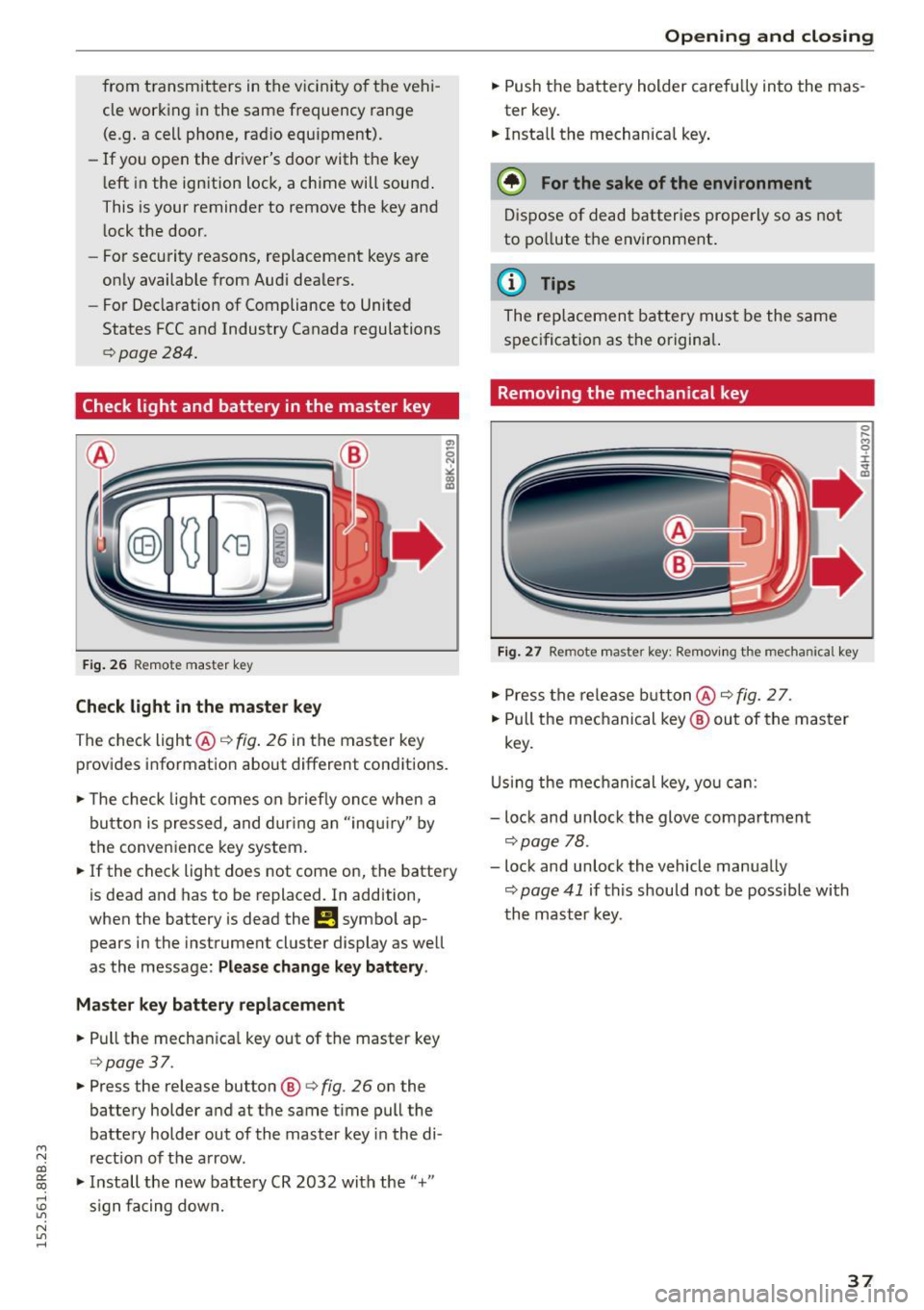
Check light and battery in the master key
F ig . 26 Remote master key
Check light in the maste r key
The check light @¢ fig. 26 in the master key
provides informat ion about different conditions.
.,. The check light comes on b riefly once when a
button is pressed, and dur ing an "inqui ry" by
the conven ience key system.
.,. If the check light does not come on, the battery
is dead and has to be replaced. In addition,
when the battery is dead the
!I symbo l ap
pears in the instrument cluster display as well
as the message:
Please change k ey battery .
Ma ster key b attery repl ace ment
.,. Pull the mechan ica l key out of the master key
¢ page 37 .
.,. Press the release button ®¢ fig. 26 on the
battery holder and at the same time pull the
battery holder out of the master key i n the di-
M
N rect ion of the a rrow. co
~ .,. Install the new battery CR 2032 with the"+"
; s ign fa cing down.
N l/1 ......
Open ing and clo sing
.,. Push the battery holder carefully into the mas
ter key .
.,. Insta ll the mechanical key .
@ For the sake of the en vironment
D ispose of dead batter ies prope rly so as not
to po llute the environment .
@ Tips
The replacement battery must be the same
specification as the origina l.
Removing the mechanical key
Fig . 27 Remote master key: Re mov ing the mechanical key
.,. Press the release b utton @¢ fig. 2 7.
.,. Pull the mechanical key ® out of the master
key.
U sing the mec hanical key, you can:
- lock and unlock the glove compartment
¢page 78.
- lock and unlock the vehicle manually
¢ page 41 if this should not be possible with
th e mast er key.
37
Page 51 of 302
M N
co ~ co
rl I.O
"' N
"' rl
Operation
Applies to vehicles: with garage door opener (Homelink)
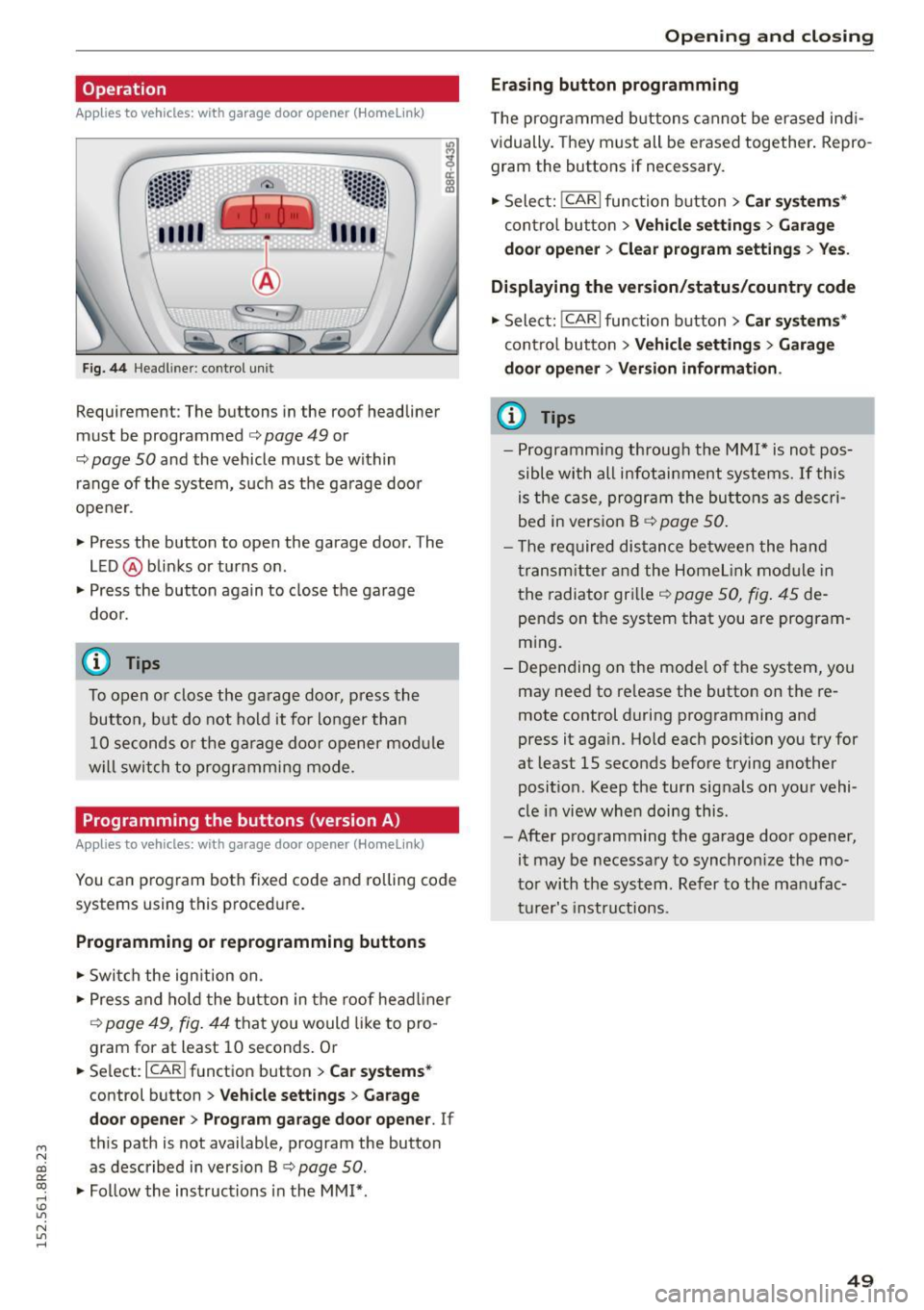
Fig. 44 Hea dlin er: co ntrol un it
Requirement : The but tons in the roof headliner
mu st be programmed
c:> page 49 or
c::> page SO and the vehicle must be within
range of the system, such as the garage door
opener .
" Press the button to open the garage door . T he
LED @ blinks or turns on .
" Press the button again to clos e the garage
doo r.
@ Tips
To open o r close the ga rage doo r, press the
button, but do not hold it fo r longer than
10 seconds o r the g arage doo r opener mod ule
w ill switch to programm ing mode .
Programming the buttons (version A )
Applies to vehicles: with garage door opener (Ho meli nk)
You can p rogram both fixed code and roll ing code
systems using this proced ure.
Programming or reprogramming buttons
" Swi tch the ign ition on .
" Press and ho ld the bu tton in the roof head liner
c::> page 49, fig. 44 that you would like to pro
gram for at least 10 seconds . Or
.. Se lect:
I CAR I function button > Car sy stem s*
control button > Vehicle sett ing s > Garage
door opene r> Program gar age door opener .
If
th is path is not available, program the button
as described in vers io n B
c::> page SO .
"Fo llow the instructions in the MMI* .
Opening and clo sing
Erasing button programming
The programmed b uttons cannot be er ased ind i
vidually. They must all be erased together . Repro
gram the buttons if necessary .
" Select:
!CARI function button> Car sy ste m s*
contro l butto n > Vehicle settin gs > Garag e
d oo r opener
> Clear program setting s > Yes.
Displaying the version /status /country code
" Select: !CARI function button> Car sy ste ms *
cont ro l button > Vehicle s etting s> Garage
d o or open er > Version information .
(D Tips
-Programm ing throug h the MMI* is not pos
sible with all infotai nment systems. If this
is the ca se, program the buttons as des cri
bed in vers ion B
c::> page 50 .
- T he req uired dis tance be twee n the h and
transm itter and the Home link mo dule in
the radiator gr ille
c::> page 50, fig . 45 de
pends on t he system that you are program
m ing.
- Depending on the mode l of the system, you
may need to re lease the button on the re
mote control during programming and
press it aga in. Hold each position you try for
at least 15 seconds before trying another
posit ion . Keep the turn signals on your vehi
cle i n view when doing this.
- After programm ing the garage door opener,
it may be necessary to synchronize the mo
to r wi th the sys tem. Ref er to the man ufac
t ur e r's instru ct ions .
49
Page 58 of 302
Lights and Vision
@Interior lights
Press the switch¢ fig. 51 in the corresponding
position.
0 -Interior lights off
I -Interio r lights on
If the sw itch is in the center position, the interior
lighting is controlled automatically.
@ Front/rear reading lights
To turn a reading light on/off, press the button
@~ fig. 51 or ¢fig. 52.
The appearance and location of the rear reading
lights may differ depending on the model.
Instrument illumination
The basic brightness of the illumination for the
instruments, the center console and the display
can be adjusted.
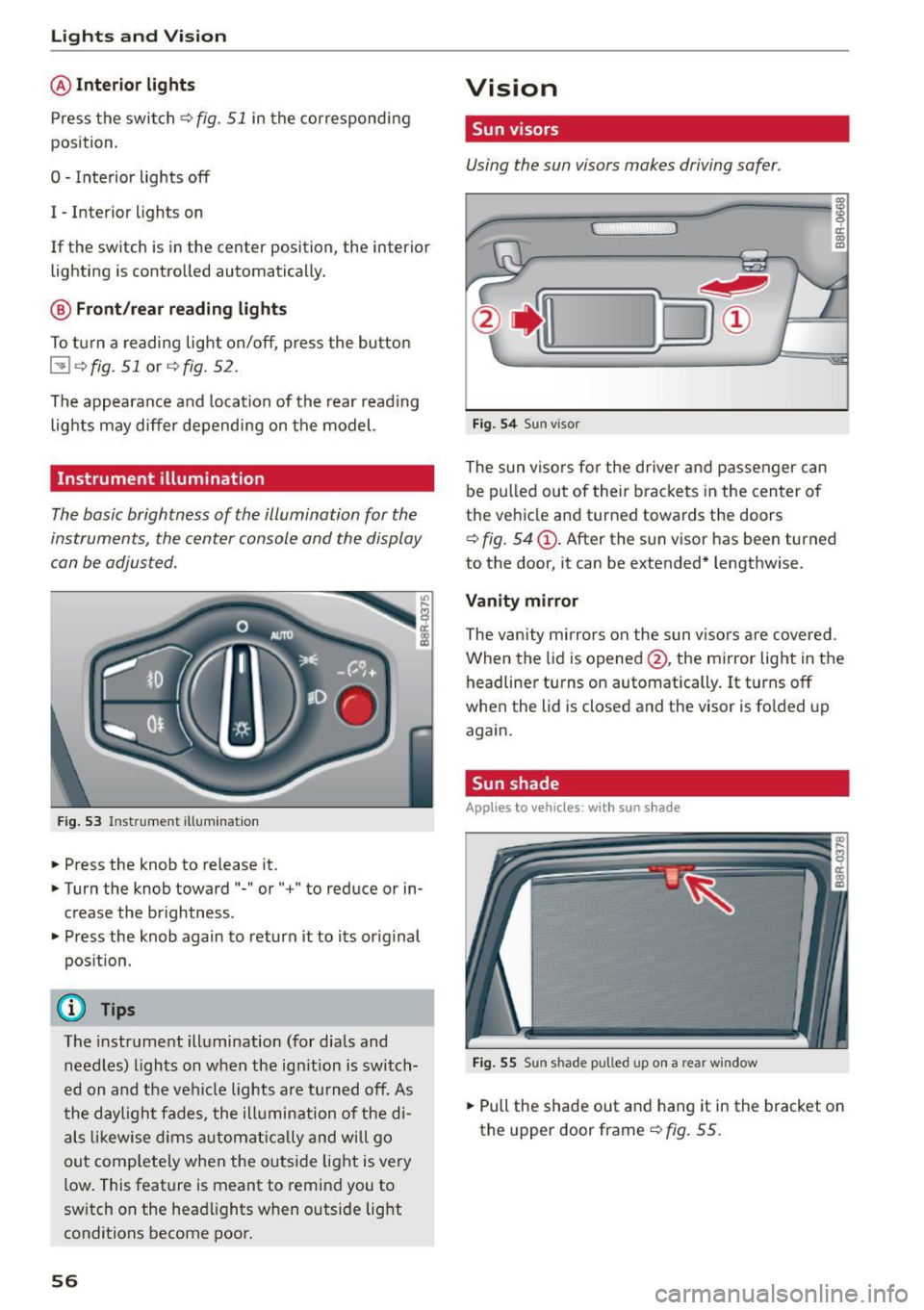
Fig. 53 Instrume nt illumina tion
.. Press the knob to release it .
.. Turn the knob toward "-" or"+" to reduce or in
crease the brightness .
.. Press the knob again to return it to its original
position.
(D Tips
The instrument illumination (for dials and
needles) lights on when the ignition is switch
ed on and the vehicle lights are turned off. As
the daylight fades, the illumination of the di
als likewise dims automatically and will go
out completely when the outside light is very
low. This feature is meant to remind you to
switch on the headlights when outside light
conditions become poor.
56
Vision
Sun visors
Using the sun visors makes driving safer .
Fig. 54 Sun visor
The sun visors for the driver and passenger can
be pulled out of their brackets in the center of
the vehicle and turned towards the doors
~ fig. 54 @. After the sun visor has been turned
to the door, it can be extended* lengthwise .
Vanity mirror
The vanity mirrors on the sun visors are covered.
When the lid is opened @, the mirror light in the
headliner turns on automatically.
It turns off
when the lid is closed and the visor is folded up
again.
Sun shade
App lies to vehicles: wi th sun s had e
Fig. 55 Su n sha de pulled up on a rear win dow
.. Pull the shade out and hang it in the bracket on
the upper door frame ~
fig. 55.
Page 63 of 302

M N
co ~ co
rl I.O
"' N
"' rl
-If swallowed and person is conscious, rinse
mouth with water for at least 15 minutes.
Do not induce vomiting unless instructed to
do so by medical professional. Get medical
attent ion immed iately .
(D Note
Liquid electrolyte leaking from broken mirror
glass will damage any plastic surfaces it
comes in contact with . C lean up spilled elec
trolyte immed iately w ith clean water and a
sponge.
@ Tips
- Switching off the dimming function of the
i nside rear view mirror also deactivates the
automat ic dimming function of the exterior
mir rors*.
- The automatic dimming mirrors do not d im
when the interior lighting is turned on or
the reverse gear is selected.
-Automatic dimming for the m irror only op
erates properly if the light striking the in
side mirror is not hindered by other objects.
Digital compass
Activating or deactivating the compass
App lies to vehicles: with dig ital compass
The direction is displayed on the interior rear
view mirror.
Fig. 62 Inside rea r view m irror: digital compa ss activated
.,. To activate or deactivate, hold the@ button
down until the red display appears or disap
pears .
Lights and Vision
The digital compass on ly works with the ignition
turned on. The directions are displayed as initials:
N (North), NE (Northeast), E (East), SE (South
east),
S (South), SW (Southwest), W (West), NW
(Northwest) .
(!_) Tips
To avoid inaccurate directions, do not allow
any remote controls, electrical systems, or
metal parts close to the mirror.
Setting the magnetic deflection zone
Applies to vehicles: wit h dig ita l compass
The correct magnetic deflection zone must be
set in order to display the directions correctly.
®
Fig. 63 North Ame rica: magne tic deflection zo ne bo unda
ri es
.,. Hold the@~ page 61, fig . 62 button down un
til the number of the set magnet ic deflection
zone appears on the inter io r r ear view mirror .
.,. Adjust the magnetic deflection zone by repeat
ed ly pressing on the @button . The set mode
automatically deactivates after a few seconds .
61
Page 64 of 302

Lights and Vi sion
Calibrating the compass
Appl ies to veh icles: w ith digital compass
The compass has to be recalibrated if the display
is wrong or inaccurate .
.,. Hold the@ button down until the letter C is
displayed on the inter ior rear view mirror .
.,. Drive in a circle at a speed of about 6 mph (10
km/h) unt il a direction is shown on the interior
. . rear view mirro r.
A WARNING
The d igital compass is to be use d as a direc
tional a id only. Even though you may want to
look at it whi le you a re dr iving, you mus t still
pay attention to traffic, roa d an d weather con
ditions as well as other possib le hazards .
62
Page 77 of 302
M N
co ~ co
rl I.O
"' N
"' rl
Opening rear beverage holders
• To open the rear cupholder, press on the sym
bol~ @¢
fig. 86.
Holding beverages at the rear
• To adjust the arm@, swing it in the direction
of the arrow.
• Place the beverage in the holder and release
the arm. The arm swings back by itself and au
tomatically secures the beverage.
Closing the rear cupholders
• To close the rear cupholder, press on the center
section between the two arms and push the cu
pholder in the slot as far as it will go.
The holding arm must be adjusted such that it lies closely against the cupholder.
A maximum of two beverages can be placed in
the center armrest.
A WARNING
Spilled hot liquid can cause an accident and
personal injury.
- Never carry any beverage containers with
hot liquids, such as hot coffee or hot tea, in
the vehicle while it is moving. In case of an
accident, sudden braking or other vehicle
movement, hot liquid could spill, causing
scald ing burns. Spilled hot liquid can also
cause an accident and personal injury.
- Use only soft cups in the cupholder. Hard
cups and glasses can cause injury in an acci
dent.
- Never use the cupholder or adapter as an
ashtray -risk of fire.
(D Note
Only drink containe rs with lids should be car
ried in the cupholder. Liquid could spill out
and damage your vehicle's electronic equip
ment or stain the upholstery, etc.
Seats and storage
Climatized cupholders
Applies to vehicles: wit h climatized beverage holde rs
The driver side beverage holder can keep your
beverage warm or cold.
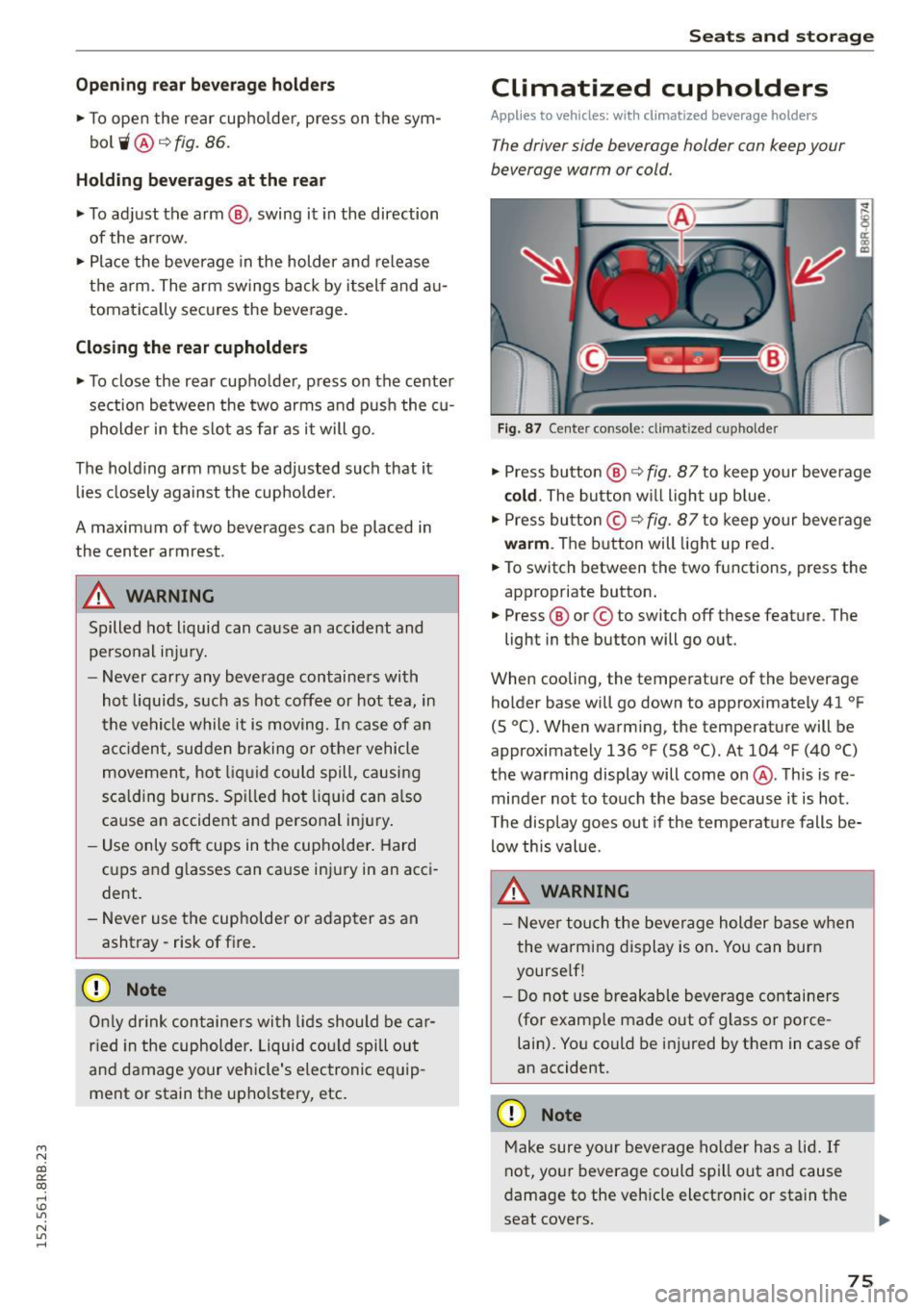
Fig. 87 Center console: cl imatized cupho lder
" Press button @¢ fig. 87 to keep your beverage
cold. The button will light up blue.
" Press button ©¢
fig. 87 to keep your beverage
warm . The button will light up red.
• To switch between the two functions, press the
appropriate button .
.,. Press @ or© to switch off these feature. The
light in the button will go out.
When cooling, the temperature of the beverage holder base will go down to approximately 41 °F
(5
°(). When warming, the temperature will be
approximately 136 °F (58 °(). At 104 °F (40 °()
the warming display will come on @. This is re
minder not to touch the base because it is hot .
The display goes out if the temperature falls be
low this value.
A WARNING
- Never touch the beverage holder base when
the warming display is on. You can burn
yourself!
- Do not use breakable beverage containers
(for example made out of glass or porce
lain). You could be injured by them in case of
an accident.
(D Note
Make sure your beverage holder has a lid. If
not, your beverage could spill out and cause
damage to the vehicle electronic or stain the
seat covers.
75
Page 80 of 302
Seats and storag e
_& WARNING
-Always remove objects from the instrument
panel. Any items not put away could slide
around inside the vehicle while dr iving or
when accelerating or when applying the brakes or when dr iv ing aro und a corner .
- When you are driving make sure that any
thi ng you may have placed in the cente r con
so le or other storage loca tions cannot fall
o ut into the footwells. I n case of sudden
braking you would not be able to brake or
acce lerate .
- Any pieces of cloth ing that you have hung
up must not interfere with the driver's view .
The coat hooks are designed only for light
weight cloth ing . Never hang any clothing
with hard, pointed or heavy objects in the
pockets on the coat hooks. During sudden
braking or in an acc ident -especially if the
airbag is deployed -these objects could in
jure any passengers ins ide the veh icle.
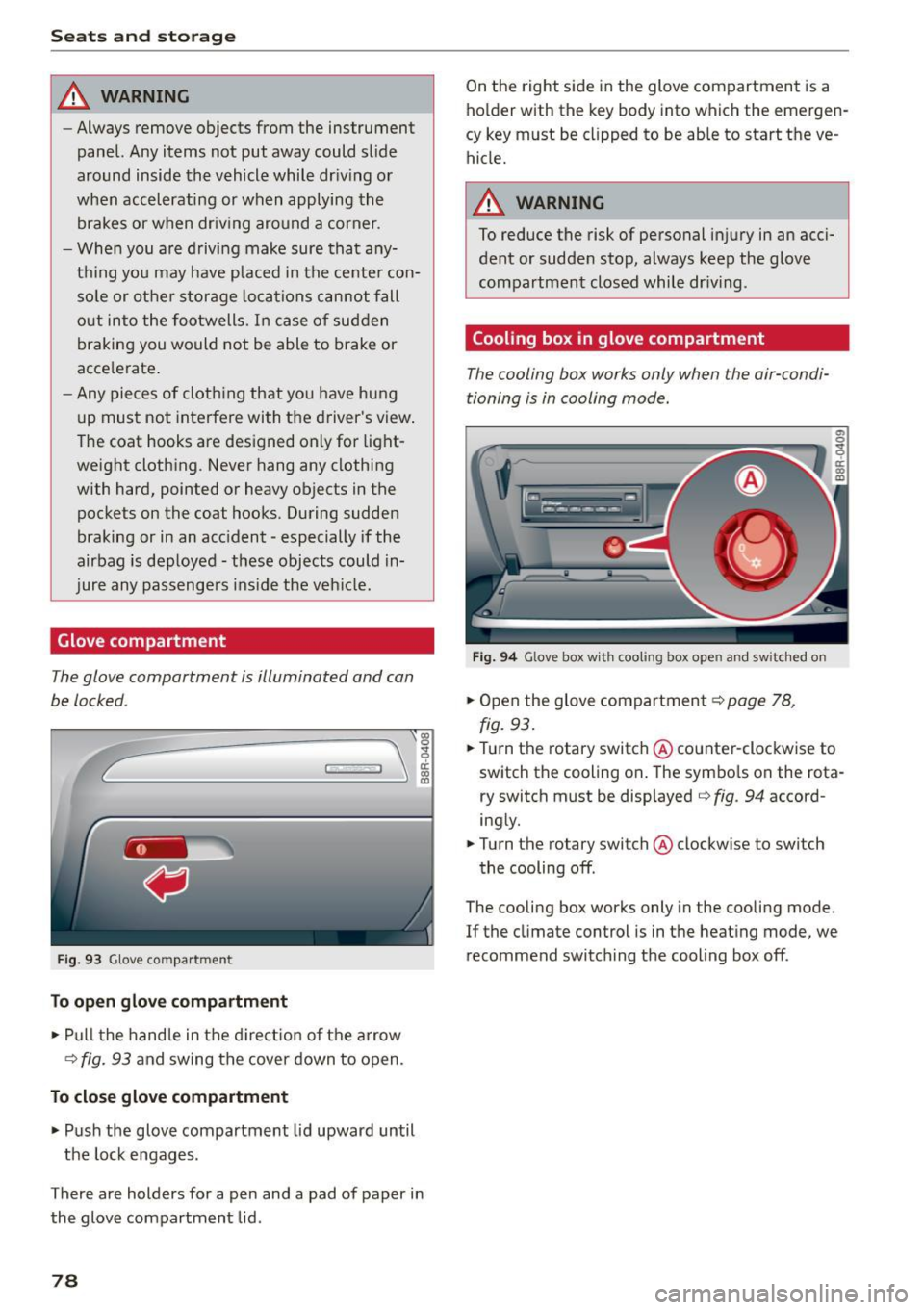
Glove compartment
The glove comportment is illuminated and con
be locked .
C
Fig. 93 Glove compar tmen t
To open glov e compartment
,.. Pu ll t he hand le in the d ire ct io n of the arrow
¢
fig. 93 and swing the cover down to open .
To close glove compartment
.,. Push the glove compartment lid upward until
the lock engages .
There are holders for a pen and a pad of paper in the glove compartment lid .
78
On the right side in the glove compartment is a
ho lder with the key body into which the emergen
cy key must be clipped to be able to start the ve
hicle.
_& WARNING
To reduce the risk of personal inj ury in an acci
dent or sudde n stop, always keep the glove
compartmen t closed while dr iv ing .
Cooling box in glove compartment
The cooling box works only when the air-condi
tioning is in cooling mode.
Fig . 9 4 Glove box w it h coo li ng box ope n and s wit c hed on
.,. Open the glove compartment¢ page 78,
fig.
93 .
.,. Turn the rotary switch @counter-clockwise to
switch the cooling on . The symbo ls on the rota
r y switch must be displayed ¢
fig. 94 accord
ing ly .
.,. Turn the ro tary switch @clockw ise to switch
the cooling off .
The cooling box works only in the cooling mode.
If the climate con trol is in t he heat ing mode, we
recommend switch ing the cooling box off .
Page 83 of 302
M N
co ~ co
rl I.O
"' N
"' rl
Warm and cold
Operation
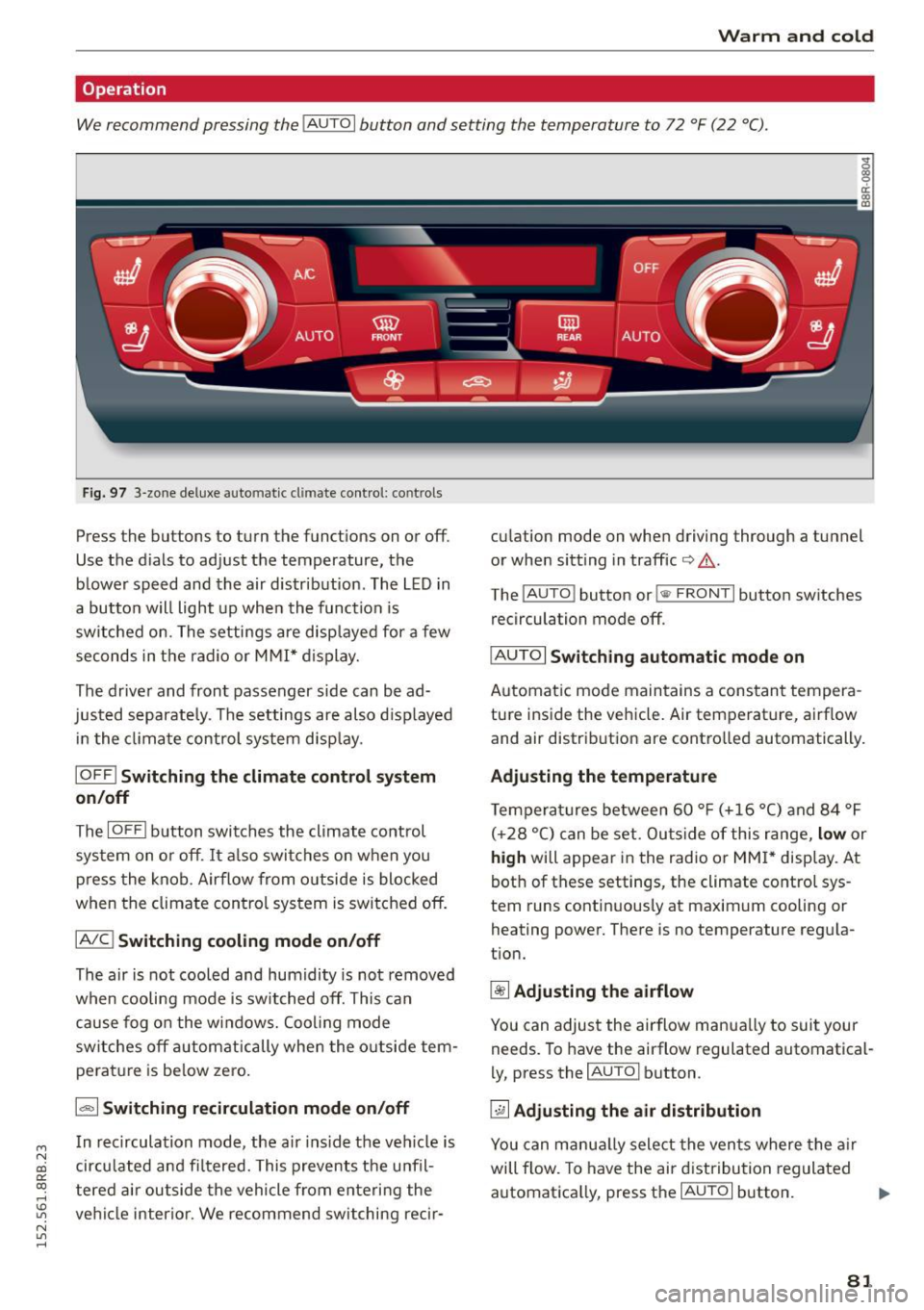
We recommend pressing the IAUTO I button and setting the temperature to 72 °F (22 °C) .
Fig. 97 3-zone de luxe au to ma tic c lima te contro l: co ntrols
Press the bu ttons to turn the funct ions on or off.
Use the d ials to adjust the temperature, the
blower speed and the air distr ibution . The L ED in
a button w ill light up when the function is
switched on . The settings are disp layed for a few
seconds in the radio or M MI* d isplay.
The driver and front passenger side can be ad
justed separate ly . The settings are also d isp layed
i n the climate control system disp lay .
IOFF ! Switching the climate control syst em
on/off
The IOFFI b utton switches the climate control
system on o r off. It also switches on when you
p ress the knob . Airflow from o utside is blocked
when the climate con trol system is switched off.
IAIC ! Switching cooling mode on /off
The air is not cooled and humidity is not removed
when cooling mode is switched off. This can
cause fog o n the windows. Cooling mode
switches off autom atically when the o utside tem
pe rat ure is be low zero.
1.,,., 1 Switching recirculation mode on /off
In recirculation mode, the a ir ins ide the ve hicle is
cir culated and fi ltered. This prevents the u nfil
tered air outside the vehicle from enteri ng the
ve hicl e interior . We recommend switching recir- cu
la tion mode on whe n driving thro ugh a tunnel
or when sitt ing in traffic
io A .
The IAU TO I button or !<11> F RONT I button switches
recirculation mode off .
IAU TOI Switch ing automatic mode on
Automatic mode maintains a cons tant tempera
ture inside the vehicle. Air temperature, airf low
and air distrib ution are contro lled automatically.
Ad justing the temp erature
Temperatures between 60 ° F (+16 °C) and 84 °F
( + 28 °C) can be set. Outs ide of this range,
low or
high will appear in the radio or MM I* display. At
bot h of these settings , the climate control sys
tem runs contin uous ly at maximum cooling or
heating power. There is no temperature regu la
t ion.
~ Adjusting the airflow
You can adjust the airflow manua lly to suit your
needs. To have the ai rflow regulated automatical
l y, press the
IAU TO I button .
~ Adjusting the air di stribution
You can manu ally select the vents where the a ir
will flow. To have the air dist ribution regulated
automatica lly, press the
IAU TOI button. .,.
81
Page 94 of 302
Driving
Ba sic requirements for the Start -Stop mod e
- The driver's door is closed.
-The driver's seat belt is latched.
- The hood is closed.
- The vehicle must have been driven faster than
2.5 mph (4 km/h) since the last stop .
- A trai ler is not h itched to the vehicle.
A WARNING
-Never turn off the engine before the veh icle
has come to a comp lete stop. The full func
t ion of the b rake booster and the power
stee ring is not guaranteed. Yo u mus t use
more force to t urn or brake if ne cessary. Be
ca use you cannot steer and brake as you
us ually would, this could lead to crashes
and serious injuries.
- To red uce the r isk o f injuries, make sure that
the Start-Stop-System is t urned off whe n
working in the engine compartment
c:>page 94.
(D Note
Always switch off the Start -Stop -System when
driving through water
c::> page 94 .
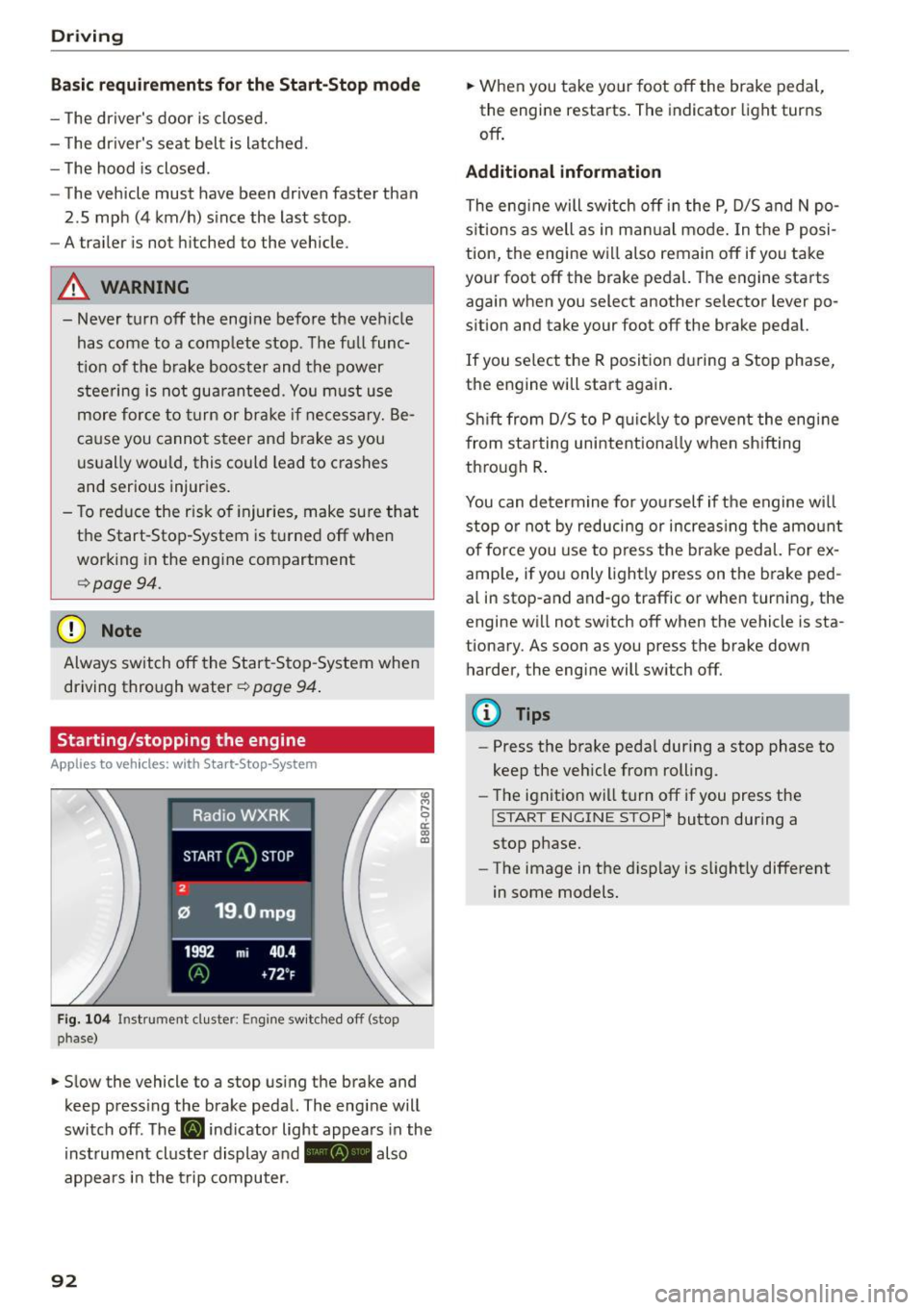
Starting/stopping the engine
App lies to veh icles: w ith S tart-Stop-System
F ig. 104 Instrument duster: Engine sw itc hed off (stop
phase)
.,. Slow the vehicle to a stop using the brake and
keep press ing the brake peda l. The engine will
switch off. The
[i] indicator light appea rs in the
instrument cluster display a nd - also
appears in the t rip computer.
92
.,. When you take your foot off the brake pedal,
the engine restarts. The indicator light turns
off .
Additional information
The eng ine will switch off in the P, D/5 and N po
s it ions as well as in ma nual mode. In the P posi
tion, the engine will also remain off if you take
your foot off the brake pedal. The engine starts
again when you select another selector lever po
sition and take your foot off the brake pedal.
If you se lect the R positio n during a Stop phase,
the engine will start again.
Sh ift from D/S to P quic kly to prevent the eng ine
from sta rting unintent iona lly when sh ifting
th rough R .
You can determine for yo urself if the engine will
stop or not by reducing or increas ing the amo unt
of force you use to press the brake pedal. For ex
ample, if you only lightly press on the b rake ped
al in stop-and and-go traffic or when turn ing, the
engine w ill not switch off when the vehicle is sta
tionary. As soon as you press the brake down
harder, the engine will switch off.
{!) Tips
-Press the brake peda l during a stop phase to
keep the vehicle from rolling.
- The ignit ion wi ll turn off if you press the
!START ENGINE STOP I* button during a
stop phase.
- The image in the d isp lay is slight ly different
in some models.
Page 96 of 302
Driving
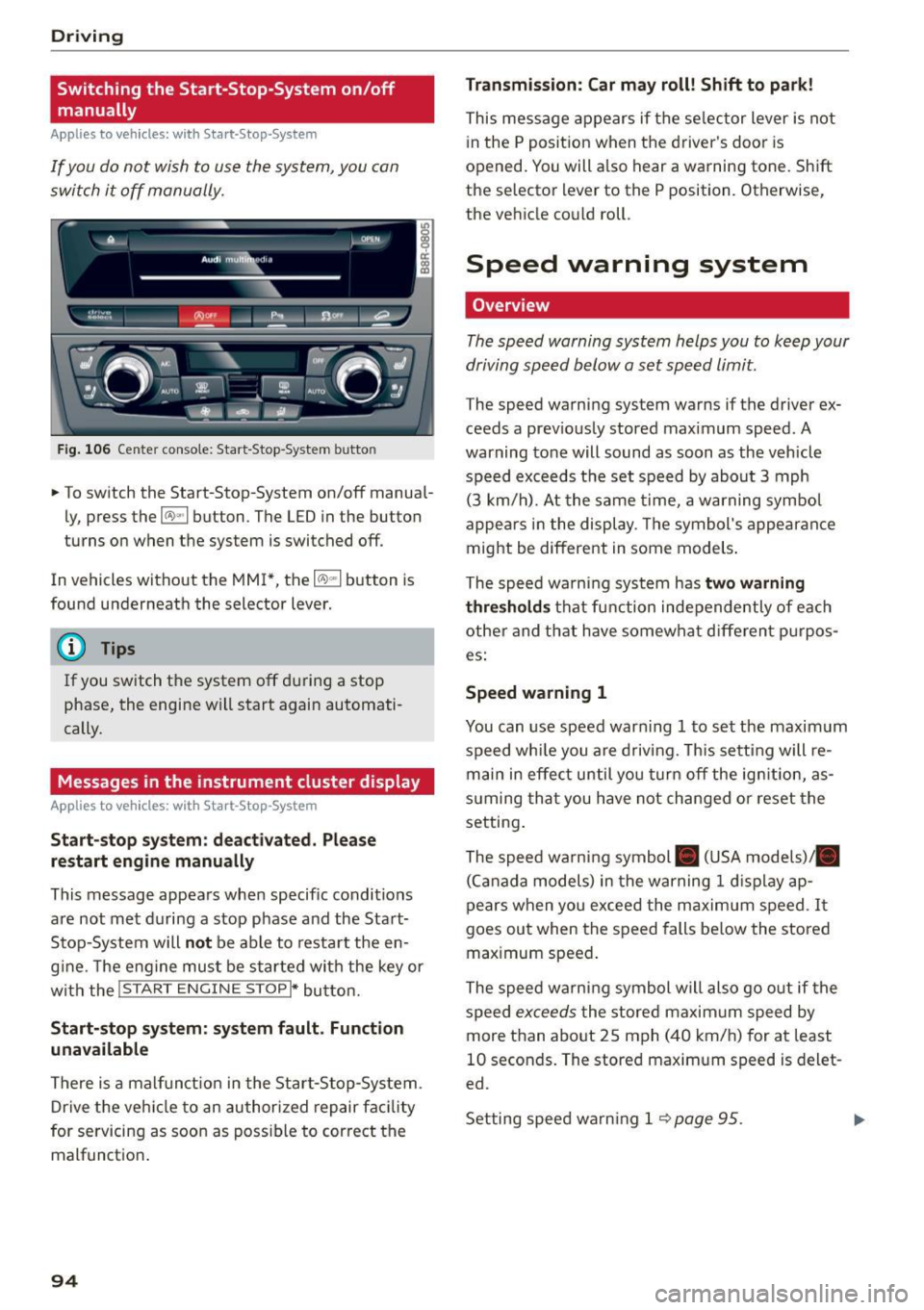
Switching the Start-Stop-System on/off
manually
Applies to veh icles: with Sta rt-Stop-System
If you do not wish to use the system, you can
switch it off manually.
F ig . 10 6 Ce nter co nsole : Start -S top -System butto n
• To switch the Start-Stop-System on/off manua l
ly, press the
1 0 ••1 button . The LED in the button
turns on when t he system is switched off .
In vehicles without the MMI*, the
10 ~1 b utton is
found underneath the selector lever.
@ Tips
If you switch t he system off du ring a stop
phase, the engine will start again automati
cally.
Messages in the instrument cluster display
Applies to veh icles: with Start-Stop-System
Start-stop system: deactivated. Plea se
restart engine manually
This message appea rs whe n specific conditions
are not met du ring a stop phase and the Sta rt
Stop-System will
not be able to resta rt the en
g ine. The e ngine mu st be started with the key or
w ith the !S TAR T
ENGINE STOPI* button.
Start-stop system: system fault. Function
unavailable
There is a malf unct ion in the Star t-Stop -System .
Dr ive the veh icle to an author ized repair fac ility
for servicing as soon as poss ible to cor rect the
malfunct ion .
94 Transmission
: Car may roll! Shift to park!
This message appears if the se lector lever is not
i n the
P posit ion when the driver 's door is
opened. You will a lso hear a warning tone. Sh ift
the selector lever to the
P position. Otherwise,
the vehicle could roll .
Speed warning system
Overview
The speed warning system helps you to keep your
driving speed below a set speed limit.
The speed warning sys tem warns if the driver ex
ceeds a prev iously stored maximum speed. A
warning tone will sound as soon as the vehicle
speed exceeds t he set speed by abo ut
3 mph
(3 km/h). At the same time, a warning sym bol
appe ars in t he display . Th e symbol's appea ran ce
might be different in some models .
The spe ed wa rni ng system has
two warning
thre sholds
that fu nction inde pendently of eac h
other and tha t have somewha t diffe ren t p urpos
es:
Speed warning 1
You can use speed war ning 1 to set the maxim um
speed wh ile you are d riv ing. This setting will re
main in effec t until yo u turn off the ig nition, as
s u ming tha t you have not changed or reset the
setting .
The speed wa rn ing symbol . (USA models)/ .
(C an ada model s) in the warning
1 d is pla y ap
pears when yo u exceed the maximum speed . It
goes ou t when the speed falls be low the stored
max imum speed .
The speed warni ng symbol will also go o ut if the
speed
excee ds the stored maxim um speed by
more than abo ut
2 5 mph (4 0 km/h) for at least
10 seconds . The stored maxim um speed is delet
ed.
Set ting spee d warn ing 1
<=? page 95 . .,._