display AUDI Q5 2015 Workshop Manual
[x] Cancel search | Manufacturer: AUDI, Model Year: 2015, Model line: Q5, Model: AUDI Q5 2015Pages: 302, PDF Size: 75.01 MB
Page 129 of 302
M N
co ~ co
rl I.O
"' N
"' rl
Manual shift program
Using the manual shift program you can man
ually select gears.
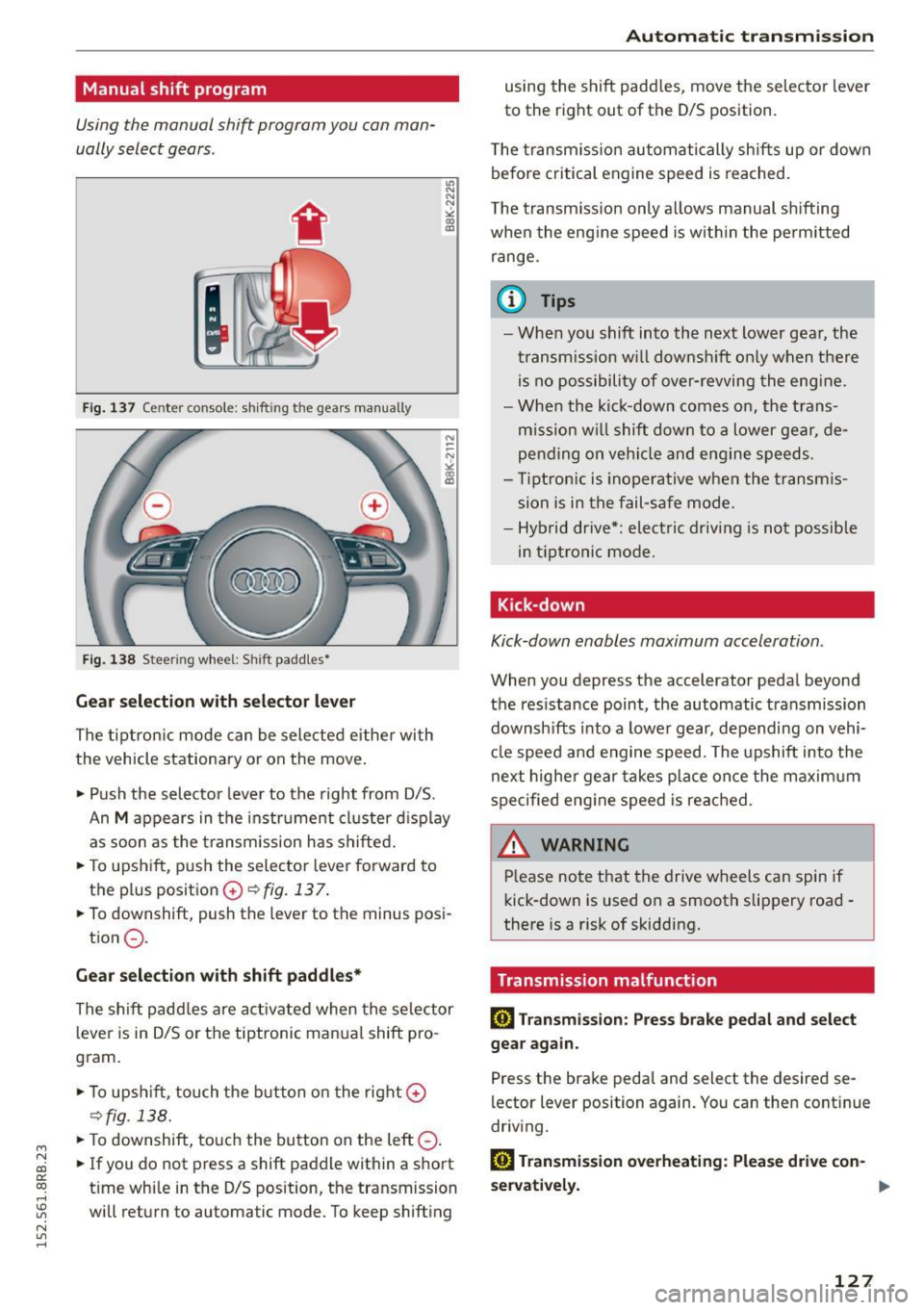
Fig. 137 Center console: shift ing t he g ears manually
Fig. 138 Stee ring whee l: Shi ft paddles•
Gear selection with selector lever
The tiptronic mode can be selected either with
the vehicle stationary or on the move.
• Push the selector lever to the right from D/S.
"' N N N :,:,
18
An M appears in the instrument cluster display
as soon as the transm ission has shifted.
• To upshift, push the selector lever forward to
the plus position
0 ~fig. 137.
• To downshift, push the lever to the minus posi-
tion
0 .
Gear selection with shift paddles*
The shift paddles are activated when the selector
lever is in D/S or the tiptronic manual shift pro
gram.
• To upshift , touch the button on the right
0
~fig. 138.
• To downshift, touch the button on the left 0-
• If you do not press a shift paddle within a short
t ime whi le in the D/S position, the transmission
will return to automatic mode. To keep shifting
Automatic transmission
using the shift padd les, move the selector lever
to the right out of the D/S position.
T he transmission automatically shifts up or dow n
before critical engine speed is reached.
T he transmission only allows manual shifting
when the engine speed is withi n the permitted
range.
@ Tips
- When you shift into the next lower gear, the
transmission will downshift only when there
is no possibility of over-revving the engine.
- When the kick-down comes on, the trans
mission will shift down to a lower gear, de
pending on vehicle and engine speeds.
- Tiptronic is ino perative when the transmis
sion is in the fail-safe mode .
- Hybrid drive*: electric d riving is not possible
in tiptronic mode.
Kick-down
Kick-down enables maximum acceleration .
When you depress the accelerator pedal beyond
the resistance point, the automatic transmission
downsh ifts into a lower gear, depending on vehi
cle speed and engine speed . The upshift into the
next higher gear takes pla ce once the maximum
specified eng ine speed is reached .
A WARNING
-Please note that the drive wheels can spin if
kick-down is used on a smooth slippery road -
there is a risk of skidding.
Transmission malfunction
rm Transmission: Press brake pedal and select
gear again.
Press the brake pedal and select the desired se
lector lever position again. You can then cont inue
driving .
rm Transmission overheating: Please drive con-
servatively. ..,.
127
Page 133 of 302
M N
co ~ co
rl I.O
"' N
"' rl
Switching on and off
Applies to vehicles: with Audi parking system p lus w ith rear
view came ra
The reorview camera switches on automatically
together with the acoustic and visual park assist
when you put the vehicle in reverse.
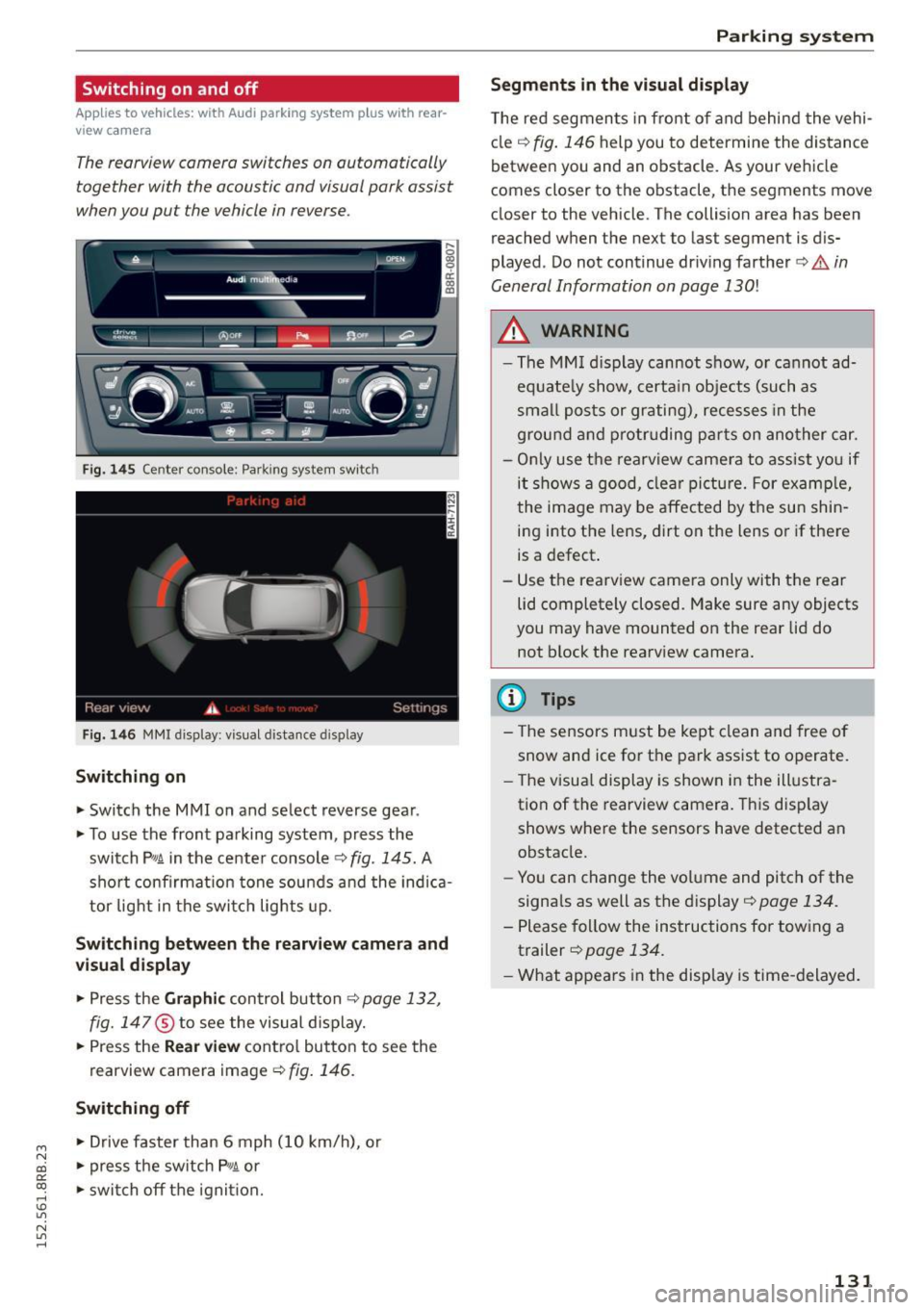
Fig. 145 Center console: Parking system switch
Fig. 1 46 MMI display: visual dista nce display
Switching on
.. Switch the MMI on and select reverse gea r.
.. To use the front parking system, press the
switch
P' "A in the center console c::> fig . 145. A
sho rt confirmat ion tone sou nds a nd the indica
tor light in the switc h lights up.
Switching betwe en th e re arview camera and
v is ual display
.. Press the Gr aphic control button c::> page 132,
fig. 147
® to see the visual d isplay .
.. Press the
Rear view cont ro l button to see the
rearview camera image
c::> fig . 146 .
Switching off
.. Drive faster than 6 mph ( 10 km/h), or
.. press the sw itch P
11JA or
.. swi tch off the ignit ion.
Par king system
Segm ents in th e vi sual display
T he red segmen ts in front of and behind the vehi
cle
c::> fig. 146 help you to determine the distance
between you and an obstacle. As your vehicle
comes closer to the obstacle, the segments move
closer to the vehicle. The collision area has been
reached when the next to last segment is dis
played. Do not continue dr iv ing farther ¢.&.
in
General Information on page 130!
A WARNING
--The MM I display cannot show, or cannot ad-
equate ly show, certa in objects (such as
smal l posts or grating), reces ses in the
ground a nd protr uding p arts on ano ther car.
- Only use t he rearview came ra to ass ist you if
it shows a good, clear picture. For examp le,
the image may be affected by the su n shin
ing into the lens, dirt on the lens or if there
is a defect.
- Use the rearv iew camera only with the rear
lid completely closed. Make sure any objects
you may have mounted on the rear lid do
not block the rearview camera.
(D Tips
-The sensors m ust be kept clean and free o f
snow and ice for t he park assist to operate.
- The visua l display is shown in the ill ustra
tion of the rearview camera. This disp lay
shows whe re the sensors have detected an
obstacle.
- Yo u can change the volume and pitch of the
signa ls as well as the display ¢
page 134.
-Please fo llow the instruc tions for tow ing a
trailer ¢
page 134.
-What appears in the disp lay is time -delayed .
131
Page 134 of 302
Parking syste m
Reverse Parking
App lies to veh icles: w ith Audi park ing system p lus w ith rear
view ca mera
Parking mode 1 can be used when parking in a
garage or into a parking space.
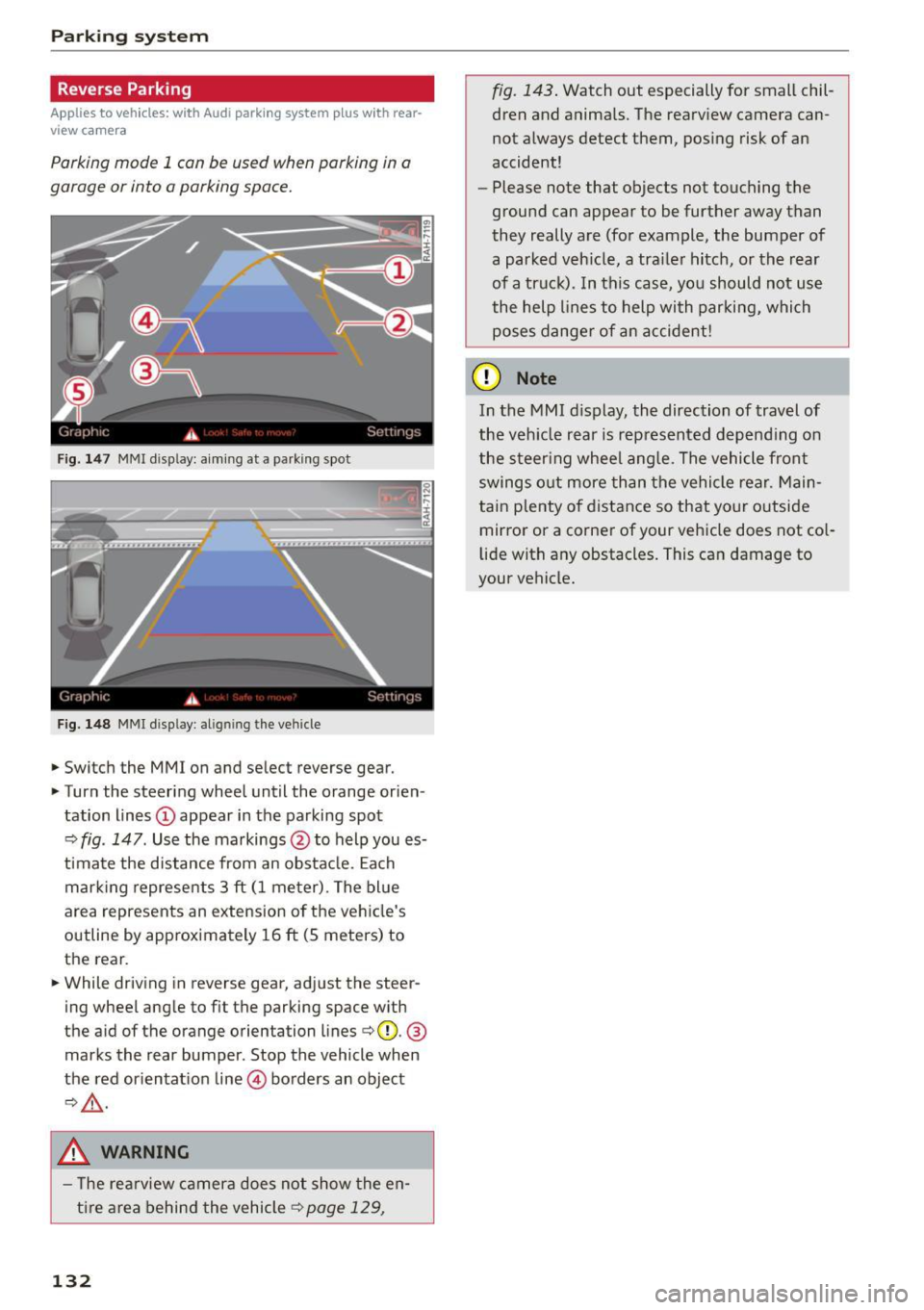
Fig. 147 MMI display: aiming at a parking spot
Fig. 148 MMI d isplay: align ing the vehicle
.,. Switch the MMI on and select reverse gear .
.,. Turn the steering wheel until the orange orien
tation lines
(D appear in the parking spot
c::> fig. 147. Use the markings @to help you es
t imate the d istance from an obsta cle. Each
mar king represents 3
ft (1 meter). The bl ue
area represents an extension o f the ve hicle's
outline by approximately 16
ft (5 meters) to
the rear .
.,. While driving in reverse gear, adjust the steer
ing wheel angle to fit the parking space with
the aid of the orange orientation lines
c::>@. @
marks the rear bumper. Stop the vehicle when
the red or ientat ion line @ borders an object
c::>,&. .
.&_ WARNING
- T he re arview camera does not show the en
t i re area behind the vehicle
c::> page 129,
132
fig. 143 . Watch out especially for small chil
dren and anima ls. The rearview camera can
not always detect them, posing risk of an
accident!
- Please note that objects not touching the
ground can appear to be further away than
they really are (for example, the bumper of
a parked veh icle, a trai ler hitch, or the rear
of a truck). In this case, you should not use
the help lines to help with parking, which
poses dange r of an accident!
(D Note
In the MMI display, the direction of travel of
the veh icle rear is represented depend ing on
the steer ing whee l ang le. The vehicle front
swings o ut more than the vehicle rear. Main
tain plenty o f distance so that yo ur outside
mirror or a corner of your vehicle does not co l
li de with any obstacles. This can damage to
your vehicle.
Page 135 of 302
M N
co ~ co
rl I.O
"'
Parallel Parking
Applies to vehicles: with Audi parking system p lus w ith rear
view came ra
Use parking mode 2 to help you parallel pork
along the side of o street.
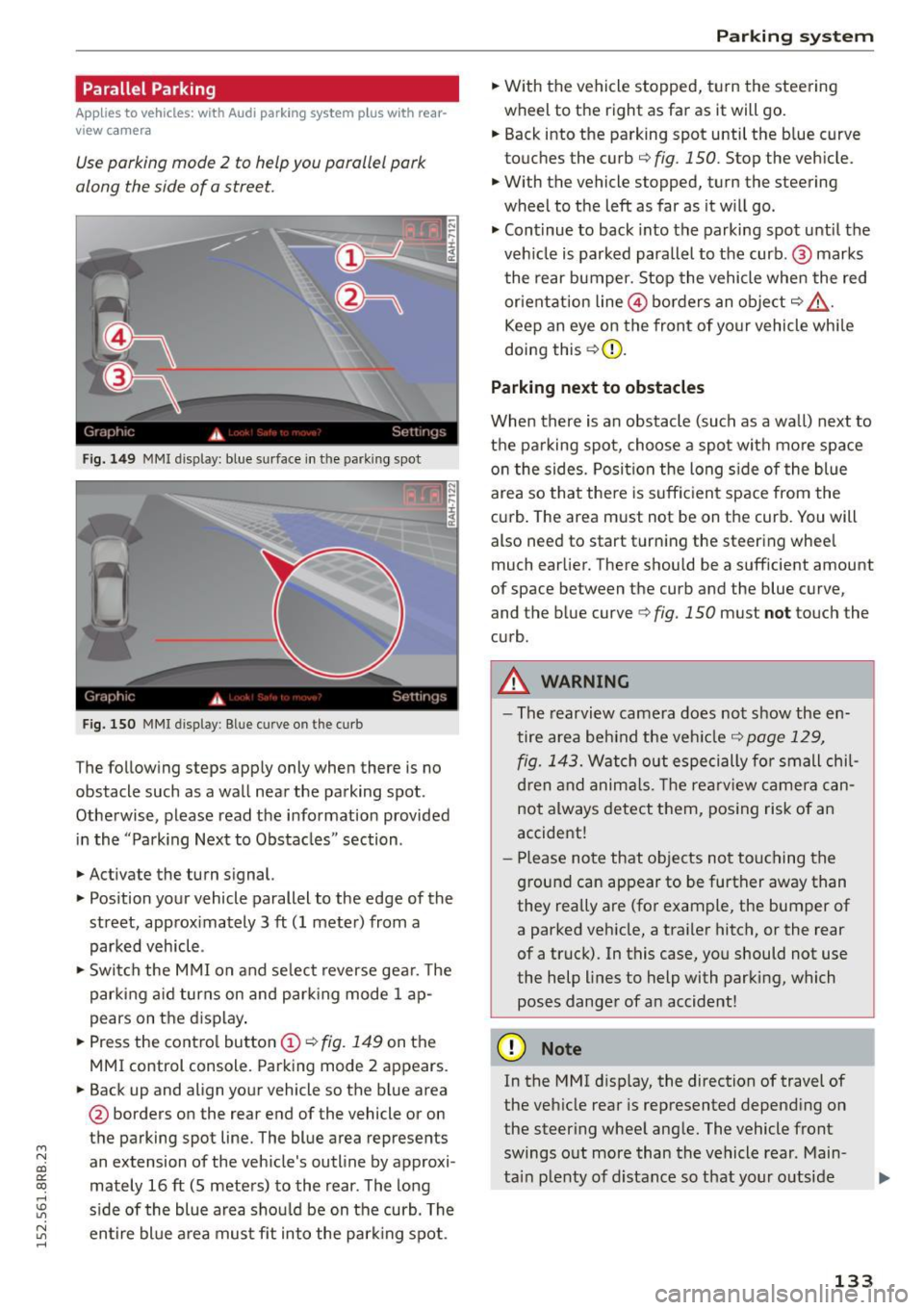
Fig. 149 MMI disp lay: blue surface in th e parking spot
Fig. 150 MMI display: Blue curve on th e curb
The follow ing steps app ly only when there is no
obstacle such as a wall near the parking spot.
Othe rwise, please read the informat ion provided
in the "Parking Next to Obstacles" section .
.,. Activate the turn s ignal.
.,. Position your vehicle parallel to the edge of the
street, approx imately 3 ft (1 meter) from a
parked vehicle .
.,. Swi tch the M MI on and se lect reverse gea r. T he
park ing a id turns on and park ing mode 1 ap
pears on the d isplay .
.,. Press the contro l button (!)¢
fig. 149 on the
MMI control console. Parking mode 2 appears.
.,. Back up and align your vehicle so the b lue area
@ borders on the rear end of the vehicle or on
the parking spot line. The blue area represents
an extension of the vehicle's outline by approxi
mately 16 ft (S meters) to the rear . The long
s ide of the blue area should be on the curb. The
~ entire bl ue a rea mus t fit into the par king spot .
Parking system
.,. With the vehicle stopped, t urn the steering
wheel to the right as far as it will go.
... Back into the parking spot until the b lue curve
to uches the curb
q fig. 150. Stop the vehicle.
.,. With the vehicle stopped, turn the steering
wheel to th e left as far as it w ill go .
.,. Cont inue to back into the parking spot until the
veh icle is parked para llel to the curb .@ marks
the rear bumper. Stop the vehicle when the red
or ientation line@ borders an obje ct
q .&, .
Keep an eye on the front of yo ur vehicle whi le
doing this ¢(D.
Parking next to obstacles
When there is an obstacle (such as a wall) next to
t h e pa rking spot, choose a spot with mo re space
o n the sides. Posi tion the long s ide of the blue
area so tha t the re is suff icient space from the
cu rb . T he area m ust not be on the curb. You will
also need to start t urn ing the steering wheel
much earlier. There should be a sufficient amount
of space between the curb and the blue curve
'
and the blue curve 9 fig. 150 must not touch the
c u rb .
A WARNING
-The rearvi ew camera does no t show the en
tire area be hind the veh icle
q page 129,
fig. 1 43.
Watch out especi ally for small chil
d ren and anima ls. The rearv iew camer a ca n
not always detect t hem, posing risk of a n
accident!
- Pl ease no te that objects no t to uch ing the
g round can appear to be further away than
they really are (for example, the bumper of
a parked vehicle, a traile r hitc h, or the rear
of a truck). In this case, you should not use
the help lines to help with parking, which
poses danger of an accident!
(D Note
In the MMI d isplay, the direction of travel of
the veh icle rear is represented depend ing on
the steer ing whee l ang le. The vehicle front
swings o ut more than the vehicle rear . Main
ta in plenty of d istance so that your o utside
133
Page 136 of 302
Parkin g system
mirror or a corner of yo ur vehicle does not col
lide with any obstacles. This can damage to
your vehicle.
(D Tips
The left or right orientation lines and sur faces
wi ll be displayed, depending on the turn sig
nal being used .
Adjusting the display
and warning tones
A pp lies to veh icles: w ith Audi park ing system p lus w ith rear
view ca mera
The display and warning tones can be adjusted in
the MMI.
~ Select: I CARI function button > Pa rking system .
Or
~ Select: ICARI funct ion button > Car s ystem s*
control button> Driver ass ist > Par king aid .
D is pl ay
- Off -when the parking system is switched on,
only audib le signals are given .
-On -when the parking system is switched on,
either the visual disp lay or the picture from the
rearview camera is disp layed.
Warning tones
- Front volum e -
front sensor volume
- Front frequency -front sensor frequency
-Rea r volume -rear sensor volume
-Rear fre quenc y -rear sensor frequency
- In -ca r entertainment fader /M usic volume
w hile pa rking -
when the parking system is
switched on, the volume of the active audio
source is lowered.
The newly adjusted value is briefly heard from
the signal generator.
(D Tips
- The warning tones can also be adjusted d i
rectly by the visual display or the picture
from the rearview camera. Simply press the
S ett ing s control button.
- Changed settings are activated when park
i ng system is switched on again .
134
-The settings are automatica lly stored and
assigned to the remote contro l key .
Trailer hitch
App lies to vehicles : wi th Audi parking sys te m plus wi th rea r
v iew camera a nd t railer hitch
For vehicles with a factory installed trailer hitch,
o r a trai ler h itch installed accord ing to factory
spec ifications, the parking sys tem rear sensors
do not come on whenever you shift into reverse
gear or when you press the
P" 1A switch. Remem
ber, there is no warning for distances to the rear.
The front sensors remain activated . The visua l
display switches to the trailer towing mode. The
picture from the rearv iew camera w ill not show
the or ientat ion lines nor the blue surfaces.
If you insta ll a hitch yourse lf, this function may
not work.
Error messages
App lies to vehicles: wi th Audi parking sys te m plus with rea r·
v iew camera
There is an error in the system if the LED on the
PwA switch is b linking and you hear a continuous
a larm for a few seconds after switching on the
parking system or when the parking system is al
ready act ivated. Have your authori zed Audi dealer
correct the error.
(D Tips
If the error is not corrected before you switch
off the ignition, when you switch on the park i ng system again, the LED in the
Pw.o. sw itch
will blink.
Page 157 of 302
M N
co
a:
co
,...., \!) 1.1'1
N 1.1'1 ,....,
A WARNING ,~
A child in a rearward-facing child safety seat
installed on the front passenger seat will be
seriously injured and can be killed if the front
airbag inflates - even with an Advanced Airbag
System.
- The inflating airbag will hit the child safety
seat or infant carrier with great force and
will smash the child safety seat and child
against the backrest, center armrest, door
or roof.
- Always install rear-facing child safety seats
on the rear seat.
- If you must install a rearward facing child
safety seat on the front passenger seat be
cause of exceptional circumstances and the
PASSENGER AIR BAG OFF light does not
come on and stay on, immediately install
the rear-facing child safety seat in a rear
seating position and have the airbag system inspected by your authorized Audi dealer.
- Forward-facing child safety seats installed
on the front passenger's seat may interfere
with the deployment of the airbag and cause serious personal injury to the child .
A WARNING
If, in exceptional circumstances, you must in
stall a forward-facing child restraint on the
front passenger's seat:
-Always make sure the forward-facing seat
has been designed and certified by its man
ufacturer for use on a front seat with a pas
senger front and side airbag.
- Never put the forward-facing child restraint
up against or very near the instrument pan
el.
- Always move the passenger seat into its
rearmost position in the seat's fore and aft
adjustment range, as far away from the air
bag as possible before installing the for
ward-facing child restraint. The backrest must be adjusted to an upright position.
- Make sure that the
PASSENGER AIR BAG
OFF
light comes on and stays on all the time
whenever the ignition is switched on.
Airbag system
A WARNING
To reduce the risk of serious injury, make sure
that the
PASSENGER AIR BAG OFF light will
be displayed whenever a child restraint is in
stalled on the front passenger seat and the ignition is switched on .
- If the
PASSENGER AIR BAG OFF light does
not stay on, perform the checks described
~ page 162, Monitoring the Advanced Air
bag System.
- Take the child restraint off the front passen
ger seat and install it properly at one of the
rear seat positions if the
PASSENGER AIR
BAG OFF
light does not stay on.
- Have the airbag system inspected by your
authorized Audi dealer immediately.
-Always carefully follow instructions from
child restraint manufacturers when instal
ling child restraints.
A WARNING
If, in exceptional circumstances, you must in
stall a forward or rearward-facing child re
straint on the front passenger's seat:
- Improper installation of child restraints can
reduce their effectiveness or even prevent
them from providing any protection.
- An improperly installed child restraint can
interfere with the airbag as it deploys and
seriously injure or even kill the child -even
with an Advanced Airbag System.
-Always carefully follow the manufacturer's
instructions provided with the child safety
seat or carrier.
- Never place additional items on the seat that can increase the total weight registered by the weight-sensing mat and can cause in
jury in a crash.
155
Page 166 of 302
Airbag syste m
his or her back up against the backrest and the
backrest is not reclined
r::!>page 136, Correct
passenger seating positions,
- the adu lt is not taking weight off the seat by
holding on to the passenger assist handle
above the front passenger door or supporting
their weight on the armrest,
- the safety belt is being properly worn and that
there is not a lot of slack in the safety belt web
bing,
- accessory seat covers or cushions or other
things that may cause an incorrect reading or impression on the weight-sens ing mat under
the upholstery of the seat have been removed
from the front passenger seat,
- a safety be lt extender has not been left in the
safety belt latch for the front passenger seat .
In addition to the
P ASS ENGER AIR BA G OF F
light in the center of the instrument panel, the
message
PASSE NGER A IR BAG OFF or PASSEN
GER AIR BAG ON
will briefly appear in the instru
ment cluster display . Thi s is to inform the driver
of the current front passenger airbag status.
Important safety instructions on
monitoring the Advanced Airbag System
A WARNING
An airbag system that is not funct ion ing prop
erly cannot prov ide supplementa l protect ion
in a frontal crash.
- If the airbag indicator light
r:!> page 16
comes when the vehicle is being used, have
the system inspected immediate ly by your
authorized Aud i dealer.
It is possible that
the a irbag will inflate when it is not s up
posed to, or wi ll not inflate when it should.
A WARNING
If the front airbag in flates, a chi ld without a
child restraint, in a rearward-facing child safe
ty seat or in a forward-facing child restraint
that has not been proper ly installed will be
ser iously injured and can be killed.
- Even though your veh icle is equipped with
an Advanced Airbag System, make certa in
that all ch ildren, especially 12 yea rs and
164
younger, a lways ride on the back seat prop
erly restrained for their age and size.
- Always install forward or rear-facing child
safety seats on the rear seat -even with an
Advanced A irbag System.
- If you must install a rearward-facing child
safety seat on the front passenger seat be
cause of exceptiona l circumstances and the
PASSENGER AIR BAG OFF light does not
appear and stay on, immediately insta ll the
rea r-facing chi ld safety seat in a rear seating
position and have the airbag system inspect
ed by your authori zed Audi dealer .
- A t ight tether or other s trap on a rea rward
facing chi ld restraint attached to the front
p assenger sea t can put too much pressure
on the weight-sens ing mat in the seat and
reg ister more weight than is actually on the
seat. The heavier weight registered can make the system work as though an adult
were on the seat and deploy the Advanced Airbag when it must be suppressed caus ing
serious or even fatal injury to the child .
- If, in exceptiona l circumstances, you must
install a forward-facing child restraint on
the front passenger seat, always move the seat into i ts rearmost pos ition in the seat's
fore and aft ad justmen t range, as fa r away
from the airbag as possib le. The backrest
m ust be adjusted to an upr ight position.
Make sure that the
PASSENGER AIR BAG
OFF
li ght comes on and stays on all the time
whenever the ignit ion is switched on.
A WARNING
- If the PASS ENGER AIR BAG OF F light does
not go out when an adult is s itting on the
front passenger seat after tak ing the steps
described above, make sure the adult is
prope rly seated and restra ined at one of the
rea r seat ing pos itions.
- Have the airbag system inspected by your
author ized Audi dealer befo re transpo rting
anyone on t he fro nt passenger seat.
Page 195 of 302
M N
co ~ co
Hill descent assist
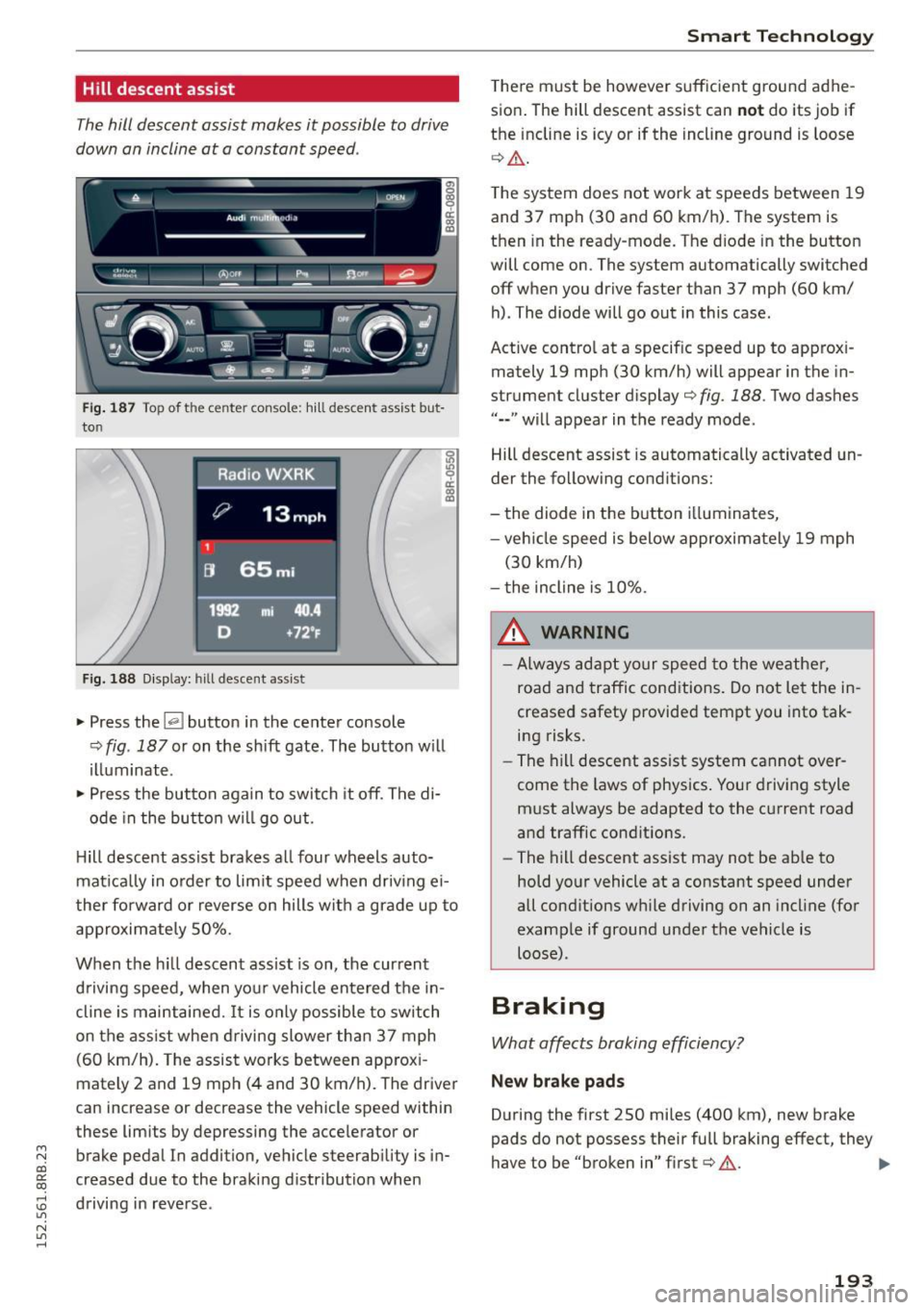
The hill descent assist makes it possible to drive
down on incline at a constant speed .
~!:t'::t Cl)Of~ ........ - -~ -fi31.. ..,_e..,,. --
I: ~_c)': ~ ~ ~ ~- .·· ~ n
l ... , .. --~ . ; - - -
Fig. 187 Top of t he ce nte r con so le: h ill descen t ass ist bu t
to n
Fig. 188 D isplay: hill descent assist
~ Press the~ button in the center console
~ 1/) 9 a:
~
¢ fig. 187 or on the shift gate. The button w ill
illuminate .
~ Press the button again to switch it off. The di-
ode in the butto n w ill go out.
H ill descent assist brakes all four wheels auto
mat ica lly in o rder to lim it speed when driv ing ei
ther fo rward or reverse on hills with a grade up to
approximately 50%.
When the h ill descent assist is on, the current
d riving speed, when your vehicle entered the in
cline is maintained.
It is only possible to switch
on the ass ist when d riving slower than 37 mph
(60 km/h). The assist works between app rox i
mately 2 and 19 mp h (4 and 30 km/h). The driver
can increase or decrease the vehicle speed within
these limits by depressing the acce lerator or
brake pedal In addition , vehicle steerability is in
creased due to the braking distribution when
:0 driving in reverse .
"' N
"' ......
Smart Technology
There must be however suffic ient ground adhe
sion . The hill descent assist can
n ot do its job if
the incline is icy or if the incline ground is loose
¢ Ll:). .
The system does not work at speeds between 19
and 37 mph (30 and 60 km/h) . The system is
then in the ready-mode. The d iode in the button
will come on . The system automatically switched
off when you drive faster than 37 mph (60 km/
h) . The diode will go out in this case .
Active control at a specif ic speed up to approx i
mately 19 mph (30 km/h) will appear in the in
strument cluster display¢
fig. 188. Two das hes
"--" will appear in the ready mode.
Hill descent assist is automatically activated un
der the fo llowing conditions:
- the diode in the button i lluminates,
- veh icle speed is below approximately 19 mph
(30 km/h)
- the incline is 10% .
A WARNING
-
-Always adapt your speed to the weather,
road and traffic conditions. Do not let the in
creased safety provided tempt you into tak ing risks.
- The hill descent assist system cannot over
come the laws of physics . Your driving style
must always be adapted to the current road
and traffic conditions.
- The hill descent assist may not be ab le to
hold your vehicle at a constant speed under
all conditions w hile driving on an incl ine (for
example if ground under the vehicle is loose) .
Braking
What affects broking efficiency?
New brake p ad s
During the first 250 miles (400 km), new brake
pads do not possess their full braking effect, they
have to be "broken in" first¢ &. .,,.
193
Page 199 of 302
M N
co
a:
co
,...., \!) ..,.,
N ..,., ,....,
electrical energy is not being used than is being
generated and ensures an optimal state of
charge for the battery.
(D Tips
- But even energy management cannot neg
ate the limits of physics. Consider that the power and life of a battery are limited.
- If starting ability is threatened, the indica
tor light (•] appears ~
page 33.
What you should know
The highest priority is given to maintaining start
ing capability.
The battery is severely taxed in short-distance
driving, in city traffic and during the co ld time of
year. Abundant electrical energy is required, but
only a little is generated. It is also critical if the
engine is not running and electrical components
are turned on. In this instance energy is being
consumed but none is being generated.
It is in precisely these situations that you wi ll no
tice energy management actively regulating the
d istribution of energy.
Vehicl e stands fo r an e xte nded p eriod
If you do not drive your vehicle over a period of
several days or weeks , e lectrica l components are
gradually cut back or switched off . This reduces
energy consumption and maintains starting ca
pability over a longer period . Some of the con
ve nience funct ions may not operate, such as the
interior lights or the power seat adjustment. The
conven ience functions wi ll be available again
when you switch on the ignit io n and start the en
g ine.
With the engine turned off
If you listen to the radio, for example, with the
engine turned off or use other MMI* functions ,
the battery is being d ischarged .
If starting capability is jeopardized due to energy
consumption, a message appears in the radio or MMI* display . The message indicates that the
system w ill be switched off automatically in a
Smart T echno log y
moment . If you wish to continue using the func
tions, you have to start the engine.
With the engin e running
Although electrical energy is generated when the
vehicle is be ing driven, the battery can become
discharged . This happens mostly when litt le en
ergy is being generated and a great dea l con
s u med and the batte ry's state of charge is not
opt imal.
T o bring the energy ba lance back into equilibri
u m, consumers which require especially large
amounts of ene rgy are temporarily cut back or
switched off. Heating systems in particu lar re
quire a great deal of energy. If you notice, for ex
amp le, that the heated seats* or the heated rear
window are not heating, they have been tempo
rar ily cut back or switched off . These systems w il l
be available again as soon as the energy ba lance
has been restored.
You w ill also notice that engi ne idle speed has
been increased slightly . T h is is normal and not a
cause for concern. By increasing eng ine idle
speed the additional energy requi red is generated
and the battery is ch arged .
197
Page 214 of 302
Care and cleaning
avoid scratches, move the scraper on ly in
one direction and not back and forth.
- Never remove snow or ice from door win
dows and mirrors using warm or hot water
because this could cause cracks to form.
- To avoid damage to the rear window de fogger, do not apply any stickers on the
heating wires on the inside of the window .
- Decorati ve p art s/ trim
- Never use chrome care or clean ing prod-
ucts .
- Paint
- To reduce the ris k of sc ratches, the veh icle
must be free of d irt and dust befo re po l
ishing or waxing .
- T o prevent paint damage, do not polish o r
wax the veh icle in direct sun light.
- To reduce the ris k of paint damage, do not
polish away rust spots.
- Remove cosmet ics and sunscreen immedi
ately -these could damage the paint.
- Di spla ys
- To avoid scratches, do not use dry cleaning
methods on displays.
- Control s
- Make sure that no flu ids enter the con-
tro ls, because this cou ld cause damage.
- Safety belt s
- Do not remove the safety be lts to clean
them.
- Never clean safety belts or the ir compo
nents chemically or wi th cor rosive f luids
or so lvents and never al low sha rp objects
t o come into con ta ct w ith the safe ty belts.
T his could cause damage to the belt web
bing .
-If there is damage to the webbing, the
connections, the retractors or the b uckles,
have them replaced by an autho rized deal
er.
- Textiles /artificial le athe r/Alcantara
- Never treat artificia l leather/Alcantara
w ith leather care products, solvents, floor
polish, shoe polish, spot remove or simi lar
products.
- Have a specialist remove stubborn stains
to prevent damage.
212
- Neve r use steam cleaners, brushes, hard
sponges, etc . when cleaning .
- D o not turn on the seat heating* to dry
the seat.
- Objects w ith sharp edges s uch as zippe rs,
rivets on clothing or be lts can cause dam
age to the surface.
- Open hook and loop fasteners, for exam
p le on clothing, can damage seat covers .
Make sure hook and loop fasteners are
closed.
- Natu ral leathe r
- Never treat leather w ith solvents, floor
polish, shoe polish, spot remover or simi
lar p roducts .
- Objects w ith sharp edges such as zippers,
rivets on clothing or be lts can cause dam
age to the surface .
- Neve r use steam cleaners, brushes, hard
sponges, etc. when cleaning .
- Do not turn on the seat heating * to dry
the seat.
- To help prevent the leather from fad ing,
do not leave the vehicle in d irect sunlight
for long periods of time . If leaving the ve
h icle parked for long periods of t ime, you
should cove r the leathe r to protect it from
d irect sunlight.
{D Tips
- Insects are easier to remove from paint that
has been fresh ly waxed.
- Regular waxing can prevent rust spots from
forming.
Placing your vehicle out
of service
If you would like to take your vehicle out of serv
ice for a longer time, contact your authorized
A udi dealer or qualified repair facility. They will
advise you of important measures, such as corro
s ion protection, maintenance and storage proce
dures. Also follow the information about the bat
tery~
page 230 .