display AUDI Q5 2015 Owner's Guide
[x] Cancel search | Manufacturer: AUDI, Model Year: 2015, Model line: Q5, Model: AUDI Q5 2015Pages: 302, PDF Size: 75.01 MB
Page 97 of 302
M N
co ~ co
rl I.O
"' N
"' rl
Speed warning 2
Storing wa rning 2 is recomme nded if you always
want to be reminded of a certa in speed, for ex
ample when you are trave ling in a co untry that
has a genera l maxim um speed limit, or if you do
not want to exceed a specified speed fo r w inter
ti res.
The speed warning 2 symbol ,. (USA mode ls)/
• (Canada models) app ears in the display when
you exceed the stored speed lim it . Unlike warning
1, it w ill not go out until the vehicle speed d rops
be low the stored speed limit .
Sett ing speed warning 2
~ page 95 .
@ Tips
Even tho ugh you r vehicle is equipped with a
spee d warn ing system, you sho uld still watch
the speedomete r to make s ure you are not
driving faster than the speed limit.
Speed warning 1: setting a speed limit
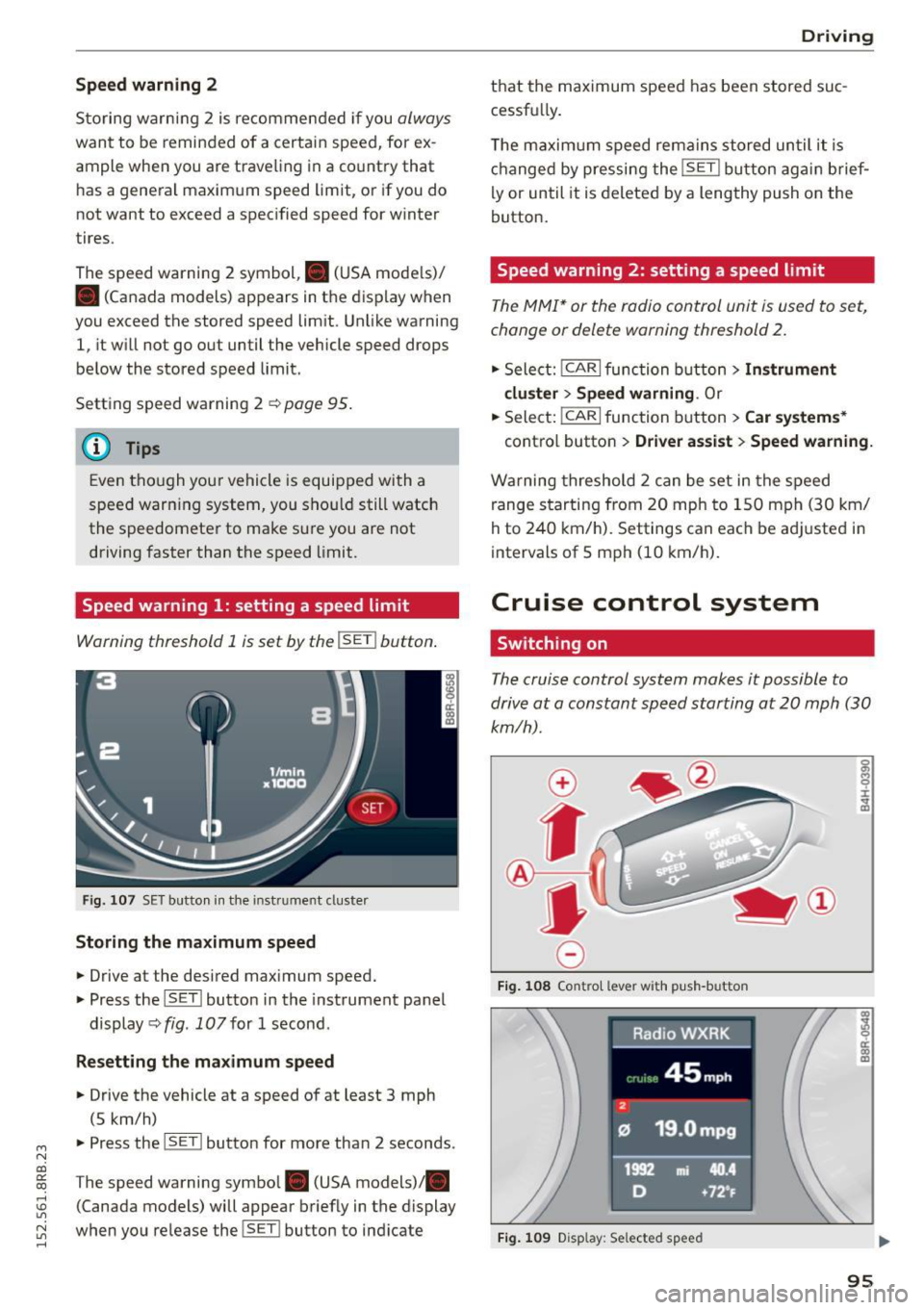
Warning threshold 1 is set by the !SET I button .
Fig. 10 7 SET butto n in t he in st ru me nt cl uster
Storing the maximum speed
.,. Drive at the desired max imum speed.
.,. Press the ISET l button in the instrument panel
display ~fig .
107for 1 second .
Resetting the maximum speed
.,. Drive the vehicle at a speed of at least 3 mph
(5 km/h)
.,. Press the l~S -ET~ ! butto n for more than 2 seconds.
T he speed warning symbol. (USA models) .
(Canada models) will appear briefly in the display
when you release the !SET l button to ind icate
D riv ing
th at the maximum speed has been stored suc
cessfu lly.
T he maxim um s peed rema ins stored un til i t is
ch anged by pressing the !SE T! button ag ain brief
ly or until it is deleted by a lengthy push on the
button.
Speed warning 2: setting a speed limit
T he MMI* or the radio control unit is u sed to s et,
change or delete warning threshold
2.
.,. Sele ct: !CAR!func tion butt on> Instrument
cluster > Speed warning .
Or
.,. Select: I CAR I function button > Car systems *
contro l butto n > Driver as sist > Speed warning.
W arning threshold 2 can be set in the speed
range s tarting from 20 mph to 1 50 mph (3 0 km/
h to 240 km/ h). Settings can each be ad justed i n
intervals of 5 mph (10 km/h).
Cruise control system
Switching on
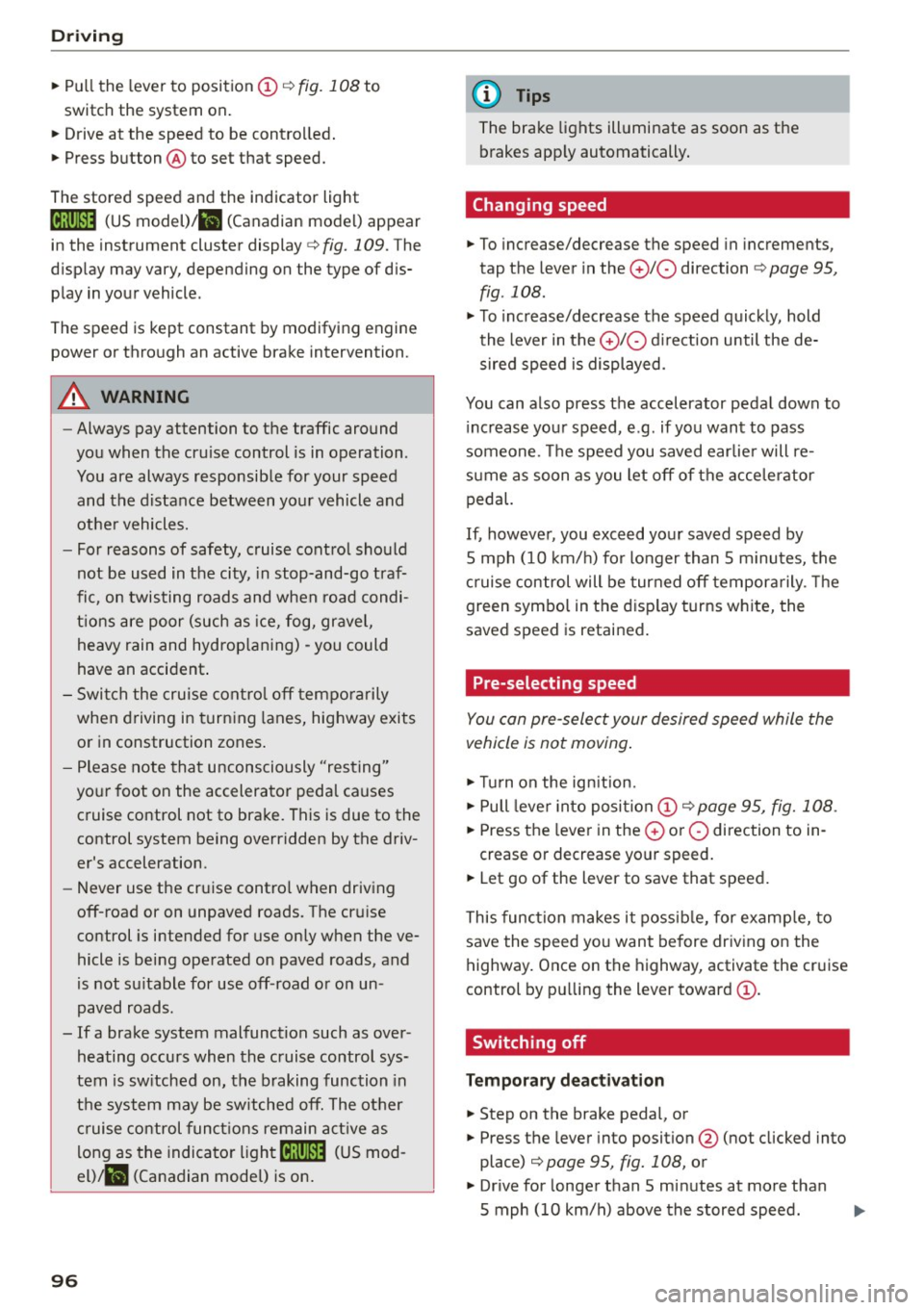
The cruise control system makes it possible to
drive at a constant speed starting at
20 mph (30
km/h).
0
f
®t
0
F ig. 1 08 Co ntr ol leve r w ith p ush -b u tto n
Fig. 1 09 Disp lay : Se lected speed
a)
8 ci: a) m
95
Page 98 of 302
Driving
"'Pull the lever to position @¢ fig. 108 to
switch the system on.
"'Drive at the speed to be controlled.
"' Press button @to set that speed.
The stored speed and the indicator light
[ij;jl)~i~ (US model)/BI (Canadian model) appear
in the instrument cluster display¢
fig. 109. The
display may va ry, depending on the type of dis
play in your vehicle .
The speed is kept constant by modifying engine
power or through an active brake intervention.
A WARNING
- Always pay attention to the traffic around
you when the cruise control is in operation .
You are always responsible for your speed
and the distance between your vehicle and
other vehicles.
- For reasons of safety, cruise control should
not be used in the city, in stop-and-go traf
fic, on twisting roads and when road condi
tions are poor (such as ice, fog, gravel,
heavy rain and hydroplaning) -you could
have an accident.
- Switch the cruise control off temporarily
when driving in turning lanes, highway exits
or in construction zones.
- Please note that unconsciously "resting"
your foot on the accelerator pedal causes
cruise control not to brake. This is due to the
control system being overridden by the driv
er's acceleration.
- Never use the cruise control when driving
off-road or on unpaved roads . The cruise
control is intended for use only when the ve
hicle is being operated on paved roads, and
is not suitable for use off-road or on un
paved roads.
- If a brake system malfunction such as over heating occurs when the cruise control sys
tem is switched on, the braking function in
the system may be switched off. The other
cruise control functions remain active as
long as the indicator
light[ij;11 )~1~ (US mod
el)/lil (Canadian model) is on.
96
(D Tips
The brake lights illuminate as soon as the
brakes apply automatically.
Changing speed
"'To increase/decrease the speed in increments,
tap the lever in the
010 direction ¢ page 95,
fig . 108.
"'To increase/decrease the speed quickly, hold
the lever in the
010 direction until the de
sired speed is displayed.
You can also press the accelerator pedal down to increase your speed, e .g . if you want to pass
someone . The speed you saved earlier will re
sume as soon as you let off of the accelerator
pedal.
If, however, you exceed your saved speed by
S mph (10 km/h) for longer than 5 minutes, the
cruise control will be turned off temporarily. The
green symbol in the display turns white, the
saved speed is retained.
Pre-selecting speed
You can pre-select your desired speed while the
vehicle is not moving.
"'Turn on the ignition.
"'Pull lever into position
(I) ¢page 95, fig. 108 .
"'Press the lever in the 0 or 0 direction to in-
crease or decrease your speed.
"' Let go of the lever to save that speed.
This function makes it possible, for example, to
save the speed you want before driving on the
highway. Once on the highway, activate the cruise
control by pulling the l ever toward @.
· Switching off
Temporary deactivation
"' Step on the brake pedal, or
"'Press the lever into position@(not clicked into
place) ¢
page 95, fig. 108, or
"'Drive for longer than S minutes at more than
S mph (10 km/h) above the stored speed.
Page 100 of 302
Hybrid
Hybrid
Hybrid drive
Introduction
App lies to veh icles: w ith hybr id drive
Gener al inf orm ation
The hybr id drive is a combined drive concept that
automatically switches between combustion en
g ine and electr ic drive types or combines them.
All work on h igh voltage systems is intended only
for h igh voltage technicians and may only be per
formed by authorized service facilities in accord
ance w ith Aud i regulations.
The high voltage system is composed of the fol lowing h igh voltage components: the h igh volt
age battery, the power electronics, the e lectr ic
motor, the h igh voltage A/C compressor and the
orange h igh vo ltage w iring.
High volta ge battery
The high voltage battery is located in the luggage
compartment underneath the cargo floor . You do
not need to perform any maintenance work on
the high voltage battery. Additional information
about the h igh vo ltage battery can be found un
der
r::!v page 105 .
The high voltage battery service plug is a lso
found underneath an orange cover under the ca r
go floo r. T he service plug is provided on ly for use
by service personne l and must not be removed by
others who are not trained to use it .
A WARNING
The voltage in the high voltage system is life
threatening. Touching a damaged high vo lt
age component can result in a fatal electric
shock. The components in the high voltage
system are marked w ith a warning label wh ich
warns against the h igh voltage.
- Never perform work on orange h igh voltage
cables or on high voltage components. Only
authorized repair facilities that are certified
may perform wo rk on the high voltage sys
tem.
98
- Never open or remove the service plug cover
in the center of the cargo floor.
- Never damage, alter o r remove the orange
high voltage cable or disconnect it from the
high voltage system.
- Aud i regu lations must be followed during
all work performed on the high voltage sys
tem and high voltage components.
A WARNING
While in electric dr ive mode, the veh icle pro
duces considerab ly less id ling, driving and op
erat ing no ise than when the combustion en
g ine is running. This may make it difficult or
impossible fo r othe rs such as pedes trians and
chi ld ren to hear and notice the veh icle when it
is in electrical drive mode . This can lead to
collisions and inj uries, for example in low traf
fic areas, when maneuvering or when driving
in reverse.
A WARNING
Never leave the vehicle unattended whi le in
the drive ready mode. The vehicle could begin moving if the accelerator peda l is pressed,
even if the combustion engine is switched off .
This may cause collisions and severe or fatal injuries. When the vehicle enters dr ive ready
mode, the status message
h• .,rid ii J ap
pears br iefly in the instrumen t cluster display
and the needle in the powe r meter points to
READ Y ¢ page 99.
-When exi ting the vehicle, make sure these
lecto r lever is i n the P position, the ignition
is switched off and the hybrid system is de
activated.
(D Note
- T he h igh voltage system can be damaged if
the vehicle underbody comes into contact
with the ground. Immediate ly drive your ve
hicle to an authorized repair facility and
have it inspected.
- Do not transport fluids in open containers in
the luggage compartment. Spill ed fluids
can seep underneath the cargo floor. This
can damage the high voltage system.
-
Page 101 of 302
Starting the vehicle
Applies to vehicles: with hybrid drive
The vehicle is started and turned off either w ith
the ign ition key
q page 84 or with the
IS TAR T ENGINE STOP I button* ¢page 87 in the
same way as a conventional vehicle .
When starting the vehicle, the need les in the in
strument cluster
move upward br iefly. When the
vehicle enters d rive ready mode, the status mes
sage
hybrid ready appears briefly in the instru
ment cluster display and the needl e in the power
meter points to READY
q page 99.
Depending on the operation mode of the hybr id
system, there are two possib le drive ready modes
after the vehicle has been started:
Drive r eady mode with combustion engine
If the ope rat ing requirements q page 101 for
e lec tric dr ive mode are
not met, the combustion
Power meter overview
Applies to vehicles: with hybrid drive
H ybri d
engine starts the vehicle as usual. You can start
driving as usual.
Drive ready m ode with th e el ectric motor
If the operating requi rements 9 page 101 for
the e lectr ic dr ive mode are met , the combustion
engi ne remains off after starting the vehicle.
(j) Tips
To p reven t the 12 volt batte ry from d ischarg
i ng, never leave t he veh icle parked in the dr ive
ready mode. Remove the key from the igni tion
or press the
! S T AR T ENGINE ST OP I button *.
When leaving the vehicle always take the key
with you.
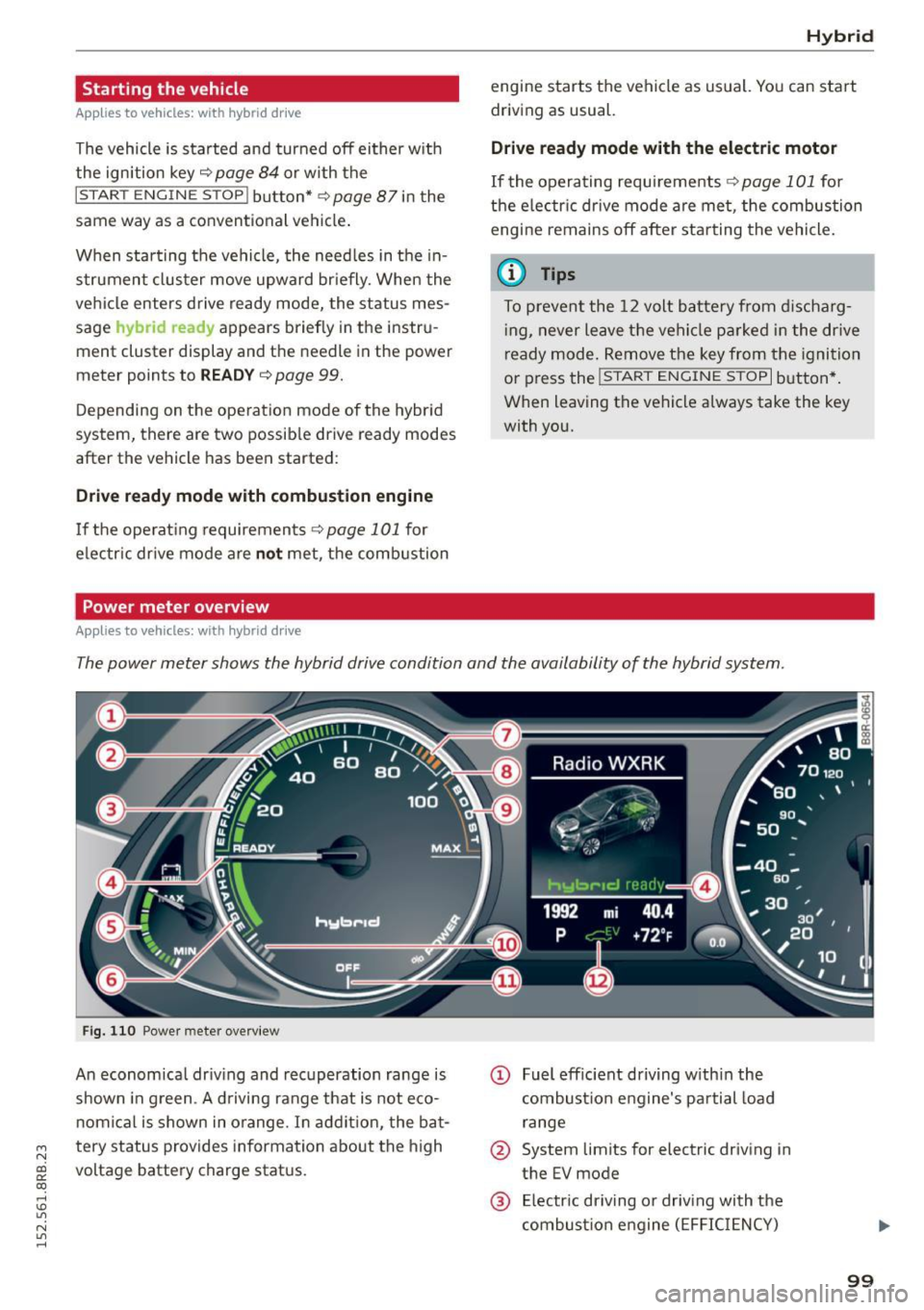
The power meter shows the hybrid drive condition and the availability of the hybrid system.
F ig. 1 10 Powe r meter overview
An economical dr iv ing and recuperation range is
shown in g reen . A d riving range that is not eco
n omical is shown in o range. In addi tion, the ba t-
"' tery status provides information about the high
N
~ voltage battery charge stat us.
co
rl I.O
"' N
"' rl
@ Fuel eff icient driving with in the
combust ion engine 's pa rtial load
range
@ System limits for electric driving in
the EV mode
@ El ectric dr iving or driv ing with the
combust ion engine (EFFIC IENCY)
99
Page 103 of 302
M N
co
a:
co
,...., \!) 1.1"1
N 1.1"1 ,....,
Hybrid functions and operating modes
Appl ies to vehicles: with hybri d drive
Fig. 111 Center console: av bu tton
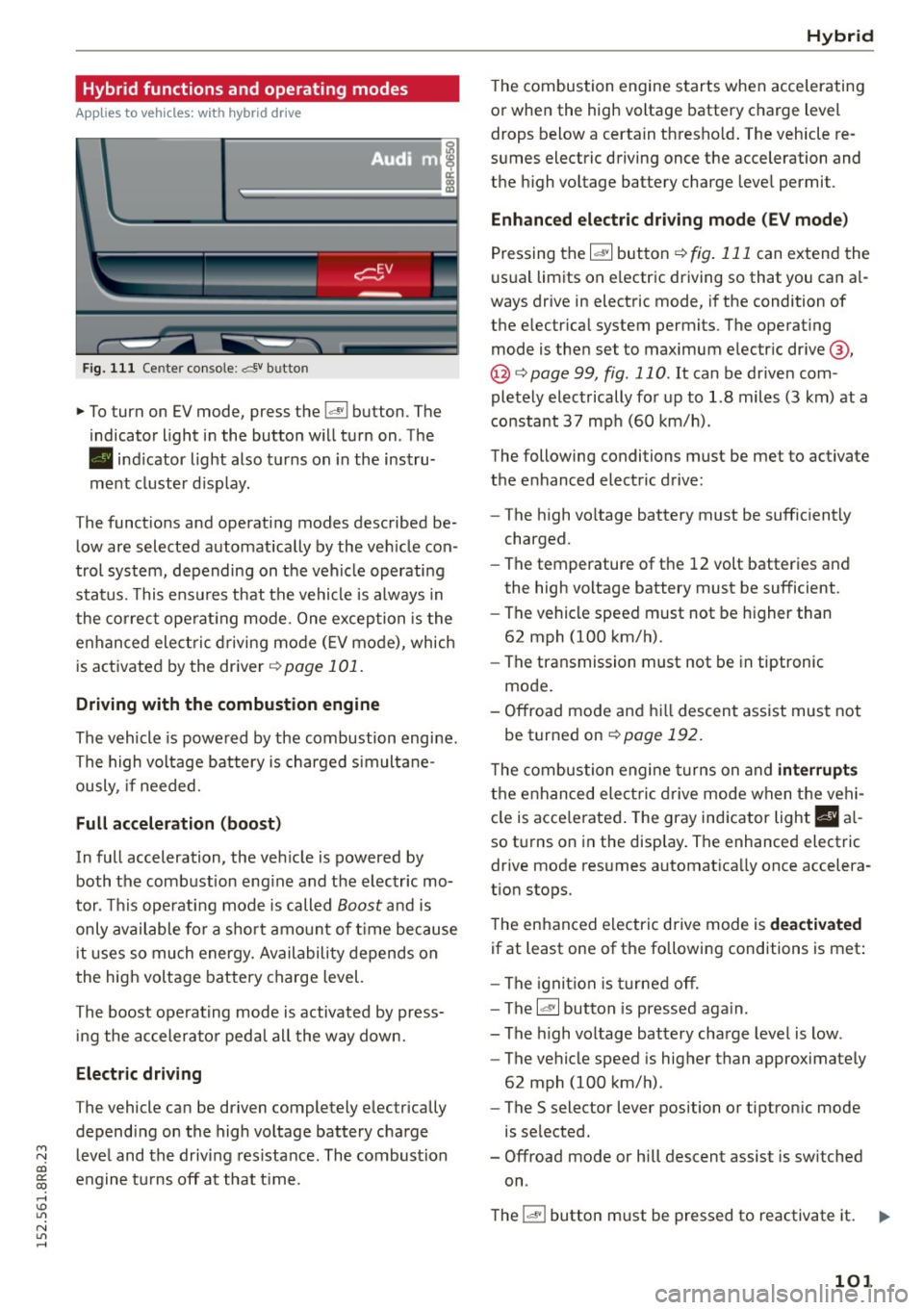
.,. To turn on EV mode, press the l.,,;v l button. The
indicator light in the button will turn on. The
• indicator light also turns on in the instru
ment cluster display.
The functions and operating modes described be
low are selected automatically by the veh icle con
trol system, depending on the vehicle operating
status. This ensures that the vehicle is always in
the correct operating mode. One exception is the
enhanced elect ric driving mode
(E V mode), which
is activated by the driver ¢
page 101.
Driving with the combustion engine
The vehicle is powered by the combustion engine.
The high voltage battery is charged simultane
ously, if needed.
Full acceleration (boost)
In full acceleration, the vehicle is powered by
both the combustion eng ine and the electric mo
tor . This operating mode is called
Boost and is
only available for a short amount of time because
i t uses so much energy. Availability depends on
the high voltage battery charge level.
The boost operating mode is activated by press in g the accelerator peda l all the way down.
Electric driving
The vehicle can be driven completely electrically
depending on the high voltage battery charge
level and the driving res istance . The combustion
engine turns off at that t ime .
Hybrid
The combustion engine starts when accelerating
or when the high voltage battery charge level drops below a certain thresho ld. The vehicle re
sumes electric driving once the acceleration and
the high voltage battery charge level permit .
Enhanced electric driving mode (EV mode)
Pressing the 1~· 1 button r::!> fig. 111 can extend the
usual limits on e lectric driving so that you can a l
ways drive in electric mode, if the condition of
the electrical system permits. The operating
mode is then set to maximum electric drive @,
@ <:!> page 99, fig . 110. It can be driven com
pletely electrically for up to 1.8 miles (3 km) at a
constant
37 mph (60 km/h).
The following conditions must be met to activate
the enhanced electric drive:
- The high voltage battery must be sufficiently
charged.
- The temperature of the
12 volt batteries and
the high voltage battery must be sufficient.
- The vehicle speed must not be higher than
62 mph (100 km/h).
- The transmission must not be in tiptronic
mode.
- Offroad mode and hill descent assist must not
be turned on
r::!;>page 192.
T he combustion engine turns on and interrupt s
the enhanced ele ctric drive mode when the vehi
cle is acce lerated. The gray ind icator light
I§ a l
so turns on in the display. The enhanced electric
drive mode resumes automatica lly once accelera
tion stops.
The enhanced electric drive mode is
deactivated
if at least one of the following conditions is met :
- The ignition is turned off.
- The
l~ ·I button is pressed aga in.
- The high voltage battery charge level is low .
- The vehicle speed is higher than approximately
62 mph (100 km/h) .
- The
S selector lever position or tiptronic mode
is selected.
- Offroad mode or hill descent assist is switched
on .
The
l "'-'' I button must be pressed to reactivate it. 1iJ11-
101
Page 104 of 302
Hybrid
St art-Stop function
The combust ion engine is operated only as need
ed . Genera lly, the combustion engine turns
off
when the vehicle is stationary and the high volt
age battery powers the electrical vehicle sys
tems .
The purpose o f automatica lly shutting the com
bustion engine
off in hybrid drive mode is to save
fue l. All of the important vehicle systems, such
as steering, brakes and the A/C system, contin ue
to remain active. In some cases, systems may re
qu ire the combustion engine to continue running
when the vehicle is stationary. When driv ing in
congested traffic for long periods of t i me, the
combustion engine will cycle on when the veh icle
is stationa ry to keep the h igh voltage battery
charged .
Gliding
If the gas pedal is not pressed and the D position
is selected, the combustion engine rema ins
turned
off up to speeds of approximate ly 99 mph
(160 km/h). Dr iving conse rvative ly like this can
r educe fue l consumpt ion.
Energy recovery (recup eration )
When braking, the e lectr ic motor will act as a
generator creating electric energy that is then
s to red in the h igh voltage batte ry. This also oc
curs when the ve hicle is coas ting or dr iv ing down
hi ll. The combust ion engine is automatically
turned
off in t his case.
Tips for Driving Efficiently with your Hybrid
Applies to veh icles: w ith hybrid drive
Driving situa- Conditions
tions
- Shift into the D pos ition .
Starting from a -
Release the brake pedal.
stop -
Only press mode rate ly on the ac-
celer ator peda l.
102
The vehicle is braked with the electric motor by
applying early and even press ure to t he brakes
and us ing short pedal movements¢
page 99,
fig. 110@. By do ing th is, a large amount of the
k inet ic energy is recovered and may be stored as
electric energy in the high voltage batte ry. Dur
i ng heavy braking, the convent ional brakes are al
so act ivated
¢ page 99, fig . 110 @.
The energy recovery is shown in the MMI display
¢page 105 .
Automatic start of the combu stion engine
Various operating conditions cause the combus
tion eng ine to start a utomatica lly :
- T he high vo ltage battery charge leve l is low.
- T he temperature of the combustion engi ne is
low.
- Th e temperature of the cataly tic converte r is
low.
- T he power output needed for the A/C system is
high.
- T he veh icle speed is high .
- The vehicle acceleration is h igh .
- The incline is steep.
- High charge level for the high voltage battery
when coasting. In this case, the hig h voltage
battery cannot absorb any more ene rgy and so
the electric motor cannot s low down the veh i
cle. The combustion engine tur ns on (eng ine
brake) . In this situation the high voltage bat
tery will show a Max cha rge.
Vehicle behavior
In the D posit io n, the hybrid system adapts
to the driving s ituat ion by automatically
sw itch ing between the combust io n engine
a nd e lectr ic dr ive types or by combini ng
them.
Page 106 of 302
Hybrid Energy flow display
App lies to vehicles: with hybrid drive
Fig. 112 Instrument cluster: ene rgy flow display
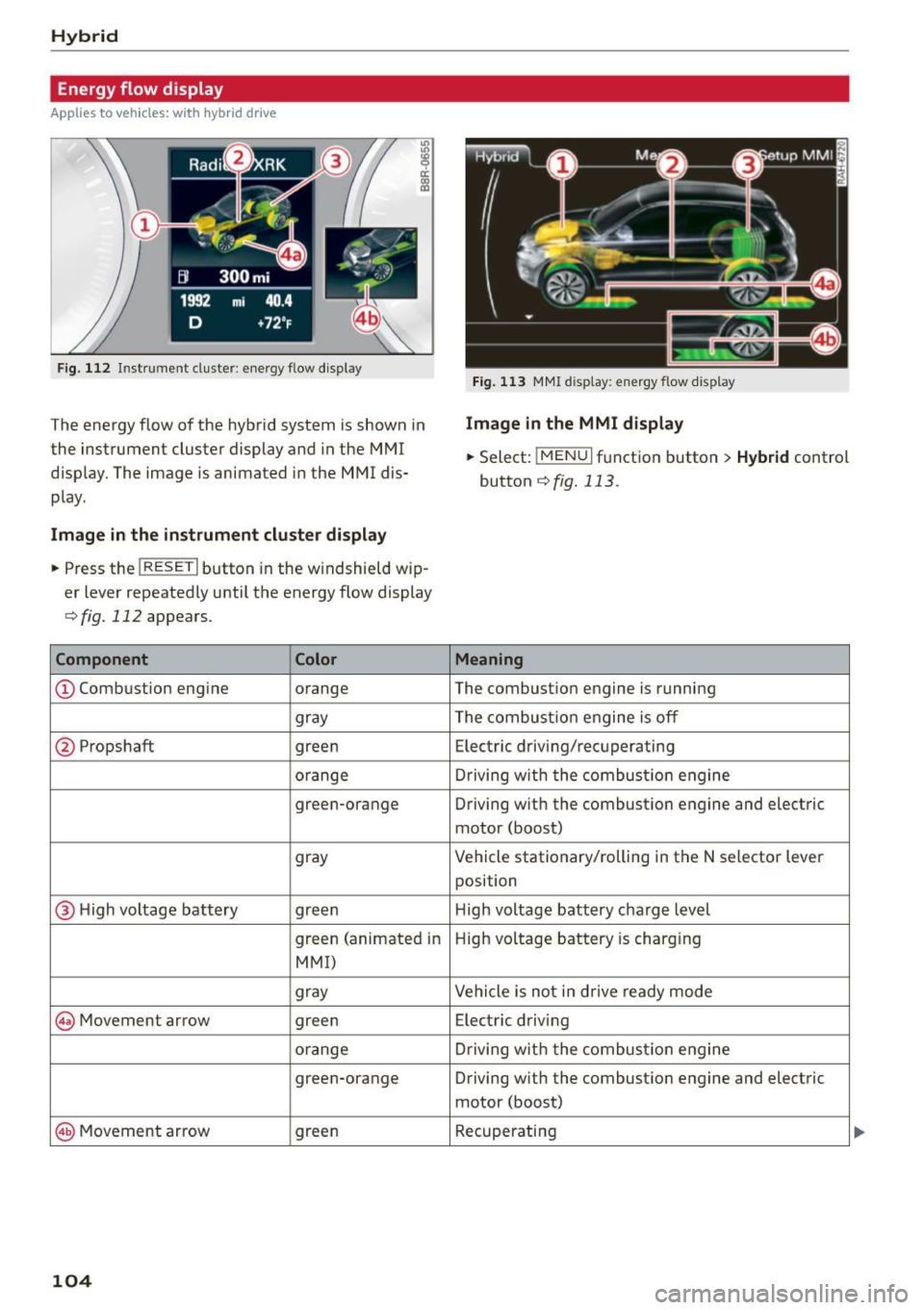
The energy flow of the hybrid system is shown in
the instrument cluster display and in the MMI
d isplay. The image is animated in the MMI dis·
play.
Image in the instrument cluster di splay
.. Press the !RESET I button in the windshield wip
er lever repeatedly until the energy flow display
r::>fig. 112 appears.
Component Color
@Combustion engine orange
gray
@ Propshaft green
orange
green-orange
gray
@ H
igh voltage battery green
green (animated in
MMI)
gray
@ Movement arrow green
o
range
green-orange
@ Movement arrow green
104
Fig. 113 MMI disp lay: energy flow display
Image in the MMI display
.,. Select: I MEN u I function button > Hybrid control
button
r::!) fig. 113 .
Meaning
The combustion engine is running
The combustion engine is off
Electric driving/recuperating
Driving with t he combustion engine
Driving w ith the combust ion engine and electric
motor (boost)
Vehicle stationary/rolling in the N selector lever
position
H igh voltage batt ery charge level
High voltage battery is charging
Vehicle is not in d rive ready mode
Electric driving
Driving with the comb ustion engine
Driving with the combustion engine and electric
motor (boost)
Recuperating
Page 107 of 302
M N
co ~ co
rl I.O
"' N
"' rl
@ Tips
The Energy flow display will not shown in the
MMI display when the reverse gear is engag-
ed, due to safety reasons.
Consumption display
App lies to vehicles: with hybri d dr ive
Fig. 114 MMI display: consumptio n dis play
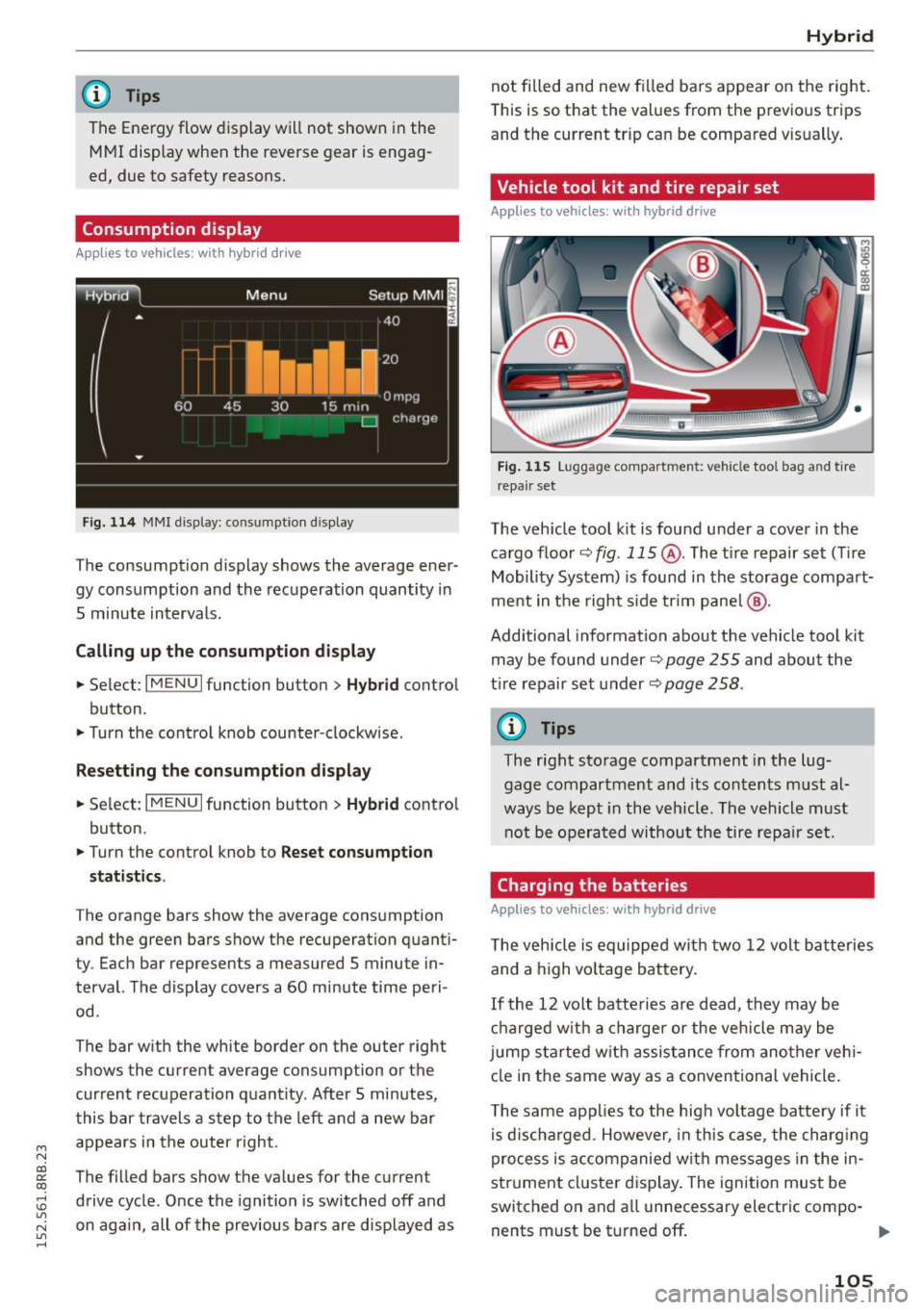
The consumption display shows the average ener
gy consumption and the recuperation quantity in
5 minute intervals.
Calling up the consumption display
... Select : I MENU I function button> Hybrid control
button .
... Turn the control knob counter-clockwise .
Resetting the consumption display
... Select: I MENU I function button > Hybrid contro l
button .
... Turn the control knob to
Reset consumpt ion
statistics .
The orange bars show the average consumption
and the green bars show the recuperation quanti
ty. Each bar represents a measured
5 minute in
terval. The display covers a
60 minute time peri
od .
The bar with the white border on the outer right
shows the current average consumption or the
current recuperation quantity. After 5 minutes,
this bar travels a step to the left and a new bar
appears in the outer right.
The filled bars show the values for the current
drive cycle . Once the ignition is switched off and
on again, all of the previous bars are displayed as
Hybrid
not filled and new filled bars appear on the right.
This is so that the values from the previous trips
and the current tr ip can be compared vis ually .
Vehicle tool kit and tire repair set
Applies to vehicles: wit h hybrid drive
Fig. 115 Luggage compart ment: vehicle tool bag an d tir e
r epa ir set
The veh icle tool kit is found under a cover in the
cargo floor
~ fig . 115 @. The t i re repair set (Ti re
Mobility System) is found in the storage compart
ment in the right s ide trim pane l@ .
Additional information about the vehicle tool kit
may be found under~
page 255 and about the
t ir e repair set under ~
page 258 .
@ Tips
The right storage compartment in the lug
gage compartment and its contents must al
ways be kept in the vehicle. The vehicle must
not be operated without the tire repair set.
Charging the batteries
Applies to vehicles: wit h hybrid drive
The vehicle is equipped with two 12 volt batteries
and a high vo ltage battery.
If the
12 volt batteries are dead, they may be
charged with a charger or the vehicle may be
j u mp started with assistance from another veh i
cle in the same way as a conventional vehicle .
The same applies to the high voltage battery if it
is d ischarged . However, in this case, the charging
process is accompanied w ith messages in the in
strument cluster display. The ignition must be
switched on and a ll unnecessary electric compo -
nents must be turned off.
ll>
105
Page 108 of 302
Hybrid
The connections in the engine compartment are
used for both charging and jump starting
¢ pag e 232 or ¢ page 271.
Vehicl e not r eady to start. S ee owne r's
m anu al
This message appears if the h igh voltage battery
charge leve l is too low. The vehicle can no longer
be started with its own power. The high voltage
battery must be charged with a charger or the ve
h icle must be jump started with the aid of anoth
er vehicle .
After the connecting the charger or jumper ca bles, the ign it ion must be turned off for approxi
mately two minutes and then turned on again .
After no more than one minute, one of the fol lowing indicator lights turns on in the instrument
cluste r display .
B Charging battery. Plea se wait ...
If the indicator light turns on and this message
appears, the high voltage battery is charging or
the vehicle is be ing jump started w ith assistance
from another vehicle .
If the 12 volt batter ies are dead , the - indi
cator light turns on . The charging procedure
takes longer in this case because the 12 volt bat
ter ies are charged first . T he p rocedure goes fast
er with the ig nition sw itched off.
Vehicle ready to st art.
This message appears if the charg ing procedure
was successful. The vehicle may be started aga in.
B atter y could n ot be ch arged en ough to st ar t
v eh icle.
This message appears if the charg ing procedure
was not successful or it was interrupted . This
may happen if the charger or the battery in the
veh icle that is assist ing is too weak. If the veh icle
can not be started, see a n author ized repair fac il i
ty for ass istance.
(D Tips
- The charger shou ld deliver a current of at
l east 30 A. Otherw ise charging t he h igh
voltage battery w il l take considerab ly Lon-
106
ger . A cu rrent between 50 A and 70 A is ide
al.
- T he veh icle that is assist ing shou ld be some
what within the same veh icle class when
jump starting a vehicle. A smaller vehicle's
battery may be drained.
- After approximately 30 minutes , the charg
ing procedure ends because the ignition is
automatically turned off. If you wo uld like
to cont inue to charge the battery, turn the
ignition on again .
Vehicle transport
Applies to vehicles : with hybrid drive
The following contains information you should
know abou t transporting your vehicle.
The lithium ion battery (SANYO 72 UF 121 285)
i nsta lled in your vehicle has passed test 38 .3 in
accordance with UN handbook tes ts and criteria.
T he vehicle may be transported w ith the battery
i nstalled as conventional class 9 hazardous mate
ria ls without addit ional official consent for air
and sea transpo rtation (cu rrent law !CAO-TI and
IMDG-Code 01.01.2012).
Page 111 of 302

M N
co ~ co
rl I.O
"' N
"' rl
Audi adaptive cruise control and braking guard
Audi adaptive cruise
control
Description
Applies to vehicles: with Audi adaptive cruise control
Fig. 119 Detect ion range
What can adaptive cruise control do?
The adaptive cruise control works in conjunction
with a radar sensor installed in the front of the
vehi cle
¢ page 107, fig. 116, which is subject to
designated system limits¢
page 109 . Stationary
objects are disregarded.
On open roads w ith no traff ic, adaptive cruise
control wo rks like a reg ular cruise control system.
The stored speed is maintained . When approach
ing a moving vehicle detected up ahead, the
adapt ive cruise control system automatically
slows down to match that vehicle's speed and
then maintains the distance that the driver previ
ously stored. As soon as the system does not de
tect a vehicle up ahead, adaptive cruise control
accelerates back up to the stored speed .
Which functions can be controlled?
When you switch adaptive cruise contro l on, you
can set the current speed as the "contro l speed"
¢ page 109, Switching on and off.
When driving , you can stop cruise control
¢
page 111 or change the speed ¢ page 110 at
any time.
You can also set the distance to the object ahead
and set the adaptive cruise control driving pro
gram
¢ page 111. Switching on and off
Applies
to vehicles: with A udi adapt ive cru ise contro l
Fig. 120 Selector lever: switc hing on/off
Fig . 121 Instrume nt cluste r: adapt ive c ruise co ntro l
You can set any speed between 20 mph and
95 mph (30 and 150 km/h) .
Indicator lamps and messages in the instrument
cluster display inform you about the current sys
tem status and settings .
Switching adaptive cruise control on
.,. Pull the lever toward you into position(!)
¢
fig. 120. ACC: Standby appears in the instru
ment cluster display .
Setting the speed and activating regulation
.,. To set the current speed, press the ISETI button
¢
fig. 120. Th e set speed is shown in the tach
ometer @and is also shown briefly in the dis
play @¢
fig. 121.
Switching adaptive cruise control off
.,. Push the lever away from you into posit ion @
until it clicks into place. The message
ACC: Off
appears. .,..
109