ECO mode AUDI Q5 2016 User Guide
[x] Cancel search | Manufacturer: AUDI, Model Year: 2016, Model line: Q5, Model: AUDI Q5 2016Pages: 300, PDF Size: 75.02 MB
Page 31 of 300
,....,
N
co
er::
co
,....,
"' Stop the vehicle.
"' Check the brake fluid leve l
c::>page 228.
"'Seek professional assistance if necessary.
Warn ing! Fault in brake s ystem. Contact
worksho p
"' Drive carefully to the nearest authorized Audi
dealer or other qualified workshop and have
the malfunction corrected
c::> A_ .
Parking brake s ystem fault! See own er's
manual
"' If this symbol appears when the vehicle is sta
tionary or after the ignition is turned on, check
to see if the parking brake can be released.
Drive to an authorized Audi dealer or other
qualified workshop as soon as possible and
have the malfunction corrected . If the parking
brake cannot be opened, then take it to a n ex
pert at an authorized Audi dealer.
"' If the symbol appears while you are d riving, it is
poss ible that the traction contro l or the emer
gency brake has ma lfunctioned . It is possib le
that the parking brake cannot be app lied .
It is
also possible that the parking brake cannot be
released after it has been applied. Drive to an
authorized Aud i dealer or other qualified work
shop to have the malfunct ion corrected.
If the ABS system malfunctions, the ABS warn ing/indicator light illuminates together with the
brake system malfunction warn ing/ indicator
light
c::> _&. .
A WARNING
-Always observe the warnings in
c::> page 220, before opening the hood and
c heck ing the b rake fl uid.
- Driv ing with low brake fl uid is a safety haz
ard. Stop the car and get professiona l assis
tance.
- If the
111111 (USA models) . (Canada mod
els) b rake system indicator light turns on to
ge ther with the ABS and ES C i ndica to r
lights, the ABS/ESC regulating function may
have failed . Functions that stabilize the ve
hicle are no longer available. This could
Dri ver informa tion system
cause the vehicle to swerve and increase the
risk of s liding. Drive carefully to the nearest
authorized Audi dealer or other qualified
workshop and have the malfunction correct
ed.
- L Engine cooling system malfunction
A malfunction in the engine cooling system must
be repaired as soon as possible.
If the . symbo l flashes in the disp lay, either the
engine coo lant
temperature is too high or the en
gine coolant
level is too low. A driver message
appears as well to explain the malfunct ion in
more deta il. The driver warn ing goes out after
about 5 seconds, but it can be brought up at any
t ime by pressing the
!SET ! button agai n.
Turn off engine and ch eck cool ant l evel
"'Pull off the road .
"' Stop the vehicle .
"' Turn off the engine.
"' Check coolant level
c::> page 226 .
"'Add coolant if necessary ~ page 227.
"'Continue driving only after the eng ine coolant
warning/indicator light goes out.
"' Contact your au thor ized Audi dealer for assis
tance if necessary.
If the engine coo lant level is correct, then the ra
diato r fan may be the ca use of the malfunct ion.
A WARNING
- I f you r vehicle should break down fo r me-
chan ica l or other reasons, par k at a safe dis
tance from moving traffic, tu rn off the en
g ine and turn on the hazard warning lights
c::> page 54, Emergency flashers.
- Never open the hood if you see or hear
steam or coo lant escaping from the engine
compartment -you risk being scalded. Wait
until you can no longer see or hea r steam or
coo lant escaping.
- The engine compartment of any vehicle is a
dangerous area. Before you perfo rm any
work in the eng ine compartment, turn of
the engine and a llow it to cool. Follow the
~
warn ing stickers c::>page 220. Ill-
29
Page 51 of 300
..... N
co ~ CX)
..... I.Cl U"I
..... I.Cl .....
Operation
Applies to vehicles: with garage door opener (Homelink)
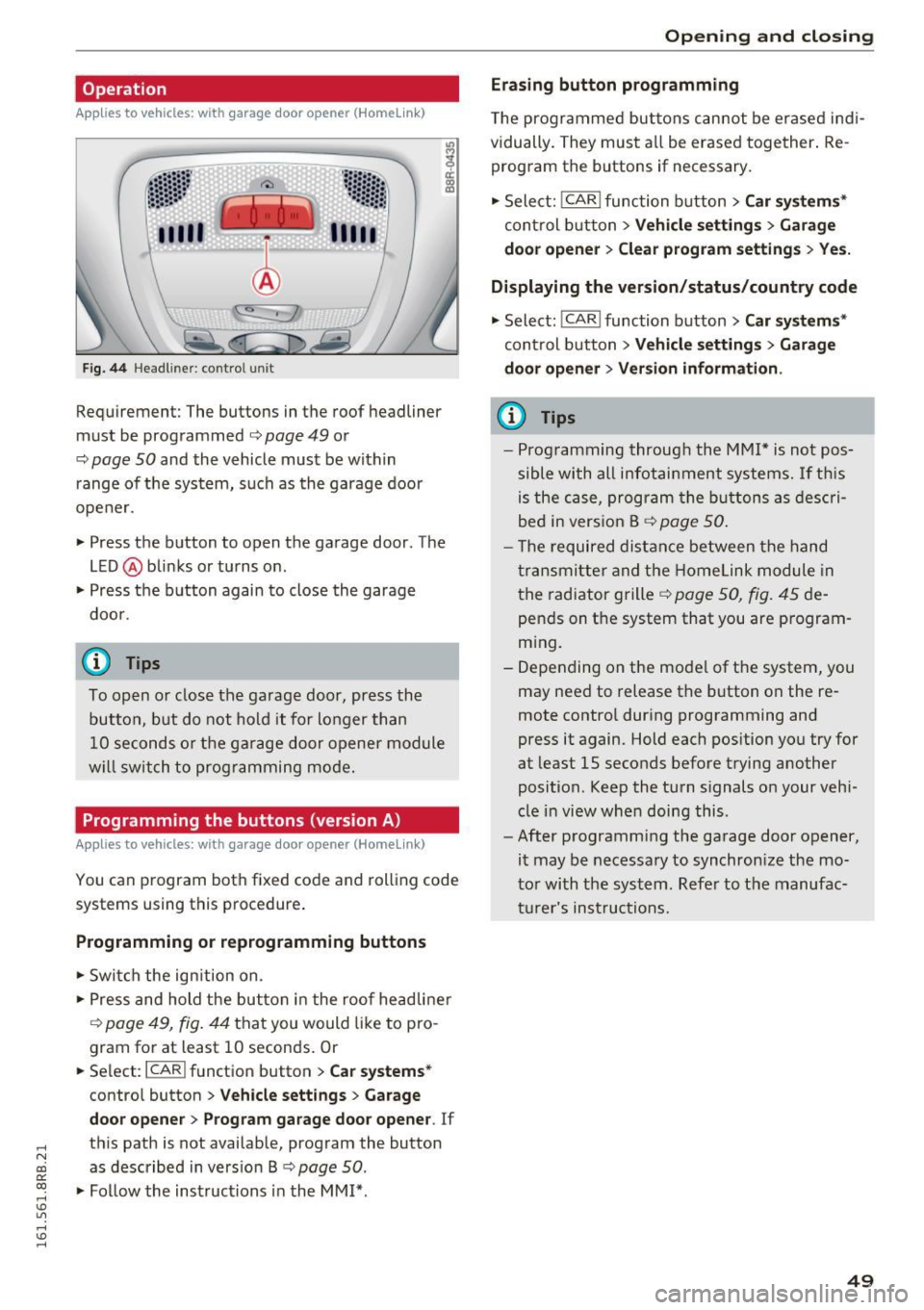
Fig. 44 Headl iner: c on tro l uni t
Requiremen t: The buttons in the roof headliner
must be programmed
c:> page 49 or
c::> page 50 and the vehicle must be within
range of the system, such as the garage door
opener.
" Press the button to open the garage door . The
LED @blinks or turns on .
" Press the button again to close the garage
door .
@ Tips
To open or close the garage door, press the
button, but do not hold it for longer than
10 seconds or the garage door opener module
will switch to programming mode.
Programming the buttons (version A )
Applies to vehicles: with garage door opener (Homelink)
You can program both fixed code and rolling code
systems using this procedure.
Programming or reprogramming buttons
"Switch the ignition on .
"Press and hold the button in the roof headliner
c::> page 49, fig. 44 that you would like to pro
gram for at least
10 seconds. Or
.. Select:
I CAR I function button > Car systems*
control button > Vehicle settings > Garage
door opener> Program garage door opener .
If
this path is not available, program the button
as described in version B
c::> page 50.
"Follow the instructions in the MMI* .
Opening and closing
Erasing button programming
The programmed buttons cannot be erased indi
vidually. They must all be erased together. Re
program the buttons if necessary.
"Select:
! CAR ! function button> Car systems*
control button > Vehicle settings > Garage
door opener> Clear program settings > Yes.
Displaying the version/status/country code
"Select: ! CAR ! function button> Car systems*
control button > Vehicle settings > Garage
door opener> Version information.
(D Tips
- Programming through the MMI* is not pos
sible with all infotainment systems. If this
is the case, program the buttons as descri
bed in version B
c::> page 50.
- The required distance between the hand
transmitter and the Homelink module in
the radiator grille
c::> page 50, fig. 45 de
pends on the system that you are program
ming.
- Depending on the model of the system, you
may need to release the button on the re
mote control during programming and
press it again. Hold each position you try for
at least
15 seconds before trying another
position . Keep the turn signals on your vehi
cle in view when doing this .
- After programming the garage door opener,
it may be necessary to synchronize the mo
tor with the system. Refer to the manufac
turer's instructions.
49
Page 52 of 300
Opening and clo sin g
Programming the buttons (version B)
Applies to vehicles: with garage door opener (Homelink)
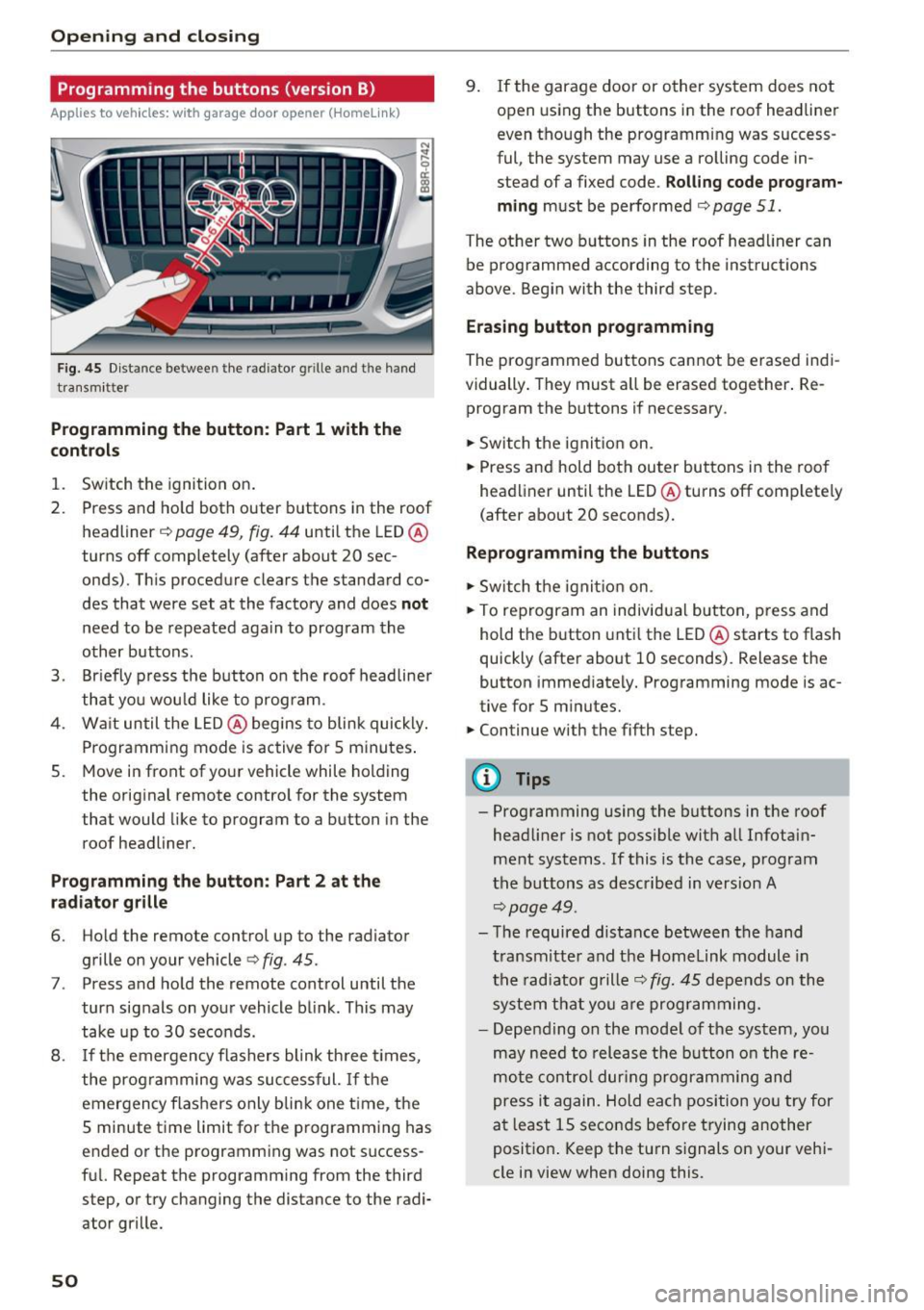
Fig. 45 Dist an ce betwee n th e rad iator g rille an d th e hand
tra nsm itt er
Programming the button : Part 1 with the
contr ols
1. Switch the ignition on.
2. Press and ho ld both outer buttons in the roof
headliner ~
page 49, fig. 44 until the LED @
turns off completely (after about 20 sec
onds). This procedure clears the s tandard co
des that were set at the factory and does
not
need to be repeated again to program the
other buttons .
3. Br iefly p ress the b utton o n the roof headliner
that you wou ld like to program .
4. Wa it until the LED @ begins to blink quickly .
Programming mode is active for 5 minutes .
5. Move in front of yo ur vehicle while holding
the original remote control for the system
t hat would like to program to a button in the
roof headliner.
Prog ramming th e butt on : Part 2 at the
r a d iat or gr ille
6. Ho ld the remote control up to the radiator
grille on your vehicle¢
fig. 45 .
7. Press and hold the remote control until the
turn signals on your vehicle blink . This may
take up to 30 seconds.
8 .
If the emergency flashers blink th ree t imes,
the programming was suc cessful.
If th e
emergency flashers only b lin k one t ime , the
5 minute time limit for the p rogramming has
ended or the programm ing was not success
fu l. Repeat the programming from the third
step, or try changing the distance to the radi
ator grille.
50
9. If the garage door or other system does not open using the buttons in the roof headliner
even though the programming was success
ful , the system may use a ro lling code in
s tead of a fixed code .
Rolling code prog ram
m ing
must be performed ¢ page 51.
The other two b uttons in the roof head liner can
be programmed according to the instruct ions
above . Begin with the third s tep .
Era sing button prog ramm ing
The prog rammed buttons cannot be erased indi
vidually . They must a ll be erased tog ether . Re
program the buttons if necessary .
.. Switch the ignit io n on.
.. Press and hold both outer bu ttons in the roof
headliner until the LED @turns off comp lete ly
( after about 20 seconds).
Reprogramm ing the buttons
.. Switch the ignit io n on .
.. To reprogram an individual button, press and
hold the button unti l the LED @starts to flash
quickly (after about 10 seconds) . Release the
button immed iately. Programming mode is ac
tive for 5 m inu tes.
.. Continue with the fifth step.
@ Tips
- Programming using the buttons in the roof
headliner is not possible with all Infotain
ment systems . If this is the case, program
the buttons as descr ibed in version A
¢ page 49 .
-The required distance between the hand
transm itte r and the Homelink module in
the radiator grille~
fig. 45 depends o n the
system that you a re prog ramming.
- Depending on the mode l of the system, you
may need to release the b utton o n the re
mote contro l dur ing programming and
press it again. Hold each position yo u try for
a t least 15 seconds before trying another
posit ion . Keep the turn s ignals on your vehi
cle in view when doing this .
Page 58 of 300
Lights and Vision
@ Interior lights
Press the switch
~fig. 51 in the co rresponding
position.
0 -Inte rior lights off
I -Interior lights on
If the sw itch is in the center position, the interio r
lighting is controlled automatically.
@ Front /rear reading lights
To tur n a reading light on/off, press the button
@~ fig. 51 or~fig . 52.
The appearance and location of the rea r read ing
lights may differ depending on the model.
Instrument illumination
The basic brightness of the illum ination for the
instruments, the center console and the display
can be adjusted.
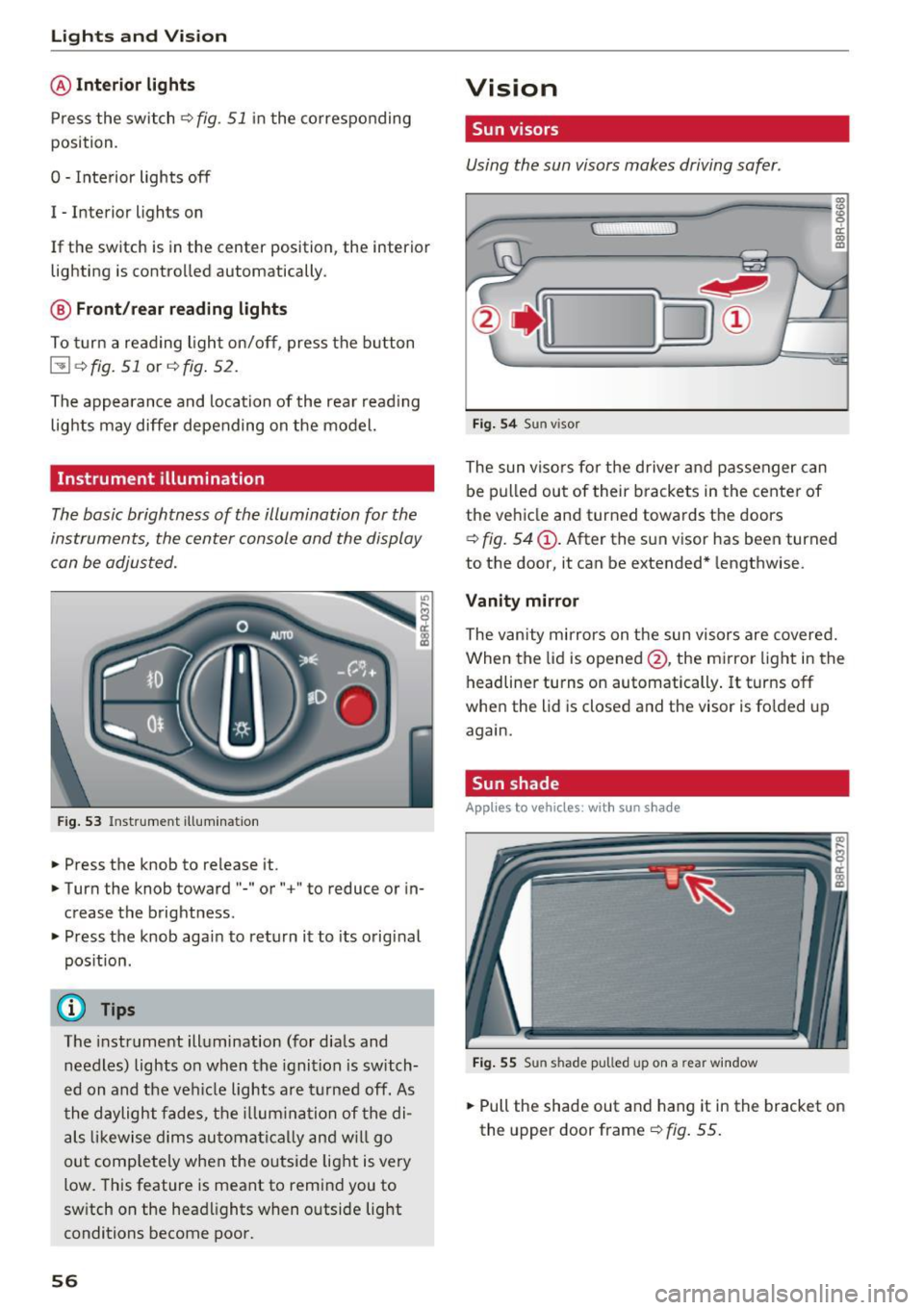
Fi g. 53 Instrument illum inat io n
.. Press the knob to release it .
.. Turn the knob toward"-" or" +" to reduce or in
c rease the brightness .
.. Press t he knob again to retu rn it to its original
pos ition.
(D Tips
T he instrument illumination (fo r dials and
needles) lights o n when the ignition is switch
e d on and the ve hicle lights are turned off. As
t he daylight fades, t he illum ina tion of the di
als likewise dims au tomati ca lly and w ill go
out comp letely when the outside light is very
low. This feature is meant to remind you to
sw itch on the head lights when o utside light
conditions become poor.
56
Vision
Sun visors
Using the sun visors makes driving safer .
Fig. 54 Sun v isor
The sun viso rs fo r th e driver and passenger can
be p ulled out of their brackets in the center of
the ve hicle and turned towa rds t he doors
~ fig. 54@. After the s un v isor has been turned
to the door, it can be extended* lengthwise.
Vanity mirror
The van ity mirrors on t he sun visors are covered.
When the lid is opened @, the mi rror light in the
headliner turns on automatically . It turns off
when the lid is closed and the visor is fo lded up
again.
Sun shade
App lies to vehicles, with sun s had e
Fig . 55 Sun shade pulled up on a rear window
.. Pull the shade out and hang it in the bracket on
the upper door frame~
fig. 55.
Page 59 of 300
..... N
co ~ CX)
.....
"' U"I
.....
"' .....
Windshield wipers
Switching the windshield wipers on
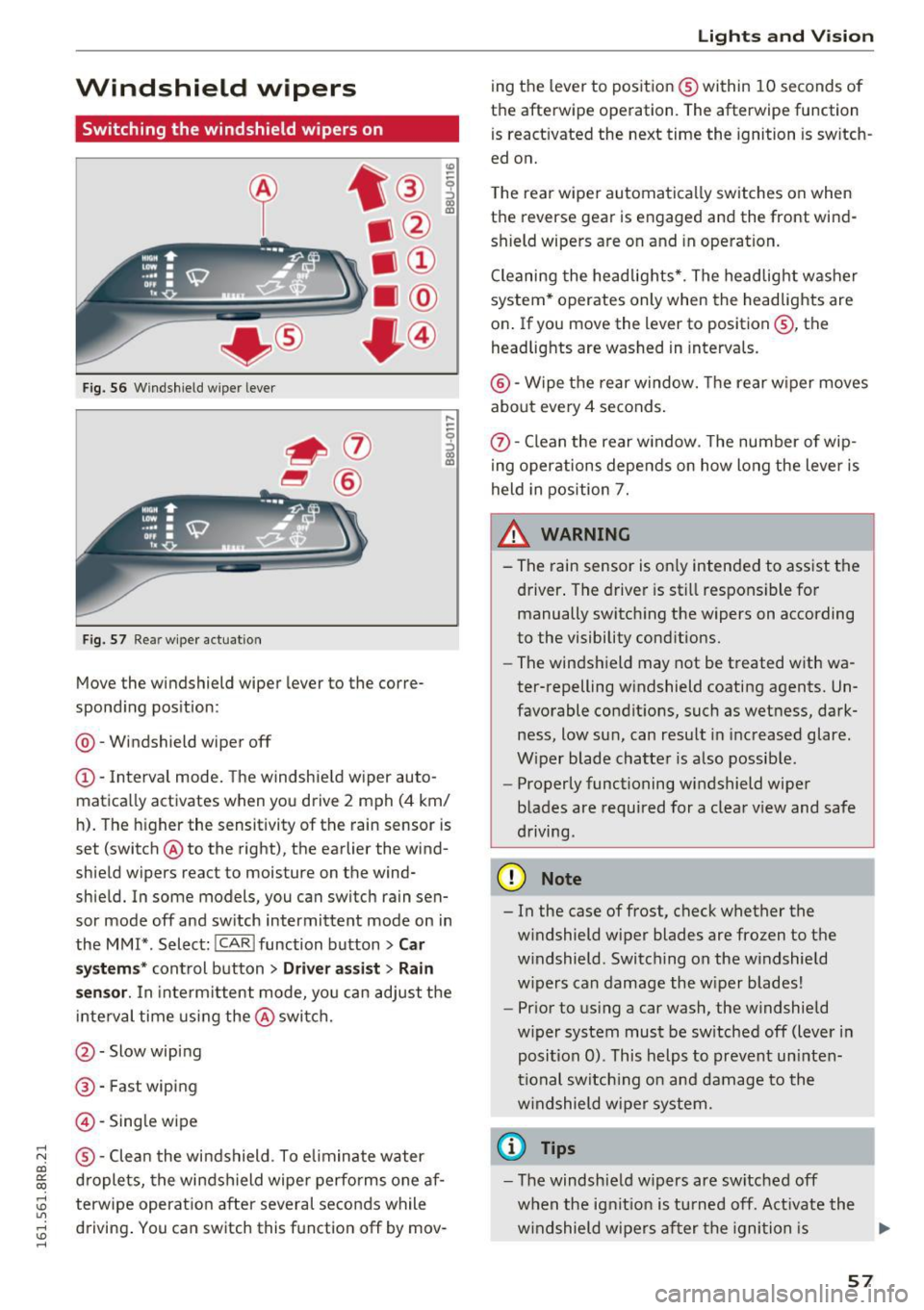
Fig. S6 Windshield wiper lever
Fig. S7 Rea r w ipe r actuation
Move the windshield wiper lever to the corre·
spond ing pos ition:
@ · Windshield wiper off
(D · Interval mode. The windshield w iper auto
matica lly activates when you drive 2 mph (4 km/
h ). The higher the sensitivity of the rain sensor is
set (switch @ to the right), the earlier the wind
shield w ipers react to moisture on the wind·
shie ld. In some models, you can switch rain sen·
sor mode off and sw itch intermittent mode on in
the MMI* . Select:
!CARI function button> Car
sy stem s*
control button > Dri ver assist > Rain
s e nsor .
In inte rm ittent mode, yo u can adjust the
i nte rval time using the @switch.
@ · Slow wiping
® ·Fast wiping
@· Single wipe
® ·Clean the windshield . To e liminate water
d rople ts, the windshield wipe r perfo rms one af
terwipe operat io n after several seconds while
d riving . You can switch this f unction off by mov-
Lights and V ision
ing the lever to posit ion ® within 10 seconds of
the afterwipe operation. The afterwipe function
is react ivated the next time the ignition is sw itch
ed on.
T he rear wiper automatically switches on when
t h e reverse gear is engaged and the front wind ·
shield wipers a re on and in ope ration.
Cleaning the headlights *. The headlight washer
system * operates only when the headlights are
on . If you move the lever to position ®, the
headlights are washed in interva ls.
@ ·W ipe the rear window. The rear w iper moves
about eve ry 4 seconds .
(!)-Clean the rear w indow . T he number of wip·
ing oper ations depends on how long the lever is
held in position 7.
_&. WARNING
-
- The rain sensor is on ly intended to ass ist the
d river. The drive r is st ill respons ible fo r
manually switch ing the wipers on according
to the visibility conditions.
- The win dshield may not be treated w ith wa
ter-repelling w indshield coating agents. Un
favorable condit ions, such as wet ness, dark·
ness, low su n, can result in increased glare.
W iper blade chatte r is also possib le.
- Properly functioning windshield wipe r
b lades are required for a clea r view and safe
driving.
(D Note
- In the case of frost, check w hether the
w indshield wiper blades are frozen to t he
w indshield . Switching on the w indshield
w ipers can damage the w iper blades!
- Pr ior to us ing a car wash , the w indshield
w iper system must be sw itched off (lever in
posi tion 0) . This helps to prevent un inten
ti onal sw itch ing o n and dam age to the
w indshield wiper system.
(D Tips
- T he windshie ld w ipers are switched off
when the ignit io n is tu rned off. Act ivate the
w indshield wipe rs af ter the igni tion is .,.
57
Page 63 of 300
..... N
co ~ CX)
..... I.Cl U"I
..... I.Cl .....
-If swa llowed and person is conscious, rinse
mouth with water for at least 15 m inutes.
Do not induce vomit ing unless instructed to
do so by medical professional. Get medical
attent ion immed iately.
(D Note
Liquid electrolyte leaking from broken m irror
glass will damage any plastic surfaces it
comes in contact with. C lean up spilled elec
trolyte immediately w ith clean water and a
sponge.
@ Tips
- Switch ing off the dimming function of the
i nside rear v iew mirror also deact ivates the
automat ic dimming function of the exte rior
mir rors*.
- The automatic d imm ing mirrors do not dim
when the interior lighting is turned on or
the reverse gea r is selected .
- Automat ic dimming for the m irror on ly op
erates prope rly if the light str iking the in
s ide mirror is not hinde red by othe r objects.
Digital compass
Activating or deactivating the compass
A ppl ies to vehicles: with digital compass
The direction is displayed on the interior rear
view mirror.
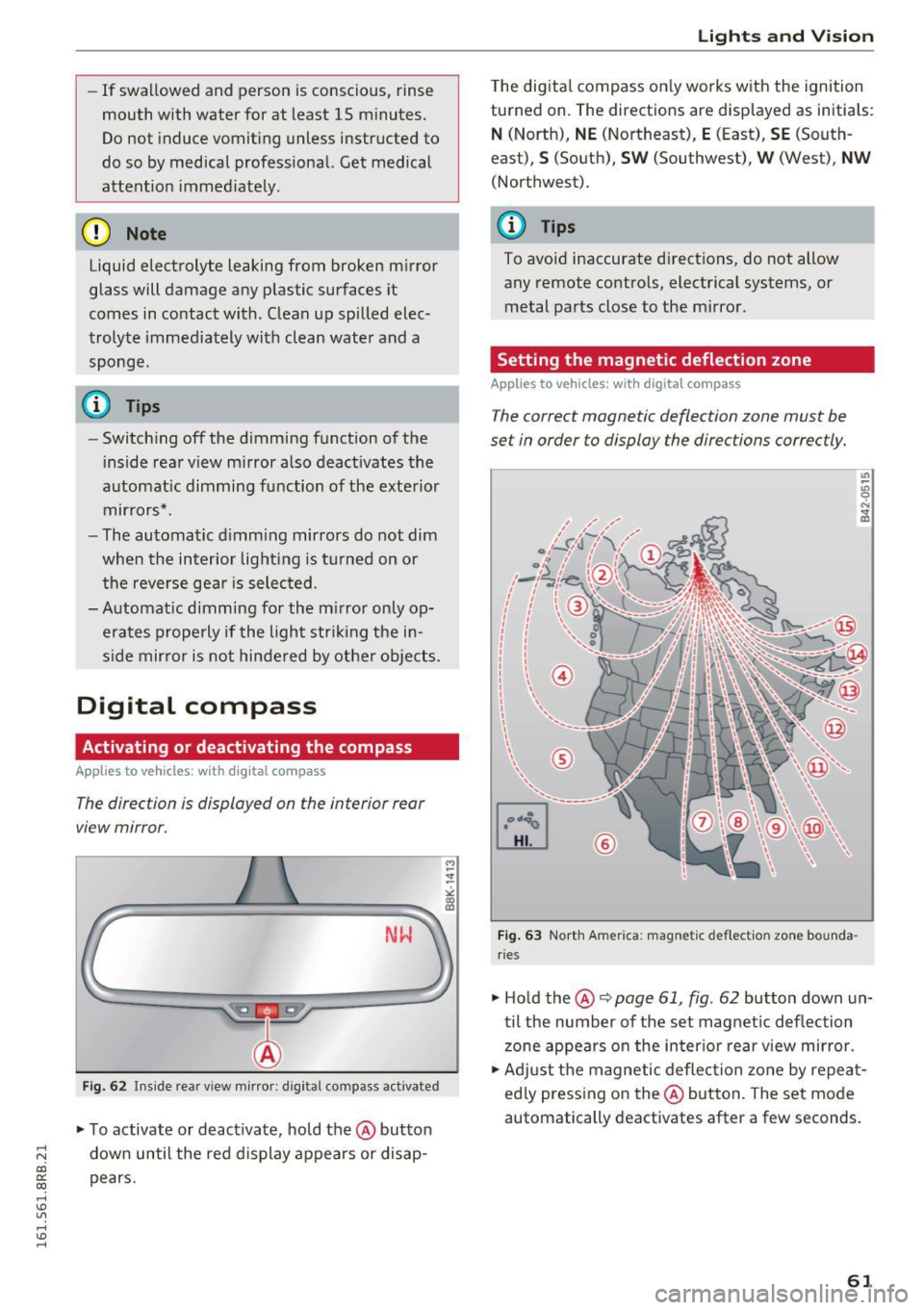
Fi g. 62 Inside rea r view m irror: d igital compass activated
... To activate or deactivate, hold the @button
down until the red d isplay appears or disap
pears.
Lights and V ision
The digita l compass on ly works with the ignition
turned on. The directions are disp layed as initia ls :
N (North), NE (Northeast), E (East), SE (South
east),
S (South), S W (Southwest), W (West), NW
(Northwest).
(!_) Tips
To avoid inaccurate d irect ions, do not allow
any remote controls, electrical systems, or
metal parts close to the mirror.
Setting the magnetic deflection zone
App lies to vehicles: wi th digita l co mp ass
The correct magnetic deflection zone must be
set in order to display the directions correctly.
®
F ig . 63 No.rth Ame rica: magnetic deflection zone bounda
ri es
... Hold the@~ page 61, fig . 62 button down un
til the number of the set magnet ic deflection
zone appears on the in ter io r r ear view mirror.
... Adjust the magnetic deflection zone by repea t
ed ly press ing on the@ button. The set mode
automatically deactivates after a few seconds .
61
Page 80 of 300
Sea ts and stor age
when accelerat ing or when app lying the
brakes or when driving around a corner.
- When you are driving make sure that any
thing you may have placed in the center con
so le or other storage locations cannot fall
out into the footwells. In case of sudden
braking you would not be able to brake or
acce le rate .
- Any pieces of cloth ing that you have hung
up must not interfere with the driver's view.
The coat hooks are designed only for light
weight cloth ing . Neve r hang any clothing
with hard , po inted or he avy objects in the
poc kets on the coat hooks . Dur ing s udden
braking or in an accident -especia lly i f the
airbag is dep loyed -these objects could in
jure any passengers inside the vehicle .
Glove compartment
The glov e comportm ent is illuminat ed and con
be locked.
F ig . 93 Glove co mpa rt men t
To open glove compartment
.. Pull the handle in the d irection of the arrow
c> fig . 93 and swing the cover down to open .
To clo se glove c omp artm ent
.. Push the glove compartment lid upward until
the lock engages .
There are ho lders for a pen and a pad of paper in
the glove compartment lid.
On the r ight side in the glove compa rtment is a
hol der wi th the key body into w hich the emerge n
cy key must be clipped to be able to star t the ve
h icle.
78
A WARNING
To reduce the risk of persona l injury in a n acci
dent or sudde n stop, a lways keep the glove
compartment closed while driving .
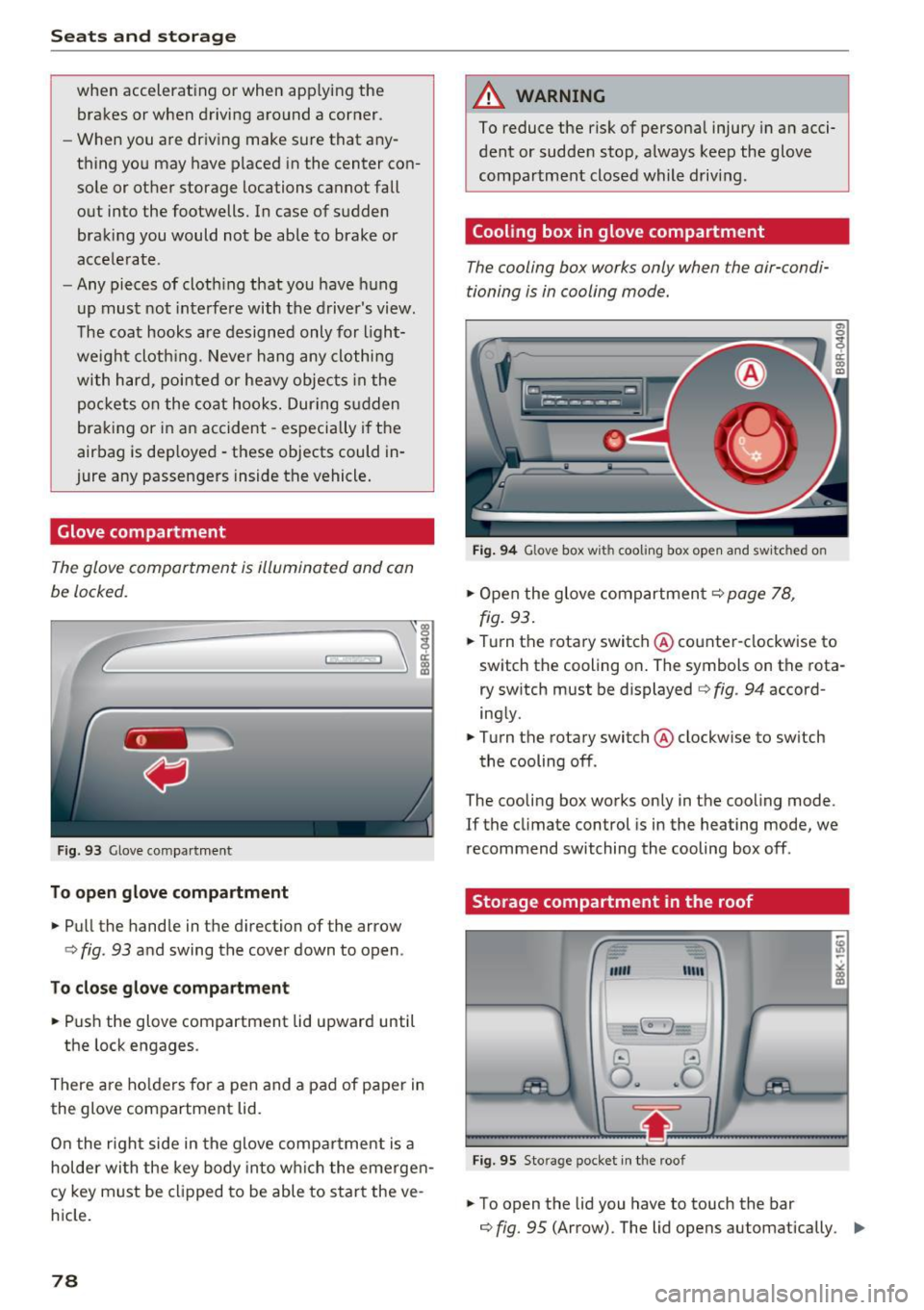
Cooling box in glove compartment
The cooling box works only when the air-condi
tioning i s in cooling mode.
Fig . 94 Glove box w ith cooli ng box ope n and sw itc hed on
.. Open the glove compartmen t c> page 78,
fig. 93 .
.. Tu rn the rotary switch @ counte r-clockwise to
switch th e cooling on . The symbols on th e rota
ry sw it c h must be displayed c> fig . 94 accord
ing ly .
.. Turn the rotary switch @ clockwise to sw itch
the cooling off .
The cooling box works only in the cooling mode.
If the climate con trol is in the heating mode, we
recommend switching the cooling box off .
Storage compartment in the roof
""' "'"
-~
@ ..!J
O .. ~O
Fig. 95 Sto ra g e pocket in t he roof
.. To open the lid you have to touch the bar
c> fig. 95 (Arrow). The lid open s automatically . ..,.
Page 83 of 300
..... N
co ~ CX)
rl I.Cl U"I
rl I.Cl .....
Warm and cold
Operation
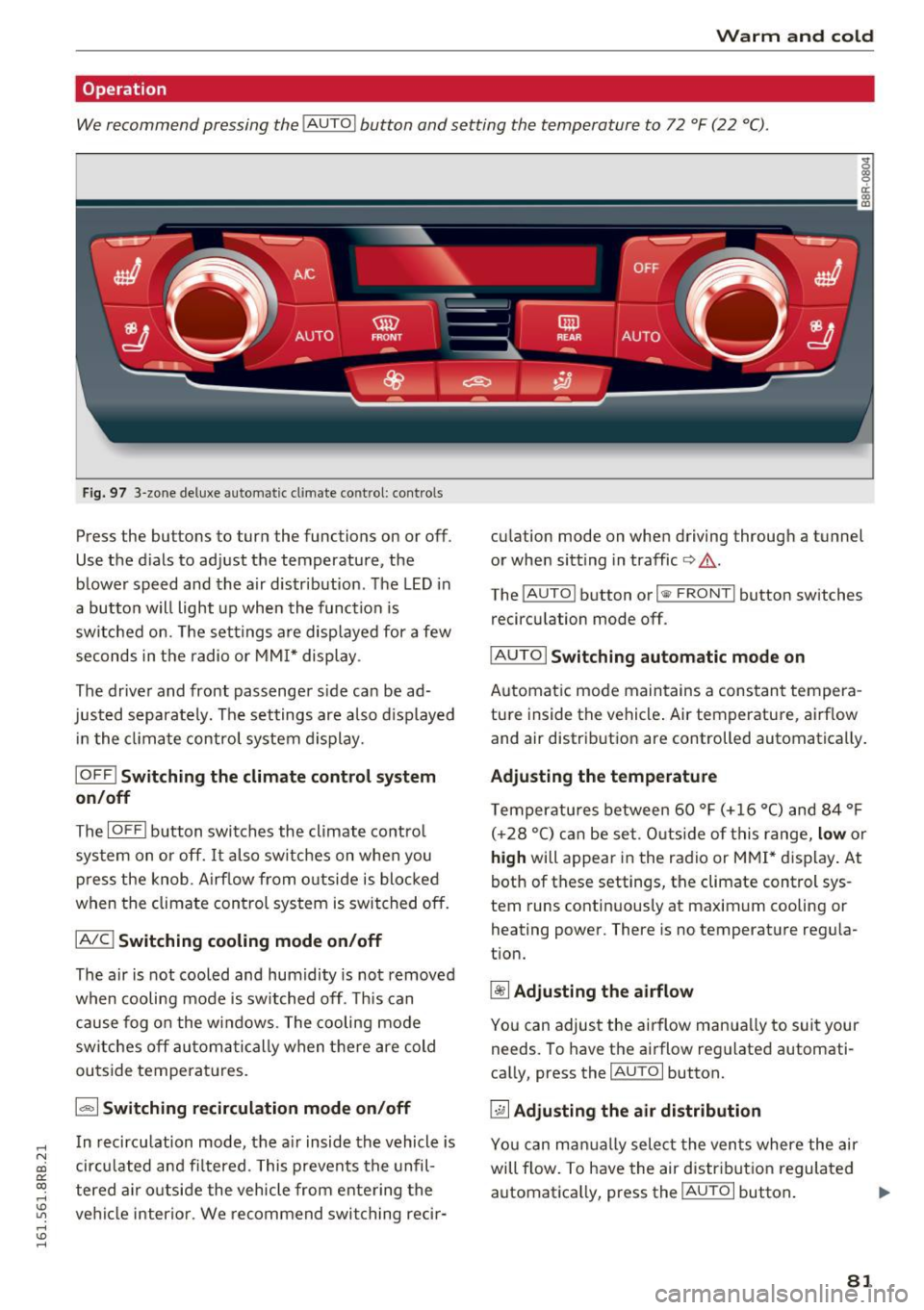
We recommend pressing the !AUTO ! button and setting the temperature to 72 °F (22 °C).
Fig. 97 3-zone deluxe automatic cl imate control: co ntrols
Press the buttons to turn the functions on or off .
Use the d ials to adjust the temperature, the
blower speed and the air distr ibut ion. The LED in
a button w ill light up when the function is
switched on. The settings are displayed for a few
seconds in the radio or MMI* display .
The driver and front passenger s ide ca n be ad
justed separately. The settings are also displayed
in t he climate control system display.
IOFFI Switching the climate control system
on/off
The I OF Fi button switches the climate contro l
system on or off.
It also sw itches on when you
press the knob. Airf low from o utside is blocked
when the climate control system is switched off.
IA/C l Switching cooling mode on/off
The air is not cooled and humidity is not removed
when cooling mode is switched off. This can
cause fog on the windows. The cooling mode
switches off automatically when there are cold
outside temperat ures.
1.,,., 1 Switching recirculation mode on/off
In recirculation mode, the air inside the vehicle is
circu lated and fi ltered. This prevents the unfil
tered air o utside the vehicle from ente ring the
ve hicl e interior. We recommend switching rec ir- cu
lation mode on when driving through a tunnel
or when sitt ing in traffic
c> .&. .
The !AUTO I button or I @ FRONT I button switches
recirculation mode off.
I AUTO I Switching automatic mode on
Automatic mode maintains a constant tempera
ture inside the vehicle . Air temperature, airf low
and air distribut ion are controlled automatically .
Adjusting the temperature
Temperatu res between 60 °F (+ 16 °C) and 84 °F
( +2 8 °C) ca n be set. O uts ide of this range,
low or
high will appear in the radio or M MI* display. At
both of these settings, the climate control sys
tem runs continuous ly at maximum cooling or
heating power. There is no temperat ure regula
t ion.
~ Adjusting the airflow
You can adjus t the airflow manua lly to suit your
needs. To have the airflow reg ulated automati
ca lly, press the
IAUTO I button.
~ Adjusting the air distribution
You can man ually select the ven ts where the air
will flow. To have the air distribut ion regulated
automatica lly, press the
IAUTOi button . ..,.
81
Page 84 of 300
Warm and cold
[ii Adjusting seat heating*
P ressing the button switches the seat heating on
at the highest setting (level 3). The LEDs indicate
the temperature level. To reduce the tempera
ture, press the button again. To switch the seat heating
off, press the button repeatedly until the
LED turns
off.
After 10 minutes, the seat heating automatically
switches from level 3 to level 2.
lil Adjusting seat ventilation*
Pressing the button switches the seat vent ilation
on at the highest sett ing (level 3). The LEDs indi
cate the venti lation level. To reduce the ventila
tion level, press the button again. To sw itch the
seat ventilation
off, press the button repeatedly
until the LED turns
off.
l qo, FRONT I Switch the defroster on/off
The windshield and side windows are defrosted
or cleared of condensation as quickly as possible.
The maximum amount of air flows main ly from
the vents below the windshield. Recirculation
mode switches off. The temperature should be
set to 72 °F (22 °() or higher. The temperature is
controlled automat ically .
The
IAUTOI button switches the defroster off.
IQiil REARI Switching rear window heater on/
off
The rear window heater on ly operates when the
engine is running. It switches off automatica lly
after a few minutes, depending on the outside
temperature.
To prevent the rear window heater from switch ing
off automatically, press and ho ld the l(jji) REARI
button for more than 2 seconds. This remains
stored until the ign it ion is switched off.
Air vents
You can open and close the center and rear air
vents using the thumbw heels . The levers adjust
the direction of the airflow from the vents.
You can adjust the air temperature in the rear by
turning the thumbwheel toward the red side to
82
make it warmer or toward the blue side to make
it coo ler.
A WARNING
- Do not use the recirculation for extended
periods of time. The windows could fog up
since no fresh air can enter the vehicle. If
the windows fog up, press the air rec ircula
tion button again immed iately to switch
off
the air rec irculat ion function or select de
frost.
- Individuals with reduced sensit iv it y to pain
or temperature could develop burns when
using the seat heating* function . To reduce
the risk of injury, these individuals should
not use seat heating.
(D Note
To avoid damage to the heating elements* in
the seats, do not kneel on the seats or place heavy loads on a small area of the seat.
Setup
-
The basic climate control settings can be adjust
ed in the radio or MM!".
"'Select : !CAR I function button> A/C control but
ton. Or
"' Select:
I CAR I function button > Car systems*
control button >
A/C.
Automatic recirculation
When switched on, automat ic rec irculation con
tro ls the recirculation mode automatically. If the
windows fog up, press the
I® FRO NT ! button.
Synchronization
When synchron izat ion is switched on, the same
settings are applied to both the dr iver and front
passenger , except for the seat heating/ventila
tion* . Synchronization switches
off when you ad
just the settings on the front passenger's side.
You can also switch synchronizat ion on by press -
i ng and holding the knob on the driver's side .
Ill>-
Page 93 of 300
,....,
N
co
er::
co
,....,
that you are developing enough driving force at
the wheels by depressing the accelerator .
Depending on the weight of the r ig (vehi cle and
tra iler) and the severity of the incline, you may
ro ll backwards as you start . You can prevent roll
ing backwards by holding the parking brake
switch pulled out and accelerating -just as you
wou ld when starting on a hill with a conventiona l
h and brake .
Emergency braking
In the event that the conven tional brake system
fails or locks .
~ In an emergency, pull the sw itch and cont inue
to pull it to slow your veh icle down with the
parking b rake.
~ As soon as you release the switch or accelerate,
the b raking process stops .
If you pull the sw itch and hold it above a speed of
about 5 mph (8 km/h) , the eme rgency braking
function is in it iated . The vehicle is braked at all
four wheels by activating the hydraulic brake sys
te m. T he b rake perfo rman ce is sim ila r t o making
an em ergen cy sto p ~ ,& .
In o rder not to activate the emergency brak ing by
mista ke, an audib le wa rn ing tone (buzze r)
sounds w hen the sw itch is p ulled. As soon as t he
sw itch is rele ased, or the acce le ra to r p edal is de
p ressed, eme rgency bra king stops.
A WARNING
Emergency bra king should only be use d in an
emergency, w hen the normal foot brake has
fai led or the bra ke pedal is obstructed . Using
the par king b rake to perfo rm emergency
brak ing will slow your vehicle down as if you
had made a full bra ke ap plication . The laws of
physics cannot be suspended even wi th ESC
a n d its associated components (A BS, ASR,
E DS). In c orn ers and when road or weath er
c ondi tions are bad, a full brake ap plication
c an ca use the vehicle to sk id or the rear end to
break away· r isking an accident .
Driving
Driver messages in the instrument cluster
Caution: Vehicle parked too steep
T h is message appears when the pa rking bra ke is
applie d on an in cl in e that exceeds about 30%.
In this case the braki ng power o f the pa rking
brake may not be adequate to prevent the ve hi
cle from roll ing uninten tionally.
Press b rake pedal to release park ing brake
This dr iver message appears when the sw itch to
re lease the par king brake was pressed. The park
ing brake can only be released if you step o n the
brake pedal and at the same time press the
switch or you automatica lly re lease the park ing
bra ke w ith the sta rting ass ist ~
page 90 .
r.lJ Parking brake malfunction!
This dr iver message appears together w ith the
yellow
rlJ symbol whe n there is a parki ng brake
malfu nction .
Start/Stop system
Description
Applies to vehicles: wit h Start-Stop-Syste m
The Start -Stop -System can he lp increase f uel
economy and reduce CO2 emissions.
In the Start -S top -mode, the engine sh uts off au
tomat ica lly when the vehicle is stoppe d, such as
at a t raff ic light. The ignition remains switched
on d uring this stop phase. The eng ine will be a u
tomat ically restarted when needed.
T he last Start-Stop -System setting (on/off usin g
the b utton
10~ 1) will be restored when the ign i
t ion is turned on. The LED in the
10'" 1 button turns
on when the Start-Stop-System is switched off
manua lly .
Ba sic requirements for the Start-Stop mode
- The d river 's door is closed.
- The driver 's sea t belt is latc hed.
- The hood is closed.
- The vehicle must have bee n driven fast er than
2.5 mph (4 km/h) s in ce the last s top.
- A t railer is not hitched to the vehicle . .,.
91