wheel AUDI Q5 2016 User Guide
[x] Cancel search | Manufacturer: AUDI, Model Year: 2016, Model line: Q5, Model: AUDI Q5 2016Pages: 300, PDF Size: 75.02 MB
Page 119 of 300
..... N
co ~ CX)
..... I.Cl U"I
..... I.Cl ..... -
Improper reliance on the side assist system
can cause collisions and serious personal in
jury:
- Never rely only on side assist when chang
ing lanes.
- Always check rear view mirrors to make
sure that it is safe to change lanes.
- Side assist cannot detect all vehicles under
all conditions -danger of accident!
- Please note that side assist indicates there
are approaching vehicles, or vehicles in your
blind spot, only after your vehicle has
reached a driving speed of at least 19 mph
(30 km/h).
- In certain situations, the system may not
function or its function may be limited. For
example:
- if vehicles are approaching or being left
behind very quickly. The display may not
turn on in time.
- in poor weather conditions such as heavy
rain, snow or heavy mist.
- on very wide lanes, in tight curves or if
there is a rise in the road surface. Vehicles
in the adjacent lane may not be detected
because they are outside of the sensor
range.
(D Note
The sensors can be displaced by impacts or
damage to the bumper, wheel housing and
underbody. This can affect the system. Have
your authorized Audi dealer or authorized
Audi Service Facility check their function.
(D Tips
-If the window glass in the driver's door or
front passenger's door has been tinted , the
display in the exterior mirror may be misin
terpreted.
- For Declaration of Compliance to United
States FCC and Industry Canada regulations
¢page 283.
Audi side assist
Activating and deactivating
Applies to vehicles: with A udi side ass ist
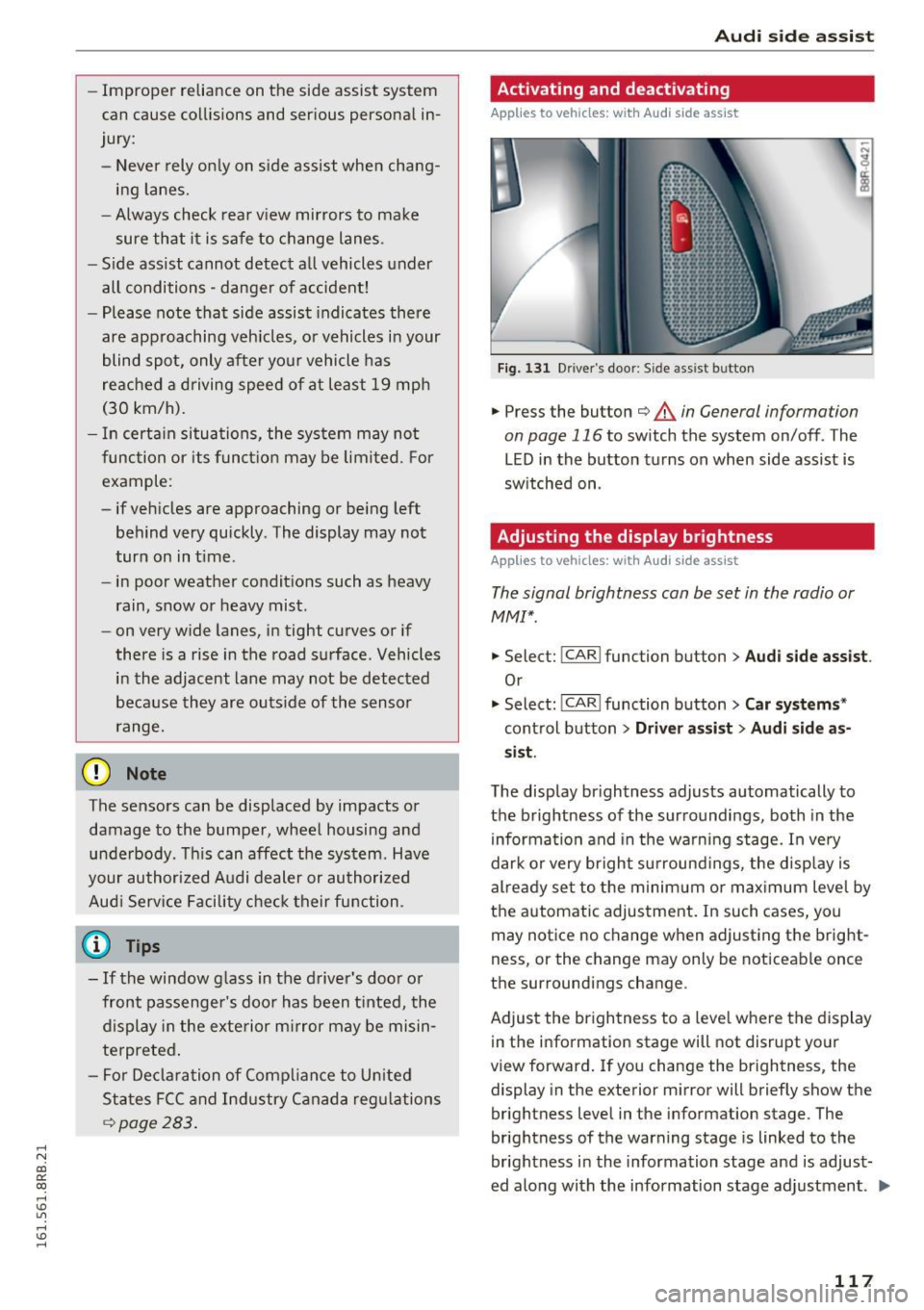
Fig. 131 Dr iver 's do or: Sid e assis t button
.,. Press the button ¢ & in General information
on page 116
to switch the system on/ off . The
LED in the button turns on when side assist is
switched on .
Adjusting the display brightness
Applies to vehicles: with Audi side assist
The signal brightness can be set in the radio or
MM!*.
.,. Select: !CAR I function button> Audi side assist .
Or
.,. Select: !CAR I function button> Car systems *
control button > Driver assist > Audi side as
sist.
The display brightness adjusts automatically to
the brightness of the surroundings, both in the
information and in the warning stage. In very
dark or very bright surroundings, the display is
already set to the minimum or maximum level by
the automatic adjustment. In such cases, you
may notice no change when adjusting the bright
ness, or the change may only be noticeable once
the surroundings change .
Adjust the brightness to a level where the display
in the information stage will not disrupt your
view forward. If you change the brightness, the
display in the exterior mirror will briefly show the
brightness level in the information stage . The
brightness of the warning stage is linked to the
brightness in the information stage and is adjust
ed along with the information stage adjustment . ..,.
117
Page 120 of 300
Audi side assist
(D Tips
-Si de assist is not active w hile you are mak
i ng t he a dju stment .
- You r settings are automatic ally store d an d
assi gned to t he remote co ntrol key being
u sed.
Driver messages
A ppl ies to ve hicles: w ith Audi side assis t
If side ass ist switches off by itself, the LED in the
button turns off a nd a message will appear in the
i n str ument cluster d isp lay :
Audi side assist unavailable: Sensors blocked
The rada r senso rs ' vision is affected. Do not cove r
the area in front of the sensors with b ike wheels,
stickers , dirt or other objects. Clean the area in
front of the sensors, if necessary
c> page 116 ,
fig. 130.
Audi side assist: Currently unavailable
Side assist cannot be switched on tempo rar ily be
cause there is a malfunction (for example, the
battery charge level may be t oo low).
Audi side assist: System fault!
The system cannot guarantee that it wi ll detect
ve hicl es co rrectly and it is switc hed off. The sen
sors have been d isp laced or are fa ulty. Have the
system checked by an a uthorized Audi dealer or
author ized Audi Se rvice Facility soon.
Audi side assist: Unavailable when towing
Side assist sw itches off automati ca lly w hen a fac
to ry -installed trailer hitch is connected to t he
electrical connector on the trailer. The re is no
gua rantee the system w ill sw itch off whe n using
a retrofitted tra ile r hitc h. Do not use side assist
when towing a trailer.
118
Page 127 of 300
,....,
N
co
er::
co
,....,
running while in gear. If you must leave
your vehicle when the engine is running, ac tivate the parking brake and move the selec
tor lever to P.
- Power is still transmitted to the wheels
when the engine is running at idle. To pre
vent the vehicle from "creeping", you must keep your foot on the brake when the en
gine is running and the selector lever is in D/
5 or R or "tiptronic" mode is selected .
- Do not press the accelerator pedal when
changing the selector lever position while
the vehicle is stationary and the engine is running.
- Never shift into R or P while driving.
- Before driving down a steep slope, reduce
your speed and shift into a lower gear with "tiptronic" .
- Do not ride the brakes or press the brake
pedal too often or too long when driving
down a hill. Constant braking causes the
brakes to overheat and substantially re
duces braking performance, increases brak
ing distance or causes complete failure of
the brake system .
- To prevent the vehicle from rolling back
when stopping on inclines, always hold it in
place with the brake pedal or parking brake.
- Never hold the vehicle on an incline with a
slipping clutch. The clutch opens automati
cally when it becomes too hot from the
overload . An indicator lamp
[ijJ illuminates
and a driver message appears
c> page 126
when the clutch is overloaded .
- If the engine must remain running, never
have any driving position engaged when
checking under the hood.
Make sure these
lector lever has securely engaged and is
locked in P with the parking brake set
c> page 220. Otherwise, any increase in en
gine speed may set the vehicle in motion,
even with the parking brake applied.
(D Note
- When stopping on an incline, do not try to
hold the vehicle in place by pressing the ac
celerator pedal while a driving gear is se-
Automatic transmission
lected. This can cause the transmission to
overheat and can damage it. Activate the
parking brake or press the brake pedal to
prevent the vehicle from rolling.
- Allowing the vehicle to roll when the engine
is stopped and the selector lever is in N will
damage the transmission because it is not
lubricated under those circumstances.
(!) Tips
For safety reasons, the parking brake is re
leased automatically only when the driver's
safety belt is engaged in the buckle.
Hill descent control
The hill descent control system assists the driver
when driving down decline s.
Hill descent control is activated when the selec
to r lever is in D/S and you press the brake pedal.
The transmission automatically selects a gear
tha t is suitable for the incline. Hill descent con
trol tries to maintain the speed achieved at the
time of braking, within physical and technical
limitations. It may still be necessary to adjust the
speed with the brakes .
Hill descent control switches off once the decline
levels out or you press the accelerator pedal.
When the speed is set in the cruise control sys
tem
c> page 95 , hill descen t control is also ac ti
vated .
A WARNING
Hill descent control cannot overcome physical
limitations, so it may not be able to maintain
a constant speed under all conditions . Always
be ready to apply the brakes.
125
Page 128 of 300
Automatic transmission
Manual shift program
Using the manual shift program you can man
ually select gears .
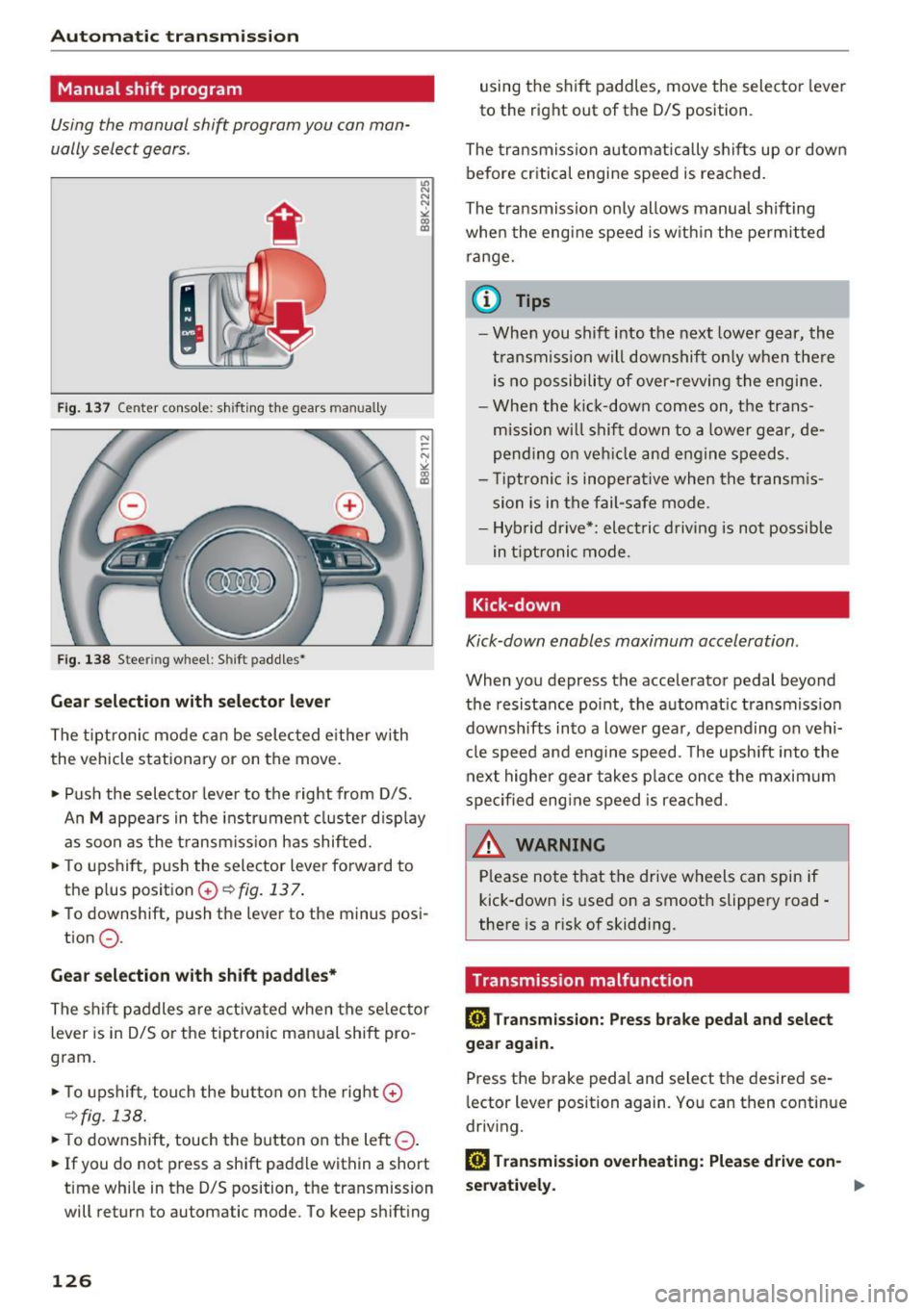
Fig. 137 Center console: shifting the gears man ually
Fig. 138 Stee rin g whee l: S hift paddles •
Gear selection with selector lever
The tiptronic mode can be selected eith er with
the vehicle stationary or on the
move.
• Push the selector lever to the right from D/S.
u, N
N
N
" ll1
An M appears in the instrument cluster displa y
as soon as the transmission has shifted.
• To upshift, push the selector lever forward to
the plus position
G) ¢ fig. 137 .
• To downshift, push the lever to the minus posi-
tion
0 .
Gear selection with shift paddles*
The shift paddles are activated when the selector
lever is in D/S or the tiptronic manual shift pro
gram.
• To upshift , touch the button on the right
G)
¢fig. 138.
• To downshift, touch the button on the left 0-
• If you do not press a shift paddle within a short
time while in the D/S position, the transmission
will return to automatic mode. To keep shifting
126
using the shift paddles, move the selector lever
to the right out of the D/S position .
The transmissron automatically shifts up or down
before critical engine speed is reached.
The transmission only allows manual shifting
when the engine speed is within the permit ted
range.
(D Tips
- When you shift into the next lower gear, the
t ransm ission will downshift only when there
is no possibili ty of
over-revving the engine.
- When the kick-down comes on, the trans
mission will shift down to a lower gear, de
pending on vehicle and engine speeds.
- Tiptr onic is inoperat ive when the transmis
sion is in the fail-safe mode.
- Hybrid drive*: elect ric driving is not possible
in t iptronic mode .
Kick-down
Kick-down enables maximum acceleration .
When you depress the accelerator pedal beyond
the resistance point, the automat ic transmission
downshifts into a lower gear, depending on vehi
cle speed and engine speed. T he upsh ift into the
next higher gear takes place once the maximum
specified eng ine speed is reached.
A.::!!. ARNING
-Please note that the drive wheels can spin if
kick-down is used on a smooth slippery road -
there is a risk of skidd ing.
Transmission malfunction
ml Transmission: Press brake pedal and select
gear again.
Press the brake pedal and select the desired se
lector lever position again. You can then continue
driving.
ml Transmission overheating: Please drive con-
servatively . .,,.
Page 133 of 300
..... N
co ~ CX)
..... I.Cl U"I
..... I.Cl .....
Reverse Parking
Applies to vehicles: with Audi parking system plus with rear
view came ra
Parking mode 1 can be used when parking in a
garage or into a parking space.
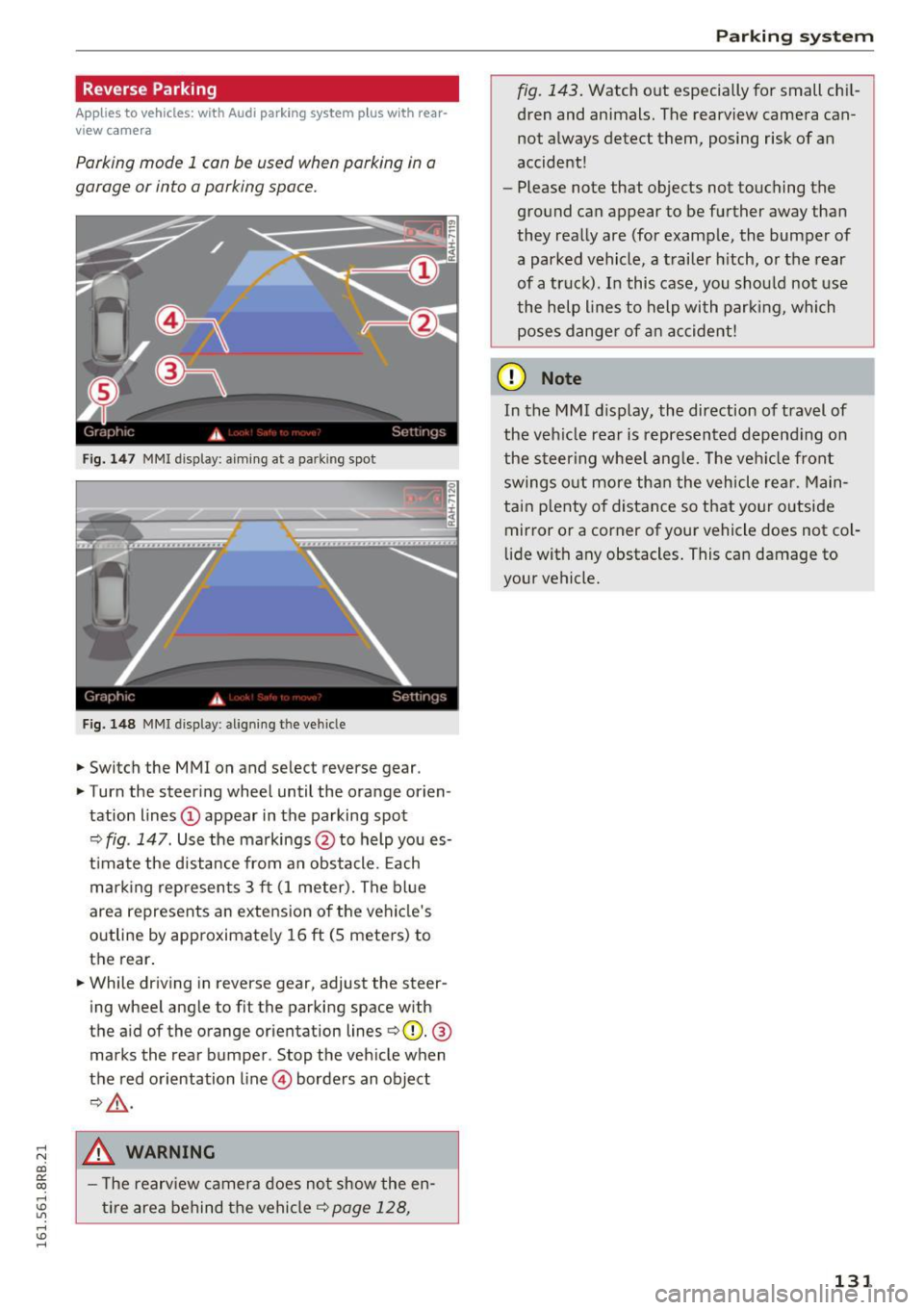
Fig. 147 MMI displa y: aiming at a p arkin g spot
Fig. 148 MMI displa y: align ing t he ve hicle
.,. Switch the MMI on and se lect reverse gear .
.,. Turn the steering wheel until the orange orien
tation lines
(D appear in the parking spot
Q fig . 147 . Use the markings @to help you es
t imate the distance from an obstacle . Each
marking represents 3 ft (1 meter). The blue
area represents an extension of the vehicle's
outline by approximately 16
ft (S meters) to
the rear.
.,. While driving in reverse gear, adjust the steer
ing wheel angle to fit the parking space with
the aid of the orange orientation lines
QQ). @
marks the rear bumper . Stop the vehicle when
the red orientation line © borders an object
Q,Lr:i. ,
.8, WARNING
-The rearv iew camera does not show the en
tire area behind the vehicle¢
page 128,
Parking system
fig. 143. Watch out especially for small chil
dren and animals. The rearview camera can
not always detect them, posing risk of an
accident!
- Please note that objects not touching the
ground can appear to be further away than
they really are (for example, the bumper of
a parked vehicle , a trailer hitch, or the rear
of a truck). In this case, you should not use
the help l ines to help with parking, which
poses danger of an accident!
(D Note
In the MMI display, the direction of travel of
the veh icle rear is represented depend ing on
the steer ing wheel angle. The vehicle front
swings out more than the vehicle rear. Main
tain p lenty of distance so that your outside
mirror or a corner of your vehicle does not col
lide with any obstacles . This can damage to
your vehicle.
131
Page 134 of 300

Parking system
Parallel Parking
Applies to veh icles: w ith Aud i park ing system p lus w ith rear
view ca mera
Use parking mode 2 to help you parallel park
along the side of a street.
Fig. 1 49 MMI d isp lay: blue su rface in the pa rking spot
F ig. 150 MMI d isp lay: Blue curve on the cu rb
The fo llowing steps apply only when there is no
obstacle such as a wall near the parking spot .
Otherw ise, please read the information provided
in the "Pa rking Next to Obstacles " section .
.,. Activate the turn signal.
.,. Pos ition your vehicle parallel to the edge of the
street, approx imately 3 ft (1 meter) from a
parked veh icle .
.,. Swi tch the MMI on and se lect reverse gear. The
parking aid turns on and park ing mode 1 ap
pears on the d isplay .
... Press the control button©¢
fig. 149 on the
MMI control console. Parking mode 2 appears.
... Back up and align your vehicle so the blue area
@ borders on the rear end of the vehicle or on
the parking spot line. The b lue area represents
an extension of the veh icle's outline by approx i
mately 16 ft (S meters) to the rear . The long
s ide of the blue area should be on the c urb . T he
entire blue area m ust fit into the parking spot.
132
.,. With the vehicle stopped, t urn the steering
wheel to the right as far as it will go.
... Back into the parking spot until the blue curve
to uches the curb¢
fig. 150. Stop the vehicle.
.,. With the vehicle stopped, turn the steering
wheel to the left as far as it will go .
.,. Continue to back into the parki ng spot unt il the
veh icle is parked paralle l to the curb .@ marks
the rea r bumpe r. Stop the veh icle when the red
orientat ion line @ borders an object¢ & .
Keep an eye on the front of you r vehicle while
doing this ¢(D .
Parking next to obstacles
When there is an obstacle (such as a wall) next to
the pa rking spot, choose a spot with mo re space
o n the s ides. Position the long side of t he b lue
area so that there is sufficient spa ce from the
curb . The area must not be on the curb. You wi ll
also need to start turning the steering wheel
much earlier . There should be a sufficient
amount of space between the curb and the blue
curve, and the blue curve¢ fig. 150 must not
touch the curb.
&_ WARNING
-The rearview camera does not show the en
tire area behind the vehicle ¢
page 128,
fig . 143.
Watch o ut especially fo r small chi l
dren and animals. The re a rv iew came ra can
no t always detect them, posing risk of an
accident!
- P lease note that objects not touching the
gro und can appear to be further away than
they really are (for examp le, the bumpe r of
a parked vehicle, a trailer hitch, or the rear
of a truck). In this case, you shou ld not use
the help lines to help with parking, which poses danger of an accident!
(D Note
In the M MI d isplay, the direction of travel of
the veh icle rear is represented depend ing on
the steer ing whee l ang le. The veh icle front
swings o ut more tha n the vehicle rear. Main
tai n plenty of distance so that yo ur outside
Page 137 of 300
..... N
co ~ CX)
..... I.Cl U"I
..... I.Cl ..... ..
Sit properly in your seat and make sure that
your passengers do the same
¢page 63,
General information .
.. Fasten your safety belt and wear it properly. Al
so instruct your passengers to fasten their safe
ty belts properly¢
page 143 .
What impairs driving safety?
Safe driving is directly related to the condition of
the vehicle, the driver as well as the driver's abili
ty to concentrate on the road without being dis
tracted.
The driver is responsible for the safety of the ve
h icle and all of its occupants . If your ability to
drive is impaired, safety risks for everybody in the
veh icle increase and you also become a hazard to
everyone else on the road ¢,& .T herefo re:
.. Do not let yourself be distracted by passengers
o r by using a cellular telephone.
.. NEVER dr ive when your dr iv ing ability is im
paired (by medications, alcohol, drugs, etc.).
.. Observe a ll traff ic laws, rules of the road and
speed limits and plain common sense.
.. ALWAYS adjust your speed to road, traffic and
weather conditions.
.. Take frequent breaks on long trips. Do not drive
for more than two hours at a stretch.
.. Do NOT drive when you are tired, under pres
sure or when you are stressed.
A WARNING
Impai red dr iv ing safety increases the risk of
ser ious personal inju ry and death whenever a
vehicle is being used.
Dr iving safety
Correct passenger
seating positions
Proper seating position for the driver
The proper driver seating position is important
for safe, relaxed driving.
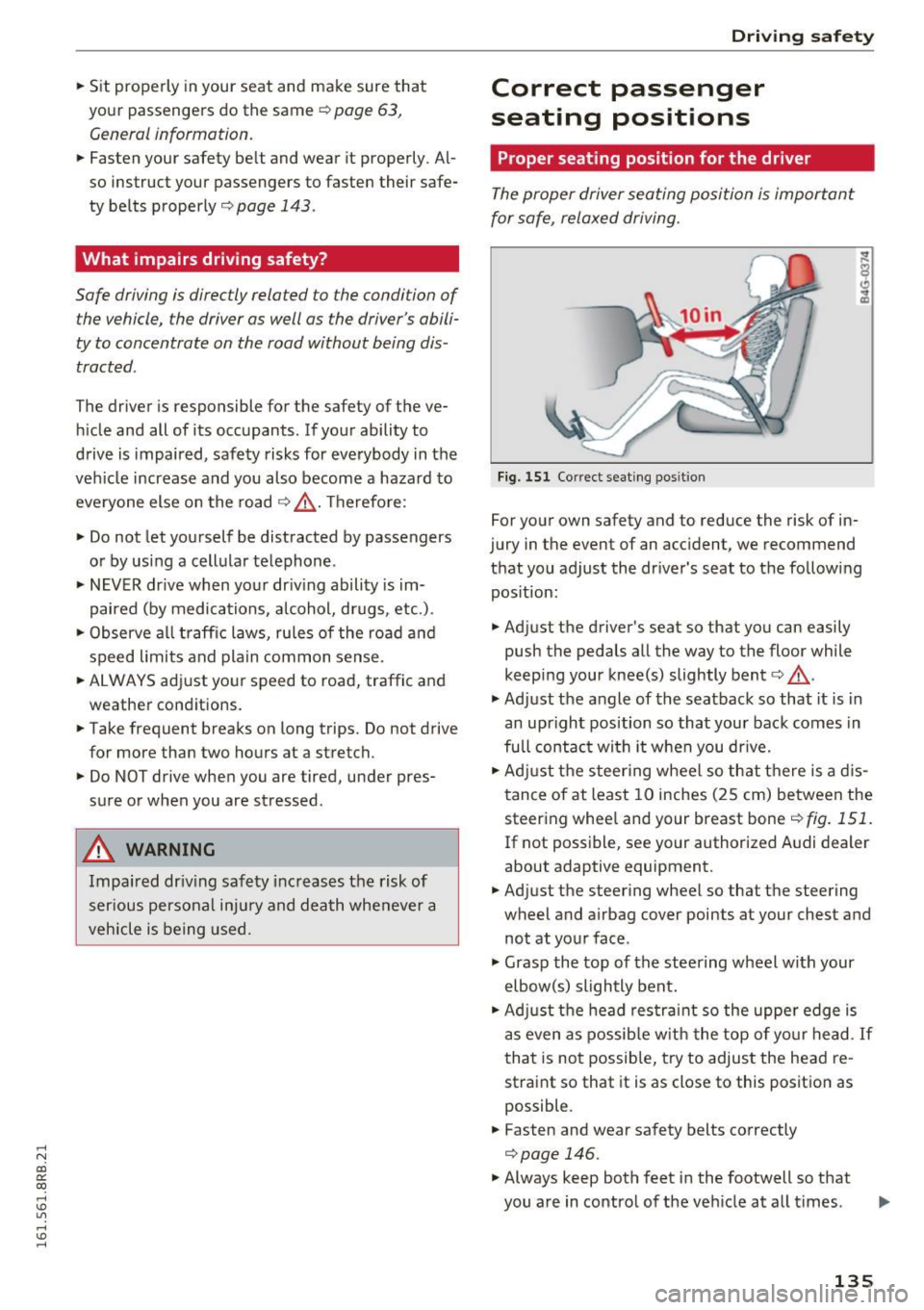
F ig. 151 Cor rect seating pos ition
For your own safety and to reduce the risk of in
jury in the event of an accident, we recommend
that you adjust the driver's seat to the fo llowing
pos ition:
.. Adjust the driver's seat so that you can easily
push the pedals all the way to the floor while
keep ing your knee(s) slightly bent¢,& .
.,. Adjust the angle of the seatback so that it is in
an upright position so that your back comes in
full contac t wi th it when you dr ive.
.. Adj ust the steer ing wheel so that there is a d is
tance of at least 10 inches (25 cm) between the steering whee l and your breast bone¢
fig. 151.
If not possible, see your author ized A udi dealer
about adaptive equipment.
.. Adjust the steering wheel so that the steering
wheel and airbag cover points at your chest and
not at your face .
.,. Grasp the top of the steering wheel with your
elbow(s) slightly bent .
.. Ad just the head res tra int so the upper edge is
as even as possib le w ith the top of yo ur head.
If
that is no t possib le, try to adjust the head re
straint so that it is as close to this position as
possible .
.. Fasten and wear safety belts correctly
¢page 146.
.. Always keep both feet i n the footwell so that
you are in control of the ve hicle at all t imes .
135
Page 138 of 300
Driving safety
For detailed information on how to adjust the
driver's seat, see ¢
page 64.
A WARNING
Drivers who are unbelted, out of position or
too close to the airbag can be seriously in
jured by an airbag as it unfolds. To help re
duce the risk of serious personal injury:
- Always adjust the driver's seat and the
steering wheel so that there are at least
10 inches (25 cm) between your breastbone
and the steering wheel.
- Always hold the steering wheel on the out
side of the steering wheel rim with your
hands at the 9 o'clock and 3 o'clock posi
tions to help reduce the risk of personal in
jury if the driver's airbag inflates.
- Never hold the steering wheel at the
12 o'clock position or with your hands at
other positions inside the steering wheel
rim or on the steering wheel hub. Holding
the steering wheel the wrong way can cause serious injuries to the hands, arms and head
if the driver's airbag deploys.
- Pointing the steering wheel toward your
face decreases the ability of the su pplemen
tal driver's airbag to protect you in a colli
sion.
- Always sit in an upright position and never lean against or place any part of your body
too close to the area where the airbags are
located.
- Before driving, always adjust the front seats
and head restraints properly and make sure
that all passengers are properly restrained.
- Never adjust the seats while the vehicle is
moving . Your seat may move unexpectedly
and you could lose control of the vehicle.
- Never drive with the backrest reclined or
tilted far back! The farther the backrests are
tilted back, the greater the risk of injury due
to incorrect positioning of the safety belt
and improper seating position.
- Children must always ride in child safety
seats¢
page 171. Special precautions ap
ply when installing a child safety seat on the
front passenger seat
¢page 151.
136
-
Proper seating position for the front
passenger
The proper front passenger seating position is
important for safe, relaxed driving.
For your own safety and to reduce the risk of in
jury in the event of an accident, we recommend
that you adjust the seat for the front passenger
to the following position :
.,. Adjust the angle of the seatback so that it is in
an upright position and your back comes in full
contact with it whenever the vehicle is moving.
.,. Adjust the head restraint so the upper edge is
as even as possible with the top of your head. If
that is not possible, try to adjust the head re
straint so that it is as close to this position as
possible
¢ page 137.
.,. Keep both feet flat on the floor in front of the
front passenger seat.
.,. Fasten and wear safety belts correctly
¢page 146.
For detailed information on how to adjust the
front passenger's seat, see
¢ page 63.
A WARNING
Front seat passengers who are unbelted, out
of position or too close to the airbag can be
seriously injured or killed by the airbag as it
unfolds. To help reduce the risk of serious
personal injury:
- Passengers must always sit in an upright po
sition and never lean against or place any
part of their body too close to the area
where the airbags are located.
- Passengers who are unbelted, out of posi
tion or too close to the airbag can be seri
ously injured by an airbag as it unfolds with
great force in the blink of an eye.
- Always make sure that there are at least
10 inches (25 cm) between the front pas
senger's breastbone and the instrument
panel.
- Each passenger must always sit on a seat of
their own and properly fasten and wear the
safety belt belonging to that seat.
- Before driving, always adjust the front pas senger seat and head restraint properly.
Page 146 of 300
Safe ty belts
-Failure to pay attention to the warn ing light
that come on, could lead to personal injury.
Why use safety belts?
Frontal collisions and the law of physics
Frontal crashes create very strong forces for peo
ple riding in vehicles.
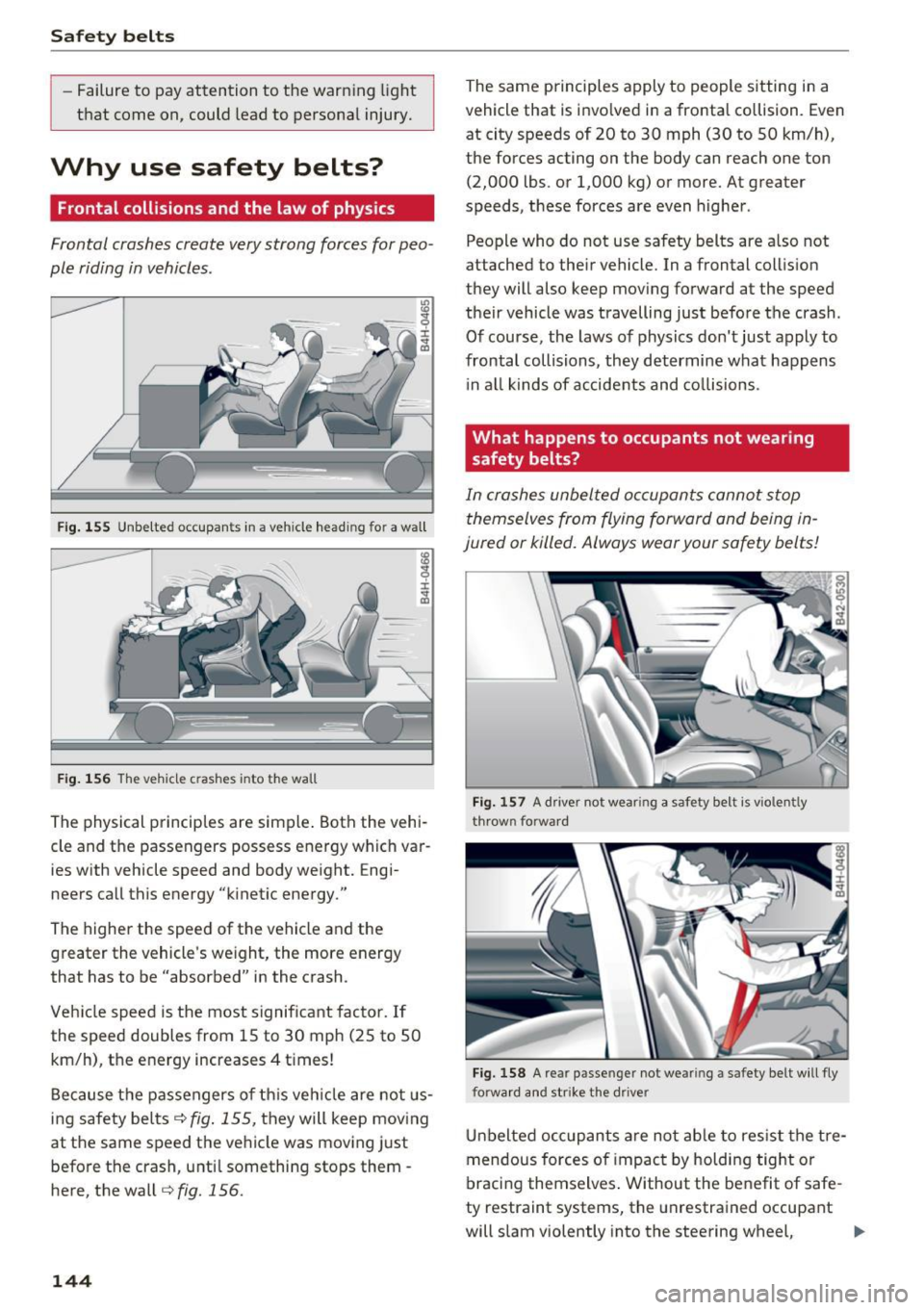
F ig . 1 55 Unbe lted occupants in a veh icle headi ng for a wall
F ig . 1 56 The veh icle c rashes into the wall
The physical principles are simple . Both the vehi
cle and the passengers possess energy wh ich var
ies with vehicle speed and body weight. Engi
neers call this energy "kinet ic energy."
The higher the speed of the vehicle and the greater the vehicle's we ight, the more energy
that has to be "absorbed" in the crash .
Vehicle speed is the most significant fac tor. If
the speed doubles from 15 to 30 mph (25 to 50
km/h), the energy increases 4 times!
Because t he passengers of th is veh icle are not us
ing safety belts<=>
fig. 155, they will keep mov ing
at the same speed the vehicle was moving just
befo re the crash , u nti l something stops them -
here, the wall
r=> fig. 156.
144
The same principles apply to people sitting in a
veh icle that is invo lved in a frontal collision . Even
at city speeds of 20 to 30 mph (30 to 50 km/h),
the forces acting on the body can reach one ton
(2,000 lbs . or 1,000 kg) or more. At greater
speeds, these forces are even higher .
People who do not use safety belts are a lso not
attached to their vehicle. In a frontal collis ion
they will also keep mov ing fo rward at the speed
their vehicle was travelling just before the crash .
Of course, the laws of physics don't just apply to
frontal collisions, they determine what happens
i n a ll kinds of accide nts and co llisions .
What happens to occupants not wearing
safety belts?
In crashes unbel ted occupants cannot stop
themselves from flying forward and being in
jured or killed. Always wear your safety belts!
Fi g. 1 57 A driver not wear ing a safety be lt is vio len tly
throw n forward
Fi g. 158 A rea r passe nge r not we arin g a sa fety be lt w ill fly
forwa rd and str ike the drive r
Unbelted occ upants are not ab le to res ist the tre
mendous forces of impact by holding tig ht or
braci ng themselves . Without the benefit of safe
ty restraint systems , the unrestra ined occupant
will slam violently into the steering wheel,
liJJ,-
Page 153 of 300
,....,
N
co
er::
co
,....,
Important information
Importance of wearing safety belts and
sitting properly
Airbags are only supplemental restraints. For
airbags to do their job, occupants must always
properly wear their safety belts and be in a prop er seating position.
For your safety and the safety of your passen
gers, before driving off, always:
""Adjust the driver's seat and steering wheel
properly
9 page 135,
""Adjust the front passenger's seat properly
9page 64,
.,. Wear safety belts properly 9 page 145,
.,. Always properly use the proper child restraint
to protect children
9 page 171.
In a collision airbags must inflate within the blink
of an eye and with considerable force. The sup
plemental airbags can cause injuries if the driver
or the front seat passenger is not seated proper
ly. Therefore in order to help the airbag to do its
job, it is important, both as a driver and as a pas
senger to sit properly at all times .
By keeping room between your body and the
steering wheel and the front of the passenger
compartment, the airbag can inflate fully and
completely and provide supplemental protection in certain frontal collisions
o page 135, Correct
passenger seating positions .
For details on the
operation of the seat adjustment controls
opage 64.
It's especially important that children are proper
ly restrained
9page 171.
There is a lot that the driver and the passengers
can and must do to help the individual safety fea
tures installed in your Audi work together as a
system.
Proper seating position is important so that the
front airbag on the driver side can do its job. If
you have a physical impairment or condition that prevents you from sitting properly on the driver
seat with the safety belt properly fastened and
Airbag system
reaching the pedals, special modifications to
your vehicle may be necessary.
Contact your authorized Audi dealer, or call Audi
Customer Relations at 1-800-822-2834.
When the airbag system deploys, a gas generator
will fill the airbags, break open the padded cov
ers, and inflate between the steering wheel and
the driver and between the instrument panel and
the front passenger. The airbags will deflate im
mediately after deployment so that the front oc
cupants can see through the windshield again
without interruption.
All of this takes place in the blink of an eye, so
fast that many people don't even realize that the airbags have deployed. The airbags also inflate
with a great deal of force and nothing should be in their way when they deploy. Front airbags in
combination with properly worn safety belts slow
down and limit the occupant's forward move
ment . Together they help to prevent the driver
and front seat passenger from hitting parts of
the inside the vehicle while reducing the forces
acting on the occupant during the crash. In this
way they help to reduce the risk of injury to the head and upper body in the crash. Airbags do not
protect the arms or the lower parts of the body.
Both front airbags will not inflate in all frontal
collisions. The triggering of the airbag system de
pends on the vehicle deceleration rate caused by
the collision and registered by the electronic con
trol unit . If this rate is below the reference value
programmed into the control unit, the airbags
will not be triggered, even though the car may be
badly damaged as a result of the collision . Vehi
cle damage, repair costs or even the lack of vehi
cle damage is not necessarily an indication of
whether an airbag should inflate or not.
It is not possible to define a range of vehicle
speeds that will cover every possible kind and an
gle of impact that will always trigger the airbags ,
since the circumstances will vary considerably be
tween one collision and another. Important fac
tors include, for example, the nature (hard or soft) of the object which the car hits, the angle of
impact, vehicle speed, etc . The front airbags will
IIJJ,
151