wing AUDI Q5 2017 User Guide
[x] Cancel search | Manufacturer: AUDI, Model Year: 2017, Model line: Q5, Model: AUDI Q5 2017Pages: 296, PDF Size: 74.43 MB
Page 35 of 296
Opening and closing Keys
Key set
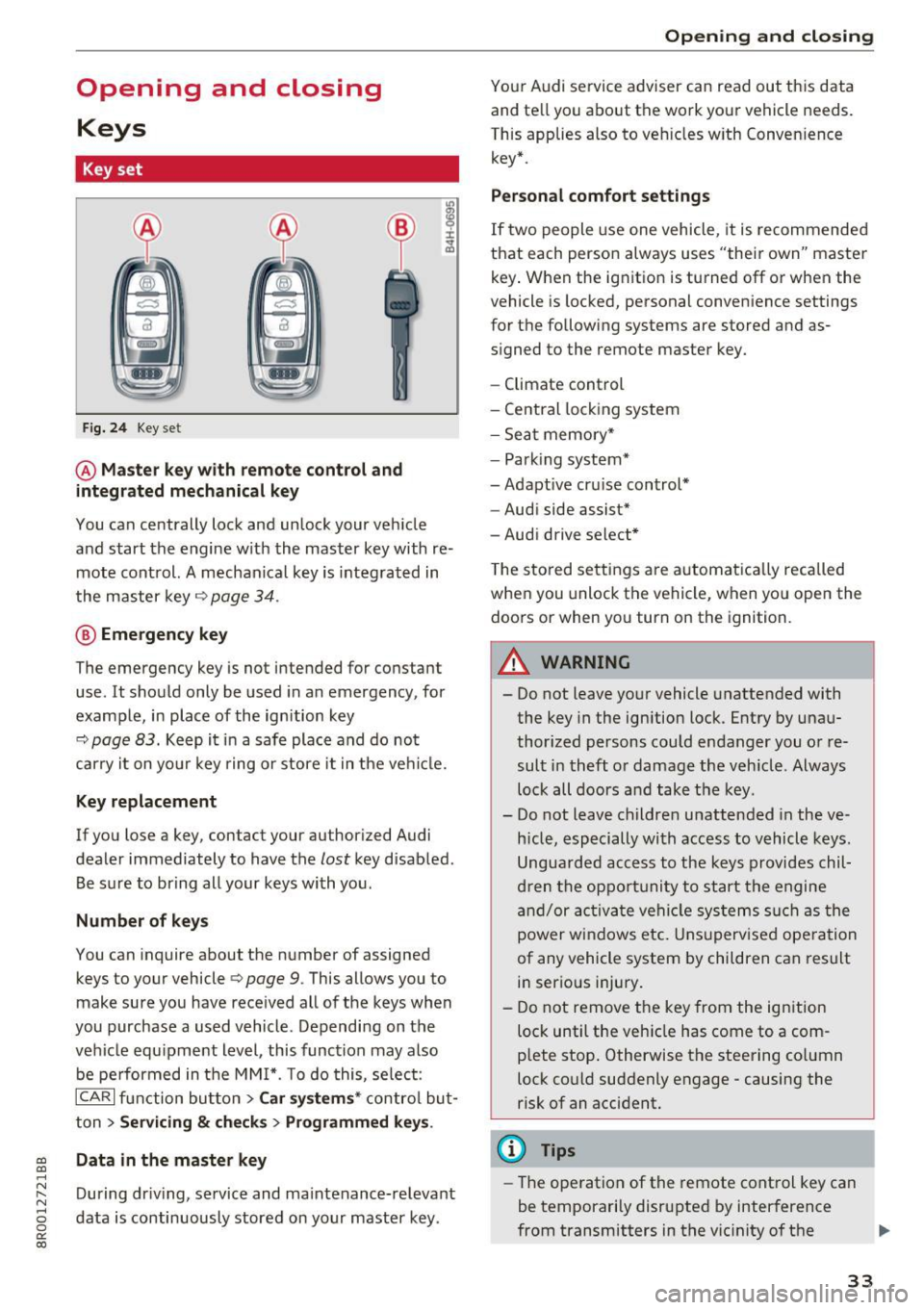
Fig. 24 Key set
@ Master key with remote control and
integrated mechanical key
You can centrally lock and unlock your vehicle
and start the engine with the master key with re mote control. A mechanical key is integrated in
the master key
q page 34.
@ Emergency key
The emergency key is not intended for constant
use . It should only be used in an emergency , for
example, in place of the ignition key
9 page 83. Keep it in a safe place and do not
carry it on your key ring or store it in the vehicle.
Key replacement
If you lose a key, con tac t your au thori zed Audi
dealer immediately to have the
lost key disabled .
Be sure to bring all your keys with you.
Number of keys
You can inquire about the number of assigned
keys to your vehicle
Q page 9. This allows you to
make sure you have received all of the keys when
you purchase a used vehicle. Depending on the
vehicle equipment level, this function may also
be performed in the MMI*. To do this, select:
ICARI function button> Car systems* control but
ton >
Servicing & checks > Programmed keys .
~ Data in the master key
.....
~ During driving, service and maintenance-relevant
8 data is continuously stored on your master key . 0
0:
co
Opening and closing
Your Audi service adviser can read out this data
and tell you about the work your veh icle needs.
This applies also to vehicles with Convenience key* .
Personal comfort settings
If two people use one vehicle, it is recommended
that each person always uses "their own" master key. When the ignition is turned off or when the
vehicle is locked, personal convenience settings
for the following systems are stored and as
signed to the remote master key.
- Climate control
- Central locking system
- Seat memory*
- Parking system*
- Adaptive cruise control*
- Audi side assist*
- Audi drive select*
The stored settings are automatically recalled
when you unlock the vehicle, when you open the
doors or when you turn on the ignition.
A WARNING
-.
- Do not leave your vehicle unattended with
the key in the ignition lock . Entry by unau
thorized persons could endanger you or re
sult in theft or damage the vehicle . Always
lock all doors and take the key .
- Do not leave children unattended in the ve
hicle, especially with access to vehicle keys.
Unguarded access to the keys provides chil
dren the opportunity to start the engine
and/or activate vehicle systems such as the
power windows etc. Unsupervised operation
of any vehicle system by children can result
in serious injury.
- Do not remove the key from the ignition
lock until the vehicle has come to a com
plete stop. Otherwise the steering column
lock could suddenly engage -causing the
risk of an accident.
¢j) Tips
-The operation of the remote control key can
be temporarily disrupted by interference
from transmitters in the vicinity of the .,.
33
Page 37 of 296
a,
a,
..... N r-N ..... 0 0
0:
co
Emergency unlocking of the ign ition key
In the event of malfunctions in the electrical sys
tem, it may happen that you cannot remove the
ignition key.
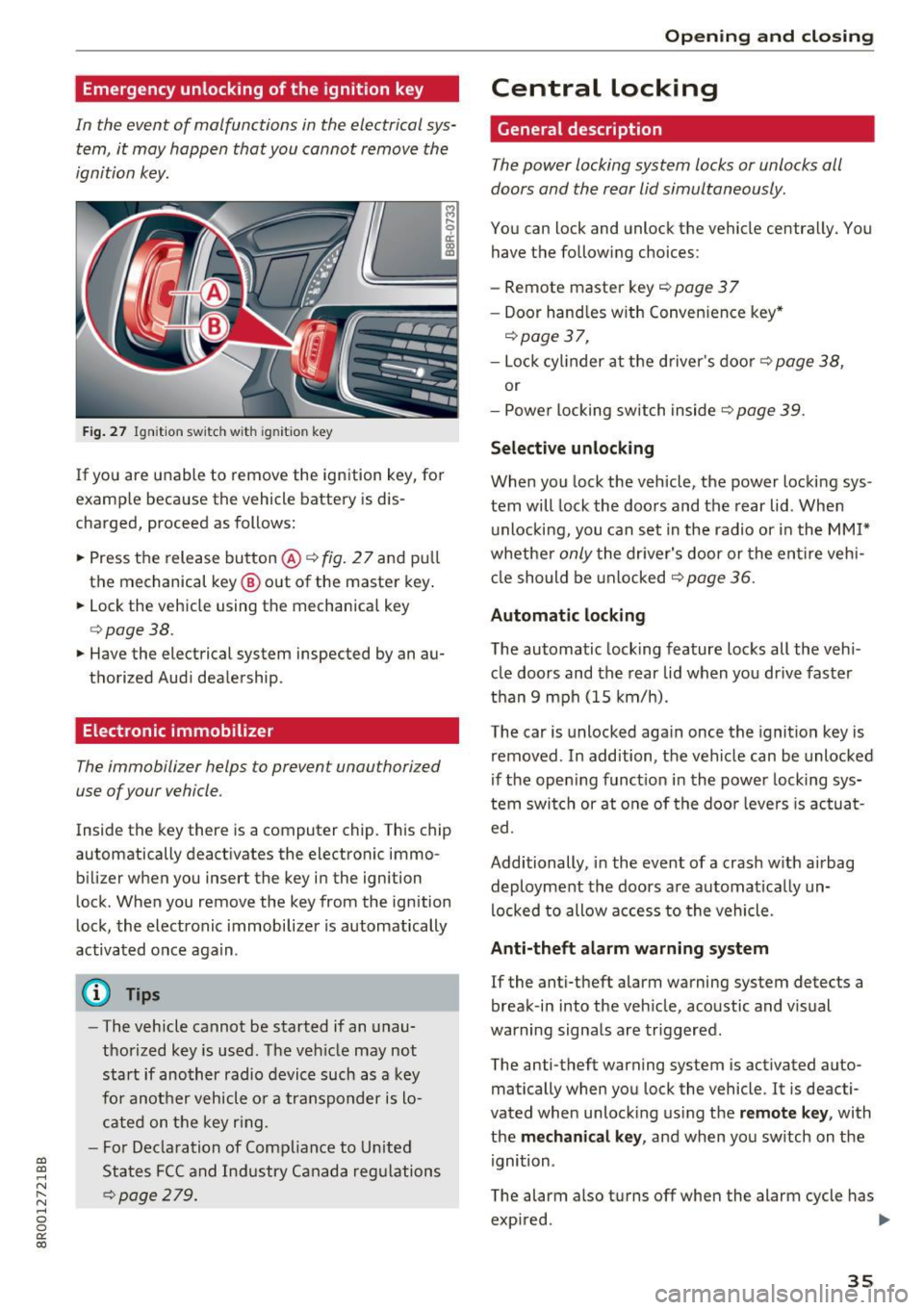
Fig . 27 Ignition switch with ig ni tion key
If you are unable to remove the ignition key, for
examp le because the vehicle battery is dis
charged, proceed as follows:
.. Press the release button@¢
fig. 27 and pull
the mechanical key @ out of the master key .
.. Lock the vehicle using the mechanical key
¢ page 38.
.. Have the electrical system inspected by an au
thorized Aud i dealership.
Electronic immobilizer
The immobilizer helps to prevent unauthorized
use of your vehicle.
Inside the key there is a computer chip. This chip
automatically deactivates the electronic immo
b ilizer when you insert the key in the ignition
lock . When you remove the key from the ignition
lock, the electronic immobilizer is automatically
activated once aga in .
(D Tips
- The vehicle cannot be started if an unau
thorized key is used. The vehicle may not
start if another radio device such as a key
for another vehicle or a transponder is lo
cated on the key ring.
- For Declaration of Compliance to United
States FCC and Industry Canada regulations
¢ page 2 79.
Opening and closing
Central locking
General description
The power locking system locks or unlocks all
doors and the rear lid simultaneously.
You can lock and unlock the vehicle centrally. You have the following choices:
- Remote master key
c::> page 3 7
- Door hand les with Convenience key*
c::> page 3 7,
-Lock cylinder at the driver's door ¢ page 38,
or
- Power locking switch inside
¢ page 39 .
Selective unlocking
When you lock the vehicle, the power locking sys
tem will lock the doors and the rear lid. When
unlocking, you can set in the radio or in the MMI*
whether
only the driver's door or the entire vehi
cle should be unlocked
r::!;) page 36 .
Automatic locking
The automatic locking feature locks all the vehi
cle doors and the rear lid when you drive faster
than
9 mph (15 km/h).
The car is unlocked again once the ignition key is
removed . In addition, the vehicle can be unlocked
if the opening funct ion in the power locking sys
tem switch or at one of the door levers is actuat
ed .
Additionally, in the event of a crash with airbag
deployment the doors are automatica lly un
locked to allow access to the vehicle.
Anti-theft alarm warning system
If the anti-theft alarm warning system detects a
break-in into the veh icle, acoustic and visual
warning signals are triggered.
The anti-theft warning system is activated auto
matically when you lock the vehicle . It is deacti
vated when unlock ing using the
remote key, with
the
mechanical key , and when you switch on the
ignition .
The alarm also turns off when the alarm cycle has exp ired.
liJ,
35
Page 38 of 296
Opening and closin g
Tu rn sign als
When you unlock the vehicle , the turn signa ls
flash twice. When you lock the vehicle, the turn
signals flash once. If they do not flash, one of the
doors, the rear lid or the hood is not locked .
Unintentionally locking your self out
In the following cases there safegua rds to pre
vent you lock ing your remote master key in the
vehicle:
- T he vehicle does not lock with the power lock
ing switch
r:!> page 39 if a doo r is open.
- On vehicles with Convenience key*, if the most
recently used master key is in the luggage com
partment, the rear l id is automa tically unlocked
again after it is closed.
Do not lock yo ur vehicle with the
re mot e ma st e r
ke y or Convenien ce key*
unti l all doors and the
rear lid are closed. In th is way you avoid locking
yourse lf out accidenta lly.
A WARNING
- When you leave the vehicle, always remove
the ignition key and take it with you . This
will prevent passengers (children, for exam ple) from accidentally being locked in the
vehicle should they acc identally press the
power locking switch in the front doors .
- Do not leave children inside the vehicle un
superv ised . In an emergency it would be im
poss ible to open the doors from the outs ide
without the key .
@ Tips
-In the event of a crash with airbag deploy
ment all locked doors will be automat ically
unlocked to give access to the veh icle occu
pants from the outside .
- If the power lock ing system should mal
funct ion, you can lock the driver's door us
i ng the mechanical key
r:::.>page 39.
-If the power lock ing system should fail, you
can still open the fuel tank flap in an emer
gency
r::!> page 213.
-You are well adv ised not to keep val uables
i nside an unattended vehicle, v is ible or not.
3 6
Even a proper ly locked veh icle cannot pro
vide the security of a safe.
- If the LED in the upper edge of the driver's
door panel comes on for about 30 seconds
after the vehicle is locked, there is a mal
function in the power locking or the anti
theft warning system. Have the malfunction corrected by an authorized Aud i dealership
or qualified repair fac ility .
Setting power locking
The driver can determine the functions for power
locking in the radio or in the MM!*.
.. Select: !CAR ! function button> Centr al lo cking .
Or
.. Select:
I CAR ! function button > Car s yste ms *
control button > Vehicl e sett ing s> (C entral
lo cking )*.
Un locking single door /Unloc k doo rs -
you can
spec ify which doors unlock when you open the ve
hicle .
- Select ing Off /All and pressing the~ button on
the remote control key unlocks the ent ire vehi
cle .
- Select ing
On /Dr iver and pressing the [§] button
on the remo te control key once unlocks only
the driver's door. In veh icles w ith a convenience
key*, only the door whose handle you pull will
unlock. If you press the
l@J button tw ice, the en
tire veh icle will unlock.
If you press the l@J but
ton, the entire ve hicle wi ll always lock .
Trunk lid/tailg ate /L o ck e xter ior trun k handl e -if
you select
O n, the rea r lid handle locks
r:::.> page 40, fig. 34 . In this case, the rear lid can
be opened with the
l = I bu tton on the master key
r:::.> page 3 7, fig. 2 8 o r with the~ button in the
driver's door
r:::.> page 40, fig . 33.
F o ld mirr ors* -if you se lect On , the outside mir
r ors will fold in automatically when you press the
lil button on the remote contro l key r:::.> page 56.
Confirmation ton e/Tone wh en lockin g -if you
select
On , a tone w ill sound when yo u lock the ve
hicle.
Page 40 of 296
Opening and clo sin g
or one of the doors ¢ page 36. The master key
must be within a range of about S feet (1.5 me
ters) from the appropriate door or the rear lid . It
makes no difference whether the master key is in
your jacket pocket or in your brief case.
If you grip the door handle while locking, this can
adversely affect the locking function.
It is not possible to re-open the doo r fo r a brief
period directly a fter closing it. This allows you to
ensure that the doors are properly locked.
A WARNING
Read and follow all WARNINGS~.& in Gener
al description on page 36.
@ Tips
If your vehicle has been standing fo r an ex
tended period, please note the fo llowing:
- The pro ximity sensors are deactivated after
a few days to
save power. You then have to
pull on the door handle once to unlock the
vehicle and a second t ime to open the vehi
cle.
- To prevent the battery from being dis
charged and to preserve your vehicle's abili
ty to start for as long as possib le, the ener
gy management system gradually switches
off unnecessary convenience functions.
It is
possib le that you wi ll not be able to unloc k
your vehicle using these convenience func tions.
- For Declaration of Compl iance to Un ited
States FCC and Ind ustry Canada regu la tions
¢page 279.
38
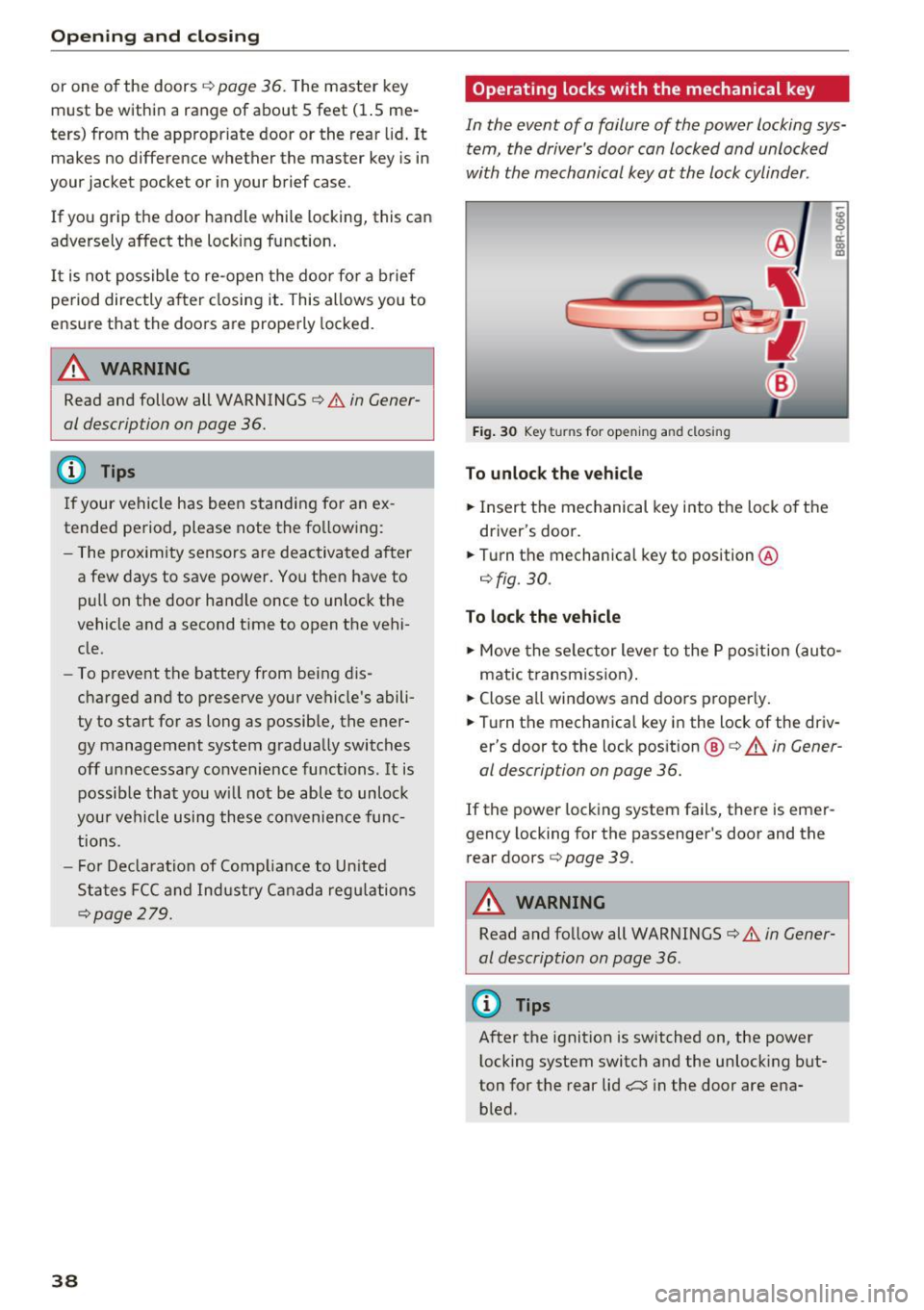
Operating locks with the mechanical key
In the event of a failure of the power locking sys
tem, the driver's door can locked and unlocked
with the mechanical key at the lock cylinder.
Fig . 30 Key turns for opening and closing
To unlock th e veh icl e
.,. Insert the mechanical key i nto the lock of the
driver's door .
.,. Turn the mechanical key to position @
¢fig. 30.
To lock the veh icle
.,. Move the se lector lever to the P pos it ion (auto
matic transmission) .
.,. Close all windows and doors proper ly.
.,. Turn the mechanical key in the lock of the driv
er's door to the lock position @¢.&. in
Gener
al description on page 36.
If the power lock ing system fails, there is emer
gency locking for the passenger's door and the
rear doors ¢
page 39.
A WARNING
Read and follow all WARNINGS¢ .& in Gener
al description on page 36 .
(D Tips
After the ignition is switched on, the power
l ocking system switch and the unlocking but
ton for the rear lid~ in the door are ena
bled .
Page 41 of 296
a,
a,
..... N r-N ..... 0 0
0:
co
Locking and unloc king the vehicle from
inside
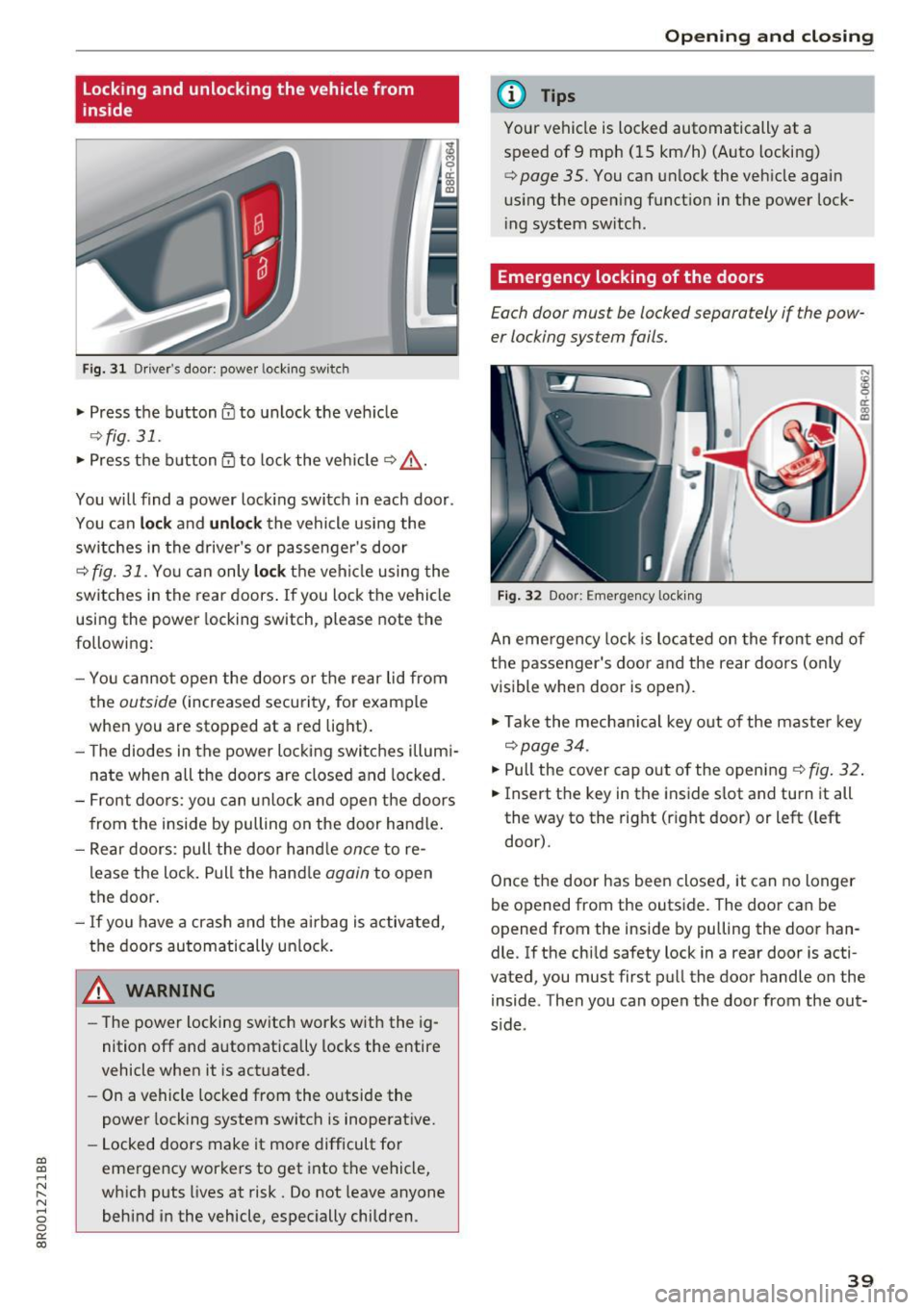
F ig. 3 1 Driver 's doo r: powe r locking sw it c h
.. Press the button@ to unlock the veh icle
9fig . 31 .
.. Press the button 53 to lock the vehicle 9 .&_ .
You will find a power lock ing switch in each door .
You can
lock and unlock the vehicle using the
sw itches in the drive r's or passenge r's door
c=;, fig. 31. Yo u can only lock th e vehicle using the
switches in the rear doors . If you lock the vehicle
using the power locking switch, please note the
following:
- You cannot open the doors or the rear lid from
the
outside (increased security, for example
when you are stopped at a red light).
- The diodes in the power locking switches illum i
nate when all the doors are closed and locked.
- Front doors: you can unlock and open the doors
from the inside by pulling on the door handle .
- Rear doors: pull the doo r hand le
once to re
lease the lock. Pull the hand le
again to open
the door.
- If you have a crash and the airbag is activated,
the doors automatically unlock.
A WARNING
-The power locking switch works with the ig
nition off and automatically locks the entire
vehicle when it is actuated .
- On a vehicle locked from the outside the
power locking system switch is inoperative.
- Locked doors make it more difficult for
emergency workers to get into the vehicle,
which puts Lives at risk. Do not leave anyone
behind in the vehicle, especially children .
Opening and closing
(D Tips
Your vehicle is locked automatically at a
speed of 9 mph (15 km/h) (Auto locking)
¢
page 35. You can unlock the vehicle again
us ing the open ing function in the power lock
i ng system switch .
Emergency locking of the doors
Each door must be locked separately if the pow
er locking sys tem fails.
Fig. 32 Door: E mergency locking
An eme rgency lock is located on the front end of
the passenger's door and the rear doors (o nly
visible when door is open).
"' Take the mechanical key out of the master key
c=;, page 34.
"'P ull the cover cap out of the opening ¢ fig. 32.
.. Insert the key in the inside slot and turn it all
the way to the right (rig ht door) or left ( left
door).
Once the door has been closed, it can no longer
be opened from the outside. The door can be
opened from the inside by pu lling the door han
dle. If the child safety lock in a rear door is acti
vated , you must first pull the door handle on the
inside . Then you can open the door from the out
s ide .
39
Page 44 of 296
Opening and closing
-Always ensure that no one is within range of
the rear lid when it is moving, in particular
close to the hinges and the upper and lower
edges -fingers or hands can be pinched.
- To help prevent poisonous exhaust gas from
being drawn into the vehicle, always keep
the rear lid closed while driving. Never
transport objects larger than those which fit
completely into the luggage area, because
then the rear lid cannot be fully closed.
- Never leave your vehicle unattended espe
cially with the rear lid left open. A child
could crawl into the car through the luggage
compartment and pull the lid shut, becom
ing trapped and unable to get out. To re
duce the risk of personal injury, never let
children play in or around your vehicle. Al
ways keep the rear lid as well as the vehicle doors closed when not in use.
- If there is a luggage rack or bicycle rack
mounted on the rear lid, it may not be able
to open completely or an opened rear lid may close by itself because of the added
weight. So the open rear lid must be sup
ported or the weight must be removed from
the luggage rack first.
(D Tips
-As soon as the electrical connection to the
trailer socket is completed on vehicles with
a factory installed towing hitch, or a trailer
hitch that was installed later according to
factory specifications, the automatic rear lid
funct ion can only be operated via the handle
in the rear lid.
- If the vehicle battery charge drops below a
certain level, you can still open or close the
rear lid manually, however, you will need to
apply more force to close it.
- If the rear lid on a locked vehicle is unlocked
with the middle button
.::::::5 on the remote
key, the rear lid is automatically locked
again immediately after closing. This is indi
cated by the turn signals blinking.
- The following applies to vehicles equipped
with the Convenience key* feature: if the re
mote control key is left in the luggage com
partment, luggage compartment will auto-
42 matically unlock
itself after you lock the ve
hicle. This prevents you from unintentional
ly locking your key in the luggage compart
ment.
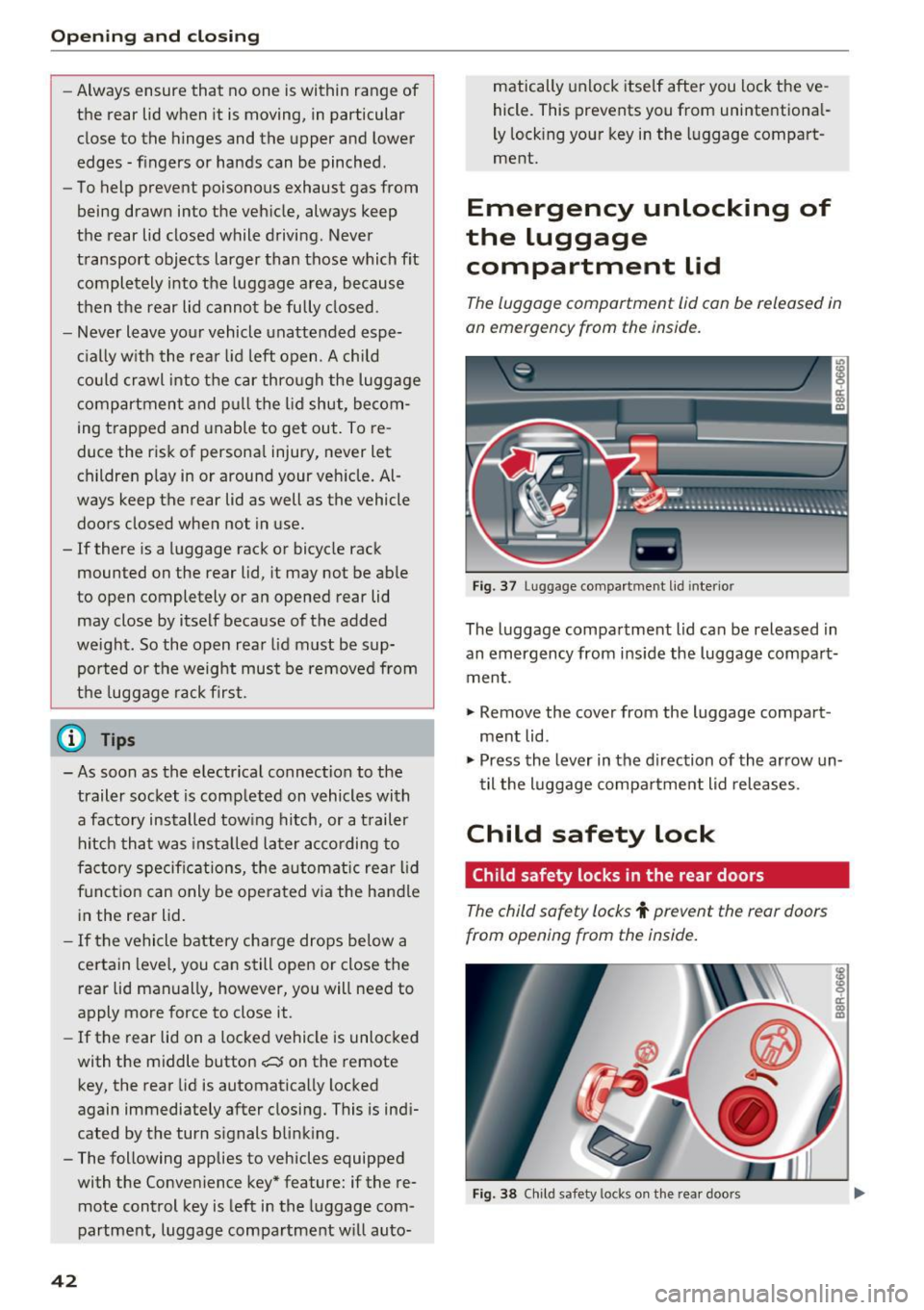
Emergency unlocking of
the luggage compartment lid
The luggage comportment lid con be released in
on emergency from the inside.
Fig . 37 Lugg age compartment lid interio r
The luggage compartment lid can be released in
an emergency from inside the luggage compart
ment .
"" Remove the cover from the luggage compart
ment lid.
""Press the lever in the direction of the arrow un
til the luggage compartment lid releases.
Child safety lock
Child safety locks in the rear doors
The child safety locks t prevent the rear doors
from opening from the inside.
Fig. 38 Child safety locks on the rear doors
Page 51 of 296
Lights and Vision
Exterior Lighting
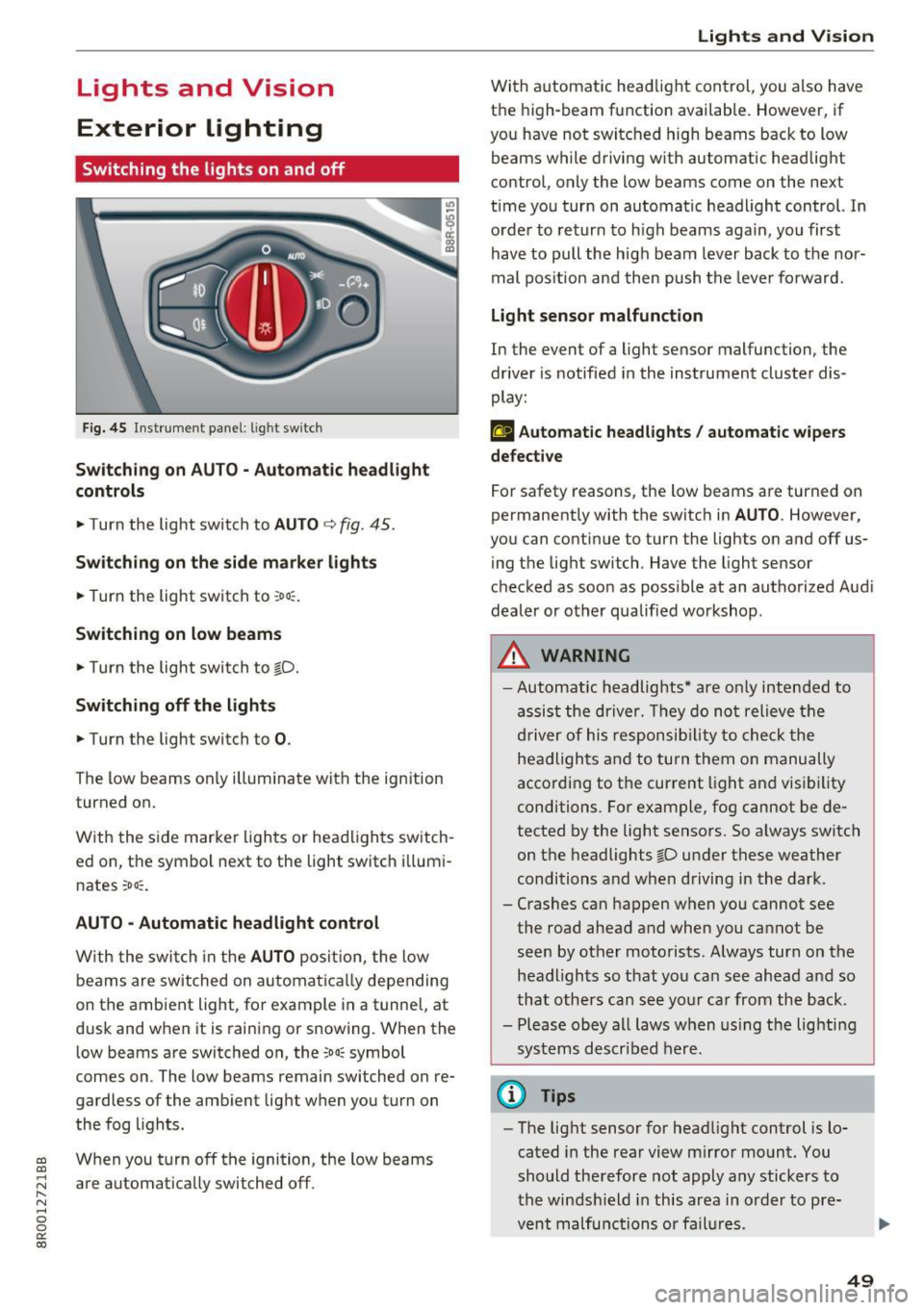
Switching the lights on and off
Fig. 45 Instrument panel: l ig ht sw itc h
Sw itching on AUTO - Automatic headlight
controls
• Turn the light switch to AUTO c> fig . 45 .
Switching on the side ma rker lights
• Turn the light switch to :oo:: .
Switching on low beams
• Turn the light swi tch to gD.
Switching off the lights
• Turn the light switch to 0 .
The low beams only illum inate with the ign ition
turned on.
W ith the s ide marke r lights or head ligh ts sw itch
e d on, the symbol ne xt to the light switch i llum i
nates
:oo ::.
AUTO • Automatic headlight control
W ith the swi tch in the AUTO posi tion, the low
beams are switched on a utomat ica lly depending
on the ambient light, for example in a tunnel, at
d usk and when it is raining or snowing . When the
l ow beams are switched on, the
:oo: symbol
comes on . The low beams remain switched on re
ga rdless of the amb ient lig ht when you turn on
the fog l ights.
~ W hen you turn off t he ignition, the low beams
~ are automat ically switched off . r-N ...... 0 0
0:
co
Lights and V ision
Wi th a utomat ic head light con trol, you also h ave
t h e high-beam function available. However, if
yo u have not switched high beams back to low
beams while d riving with automatic headlight
contro l, only the low beams come on the next
t ime you turn on automa tic headl ight control. In
o rder to retur n to h igh beams agai n, you first
have to pull the hig h beam lever back to the nor
mal pos ition an d then push the leve r fo rward.
Light sensor malfunction
In the event of a light sensor malfunction, the
drive r is notified in the ins trument cluster dis
play:
t!;I Automatic headlights / automatic w ipers
defective
For safety reasons, the low beams are turned on
permanent ly with the switc h in
AU TO . However,
you can continue to turn the lights on and off us
i ng t he lig ht switch . Have the light sensor
c h ec ked as soo n as poss ible at an au thorized Aud i
dealer or other qualified workshop .
A WARNING
=
-Automatic headlights * are on ly inten ded to
a ss is t t he dr iver. They do no t relieve t he
d river of his respon sib ilit y t o ch eck t he
he adli ghts a nd to turn t hem o n manu ally
accordi ng to t he current l ight and visi bili ty
conditi ons. Fo r exam ple, fo g cannot be de
tected by the light senso rs. S o always switch
on the headlights gD u nder these weather
conditions and whe n driving in the dark .
- Crashes can happen w hen you cannot see
the road ahead and when you cannot be
se en by other moto rists . A lways turn on the
hea dligh ts so t hat yo u ca n see ahea d an d so
that oth ers ca n see your ca r from th e back.
- Please obey all laws w hen us in g t he lighti ng
sys tems described here.
@ Tips
- The lig ht sensor for hea dlight control is lo
cated in the rea r view m irro r mount. You
should the refore not apply any sticke rs to
the win dsh ield in this area in or der to pre
v ent malfu nctions o r fail ures .
49
Page 52 of 296
Lights and Vision
-Some exterior lighting functions can be ad
justed
c:>poge 50.
-When yo u remove your key from the igni
tion whi le the vehicle's lights are t urned on,
a buzzer sounds as long as the driver's door
i s open.
- In cool or damp weather, the inside of the
headlights, turn s ignals and tail lights can
fog over due to the temperature d ifference
between the inside and outs ide. They will
clear short ly after sw itch ing them on. This
does not affect the serv ice life of the light
i ng.
- In the event of a light se nsor mal funct ion,
the driver is not ified in the instr ument clus
te r d is p lay
c;, pag e 29.
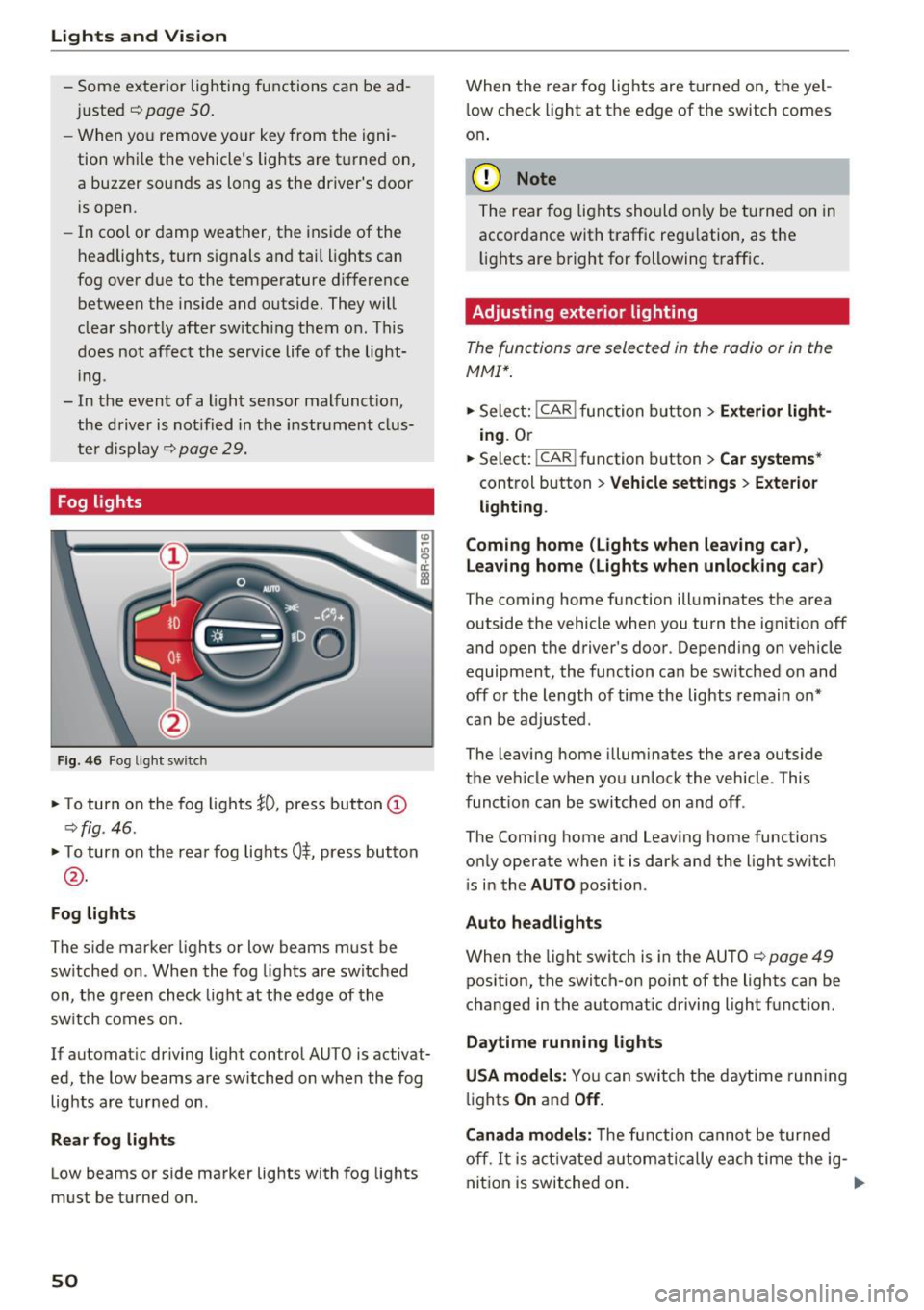
Fog lights
Fig . 4 6 Fog lig ht switch
• To turn on the fog lights }D, press button @
c:>fig. 46 .
• To turn on the rea r fog lights 0$, press button
@ .
Fog lights
The s ide marker lights or low beams must be
sw itched on. Whe n the fog lights are sw itched
on, the g reen check light at the edge of the
sw itch comes o n.
If automat ic driving light control AUTO is activat
ed, the low beams are sw itched on when the fog
lights are turned on.
Rear fog lights
Low beams or side marker lights with fog lights
must be turned on.
50
When the rear fog lights are turned on, the yel
l ow check light at t he edge of the switch comes
on .
(D Note
The re ar fog lig hts should on ly be t urned on in
accor dance with traffic reg ulation, as the
li ghts are bright for following t raff ic .
Adjusting exterior lighting
The functions ore selected in the radio or in the
MMI".
• Sele ct: I CAR I func tion b utton > Exterior light
ing . Or
• Select:
-1 c- A~ R~! function b utton > Car systems *
control button > Vehicle settings > E xterior
lighting .
Coming home (Lights when leaving car),
Leaving home (Light s when unlock ing ca r)
The coming home function ill uminates the area
outside the vehicle when you turn the ignit ion
off
and open the driver's door . Depending on vehicle
equipment, the function ca n be sw itched on and
off or the length of time the lights remain o n*
can be adj usted.
The leaving home illum inates the area outside
the ve hicle when you unlock the vehicle. This
funct ion can be switched on and off .
The Coming home and Leaving home functions
on ly operate when it is dark and the light switc h
i s in the
AUTO pos ition.
Auto headlights
When the light sw itch is in the AUTO c:> page 49
pos ition, the switch-on point of the lights can be
c hanged in the automat ic driving light function.
Daytime running lights
USA models: You can switch the daytime runn ing
li ghts
On and Off .
Canada model s:
The function canno t be tur ned
off.
It i s a ct ivate d automatically ea ch time the ig-
nit ion is switched on.
liJI.
Page 54 of 296
Lights and Vision
-yo ur vehicle is being towed by a tow truck or
if you are towing another vehicle behind
you.
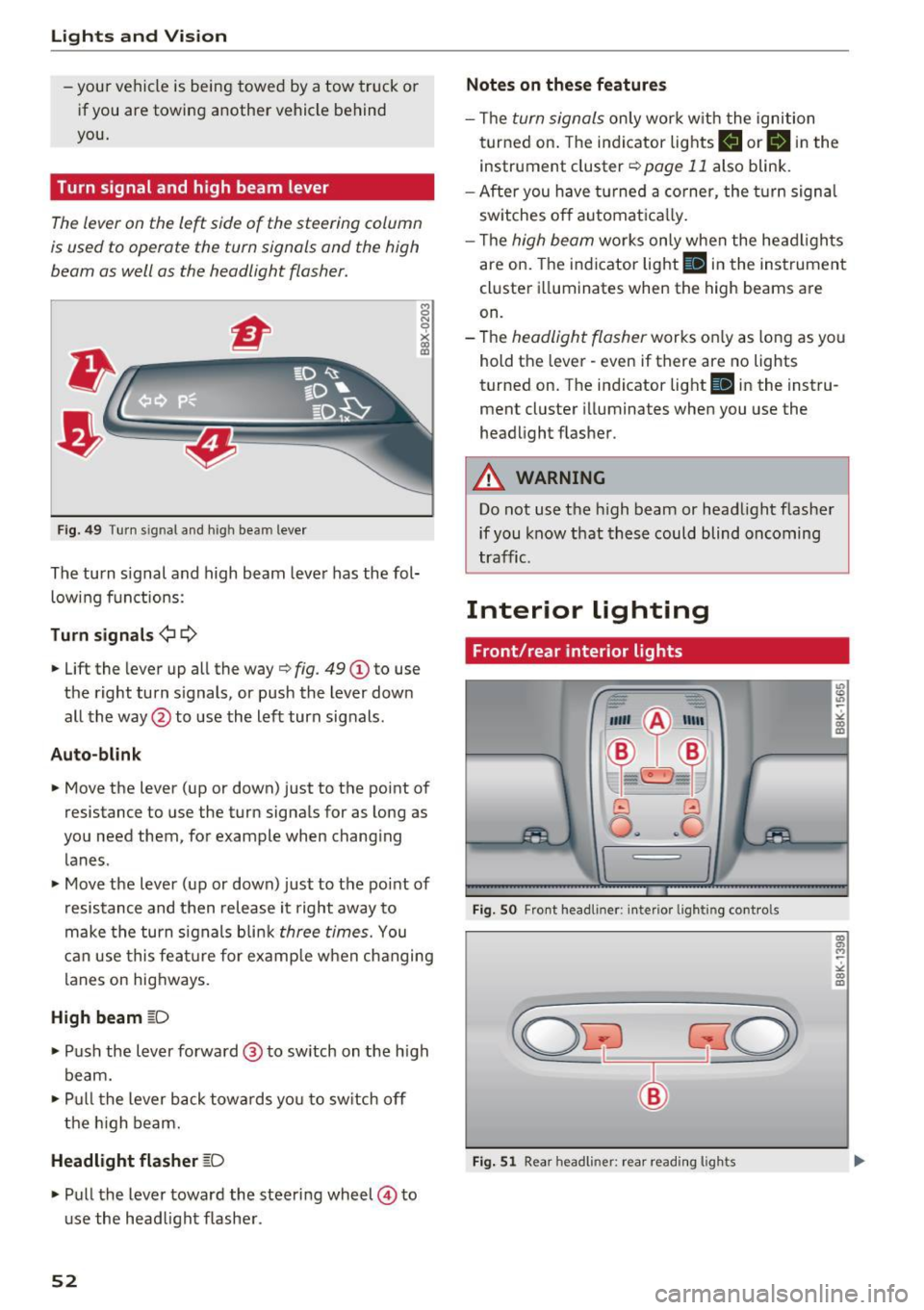
Turn signal and high beam lever
The lever on the le~ side of the steering column
is us ed to operat e the turn signals and th e high
beam as well as the headlight flasher.
F ig . 4 9 Tu rn s ig na l a n d h ig h beam leve r
The turn signal and high beam leve r has the fol
low ing f unctions :
Turn signals ¢¢
8 N 'i'
~ (0
• Lift the lever up al l the way c> fig . 49 (D to use
the right turn s ignals, or push the lever down
all the way@to use the left turn signals .
Auto-blink
• Move the lever (up or down) just to t he point of
resistance to use the turn signals for as long as
yo u need them, for example when chang ing
lanes .
• Move the lever (up or down) just to the point of
resistance and then release it right away to
make the turn signals b li nk
three times. You
can use this fea ture for example when ch anging
lanes on hig hways.
High beam ~D
• Push the l ever forward @ to sw itch on the h igh
beam.
• Pull t he lever back towa rds you to sw itch off
t he hig h beam.
Headlight flasher ~D
• Pu ll the lever toward the steering wheel © to
u se the head light f lashe r.
52
Notes on these features
- Th e turn signals on ly work w it h the ignition
t urned on. The indi cator lights
B or B in the
instrument cluster¢
page 11 also blink .
- After you have turned a co rner, the turn signa l
sw itches o ff automat ica lly.
- Th e
high beam works only when the head ligh ts
are on. The indicator light
Bl in the instrumen t
cl uster illuminates when the high beams are
on.
- The
headlight flasher works o nly as long as yo u
hold t he lever - even if there are no lights
turned on. T he indicator light
Bl in the inst ru
ment cluster illuminates when you use the
headlight flas her .
A WARNING
Do not use the h igh beam or head light flasher
if you know that these could blind oncoming
tra ffic.
Interior lighting
Front/rear interior lights
Fig. SO Fro nt headl iner: interio r li gh tin g cont ro ls
Fig. 51 Rear h eadli ner: rea r read ing ligh ts
" co (0
co a, M ~
"' co (0
Page 59 of 296
a,
a,
..... N r-N ..... 0 0
0:
co
The mirror returns to its initial position as soon
as reverse gear is dis e ngaged and vehicle speed is
above about 9 mph (15 km/h) . T he mirror also
returns to its ini tial posit ion if the switch is
moved to the driver's exter ior mirror © or the ig
n ition is switched off .
If the position of the m irror surface is changed
on a ti lted mirror , this new position will be auto
matically assigned to the remote key when the
vehicle is taken out of reverse gear .
(D Note
- Curved mirror surfaces (convex or spheri
cal") increase your field of v iew . Remember
that vehicles or other objects will appear
smaller and farther away than when seen in
a flat mirror . If you use th is m irror to esti
ma te distances of following vehicles when
changing lanes, yo u could estimate incor
rectly and cause an a ccident.
- If the mir ror housing is moved unin tention
ally (for example, wh ile pa rking yo ur vehi
cle), then you must first fold the m irror
electrica lly. Do not read just the mirror
hous ing manua lly. You could damage the
motor which contro ls the mirror.
- If you wash the vehicle in an automatic car
wash, yo u m ust fold the exterior m irrors in
to reduce the risk of damage to the mirrors. Never fold power folding exterior m irrors*
by hand . Only fold them in and out using
the power contro ls .
@ Tips
If there should be a ma lfunction in the e lec
trical system, you can still adjust the exterior m irro rs by p ressing the edge of the m irror .
Lights and V ision
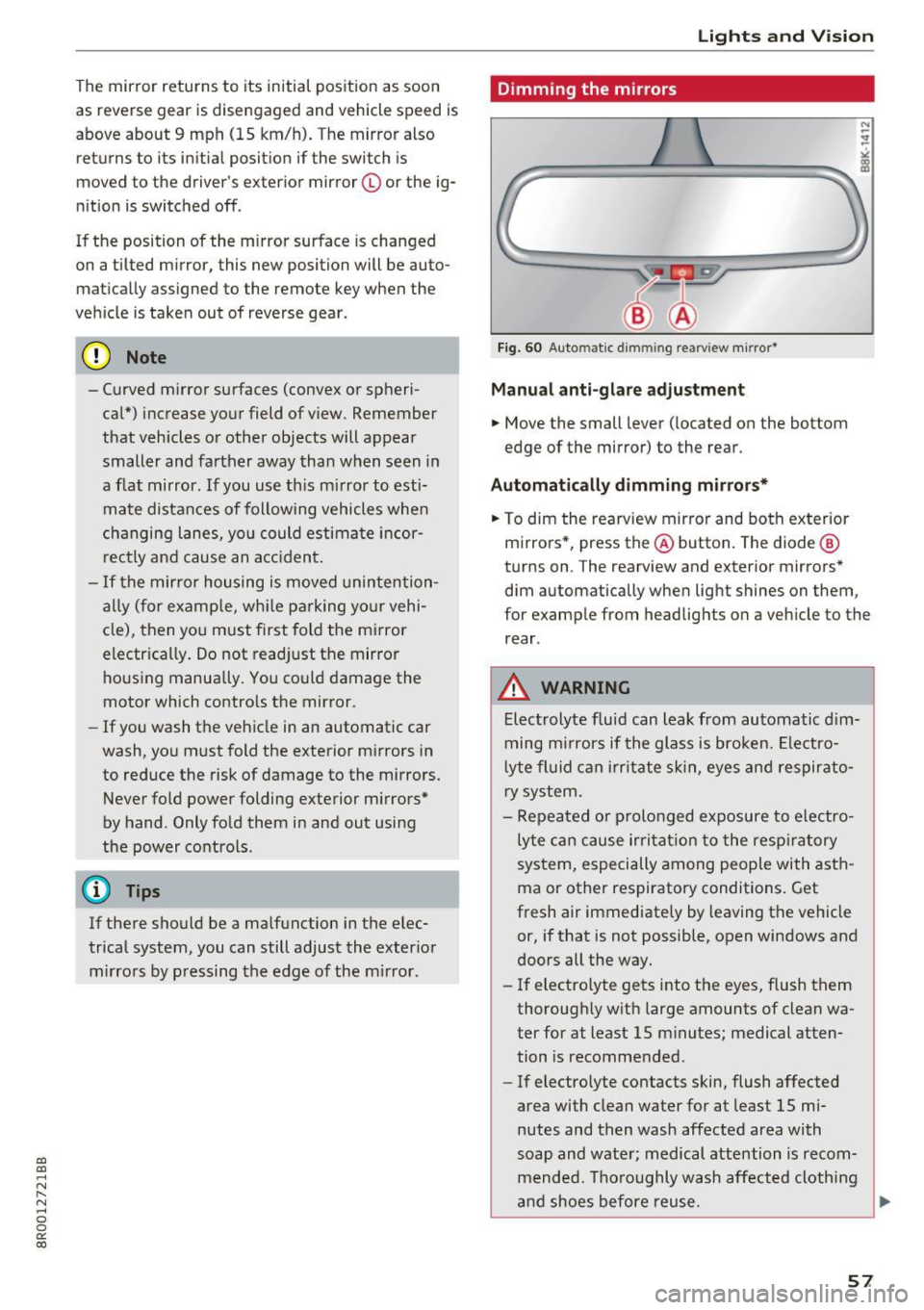
Dimming the mirrors
Fig. 60 Auto ma tic dimmin g rearvi ew m irror*
Manu al anti-glare adjustment
.. Move the small lever ( located on the bottom
edge of the mirror) to the rear .
Automat ically dimm ing mirro rs*
.. To dim the rearview mir ror and both exterior
m irrors *, press the@ button. The diode @
turns on . The rearv iew and exterior mirrors*
dim automatically when light shines on them ,
for example from headlights on a veh icle to the
rear .
_&. WARNING
-Electrolyte flu id can leak from automatic d im
ming m irrors if the glass is broken. Ele ctro
l yte fluid can i rr itate sk in, eyes and respirato
ry system .
- Repeated or p rolonged exposure to electro
ly te ca n cause irri tat ion to the resp iratory
system, especially among people with asth
ma or other respiratory conditions. Get
fresh air immediately by leaving the vehicle
or, if that is not possible, open windows and
doors all the way.
- If electro lyte gets into the eyes, flush them
thorough ly w ith large amounts of clean wa
ter for at least 15 m inutes; medical atten
tion is recomme nded .
- If electrolyte contacts skin, flush affected
area with clean water for at least 15 mi
nutes and then wash affected area with
soap and water; medical attention is recom mended. Thoroughly wash affected cloth ing
and shoes before reuse .
~
57