light AUDI Q5 2017 Owner's Guide
[x] Cancel search | Manufacturer: AUDI, Model Year: 2017, Model line: Q5, Model: AUDI Q5 2017Pages: 296, PDF Size: 74.43 MB
Page 53 of 296
a,
a,
..... N l"N ..... 0 0
0:
co
Travel mode (Canada models)*
The headlight beam is asymmetrical. This pro
vides stronger illumination on the side of the
road on which you are driving. If you are driving
in a country that drives on the opposite side of
the road from your own country, this will cause
glare for oncoming drivers. To prevent glare:
- Travel mode must be selected in vehicles with
Xenon headlights*.
- In vehicles with halogen headlights, certain
areas of the headlight lenses must be covered
with waterproof adhesive covers that prevent
light from passing through. For more informa
tion, please see your authori zed Audi dealer or
authorized repair facility .
(!) Tips
When travel mode* is activated, a display in
the driver information system indicates this each time you switch the ignition on .
Adaptive light
Applies to: vehicles with adaptive light
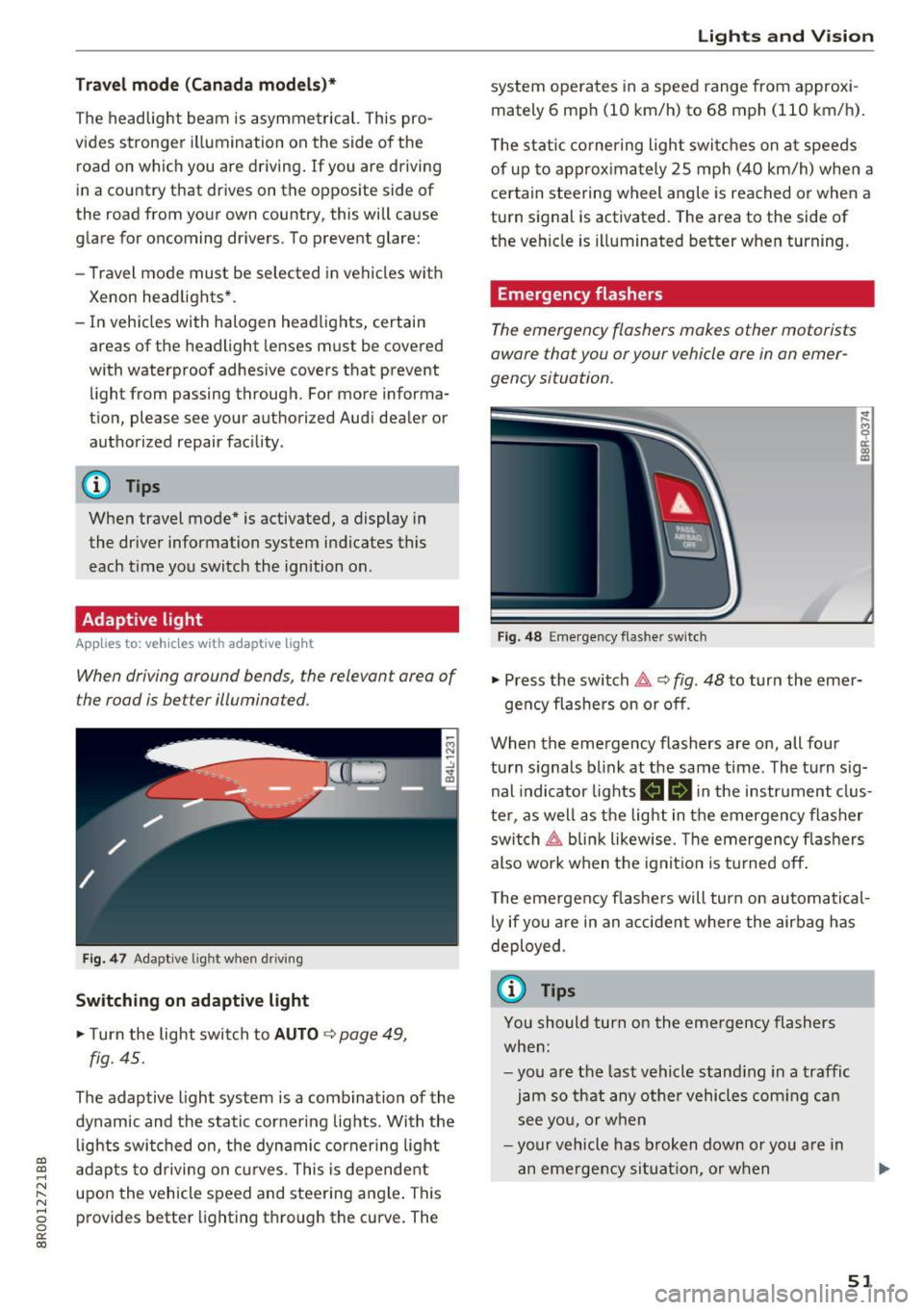
When driving around bends, the relevan t area of
the rood is better illuminated .
Fig. 47 Adaptive lig ht when dr iving
Switching on adaptive light
.. Turn the light switch to AUTO c:> page 49,
fig. 45.
The adaptive light system is a combination of the
dynamic and the static cornering lights . With the
lights switched on, the dynamic cornering light
adapts to driving on curves . This is dependent
upon the vehicle speed and steering angle. This
provides better lighting through the curve. The
Lights and Vision
system operates in a speed range from approxi
mately 6 mph (10 km/h) to 68 mph (110 km/h).
The static cornering light switches on at speeds
of up to approximately 25 mph (40 km/h) when a
certain steering wheel angle is reached or when a
turn signal is activated. The area to the side of
the vehicle is illuminated better when turning.
Emergency flashers
The emergency flashers makes other motorists
aware that you or your vehicle ore in on emer
gency situation.
Fig. 48 E mergency flas her switch
~
9 a: a, m
.. Press the switch &, c:> fig. 48 to turn the emer-
gency flashers on or off .
When the emergency flashers are on, all four
turn signals blink at the same time . The turn sig
nal indicator lights
B II in the instrument clus
ter , as well as the light in the emergency flasher
switch ~ blink likewise. The emergency flashers
also work when the ignition is turned off.
The emergency flashers will turn on automatical
ly if you are in an accident where the airbag has
deployed .
(0 Tips
You should turn on the emergency flashers
when:
-you are the last vehicle standing in a traffic
jam so that any other vehicles coming can
see you, or when
-your vehicle has broken down or you are in
an emergency situation, or when
51
Page 54 of 296
Lights and Vision
-yo ur vehicle is being towed by a tow truck or
if you are towing another vehicle behind
you.
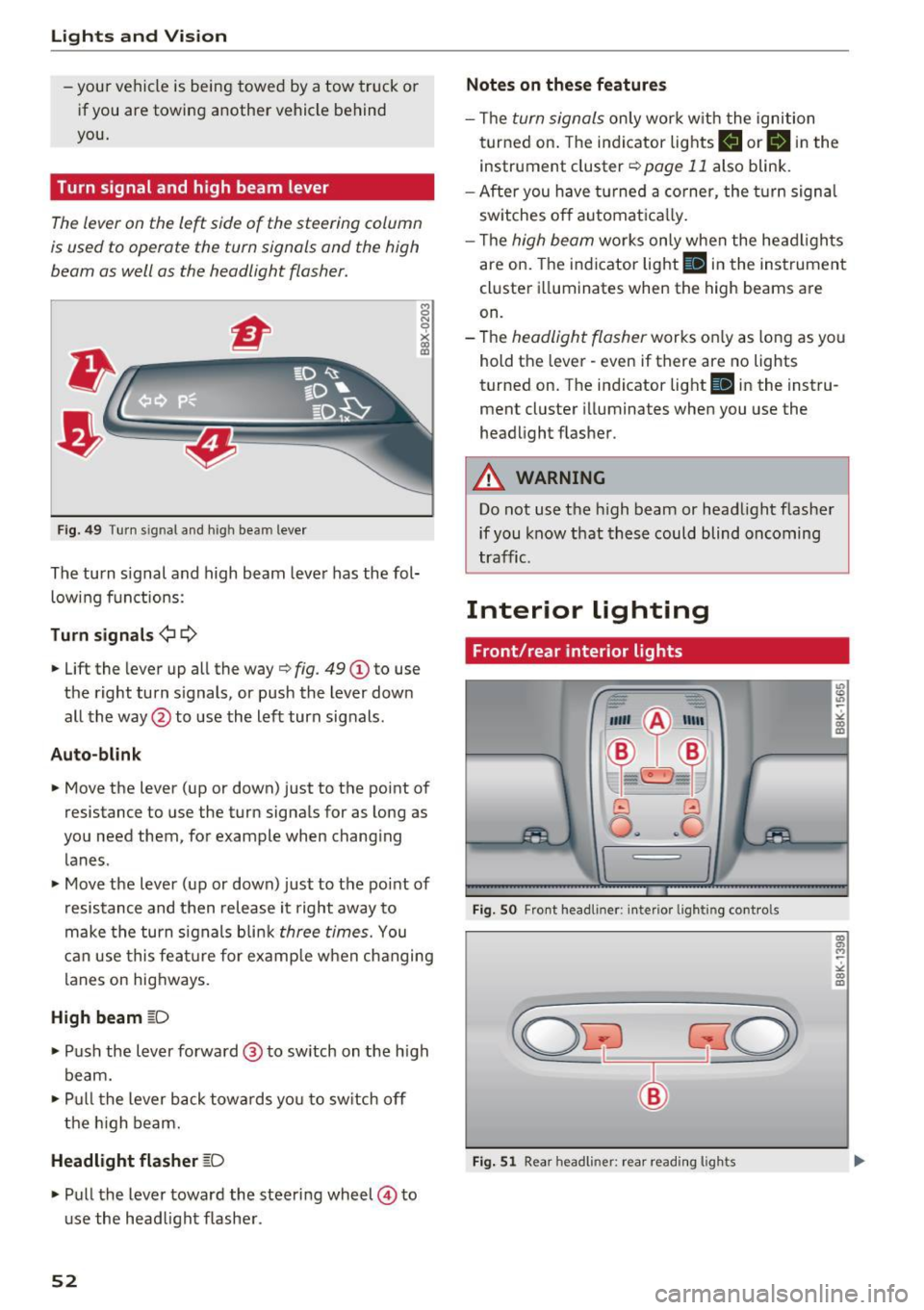
Turn signal and high beam lever
The lever on the le~ side of the steering column
is us ed to operat e the turn signals and th e high
beam as well as the headlight flasher.
F ig . 4 9 Tu rn s ig na l a n d h ig h beam leve r
The turn signal and high beam leve r has the fol
low ing f unctions :
Turn signals ¢¢
8 N 'i'
~ (0
• Lift the lever up al l the way c> fig . 49 (D to use
the right turn s ignals, or push the lever down
all the way@to use the left turn signals .
Auto-blink
• Move the lever (up or down) just to t he point of
resistance to use the turn signals for as long as
yo u need them, for example when chang ing
lanes .
• Move the lever (up or down) just to the point of
resistance and then release it right away to
make the turn signals b li nk
three times. You
can use this fea ture for example when ch anging
lanes on hig hways.
High beam ~D
• Push the l ever forward @ to sw itch on the h igh
beam.
• Pull t he lever back towa rds you to sw itch off
t he hig h beam.
Headlight flasher ~D
• Pu ll the lever toward the steering wheel © to
u se the head light f lashe r.
52
Notes on these features
- Th e turn signals on ly work w it h the ignition
t urned on. The indi cator lights
B or B in the
instrument cluster¢
page 11 also blink .
- After you have turned a co rner, the turn signa l
sw itches o ff automat ica lly.
- Th e
high beam works only when the head ligh ts
are on. The indicator light
Bl in the instrumen t
cl uster illuminates when the high beams are
on.
- The
headlight flasher works o nly as long as yo u
hold t he lever - even if there are no lights
turned on. T he indicator light
Bl in the inst ru
ment cluster illuminates when you use the
headlight flas her .
A WARNING
Do not use the h igh beam or head light flasher
if you know that these could blind oncoming
tra ffic.
Interior lighting
Front/rear interior lights
Fig. SO Fro nt headl iner: interio r li gh tin g cont ro ls
Fig. 51 Rear h eadli ner: rea r read ing ligh ts
" co (0
co a, M ~
"' co (0
Page 55 of 296
a,
a,
..... N
" ('I ..... 0 0
0:
co
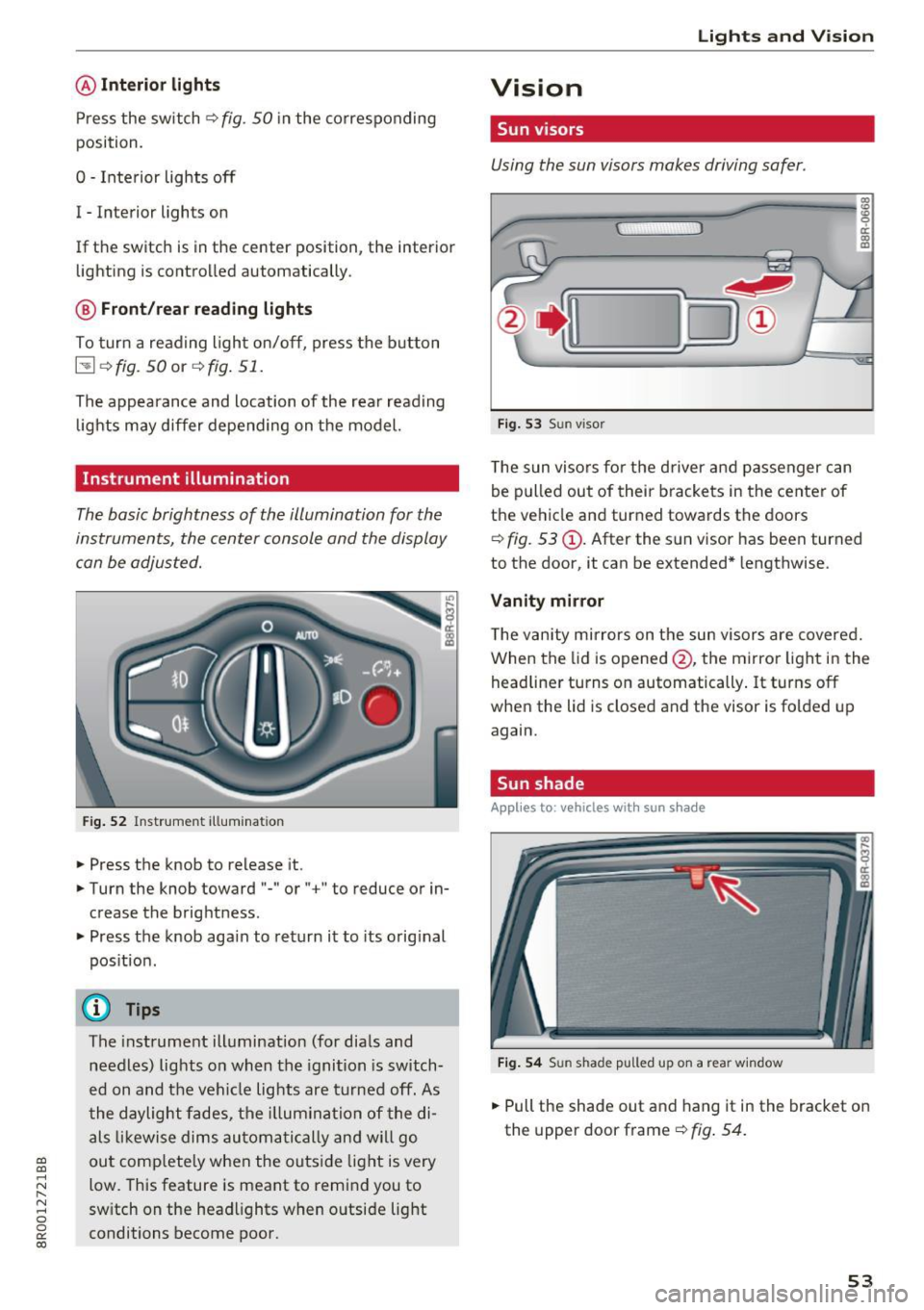
@Interior lights
Press the sw itch q fig . 50 in the co rresponding
position.
0 -Inte rior lights off
I -Interior lights on
If the switch is in the center position, the interior lighting is controlled automatically .
@ Front/rear reading lights
To tur n a read ing ligh t on/off, press the b utton
I::!! q fig. 50 or q fig . 51.
The appearan ce and location of the rear read ing
lig hts may differ depending on the model.
Instrument illumination
The basic brightness of the illumination for the
instruments, the cen ter console and the display
c an be a djusted.
F ig. 5 2 Instr ume nt ill um inatio n
• Press the knob to release it.
• Turn the knob toward "-"or" +" to reduce o r in
crease the brightness .
• Press the knob aga in to ret urn i t to its orig inal
pos it ion .
@ Tips
The inst rument ill umination (for dia ls and
needles) lig hts o n when the ignition is switch
ed on and t he vehi cle lights are turned off . As
t he daylight fade s, the illum ina tio n of the di
a ls li kewise dims au toma tically a nd wil l go
ou t com plete ly when the outs ide light is very
low. This feature is meant to remi nd you to
sw itch on the headlights when o utsi de light
conditions become poor.
Lights and V ision
Vision
Sun visors
Using the sun visors makes driving safer .
~
i:--o J®
Fig. 53 Sun visor
T he sun viso rs fo r the d river a nd passenger c an
be p ulled out of their brackets in the center of
the ve hicle and turned towards the doors
q fig. 53 @. After the s un visor has been turned
to the door, it can be extended* lengthwise .
Vanity mirror
The v anity mirrors on the sun visors are covered.
When the lid is opened @, the mirro r light in the
head line r turns on automatically . It turns off
when the lid is closed and the visor is fo lded up
again.
Sun shade
Applies to : vehicles with sun shade
Fi g. 54 Sun shade p ulle d up on a rea r w indow
• Pull the shade out and hang it in the bracket on
the upper door frame
q fig . 54.
53
Page 56 of 296
Lights and Vision
Windshield wipers
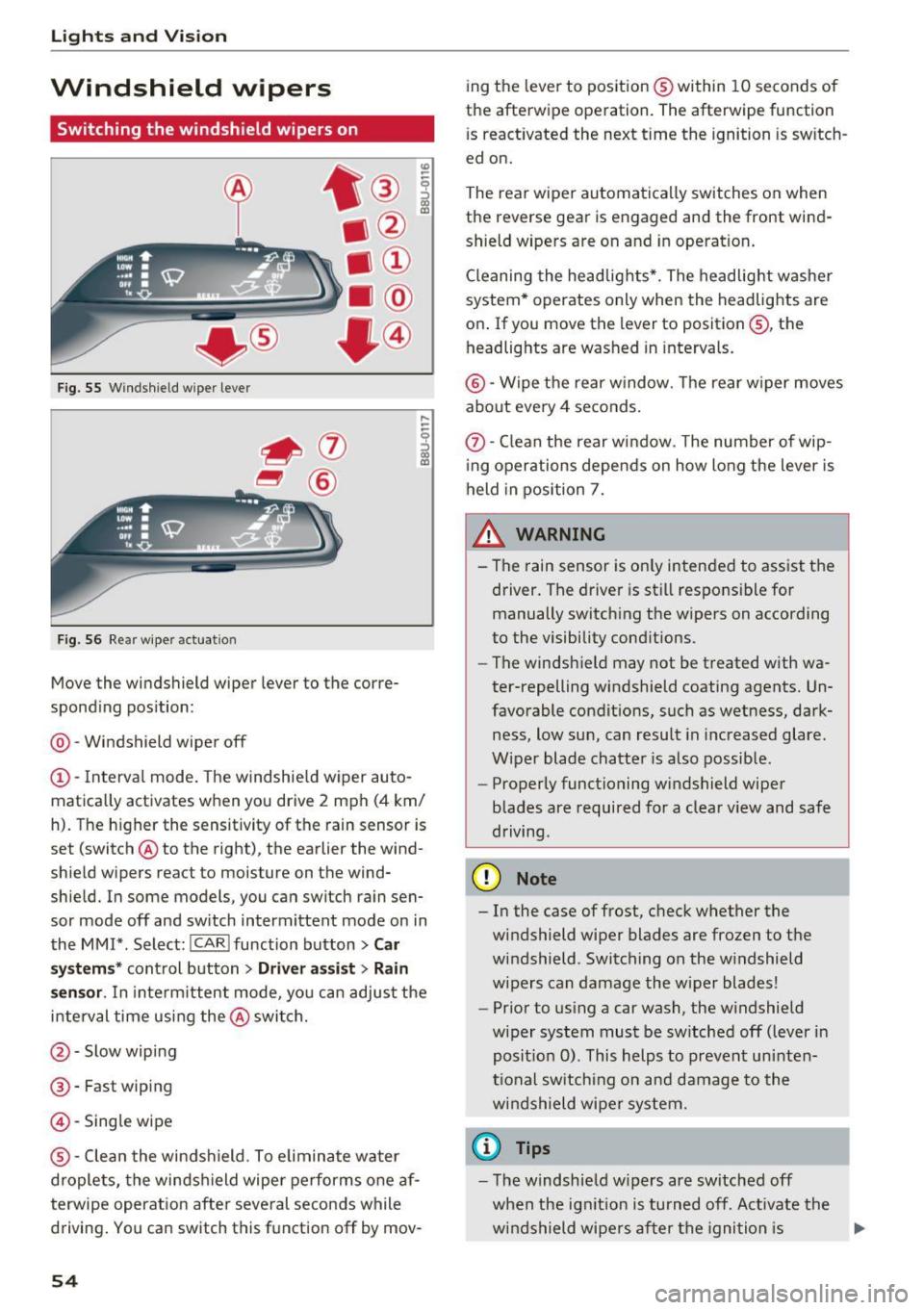
Switching the windshield w ipers on
F ig. 55 W indshield wiper lever
F ig. 56 Rear w iper actuat ion
Move the windshield wiper lever to the corre
spond ing pos ition:
@ -Windshield wiper off
(D -Interval mode. The windshie ld w iper auto
matica lly activates when you drive 2 mph (4 km/
h). The h igher the sensit ivity of the rain sensor is
set (switch @to the right), the earlier the wind
shield wipers react to moisture on the wind
shie ld. In some models, you can switch rain sen
sor mode off and sw itch intermittent mode on in
the MM!* . Select:
!CARI function button> Car
s y stem s*
control button > Driver a ssi st > Rain
s en sor .
In inte rm ittent mode, yo u can adjust the
i n terval time using the @switch.
@-Slow wipi ng
@ -Fast wiping
@-Sing le wipe
® -Clean the windshield . To elimin ate water
d roplets, the winds hield wipe r performs one af
terwipe operatio n afte r seve ral seconds while
driving . You can switch this f unction off by mov -
54
ing the leve r to pos ition ® within 10 seconds of
the afterwipe ope ration. The afterwipe function
i s react ivated the next time the ignition is sw itch
ed on.
The rear wiper automatica lly switches on when
the reverse gear is engaged and the front wind
shield wipers are on and in operation .
Cl eaning the headlig hts*. The headlight was he r
system * operates only when the headlights are
on . If you move the lever to position@, the
headlights are washed in intervals.
@ -Wipe the rear w indow. The rear w iper moves
a bout every 4 se conds .
(!)-Clean the rear w indow . T he number of wip
i ng operations depe nds on how long the lever is
held in position 7.
& WARNING
- Th e rain sensor is on ly inten ded to ass ist the
driver. The driver is st ill responsi ble for
manually switch ing the wipers on according
to the visibility cond itions.
- The windsh ield may not be t reated with wa
ter-repelling windshield coating agents. Un
favorable condit ions, such as wetness, dark
ness, low sun, can resu lt in i ncreased glare.
Wiper blade chatte r is also possib le.
- Properly functioning windshield wiper
blades are required for a clea r view and safe
driving.
@ Note
- In the case of frost, c heck whether the
windshield wiper blades are frozen to the
windshield . Switching on the w indshield
w ipers can damage the w iper blades!
- Pr ior to us ing a car wash, the w indshield
wiper system must be sw itched off (lever in
posit io n 0) . This helps to preven t un inte n
ti onal sw itchi ng on and damage to the
w indshield wipe r sy stem.
(D Tips
-The windshie ld w ipers are switched off
when the ig nitio n is turned off. Activate th e
w ind shield wipe rs a fter the igni tion is .,.
Page 57 of 296
CD
CD
.... N ,-... N ..... 0 0 C<'. 00
switched back on by moving the windshield
wiper lever to any position .
- Worn or dirty windshield wiper blades result
i n streaking. This can affect the rain sensor
funct ion . Check yo ur windshield wiper
blades regularly.
- The washer fluid nozzles of the windshield
washer system are heated at low tempera
tures when the ignition is on.
- When stopping temporarily, e .g . at a traffic
light, the set speed of the windsh ield wipers
i s automatically reduced by one speed.
Cleaning windshield wiper blades
Clean the windshield wiper blades when they be
g in to leave streaks . Use a soft cloth a nd glass
cleane r to clean the w indshield wiper blades .
Front w ipe r
.. Place the windshield wiper arms in the service
pos ition. Refer to
9 page 55 .
.. Lift the wiper arm away from the front window .
Rear wiper
.. Lift the wiper arm away from the rear window.
A WARNING
Dirty windshield wiper blades can impair your
view. This can lead to accidents.
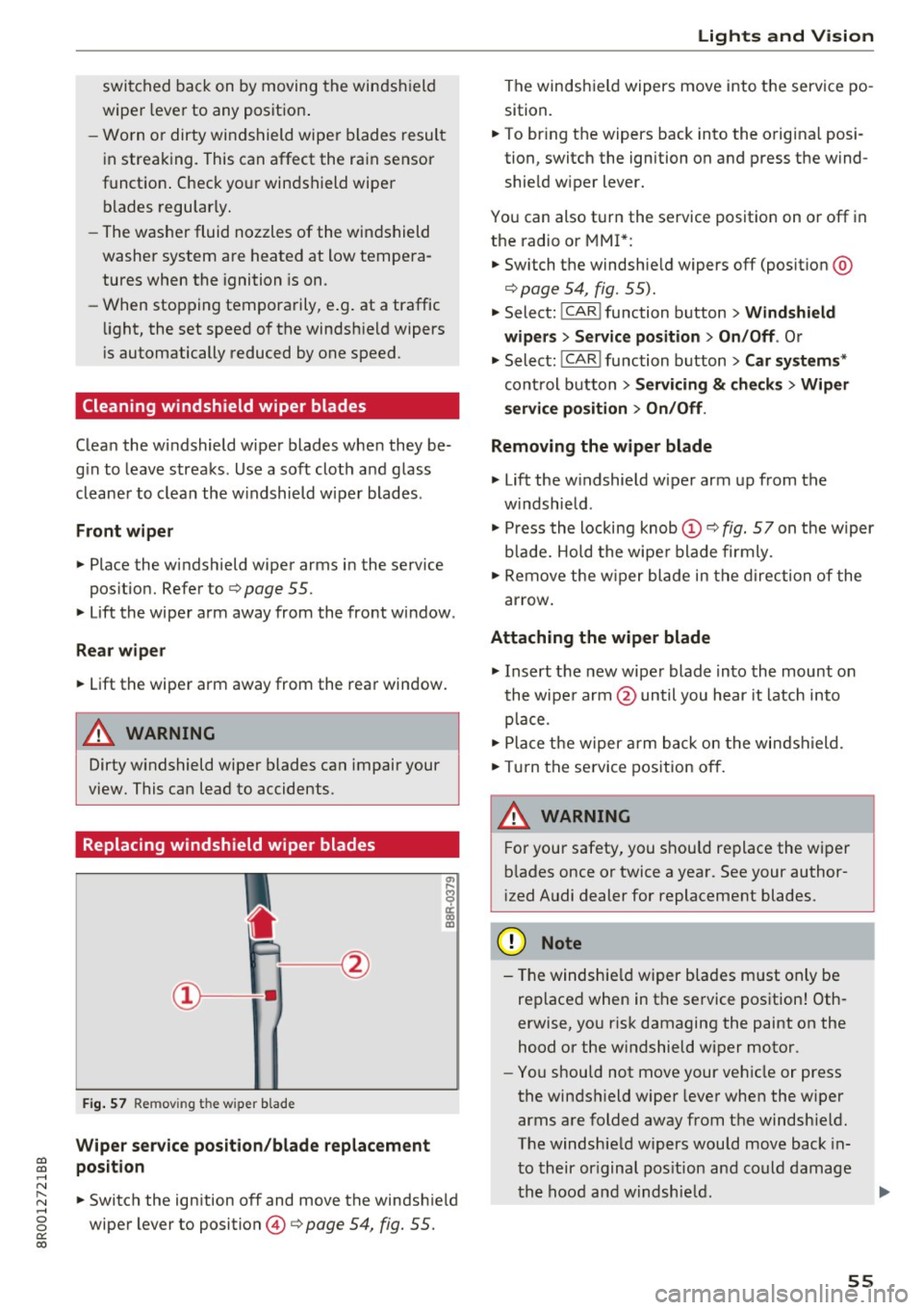
Replacing windshield wiper blades
F ig. 57 Remov ing the w ipe r blade
Wiper s ervice position /blade replac em ent
posit ion
a,
ij
a: co
"'
.. Switch the ign ition off and move the windsh ield
wiper lever to position @
9 page 54, fig. 55.
Lights and Vision
The windshield wipers move into the service po
sition .
.. To br ing the wipers back into the orig ina l posi
tion, switch the ignition on and press the wind shie ld w iper lever.
You can also turn the service position on or off in
the radio or MMI*: .. Switch the windshie ld wipers
off (posit ion @
9page 54, fig. 55).
.. Select: !CAR ! function button > Wind shield
wiper s
> Servic e po sition > On /Off . Or
.. Select:
!CAR ! function button> Car syst em s*
cont rol button > Servicing & c heck s> Wiper
s ervi ce po sition
> On /Off .
Removing the wiper blade
.,. Lift the w indshield wiper arm up from the
w indshield .
.,. Press the locking knob
(D 9 fig. 57 on the wiper
b lade. Hold the wipe r blade firmly .
.. Remove the w iper blade in the direction of the
ar row .
Attaching the wiper blade
.. Insert t he new wipe r blade into the mount on
the wipe r arm @until you hear it latch into
p lace.
.. Place t he w iper arm back on the windshield.
.. Turn the se rvice pos ition off.
A WARNING ~ -
F or your safety, you should replace the wiper
b lades once or twice a year . See your author
i zed Audi dealer for replacement blades.
(D Note
- T he windshie ld wiper blades must on ly be
replaced when in the service position! Oth
erwise, you r isk damaging the paint on the
hood or the w indshield wiper motor .
- You should not move your vehicle or press
the windsh ield wiper lever when the wiper
arms a re folded away from the windshie ld.
The windshield wipers would move back in
t o their or iginal pos ition and could damage
the hood and w indshie ld .
55
Page 58 of 296
Lights and Vision
-To help prevent damage to the wiper sys
tem, a lways loosen blades which are frozen
to the windshie ld before operating w ipers .
- To help prevent damage to wiper blades, do
not use gasoline, kerose ne, paint thinner, or
other solvents on or near the wiper blades.
- To help prevent damage to the wiper arms
or other components, do not attempt to
move the wipers by hand.
@ Tips
- Comme rcial hot waxes applied by a utomat ic
car washes affect the how eas ily the glass
surface can be cleaned.
- You can also use the service position, fo r ex
ample, if you want to protect the windsh ield
from icing by using a cover.
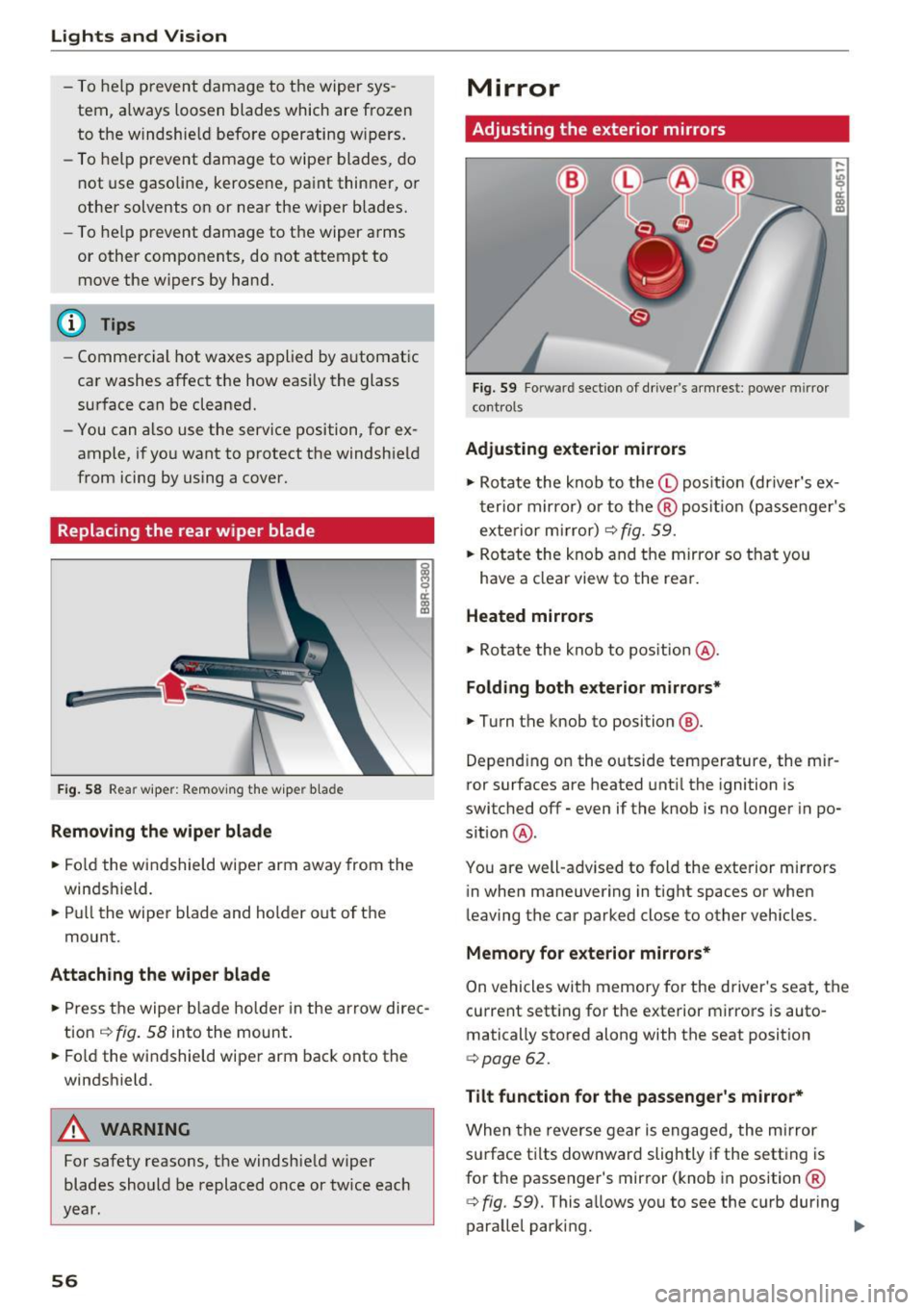
Replacing the rear wiper blade
F ig. 58 Rea r wiper: Remov ing the w iper b lade
Removing the wiper blade
.. Fo ld the wi ndshield wipe r arm away from the
windshield.
.. Pu ll the wiper blade and holder out of t he
mount.
Attaching the wiper blade
~ M 0 a: a, (C
.. Press t he wiper b la d e holde r in the arrow dire c
tion
c:> fig. 58 into the mount.
.. Fo ld the windshield wiper arm bac k onto the
windshield.
A WARNING
-
For safety reasons, the windshield w iper
blades sho uld be replaced once or twice each
year .
56
Mirror
Adjusting the exterior mirrors
Fig. 59 Forwa rd sect ion of dr ive r's armrest : power mirror
cont rols
Adjusting exterior mirrors
,...
-"' 9 a: ::,:
• Ro tate the knob to the© pos it io n (dr iver's ex
t erior mirro r) o r to t he ® posi tion (passe nger's
exterior m irror)
c:> fig. 59.
.. Rotate the knob and the mirro r so that you
have a clear view to the rea r.
Heated mirrors
.,. Ro tate the knob to pos ition @.
Folding both exterior mirrors*
.,. Turn the knob to position @.
Depend ing o n the outside temperature, the mi r
ror surfaces are heated unt il the ignition is
switched
off -even if the knob is no longer in po
s it ion @.
You are well-adv ised to fold the exte rior m irrors
in when maneuvering in tight spaces or when
leaving the car parked close to other vehicles .
Memory for e xterior mirrors*
On vehicles with memory for the driver's seat, the
current sett ing fo r the exterior mirrors is auto
matically stored along with the seat posit ion
<=> page 62.
Tilt function for the passenger 's mirror*
When the reverse gear is engaged, the mirror
s u rface t ilts downwar d slightly if the setting is
for t he passenger's mirror (knob in position ®
c:> fig. 59). This allows you to see the curb during
parallel parking. ..,_
Page 59 of 296
a,
a,
..... N r-N ..... 0 0
0:
co
The mirror returns to its initial position as soon
as reverse gear is dis e ngaged and vehicle speed is
above about 9 mph (15 km/h) . T he mirror also
returns to its ini tial posit ion if the switch is
moved to the driver's exter ior mirror © or the ig
n ition is switched off .
If the position of the m irror surface is changed
on a ti lted mirror , this new position will be auto
matically assigned to the remote key when the
vehicle is taken out of reverse gear .
(D Note
- Curved mirror surfaces (convex or spheri
cal") increase your field of v iew . Remember
that vehicles or other objects will appear
smaller and farther away than when seen in
a flat mirror . If you use th is m irror to esti
ma te distances of following vehicles when
changing lanes, yo u could estimate incor
rectly and cause an a ccident.
- If the mir ror housing is moved unin tention
ally (for example, wh ile pa rking yo ur vehi
cle), then you must first fold the m irror
electrica lly. Do not read just the mirror
hous ing manua lly. You could damage the
motor which contro ls the mirror.
- If you wash the vehicle in an automatic car
wash, yo u m ust fold the exterior m irrors in
to reduce the risk of damage to the mirrors. Never fold power folding exterior m irrors*
by hand . Only fold them in and out using
the power contro ls .
@ Tips
If there should be a ma lfunction in the e lec
trical system, you can still adjust the exterior m irro rs by p ressing the edge of the m irror .
Lights and V ision
Dimming the mirrors
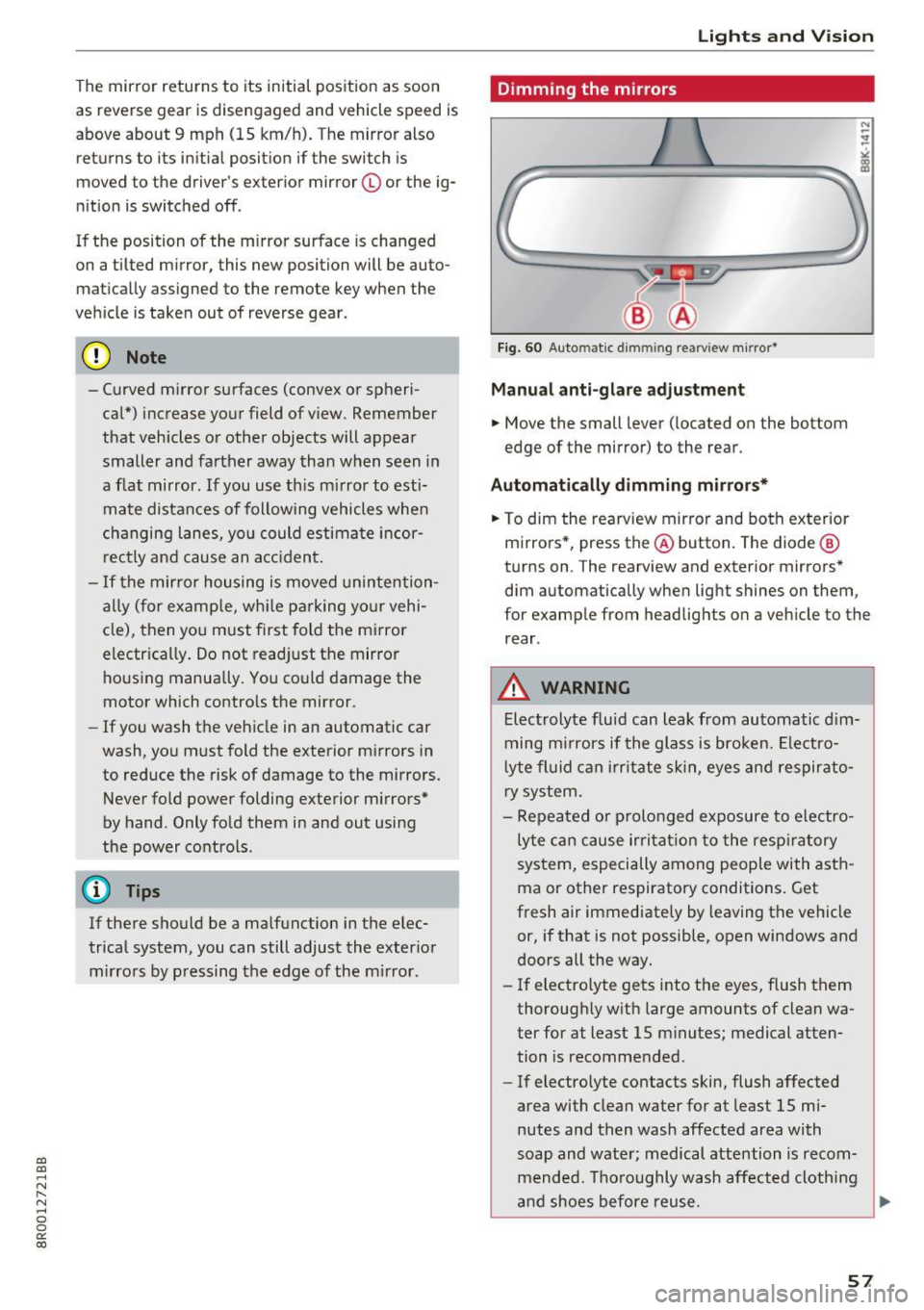
Fig. 60 Auto ma tic dimmin g rearvi ew m irror*
Manu al anti-glare adjustment
.. Move the small lever ( located on the bottom
edge of the mirror) to the rear .
Automat ically dimm ing mirro rs*
.. To dim the rearview mir ror and both exterior
m irrors *, press the@ button. The diode @
turns on . The rearv iew and exterior mirrors*
dim automatically when light shines on them ,
for example from headlights on a veh icle to the
rear .
_&. WARNING
-Electrolyte flu id can leak from automatic d im
ming m irrors if the glass is broken. Ele ctro
l yte fluid can i rr itate sk in, eyes and respirato
ry system .
- Repeated or p rolonged exposure to electro
ly te ca n cause irri tat ion to the resp iratory
system, especially among people with asth
ma or other respiratory conditions. Get
fresh air immediately by leaving the vehicle
or, if that is not possible, open windows and
doors all the way.
- If electro lyte gets into the eyes, flush them
thorough ly w ith large amounts of clean wa
ter for at least 15 m inutes; medical atten
tion is recomme nded .
- If electrolyte contacts skin, flush affected
area with clean water for at least 15 mi
nutes and then wash affected area with
soap and water; medical attention is recom mended. Thoroughly wash affected cloth ing
and shoes before reuse .
~
57
Page 60 of 296
Lights and Vision
-If swallowed and person is conscious, rinse
mouth with water for at least 15 minutes.
Do not induce vomiting unless instructed to
do so by medical professional. Get medical
attention immediately.
(D Note
Liquid electrolyte leaking from broken mirror
glass will damage any plastic surfaces it
comes in contact with . Clean up spilled elec
trolyte immediately with clean water and a
sponge.
{D) Tips
- Switching off the dimming function of the
inside rear view mirror also deactivates the
automatic dimming function of the exterior mirrors*.
- The automatic dimming mirrors do not dim
when the interior lighting is turned on or
the reverse gear is selected.
- Automatic dimming for the mirror only op
erates properly if the light striking the in
side mirror is not hindered by other objects.
Digital compass
Activating or deactivating the compass
Applies to: vehicles with digital compass
The direction is displayed on the interior rear
view mirror.
Fig. 61 Inside rea r view mirror: digi tal compass activated
~ To activate or deactivate, hold the @button
down until the red display appears or disap pears.
58
The digital compass only works with the ignition
turned on. The directions are displayed as initials:
N (North), NE (Northeast), E (East), SE (South
east),
S (South), SW (Southwest), W (West), NW
(Northwest).
(D Tips
To avoid inaccurate directions, do not allow any remote controls, electrical systems, or
metal parts close to the mirror.
Setting the magnetic deflection zone
Applies to : vehicles with digital compass
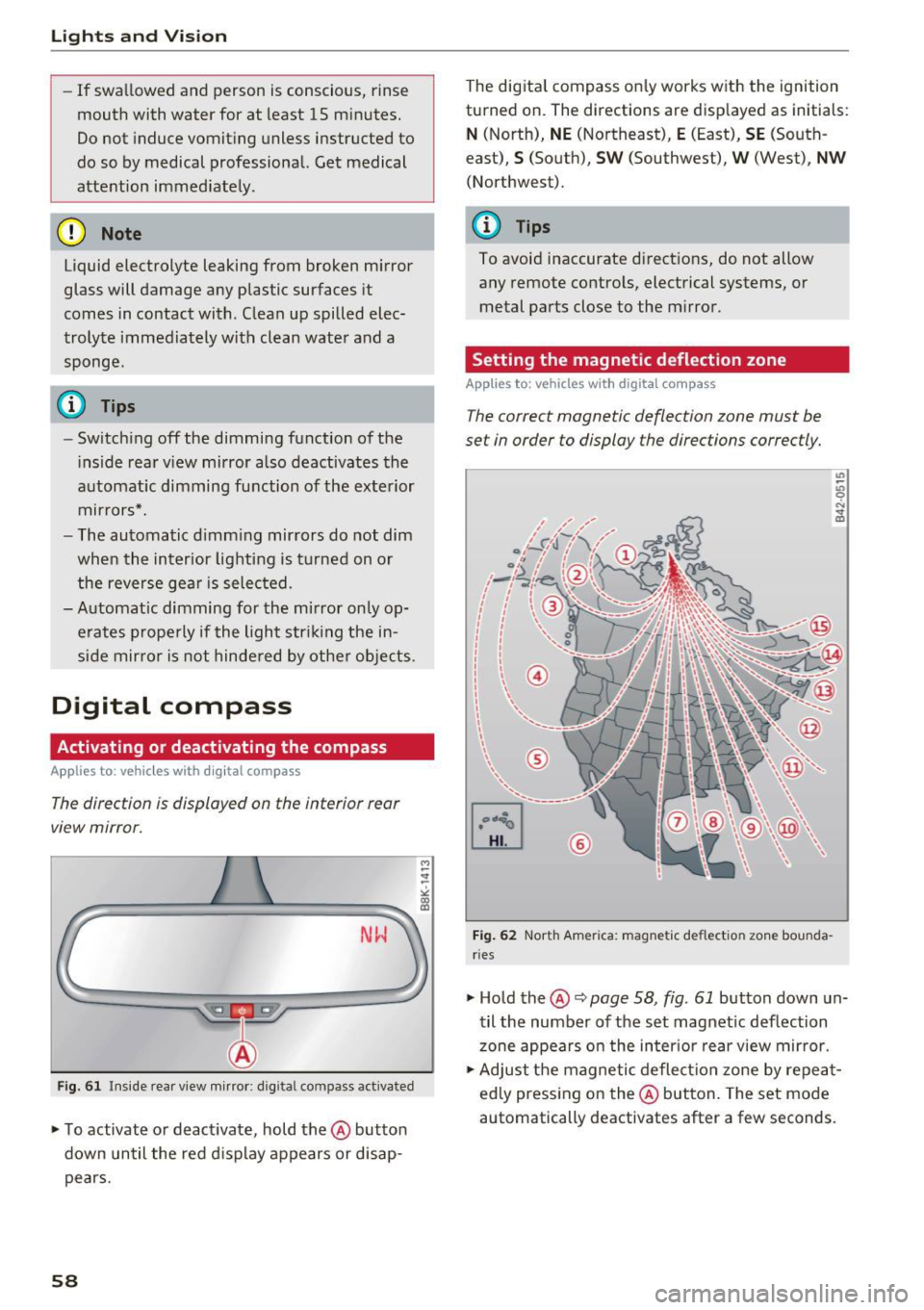
The correct magnetic deflection zone must be
set in order to display the directions correctly.
~
[mJ
®
Fig. 62 North America: magnetic deflection zone bounda
rie s
~ Hold the@c::> page 58, fig . 61 button down un
til the number of the set magnetic deflection
zone appears on the interior rear view mirror.
~ Adjust the magnetic deflection zone by repeat
edly pressing on the@button. The set mode
automatically deactivates after a few seconds.
Page 61 of 296
CD
CD
.... N ,-... N .... 0 0 C<'. 00
Calibrating the compass
Applies to: vehicles with digital compass
The compass has to be recalibrated if the display
is wrong or inaccurate .
.. Hold the@ button down until the letter C is
displayed on the interior rear view mirror .
.,. Drive in a circle at a speed of about 6 mph (10
km/h) until a d irection is shown on the interior
. . rear view mirror.
A WARNING
The digital compass is to be used as a direc
tional aid only. Even though you may want to
look at it whi le you are dr iving, you must sti ll
pay attention to traffic, road and weather
conditions as well as other possible hazards.
-
Lights and Vision
59
Page 62 of 296
Seat s and sto rage
Seats and storage
General information
Why is your seat adjustment so important?
The safety belts and the airbag system can only
provide maximum protection if the front seats are correctly adjusted .
There are various ways of adjusting the front
seats to provide safe and comfortable support
for the dr iver and the front passenger . Adjust
your seat properly so that:
- you can easily and quickly reach all the switches
and controls in the instrument panel
- your body is properly supported thus reducing
physical stress and fatigue
- the safety belts and a irbag system can offer
maximum protection ¢
page 148.
In the following sections, you will see exact ly
how you can best adjust your seats.
There are spec ial regulat ions and instr uctions for
installing a c hild safety seat on the front pas
senger 's seat . Always fo llow the information re
garding child safety provided in ¢
page 168,
Child safety.
A WARNING
Incorrect seating position of the driver and all
other passengers can result in serious person
al injury.
- Always keep your feet on the floor when the
vehicle is in motion - never put your feet on
top o f the instrument pane l, o ut of the win
dow o r on top of the sea t cushion. This ap
plies espe cially to the passenge rs.
If your
seat ing pos ition is inco rre ct, you increase
the risk of injury in the case of sudden b rak
ing or an accident . If the airbag inf lates and
the seating position is incor rect, this could
result in personal injury or even death.
- It is important for both the driver and front
passenge r to keep a d istance o f at least
10 inches (25 cm) between themselves and
the steering wheel and/or instrument pan el. If you're s itting any closer than this, the
airbag system cannot pro tect you properly.
60
In addition, the front seats and head re
straints must be adjusted to your body
he ight so that they can give you maximum
protection .
- Always try to keep as much distance as pos
sible between yourself and the steer ing
wheel or instrument panel.
- Do not adjust the driver's or front passeng
er's seat while the veh icle is moving. Yo ur
seat may move unexpectedly, causing sud
den loss of vehicle contro l and personal in
jury. If you ad just yo ur seat while the veh icle
is moving, you a re o ut of pos ition.
, Driver's seat
The correct seat position is important for safe
and relaxed driving .
We recommend that you adjust the dr iver's seat
i n the following manner:
.. Adjust the seat in fore and aft direction so that
you can easi ly push the pedals to the floor
while keep ing your knees slightly bent¢
A. in
Why is your seat adjustment so important? on
page 60 .
.. Adjust the seatback so that when yo u sit with
your back agains t the seatback, you can still
gras p the top of the steering wheel.
.. Adjust the head res traint so the uppe r edge is
as even as possib le w ith the top of you r head. If
that is not possible, try to adjust the head re
straint so that it is as close to this pos it ion as
possible ¢
page 64.
A WARNING
Neve r place any objects in the dr iver's foo t
well. An object could get into the pedal area and inte rfere with pedal function. In case of
sud den bra king or an ac cident, you w ould no t
be ab le to b rake o r accelerate.
-