light AUDI Q5 2017 Repair Manual
[x] Cancel search | Manufacturer: AUDI, Model Year: 2017, Model line: Q5, Model: AUDI Q5 2017Pages: 296, PDF Size: 74.43 MB
Page 101 of 296

a,
a,
..... N r-N ..... 0 0
0:
co
The transmission temperature has increased sig
nificantly due to the sporty driving manner. Drive
in a less sporty manner until the temperature re
turns to the normal range and the indicator light
switches of.
rm Transmission malfunction: You can continue
driving
There is a system mal funct ion in the transm is
sion. You may continue driving. Drive to your au
thorized Audi dealer or qualified repair facility
soon to have the malfunction corrected.
rm Transmission malfunction: Limited driving
functionality
There is a system malfunct ion in the transmis
sion . T he transmission is switching to emergency
mode. This mode only shifts in to certa in gears or
will no longer shift at all. The engine may stall.
Drive to your authorized Audi dea ler or qualified
repair faci lity immediately to have the malfunc
tion corrected.
rm Transmission malfunction: Stop vehicle and
shift to park.
Do not continue driving. Select the P selector lev
e r position and see your a uthorized Aud i dea le r
or qualified repair facility for assistance.
(D Note
If the transmission switches to emergency
mode, you should take the vehicle to an au
t horized Audi dealership as soon as possible
to have the condition cor rected.
Driving
Selector lever emergency release
If the vehicle's power supply fails, the selector
lever can be released in an emergency.
Fig. 114 F ront center conso le: Removing the ashtray insert
Fig.
11S Selector lever emerge ncy release
.,. To access the emergency re lease mechanism,
remove t he ashtray insert@ using the release
switch @
Q fig. 114.
.,. Loosen and remove the cap in the ashtray
mount
Qfig. 115.
.. You now have access to a pin . Using a screw
driver or sim ilar object, press the pin down and
hold it in that position .
.. Now press the release button and move these-
lector lever to the N position.
The selector lever can only be moved from the P
position if the key is in the lock and the ignition is
switched on. If the power supply fails (for exam
ple, the battery is discharged) and the vehicle
must be pushed or towed, move the selector lev
er to the N position f irst using the emergency re
l ease .
99
Page 104 of 296
Hybrid
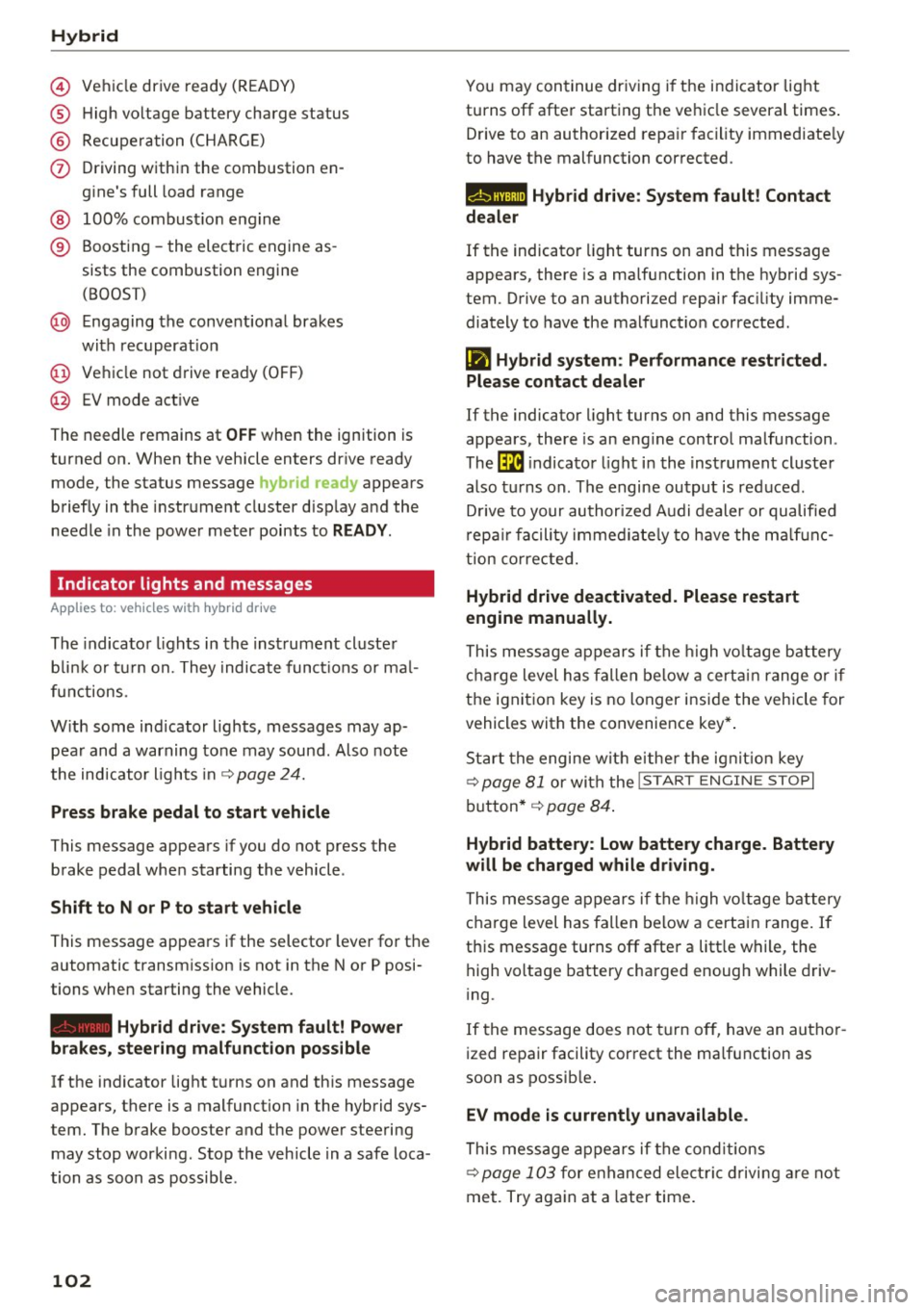
© Vehicl e drive ready (READY)
® High voltage battery charge status
® Recuperation (CHARGE)
(j) Driving within the combustion en-
gine's full load range
® 100% combust ion engine
® Boosting -the electric engine as-
sists the combustion engine
(BOOST)
@ Engaging the conventional brakes
with recuperat ion
@ Vehicle not drive ready (OFF)
@ EV mode act ive
The needle remains at
OFF when the ignition is
turned on. When the vehicle enters drive ready
mode, the status message
hybrid ready appears
briefly in the instrument cluster display and the
needle in the power meter points to
READY.
Indicator lights and messages
App lies to: ve hicles w ith hyb rid drive
The indicator lights in the instrument cluster
b lin k or tu rn on. They indicate functions or mal
f unct ions.
With some indicator lights, messages may ap
pear and a warning tone may sound . Also note
the indicator l ights in
¢page 24.
Press brake pedal to start vehicle
This message appears if you do not press the
brake pedal when starting the vehicle .
Shift to N or P to start vehicle
This message appears if the selector lever for the
automatic transmission is not in the Nor P posi
tions when starting the vehicle.
- Hybrid drive: System fault! Power
brakes, steering malfunction possible
lfthe indicator light turns on and this message
appears, there is a malfunction in the hybrid sys
tem . The brake booster and the power steering
may stop working. Stop the vehicle in a safe loca
tion as soon as possible.
102
You may continue driving i f the i ndicator light
turns off after starting the vehicle several times .
Drive to an authorized repair facility immediate ly
to have the malfunction corrected .
Q/ij:@,j rlybrid drive: System fault! Contact
dealer
If the indicator light turns on and this message
appears, there is a malfunction in the hybrid sys
tem. Drive to an authorized repair fac ility imme
diately to have the malfunct ion corrected.
(II Hybrid system: Performance restricted.
Please contact dealer
If the indicator light turns on and this message
appears, there is an eng ine control malfunction .
The
ffa i ndicator light in the instrument cluster
also turns on. The engine output is reduced.
D rive to your authorized Audi dealer or qualified
r epa ir facility immediate ly to have the malfunc
tion corrected.
Hybrid drive deactivated. Please restart
engine manually.
This message appears if the high vo ltage battery
charge level has fallen below a certain range or if
the ignition key is no longer inside the vehicle for
vehicles with the convenience key* .
Start the engine wit h eithe r the ignition key
¢
page 81 or with the !START ENGINE STOPI
button* ¢ page 84.
Hybrid battery: Low battery charge. Battery
will be charged while driving.
This message appears if the high vo ltage battery
charge level has fallen below a certain range. If
this message turns off after a litt le while, the
high voltage battery charged enough while driv
i ng.
If the message does not turn off, have an author
ized repair facility correct the ma lfunction as
soon as possib le .
EV mode is currently unavailable .
This message appears if the conditions
¢ page 103 for enha nced elect ric driving are not
met. Try again at a la ter time .
Page 105 of 296
CD
CD
.... N ,-... N ..... 0 0 C<'. 00
Hybrid functions and operating modes
Applies to: vehicles wit h hybrid drive
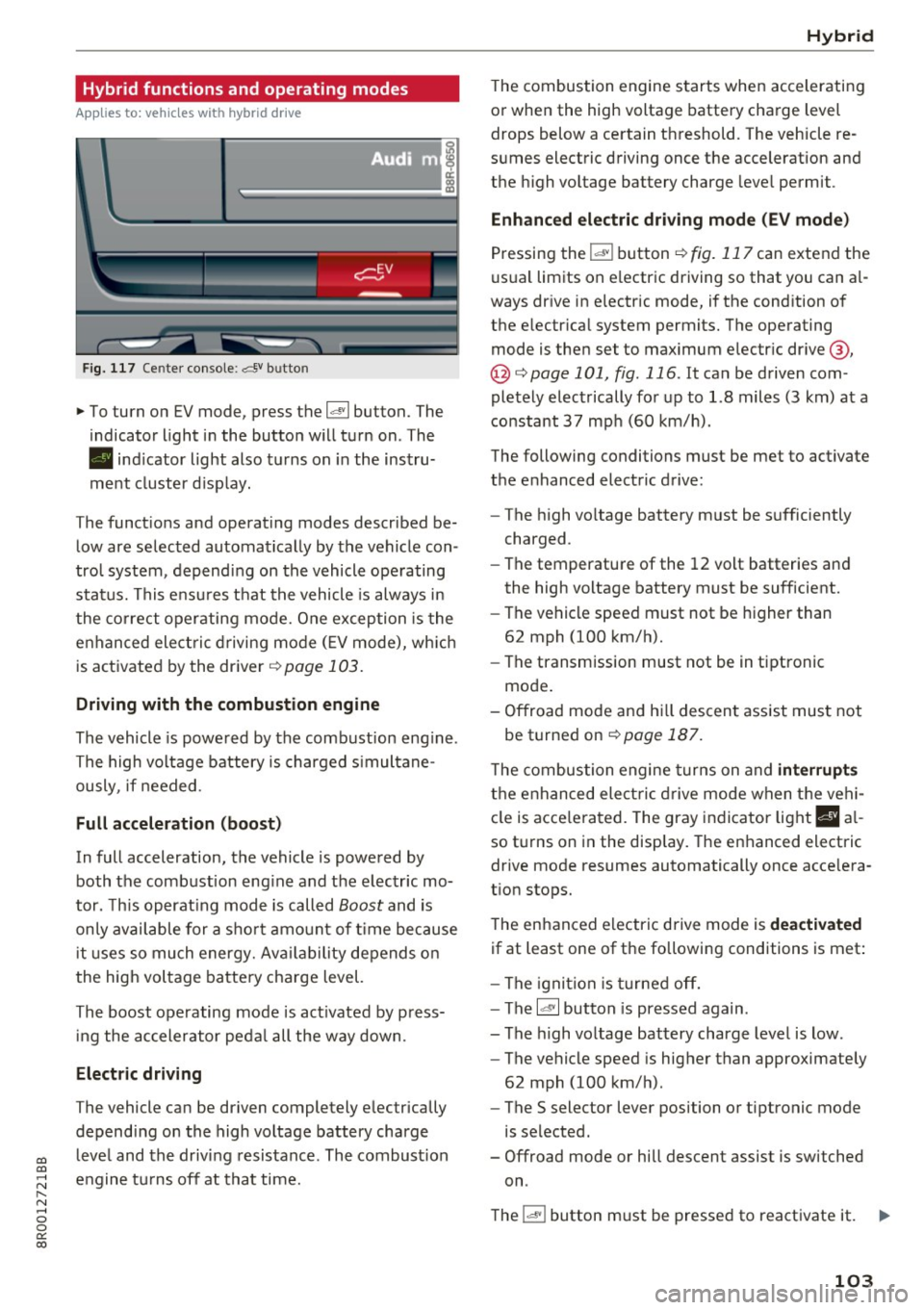
Fig. 11 7 Cente r console: ,:::5v b utto n
.,. To turn on EV mode, press the 14" 1 button. The
indicator light i n the button w ill turn on . The
• indicator light also turns on in the instru
ment cluster d isp lay.
T he funct ions and operating modes described be
low are selec ted automat ica lly by the vehicle con
tro l system , depend ing on the vehicle ope rating
stat us. This e nsur es t hat the vehicle is always in
the co rrect operating mo de. One exception is the
e n hanced ele ct ric dr iving mo de
(E V mode), wh ic h
is act ivated by the dr iver
¢ page 103.
Driving with the combustion engine
The vehicle is powe red by the combust ion eng ine .
The high vo ltage battery is charged s imultane
ously , if needed.
Full acceleration (boost)
In full acceleration, the vehicle is powe red by
both the comb ust ion eng ine and t he e lec tric mo
tor . T his operat ing mode is called
Boost and is
on ly available for a s hort amo unt of time because
i t uses so much energy. Av ailability depends o n
the hig h voltage batte ry cha rge level.
Th e boost operating mode is act ivated by p ress
in g the ac celerator ped al all the way down.
Electric driving
T he vehicle can be driven completely e lec trically
depend ing on the high voltage battery charge
leve l and the driv ing resistance . The combust ion
e n gine t urns off a t that time .
Hybrid
The combustion engine s tarts when accelerati ng
o r when the high voltage battery cha rge level
drops below a ce rtain t hreshold . The vehicle re
s u mes electric driving once the acceleration and
the high vo ltage battery charge leve l permit .
Enhanced electric driving mode (EV mode)
Pressing the
l.al"I button ¢ fig. 117 can extend the
u su a l lim its on e lectr ic driving so that you can a l
ways dr ive in e lectric mode, if the cond ition o f
the e lectr ica l system permits. The operating
mode is the n set to maximum e lectr ic dr ive @ ,
@¢ page 101, fig. 116 . It can be d riven com
pletely e lect rically fo r up to 1.8 miles (3 km) at a
constant
37 mp h (60 km/h) .
The following conditions must be met to activate
the e nhanced electric drive:
- The high vo ltage battery m ust be s ufficiently
charged .
- The temperatu re of the
1 2 volt batteries an d
the high voltage battery must be sufficient.
- The ve hicle speed must not be h igher than
62 mph (100 k m/h).
- The transmission must not be in tipt ronic
mo de.
- O ffroad mode an d hill descen t ass ist mus t not
be turne d on
¢page 187.
The combustion engine turn s on and interrupts
t h e e nhanced ele ct ric dr ive mode when t he vehi
cl e is acce le ra ted. The gray indicator light
B al
so t urns on in the disp lay. The e nhanced electric
drive mo de resumes automatically once acce le ra
t ion stops.
T he enhanced electric drive mode is deactivated
if at least one of the followi ng cond itions is met :
- The igni tion is tur ned off.
- Th e
l~· I button is pressed again .
- The high vo ltage battery charge level is low .
- The vehicle speed is higher than approximately
62 mph (100 km/h) .
- The
S selector lever position or tiptronic mode
is selected.
- Offroad mode or hill descent assist is switched
on .
T he
l"'-''I button m ust be pressed to react ivate it. ..,.
103
Page 110 of 296
Hybrid
The connections in the engine compartment are
used for both charging and jump starting
c::> page 22 7 or c::> page 266.
Vehicle not ready to start. See owner's
manual
This message appears if the high voltage battery
charge level is too low. The vehicle can no longer
be started with its own power. The high voltage
battery must be charged with a charger or the ve
h icle must be jump started with the aid of anoth
er vehicle.
After the connecting the charger or jumper ca
bles, the ignition must be turned off for approxi
mately two minutes and then turned on again .
After no more than one m inute, one of the fol
lowing indicator lights turns on in the instrument
cluste r display .
B Charging battery. Please wait ...
If the indicator light turns on and this message
appears, the high voltage battery is charg ing or
the vehicle is be ing jump started with assistance
from another veh icle .
If the 12 volt batteries are dead, the- indi
cator light turns on . The charging procedure
takes longer in this case because the 12 volt bat
ter ies are charged first. The procedure goes fast
er with the ig nition sw itched off.
Vehicle ready to start.
This message appears if the charging procedure
was successful. The vehicle may be started again .
Battery could not be charged enough to start
vehicle .
This message appears if the charging procedure
was not successful or it was interrupted. Th is
may happen if the charger or the battery in the
veh icle that is assisting is too weak.
If the veh icle
can not be started, see an authorized repa ir facil i
ty for ass istanc e.
(D Tips
-The charger should deliver a current of at
l east 30 A. Otherwise charging the high
voltage battery will take considerably Ion-
108
ger. A current between 50 A and 70 A is ide
al.
- Th e veh icle that is assisting should be some
what within the same vehicle class when
jump starting a vehicle. A smaller vehicle's
battery may be drained.
- After approximately 30 minutes, the charg
ing procedure ends because the ignit ion is
automatically turned off. If you would like
to cont inue to charge the battery, turn the
ignition on again.
Vehicle transport
App lies to: vehicles wit h hybrid drive
The following contains information you should
know about transporting your vehicle.
The lithium ion battery (SANYO 72 UF 121 285)
installed in your vehicle has passed test 38.3 in
accordance with UN handbook tests and criteria.
The vehicle may be transported with the battery
i nstalled as conventional class 9 hazardous mate
rials without addit ional officia l consent for a ir
and sea transportation (current law !CAO-TI and
IMDG-Code 01.01.2012).
Page 114 of 296
Audi adaptive cruise control and braking guard
@ Indicator lights
Ill -Adaptive cruise control is switched on. No
vehicles are detected up ahead. The stored speed
is maintained .
• -A moving veh icle is detected up ahead. The
adaptive cruise control system regulates the
speed and distance to the moving vehicle ahead
and accelerates/brakes automatically.
• -When automatic braking is not able to keep
enough distance to a previously detected moving
vehicle up ahead, you must take contro l and
brake
¢ page 114, Request for driver interven
tion.
© Display
If
adaptive cruise control is not shown in the dis
play, you can call it up with the
IRESETI button
¢page 17.
Based on the symbo ls in the display, you can de
termine if the system is ma inta ining a distance to
the vehicle ahead and what that distance is .
No vehicle -No vehicle ahead was detected .
White vehicle -A vehicle ahead was detected.
Red vehicle -Prompt for the driver to take action
¢page 114.
Both arrows on the scale© indicate the distance
to the vehicle ahead . No arrow appears when the
veh icle is on an open road and there is no object
ahead. If an object is detected ahead, the arrow
moves on the scale .
The green zone on the scale shows the stored dis
tance . For information on changing the stored
distance, refer to
¢page 113. If the distance se
lected is too close or may soon become too close,
the arrows move into the red zone on the scale .
A WARNING
Improper use of the adaptive cruise control
can cause collis ions, other accidents and seri
ous personal injuries.
- Pressing the
! SET ! button when driving at
speeds below 20 mph (30 km/h), will auto
matically accelerate the vehicle to 20 mph
112
(30 km/h), which is the minimum speed
that can be set.
@ Tips
- If you switch the ign it ion or the adaptive
cruise control off, the set speed is erased
from the system memory.
- The Electronic Stabilization Control (ESC) is
automatically turned on when the adapt ive
cruise control is turned on. You cannot
switch the ESC into offroad mode while the
adaptive cruise control is turned on
¢page 187.
Changing the speed
App lies to: vehicles with Audi adaptive cru ise control
0
f
•
0
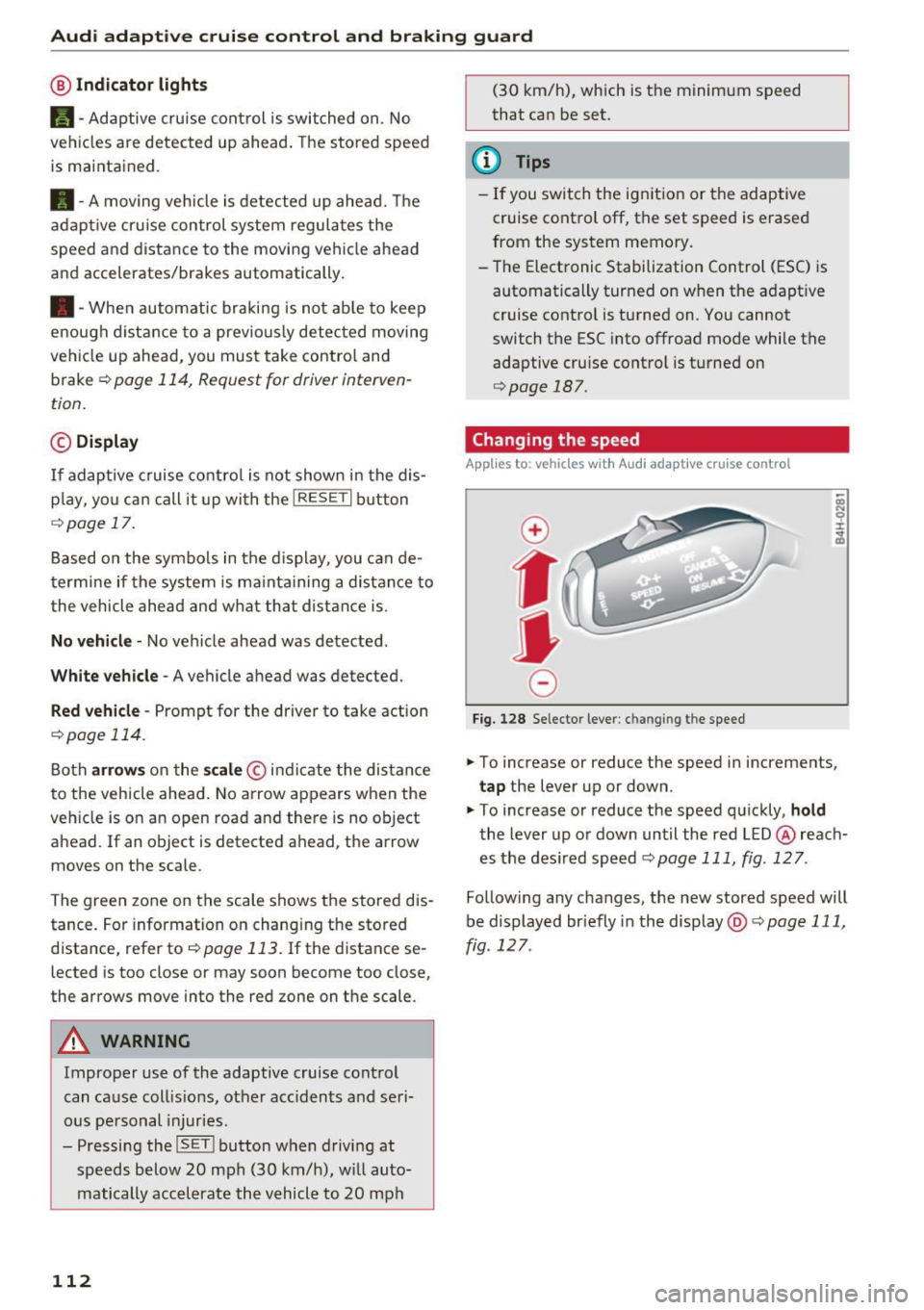
Fig. 128 Selector lever: ch an gin g the speed
.,. To increase or reduce the speed in increments,
tap the lever up or down.
.,. To increase or reduce the speed quickly,
hold
the lever up or down until the red LED @ reach
es the desired speed
¢page 111, fig . 127 .
Follow ing any changes, the new stored speed will
be displayed br iefly in the display @¢
page 111,
fig . 127 .
Page 116 of 296
Audi adaptive cruise control and braking guard
c:::::, ___ c:::::,_ Distance 3 : This setting corresponds
to a distance of 164 feet/SO mete rs when trave l
ing at 62 mph (100 km/h), or a time interval of 1.8 seconds .
c:::::, ____ c:::::, Distance 4 : This setting corresponds
to a distance of 210 feet/64 meters when trave l
ing at 62 mph (100 km/h), or a time interval of
2 .3 seconds .
_&. WARNING
Following ot her vehicles too closely increases
the risk of collisions and ser ious personal in
jury.
- Setting short distances to the traffic ahead
reduces the t ime and distance ava ilable to
br ing your vehicle to a safe sto p an d makes
i t eve n mo re necessary to pay close atten
t ion t o traffic.
- Always obey applicable traffic laws, use
g ood ju dgment, and select a safe f ollow ing
di st ance f or th e tra ffic, road and we athe r
c ondition s.
¢j) Tips
- Distance 3
is set au tomati cally e ach time
yo u sw itch th e ig nit io n o n.
- Y our sta ndard setti ngs a re a uto mat ica lly
stor ed and as signed to th e re m ote contro l
k ey be ing used ¢
page 33 .
Setting the dr iving program
A pp lies to: ve hicles w ith Audi adaptive cruise co ntro l
Depending on t he se lec ted dr iv ing program and
d istance, dr iv ing behavior whe n accelerating wi ll
vary from dynamic to comfo rtable.
Setting the driving program for vehicles
without Audi drive select*
~ In the radio/ MM!*, selec t: !CARI function but
ton
> adaptive cruise control > Driving pro
gram
> Comfort , Standard or Dynamic. Or
~ Se lect : I CARI funct ion button > Car systems*
contro l button > Driver assist > Adaptive cruise
control
> Driving program > Comfort, Stand
ard
o r Dynamic .
114
Setting the driving mode for vehicles with
Audi drive select*
Refer to ¢page 123 .
(D Tips
Your set tings are automatic ally store d and as
signed to t he remote contro l key being used
¢ page 33 .
Request for driver intervention
App lies to: vehicles wi th Audi ada ptive c ru ise control
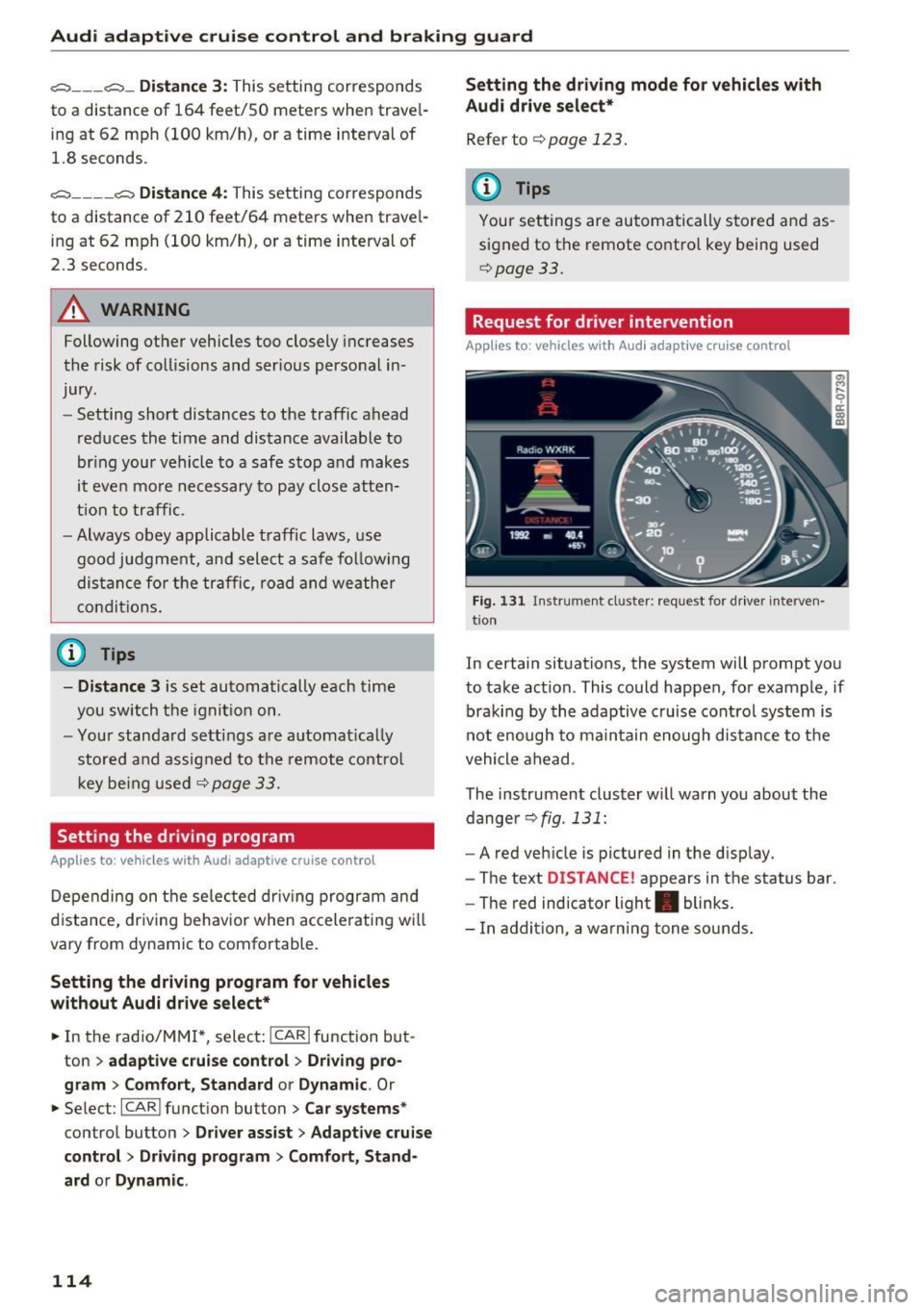
Fig. 131 I n str um ent cl uste r: re quest for driver interve n
t io n
In certain situations, the system will prompt yo u
to take ac tion . This could happen, for example, if
braki ng by the adaptive cruise cont rol sys tem is
not en ough to ma in tain enough dis tance to t he
vehicle a he ad .
The ins trument cluster w ill warn you about the
dange r¢
fig . 131 :
-A red veh icle is pictured in the d isp lay.
- The te xt
DISTANCE! appears in the status bar .
- The red indicator light . blinks .
- In ad dition, a wa rni ng tone so unds .
Page 117 of 296
a,
a,
..... N r-N ..... 0 0
0:
co
Audi adaptive cruise control and braking guard
Audi braking guard
Description
Applies to: ve hicles with Audi adaptive cruise co ntro l
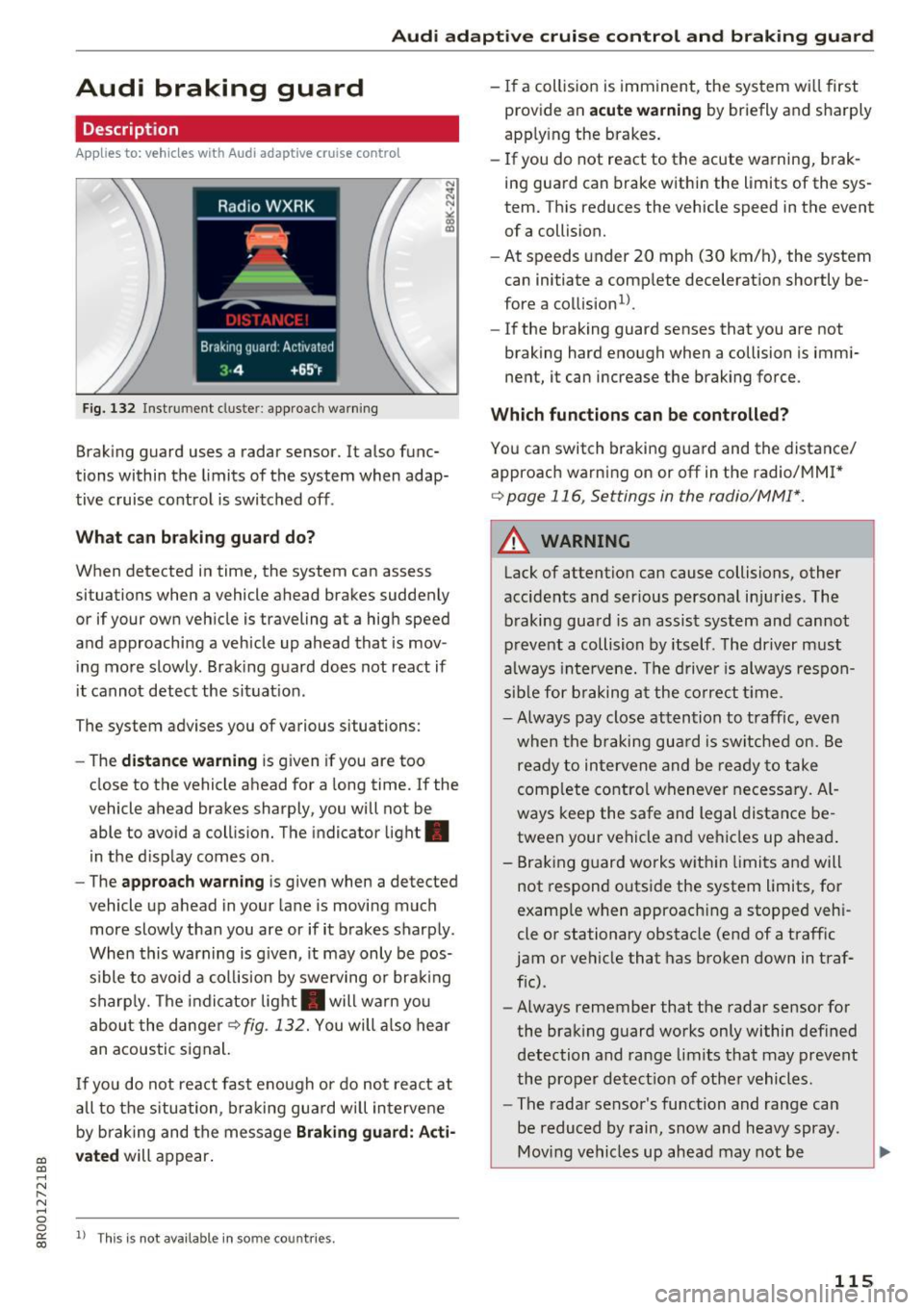
Fig. 132 Instrument cluste r: approach warning
Braking guard uses a radar sensor. It also func
tions within the limits of the system when adap
tive cruise control is switched off .
What can braking guard do?
When detected in time, the system can assess
situations when a vehicle ahead brakes suddenly
or if your own vehicle is traveling at a high speed
and approaching a vehicle up ahead that is mov
ing more slowly . Braking guard does not react if
it cannot detect the situat ion.
The system advises you of various situations:
- The
distance warning is g iven if you are too
close to the vehicle ahead for a long time.
If the
vehicle ahead brakes sharply, you will not be
able to avoid a collision. The indicator light .
in the display comes on.
- The
approach warning is given when a detected
vehicle up ahead in your lane is moving much
more slowly than you are or if it brakes sharply .
When this warning is g iven, it may only be pos
s ible to avo id a col lision by swerving or brak ing
sharp ly. Th e indicator light . will warn you
about the danger
¢fig. 132. You will also hear
an acoustic signal.
If you do not react fast enough or do not react at
all to the situation, braking guard will intervene
by braking and the message
Braking guard: Acti
vated
will appear.
1> Th is is not ava ilab le in some coun tries.
-If a collision is imminent, the system wi ll first
provide an
acute warning by briefly and sharply
apply ing the brakes.
- If you do not react to the acute warning, brak
ing guard can brake within the limits of the sys
tem. This reduces the vehicle speed in the event
of a collision.
- At speeds under 20 mph (30 km/h), the system
can initiate a comp lete decelerat ion shortly be
fore a collision
ll.
- If the braking guard senses that you are not
braking hard enough when a collision is immi
nent, it can increase the braking force .
Which functions can be controlled?
You can switch braking guard and the distance/
approach warn ing on or
off in the radio/MM!*
¢ page 116, Settings in the radio/MM!*.
A WARNING
-
Lack of attention can cause collisions, other
accidents and ser ious personal in juries. The
braking guard is an assist system and cannot
prevent a collision by itself. The driver must
always intervene. The driver is always respon
sible for braking at the correct tim e.
- Always pay close attention to traffic, even
when the braking guard is switched on. Be
ready to intervene and be ready to take
comp lete control whenever necessary. Al
ways keep the safe and legal distance be
tween your vehicle and vehicles up ahead .
- Braking guard works wit hin limits and will
not respond outside the system limits, for
examp le when approaching a stopped veh i
cle or stationary obstacle (end of a traffic
jam or vehicle that has broken down in traf
fic).
- Always remember that the radar sensor for
the braking guard works only within defined
detection and range limits that may prevent
the proper detect ion of other vehicles.
- The radar sensor's function and range can
be reduced by rain, snow and heavy spray.
Moving vehicles up ahead may not be
,.
115
Page 128 of 296
Parking aid
Rearview cam era cov erage area
The MM I display shows the area covered by the
rearview camera
c:> fig . 142 @. Objects that a re
not in the area covered @are not shown on the
MMI disp lay.
We recommend th at yo u pract ice pa rking with
the rearview camera in a traffic-free location or
parking lot to become familiar with the system,
the orientation lines, and their function . When
doing this, there should be good light and weath
er cond itions .
I n the MMI disp lay, objects or vehicles appear
closer or further away if :
- yo u are driving in reverse ge ar from a level su r
f ace onto an incl ine, or a downward s lope,
- yo u are d rivi ng in reverse gea r toward protr ud
ing obje cts,
- the ve hicl e is ca rry ing too much load in the
rear.
The accuracy of the orientation lines and b lue
surfaces d imin ishes if:
- the rearv iew camera does not provide a reliab le
image, for example, in poor visibility cond itions
or if the lens is d irty,
- the image on the screen is not visib le due to
sun glare and reflection .
Caring for the rearview camer a lens
The rearview camera is located above the rear li
cense plate bracket. For the parking system to
operate, the lens
c:> fig. 143 must be kept clean:
- Dampen the lens with a househo ld alcoho l-
based glass cleaner, and then wipe the lens
clean with a dry cloth
i::> (!).
-Remove snow with a hand br ush and ice pref
erab ly with a de -icing spray
i::> (!) .
A WARNING
-The parking system ca nnot replace the dr iv
er's attention . The dr iver alone is responsi
ble for parking a nd s imilar dr iv ing mane u
vers.
- Sensors have blind spots in wh ich objects
cannot be detected . Pay spec ial atten tion to
126
sma ll children and anima ls because the sen
sors cannot a lways detect them.
- Always keep your eyes on the vehicle's sur
roundings, us ing the rearv iew mirror as
wel l.
- Do not allow yourself to be dist racted from
traffic by the rearview camera pictures.
- If the position and the installation angle of
the camera has changed, for example, after
a rea r end co llision, do not continue to use
the system for safety reasons. Have it
checked by a q ualified dealership .
(D Note
-Low obstacles a lready signa led by a warning
can disappear from the system's detect ion
range as they are approached and w ill not
cont inue to be signaled . Objects such as
barrier cha ins, tra iler draw bars, t hin paint
ed vertical po les or fences may not be de
tecte d by the system, posi ng ris k of dam
age.
- Never use wa rm o r hot wate r to remove
s now or ice from the rearview came ra le ns ·
this could cause the lens to c rack!
- Whe n cleani ng the lens, never use products
tha t are abr asive .
Page 129 of 296
Switching on and off
Applies to: vehicl es wit h Aud i parking system p lus w ith rear
view came ra
The rearview camera switches an automatically
together with the acoustic and visual park assist
when you put the vehicle in reverse.
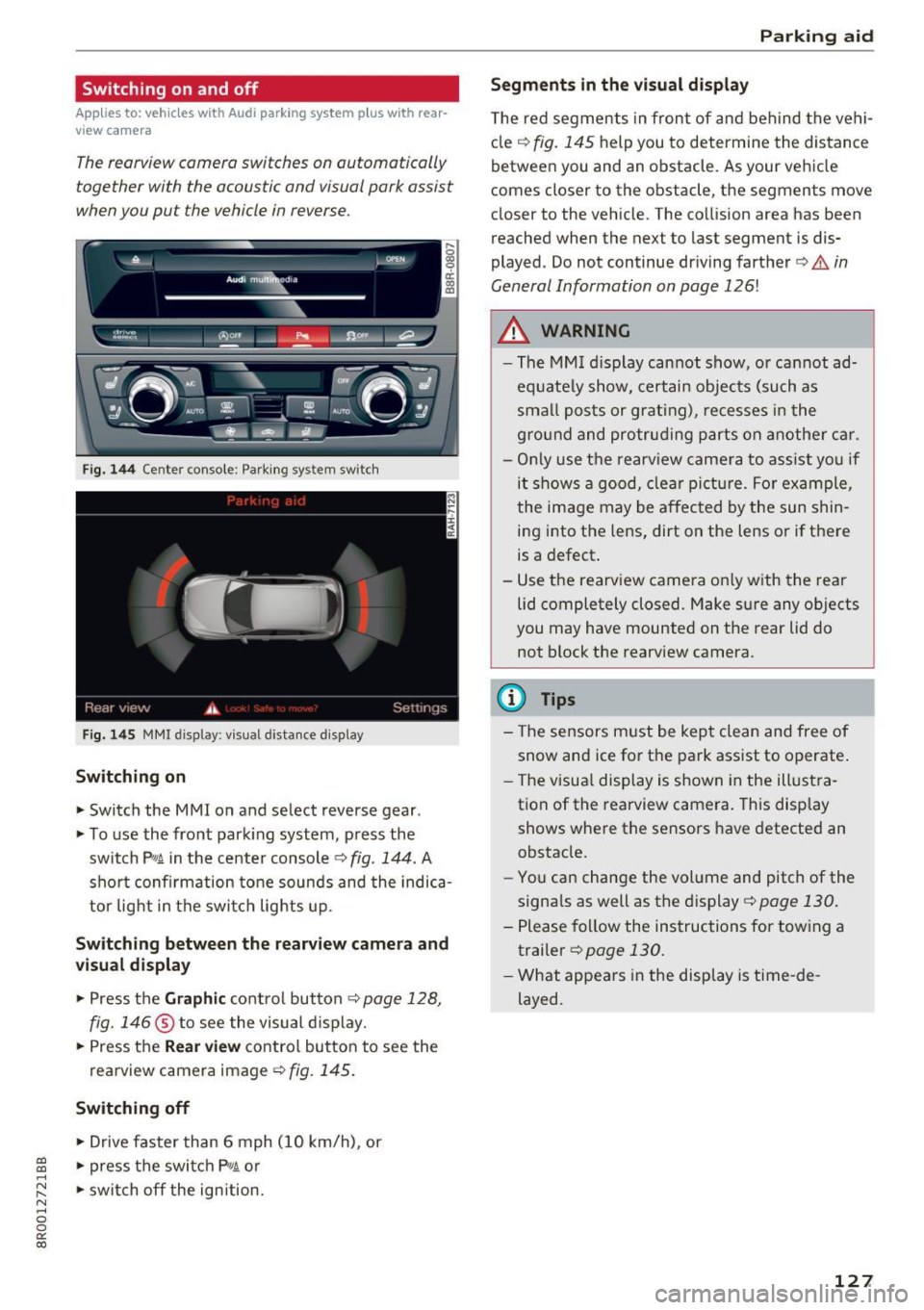
Fig. 144 Center console: Park ing system switch
Fig . 1 45 MMI display: visual distance display
Switching on
.. Switch the MMI on and select reverse gear .
.. To use the front park ing system, press the
switch
p,, 1A in the center console c::> fig . 144. A
sho rt confirmation tone sounds and the indica
tor light in the switc h lights up.
Switching between th e re arview came ra and
vi sual displa y
.. Press the Graphi c co ntrol button c::>page 128,
fig. 146
® to see the visual d isplay .
.. Press the
Rear view contro l butto n to see the
rearview camera image
¢fig. 145.
Switching off
.. Drive faster than 6 mph ( 10 km/h), or
~ .. press the switch P'#A or .....
~ .. switch off the ign ition. N ..... 0 0
0:
co
P ark ing aid
Segments in the visual di splay
T he red segments in front of and behind the vehi
cle
c:::> fig. 145 help you to determine the distance
between you and an obstacle. As your vehicle
comes closer to the obstacle, the segments move
closer to the vehicle. The collision area has been
reached when the next to last segment is dis
played . Do not continue dr iving farther
c:::> .&. in
General Information on page
126!
A WARNING
-- The MM I display cannot show, o r cannot ad-
equate ly show, certain objects (such as
smal l posts or grating), recesses i n the
g ro und and protruding parts on another car.
- On ly use the rearv iew camera to ass ist yo u if
it shows a good, clea r pi ctu re. For example,
the image may be affected by the sun shin
ing into the lens, dirt on the lens or if there
is a defect.
- Use the rearv iew camera on ly w ith the rea r
lid completely closed. Make sure any objects
you may have mounted on the rear lid do
not block the rearv iew camera.
(D Tips
- The sensors must be kept clean and free of
snow and ice for t he park ass ist to operate .
- The visua l display is shown in the illust ra
tion of the rearview camera. This display shows where the sensors have detected an
obstacle.
- You can change the volume and pitch of the
signa ls as well as the display
c:::> page 130.
- Please fol low the instructions for tow ing a
trailer
c:::> page 130.
- What appears in the display is time -de
layed.
127
Page 133 of 296
CD
CD
.... N ,-... N ,....,
0 0 C<'. 00
Driving safety
Basics
Safe driving habits
Please remember -safety first!
This chapter contains important information,
tips, instructions and warnings that you need to
read and observe for your own safety, the safety
of your passengers and others . We have summar
ized here what you need to know about safety
belts, airbags, child restraints as well as child
safety. Your safety is for us
priority number 1. Al
ways observe the information and warnings in
this section - for your own safety as well as that
of your passengers.
The information in this section applies to all
model versions of your vehicle. Some of the fea
tures descr ibed in this sections may be standard
equipment on some models, or may be optional
equipment on others. If you are not sure, ask
your authorized Audi dealer.
A WARNING
- Always make sure that you follow the in
structions and heed the WARNINGS in this
Manual. It is in your interest and in the in
terest of your passengers .
-
-Always keep the complete Owner's Litera
ture in your Audi when you lend or sell your
vehicle so that this important information
will always be available to the driver and
passengers.
- Always keep the Owner's literature handy so
that you can find it easily if you have ques
tions.
Safety equipment
The safety features are part of the occupant re
straint system and work together to help reduce
the risk of injury in a wide variety of accident sit
uations.
Your safety and the safety of your passengers
should not be left to chance. Advances in tech
nology have made a var iety of features available
to help reduce the risk of injury in an accident.
Driving safety
The following is a list of just a few of the safety
features in your Audi:
- sophisticated safety belts for driver and all pas-
senger seat ing pos itions,
- be lt force limiters for the front seats,
- belt pretensioners for the seats,
- belt height adjustment for the front seats,
- head restraints for each seating position,
- front airbags,
- side airbags in the front seats and outer rear
seats *,
- side curtain airbags,
- special LATCH anchorages for child restraints,
- adjustab le steering column.
These individual safety features, can work to gether as a system to help protect you and your
passengers in a wide range of accidents . These
features cannot work as a system if they are not
always correctly adjusted and correctly used.
Safety is everybody's responsibility!
Important things to do before driving
Safety is everybody 's job! Vehicle and occupant
safety always depends on the informed and care
ful driver .
For your safety and the safety of your passen
gers,
before driving always:
.,. Make sure that all lights and signals are operat
ing correctly.
.,. Make sure that the tire pressure is correct .
.,. Make sure that all windows are clean and afford
good visibility to the outside .
.,. Secure all luggage and other items carefully
~page 74 .
.,. Make sure that nothing can interfere with the
pedals.
.,. Adjust front seat, head restraint and mirrors
correctly for your height.
.,. Instruct passengers to adjust the head re
straints according to their height.
.,. Make sure to use the right child restraint cor
rectly to protect children
¢ page 168, Child
safety. ..,.
131