Heat AUDI Q5 2017 Owners Manual
[x] Cancel search | Manufacturer: AUDI, Model Year: 2017, Model line: Q5, Model: AUDI Q5 2017Pages: 296, PDF Size: 74.43 MB
Page 11 of 296
a,
a,
..... N r-N ..... 0 0
0:
co
Warning light in the instrument cluster
display
If the . warning light in the instrument cluster
display flashes, this can mean one of two things:
either the coolant
temperature is too high, or the
coolant
level is too low~ page 26.
If the needle is well in the upper area of the
gauge, the coolant temperature is too high.
Stop
the vehicle, switch the engine off, and allow it
to cool. If the warning light comes on again after
driving a short distance, contact an authorized
Audi dealer or other qualified workshop .
_& WARNING
- Always observe the warning in~ page 217,
before opening the hood and checking the
engine coolant level.
- Never open the engine hood if you see or
hear steam, or if you see engine coolant
dr ipping from the engine compartment. You
cou ld burn yourself. Let the engine cool off
first so that you cannot hear or see any
steam or engine coo lant.
CD Note
- Mounting additional lights or accessories in
front of the air inlets reduces the cooling ef
fect of the radiator. At high outside temper
atures or high engine load, the engine could
overheat.
- The front spoiler has been designed to prop
erly distribute the cooling air when the vehi
cle is moving. If the spoiler is damaged, this
could reduce the cooling effect and the en
gine could then overheat. Ask your author
iz ed Audi dealer for assistance.
Tachometer (engine rev counter)
The tachometer indicates the engine RPM (revo
lutions per minutes) .
If engine RPM drops below 1,500, you should
downshift to the next lower gear. The red area at
the end of the scale indicates max imum permis
sible engine RPM after the break-in period . Be
fore reaching this area, move the selector lever
Instruments and indicator lights
to posit ion D/S or ease your foot off the accelera
tor pedal.
CD Note
The tachometer need le@ ~ page 8, fig. 3
shou ld only briefly be in the red zone: you
could damage your engine! The beginning of
the red zone varies depending on the engine.
@ For the sake of the environment
Upshifting early saves fuel and reduces en
gine noise.
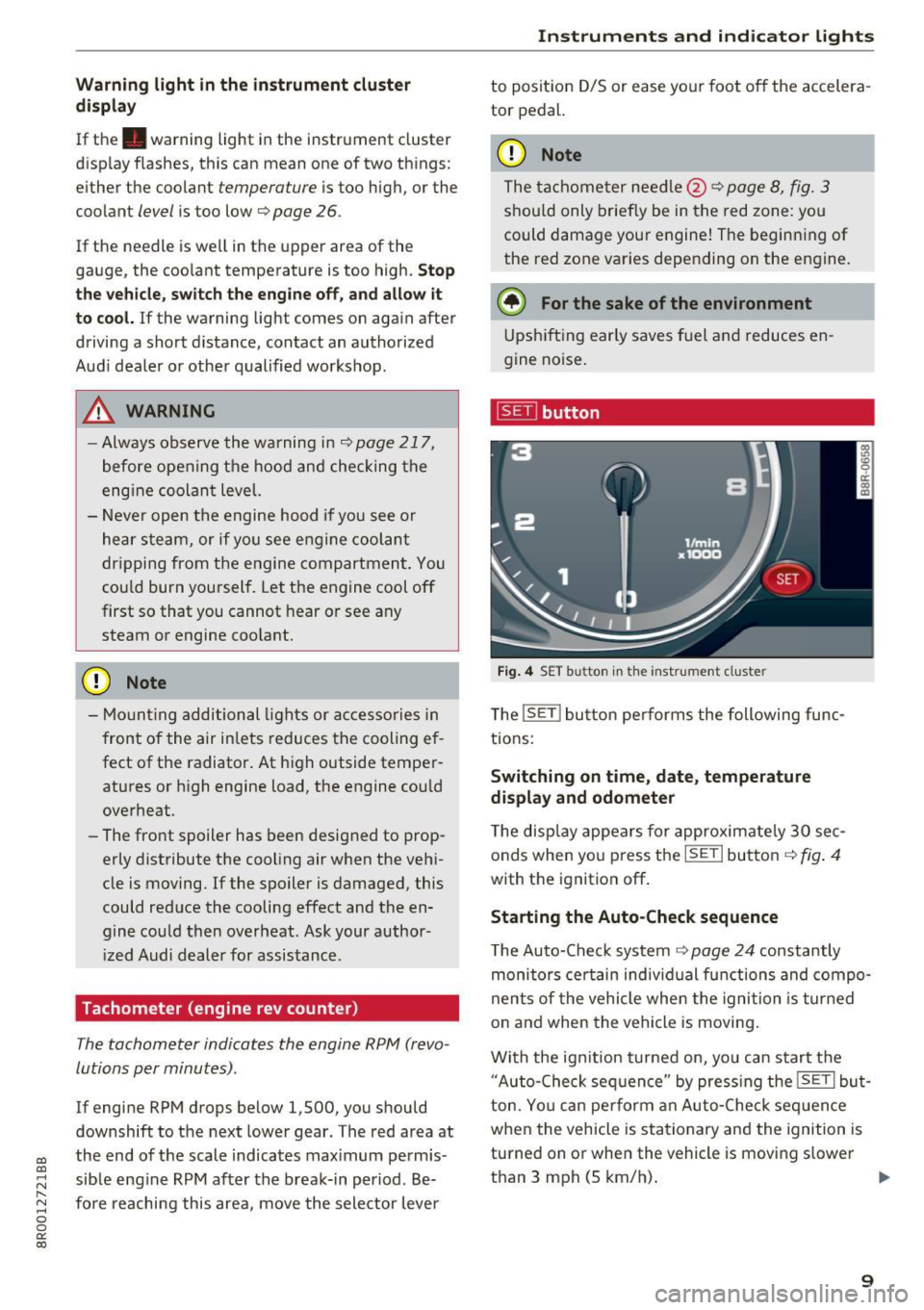
~ button
Fig. 4 SET button in the instrument cluster
The !SET ! button performs the following func
tions:
Switching on time, date, temperature
display and odometer
The display appears for approximately 30 sec
onds when you press the
ISETI button ~fig . 4
with the ignition off .
Starting the Auto-Check sequence
The Auto-Check system ~ page 24 constantly
monitors certain individual functions and compo
nents of the vehicle when the ignition is turned
on and when the vehicle is moving.
With the ignit ion turned on, you can start the
"Auto-Check sequence" by press ing the
!SE TI but
ton. You can pe rform an Auto-Check seq uence
when the vehicle is stationary and the ignition is
turned on or when the vehicle is moving slower
than 3 mph (5 km/h).
IIJ,,,
9
Page 12 of 296
Instruments and indicator lights
The number of keys programmed to the vehicle is
also displayed. The display
L2 3/3 in dicates that
three keys have been programmed. This a llows
you to make sure you have received all of the keys
when you purchase a used vehicle.
For examp le, if you on ly receive two keys, you
should take those keys to your authorized Audi
dealer to have the missing key deactivated so it
cannot be used. You should also report the miss
ing key to your insurance company .
Calling up the driver information
A yellow or red symbol appears in the instrument
cluster display, usually with a driver message.
The driver message display disappears after about 5 seconds. The dr iver message can be dis
played again by briefly pressing the
ISETI button.
Setting the speed warning
By pressing the !SET ! button briefly, you can set
thresho ld
1 of the speed warning while you are
driving
c::;,page 92. By maintaining pressure on
the
! SET I button, you delete the warning thresh
old.
Digital clock with date display
Depending on the vehicle equipment level, you
may choose between the quartz clock or the
GPS
controlled clock* l!j in the radio or in the MMI* .
You can learn more about this in the MMI manual
or in the radio user's manual.
(Di Tips
-When you sw itch off the ignition or open
the driver door, the time, date, odometer
and temperature are displayed for an addi
tiona l
30 seconds.
- You can also call up the display with the
ISET I button c::;, page 9 while the ignition is
switched
off.
Fuel gauge
The fuel gauge works only when the ignition is
on.
When the needle reaches the reserve mark, the
c::;, page 30 Ii') symbol appears in the instru-
10
ment cluster display as well as the message
Please refuel. This message is meant to remind
you to
refuel.
The total tank capacity of your ve hicle is listed in
¢ page 273.
(D Note
Never run the tank completely dry! An ir regu
lar supply of fuel can cause engine misfiring
and fuel could enter into the exhaust system.
The catalytic converter could then overheat
and be damaged.
Odometer
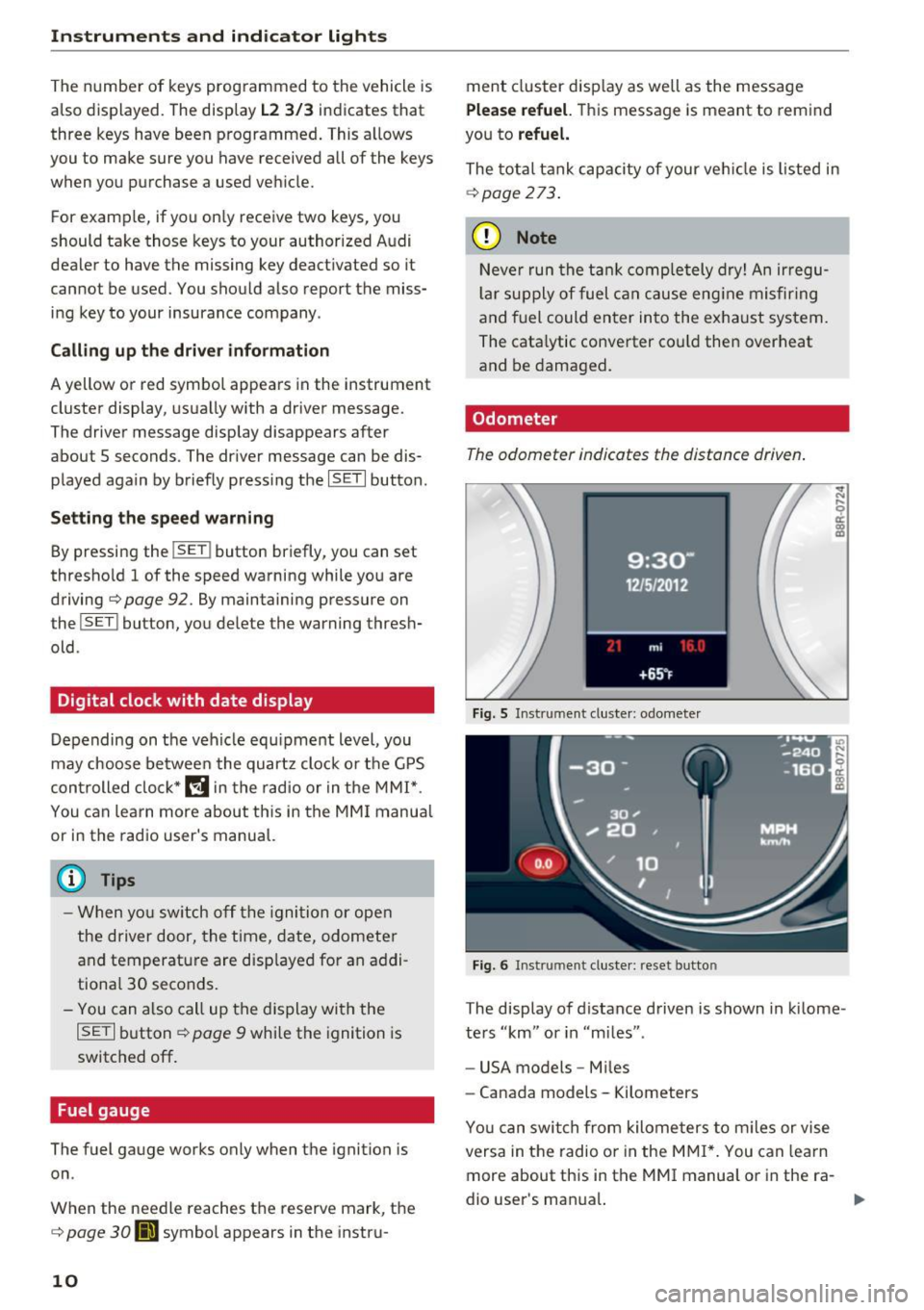
The odometer indicates the distance driven.
Fig. 5 Instrument cluster: odometer
Fig. 6 Instrument cluster: reset button
The display of distance driven is shown in kilome
ters "km" or in "m iles".
- USA models -Miles
- Canada models - Kilometers
Yo u can switch from kilometers to miles or vise
versa in the radio o r in the MMI*. You can lea rn
more about this in the MMI manual or in the ra
dio user's man ual.
Page 20 of 296
Driver i nf orm ati on sy stem
Outside temperature display
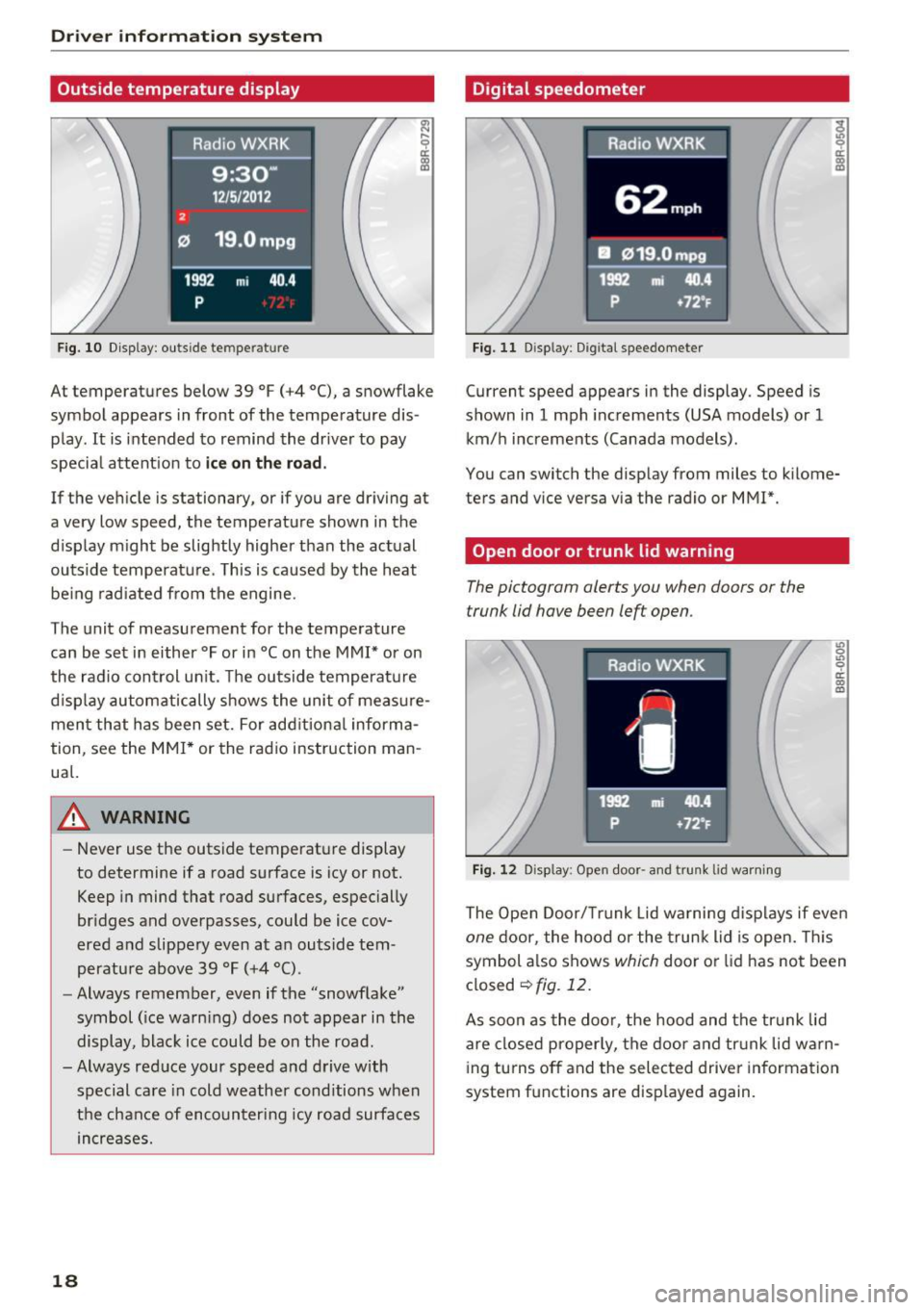
Fig. 10 D isplay : ou ts ide te m pe ratur e
At temperatures below 39 °F (+4 °C), a snowflake
symbol appears in front of the temperature dis
p lay . It is intended to remind the driver to pay
specia l attent ion to
ic e on th e ro ad .
If the vehicle is stationary, or if you are driving at
a very low speed, the temperature shown in the
display m ight be slightly higher than the act ual
outside temperature . T his is caused by the heat
be ing rad iated from the engine.
The unit of measurement for the temperature can be set in either °For in °Con the MMI* or on
the radio control un it. The outside temperatu re
d isp lay automatically shows the unit of measure
ment that has been set. For add itional informa
tion, see the
MMI* or the rad io instruction man
ual.
A WARNING
- Never use the outside temperature display
to determine if a road surface is icy or not.
Keep in mind that road surfaces , especially
bridges and overpasses, could be ice cov
ered and slippery even at an outside tem
perature above 39 °F (+4 °C) .
- Always remember, even if the "snowflake"
symbol ( ice warn ing) does not appear in the
display, black ice could be on the road .
-Always red uce your speed and drive with
special care in cold weather cond itions when
t h e chance of encounter ing icy road surfaces
increases.
18
Digital speedometer
Fig. 11 D isp lay: D ig ital speedomete r
Current speed appears in the display . Speed is
shown in
1 mph increments (USA models) or 1
km/h i ncrements (Canada models) .
You can switch the display from miles to k ilome
ters and v ice versa via the radio or MM!*.
Open door or trunk lid warning
The pictogram alerts you when doors or the
trunk lid have been left open .
Fig . 12 D isp lay : Open door -and trunk lid warni ng
L'> 0
"' 0 ri:: m a,
The Open Door/ Tru nk Lid wa rning d isplays if even
one door, the hood or the trunk lid is open. This
symbol a lso shows
which door or lid has not been
closed
¢ fig . 12.
As soon as the doo r, the hood and the tr unk lid
are closed properly, the door and tr unk lid w arn
i ng turns off and the selected driver in formation
system f unctions are disp layed again.
Page 57 of 296
CD
CD
.... N ,-... N ..... 0 0 C<'. 00
switched back on by moving the windshield
wiper lever to any position .
- Worn or dirty windshield wiper blades result
i n streaking. This can affect the rain sensor
funct ion . Check yo ur windshield wiper
blades regularly.
- The washer fluid nozzles of the windshield
washer system are heated at low tempera
tures when the ignition is on.
- When stopping temporarily, e .g . at a traffic
light, the set speed of the windsh ield wipers
i s automatically reduced by one speed.
Cleaning windshield wiper blades
Clean the windshield wiper blades when they be
g in to leave streaks . Use a soft cloth a nd glass
cleane r to clean the w indshield wiper blades .
Front w ipe r
.. Place the windshield wiper arms in the service
pos ition. Refer to
9 page 55 .
.. Lift the wiper arm away from the front window .
Rear wiper
.. Lift the wiper arm away from the rear window.
A WARNING
Dirty windshield wiper blades can impair your
view. This can lead to accidents.
Replacing windshield wiper blades
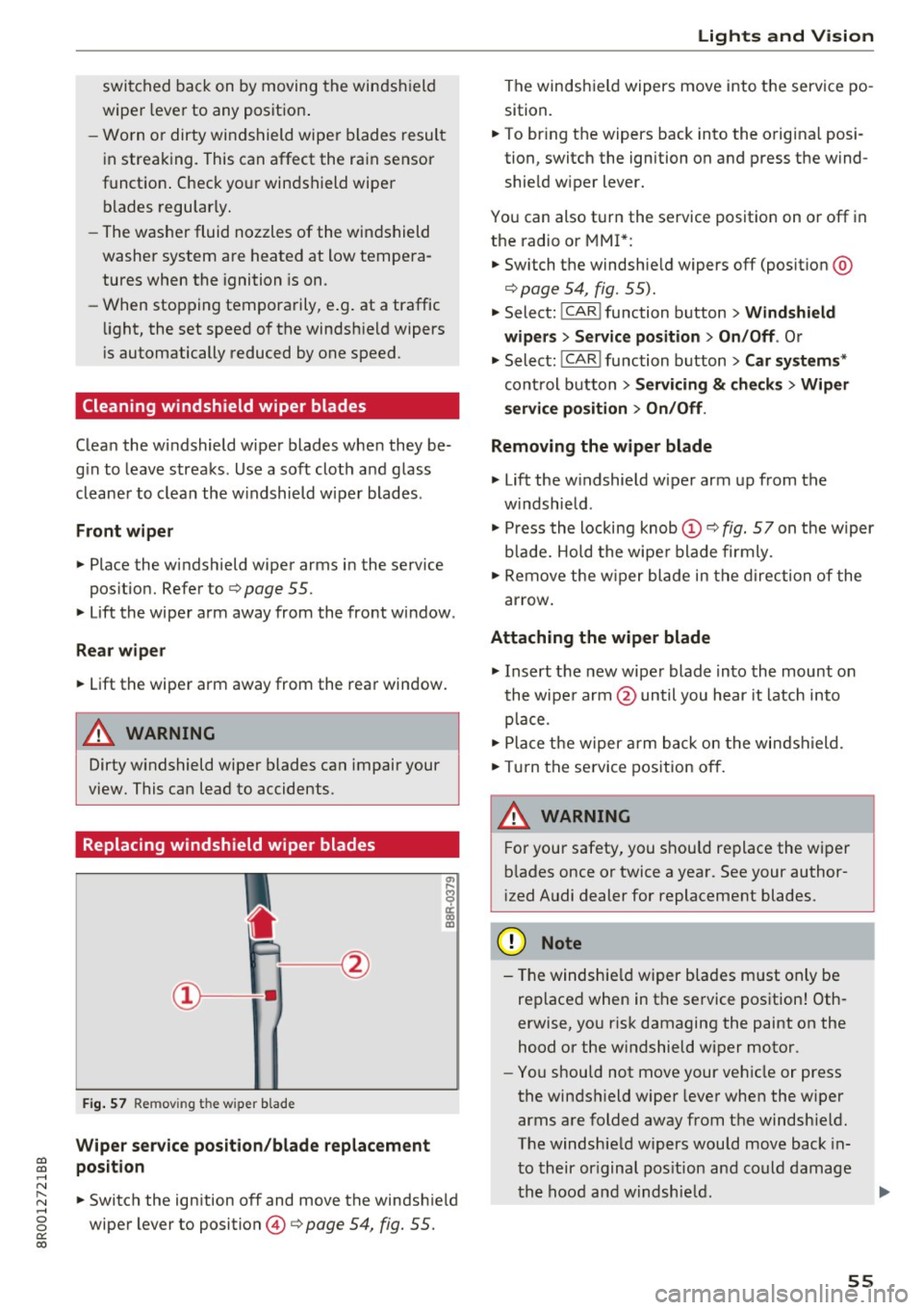
F ig. 57 Remov ing the w ipe r blade
Wiper s ervice position /blade replac em ent
posit ion
a,
ij
a: co
"'
.. Switch the ign ition off and move the windsh ield
wiper lever to position @
9 page 54, fig. 55.
Lights and Vision
The windshield wipers move into the service po
sition .
.. To br ing the wipers back into the orig ina l posi
tion, switch the ignition on and press the wind shie ld w iper lever.
You can also turn the service position on or off in
the radio or MMI*: .. Switch the windshie ld wipers
off (posit ion @
9page 54, fig. 55).
.. Select: !CAR ! function button > Wind shield
wiper s
> Servic e po sition > On /Off . Or
.. Select:
!CAR ! function button> Car syst em s*
cont rol button > Servicing & c heck s> Wiper
s ervi ce po sition
> On /Off .
Removing the wiper blade
.,. Lift the w indshield wiper arm up from the
w indshield .
.,. Press the locking knob
(D 9 fig. 57 on the wiper
b lade. Hold the wipe r blade firmly .
.. Remove the w iper blade in the direction of the
ar row .
Attaching the wiper blade
.. Insert t he new wipe r blade into the mount on
the wipe r arm @until you hear it latch into
p lace.
.. Place t he w iper arm back on the windshield.
.. Turn the se rvice pos ition off.
A WARNING ~ -
F or your safety, you should replace the wiper
b lades once or twice a year . See your author
i zed Audi dealer for replacement blades.
(D Note
- T he windshie ld wiper blades must on ly be
replaced when in the service position! Oth
erwise, you r isk damaging the paint on the
hood or the w indshield wiper motor .
- You should not move your vehicle or press
the windsh ield wiper lever when the wiper
arms a re folded away from the windshie ld.
The windshield wipers would move back in
t o their or iginal pos ition and could damage
the hood and w indshie ld .
55
Page 58 of 296
Lights and Vision
-To help prevent damage to the wiper sys
tem, a lways loosen blades which are frozen
to the windshie ld before operating w ipers .
- To help prevent damage to wiper blades, do
not use gasoline, kerose ne, paint thinner, or
other solvents on or near the wiper blades.
- To help prevent damage to the wiper arms
or other components, do not attempt to
move the wipers by hand.
@ Tips
- Comme rcial hot waxes applied by a utomat ic
car washes affect the how eas ily the glass
surface can be cleaned.
- You can also use the service position, fo r ex
ample, if you want to protect the windsh ield
from icing by using a cover.
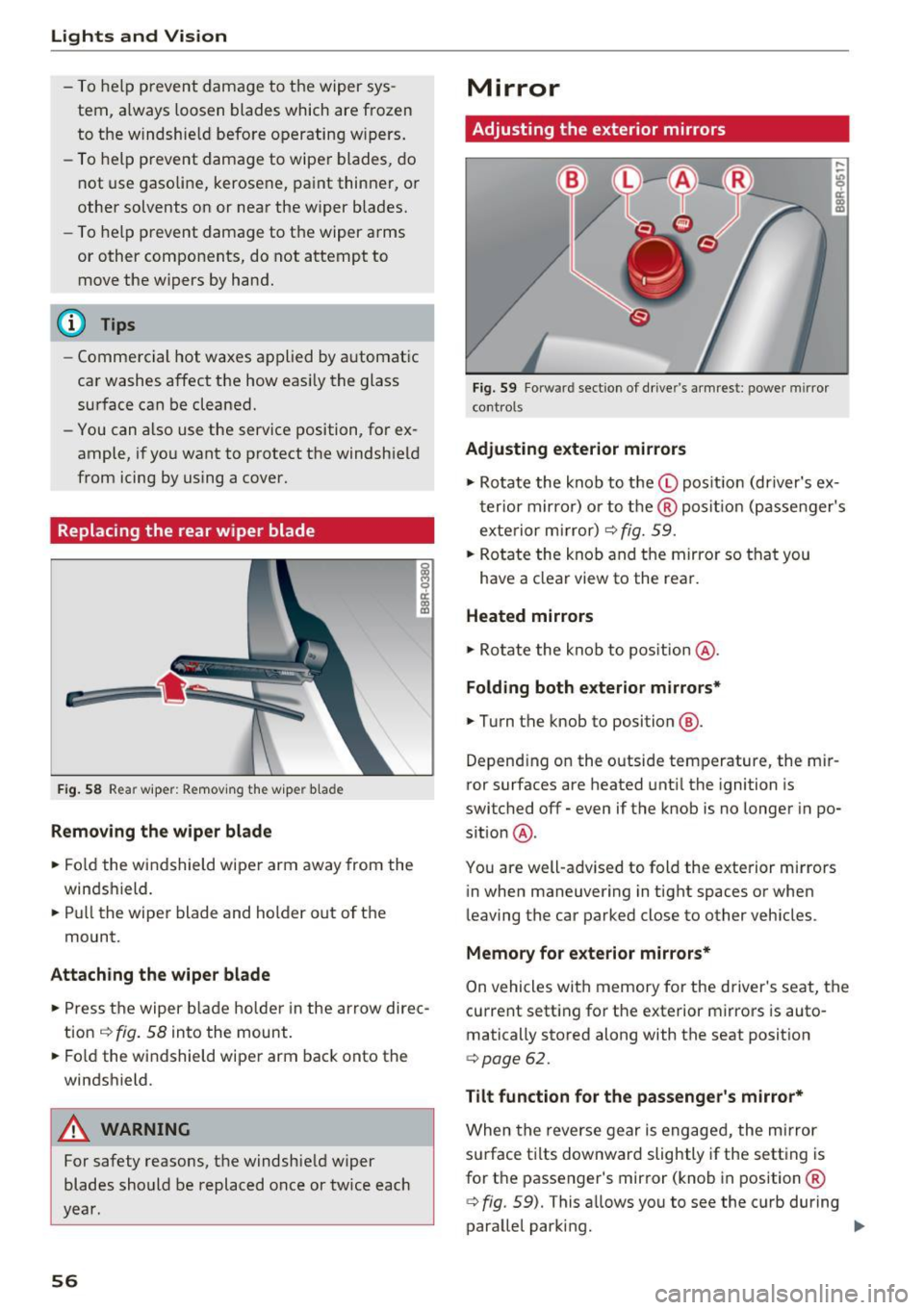
Replacing the rear wiper blade
F ig. 58 Rea r wiper: Remov ing the w iper b lade
Removing the wiper blade
.. Fo ld the wi ndshield wipe r arm away from the
windshield.
.. Pu ll the wiper blade and holder out of t he
mount.
Attaching the wiper blade
~ M 0 a: a, (C
.. Press t he wiper b la d e holde r in the arrow dire c
tion
c:> fig. 58 into the mount.
.. Fo ld the windshield wiper arm bac k onto the
windshield.
A WARNING
-
For safety reasons, the windshield w iper
blades sho uld be replaced once or twice each
year .
56
Mirror
Adjusting the exterior mirrors
Fig. 59 Forwa rd sect ion of dr ive r's armrest : power mirror
cont rols
Adjusting exterior mirrors
,...
-"' 9 a: ::,:
• Ro tate the knob to the© pos it io n (dr iver's ex
t erior mirro r) o r to t he ® posi tion (passe nger's
exterior m irror)
c:> fig. 59.
.. Rotate the knob and the mirro r so that you
have a clear view to the rea r.
Heated mirrors
.,. Ro tate the knob to pos ition @.
Folding both exterior mirrors*
.,. Turn the knob to position @.
Depend ing o n the outside temperature, the mi r
ror surfaces are heated unt il the ignition is
switched
off -even if the knob is no longer in po
s it ion @.
You are well-adv ised to fold the exte rior m irrors
in when maneuvering in tight spaces or when
leaving the car parked close to other vehicles .
Memory for e xterior mirrors*
On vehicles with memory for the driver's seat, the
current sett ing fo r the exterior mirrors is auto
matically stored along with the seat posit ion
<=> page 62.
Tilt function for the passenger 's mirror*
When the reverse gear is engaged, the mirror
s u rface t ilts downwar d slightly if the setting is
for t he passenger's mirror (knob in position ®
c:> fig. 59). This allows you to see the curb during
parallel parking. ..,_
Page 77 of 296
a,
a,
..... N r-N ..... 0 0
0:
co
when accelerating or when applying the brakes or when driving around a corner.
- When you are driving make sure that any
thing you may have placed in the center con
sole or other storage locations cannot fall out into the footwells. In case of sudden
braking you would not be able to brake or
accelerate.
- Any pieces of clothing that you have hung
up must not interfere with the driver's view.
The coat hooks are designed only for light
we ight cloth ing. Never hang any clothing
with hard, pointed or heavy objects in the
pockets on the coat hooks. During sudden
braking or in an accident -especially if the
airbag is deployed -these objects could in
jure any passengers inside the vehicle.
Glove compartment
The glove comportment is illuminated and can
be locked.
Fig. 92 Glove compartment
To open glove compartment
.,. Pull the handle in the direction of the arrow
c:> fig. 92 and swing the cover down to open .
To close glove compartment
.,. Push the glove compartment lid upward until
the lock engages.
There are holders for a pen and a pad of paper in
the glove compartment lid.
On the right side in the glove compartment is a holder with the key body into which the emergen
cy key must be clipped to be able to start the ve
hicle.
Seats and storage
A WARNING
-To reduce the risk of personal injury in an acci-
dent or sudden stop, always keep the glove
compartment closed while driving.
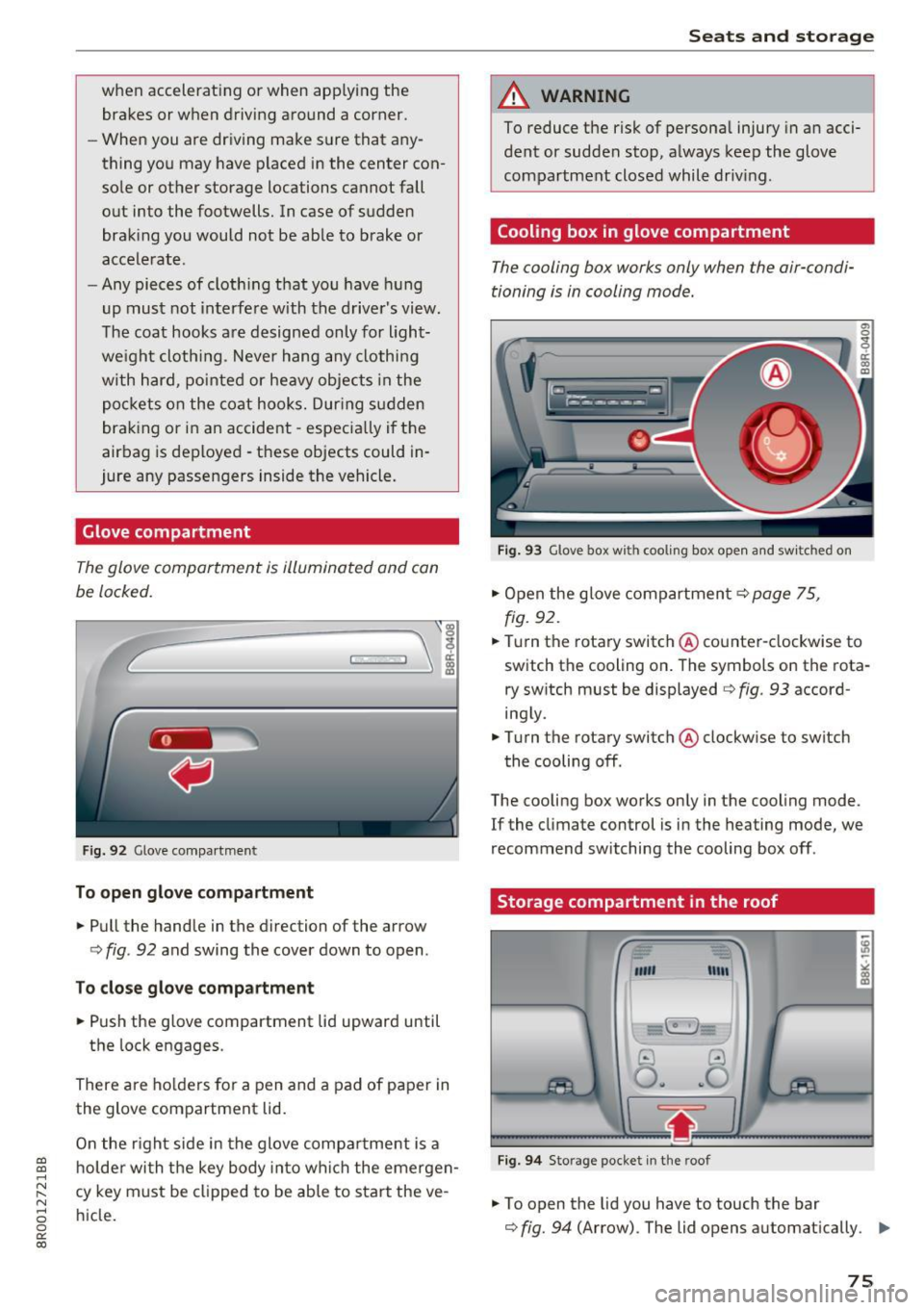
Cooling box in glove compartment
The cooling box works only when the air-condi
tioning is in cooling mode.
Fig. 93 Glove box with cooling box open and switched on
.,. Open the glove compartment c:> page 75,
fig.
92 .
.,. Turn the rotary switch @counter-clockwise to
switch the cooling on. The symbols on the rota
ry switch must be displayed
c:> fig. 93 accord
ing ly .
.,. Turn the rotary switch @clockwise to switch
the cooling off.
The cooling box works only in the cooling mode.
If the climate control is in the heating mode, we
recommend switching the cooling box off .
Storage compartment in the roof
""'
11111
.3
0 .. ~O
~-__;,:~ ~~lr.;...__--1
Fig. 94 Storage pocket in the roof
.,. To open the lid you have to touch the bar
c:> fig. 94 (Arrow) . The lid opens automatically. Ill>
75
Page 79 of 296
CD
CD
.... N ,-... N .... 0 0 C<'. 00
Warm and cold Climate control system
Description
The climate control system warms , cools and
adds humidity to the a ir in the veh icle inter ior. It
i s the most effective when the windows and pan
oramic sliding sunroof* ar e closed. If th ere is a
bui ld-up of heat inside th e vehicle, ventilation
can help to sp eed up th e cooling process.
I n all heating mode functions except
defrost, the
b lower only switches to a higher speed once the
engine coolant has reached a certain tempera
ture .
Condensat ion from the cooling system can drip
and fo rm a puddle of water unde r the vehicle.
This is normal and does not mean there is a leak.
Pollut ant filter
The pollutant filter removes pollutants such as
dust and pollen from the air.
The air pollutants filter must be changed at the intervals specified in your Warranty
& Mainte
nance booklet, so that the a ir condit ione r can
p roperly work.
If you drive your vehicle in an area with high air
pollution , the filter may need to be changed
mo re frequently than specified in your Aud i Wa r
ranty
& Ma intenance booklet. If in doubt, ask
your author ized Audi Service Advisor for advice .
Key co ded setting s
The climate control settings are automatically
stored and assigned to the remote control key
that is i n use .
_&. WARNING
Reduced visib ility is dangerous and can ca use
accidents.
- For safe dr iv ing it is very impo rtant that all
windows be free of ice, snow and condens a
tion .
Warm and c old
- Completely familiarize yourself with the
proper use and function of the heating and
ventilation system and especially how to de
fog and defrost the windows .
- Never use the windshield wiper/washer sys
tem in freezing weather until you have
warmed the windshie ld first, using the heat
ing and vent ilation system . The washe r solu
tion may freeze on the w indshield and re
duce visibility.
(D Note
- If you suspect that the air conditioner has bee n damaged, sw itch the system off to
avoid further damage and have it inspected
by a qualified dea lership.
- Repa irs to the Aud i a ir cond itioner requ ire
special techn ical know ledge and spec ial
t ools. Contact an a uthorized Audi dea ler fo r
assistance.
@ For the sake of the environment
By reduc ing the amo unt of fuel you use, yo u
also reduce the amount of pollutants emitted
into the air.
(D Tips
- Keep the a ir intake slots (in fro nt of t he
w indshield) free from ice , snow and debr is
in orde r to maintain the proper function of
the climate control system .
- T he energy management system may switch
the seat heating* or rear window defroster
off temporarily . These systems are availab le
again as soon as the energy ba lance has
been restored .
- The a ir flowing out of the vents and
throughout the vehicle's ent ire inter ior is
discharged at the rear of the vehicle . Make
sure that the out let slots are not covered by
cloth ing , etc.
77
Page 80 of 296
Warm and cold
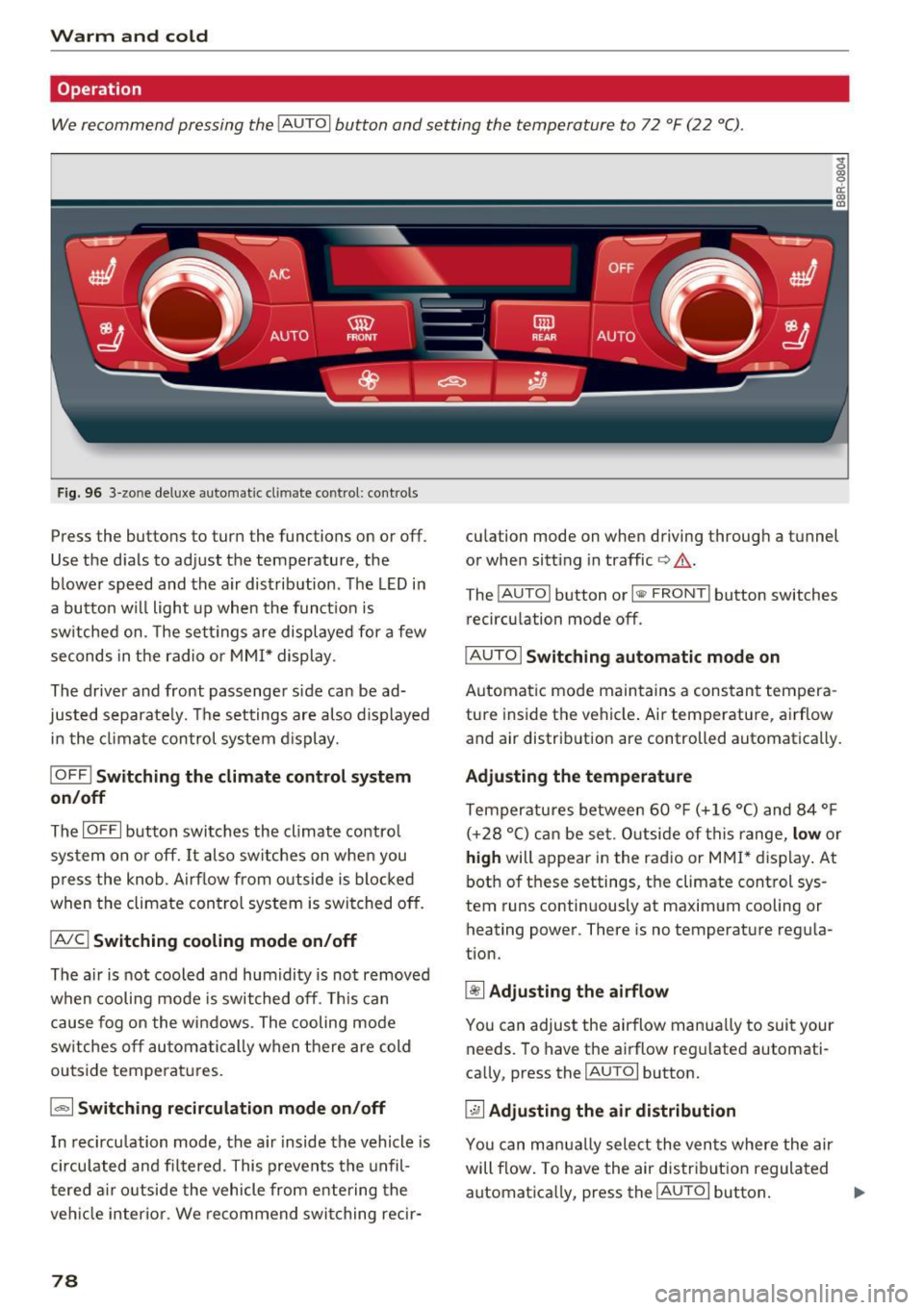
Operation
We recommend pressing the IAUTOI button and setting the temperature to 72 °F (22 °C) .
Fig . 96 3-zo ne de luxe automat ic cl imate co ntrol: con tro ls
Press the buttons to turn the functions on or off .
Use the dials to adjust the temperature, the
b lowe r speed and the air distrib ution . The LED in
a bu tton w ill light up when the funct ion is
sw itched on. The sett ings a re displayed for a few
seconds in the radio or MMI* display .
The driver and front passenger side can be ad
jus ted separate ly. Th e settings are also d isplayed
in the clima te control system d isplay.
I O FF j Switching the climate control system
on /off
The IOFFI button swi tches the climate contro l
sys tem on or off. It also switches on when you
press the knob . Ai rf low from o utside is blocked
when the climate con trol system is switched off.
IAIC ! Switching cooling mode on /off
The air is not cooled and humidity is not removed
when cooling mode is switched off . T h is can
cause fog on the windows . The cooling mode
sw itches off au toma tic ally when there are cold
outside temperat ures.
la, I Switching recirculation mode on /off
In recirculation mode, the a ir inside the vehicle is
circu lated and filtered . This prevents the unfil
tered a ir o utside the vehicle from e ntering the
veh icle interior . We recommend switching recir-
78
culation mode on when driving through a tunnel
or when sitt ing in traffic
Q &. -
The !AUTO I button or I l1ii> FRONT ! button switches
reci rculation mode off .
I AUTO I Switching automatic mode on
Automatic mode main tains a constan t tempera
ture inside the vehicle . Air temperature , airflow
and air distribution are controlled automatically.
Adjusting the temp erature
Temperatures between 60 ° F (+ 16 °C) and 84 ° F
( + 28 °C) can be set . O utside of th is range,
l ow or
high will appear in the radio or MMI* display . At
both of these settings, the climate control sys
tem runs continuously at maximum cooling or
heating power. There is no temperature regula
tion.
~ Adju sting th e airfl ow
You can adjust the airflow manua lly to suit your
needs . To have the airflow reg ulated automati
cally, press the
IAUTO I button.
~ Adjusting the air distribution
Yo u can manual ly select the vents where the air
will flow. To have the air distribut ion regulated
automat ica lly, press the
IAUTO I button. ""
Page 81 of 296
![AUDI Q5 2017 Owners Manual CD
CD
.... N ,-... N .... 0 0 C<. 00
[i] Adjusting seat heating*
Pressing the button switches the seat heating on
at the highest setting (level 3) . The LEDs indicate
the temperat](/img/6/57633/w960_57633-80.png "AUDI Q5 2017 Owners Manual CD
CD
.... N ,-... N .... 0 0 C<. 00
[i] Adjusting seat heating*
Pressing the button switches the seat heating on
at the highest setting (level 3) . The LEDs indicate
the temperat")
CD
CD
.... N ,-... N .... 0 0 C<'. 00
[i] Adjusting seat heating*
Pressing the button switches the seat heating on
at the highest setting (level 3) . The LEDs indicate
the temperature level. To reduce the tempera
ture, press the button again. To switch the seat heating off, press the button repeatedly until the
LED turns off.
After 10 minutes, the seat heating automatically
switches from level 3 to level 2.
lil Adjusting seat ventilation*
Pressing the button switches the seat ventilation
on at the highest sett ing (level 3). The LEDs indi
cate the venti lation level. To reduce the ventila
tion level, press the button again. To switch the
seat v entilation off, press the button repeatedly
until the LED turns off.
I ..., FRONT I Switch the defroster on/off
The windshield and side windows are defrosted
or cleared of condensation as quickly as possib le.
The maximum amount of air flows mainly from
the vents below the windshield. Recirculation
mode switches off. The temperature should be
set to 72 °F (22 °() or higher. The temperature is
controlled automatically .
T he
IAUTOI button switches the defroster off.
llliil REARI Switching rear window heater on/
off
The rear window heater on ly operates when the
engine is running. It switches off automatica lly
after a few minutes, depending on the outs ide
temperature.
To prevent the rear window heater from switching off automatically, press and hold the
!llil> REAR I
button for more than 2 seconds . This remains
s tored until the ignition is switched off .
Air vents
You can open and close the center and rear air
vents using the thumbwheels . The levers adjust
the direction of the airflow from the vents.
You can adjust the air temperature in the rear by
turning the thumbwheel toward the red side to
Warm and cold
make it warmer or toward the blue s ide to make
it coo ler.
A WARNING
-~
- Do not use the recirculation for extended
periods of time. The windows could fog up
since no fresh air can enter the vehicle . If
the windows fog up, press the air rec ircula
tion button again immed iately to switch off
the air rec irculat ion function or select de
frost.
- Individuals with reduced sensit ivity to pain
or temperature could develop burns when
using the seat heating* function. To reduce
the risk of injury, these individua ls should
not use seat heating.
(D Note
To avoid damage to the heating elements* in
the seats, do not kneel on the seats or place heavy loads on a small area of the seat.
Setup
The basic climate control settings can be adjust
ed in the radio or MMI*.
"'Select: !CAR I function button> A/C control but
ton. Or
"' Select:
!CAR ! function button> Car systems*
control button >
A/C.
Automatic recirculation
When switched on, automat ic rec irculat ion con
trols the recirculation mode automatically. If the
windows fog up, press the
I@ F RON T I button.
Synchronization
When synchronization is switched on, the same
settings are appl ied to both the driver and front
passenger , except for the seat heating/ventila
t ion* . Synchronization switches off when you ad
just the settings on the front passenger's sid e.
You can also sw itch synchronizat ion on by press-
i ng and holding the knob on the driver's side. ..,.
79
Page 82 of 296
Warm and cold
Supplementary heater*
The supplementary heater warms the interior of
veh icles with flexible fuel engines*, diesel en
gines* or hybrid drive* more quickly. The supple
mentary heater is controlled automatically in the
Auto setting.
80