air condition AUDI Q5 2017 Owners Manual
[x] Cancel search | Manufacturer: AUDI, Model Year: 2017, Model line: Q5, Model: AUDI Q5 2017Pages: 296, PDF Size: 74.43 MB
Page 5 of 296
CD
CD
.... N ,-... N ..... 0 0 C<'. 00
Storing cargo correctly . . . . . . . . . . . . . . . 136
R epo rting Safety Defects . . . . . . . . . . . . . . 138
Safety belts . . . . . . . . . . . . . . . . . . . . . . 14 0
General information . . . . . . . . . . . . . . . . . 140
Why use safety belts? . . . . . . . . . . . . . . . . 141
Safety belts . . . . . . . . . . . . . . . . . . . . . . . . 143
Belt tensioners . . . . . . . . . . . . . . . . . . . . . . 146
Airbag system . . . . . . . . . . . . . . . . . . . . 148
Important information . . . . . . . . . . . . . . . 148
Front airbags . . . . . . . . . . . . . . . . . . . . . . . 1S2
Monitoring the Advanced Airbag System . 158
Side airbags . . . . . . . . . . . . . . . . . . . . . . . . 162
Side curtain airbags . . . . . . . . . . . . . . . . . . 165
Child safety . . . . . . . . . . . . . . . . . . . . . . 168
Important information . . . . . . . . . . . . . . . 168
Ch ild seats . . . . . . . . . . . . . . . . . . . . . . . . . 174
S ecur ing ch ild seats . . . . . . . . . . . . . . . . . . 178
L ATCH system (lower anchorages and
tethers for chi ldren) . . . . . . . . . . . . . . . . . 181
Additional in fo rma tion
185
Driver messages . . . . . . . . . . . . . . . . . 186
Intelligent Technology . . . . . . . . . . 186
Elect ronic Stabilization Control (ESC) . . . . 186
Notice about data recorded by the Event
Data Recorder and vehicle control
modules . . . . . . . . . . . . . . . . . . . . . . . . . . . 188
B rak ing . . . . . . . . . . . . . . . . . . . . . . . . . . . . 190
E lect romechanical power assist, Dynamic
steering . . . . . . . . . . . . . . . . . . . . . . . . . . . 191
Dri ving with your quattro . . . . . . . . . . . . . 192
En erg y management . . . . . . . . . . . . . . . . . 192
Driving and the environment . . . . 194
Br eak ing in . . . . . . . . . . . . . . . . . . . . . . . . . 194
Catalytic converter . . . . . . . . . . . . . . . . . . . 194
Di ese l particulate filter . . . . . . . . . . . . . . . 195
Avoid damaging the vehicle . . . . . . . . . . . 195
Economical and environmentally-friendly
driving . . . . . . . . . . . . . . . . . . . . . . . . . . . . 195
Table of contents
Offroad driving . . . . . . . . . . . . . . . . . . .
198
Driving under difficult conditions and off-
ro ad . . . . . . . . . . . . . . . . . . . . . . . . . . . . . . 198
Trailer towing . . . . . . . . . . . . . . . . . . . . 200
Driving with a traile r . . . . . . . . . . . . . . . . . 200
Trailer towing information . . . . . . . . . . . . 202
Operating instructions . . . . . . . . . . . 204
Care and cleaning . . . . . . . . . . . . . . . . 204
Genera l information . . . . . . . . . . . . . . . . . 204
Car washes . . . . . . . . . . . . . . . . . . . . . . . . . 204
Cleaning and care information . . . . . . . . . 205
Plac ing your vehicle out of service . . . . . . 208
Fuel and Refueling . . . . . . . . . . . . . . . 209
Fuel .. .. .. .. .. .. .. ... .. ..... ... .. .. 209
Refueling ... .. .. .. .... .. ... .... .. .. 211
Selective catalytic reduct ion (Ad Blu e/
DEF) . . . . . . . . . . . . . . . . . . . . . . . . . . . . . . 214
Checking and Filling ........... .. 2 17
Hood ..... .. .. .. ................. .. 217
Eng ine compartm ent . . . . . . . . . . . . . . . . . 219
Eng ine oil . . . . . . . . . . . . . . . . . . . . . . . . . . 219
Cooling system . . . . . . . . . . . . . . . . . . . . . . 223
Brake fluid . . . . . . . . . . . . . . . . . . . . . . . . . 224
Battery . . . . . . . . . . . . . . . . . . . . . . . . . . . . 225
Windshield/headlight washer container
229
Wheels ........................... 230
Wheels and Tires . . . . . . . . . . . . . . . . . . . . 230
Tire pressure monitoring system 247
Do It Yourself . . . . . . . . . . . . . . . . . . . . 250
Emergency assistance . . . . . . . . . . . 250
Vehicle jack, vehicle tool kit and
collapsible spare tire . . . . . . . . . . . . . . . . . 250
T ire mobility kit . . . . . . . . . . . . . . . . . . . . . 253
Replacing wheels . . . . . . . . . . . . . . . . . . . . 255
Fuses and bulbs . . . . . . . . . . . . . . . . . . 261
Fuses . . . . . . . . . . . . . . . . . . . . . . . . . . . . . . 261
Bulbs . . . . . . . . . . . . . . . . . . . . . . . . . . . . . . 264
Emergency situations . . . . . . . . . . . . 266
General . . . . . . . . . . . . . . . . . . . . . . . . . . . . 266
Starting by pushing or tow ing . . . . . . . . . . 266
3
Page 25 of 296
a,
a,
..... N l"N ..... 0 0
0:
co
On Board Diagnostic
System (OBD)
Malfunction Indicator lamp (MIL)
The Malfunction Indicator Lamp (MIL) ¢'4 in the
instrument cluster
¢ page 11, fig. 7 is part of the
On -Board Diagnostic (OBD II) system.
The warning/indicator light illuminates when the
ignition is switched on and goes out after the en
gine starts and the idle has stabilized . This indi
cates that the MIL is working properly .
If the light does not go out after the engine is
started, or illuminates while you are driving, a
malfunction may exist in the engine system .
If
the light illuminates, the catalytic converter
could be damaged.
Continue driving
with reduced power (avoiding
sustained high speeds and/or rapid accelera
tions) and have the condition corrected. Contact
your authori zed Audi dealer.
If the light illuminates, the electronic speed lim
iter may also be malfunctioning . For more infor
mation ¢
page 23, Electronic speed limiter.
An improperly closed fuel filler cap may also
cause the MIL light to illuminate (only vehicles
with gasoline engine)
¢page 212.
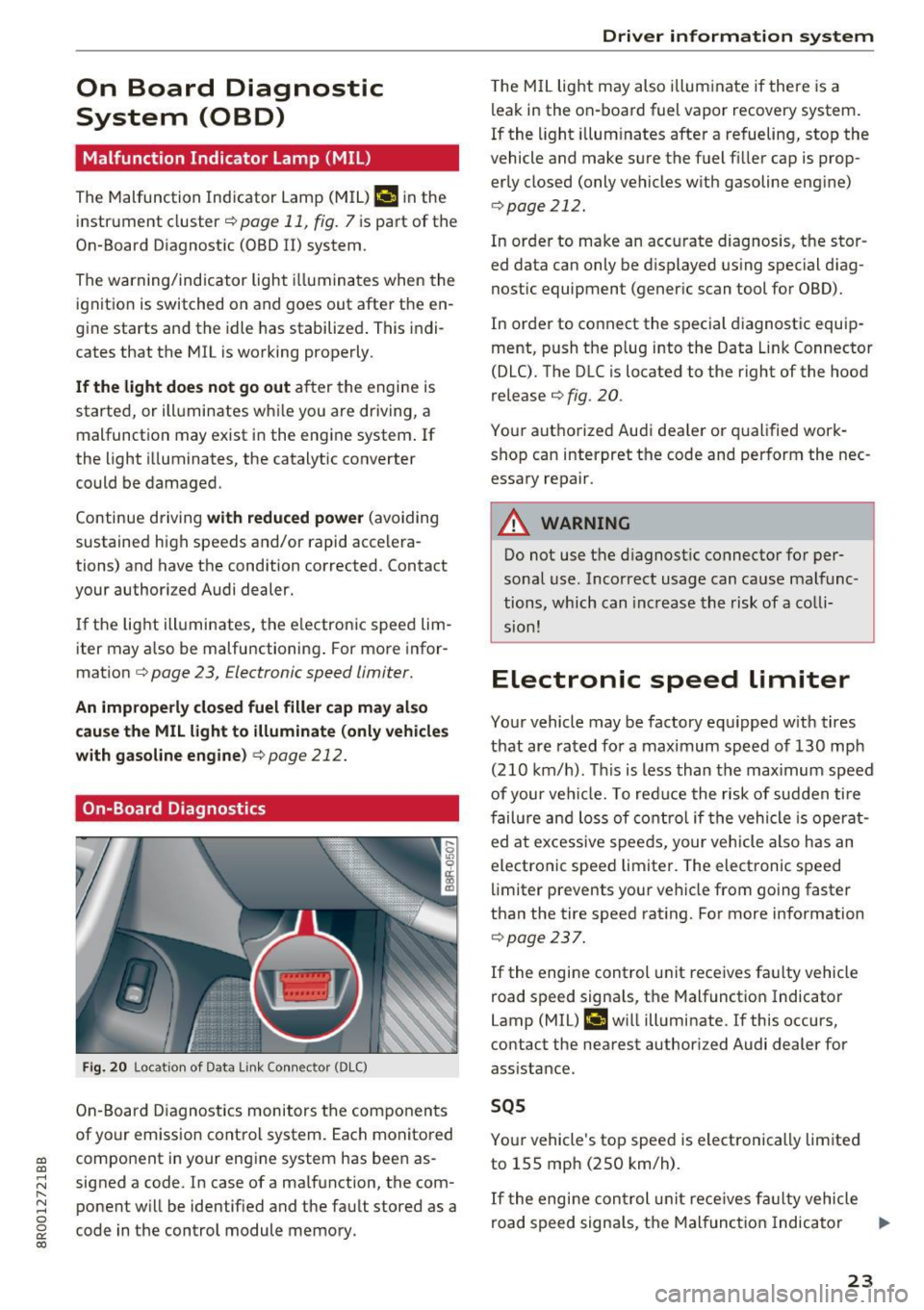
On-Board Diagnostics
Fig. 20 Locat ion of Data Link Connec tor (DLC )
On-Board Diagnostics monitors the components
of your emission control system. Each monitored
component in your engine system has been as
signed a code. In case of a malfunction, the com ponent will be identified and the fault stored as a
code in the control module memory.
Driver in forma tion system
The MIL light may also illum inate if there is a
leak in the on-board fuel vapor recovery system.
If the light illuminates after a refueling, stop the
vehicle and make sure the fuel filler cap is prop
erly closed (only vehicles with gasoline engine)
¢ page 212.
In order to make an accurate diagnosis, the stor
ed data can only be displayed using special diag
nostic equipment (generic scan tool for OBD).
In order to connect the special diagnostic equip
ment, push the plug into the Data Link Connector
(DLC). The DLC is located to the right of the hood
release ¢
fig. 20.
Your authorized Audi dea ler or qualified work
shop can interpret the code and perform the nec
essary repair.
A WARNING
-~
Do not use the diagnostic connector for per
sonal use. Incorrect usage can cause malfunc
tions, which can increase the risk of a colli
sion!
Electronic speed limiter
Your vehicle may be factory equipped with tires
that are rated for a maximum speed of 130 mph (210 km/h). This is less than the maximum speed
of your vehicle. To reduce the risk of sudden tire
failure and loss of control if the vehicle is operat
ed at excessive speeds, your vehicle also has an
electronic speed limiter. The electronic speed
limiter prevents your vehicle from going faster
than the tire speed rating . For more information
¢ page 237.
If the engine control unit receives faulty vehicle
road speed signa ls, the Malfunction Indicator
Lamp (MIL)
¢4 will illuminate. If this occurs,
contact the nearest authori zed Audi dealer for
assistance.
SQS
Your vehicle's top speed is electronically limited
to 155 mph (250 km/h).
If the engi ne control unit receives fa ulty vehicle
road speed signals, the Malfunction Indicator
lllJ,,
23
Page 26 of 296
Driver information system
Lamp (MIL) II will illuminate. If this occurs,
contact the nearest authorized Audi dealer for
assistance.
A WARNING
Always observe the posted speed limits and
adjust your speed to suit prevailing road, traf
fic and weather conditions. Never drive your
vehicle faster than the maximum speed rating
of the tires installed.
Auto Check Control
Introduction
The Auto-Check control monitors the function of
certa in vehicle features and components. It sim
ply makes sure these features and components
are working properly. The Auto-Check control
works as long as the ignition is on, as well as
whenever the veh icle is driven.
-
If a component is malfunctioning or if the need
for an urgent repair has been detected, this will
appear in the instrument cluster display. You will
also hear an audib le warning tone . The displays
are color coded in eit he r red or yellow depending
on their level of priority.
A red symbol means
Danger, a yellow symbol in
d icates
Warning . In certain s ituations, informa
tion message for the driver appea r in addition to
the red and yellow symbols .
Note about automatic transmission
The Auto -Check Control will automatically per
form a test each time you switch on the ignition. W ith the selector lever in P or N, the fo llowing
message appears in the display:
When stationary apply brake pedal while select
ing gear
When you select a different gear (for example: R, D, etc.), the message will disappear and the Au
to-Check function is displayed.
If there is a malfunct ion, then the malfunction
message will appear about 15 seconds after you
start the vehicle. At the same time you will hear a
warn ing tone.
24
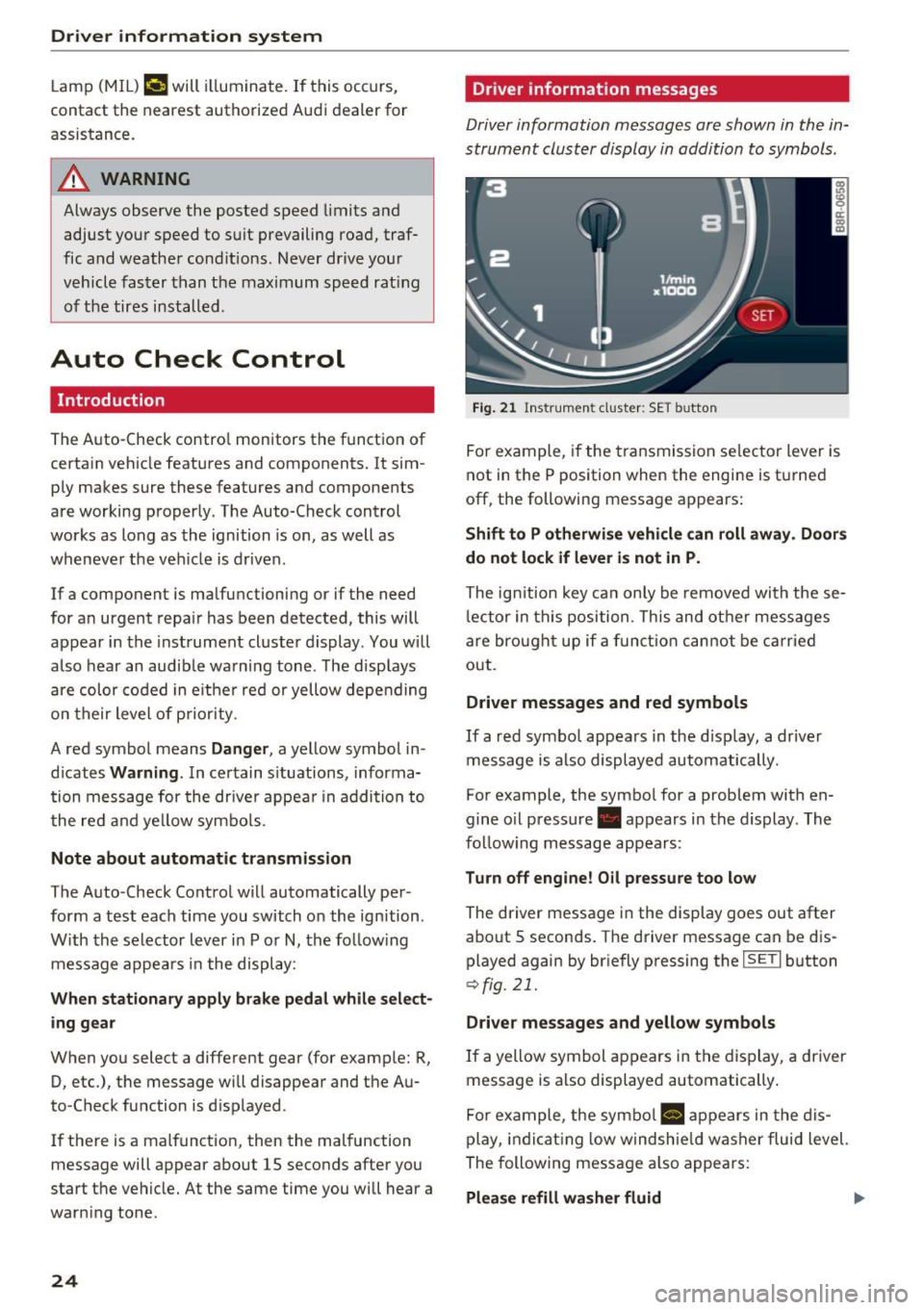
Driver information messages
Driver information messages are shown in the in
strument cluster display in addition to symbols.
Fig. 21 Instrument cluste r: SET button
For example, if the transmission selector lever is
not in the P position when the engine is tu rned
off, the following message appears:
Shift to P otherwise vehicle can roll away. Doors
do not lock if lever is not in P.
The ign ition key can only be removed with these
lector in this position. This and other messages
are brought up if a function cannot be carried
out.
Driver messages and red symbols
If a red symbol appears in the disp lay, a driver
message is also displayed automatically.
For example, the symbol for a problem with en
gine o il pressure . appears in the display. The
follow ing message appears:
Turn off engine! Oil pressure too low
The driver message in the display goes out after
about 5 seconds. The driver message can be dis played again by briefly pressing the
I SETI button
r::> fig. 21.
Driver messages and yellow symbols
If a yellow symbol appears in the display, a driver
message is also displayed automatically.
For example, the symbol
a, appears in the dis
play, indicating low windshie ld washer fluid level.
The following message also appears:
Please refill washer fluid II>-
Page 33 of 296
the driver information system. Keep in mind that
the engine speed will not exceed the value dis
p layed in the driver information system, for ex
ample when downshifting.
Please go to an autho rized Audi dea ler o r other
qua lified workshop to have the malfunction re
pa ired .
~ Diesel particulate filter clogged
Applies to: ve hicles with diesel eng ine and diesel part iculate
filter
11!1 Particul ate filt er S ee ow ner's manual
When the II symbol illum inates, you can a lter
your d riving style to assist the fi lter self-cleaning
process . Dr ive for approx imately 15 minutes with
the selector leve r in the S position at a minimum
speed of 37 mph (60 km/h) and an engine speed
of approximate ly 2,000 RPM. The temperature
increase that will result from this can burn off
the soot in the filter. The symbol will switch off
when the clean ing is successful. After a success
ful cleaning, there is no need to br ing the car to
a n author ized dealer or qualified workshop be
cause this is part of no rmal veh icle operat ion.
If the symbol
II does not switch off, see your
author ized dealer or other qualif ied workshop to
have the prob lem corrected.
For more information on the diesel particulate
filter, refer to
<=:>page 195.
A WARNING
Always adapt your speed to the current
weather, road and traffic conditions. You
should never disobey traffic laws in orde r to
follow driving recommenda tions.
{0 Headlight range control defective
II Headlight range cont rol defe cti ve !
If the symbol II ill uminates, the dynamic head
l ight range control is no longer wo rking prope rly.
H ave the sys tem checked and repaired at yo ur au-
CD thor ized Audi dealer. CD .... N ,-... N .... 0 0 c:<: 00
Dri ver informa tion system
~O Adaptive light defective
Applies to: vehicles with adaptive light
Efl Audi adapt ive light : defe ctiv e
When this symbol Efl illuminates, it means that
adaptive light is defective. Go to an authorized
Audi dealer to have the head lights or the contro l
u nit for the adapt ive lig ht repaired.
~ - Steering malfunction
El! Steering lo ck : Con tact deale r!
If the m symbol in the d isplay comes on, there
is an e lectronic stee ring column lock malfunc
t ion.
Drive to your author ized Audi dealer immed iately
to have the malfunction cor rected .
A WARNING "--
Your vehicle m ust not be towed in the event
of a malfunction in the e lectronic steering
column loc k bec ause i t cannot be stee red due
to the loc ked steering. If it is towed w ith the
steering locked, there is the risk of an acc i
dent .
~ Ignition lock malfunction
m Ignition lock defective
If the l3 symbo l in the d isplay comes on, the re is
a malfunction in the electronic ignition lock .
Please go to an authorized Audi dealer or other
qualified workshop to have the malfunction re
paired.
Q Adaptive dampers
Applies to: vehicles with Audi drive select
R Suspension: System fault!
If the R symbo l in the disp lay comes on, the re is
a malfunction in the adaptive dampers. Please go
to an authorized Audi dealer or other qualified
workshop to have the ma lfunction repaired.
~ Windshield wipers faulty
El Windshield wiper s defective
31
Page 59 of 296
a,
a,
..... N r-N ..... 0 0
0:
co
The mirror returns to its initial position as soon
as reverse gear is dis e ngaged and vehicle speed is
above about 9 mph (15 km/h) . T he mirror also
returns to its ini tial posit ion if the switch is
moved to the driver's exter ior mirror © or the ig
n ition is switched off .
If the position of the m irror surface is changed
on a ti lted mirror , this new position will be auto
matically assigned to the remote key when the
vehicle is taken out of reverse gear .
(D Note
- Curved mirror surfaces (convex or spheri
cal") increase your field of v iew . Remember
that vehicles or other objects will appear
smaller and farther away than when seen in
a flat mirror . If you use th is m irror to esti
ma te distances of following vehicles when
changing lanes, yo u could estimate incor
rectly and cause an a ccident.
- If the mir ror housing is moved unin tention
ally (for example, wh ile pa rking yo ur vehi
cle), then you must first fold the m irror
electrica lly. Do not read just the mirror
hous ing manua lly. You could damage the
motor which contro ls the mirror.
- If you wash the vehicle in an automatic car
wash, yo u m ust fold the exterior m irrors in
to reduce the risk of damage to the mirrors. Never fold power folding exterior m irrors*
by hand . Only fold them in and out using
the power contro ls .
@ Tips
If there should be a ma lfunction in the e lec
trical system, you can still adjust the exterior m irro rs by p ressing the edge of the m irror .
Lights and V ision
Dimming the mirrors
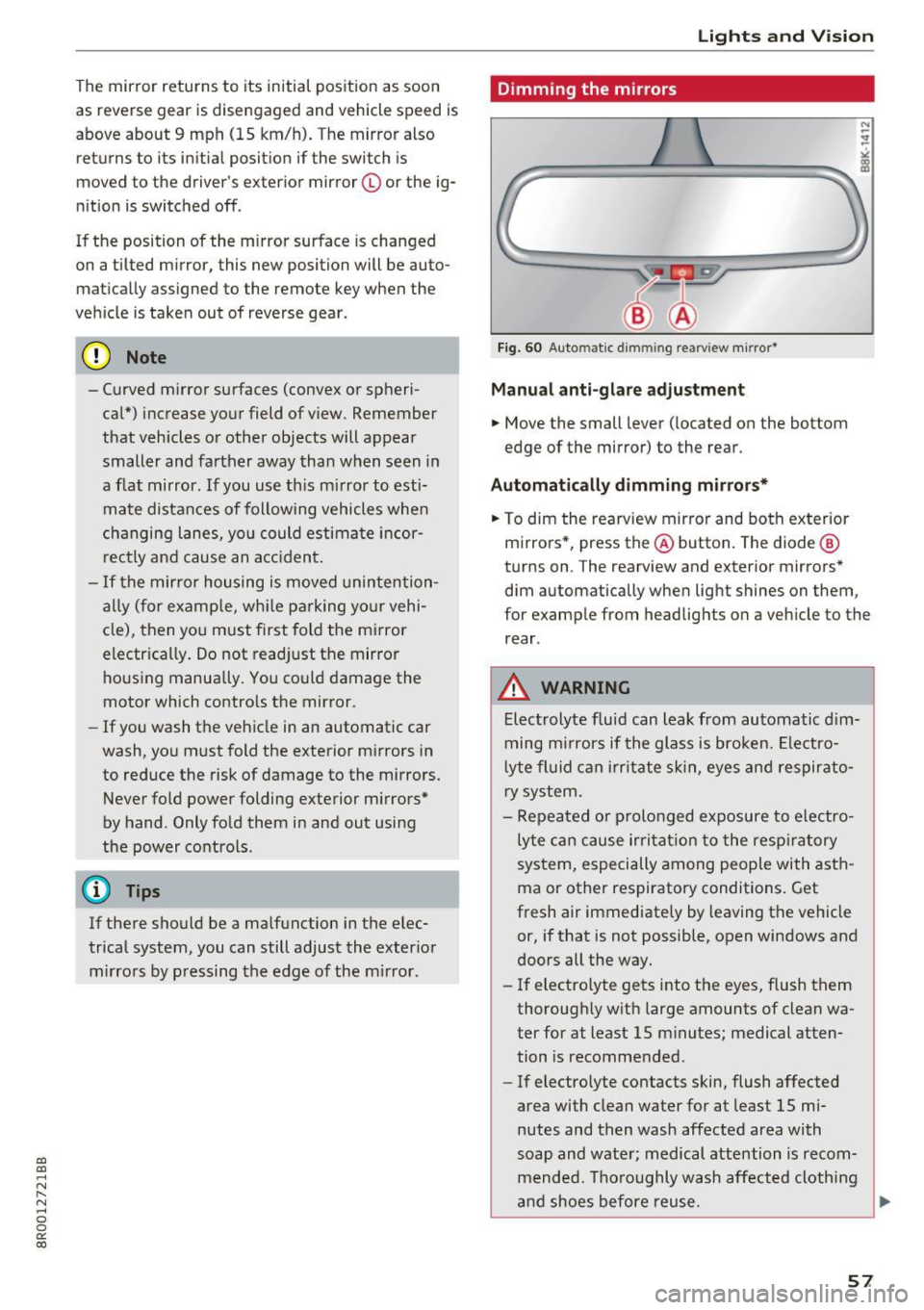
Fig. 60 Auto ma tic dimmin g rearvi ew m irror*
Manu al anti-glare adjustment
.. Move the small lever ( located on the bottom
edge of the mirror) to the rear .
Automat ically dimm ing mirro rs*
.. To dim the rearview mir ror and both exterior
m irrors *, press the@ button. The diode @
turns on . The rearv iew and exterior mirrors*
dim automatically when light shines on them ,
for example from headlights on a veh icle to the
rear .
_&. WARNING
-Electrolyte flu id can leak from automatic d im
ming m irrors if the glass is broken. Ele ctro
l yte fluid can i rr itate sk in, eyes and respirato
ry system .
- Repeated or p rolonged exposure to electro
ly te ca n cause irri tat ion to the resp iratory
system, especially among people with asth
ma or other respiratory conditions. Get
fresh air immediately by leaving the vehicle
or, if that is not possible, open windows and
doors all the way.
- If electro lyte gets into the eyes, flush them
thorough ly w ith large amounts of clean wa
ter for at least 15 m inutes; medical atten
tion is recomme nded .
- If electrolyte contacts skin, flush affected
area with clean water for at least 15 mi
nutes and then wash affected area with
soap and water; medical attention is recom mended. Thoroughly wash affected cloth ing
and shoes before reuse .
~
57
Page 79 of 296
CD
CD
.... N ,-... N .... 0 0 C<'. 00
Warm and cold Climate control system
Description
The climate control system warms , cools and
adds humidity to the a ir in the veh icle inter ior. It
i s the most effective when the windows and pan
oramic sliding sunroof* ar e closed. If th ere is a
bui ld-up of heat inside th e vehicle, ventilation
can help to sp eed up th e cooling process.
I n all heating mode functions except
defrost, the
b lower only switches to a higher speed once the
engine coolant has reached a certain tempera
ture .
Condensat ion from the cooling system can drip
and fo rm a puddle of water unde r the vehicle.
This is normal and does not mean there is a leak.
Pollut ant filter
The pollutant filter removes pollutants such as
dust and pollen from the air.
The air pollutants filter must be changed at the intervals specified in your Warranty
& Mainte
nance booklet, so that the a ir condit ione r can
p roperly work.
If you drive your vehicle in an area with high air
pollution , the filter may need to be changed
mo re frequently than specified in your Aud i Wa r
ranty
& Ma intenance booklet. If in doubt, ask
your author ized Audi Service Advisor for advice .
Key co ded setting s
The climate control settings are automatically
stored and assigned to the remote control key
that is i n use .
_&. WARNING
Reduced visib ility is dangerous and can ca use
accidents.
- For safe dr iv ing it is very impo rtant that all
windows be free of ice, snow and condens a
tion .
Warm and c old
- Completely familiarize yourself with the
proper use and function of the heating and
ventilation system and especially how to de
fog and defrost the windows .
- Never use the windshield wiper/washer sys
tem in freezing weather until you have
warmed the windshie ld first, using the heat
ing and vent ilation system . The washe r solu
tion may freeze on the w indshield and re
duce visibility.
(D Note
- If you suspect that the air conditioner has bee n damaged, sw itch the system off to
avoid further damage and have it inspected
by a qualified dea lership.
- Repa irs to the Aud i a ir cond itioner requ ire
special techn ical know ledge and spec ial
t ools. Contact an a uthorized Audi dea ler fo r
assistance.
@ For the sake of the environment
By reduc ing the amo unt of fuel you use, yo u
also reduce the amount of pollutants emitted
into the air.
(D Tips
- Keep the a ir intake slots (in fro nt of t he
w indshield) free from ice , snow and debr is
in orde r to maintain the proper function of
the climate control system .
- T he energy management system may switch
the seat heating* or rear window defroster
off temporarily . These systems are availab le
again as soon as the energy ba lance has
been restored .
- The a ir flowing out of the vents and
throughout the vehicle's ent ire inter ior is
discharged at the rear of the vehicle . Make
sure that the out let slots are not covered by
cloth ing , etc.
77
Page 101 of 296

a,
a,
..... N r-N ..... 0 0
0:
co
The transmission temperature has increased sig
nificantly due to the sporty driving manner. Drive
in a less sporty manner until the temperature re
turns to the normal range and the indicator light
switches of.
rm Transmission malfunction: You can continue
driving
There is a system mal funct ion in the transm is
sion. You may continue driving. Drive to your au
thorized Audi dealer or qualified repair facility
soon to have the malfunction corrected.
rm Transmission malfunction: Limited driving
functionality
There is a system malfunct ion in the transmis
sion . T he transmission is switching to emergency
mode. This mode only shifts in to certa in gears or
will no longer shift at all. The engine may stall.
Drive to your authorized Audi dea ler or qualified
repair faci lity immediately to have the malfunc
tion corrected.
rm Transmission malfunction: Stop vehicle and
shift to park.
Do not continue driving. Select the P selector lev
e r position and see your a uthorized Aud i dea le r
or qualified repair facility for assistance.
(D Note
If the transmission switches to emergency
mode, you should take the vehicle to an au
t horized Audi dealership as soon as possible
to have the condition cor rected.
Driving
Selector lever emergency release
If the vehicle's power supply fails, the selector
lever can be released in an emergency.
Fig. 114 F ront center conso le: Removing the ashtray insert
Fig.
11S Selector lever emerge ncy release
.,. To access the emergency re lease mechanism,
remove t he ashtray insert@ using the release
switch @
Q fig. 114.
.,. Loosen and remove the cap in the ashtray
mount
Qfig. 115.
.. You now have access to a pin . Using a screw
driver or sim ilar object, press the pin down and
hold it in that position .
.. Now press the release button and move these-
lector lever to the N position.
The selector lever can only be moved from the P
position if the key is in the lock and the ignition is
switched on. If the power supply fails (for exam
ple, the battery is discharged) and the vehicle
must be pushed or towed, move the selector lev
er to the N position f irst using the emergency re
l ease .
99
Page 104 of 296
Hybrid
© Vehicl e drive ready (READY)
® High voltage battery charge status
® Recuperation (CHARGE)
(j) Driving within the combustion en-
gine's full load range
® 100% combust ion engine
® Boosting -the electric engine as-
sists the combustion engine
(BOOST)
@ Engaging the conventional brakes
with recuperat ion
@ Vehicle not drive ready (OFF)
@ EV mode act ive
The needle remains at
OFF when the ignition is
turned on. When the vehicle enters drive ready
mode, the status message
hybrid ready appears
briefly in the instrument cluster display and the
needle in the power meter points to
READY.
Indicator lights and messages
App lies to: ve hicles w ith hyb rid drive
The indicator lights in the instrument cluster
b lin k or tu rn on. They indicate functions or mal
f unct ions.
With some indicator lights, messages may ap
pear and a warning tone may sound . Also note
the indicator l ights in
¢page 24.
Press brake pedal to start vehicle
This message appears if you do not press the
brake pedal when starting the vehicle .
Shift to N or P to start vehicle
This message appears if the selector lever for the
automatic transmission is not in the Nor P posi
tions when starting the vehicle.
- Hybrid drive: System fault! Power
brakes, steering malfunction possible
lfthe indicator light turns on and this message
appears, there is a malfunction in the hybrid sys
tem . The brake booster and the power steering
may stop working. Stop the vehicle in a safe loca
tion as soon as possible.
102
You may continue driving i f the i ndicator light
turns off after starting the vehicle several times .
Drive to an authorized repair facility immediate ly
to have the malfunction corrected .
Q/ij:@,j rlybrid drive: System fault! Contact
dealer
If the indicator light turns on and this message
appears, there is a malfunction in the hybrid sys
tem. Drive to an authorized repair fac ility imme
diately to have the malfunct ion corrected.
(II Hybrid system: Performance restricted.
Please contact dealer
If the indicator light turns on and this message
appears, there is an eng ine control malfunction .
The
ffa i ndicator light in the instrument cluster
also turns on. The engine output is reduced.
D rive to your authorized Audi dealer or qualified
r epa ir facility immediate ly to have the malfunc
tion corrected.
Hybrid drive deactivated. Please restart
engine manually.
This message appears if the high vo ltage battery
charge level has fallen below a certain range or if
the ignition key is no longer inside the vehicle for
vehicles with the convenience key* .
Start the engine wit h eithe r the ignition key
¢
page 81 or with the !START ENGINE STOPI
button* ¢ page 84.
Hybrid battery: Low battery charge. Battery
will be charged while driving.
This message appears if the high vo ltage battery
charge level has fallen below a certain range. If
this message turns off after a litt le while, the
high voltage battery charged enough while driv
i ng.
If the message does not turn off, have an author
ized repair facility correct the ma lfunction as
soon as possib le .
EV mode is currently unavailable .
This message appears if the conditions
¢ page 103 for enha nced elect ric driving are not
met. Try again at a la ter time .
Page 134 of 296
Driving safety
• Sit properly in your seat and make sure that
your passengers do the same
c:> page 60,
General information.
• Fasten your safety belt and wear it properly . Al
so instruct your passengers to fasten their safe
ty belts properly
c:> page 140 .
What impairs driving safety?
Safe driving is directly related to the condition of
the vehicle, the driver as well as the driver 's abili
ty to concentrate on the road without being dis
tracted .
The driver is responsible for the safety of the ve
hicle and all of its occupants. If your ability to
drive is impaired, safety risks for everybody in the
vehicle increase and you also become a hazard to
everyone else on the road
c:> Li').. Therefore :
• Do not let yourself be distracted by passengers
or by using a cellular telephone .
• NEVER drive when your driving ability is im
paired (by medications, alcohol, drugs, etc.).
• Observe all traffic laws, rules of the road and
speed limits and plain common sense.
• ALWAYS adjust your speed to road, traffic and
weather conditions.
• Take frequent breaks on long trips. Do not drive
for more than two hours at a stretch.
• Do NOT drive when you are tired, under pres
sure or when you are stressed.
A WARNING
Impaired driving safety increases the risk of
ser ious personal injury and death whenever a
vehicle is being used.
132
Correct passenger
seating positions
Proper seating position for the driver
The proper driver seating position is important
for safe, relaxed driving.
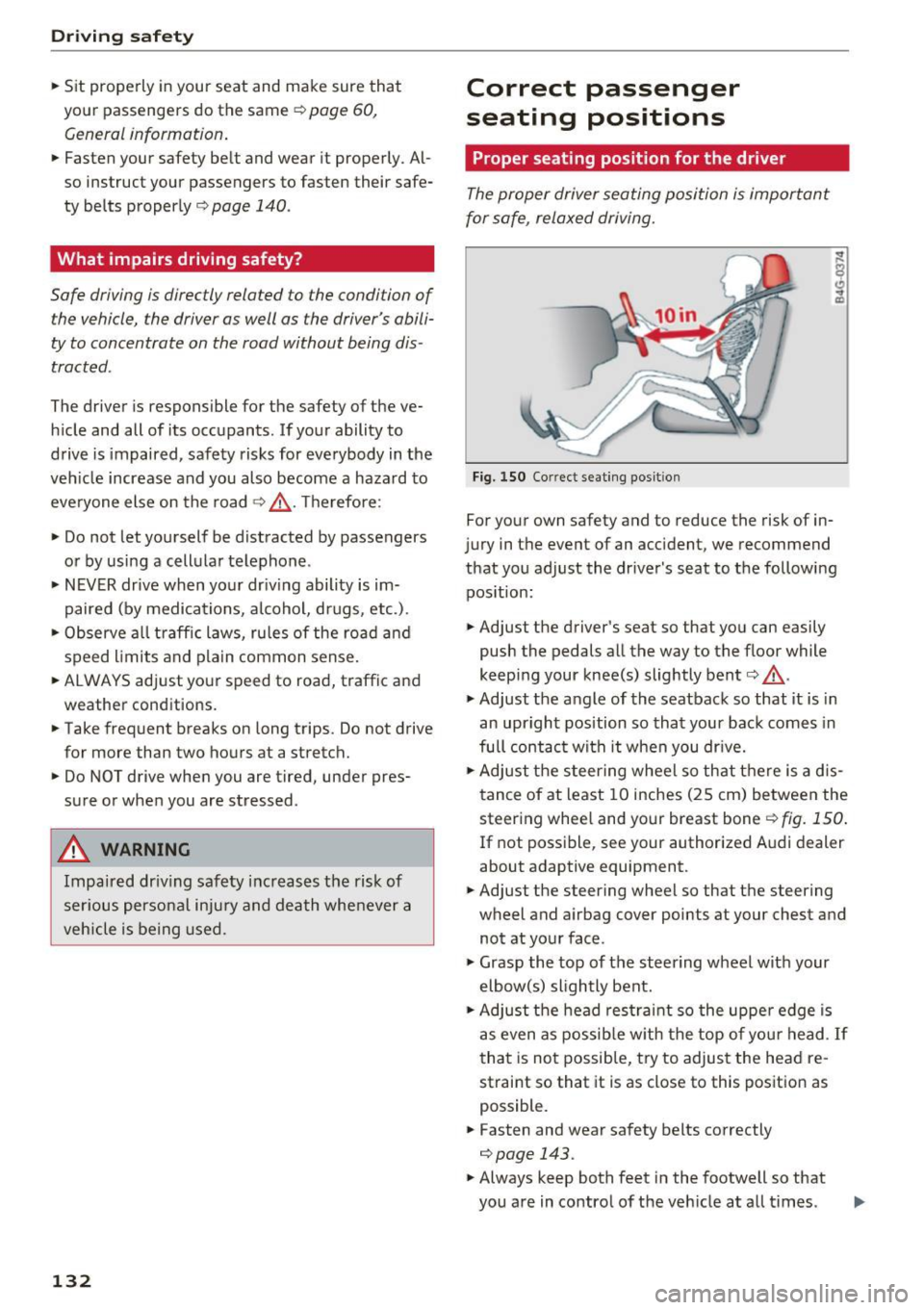
Fig. 150 Correct seating posit ion
For your own safety and to reduce the risk of in
jury in the event of an accident, we recommend
that you adjust the driver's seat to the following position:
• Adjust the driver's seat so that you can easily
push the pedals all the way to the floor while
keeping your knee(s) slightly bent
c:> .&_ .
• Adjust the angle of the seatback so that it is in
an upright position so that your back comes in
full contact with it when you drive.
• Adjust the steering wheel so that there is a d is
tance of at least 10 inches (25 cm) between the
steering wheel and your breast boner::!)
fig. 150.
If not possible, see your authorized Audi dealer
about adaptive equipment.
• Adjust the steering wheel so that the steering
wheel and airbag cover points at your chest and
not at your face.
• Grasp the top of the steering wheel with your
elbow(s) slightly bent.
• Adjust the head restraint so the upper edge is
as even as possible with the top of your head .
If
that is not possible, try to adjust the head re
straint so that it is as close to this position as
possible.
• Fasten and wear safety belts correctly
c:> page 143.
• Always keep both feet in the footwell so that
you are in control of the veh icle at all times .
Page 139 of 296
CD
CD
.... N ,-... N .... 0 0 C<'. 00
-Always put objects, for example, luggage or
other heavy items in the luggage compart
ment.
- Always secure objects in the luggage com
partment using the tie-down eyelets and
suitable straps.
A WARNING
Heavy loads will influence the way your vehi
cle handles . To help reduce the risk of a loss
of control leading to serious personal injury:
- Always keep in mind when transporting
heavy objects, that a change in the center of
gravity can also cause changes in vehicle
hand ling:
- Always distribute the load as evenly as
possible.
- Place heavy objects as far forward in the
luggage compartment as possible.
- Never exceed the Gross Axle Weight Rating
or the Gross Vehicle Weight Rating specified
on the safety compliance sticker on the left
door jamb. Exceeding permissible weight
standards can cause the vehicle to slide and
handle differently .
- Please observe information on safe driving
<=>page 131.
A WARNING
To help prevent poisonous exhaust gas from
being drawn into the vehicle, always keep the
rear lid closed while driving .
- Never transport objects larger than those
fitting completely into the luggage area be
cause the rear lid cannot be fully closed .
- If you absolutely must drive with the rear lid
open, observe the following notes to reduce
the risk of poisoning:
- Close all windows,
- Close the Pano ramic sliding sunroof*,
- Open all air outlets in the instrument pan-
el,
- Switch off the air recirculation,
- Set the fresh air fan to the highest speed .
Driving safety
A WARNING
-
Always make sure that the doors, all win
dows, the Panoramic sliding sunroof* and the
rear lid are securely closed and locked to re
duce the risk of injury when the vehicle is not
being used .
-After closing the rear lid, always make sure
that it is properly closed and locked.
- Never leave your vehicle unattended espe
cially with the rear lid left open. A child
could crawl into the vehicle through the lug
gage compartment and close the rear lid be
coming trapped and unable to get out. Be
ing trapped in a vehicle can lead to serious
personal injury.
- Never let children play in or around the vehi
cle.
- Never let passengers ride in the luggage
compartment. Vehicle occupants must al
ways be properly restrained in one of the ve
hicle's seating positions.
(D Tips
-Air circulation helps to reduce w indow fog
ging . Stale air escapes to the outside
through vents in the trim panel. Be sure to
keep these slots free and open.
- The tire pressure must correspond to the
load. The tire pressure is shown on the tire
pressure label. The tire pressure label is lo
cated on the driver's side B-pillar . The tire
pressure label lists the recommended cold
tire inflation pressures for the vehicle at its
maximum capac ity weight and the tires that
were on your vehicle at the time it was man
ufactured. For recommended t ire pressures
for normal load conditions, please see chap
ter
r=> page 241.
Tie-downs
The luggage compartment is equipped with four
tie-downs to secure luggage and other items.
Use the tie-downs to secure your cargo properly
Q page 136, Loading the luggage compartment . ..,_
137