child lock AUDI Q5 2017 Owners Manual
[x] Cancel search | Manufacturer: AUDI, Model Year: 2017, Model line: Q5, Model: AUDI Q5 2017Pages: 296, PDF Size: 74.43 MB
Page 4 of 296
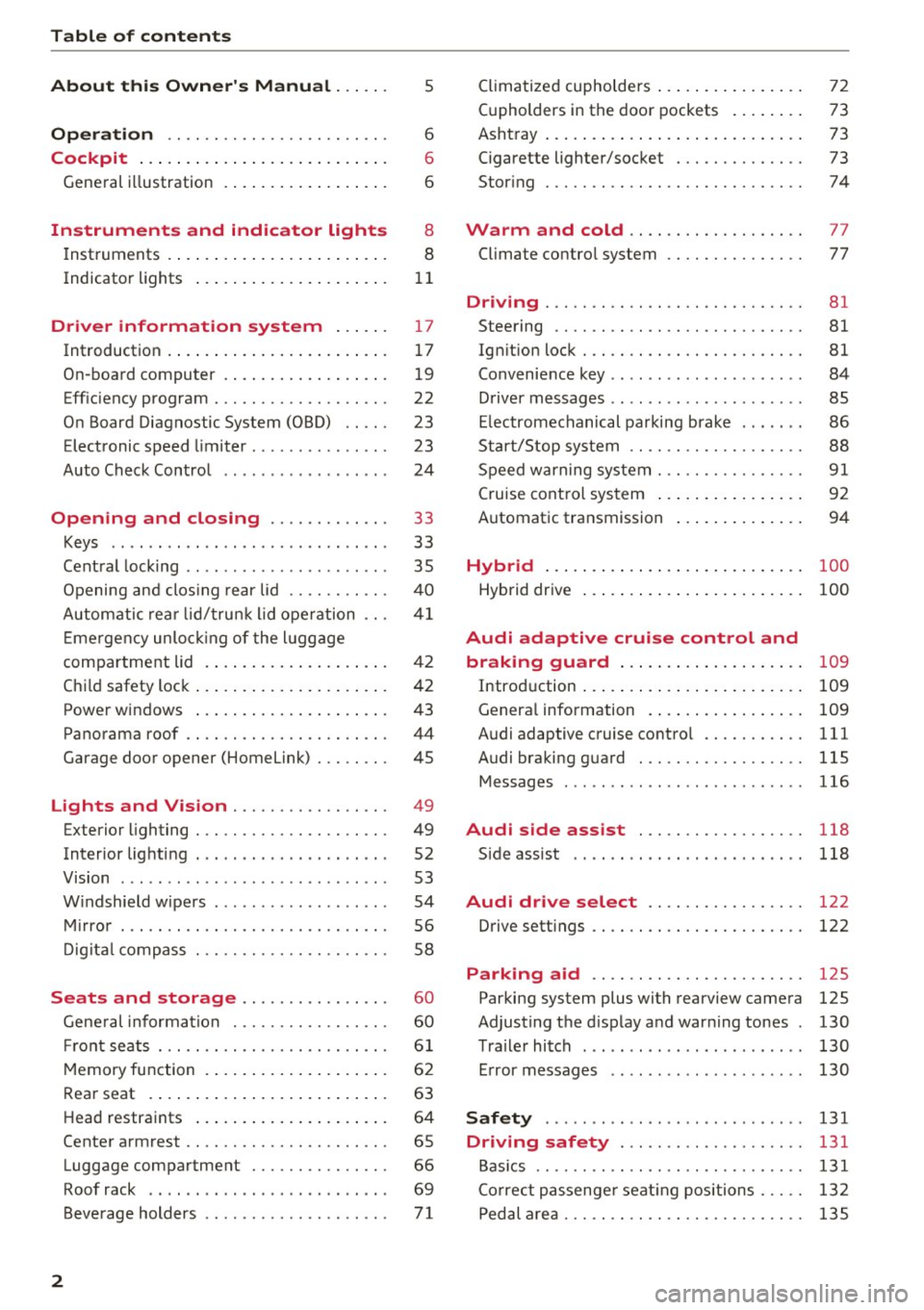
Table of contents
About this Owner's Manual. . . . . .
5
Operation . . . . . . . . . . . . . . . . . . . . . . . . 6
Cockpit . . . . . . . . . . . . . . . . . . . . . . . . . . . 6
General illustration . . . . . . . . . . . . . . . . . . 6
Instruments and indicator lights 8
Instruments . . . . . . . . . . . . . . . . . . . . . . . . 8
Indicator lights . . . . . . . . . . . . . . . . . . . . .
11
Driver information system . . . . . . 17
Introduction . . . . . . . . . . . . . . . . . . . . . . . . 17
On-board computer . . . . . . . . . . . . . . . . . . 19
Efficiency program . . . . . . . . . . . . . . . . . . . 22
On Board Diagnostic System (OBD) . . . . .
23
Electronic speed limiter. . . . . . . . . . . . . . . 23
Auto Check Control . . . . . . . . . . . . . . . . . . 24
Opening and closing . . . . . . . . . . . . . 33
Keys . . . . . . . . . . . . . . . . . . . . . . . . . . . . . .
33
Central locking . . . . . . . . . . . . . . . . . . . . . . 35
Opening and closing rear lid . . . . . . . . . . . 40
Automatic rear lid/trunk lid operation
41
Emergency unlocking of the lu ggage
compartment lid . . . . . . . . . . . . . . . . . . . . 42
Child safety lock . . . . . . . . . . . . . . . . . . . . . 42
Power windows . . . . . . . . . . . . . . . . . . . . . 43
Panorama roof . . . . . . . . . . . . . . . . . . . . . . 44
Garage door opener (Home link) . . . . . . . . 45
Lights and Vision . . . . . . . . . . . . . . . . . 49
Exterior lighting . . . . . . . . . . . . . . . . . . . . . 49
Interior lighti ng . . . . . . . . . . . . . . . . . . . . .
52
V1s1on . . . . . . . . . . . . . . . . . . . . . . . . . . . . . 53
Windshield wipers . . . . . . . . . . . . . . . . . . . 54
Mirror . . . . . . . . . . . . . . . . . . . . . . . . . . . . . 56
Digital compass . . . . . . . . . . . . . . . . . . . . .
58
Seats and storage ...... ... .. .. .. .
General informa tion .......... .... .. .
Fr ont seats . .. .... ........... .. .. .. .
Memory function ... ................ .
60
60
61
62
Rear seat . . . . . . . . . . . . . . . . . . . . . . . . . . 63
Head restraints . . . . . . . . . . . . . . . . . . . . . 64
Center armrest . . . . . . . . . . . . . . . . . . . . . . 65
Luggage compartment . . . . . . . . . . . . . . . 66
Roof rack . . . . . . . . . . . . . . . . . . . . . . . . . . 69
Beverage holders . . . . . . . . . . . . . . . . . . . .
71
2
Climatized cupholders . . . . . . . . . . . . . . . . 72
(upholders in the door pockets . . . . . . . . 73
Ashtray . . . . . . . . . . . . . . . . . . . . . . . . . . . . 73
Cigarette lighter/socket . . . . . . . . . . . . . . 73
Storing . . . . . . . . . . . . . . . . . . . . . . . . . . . . 74
Warm and cold . . . . . . . . . . . . . . . . . . . 77
Climate control system . . . . . . . . . . . . . . . 77
Dr1v1ng ..... .. .. .. .. ............... 81
Steering . . . . . . . . . . . . . . . . . . . . . . . . . . . 81
Ign ition lock . . . . . . . . . . . . . . . . . . . . . . . . 81
Convenience key . . . . . . . . . . . . . . . . . . . . . 84
Driver messages . . . . . . . . . . . . . . . . . . . . .
85
Electromechanical parking brake . . . . . . . 86
Start/Stop system . . . . . . . . . . . . . . . . . . . 88
Speed warning system . . . . . . . . . . . . . . . .
91
Cruise control system . . . . . . . . . . . . . . . . 92
Automatic transmission 94
Hybrid
............................ 100
Hybrid drive . . . . . . . . . . . . . . . . . . . . . . . . 100
Audi adaptive cruise control and
braking guard . . . . . . . . . . . . . . . . . . . .
109
Introduction . . . . . . . . . . . . . . . . . . . . . . . . 109
Genera l information . . . . . . . . . . . . . . . . . 109
Audi adaptive cruise control . . . . . . . . . . . 111
Audi braking guard . . . . . . . . . . . . . . . . . . 115
Messages . . . . . . . . . . . . . . . . . . . . . . . . . . 116
Audi side assist . . . . . . . . . . . . . . . . . . 118
S ide assist . . . . . . . . . . . . . . . . . . . . . . . . . 118
Audi drive select . . . . . . . . . . . . . . . . . 122
Drive settings . . . . . . . . . . . . . . . . . . . . . . . 122
Parking aid . . . . . . . . . . . . . . . . . . . . . . . 125
Parking system plus with rearview camera
Adjusting the display and warning tones
Trailer hitch ...... ... .............. .
Error messages 125
130
130
130
Safety . . . . . . . . . . . . . . . . . . . . . . . . . . . . 131
Driving safety . . . . . . . . . . . . . . . . . . . . 131
Basics . . . . . . . . . . . . . . . . . . . . . . . . . . . . . 131
Correct passenger seating positions . . . . . 132
Pedal area . . . . . . . . . . . . . . . . . . . . . . . . . . 135
Page 35 of 296
Opening and closing Keys
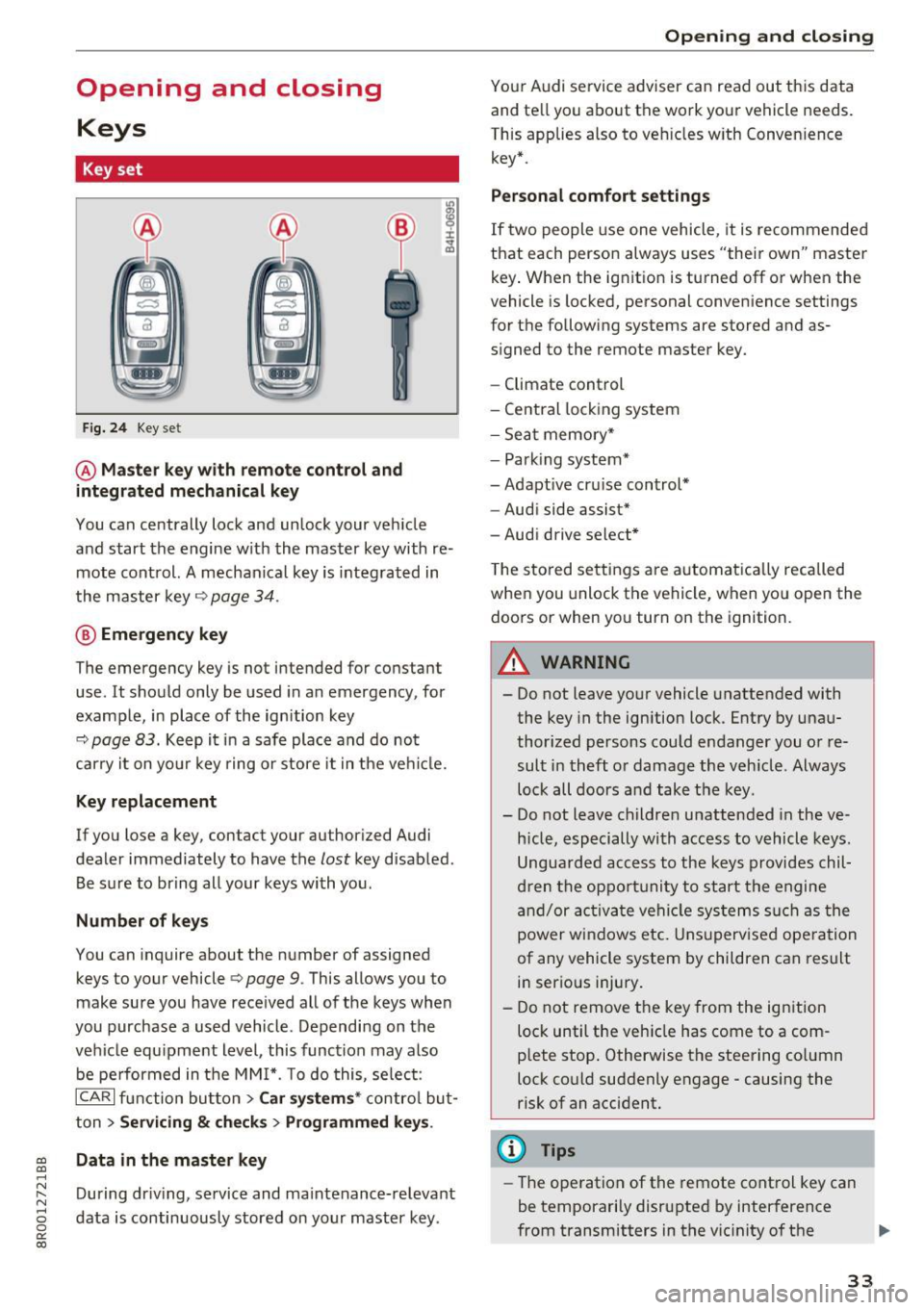
Key set
Fig. 24 Key set
@ Master key with remote control and
integrated mechanical key
You can centrally lock and unlock your vehicle
and start the engine with the master key with re mote control. A mechanical key is integrated in
the master key
q page 34.
@ Emergency key
The emergency key is not intended for constant
use . It should only be used in an emergency , for
example, in place of the ignition key
9 page 83. Keep it in a safe place and do not
carry it on your key ring or store it in the vehicle.
Key replacement
If you lose a key, con tac t your au thori zed Audi
dealer immediately to have the
lost key disabled .
Be sure to bring all your keys with you.
Number of keys
You can inquire about the number of assigned
keys to your vehicle
Q page 9. This allows you to
make sure you have received all of the keys when
you purchase a used vehicle. Depending on the
vehicle equipment level, this function may also
be performed in the MMI*. To do this, select:
ICARI function button> Car systems* control but
ton >
Servicing & checks > Programmed keys .
~ Data in the master key
.....
~ During driving, service and maintenance-relevant
8 data is continuously stored on your master key . 0
0:
co
Opening and closing
Your Audi service adviser can read out this data
and tell you about the work your veh icle needs.
This applies also to vehicles with Convenience key* .
Personal comfort settings
If two people use one vehicle, it is recommended
that each person always uses "their own" master key. When the ignition is turned off or when the
vehicle is locked, personal convenience settings
for the following systems are stored and as
signed to the remote master key.
- Climate control
- Central locking system
- Seat memory*
- Parking system*
- Adaptive cruise control*
- Audi side assist*
- Audi drive select*
The stored settings are automatically recalled
when you unlock the vehicle, when you open the
doors or when you turn on the ignition.
A WARNING
-.
- Do not leave your vehicle unattended with
the key in the ignition lock . Entry by unau
thorized persons could endanger you or re
sult in theft or damage the vehicle . Always
lock all doors and take the key .
- Do not leave children unattended in the ve
hicle, especially with access to vehicle keys.
Unguarded access to the keys provides chil
dren the opportunity to start the engine
and/or activate vehicle systems such as the
power windows etc. Unsupervised operation
of any vehicle system by children can result
in serious injury.
- Do not remove the key from the ignition
lock until the vehicle has come to a com
plete stop. Otherwise the steering column
lock could suddenly engage -causing the
risk of an accident.
¢j) Tips
-The operation of the remote control key can
be temporarily disrupted by interference
from transmitters in the vicinity of the .,.
33
Page 38 of 296
Opening and closin g
Tu rn sign als
When you unlock the vehicle , the turn signa ls
flash twice. When you lock the vehicle, the turn
signals flash once. If they do not flash, one of the
doors, the rear lid or the hood is not locked .
Unintentionally locking your self out
In the following cases there safegua rds to pre
vent you lock ing your remote master key in the
vehicle:
- T he vehicle does not lock with the power lock
ing switch
r:!> page 39 if a doo r is open.
- On vehicles with Convenience key*, if the most
recently used master key is in the luggage com
partment, the rear l id is automa tically unlocked
again after it is closed.
Do not lock yo ur vehicle with the
re mot e ma st e r
ke y or Convenien ce key*
unti l all doors and the
rear lid are closed. In th is way you avoid locking
yourse lf out accidenta lly.
A WARNING
- When you leave the vehicle, always remove
the ignition key and take it with you . This
will prevent passengers (children, for exam ple) from accidentally being locked in the
vehicle should they acc identally press the
power locking switch in the front doors .
- Do not leave children inside the vehicle un
superv ised . In an emergency it would be im
poss ible to open the doors from the outs ide
without the key .
@ Tips
-In the event of a crash with airbag deploy
ment all locked doors will be automat ically
unlocked to give access to the veh icle occu
pants from the outside .
- If the power lock ing system should mal
funct ion, you can lock the driver's door us
i ng the mechanical key
r:::.>page 39.
-If the power lock ing system should fail, you
can still open the fuel tank flap in an emer
gency
r::!> page 213.
-You are well adv ised not to keep val uables
i nside an unattended vehicle, v is ible or not.
3 6
Even a proper ly locked veh icle cannot pro
vide the security of a safe.
- If the LED in the upper edge of the driver's
door panel comes on for about 30 seconds
after the vehicle is locked, there is a mal
function in the power locking or the anti
theft warning system. Have the malfunction corrected by an authorized Aud i dealership
or qualified repair fac ility .
Setting power locking
The driver can determine the functions for power
locking in the radio or in the MM!*.
.. Select: !CAR ! function button> Centr al lo cking .
Or
.. Select:
I CAR ! function button > Car s yste ms *
control button > Vehicl e sett ing s> (C entral
lo cking )*.
Un locking single door /Unloc k doo rs -
you can
spec ify which doors unlock when you open the ve
hicle .
- Select ing Off /All and pressing the~ button on
the remote control key unlocks the ent ire vehi
cle .
- Select ing
On /Dr iver and pressing the [§] button
on the remo te control key once unlocks only
the driver's door. In veh icles w ith a convenience
key*, only the door whose handle you pull will
unlock. If you press the
l@J button tw ice, the en
tire veh icle will unlock.
If you press the l@J but
ton, the entire ve hicle wi ll always lock .
Trunk lid/tailg ate /L o ck e xter ior trun k handl e -if
you select
O n, the rea r lid handle locks
r:::.> page 40, fig. 34 . In this case, the rear lid can
be opened with the
l = I bu tton on the master key
r:::.> page 3 7, fig. 2 8 o r with the~ button in the
driver's door
r:::.> page 40, fig . 33.
F o ld mirr ors* -if you se lect On , the outside mir
r ors will fold in automatically when you press the
lil button on the remote contro l key r:::.> page 56.
Confirmation ton e/Tone wh en lockin g -if you
select
On , a tone w ill sound when yo u lock the ve
hicle.
Page 41 of 296
a,
a,
..... N r-N ..... 0 0
0:
co
Locking and unloc king the vehicle from
inside
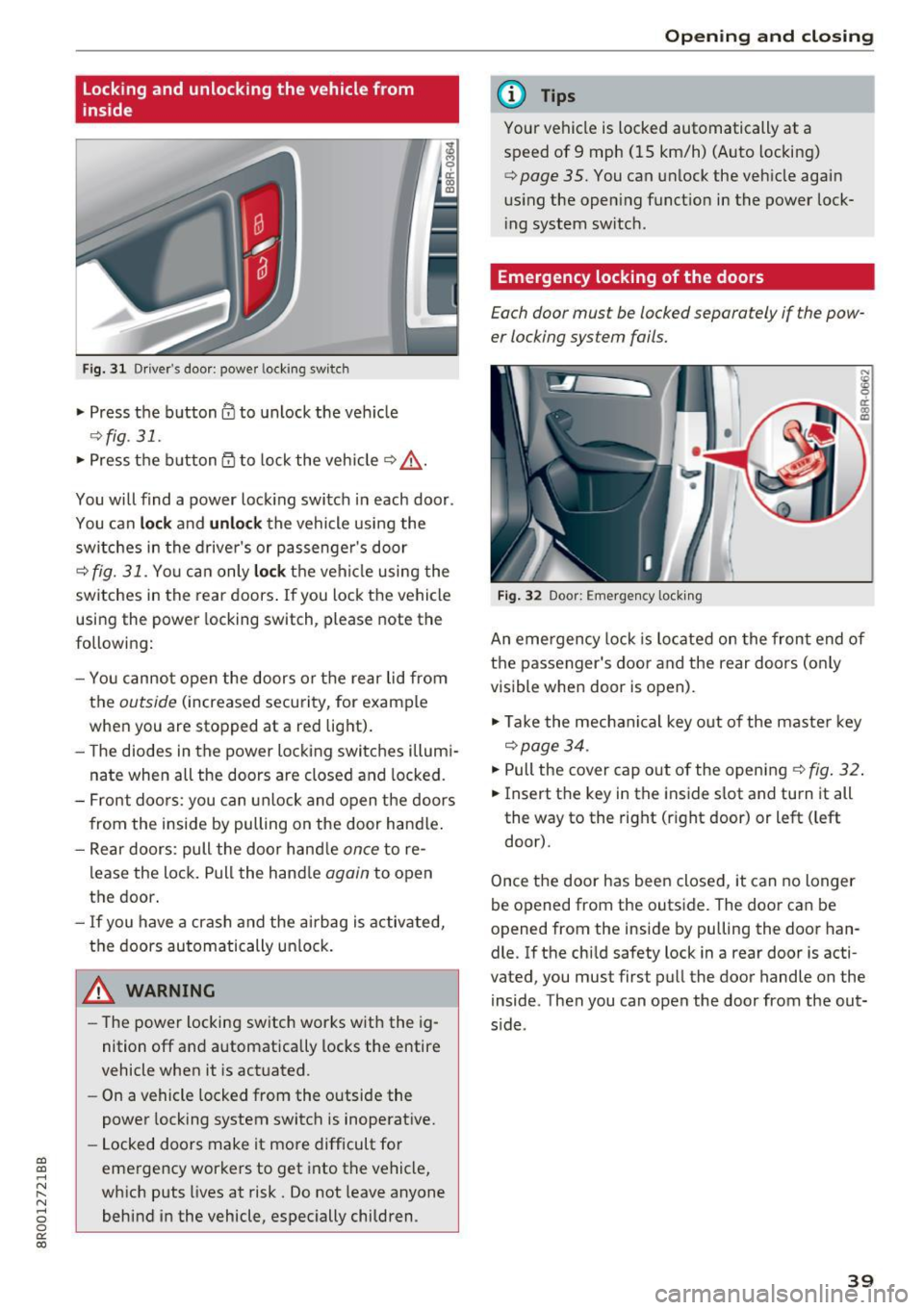
F ig. 3 1 Driver 's doo r: powe r locking sw it c h
.. Press the button@ to unlock the veh icle
9fig . 31 .
.. Press the button 53 to lock the vehicle 9 .&_ .
You will find a power lock ing switch in each door .
You can
lock and unlock the vehicle using the
sw itches in the drive r's or passenge r's door
c=;, fig. 31. Yo u can only lock th e vehicle using the
switches in the rear doors . If you lock the vehicle
using the power locking switch, please note the
following:
- You cannot open the doors or the rear lid from
the
outside (increased security, for example
when you are stopped at a red light).
- The diodes in the power locking switches illum i
nate when all the doors are closed and locked.
- Front doors: you can unlock and open the doors
from the inside by pulling on the door handle .
- Rear doors: pull the doo r hand le
once to re
lease the lock. Pull the hand le
again to open
the door.
- If you have a crash and the airbag is activated,
the doors automatically unlock.
A WARNING
-The power locking switch works with the ig
nition off and automatically locks the entire
vehicle when it is actuated .
- On a vehicle locked from the outside the
power locking system switch is inoperative.
- Locked doors make it more difficult for
emergency workers to get into the vehicle,
which puts Lives at risk. Do not leave anyone
behind in the vehicle, especially children .
Opening and closing
(D Tips
Your vehicle is locked automatically at a
speed of 9 mph (15 km/h) (Auto locking)
¢
page 35. You can unlock the vehicle again
us ing the open ing function in the power lock
i ng system switch .
Emergency locking of the doors
Each door must be locked separately if the pow
er locking sys tem fails.
Fig. 32 Door: E mergency locking
An eme rgency lock is located on the front end of
the passenger's door and the rear doors (o nly
visible when door is open).
"' Take the mechanical key out of the master key
c=;, page 34.
"'P ull the cover cap out of the opening ¢ fig. 32.
.. Insert the key in the inside slot and turn it all
the way to the right (rig ht door) or left ( left
door).
Once the door has been closed, it can no longer
be opened from the outside. The door can be
opened from the inside by pu lling the door han
dle. If the child safety lock in a rear door is acti
vated , you must first pull the door handle on the
inside . Then you can open the door from the out
s ide .
39
Page 42 of 296
Opening and clo sin g
Opening and closing rear
lid
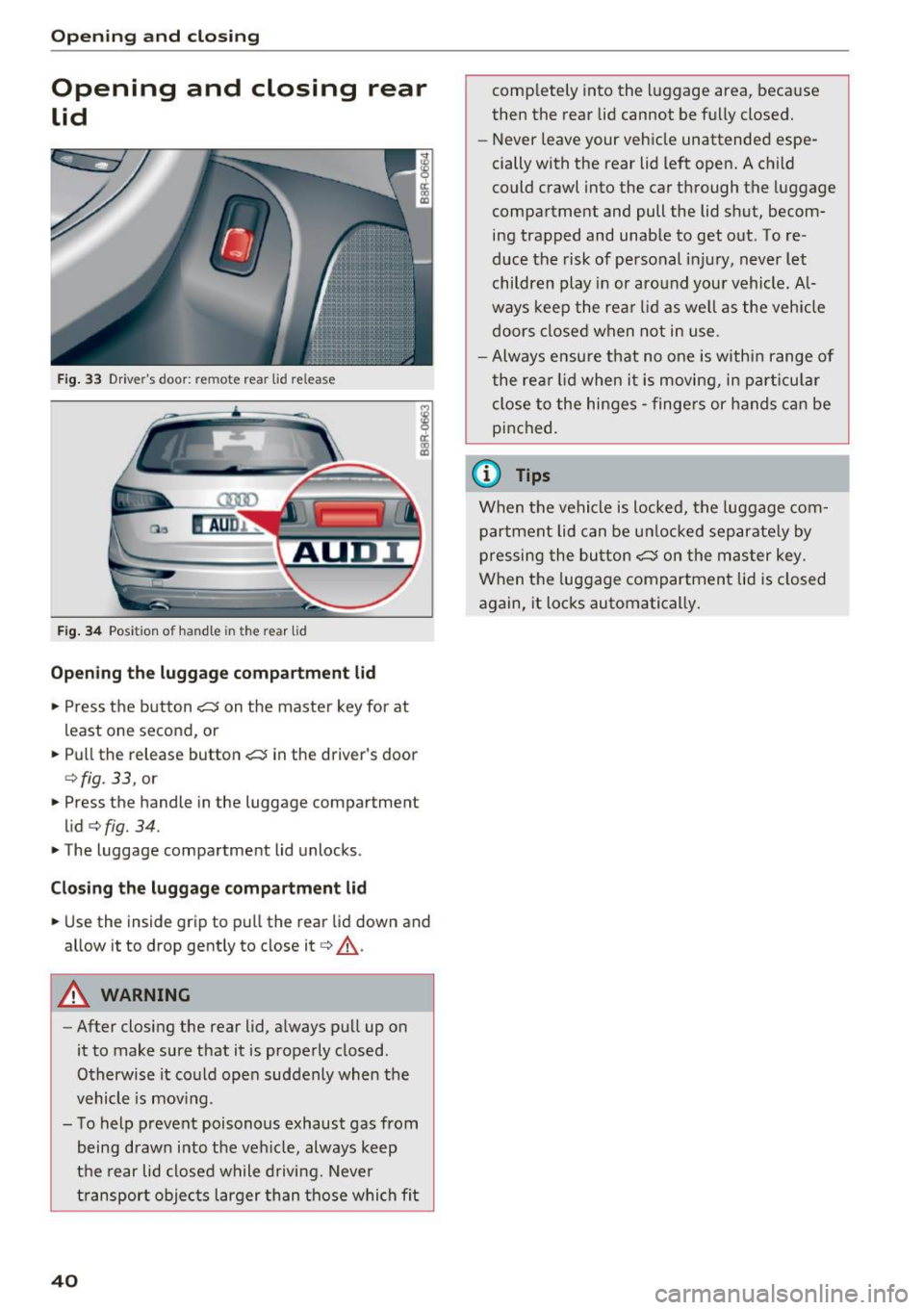
Fig. 33 Drive r's door : rem ote rear lid re lease
F ig . 34 Pos it ion of hand le in the r ear lid
Op en ing th e lug gage compartm ent lid
.. Press the b utton ~ on the master key for at
least one second, or
.. Pull the release button~ in the driver 's door
¢ fig . 33, or
.. Press the handle in the luggage compartment
lid ¢
fig. 34 .
.. The luggage compartment lid unlocks .
Clos ing th e lug gage compartment lid
.. Use the inside grip to pull the rear lid down and
allow it to d rop gently to close it¢ ,&. .
A WARNING
-After closing the rear lid, always pull up on
it to make sure that it is properly closed .
Otherwise it could open suddenly when the
vehicle is mov ing .
- To help prevent poisonous exhaust gas from
being drawn into the veh icle, always keep
the rear lid closed while driving. Never
t ransport objec ts larger than those whi ch fit
40
completely into the luggage area, because
then the rear lid cannot be fully closed.
- Never leave your vehicle unattended espe
cially with the rear lid left open. A child
could crawl into the car through the luggage
compartment and pull the lid shut, becom
ing trapped and unable to get out . To re
duce the risk of personal injury, never let
children play in or around your vehicle. Al
ways keep the rear lid as well as the vehicle
doors closed when not in use .
- Always ensure that no one is within range of
the rea r lid when it is moving, in part icu lar
close to the hinges - finge rs or hands can be
pinched.
(D Tips
When the vehicle is locked, the luggage com
partment lid can be unlocked separate ly by
pressing the button~ on the master key.
When the luggage compartment lid is closed
again, it locks automatically.
Page 44 of 296
Opening and closing
-Always ensure that no one is within range of
the rear lid when it is moving, in particular
close to the hinges and the upper and lower
edges -fingers or hands can be pinched.
- To help prevent poisonous exhaust gas from
being drawn into the vehicle, always keep
the rear lid closed while driving. Never
transport objects larger than those which fit
completely into the luggage area, because
then the rear lid cannot be fully closed.
- Never leave your vehicle unattended espe
cially with the rear lid left open. A child
could crawl into the car through the luggage
compartment and pull the lid shut, becom
ing trapped and unable to get out. To re
duce the risk of personal injury, never let
children play in or around your vehicle. Al
ways keep the rear lid as well as the vehicle doors closed when not in use.
- If there is a luggage rack or bicycle rack
mounted on the rear lid, it may not be able
to open completely or an opened rear lid may close by itself because of the added
weight. So the open rear lid must be sup
ported or the weight must be removed from
the luggage rack first.
(D Tips
-As soon as the electrical connection to the
trailer socket is completed on vehicles with
a factory installed towing hitch, or a trailer
hitch that was installed later according to
factory specifications, the automatic rear lid
funct ion can only be operated via the handle
in the rear lid.
- If the vehicle battery charge drops below a
certain level, you can still open or close the
rear lid manually, however, you will need to
apply more force to close it.
- If the rear lid on a locked vehicle is unlocked
with the middle button
.::::::5 on the remote
key, the rear lid is automatically locked
again immediately after closing. This is indi
cated by the turn signals blinking.
- The following applies to vehicles equipped
with the Convenience key* feature: if the re
mote control key is left in the luggage com
partment, luggage compartment will auto-
42 matically unlock
itself after you lock the ve
hicle. This prevents you from unintentional
ly locking your key in the luggage compart
ment.
Emergency unlocking of
the luggage compartment lid
The luggage comportment lid con be released in
on emergency from the inside.
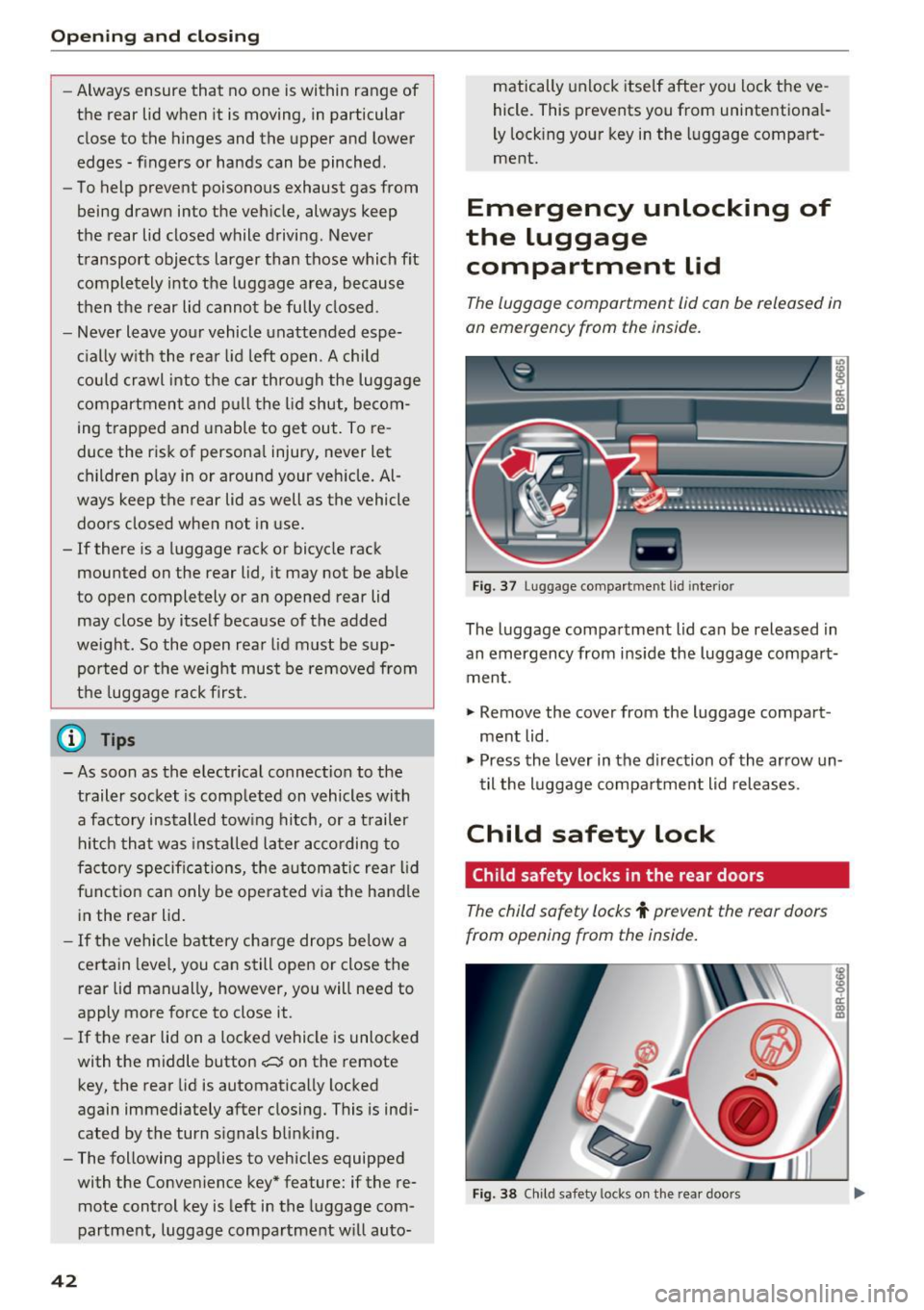
Fig . 37 Lugg age compartment lid interio r
The luggage compartment lid can be released in
an emergency from inside the luggage compart
ment .
"" Remove the cover from the luggage compart
ment lid.
""Press the lever in the direction of the arrow un
til the luggage compartment lid releases.
Child safety lock
Child safety locks in the rear doors
The child safety locks t prevent the rear doors
from opening from the inside.
Fig. 38 Child safety locks on the rear doors
Page 45 of 296
a,
a,
..... N
" ('I ..... 0 0
0:
co
The rear doors are equipped with child safety locks. The lock is only visible wh en the door is
open . T ake the mechanical key out of the master
key
q page 34 .
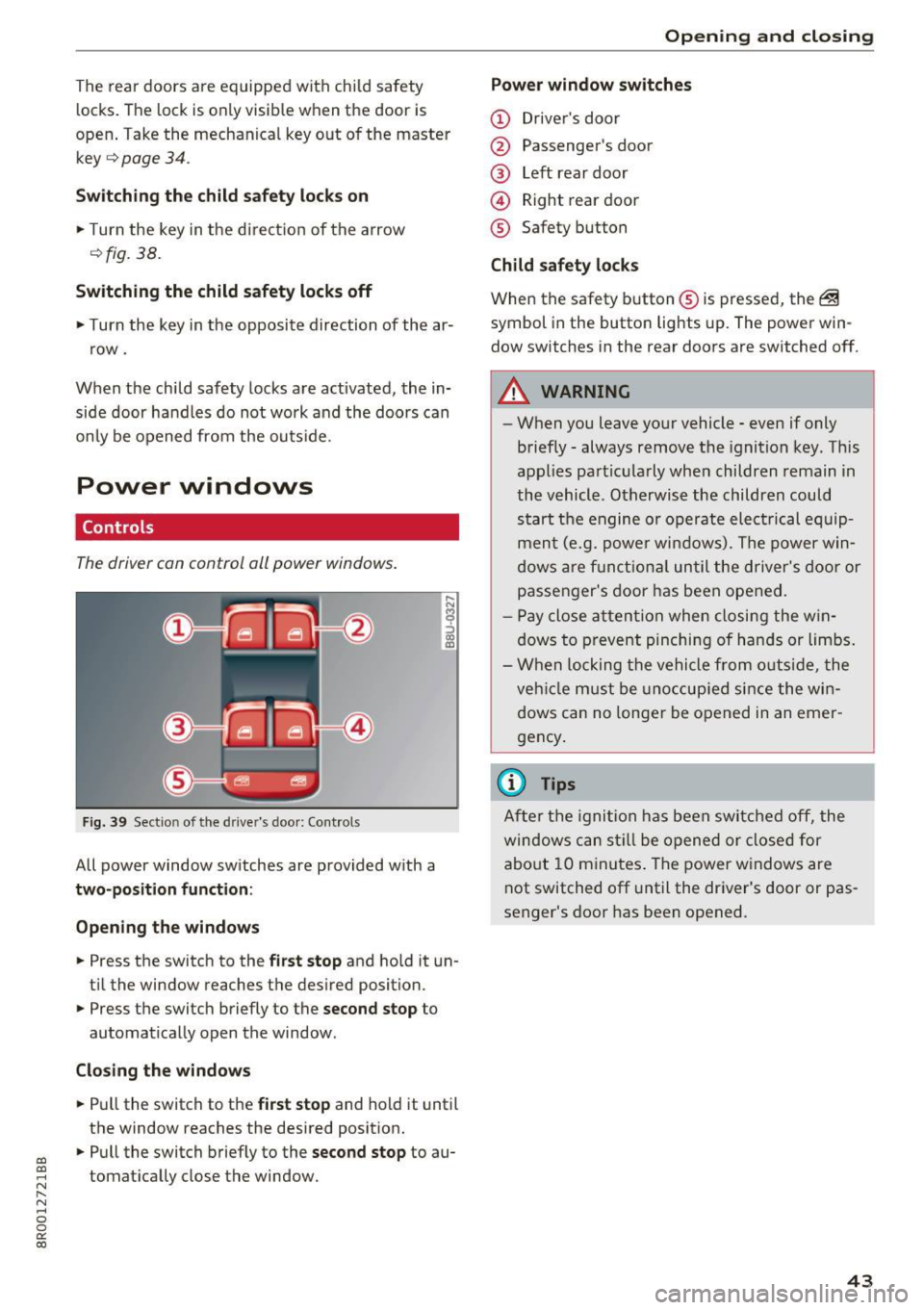
Switching the child safety locks on
• Turn the key in the direction of the arrow
¢fig. 38.
Switching the child safety locks off
• Turn the key in the opposite direction of the ar
row .
When the child safety locks are activated, the in
side door ha ndles do not work and the doors can
only be opened from the outs ide .
Power windows
Controls
The driver can control all power windows.
Fig. 39 Sect io n of the drive r's d oor: Cont ro ls
All power window switches are provided with a
two-position function :
Opening the windows
• Press the switch to the first stop and hold it un
til the window reaches the desired position.
• Press the switch briefly to the
second stop to
automatically open the window .
Closing the windows
• Pull the switch to the first stop and hold it until
the window reaches the desired position.
• Pull the switch briefly to the
second stop to au
tomatically close the window .
Open ing and closing
Power window switches
(D Driver's door
@ Passenger's door
@ Left rear door
@ Right rear door
® Safety button
Child safety locks
When the safety button ® is pressed, the ~
symbol in the button lights up. The power win
dow switches in the rear doors are switched off.
A WARNING
-~·
- When you leave your vehicle -even if only
briefly -always remove the ignition key. This
appl ies particularly when children remain in
the vehicle . Otherwise the children could
start the engine or operate elect rical equip
ment (e.g. power windows). The power win
dows are functional until the driver's door or
passenger's door has been opened.
- Pay close attention when closing the win
dows to prevent pinching of hands or limbs .
- When locking the vehicle from outside, the
veh icle must be unoccup ied since the win
dows can no longer be opened in an emer
gency .
(0 Tips
After the ignition has been switched off, the
windows can st ill be opened or closed for
about 10 minutes . The power windows are
not switched off until the dr iver's door or pas
senger's door has been opened.
43
Page 70 of 296
Seats and storage
the luggage compartment to help prevent
items from flying forward into the passen
ger compartment.
- Never attach a child safety seat tether strap
to a tie-down.
Luggage compartment cover
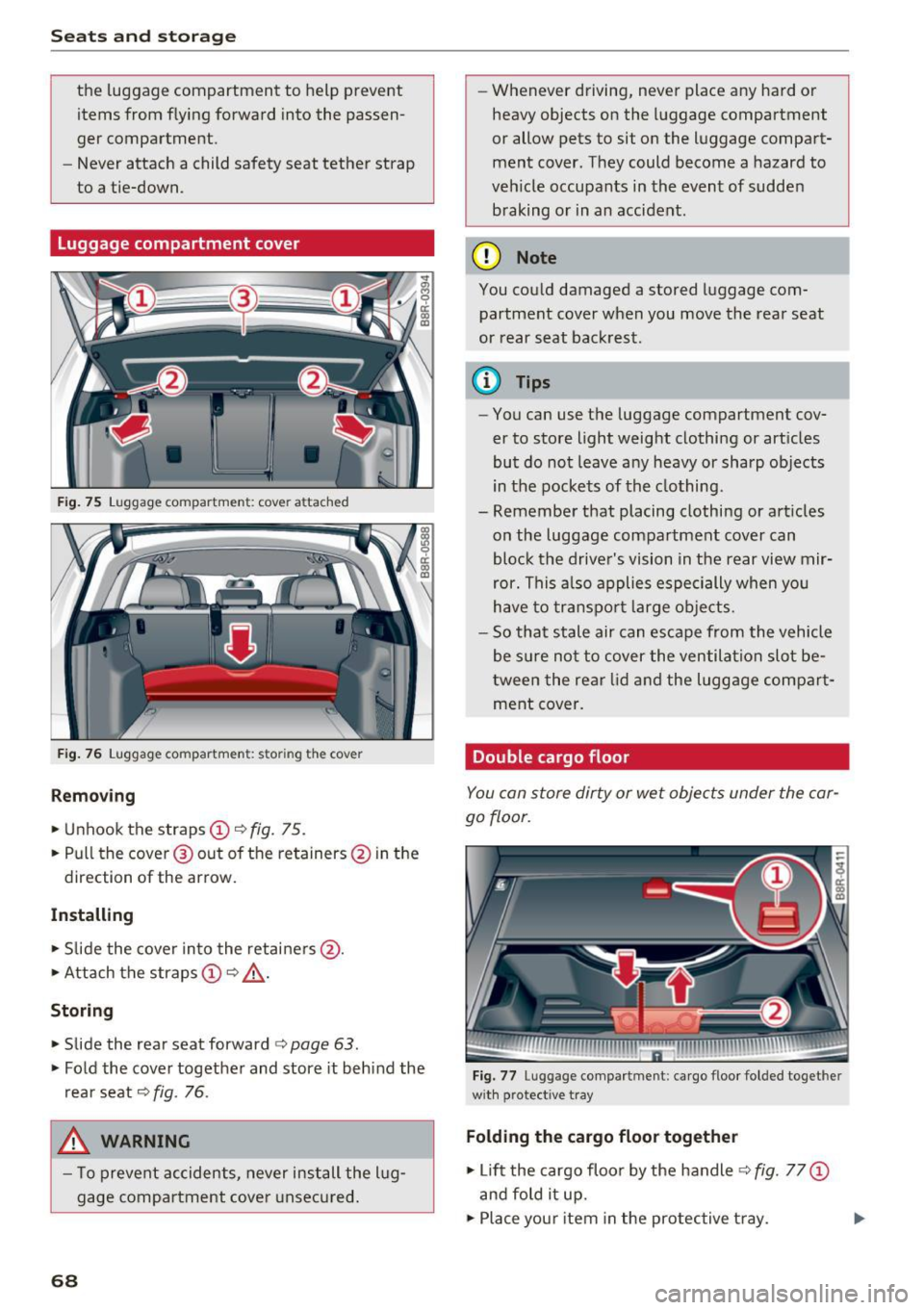
Fig. 75 Luggage compartment: cover attached
Fig. 76 Luggage compartment: storing the cover
Removing
• Unhook the straps@ c::> fig. 75.
• Pull the cover @out of the retainers @ in the
direction of the arrow.
Installing
• Slide the cover into the retainers @.
• Attach the straps
(D c::> & .
Storing
• Slide the rear seat forward <=> page 63.
• Fold the cover together and store it behind the
rear seat
c::> fig. 76 .
_&. WARNING
-To prevent accidents, never install the lug
gage compartment cover unsecured.
68
-
-Whenever driving, never place any hard or
heavy objects on the luggage compartment
or allow pets to sit on the luggage compart
ment cover. They could become a hazard to
vehicle occupants in the event of sudden braking or in an accident.
(D Note
You could damaged a stored luggage com
partment cover when you move the rear seat
or rear seat backrest.
@ Tips
- You can use the luggage compartment cov
er to store light weight clothing or articles
but do not leave any heavy or sharp objects
in the pockets of the clothing.
- Remember that placing clothing or articles on the luggage compartment cover can
block the driver's vision in the rear view mir
ror. This also applies especially when you
have to transport large objects.
- So that stale air can escape from the vehicle
be sure not to cover the ventilation slot be
tween the rear lid and the luggage compart
ment cover.
Double cargo floor
You can store dirty or wet objects under the car
go floor.
Fig. 77 Luggage compartment: cargo floor folded toget her
wit h protective tray
Folding the cargo floor together
• Lift the cargo floor by the handle c::> fig. 77 (D
and fold it up.
• Place your item in the protective tray.
Page 84 of 296
Driving
"' It is possible that there will be a slight de lay
when starting the engine for diesel vehicles* in
colder temperatures. Therefore, you must hold
the brake pedal down until the eng ine starts.
The ind icator lamp
IJ i llumina tes when the en
gine is preheated .
Switching the ignit ion on /off
If you would like to switch the ign ition on with
out starting the engine, fo llow these steps:
"' Inse rt the key into the igni tion lock .
"' Press the key briefly
without press the brake
pedal.
"' To switch the ignition off, press the key aga in.
Diese l vehicles * are p reheate d while the ignition
is switched on.
W hen start ing the e ngine, major elec trical loads
are swi tched off temporarily.
You can only remove the key with the ignition
sw itched off. To do this, yo u have to press on the
key again.
I f the engine sho uld not start immed iately, the
s tarting p rocess is a utomat ica lly stopped after a
short t ime. Repeat sta rt ing procedu re .
Start-Stop-System*:
Note the information on ¢ page 88, Start/S top
system.
A WARNING
- Never allow t he engine to ru n in confined
spaces - dange r of asphyxiation .
- Never remove the ig nit ion key from the ign i
t ion loc k w hile the veh icle is moving . Other
wise, the steering lock cou ld sudde nly en
g age and you would not be able to stee r the
vehicle.
- Always ta ke the key with you w henever you
leave yo ur vehicle. Othe rw ise, the engi ne
c ould be s tar ted or ele ctrica l e qui pme nt
s u ch as the power windows cou ld be operat
ed. This can lead to se rious i njury.
- Never leave childre n or pe rsons requiring as
sistance unattended i n the vehicle. The
doors can be locked usi ng the remote trans-
82
-
m itter, p reventing peop le from escaping
from the vehicle on their own in the event of
an emergency. Depending on the time of
yea r, people ins ide the veh icle can be ex
posed to very high or very low tempera
t ures .
(D Note
Avoid h igh engine rpm, full throttle and heavy
engine loads unti l the engine has reached op
e rating temperature - otherwise you risk en
gine damage.
@ For the sake of the environment
Do not let the eng ine run wh ile parked to
warm up . Beg in d riving immed iate ly . Th is re
d uces unnecessa ry emissions .
(D Tips
-If the key cannot be removed from the igni
t ion loc k, you have to pull the mechan ical
key out of the master key in o rder to be able
to loc k the vehicle ¢
page 35.
-Some no ise afte r start ing the e ngine is nor
ma l and is no cause fo r co nce rn.
- If you leave the ve hicle w ith the ignition
switched on, the ig nitio n w ill switch off af
ter a ce rtain per io d of t ime. Please note that
ele ct rical eq uipme nt such as e xte rior lights
w ill swit ch off as we ll whe n th at happens .
Page 85 of 296
a,
a,
..... N
" ('I ..... 0 0
0:
co
Starting the vehicle with the emergency
key
You can use the emergency key as an ignition key
in an emergency .
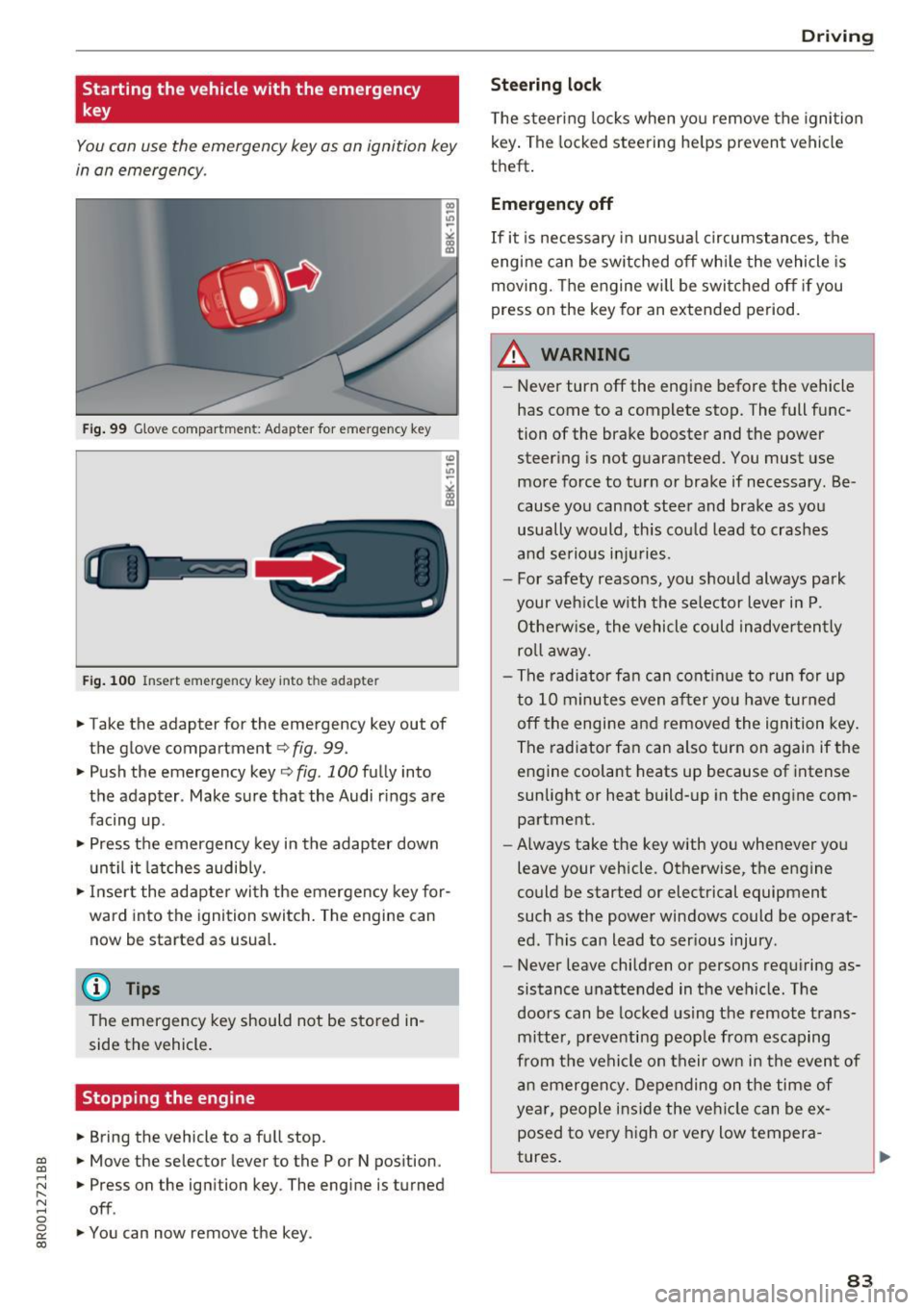
Fig. 99 G lo ve compar tme nt: A dap ter for e mergen cy key
F ig . 1 00 In sert emergen cy key into t he ad ap te r
.. Take the adapter for the emergency key out of
t he glove compartmen t¢
fig. 99.
.. Push the emergency key¢ fig. 100 fully into
the adapter . Make sure that the Audi r ings are
facing up .
.. Press the emergency key in the adapter down
until it latches audib ly.
.. Inse rt the adapter wi th the emergency key for
ward into the ign ition switch. The engine can
now be started as usual.
@ Tips
The emergency key should not be sto red in
side the vehicle.
Stopping the engine
.. Bring the vehicle to a full stop.
.. Move the selector lever to the P or N pos ition .
.. Press on the ignition key . The engine is turned
off.
.. You can now remove the key .
Drivi ng
Ste ering lock
T he s teeri ng locks when yo u remove the ignition
k ey . The locked steering he lps prevent vehicle
theft .
Emergency off
If it is necessary in unusua l circumstances, the
engine can be switched off wh ile the vehicle is
moving. The engine will be swi tched off if you
press on the key for an extended period.
A WARNING ~
- Never turn off the engine before the vehicle
has come to a complete stop. The full func
tion of the brake booster and the power
steer ing is not guaranteed. You must use
more force to turn or brake if necessary . Be
cause yo u cannot steer and brake as you
usually would, this cou ld lead to crashes
and se rio us i njur ies.
- For safety reasons, you should always park
your veh icle w ith the selector lever i n P.
Otherw ise, the vehicle could inadve rten tly
ro ll aw ay.
- The radiator fa n can cont inue to run for up
t o 10 minutes even after you have turned
off the engine and removed the ignition key .
The radiator fan can also turn on again if the engine coolant heats up because of intense
sunlig ht or heat build-up in the eng ine com
partment .
- Always take the key with you whenever you
leave your vehicle . Otherwise, the engine
could be started or electrical equipment
such as the power windows could be operat
ed . T his can lead to ser ious injury .
- Never leave children or persons requiring as
sistance unattended in the vehicle. T he
doors can be locked using the remote t rans
mitter, pr eve nti ng peop le from escaping
from t he vehicle on their own in the even t of
a n emergency. Depe nding on the time of
year, peo ple i nside the ve hicle can be ex
posed to very high o r very low tempera
tures .
83