CD player AUDI Q5 2018 User Guide
[x] Cancel search | Manufacturer: AUDI, Model Year: 2018, Model line: Q5, Model: AUDI Q5 2018Pages: 392, PDF Size: 60.56 MB
Page 244 of 392
Media
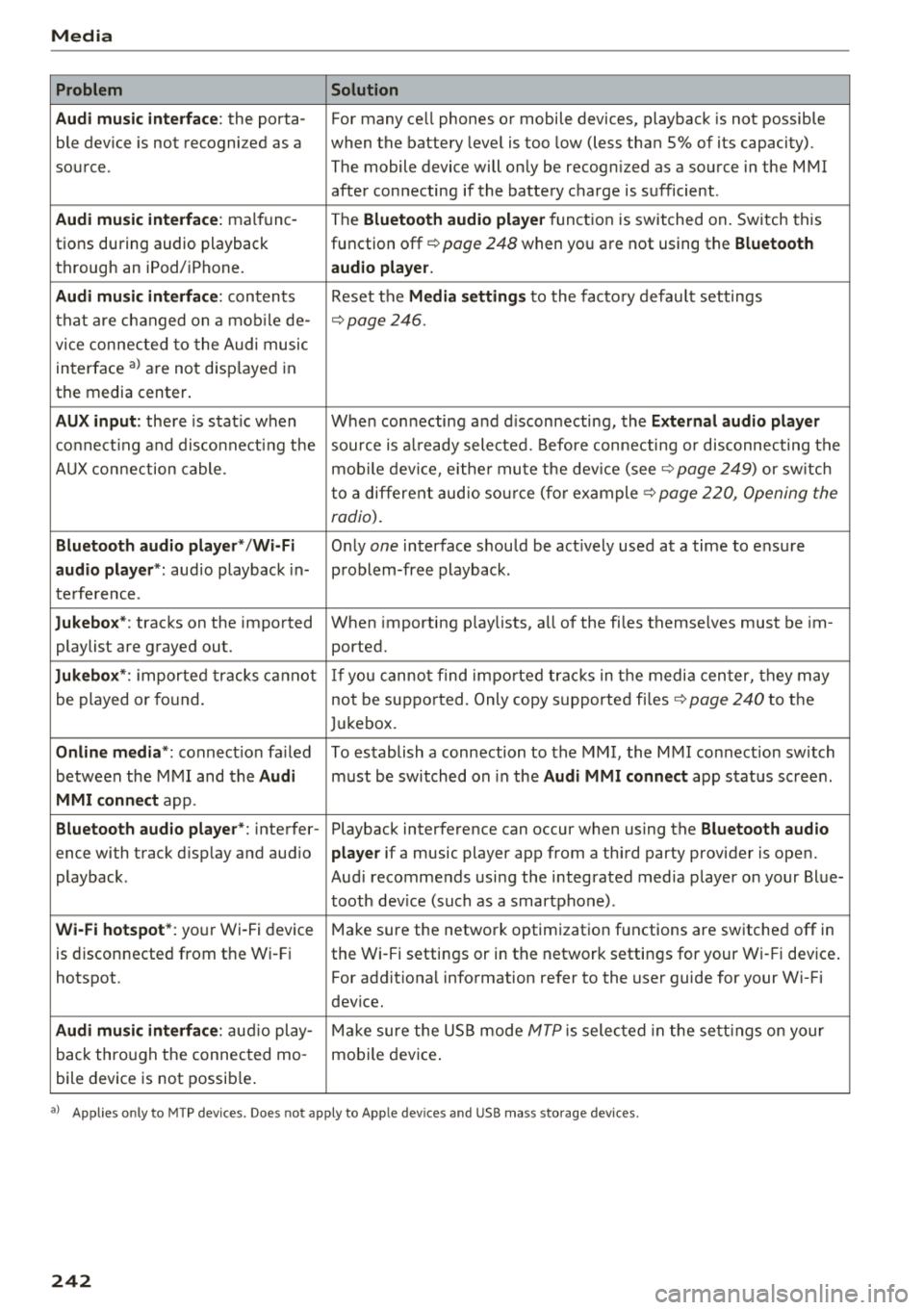
Problem Solution
Audi music interface :
the porta-For many ce ll phones or mobile devices, playback is not possible
ble device is not recogni zed as a when the battery level is too low (less than 5% of its capacity).
source. The mobile device will only be recogn ized as a source in the MMI
after connecting if the battery charge is sufficient .
Audi music interface: malfunc-
The Bluetooth audio player function is switched on. Switch this
tions during audio playback function off¢
page 248 when you are not using the Bluetooth
through an iPod/ iPhone. audio player.
Audi music interface:
contents Reset the Media settings to the factory default settings
that are changed on a mobile de -
¢page 246.
vice connected to the Audi music
interface
a l are not disp layed in
the media center .
AUX input: there is stat ic when When connecting a nd disconnecting, the External audio player
connecting and disconnect ing the source is already selected. Before connecting or disconnecting the
AUX connection cable. mobile device, either mute the device (see ¢
page 249) or sw itch
to a different audio source (for example ¢
page 220, Opening the
radio).
Bluetooth audio player* /Wi-Fi
Only one interface should be act ively used at a time to ensure
audio player*: audio playback in- problem-free playback.
terference.
Jukebox* : tracks on the imported When importing playlists, a ll of the files themselves must be im-
playlist are grayed out. ported.
Jukebox*: imported tracks cannot If you cannot find imported tracks in the media center, they may
be played or found. not be supported. Only copy supported files"*
page 240 to the
Jukebox.
Online media *: connection fa iled To establish a connection to the MMI, the MMI connection switch
between the MMI and the
Audi must be switched on in the Audi MMI connect app status sc ree n.
MMI connect app.
Bluetooth audio player *: interfer- Playback interference can occur when using the Bluetooth audio
ence with track d isp lay and aud io player if a music player app from a third party provider is open.
playback . Audi recommends using the integrated media player on your Blue-
tooth device (such as a smartphone) .
Wi-Fi hotspot*: your Wi-Fi device
Make sure the network optimization functions are switched off in
is disconnected from the Wi -Fi the Wi-Fi settings or in the network settings for your Wi -Fi device .
hotspot . For additional information refer to the user guide for your Wi-Fi
dev ice.
Audi music interface: audio play-Make sure the USB mode MTP is selected in the settings on your
back through the connected mo- mobile device.
bile device is not possible.
al Applie s onl y to MTP dev ice s. Does not apply to App le dev ices and USB mass s torage dev ice s.
242
Page 249 of 392
u co ..... N r--N ..... 0 <( 0 00
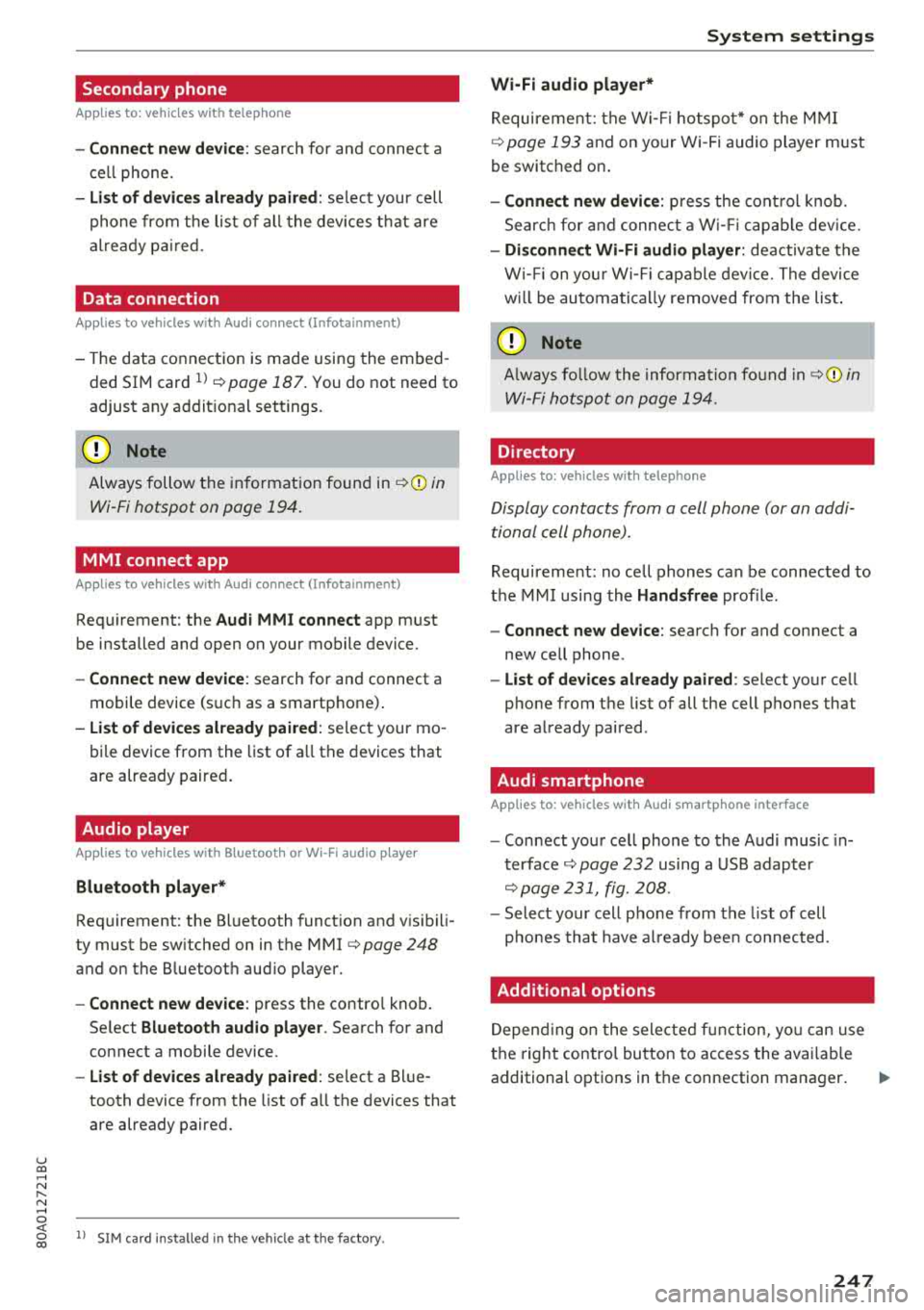
Secondary phone
Applies to: vehicles with telephone
-Connect new device : search for and connec t a
c e ll phone.
- List of devices already paired : selec t your cell
p hone fro m the lis t of all the devices t hat are
al re ad y p aired.
Data connection
Applies to vehicles with Audi connect (Infotainment)
- T he data conne ct ion is made using the em bed
ded SIM car d
ll i=>page 187. You do not need to
adjust a ny a ddit io n al sett ings.
{Ll) Note
Always follow t he inf ormat ion foun d in i=> @ in
Wi-Fi hotspot on page 19 4.
MMI connect app
Applies to vehicles with Audi connect (Infotainment)
Requirement: the Audi MMI connect app m ust
be installed and open on your mobile device.
- Connect new device : search for and connect a
mobile device (s uch as a smartp hone) .
-List of devices already paired : selec t your mo
bile device from the list of a ll the devices that
are already paire d.
Audio player
Applies to vehicles with Bluetooth or Wi-Fi audio player
Bluetooth player*
Requirement: the Bluetooth funct ion and v is ibili
ty must be sw itched on in the MMI
i=> page 248
and on the B luetoot h aud io player.
- Connect new device : press the control knob.
Se lect
Bluetooth audio player . Search fo r and
connect a mobile device .
-List of devices already paired : select a Bl ue
tooth device from the list of a ll the devices that
are already paire d.
ll SIM card inst alle d in t he v eh icle at the fa ctory.
System settings
Wi-Fi audio player*
R eq uiremen t: th e W i-Fi h otspo t* on the M MI
i=> page 193 an d on yo ur Wi -Fi audio playe r must
be switched o n.
-Connect new device: press the co ntrol knob.
Se arch for and conne ct a W i-Fi ca pabl e dev ice.
- Disconnect Wi-Fi audio player: de activate t he
W i-Fi on you r W i-Fi capa ble dev ice. The devi ce
w ill be au tom atic a lly removed from the lis t.
@ Note
Alway s follo w the inf ormat ion foun d in i=> @ in
W i-F i h ots pot on p age 194.
Directory
Applies to: vehicles with telephone
Display contacts from a cell phone (or an addi
tiona l cell phone).
Requirement: no ce ll phones can be connec ted to
the MMI using the
Handsfree pro file.
- Connect new device: search for and connect a
new ce ll phone .
-List of devices already paired : select yo ur cell
phone from t he list of all the cell phones that
are a lready paired .
Audi smartphone
Applies to: vehicles with Audi smartphone interface
-Connect yo ur cell phone to the A udi music in
t erface
i=> page 232 using a USB adap ter
i=> page 231, fig. 2 08 .
- Sel ect your cell p ho ne from t he list of cell
p ho nes th at h ave already bee n con nec ted.
Additional options
D epen ding on the sele cted fun ct ion, yo u ca n use
t h e righ t contro l bu tton to access the ava ila bl e
additional options in t he connection mana ger .
.,.
247
Page 250 of 392
System settings
Delete Bluetooth device*
The se lecte d cell p ho ne/mo bile dev ice is dis con
nected from t he M MI and is removed from the
list of all devices that are alrea dy paire d.
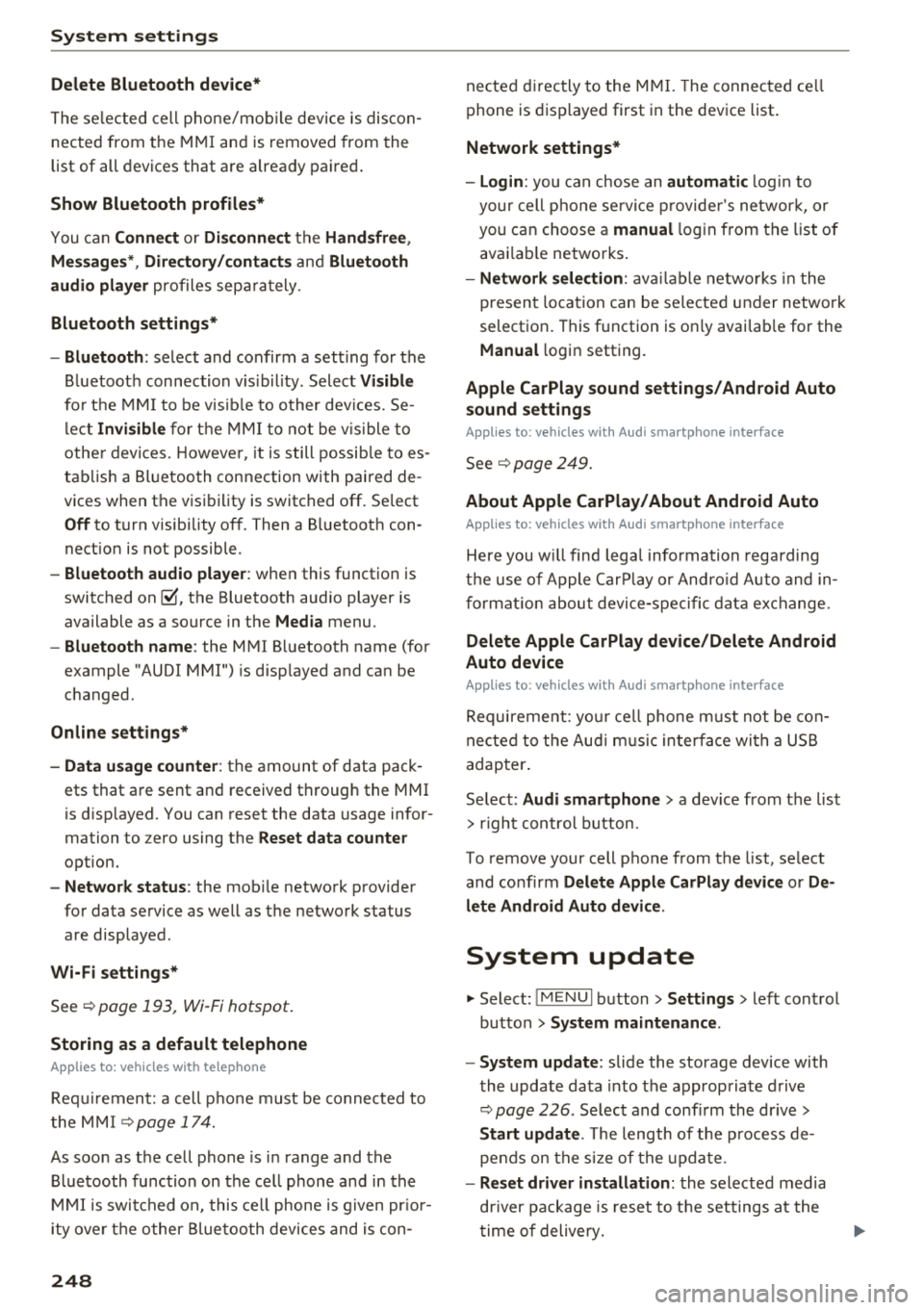
Show Bluetooth profiles*
You can Connect or Disconnect the Handsfree ,
Me ssages *, Dire ctory /contacts
an d Bluetooth
audio player
pro files sep arately.
Bluetooth settings*
- Bluetooth :
select and confirm a set ting for the
B luetoot h connec tion v is ibility . Select
Visible
fo r th e MM I to be vis ib le to o ther dev ices. Se
l ec t
Invisible fo r th e M MI to not be v is ible t o
othe r devi ce s. H oweve r, it is still possib le to es
tab lish a Bl uetoo th con nection with pai red de
vices when the v is ibi lity is switched off. Se lect
Off to t urn visibi lity off . Then a B luetooth con
nect ion is not possible .
-Bluetooth audio player : when this function is
switc hed
on ~' the Bluetooth audio player is
available as a so urce in t he
Media menu .
-Bluetooth name : the MMI B luetooth name (for
example "AUDI MMI") is d isp layed and ca n be
c h anged.
Online settings*
- Data usage counter :
the amount of data pack
ets that a re sent a nd received throug h the MMI
is d isp layed. You can reset the data usage infor
mation to zero using the
Reset data counter
option.
- Network status : the mobile netwo rk p rovider
fo r data se rvice as well as the netwo rk status
are disp layed .
Wi-Fi settings*
See ¢ page 193, Wi -Fi hotspot.
Storing as a default telephone
Applies to: vehicles with telephone
Requir emen t: a cell phone must be connected to
t he MM I
¢page 17 4.
As soon as t he cell phone is i n range and the
B lue tooth func tion on the ce ll phone and in the
MM I is swi tched o n, this ce ll phone is g iven pr io r
ity ove r th e ot her Blue tooth devices and is c on-
248
necte d dir ectly to the M MI. The connec ted ce ll
p hone is d is pl ayed first in t he dev ice li st .
Network settings*
- Login :
you can chose an automatic log in to
your cell p ho ne servi ce pro vider 's ne twor k, or
you can ch oose a
manual log in from t he list of
avai la bl e netwo rks .
-Network selection : availabl e netwo rks in t he
presen t loca tion can be sele cte d unde r network
select io n. This f unction is on ly avai la bl e for the
Manual log in setting.
Apple CarPlay sound settings/ Android Auto
sound settings
Applies to: vehicles with Audi smartphone interface
See q page 249.
About Apple CarPlay/ About Android Auto
Applies to: vehicles with Audi smartphone interface
Here you w ill find l ega l informa tion regarding
t h e use o f A pple Car Play o r And ro id Aut o and in
fo rmat ion a bout device -s p eci fic d ata exch ange.
Delete Apple CarPlay device/Delete Android
Auto device
Applies to: vehicles with Audi smartphone interface
Require ment: yo ur cell phone must not be con
n ect ed to the Au di music interf ace wi th a USB
adap ter.
Se lec t:
Audi smartphone > a dev ice from t he lis t
> r igh t con trol b utto n.
To remove your cell p ho ne from the list, se lect
and co nfirm
Delete Apple CarPlay device or De
lete Android Auto device .
System update
"'Select : !ME NUI bu tton> Settings > left control
bu tton >
System maintenance.
- System update :
slide the storage device with
t he update da ta into the a pprop ria te drive
¢ page 2 26 . Se lec t and conf irm the dr ive>
Start update . The length of the p rocess de
pe nds on the s ize of the upd ate.
- Reset driver installation: the selected media
dr iver p ackage is rese t to t he se ttings a t the
t im e of delivery .
Page 276 of 392
Airbag syste m
-Never hold the steering whee l at the 12
o'clock pos it ion or w ith your han ds any
where inside the steering wheel or on the steering wheel hub. Holding t he steering
wheel the wrong way increases the risk of severe injury to the arms, hands, and head if
the d river a irbag deploys.
A WARNING
Objects between you and the a irbag w il l in
crease the risk of inj ury in a crash by interfer
ing w ith the way the airbag unfo lds and/or by
being pushed into you as the airbag inflates .
- Always make sure nothing is in the front air-
bag deployment zone that could be str uck
by the airbag when it inflates.
-
- Objects in the zone of a deploying airbag
can become projectiles when the airbag de
ploys and cause serious persona l injury .
- Never hold th ings in your hands or on your
lap when the vehicle is in use.
- Never place accessor ies or other objec ts
(s uch as c up ho lders, telephone brackets,
note pads, navigation systems, or things
that are large, heavy, o r bulky) on the doors;
never attach then to the doors or the wind
shield; never place them over or near or at
tach them to the area marked
,,AIRBAG" on
the steering wheel, instrument panel or the seat backrests; never p lace them between
these a reas and yo u or any other person in
the vehicle.
- Never attach objects to the w indshield
above the passenger front airbag, s uch as
accessory GPS navigation uni ts or mus ic
players . S uch objects could ca use serio us in
jury in a collision, especially when the air bags inflate.
- Never recline the front passenger seat to transport objects . Items can also move into
the deployment area of the side a irbags or
the front a irbag during breaking o r in a sud
den maneuver. Objects near the airbags can
fly dangerous ly through the passenger com
partment and cause injury, particularly
when the seat is reclined and the airbags in
flate.
274
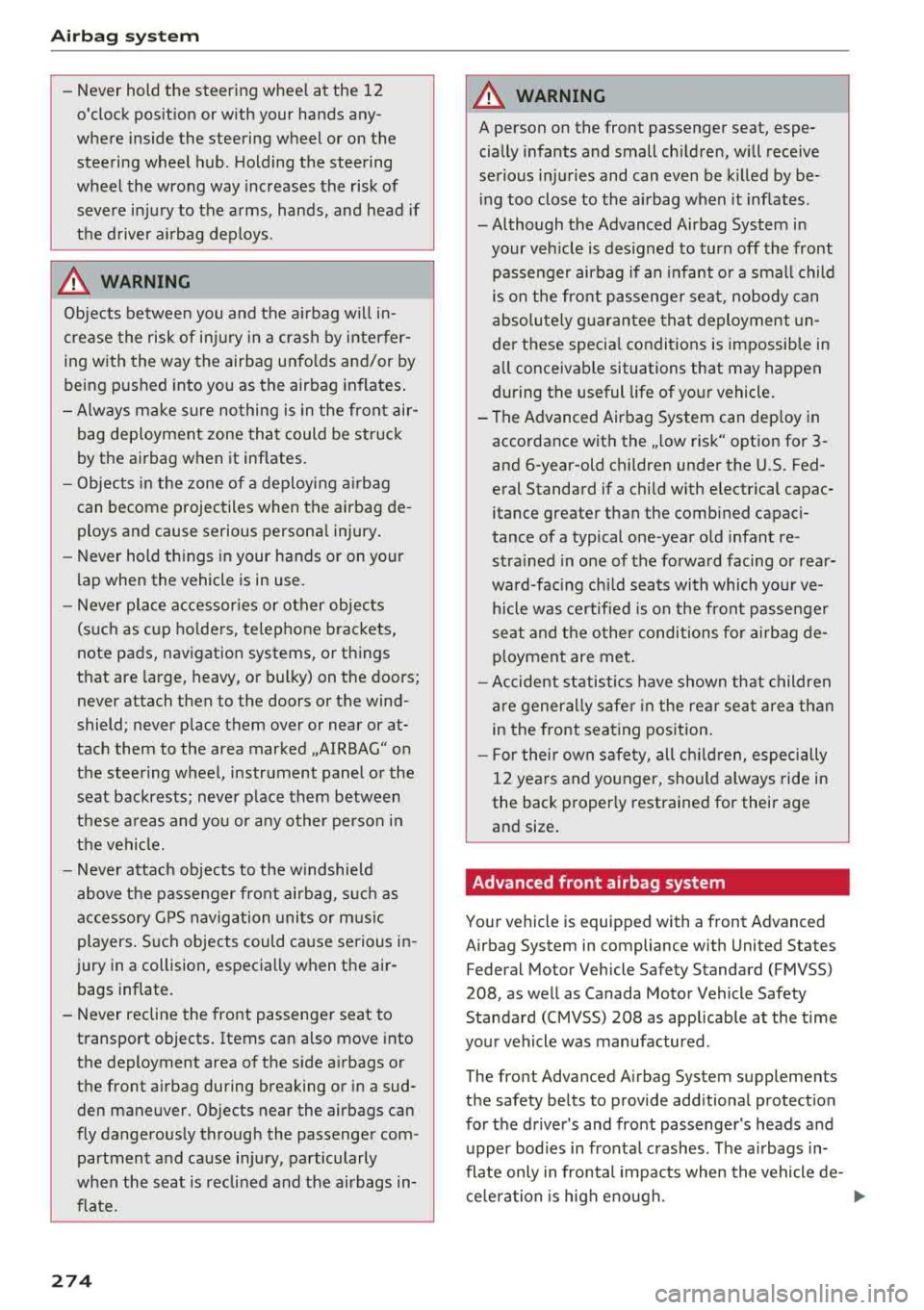
A WARNING
A person on the front passenger seat, espe
cially infants and small ch ildren, wi ll receive
serious in juries and can even be k illed by be
ing too close to the airbag when it inflates .
- Although the Advanced Airbag System in your veh icle is designed to turn off the front
passenger airbag if an infant o r a small child
is on the fron t passenger sea t, nobody can
absolu tely guarantee tha t deployment un
de r these specia l condi tions is impossible in
all conceivable situations that may happen
during the useful life of yo ur vehicle.
- The Advanced Airbag System can dep loy in
accordance with the
,. low risk" option for 3-
and 6-year-old children under the U.S. Fed
eral Standard if a child w ith electrical capac
itance greater than the combined capac i
tance of a typical one-year o ld infant re
strained in one of the forward facing or rea r
ward-facing chi ld seats with which yo ur ve
hicle was certified is on the front passenger
seat and the o ther conditions for airbag de-
ployment are me t.
- Accident s tatisti cs have shown th at children
are generally safer in the rear seat are a than
in the front seat ing pos ition.
- For their own s afety, all ch ildren, especi ally
12 years and younger, should alw ays ride in
the back proper ly restrained for their age
and size .
Advanced front airbag system
Your vehicle is equipped with a front Advanced
Airbag System in compliance with United States
Federal Motor Vehicle Safety Standard (FMVSS)
208, as well as Canada Motor Vehicle Safety
Standard (CMVSS) 208 as applicable at the t ime
you r vehicle was manufactured .
-
The front Advanced Airbag System supplements
the safety belts to provide add itiona l protect ion
for the driver 's and front passenger's heads and
upper bod ies in fronta l crashes. The a irbags in
flate only in frontal impacts when the vehicle de-
ce le ra tion is high e no ugh.
II>-
Page 280 of 392
Airbag syste m
The additiona l layers prevent the capacitive
passenger detection system from accurately
measuring the capac itance of the ch ild safe
ty seat and/or the person on the seat and
thus keep the Advanced Airbag System from
working p roperly .
- Never place or use any electrical device (such as a laptop, CD player, elect ronic
games dev ice, power inverte r or seat heater
for child seats) on the front passenger seat if the device is connected to the 12-vol t
socket or the cigarette lighter socket . S u ch
devices can infl uence the capacitance regis
tered by the capacitive passenger detection
system, so that incorrect information is pro
vided to the airbag control unit.
- If you must use a child restraint on the front
passenger seat and the child restraint man
ufacturer's instructions require the use of a
towel, foam cushion or something else to properly position the ch ild restraint, make
certain that the
PASSENGER AIR BAG OFF
~; light comes on and stays on whenever
the chi ld restraint is installed on the front
passenger seat .
-If the PASSENGER AIR BAG OFF ~; light
does not come on and s tay on, immedi ate ly
install child restra int in a rear seating posi
tion and have the airbag system inspected by your A udi dealer .
,&_ WARNING
If the front passenger seat gets wet, dry it im
mediately.
- If liquid soaks into the front passenger seat,
this can keep the a irbag system from work
ing prope rly and may, for instance, deact i
vate the passenger frontal airbag. If this happens, the
PASSENGER AIR BAG OFF ~;
light will come on and stay on togethe r wi th
the a irbag ind icator light
m in the inst ru
ment cluster.
- If liquid is poo led on the seat, bu t has not
soa ked in, this may also keep the airbag sys
tem from wo rking properly and ca use the
passenge r frontal a irb ag to be enabled
(tu rned on), even though there is a properly
278
installed child restraint system on the seat .
Wet towels or other wet things on the seat
cushion can have the same effect. If the
front passenger fronta l airbag is turned on,
the
PASSENGER AIR BAG OFF ~; light will
turn off.
How the Advanced Airbag System
components work together
The front Advanced A irbag System and the side
airbags supp lement the protection offered by the
front t hree-point safety belts and the adjustable
head restraints to he lp reduce the risk of injury in
a wide range of accident and crash situat ions. Be
sure to read the important i nformat ion about
safety and heed the WARNINGS in this chapter .
Deployment of the Advanced A irbag System and
the activation of the safety belt pretensioners de
pend on the dece leration measured by the crash
sensors and registered by the electronic contro l
u nit . Crash seve rity depe nds on speed and decel
eration as well as the mass and stiffness of the
vehicle or object involved in the cras h.
On the passenger side, regard less of safety be lt
use, the front passenge r frontal a irbag will be
turned off if t he e lectr ica l capacitance measured
by the capacitive passenge r detection system o n
t h e fron t pa ssenger sea t is less th an the amou nt
prog rammed in t he e lec tronic contro l unit. The
front passenger frontal airbag wi ll also be turned
off if the capacitance measured by the system for
the front passenger seat equals that of an infant
of about one year of age in one of the chi ld seats
that was used to certify the Advanced Airbag Sys
tem under Federal Motor Vehicle Safety Standard
208 . The
PASSENGER AIR BAG OFF ~; light
comes on a nd stays on to tell you when the front
Advanced Airbag System on the passenge r side
has been tu rned off<=?
page 281.
,&_ WARNING
T o reduce the ris k of injury when an airbag in
flates, always wear safety belts prope rly.
- If you are unres trained, leaning forward, si t
ting sideways or out of position in any way,
your r isk of injury is much highe r.
~
Page 294 of 392
Child sa fety
A WARNING
Children on the front seat of any car even with
Advanced Airbags can be seriously injured or
even killed when an airbag inflates. A child in
a rearward-facing child safety seat installed
on the front passenger seat will be seriously
injured and can be killed if the front airbag in
flates.
- The inflating airbag will hit the child safety
seat or infant carrier with great force and
will smash the child safety seat and child
against the backrest, center armrest, o r
doo r.
- Always install rear-facing child safety seats
on the rear seat.
- If you must install a rearward fac ing ch ild
safety seat on the front passenger seat in
exceptional c ircumstances and the
PASSEN
GER AIR BAG
OFF ~; light does not come
on and stay on, immediately install the rear
facing child safety seat in a rear seating po sition and have the airbag system inspected
immediately by your Audi dealer.
A WARNING
- Forward-facing chi ld seats installed on the
front passenger seat may interfere with the
deployment of the a irbag and cause serious
personal injury to the child.
- If except ional circumstances require the use
of a forward-facing child restraint on the
front passenger's seat, the child's safety
and well-being require the following special
precautions to be taken:
- Always make sure that the forward-facing
seat has been designed and cert ified by its
manufacturer for use on a front passenger
seat with a front and s ide a irbag.
- Always carefully follow the manufacturer's instructions provided with the child seat
or infant carrier.
- Never install a child restraint without a
properly attached top tether strap if the
child restraint manufacturer's instructions
require the top tether strap to be used.
292
- Never put the forward-facing child re
straint up aga inst or very near the instru
ment panel.
- Always set the safety belt upper anchor
age to the adjustment position that per
mits proper installation in accordance
with the child restraint manufacturer's in
str uctions .
- Always move the front passenger seat to
the h ighest position in the up and down
adjustment range and move it back to the
r earmost position in the seat's fore and
aft ad justmen t range, as far away from
the airbag as possible, before installing
the forward- facing child restra int .
- Always make s ure tha t the safety belt up
per anchorage is behind the chi ld restraint
and not next to or in front of the child re
straint so that the safety belt will be prop
erly pos itioned.
- Always make sure that nothing prevents
the f ront passenger's seat from being
moved to the rearmost position in its fore
and aft adjustment range.
- Never place objects on the seat (such as a
l aptop, CD player, elect ronic games de
v ice, power inverter or seat heater for
ch ild seats) . These may influence the elec
trical capacitance measu red by the capaci
tive passenger detection system and can
also fly a round in an acciden t and cause
se rious personal injury.
- Never place or use any elect rical device
(such as a laptop, CD player, electronic
games device, powe r inverter or sea t heat
er for child seats) on the front passenger
seat if the device is connected to the 12-
vo lt socket or the cigarette lighter socket.
- If a seat heater has been retrofitted or
otherwise added to the front passenger
seat, never install any child restraint sys
tem on this seat.
- Make su re that there a re no wet objects
(such as a wet towe l) and no water or oth
er liquids on the front passenger seat
cush ion .
- Always make sure that the
PASSENGER
AIR BAG
OFF ~; light comes on and stays
Page 298 of 392
Child sa fety
- The chi ld and the passenger can a lso in
jure each other in an accident .
- Never install rear-facing child safety seats
or infant carriers on the front passenger
seat. A child will be serious ly injured and
can be killed when the passenger airbag in
flates - even with an Advanced Airbag Sys
tem .
- The inflating a irbag w ill hit the child safety
seat or infant carrier with great force and
will smash the chi ld safety seat and child
against the bac krest, center armrest, doo r
o r roof.
- Always install rear-facing child safety seats
o r infant carr iers on the rear seat.
- Before you carry a ch ild in a rea r-facing child
sa fety seat on the rear seat, remove the
Rear Seat Entertainment (RS E)* and its
holder* from the ba ckres t of the front seat.
- Make s ure there is enough space in fron t of
the ch ild in the ch ild se at.
If necessary, ad
just the angle and posit ion of the seat in
front of the child seat .
- Forward-facing ch ild safety seats installed
on the front passenger's seat can interfere
with the airbag when it inflates and cause
serious injury to the child. A lways insta ll for
ward-facing child safety seats on the rear
seat.
- If except ional circumstances require the use
of a forward-facing child restraint on the
front passenger's seat, the child 's safety
and we ll-being require that the following
special p recautions be taken:
- Ma ke sure the forward -fac ing seat has
been designed and certified by its manu
facturer for use on a front seat with a pas
senger front and side airbag .
- Always carefully follow the manufacturer's
instructions provided with the child safety
seat or ca rrie r.
- Always move the front passenger seat to
the highest posit ion in the up and down
ad justment range and move it back to the
rearmost posit ion in the seat's fore and
aft adjustment range, as far away from
the airbag as possible, before installing
the forward-fac ing ch ild rest raint .
296
-Always make s ure that the safety belt up
per anchorage is behind the chi ld restraint
and not next to or in front of the child re
straint so that the safety belt wi ll be prop
erly pos itioned.
- Always make sure that nothing prevents
the front passenger's seat from being moved to the rearmost position in its fore
and aft adjustment range.
- Always make s ure that the backrest is in
the up right pos ition.
- Never place or use any electrical device (such as a laptop, CD player, electronic
games device, powe r inverter or seat heat
er for child seats) on the fro nt passenger
seat if the devi ce is connec ted to the
12-
vo lt socke t or the cigarette ligh ter soc ket.
- If a seat heate r has been retrofitted o r
othe rwise added to the fron t passenger
seat, neve r install any child restraint sys
tem on this seat .
- Make sure that there a re no wet objects
(such as a wet towe l) and no water or oth
er liquids on the front passenger seat
cush ion.
- Never place objects on the seat (such as a
l aptop, CD player, elect ronic games de
v ice, power inverte r or seat heater for
ch ild seats) . These may influence the elec
trical capacitance measured by the capaci
tive passenger detection sys tem and can
also fly a round in an accident and cause
se rious personal injury.
- Always buckle the child safety seat fi rmly in
place even if a ch ild is not sitt ing in it . A
loose child safety seat can fly a round dur ing
a sudden s to p or in a collision .
- Always read and heed all WARNINGS when
eve r us ing a child restrained in a vehicle is
be ing
used~ page 261, Safe ty belts,
~ page 269, Airbag system and
~ page 291, Child safety.
_&. WARNING
To reduce the ris k of serious injury, make sure
that the
PASSENGER AIR BAG OFF 'I,;; light ~
Page 300 of 392
Child sa fety
should ride only in special restraints in which the
chi ld faces the back of the vehicle. These infant
seats support the baby's back, neck and head in a
crash
c::> fig. 242.
The airbag on the passenger side makes the front
seat a potentially dangerous p lace for a child to
ride . The front seat is not the safest place for a
child in a forward -facing child seat. It is a very
dangerous place for an infant or a larger child in
a rearward -facing seat .
A WARNING
Not using a ch ild safety seat, using the wrong
child safety seat o r improperly install ing a
child restra int increases the r is k of se rious
personal inju ry and death in a crash.
- Never install rear-facing chi ld safety seats
o r infant carr iers on the front passenger
seat
-even with an Advanced A irb ag Sys
tem . A child w ill be seriously injured and can
be ki lled when the inflating airbag hits the
child safety seat or infant carrier with great
force and smashes the child safety seat and
child against the backrest, center armrest,
door or roof c::> page 2 70, Child restraints on
the front seat
-some important things to
know .
- Always install rear-facing child safety seats
or infant carr iers on the rear seat.
- Never install a rear-facing child restra int in
the forward-facing direct ion . Such restraints
are designed for the spec ial needs of infants
and very sma ll children and cannot protect
them properly if the seat is forward-fa cing.
- If you must install a rearward fac ing ch ild
sa fety seat on the front passenger seat be
ca use of exception al circumst ances and the
PASSENGER AIR BAG OFF ,;; light does not
come on and stay on, immediate ly install
the rear-facing chi ld safety seat in a rear
seat ing pos ition and have the airbag system
inspected by your Audi dealer.
- Never place or use any electrical device
(s uch as a laptop, CD player, elect ronic
games dev ice, powe r inverter or seat heater
for child seats) on the front passenger seat
298
if the device is connected to the 12-volt
socket or the ciga rette lighte r socket.
- If a seat heater has been ret rofitted or oth
erwise added to the front passenger seat, never install any child restra int system on
this seat.
- Make sure that there are no wet objects (such as a wet towel) and no water or other
liquids on the front passenger seat cush ion .
- Never p lace objects on the seat (such as a
laptop, CD p layer, electron ic games device,
power inverte r or seat heater for ch ild
seats). These may influence the elect rical
capacitance measu red by the capacitive pas
senger detect ion system and can also fly
a round in an accident and cause se rious per
sonal injury .
- Always read and heed all WARNINGS when
eve r us ing a child restrained in a vehicle is
be ing used
c::> page 261, Safety belts,
c::> page 269, Airbag system and
¢ page 291 , Important information .
Page 302 of 392
Child sa fety
restraint in place ~ page 58. Install the
head restraint again immediately once the
child seat is removed. Driving without head
restra ints or w ith head restraints that are
not properly adjusted increases the risk of
serious or fatal neck injury dramatically .
- Always read and heed all WARNINGS when
ever using a child restrained in a veh icle is
being used
~ page 261, Safety belts,
~ page 269, Airbag system and
~ page 291, Important information.
A WARNING
If exceptional circumstances require the use
o f a forward- facing child restra int on the
front passenger's seat, the child's safety and
well-being require that the following special precaut ions be taken:
- Make s ure the forward-facing seat has been
designed and cert ified by its manufact urer
for use on a front seat with a passenger
front and side airbag.
- Always follow the manufacturer's instruc tions prov ided with the ch ild safety seat or
infant carrier.
- Always move the front passenger seat to the h ighest position in the up and down ad
justment range and move it back to the
rearmost position in the seat's fore and aft
adjustment range, as fa r away from the air
bag as possib le, before insta lling the for
ward-facing child res tra int.
- Always make sure that the safety belt upper
anchorage is beh ind the child restrain t and
not next to or in front o f the child restrain t
so that the safety belt will be properly pos i
tioned.
- Always make sure that nothing prevents the
front passenger's seat from being moved to
the rearmost position in its fore and aft ad
justment range.
- Always make sure the backrest is in an up
right position .
- Never place or use any electrical device (such as a laptop, CO player, elect ronic
games dev ice, power inverte r or seat heater
for child seats) on the front passenger seat
300
if the device is connected to the 12-volt
socket or the cigarette lighte r socket.
- If a seat heater has been ret rofitted or oth
erwise added to the front passenger seat, never install any child restra int system on
this seat.
- Make sure that there are no wet objects (such as a wet towel) and no water or other
liquids on the front passenger seat cush ion .
- Never p lace objects on the seat (such as a
laptop, CO p layer, electron ic games device,
power inverte r or seat heater for ch ild
seats) . These may influence the elect rical
capacitance measu red by the capacitive pas
senger detect ion system and can also fly
around in an accident and cause se rious per
sonal injury .
- Ma ke sure th at the
PASSENGER AIR BAG
OFF
1-f; light comes on and stays on all the
time wheneve r the ign it ion is switched on .
- If the
PASSENGER AIR BAG OFF 1-f; light
does not come on and stay on, immediately
install the forward -facing child seat at a
seating position on the rear seat and have
the airbag system inspected by your author
ized Audi dealer.
- Take the child restra int off the front passen
ge r seat and install it prope rly at one of the
rear seat positions if the
PASSENGER AIR
BAG OFF
1-f; light does not stay on whenever
the ignition is switched on.
Page 378 of 392
Index
Audio player Bluetooth audio player . . . . . . . . . . . . . . . 228
Wi-Fi audio player . . . . . . . . . . . . . . . . . . . 229
Aud io track . . . . . . . . . . . . . . . . . . . . . . . . . . 237
Aud i pre sense . . . . . . . . . . . . . . . . . . . . . . . 112
Messages . . . . . . . . . . . . . . . . . . . . . . . . . . 116
Sett ings . . . . . . . . . . . . . . . . . . . . . . . . . . . 116
Audi Service Repair Manuals and Literature 371
Aud i side assist . . . . . . . . . . . . . . . . . . . . . . . 120
Rear cross-traffic assist . . . . . . . . . . . . . . . 124
Audi smartphone interface . . . . . . . . . 243, 247
Audi virtua l cockpit
refer to Instrument cluster . . . . . . . . . . . . . 10
AUTO Automatic headlights . . . . . . . . . . . . . . . . . 45
Auto Lock (central locking system) . . . . . . . . 30
Automatic belt retractor . . . . . . . . . . . . . . . 264
Automatic climate control . . . . . . . . . . . . . . . 69
Operation . . . . . . . . . . . . . . . . . . . . . . . . . . . 70
Automatic climate control system Audi drive select . . . . . . . . . . . . . . . . . . . . . 125
Setup . . . . . . . . . . . . . . . . . . . . . . . . . . . . . . 72
Automatic transmission . . . . . . . . . . . . . . . . . 84
Emergency program . . . . . . . . . . . . . . . . . . 89
Hill descent control . . . . . . . . . . . . . . . . . . . 87
Kick-down . . . . . . . . . . . . . . . . . . . . . . . . . . . 88
La unch control program . . . . . . . . . . . . . . . 89
Manual shiftin g . . . . . . . . . . . . . . . . . . . . . . 88
Parking lock emergency re lease . . . . . . . . . 90
Selector lever positions . . . . . . . . . . . . . . . . 85
Automatic wipe/wash system . . . . . . . . . . . . 51
Auto Safety Hotline . . . . . . . . . . . . . . . . . . . 259
AUTO (button) Automatic climate control system . . . . . . . 71
Auxiliary heater (automatic climate control) 72
AUX input . . . . . . . . . . . . . . . . . . . . . . . . . . . 232
Average consumption . . . . . . . . . . . . . . . . . . . 16
Average speed . . . . . . . . . . . . . . . . . . . . . . . . 16
B
BACK button 147
Balance (sound) . . . . . . . . . . . . . . . . . . . . . . 249
Bass (sound) . . . . . . . . . . . . . . . . . . . . . . . . . 249
Battery Jump starting . . . . . . . . . . . . . . . . . . . . . . . 363
also refer to Vehicle battery . . . . . . . . . . . 321
376 Before
driving . . . . . . . . . . . . . . . . . . . . . . . . 252
Belt tensioners . . . . . . . . . . . . . . . . . . . . . . . 267
Blended gasoline . . . . . . . . . . . . . . . . . . . . . 310
Blower (automat ic climate control system) . 71
Bluetooth Audio player . . . . . . . . . . . . . . . . . . . . . . . . 228
Connecting a cell phone . . . . . . . . . . . . . . 17 4
Settings . . . . . . . . . . . . . . . . . . . . . . . . . . . 248
Boost...... .. .. .. .. .. ............. ... 17
Booster seats . . . . . . . . . . . . . . . . . . . . . . . . 301
Boost pressure indicator . . . . . . . . . . . . . . . . 17
Brake fluid Checking the brake fluid level . . . . . . . . . . 321
Brakes . . . . . . . . . . . . . . . . . . . . . . . . . . . . . . 142
Brake assist . . . . . . . . . . . . . . . . . . . . . . . . 140
Brake fluid . . . . . . . . . . . . . . . . . . . . . . . . . 321
E lectromechanical parking brake . . . . . . . . 80
Emergency braking function . . . . . . . . . . . . 81
New brake pads . . . . . . . . . . . . . . . . . . . . . 142
Worn brake pads . . . . . . . . . . . . . . . . . . . . . 26
Break-in security feature . . . . . . . . . . . . . . . . 36
Breaking in
New brake pads . . . . . . . . . . . . . . . . . . . . . 142
New engine . . . . . . . . . . . . . . . . . . . . . . . . . 73
New tires . . . . . . . . . . . . . . . . . . . . . . . . . . 332
Browser
refer to Media center . . . . . . . . . . . . . . . . . 235
Bulbs . . . . . . . . . . . . . . . . . . . . . . . . . . . . . . . 362
Buttons Control panel (MMI) . . . . . . . . . . . . . . . . . 148
Multifunction steering wheel . . . . . . . . 12, 15
Switching the Infotainment system display
on/off . . . . . . . . . . . . . . . . . . . . . . . . . . . . . 148
C
Cable (USB adapter/ AUX connector cable) 231
California Proposition 65 Warning . . . . . . . 315
Battery specific . . . . . . . . . . . . . . . . . . . . . 322
Call list . . . . . . . . . . . . . . . . . . . . . . . . . . . . . 177
Call options . . . . . . . . . . . . . . . . . . . . . . . . . . 185
Capacities Fuel tank. . . . . . . . . . . . . . . . . . . . . . . . . . . 369
Washer fluid reservoir . . . . . . . . . . . . . . . . 369
Cargo area
refer to Loading the luggage compart-
ment..... .... .. .. .. ............. .. 257