change time AUDI Q5 2018 User Guide
[x] Cancel search | Manufacturer: AUDI, Model Year: 2018, Model line: Q5, Model: AUDI Q5 2018Pages: 392, PDF Size: 60.56 MB
Page 110 of 392

Assistance systems
The distances provided are specified values . De
pending on the driving situation and how the ve
h icle ahead is dr iv ing, the actual d istance may be
more or less than these target d istances.
If you change the time gaps, the newly set value
appears briefly in the instrument cluster disp lay,
for example
II for Distance 3. This only occurs if
the
D rive r assistance display is not currently
shown in the display
r=>page 104, fig. 104.
Distance 1: this setting corresponds to a distance
of 92 ft (28 m) when traveling at 62 mph (100 km/h), or a time d istance of 1 second.
Distance 2 : this setting corresponds to a distance
of 118 ft (36 m) when traveling at 62 mph (100
km/h), or a time d istance of 1.3 seconds .
Distance 3: this setting corresponds to a distance
of 164 ft (SO m) when traveling at 62 mph (100
km/h), or a time distance of 1.8 seconds .
Distance 4: this setting corresponds to a distance
of 219 ft (67 m) when traveling at 62 mph (100
km/h), or a time dista nce o f 2.4 seconds .
Distance 5 : this setting corresponds to a distance
of 328 ft (100 m) when traveling at 62 mph (100
km/h), or a time distance of 3.6 seco nds.
A WARNING
When setting the distance, the driver is re
sponsible for adhering to any applicab le lega l
regulations.
(D Tips
Depending on the selected driving mode in
drive se lect* and the set distance, the driving
behavior will vary from dynamic to comforta
ble when accelerating
9 page 12 7.
Setting Audi adaptive cruise control
Applies to: vehicles with Audi adaptive cruise control
-
.. Select in the Infotainment system: I MENU I but
ton
> Vehicle > left control button > Driver as
sistance
> Audi adaptive cruise control.
1) In prepa ra tio n at the t ime of print ing. T his funct ion is not
ava ilable in every vehicle .
108 Storing the last distance
1
)
The last distance that was set will be stored after
the ignition is switched off. If the distance is not
stored,
Distance 3 is a utomatica lly set eve ry time
the ignit ion is switched on.
Driving program
Applies to: vehicles without Audi drive select
Depending on the selected driving program and
distance, driving behavior when accelerating will
vary from dynamic to comfortable.
Selecting the driving mode
Applies to: vehicles with Audi drive select
For vehicles with drive select, refer to
r=>page 127.
(0 Tips
Your settings are automatically stored and as
signed to the remote control key being used.
Driver intervention request
Applies to: vehicles with Audi adaptive cruise control
Fig. 109 Instr umen t cluster: request for driver interve n
t ion
The request for driver intervention instructs you
to take over if the adaptive cruise control braking
funct ion is not able to maintain a suffic ient dis
tance to the veh icle dr iv in g ahead
r=> fig . 109 .
Page 119 of 392
u co ..... N r--N ..... 0 <( 0 00
This message appears if the pre sense functions
are switched off through the Infotainm ent sys
tem or if the system is not ready.
Audi active lane assist
Description
Applies to: vehicles with Audi active lane assist
Active lane assist (lane departure warning) de
tects lane marker lines within the limits of the
system using a camera in the windshield. If you
are approaching a detected lane marker line and
it appears likely that you will leave the lane, the
system will warn you with corrective stee ring .
You can override this steering at any time . If you
pass over a line, the steering wheel will vibrate
lightly . In order for this warning vibration to oc
cur, it must first be switched on in the Infotain
ment system. Active lane assist is ready for oper
ation when the lane marker line is detected on at
least one side of the vehicle.
The system is designed for driving on express
ways and highways and therefore only activates
at speeds above approximately 40 mph (65 km/
h).
Applies to: veh icles w ith side assist: if you acti
vate a turn signal when active lane assist is ready
and it classifies a lane change as critical because
of vehicles traveling alongside you or approach
ing you, there will be noticeable corrective steer
ing shortly before you leave the lane. This will at
tempt to keep your vehicle in the lane.
Applies to: veh icles w it h out s ide ass ist: the ready
system does not warn you if you activate a turn
signal before crossing the lane marker line. In
this case, it assumes that you are changing lanes
intentionally.
Applies to: vehicles with adaptive cruise control:
there is no corrective steering or warnings if the
syst em recognizes a distinct passing maneuver.
If the conditions are met, traffic jam assist
switches on at speeds under approximately
40 mph (65 km/h)
¢ page 109 .
Assistance systems
A WARNING
--
-The system warns the driver that the vehicle
is leaving the lane using corrective steering .
The driver is always responsible for keeping
the vehicle within the lane.
- The system can help you keep the vehicle in
the lane, but it does not drive by itself. Al
ways keep your hands on the steering
wheel.
- Corrective steering may not occur in certain
situations, such as during heavy braking.
- There may be cases where the camera does
not recognize all lane marker lines. Correc
tive steering can only take place on the side
of the vehicle where lane marker lines are
detected.
- Other road structures or objects could possi
bly be identified unintentionally as lane
marker lines. As a result, corrective steering
may be unexpected or may not occur.
- The camera view can be restricted, for ex
ample by vehicles driving ahead or by rain,
snow, heavy spray or light shining into the
camera. This can result in active lane assist
not detecting the lane marker lines or de
tecting them incorrectly .
- In certain situations where visibility is low,
the vehicle may switch from an "early" to
"late" steering correction.
- Under certain conditions such as ruts in the
road, an inclined roadway or crosswinds, the
corrective steering alone may not be enough
to keep the vehicle in the middle of the lane .
- For safety reasons, active lane assist must
not be used when there are poor road and/
or weather conditions such as slippery roads, fog, gravel, heavy rain, snow and the
potential for hydroplaning. Using active lane
assist under these conditions may increase
the risk of a crash.
117
Page 122 of 392
Ass is tance sy stem s
Stee ring time
Earl y: in th is sett ing, the correct ive steering hap
pens continuously to help keep the vehicle in the
center of the lane.
La te : in this setting, the system provides correc
tive steering just before a w heel goes over a de
tected lane marker line .
Vibration warning
You can switch the additional vibration warning
i n the stee ring wheel on or off .
,&. WARNING
-
With the vibration warning switched off,
t here will also be no visual warn ing in the in
strument cluster display when crossing a lane
marker line.
© Tips
I n certain mar kets: you r settings are stored
automatically and ass igned to the remote
control key in use .
Audi side assist
Description
App lies to: ve hicles w it h Aud i side ass ist
F ig . 11 8 Sensor detect ion ra n ge
120
Fig. 119 D isp lay on the exterior mirror
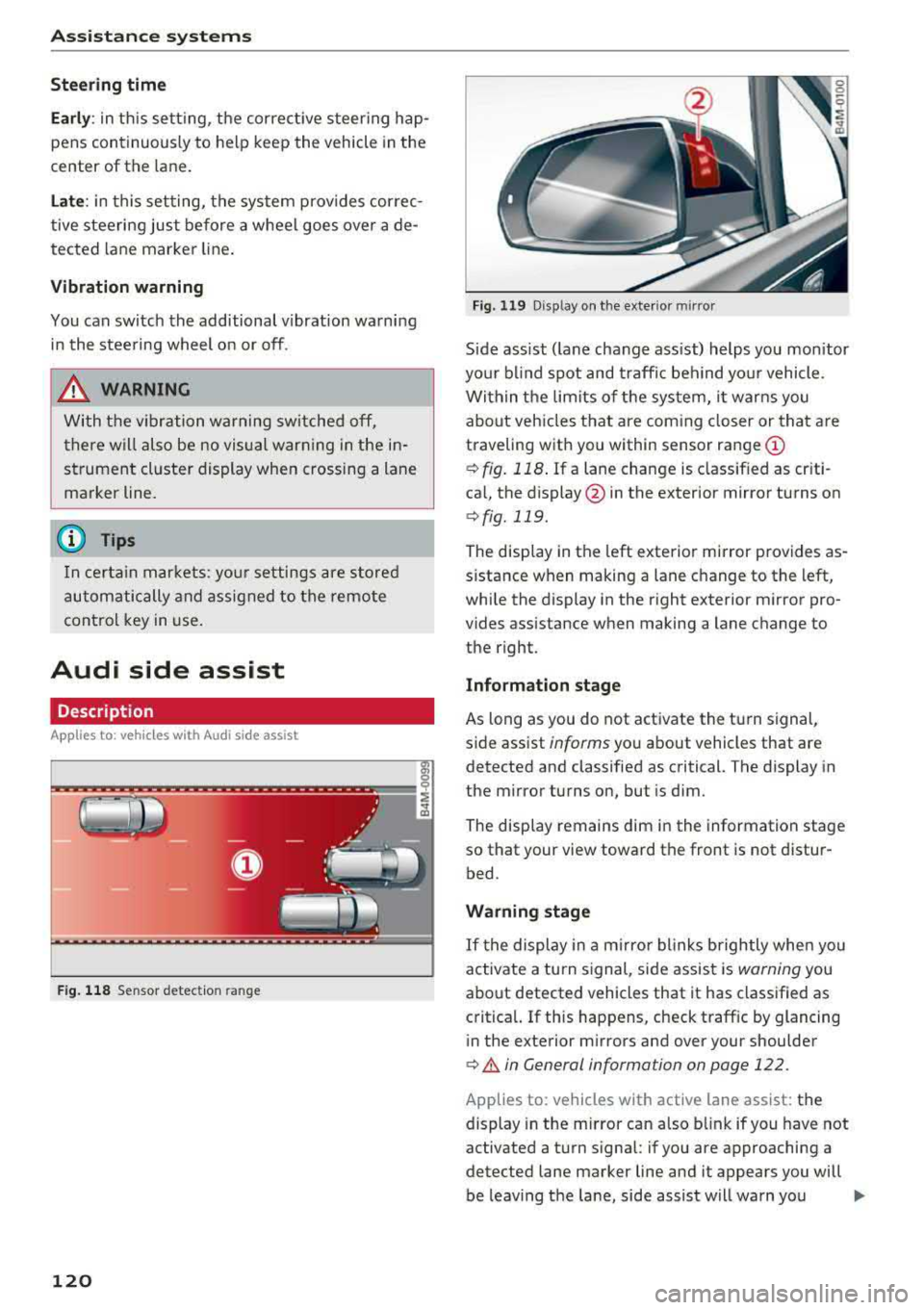
S ide ass ist ( lane change ass ist) helps you mon itor
you r bl ind spot and traff ic beh ind yo ur vehicle.
Within the limits of the system, it warns you about vehicles that are coming closer or that are
traveling with you within sensor range
(D
¢ fig. 118 . If a lane change is class ified as cr iti
ca l, the display @in the exterior mirror turns on
¢fig. 119.
The display in the left exterior mirror provides as
sistance when making a lane c hange to the left,
while the display in the r ight exterior m irror pro
vides assistance when making a lane change to
the right.
Information stage
As long as you do not activate the turn signal,
s ide assist
informs yo u about vehicles that are
detected and classified as critical. The display in
the mirror turns on, but is dim .
The disp lay remains dim in the information stage
so that your view toward the front is not distur
bed.
Warning stage
If t he display in a m irro r blinks brightly whe n you
activate a turn s ignal, side assist is
warning you
about detected vehicles that it has classified as
critica l. If this happens, check traff ic by glancing
in the exterior m irrors and over your shoulder
¢ A in General information on page 122 .
Applies to: vehicles with active lane assist: the
display in the m irror can also b link if you have not
activated a turn signal : if you are approaching a
detected lane marker line and it appears you will
be leaving the lane, side assist will warn you
..,.
Page 123 of 392
about detected vehicles that it has classified as
critical.
@ Tips
You c an ad just t he brig htness on of the dis
play on the rearview
mirror ~ page 122.
General information
Applies to: vehicles with Audi side assist
@
@
©
F ig . 12 0 Dr ivi ng s it u at ions
A U DI
Fig . 121 Rea r of the ve hicle: pos it io n of the sensors
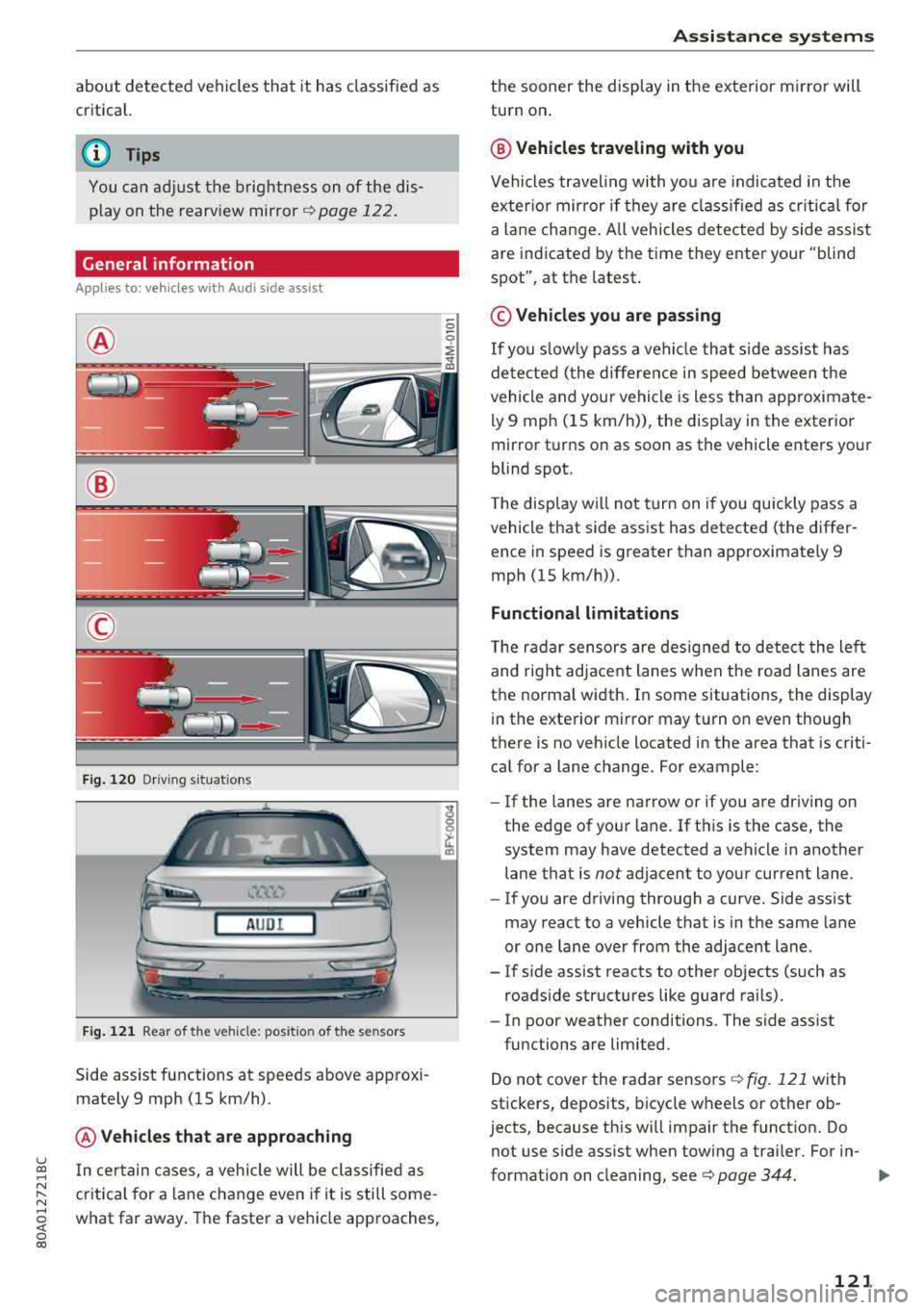
Side assist functions at speeds above app roxi
mately 9 mph (15 km/h) .
@Vehicles that are app roaching
u ~ I n certain cases, a vehicle will be classified as
N :::. cr itica l for a lane change even i f it is still some-,.....
~ what far away . The faste r a veh icle approaches,
0 co
A ssi st a nce systems
the sooner the display in the exterior m irror will
turn on .
@ Vehicles traveling with you
Vehicles traveling with yo u are indicated in the
exter io r mirror if they a re classified as cr itical for
a la ne change. A ll vehicles dete cted by s ide assist
are indicated by the time they ente r your "blind
spot", at the latest.
© Vehicles you are passing
If
you s lowly pass a vehicle that s ide assist has
de tected ( the differe nce in speed between the
vehicle and your vehicle is less than app roximate
ly 9 mph (15 km/h)), the disp lay in the exterior
mirror turns on as soon as the vehicle enters your
blind spot.
T he display w ill not tur n on if you quickly pass a
vehicle that side assist has detected (the differ ence in speed is greater than approximate ly 9
mph (15 km/h)) .
Functional limitations
The radar sensors are des igned to detect the left
and right adjacent lanes when the road lanes are
the norma l width . In some situations, the display
in the exte rior mirror may turn on even though
there is no vehicle located in the area that is criti cal for a lane change. For example :
-If the lanes are narrow or if you are driving on
the edge of your lane. If t his is the case, the
system may have detected a vehicle in another lane that is
not adjacent to your current lane .
- If you are driving through a curve. Side assist
may react to a vehicle that is in the same lane
or one lane over from the adjacent lane .
- If s ide assist reacts to other objects (such as
roads ide structures like guard rails).
- In poor weather conditions . The side assist
functions are limited.
Do not cover the radar sensors
Q fig. 121 with
stickers, deposits, bicycle wheels or other ob
jects, because this w ill impair the funct ion. Do
not use s ide ass ist when towing a trai ler. For in-
format io n on cleaning, see ¢
page 344. ..,.
121
Page 124 of 392
Ass is tanc e system s
A WARNING
-Always pay attention to traffic and to the
area around your vehicle . Side assist cannot
replace a dr iver's attention . The dr iver alone
is a lways responsible for lane changes and
s imi lar d riving maneuvers.
- In some situat ions, the system may not
funct ion or its f unct io n may be lim ited. For
example :
- If vehicles are approaching or being left
behind very quickly. The display may not
turn on in time .
- In poor weather conditions such as heavy
rain, snow or heavy mist.
- On very wide lanes, in tight curves, or if
there is a rise in the road surface. Vehicles
in the adjacent lane may not be detected
because they are outs ide of the sensor
range .
@ Note
The sensors can be displaced by impacts or
damage to the bumper, whee l housing and
underbody . Th is can impa ir the system . Have
an author ized Audi dealer or authorized Aud i
Serv ice Facility check their function .
@ Tips
-If the window glass in the driver's door or
front passenger 's door has been tinted, the
display in the exterior mirror may be incor
r ect.
- For an explanation on conformity with the
F CC regu lations in the United States and the
Industry Ca nada regu lations, see
¢ page 374.
Switching on/off
Applies to: veh icles w ith Audi side assis t
The system can be switched on/off in the Info
tainment system .
-
.,. Select in the Infotainment system: IM ENU I but
ton
> V ehicle > left contro l button > Dri ver a s
s is ta nce
> Audi sid e ass ist . Off sw itches the
system off.
122
If the system is activated , the disp lays in the ex
terior mirrors wi ll turn on briefly when th e igni
tion is switched on .
(D Tips
When you switch side assist on o r off, the exit
warning system activates or deactivates
¢ page 123 .
Setting the display brightness
Applies to : vehicles wit h Aud i side ass ist
The display brightness can be adjusted in the In
fotainment system.
.,. Select in the Infotainment system: I MENU ! but
ton
> V ehicle > left control button > Dri ver a s
s is tanc e
> Audi side a ssist.
The disp lay br ightness adjusts automatically to
t h e brightness of the sur roundings, both in the
information and in the warning stage. In very
dark or very bright surroundings , the automatic
adjustment will set the display to the minimum
or max imum level. In such cases, you may notice
no change when adjusting the br ightness, or the
change may only be noticeable once the sur
round ings change .
Adjust the br ightness to a leve l where the display
i n the in formation stage will not disrupt your
v iew ahead . If you change the br ightness, the dis
play in the exterior mirror w ill br iefly show the
br ightness leve l in t he info rmat ion stage . The
br ightness of the warn ing stage is linked to the
br ightness in the information stage and is adjust
ed along with the information stage .
© Tips
- The side assist f unct ions are not active dur
ing the adjustment process.
- Th e exit war ning indicato rs turn o n du ring
the adjustment process.
- Your sett ings are automat ica lly stored and
assigned to the remote control key be ing
used .
Page 128 of 392
Assistance systems
Engine and automatic transmission
Depending on the mode , the engine and auto
matic transmission respond more quickly or in a
more balanced manner to accelerator peda l
movements. In the sporty
Dynamic mode, the
transmission shifts at higher speed ranges.
Air suspension*
The air suspension* is an electronically-control
led air suspension and damping system. The
ad
justment depends on the driving mode selected,
steering movements, the driver's braking and
ac
celeration, and as the road surface, vehicle speed
and load. The veh icle ground clearance depends
on the mode selected and the speed .
The ground clearance increases significantly
when the vehicle is in the
Allroad mode . At
speeds from approximate ly SO mph (80 km/h) to
75 mph (120 km/h), the ground clearance
re
duces in stages . When the speed decreases, the
ground clearance increases aga in automat ically .
The ground clearance is the lowest in
Dynamic
mode.
Suspension control*
The suspension control* uses sensors to record
information regard ing steering movements,
braking and acceleration operations by the driv
er, road surface, dr iv in g speed, and load. This
makes it possible to adapt damping to the driv
ing situation near ly in rea l time. With drive
se
lect, you can adjust the suspension contro l to be
sporty
( Dynamic ), comfortab le (C omfort ) or bal
anced
(A uto ).
Steering
The power steering adapts. Ind irect steer ing that
moves easi ly as in
Comfort mode is especia lly
suited to long drives on highways. The
Dynamic
mode provides sporty, direct steering.
The following applies to vehicles with dynamic
steering* : the steering ratio changes based on
vehicle speed in order to maintain optimum
steering effort for the driver at all times . This
sets the steering to be less sensitive at higher
speeds in order to prov ide improved vehicle con
trol. At reduced speeds, steering is more direct in
126
order to keep the steering effort as minima l as
possible when the driver is maneuvering the ve hi
cle. At low and average speeds, dynamic steer
i ng* addit iona lly prov ides more respons ive steer
i ng performance.
Sport differential*
As a component of the all whee l drive system
(quattro)
r=!> page 144, the sport differentia l dis
tributes the driving power to the rear axle
de
pending on the s ituation. The distr ibut ion of
power varies depending on the selected mode
from moderate
(C omfort ) to sporty (Dynamic ).
The goal is a high level of ag ility and ability to ac
celer ate on curves. The vehicle is very respons ive
to stee ring.
Adaptive cruise control (ACC)*
The behavior whe n accelerating can be adjusted
from comfortable to sporty, depending on the drive select mode . Adaptive cruise control also
r esponds to the driv in g behavior of the vehicle
ahead in a more conservative or sporty manner.
Engine sound*
The engine sound adapts to the current mode
and can be subtle to sporty .
@ Note
Applies to: vehicles with a ir suspension
- Make sure there is enough clearance above
and below the vehicle when pa rking. Th e
height of the vehicle (ground clearance) can
change once it is parked due to temperature
fluctuations, changes to the load conditions
and changes to the driving modes.
- When transporting the vehicle on a car
car
rier, train, ship or by other means, only tie
the vehicle down at the running sur face of
the tires, which is the outer c ircumference.
Securing the vehicle at the axle compo
nents, suspension struts or tow ing eyes is
not perm itted because the pressure in the
air suspens ion struts can change during
transport. The vehicle may not be secured
sufficiently if this happens .
Page 132 of 392
Parking aid
Parking aid
General information
A pplies to: ve hicles w ith a rea r parking sys te m /parking sys
tem p lus/rearv iew camera/peripheral cameras
Depending on your vehicle's equipment , various
parking aids will help you when parking and ma
neuvering.
The
rear parking system is an audible parking aid
that warns you of obstacles
behind the vehicle
¢ page 131.
The parking system plus assists you when park
ing by audibly and visually indicating objects de
tected
in front of and behind the vehicle
¢ page 131.
The rearview camera shows the area behind the
vehicle in the Infotainment system display. The lines in the rearview camera image help you to
park or maneuver
¢ page 133.
The peripheral cameras give various views to
help you when parking or maneuvering
¢ page 135 . The parking system plus functions
are also available ¢
page 131.
_& WARNING
-Always look for traffic and check the area
around your vehicle by looking at it directly
as well. The parking system cannot replace
the driver's attention. The driver is always
responsible when entering or leaving a park
ing space and during similar maneuvers.
- Please note that some surfaces, such as
clothing, are not detected by the system.
-
- Sensors and cameras have blind spots in
which people and objects cannot be detect
ed . Be especially cautious of small children
and animals.
- Always keep your eyes on the vehicle's sur roundings, using the rearview mirror as
well.
- The sensors can be displaced by impacts or
damage to the radiator grille, bumper,
wheel housing and the underbody . The park
ing system may be impaired as a result.
Have an authorized Audi dealer or author-
130
ized Audi Service Facility check their func
tion .
@ Note
-Some objects are not detected or displayed
by the system under certain circumstances:
- objects such as barrier chains, trailer draw
bars, vertical poles or fences
- objects above the sensors such as wall ex
tensions
- objects with certain surfaces or structures
such as chain link fences or powder snow
- If you continue driving closer to a low ob
ject, it may disappear from the sensor range . Note that you will no longer be
warned about this obstacle.
- Keep enough distance from the curb to re
duce the risk of damage to the rims .
(D Tips
-The system may provide a warning even
though there are no obstacles in the cover
age area in some situations, such as:
- certain road surfaces or when there is tall
grass
- external ultrasonic sources such as from
cleaning vehicles
- in heavy rain, snow, or thick vehicle ex
haust
- We recommend that you practice parking in
a traffic-free location or parking lot to be
come familiar with the system. When doing
this, there should be good light and weath
er conditions.
- You can change the volume of the signals
and the display ¢
page 138.
-Please refer to the instructions for towing a
trailer located in
¢page 139.
-What appears in the infotainment display is
somewhat time-delayed.
- The sensors must be kept clean and free of
snow and ice for the parking aid to operate.
- The rearview camera is cleaned when clean
ing the rear window
¢page 51.
Page 166 of 392
Multifunctio n ste ering whe el
Requirement: a destination must be entered
r::!> page 204, route guidance must be started and
the navigation tab must be disp layed.
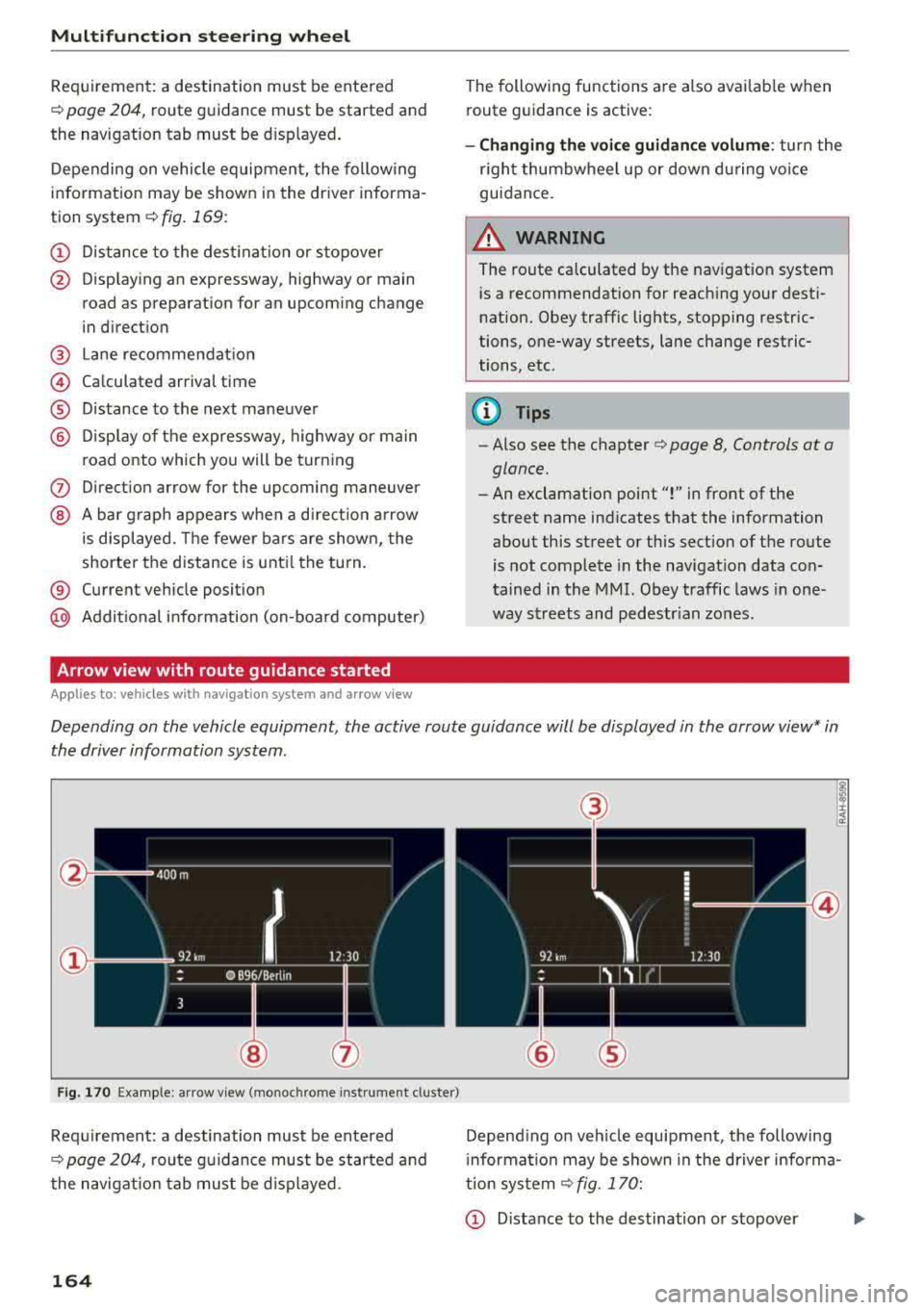
Depending on vehicle equipment, the following
information may be shown in the driver informa
tion system
r::!> fig . 169 :
CD Distance to the dest inat ion or stopover
@ Disp laying an expressway, highway or main
road as preparation for an upcoming change
in direction
@ L ane recommendation
@ Ca lculated arrival time
® D istance to the next maneuver
@ D isp lay of the expressway, highway or main
road onto which you will be turning
(J) Direct ion arrow for the upcoming maneuver
@ A bar graph appears when a di rect io n arrow
is displayed. The fewer bars are shown, the
shorter the d istance is unt il the turn .
® Current vehicle posit ion
@ Addit ional info rmation (on-board computer)
Arrow view with route guidance started
Applies to: ve hicles with navigat ion system and arrow view
The following functions are also avai lab le when
route guidance is act ive :
-Changing the voice guidance volume : turn the
r igh t thumbwheel up or down du ring voice
guidance.
A WARNING
The route calculated by the nav igation system
is a recommendation for reaching your desti
nation. Obey traffic lights, stopp ing restric
tions, one-way streets, lane change restric
tions, etc .
@ Tips
- Also see the chapter
r::!> page 8, Controls at a
glance.
- An exclamation point ''!'' in front of the
street name indicates that the information
about this street or this sect ion of the route
is not complete in the navigation data con
tained in the
MMI. Obey traffic laws in one
way streets and pedestr ian zones.
Depending on the vehicle equipment , the active route guidance will be displayed in the arrow view* in
the driver information system.
F ig . 170 Example : a rr ow v iew (monoc hrome inst rument cluster)
Requirement: a destination must be entered
r::!> page 204, route gu idance must be started and
the navigation tab mus t be d isp layed .
164
(3)
@
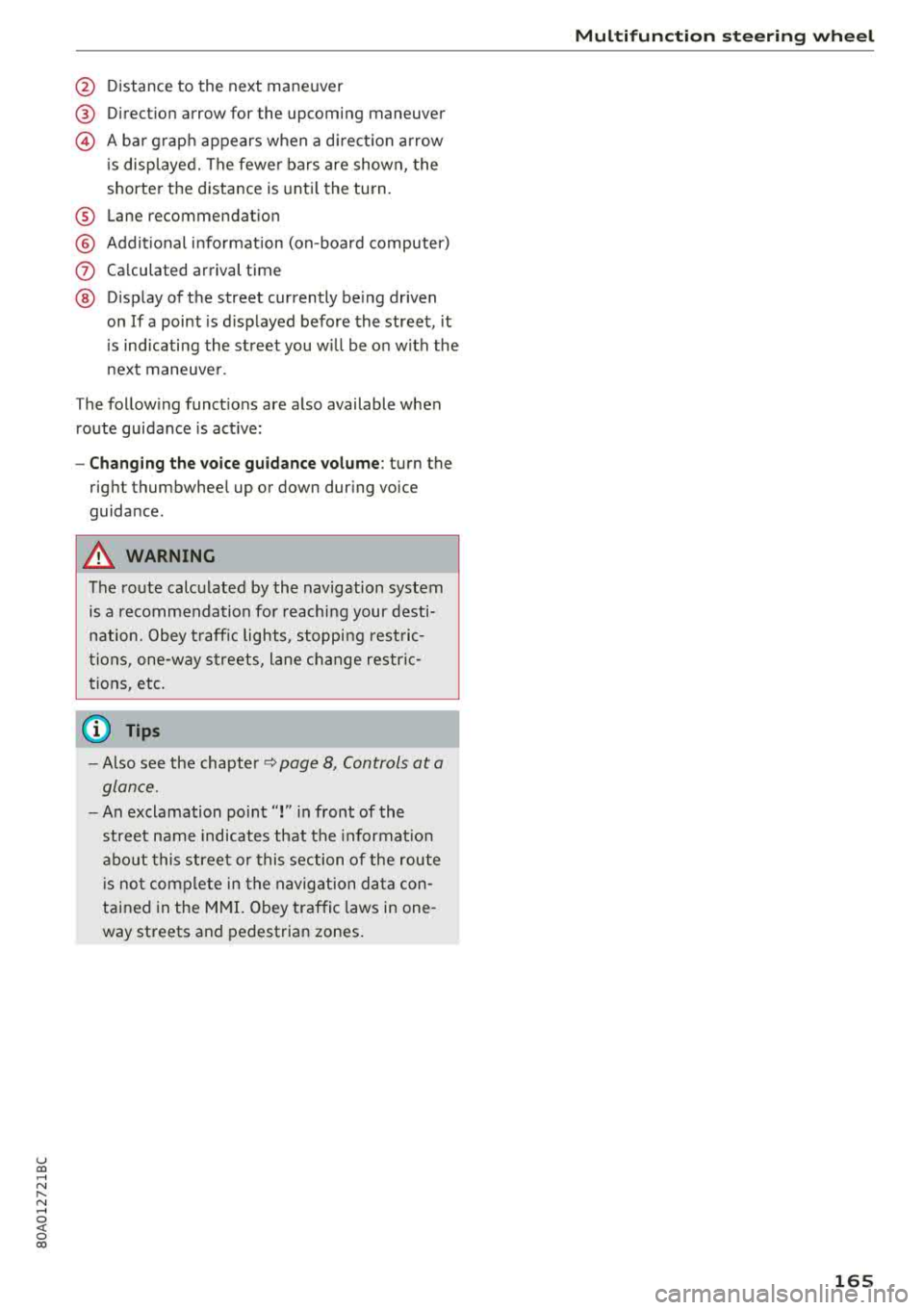
Depend ing on veh icle equipment, the following
i nformation may be shown in the driver info rma
tion system
r::!> fig . 170:
CD Distance to the destination or stopover ...,
Page 167 of 392
u co .... N r--N .... 0 <( 0 00
@ Distance to the next maneuver
® Direct ion arrow for the upcoming maneuver
@ A bar grap h appears when a d irect ion arrow
i s disp layed. The fewe r bars are show n, the
shorter t he distance is unti l the turn .
® Lane recommendat ion
@ Addit ional in fo rmat ion (on-board computer)
(J) Calculated arrival time
@ Display of the street currently be ing driven
on If a point is displayed before the street, it
i s ind icating the street you w ill be on w ith the
n ext maneuve r.
The follow ing funct ions are also available when
route guidance is act ive:
- Changing the voice guidance volume : turn the
rig ht thumbwhee l up or down during voice
guidance.
A WARNING
The route calculated by the navigation system
is a recommendation fo r reaching your desti
nation. Obey t raff ic lights, stopping rest ric
tions, one-way streets, lane change restr ic
tions, etc.
(D Tips
- Also see the chapter~ page 8, Controls at a
glance.
- An exclamation point" !" in front of the
street name indicates that the informat ion
abo ut this street or this section of the route
i s no t complete in the navigation da ta con
tained in the M MI. Obey traffic laws in one
way streets and pedestrian zones.
Multifunction ste ering wheel
165
Page 173 of 392
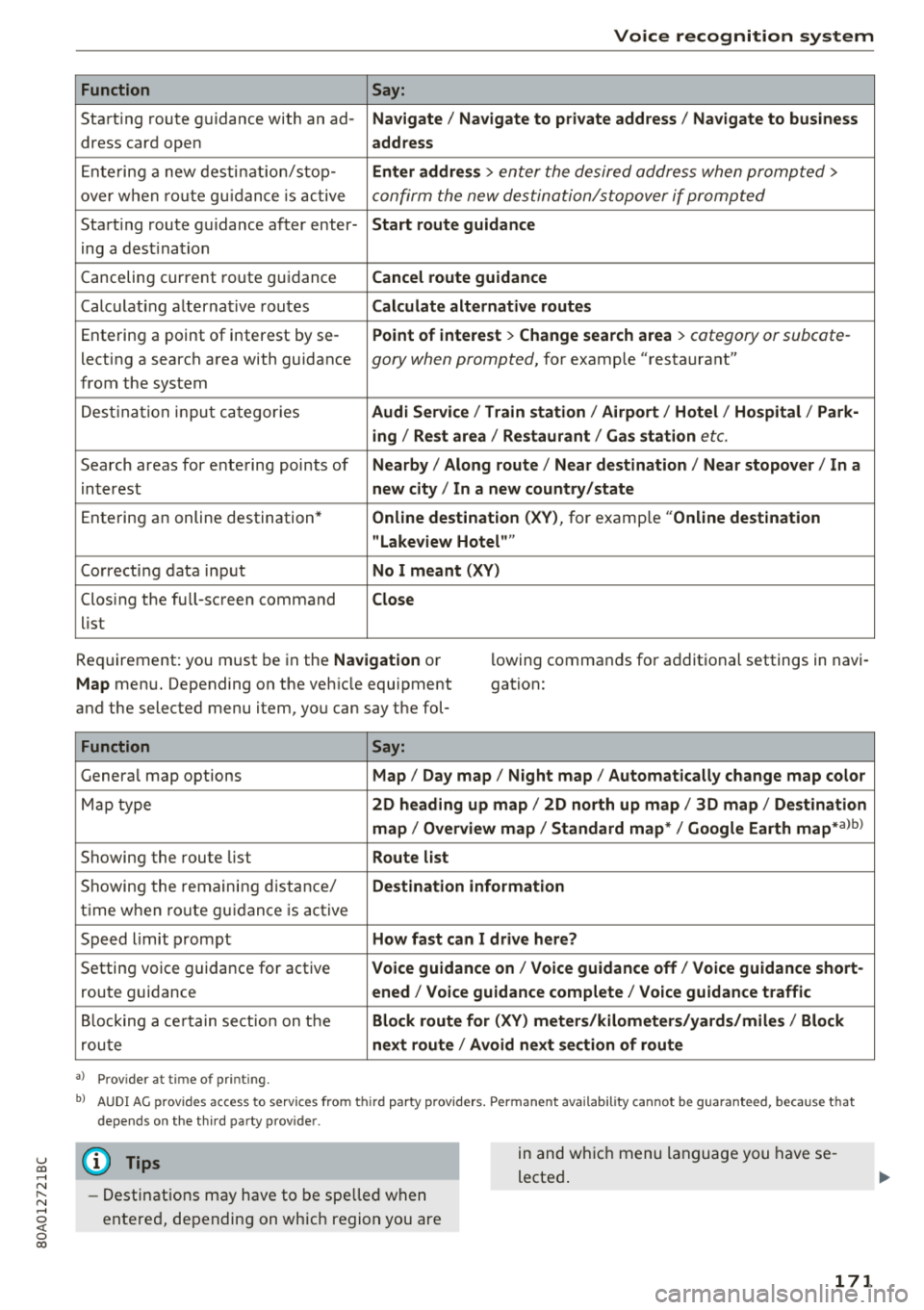
u co .... N r--N ..... 0 <( 0 00
Voice recognition system
Function
Say:
Start ing route g uidance with an ad- Navigate/ Navigate to p riv ate addre ss/ Navig ate to business
dress card open address
E nte ring a new desti nat ion/stop -Enter addr ess
> enter the desired address when prompted>
over w hen ro ut e gu idance is ac tive confirm the new destination/stopover if prompted
Start ing route guidance after enter- Start route guidance
ing a dest ination
Canceling current ro ute g uidance Cancel route guidance
Calc ulat ing a lternat ive routes Calculate alternative route s
Ente ring a point of interest by se -Point of intere
st
> Change sea rch a rea > category or subcote-
lecting a search area with guidance gory when prompted, for example "restaurant"
from the system
Dest ina tion input ca tegor ies Audi Service / Train station /Airport / Hot el / Ho spital / Park-
ing / Re st area / Restaurant / Gas station
etc.
Search areas for entering points of Nearby/ Along route / Near de stination / Near stopover / In a
interest new city/ In a new country /state
Entering an online destination* Online dest
ination (XV), for examp le "Online de stination
" Lakeview Hotel" "
Correct ing data input No I meant (XV)
Clos ing the full -screen command
Close
list
Requirement: you must be in the Navigation or
Map menu. Depending on the veh icle equipment
and the selected menu item, you can say t he fol- l
owing commands for additional settings in navi
gation:
Function Say:
Genera l map options Map/ Day map / Night map / Automat ically change map color
Map type 2D heading up map/ 2D north up map / 3D map / De stination
map / Overview map / Standard map */ Google Earth
map* albl
Showing the route list Route list
Showing the remaini ng d istance/ Destination information
time w hen route guidance is active
Speed limit prompt How fast can I drive here?
Setting voice guidance for active Voice guidance on/ Voice guidance off / Voice guidance short-
route guidance ened / Voice guidance complete / Voice guidan ce traffic
B locking a ce rtain sect ion on t he Block route for (XV) meter s/kilometers /yards /miles / Block
rou te next route / Avoid n ext se ction of route
a ) Pro vid er a t tim e of pr inting .
bl AU DI AG provi des acc ess to s ervi ce s fro m thir d par ty prov id ers. P ermane nt a vailabi lity canno t be guarant eed, beca use tha t
de pen ds on the th ird party p ro vid er.
(D Tips
- Destinations may have to be spelled when
entered, depending on which region you are in and wh
ich menu language you have se
lected .
171