ignition AUDI Q5 2018 User Guide
[x] Cancel search | Manufacturer: AUDI, Model Year: 2018, Model line: Q5, Model: AUDI Q5 2018Pages: 392, PDF Size: 60.56 MB
Page 39 of 392
u co ..... N r-N .....
~ 0 co
- Never leave your vehicle unattended when
the luggage compartment lid is open. A
child could climb into the vehicle through
the luggage compartment. If the luggage
compartment lid was then closed, the child
would be trapped in the vehicle and unable
to escape. To reduce the risk of injury, do
not allow children to play in or around the
vehicle. Always keep the luggage compart
ment lid and the doors closed when the ve
hicle is not in use.
- Always make sure no one is in the luggage
compartment lid's range of motion when it
is closing, especially near the hinges. Fin
gers or hands could be pinched.
(D Tips
- When the vehicle is locked, the luggage
compartment lid can be unlocked separately
by pressing the
c:s button on the remote
control key. The luggage compartment lid
locks automatically when it is closed again.
- The settings in the Infota inment system de
termine if the luggage compartment lid can
be opened us ing the
handle¢ page 35.
Automatic luggage compartment lid
Applies to: veh icles with automatic luggage compartme nt lid
The luggage compartment lid can be opened and
closed electrically.
F ig. 27 Driver's door: opening the luggage compartment
l id
Opening and closing
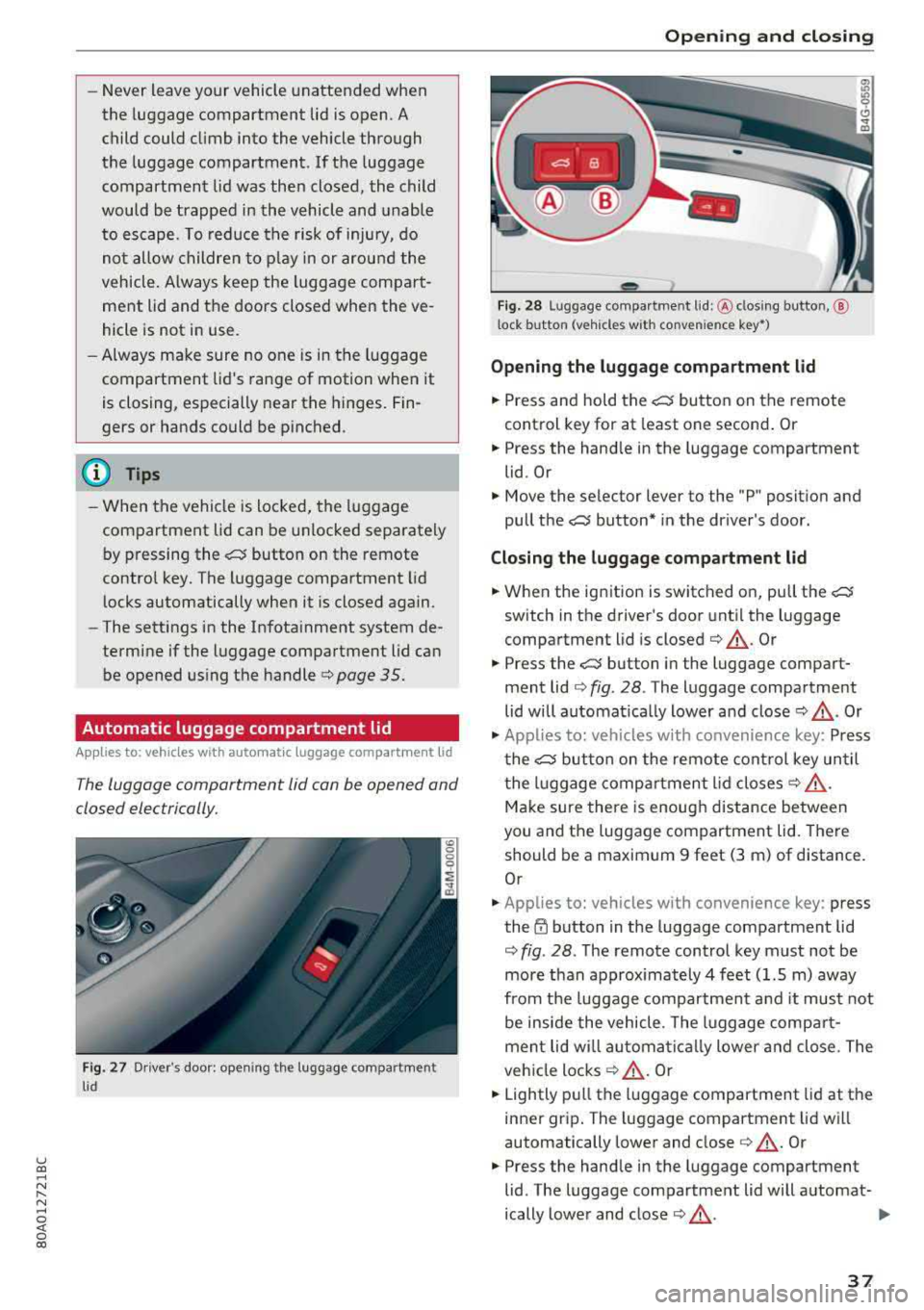
Fig. 28 Luggage compa rtment lid: @clos ing button, @
l ock button (vehicles with convenience key•)
Opening the luggage compartment lid
... Press and hold the c:s button on the remote
control key for at least one second . Or
... Press the hand le in the luggage compartment
lid. Or
... Move the selector lever to the "P" posit ion and
pull the
c:s button* in the dr iver's door.
Closing the luggage compartment lid
... When the ignition is switched on, pull the c:s
switch in the driver's door until the luggage
compartment lid is closed
¢ &_ . Or
... Press the c:s button in the luggage compart
ment
lid ¢ fig. 28 . The luggage compartment
lid will automat ica lly lower and
close ¢&_ . Or
.,. Applies to: vehicles with convenience key: Press
the
c:s button on the remote control key until
the lu ggage compartment lid
closes¢&.
Make sure there is enough distance between
you and the luggage compartment lid. There
should be a maximum 9 feet (3 m) of distance.
Or
... Applies to: vehicles with convenience key: press
the~ button in the luggage compartment lid
¢ fig. 28 . The remote control key must not be
more than approx imately 4 feet (1.5 m) away
from the luggage compartment a nd it must not
be inside the vehicle . The l uggage compart
men t lid wi ll automatically lower and close. The
vehicle
locks ¢&_ . Or
... Lightly pull the luggage compartment lid at the
inner gr ip . The luggage compartment lid will
automatically lower and close
¢ &.-Or
... Press the handle in the luggage compartment
lid . The luggage compartment lid will automat-
ically lower and close
¢ &_. .,.
37
Page 41 of 392
u co ..... N r-N .....
~ 0 co
-When the trailer socket is being used (for
example, for a bicycle rack), the luggage
compartment lid can be opened and closed using the handle or the foot motion activa
tion (vehicles with convenience key*).
Opening/closing the luggage compartment
lid with foot motion activation (kicking
movement)
Applies to: veh icles with conven ience key and sensor-control
led luggage compartment lid
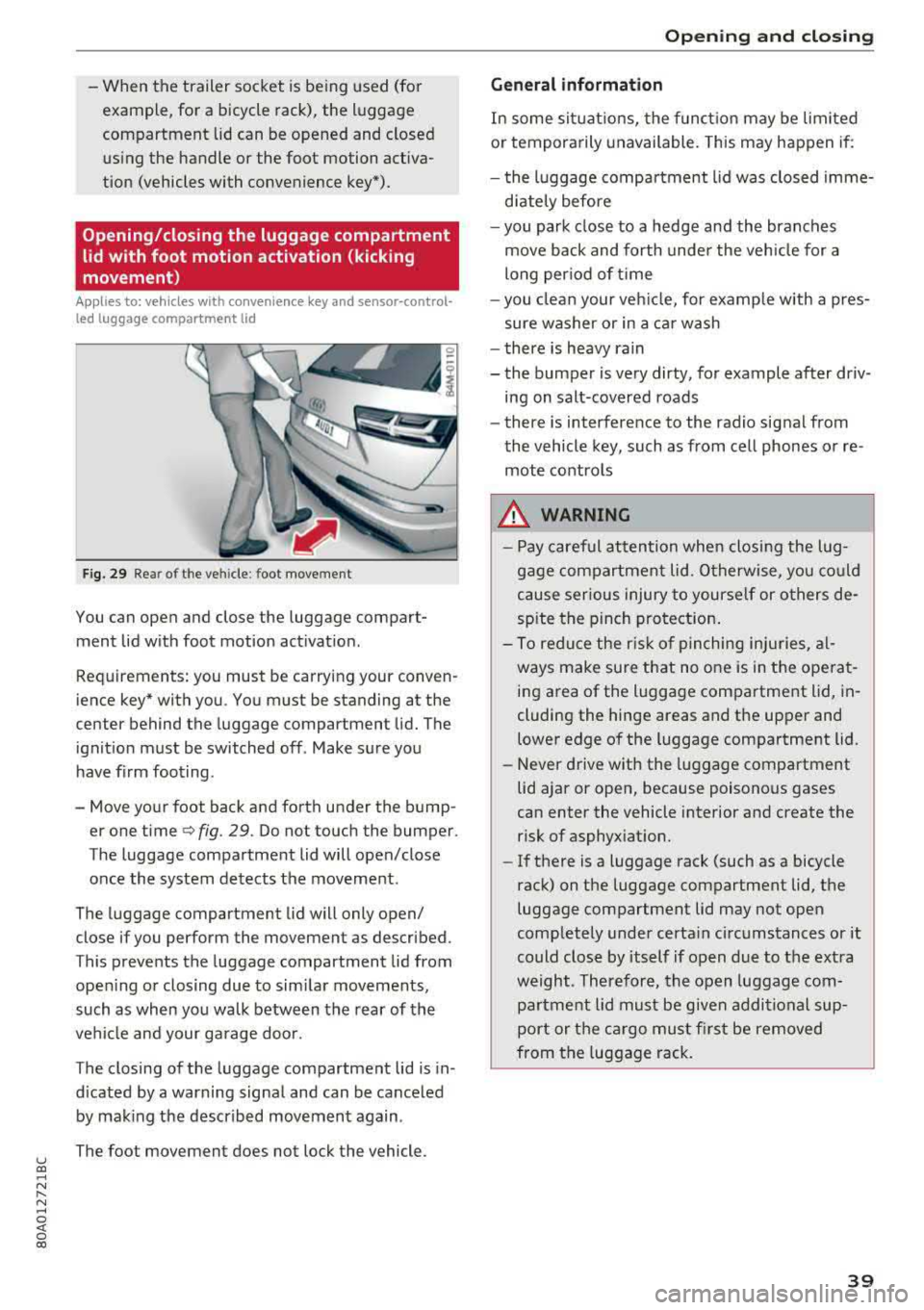
Fig. 29 Rea r of t he ve hicle : foot movement
You can open and close the luggage compart
ment lid w ith foot motion activat ion .
Requirements: you must be carrying your conven
ience key* with you . You must be standing at the
center behind the luggage compartment lid. The
ignition must be switched off . Make sure you
have f irm foot ing.
- Move your foot back and forth under the bump er one time
q fig. 29. Do not touch the bumper.
The luggage compartment lid will open/close
once the system detects the movement.
The luggage compartment lid will only open/
close if you perform the movement as described.
This prevents the luggage compartment lid from open ing or closing due to sim ilar movements,
such as when you walk between the rear of the
vehicle and your garage door.
The closing of the luggage compartment lid is in
d icated by a warning signa l and can be cance led
by making the described movement again .
The foot movement does not lock the vehicle.
Op eni ng and clos ing
General informat ion
In some sit uations, the funct ion may be limited
or temporarily unavailable. This may happen if:
- the l uggage compartment lid was closed imme
d iately before
- you park close to a hedge and the branches
move back and forth under the veh icle for a
long per iod of t i me
- you clean your veh icle, for example w ith a pres
sure washer or in a car wash
- there is heavy rain
- the bumper is very dirty, for example after driv- ing on salt-covered roads
- there is interference to the radio signal from
the vehicle key, such as from cell phones or re
mote controls
8,. WARNING
-Pay careful attention when closing the lug
gage compartment lid . O therwise, you co uld
cause serious injury to yourself or others de
spite the pinch protection .
-To reduce the risk of pinching inju ries, al
ways make sure that no o ne is in the ope rat
ing area of the luggage compartment lid, in
cluding the hinge areas and the upper and
lower edge of the luggage compartment lid.
-Never drive with the luggage compartment
lid ajar or open, because poisonous gases
can enter the vehicle interior and create the risk of asphyxiat ion.
-If there is a luggage rack (such as a bicycle
rack) on the luggage compartment lid, the
luggage compartment lid may not open
comp letely under certa in circumstances or it
could close by itself if open due to the ext ra
weight. Therefore, the open luggage com
partment lid must be given additional sup
port or the ca rgo must fi rst be removed
from the luggage rack.
3 9
Page 42 of 392
Opening and closing
Luggage compartment lid emergency
release
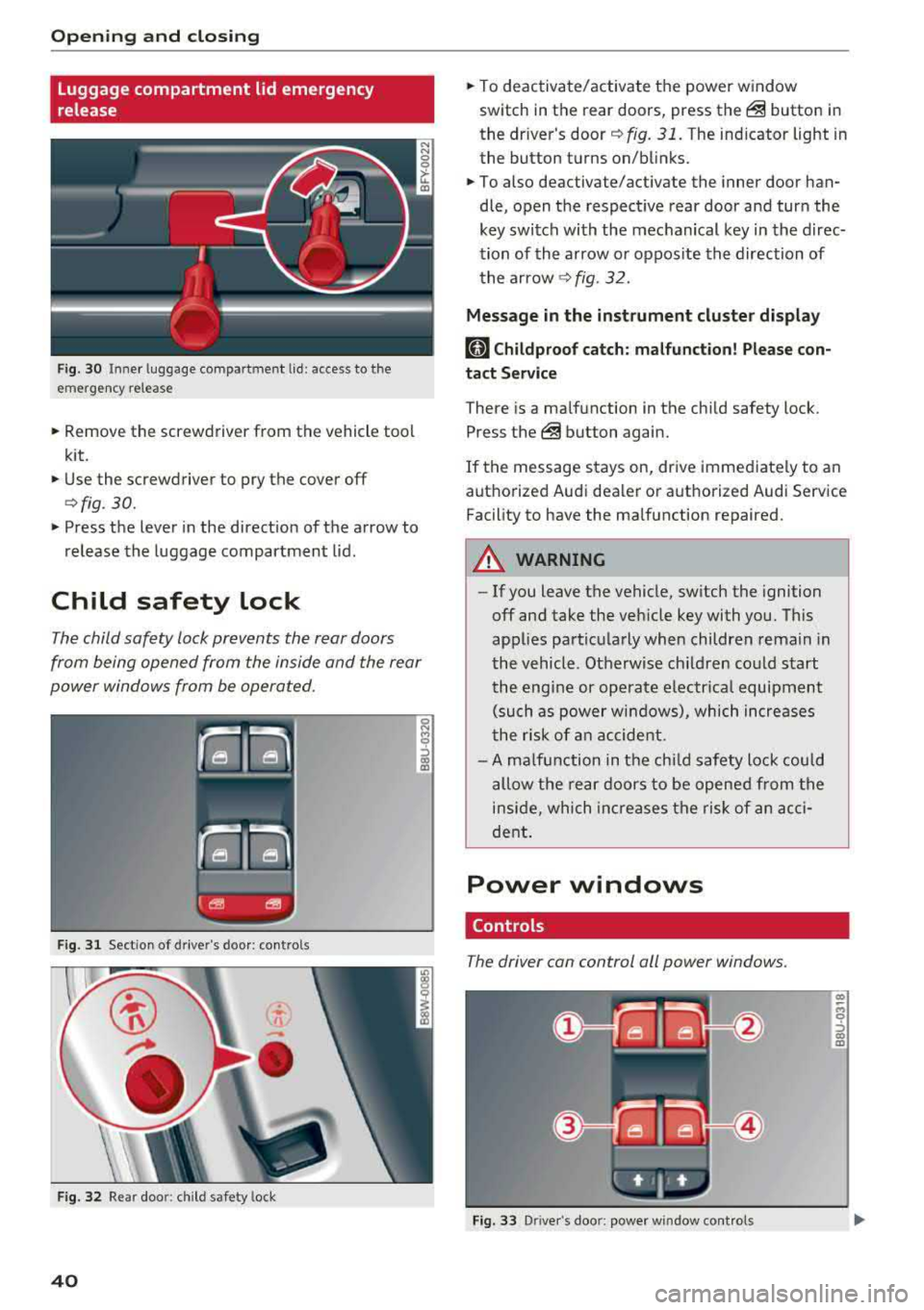
Fig. 30 Inne r luggage compartment lid : access to the
emergency release
.. Remove the screwdriver from the vehicle tool
kit.
.. Use the screwdriver to pry the cover off
<=>fig. 30.
.. Press the lever in the direct ion of the arrow to
release the luggage compartment lid .
Child safety lock
The child safety lock prevents the rear doors
from being opened from the inside and the rear
power windows from be operated.
F ig. 31 Sect ion of drive r's door: contro ls
Fig . 32 Re ar doo r: child safety lock
40
.. To deactivate/activate the power window
switch in the rear doors, press
the@ button in
the driver's
door ¢ fig. 31. The indicator light in
the button turns on/blinks .
.. To also deactivate/activate the inner door han
dle, open the respect ive rear door and turn the
key switch with the mechanical key in the direc
tion of the arrow or oppos ite the direction of
the arrow
¢fig. 32.
Message in the instrument cluster display
(81 Childproof catch: malfunction! Please con
tact Service
There is a ma lfunction in the chi ld safety lock .
Press
the @ button again .
If the message stays on, drive immediate ly to an
authorized Audi dealer or authorized Audi Service
Facility to have the malfunction repaired .
A WARNING
-- If you leave the vehicle, sw itch the ignition
off and take the veh icle key with you. This
applies particularly when children remain in
the vehicle. Otherwise ch ildren could start
the engine or operate electrical equipment
(such as power windows), which increases
the ris k of an accident.
- A malfunction in the child safety lock could
allow the rear doors to be opened from the
inside, which increases the risk of an acci
dent.
Power windows
Controls
The driver can control all power windows .
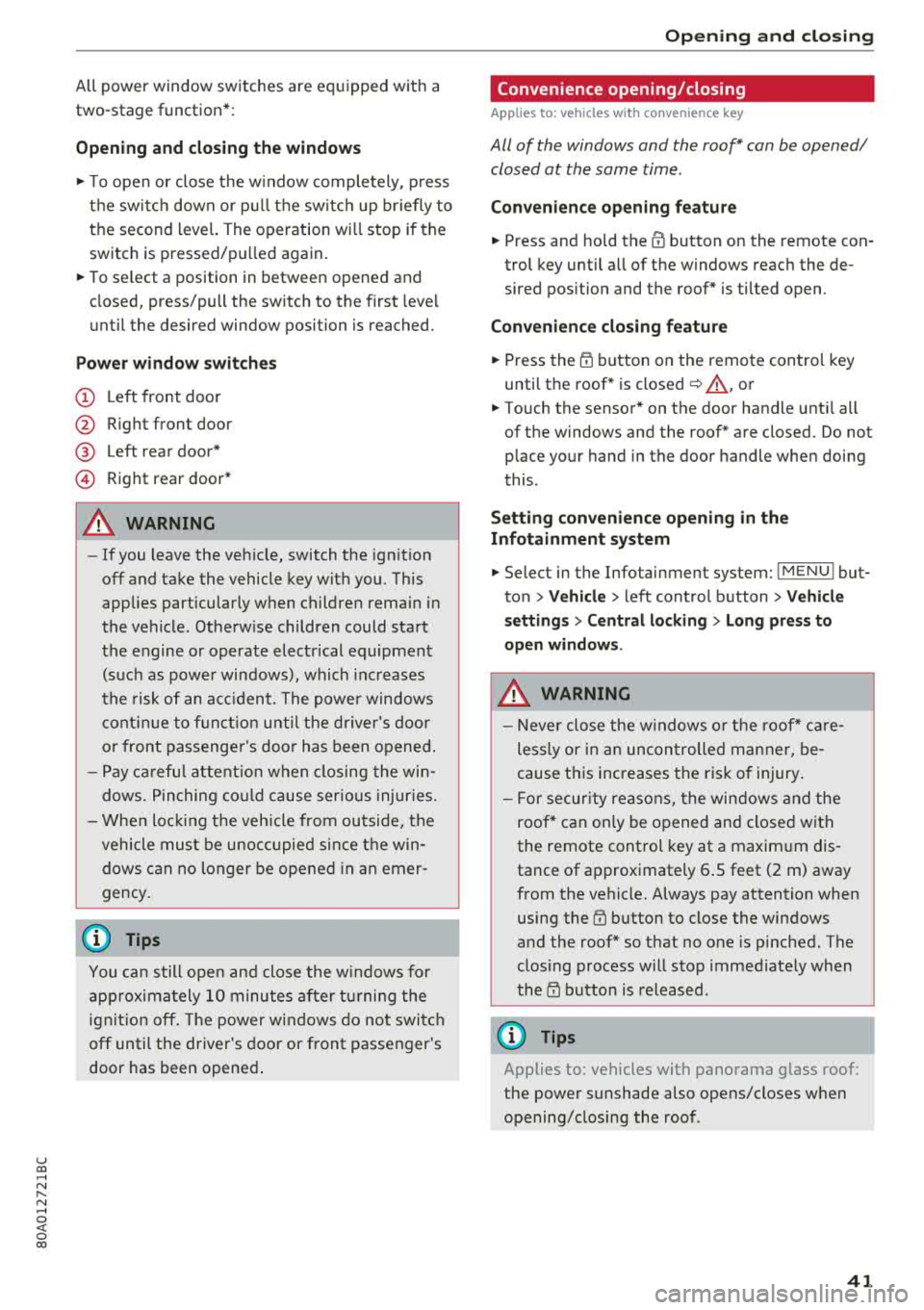
Fig. 33 Driver's doo r: power window cont rols
Cl) ~
"" 0
='> Cl) m
Page 43 of 392
u co ..... N ,..._
N ..... 0 <( 0 00
All power window switches are equipped with a
two-stage function *:
Opening and clo sing the windows
.,. T o open or close the w indow completely, p ress
the sw itc h down or p ull the sw itc h up br iefly to
the second level. The operation wi ll stop if the
switch is pressed/pu lled again.
.. To se lect a position in between opened and
closed, press/pull the switch to the first leve l
until the desired window position is reached.
Po wer window switch es
(D Left front door
@ R ight front door
@ L eft rea r door*
© Right rear door*
A WARNING
- If you leave the veh icle, switch the ignition
off and take the vehicle key with you. This
applies particularly when children remain in
the vehicle . Otherw ise children could start
the engine or operate elect rical equipment
(such as powe r windows), which inc reases
the risk of an acc ident. The power windows
c ontin ue to f unct ion until the driver's door
or front passenge r's door has been opened .
- Pay ca reful attent ion when closing the win
dows. Pin ching co uld cause serious injur ies.
- When loc king the veh icle from outside, the
vehicle mus t be unoccupied since the win
dows can no longer be opened in an emer
gency.
(D Tips
You can still open and close the w indows for
app roxima tely 10 minutes after tu rning the
ign it ion off. The power windows do no t switch
off until the driver's door or front passenger's
door has been opene d.
Opening and cl osing
Convenience opening/closing
Applies to: vehicles with convenience key
All of the windows and the roof* con be opened/
closed at the some time .
Convenience opening f eature
.. Press and hold the @ button on the remote con
trol key until a ll of the windows reach the de
sired position and the roof* is ti lted open .
Convenience closing feature
.. Press the t'fl button on the remote control key
until the roof* is closed
~ ,&. , or
.. Touch the sensor * on the door handle unti l all
of the windows and the roof* are closed. Do not place your hand in the door handle when doing
this .
Sett ing con ven ience opening in the
Infotainment system
.. Select in the Infotainment system: I MENU ! but
ton
> V ehicle > left control button > V ehicle
s etting s
> Central locking > Long press to
open windows .
A WARNING
-Never close the w indows o r the roof* ca re
lessly or in an uncon trolled manner, be
cause this increases the risk o f injury .
- For secur ity reasons, the win dows and the
roof* c an only be opened and closed with
the remote control key at a maxim um dis
tance of approximately 6.S feet (2 m) away
from the vehicle. Always pay attention when using the
t'fl button to close the windows
and the roof * so that no one is pinched. The
clos ing process will stop immediately when
the
t'fl button is released.
(D Tips
Applies to: vehicles with panorama glass roof:
the power sunshade also opens/closes when
opening/closing the roof .
-
41
Page 44 of 392
Opening and clo sin g
Correcting power window malfunctions
You can reactivate the one-touch up/down func
tion if it malfunctions.
.. Pull the power window switch up unt il the win
dow is completely raised.
.. Release the sw itch and pull it up again for at
least one second.
Panorama glass roof
Panorama glass roof, opening/closing the
sunshade
A ppl ies to: ve hicles w ith pan orama gl ass roo f
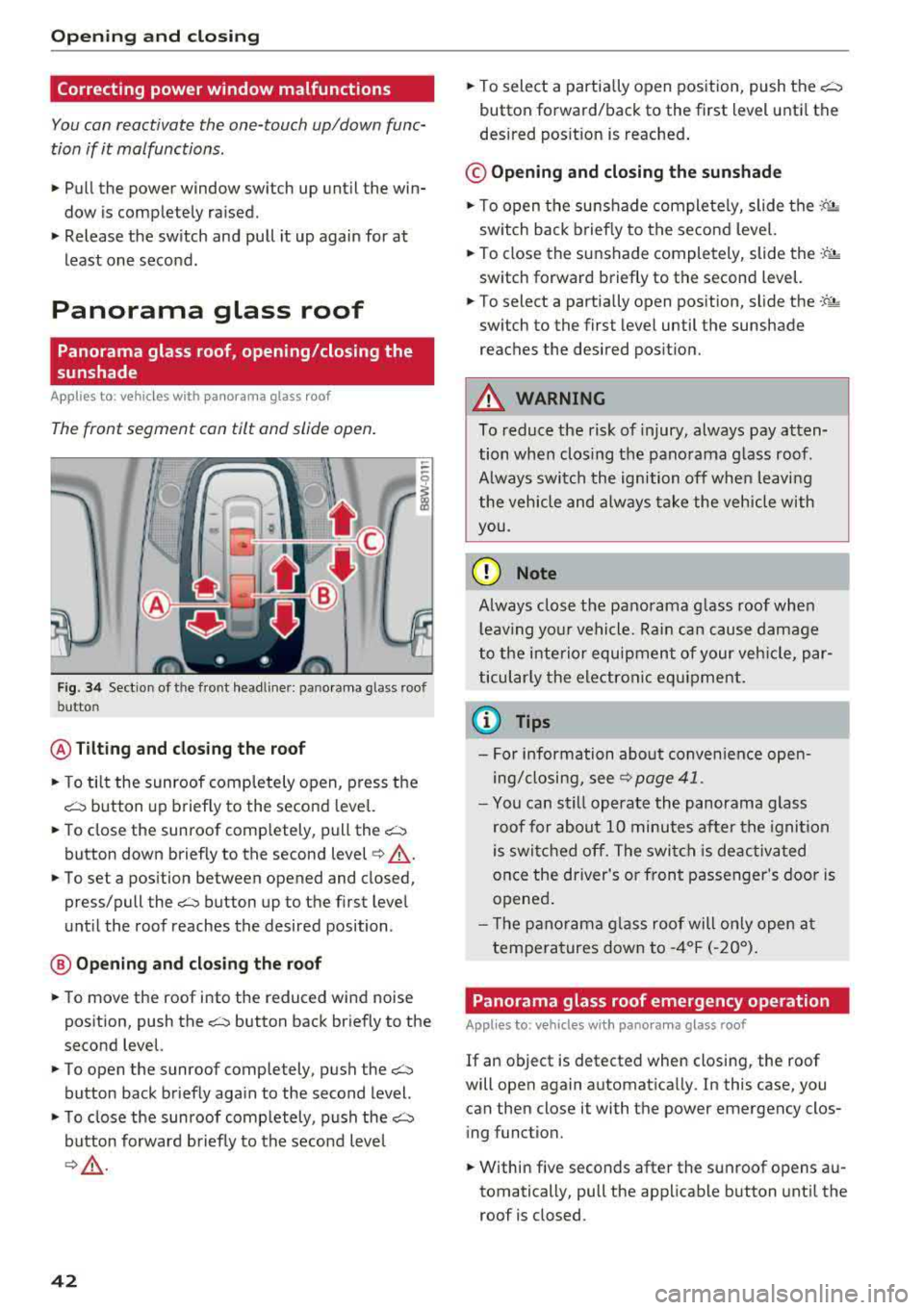
The front segment can tilt and slide open.
Fig. 34 Sect ion of the front headline r: pano rama glass roof
button
@ Tilting and clo sing th e roof
.. To tilt the sunroof comp letely open, press the
c::::::, button up briefly to the second leve l.
.,. To close the sunroof completely, pull the~
button down briefly to the second level¢_& .
.. To set a position between opened and closed,
press/pull
the~ button up to the first level
until the roof reaches the desired position .
@ Opening an d clos ing th e ro of
.,. To move the roof into the reduced wind noise
position, push
the~ button back briefly to the
second level.
.. To open the sunroof completely, push the~
button back briefly aga in to the second level.
.,. T o close the sunroof comp letely, push the c::::::,
button forward briefly to the second level
¢ ,& .
42
.,. To select a partia lly open pos ition, push the~
button forward/back to the first level unti l the
desired pos ition is reached .
© Opening and closing the sunshad e
.,. To open the sunshade completely, slide the ·-P. •·
sw itch back briefly to the second level.
.,. To close the su nshade completely, slide the -'f'~
switch forward briefly to the second level.
.,. To select a partially open position, slide the -:t- ;&
switch to the first level until the sunshade
reaches the desired posit ion.
A WARNING
To reduce the risk of injury, always pay atten
tion when clos ing the panorama g lass roof.
A lways switch the ignition off when leavi ng
the vehicle and always take the vehicle with
you.
(D Note
A lways close the panorama g lass roof when
l eav ing you r vehicle. Ra in can cause damage
to the i nterior equipment of your veh icle, par
ticular ly the electronic equ ipment.
(I) Tips
- For information about convenience open
ing/closing, see
9 page 41 .
-You can still operate the panorama glass
roof for about 10 minutes a fter the igni tion
is switched off. The swi tch is deactiv ated
once the driver's or front passenger's door is
opened .
- T he p anorama g lass roof will on ly open a t
temperatures down to
- 4°F ( -20°).
Panorama glass roof emergency operation
App lies to: vehicles wi th pano ra m a g lass ro of
If an object is detected when closing, the roof
will open again automatica lly. In this case, you
can then close it with the power emergency clos
i ng function.
.,. Within five seconds after the sunroof opens au
tomatically, pull the applicable button unti l the
roof is closed.
Page 47 of 392
Lights and Vision
Exterior Lighting
Switching the lights on and off
--- ----~-----'~
i
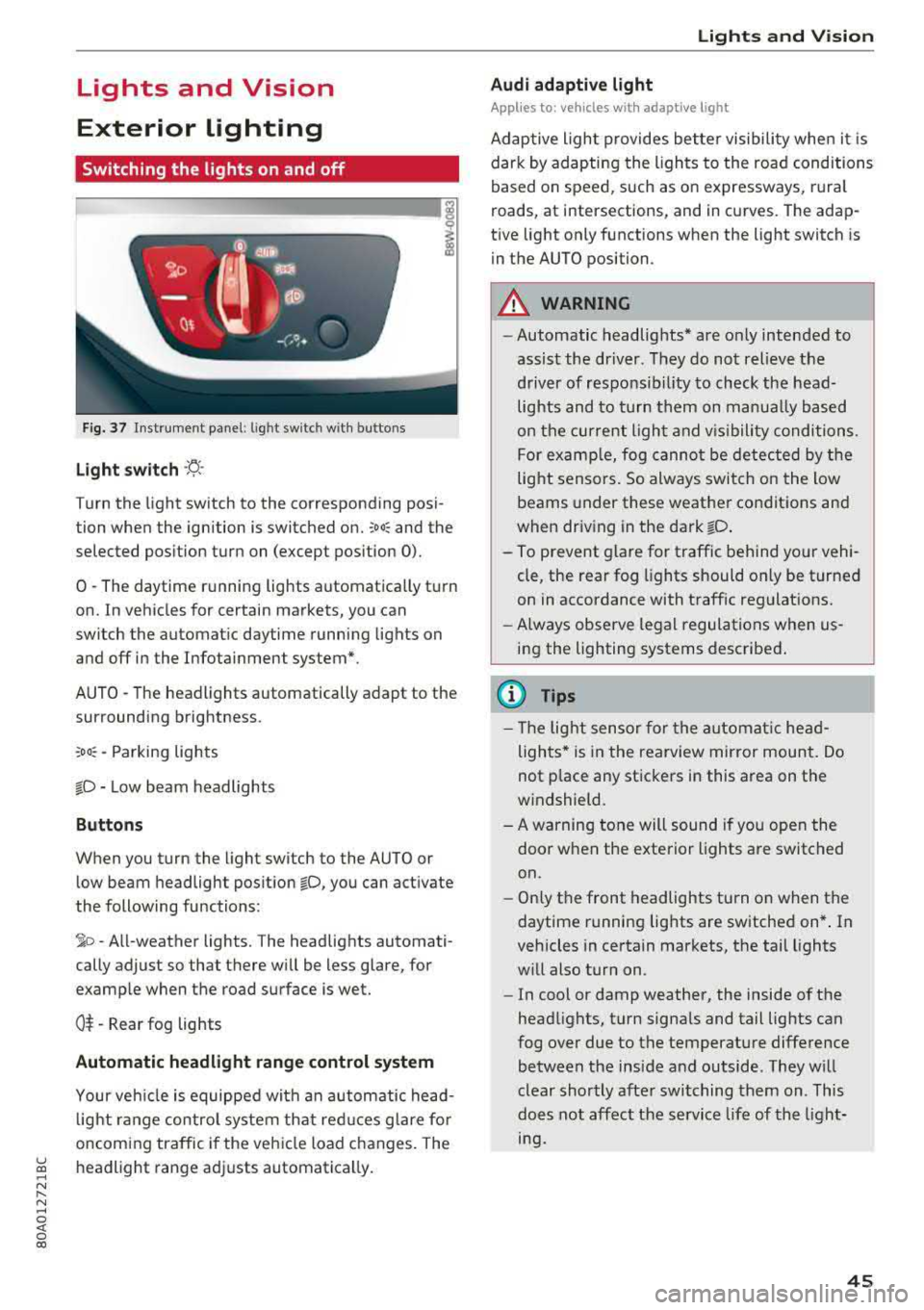
Fig. 37 Instrument p anel: l ig ht switc h with buttons
Light switch ·'!:! ·
Turn the light sw itch to the corresponding posi
tion when the ignition is switched on.
:oo: and the
selected pos ition turn on (except pos ition 0).
0 -The daytime r unning lights automat ica lly t urn
on. In vehicles for certain markets, you can
switch the automatic daytime running lights on
and off in the Infotainment system*.
AUTO
-T he headlights automatically adapt to the
surrounding brightness.
: oo : -Parking lights
io -Low beam headlights
Buttons
When you turn the light switch to the AUTO or
low beam headlight pos ition
io, you can activate
the following functions:
~ o -A ll-weather lights. The headlights automati
cally adjust so that there wi ll be less glare, for
examp le when the road surface is wet.
O t -Rear fog lights
Automatic headlight range control system
Your veh icle is equipped with an automatic head
l ight range contro l system that re duces g lare fo r
oncoming traffic i f the vehicle load c hanges. The
~ headlight range ad justs automatica lly . ..... N r-N .....
~ 0 co
Lights and V ision
Audi adaptive light
Appl ies to: vehicles wit h adaptive light
Adaptive ligh t provides better visibili ty whe n it i s
dark by adapting the lights to the road conditions
based on speed , such as on e xpressways, rura l
roads, at intersections, and in c urves. The adap
t ive light only functions when the light sw itch is
i n the AUTO position .
A WARNING
--Automatic headlights* are on ly intended to
assist the driver. They do not relieve the
driver of responsibil ity to check the head
lights and to t urn t hem on manua lly based
on t he curren t ligh t and v is ibility condition s.
For examp le, fog canno t be detec ted by the
light sensors. So always switch on the low
beams under these weather co nditions and
when driv ing in the da rk
io .
- To prevent glare for traffic behind yo ur vehi
cle, the rear fog lights should only be turned
on in accordance with traff ic regulat ions.
- Always observe legal regulations when
us
ing the lighting systems desc ribed .
(D Tips
- The lig ht sensor for the automat ic he ad
lights * is in the rearview mir ror mount. Do
not p lace any st ickers in this area on the
windshield.
- A warning tone will sound if you open the door when the exte rior lights a re switched
on .
- Only t he front headlights turn on when t he
daytime running lights are switched on *. In
vehicles in certain markets, the tail lights
w ill also turn on .
- In cool or damp weather, the inside of the
head lights, turn signa ls and tail lights can
fog over due to the temperature diffe rence
between the inside and outside . They will
clear shortly afte r swi tching them on . This
does not aff ect the service life of the light
mg.
45
Page 48 of 392
Lights and Vision
Turn signal and high beam lever
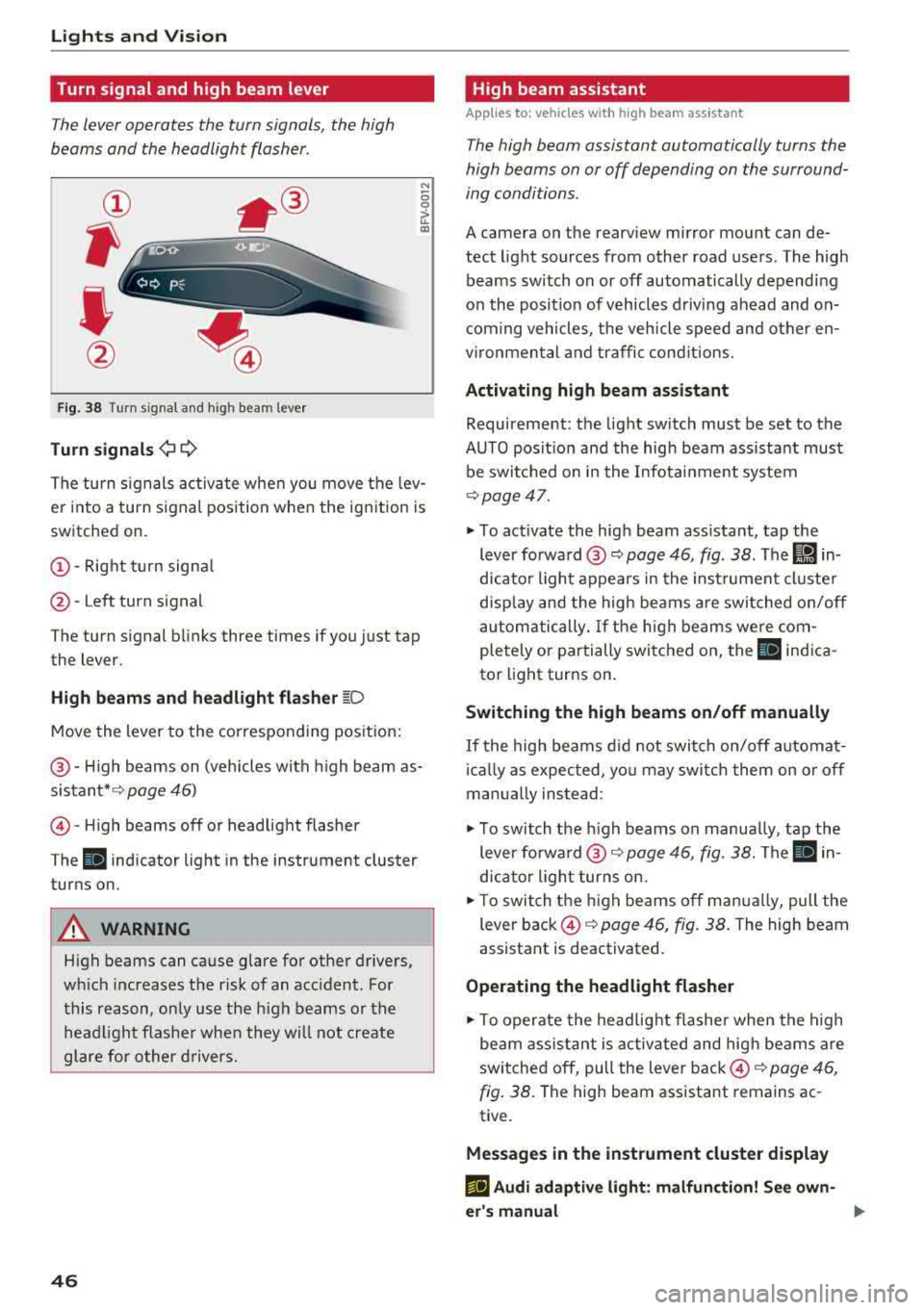
The lever operates the turn signals, the high
beams and the headlight flasher .
Fig. 38 Turn sig nal and high beam lever
Turn signals¢ Q
N
0 0
> u.. a,
The turn signals activate when you move the lev
er into a turn signal position when the ignition is
switched on.
@ -Right turn signal
@-Left turn signal
The turn signal blinks three times if you just tap
the lever.
High beams and headlight flasher ~D
Move the lever to the corresponding position:
@ -High beams on (vehicles with high beam as
sistant*¢ page 46)
©-High beams off or headlight flasher
The
II indicator light in the instrument cluster
turns on .
A WARNING
High beams can cause glare for other drivers,
wh ich increases the risk of an accident. For
this reason, only use the high beams or the
headlight flasher when they will not create
glare for other drivers.
46
High beam assistant
App lies to : vehicles with high beam ass istant
The high beam assistant automatically turns the
high beams on or off depending on the surround
ing conditions .
A camera on the rearview mirror mount can de
tect light sources from other road users. The high
beams switch on or off automatically depending
on the posit ion of vehicles driving ahead and on
coming vehicles, the vehicle speed and other en
vironmen tal and traffic conditions.
Activating high beam assistant
Requirement: the light sw itch must be set to the
AUTO posit ion and the high beam assistant must
be switched on in the Infotainment system
¢page 47 .
• To act ivate the high beam ass istant, tap the
lever
forward @~ page 46, fig . 38. The Ii] in
dicator light appears in the instrument cluster
display and the high beams are switched on/off
automatically. If the high beams were com
pletely or partially switched on, the
SI indica
tor light turns on .
Switching the high beams on/off manually
If the high beams did not switch on/off automat
icall y as expected, you may switch them on or off
manua lly instead :
• To switch the h igh beams on manually, tap the
lever
forward @~ page 46, fig. 38. The II in
dicator light turns on.
• To switch the high beams off manually, pull the
lever back ©¢
page 46, fig. 38. The high beam
assistant is deactivated.
Operating the headlight flasher
• To operate the headlight flasher when the high
beam assistant is activated and high beams are
switched off, pull the lever back ©¢
page 46,
fig. 38.
The high beam assistant remains ac
tive.
Messages in the instrument cluster display
EIJ Audi adaptive light: malfunction! See own
er's manual
Page 52 of 392
Lights and Vision
move out of reverse and into another gear, the
new mirror position is stored and assigned to the
key you are using.
The mirror goes back into its original position
once you drive forward faster than 9 mph
(15 km/h) or turn t he ignition
off.
A WARNING
Curved mirror surfaces (for example convex)
enlarge the field of vision. However, they
make objects in the mirror appear smaller
and farther away. You may estimate incor
rectly when you use these mirrors to gauge
your distance from the vehicles behind you
when changing lanes, which increases the risk of an accident.
«1j) Note
-Applies to vehicles with power folding exte
rior mirrors: if the mirror housing was
moved by outside forces (such as an impact
when maneuvering), you must use the pow
er folding function to fold the mirror all the
way out. The mirrors will make a loud noise
when they latch into place. The mirror hous
ing must not be moved back into place by
hand because this would impair the func
tion of the mirror mechanism.
- Applies to vehicles without power folding
exterior mirrors : if the mirror housing was
moved by outside forces (such as an impact
when maneuvering), you must move it back in place by hand.
- If you wash the vehicle in an automatic car
wash, you must fold the exterior mirrors in
to reduce the risk of damage to the mirrors.
Never fold power folding exterior mirrors*
by hand . Only fold them in and out using
the power controls.
(D Tips
-If the power adjusting function malfunc
tions, the glass in both mirrors can be ad
justed by pressing on the edge of it by hand.
- The exterior mirror settings are stored with
the memory
function*~ page 59.
so
Dimming the mirrors
Your vehicle is equipped with a manual or auto
matic* dimming rearview mirror .
Manual dimming rearview mirror
.,. Pull the lever on the bottom of the mirror back.
Automatic dimming rearview mirror*
.,. The interior and exterior mirrors dim automati
cally when light shines on them, for example
from headlights on a vehicle behind you.
A WARNING
If the glass on an automatic dimming mirror
breaks, electrolyte can leak out. This liquid
can irritate the skin, eyes and respiratory sys
tem. If there is contact with the fluid, flush immediately with plenty of water. Consult a
physician if necessary .
- Repeated or long-term exposure to electro
lyte fluid can lead to irritation of the air
ways, especially in people with asthma or other respiratory conditions. Take deep
breaths immediately after leaving the vehi
cle or, if this is not possible, open all of the
doors and windows as wide as possible.
- If electrolyte fluid enters the eyes, flush
them thoroughly with a large amount of
clean water for at least 15 minutes and then
seek medical attention.
- If electrolyte fluid comes into contact with
the skin, flush the affected area with clean
water for at least 15 minutes and then clean
with soap and water and seek medical at tention. Clean affected clothing and shoes
thoroughly before wearing again.
- If the fluid was swallowed and the person is
conscious, flush the mouth with water for at
least 15 minutes . Do not induce vomiting
unless this is recommended by medical pro
fessionals. Seek medical attention immedi
ately .
@ Note
If the glass on an automatic dimming mirror
breaks, electrolyte can leak out. This liquid
damages plastic surfaces and paint. Clean
Page 54 of 392
Lights and Vision
@-Fast wiping
©-Single wipe. If you hold the lever in this posi
tion longer, the wipers switch from slow wiping
to fast wiping .
®-Clean the windshield . The wipers wipe one
time after several seconds of driving to remove
water droplets . You can switch this function off
by moving the lever to position ® within
10 sec
onds of the afterwipe. The afterwipe function is
r e activated the next time you switch the ignition
on.
Clean the headlights*. The headlight washer sys
tem* operates only when the low beam head
lights are on. If you move the lever into position
@, the headlights will be cleaned at fixed inter
vals .
@-Wipe the rear window. The number of wipes
depends on the windshield wiper movement.
The rear wiper automatically switches on when
the reverse gear is selected and the front wind
shield wipers are on and running.
(j) -Clean the rear window. The number of wipes
depends on how long the lever is held in position
(z). This may also clean the rearview camera, de
pending on the vehicle equipment.
A WARNING
- The rain sensor is only intended to assist the
driver. The driver may still be responsible
for manually switching the wipers on based on visibility conditions.
- The windshield may not be treated with wa ter-repelling windshield coating agents . Un
favorable conditions, such as wetness, dark
ness or low sun, can result in increased
glare, which increases the risk of an acci
dent. Wiper blade chatter is also possible.
- Properly functioning windshield wiper
blades are required for a clear view and safe
driving ~ page 53, Replacing wiper
blades .
«1j) Note
-If there is frost, make sure the windshield
wiper blades are not frozen to the wind-
52
shield. Switching on the windshield wipers
when the blades are frozen to the wind shield can damage the wiper blades.
- The windshield wiper system must be
switched off (lever in position 0) before us
ing a car wash. This prevents the wipers
from switching on unintentionally and caus ing damage to the windshield wiper system.
(D Tips
- The windshield wipers switch off when the
ignition is switched off. You can activate the
windshield wipers after the ignition is
switched back on by moving the windshield
wiper lever to any position .
- Worn or dirty windshield wiper blades result
in streaking. This can affect the rain sensor
function . Check your windshield wiper
blades regularly.
- The washer fluid nozzles for the windshield
washer system are heated at low tempera
tures when the ignition is on.
- When stopping temporarily, such as at a
traffic light, the speed of the windshield
wipers automatically reduces by one level.
Cleaning the wiper blades
Clean the wiper blades when you see wiper
streaks. Use a soft cloth and a glass cleaner.
Windshield wiper
.,. Place the windshield wiper arms in the service
position
~ page 53.
.,. Fold the windshield wiper arms away from the
windshield.
Rear window wiper
.,. Fold the wiper arm away from the rear window.
A WARNING
Dirty windshield wiper blades can impair vi
sion, which increases the risk of an accident.
-
Page 55 of 392
u co ..... N r-N .....
~ 0 co
Replacing wiper blades
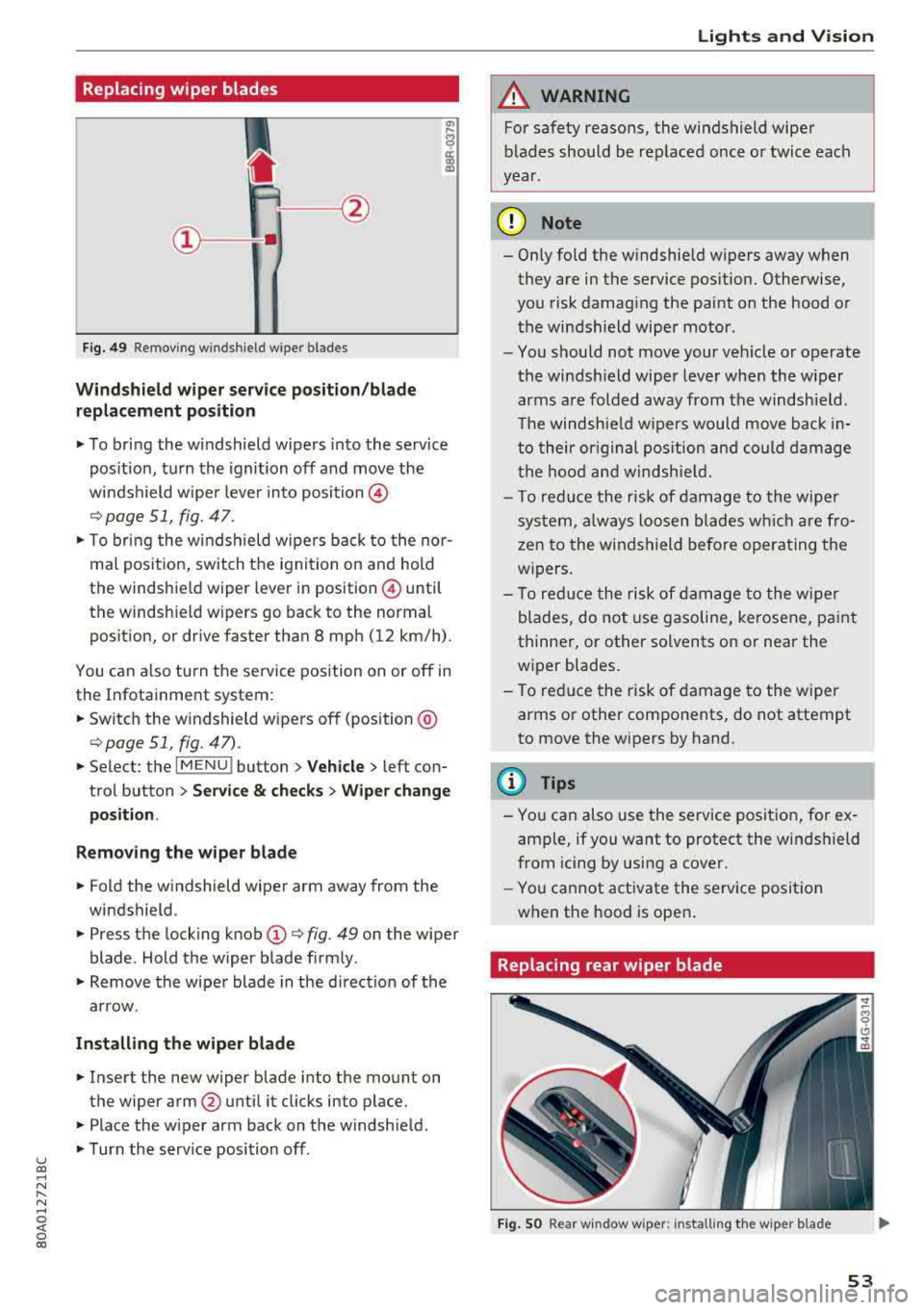
Fig. 49 Remov ing w indshi el d w iper blades
Windshield wiper serv ice po sition /blade
replacement position
"' To bring the windshield wipers into the service
pos ition, turn the ignition off and move the
windshield wiper lever into position @
¢ page 51, fig. 47.
"'T o bring the windshield wipers back to the nor
mal pos ition, switch the ignition on and hold
the windshie ld wiper lever in posit ion @ until
the windshie ld wipers go back to the normal
pos ition, or d rive faster than 8 mph (12 km/h) .
You can a lso tu rn the service position on or off in
the Infotainment system :
"'Switch the windshield wipers off (position @
¢page 51 , fig. 47) .
"'Select : the I MENU ! button> Vehicle> left con
trol button >
Service & checks > Wiper change
position .
Removing the wiper blade
"'Fold the windshield wiper arm away from the
windshield .
"' Press the locking knob (D ¢ fig. 49 on the wiper
blade . Hold the wiper blade firmly .
"'Remove the wiper blade in the direct ion of the
arrow .
Installing the wiper blade
"'Insert the new wiper blade into the mount on
the wiper arm
@ until it clicks into place.
"'Place the wiper arm back on the windshield .
"'Turn the serv ice position off.
Lights and Vision
A WARNING
For safety reasons, the windshield wiper
blades should be replaced once or twice each
year .
(D Note
- Only fold the windshield wipers away when
they are in the service pos ition. Otherwise,
you risk damaging the paint on the hood or
the windshield wiper motor .
- You should not move your veh icle or operate
the windsh ield wiper lever when the wiper
arms are folded away from the windshield .
Th e windshield wipers would move back in
to their or iginal pos ition and could damage
the hood and windshield.
- T o red uce the risk of damage to the wiper
system, always loosen blades wh ich are fro
zen to the windshield before operating the
w ipers.
- To reduce the risk of damage to the wiper
blades, do not use gasoline, kerosene, paint
thinner, or other solvents on or near the
wiper blades.
- To reduce the risk of damage to the wiper
arms or other components, do not attempt
to move the wipers by hand.
(D Tips
- You can also use the service position, for ex
ample, if you want to protect the windshield
from icing by using a cover .
- You cannot activate the service posit ion
when the hood is open .
Replacing rear wiper blade
Fig . SO Rear w indow wiper : installing the w ip er blade
53