ignition AUDI Q5 2018 Owner's Manual
[x] Cancel search | Manufacturer: AUDI, Model Year: 2018, Model line: Q5, Model: AUDI Q5 2018Pages: 392, PDF Size: 60.56 MB
Page 58 of 392
Seats and stor age
Seats and storage
General information
A WARNING
See c> page 252, Driving safety for important
information, tips, suggestions and warnings
that you should read and follow for your own
safety and the safety of yo ur passengers .
Front seats
Power seat adjustment
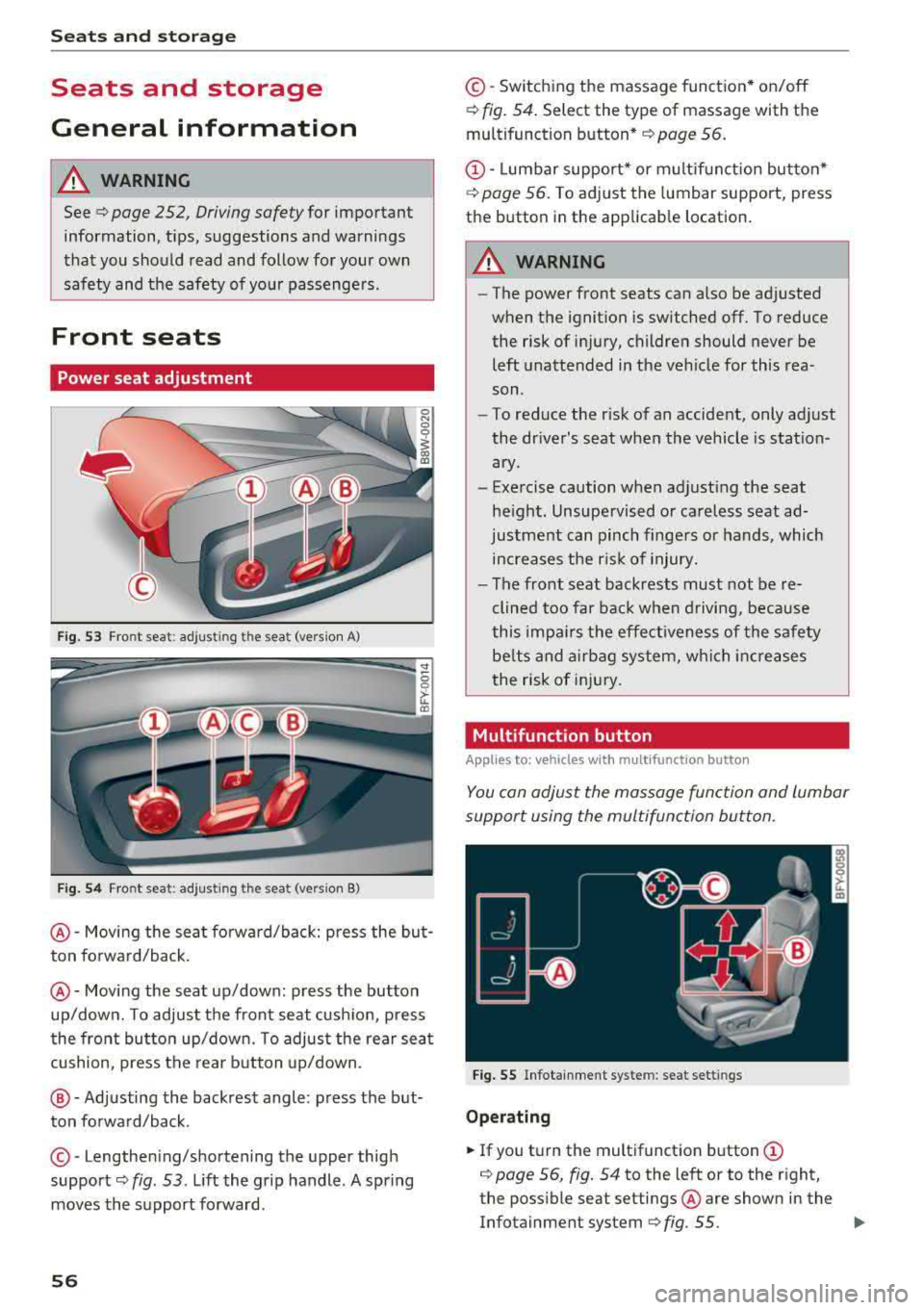
Fig. 53 Front seat : adjust ing the seat (vers ion A)
Fig. 54 Fro nt seat: adjusting the sea t (vers ion B)
@ -Movi ng the seat fo rwa rd/back: press the but
ton forwa rd/back .
@-Moving the seat up/down: press the button
up/dow n. To adjust the front seat cush ion, press
the front button up/down. To adjus t the rear sea t
cushion, press the rear b utton up/down.
@ -Adjusting the backrest angle : press the but
ton fo rward/back.
© -Lengthe ning/shortening the upper thigh
support
c> fig . 53 . Lift the grip handle . A spring
moves the su pport forward .
56
©-Switching the massage funct ion* on/off
c> fig. 54. Select the type of massage with the
multifunction button *
c> page 56.
CD-Lumbar support* or m ultif unction button*
c> poge 56. To ad just the lumbar support, press
the button in the applicab le location .
A WARNING
-The power front seats can also be adjusted
when the ignition is switched off. To reduce
the risk of injury, children should never be
left unattended in t he vehicle for this rea
son .
-To reduce the r isk of an accident, only adjust
the driver's seat when the vehicle is station
ary .
-Exe rcise caution when adjust ing the seat
he igh t. Unsupe rvised or ca reless seat ad
justment can pinch finge rs or hands, which
increases the r is k of injury.
- The front seat backrests must not be re
clined too far bac k when d riving, beca use
this impa irs the effect iveness of the safety
be lts and a irbag sys tem, w hich i ncreases
the risk of inj ury.
Multifunction button
App lies to: vehicles wi th mult ifunc tion butto n
You con adjust the massage function and lumbar
support using the multifunction button.
Fig . 55 Infotainment system: seat sett ings
Op erating
... If you tu rn the multifunction button CD
c> page 56, fig. 54 to the left or to the right,
the poss ible seat settings @are shown in the
Infotainment system
c> fig . 55. ..,
Page 61 of 392
u co ..... N r-N .....
~ 0 co
Installing the head restraints
.,. Slide the posts on the head restraint dow n into
the gu ides unt il the posts click into place .
... Press the button -arrow-c::> fig. 60 and slide the
head restraint all th e way down. You should not
be able to remove the head restraint from the
backrest without pressing the button.
A WARNING
-Always read and follow the applicable warn
ings
c::> page 255 , Proper adjustment of
head restraints .
-Only remove the head restraints from the
rear seats when it is necessary for install ing
a ch ild safety sea t
c::> page 291, Child safe
ty. Install the head restra int aga in immedi
ately once the chi ld safety seat is removed .
Driv ing with the head restraints removed or
not in the upright position inc reases the risk
of serious inj ury.
Memory function
Description
Applies to: vehicles with memory function
Using the memo ry funct ion, you can qu ickly and
eas ily store a pe rsonal seat profile for the dr iver
and recall the setti ngs later. The memory f unc
tion is controlled by the remo te control key and
the memory buttons in the drive r's door.
The drive r's seat p rofile is stored again and as
signed to t he remote contro l key each time the
ve hicle is locked. When you open the door, the
seat prof ile is automatica lly reca lled . If two peo
p le use the vehicle, it is recommended that each
person always uses their
"own" remote control
key .
Two seat profiles can be stored each using the memory buttons . Once they are stored, these
seat profi les can be se lected at any time.
The fo llow ing settings are stored :
Seats and storag e
Remote con- Memory but-
trol key ton
Driver Driver
Seat X X
Both exterior
mirrors*
X X
Remote control key
Applies to: vehicles with memory function
The driver's seat profile can be assigned to the
remote control key when the vehicle is locked .
... Select in the Infotainment system: I MENU! but
ton
> Vehicle > left control button > Vehicle
setting s > Seat s > Driver's seat > Store set
ting s on remote control ke y.
(D Tips
If you do not wish to have the seat prof ile for
anothe r dr iver assigned to the remote control
k ey, sw itch the memory f unction off in the In
fotainment system.
Memory buttons
Applies to: vehicles with memory function
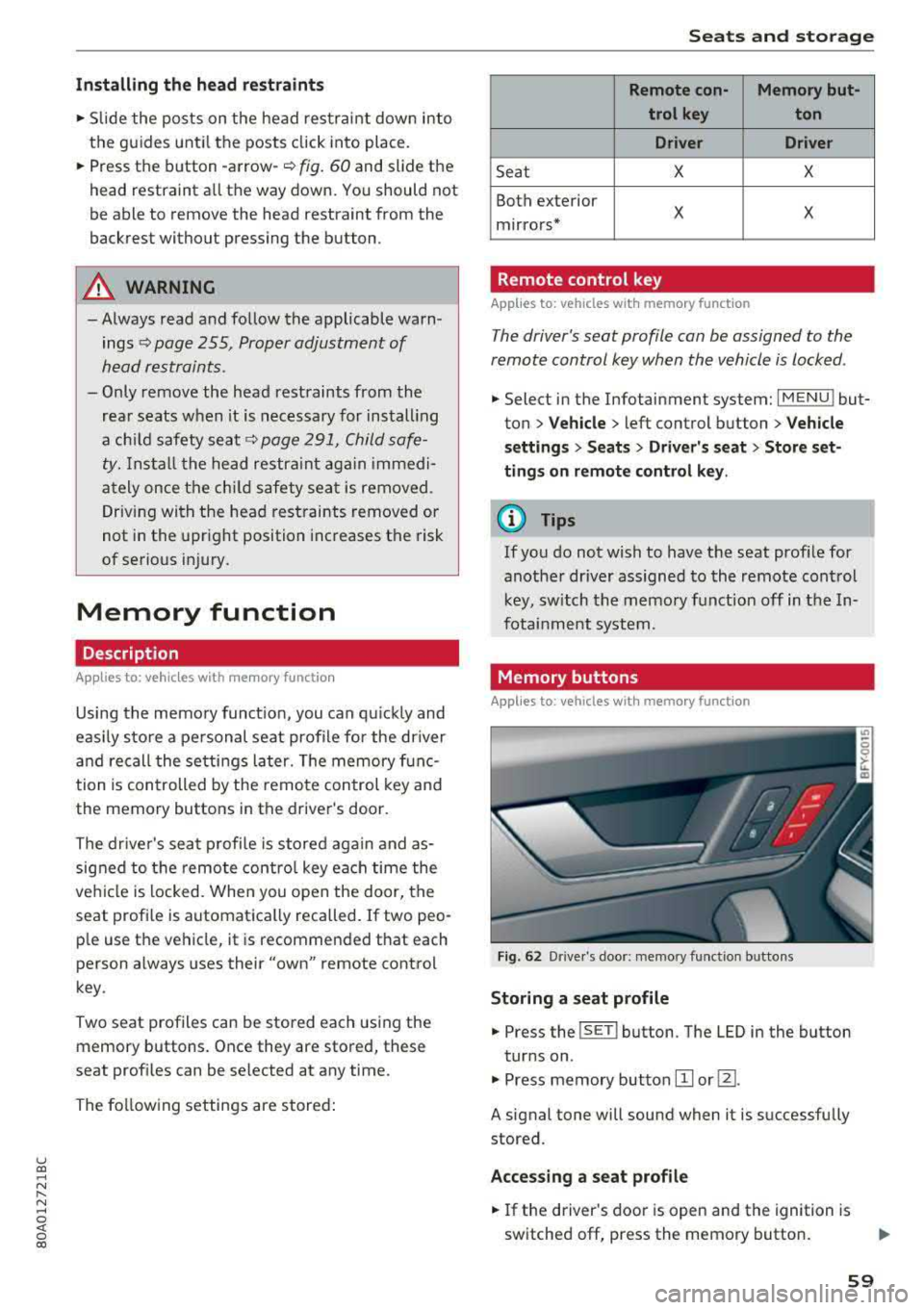
Fig. 62 Drive r's doo r: memory funct io n bu ttons
Storing a seat p rofile
... Press the ISET I button. The LED in the button
tur ns on .
.,. Press memory button IT] or@.
A signal tone will sound when it is successfully
stored.
Acces sing a seat profile
... If the driver's door is open and the ignition is
switched off, press the memory button .
59
Page 62 of 392
Seats and stor age
,.. If the driver's door is closed or the ignition is
switched on, press and ho ld the memory but
ton until the seat adjustment is comp lete.
A WARNING
- For safety reasons, the seat setting can only
be recalled when the vehicle is stationary to
reduce the risk of an accident.
- In an emergency, seat adjustment operation
can be stopped by press ing the
ISETI button
or the buttons @or@
¢ page 56, fig . 54.
Power sources
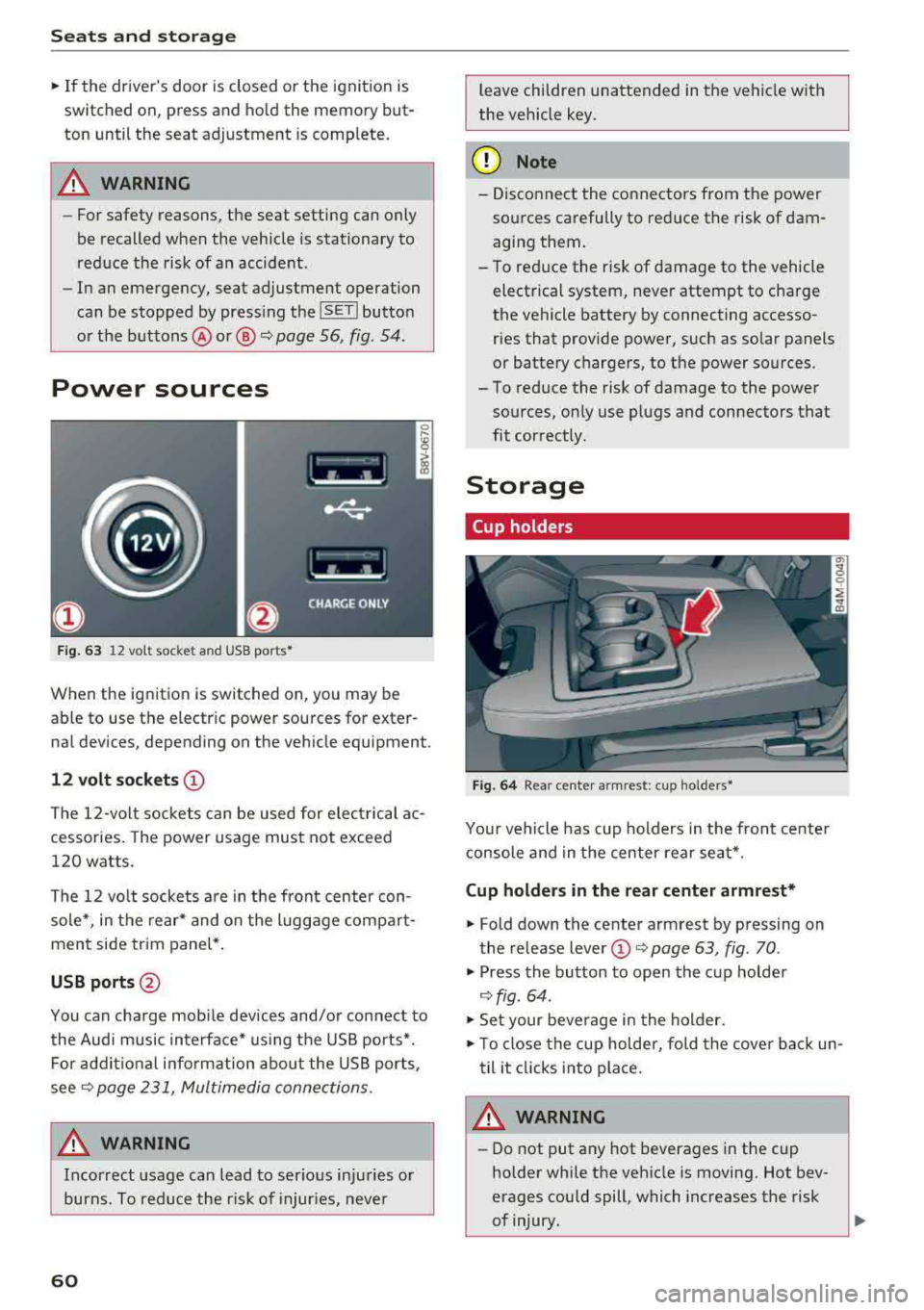
F ig . 63 12 vo lt socket and USB ports *
When the ignition is switched on, you may be
ab le to use the e lectr ic power sources for exter
nal devices, depending on the vehicle equipment.
12 volt so ckets CD
The 12-volt sockets can be used for elec trical ac
cessories. The power usage must not exceed
120 watts.
The 12 vo lt socke ts a re in the front center con
sole *, in the rear * and on the luggage compar t
ment side trim panel* .
USB ports@
You can cha rge mobi le devices and/or connect to
the Audi music interface* us ing the USB ports*.
For addit ional i nfo rmation abou t the USB ports,
see
¢ page 231, Multimedia connections.
A WARNING
Incorrect usage ca n lead to serious injuries or
burns. To reduce the r is k of injur ies, neve r
60
leave children unattended in the vehicle wit h
the vehicle key.
(D Note
- Dis co nnect the connectors from t he power
sources carefu lly to reduce the risk of dam
aging them .
- To reduce the risk of damage to the vehicle
electrical system, neve r attempt to charge
the vehicle battery by connecting accesso r ies that provide power, such as solar panels
or battery chargers, to the power sources.
- To reduce the risk of damage to the power sou rces, on ly use plugs and connectors that
fit correctly.
Storage
Cup holders
Fi g. 6 4 Rear ce nte r armrest: cup holders•
Yo ur vehicle has cup holders in the fron t center
console and in the center rear seat*.
Cup holders in the rear center armrest*
.,. Fold down the ce nte r armrest by pressing on
t he release lever
(D ¢ page 63, fig . 70 .
.,. Press the button to open the cup holde r
~fig. 64 .
.,. Set your beverage i n the holder.
.,. To close the cup holder, fold the cover bac k un
til it clicks into place.
A WARNING
-
- Do not put any hot beverages in the cup
holder while the vehicle is moving. Hot bev
erages could spill, which increases the risk
of injury.
1iJ,,
Page 73 of 392
u co ..... N ,..._
N ..... 0 <( 0 00
system operates most efficiently in eco cooling
mode.
A/C MAX Cooling mode*
You can switch the maximum cooling mode on or
off using the rocker switch@. Th e air is not
cooled and humidity is not removed when coo ling
mode is switched off. This can cause fog on the
windows . Cooling mode switches off automati
cally when the o utside temperature is below
ze ro. When the cooling mode is switched on, the
vehicle interior is cooled as quickly as possible
and dehumidified.
<::E::> Recirculation mode
In recirculation mode, the air inside the vehicle is
circu lated and fi ltered. This prevents the unfil
tered air outside the vehicle from entering the
ve hicle interior . Switch ing recirculation mode on
when dr iv ing through a tunnel or when s itting in
traffic is recommended
~ ,&. .
You can switch the recircu lation mode on or off
using the
6<:> button . You can also sw itch the re
circulation mode off by pressing the knob(!) or
the Sfx button.
AUTO automatic mode
Automatic mode ma inta ins a constant tempera
ture ins ide the veh icle. Air temperature, airflow
and a ir distribution are controlled automatically .
You can switch automatic mode on or off by pressing the
knob @.
Temperature
You can adjust the temperature between 60°F
(+16°() and 84°F (+28°() by turn ing the knob
@. If outs ide of this range, LO or HI will appear
in the climate control system display. In both
sett ings, the climate control runs constantly at
the maximum cooling or heating level. The tem
perature is not regulated.
The temperature can be adjusted in the rear us
in g the rea r controls
~ fig . 83 .
<%'~ Blower
You can adjust the vo lume of air generated by the
blower to your preference using the rocker sw itch
@ . The blower should always run at a low setting
Warm and cold
to prevent the windows from fogging and to en
sure a continuous exchange of air inside the ve hi
cle . To have the blower regulated a utomatica lly,
press one of the
knobs @.
Air distribution
You can use the rocker sw itches @to adjust the
vents where the air wi ll flow out o f. Press the
rocker switches @repeatedly until the desired
air distrib ution setting is disp layed in the climate
contro l system controls. To have the air distribu
t ion regulated automat ically, press one of the
knobs @.
.JI~ Seat heating/ventilation*
Pressing the JI~ button switches the seat
heating/ventilation on at the highest setting
(level 3). The LEDs indicate the temperature lev
el. To reduce the temperature, press the button
again. To switch the seat heat ing/ventilat ion off,
press the button repeatedly until the LED turns
off.
:.f% Defrosting
The w indshield and side windows are defrosted
or cleared of condensat ion as quickly as poss ible.
The maximum amount of a ir flows mainly from
the vents below the windsh ield. Rec ircu lat ion
mode switches off. The temperatu re should be
set at +72°F (+22°() or hig her. Th e temperature
is controlled automat ically.
You can switch the defroster on or off using the
3R button. You can switch the fu nction off by
pressing a
knob @.
[ffi) REAR Rear window defogger
You can switch the rear w indow defogger on by
pressing the
!!P. button . It only operates when the
engi ne is run ning .
It switches off automatically
after 10 to 20 minutes , depending on the outside
temperature.
T o prevent the rear window defogger from
switching off automat ically, press and hold the
QiP REAR button for more than thr ee seconds.
T his is stored until the ignition is switched off .
.,.
71
Page 74 of 392
Warm and cold
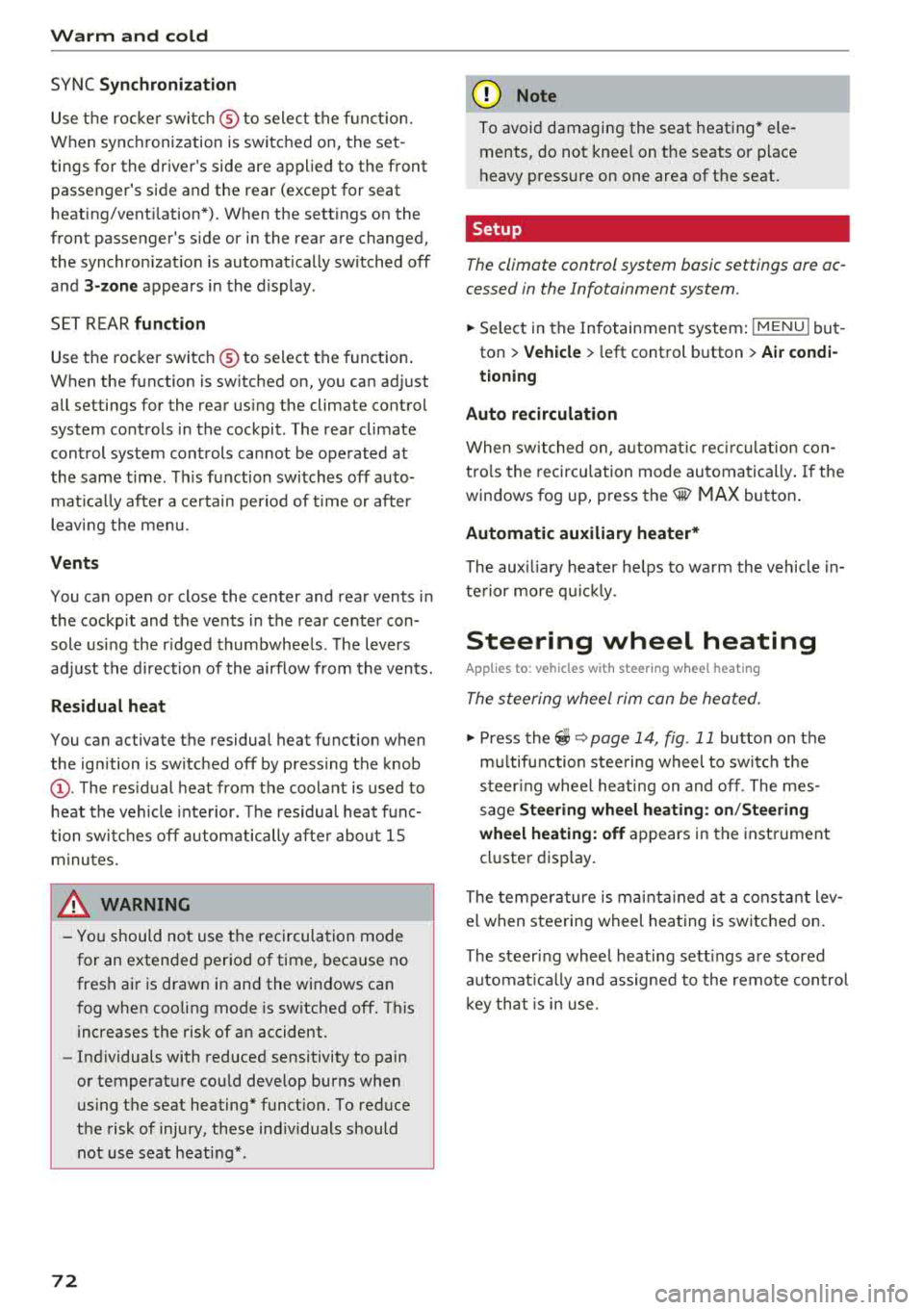
SYNC Syn chr oniz ation
Use t he rocker sw itc h® to select the f unct ion.
When synchronization is switched on, the set
tings for the driver's side are applied to the front
passenger's side and the rear (except for seat
heating/venti lation*). When the settings on the
front passenger's side or in the rear are changed,
the synchron izat ion is automatically switched off
and
3 -z one appears in the display .
SET REAR function
Use the rocker switch ® to select the function .
When the function is switched on, you can adjust
all settings for the rear us ing the climate control
system controls in the cockpit . The rear climate
control system controls cannot be operated at
the same time . T his function switches off auto
mat ica lly after a ce rtain per iod of t ime or after
leav ing the menu.
Vents
You can open or close the center and rear vents in
the cockpit and the vents in the rear center con
sole us ing the r idged thumbwhee ls . T he levers
adjust the d irection of the airflow from the vents.
Re sidu al he at
You can activate the residual heat function when
the ignition is switched off by pressing the knob
(!) . The res idual heat from the coolant is used to
heat the vehicle interior. The residual heat func
tion switches off automatically afte r about 15
m inutes.
A WARNING
- Yo u should not use the re circulation mode
for an extended period of time, because no
fres h air is drawn in and the windows can
fog when cooling mode is sw itched off. This
increases the risk of an accident.
- Individuals with reduced sensitivity to pain
or temperature cou ld deve lop burns when
using the seat heating* funct ion. To reduce
the risk of injury, these ind iv iduals should
not use seat heati ng*.
72
@ Note
To avoid damaging the seat heating* ele
ments, do not knee l on the seats or p lace
heavy pressure on one area of the seat.
Setup
The climate control system basic settings ore ac
cessed in the Infotainment system .
.. Select in the Infotainment system : IMENU! but
ton
> Veh icle > left control button > Air condi
t ioning
Auto recirculation
When sw itched on, a utomat ic rec ircu lat ion con
tro ls the recircu lation mode automatically . If the
windows fog up, press
the® MAX button .
Automatic au xiliary heater *
The auxiliary heater he lps to wa rm the vehicle in
te rior more qu ic kl y.
Steering wheel heating
Applies to: vehicles with steering wheel heating
The steering wheel rim con be heated .
.. Press the lg\~ page 14, fig . 11 button on the
mu ltifu nction stee ring wheel to switch the
steer ing whee l heating on and off . The mes
sage
S teering wheel h eating : on /Ste ering
wheel heating: off
appears in the instrument
cluster display.
The tempe ra ture is ma inta ined at a constant lev
el when steering wheel heating is switc hed on .
The steer ing whee l heating sett ings are stored
automat ica lly and assigned to the remote control
k ey tha t is in use .
Page 77 of 392
u co ..... N r-N .....
~ 0 co
(D Note
-Have your vehicle maintained properly and
in accordance with the service recommenda
tions in your Warranty
& Maintenance book
let. Lack of proper maintenance as well as
improper use of the vehicle will impair the
function of the emission control system and
could lead to damage.
- Do not alter or remove any component of the Emission Control System unless approved by the manufacturer.
- Do not alter or remove any device, such as
heat shields, switches, ignition wires,
valves, which are designed to protect your
vehicle's Emission Control System and other important vehicle components.
(D Tips
The consumption estimates as published by
ENVIRONMENTAL PROTECTION AGENCY
(EPA) and Transport Canada may not corre
spond to your actual consumption on the
road, which will vary depending upon vehicle
load and speed, road and weather conditions,
trip length, etc.
Steering
Manual steering wheel position adjustment
Applies to: vehicle s with manu al steering wheel adjustment
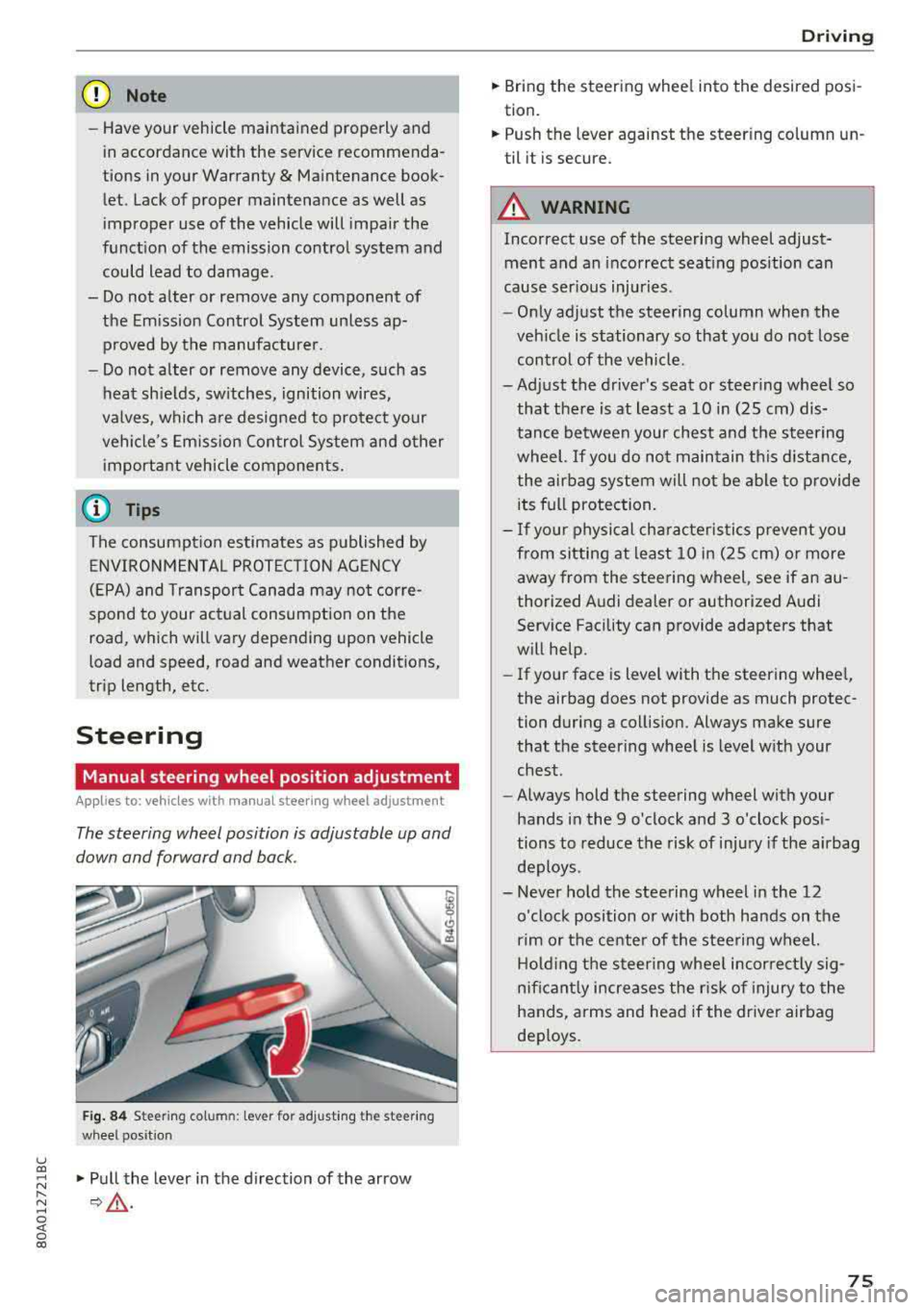
The steering wheel position is adjustable up and
down and forward and back.
Fig. 84 Steeri ng column: lever for adjust ing the steer ing
wheel position
"Pull the lever in the direction of the arrow
¢ .&.-
Driving
"Bring the steering wheel into the desired posi
tion.
" Push the leve r against the steer ing column un
til it is secure.
A WARNING
-Incorrect use of the steering wheel adjust
ment and an incorrect seating position can
cause serious injuries.
-
- Only adjust the steering column when the
vehicle is stationary so that you do not lose
control of the vehicle.
-Adjust the driver's seat or steering wheel so that there is at least a 10 in (25 cm) dis
tance between your chest and the steering
wheel. If you do not maintain this distance
I
the airbag system will not be able to provide
its full protection.
- If your physical characteristics prevent you
from sitting at least 10 in (25 cm) or more
away from the steering wheel, see if an au
thorized Audi dealer or authorized Audi Service Facility can provide adapters that
will help.
- If your face is level with the steering wheel,
the airbag does not provide as much protec
tion during a collision. Always make sure
that the steering wheel is level with your
chest.
- Always hold the steering wheel with your
hands in the 9 o'clock and 3 o'clock posi
tions to reduce the risk of injury if the airbag
deploys.
- Never hold the steering wheel in the 12
o'clock position or with both hands on the
rim or the center of the steering wheel.
Holding the steering wheel incorrectly sig
nificantly increases the risk of injury to the
hands, arms and head if the driver airbag
deploys.
75
Page 78 of 392
Driving
Power steering wheel position adjustment
App lies to: vehicles with power stee ring whee l adjustme nt
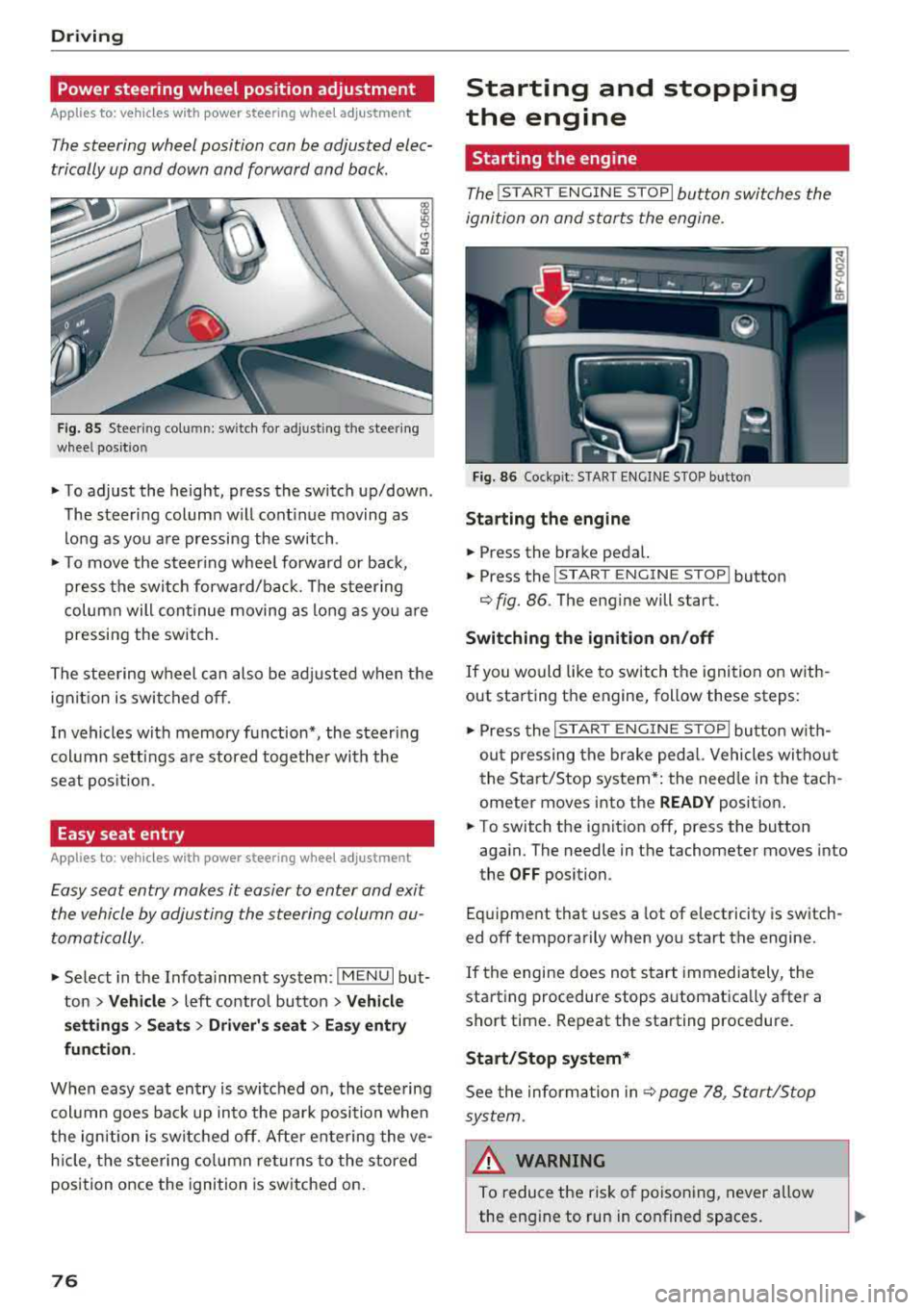
The steering wheel position can be adjusted elec
trically up and down and forward and back.
F ig. 85 Steer ing co lu m n: sw itch for ad just ing the steering
whee l pos it io n
.. To adjust the height, press the switch up/down .
The steer ing column w ill cont inue moving as
long as you are pressing the switch .
"To move the steering whee l forward or back,
press the swi tc h forward/bac k. T he steer ing
column will continue moving as long as you a re
pressing the switch .
The steering wheel can also be adjusted when the ign it io n is swit ched off .
In vehicles with memory function*, the steering
col umn sett ings a re stored together wi th the
seat pos it ion.
Easy seat entry
Applies to : vehicles with power stee ring wheel adjustme nt
Easy seat entry makes it easier to enter and exit
the vehicle by adjusting the steering column au
tomatically.
" Se lect in the Infota inment system: IMENU I but
ton
> Vehicle > left contro l button > Vehicl e
setting s > Seats > Driver 's seat > Ea sy entry
fun ction .
When easy seat entry is swi tched o n, the stee ring
col umn goes bac k up into the par k posi tion whe n
the ign ition is switched off. After ente ring the ve
h icle, the steering co lumn re turns to the stored
position once the ignition is switched on.
76
Starting and stopping
the engine
Starting the engine
The ! STAR T ENGINE ST OPI button switches the
ignition on and s tarts the engine.
Fig. 86 Coc kp it: S TART ENGINE STOP b utto n
Starting the engine
.. Press the brake pedal.
.. Press the I START ENGINE STOP ! button
¢fig. 86. The eng ine will start.
Switching the ignition on /off
If you would like to sw itch the ignition on w ith
out starting the engine, follow these steps:
" Press the I ST AR T ENGINE ST OP ! butto n w ith
out p ressing the brake ped al. Vehicles wi tho ut
the Start/Stop system* : the need le in the tach
ometer moves into the
READY posit ion .
.. To switch the ignition off, press the button
aga in. The needle in the tachometer moves into
the
OFF position.
Eq uipment that uses a lot of e lectricity is switch
ed off temporarily when you start the engine.
If the engine does not s tart immedia tely, the
starting procedure stops automatically after a
short time . Repeat the starting procedure .
Start/Stop system*
See the information in c::;, page 78, Start/Stop
sys tem .
& WARNING
To reduce the ris k of poisoning, never allow
the eng ine to run in confined spaces.
-
Page 79 of 392
u co ..... N r--N ..... 0 <( 0 00
@ Note
Avoid high engine speed, full throttle, and heavy engine load if the engine has not
reached operating temperature yet. You could
damage the engine.
@) For the sake of the environment
Do not let the engine run while parked to
warm up. Begin driving immediately. This re duces unnecessary emissions.
(D Tips
- Some noise after starting the engine is nor
mal and is no cause for concern.
- If you leave the vehicle with the ignition
switched on, the ignition will switch off af
ter a certain amount of time. Make sure that electrical equipment such as the exterior
lights are switched off.
Starting the engine
"'Bring the vehicle to a full stop.
"'Press the I START ENGI NE STO PI button
C? page 76, fig. 86.
Emergency off function*
If it is absolutely necessary, the engine can also
be turned off while driving at speeds starting at
4 mph (7 km/h). To switch the engine off, press
the
! START ENGINE STOPI button twice in a row
briefly or press and hold for longer than two sec
onds.
A WARNING
- Never turn off the engine before the vehicle
has come to a complete stop. The full func
tionality of the brake booster and the power steering is not guaranteed. You must use
more force to steer and brake the vehicle.
The fact that you cannot steer and brake as
usual can increase the risk of accidents and
serious injuries.
-If you leave the vehicle, switch the ignition
off and take the vehicle key with you .
If you
do not, the engine could be started and
electrical equipment such as the power win-
Driving
dows could be activated. This can lead to se
rious injuries.
- For safety reasons, always park the vehicle
with the selector lever in the "P" position.
Otherwise, there is the risk that the vehicle
could roll unintentionally.
@ Note
If the engine has been under heavy load for
an extended period of time, heat builds up in
the engine compartment after the engine is
switched off and there is a risk of damaging
the engine . For this reason, let the engine run
at idle for approximately two minutes before
shutting it off.
(D Tips
For up to 10 minutes after stopping the en
gine, the radiator fan may turn on again auto
matically or it may continue to run (even if
the ignition is switched off) for the following
reasons :
- The coolant temperature is increasing due
to
trapped heat.
- If the engine is warm and the engine com
partment also heats up from strong sun
light.
Messages
Engine running. Warning! Turn off ignition be
fore leaving vehicle
This message appears and a warning tone sounds
if you open the driver's door when the engine is
running.
Please press the brake pedal
This message appears if you do not press the brake pedal when starting the engine .
Ill Remote control key: key not detected. Is the
key still in the vehicle?
This indicator light turns on and this message ap
pears if the ignition key was removed from the
vehicle when the engine was running. If the igni
tion key is no longer in the vehicle, you cannot
switch on the ignition or start the engine once
..,.
77
Page 80 of 392
Driving
you stop it. You also cannot lock the vehicle from
the outside.
Shift to P, otherwise vehicle can roll away.
Doors do not lock if gearshift is not in
P
This message appears for safety reasons if the
selecto r lever is in the "N" position when you
switch the ignition off. Move the selector lever to
the "P" posit ion. Otherwise the vehicle is not pro
tected from rolling and it cannot be locked.
I) Remote control key : hold back of key
against the designated area. See owner's man
ual
I f the indicator light turns on and this message
appears, there is a malfunction
c:> page 78.
Shift to P before leaving vehicle, otherwise vehi
cle can roll away
This message appears if the driver's door is
opened while the ignition is switched on and the
transmission has not been shifted to the "P" posi
tion . Sh ift the transm iss ion into the "P" position
and turn off the ignition if you are leav ing the ve
h icle. Otherwise the vehicle could roll. Also see
<=:>page 79.
Starting the engine when there is a
malfunction
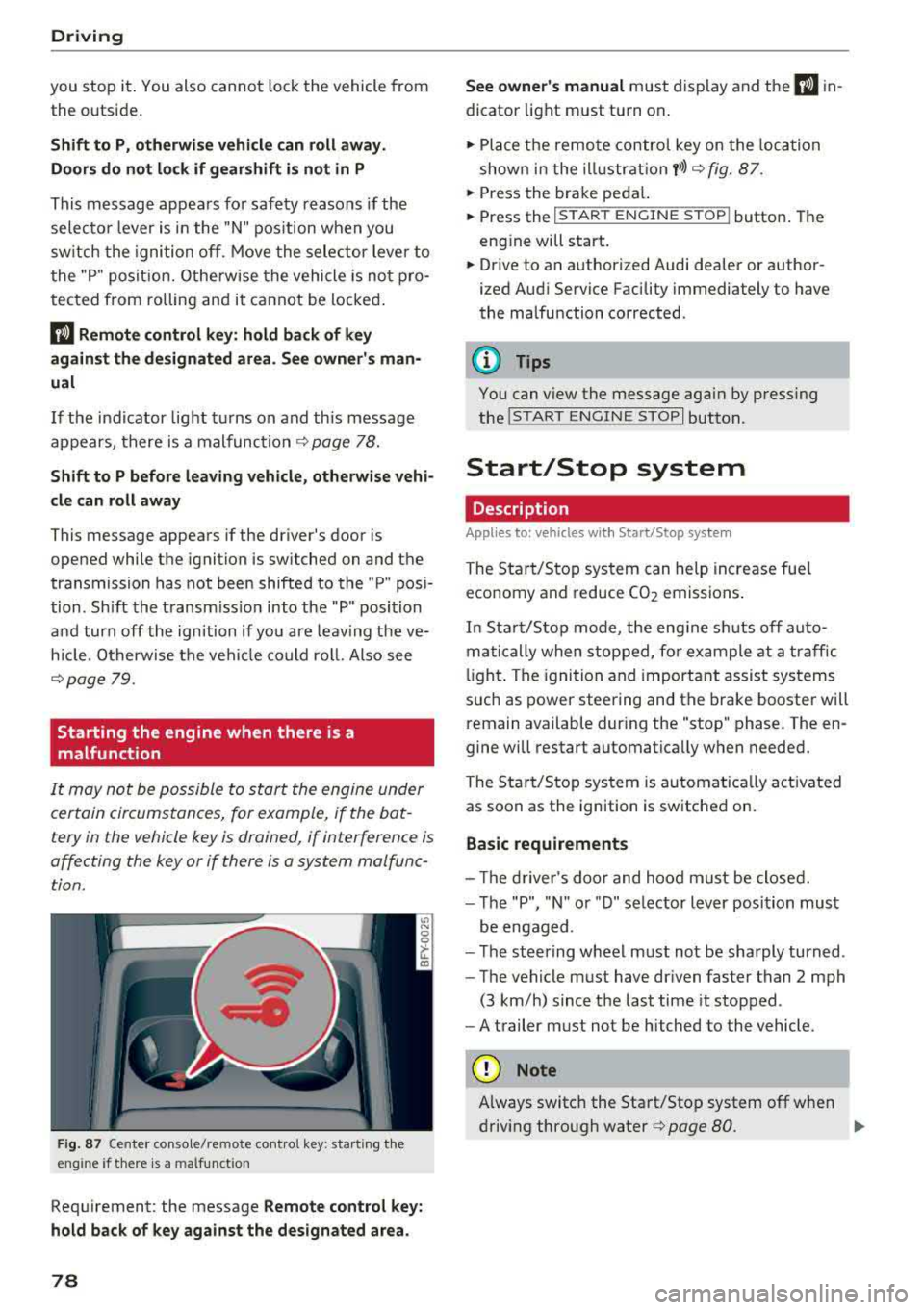
It may not be possible to start the engine under
certain circumstances, for example, if the bat
tery in the vehicle key is drained, if interference is
affecting the key or if there is a system malfunc tion.
F ig. 87 Center console/remote contro l key : start ing the
eng ine if there is a malfunct ion
Requirement: the message Remote control key:
hold back of key against the designated area.
78
See owner's manual must display and the I) in
dicator light must turn on .
.,. Place the remote control key on the loca tion
shown in the illu strat ion
y >l) c:> fig. 87.
... Press the brake pedal.
... Press the I START ENGINE STOPI button. The
eng ine will start.
... Drive to an authorized Audi dealer or author
ized Aud i Service Facility immediately to have
the malfunction corrected .
(!) Tips
You can view the message aga in by pressing
the lS TART
ENGINE STOP I button.
Start/Stop system
Description
Appl ies to : vehicles wi th Start/Stop sys te m
The Start/Stop system can help increase fue l
economy and reduce CO2 emissions.
In Sta rt/S top mode, the engine sh uts off auto
matically when stopped, for example at a traffic
li ght . The ignition and important assist systems
such as power steering and the brake booster will
remain available dur ing the "stop" phase. The en
gine will restart automatically when needed.
The Start/Stop system is automat ica lly act ivated
as soon as the ignition is switched on.
Basic requirements
- Th e driver's door and hood must be closed.
- The "P", "N " or "D" selector lever position must
be engaged .
- The steering wheel must not be sharply turned .
- The vehicle must have dr iven faster than
2 mph
(3 km/h) since the last time it stopped.
- A trailer must not be hitched to the vehicle.
(D Note
Always switch the Start/Stop system off when
driving through water
r=;, page 80.
Page 81 of 392

u co ..... N r--N ..... 0 <( 0 00
(D Tips
-Depending on the driving situation, the en
gine may already stop when
coasting before
the vehicle has come to a complete stop
ll.
- If you select the "D" selector lever position
after shifting into reverse, the vehicle must be driven faster than 6 mph (10 km/h) in or
der for the Start/Stop system to be active
again.
Stopping/starting the engine
Applies to: vehicles with Start/Stop system
"'Apply the brakes and keep your foot on the
brake pedal until the vehicle has stopped. The
rl1 indicator light appears in the instrument
cluster once the engine stops automatically .
"'The engine starts again when you take your
foot off the brake pedal. The indicator light
turns off.
(D Tips
-The ignition will turn off if you press the
I START ENGINE STOP I button during a stop
phase .
- You can determine for yourself if the engine
will stop or not by reducing or increasing
the amount of force you use to press the brake pedal. For example, if you only lightly
press on the brake pedal in stop-and-go
traffic or when turning, the engine will not
switch off when the vehicle is stationary. As
soon as you press the brake down harder,
the engine will switch off.
- Press the brake pedal during a Stop phase
to keep the vehicle from rolling.
Starting/stopping the engine automat
ically
Applies to: vehicles with Start/Stop system
The system checks if certain conditions are met
before and during the "stop" phase, and deter
mines if and how long the engine is stopped de
pending on the situation. For example, if power
usage is high, the engine will not be stopped .
ll Market-specific
Driving
Along with other conditions, the following fac
tors influence the automatic engine start or stop:
- Environmenta l conditions (slopes, inclines, ele-
vation, temperature)
- Battery (charge status, temperature, power us-
age)
- Engine temperature
- Assistance systems
- Driving behavior
If the
rid indicator light appears in the instru
ment cluster display, the engine will not be stop
ped.
Switching the ignition off automatically
Applies to: vehicles with Start/Stop system
If you leave the vehicle during a "stop" phase, the
engine can be restarted within approximately 30
seconds if the doors are closed, the driver's safe
ty belt is fastened and the brake pedal is pressed.
If you leave the vehicle longer than 30 seconds,
the ignition will switch off automatically to pre
vent the vehicle battery from draining. If this is
the case, the message
Start/stop system: igni
tion will be switched off in 30s
will appear in the
instrument cluster and, if the low beam head
lights are switched on, the parking lights will
switch on instead. The parking lights will switch
off after approximately 30 minutes or when you
lock the vehicle.
The ignition also switches off when you lock the
vehicle from the outside during a stop phase.
If the Start/Stop system has not turned off the
engine or if you have switched the Start/Stop sys
tem off manually, the ignition will not be auto matically switched off and the engine will contin
ue to run.
A WARNING
-To reduce the risk of poisoning, never allow
the engine to run in confined spaces.
-
79