infotainment AUDI Q5 2018 Owner's Manual
[x] Cancel search | Manufacturer: AUDI, Model Year: 2018, Model line: Q5, Model: AUDI Q5 2018Pages: 392, PDF Size: 60.56 MB
Page 53 of 392
u co ..... N r-N .....
~ 0 co
this liquid as quickly as possible, for example
with a wet sponge.
@ Tips
- If the light reaching the rearview mirror is
obstructed, the automatic dimming mirror
will not function correct ly,
- The automatic dimming mirrors do not dim
when the interior lighting is turned on or
the reverse gear is selected.
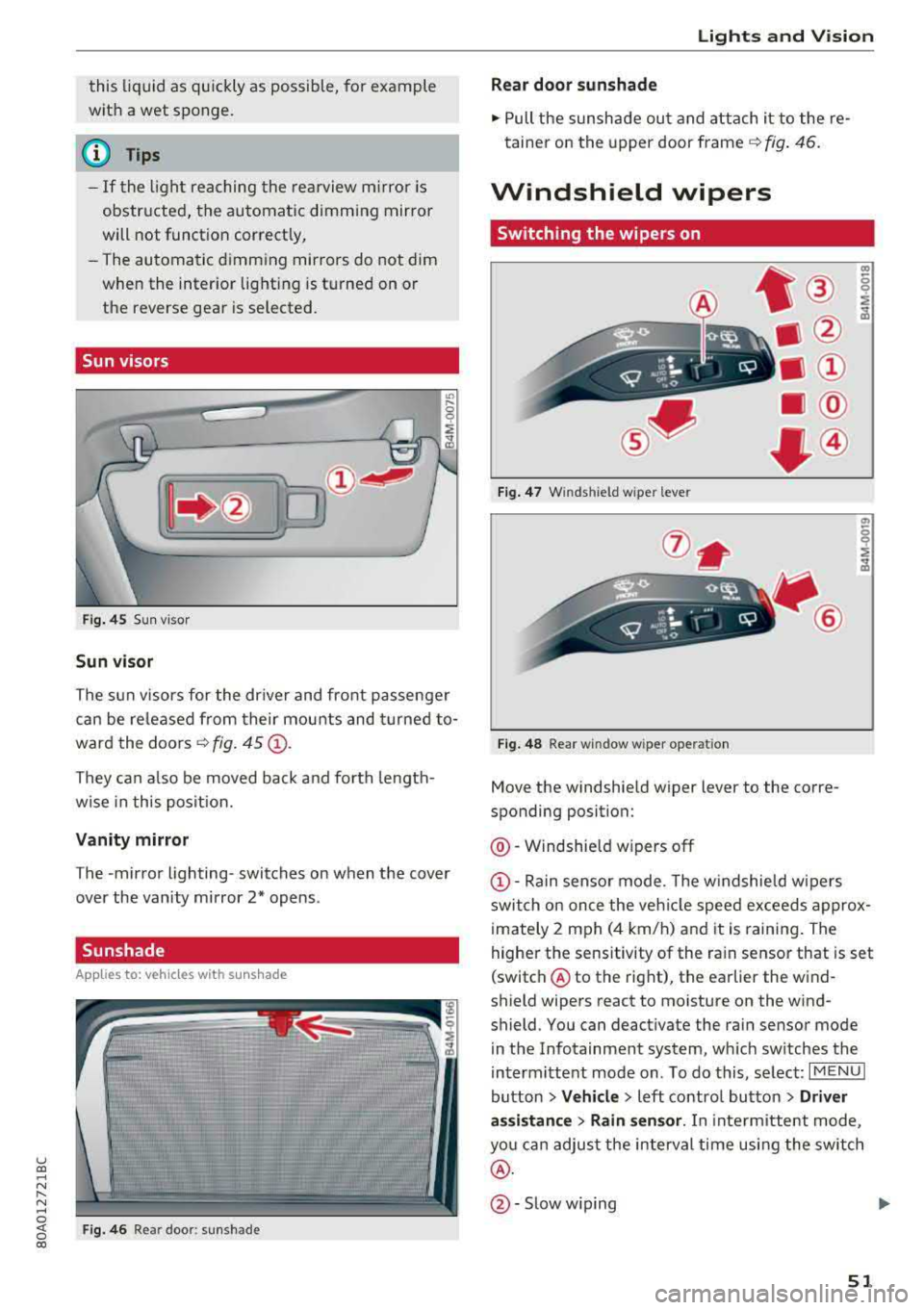
Sun visors
Fig. 45 Sun visor
Sun visor
The sun visors for the dr iver and front passenger
can be re leased from their mounts and turned
to
ward the doors ¢ fig. 45 (D.
They can also be moved back and forth length
wise in this posit ion.
Vanity mirror
The -mir ror lighting- switches on when the cover
over the vanity mirror 2* opens .
Sunshade
App lies to: ve hicles with s unsh ad e
Fig. 46 Rea r door : sunshade
Lights and Vision
Rear door sunshade
.,. Pull the sunshade out and attach it to the re
tainer on the upper door frame ¢ fig. 46.
Windshield wipers
Switching the wipers on
•®
• @
•@
@.
• @
•®
Fig. 47 Winds hield wiper leve r
(!)-
. ®
Fig. 48 Rear window wiper operat ion
Move the windshield wiper lever to the corre
sponding position:
@ -Windshield w ipers off
co 0
;&
a,
0
;&
(D -Rain sensor mode . T he windshield wipers
switch on once the veh icle speed exceeds approx
imately 2 mph (4 km/h) and it is raining. The
higher the sensitivity of the ra in sensor that is set
(switch ® to the right), the earlier the wind
shield wipers react to moisture on the wind
shield. You can deactivate the rain sensor mode
in the Infotainment system, which switches the
intermittent mode on . To do this, select:
I MENU I
button > Vehicle > left control button > Driver
as sistance > Rain sensor.
In interm ittent mode,
you can adjust the interval time using the switch
®·
@ -Slow w iping .,.
51
Page 55 of 392
u co ..... N r-N .....
~ 0 co
Replacing wiper blades
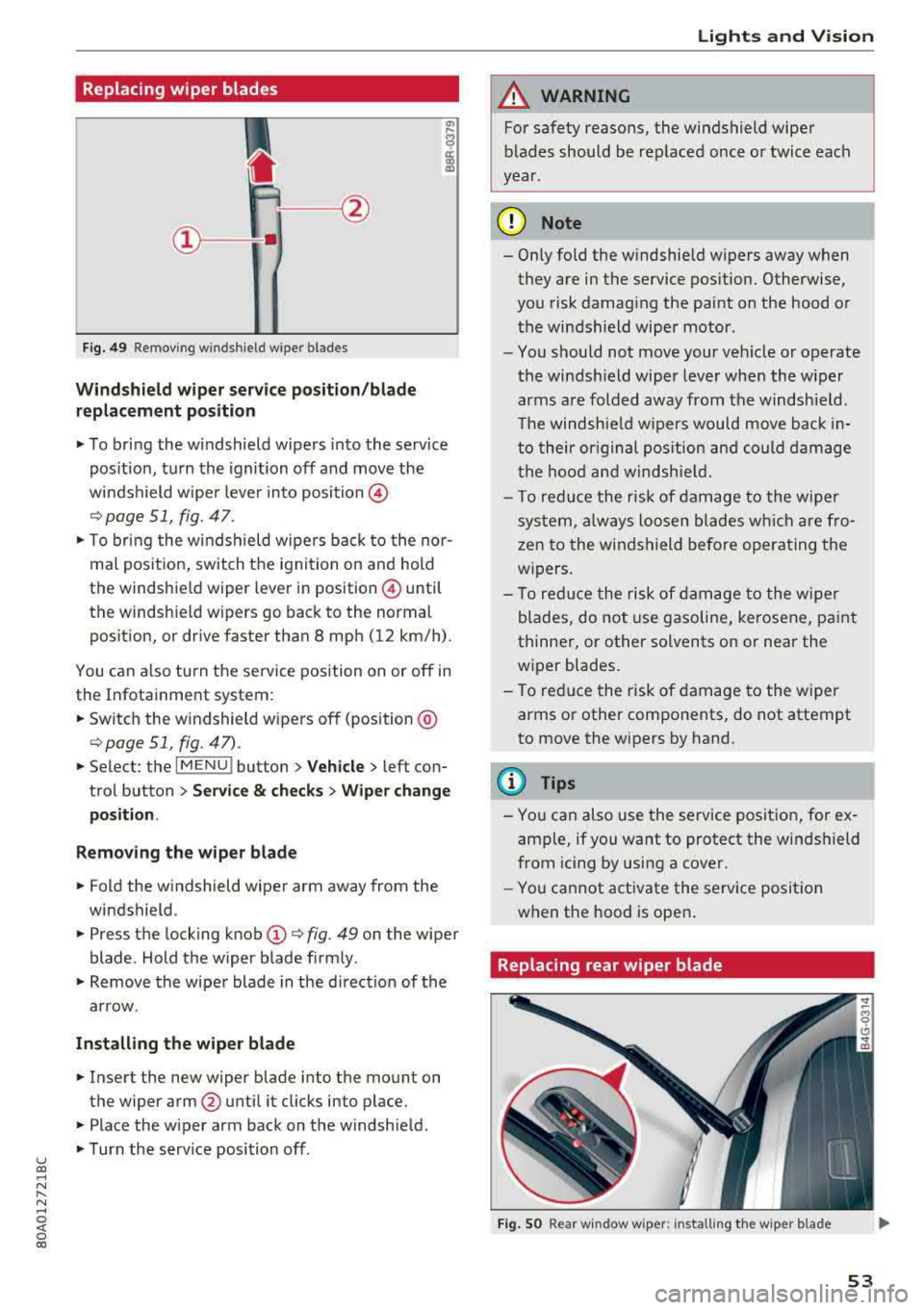
Fig. 49 Remov ing w indshi el d w iper blades
Windshield wiper serv ice po sition /blade
replacement position
"' To bring the windshield wipers into the service
pos ition, turn the ignition off and move the
windshield wiper lever into position @
¢ page 51, fig. 47.
"'T o bring the windshield wipers back to the nor
mal pos ition, switch the ignition on and hold
the windshie ld wiper lever in posit ion @ until
the windshie ld wipers go back to the normal
pos ition, or d rive faster than 8 mph (12 km/h) .
You can a lso tu rn the service position on or off in
the Infotainment system :
"'Switch the windshield wipers off (position @
¢page 51 , fig. 47) .
"'Select : the I MENU ! button> Vehicle> left con
trol button >
Service & checks > Wiper change
position .
Removing the wiper blade
"'Fold the windshield wiper arm away from the
windshield .
"' Press the locking knob (D ¢ fig. 49 on the wiper
blade . Hold the wiper blade firmly .
"'Remove the wiper blade in the direct ion of the
arrow .
Installing the wiper blade
"'Insert the new wiper blade into the mount on
the wiper arm
@ until it clicks into place.
"'Place the wiper arm back on the windshield .
"'Turn the serv ice position off.
Lights and Vision
A WARNING
For safety reasons, the windshield wiper
blades should be replaced once or twice each
year .
(D Note
- Only fold the windshield wipers away when
they are in the service pos ition. Otherwise,
you risk damaging the paint on the hood or
the windshield wiper motor .
- You should not move your veh icle or operate
the windsh ield wiper lever when the wiper
arms are folded away from the windshield .
Th e windshield wipers would move back in
to their or iginal pos ition and could damage
the hood and windshield.
- T o red uce the risk of damage to the wiper
system, always loosen blades wh ich are fro
zen to the windshield before operating the
w ipers.
- To reduce the risk of damage to the wiper
blades, do not use gasoline, kerosene, paint
thinner, or other solvents on or near the
wiper blades.
- To reduce the risk of damage to the wiper
arms or other components, do not attempt
to move the wipers by hand.
(D Tips
- You can also use the service position, for ex
ample, if you want to protect the windshield
from icing by using a cover .
- You cannot activate the service posit ion
when the hood is open .
Replacing rear wiper blade
Fig . SO Rear w indow wiper : installing the w ip er blade
53
Page 58 of 392
Seats and stor age
Seats and storage
General information
A WARNING
See c> page 252, Driving safety for important
information, tips, suggestions and warnings
that you should read and follow for your own
safety and the safety of yo ur passengers .
Front seats
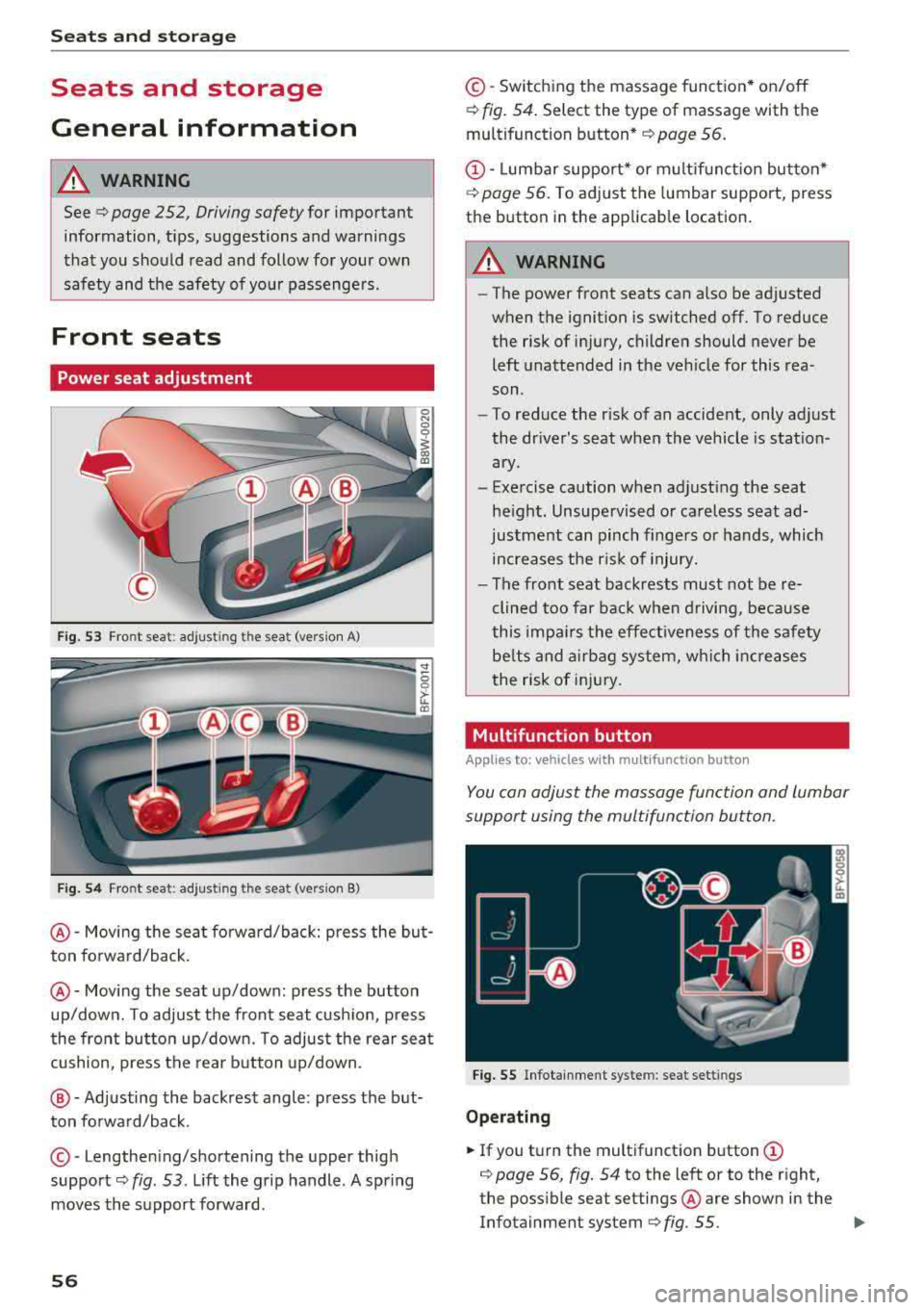
Power seat adjustment
Fig. 53 Front seat : adjust ing the seat (vers ion A)
Fig. 54 Fro nt seat: adjusting the sea t (vers ion B)
@ -Movi ng the seat fo rwa rd/back: press the but
ton forwa rd/back .
@-Moving the seat up/down: press the button
up/dow n. To adjust the front seat cush ion, press
the front button up/down. To adjus t the rear sea t
cushion, press the rear b utton up/down.
@ -Adjusting the backrest angle : press the but
ton fo rward/back.
© -Lengthe ning/shortening the upper thigh
support
c> fig . 53 . Lift the grip handle . A spring
moves the su pport forward .
56
©-Switching the massage funct ion* on/off
c> fig. 54. Select the type of massage with the
multifunction button *
c> page 56.
CD-Lumbar support* or m ultif unction button*
c> poge 56. To ad just the lumbar support, press
the button in the applicab le location .
A WARNING
-The power front seats can also be adjusted
when the ignition is switched off. To reduce
the risk of injury, children should never be
left unattended in t he vehicle for this rea
son .
-To reduce the r isk of an accident, only adjust
the driver's seat when the vehicle is station
ary .
-Exe rcise caution when adjust ing the seat
he igh t. Unsupe rvised or ca reless seat ad
justment can pinch finge rs or hands, which
increases the r is k of injury.
- The front seat backrests must not be re
clined too far bac k when d riving, beca use
this impa irs the effect iveness of the safety
be lts and a irbag sys tem, w hich i ncreases
the risk of inj ury.
Multifunction button
App lies to: vehicles wi th mult ifunc tion butto n
You con adjust the massage function and lumbar
support using the multifunction button.
Fig . 55 Infotainment system: seat sett ings
Op erating
... If you tu rn the multifunction button CD
c> page 56, fig. 54 to the left or to the right,
the poss ible seat settings @are shown in the
Infotainment system
c> fig . 55. ..,
Page 61 of 392
u co ..... N r-N .....
~ 0 co
Installing the head restraints
.,. Slide the posts on the head restraint dow n into
the gu ides unt il the posts click into place .
... Press the button -arrow-c::> fig. 60 and slide the
head restraint all th e way down. You should not
be able to remove the head restraint from the
backrest without pressing the button.
A WARNING
-Always read and follow the applicable warn
ings
c::> page 255 , Proper adjustment of
head restraints .
-Only remove the head restraints from the
rear seats when it is necessary for install ing
a ch ild safety sea t
c::> page 291, Child safe
ty. Install the head restra int aga in immedi
ately once the chi ld safety seat is removed .
Driv ing with the head restraints removed or
not in the upright position inc reases the risk
of serious inj ury.
Memory function
Description
Applies to: vehicles with memory function
Using the memo ry funct ion, you can qu ickly and
eas ily store a pe rsonal seat profile for the dr iver
and recall the setti ngs later. The memory f unc
tion is controlled by the remo te control key and
the memory buttons in the drive r's door.
The drive r's seat p rofile is stored again and as
signed to t he remote contro l key each time the
ve hicle is locked. When you open the door, the
seat prof ile is automatica lly reca lled . If two peo
p le use the vehicle, it is recommended that each
person always uses their
"own" remote control
key .
Two seat profiles can be stored each using the memory buttons . Once they are stored, these
seat profi les can be se lected at any time.
The fo llow ing settings are stored :
Seats and storag e
Remote con- Memory but-
trol key ton
Driver Driver
Seat X X
Both exterior
mirrors*
X X
Remote control key
Applies to: vehicles with memory function
The driver's seat profile can be assigned to the
remote control key when the vehicle is locked .
... Select in the Infotainment system: I MENU! but
ton
> Vehicle > left control button > Vehicle
setting s > Seat s > Driver's seat > Store set
ting s on remote control ke y.
(D Tips
If you do not wish to have the seat prof ile for
anothe r dr iver assigned to the remote control
k ey, sw itch the memory f unction off in the In
fotainment system.
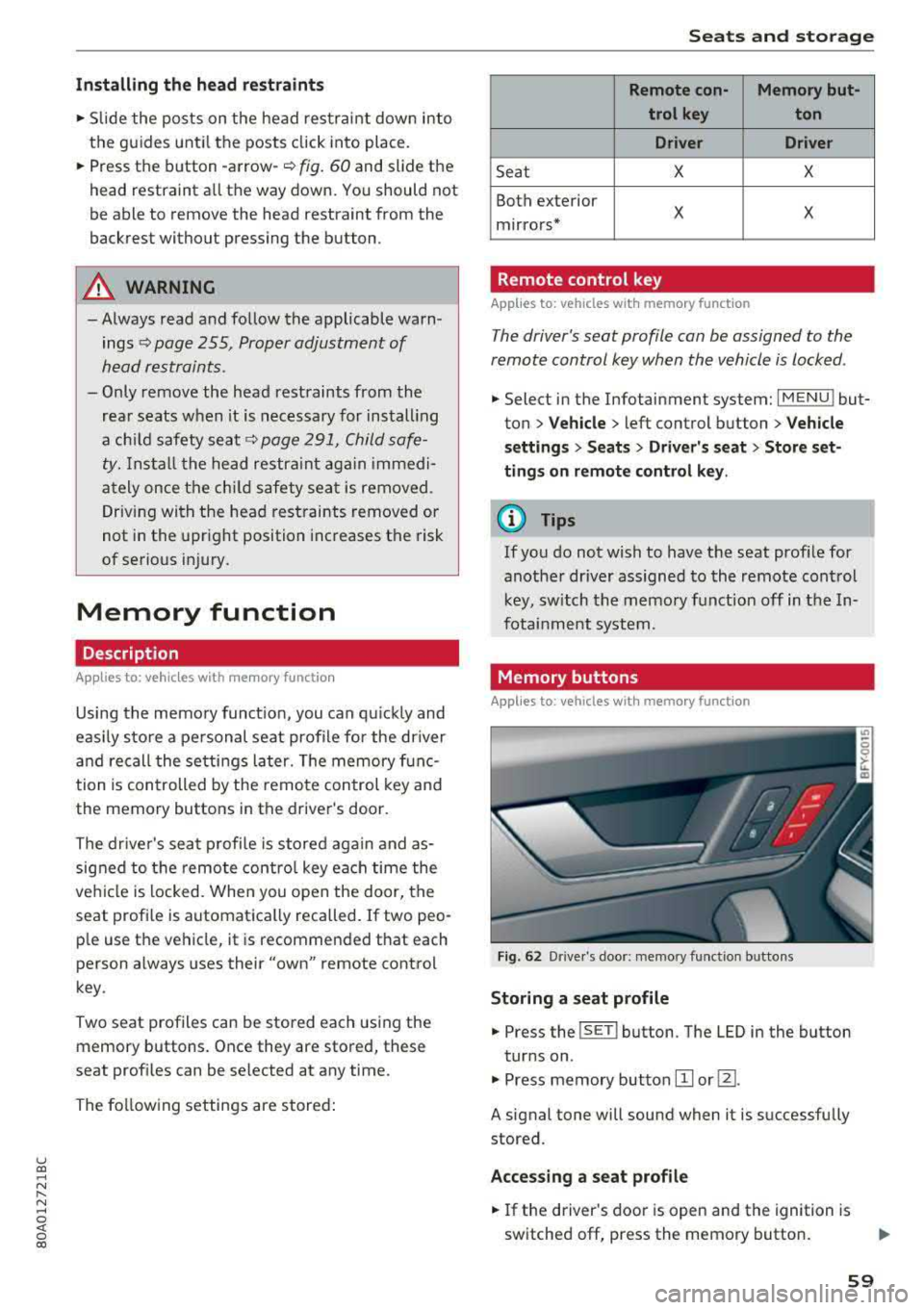
Memory buttons
Applies to: vehicles with memory function
Fig. 62 Drive r's doo r: memory funct io n bu ttons
Storing a seat p rofile
... Press the ISET I button. The LED in the button
tur ns on .
.,. Press memory button IT] or@.
A signal tone will sound when it is successfully
stored.
Acces sing a seat profile
... If the driver's door is open and the ignition is
switched off, press the memory button .
59
Page 74 of 392
Warm and cold
SYNC Syn chr oniz ation
Use t he rocker sw itc h® to select the f unct ion.
When synchronization is switched on, the set
tings for the driver's side are applied to the front
passenger's side and the rear (except for seat
heating/venti lation*). When the settings on the
front passenger's side or in the rear are changed,
the synchron izat ion is automatically switched off
and
3 -z one appears in the display .
SET REAR function
Use the rocker switch ® to select the function .
When the function is switched on, you can adjust
all settings for the rear us ing the climate control
system controls in the cockpit . The rear climate
control system controls cannot be operated at
the same time . T his function switches off auto
mat ica lly after a ce rtain per iod of t ime or after
leav ing the menu.
Vents
You can open or close the center and rear vents in
the cockpit and the vents in the rear center con
sole us ing the r idged thumbwhee ls . T he levers
adjust the d irection of the airflow from the vents.
Re sidu al he at
You can activate the residual heat function when
the ignition is switched off by pressing the knob
(!) . The res idual heat from the coolant is used to
heat the vehicle interior. The residual heat func
tion switches off automatically afte r about 15
m inutes.
A WARNING
- Yo u should not use the re circulation mode
for an extended period of time, because no
fres h air is drawn in and the windows can
fog when cooling mode is sw itched off. This
increases the risk of an accident.
- Individuals with reduced sensitivity to pain
or temperature cou ld deve lop burns when
using the seat heating* funct ion. To reduce
the risk of injury, these ind iv iduals should
not use seat heati ng*.
72
@ Note
To avoid damaging the seat heating* ele
ments, do not knee l on the seats or p lace
heavy pressure on one area of the seat.
Setup
The climate control system basic settings ore ac
cessed in the Infotainment system .
.. Select in the Infotainment system : IMENU! but
ton
> Veh icle > left control button > Air condi
t ioning
Auto recirculation
When sw itched on, a utomat ic rec ircu lat ion con
tro ls the recircu lation mode automatically . If the
windows fog up, press
the® MAX button .
Automatic au xiliary heater *
The auxiliary heater he lps to wa rm the vehicle in
te rior more qu ic kl y.
Steering wheel heating
Applies to: vehicles with steering wheel heating
The steering wheel rim con be heated .
.. Press the lg\~ page 14, fig . 11 button on the
mu ltifu nction stee ring wheel to switch the
steer ing whee l heating on and off . The mes
sage
S teering wheel h eating : on /Ste ering
wheel heating: off
appears in the instrument
cluster display.
The tempe ra ture is ma inta ined at a constant lev
el when steering wheel heating is switc hed on .
The steer ing whee l heating sett ings are stored
automat ica lly and assigned to the remote control
k ey tha t is in use .
Page 86 of 392
Driving
Drive quick ly through sandy or marshy off-road
sections and do not stop , if at all poss ibl e.
Driving through water
Also read the information found in ¢ page 73.
Driving on a slope
If you a re ever unable to dr ive up a hill , do not try
to turn around . Drive back down in
re verse in
stead. Otherwise you r un the r isk o f tipping over .
If the vehicle threatens to tip over when dr iving
across a slope , you mu st immediately stee r
downhill in the direction of the slope.
Do not park your vehicle on steep hills.
To reduce the r isk of t ipping over, dr ive on hills in
the direction of the downward s lope (fa ll line)
-
never crosswise .
Tilt angle display
Description
Applies to: vehicles with a ti lt angle display
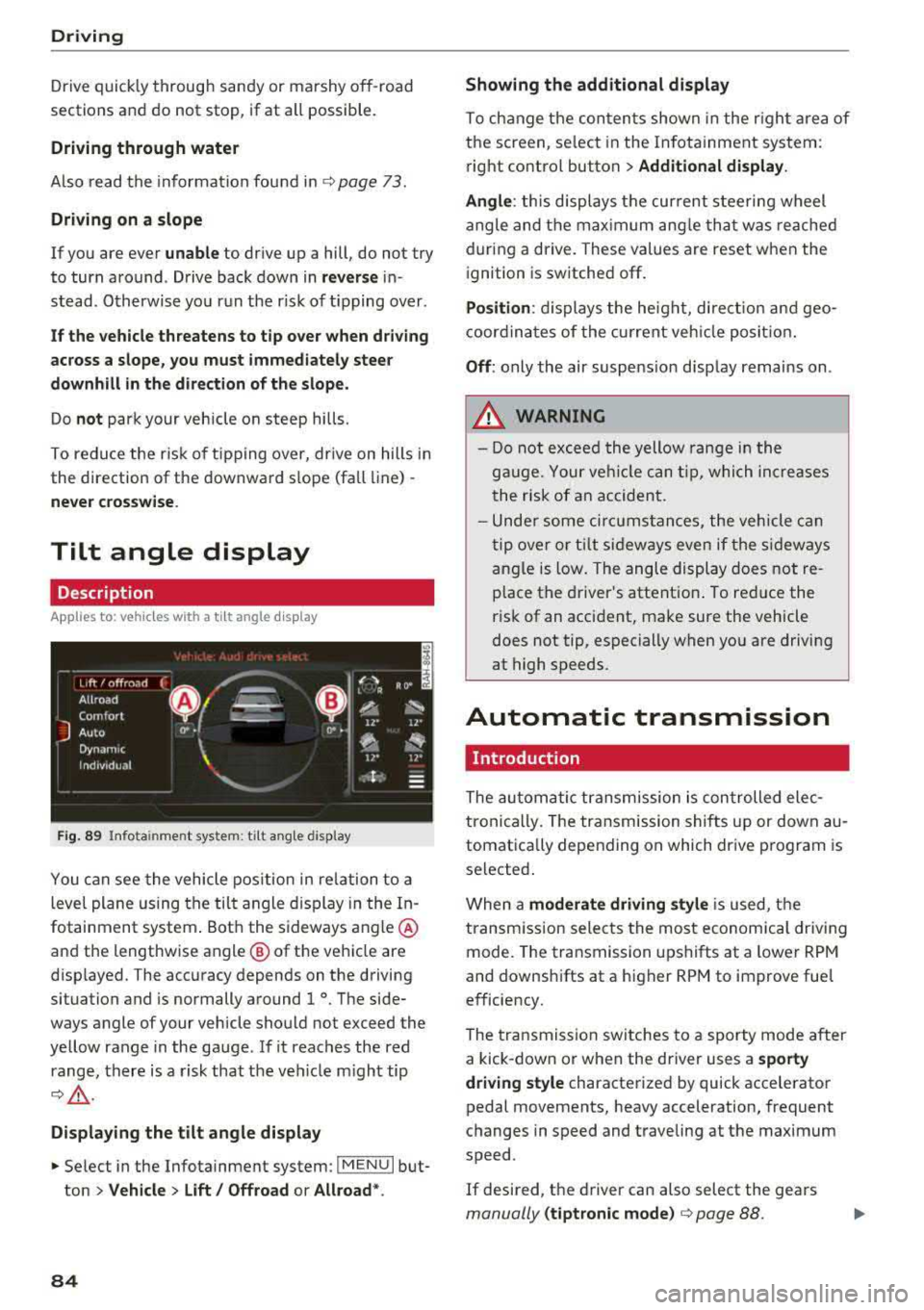
F ig. 89 I nfo ta in me nt syste m: tilt ang le d ispla y
You c an see the vehicle pos ition in re lation to a
leve l plane us ing the tilt angle display in the In
fotainment system . Bot h the sideways angle @
and the lengthwise angle @ of the vehicle are
disp layed. The accuracy depends on the driving
situation and is normally a round 1
°. The side
ways angle of your vehicle should no t exceed the
ye llow range in the gauge . If it reaches the red
range, there is a risk that the ve hicle m ight tip
¢ ,&. .
Displaying the tilt angle display
~ Select in the Infotainment system : IME NUI but
ton
> Vehicle > Lift / Offroad or Allroad *.
84
Showing the additional display
To ch ange the con ten ts shown in the r igh t ar ea of
t h e screen, se lect in the In fo ta inment system :
r ight contro l button
> Additional display.
Angle :
this displays t he cur rent stee ring wheel
angle and t he max imum ang le th at was re ached
dur ing a drive . These values are reset when the
i gnition is switche d off .
Position : displays the he ig ht, di re ct io n a nd geo
coor din at es of the cur rent veh icle posit io n.
Off : only the air suspe nsio n disp lay remains on .
A WARNING
- Do not excee d the yellow range in the
g au ge. Your ve hicle can t ip, whi ch in cre as es
t he risk of an accident.
- Unde r some ci rcumstan ce s, the vehicle can
t ip ove r or til t sid eways eve n if the s ideways
angle is low. The angle display does not re
p lace the driver's attent io n. To re duce the
risk of an accident, make sure the vehicle
does not tip, especially when yo u are driving
at high speeds.
Automatic transmission
Introduction
The au tom atic transmission is con trolled ele c
tronically. The transmission shifts up or down au
tomat ica lly depending on which dr ive p rogram is
selected .
When a
moderate driving style i s used, t he
transm iss ion selec ts the most economica l driv ing
mode. The transmission upshifts at a lower RPM
and downshifts at a higher RPM to improve fue l
e fficiency.
The tra nsmission switches to a sporty mode after
a kick-down or when the driver uses a
sporty
driving style
characterized by quick accelerator
pedal movements, heavy acceleration, frequent
changes in speed and t raveling at the max imum
speed .
If desired, th e driver can also select the gears
manually (tiptronic mode ) ¢ page 88.
Page 95 of 392
u co ..... N r--N ..... 0 <( 0 00
Tongue weight
The maximum permitt ed tongue weight of the
trailer drawbar on the trailer hitch ball head may
not be exceeded .
I f the tongue we ight is too low, th is affects t he
trailer's handling. For driv ing safety, we recom
mend to always utilize the maximum permitted
tongue weight, but not exceed it. You can reach
it, for example, by distributing the cargo in the
trailer correctly.
You can determine the tongue weight, for exam
p le, with a bathroom scale or a public weigh sta
tion .
The permitted tongue we ight of your veh icle can
be found in the vehicle documentation or in
¢page 370.
Load distribution
Poor cargo load and distribution can negatively
i mpact ve hicle handl ing .
-Store objects preferably in the vehicle luggage
compartment. The vehicle shou ld always carry
the heaviest possible load and the trailer
shou ld have the lightest possible load.
-Distribute the load in the tra iler so that the
heavy objects are as close to the axle as possi
ble.
-Secure objects from slid ing out of p lace.
-Utilize the maximum permitted tongue weight
if possible .
Tires
Set the tire pressure on your vehicle for a "full
load"; see the t ire pressure
sticker¢ page 335 .
If necessary, also adjust the tire pressure on the
trailer according to the manufacturer's recom
mendation .
W inter tires should be mounted on the vehicle
and on the trailer during winter temperatures .
Outside mirrors
If you cannot see the traffic behind the trailer
with the standard exterior mirrors, then you must attach addit ional exterior m irrors. Adjust
them so you have a sufficient visibility behind
you .
Trailer towing
Exterior lighting
Follow the legal regu lations rega rding the light
ing equipment on your trailer. Contact an author
ized Audi dea ler or authorized Audi Service Facili
ty for more information.
Before starting to drive , check all lighting eq uip
ment on the hitched trailer.
T he headlight range cont rol adjusts automat ica l
ly to the light range of the headlights .
Safety chains
Make sure the safety chains are correctly applied
when pulling a trailer . The cha ins should hang
enough so that the trailer can drive around
curves . Howeve r, th ey must not touch the
ground.
Air suspension
Applies to: vehicles with air suspension
The air suspens ion must be at the standard vehi
cle height before you set the tongue weight on
the tra iler and hitch the
trailer ¢@ , ¢page 128,
Raising/lowering the vehicle.
For vehicles with a factory-installed trailer hitch,
the a ir suspension trailer mode w ill automatically
switch on if you connect the trailer cable to the
socket.
For vehicles with a retrofitted trailer hitch, you
must sw itch on the a ir suspension trailer mode
manua lly . Select in the Infotainment system:
IMENU I button> Vehicle> left cont rol button>
Vehicle settings > Air suspension: trailer. Switch
i t off again after towing a tra iler .
You can also sw itch off trailer mode manually
wh ile dr iving, for example, whe n using a bicycle
rack system.
If you have to dr ive through d ifficult road cond i
tions, you can ra ise the vehicle again after hitch
i ng the tra iler o r after adjusting the tongue
we ight.
(UJ} Note
Applies to: vehicles with air suspension
-Changes in temperature or load can affect
the height of the vehicle .
93
Page 97 of 392
u co ..... N r-N .....
~ 0 co
Assistance systems Speed warning system
Description
App lies to: vehicles with speed warning system
The speed warning system helps you to stay be
low a specified maximum speed that can be set,
changed or deleted in the Infotainment system .
The speed warning system warns you if you are
exceeding the maximum speed that you have set .
A warning tone will sound as soon as your speed
exceeds the stored value slightly. The
(Ol (USA
models)/
(01 (Canada models) indicato r light
and a message appear i n the ins trumen t cluster
d isplay at the same time. The
(Sl / (Ol indicator
light and the message turn
off if the speed falls
back below the stored maximum speed .
Sett ing a threshold is recommended if you would
like to be reminded when yo u reach a certa in
maximum speed . Situations where you may want
to do so include driving in a country with a gener
al speed limit or if there is a specified maximum
speed for winter tires.
Setting the warning threshold
Select in the I nfotai nment system: IMENU I but
ton
> Ve hicle > le ft control button > Dri ver a ssis
tan ce
> Speed warning > Manual.
@ Tips
Regard less of the speed warning system, you
should always monitor your speed using the
speedometer and make sure you are following
the legal speed limit.
A ssi st a nce systems
Cruise control system
Switching on
Applies to: vehicles with cruise control system
The cruise control system makes it possible to
drive at a constant speed starting at 15 mph
(20 km/h).
0
f
~
0
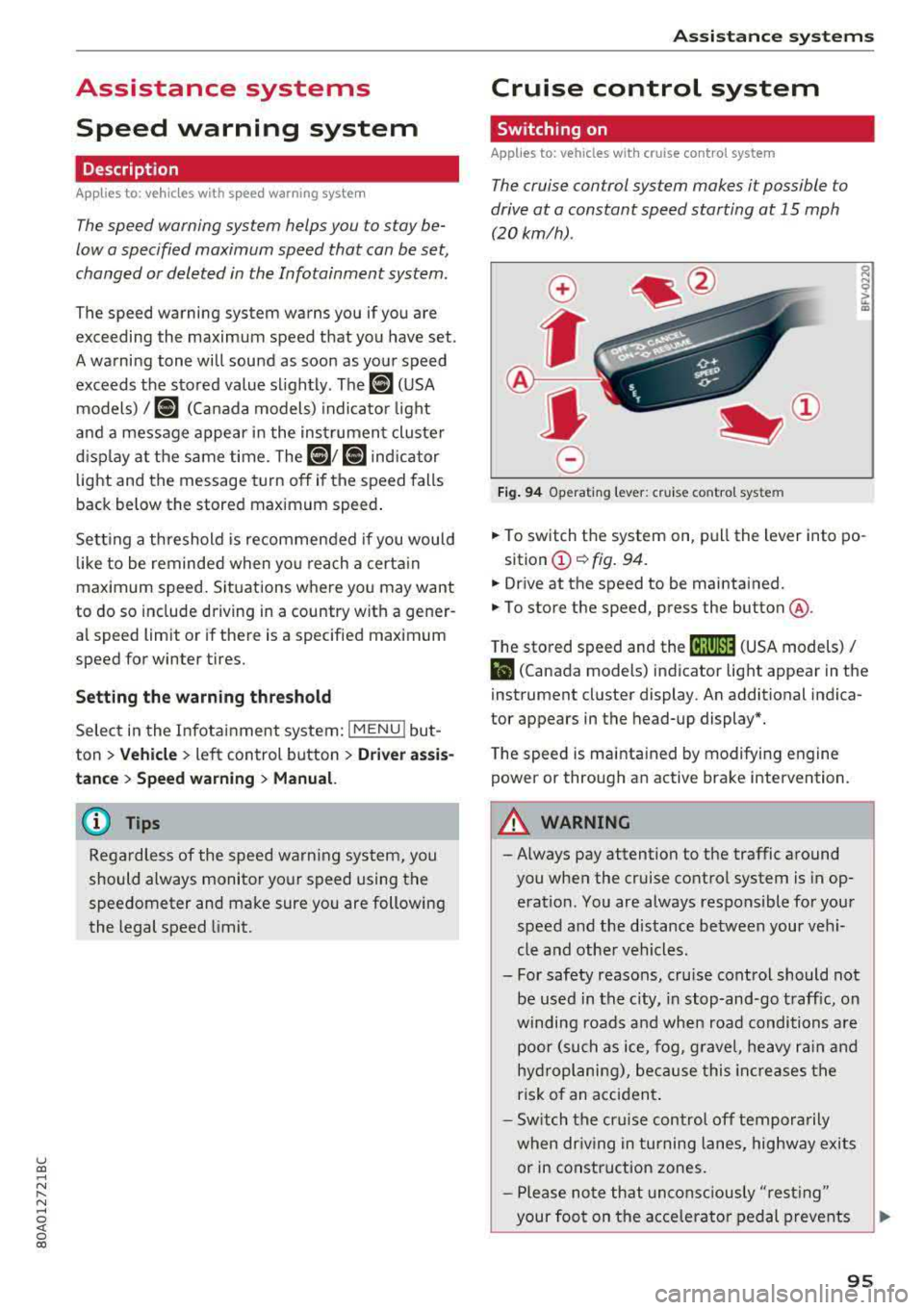
Fig . 94 Operat ing leve r: cru ise control system
.,. To switch t he system on, pull the lever into po-
sition
(D ¢ fig. 94.
.,. Drive at the speed to be maintained.
.,. To store the speed, press the button @.
T he stored speed and the
@jltJ~i, (USA models) /
l'I (Canada models) ind icator lig ht appear in the
instrument cluster display. An additional indica
tor appears in the head-up display*.
T he speed is mainta ined by modifyi ng engine
power or through an active brake intervention.
A WARNING
-Always pay attention to the traffic around
you when the cruise control system is in op
eration. You are always responsible for you r
speed and the distance between your vehi
cle and othe r vehicles .
- For safety reasons, cru ise control should not
be used in the city, in stop -and-go t raff ic, on
winding roads a nd when road conditions a re
poor (such as ice, fog, g rave l, heavy ra in and
hy droplani ng), bec ause this in cr eases the
risk of an acciden t.
- S witch the cr uise con trol
off tempor arily
when dr iv ing in turning lanes, highway exits
or in construction zones.
- P lease no te th at unconsc iously
"rest ing"
your foot on the accelerator ped al prevents
95
Page 100 of 392
Ass is tance sy stem s
Operating
Applies to: vehicles with camera -based traffic sign recogni
tion
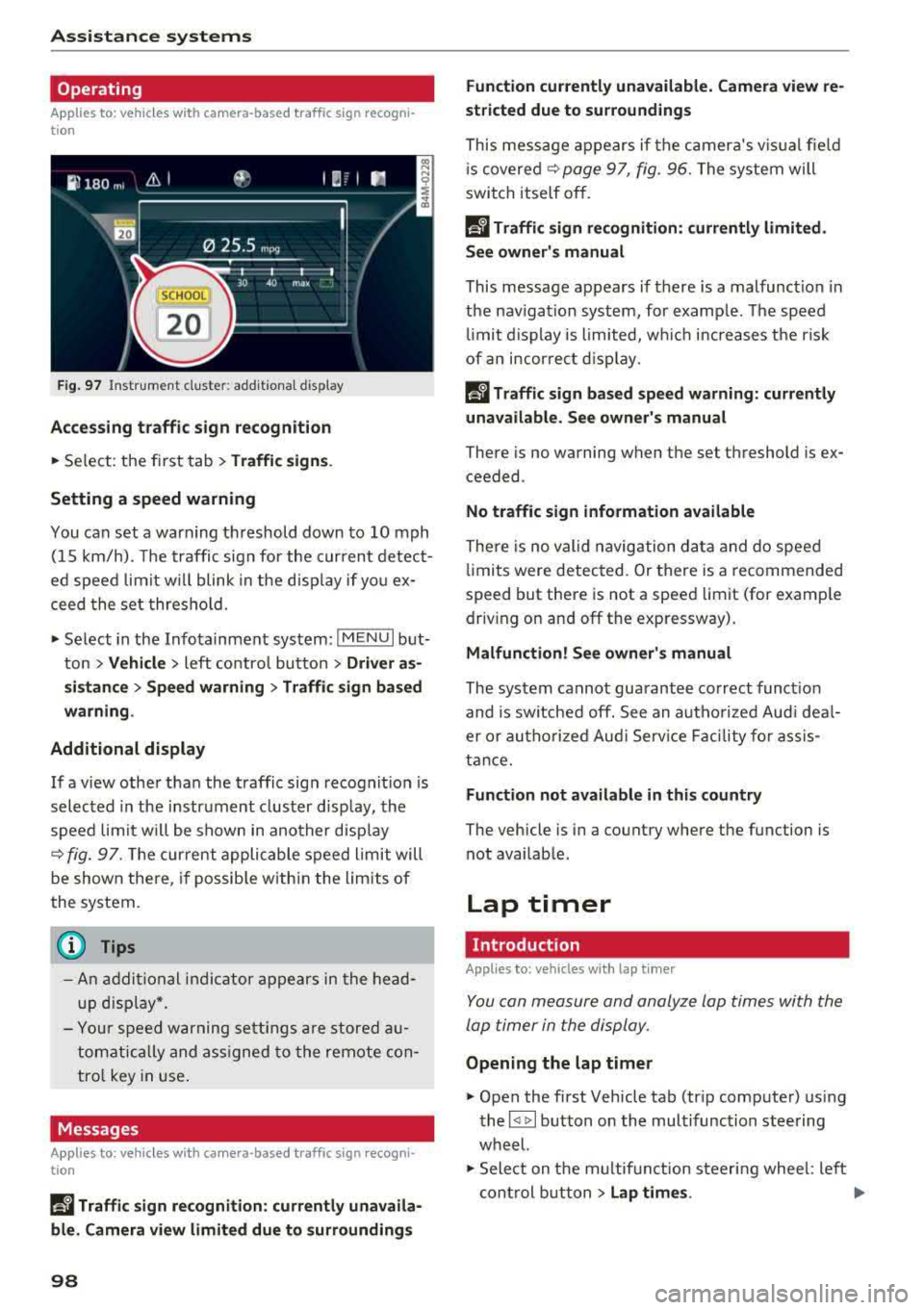
F ig . 97 Instrument clus te r: addi tiona l d isplay
Ac ces sing traffic sign recogn iti on
... Se lect: the first tab> T ra ffic si gns.
Setting a speed warning
You can set a warn ing th reshold down to 10 mph
(15 km/h). The traffic sign for the current detect
ed speed limit w ill blink in the disp lay if you ex
ceed the set thresho ld.
... Select in the Infotainment system: IM ENU I but
ton >
V ehi cle> left contro l button > Driver a s·
s is tan ce
> S pe ed war ning > Tr affic sign ba sed
w arning .
Add itional display
If a view other than the traffic sign recognit ion is
selected in the instrument cluster disp lay, the
speed limit w ill be shown in another disp lay
~ fig. 97 . The cur rent applicable speed limit will
be shown there , if possib le with in the limits of
the system.
(D Tips
- An additional indicator appears in the head
up d isplay*.
- Your speed warning settings a re stored au
tomatically and ass igned to the remote con
tro l key in use .
Messages
Applies to: vehicles with camera-based traffic sign recogn i
tion
P!\i Traffi c sign recognition : curren tly unavaila
ble _ Camera view limit ed du e to su rrounding s
98
Function currentl y una va ilable. Camera view re
stricted due to surroun ding s
This message appears if the camera's v is ual fie ld
i s
covered ~ page 97, fig. 96. The system will
switch itself o ff.
la Tr affic sign r ecog nition : currentl y limit ed .
Se e owner' s manua l
This message appears if there is a malfunct ion in
the nav igation system, for example . The speed
li mit d isplay is limited, wh ich inc reases the risk
of an incorrect d isp lay.
P!\i Traffic sign based speed warnin g: current ly
una vail able . Se e own er' s manual
There is no warning when the set threshold is ex
ceeded .
No traffic sign inf ormation available
There is no valid navigation data and do speed
li mits were detected. Or there is a recommended
speed but there is not a speed lim it (for examp le
driv ing on and off the expr essway) .
Malfun ction! S ee owner's manu al
The system cannot guarantee correct funct ion
and is switched off. See an autho rized Aud i dea l
er or autho rized Aud i Serv ice Faci lity for assis
tance.
Functi on not av ailable in this country
The vehicle is in a country where the function is
not availab le .
Lap timer
Introduction
Applies to: vehicles with lap t imer
You can measure and analyze lap times with the
lap timer in the display.
Opening the lap timer
... Open the first Vehicle tab (trip computer) using
the
l <1 1>I button on the multifunction steering
wheel.
... Sele ct on the m ultifunction steering wheel : lef t
cont rol b utton
> Lap time s. Ill-
Page 104 of 392
Ass is tanc e system s
not cause the adaptive cruise control to
switc h off .
- After switching on t he ignit ion, the system
initially adj usts to a speed of 80 mph
(130 km/h) when driving onto highways
without a speed limit. Then the system ad
justs to the last speed stored by the driver.
- There is no adaptation to speed limits when
driving thro ugh h ighway interchanges and
when driving on or off the expressway.
- There is no pred ictive control at speed limits
under 20 mph (30 km/h).
- If a speed limit is only detected by the cam
era and the actua l speed is significantly
higher, then the speed limit will blink in the
display u ntil you have reached the requ ired
speed
Q page 98.
- Incorrect values from the camera-based
traffic s ign recogn ition* or outdated naviga
tion system map data can lead to incorrect
or implausible co ntro l.
- When route guidance is switched on, the system adapts to the route provided by the
navigation system. Driving w ithout route
g ui dance o r leaving a route can res ult in im
p lau sib le con trol.
- The system switches off when o utside of a
r oad system th at is re co rded in the navig a
tion system map data.
Settings in the Infotainment system
Applies to: vehicles with predictive efficiency assist
Predict ive messages*
~ In the Infotainment system, se lect: IMENU !
button > Vehicle > left contro l button > Dri ver
a ss istance > Eff iciency assist .
Predic tive messages are shown when this f unc
tion is sw itched on.
Setting predictive control*
~ Select in the Infota inment system: IMENU I but
ton
> Vehi cle > left contro l button > Dri ver a s
si stan ce > Audi adaptiv e cruise con trol > Pre
dictive control.
Set spe ed limit
-when this function is sw itched
on, t he system ad justs to the speed limits. This
102
can a lso be done with at to lerance, if desired . In
this scenario, you may fall be low or exceed the
set speed in favor of increased efficiency.
Adaptation to route ahead -whe n this funct ion
i s sw itched on, the system adapts to the route
ahead, such as reducing the speed when driving
around curves.
(D Tips
N o predictive messages are shown on vehicles
without a navigation system.
Audi adaptive cruise control
Description
Applies to: vehicles with Audi adaptive cruise control
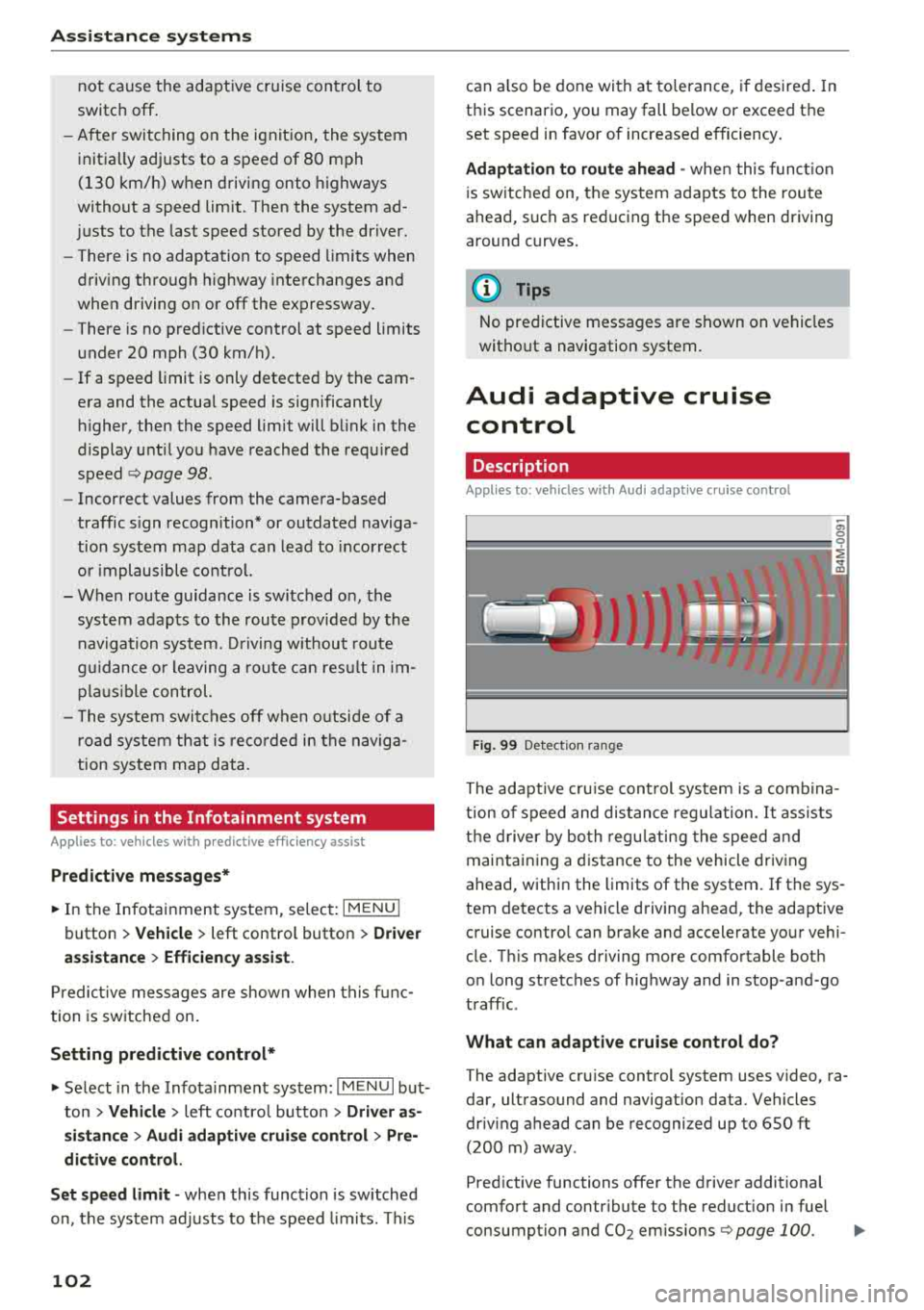
Fig. 99 Detect ion ra nge
The adaptive cru ise cont rol system is a comb ina
t ion of speed and distance regu lation .
It assists
t h e d river by bo th regu lating the speed and
maintain ing a d istance to the vehicle driv ing
ahead, within the limits of the system.
If the sys
tem detects a vehicle d riving ahead, the adaptive
cruise contro l can brake and accelerate your vehi
cle. T his makes driving more comfortable both
o n long stretches of highway and in stop -and-go
traffic.
What can adapti ve cruise control do?
The adaptive cru ise control system uses video, ra
dar, ultrasound and navigation data . Vehicles
driv ing ahead can be recognized up to 650 ft
(200 m) away .
Pred ictive functions offer the driver additional
comfort and contr ibute to the reduct ion in fuel
consumption and
CO2 em issions Q page 100. IJIJ,