infotainment AUDI Q5 2018 Workshop Manual
[x] Cancel search | Manufacturer: AUDI, Model Year: 2018, Model line: Q5, Model: AUDI Q5 2018Pages: 392, PDF Size: 60.56 MB
Page 162 of 392
Multifunction steering wheel
Multifunction steering
wheel
Introduction
Applies to: vehicles with multifunction steering wheel
In the driver information system display, you can
control numerous Infotainment functions using
the multifunction steering wheel plus*
¢ page 12 or the mult ifunct ion steer ing wheel*
¢pag e 15.
You can control additional Infotainment func
tions using the
MMI control panel¢ page 147 in
the Infota inment system display.
.&_ WARNING
Direct your full attention to driving. As the
dr iver, yo u have complete responsibility for
safety in traffic. Only use the functions in
-
such a way that you a lways maintain com
plete control over your vehicle in all traffic sit-
uations.
Radio
Applies to: vehicles with multifunction steering wheel and ra
dio
Applies to: vehicles with multifunction steering wheel
"' Press the I MODE I button on the multifunction
steering wheel repeatedly until the Rad io/Me
dia tab is displayed.
Applies to: vehicles with multifunction steering wheel plus
"'Press the l<1 t>I button on the multifunction
steering wheel repeatedly until the Radio/Me
dia tab is displayed.
"' Press the le ft contro l button ¢ page 13.
Dep ending on vehicle equipm ent, the following
functions may be available in the drive r informa
tion system.
- Selecting the frequency band: select and con
firm a frequency band .
-Selecting a station from the station list: select
and confirm a radio station.
- Selecting a station from the presets list : select
and confirm
Presets and then a radio station .
160
-Opening a media source: select and confirm
Switch to media.
Additional settings
-Select: r ight cont rol button> desired entry.
See¢ page 223 .
Q) Tips
Pay attention to the Infotainment system dis
play if necessary. Depending on the selected
funct ion, it may be necessary to use the MMI
control panel.
Media
Applies to: vehicles with multifunction steering wheel and media
Requirement: a media drive must contain audio/
video
files¢ page 226.
Applies to: vehicles with multifunction steering wheel
"'Press th e I MODE ! button on the mu ltifunction
steering whee l repeatedly unti l the Radio/Me
dia tab is d isp layed.
Applies to: vehicles with multifunction steering wheel plus
"' Press the l<1 C> I button on the multifunction
steer ing whee l repeatedly unt il the Radio/Me
dia tab is displa yed.
"' Press the left control button ¢ page 13.
Depending on veh icle equipment, the following
funct io ns may be available in the driver informa
tion system .
-Selecting a media source: select and confirm a
source such as the SD card.
-Switching to the radio : select and confirm
Switch to radio.
- Playing an audio/video file:
select and confirm
a file .
-Pausing/resuming playback : press the right
thumbwheel @¢page 14, fig . 11 . To resume
playback, press the right thumbwheel again.
-Opening additional track information: select:
r ight control button >
Show "Now Playing "
screen .
For additional information, see ¢page 238.
Page 163 of 392
(D Tips
-Always fo llow the information found in
~ page 225 .
-Please note that w ith in a media sou rce in
t h e driver i nfo rmation system, on ly playlists
that we re se lected throug h the MMI contro l
panel can be
p layed~ page 235.
- Pay attention to t he Infotainment system
d isplay if necessary . Dependi ng on these
l ected function, it may be necessary to use
the M MI co ntrol panel.
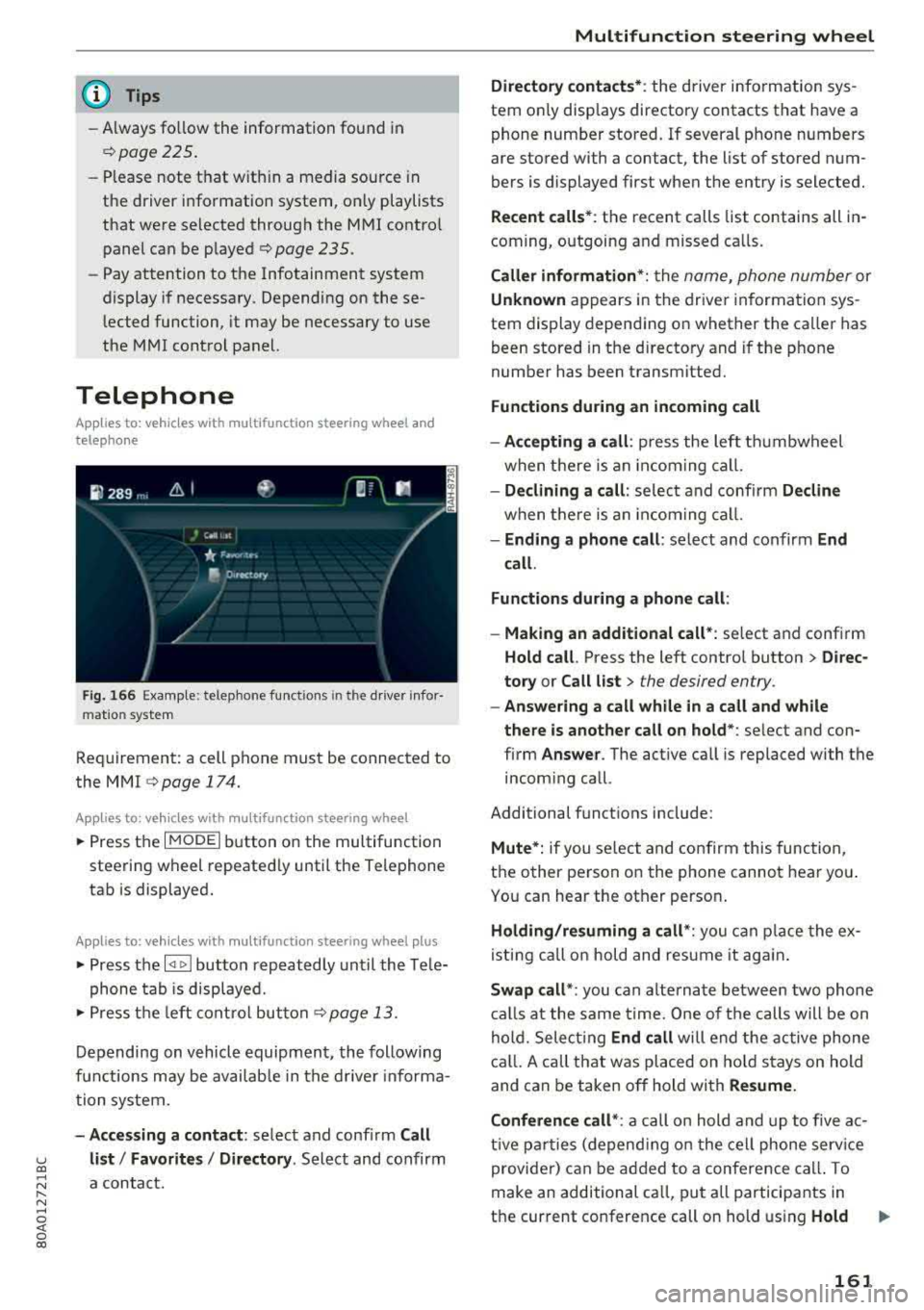
Telephone
App lies to: ve hicles with multifunction steering wheel and
telepho ne
F ig . 166 Exa mpl e: t e lep hone fu nct ions in t he d river infor
mat io n system
Req uirement: a cell p hone must be connected to
the MMI
~ page 174.
Ap plies to: ve hicles with multifunction steering wheel
• Press t he I M ODE i butto n on the multifunction
stee rin g wheel repeate dly until the Te lephone
tab is displayed .
Applies to: vehicles w ith multifunction steering wheel plus
• Press the l
phone ta b is disp laye d.
• Press t he left co ntro l but ton ~ p age 13.
D epending on vehicle equip men t, the following
f unc tions may be availab le in the dr ive r informa
tio n syste m.
-Accessing a contact : select and confir m Call
u list/ Favorite s I Directory . Select and confirm co
~ a contact. r--N ......
~ 0 co
Multifunction steering wheel
Directory contacts *: the driver inform ation sys
tem on ly disp lays directory contacts that have a
phone num ber stored . If several phone numbers
are stored with a contact, the list o f stored n um
bers is displayed first when the entry is selected .
Recent calls*: the recent calls list contains all in
com ing, outgoing a nd missed ca lls.
Caller information* : the name , phone number or
Unknown a ppe ars in the drive r informa tion sys
tem dis play depend ing on whether the ca ller has
been stored in t he d irecto ry and if the p hone
numbe r has been transmitted.
Functions during an incoming call
-Accepting a call : press the left th umbwheel
w hen there is an incomi ng cal l.
-Declining a call : selec t and conf irm Decline
w hen t he re is an incom ing ca ll.
-Ending a phone call : se lect and confirm End
call.
Functions during a phone call :
-Making an additional call*: select and conf irm
Hold call. Press the left contro l bu tton > Direc
tory or Call list >
the desired entry.
-Answering a call while in a call and while
there is another call on hold *:
select and con
firm
Answer . The active ca ll is replaced with the
incom ing ca ll.
Additional funct ions include:
Mute*: if you se lect a nd co nfirm this func tio n,
t h e o ther person on the phone canno t hear yo u.
Yo u can hear the ot her perso n.
Holding/resuming a call *: you can p lace the ex
i s ting ca ll on hold and res ume it aga in.
Swap call* : you can alterna te betwee n two phone
calls at t he same time. One o f the calls will be on
hol d. Sele ct ing
End call will end the acti ve ph one
c a ll. A c all th at was pl aced on ho ld st ays on hold
and can be taken o ff hold wi th
Resume.
Conference call *:
a ca ll o n hold and up to five a c
ti ve p arties ( depen ding o n the ce ll phone serv ice
provider) can be add ed to a conference call . To
m ake an ad ditional ca ll, pu t all participants in
t h e current co nference call on hold using
Hold ..,
161
Page 169 of 392
u co ..... N r--N ..... 0 <( 0 00
Voice recognition system Operating
Applies to: vehicles with voice recognitio n system
You con operate many Infotainment functions
conveniently by speaking.
Requirement: the ignition and the MM I must be
switched on ¢
page 148, there must not be any
phone call in progress and the park ing system
must not be active .
~ Switching on: press the~ button @
¢page 14, fig . 11 o r ¢ page 15, fig. 13 br iefly
on the mu ltifunction stee ring wheel and say
the des ired command after the
Beep .
~ Switching off : press and hold the [2;J b utton.
Or : press the [2] but to n.
~ Pausing : say the command Pause . To resume,
press the
[2;J b utton .
~ Correcting : say the com mand Correction . Or :
simp ly say a new comm and d uring an an
no uncement
¢ page 245.
Input assistance
The system gu ides you throug h the input with
v isua l and audio feedbac k.
- Visual input assistance : after switching on
vo ice recogn it ion, a display w ith a selection of
poss ible commands appea rs . This command
display can be sw itched on o r off. Se lec t:
IMEN UI butt on> Settings > left cont ro l button
> MMI settings > Speech dialog system .
- Audio input assistance :
to have the poss ible
comm ands read, tu rn th e voice rec ogn ition sys
tem o n and say
Help.
For the system to understand you:
Speak clearly and dis tinct ly a t a normal vo lume .
Speak lo uder when d riving faste r.
Emphasize the words in the commands even ly
a n d do no t leave long pauses .
C lose the doors, the windows and the sunroof* to
reduce background noise . Make s ure that passen
gers a re not speaking when you a re giving a voice
command .
Voice recognition system
D o not d irect the vents towa rd the hands -free mi
c ro p hone, wh ich is in the roof head liner nea r the
front interior lig hts.
O nly use the system from the dr ive r's sea t be
ca use the hands -free microphone is di rected to
ward that seat .
Additional settings
See¢ page 245, Speech dialog system .
_&. WARNING
- Dir e ct y ou r full a tte ntio n to dr iv in g. A s the
d river, you have com ple te re sponsibili ty fo r
safety in t raff ic . O nly use the functions in
such a way t hat you a lways maintai n com
p lete contro l over your vehicle in all traffic
situations.
- Do not use t he voice recognition system in
emergencies beca use your voice may change
in st ressfu l situations. It may take longe r to
d ia l the number o r th e system may not be
ab le to d ia l it at all. Dia l the emergency
number manually.
(D Tips
-The d ialog pauses w hen the re is a n incom
ing phone call a nd will con tinue if yo u ig
nore the ca ll. The dia log ends if yo u answer
t he ca ll.
- Yo u can select an item in the list using ei
t her the vo ice recogn it io n sys tem o r the
cont ro l knob .
Command overview
information
Applies to: vehicles with voice recognition system
T he following overv iews des cribe the comm ands
t h at can be used to ope rate the MMI using the
vo ice recognit ion system.
Alte rnative co m mand s ar e separate d using
a"/ ",
fo r ex ample say: Telephone / (or) Navigation /
(or) Radio.
Sequences of com mands used to perfo rm an a c
t io n a re iden tified w it h
a ">", fo r ex am ple s ay:
Enter address > ( then) Enter country/state . ..,
167
Page 171 of 392
u co ..... N r--N ..... 0 <( 0 00
Function
Calling the last number dialed
Dialing a phone num ber
Correcti ng the p hone number that
was entered
Showing contact information
L isten ing to messages
Entering the PIN (SIM)
C orre ct in g the P IN entry
Correcting data input
C los ing the f ull -s cr een command
list
(D Tips
Voice recognition system
Say :
Redial
Enter number
> after being prompted, say the telephone num-
ber in group s of individual numbers,
fo r example. 888 555
1212 > Dial
Correction / Delete number
Directory
> say the desired contact when prompted,
for example John Smith
Call voicemail
Enter PIN
> when prompted, say the PIN in individual numbers
> Save
Correction / Delete PIN
No I meant ( XV)
Close
- P lease note th at comm an d s can o nly be giv
en for the primary
phone *¢ page 1 74.
- Cont acts in the dire ctory can sele cted using
the fu ll name ("first name las t name" and
"last name, first name") as well as with only
the f irst or last nam e. This applies to cell
phones that t ransmit names separate d into
first and last names . -
For more informat io n on s uppo rted cell
phone s, vi sit www.audius a.c om/ blu etoo th
or cont act an a uthorized Audi dea ler or au
thorized Audi Service Fac ility.
Audi connect (Infotainment)
A pp lies to: ve hicles with vo ice recognition syste m and Audi co nnect (Infotainment)
Req uirement: the requirements fo r A udi co nnect
(Info tainmen t) must be met
¢ page 187.
Function Say:
Accessing A udi con nect I nfota in-Audi connect > follow the system prompts
me nt serv ices
Audi co nnect Infotainment services
Weather / Online news / Fuel prices / Parking information /
T ravel infor mation / Twitter / Online traffic information / City
Events / Flight information
Search areas for Au di connec t Info -Near destination / Nearby / In a new city
ta inment serv ices
Correcting data inp ut
No I meant (XV)
(D Tips
Always read t he cha pte r¢ page 194, Audi
connect (Infotainm ent) g en eral information .
169
Page 172 of 392
Voice recognition s ystem
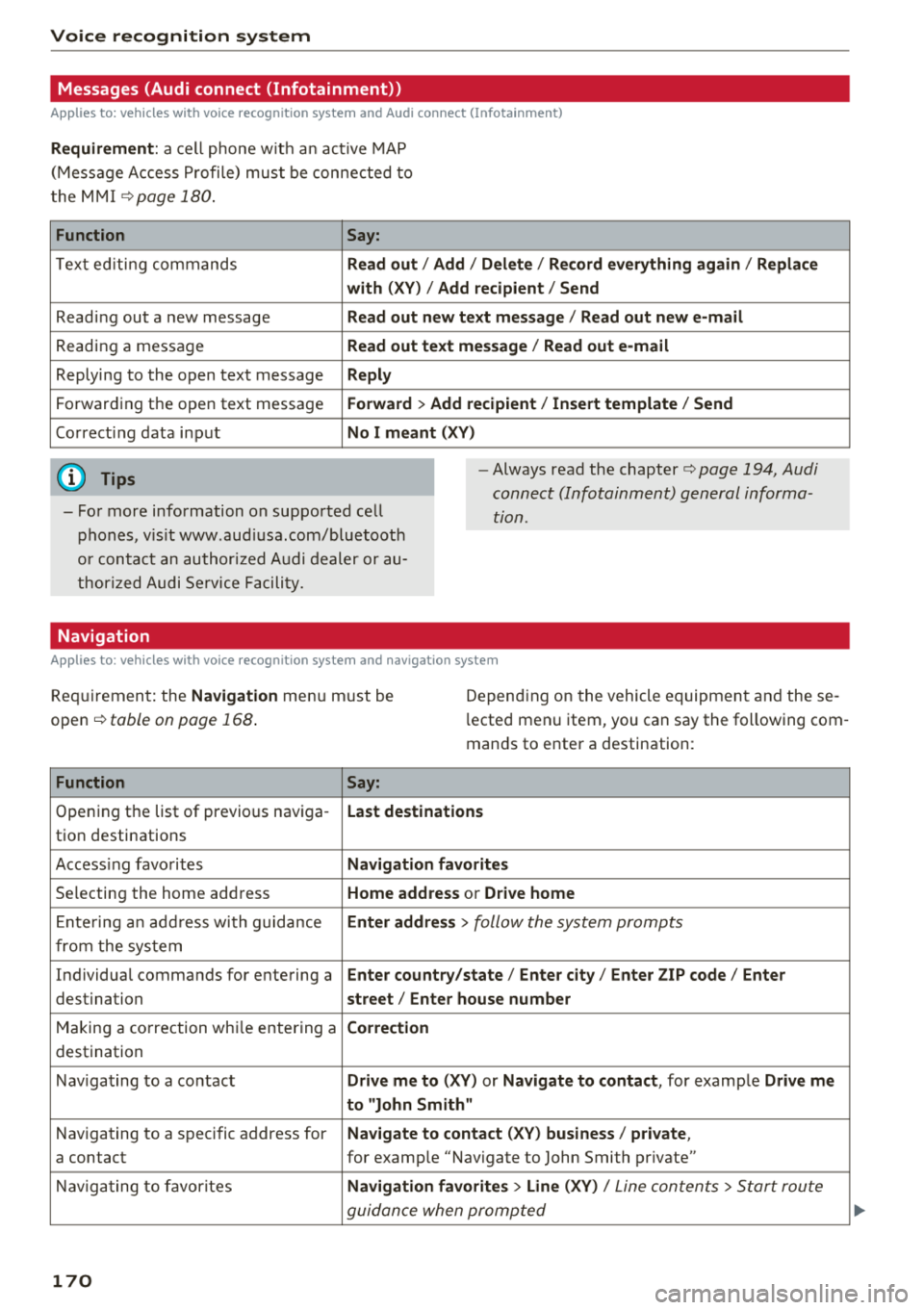
Messages (Audi connect (Infotainment))
Applies to: vehicles with voice recognition system and Audi connect (Infotainment)
Requirement : a ce ll phone w it h an ac tive MAP
(Mess age Access P rofi le) must be connected to
t he MMI
¢page 180 .
Function Say:
T ex t ed iti ng commands Read out
I Addi/ Delete / Re cord everything ag ain / Replac e
w ith (XV ) / Add recipient / Send
Reading out a new message Read out new text me ssage
I Read out ne w e-mail
Reading a message Read out text me ssage / Read out e-m ail
Replying to the open text message Reply
Forwarding the open text message Forward > Add recipient / In sert template / Send
Correcti ng data input No I meant (XV)
(D Tips
-Fo r more information on supported cell
phones, v is it www .aud iusa .com/bluetooth
or contact an author ized A udi dealer or au
thor ized Audi Se rvice Facility.
-Always read the chapter¢ page 194 , Audi
connect (Infotainment) general informa
tion.
Navigation
Applies to: vehicles with voice recognition system and navigation system
Requiremen t: the Navigation menu m ust be
open
¢ table on page 168 .
Depending on the vehicle equipmen t an d these
l ected menu item, you can say the following com
mands to enter a destination:
Function Say:
Opening the list of previous naviga -Last destinati ons
tion destinations
Access ing favo rites Navigation fa vori tes
Selecting the home add ress Home address or Driv e home
E nte ring a n add ress wi th guidance Enter address
> follow the system prompts
from the system
Individual commands for entering a Enter countr y/state / Ente r cit y/ Enter ZIP code / Enter
destination street/ Ent er hou se numb er
Making a correction wh ile entering a Correction
destination
Nav igating to a co ntact Drive me to
(XY) or Na vigate to contac t, for example Drive me
to "John Sm ith"
Navigating to a specific address for Na
vigate to co nta ct (X V) bu sine ss/ private ,
a contact for example "Navigate to John Smith pr ivate"
Nav igating to favorites Navigation favorite s> Line (XV) /
Line contents> Start route
guidance when prompted
170
Page 174 of 392
Voice recognition s ystem
-Always read the chapter ¢ page 194, Audi
connect (Infotainment) general informa tion .
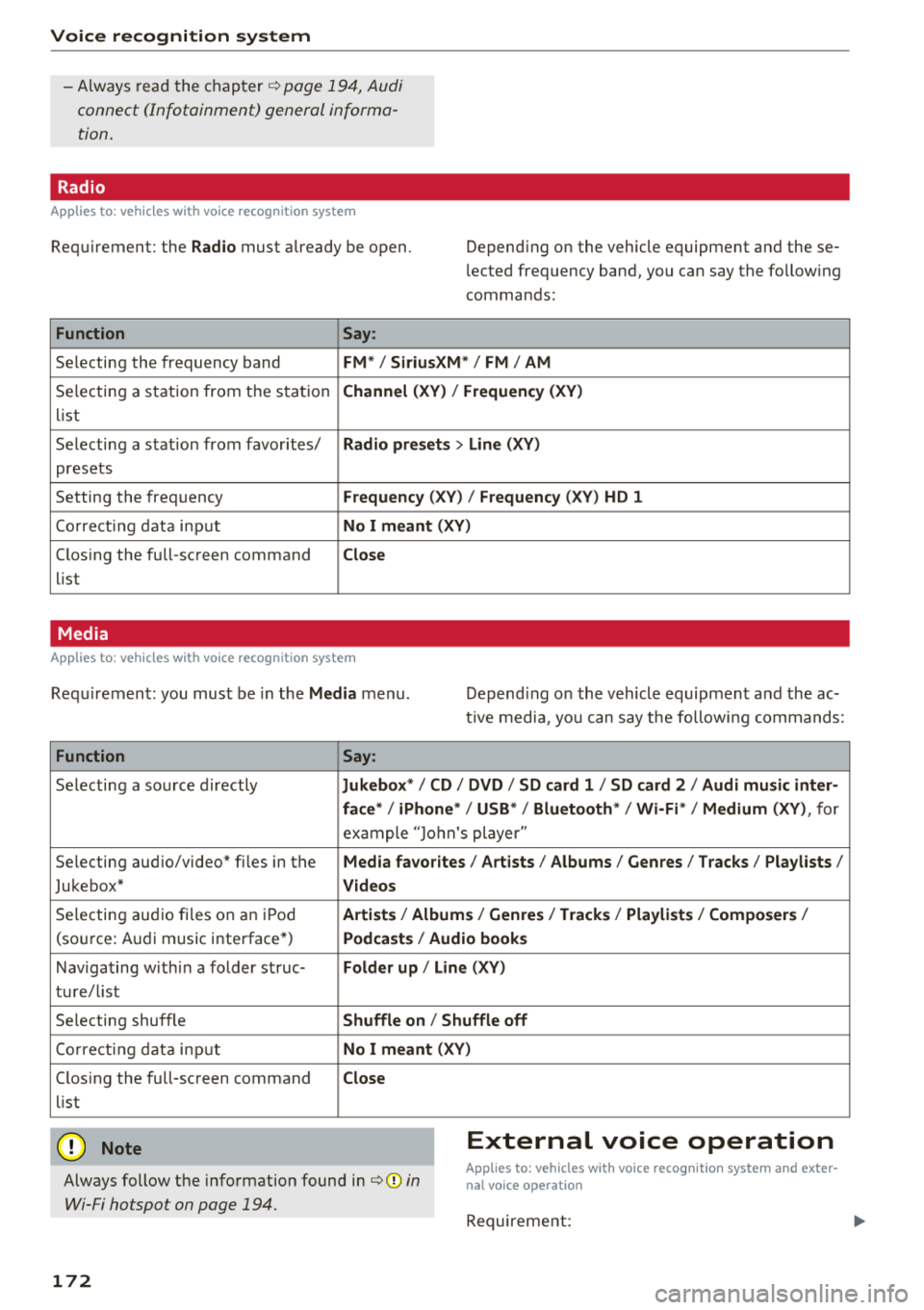
Radio
Applies to: vehicles with voice recognition system
Requirement: the Radio must already be open. Depend ing on the vehicle equipment and these
lected frequency band, you ca n say the fo llow ing
commands :
Function Say:
Selecting the frequency band FM*/ Siriu sXM* / FM / AM
Selecting a station from t he s ta tion Channel (XV ) / !Frequenc y (XV)
list
Selecting a stat ion from favorites/
Radio presets > Line (XV)
presets
Setting the frequency
F requency (X V ) / Frequency ( XV) HO 1
Correct ing data inp ut No I meant (XV )
Closing the full-screen command Close
list
Media
Applies to: vehicles with voice recognition system
Requirement: you mus t be in the Media menu . Depending on the vehicle equipment and the ac
t ive media, yo u can say the following commands :
Function Say:
Selecting a sou rce directly Ju kebox* / CO / DVD / SO card 1 / SO card 2 / Audi music inter-
face */ iPhone * / USB * / Bluetooth * / Wi -Fi * / Medium (XV) ,
for
exa mple "J o hn's player "
Selecting aud io/video" fi les in the
Media fa vorites I Artists / Albums / Genres I Tracks / Playlists /
Jukebox* Videos
Selecting aud io fi les on a n iP od Artists / Albu m is/ Genres I Track s/ Playlists / Compo sers I
(so urce: A udi music i nterface*) Podca st s / Aud io books
Nav iga ting with in a folder s truc-Folder up / Line (XV )
tu re/l ist
Selecting shuffle
Shuffle on / Shuffle off
Co rre ct in g data inp ut No I meant (XV )
Closing the full-screen command Close
list
@ Note External voice operation
Always follow the info rmation found in ¢@) in
Wi-Fi hotspot on page 194.
Applies to: vehicles with voice recognition system and exter·
nal voice operation
Requireme nt:
172
Page 181 of 392
u co ..... N r--N ..... 0 <( 0 00
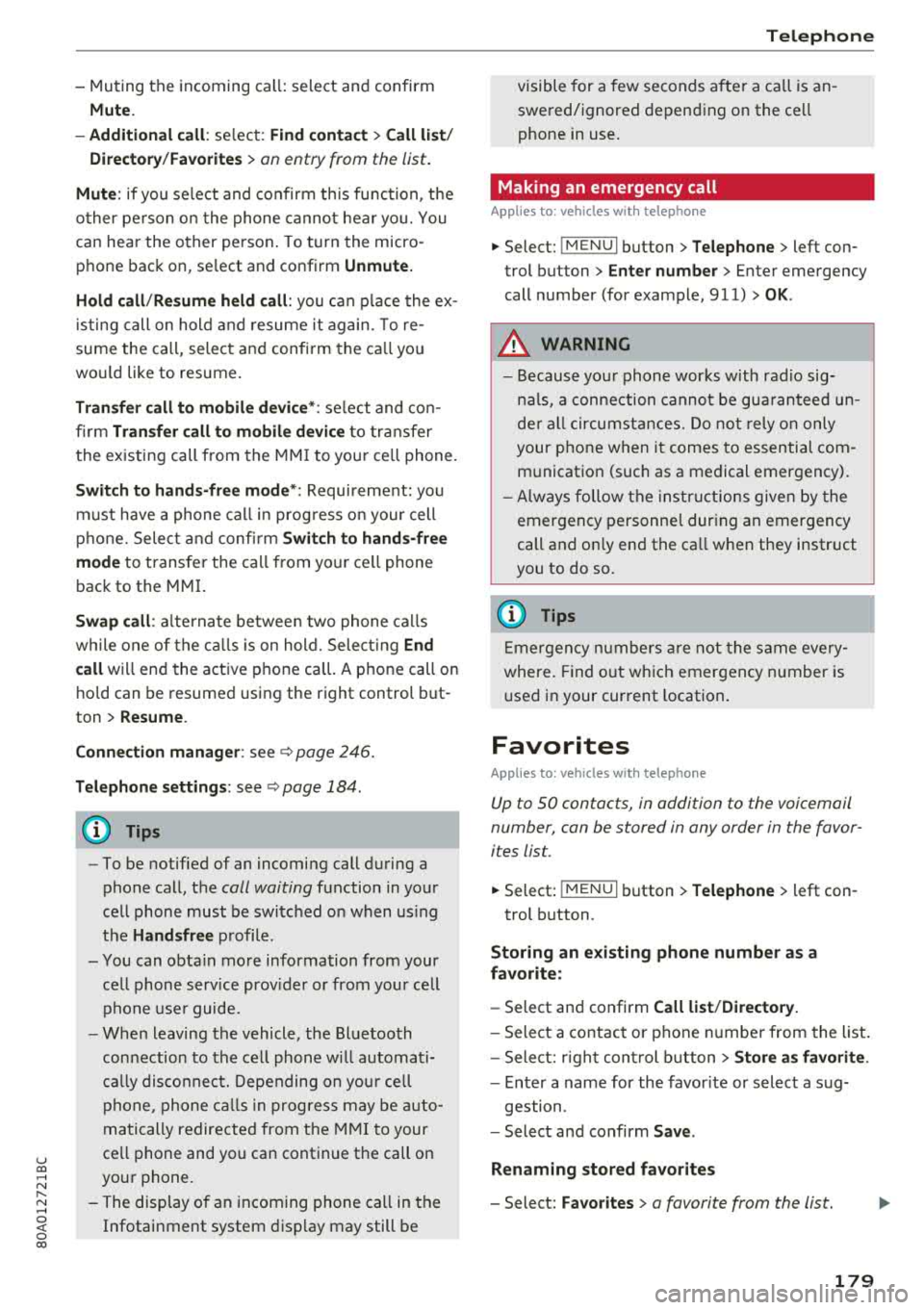
-Muting the incoming call: select and confirm
Mut e.
- Additi onal ca ll:
se lect: F in d co ntac t > Call li st/
Di rect ory/ Fa vo rite s
> an entry from the list .
Mute: if you select and co nfirm th is function, the
other pe rson on the phone cannot hea r yo u. You
can hear the other person . To turn the micro
phone back on, se lect and confirm
Unmute.
Hold call /Re sum e held call :
you can p lace the ex
i sting call on hold and resume it again. To re
sume the call, select and confirm the ca ll you
wo uld like to resume.
Tran sfe r call to mobile d evice* : select and con
fi rm
Tr ansfe r call t o m obile d evic e to tra nsfer
the existing call from the MM I to you r ce ll phone.
Swi tch to hand s-fr ee mod e*: Requirement: you
must have a phone call in prog ress o n your cell
phone. Select and confi rm
S wit ch t o hand s-free
mode
to t ransfer the call from your ce ll phone
back to the MM I.
Swap call : alternate betwee n two phone ca lls
while one of the c alls is on hold. Select ing
End
ca ll
will end the active phone ca ll. A p hone call on
h o ld can be resumed using the right control but
ton >
Resume.
C onne ction manag er:
see ~ page 246.
Telephone settings : see~ page 184 .
(D Tips
-To be notified of an incoming call during a
phone call, the
call waiting function in your
cell phone must be switched on when us ing
the
Hand sfr ee profile .
- You can obta in more information from your
ce ll phone serv ice prov ider or from your cell
phone use r guide.
- When leaving the vehicle, the Bl uetooth
connection to the ce ll phone w ill automat i
ca lly disconnect. Depending on you r ce ll
phone, phone calls in prog ress may be auto
matically redirected from t he M MI to your
ce ll phone and you can continue t he call on
your phone .
- The display of an incoming phone call in the Infotainment system disp lay may still be
T ele ph on e
visible for a few seconds a fte r a ca ll is an
swered/ignored depending on the ce ll
phone in use.
Making an emergency call
Applies to: vehicles with telephone
.,. Select: ! MENUI button> Telephone > left con
trol button >
Enter n umber > Enter emergency
call number (for example, 911) >
OK.
A WARNING
-
- Because yo ur phone works w ith rad io sig
na ls, a connection canno t be gua ranteed un
de r all circumsta nces. Do not rely o n only
your p hone when i t comes to essential com
m unication (such as a medical emergency) .
- Always follow the inst ructions given by the
emergency pe rsonne l dur ing an emergency
call and on ly end the ca ll w hen they instruct
you to do so .
(D Tips
Emergen cy nu mbe rs a re not the s ame every
where. Find out w hich emergency n umber is
u sed in your current location.
Favorites
Applies to: vehicles with telephone
Up to 50 contacts, in addition to the voicemail
number, can be stored in any order in the favor
ites list.
.,. Select: ! MENUI button> T elephone > left con-
trol button .
Storing an e xis ting phone number as a
fa vorite :
-Select and confirm Call li st/ Director y.
- Select a contact or phone n umbe r from the list.
- Select: r ight cont rol b utton >
S to re as favorit e.
-Enter a name for the favor ite or select a sug-
gestion .
- Select and confirm
Sav e.
Renaming stored fa vorite s
-Select: Fav orite s > a favorite from the list.
179
Page 184 of 392
Telephone
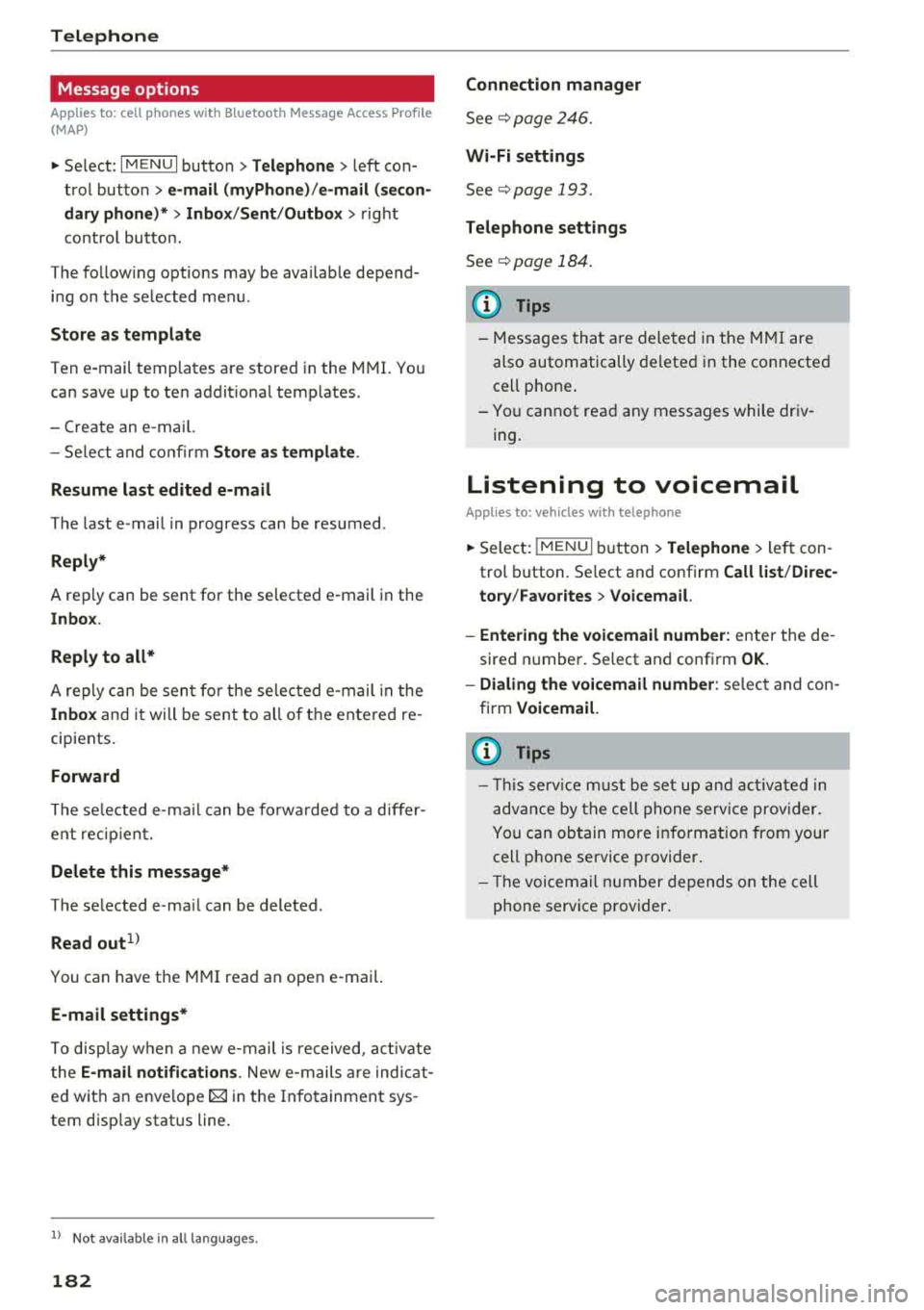
Message options
Applies to: cell phones with Bluetooth Message Access Profile
(MAP)
"' Select : IMENUI button> Telephone > left con
trol button >
e-mail (myPhone)/e-mail (secon
dary phone)* > Inbox /Sent /Outbox
> right
contro l button.
The follow ing options may be available depend
ing on the selected menu .
Store as template
Ten e-mail templates are stored in the MMI. You
can save up to ten addit ional templates.
- Create an e-mai l.
- Select and confirm
Store as template .
Resume last edited e-mail
The last e-mail in progress can be resumed .
Reply*
A reply can be sent for the selected e -mail in the
In box .
Reply to all*
A reply can be sent for the selected e -mail in the
Inbox and it will be sent to all of the entered re
cipients.
Forward
The selected e-ma il can be forwarded to a differ
ent rec ipient.
Delete this message*
The selected e-ma il can be deleted .
Read out1
)
You can have the MMI read an open e-mail.
E-mail settings*
To disp lay when a new e-mail is re ceived, act ivate
t he
E-mail notifications . New e-mai ls are indicat
ed wit h an enve lope
121 in the Infotainment sys
tem disp lay status line.
1> N ot availa ble in all l an guage s.
182
Connection manager
See¢ page 246.
Wi-Fi settings
See ¢page 193 .
Telephone settings
See ¢page 184.
(D Tips
- Messages that are deleted in the MMI are
also automatically deleted in the connected
cell phone .
- You cannot read any messages while driv
ing.
Listening to voicemail
Applies to: vehicles with telephone
"'Select: IMENU I button> Telephone > left con
trol button. Select and confirm
Call list /Direc
tory /Fav orites > Voicemail.
- Entering the voicemail number:
enter the de
s ired number. Select and confirm
OK.
- Dialing the voicemail number: select and con
firm
Voicemail.
{D Tips
- This service must be set up and activated in
advance by the cell phone service provider.
You can obtain more information from your
cell phone service provider .
- Th e voicemai l number depends on the cell
phone service provider .
Page 186 of 392
Telephone
~ Select: I M ENUI button> Telephone > left con
tro l button .
~ Select and confirm Directory > a contact from
the directory.
~ Se lect : rig ht contro l butto n > Show contact de·
tails .
- Calling:
select and confirm the desired tele
phone numbe r.
- Navigating : to start navigation, se lect and con
firm the desi red address. Select and confirm
Start route guidance .
Press the r ight cont rol button to o pen additional
options fo r th e contact details.
Add destination
To st art na vigatio n, se le ct and co nf irm the de
sired ad dress . Se le ct and confirm
Start route
guidance .
Store as favorite
S ee ¢ page 1 79, Favorites .
Send text message*
You can send a text message¢ page 180 to the
selected contact .
Delete contact
The selected contact can be delete d.
(D Tips
- Contacts edit ed in th e MMI d irecto ry cannot
b e autom atic all y up dat ed in t he connec ted
ce ll p hone. Audi recommends editing cell
ph one contacts direct ly in t he ce ll phone .
- On ly the co nt acts in the lo ca l MM I memory
ca n be e dite d or de leted .
Importing and exporting contacts
App lies to: ve hicles w ith telep hone
Con tacts in vCard forma t (. vcf) can be impo rted
into the directory or e xported .
Requir em en t: an S D car d m us t b e in se rted in o ne
of the S D card
readers *¢ page 22 6 or a USB
s to rage dev ice m ust be connecte d to the Audi
m usic
interface *¢ page 231 or the require -
184 ments
fo r Audi connect In fota inme nt serv ices*
must be met
¢ page 187.
~ Sele ct: !ME NUI butto n> Telephone > le ft co n
t rol butt on >
Directory .
~ Select: r ight con trol button> Directory set
tings.
- Importing contacts from a storage device :
se
le ct and con fir m
Import contacts > SD card 1 /
SD card 2 or USB device 1 /USB device 2
> de
sired contacts
> Start import.
- Exporting contacts to a storage device:
selec t
an d confirm
Export contacts > SD card 1 /SD
card 2 or USB device 1 /USB device 2
> desired
contacts
> Start export .
- Selecting all contacts at once to import/ex
port :
select and confirm Import contacts /Ex
port contacts > SD card 1 /SD card 2 or USB de·
vice 1 /USB device 2 > All > Start import /Start
export .
(D Tips
-Always read the chapter¢ page 194, Audi
connect (Infotainment) gen eral informa
tion.
- Fo r add itiona l information o n the myAu di
accou nt, visi t www .a udiusa .com/myaud i.
- Th e imported contacts a re stored in the lo
cal memory of t he dire ctory.
- A ma ximum of 1, 000 contacts can be im
p orted. Yo u ca n check t he directory memory
capaci ty at any t ime
¢pag e 185.
-Never save important data on memory ca rds
o r U SB storage devices. Audi is not responsi
b le fo r damaged o r los t fil es a nd media.
- Contacts t hat were dow nloa ded from a ce ll
p hon e cannot be e xpo rted.
- Th ere s houl d be no ot her f iles or fo lders on
t h e st ora ge m ediu m co ntain ing th e contacts
to be importe d.
Additional settings
Telephone settings
App lies to: vehicles wi th telepho ne
~ S elect: IME NUI button> Telephone > righ t co n-
trol button >
Telephone settings. .,,.
Page 189 of 392
u co ..... N ,..._
N ..... 0 <( 0 00
Audi connect (Infotainment)
Introduction
Applies to vehicles with Audi connect (Infotainment)
With Audi connect Infotainment services, on line information is transmit ted directly to the vehicle
and then integrated .
A WARNING
To reduce the r isk of an accident, only use
Aud i connect Infotainment serv ices when
road a nd traffic cond it ions permit. A lways
read and fo llow the notes in
~ page 147,
Traffic safety information.
Setup
Requirements for Audi connect (Infotainment)
Applies to vehicles with Audi connect (Infotainment)
-
The data connection fo r Audi connect Infota in
ment services is made th ro ugh an embedded SIM
card (eS IM card) that is equipped in the ve hicle.
The follow ing requ irements must be met to use
the embedded SIM card :
-You have already registered at
www .aud iusa .com/myaudi and ass igned a vehi
cle .
-You have also already logged in to your myAudi
account under Audi connect pl an for the em
bedded SIM card and accepted the terms of use
given there. For add it io nal information, co ntact
an a utho rized Aud i dea le r o r auth orized Aud i
Service Facility .
Then your Audi connect Infota inment serv ices are
activated and can be used in your veh icle.
(D Tips
-After the free subscr iption has ended or the
data volume has been used up, data packets
ca n be pu rchased for the use of Audi co n
nect Infota inme nt serv ices. Yo u ca n find ad
dit iona l information about fees and p ur
chasing at www .a udiusa.com/myaudi.
Audi conn ect (Inf otainment )
-Read this chapter before operating
~ page 194, Audi connect (Infotainment)
general information .
Configuration through
myAudi
Audi connect (Infotainment) configuration
Applies to vehicles with Audi connect (Infotainment)
Some Audi connect Infotainment services must
be configured through your personal myAudi ac
count before using them for the first time.
-If you do not have a persona l myAudi account
yet, you can register on line at
www.audiusa.com/myaudi.
- Add your vehicle to your myAudi account.
-Act iva te/config ure the A udi connect (Infotain -
ment) services you would like for your ve hicle in
your myAudi account.
-For some Audi connect Infotainment services,
you may also have to enter your myAudi user
data or your myAudi PIN when accessing serv ices in the MMI to connect you r vehicle to
myAudi.
For detailed information on configuration, visit
www .audiusa .com/myaudi.
Logging into myAudi in the vehicle
Applies to vehicles with Audi connect (Infotainment)
To use some Audi connect Infotainment services
(such as Twitter*), you must first connect your
v e hicl e to myAudi to transfer your personal s et
tings from your myAudi account.
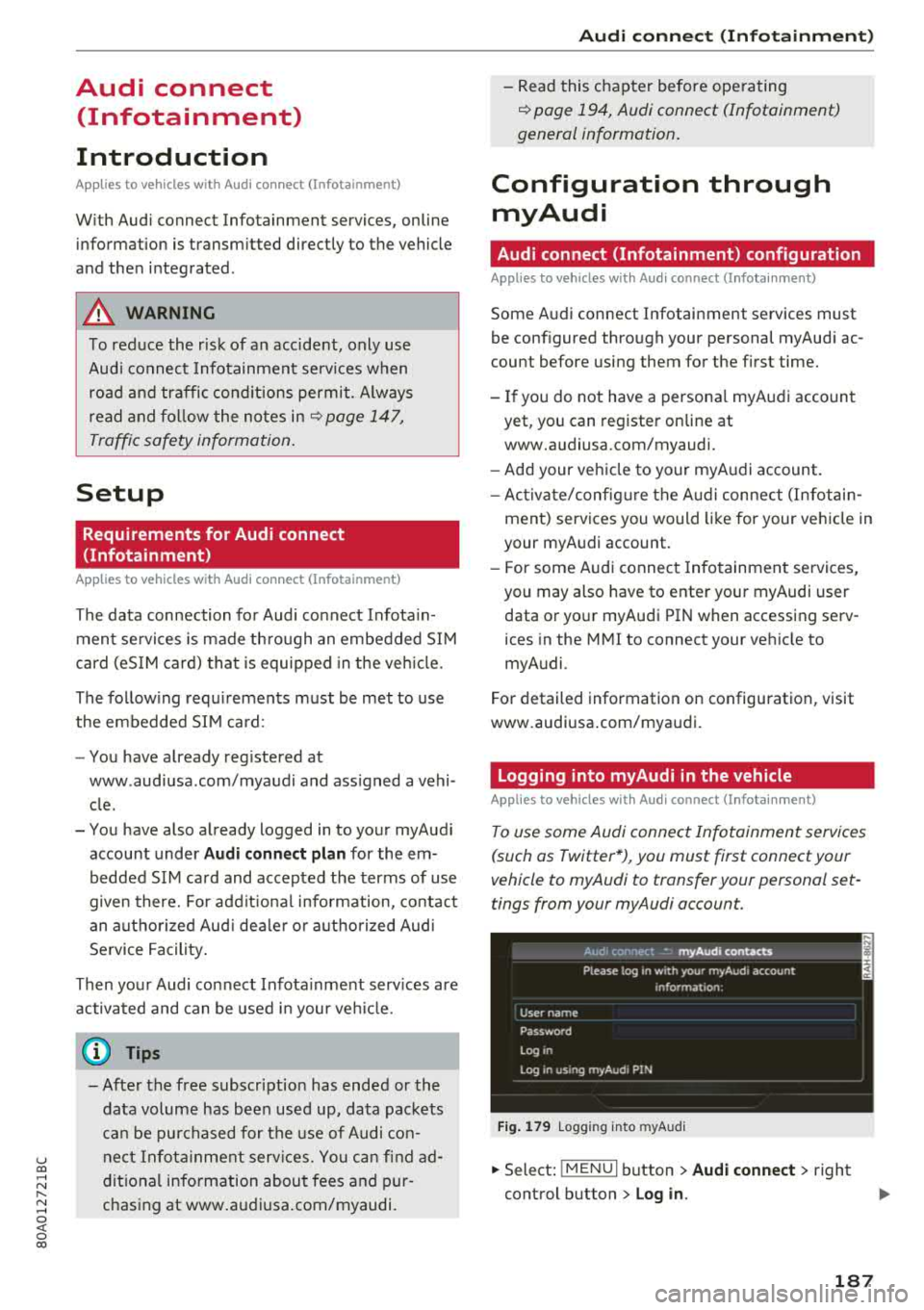
F ig . 17 9 Logg ing in to m yAud i
.,. Select: !MENU I button> Audi conne ct > right
control button > Log in.
18 7