ESP AUDI Q5 2018 Repair Manual
[x] Cancel search | Manufacturer: AUDI, Model Year: 2018, Model line: Q5, Model: AUDI Q5 2018Pages: 392, PDF Size: 60.56 MB
Page 234 of 392
Media
@ Tips
-The USB adapter on the Audi music inter
fac e will support iPod touc h/iPh one from
the 5th generation or later with the light
ning connector.
- Mobile devices with an Apple Dock connec
tor can only be charged with a USB adapter
for devices with an Apple Dock connector
and cannot transmit data.
Audi music interface
Connec t your mobile devices to the Audi music
interface in order to operate them through the
MMI and charge the battery .
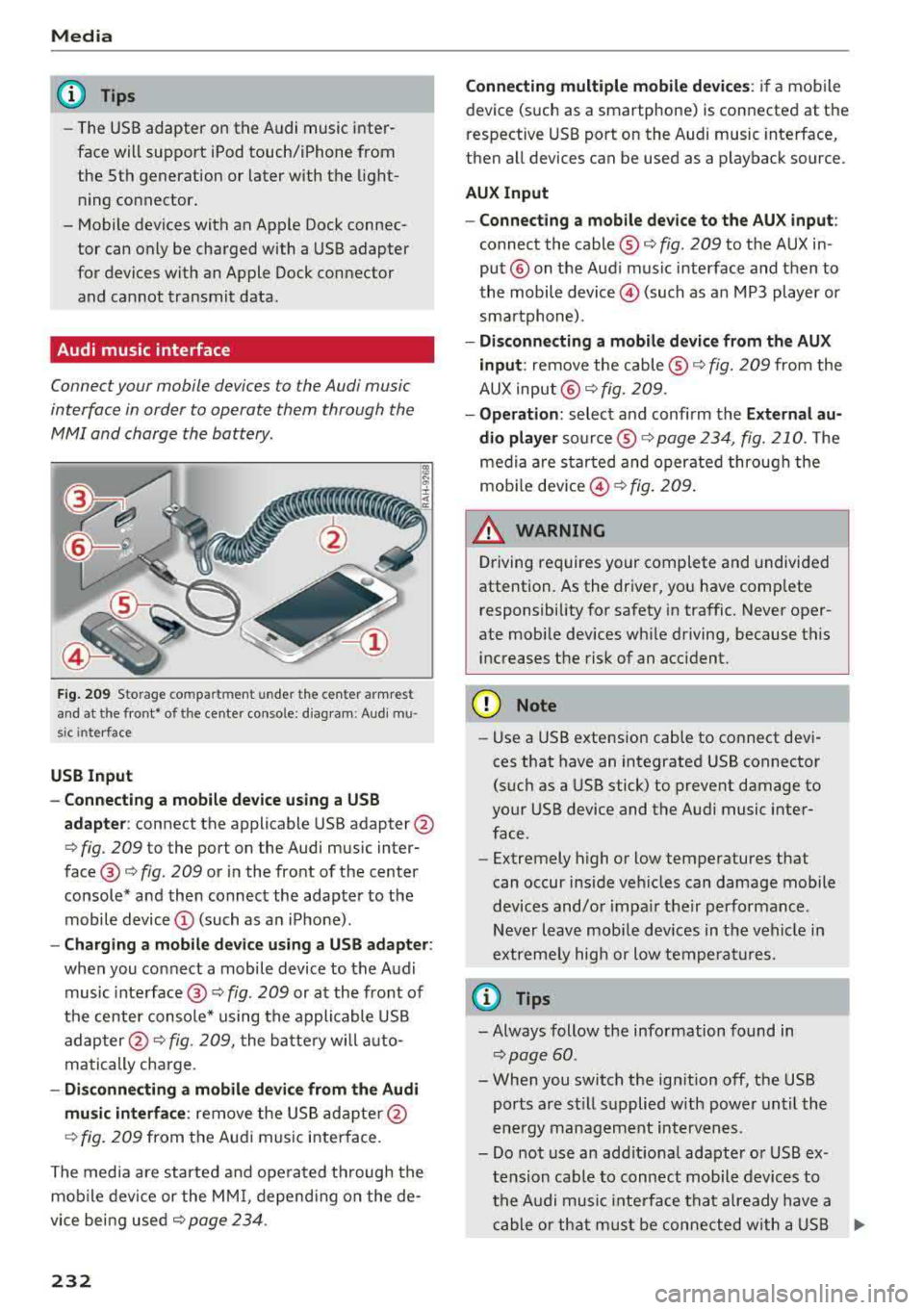
Fig. 2 09 Storage co m pa rtmen t unde r the c ente r armr est
and at the fro nt• o f the ce nter co nso le : diag ram : Audi mu
s ic inte rfa ce
USB Input
- Connecting a mobile device u sing a USS
adapte r:
connect the applicable USB adapter @
c:::> fig. 209 to the port on the Audi music inter
face @ c:::> fig. 209 or in the front of the center
console* a nd then connect the adapter to the
mobile device © (such as a n iP hone) .
-Charging a mobile device us ing a USS adapter :
when you connect a mobile device to the Audi
music inte rface @
c:::> fig. 209 or at the fro nt of
the cen ter console* using the appli cable USB
ad apter @
c:::> fig. 209, the batte ry wi ll a uto
matically charge .
-Di sconnecting a mobile devi ce from the Audi
mu sic interface :
remove the US B ad apte r@
c:::> fig . 2 09 from the Au di m usic i nterface .
T he media are started and ope rated through the
mobile device or the MM I, depend ing o n the de
vice bei ng used
c:::> page 234 .
232
Connecting multiple mobile devices : if a mobile
device (such as a smartphone) is connected at the
respective USB port on the Audi music interface,
then a ll devices can be used as a playback source.
AUX Input
- Connect ing a mobile device to the AU X input :
connect the cable ® c:::> fig. 209 to t he AUX in
put® on the Aud i music interface and then to
the mobile
device @) (such as a n MP3 playe r or
sma rtphone) .
-Di sconnecting a mobile device from the AUX
input :
remove the cable ® c:::> fig. 209 from the
AUX input @
c:::> fig. 209.
-Oper ation : select a nd confi rm the E xternal au
dio player
so urce ® c:::> page 234, fig. 210. The
medi a are sta rted and operate d through the
mob ile
dev ice @ c:::> fig. 209 .
_& WARNING
Driving requires your complete and undivided
attention. As the driver, yo u have comp lete
responsibility fo r safety in traffic. Never oper
ate mobi le dev ices wh ile driving, because this
i n creases the risk of an acc ident.
(D Note
- Use a USB extens ion cable to co nnect devi
ces that have an integrated USB connector
(such as a USB stick) to prevent damage to
your USB device and the A udi music inter
face .
- Extremely high o r low temperatures that
can occur inside ve hicles can damage mobile
devices and/o r impa ir the ir performance .
N ever l eave mobi le devices in t he vehicle i n
extremely high or low tempe ra tur es.
(D Tips
- Always follow the info rmation found in
c:::> page 60 .
- When you switch the ign ition off, the USB
ports a re st ill su pplied w ith power unt il the
e n ergy managem ent int erven es.
- Do not use a n addit iona l adapter o r USB ex
tension cab le to connect mobile devices to
th e A udi music i nte rfa ce tha t already have a
ca ble or th at must be c onnec ted w ith a U SB
Ill-
Page 235 of 392
u C0 .... N ,..._
N
adapter(¢ page 231). They may impair the
functionality.
- You can purchase the AUX connector cable
from an authorized Audi dealer or at spe
cialty stores.
- Audi recommends setting the volume of a
mobile device connected to the AUX input to
approximately 70% of the maximum vol ume .
- Functionality is not guaranteed for mobile
devices that do not conform to the USB 2.0
specification.
- USB hubs are not supported.
- Some versions of the iPod such as the iPod
shuffle cannot be connected to the USB
adapter for devices with Apple Dock connec
tor. Connect these devices using a AUX con nector cable.
- Changed content on a mobile device
l) that
is connected to the Audi music interface
may not be displayed in the media center.
In this case, reset the
Media settings back
to
Factory settings ¢ page 246.
- Video playback through the Audi music in
terface is only supported if the connected
device is recognized as a USB storage device
(for example a USB stick). Apple devices and
MTP devices (such as smartphones) are not
recognized as USB storage devices.
- iPod/iPhone malfunctions also affect the
operation of the MMI. Reset your iPod/
iPhone if this happens.
- Audi recommends updating the iPod/iPhone
software to the latest version. For impor
tant information on operating your iPod/ iPhone, refer to the user guide for the de
vice.
- The USB adapter on the Audi music inter
face will support iPod touch/iPhone from
the 5th generation or later with the light
ning connector.
- For more information about the Audi music
interface and supported devices, check the
Audi database for mobile devices at
www .audiusa .com/mp3 or contact an au -
.... o l) A ppli es o nly t o MTP devic e s. Doe s not a pply to Ap ple de vi
thorized Audi dealer or authorized Audi
Service Facility.
USB charging ports in the rear
Applies to: vehicles with USB charging ports in the rear
You con charge the battery on your mobile device
through a USB charging port.
Two USB charging ports are located at the back
of the center console .
-USB adapter: refer to ¢ page 2 31, USB adopter
for Audi music interface or USB charging port.
- Charging a mobile device using the USB
adapter:
connect your mobile device to a USB
charging port using a suitable USB adapter.
- Disconnecting a mobile device from the charg
ing port:
remove the USB adapter from the USB
charging port .
-Disconnecting mobile devices with an Apple
Dock connector :
remove the Apple Dock con
nector from the Apple device with the release
tabs pressed in.
A WARNING
= -
Driving requires your complete and undivided
attention. As the driver, you have complete
responsibility for safety in traffic. Never oper
ate your mobile devices while driving, because
this increases the risk of an accident.
@ Note
Extremely high or low temperatures that can
occur inside vehicles can damage mobile devi
ces and/or impair their performance . Never
leave mobile devices in the vehicle in ex
tremely high or low temperatures .
(D Tips
-In preparation at the time of printing.
- Always follow the information found in
<=> page 60 .
-When you switch the ignition off, the USB
ports are still supplied with power until the
energy management intervenes .
233
Page 238 of 392
Media
@Tra cks
All available tracks are displayed. Se lect and con
f irm a track.
(J) Folders
The fo lder structu re or track/chapter list is dis
p layed. Select a folder, if necessary. Select and
confirm a track.
@ Playli sts
All available playlists from the source and the
smart playlists are displayed. Select and confirm
a playlist and then a track .
Sm art play list s:
- La st pl ayed track s:
the last tracks played in the
selected source are disp layed.
- Mos t pl ayed: the most p layed songs in the se
lected source are disp layed.
- S sta rs to 1 st ar: tracks from the se lected
source are displayed according to their rating.
- Unr ated : all files from the selected source
without rat ing informa tion (for example, i n the
103 tag) are displayed .
@Vid eos *
All available video files are displayed . Select and
confirm a v ideo file .
@ Note
Applies to: vehicles with Audi connect (Infotainment) and
use of the radio category with iPod/iPhone
Always follow the information found in q(i) in
Wi-Fi hotspot on page 194.
@ Tips
- Only the categories supported by the medi
um are available. For example, CD/DVD
ROM tracks cannot be selected with catego
ries such as
A rti sts, Alb um s or Genre s.
With an iPod/iPhone (source: Audi music in
terface
q page 231), the P odca st s, Audi o
book s
and Compo ser s catego ries are also
available.
- Fo r safety reasons, the video image is only
displayed when the vehicle is stationary. On l y the sound from the v ideo p lays while driv
ing.
2 36
- When synchronizing a portable device with
"Cloud" services, playlists may display incor
rectly in the MMI. Use the med ia center in
the device.
- With an iPod/iPhone (media source: Audi
music interface
q page 231), the P od casts ,
Aud io boo ks
and C ompos ers categories are
also available.
(D Tips
Applies to: iPod/iPhone on Audi music interface
- An Internet connection is required to use
the additional
Radio category, an onl ine
media se rvice . Also see the chapter
q page 193, Wi -Fi hotspot . Also read the in
formation on the Audi music inte rface and
the supported devices
q page 231 .
-Depend ing on the In ternet connection and
network traffic, a connection loss can occur
during playback of online media services.
- T he use of on line media serv ices depends on
the service availability of the third party
provider.
- Audi AG simply makes the access to on line
media services possib le through the MMI
and does not take any responsibility for the
contents of the online media services.
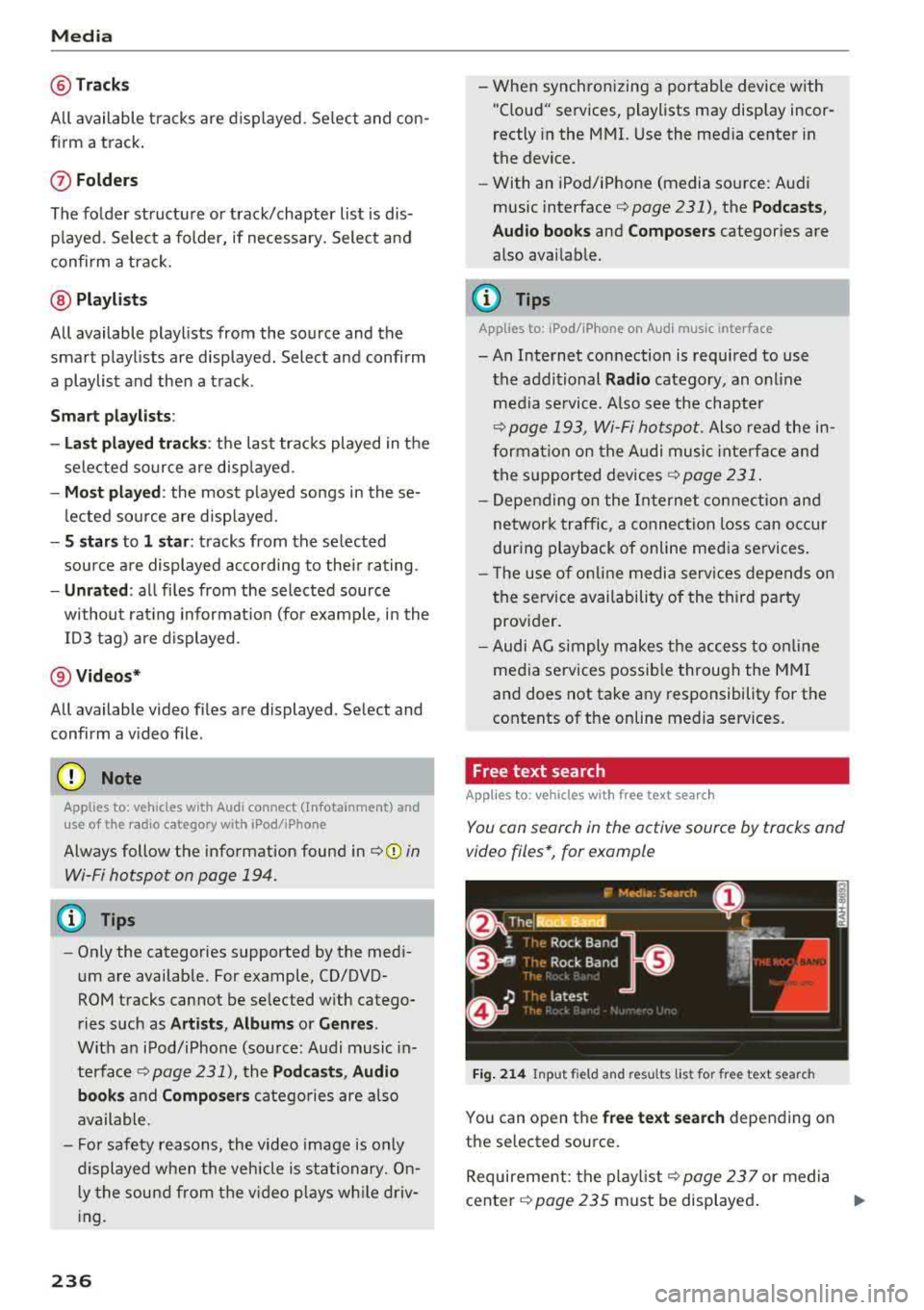
Free text search
Applies to : vehicles with free text search
You con search in the active source by tracks and
video files*, for example
Fig . 214 Input field and resu lts list for free text search
You can open the free te xt se a rch depending on
the selected source.
Requirement: the p layl ist
q page 23 7 or media
center
q page 235 must be displayed . ..,.
Page 247 of 392
u co ..... N r--N ..... 0 <( 0 00
System settings
Setting the date and
time
You can set the clock time manually or using the
CPS* .
.. Select : IMENU I button> Settings > left co ntro l
button >
MMI settings > Date & time.
.. Or : select : IMENU I button> Vehicle > left con-
t ro l button >
Vehicle settings > Date & time .
Automatic setting
When t his function is sw itched on g, the time
and date are a utomat ically set.
Time
R eq uirement: the Automatic setting must be
sw itched
off .
Press the cont ro l kn ob. Yo u ca n se t the Time
manually by turn ing and press ing the con trol
k nob.
Date
R eq uirement: the Automati c setting must be
sw itched
off.
Press the cont rol knob . Yo u can set the Date
manually by turn ing and press ing the cont rol
knob.
Time zone
When se lecting the approp riate t ime zone, a
sampling of countr ies in this zone will be listed .
Automatic time zone*
When t his function is sw itched on g , the time
will automatically ad just to the corresponding
time zone.
Automatic daylight saving time*
When t his function is sw itche d on g, the time
w ill automatically switc h to day light saving time .
Time format
If yo u select 24h , the clock will d isp lay, for ex
a m ple,
13 :00 . If yo u se lec t AM /PM , the clock
w ill d isp lay, for examp le,
1 :00 PM .
System settings
Date format
If you select DD .MM .YYYY , the date displ ay will
show, for example ,
31.08.2018. If you select
MM /DD/YYYY , the date disp lay w ill show, for ex
amp le,
08/31/2018. If you select YYYY-MM
DD ,
the date display will show, fo r example,
2018 -08 -31 .
MMI settings
.. Select: !ME NUI button> Settings > left control
button >
MMI settings .
Language
Yo u can c hange the display language as well as
the lang uage fo r the voice guidance * and voice
r ecognition system *.
T he num ber of langu ages av ailab le depends on
t h e ma rket.
Measurement units
The following meas urement u nits can be set de
pend ing on ava ilab ility:
Speed , Distance , Tem
perature , Fuel consumption , Volume , Pressure .
Tool tips
When this f unct ion is switched on g, yo ur MMI
shows you tips fo r inpu t. The freq uency of how
often it displays dec reases w ith time .
Speech dialog system
App lies to : vehicles wit h voice recog nitio n system
Depend ing on veh icle equipment, the following
funct ions may be ava ilable:
Command display : when this function is sw itch
ed on
g , th e M MI w ill show yo u the poss ible
commands for voice input in the respective
menu.
Short dialog : when this function is sw itche d on
g, a shorter form of the prompts is used .
Command during voice output*: thi s fu nction i s
swi tched on at the factory . W hen this func tion is
switched on
g , yo u can say new commands dur-
i ng announcements. You do not need to wa it for
the signal tone (beep) dur ing an announcement.
When the funct io n is swi tched off
0, you need to Iii>
245
Page 248 of 392
System settings
wait for the sig nal t one (bee p) to say a new
command.
Volume : you can a djust th e vol ume of th e
p romp ts by turning the con tro l k no b.
Individual speech training (on ly when the v ehi
cle is s ta ti onary): yo u ca n ad apt the vo ice recog
ni tion sy ste m to your voic e or pro nunciati on in
or der to im prove the sys tem's a bili ty to re co gni ze
your speec h. Indivi dua l speech train ing is com
p rised of 20 s peech ent ries t hat consist o f com
mands and sequences of numbers . You can de
lete the p rogrammed voice t rain ing with the
Re
set individual speech training
function.
Display brightness
You can a djust the brigh tness o f the Info tain
ment system disp lay by t urning the cont ro l knob.
Factory settings
D epe ndi ng on t he ve hicle eq uipme nt, th e fo llow
i ng fu nctio ns ca n b e rese t to factory se ttings :
-Sound settings
- Radio
- Media settings
- Jukebox *
- Directory
-Telephone
- Bluetooth and Wi-Fi*
- Navigation settings*
- Navigation and online memory *
- Speech dialog system*
- Shortcut keys
- Message settings *
-Apps *
- Tool tips
- Audi connect *
- Audi smartphone interface *
You can select the desi red functio ns i nd ividua lly
or all at once with the option
Select all entries .
Select and confirm Restore factory settings .
(D Tips
Make sure that not o nly the sett ings were de
leted but a lso the sto red data, if ap plicable.
246
Connection manager
Introduction
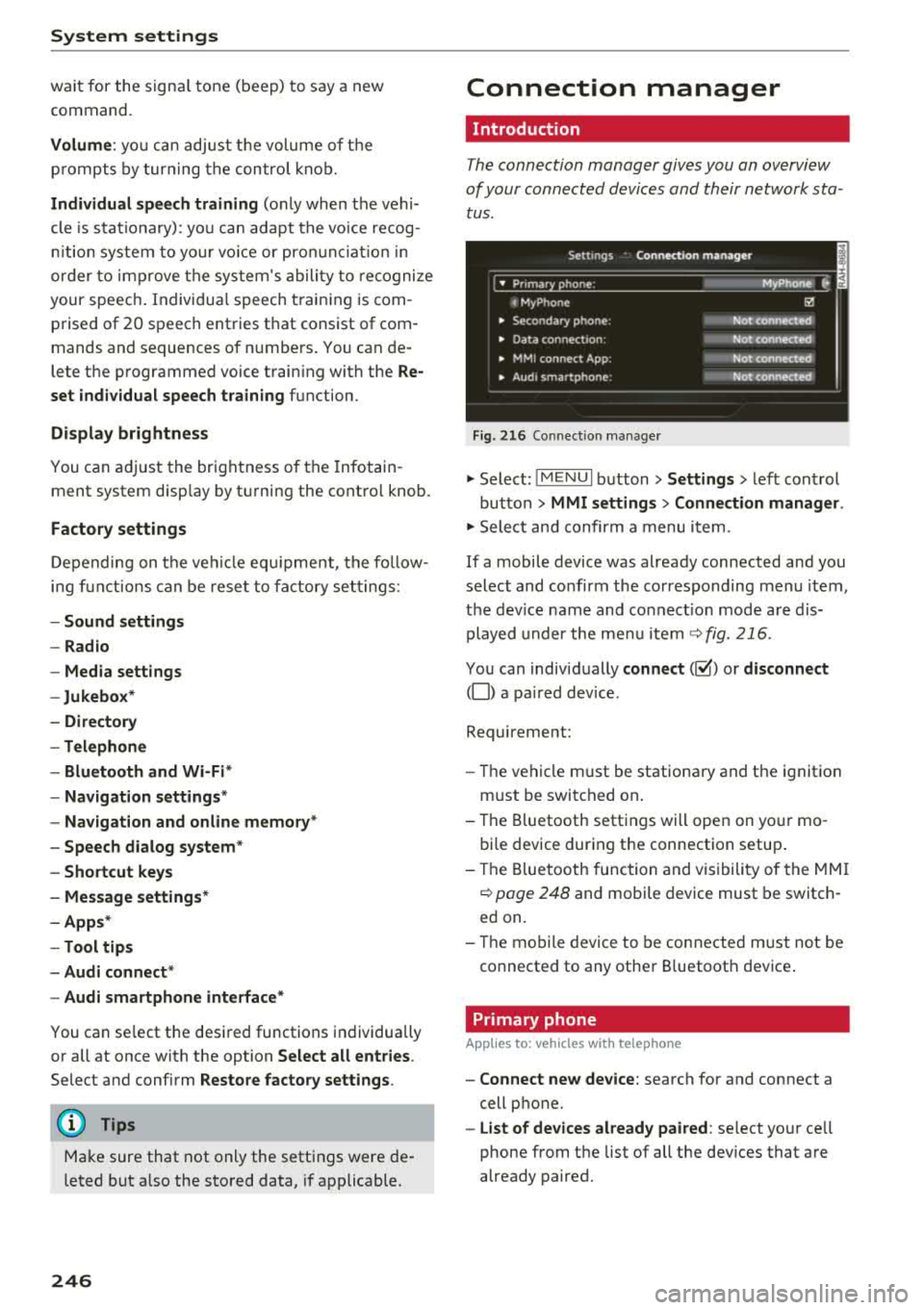
The connection manager gives you an overview
of your conn ected devic es and th eir network sta
tus .
Settings Conne -ction manager I
-====- ,.· • Prima hone: MyPhone .,.
c M yPhone
• Second ary phone :
• Data conn ection :
• MM I
connect App :
• Audi smartphone:
Fig. 216 Co nnec tion man ag er
Ii'!
Not connected
Not
conn.,ct.,d
Not connected
Not
conn..cted
"' Select : !ME NUI bu tton> Settings > left con trol
bu tton >
MMI settings > Connection manager .
"'Sele ct a nd confirm a menu item.
If a mobile device was already connected and you
select and co nfirm the co rresponding menu item,
t h e dev ice name and co nnect ion mode a re dis
p layed under the menu i tem
r:!;> fig. 216.
Yo u can indiv id ually connect (~) or disconnect
(0) a pa ired device .
Requirement:
- The ve hicl e m ust be statio na ry and the ignit io n
m ust be switc hed on .
- Th e Bluetooth sett ings will open on yo ur mo
bi le device dur ing the connection setup .
- T he Blue tooth func tion and v is ibili ty of the MMI
c:!;> page 24 8 and mobile device must be switc h
ed on.
- T he mo bile device to be con nected m ust not be
connected to any othe r Bluetoot h dev ice .
Primary phone
App lies to: vehicles wit h telepho ne
- Connect new device: search for and connect a
cell p hone.
- List of devices already paired : select yo ur cell
phone from the list of all the dev ices that a re
already paired.
Page 254 of 392
Drivin g saf ety
Driving safety
Basics
Safe driving habits
Please remember -safety first!
The individua l safety features of your vehicle can
work together as a system to help protect you
and your passengers in a wide range of accidents.
These features cannot work as a system if they
are not always correctly adjusted and correctly
used .
This chapter contains important informat ion,
tips, instruct ions and warn ings that you need to
read and observe for your own safety, the safety
of you r passengers and others . We have summar
ized here w hat you need to know about safety
be lts, a irbags, child restra ints as well as child
safety. Yo ur safety is for us priority number 1. Al
ways observe the information and warnings in
this section -for your own safety as we ll as that
of your passengers.
The information in this section applies to all
model versions of your vehicle . Some of the fea
tures described in this sections may be standard
equipment on some models, or may be optional
equ ipment on others. If you are not sure, ask
your author ized Audi dealer.
A WARNING
- Always make sure that you follow the in
structions and heed the WARNINGS in th is
manual.
It is in your inte rest and in the in
te rest of your passengers .
-
-Always keep all of the Owner's L iterature
manuals in yo ur Audi when you lend o r sell
yo ur vehicle so that this import ant informa
t ion w ill alw ays be availab le to the dr iver
and passengers.
- Always keep the Owner 's Lite ra ture han dy
so that you can find it easi ly if yo u have
questions .
252
Important things to do before driving
Safety is everybody's job! Vehicle and occupant
safety always depends on the informed and care
ful driver .
For your safety and the safety of your passen
gers,
bef ore dri ving alw ays:
.. Make sure that a ll lights and signals are operat
ing correctly .
.. Make sure that the tire pressure is correct.
.. Make sure that all windows are clean and afford
good vis ibility to the outs ide .
.. Sec ure all luggage and othe r items ca refully
¢ page 257 .
.. Make sure tha t noth ing ca n interfere wi th the
peda ls .
.. Adjust front seat, head restraint and mirrors
correctly for your height.
.. Instruct passengers to adjust the head re
straints according to their he ight.
.. Make sure to use the right child restraint cor
rectly to protect
children ¢ page 291, Child
safety .
• Sit proper ly in yo ur seat a nd make sure t hat
your passenge rs do the same
¢ page 56, Front
seats .
.. Fasten your sa fety belt and wear it p roperly . Al
so instruct your passengers to fasten their safe
ty be lts
properly ¢ page 261 .
What impairs driving safety?
Safe driving is directly related to the condition of
the vehicle, the driver as well as the driver's abili
ty to concentrate on the rood without being dis
tracted.
The driver is responsib le for the safety of the ve
hicle and a ll of its occupants. If your ability to
drive is impa ired, safety risks for everybody in the
vehicle increase and you a lso become a hazard to
everyone else on the road
¢ _&. . Therefore:
.. Do not let yourse lf be distracted by passenge rs
or by using a cellular telephone .
.. NEVER drive when your driving ability is im
paired (by med ications, alcohol, drugs, etc .) .
.. Observe all traffic laws, rules of the road and
speed lim its and plain common sense .
.,.
Page 258 of 392
Drivin g saf ety
- Never attempt to adjust head restraint
wh ile driving. If you have dr iven off and
must adjust the driver headrest for any rea
son, first stop the vehicle safely before at
tempting to ad just the head restra int.
- Children must always be properly restrained
in a child restraint that is appropriate for
their age and size
c> page 291 .
Examples of improper seating positions
The occupant restraint system can only reduce
the risk of injury if vehicle occupants are properly
seated .
Improper seating positions can cause serious in
jury or deat h. Safety belts can only work when
they are properly positioned on the body . Im
proper seating positions reduce the effect iveness
of safety belts and w ill even increase the r isk of
i n ju ry and death by moving the safety be lt to crit
ical a reas of t he body. Improper seat ing posit ions
a lso increase the risk of serious injury and dea th
when an airbag deploys and strikes an occupant
who is not in the proper seating position. A driver is responsib le for the safety of all vehicle occu
pants and especially for children. Therefore :
~ Never allow anyone to assume an incorrect
seating position when the vehicle is being used
c> & .
The fo llowing bulletins list only some sample po
sitions that wi ll increase the risk of serio us inj ury
and death. Our hope is that these examples will
make you more aware of seating posit ions that
are dangerous.
The refore, when ever th e vehicle i s mo ving :
-never stand up in the vehicle
- never s tand on the seats
- never knee l on the seats
- never r ide with the seatback reclined
- never lie down on the seats
- never lean up against the instrument pane l
- never sit on the edge of the seat
- never sit sideways
- never lea n ou t t he w indow
- never put yo ur feet out the window
256
-never put your feet on the instrument panel
- neve r rest your feet on the seat c ushion or bac k
o f the seat
- neve r ride in the footwell
- never ride in the cargo area
.8, WARNING
Imp roper seating positions in cr ease the risk
of ser ious personal inju ry and dea th whenever
a veh icle is being used.
- Always make sure that all veh icle o ccupants
s tay in a proper sea ting posit ion and a re
proper ly restrained whenever the vehicle is
being used .
Pedal area
Pedals
The pedals must always be free to move and
must never be interfered with by a floor mat or
any other object.
Make sure that all pedals move free ly without in
terference and that nothing prevents them from retur ning to their or ig inal pos itions .
Only use floor mats that leave the pedal area free
and can be secured with floor mat fasteners.
If a bra ke circuit fails, increased brake pedal trav
e l is req uired to bring the vehicle to a fu ll stop.
.8, WARNING
Pedals that cannot move freely can cause loss
of vehicle contro l and increase the r isk of seri
ous injury.
- Never p lace any objects in the driver's foot
wel l. An object could get into the pedal area
and interfere with pedal funct ion. In case of
sudden braking or an acc ident, you would
no t be able to brake o r acce le rate!
- Always make sure that nothing can fall or
move into the driver's footwell.
Page 260 of 392
Driving safety
A WARNING
Heavy loads will influence the way your vehi
cle handles . To help reduce the risk of a loss
of control leading to serious personal injury:
- Always keep in mind when transporting
heavy objects, that a change in the center of
gravity can also cause changes in vehicle
handling:
- Always distribute the load as evenly as
possible.
-Place heavy objects as far forward in the
luggage compartment as possible.
- Never exceed the Gross Axle Weight Rating
or the Gross Vehicle Weight Rating specified
on the safety compliance sticker on th e driv
er's side B-pillar. Exceeding permissible
weight standards can cause the vehicle to
slide and handle differently .
- Please observe information on safe driving
<=) page 252.
A WARNING
To help prevent poisonous exhaust gas from
being drawn into the vehicle, always keep the
rear lid closed while driving .
- Never transport objects larger than those
fitting completely into the luggage area be cause the rear lid cannot be fully closed .
- If you absolutely must drive with the rear lid
open, observe the following notes to reduce
the risk of poisoning:
- Close all windows,
- Close the sunroof*,
-Open all air outlets in the instrument pan-
el,
- Switch off the air recirculation,
- Set the fresh air fan to the highest speed .
A WARNING
Always make sure that the doors, all win
dows, the sunroof* and the rear lid are se
curely closed and locked to reduce the risk of
injury when the vehicle is not being used .
-After closing the rear lid , always make sure
that it is properly closed and locked.
258
-Never leave your vehicle unattended espe
cially with the rear lid left open. A child
could crawl into the vehicle through the lug
gage compartment and close the rear lid be
coming trapped and unable to get out . Be
ing trapped in a vehicle can lead to serious
personal injury.
- Never let children play in or around the vehi
cle .
- Never let passengers ride in the luggage
compartment . Vehicle occupants must al
ways be properly restrained in one of the
ve
hicle 's seating positions.
@ Note
If you are transporting large items with the
backrest folded down*, you should remove
the Rear Seat Entertainment (RSE)* and its
holder* to avoid damage.
© Tips
-Air circulation helps to reduce window fog
ging. Stale air escapes to the outside
through vents in the trim panel. Be sure to
keep these slots free and open .
-The tire pressure must correspond to the
load. The tire pressure label lists the recom
mended cold tire inflation pressures for the
vehicle at its maximum capacity weight and
the tires that were on your vehicle at the
time it was manufactured. For recommend ed tire pressures for normal load condi
tions, please see chapter
Q page 336 .
Tie-downs
The luggage compartmen t is equipped with four
t ie-downs to secure luggage and o ther i tems.
Use the tie-downs to secure your cargo properly
Qpage 25 7, L oading the luggage compartment.
In a collision , the laws of physics mean that even
smaller items that are loose in the vehicle will
become heavy missiles that can cause serious in
jury. Items in the vehicle possess ene rgy which
vary with vehicle speed and the weight of the
item . Vehicle speed is the mos t significant fac tor .
..,.
Page 263 of 392
u co ..... N r--N ..... 0 <( 0 00
Safety belts
General information
Always wear safety belts!
Wearing safety belts correctly saves lives!
This chapter exp lains why safety be lts are neces
sary, how they work and how to adjust and wear
them correctly.
• Read all the information that follows and heed
all of the instructions and WARNINGS.
A WARNING
Not wearing safety belts or wearing them im
properly increases the risk of serious personal
injury and death.
- Safety belts are the s ingle most effective
means ava ilable to reduce the risk of serious
injury and death in automobile accidents.
For your protection and that of your passen
gers, always correctly wear safety belts
when the vehicle is moving.
-Pregnant women, injured, o r physically im
paired persons must also use safety belts.
Like all vehicle occupants, they are more
like ly to be seriously injured if they do not
wear safety belts. The best way to protect a
fetus is to protect the mother
-throughout
the entire pregnancy.
Number of seats
Your Aud i has a total of five seating positions:
two in the front and three in the rear. Each seat
ing position has a safety belt.
A WARNING
Not wearing safety belts or wear ing them im
properly increases the risk of serious personal
inju ry and death.
- Never strap more than one person, includ
ing small children, into any belt.
It is espe
cia lly dangerous to place a safety belt over a
child sitt ing on you r lap.
- Never let more people ride in the vehicle
than there are safety belts available.
Safety belts
- Be sure everyone riding in the vehicle is
properly restrained with a separate safety
belt or child restraint.
Safety belt warning light
Your vehicle has a warning system for the driver
and front seat passenger to remind you about the importance of buckling-up.
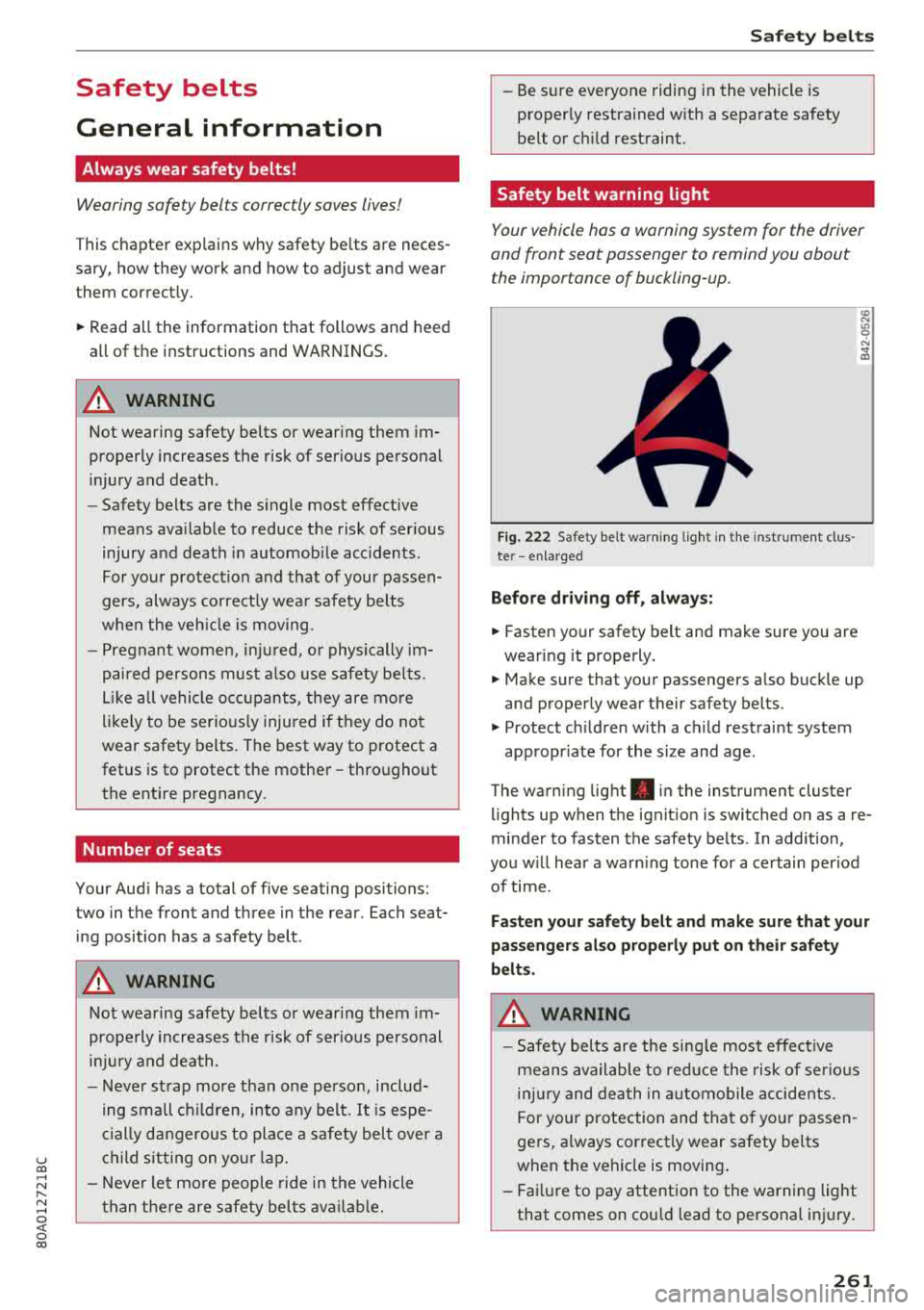
Fig. 222 Safety belt warn ing ligh t in the instrument clus ·
te r - en larged
Before driving off, always:
• Fasten your safety belt and make sure you are
wearing it properly.
;;i;
• Make sure that your passengers also buckle up
and properly wear their safety belts.
• Protect ch ildren with a child restraint system
appropr iate for the size and age .
The warning light . in the instrument cluster
lights up when the ignit ion is switched on as a re
minder to fasten the safety belts . In add ition,
you w ill hear a warn ing tone for a certain period
of time.
Fasten your safety belt and make sure that your
passengers also properly put on their safety
belts.
A WARNING
-
- Safety belts are the single most effect ive
means available to red uce the risk of serious
i njur y and death in automobile accidents.
F or your protection and that of yo ur passen
gers, a lways correct ly wear safety belts
when the vehicle is moving .
- Fail ure to pay attention to the warning light
that comes on cou ld lead to personal injury.
261
Page 267 of 392
u co ..... N r-N .....
~ 0 co
Automatic saf ety belt retractor s
Every safety be lt is equ ipped with an automatic
be lt retractor on the shoulder belt. Th is feature
l ocks the belt when the belt is pull ed out fast,
during hard braking and in an accident. The be lt
may a lso lock when you drive up or down a steep
h ill or through a sharp curve. During normal driv
ing the belt lets you move freely .
Safety be lt pret en sioner s
Safety belts with pretensioners he lp to tighten
the safety belt and remove slack when the pre
tensioners are activated
c:> page 267. The func
tion of the pretensioner is monitored by a warn
i ng light
<=> page 26 .
Con vertible loc king retract or
Every safety belt except the one on the driver
seat is equipped with a convertible locking retrac
tor that
m ust be used when the safety belt is
used to attach a child safety seat. Be sure to read
the important information about this feature
<=>page 302 .
A WARNING
Improperly posit ioned safety be lts ca n cause
ser ious injury in an accident
c:> page 265,
Safety belt position.
-Safety belts offer optimum protection only
when the seatback is upright and belts are
prope rly pos itioned on the body.
-Always ma ke sure tha t the rear seat bac k
rest to wh ich the center rear safety be lt is
attached is secure ly latched whenever the
rear center safety belt is being used. If the
backrest is not securely latched, the passen
ger will move forward with the backrest dur
ing sudden braking, in a sudden maneuver
and especially in a cras h.
-Never attach the safety belt to the buckle
for another seat. Attaching the belt to the
wrong buckle w ill reduce safety belt effec
t iveness and can cause serious personal in
jury.
-A passenger who is not properly restrained can be seriously in jured by the safety be lt it
self when it moves from the stronger parts
Safet y bel ts
of the body into critical areas like the abdo
men .
-Always lock the convertible locking retractor
when you are securing a child safety seat in
the vehicle
c:> page 304.
Safety belt position
Correct belt position is the key to getting maxi
mum protection from safety belts.
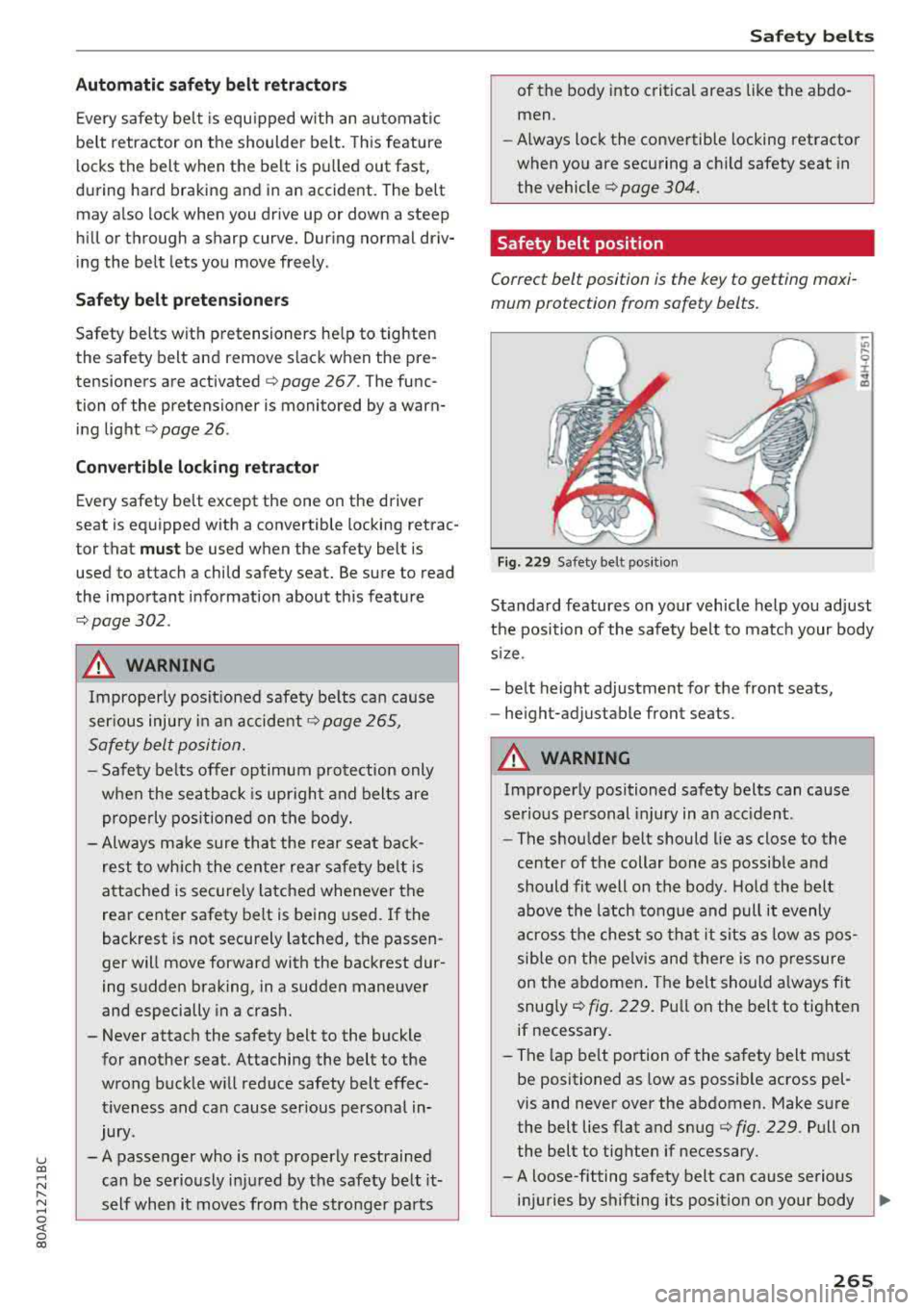
Fig. 229 Safety belt pos it ion
Standard features on your vehicle help you adjust
the position of the safety belt to ma tch your body
s iz e.
-belt height adjustment for the front seats,
-height-adjustable front seats.
A WARNING
Improperly positioned safety belts can cause
se rious personal injury in an acc ident.
-The shou lder belt should lie as close to the
center of the collar bone as possib le and
should fit well on the body. Ho ld the belt
above the latch tongue and pull it evenly
across the chest so th at it sits as low as pos
sible on the pe lvis and there is no p ressure
on the abdomen . The belt should a lways fit
snug ly
c:> fig. 229. Pu ll on the belt to tighten
if necessary .
-The lap be lt portion of the sa fety belt must
be positioned as low as possible across pel
vis and never over the abdomen. Make sure
the belt lies flat and snug
c:> fig. 229. Pull on
the belt to tighten if necessary.
-A loose-fitting safety belt can cause serious
in juries by shifting its position on your body
ll>
265