service AUDI Q5 2019 Owner's Manual
[x] Cancel search | Manufacturer: AUDI, Model Year: 2019, Model line: Q5, Model: AUDI Q5 2019Pages: 392, PDF Size: 99.86 MB
Page 80 of 392
Driving
—Environmentalconditions(slopes,inclines,ele-
vation,temperature)
—Battery (chargestatus,temperature,powerus-
age)
—Enginetemperature
—Assistsystems
—Drivingbehavior
Dependingontheengine,theindicatorlight
mayappeariftheengineisnot stopped.
ScalemaeCeleraLin
Appliesto:vehicleswithStart/Stopsystem
IfyouleavethevehicleduringaStopphase,the
enginecanberestartedwithinapproximately30
secondsifthedoorsareclosed,thedriver'ssafe-
tybeltisfastened,andthebrakepedalispress-
ed.
Ifyouleavethevehiclelongerthan30seconds,
theignitionwillswitchoffautomaticallytopre-
vent thevehiclebatteryfromdraining.Ifthisis
thecase,themessageStart/stopsystem:igni-
tionwillbeswitchedoffin30swillappearinthe
instrumentclusterand,ifthelowbeamhead-
lightsareswitchedon,theparkinglightswill
switchoninstead.Theparkinglightswillswitch
offafterapproximately30minutesorwhenyou
lockthevehicle.
Theignitionalsoswitchesoffwhenyoulockthe
vehiclefromtheoutsideduringaStopphase.
IftheStart/Stopsystemhasnotturnedoffthe
engineorifyouhave switchedtheStart/Stopsys-
temoffmanually, theenginewillcontinuetorun
andtheignitionwillnotswitchoffautomatically.
Toreducetheriskofasphyxiation,neverallow
theenginetoruninconfinedspaces.
Ifyouleavethevehiclewiththe"D/S"or"R"
selectorleverpositionengaged,theparking
brakeisautomaticallyset.
78
ManuallyswitchingtheStart/Stopsystem
aaeel
Appliesto:vehicleswithStart/Stopsystem
The(A)>Fbuttonislocatedabovetheselectorlev-
erinthecenterconsole.
>Press(A)°*toswitchonoroff.TheLEDinthe
buttonturnsonwhenthefunctionisswitched
off.
IfyouswitchthesystemoffduringaStop
phase,theenginewillstartagainautomati-
cally.
WeTel4
Appliesto:vehicleswithStart/Stopsystem
Start/stopsystem:deactivated.Pleasestart
enginemanually
Thismessageappearswhenspecificconditions
arenotmetduringaStopphase.TheStart/Stop
systemwillnot beabletorestarttheengine.The
enginemustbestartedwiththe
STARTENGINESTOP]button.
Start/stopsystem:malfunction!Function
unavailable.PleasecontactService
ThereisamalfunctionintheStart/Stopsystem.
DrivethevehicletoanauthorizedAudidealeror
authorizedServiceFacilityassoonaspossibleto
havethemalfunctioncorrected.
Electromechanical
parkingbrake
= q
s
=%a
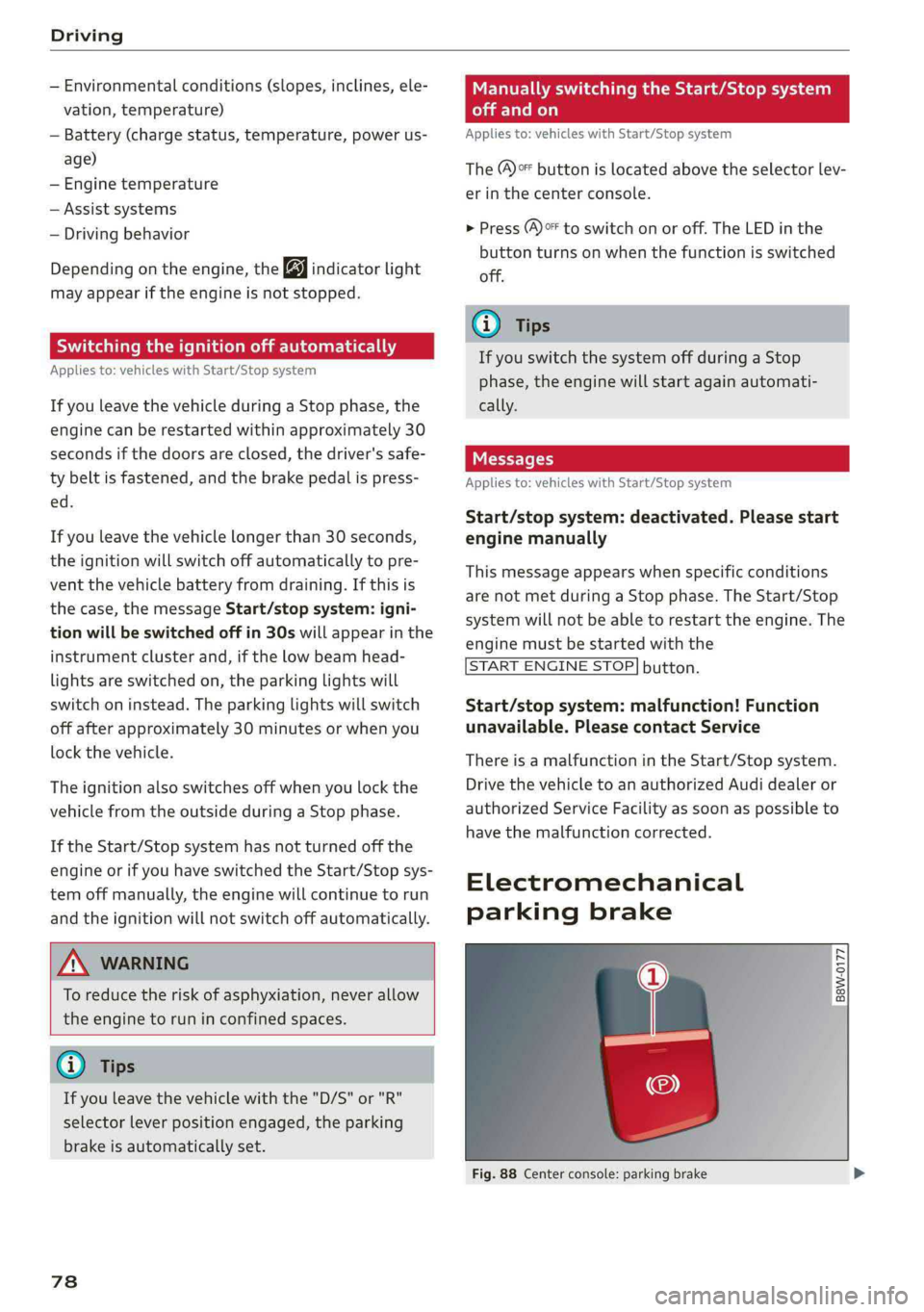
Fig.88Centerconsole:parkingbrake
Page 82 of 392
Driving
orauthorizedAudiServiceFacilityforassis-
tance.
—Alwayssettheparkingbrakewhenleaving
yourvehicle,evenifforashortperiodof
time.Iftheparkingbrakeisnotset,theve-
hiclecouldrollaway,increasingtheriskof
anaccident.
—Ifyouleavethevehicle,switchtheignition
offandtakethevehiclekeywithyou.This
appliesparticularlywhenchildrenremainin
thevehicle.Otherwise,childrencouldstart
theengine,releasetheparkingbrake,orop-
erateelectricalequipmentsuchaspower
windows,whichincreasestheriskofanacci-
dent.
—Noone,especiallychildren,shouldremainin
thevehiclewhenitislocked.Locked doors
makeitmoredifficultforemergencywork-
erstoenterthevehicle,whichputslivesat
risk.
@)Note
Donotleaveyourvehicleunattendedwhile
theengineisrunning,becausethisincreases
theriskofanaccident.
G)Tips
Whenstoppingatatrafficsignalorstopping
incitytraffic,youcansettheparkingbrake
manually.Thevehicledoesnot havetobe
heldwiththebrakepedal.Theparkingbrake
eliminatesthetendencytocreepwhena se-
lectorleverpositionisengaged.Assoonas
youpresstheacceleratorpedal,theparking
brakereleasesautomaticallyandthevehicle
startstomove>page80.
@Tips
—Occasionalnoiseswhentheparkingbrakeis
setandreleasedarenormalandarenota
causeforconcern.
—Theparkingbrakegoesthroughaself-test
cycleatregularintervalswhenthevehicleis
stopped.Anynoisesassociatedwiththisare
normal.
—Ifthereisapowerfailure,theparkingbrake
willnotsetifitisreleased,anditwillnot
80
releaseifit isset>A\.Seeanauthorized
AudidealerorauthorizedAudiServiceFa-
cilityforassistance.
Startingtodrive
Variousconvenienceandsafetyfunctionsmaybe
availablewhenthevehiclebeginsdriving,de-
pendingonvehicleequipment.
Startingonhillswiththeparkingbrakeset
Requirement:thedoorsmustbeclosedandthe
driver'ssafetybeltmustbefastened.
>Tostartdrivingcomfortablywhenonahill,set
theparkingbrakeandbegindrivingasusual.
Thebrakingforce oftheparkingbrakedoesnot
releaseautomaticallyuntilthewheelsbuildup
enoughdrivingforce.
Startingonhillswithhillholdassist
Hillholdassistmakesiteasiertostartonhills.
Requirement:
thedriver'sdoormustbeclosed
andtheenginemustberunning.
>Toactivatehillholdassist,pressandholdthe
brakepedalforseveralseconds.Thevehicle
mustbefacinguphill.
Afterreleasingthebrakepedal,thebrakingpow-
erismaintainedbriefly>A\topreventthevehi-
clefromrollingbackwhenstarting.Thisallows
youtobegindrivingmoreeasily.
ZAWARNING
—Ifyoudonotbegindrivingimmediatelyor
theenginestallsafterreleasingthebrake
pedal,yourvehiclemaybegintorollback-
ward.Pressthebrakepedalorsetthepark-
ingbrakeimmediately.
—Theintelligenttechnologyofhillholdassist
cannotovercomethelimitationsimposedby
naturalphysicallaws.Theincreasedcomfort
offeredbyhillholdassistshouldnotcause
youtotakesafetyrisks.
—Hillholdassistcannotholdthevehiclein
placeonallhills(forexample,iftheground
isslipperyoricy).>
Page 89 of 392
80A012721BG
Driving
Thetransmissiononlyallowsmanualshifting
whentheenginespeediswithinthepermitted
range.
G)Tips
—Ifyoushifttothenextlowestgear,the
transmissionwillonlyshiftiftheenginewill
notbeover-revwved.
—Withkick-down,thetransmissionshiftstoa
lowergear,dependingonvehiclespeedand
enginespeed.
—tiptronicdoesnotworkifthetransmission
isrunninginemergencymode.
Kick-downenablesmaximumacceleration.
Whenyoupresstheacceleratorpedaldownbe-
yondtheresistancepoint,theautomatictrans-
missiondownshiftsintoalower gearandtheen-
gineutilizesitsfullpower,ifthevehiclespeed
andengineRPMpermit.Itshiftsupintothenext
highergearoncethemaximumpermittedengine
RPMisreached.
ZA\WARNING
Pleasenotethatthewheelscouldspinon
slickorslipperyroadswhenkick-downisac-
tive.
Launchcontrolprogram
Appliesto:vehicleswithStronictransmission
The launchcontrolprogramprovidesthebest
possibleaccelerationwhenstartingfromastop.
Requirement:theenginemustbeatoperating
temperatureandthesteeringwheelmustnot be
turned.
>DeactivatetheStart/Stopsystem*>page78.
TheLEDinthe[®«]buttonturnson.
>Withtheenginerunning,pressthe|&OFF]but-
tonbriefly>page145.TheBindicatorlight
turnsonandthemessageStabilizationcontrol
(ESC):offroad.Warning!Reducedstabilityap-
pearsintheinstrumentclusterdisplay.
> Pull
theselectorleverbackoutofthe"D/S"po-
sitionbrieflytoselectthe"S"positionorselect
theDynamicdrivingmodeindrivese-
lect*>page127.
>Pressthebrakepedalfirmlywithyourleftfoot
andholditallthewaydownforatleastone
second.
>Atthesametime,pressthegaspedalallthe
waydownwithyourrightfootuntiltheengine
reachesandstaysatahighRPMlevel.
>Removeyourfootfromthebrakepedalwithin
fiveseconds>/\.
ZA\WARNING
—Alwaysadaptyourdrivingtothetrafficflow.
—OnlyusetheLaunchcontrolprogramwhen
roadandtrafficconditionsallowitandother
driverswillnot beendangeredorbothered
byyourdrivingandthevehicle'saccelera-
tion.
—Pleasenotethatthedrivewheelscanspin
andthevehiclecanbreakawaywhenoffroad
modeisswitchedon,especiallywhenthe
roadisslippery.
—Oncethevehiclehasstartedmoving,press
the[&OFF]buttonbrieflytoturntheoffroad
modeoff.
CG)Note
WhenacceleratingusingLaunchControl,all
vehiclecomponentsaresubjecttoheavy
loads.Thiscanresultinincreasedwear.
G@)Tips
AfteracceleratingusingtheLaunchControl,
thetemperatureof somevehiclecomponents
mayincreasegreatly.Ifthathappens,the
functionwillnot beavailable forafewmi-
nutestoreduce theriskofdamage.Aftera
cool-downperiod,LaunchControlwillbe
availableagain.
Messages
[BiTransmission:toohot.Pleasestopvehicle
Donotcontinuedriving.Selectthe"P"selector
leverpositionandcontactanauthorizedAudi
dealerorauthorizedAudiServiceFacilityforas-
sistance.
87
>
Page 90 of 392
Driving
iTransmission:malfunction!Safelystopvehi-
cle
Donotcontinuedriving.Stopthevehicleassoon
aspossibleinasafelocationandsecureitsoit
doesnotroll.SeeanauthorizedAudidealeror
authorizedAudiServiceFacilityforassistance.
fs}Selectorlever:malfunction!Youcancontin-
uedriving.PleasecontactService
Thereisasystemmalfunctioninthetransmis-
sion.DriveimmediatelytoanauthorizedAudi
dealerorauthorizedAudiServiceFacilitytohave
themalfunctionrepaired.
fs}Pbutton:malfunction!AutoPwhenengine
off.PleasecontactService
Thereisamalfunctioninthe"P"buttononthe
selectorlever.Thetransmissionautomatically
engages"P"whenyouswitchofftheengine.
DrivetoanauthorizedAudidealerorauthorized
AudiServiceFacilityimmediatelytohavethe
malfunctioncorrected.
5Selectorlever:malfunction!Gearchangeon-
lypossibleusingbothpaddlelevers.Pleasecon-
tactService
Thereisasystemmalfunctioninthetransmis-
sion.Youcancontinuedrivingwithrestricted
function.Theselectorleverisnotworking.Gears
canonlybeselectedby tappingbothshiftpad-
dlesatthesametimewhenthevehicleisstation-
ary>page86,fig.92.Payattentiontothese-
lectedtransmissionpositionintheinstrument
clusterdisplay.Theparkinglockengagesauto-
maticallywhenyouturnofftheengine.Driveto
anauthorizedAudidealerorauthorizedAudi
ServiceFacilityimmediatelytohavethemalfunc-
tioncorrected.
fiTransmission:pleasepressbrake pedaland
selectgearagain
Pressthebrakepedalandselectthedesiredse-
lectorleverpositionagain.Youcanthencontinue
driving.
fs}Transmission:toohot.Pleaseadaptdriving
style
838
Thetransmissiontemperaturehasincreasedsig-
nificantly.Driveverycautiouslyortakeabreak
fromdrivinguntilthetemperaturereturnstothe
normalrangeandtheindicatorlightturnsoff.
iTransmission:malfunction!Youcancontin-
uedriving.Seeowner'smanual
Thereisasystemmalfunctioninthe transmis-
sion.Youmaycontinuedriving.Drivetoanau-
thorizedAudidealerorauthorizedAudiService
Facilitysoontohavethe malfunctioncorrected.
iTransmission:malfunction!Youcancontin-
uedrivinginDuntilengineisoff
Thereisasystemmalfunctioninthe transmis-
sion.Thetransmissionisswitchingtoemergency
mode.Ifyouturntheengineoff,youwillnotbe
abletoselectanyotherselectorleverpositions
afterstartingtheengineagain.Drivetoanau-
thorizedAudidealerorauthorizedAudiService
Facilityimmediatelytohave the malfunctioncor-
rected.
iTransmission:malfunction!Youcancontin-
uedrivingwithlimitedfunction.Pleasecontact
Service
Thereisasystemmalfunctioninthe transmis-
sion.Thetransmissionisswitchingtoemergency
mode.Thismodeonlyshiftsintocertaingearsor
maynolongershiftatall.Theenginemaystall.
DrivetoanauthorizedAudidealerorauthorized
AudiServiceFacilityimmediatelytohavethe
malfunctioncorrected.
i]Transmission:malfunction!Youcancontin-
uedrivingwithlimitedfunction.Noreverse
gear
Thereisasystemmalfunctioninthe transmis-
sion.Thetransmissionisswitchingtoemergency
mode.Thismodeonlyshiftsintocertaingearsor
maynolongershiftatall.Theenginemaystall.
You cannotengagethereversegear.Drivetoan
authorizedAudidealerorauthorizedAudiService
Facilityimmediatelytohavethe malfunctioncor-
rected.
flDangerofrollingaway!Pnotpossible.
Pleaseapplyparkingbrake
Page 91 of 392

80A012721BG
Driving
—Theparkinglockwasreleasedusingtheemer-
gencyrelease>page89.Or
—Theparkinglockcannolongerbeengaged.
DrivetoanauthorizedAudidealerorauthor-
izedAudiServiceFacilityimmediatelytohave
themalfunctioncorrected.
Moveselectorlevertoautomaticposition
Thereisamalfunctioninthetiptronicmode.End
tiptronicmodebypushingtheselectorleverto
theleftintothe"D/S"position.
Parkinglockemergencyrelease
>Keepthebrakepedalpressedandengagethe
followingselectorleverpositionsoneafterthe
other:"N","D"andbackto"N".
>Turn theengineoffagain.
>Graspthe socketwrenchwithbothhandsand
carefullypullitupwardtoremove.
>Installthecover.
Iftheparkinglockisreleasedwiththeemergen-
cyrelease,thefs]indicatorlightturnsoninthe
instrumentclusterand“N”isengaged.The mes-
sageDangerofrollingaway!Pnotpossible.
Pleaseapplyparkingbrakealsoappears.
B4M-0189
@
@)
Fig.93Driver'ssidefootwell:releasingtheparkinglock
usingtheemergencyrelease
Theemergencyreleaseislocatedunderthefloor
matonthedriver'sside.Readandfollowtheim-
portantinstructionsabouttowing>page364.
Releasingtheparkinglockusingthe
emergencyrelease
>Set theparkingbraketosecureyourvehicle
fromrollingaway.Ifthisisnotpossible,secure
yourvehiclefromrollingusinganothermeth-
od.
>Prythecoveroffatoneoftheopeningsusing
thescrewdriverfromthevehicletoolkit.
>Insertthe socketwrenchfromthevehicletool
kitintotheopening>fig.93.
>Turn thesocketwrenchclockwise(4)untilit
stopsandpressitdownward(2)untilitlocksin-
toplace.
>Leavethe socketwrenchinserted.
Resettingtheparkinglock
>»Pressthebrake pedalandstarttheengine.
ZA\WARNING
—Theparkinglockmustbereleasedusingthe
emergencyreleasebeforetowingthevehi-
cley
— Theparkinglockmayonlybereleasedusing
the emergencyreleaseiftheparkingbrake
isset.Ifit isnotworking,securethevehicle
fromrollingusingthebrakepedalorother
suitablemeans,suchasblockingafrontand
arearwheel.Anunsecuredvehiclemayroll
away,whichincreasestheriskofanacci-
dent.
—Onlyactivatetheemergencyreleasewhile
onalevelsurfaceoraslightslope.
—Toreducetheriskofanaccident,youmust
notdrivewhentheemergencyreleaseisac-
tivated.
©Note
Duetotheriskofdamage,carefullyremove
the socketwrenchwhenyouresettheparking
lock.
89
Page 93 of 392
80A012721BG
Trailertowing
Tongueweight
Themaximumpermittedtongueweightofthe
trailerdrawbaronthetrailerhitchballheadmust
notbeexceeded.
Havingthetongueweighttoolowaffectstheve-
hicle'shandling.Fordrivingsafety,alwaysusing
themaximumpermittedtongueweightisrecom-
mended,butnotexceedit.Distributingthecargo
inthetrailercorrectlywillhelptoachievethis
weight.
Youcandeterminethetongueweightusinga
tongueweightscale,abathroomscale,orapub-
licweighstation,forexample.
Thepermittedtongueweightofyourvehiclecan
befoundinthevehicledocumentationorin
=>page373.
Loaddistribution
Poorcargoloadanddistributioncannegatively
impactvehiclehandling.Loadthetrailerbased
onthefollowingcriteriaasmuchaspossible:
—Storeobjectsinthevehicleluggagecompart-
ment,ifpossible.Thevehicleshould always
carrytheheaviestpossibleloadandthetrailer
shouldhavethelightestpossibleload.
—Distributetheloadinthetrailersothatthe
heavyobjectsareasclosetotheaxleaspossi-
ble.
—Secureobjectssothattheydonotslide.
—Utilizethemaximumpermittedtongueweight
ifpossible.
Tires
Set thetirepressureonyourvehiclefora“full
load”;seethetirepressuresticker>page334.If
necessary,alsoadjustthetirepressureonthe
traileraccordingtothemanufacturer'sspecifica-
tions.
Thetrailerandthevehicleshould beequipped
withwintertireswhendrivinginwintertempera-
tures.
Outsidemirrors
Ifyoucannotseethetrafficbehindthetrailer
withthestandardexterior mirrors,thenyou
mustattachadditionalexterior mirrors.Adjust
themsoyouhaveasufficientvisibilitybehind
you.
Exterior lighting
Followthelegalregulationsregardingthelight-
ingequipmentonyourtrailer.Contact anauthor-
izedAudidealerorauthorizedAudiServiceFacili-
tyformoreinformation.
Beforeyoustartdriving,checkalllightingequip-
mentonthetrailerwhileitishitchedtothevehi-
cle.
Theheadlightrangecontrolautomaticallyad-
juststhelightrangeoftheheadlights.
Safety chains
Makesurethesafetychainsarecorrectlyapplied
whenpullingatrailer.Thechainsshouldhang
enoughsothatthetrailercandrivearound
curves.However,theymustnottouchthe
ground.
Airsuspension
Appliesto:vehicleswithairsuspension
The
airsuspensionmustbeatthestandardvehi-
cleheight beforeyouadjustthetongueweight
onthetrailerandhitchthetrailer9,
=>page128,Liftingandloweringthevehicle.
Forvehicleswithafactory-installedtrailerhitch,
theairsuspensiontrailermodewillautomatically
switchonifyouconnectthetrailercabletothe
socket.
Forvehicleswitharetrofittedtrailerhitch,you
mustswitchontheairsuspensiontrailermode
manually.SelectintheInfotainmentsystem:
MENU}button>Vehicle>leftcontrolbutton>
Vehiclesettings>Airsuspension:trailer.Switch
itoffagainwhenyouarenolongertowingatrail-
er.
Youcanalsoswitchofftrailermodemanually
whiledriving,forexample,whenusingabicycle
racksystem.
Ifyouhavetodrivethroughdifficultroadcondi-
tions,youcanraisethevehicleagainafterhitch-
ingthetrailerorafteradjustingthetongue
weight.
91
Page 94 of 392
Trailertowing
@)Note
Appliesto:vehicleswithairsuspension
—Changesintemperatureorloadcanaffect
the heightofthevehicle.
—Ifthestandardvehicleheightisnotused,
thetongueweightspecificationisnolonger
applicable.
®Note
Attachmentsretrofittedonthevehiclemay
causedamage,especiallyonthetrailerhitch
ballhead.Incasesofdamage,havethefunc-
tioncheckedby anauthorizedAudidealeror
authorizedAudiServiceFacility.
G)Tips
—Blockthewheelswithchockswhenparking
oninclinesifthetrailerisloaded.
—Havingthevehicleinspectedbetweenthe
inspectionintervalsisrecommendedifyou
towatrailerfrequently.
—Avoiddrivingwithatrailerduringthevehi-
clebreak-inperiod.
Drivingwithatrailer
Drivingwithatrailerrequiresextracaution.
Speed
Adheretothelegalspeedlimits.Followthelegal
regulationsspecifictothecountry.
Asthespeedincreases,thedrivingstabilityof
thetrailerdecreases.Thereforeyoushouldnot
exceedthemaximumlegalspeedlimitwhen
thereareunfavorableroad,weather,and/orwind
conditions.Thisespeciallyapplieswhendriving
downhill.
Hill
Whenyoustartdrivinguphillordownhill,trailers
maytiltorswaysoonerthanwhendrivingona
levelsurface.Ifsmallswayingmovementshave
alreadyoccurred,youcanstabilizethetrailerby
firmlybrakingimmediately.Nevertryto
“straightenout”thetrailerbyaccelerating.
92
Downshiftbeforedrivingonhillstoutilizetheen-
ginebrakingeffect>A\.
Brakes
Whenusingatrailerwithoverrunbrakes,first
brakegentlythenquickly.Thisreducestheriskof
jerkingwhilebrakingifthetrailerwheelslockup.
Enginecoolanttemperature
Payattentionspecificallytothecoolanttempera-
ture display whentherearehighoutsidetemper-
atures,andwhendrivingonlonginclines
=>page14.Shifttoahighergearinatimelyman-
ner.
ZAWARNING
Constantbrakingcausesthebrakestoover-
heatandcansubstantiallyreducebrakingper-
formance,increasebrakingdistance,orcause
completefailureofthebrakesystem.
Page 98 of 392
Assistsystems
theinstrumentclustercanmeaneithermph
orkm/h,dependingonthecountry.
Operating
Appliesto:vehicleswithcamera-basedtrafficsignrecognition
©.aaq
|
==a
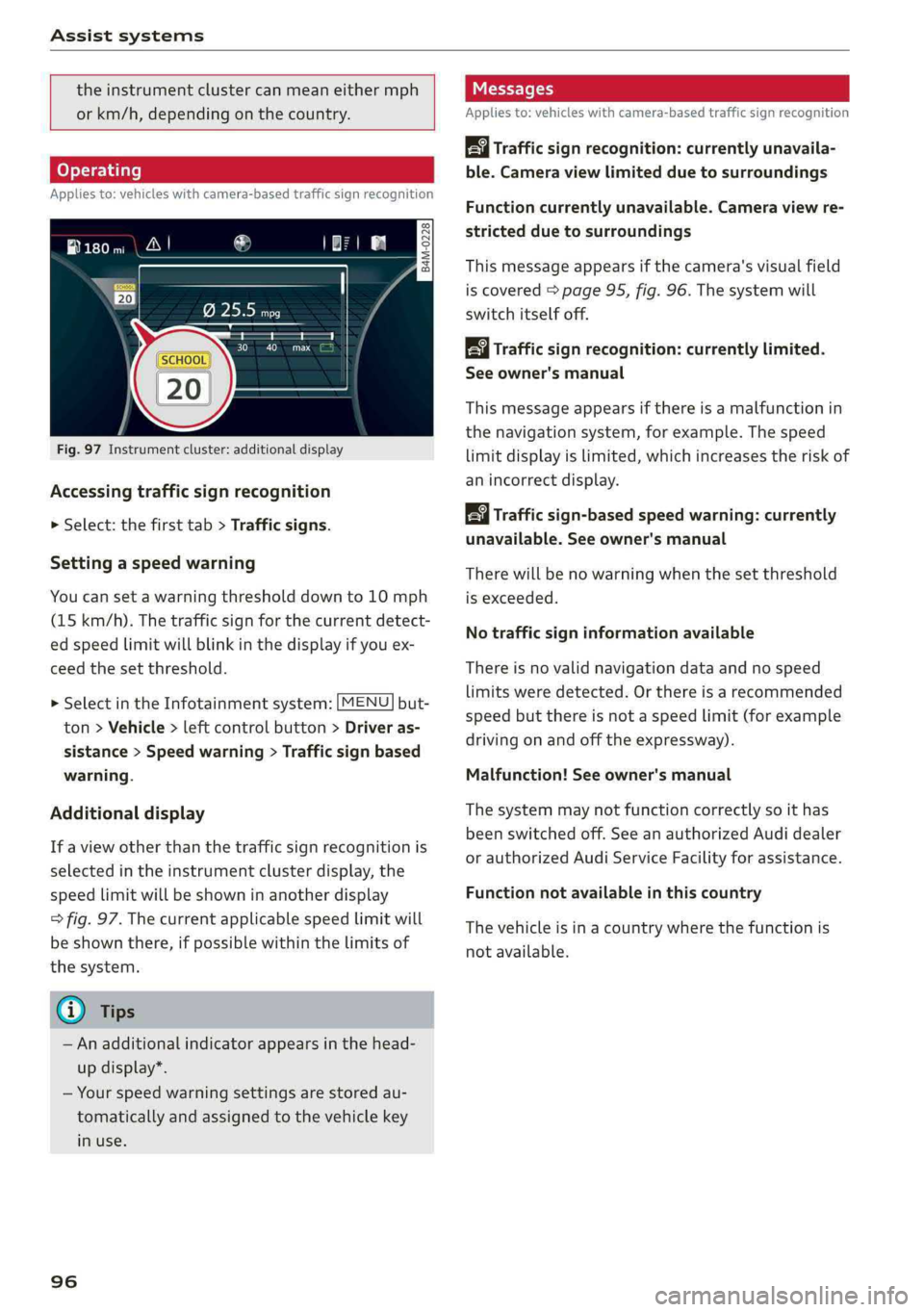
Fig.97Instrumentcluster:additionaldisplay
Accessingtrafficsignrecognition
>Select:thefirsttab>Trafficsigns.
Settingaspeedwarning
Youcansetawarningthresholddownto10mph
(15km/h).Thetrafficsignforthecurrentdetect-
edspeedlimitwillblinkinthedisplayifyouex-
ceed thesetthreshold.
> SelectintheInfotainmentsystem:[MENU]but-
ton>Vehicle>leftcontrolbutton>Driveras-
sistance>Speedwarning>Trafficsignbased
warning.
Additionaldisplay
If aviewotherthanthetrafficsignrecognitionis
selectedintheinstrumentclusterdisplay,the
speedlimitwillbeshowninanotherdisplay
=>fig.97.Thecurrentapplicablespeedlimitwill
beshownthere,ifpossiblewithinthelimitsof
thesystem.
G)Tips
—Anadditionalindicatorappearsinthehead-
updisplay*.
—Yourspeedwarningsettingsarestoredau-
tomaticallyandassignedtothevehiclekey
inuse.
96
Messages
Appliesto:vehicleswithcamera-basedtrafficsignrecognition
Trafficsign recognition:currently unavaila-
ble.Cameraviewlimitedduetosurroundings
Functioncurrentlyunavailable.Cameraviewre-
strictedduetosurroundings
Thismessageappearsifthecamera'svisualfield
iscovered>page95,fig.96.Thesystemwill
switchitselfoff.
Trafficsign recognition:currentlylimited.
Seeowner'smanual
Thismessageappearsifthereisamalfunctionin
thenavigationsystem,forexample.Thespeed
limitdisplayislimited,whichincreasestheriskof
anincorrectdisplay.
Trafficsign-basedspeedwarning:currently
unavailable.Seeowner'smanual
Therewillbenowarningwhenthesetthreshold
isexceeded.
Notrafficsigninformationavailable
Thereisnovalidnavigationdataandnospeed
limitsweredetected.Orthereisarecommended
speedbutthereisnotaspeedlimit(forexample
drivingonandoffthe expressway).
Malfunction!Seeowner'smanual
Thesystemmaynotfunctioncorrectlysoithas
beenswitchedoff.SeeanauthorizedAudidealer
orauthorizedAudiServiceFacilityforassistance.
Functionnotavailableinthiscountry
Thevehicleisinacountrywherethefunctionis
notavailable.
Page 99 of 392
80A012721BG
Assistsystems
Trafficlightinformation
Appliesto:vehicleswithtrafficlightinformation
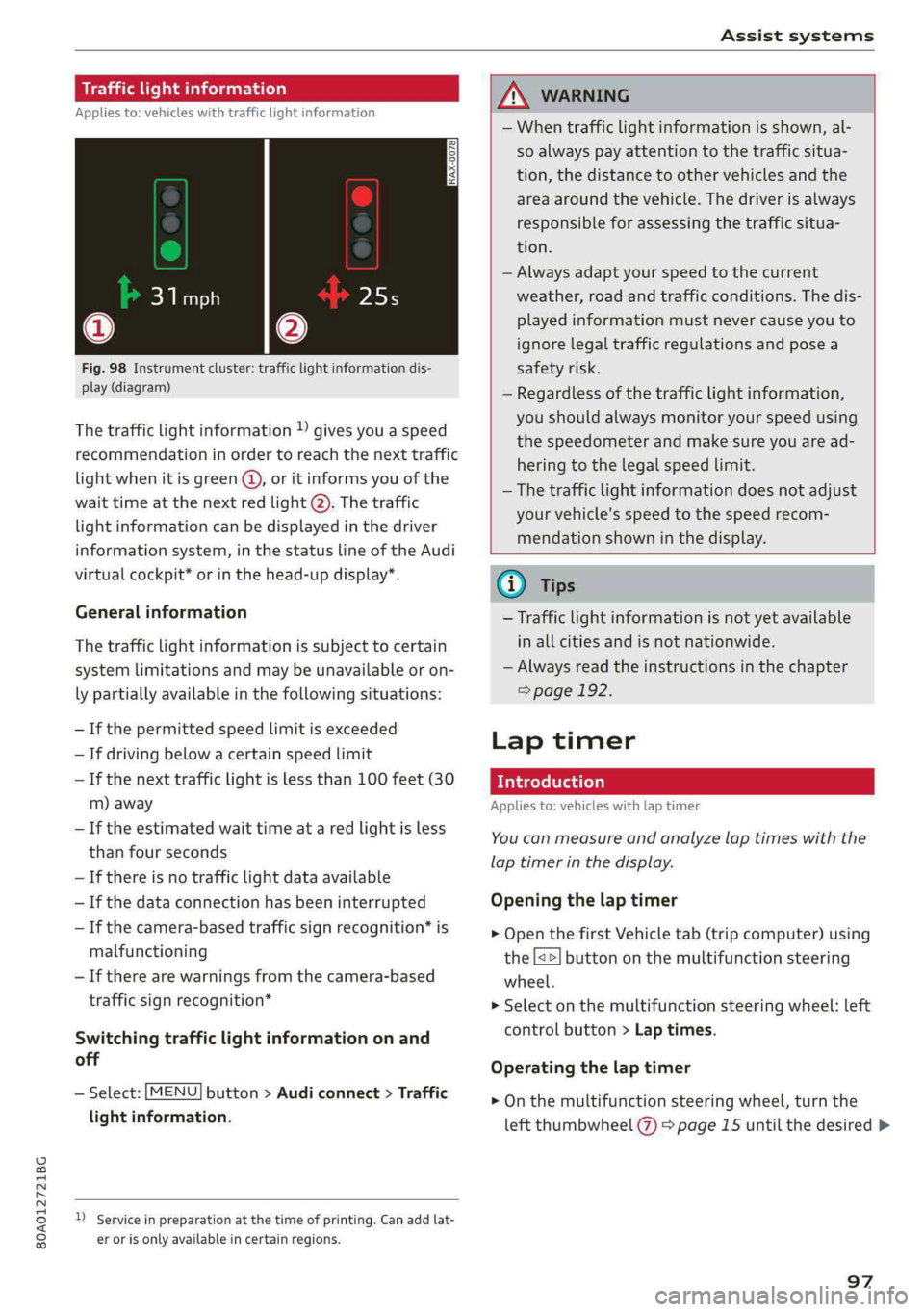
Fig.98Instrumentcluster:trafficlightinformationdis-
play(diagram)
Thetrafficlightinformation)givesyouaspeed
recommendationinordertoreachthenexttraffic
lightwhenitisgreen@,oritinformsyouofthe
waittimeatthenextredlight@).Thetraffic
lightinformationcanbedisplayedinthedriver
informationsystem,inthestatuslineoftheAudi
virtualcockpit*orinthehead-updisplay*.
Generalinformation
Thetrafficlightinformationissubjecttocertain
systemlimitationsandmaybeunavailableoron-
lypartiallyavailableinthefollowingsituations:
—Ifthepermittedspeedlimitisexceeded
—Ifdrivingbelowacertainspeedlimit
—Ifthenexttrafficlightislessthan100feet(30
m)away
—Iftheestimatedwaittimeataredlightisless
thanfourseconds
—Ifthereisnotrafficlightdataavailable
—Ifthedataconnectionhasbeeninterrupted
—Ifthecamera-basedtrafficsignrecognition*is
malfunctioning
—Iftherearewarningsfromthecamera-based
trafficsignrecognition*
Switchingtrafficlightinformationonand
off
—Select:[MENU]button>Audiconnect>Traffic
lightinformation.
)Serviceinpreparationatthetimeofprinting.Can addlat-
erorisonlyavailableincertainregions.
ZAWARNING
—Whentrafficlightinformationisshown,al-
soalways payattentiontothetrafficsitua-
tion,thedistancetoothervehiclesandthe
areaaroundthevehicle.Thedriverisalways
responsibleforassessingthetrafficsitua-
tion.
—Alwaysadaptyourspeedtothecurrent
weather,roadandtrafficconditions.Thedis-
playedinformationmustnevercauseyouto
ignorelegaltrafficregulationsandposea
safetyrisk.
—Regardlessofthetrafficlightinformation,
youshould alwaysmonitoryourspeedusing
thespeedometerandmakesureyouaread-
hering
tothelegalspeedlimit.
—Thetrafficlightinformationdoesnotadjust
yourvehicle'sspeedtothespeedrecom-
mendationshowninthedisplay.
@)Tips
—Trafficlightinformationisnotyetavailable
inallcitiesandisnotnationwide.
—Alwaysreadtheinstructionsinthe chapter
=>page192.
Laptimer
Introduction
Appliesto:vehicleswithlaptimer
Youcanmeasureandanalyzelaptimeswiththe
laptimerinthedisplay.
Openingthelaptimer
>OpenthefirstVehicletab(tripcomputer)using
the[<>]buttononthemultifunctionsteering
wheel.
>Selectonthemultifunctionsteeringwheel:left
controlbutton>Laptimes.
Operatingthelaptimer
>Onthemultifunctionsteeringwheel,turnthe
leftthumbwheel()>page15untilthedesired>
97
Page 105 of 392
80A012721BG
Assistsystems
—Adaptivecruisecontroldoesnotrespondto
people,animals,orcrossingoroncoming
objects.
— Thefunction oftheradarsensorscanbeaf-
fectedbyreflectiveobjectssuchasguard
rails,theentrancetoatunnel,heavyrainor
ice
C)Note
Thesensorscanbedisplacedbyimpactsor
damagetothebumper,wheelhousingand
underbody.Thiscanimpair theadaptive
cruise control.HaveanauthorizedAudidealer
orauthorizedAudiServiceFacilitychecktheir
function.
@Tips
Foranexplanationonconformitywiththe
FCCregulationsintheUnitedStatesandthe
IndustryCanadaregulations,see>page370.
Incurves
Appliesto:vehicleswithAudiadaptivecruisecontrol
B4m-0093
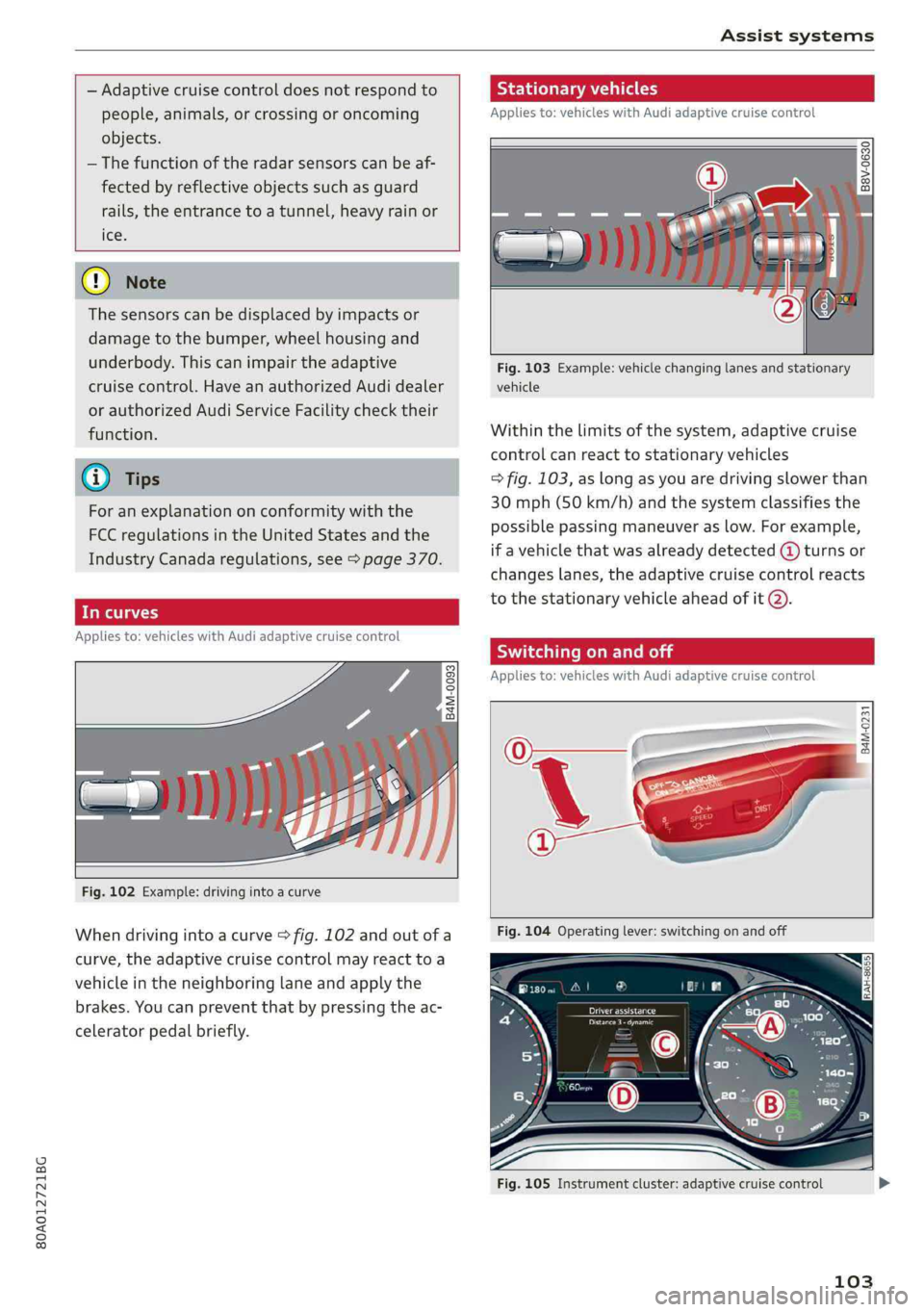
Fig.102Example:drivinginto acurve
Whendrivingintoacurve>fig.102andoutofa
curve,theadaptivecruisecontrolmayreacttoa
vehicleinthe neighboringlaneandapplythe
brakes.Youcanpreventthatbypressingtheac-
celeratorpedalbriefly.
Stationaryvehicles
Appliesto:vehicleswith Audiadaptivecruisecontrol
22. S| g|
=ooa
Fig.103Example:vehiclechanginglanesandstationary
vehicle
Withinthelimitsofthesystem,adaptivecruise
controlcanreacttostationaryvehicles
=>fig.103,aslongasyouaredrivingslowerthan
30mph(50km/h)andthesystemclassifiesthe
possiblepassingmaneuveraslow.Forexample,
ifavehiclethatwasalreadydetected@turnsor
changeslanes,theadaptivecruisecontrolreacts
tothestationaryvehicleaheadofit2).
SyieemeieRela
Appliesto:vehicleswithAudiadaptivecruisecontrol
B4M-0231
Fig.105Instrumentcluster:adaptivecruisecontrol
103