AUX AUDI Q5 2019 Owners Manual
[x] Cancel search | Manufacturer: AUDI, Model Year: 2019, Model line: Q5, Model: AUDI Q5 2019Pages: 392, PDF Size: 99.86 MB
Page 16 of 392
Instrumentcluster
Certaininstrumentclustercontentcanalsobe
displayedinthehead-updisplay*>page27.
ZAWARNING
Donotassumetheroadsarefreeoficebased
ontheoutsidetemperaturedisplay.Beaware
thattheremaybeiceonroadsevenwhenthe
outsidetemperatureisaround41°F(+5°C)
andthaticecanincreasetheriskofaccidents.
@)Tips
— Depending onvehicleequipment,thein-
strumentillumination(needlesandgauges)
mayturnonwhenthelightsareoffandthe
ignitionisswitchedon.Theilluminationfor
thegaugesreducesautomaticallyandeven-
tuallyturnsoffasbrightnessoutsidein-
creases.Thisfunctionremindsthedriverto
turnthelowbeamsonattheappropriate
time.
—Youcanselecttheunitsusedfortempera-
ture,speed,andothermeasurementsinthe
Infotainmentsystem>page245.
—Speedsaredisplayedinmph(milesper
hour)orkm/h(kilometersperhour).
—Ifyourvehicleisstationaryor ifyouaredriv-
ingatverylowspeeds,thetemperaturedis-
playedmaybeslightlyhigherthantheac-
tualtemperatureoutsideduetotheheatra-
diatingfromtheengine.
—Attemperaturesbelow41°F(+5°C),a
snowflakesymbolappearsinfront ofthe
temperaturedisplay>A\.
Coolanttemperature
indicator
Thecoolanttemperaturedisplay@>page13,
fig.3or>page13,fig.4onlyfunctionswhen
theignitionisswitchedon.Toreducetheriskof
enginedamage,pleaseobservethefollowing
notesaboutthetemperatureranges.
Coldrange
IfonlytheLEDsatthebottomofthegaugeturn
on,theenginehasnot reachedoperatingtem-
peratureyet.Avoidhighenginespeeds,fullaccel-
eration,andheavyengineloads.
14
Normalrange
Theenginehasreacheditsoperatingtempera-
tureoncetheLEDsuptothecenterofthegauge
turnon.Ifthegindicatorlightintheinstru-
mentclusterdisplayturnson,thecoolanttem-
peratureistoohigh>page22.
@)Note
—Auxiliaryheadlightsandotheraccessoriesin
frontoftheairintakeimpairthecoolingef-
fectofthecoolant.Thisincreasestheriskof
theengineoverheatingduringhighoutside
temperatures andheavyengineload.
—Thefrontspoileralsohelpstodistribute
coolingaircorrectlywhiledriving.Ifthe
spoilerisdamaged,thecoolingeffectwill
beimpairedandtheriskoftheengineover-
heatingwillincrease.SeeanauthorizedAu-
didealerorauthorizedAudiServiceFacility
forassistance.
Tachometer
Thetachometerdisplaystheenginespeedinrev-
olutionsperminute(RPM).
Thebeginningoftheredzoneinthetachometer
indicatesthemaximumpermissibleenginespeed
forallgearsoncetheenginehasbeenbrokenin
andwhenitiswarmeduptooperatingtempera-
ture.Before reachingthiszone,youshouldshift
intothenexthighestgear,selectthe"D/S"selec-
torleverposition,orremoveyourfootfromthe
acceleratorpedal.
@)Note
Theneedleinthetachometer2)>page13,
fig.3or>page13,fig.4mayonlybeinthe
redareaofthegaugeforashorttimeorthere
isariskofenginedamage.Thelocationwhere
theredzonebeginsvariesdependingonthe
engine.
@)Forthesakeoftheenvironment
Upshiftingearlyhelpsyoutosavefuelandre-
ducesoperatingnoise.
Page 22 of 392
Instrumentcluster
—Timeanddate>page245
—Digitalspeedometer*
—Averageconsumption
—Remainingrange*
—Short-termmemoryoverview
—Long-termmemoryoverview
—Energyconsumers*=page20
—Driverassistance*>page101
—Trafficsignrecognition*>page95
Theshort-termmemorycollectsdrivinginforma-
tionfromthetimetheignitionisswitchedonun-
tilitisswitchedoff.Ifyoucontinuedrivingwithin
twohoursafterswitchingtheignitionoff,the
newvaluesareincludedwhencalculatingthecur-
renttripinformation.
Unliketheshort-termmemory,thelong-term
memoryisnoterasedautomatically.Youcanse-
lectthetimeperiodforevaluatingtripinforma-
tionyourself.
Fuelconsumption
Thecurrentfuelconsumptioncan beshownusing
abargraph&fig.14.Theaverageconsumption
storedintheshort-termmemoryisalsodis-
played.Ifthebarsaregreenorthegraytone on
thebarschanges(dependingontheequipment),
yourvehicleissavingfuelbythefollowingfunc-
tion:
—Recuperation:electricalenergycanbestoredin
thebatterywhenthevehicleiscoastingordriv-
ingdownhill.Thebarwillmovetoward(7/4.
@)Tips
Thedate,timeofday,andtimeanddatefor-
matcanbesetintheInfotainmentsystem
=>page245.
20
Energyconsumers
Appliesto:vehicleswithenergyconsumers
aN}®ao
Energyconsumers
taeri
0)2
Airconditioning
Auxiliaryheating
Rearwindowheating
Fig.15Instrumentcluster:energyconsumers
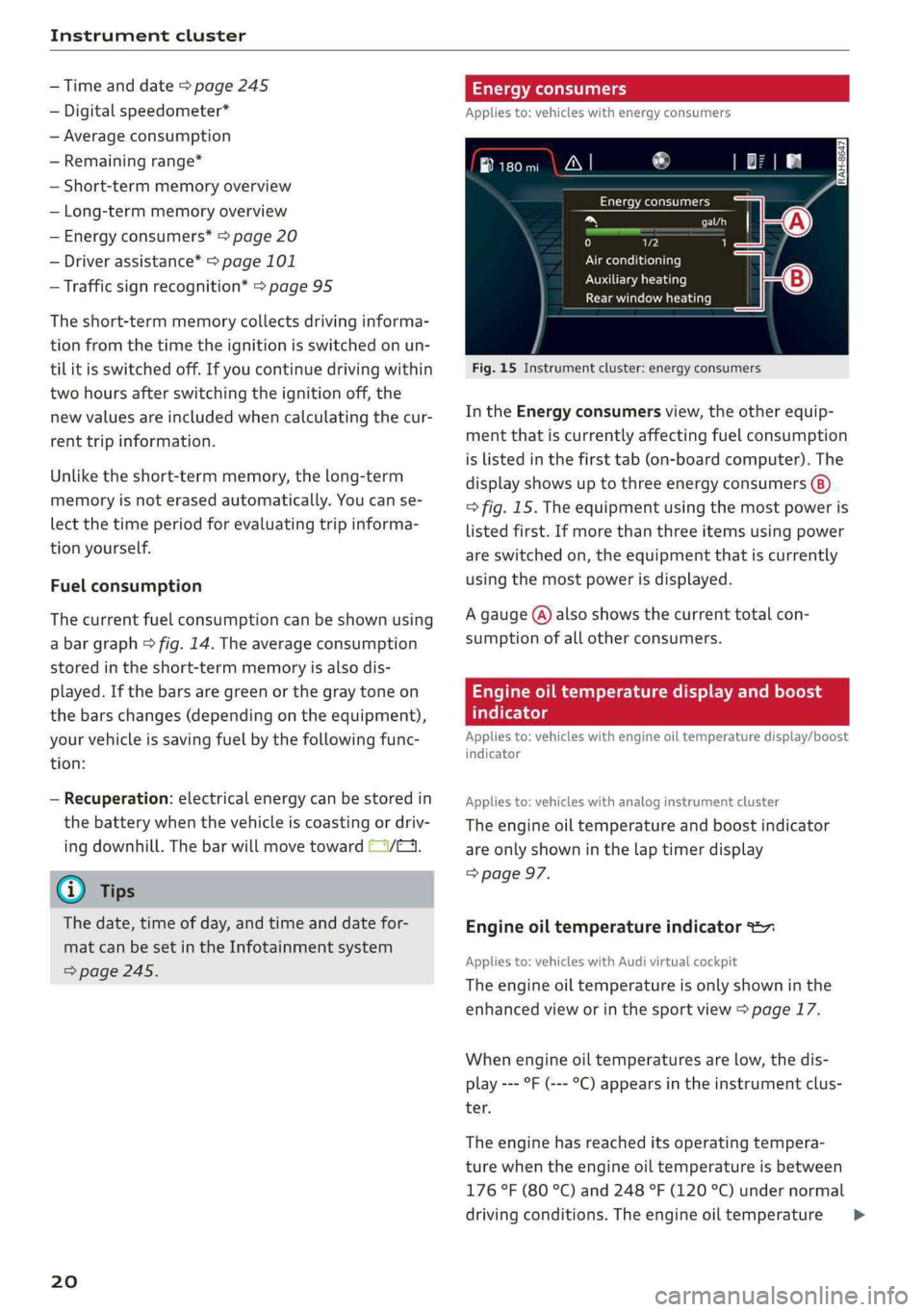
IntheEnergyconsumersview,theotherequip-
mentthatiscurrentlyaffectingfuelconsumption
islistedinthefirsttab(on-boardcomputer).The
displayshowsuptothreeenergyconsumers
>fig.15.Theequipmentusingthemostpoweris
listedfirst.Ifmorethanthreeitemsusingpower
areswitchedon,theequipmentthatiscurrently
usingthemostpowerisdisplayed.
Agauge(@)alsoshowsthecurrenttotalcon-
sumptionofallotherconsumers.
Engineoiltemperaturedisplayandboost
atelte-hels
Appliesto:vehicleswithengineoiltemperaturedisplay/boost
indicator
Appliesto:vehicleswithanaloginstrumentcluster
Theengineoiltemperatureandboostindicator
areonlyshowninthelaptimerdisplay
=>page97.
Engineoiltemperatureindicator=
Appliesto:vehicleswith Audivirtualcockpit
Theengineoiltemperatureisonlyshowninthe
enhancedvieworinthesportview>page17.
Whenengineoiltemperaturesarelow,thedis-
play---°F(---°C)appearsintheinstrumentclus-
ter.
Theenginehasreacheditsoperatingtempera-
turewhentheengineoiltemperatureisbetween
176°F(80°C)and248°F(120°C)undernormal
drivingconditions.Theengineoiltemperature>
Page 234 of 392
Media
TheAudimusicinterfaceAUXinputislocatedin
thestoragecompartmentunderthecenter
armrestandislabeledwithAUX.
USBInput
—Connectingorchargingmobiledevicesusinga
USBadapter:ConnectthematchingUSBadapt-
ertothe AudimusicinterfaceUSBportand
thenconnectittothemobiledevice,forexam-
pleaniPhone.Thebatterywillchargeautomat-
ically.
—DisconnectingamobiledevicefromtheAudi
musicinterface:RemovetheUSBadapterfrom
the AudimusicinterfaceUSBport.
Themediaarestartedandoperatedthroughthe
mobiledeviceortheMMI,dependingonthede-
vicebeingused>page234.
Connectingmultiplemobiledevices:ifamobile
device(suchasasmartphone)isconnectedatthe
respectiveUSBportontheAudimusicinterface,
thenalldevicescanbeusedasa playbacksource.
AUXInput
—Connectingamobiledevice totheAUXinput:
ConnecttheAUXcabletotheAUXinputonthe
Audimusicinterfaceandthenconnectittothe
mobiledevice(forexample,anMP3playerora
smartphone).
—DisconnectingamobiledevicefromtheAUX
input:RemovetheAUXcablefromtheAUXin-
putonthe Audimusicinterface.
—Operation:selectandconfirmtheExternalau-
dioplayersource©)>page234,fig.210.Me-
diaisstartedandoperatedonthemobilede-
vice.
ZAWARNING
Drivingrequiresyourcompleteandundivided
attention.Asthedriver,youhavecompletere-
sponsibilityforsafetyintraffic.Neveroperate
mobiledeviceswhiledriving,becausethisin-
creasestheriskofanaccident.
1)Applies onlytoMTPdevices.DoesnotapplytoAppledevi-
cesandUSBmassstoragedevices.
232
@)Note
—UseaUSBextensioncabletoconnectdevi-
cesthathaveanintegratedUSBconnector
(suchasaUSBstick)topreventdamageto
yourUSBdeviceandthe Audimusicinter-
face.
—Extremelyhighorlow temperaturesthat
canoccurinsidevehiclescandamagemobile
devicesand/orimpairtheirperformance.
Neverleavemobiledevicesinthevehiclein
extremelyhighorlowtemperatures.
G)Tips
—Alwaysfollowtheinformationfoundin
=page59.
—Whenyouswitchtheignitionoff,theUSB
portsarestillsuppliedwithpoweruntilthe
energymanagementintervenes.
—DonotuseanadditionaladapterorUSBex-
tensioncabletoconnectmobiledevicesto
theAudimusicinterfacethatalreadyhavea
cableorthatmustbeconnectedwithaUSB
adapter(>page231).Using anadditional
adapterorUSextensioncablemayimpair
functionality.
—YoucanpurchasetheAUXconnectorcable
fromanauthorizedAudidealeror atspe-
cialtystores.
—Audirecommendssettingthevolumeofa
mobiledeviceconnectedtotheAUXinputto
approximately70%ofthemaximumvol-
ume.
—Functionalityisnotguaranteedformobile
devicesthatdonotconformtotheUSB2.0
specification.
—USBhubsarenotsupported.
—SomeversionsoftheiPodsuchastheiPod
shufflecannotbeconnectedtotheUSB
adapterfordeviceswithAppleDockconnec-
tor.ConnectthesedevicesusingaAUXcon-
nectorcable.
—Changedcontentonamobiledevice»)that
isconnectedtotheAudimusicinterface
maynotbedisplayedinthemediacenter.In>
Page 236 of 392
Media
UsingAudiGenuineAccessoriesisrecommended.
Audihasverifiedtheirreliability,safety,andsuit-
ability.
Wecannotevaluateorendorseotherproductsin
thisway,eveniftheproductisapprovedbyacer-
tifiedtestingagencyorgovernmentagency.
@)Note
Onlyusedevicesthatareapprovedforthe
Rear SeatEntertainmentpreparation.Unap-
provedequipmentcan causedamagetothe
vehicleelectricalsystem.
G)Tips
—Contact anauthorizedAudidealerorau-
thorizedAudiServiceFacilityforadditional
informationonAudiEntertainmentmo-
bile.
—Alwaysreadthechapter>page367.
—TheRear SeatEntertainmentpreparationis
notintendedtochargeexternalelectronic
devices.
Playingmedia
Accessingmedia
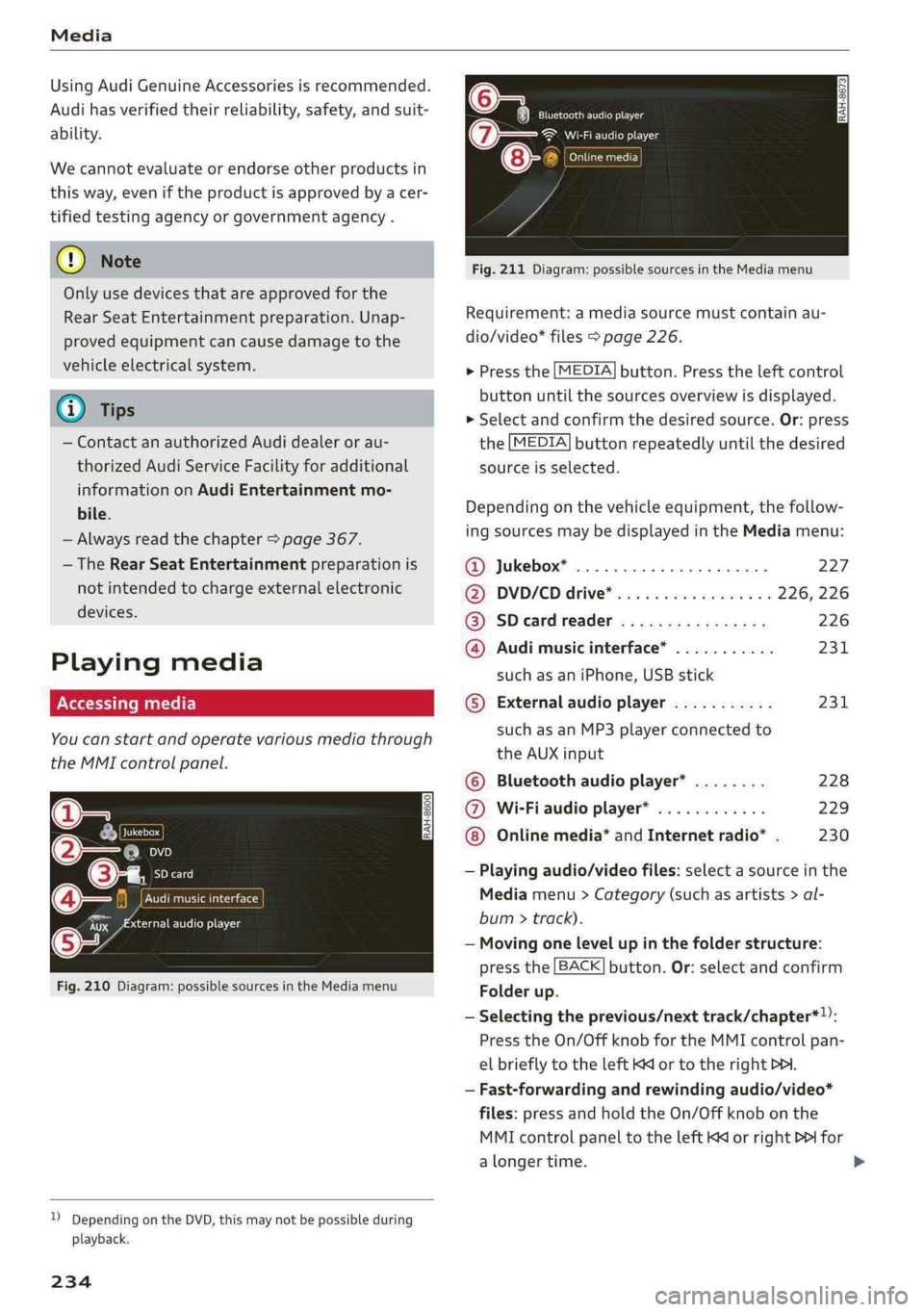
Youcanstartandoperatevariousmediathrough
theMMIcontrolpanel.
PNWTeatCeMial<1aile
fiiEeneN(ta
Fig.210Diagram:possiblesourcesintheMediamenu
Sis3<9 =|Z|
cc|
))DependingontheDVD,thismaynotbepossibleduring
playback.
234
Eltrones
SeeaerEg
Cinetacic)
Fig.211Diagram:possiblesourcesintheMediamenu
Requirement:amediasourcemustcontainau-
dio/video*files>page226.
>Pressthe[MEDIA]button.Presstheleftcontrol
buttonuntilthesourcesoverviewisdisplayed.
>Selectandconfirmthedesiredsource.Or:press
the[MEDIA]buttonrepeatedlyuntilthedesired
sourceisselected.
Dependingonthevehicleequipment,thefollow-
ingsourcesmaybedisplayedintheMediamenu:
@Jukebox*...00...ee.227
DD,DVD/CDidtive®sinoscece¢wieones226,226
@SDeardreader................226
@Audimusicinterface*...........231
suchasaniPhone,USBstick
©®Externalaudioplayer...........231
suchasanMP3playerconnectedto
theAUXinput
©Bluetoothaudioplayer*........228
@Wi-Fiaudioplayer*............229
Onlinemedia*andInternetradio”.230
—Playingaudio/videofiles:selectasourceinthe
Mediamenu>Category(suchasartists>al-
bum>track).
—Movingonelevelupinthefolderstructure:
pressthe[BACK]button.Or:selectandconfirm
Folderup.
—Selectingtheprevious/nexttrack/chapter*)):
PresstheOn/OffknobfortheMMIcontrolpan-
elbrieflytotheleftKdor totherightPHI.
—Fast-forwardingandrewindingaudio/video*
files:pressandholdtheOn/Offknobonthe
MMIcontrolpaneltotheleftKdorrightPofor
alongertime.
Page 239 of 392
80A012721BG
Media
Playlist
ThebigB
5ke
Stories
kE
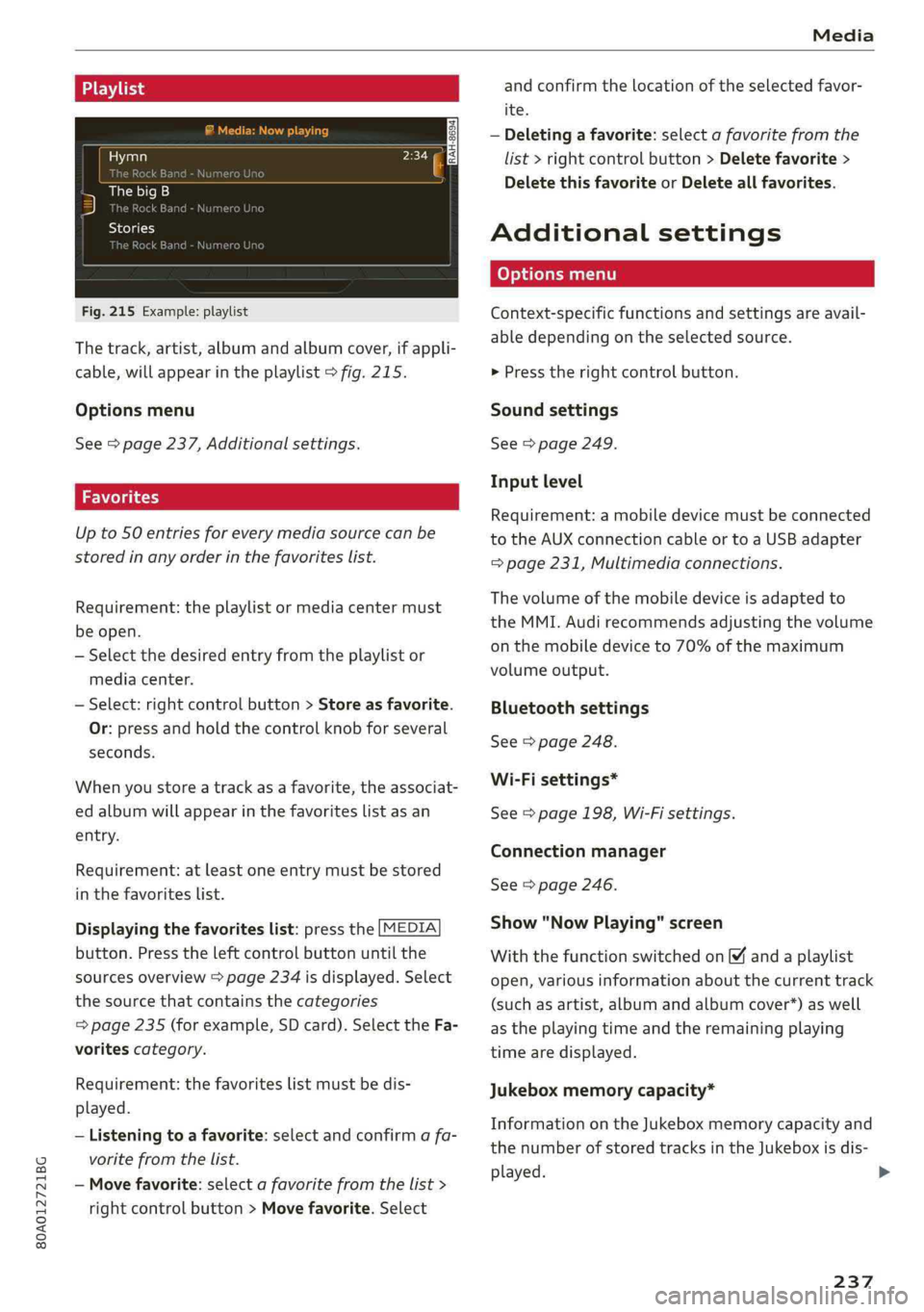
Fig.215Example:playlist
Thetrack,artist,albumandalbumcover,ifappli-
cable,willappearintheplaylist>fig.215.
Optionsmenu
See>page237,Additionalsettings.
Upto50entriesforeverymediasourcecanbe
storedinanyorderinthefavoriteslist.
Requirement:theplaylistormediacentermust
beopen.
—Selectthedesiredentryfromtheplaylistor
mediacenter.
—Select:rightcontrolbutton>Storeasfavorite.
Or:pressandholdthecontrolknobforseveral
seconds.
Whenyoustoreatrackasa favorite,theassociat-
edalbumwillappearinthefavoriteslistasan
entry.
Requirement:atleastoneentrymustbestored
inthefavoriteslist.
Displayingthefavoriteslist:pressthe[MEDIA
button.Presstheleftcontrolbuttonuntilthe
sourcesoverview>page234isdisplayed.Select
thesourcethat containsthecategories
=>page235(forexample,SDcard).SelecttheFa-
voritescategory.
Requirement:thefavoriteslistmustbedis-
played.
—Listeningtoafavorite:selectandconfirm afa-
voritefromthelist.
—Movefavorite:selectafavoritefromthelist>
rightcontrolbutton>Movefavorite.Select
andconfirm thelocationoftheselectedfavor-
ite.
—Deletingafavorite:selectafavoritefromthe
list>rightcontrolbutton>Deletefavorite>
DeletethisfavoriteorDeleteallfavorites.
Additionalsettings
Context-specificfunctionsandsettingsareavail-
abledependingontheselectedsource.
>Presstherightcontrolbutton.
Soundsettings
See>page249.
Inputlevel
Requirement:amobiledevicemustbeconnected
totheAUXconnectioncableortoaUSBadapter
=page231,Multimediaconnections.
Thevolumeofthemobiledeviceisadaptedto
theMMI.Audirecommendsadjustingthevolume
onthemobiledeviceto70%ofthemaximum
volumeoutput.
Bluetoothsettings
See>page248.
Wi-Fisettings*
See>page198,Wi-Fisettings.
Connectionmanager
See>page246.
Show"NowPlaying"screen
Withthefunctionswitchedon¥andaplaylist
open,variousinformationaboutthecurrenttrack
(suchasartist,albumandalbumcover*)aswell
astheplayingtimeandtheremainingplaying
timearedisplayed.
Jukeboxmemorycapacity*
InformationontheJukeboxmemorycapacityand
thenumberofstoredtracksintheJukeboxisdis-
played.
237
>
Page 243 of 392
80A012721BG
Media
notalwaysdisplay,dependingonthesys-
temlanguage.
— Themanufacturerofthestoragedevicecan
—SomeMTPplayerfunctionsarenotsupport-
ed,suchasratingmusictracksandvideo
provideinformationaboutits“USBDevice
Subclass”.
playback.
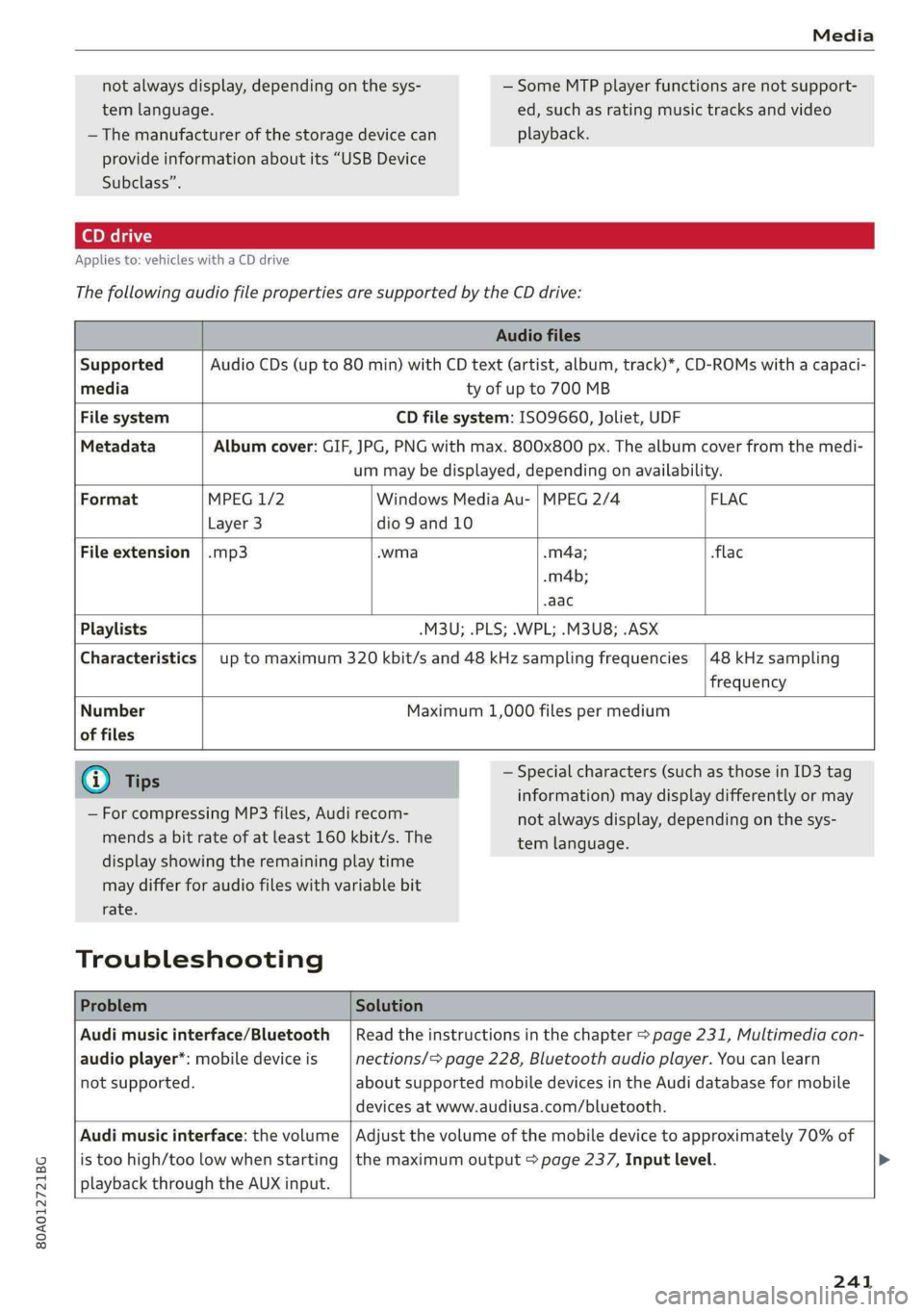
Appliesto:vehicleswithaCDdrive
ThefollowingaudiofilepropertiesaresupportedbytheCDdrive:
Audiofiles
SupportedAudioCDs(upto80min)withCDtext(artist,album,track)*,CD-ROMswithacapaci-
mediatyofupto700MB
FilesystemCDfilesystem:ISO9660,Joliet,UDF
MetadataAlbumcover:GIF,JPG,PNGwithmax.800x800px.Thealbumcoverfromthemedi-
ummaybedisplayed,dependingonavailability.
FormatMPEG1/2WindowsMediaAu-|MPEG2/4 FLAC
Layer3dio9and10
Fileextension|.mp3.wma-m4a;flac
.m4b;
-aac
Playlists-M3U;.PLS;.WPL;.M3U8;.ASX
Characteristicsuptomaximum320kbit/sand48kHzsamplingfrequencies
48kHzsampling
frequency
Number
offiles
Maximum1,000filespermedium
@Tips
—ForcompressingMP3files, Audirecom-
mendsabitrateofatleast160kbit/s.The
—Specialcharacters(such asthoseinID3tag
information)maydisplaydifferentlyormay
displayshowingtheremainingplaytime
maydifferforaudiofileswithvariablebit
rate.
Troubleshooting
notalwaysdisplay,dependingonthesys-
temlanguage.
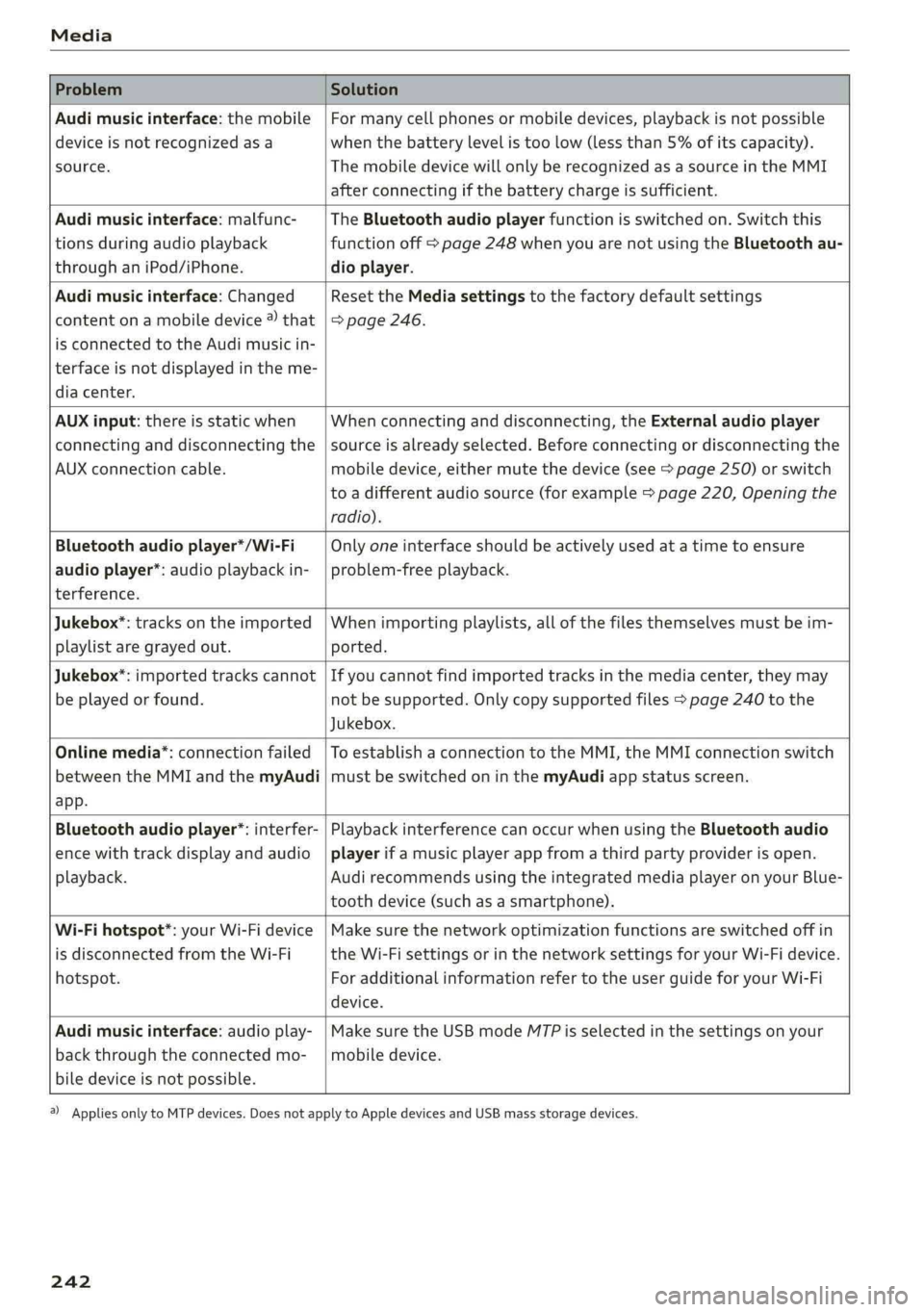
ProblemSolution
Audimusicinterface/Bluetooth
audioplayer*:mobiledeviceis
notsupported.
Readtheinstructionsinthechapter>page231,Multimediacon-
nections/=page228,Bluetoothaudioplayer.Youcanlearn
aboutsupportedmobiledevicesinthe Audidatabaseformobile
devicesatwww.audiusa.com/bluetooth.
Audimusicinterface:thevolume
istoohigh/toolowwhenstarting
playbackthroughtheAUXinput.
Adjustthevolumeofthemobiledevicetoapproximately70%of
themaximumoutput>page237,Inputlevel.>
241
Page 244 of 392
Media
ProblemSolution
Audimusicinterface:themobile
deviceisnotrecognizedasa
source.
Formanycellphonesormobiledevices,playbackisnotpossible
when
thebatterylevelistoolow(lessthan5%ofitscapacity).
ThemobiledevicewillonlyberecognizedasasourceintheMMI
afterconnectingifthebatterychargeissufficient.
Audimusicinterface:malfunc-
tionsduringaudioplayback
throughaniPod/iPhone.
TheBluetoothaudioplayerfunctionisswitchedon.Switchthis
functionoff>page248whenyouarenotusingtheBluetoothau-
dioplayer.
Audimusicinterface:Changed
contentonamobiledevice®that
isconnectedtothe Audimusicin-
terfaceisnotdisplayedintheme-
diacenter.
Reset theMediasettingstothefactorydefaultsettings
=>page246.
AUXinput:thereisstaticwhen
connectinganddisconnectingthe
AUXconnectioncable.
Whenconnectinganddisconnecting,theExternalaudioplayer
sourceisalreadyselected.Beforeconnectingordisconnectingthe
mobiledevice,eithermutethedevice(see>page250)orswitch
toadifferentaudiosource(forexample>page220,Openingthe
radio).
Bluetoothaudioplayer*/Wi-Fi
audioplayer*:audioplaybackin-
terference.
Onlyoneinterfaceshouldbeactivelyusedatatimetoensure
problem-freeplayback.
Jukebox®*:tracks ontheimported
playlistaregrayedout.
Whenimportingplaylists,allofthefilesthemselvesmustbeim-
ported.
Jukebox*:importedtrackscannot
beplayedorfound.
Ifyoucannotfindimportedtracksinthemediacenter,theymay
notbesupported.Onlycopysupportedfiles>page240tothe
Jukebox.
Onlinemedia*:connectionfailed
betweentheMMIandthemyAudi
app.
ToestablishaconnectiontotheMMI,theMMIconnectionswitch
mustbe switchedoninthemyAudiappstatusscreen.
Bluetoothaudioplayer*:interfer-
encewithtrackdisplayandaudio
playback.
PlaybackinterferencecanoccurwhenusingtheBluetoothaudio
playerifamusicplayerappfromathirdpartyproviderisopen.
Audi
recommendsusingtheintegratedmediaplayeronyourBlue-
toothdevice(suchasasmartphone).
Wi-Fihotspot*:yourWi-Fidevice
isdisconnectedfromtheWi-Fi
hotspot.
Makesurethenetworkoptimizationfunctionsareswitchedoffin
theWi-FisettingsorinthenetworksettingsforyourWi-Fidevice.
ForadditionalinformationrefertotheuserguideforyourWi-Fi
device.
Audimusicinterface:audioplay-
backthroughtheconnectedmo-
biledeviceisnotpossible.
MakesuretheUSBmodeMTPisselectedinthesettingsonyour
mobiledevice.
2)Applies onlytoMTPdevices.DoesnotapplytoAppledevicesandUSBmassstoragedevices.
242
Page 322 of 392
CheckingandFilling
—Ifthebrakefluidisold,bubblesmayformin
thebrakesystemduringheavybraking.This
couldimpairbrakingperformanceanddriv-
ingsafety,whichincreasestheriskofanac-
cident.
— Thebrakefluidinyourvehiclemustmeet
thestandardVW50114andisavailableat
anauthorizedAudidealerorauthorizedAu-
diServiceFacility.Ifthisbrakefluidisnot
available,anotherhigh-gradebrakefluidof
equivalentqualitymaybeused,anditmust
meettheU.S.FederalMotorVehicleStand-
ard(FMVSS)116DOT4,Class6.
@Note
—IfthebrakefluidlevelisabovetheMAX
marking,brakefluidmayleakoutoverthe
edgeofthereservoirandresultindamage
tothevehicle.
—Donotallowanybrakefluidtocomeinto
contactwiththevehiclepaint,becauseit
willcorrodethepaint.
Electricalsystem
Iftheieorfmindicatorlightturnson,thereisa
malfunctioninthegenerator,thebattery,orthe
vehicleelectricalsystem.
=Electricalsystem:malfunction!Safelystop
vehicle
Donotcontinuedrivingandswitchtheengineoff
=>AX.SeeanauthorizedAudidealerorauthorized
AudiServiceFacilityforassistance.
=Electricalsystem:malfunction!Restartnot
possible.PleasecontactService
Itwillnot bepossible torestarttheengineonce
youturnitoff.Vehiclefunctions/drivingstability
maybelimited.DrivetoanauthorizedAudideal-
erorauthorizedAudiServiceFacilityimmediate-
ly.
=Electricalsystem:malfunction!Pleasecon-
tactService
Switchoffallelectricalequipmentthatisnot
needed.Vehiclefunctions/drivingstabilitymay
320
belimited.DrivetoanauthorizedAudidealeror
authorizedAudiServiceFacilityimmediately.
=Electricalsystem:lowbatterycharge.Bat-
tery
willbechargedwhiledriving
Thestartingabilitymaybeimpaired.
Ifthismessageturnsoffafteralittlewhile,the
vehiclebatteryhaschargedenoughwhiledriving.
Ifthismessagedoesnotturnoff,driveimmedi-
atelytoanauthorizedAudidealerorauthorized
AudiServiceFacility.
ZAWARNING
Whenthereisanelectricalsystemmalfunc-
tion,vehiclefunctionsmaynotworkanddriv-
ingstabilitymaybelimited,whichincreases
theriskofanaccident.Stopdrivingand
switchtheengineoff.SeeanauthorizedAudi
dealerorauthorizedAudiServiceFacilityfor
assistance.
Battery
Palaees)
Becauseofthecomplexpowersupply,allworkon
batteriessuchasdisconnecting,replacing,etc.,
should only beperformedby anauthorizedAudi
dealerorauthorizedAudiServiceFacility>A\.
Multiplebatterieswithdifferenttechnologies
maybeinstalledinyourvehicle:
—Vehiclebattery(forexample,forstartingthe
engine,basicpowersupply)>page321,Lead
batteryor>page321,Otherbatterytypes
—Auxiliarybattery(forexample,forrecuperation
oroptionalequipment)>page321,Otherbat-
terytypes
Notrunningthevehicleforlongperiodsof
time
Thebatterywillgraduallydrainifthevehicle
doesnotrunforlongperiodsoftime.Toensure
thatthevehiclecanstill bestarted,theelectrical
equipmentwillbereducedorswitchedoff
=>page148.Someconveniencefunctions,such
asinteriorlightingorpowerseatadjustment,
maynotbeavailableundercertain
Page 362 of 392
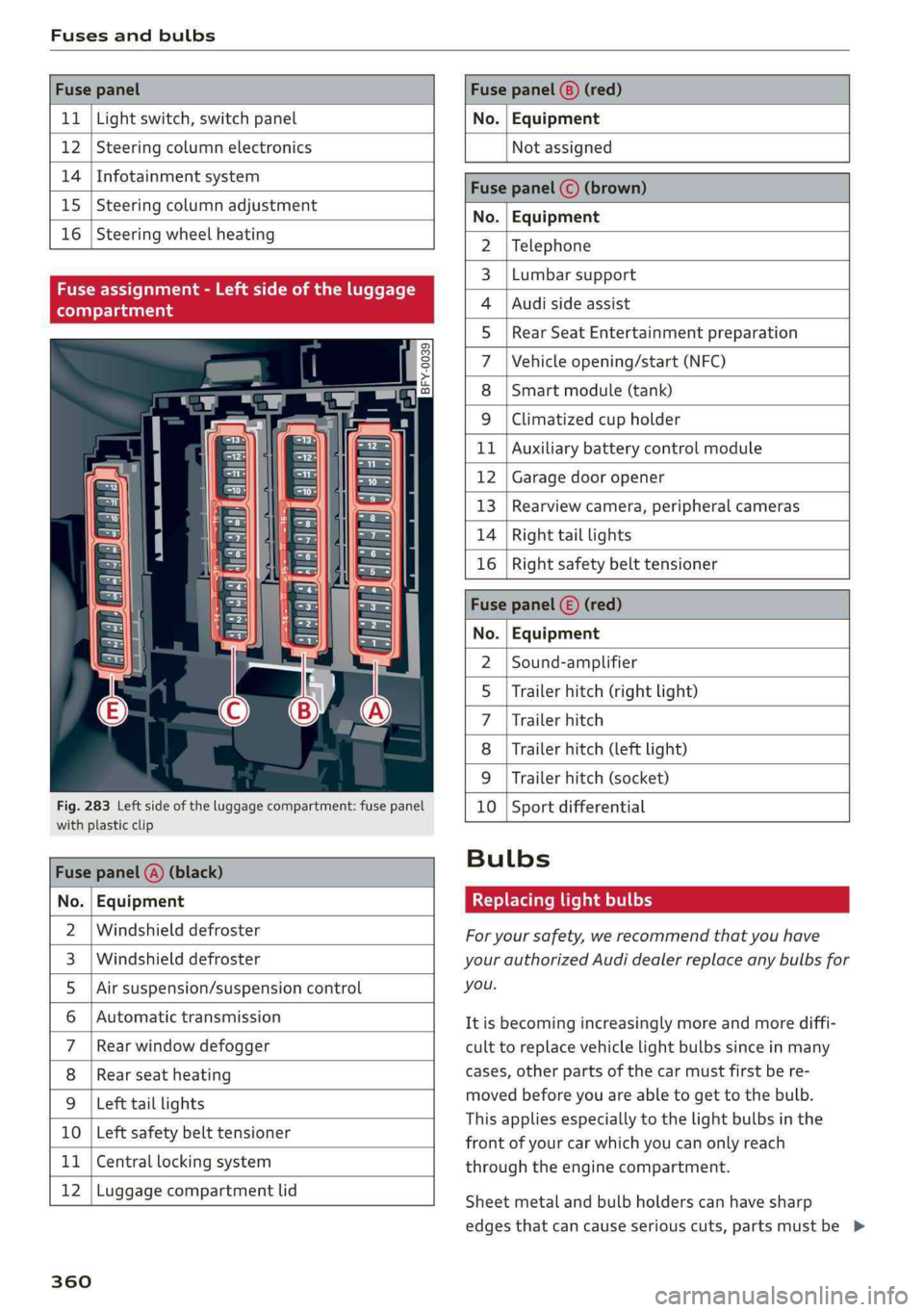
Fusesandbulbs
FusepanelFusepanel(8)(red)
11|Lightswitch,switchpanelNo.|Equipment
12|SteeringcolumnelectronicsNotassigned
14|Infotainmentsystem
15|Steeringcolumnadjustment
16|Steeringwheelheating
Fuseassignment-Leftsideoftheluggage
compartment
Fig.283Leftside oftheluggagecompartment:fusepanel
withplasticclip
Fusepanel@)(black)
No.|Equipment
Windshielddefroster
Windshielddefroster
Airsuspension/suspensioncontrol
Automatictransmission
Rearwindowdefogger
Rearseatheating
Lefttaillights
10|Leftsafetybelttensioner
WO}lAINI
AD)
MW)
nN
11|Centrallockingsystem
12|Luggagecompartmentlid
360
Fusepanel©(brown)
z°.|Equipment
Telephone
Lumbarsupport
Audisideassist
Rear SeatEntertainmentpreparation
Vehicleopening/start(NFC)
Smartmodule(tank)
WOl/oOlIN|M|ALWINClimatizedcupholder
bBRAuxiliarybatterycontrolmodule
BRNGaragedooropener
BWwRearviewcamera,peripheralcameras
Righttaillights
Rightsafetybelttensioner
Bfy
Bba
Fusepanel()(red)
No.|Equipment
Sound-amplifier
Trailerhitch(rightlight)
Trailerhitch
Trailerhitch(leftlight)
Trailerhitch(socket)
10|Sportdifferential
WOl/OIN|
MIN
Bulbs
Replacinglightbulbs
Foryoursafety,werecommendthatyouhave
yourauthorizedAudidealerreplaceanybulbsfor
you.
Itisbecomingincreasinglymoreandmorediffi-
culttoreplacevehiclelightbulbssinceinmany
cases,otherpartsofthecarmustfirstbere-
movedbeforeyouareabletogettothebulb.
This appliesespeciallytothelightbulbsinthe
frontofyourcarwhichyoucanonlyreach
throughtheenginecompartment.
Sheetmetalandbulbholderscanhavesharp
edgesthatcan causeseriouscuts,partsmustbe>
Page 377 of 392
80A012721BG
Index
Audiphone-Doxcesses¢sconce2 xeeeceoeerence2
AUG:preiSense@in«2exces6oew6 2sores8ooe
MessagesS.........0.0.00.cceeeee
SOttiliGSiccss =ness& 3ReSaoBERRAsBERGS
Audisideassist...6...0...ceceeeeeee
Rearcross-trafficassist.............-..
Audi smartphoneinterface..........243,
Audivirtualcockpit
refertoInstrumentcluster..............
AUTO
Automaticclimatecontrolsystem........
Automaticheadlights..................
Auto
Lock(centrallockingsystem).........
Automaticbeltretractor..............0.
Automaticclimatecontrol................
Automaticclimatecontrolsystem
Audidriveselect...............000008
Automatic
luggagecompartmentlid....36
Automatictransmission............-...0-
Emergencyprogram...........0eeeeeae
HiLLGSSCENECOMtTOli:=ems=ewea 2cere
ICKECOWMisicoames:wxcommiwsooomensowooox
Launchcontrolprogram.............-.-
Manualshiftingwc5 2essseeensseeeess
Parkinglockemergencyrelease..........
Selectorleverpositions................-
Automaticwipe/washsystem.............
AUX (PUbeswwes5«semuaaaansans6 @seauens6 0messes6
Averageconsumption:.occuocoseeeeea
Averagespeed...0...ccc ceeeceneeeee
B
BACKDUttONacesx =sewsx=ees5 oewseeae
Balancé(sound)22.5:sven: eens: pews:
Band
refertoFrequencyband...............
Bassi(SOurtd)seursx xsae3 erome5 2pees& 2oe
Bluetooth
Audioplayer........ccceeeeee228
Connectingacellphone...............177
SOGUINGSsoinsoswanens¥snemensaememewo+eM248
BOOSts«2ciesoeewsooeeooeeooee920
Boosterseats'.=ssws< ¢sewssoseesseeee297
Boostpressureindicator.................20
Brakefluid
Checkingthebrakefluidlevel...........319
BrakeSiacy:»2semesoBaws&&aweetROSEEeee146
Brakerassisttsassisssarisesoovenarea aanovanea144
Brakefluid...2.2.00...00.ceceeee319
Electromechanicalparkingbrake.........78
Emergencybrakingfunction.............79
Newbrakepads..............-..00005147
Break-insecurityfeature............0000.34
Breakingin
Newbrakepads............-.02+0000147
Newtite:« sgees« xsewssoceesoitee331
Browser
refertoMediacenter..............000.235
BulbS%«wes= @ewe¢ opewsooeeeeemeowoe360
Buttons
Control:panel(MMI),ceivesosavinsososvewas152
Multifunctionsteeringwheel.........15,18
SwitchingtheInfotainmentsystemdisplay
ON/OFficss:oewasnovarsusosavaeannesvoacaowowe152
Cable(USBadapter/AUXconnectorcable)..231
CaliforniaProposition65Warning........312
Batteryspecific.................-000.321
CaUlliSt.sscsiiswsaameaesvosoeeenseweensowavav182
CallOptionsiicscsscowseowenseawesween189
Capacities
Furelitaniki.2ccc:0 xmenuea«sinpene©0)cme©owB72
Washerfluidreservoir...........000005372
Catalyticconverter.............-.00000-310
CD
drive(mediadrives)..............005226
Cellphone
refertoTelephone«iissseeeeeeeeew177
375