tow AUDI Q5 2021 Owner´s Manual
[x] Cancel search | Manufacturer: AUDI, Model Year: 2021, Model line: Q5, Model: AUDI Q5 2021Pages: 332, PDF Size: 118.86 MB
Page 78 of 332
Sitting correctly and safely
that PASSENGER AIR BAG OFF #; stays
on while driving. If
PASSENGER AIR BAG OFF #¥; does not
turn on, remove the child safety seat and in-
stall it again according to the child safety
seat manufacturer instructions. If
PASSENGER AIR BAG OFF &%; still does
not turn on, the front passenger's seat must
not be used. Drive to an authorized Audi
dealer or authorized Audi Service Facility
and have the airbag system inspected.
— Fluids, electronic devices, or mechanical
damage on the front passenger's seat may
cause the front passenger seat occupant de-
tection to malfunction. The system may
then incorrectly detect if the front passeng-
er's seat is occupied. As a result, it could de-
ploy the front passenger’s airbag incorrectly
or fail to deploy it, which increases the risk
of serious or fatal injury. Make sure that no
wet objects (such as a wet hand towel) and
no fluids come into contact with the front
passenger's seat cushion. If the front pas-
senger's seat becomes wet, dry it immedi-
ately. Make sure no electronic devices (such
as a laptop or a retrofitted seat heater) are
on the front passenger's seat. Do not trans-
port any objects on or under the front pas-
senger's seat.
— Seat covers or protective covers may prevent
the advanced airbag system from correctly
detecting child safety seats or passengers in
the front passenger's seat. You must not use
seat covers or protective covers on the front
passenger's seat that are not specifically ap-
proved for use on Audi seats with an ad-
vanced airbag system.
Child safety seats
General information
When installing and using child safety seats, fol-
low the information in this Owner's Manual, the
applicable state and federal regulations, and the
manufacturer instructions for the child safety
seat.
76
You can also obtain useful and current informa-
tion from the following sources:
U.S. National Highway Traffic Safety Adminis-
tration
http://www.nhtsa.gov
http://www.safercar.gov
National SAFE KIDS Campaign
http://www.safekids.org
SafetyBeltSafe U.S.A.
http://www.carseat.org
Transport Canada Information Centre
http://www.tc.gc.ca/roadsafety
Audi Customer Experience Center
https://www.audiusa.com/help/contact-us
https://www.audi.ca/ca/web/en/models/layer/
contact.html
Z\ WARNING
To reduce the risk of serious or fatal injuries,
children must always be secured in the vehicle
with a child safety seat that is appropriate for
their body size, weight, and age.
— Children ages 12 and under must be trans-
ported using the appropriate child safety
seat. Note differences in regulations be-
tween states and countries.
— Child safety seats secured incorrectly in the
vehicle may cause serious or fatal injuries in
the event of an accident. Always secure the
child safety seat according to the manufac-
turer instructions.
— Children or babies must not under any cir-
cumstances be held on the lap of the driver
or other passengers while driving.
— Do not secure more than one child in a child
safety seat.
— Never allow a child to sit in a child safety
seat unsupervised.
— Never allow children to ride unsecured in the
vehicle or to stand or kneel on the seats
while driving. In the event of an accident, a
child could be propelled through the vehicle.
This can cause serious or fatal injuries for
the child and passengers.
— If children use an incorrect seating position
while driving, they have a higher risk of
Page 82 of 332
Sitting correctly and safely
A WARNING
— A safety belt that is not locked by the belt
retractor lock or a locking device cannot se-
cure a child safety seat while driving or in
the event of an accident, which increases the
risk of fatal injury. Always make sure the
belt retractor lock on the safety belt is acti-
vated if the child safety seat manufacturer
instructions require it.
— Due to the risk of fatal injury, never place a
rear-facing child safety seat on the front
passenger's seat when the front passenger's
airbag is switched on.
— For the child safety seat to offer the maxi-
mum protection, it is especially important
to route the vehicle safety belt correctly. Al-
ways follow the instructions from the child
safety seat manufacturer for routing the
safety belt correctly. Incorrectly fastened
safety belts can cause injuries, even during
minor accidents.
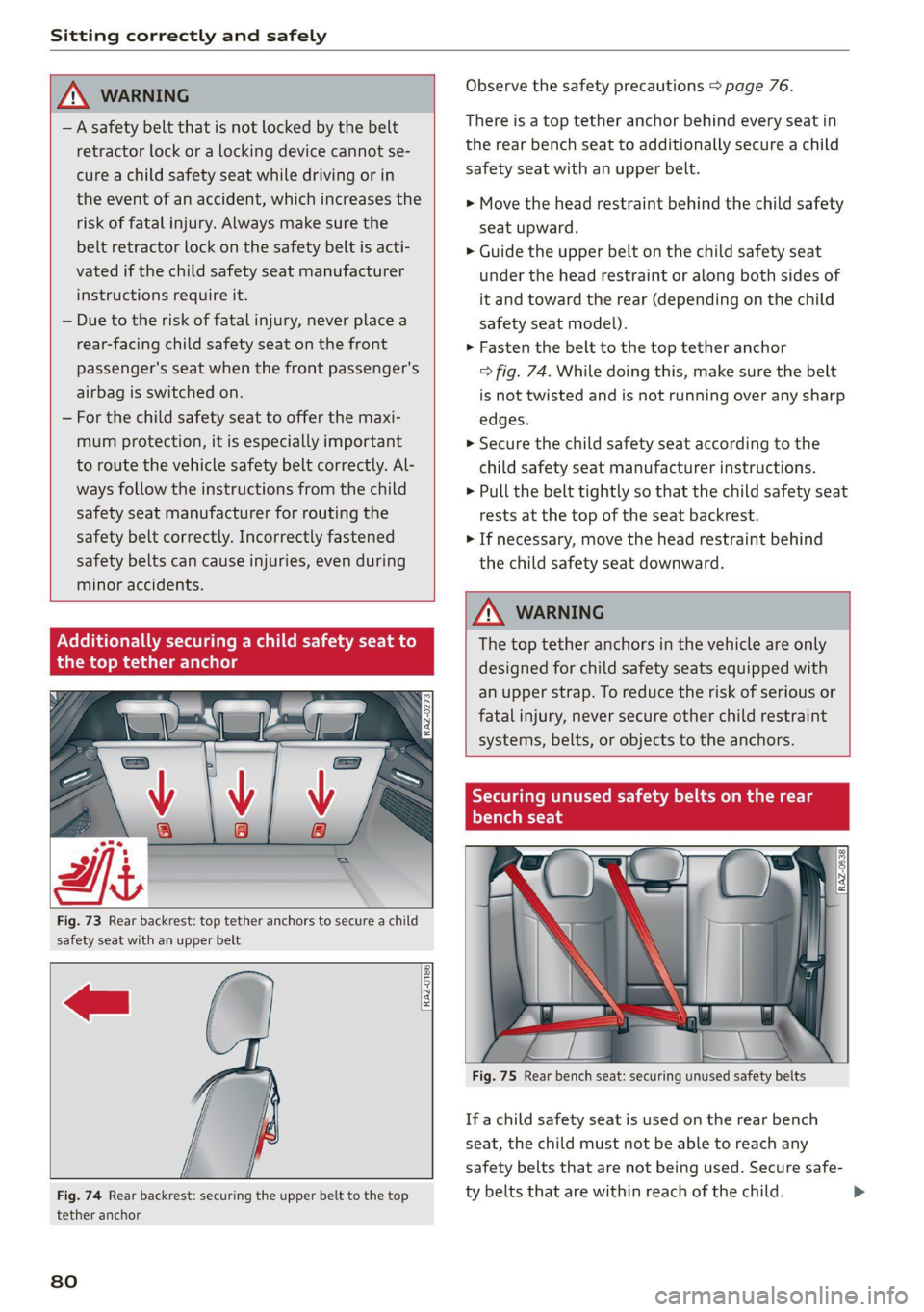
Fig. 73 Rear backrest: top tether anchors to secure a child
safety seat with an upper belt
RAZ-0186,
Fig. 74 Rear backrest: securing the upper belt to the top
tether anchor
80
Observe the safety precautions > page 76.
There is a top tether anchor behind every seat in
the rear bench seat to additionally secure a child
safety seat with an upper belt.
> Move the head restraint behind the child safety
seat upward.
> Guide the upper belt on the child safety seat
under the head restraint or along both sides of
it and toward the rear (depending on the child
safety seat model).
> Fasten the belt to the top tether anchor
=> fig. 74. While doing this, make sure the belt
is not twisted and is not running over any sharp
edges.
>» Secure the child safety seat according to the
child safety seat manufacturer instructions.
> Pull the belt tightly so that the child safety seat
rests at the top of the seat backrest.
> If necessary, move the head restraint behind
the child safety seat downward.
Z\ WARNING
The top tether anchors in the vehicle are only
designed for child safety seats equipped with
an upper strap. To reduce the risk of serious or
fatal injury, never secure other child restraint
systems, belts, or objects to the anchors.
Tae Meee Coe a meee Meg
Mt
YT ey -T-14
ONG"
i a
\
1 i
1, —_..
Ss
Fig. 75 Rear bench seat: securing unused safety belts
If a child safety seat is used on the rear bench
seat, the child must not be able to reach any
safety belts that are not being used. Secure safe-
ty belts that are within reach of the child. >
Page 86 of 332
Storage and convenience
— Make sure your view toward the rear is not
blocked, for example by hanging clothing or
objects in the vehicle.
Luggage compartment
eee)
All pieces of luggage or objects must be securely
fastened in the luggage compartment. Note the
following to maintain good vehicle handling:
> Distribute the load evenly in the luggage com-
partment.
> Stow heavy luggage as far forward in the lug-
gage compartment as possible.
> Use non-elastic cords attached to the tie-downs
to secure objects.
ZA\ WARNING
— Applies to: vehicles with luggage compart-
ment cover: The luggage compartment cov-
er is not a surface for storing objects. Ob-
jects placed on the cover increase the risk of
injury to all vehicle occupants during sudden
driving or braking maneuvers or in the event
of an accident.
— Applies to: vehicles with luggage compart-
ment cover: The luggage compartment cov-
er must always be securely fastened when in
use to reduce the risk of an accident.
— Loose objects can be thrown around the ve-
hicle interior during sudden driving or brak-
ing maneuvers, which increases the risk of
an accident. Always stow objects securely in
the luggage compartment and secure them
at the tie-downs. Use straps suitable for
heavy objects.
— If pieces of luggage or objects are secured
to the tie-downs with unsuitable or dam-
aged straps, this can increase the risk of in-
jury during braking maneuvers or accidents.
— When transporting heavy objects, the vehi-
cle characteristics will change due to the
shift in the center of gravity, which increases
the risk of an accident. You may need to
adapt your driving style and speed to the
current conditions.
84
— The cargo net* is only strong enough to se-
cure light objects. Heavy objects are not ade-
quately secured. Attempting to secure heavy
objects increases the risk of injury.
— Never exceed the permitted axle and load
and vehicle weight > page 314.
— Never secure a child safety seat to the tie-
downs.
— Never leave your vehicle unattended, espe-
cially if the luggage compartment lid is
open. Children could enter the luggage com-
partment and close the luggage compart-
ment lid from the inside. This creates the
risk of fatal injury, since the children would
be locked in and may not be able to escape
by themselves.
— Do not allow children to play in or on the ve-
hicle. Close and lock the luggage compart-
ment lid as well as all other doors when you
leave the vehicle.
— Never transport passengers in the luggage
compartment. Every passenger must be cor-
rectly secured with the safety belts in the
vehicle > page 67.
— Be careful when releasing the backrest and
folding
it forward. To reduce the risk of be-
ing pinched, pay attention and check when
folding backrests forward.
— The backrest must be securely latched so
objects cannot slide forward out of the lug-
gage compartment during sudden braking.
— The backrest must be latched securely to en-
sure that the safety belt is protecting the
center seating position.
— Always pull forward on the backrest to make
sure it is check if it is correctly locked in
place.
@) Note
—To reduce the risk of damage, move the rear
head restraints down > page 67 before fold-
ing the rear backrests forward.
— When folding the backrest forward, make
sure the outer safety belts are in the belt
guide recess so that they do not get pinched
in the backrest lock and damaged. Other ob-
jects should be removed from the rear
Page 89 of 332
80B012721BA
Storage and convenience
Increasing the size of the cargo area f
inside the luggage compartment
Applies to: vehicles with release lever in the luggage compart-
ment
B8Ww-0268
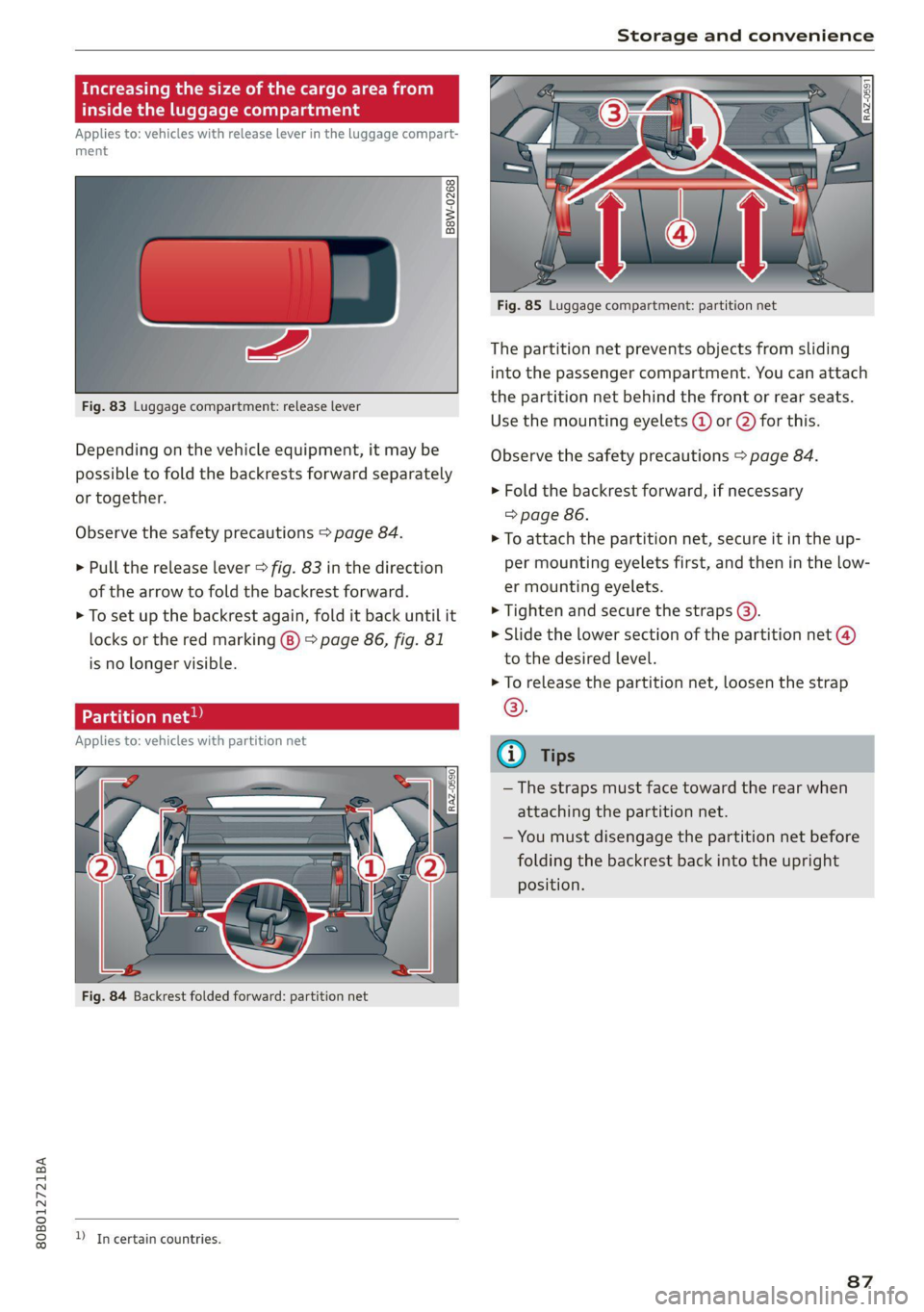
Fig. 83 Luggage compartment: release lever
Depending on the vehicle equipment, it may be
possible to fold the backrests forward separately
or together.
Observe the safety precautions > page 84.
> Pull the release lever > fig. 83 in the direction
of the arrow to fold the backrest forward.
> To set up the backrest again, fold it back until it
locks or the red marking (8) > page 86, fig. 81
is no longer visible.
Pe vaat ated Matte
Applies to: vehicles with partition net
D In certain countries.
Fig. 85 Luggage compartment: partition net
The partition net prevents objects from sliding
into the passenger compartment. You can attach
the partition net behind the front or rear seats.
Use the mounting eyelets @ or @ for this.
Observe the safety precautions > page 84.
» Fold the backrest forward, if necessary
=> page 86.
> To attach the partition net, secure it in the up-
per mounting eyelets first, and then in the low-
er mounting eyelets.
> Tighten and secure the straps @).
> Slide the lower section of the partition net @)
to the desired level.
> To release the partition net, loosen the strap
©.
—The straps must face toward the rear when
attaching the partition net.
— You must disengage the partition net before
folding the backrest back into the upright
position.
87
Page 90 of 332
Storage and convenience
ie-downs and luggage com nt net Car
Applies to: vehicles with removable cargo floor
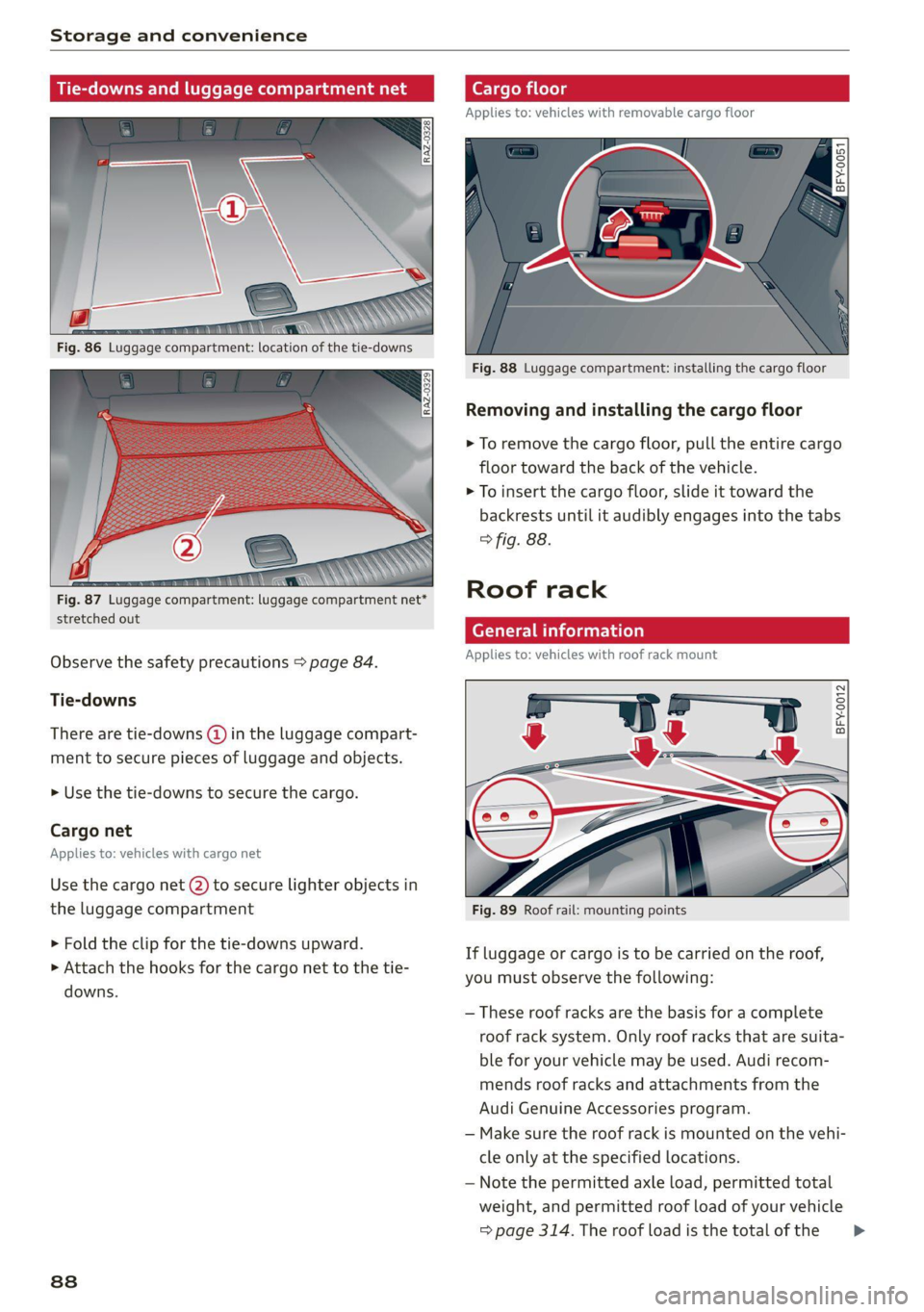
Fig. 88 Luggage compartment: installing the cargo floor
Removing and installing the cargo floor
> To remove the cargo floor, pull the entire cargo
floor toward the back of the vehicle.
> To insert the cargo floor, slide it toward the
backrests until it audibly engages into the tabs
> fig. 88.
Roof rack
stretched out z -
General information
Applies to: vehicles with roof rack mount
Observe the safety precautions > page 84.
Tie-downs
BFY-0012 There are tie-downs (@ in the luggage compart-
ment to secure pieces of luggage and objects.
» Use the tie-downs to secure the cargo.
Cargo net
Applies to: vehicles with cargo net
Use the cargo net (2) to secure lighter objects in
the luggage compartment Fig. 89 Roof rail: mounting points
> Fold the clip for the tie-downs upward.
> Attach the hooks for the cargo net to the tie-
downs.
If luggage or cargo is to be carried on the roof,
you must observe the following:
— These roof racks are the basis for a complete
roof rack system. Only roof racks that are suita-
ble for your vehicle may be used. Audi recom-
mends roof racks and attachments from the
Audi Genuine Accessories program.
— Make sure the roof rack is mounted on the vehi-
cle only at the specified locations.
— Note the permitted axle load, permitted total
weight, and permitted roof load of your vehicle
=> page 314. The roof load is the total of the >
88
Page 102 of 332
Driving
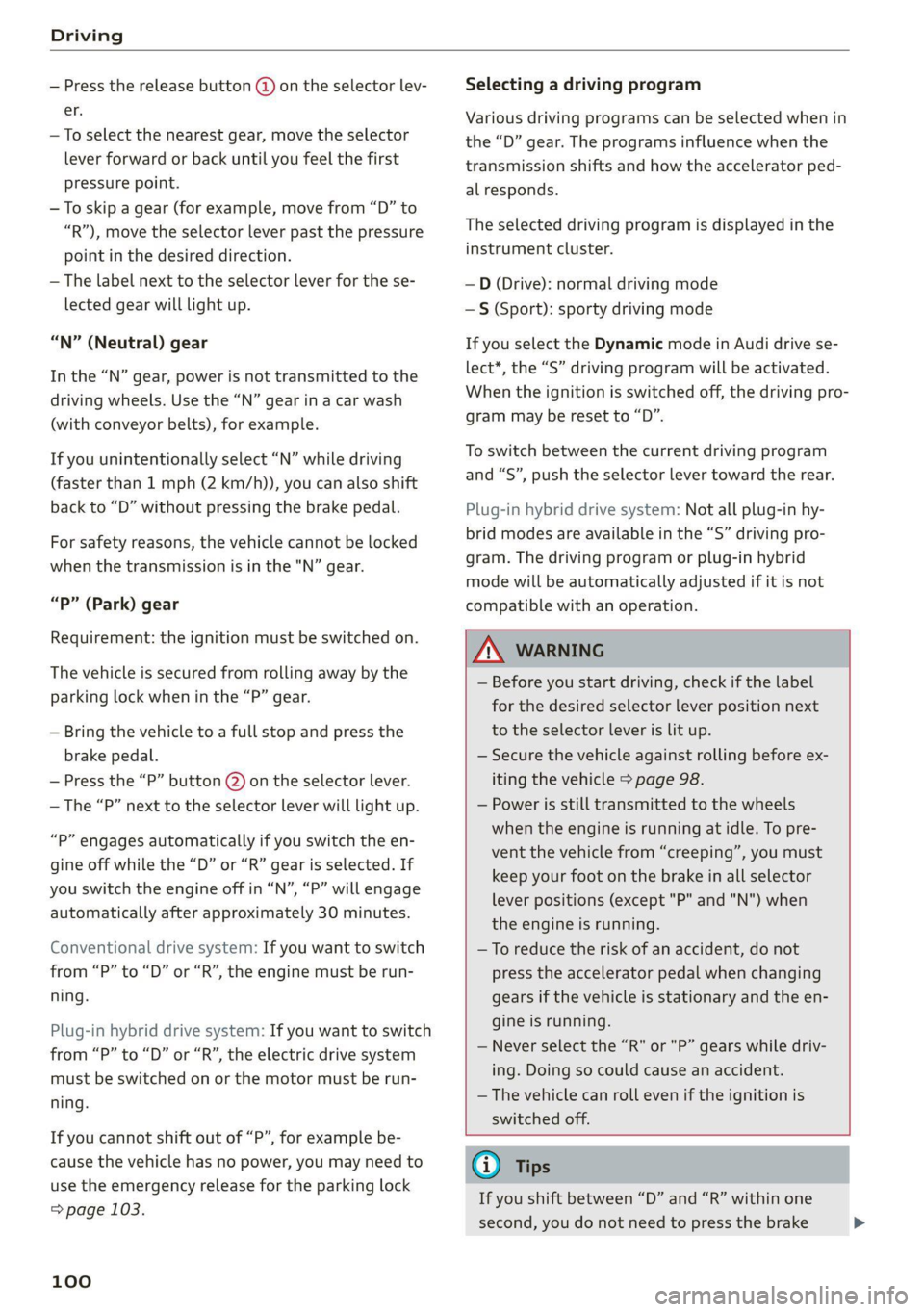
— Press the release button @ on the selector lev-
er.
—To select the nearest gear, move the selector
lever forward or back until you feel the first
pressure point.
—To skip a gear (for example, move from “D” to
“R”), move the selector lever past the pressure
point in the desired direction.
— The label next to the selector lever for the se-
lected gear will light up.
“N” (Neutral) gear
In the “N” gear, power is not transmitted to the
driving wheels. Use the “N” gear in a car wash
(with conveyor belts), for example.
If you unintentionally select “N” while driving
(faster than 1 mph (2 km/h)), you can also shift
back to “D” without pressing the brake pedal.
For safety reasons, the vehicle cannot be locked
when the transmission is in the "N” gear.
“P” (Park) gear
Requirement: the ignition must be switched on.
The vehicle is secured from rolling away by the
parking lock when in the “P” gear.
— Bring the vehicle to a full stop and press the
brake pedal.
— Press the “P” button @) on the selector lever.
— The “P” next to the selector lever will light up.
“P” engages automatically if you switch the en-
gine off while the “D” or “R” gear is selected. If
you switch the engine off in “N”, “P” will engage
automatically after approximately 30 minutes.
Conventional drive system: If you want to switch
from “P” to “D” or “R”, the engine must be run-
ning.
Plug-in hybrid drive system: If you want to switch
from “P” to “D” or “R”, the electric drive system
must be switched on or the motor must be run-
ning.
If you cannot shift out of “P”, for example be-
cause the vehicle has no power, you may need to
use the emergency release for the parking lock
=> page 103.
100
Selecting a driving program
Various driving programs can be selected when in
the “D” gear. The programs influence when the
transmission shifts and how the accelerator ped-
al responds.
The selected driving program is displayed in the
instrument cluster.
—D (Drive): normal driving mode
—S (Sport): sporty driving mode
If you select the Dynamic mode in Audi drive se-
lect*, the “S” driving program will be activated.
When the ignition is switched off, the driving pro-
gram may be reset to “D”.
To switch between the current driving program
and “S”, push the selector lever toward the rear.
Plug-in hybrid drive system: Not all plug-in hy-
brid modes are available in the “S” driving pro-
gram. The driving program or plug-in hybrid
mode will be automatically adjusted if it is not
compatible with an operation.
ZA\ WARNING
— Before you start driving, check if the label
for the desired selector lever position next
to the selector lever is lit up.
— Secure the vehicle against rolling before ex:
iting the vehicle > page 98.
— Power is still transmitted to the wheels
when the engine is running at idle. To pre-
vent the vehicle from “creeping”, you must
keep your foot on the brake in all selector
lever positions (except "P" and "N") when
the engine is running.
— To reduce the risk of an accident, do not
press the accelerator pedal when changing
gears if the vehicle is stationary and the en-
gine is running.
— Never select the “R" or "P” gears while driv-
ing. Doing so could cause an accident.
— The vehicle can roll even if the ignition is
switched off.
G) Tips
If you shift between “D” and “R” within one
second, you do not need to press the brake >
Page 103 of 332
80B012721BA
Driving
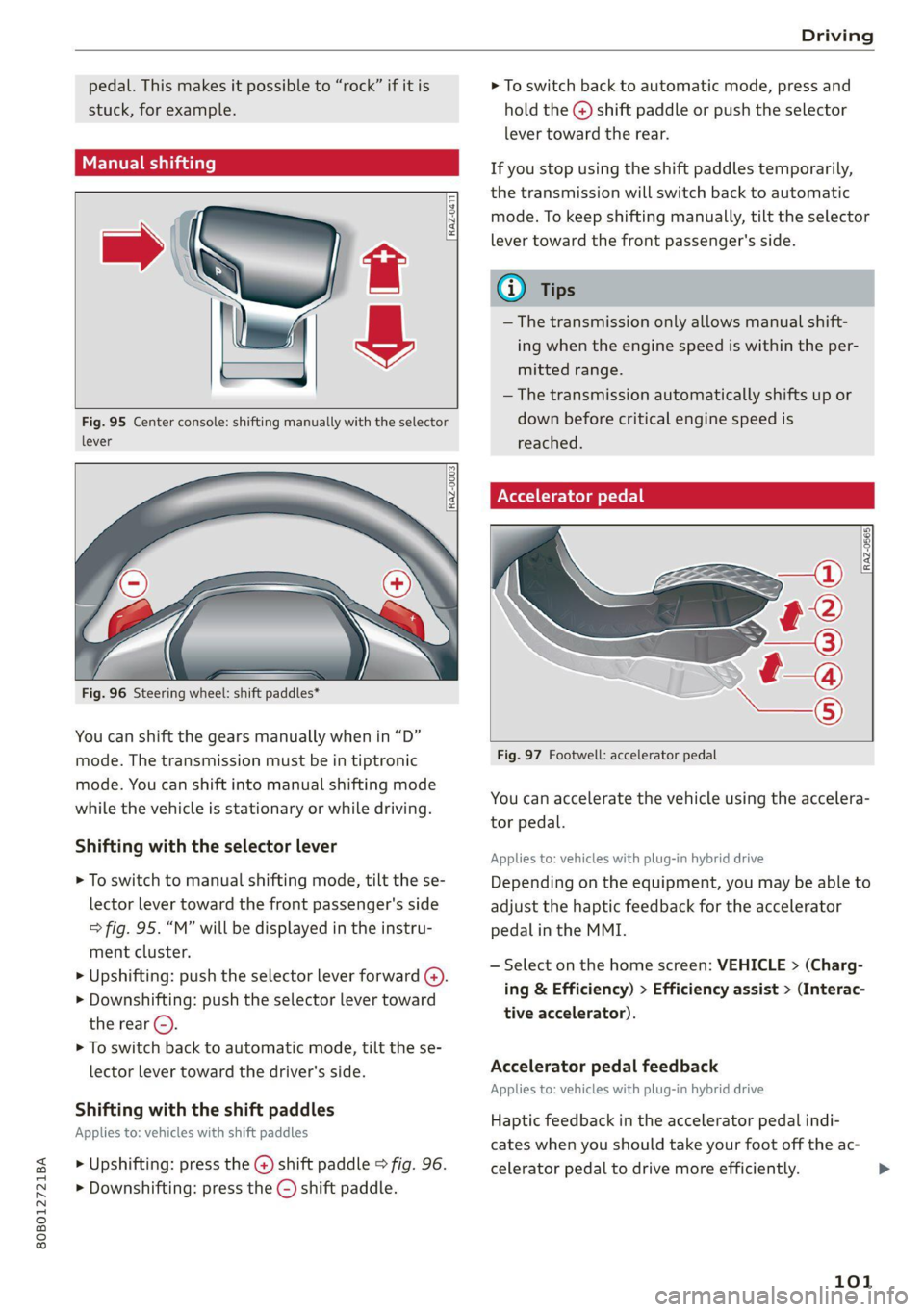
pedal. This makes it possible to “rock” if it is > To switch back to automatic mode, press and
stuck, for example. hold the @) shift paddle or push the selector
lever toward the rear.
DTT ah If you stop using the shift paddles temporarily,
the transmission will switch back to automatic
mode. To keep shifting manually, tilt the selector
lever toward the front passenger's side.
@ Tips
— The transmission only allows manual shift-
ing when the engine speed is within the per-
mitted range.
— The transmission automatically shifts up or
Fig. 95 Center console: shifting manually with the selector down before critical engine speed is
lever reached.
Accelerator pedal
RAZ-0411
RAZ-0003|
RAZ-0565
— a
Fig. 96 Steering wheel: shift paddles*
You can shift the gears manually when in “D”
mode. The transmission must be in tiptronic Big S Sao my loc co le ogpeua
mode. You can shift into manual shifting mode
while the:vehicle is stationary or while driving: You can accelerate the vehicle using the accelera-
tor pedal.
Shifting with the selector lever , , a
Applies to: vehicles with plug-in hybrid drive
> To switch to manual shifting mode, tilt the se- Depending on the equipment, you may be able to
lector lever toward the front passenger's side adjust the haptic feedback for the accelerator
> fig. 95. “M” will be displayed in the instru- pedal in the MMI.
ment cluster.
» Upshifting: push the selector lever forward (4).
> Downshifting: push the selector lever toward
the rear ©).
> To switch back to automatic mode, tilt the se-
lector lever toward the driver's side. Accelerator pedal feedback
Applies to: vehicles with plug-in hybrid drive
— Select on the home screen: VEHICLE > (Charg-
ing & Efficiency) > Efficiency assist > (Interac-
tive accelerator).
Shifting with the shift paddles
. . Haptic feedback in the accelerator pedal indi-
Applies to: vehicles with shift paddles
cates when you should take your foot off the ac-
> Upshifting: press the @ shift paddle © fig. 96. celerator pedal to drive more efficiently. >
> Downshifting: press the ©) shift paddle.
101
Page 107 of 332
80B012721BA
Driving
When you press the brake pedal, recuperation is
used to brake the vehicle. The brakes will only be
activated if necessary. When driving normally,
this makes it possible to brake using only recu-
peration just before coming to stop and to lose
little energy and range from braking.
ZA WARNING
In certain situations, the recuperation may
brake proactively. However, the recuperation
braking effect is limited. Always be ready to
brake to reduce the risk of an accident.
@ Tips
If the ESC is limited or switched off, automat-
ic recuperation is not available and will not
brake.
Plug-in hybrid mode
Applies to: vehicles with plug-in hybrid drive
Switching the plug-in hybrid mode
The <¥ button is located above the selector lever
in the center console.
> Press
Hybrid driving
If the
with the combustion engine or with the electric
motor if the conditions for it have been met
= page 105, Conditions for electric driving.
Depending on the motor, you may be able to
switch among various hybrid modes:
> Applies to: MMI: Select on the home screen:
VEHICLE > Charging & Efficiency > e-tron
mode.
© Auto Hybrid - The electric motor and combus-
tion engine work efficiently together. This mode
is particularly effective for long trips.
“= Battery Hold - The vehicle is driven predomi-
nantly with the combustion engine to maintain
the high-voltage battery charge level for as long
as possible.
If &% is displayed, the navigation route guidance
is active and the vehicle is taking the route data
into account for selecting the drive mode. The ve-
hicle will calculate what sections of the route
should be driven on using electric power in order
to achieve the most efficient driving style that is
possible. Electric driving is preferred for sections
of the route predicted to have lower speeds, such
as in towns or traffic jams.
Electric driving
The
electric motor if the conditions for this have been
met > page 105, Conditions for electric driving.
Conditions for electric driving
— The high-voltage battery charge level and tem-
perature must be sufficient.
— Driving program “S” must not be selected.
— The vehicle speed must be below approximately
85 mph (140 km/h).
— The accelerator pedal must not be pressed too
hard.
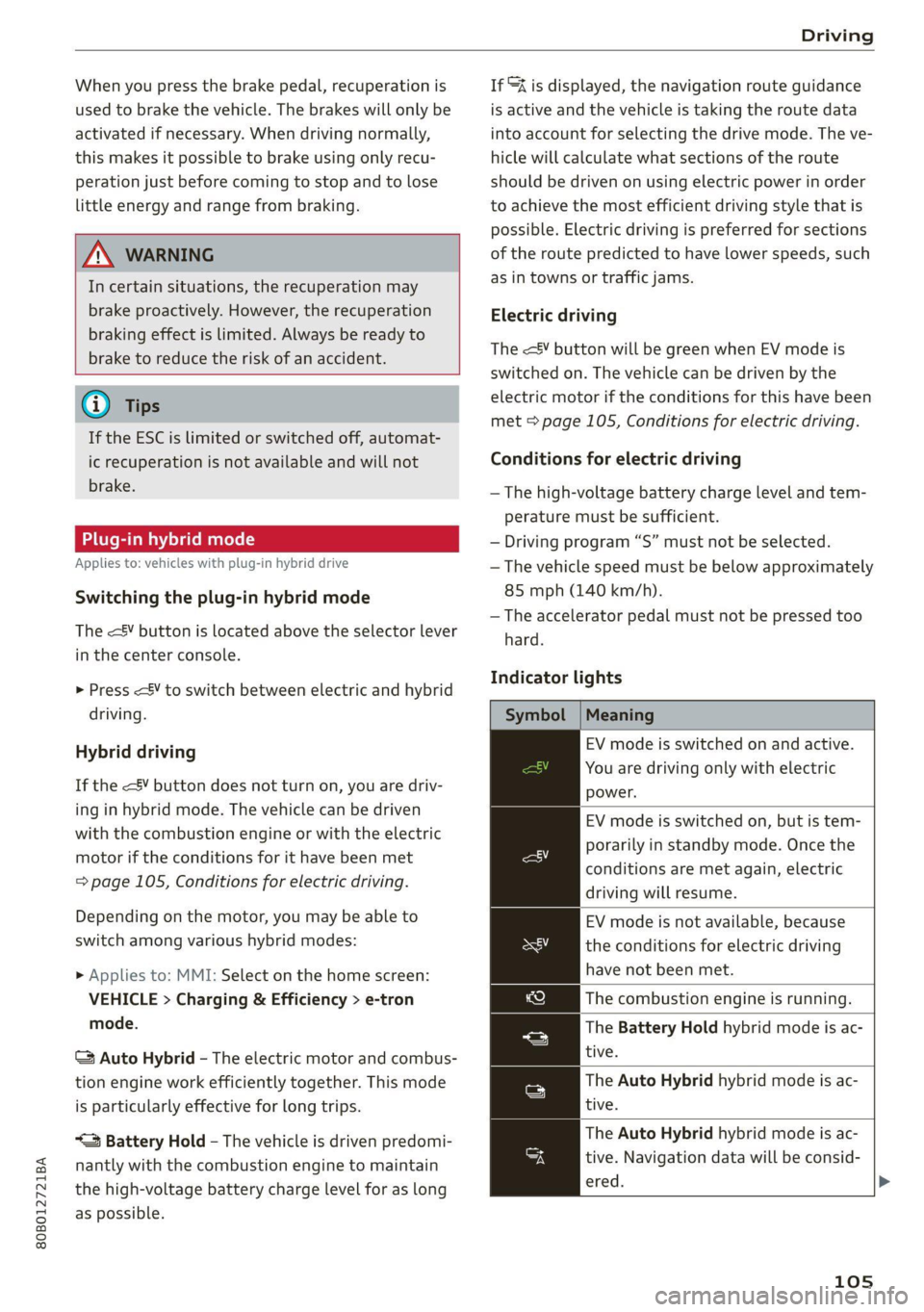
Indicator lights
Symbol | Meaning
EV mode is switched on and active.
You are driving only with electric
power.
EV mode is switched on, but is tem-
porarily in standby mode. Once the
conditions are met again, electric
driving will resume.
EV mode is not available, because
the conditions for electric driving
have not been met.
The combustion engine is running.
The Battery Hold hybrid mode is ac-
tive.
The Auto Hybrid hybrid mode is ac-
tive.
The Auto Hybrid hybrid mode is ac-
tive. Navigation data will be consid-
ered.
105
Page 112 of 332
Driving
Brake pads
New brake pads do not achieve their full braking
effect during the first 250 miles (400 km). They
must be “broken in” first. However, you can com-
pensate for the slightly reduced braking force by
pressing firmly on the brake pedal. Avoid heavy
braking during the break-in period.
Brake pad wear depends largely on the way the
vehicle is driven and on operating conditions.
Brake pad wear increases when driving frequently
in the city or short distances or when using a very
sporty driving style.
Applies to: vehicles with plug-in hybrid drive: Be-
cause recuperation is also used for braking, the
break-in period for new brake pads is 500 miles
(800 km).
Automatic post-collision braking system
The automatic post-collision braking system can
help to reduce the risk of sliding and of addition-
al collisions after an accident. If the airbag con-
trol module detects a collision, the vehicle is
braked by the ESC.
The vehicle does not brake automatically if one of
the following occurs:
— The driver presses the accelerator pedal, or
— The braking force generated by the pressed
brake pedal is greater than the braking force
that would be initiated by the system
— The ESC, the brake system, or the vehicle elec-
trical system is not functioning
Z\, WARNING
— Only apply the brakes for the purpose of
cleaning the brake system when road and
traffic conditions permit. You must not en-
danger other road users and increase the
risk of an accident.
— Due to the risk of injury, only have an au-
thorized Audi dealer or authorized Audi
Service Facility work on the brake system.
Incorrect repairs could impair the function.
— Never let the vehicle roll while the engine is
stopped because this increases the risk of an
accident.
110
— During automatic braking maneuvers, the
brake pedal may move downward automati-
cally. To reduce the risk of injury, do not
place your foot under the brake pedal.
@) Note
— Never let the brakes “rub” by pressing the
pedal lightly when braking is not actually
necessary. This can cause the brakes to over-
heat and increases braking distance and
causes wear.
— Observe the important information for driv-
ing downhill > page 112. This especially ap-
plies when towing a trailer.
G) Tips
— In vehicles with an electromechanical brake
booster, the resistance in the brake pedal
may vary depending on the driving situation
(such as if driver assistance system are ac-
tive).
— If you retrofit your vehicle with a front spoil-
er, wheel covers or similar items, make sure
that the air flow to the brakes is not ob-
structed. Otherwise the brake system can
overheat.
— Also refer to the information about brake
fluid > page 255.
Messages
EG / @ Brakes: malfunction! Stop vehicle
safely
There is a malfunction in the brake system. If
BS / Bana B also turn on, there is a malfunc-
tion in the ABS, ESC, and braking distribution. If
the brake booster is not working, you have to use
much more force when braking the vehicle.
Do not continue driving. See an authorized Audi
dealer or authorized Audi Service Facility for as-
sistance. Read and follow the other safety pre-
cautions > A\.
EG Z © Brake pads: wear limit reached. You
can continue driving. Please contact Service
The brake pads are worn. Drive to an authorized
Audi dealer or authorized Audi Service Facility as >
Page 115 of 332
80B012721BA
Driving
— When driving down hills, you can activate the
hill descent control if you press the brake pedal
while driving in “D” gear. The automatic trans-
mission will select a gear suitable for driving
down the hill and will attempt to maintain the
speed at which the vehicle was traveling at the
time the brake pedal was pressed. Press the
brake pedal if necessary. The hill descent con-
trol will switch off once the hill levels out or
you press the accelerator pedal.
— Utilize the engine braking effect when driving
downhill by selecting the “S” driving program
=> page 100. This especially applies when tow-
ing a trailer. This reduces the load on the
brakes.
— Applies to: plug-in hybrid drive: In high temper-
atures, make sure the high-voltage battery is
charged to at least 1/4 if towing a trailer while
driving on long stretches of roads with hills.
This relieves some of the load on the cooling
system.
— Apply the brakes in intervals and do not press
the brake pedal continuously.
— Use the hill hold assist > page 114.
Inclinometer
Applies to: vehicles with a tilt angle display
You can display the vehicle's sideways angle and
lengthwise angle in relation to the horizon.
— Applies to: MMI: Select on the home screen:
VEHICLE > Vehicle data.
— You may need to scroll down to the Inclinome-
ter display.
The sideways angle of your vehicle should not ex-
ceed the yellow range in the gauge. If it reaches
the red range, there is a risk that the vehicle
might tip.
The steering wheel angle, the elevation, the com-
pass direction, and the geo-coordinates of the
current vehicle position are displayed in addition
to the current vehicle angle. You will also receive
information about the maximum sideways and
lengthwise angle that was reached in the current
driving cycle. These values are reset when the ig-
nition is switched off.
Note that the accuracy of the display depends on
the driving situation.
ZX WARNING
— Only drive on inclines that your vehicle is de-
signed to handle. Do not exceed the hill
climbing ability of your vehicle. Your vehicle
could tip or slide.
— Do not drive at an angle on steep inclines
and hills. If your vehicle is about to tip, you
must immediately start steering in the di-
rection of the downward slope to reduce the
risk of an accident.
— Always be ready to brake when using the hill
descent control function.
— Applies to: vehicles with an inclinometer: Do
not rely only on the inclinometer when as-
sessing the driving situation.
Offroad driving
Your vehicle is not an offroad vehicle. Note the
following points when driving offroad:
— Drive slowly and carefully.
—To reduce the risk of underbody damage, pay
attention to the vehicle's ground clearance and
drive across raised areas of the ground with the
wheels on one side of the vehicle, instead of al-
lowing the center of the vehicle to pass over the
raised areas.
—To reduce the risk of becoming stuck, drive
through sandy or swampy areas at a steady
speed and without stopping, if possible.
If necessary, use the following functions:
— Audi drive select* Offroad mode > page 115
— Hill hold assist* > page 114
— Limit ESC > page 120
ZA\ WARNING
Only drive in terrain that is suitable for the ve-
hicle and your driving ability.
(@) For the sake of the environment
Avoid actions that are damaging to the envi-
ronment. Show respect for the natural envi-
ronment and remain on marked routes.
113