add AUDI Q5 2021 Owner´s Manual
[x] Cancel search | Manufacturer: AUDI, Model Year: 2021, Model line: Q5, Model: AUDI Q5 2021Pages: 332, PDF Size: 118.86 MB
Page 40 of 332
Opening and closing
Break-in security feature
The alarm will sound if there is a break-in at the
doors, hood, and/or luggage compartment lid.
Interior/towing protection monitor
The alarm will be triggered if there are move-
ments detected in the vehicle interior (for exam-
ple, by animals) or if there is a change in the vehi-
cle angle (for example, when the vehicle is being
towed).
You can prevent the alarm from being triggered
by deactivating the interior/towing protection
monitor.
Deactivating the interior/towing protection
monitor
There are the following options for deactivating
the interior/towing protection monitor:
> Press the & button on the vehicle key a second
time within two seconds. Or
> Applies to: vehicles with convenience key:
Touch the sensor on the door handle a second
time within two seconds. Or
> Turn the mechanical key in the door lock to the
close position a second time within two sec-
onds.
> Applies to: vehicles with MMI: Select on the
home screen: VEHICLE > Settings & Service >
Interior monitoring.
If you lock the vehicle, then the interior/towing
protection monitor will stay off until the next
time the vehicle is unlocked.
ZA WARNING
No one, especially children, should stay in the
vehicle when it is locked from the outside, be-
cause the windows can no longer be opened
from the inside. Locked doors make it more
difficult for emergency workers to enter the
vehicle, which puts lives at risk.
@) Tips
The interior/towing protection monitoring on-
ly functions correctly when the windows and
the roof* are closed.
38
RAZ-0720,
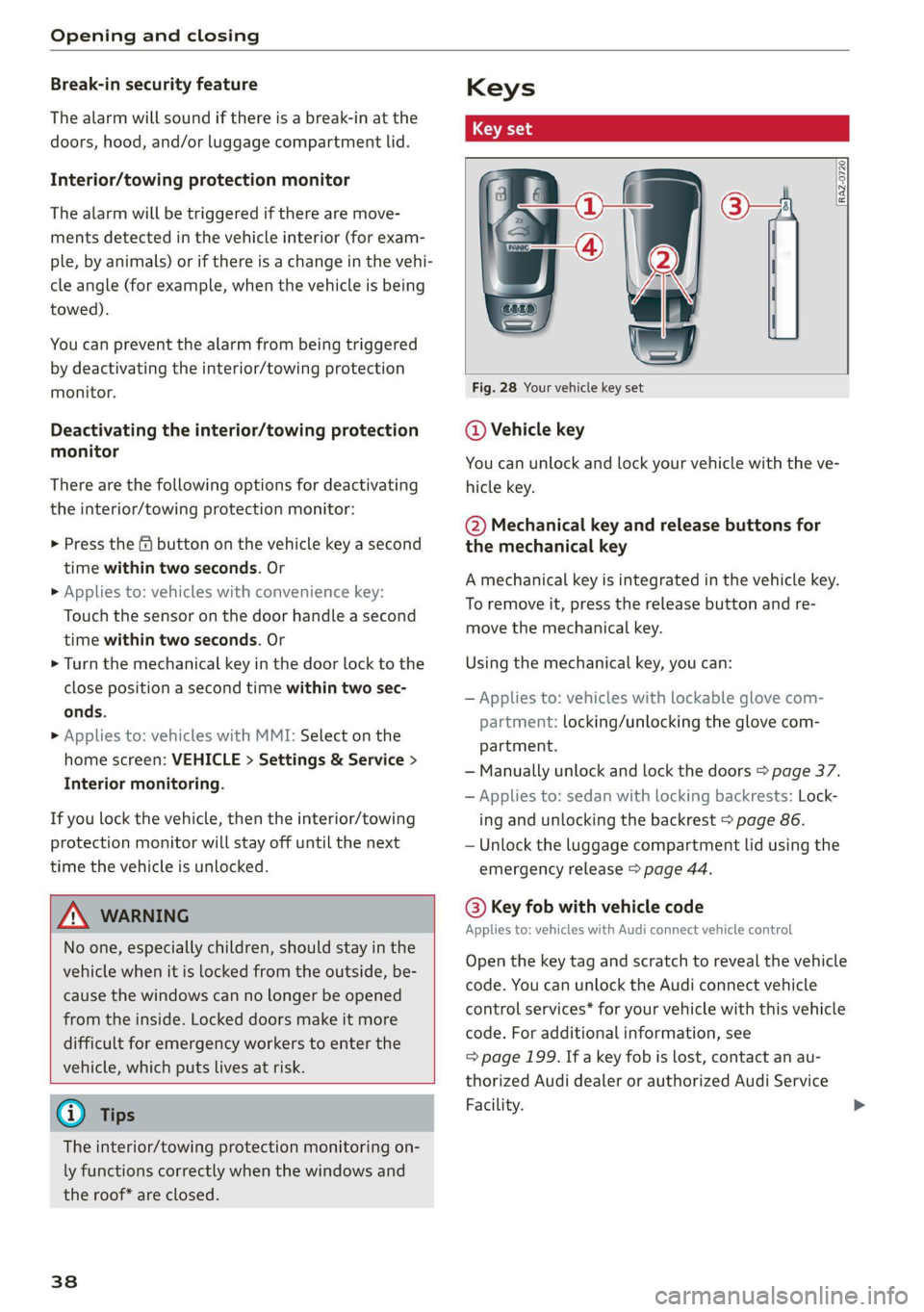
Fig. 28 Your vehicle key set
@ Vehicle key
You can unlock and lock your vehicle with the ve-
hicle key.
@ Mechanical key and release buttons for
the mechanical key
A mechanical key is integrated in the vehicle key.
To remove it, press the release button and re-
move the mechanical key.
Using the mechanical key, you can:
— Applies to: vehicles with lockable glove com-
partment: locking/unlocking the glove com-
partment.
— Manually unlock and lock the doors > page 37.
— Applies to: sedan with locking backrests: Lock-
ing and unlocking the backrest > page 86.
— Unlock the luggage compartment lid using the
emergency release > page 44.
@® Key fob with vehicle code
Applies to: vehicles with Audi connect vehicle control
Open the key tag and scratch to reveal the vehicle
code. You can unlock the Audi connect vehicle
control services* for your vehicle with this vehicle
code. For additional information, see
=> page 199. If a key fob is lost, contact an au-
thorized Audi dealer or authorized Audi Service
Facility.
Page 43 of 332
80B012721BA
Opening and closing
ZA WARNING
If batteries or coin cell batteries are swal-
lowed or enter the body in any other way, they
can cause serious or fatal injuries within a
short period of time. There is a risk of chemi-
cal burns.
— Keep vehicle keys and key fobs with batter-
ies out of the reach of children.
— Keep new or used batteries away from chil-
dren.
— If the battery compartment on a vehicle key
does not close securely, stop using the key
and keep it away from children.
— Seek medical attention immediately if you
suspect that a battery was swallowed or has
entered the body in any other way.
@ For the sake of the environment
Discharged batteries must be disposed of us-
ing
methods that will not harm the environ-
ment. Do not dispose of them in household
trash.
G) Tips
Replacement batteries for the vehicle key
must meet the same specifications as the
original battery.
Luggage compartment
lid
General information
inside it. To reduce the risk of injury, do not
allow children to play in or around the vehi-
ley
—To reduce the risk of injuries by pinching,
make sure that no one is in the operating
area of the luggage compartment lid, in-
cluding the hinge areas and the upper and
lower edge of the luggage compartment lid.
— After closing the luggage compartment lid,
make sure that it is latched. The luggage
compartment lid could open suddenly while
driving, which would increase the risk of an
accident.
— Never drive with the luggage compartment
lid ajar or open, because poisonous gases
from the surrounding area can enter the ve-
hicle interior and increase the risk of asphyx-
iation.
— If there is a luggage rack (such as a bicycle
rack) on the luggage compartment lid, the
luggage compartment lid may not open
completely under certain circumstances or it
could close by itself if open due to the extra
weight. Therefore, the open luggage com-
partment lid must be given additional sup-
port or the cargo must first be removed
from the luggage rack.
— Applies to vehicles with power-operated or
sensor-controlled luggage compartment lid:
Pay careful attention when closing the lug-
gage compartment lid. Otherwise, you could
cause serious injury to yourself or others de-
spite the pinch protection.
ZA\ WARNING
— Applies to vehicles with anti-theft alarm sys-
tem: When the vehicle is locked from the
outside, no one - especially children - should
remain in the vehicle, because the windows
can no longer open from the inside
= page 37. Locked doors make it more diffi-
cult for emergency workers to enter the ve-
hicle, which puts lives at risk.
— Always close and lock the luggage compart-
ment lid and the doors when the vehicle is
not in use. Otherwise someone such as a
child could enter the vehicle through the
luggage compartment and become locked
@) Note
The luggage compartment lid can bump into
objects such as the garage ceiling when open-
ing and become damaged.
@) Tips
— When the vehicle is locked, the luggage
compartment lid can be unlocked separately
by pressing the “S button twice on the vehi-
cle key. The luggage compartment lid locks
automatically when it is closed again.
— The ability to open the luggage compart-
ment lid using the handle can be deactivat-
ed or activated in the MMI > page 35.
41
>
Page 56 of 332
Lights and Vision
Tata
RAZ-1100
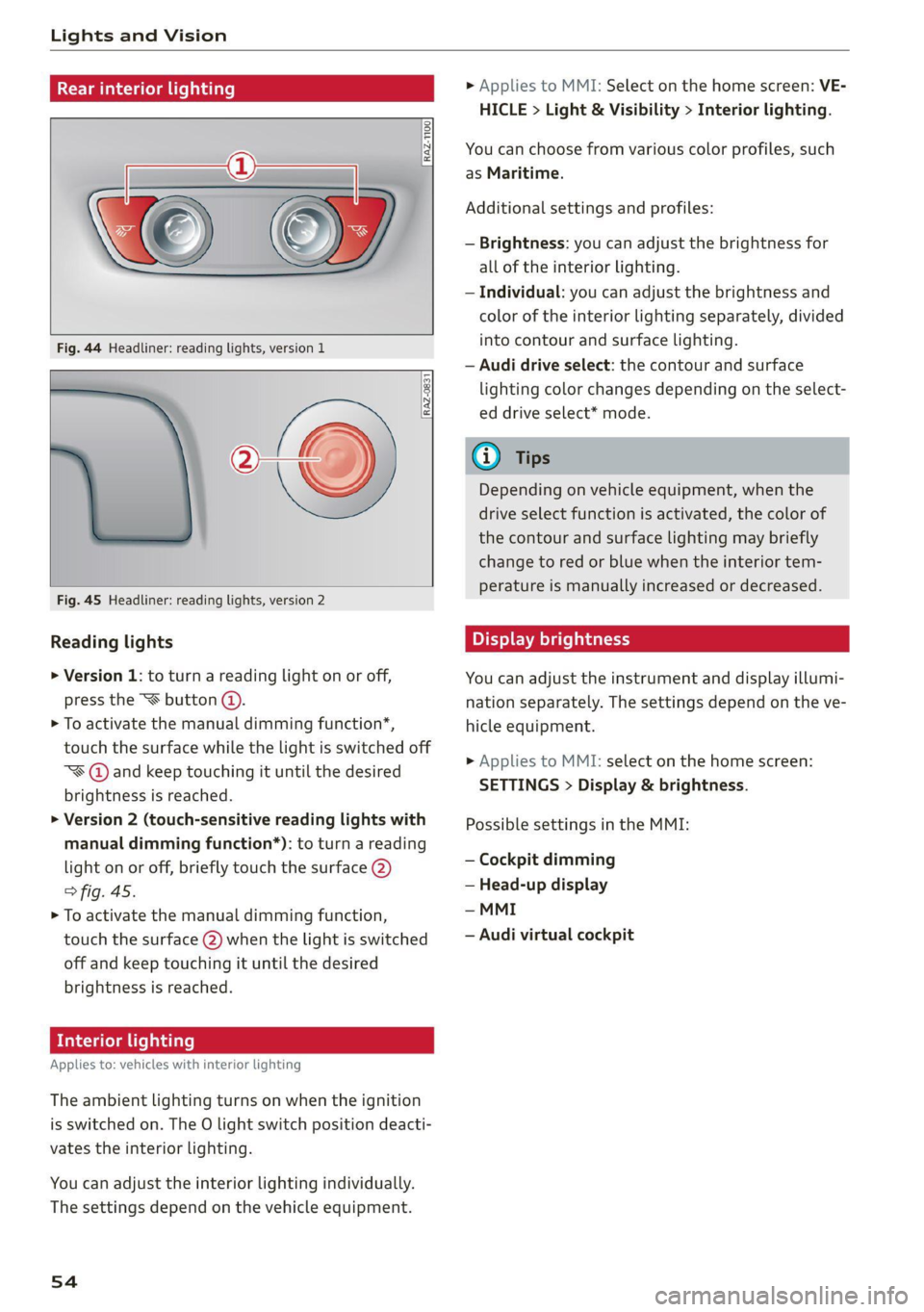
Fig. 44 Headliner: reading lights, version 1
, oto)
Fig. 45 Headliner: reading lights, version 2
RAZ-0831
Reading lights
> Version 1: to turn a reading light on or off,
press the “€ button @.
> To activate the manual dimming function*,
touch the surface while the light is switched off
“¥@ and keep touching it until the desired
brightness is reached.
> Version 2 (touch-sensitive reading lights with
manual dimming function*): to turn a reading
light on or off, briefly touch the surface (2)
> fig. 45.
> To activate the manual dimming function,
touch the surface (2) when the light is switched
off and keep touching it until the desired
brightness is reached.
Interior lighting
Applies to: vehicles with interior lighting
The ambient lighting turns on when the ignition
is switched on. The O light switch position deacti-
vates the interior lighting.
You can adjust the interior lighting individually.
The settings depend on the vehicle equipment.
54
» Applies to MMI: Select on the home screen: VE-
HICLE > Light & Visibility > Interior lighting.
You can choose from various color profiles, such
as Maritime.
Additional settings and profiles:
— Brightness: you can adjust the brightness for
all of the interior lighting.
— Individual: you can adjust the brightness and
color of the interior lighting separately, divided
into contour and surface lighting.
— Audi drive select: the contour and surface
lighting color changes depending on the select-
ed drive select* mode.
Gi) Tips
Depending on vehicle equipment, when the
drive select function is activated, the color of
the contour and surface lighting may briefly
change to red or blue when the interior tem-
perature is manually increased or decreased.
Display brightness
You can adjust the instrument and display illumi-
nation separately. The settings depend on the ve-
hicle equipment.
> Applies to MMI: select on the home screen:
SETTINGS > Display & brightness.
Possible settings in the MMI:
— Cockpit dimming
— Head-up display
— MMI
— Audi virtual cockpit
Page 65 of 332
80B012721BA
Sitting correctly and safely
— Your thighs are lightly supported by the front window, or on the seat surfaces. This also
surface of the seat applies to passengers in the rear seats.
— The backrest is in an upright position and your
back is resting against it CG) Note
— You have a sufficient view of the area around Applies to: vehicles with manually adjustable head re-
the vehicle straints
— You have a clear view of the instrument cluster, To reduce the risk of damage, be very careful
indicator lights, and the head-up display* when adjusting the seat to make sure the
head restraints do not come into contact with
JN WARNING the headliner or the sunroof*.
— If you are too close to the steering wheel or
instrument panel, the airbag system cannot
provide the optimal protection, which in-
creases the risk of injury and death.
— To reduce the risk of injury in the event of
sudden braking maneuvers or accidents,
never drive with the backrest reclined very
far. The airbag system and seat belts can on-
ly provide optimal protection when the back-
rest is in an upright position and the driver
is wearing the seat belt correctly. If the
backrest is angled back too far, the safety
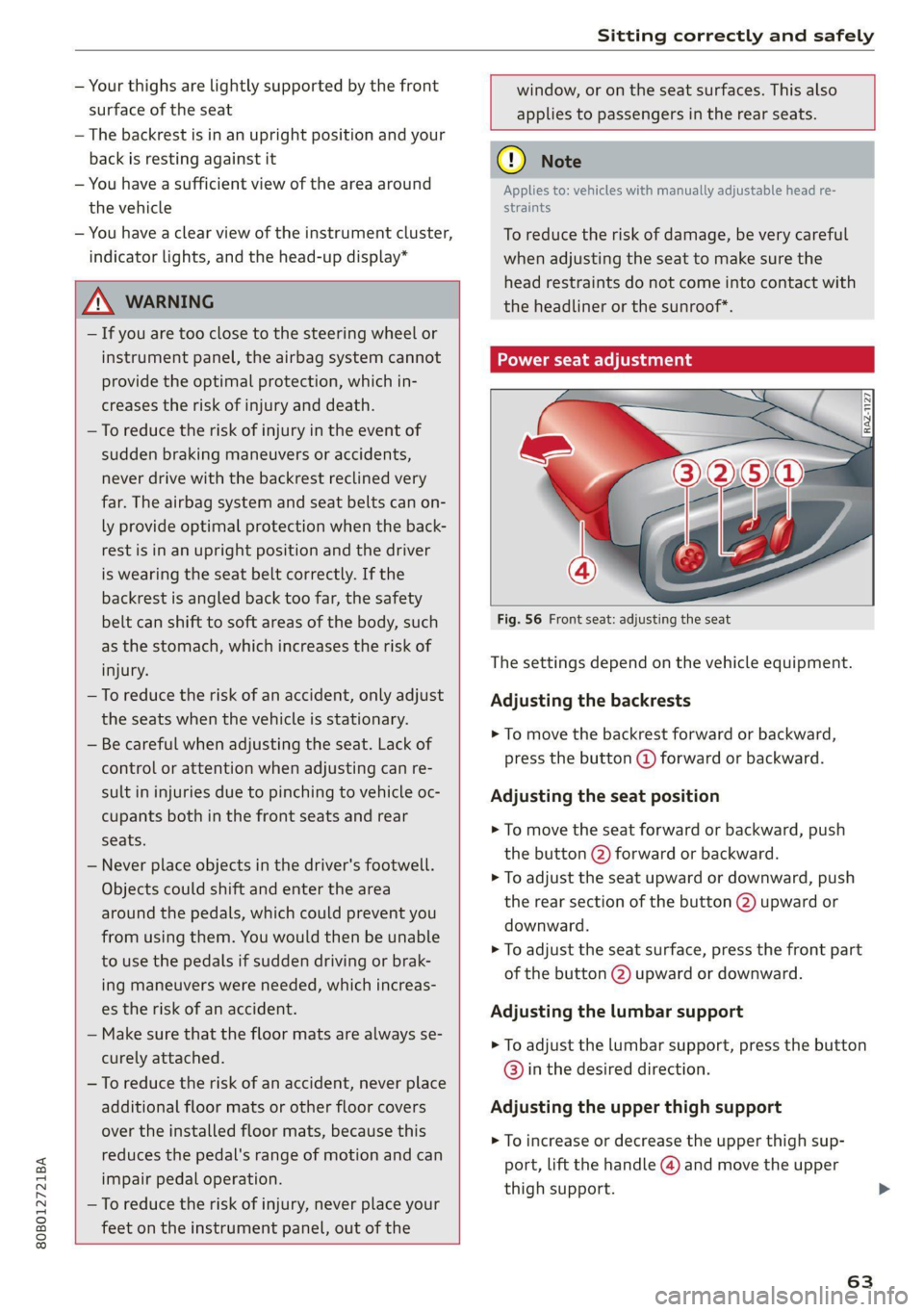
belt can shift to soft areas of the body, such Fig. 56 Front seat: adjusting the seat
as the stomach, which increases the risk of
injury The settings depend on the vehicle equipment.
—To reduce the risk of an accident, only adjust Adjusting the backrests
the seats when the vehicle is stationary.
— Be careful when adjusting the seat. Lack of
control or attention when adjusting can re-
> To move the backrest forward or backward,
press the button @) forward or backward.
sult in injuries due to pinching to vehicle oc- Adjusting the seat position
cupants both in the front seats and rear
ee > To move the seat forward or backward, push
the button @) forward or backward.
> To adjust the seat upward or downward, push
the rear section of the button (2) upward or
downward.
> To adjust the seat surface, press the front part
of the button @) upward or downward.
— Never place objects in the driver's footwell.
Objects could shift and enter the area
around the pedals, which could prevent you
from using them. You would then be unable
to use the pedals if sudden driving or brak-
ing maneuvers were needed, which increas-
es the risk of an accident. Adjusting the lumbar support
— Make sure that the floor mats are always se-
curely attached.
—To reduce the risk of an accident, never place
additional floor mats or other floor covers Adjusting the upper thigh support
over the installed floor mats, because this
reduces the pedal's range of motion and can
impair pedal operation.
—To reduce the risk of injury, never place your
feet on the instrument panel, out of the
> To adjust the lumbar support, press the button
@) in the desired direction.
> To increase or decrease the upper thigh sup-
port, lift the handle @) and move the upper
thigh support.
63
Page 66 of 332
Sitting correctly and safely
Massage function
> To switch the massage function on or off, press
the button ©) > fig. 56.
ZA WARNING
—To reduce the risk of an accident, only adjust
the driver's seat when the vehicle is station-
ary.
— The power front seats can also be adjusted
when the ignition is switched off. To reduce
the risk of injury, children should never be
left unattended in the vehicle for this rea-
son.
— Exercise caution when adjusting the seat
height. Unsupervised or careless seat adjust-
ment could cause parts of the body to get
pinched, which increases the risk of injury.
— The front seat backrests must not be re-
clined too far back when driving, because
this impairs the effectiveness of the safety
belts and airbag system, which increases the
risk of injury.
Adjusting the front seats in the MMI
Applies to: vehicles with seat settings in the MMI
3a
RAZ-0873
@-—S
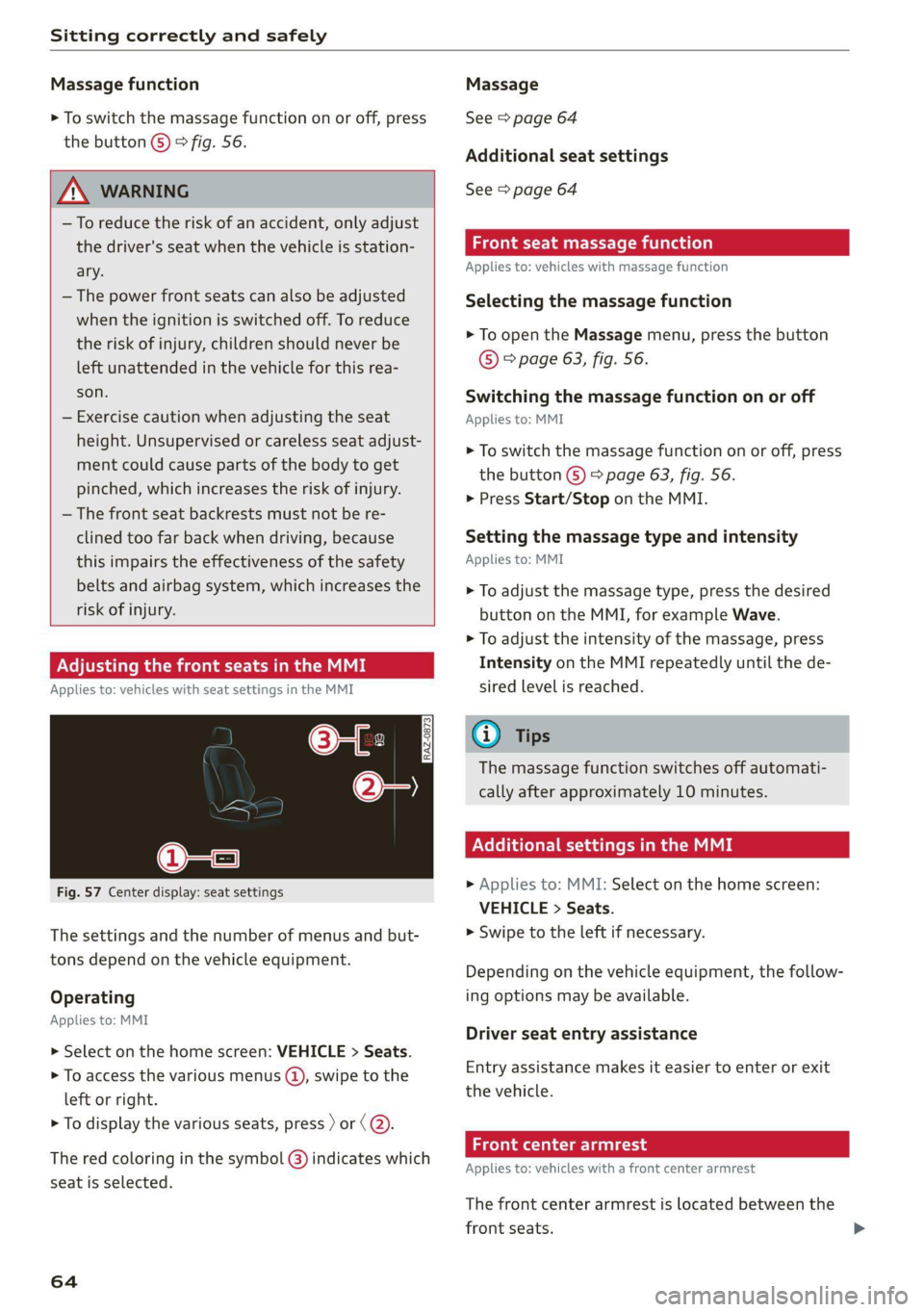
Fig. 57 Center display: seat settings
The settings and the number of menus and but-
tons depend on the vehicle equipment.
Operating
Applies to: MMI
> Select on the home screen: VEHICLE > Seats.
> To access the various menus (@), swipe to the
left or right.
> To display the various seats, press ) or (@).
The red coloring in the symbol @) indicates which
seat is selected.
64
Massage
See > page 64
Additional seat settings
See > page 64
Front seat massage function
Applies to: vehicles with massage function
Selecting the massage function
> To open the Massage menu, press the button
© > page 63, fig. 56.
Switching the massage function on or off
Applies to: MMI
> To switch the massage function on or off, press
the button ©) > page 63, fig. 56.
> Press Start/Stop on the MMI.
Setting the massage type and intensity
Applies to: MMI
> To adjust the massage type, press the desired
button on the MMI, for example Wave.
> To adjust the intensity of the massage, press
Intensity on the MMI repeatedly until the de-
sired level is reached.
G@) Tips
The massage function switches off automati-
cally after approximately 10 minutes.
Xe Tie Cea etal MME
> Applies to: MMI: Select on the home screen:
VEHICLE > Seats.
> Swipe to the left if necessary.
Depending on the vehicle equipment, the follow-
ing options may be available.
Driver seat entry assistance
Entry assistance makes it easier to enter or exit
the vehicle.
Front center armrest
Applies to: vehicles with a front center armrest
The front center armrest is located between the
front seats.
Page 70 of 332
Sitting correctly and safely
safety belt correctly and make sure that all vehi-
cle passengers are also wearing their safety belts
correctly when the vehicle is moving.
Even though your vehicle is equipped with an air-
bag system, every vehicle passenger must still al-
ways wear the appropriate safety belt. In addi-
tion to their normal protective function, safety
belts also hold vehicle occupants in the correct
seating position in the event of a collision so that
the airbags can deploy correctly and provide addi-
tional protection. Safety belts provide protection
during collisions when the airbags do not deploy
or if they have already deployed.
ZA\ WARNING
The risk of serious or fatal injury increases if
the safety belt is not fastened, if it is worn in-
correctly, or if it is damaged.
— All vehicle occupants, including the driver,
must fasten their safety belts correctly be-
fore every trip and must always keep their
safety belts fastened during the trip, regard-
less of whether the seat is equipped with an
airbag or not. This also applies to children
that are seated in a child safety seat that is
appropriate for their weight and age and
that is secured with a safety belt.
— In the event of a collision, vehicle occupants
that are not wearing safety belts could be
propelled through the vehicle interior and
collide with vehicle components, such as the
steering wheel, instrument panel, wind-
shield, or doors. In some situations, vehicle
occupants could also be ejected from the ve-
hicle. Vehicle occupants in the rear seats
who do not wear safety belts not only en-
danger themselves, but also other people in
the vehicle.
— Only one person may be fastened with a
safety belt at a time. Never secure more
than one person, including children, with a
single safety belt.
— Never allow children or infants to ride on an-
other person's lap and be belted into the
safety belt with them.
— Insert the belt buckle only in the belt latch
belonging to the corresponding seat, so that
the protective function is not impaired.
68
—To ensure the maximum protective function
of the safety belts, all vehicle passengers
must sit in the correct seating position
=> page 62.
— Check the condition of your vehicle’s safety
belts regularly > page 283. If you find dam-
age to the belt webbing, the belt connec-
tions, the retractor, or the buckle, have the
damaged safety belt replaced by an author-
ized Audi dealer or authorized Audi Service
Facility.
— The safety belts must not be removed or
modified in any way. Do not attempt to re-
pair the safety belts yourself.
— Safety belts that are strained during an acci-
dent must be replaced by an authorized
Audi dealer or authorized Audi Service Facili-
ty.
(electra tae tlie teil lars)
B4H-0751
=~
Fig. 66 Safety belt positioning for pregnant women
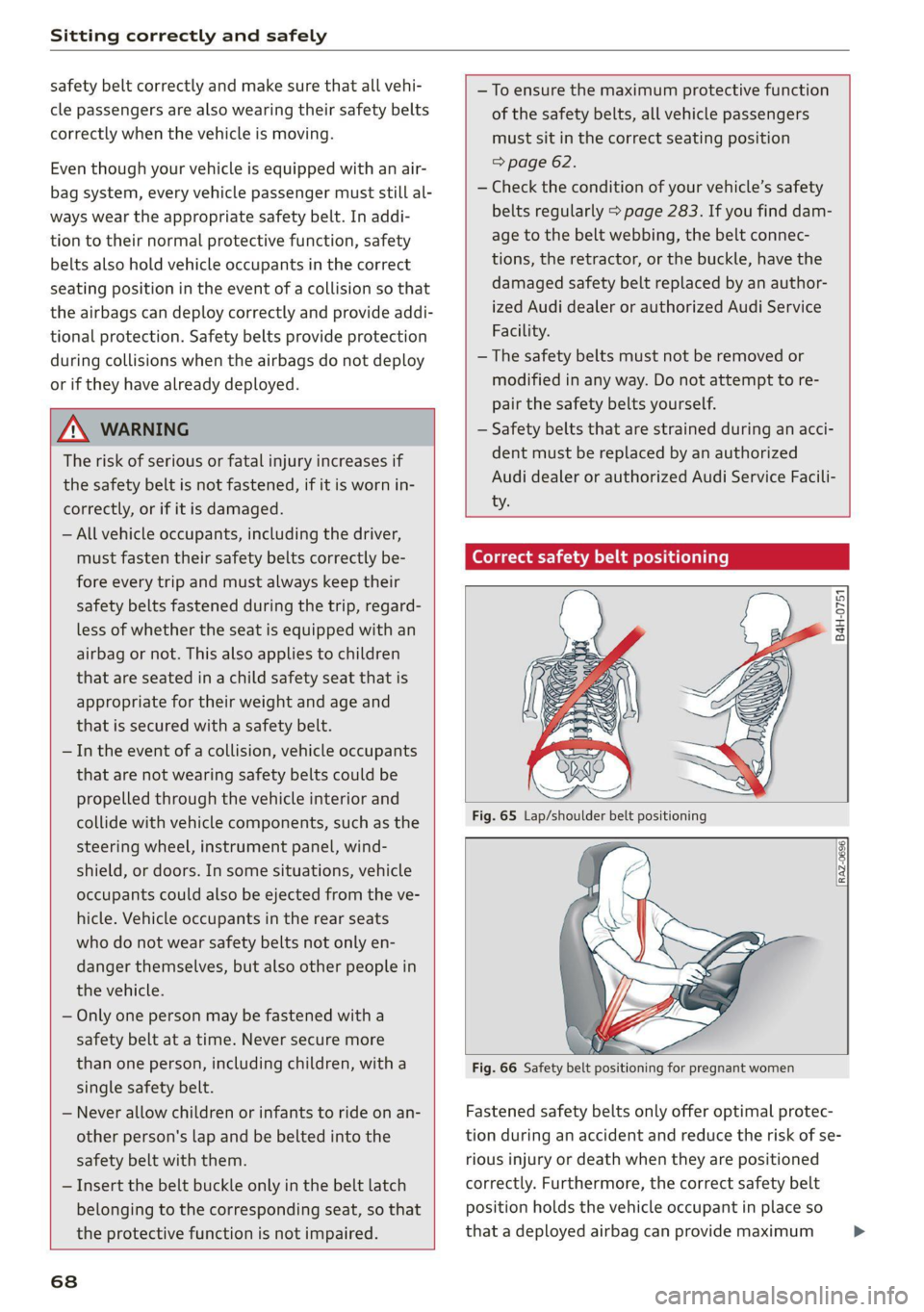
Fastened safety belts only offer optimal protec-
tion during an accident and reduce the risk of se-
rious injury or death when they are positioned
correctly. Furthermore, the correct safety belt
position holds the vehicle occupant in place so
that a deployed airbag can provide maximum >
Page 72 of 332
Sitting correctly and safely
Fastening the safety belt
> Pull the safety belt by the belt buckle evenly
across your chest and lap.
> Insert the belt buckle in the belt latch belong-
ing to the seat until it audibly engages
> fig. 67.
> Pull on the belt to make sure that the belt is se-
curely locked in the latch.
Unfastening the safety belt
> Press the red button on the belt latch > fig. 68.
The belt buckle will pop out.
> Guide the belt back by hand so that the safety
belt can roll up more easily.
Safety belt monitoring system
Ba - If the indicator light turns on or flashes, a
safety belt is not fastened or it has been unbuck-
led while driving. Above certain speeds, addition-
al warning tones will sound.
Adjusting the height of the safety belt
B4G-0004)
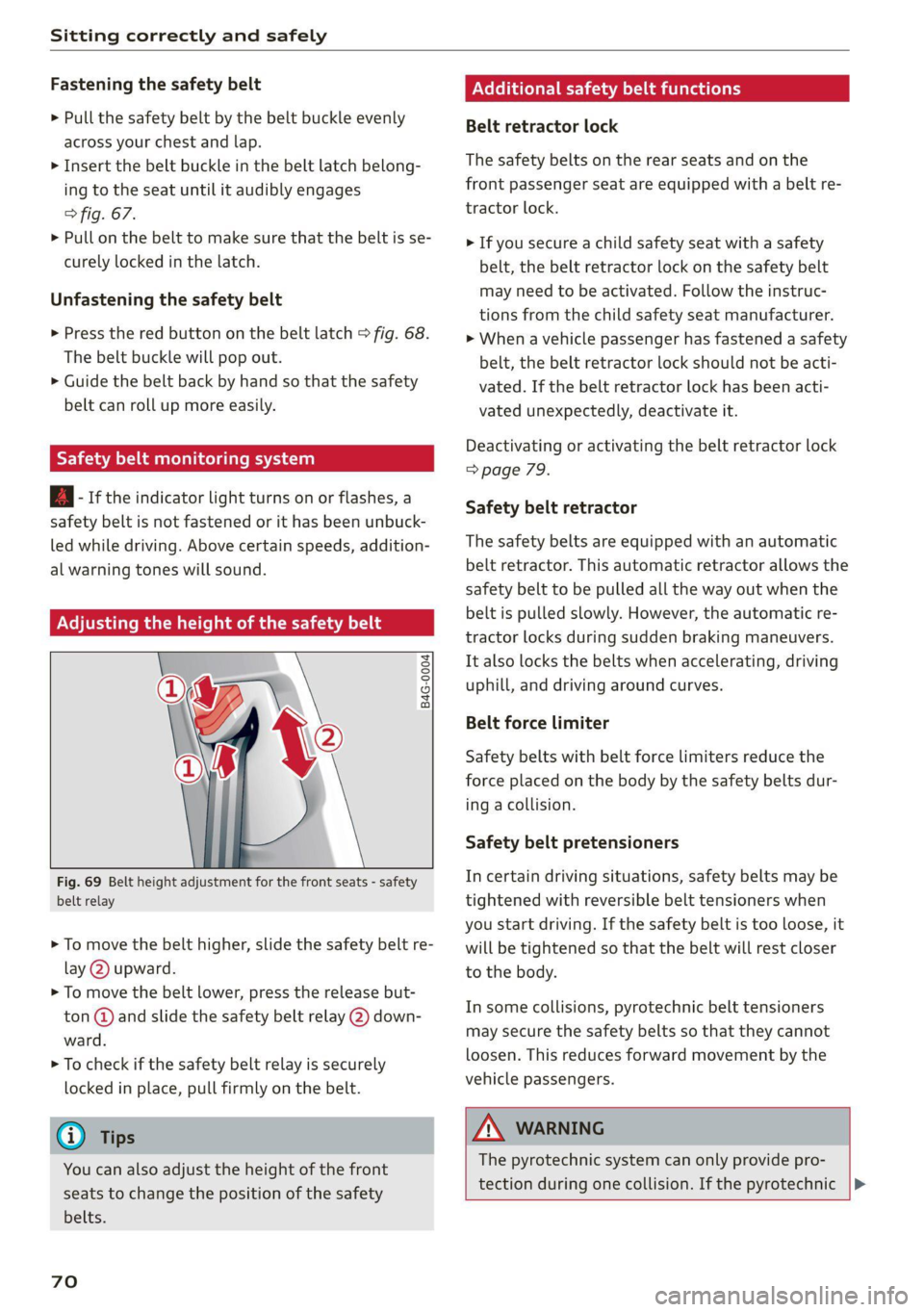
Fig. 69 Belt height adjustment for the front seats - safety
belt relay
> To move the belt higher, slide the safety belt re-
lay @ upward.
> To move the belt lower, press the release but-
ton @ and slide the safety belt relay (2) down-
ward.
> To check if the safety belt relay is securely
locked in place, pull firmly on the belt.
G) Tips
You can also adjust the height of the front
seats to change the position of the safety
belts.
70
Additional safety belt functions
Belt retractor lock
The safety belts on the rear seats and on the
front passenger seat are equipped with a belt re-
tractor lock.
> If you secure a child safety seat with a safety
belt, the belt retractor lock on the safety belt
may need to be activated. Follow the instruc-
tions from the child safety seat manufacturer.
> When a vehicle passenger has fastened a safety
belt, the belt retractor lock should not be acti-
vated. If the belt retractor lock has been acti-
vated unexpectedly, deactivate it.
Deactivating or activating the belt retractor lock
=> page 79.
Safety belt retractor
The safety belts are equipped with an automatic
belt retractor. This automatic retractor allows the
safety belt to be pulled all the way out when the
belt is pulled slowly. However, the automatic re-
tractor locks during sudden braking maneuvers.
It also locks the belts when accelerating, driving
uphill, and driving around curves.
Belt force limiter
Safety belts with belt force limiters reduce the
force placed on the body by the safety belts dur-
ing acollision.
Safety belt pretensioners
In certain driving situations, safety belts may be
tightened with reversible belt tensioners when
you start driving. If the safety belt is too loose, it
will be tightened so that the belt will rest closer
to the body.
In some collisions, pyrotechnic belt tensioners
may secure the safety belts so that they cannot
loosen. This reduces forward movement by the
vehicle passengers.
ZA\ WARNING
The pyrotechnic system can only provide pro-
tection during one collision. If the pyrotechnic |>
Page 82 of 332
Sitting correctly and safely
A WARNING
— A safety belt that is not locked by the belt
retractor lock or a locking device cannot se-
cure a child safety seat while driving or in
the event of an accident, which increases the
risk of fatal injury. Always make sure the
belt retractor lock on the safety belt is acti-
vated if the child safety seat manufacturer
instructions require it.
— Due to the risk of fatal injury, never place a
rear-facing child safety seat on the front
passenger's seat when the front passenger's
airbag is switched on.
— For the child safety seat to offer the maxi-
mum protection, it is especially important
to route the vehicle safety belt correctly. Al-
ways follow the instructions from the child
safety seat manufacturer for routing the
safety belt correctly. Incorrectly fastened
safety belts can cause injuries, even during
minor accidents.
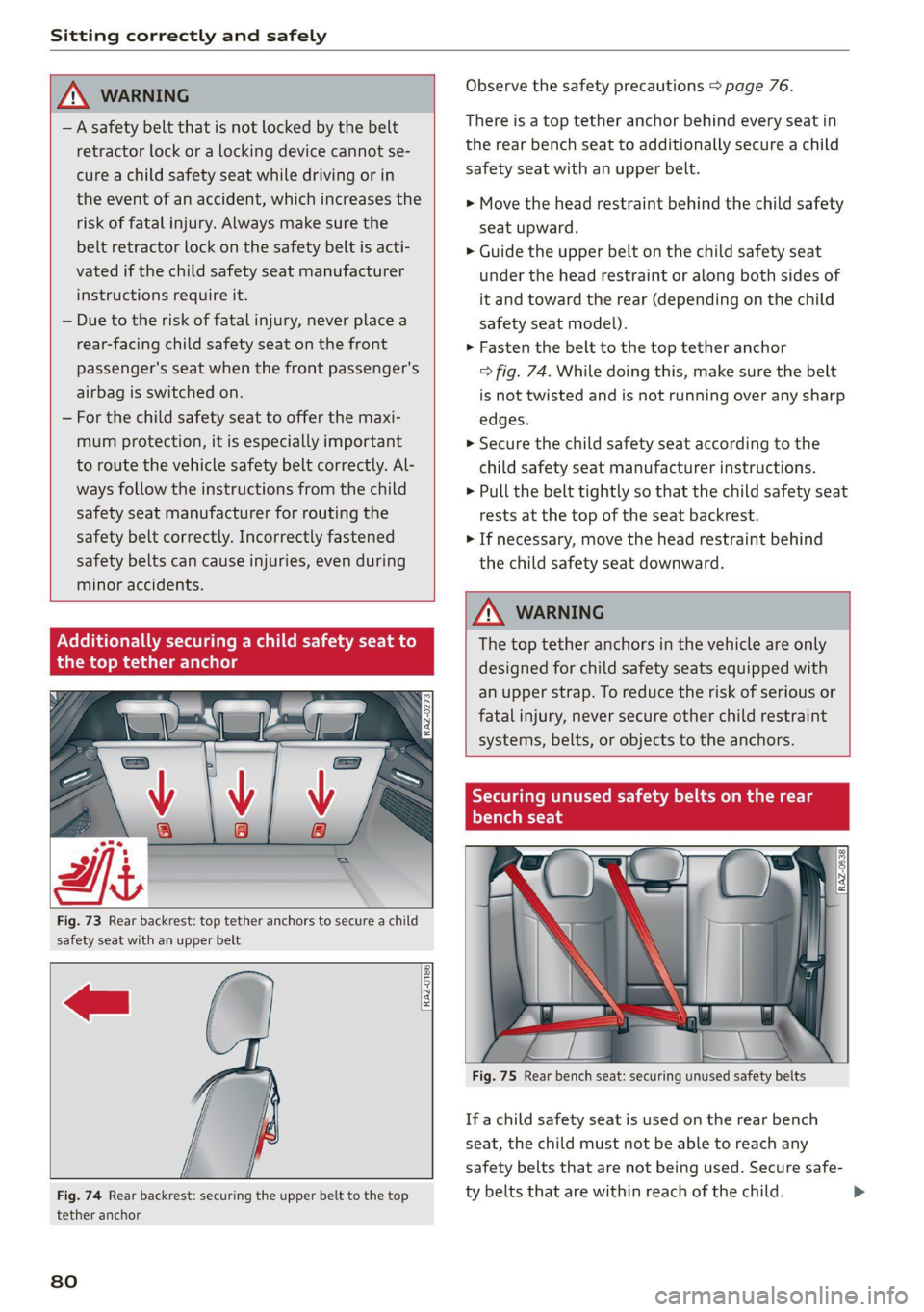
Fig. 73 Rear backrest: top tether anchors to secure a child
safety seat with an upper belt
RAZ-0186,
Fig. 74 Rear backrest: securing the upper belt to the top
tether anchor
80
Observe the safety precautions > page 76.
There is a top tether anchor behind every seat in
the rear bench seat to additionally secure a child
safety seat with an upper belt.
> Move the head restraint behind the child safety
seat upward.
> Guide the upper belt on the child safety seat
under the head restraint or along both sides of
it and toward the rear (depending on the child
safety seat model).
> Fasten the belt to the top tether anchor
=> fig. 74. While doing this, make sure the belt
is not twisted and is not running over any sharp
edges.
>» Secure the child safety seat according to the
child safety seat manufacturer instructions.
> Pull the belt tightly so that the child safety seat
rests at the top of the seat backrest.
> If necessary, move the head restraint behind
the child safety seat downward.
Z\ WARNING
The top tether anchors in the vehicle are only
designed for child safety seats equipped with
an upper strap. To reduce the risk of serious or
fatal injury, never secure other child restraint
systems, belts, or objects to the anchors.
Tae Meee Coe a meee Meg
Mt
YT ey -T-14
ONG"
i a
\
1 i
1, —_..
Ss
Fig. 75 Rear bench seat: securing unused safety belts
If a child safety seat is used on the rear bench
seat, the child must not be able to reach any
safety belts that are not being used. Secure safe-
ty belts that are within reach of the child. >
Page 85 of 332
80B012721BA
Storage and convenience
@) Note
Beverage containers in the cup holders should
always
have a lid. Otherwise, the liquid inside
could spill and cause damage to vehicle
equipment.
Climatized cup holders
Applies to: vehicles with climatized cup holders
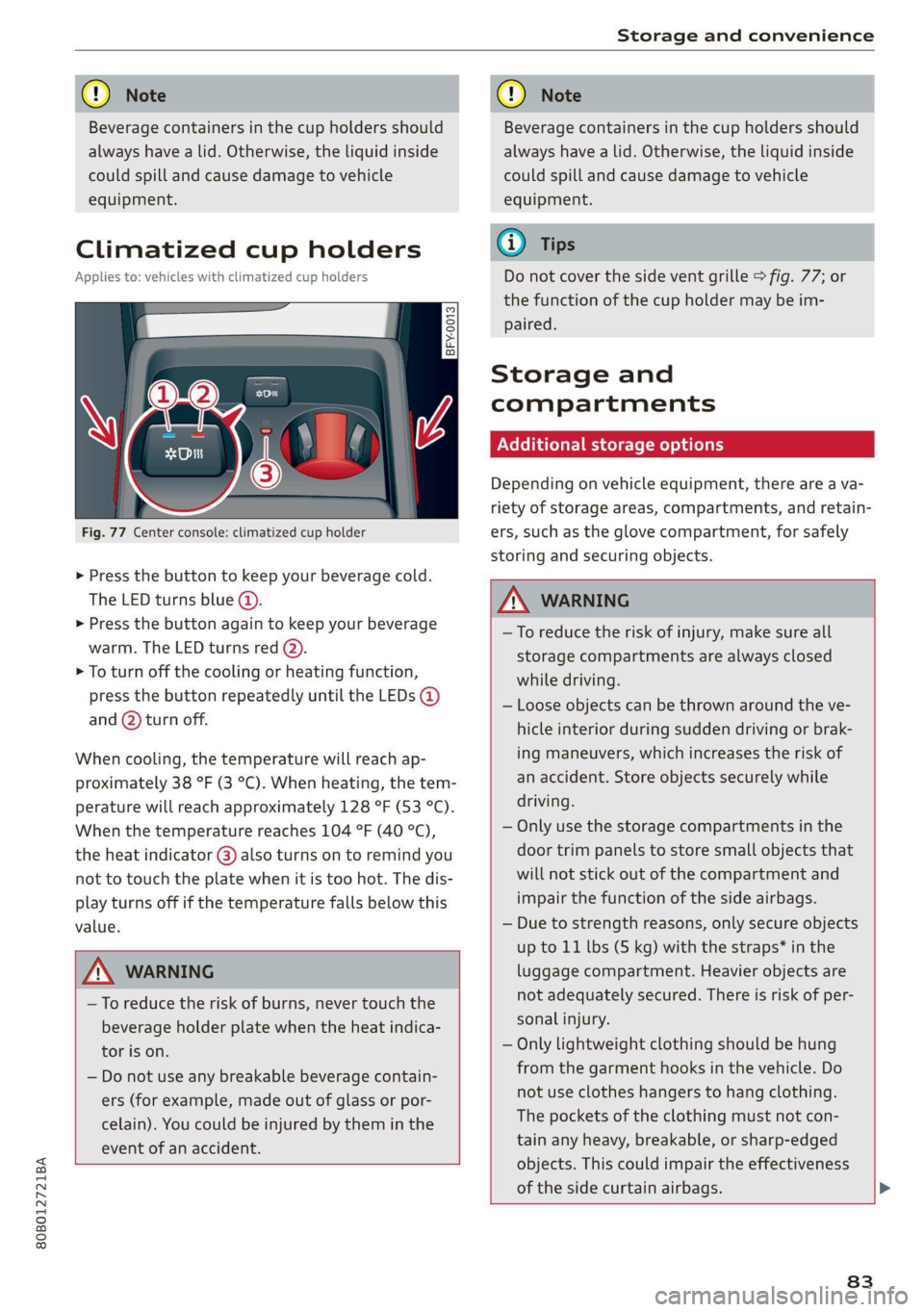
Fig. 77 Center console: climatized cup holder
> Press the button to keep your beverage cold.
The LED turns blue @).
> Press the button again to keep your beverage
warm. The LED turns red @).
> To turn off the cooling or heating function,
press the button repeatedly until the LEDs @)
and (2) turn off.
When cooling, the temperature will reach ap-
proximately 38 °F (3 °C). When heating, the tem-
perature will reach approximately 128 °F (53 °C).
When the temperature reaches 104 °F (40 °C),
the heat indicator @) also turns on to remind you
not to touch the plate when it is too hot. The dis-
play turns off if the temperature falls below this
value.
Z\ WARNING
—To reduce the risk of burns, never touch the
beverage holder plate when the heat indica-
tor is on.
— Do not use any breakable beverage contain-
ers (for example, made out of glass or por-
celain). You could be injured by them in the
event of an accident.
CG) Note
Beverage containers in the cup holders should
always
have a lid. Otherwise, the liquid inside
could spill and cause damage to vehicle
equipment.
Gi) Tips
Do not cover the side vent grille > fig. 77; or
the function of the cup holder may be im-
Paired.
Storage and
compartments
Additional storage options
Depending on vehicle equipment, there are a va-
riety of storage areas, compartments, and retain-
ers, such as the glove compartment, for safely
storing and securing objects.
ZA\ WARNING
—To reduce the risk of injury, make sure all
storage compartments are always closed
while driving.
— Loose objects can be thrown around the ve-
hicle interior during sudden driving or brak-
ing maneuvers, which increases the risk of
an accident. Store objects securely while
driving.
— Only use the storage compartments in the
door trim panels to store small objects that
will not stick out of the compartment and
impair the function of the side airbags.
— Due to strength reasons, only secure objects
up to 11 lbs (5 kg) with the straps* in the
luggage compartment. Heavier objects are
not adequately secured. There is risk of per-
sonal injury.
— Only lightweight clothing should be hung
from the garment hooks in the vehicle. Do
not use clothes hangers to hang clothing.
The pockets of the clothing must not con-
tain any heavy, breakable, or sharp-edged
objects. This could impair the effectiveness
of the side curtain airbags.
83
Page 96 of 332
Warm and cold
& Defrosting
The windshield and side windows are defrosted
or cleared of condensation as quickly as possible.
Align the outer air vents with the side windows.
The maximum amount of air flows mainly from
the vents below the windshield. Recirculation
mode switches off. The temperature should be
set at 72 °F (+22 °C) or higher. The temperature
is controlled automatically.
You can switch the defroster on or off using the
& button. You can switch the function off by
pressing a knob @).
@ Rear window defogger
The rear window defogger only operates when
the engine is running. It switches off automati-
cally after 10 to 20 minutes, depending on the
outside temperature.
To prevent the rear window defogger from
switching off automatically, press and hold the
® button for more than three seconds. This is
stored until the ignition is switched off.
Vents
You can open or close the center and rear vents in
the cockpit and the vents in the rear center con-
sole using the ridged thumbwheels. The levers
adjust the direction of the airflow from the vents.
Residual heat
You can activate the residual heat function when
the ignition is switched off by pressing the knob
@ (left side). The residual heat from the coolant
is used to heat the vehicle interior. The residual
heat function switches off automatically after
about 15 minutes.
ONC eeiaeiile hy
You can adjust additional settings.
» Applies to MMI: Select on the home screen: VE-
HICLE > Air conditioning.
Auto recirculation
When switched on, automatic recirculation con-
trols the recirculation mode automatically. You
94
must press the §& button if fog forms on the win-
dows.
Steering wheel heating
Sica Le molal
Applies to: vehicles with steering wheel heating
> Press the @ button on the multifunction steer-
ing wheel to switch the steering wheel heating
on and off.
Messages
Applies to: vehicles with steering wheel heating
@& Steering wheel heating: on / Steering wheel
heating: off
This message appears if you switched the steer-
ing wheel heating on or off by pressing the but-
ton on the multifunction steering wheel.
Steering wheel heating: malfunction! See own:
er's manual
If this message appears, there is a malfunction.
Drive immediately to an authorized Audi dealer
or authorized Audi Service Facility to have the
malfunction repaired.
Auxiliary climate control
Applies to: vehicles with auxiliary climate control
The auxiliary climate control system warms or
cools the vehicle interior. The vehicle will turn on
the auxiliary climate control system if needed,
depending on the last temperature that was set
with the climate control system controls. This
function can be used when the drive system is
switched off.
You can turn the auxiliary climate control system
on and off immediately in the MMI or set a timer.
Requirement: the charge level of the high-volt-
age battery must be sufficient.