time AUDI Q5 2021 Owner´s Manual
[x] Cancel search | Manufacturer: AUDI, Model Year: 2021, Model line: Q5, Model: AUDI Q5 2021Pages: 332, PDF Size: 118.86 MB
Page 166 of 332
![AUDI Q5 2021 Owner´s Manual Driver assistance
Distance warning
Applies to: vehicles with distance warning
S| iS 9] nN ‘|
ja
Applies to: vehicles with adaptive cruise control:
Fig. 127 Instrument cluster: display o](/img/6/40263/w960_40263-165.png "AUDI Q5 2021 Owner´s Manual Driver assistance
Distance warning
Applies to: vehicles with distance warning
S| iS 9] nN ‘|
ja
Applies to: vehicles with adaptive cruise control:
Fig. 127 Instrument cluster: display o")
Driver assistance
Distance warning
Applies to: vehicles with distance warning
S| iS 9] nN ‘|
ja
Applies to: vehicles with adaptive cruise control:
Fig. 127 Instrument cluster: display of the current dis-
tance
RAZ-0400
Applies to: vehicles with Audi adaptive cruise control
Fig. 128 Instrument cluster: distance warning
General information
At speeds above approximately 40 mph (65
km/h), this function measures the distance to the
vehicle ahead as time. If the distance falls below
the warning threshold and remains there, the
system will warn you of the hazard with the &
indicator light.
Image in the Driver assistance display
Applies to: vehicles with Audi adaptive cruise control
The display only appears if the Driver assistance
display is selected in the on-board computer
= page 17 and the adaptive cruise control is not
actively controlling the vehicle.
@ Detected vehicle driving ahead
@ Use the markings to help you estimate the
distance to an obstacle. Each marking repre-
sents approximately one second.
@® Set warning threshold. Depending on the set-
tings, the display will be colored in from the
bottom to the top.
164
@ The actual distance is smaller than the set
distance and you will be informed about the
danger.
Adjusting the distance warning
The system can be switched off or on in the MMI
and you can customize the distance warning
threshold. The settings depend on the vehicle
equipment.
— Applies to: MMI: Select on the home screen:
VEHICLE > Driver assistance > Distance warn-
ing.
Messages
1f Bo is displayed when there is a malfunc-
tion, the distance warning functions may be un-
available or may be limited.
A message that indicates the cause and possible
solution
may appear with some displays. The
weather conditions may be too poor or a sensor
may be covered. Clean the area in front of the
sensors > page 143 and try to turn the system on
again later.
If the malfunction remains, drive to an author-
ized Audi dealer or authorized Audi Service Facili-
ty immediately to have the malfunction correct-
ed.
ZA\ WARNING
Observe the safety precautions and note the
limits of the assist systems, sensors, and
cameras > page 141.
Gi) Tips
— The driver is always responsible for adhering
to the regulations applicable in the country
where the vehicle is being operated.
— You may fall below the warning threshold
briefly when passing or when quickly ap-
proaching a vehicle driving ahead. There is
no warning in this scenario. A warning is giv-
en only if you fall below the warning thresh-
old for an extended period of time.
Page 167 of 332
80B012721BA
Driver assistance
Audi active lane assist/ The system functions in the speed range of ap-
lane departure warning OMe mph 155 imph (65 kmzh -
m. #
General information . ; -
Applies to: vehicles with Audi adaptive cruise control and traf-
Applies to: vehicles with Audi active lane assist fic jam assist
If the conditions are met, traffic jam assist
switches on at speeds under approximately
40 mph (65 km/h) > page 162.
The active lane assist/lane departure warning
(called only active lane assist in the vehicle dis-
plays and in the information that follows in this
Owner's Manual) can detect lane marker lines AK WARNING
within the limits of the system. If you are ap-
proaching a detected lane marker and it appears Observe the safety precautions and note the
likely that you will leave the lane, the system can limits of the assist systems, sensors, and
warn you with corrective steering and a steering cameras > page 141.
wheel vibration, if necessary.
Applies to: vehicles with Audi active lane assist
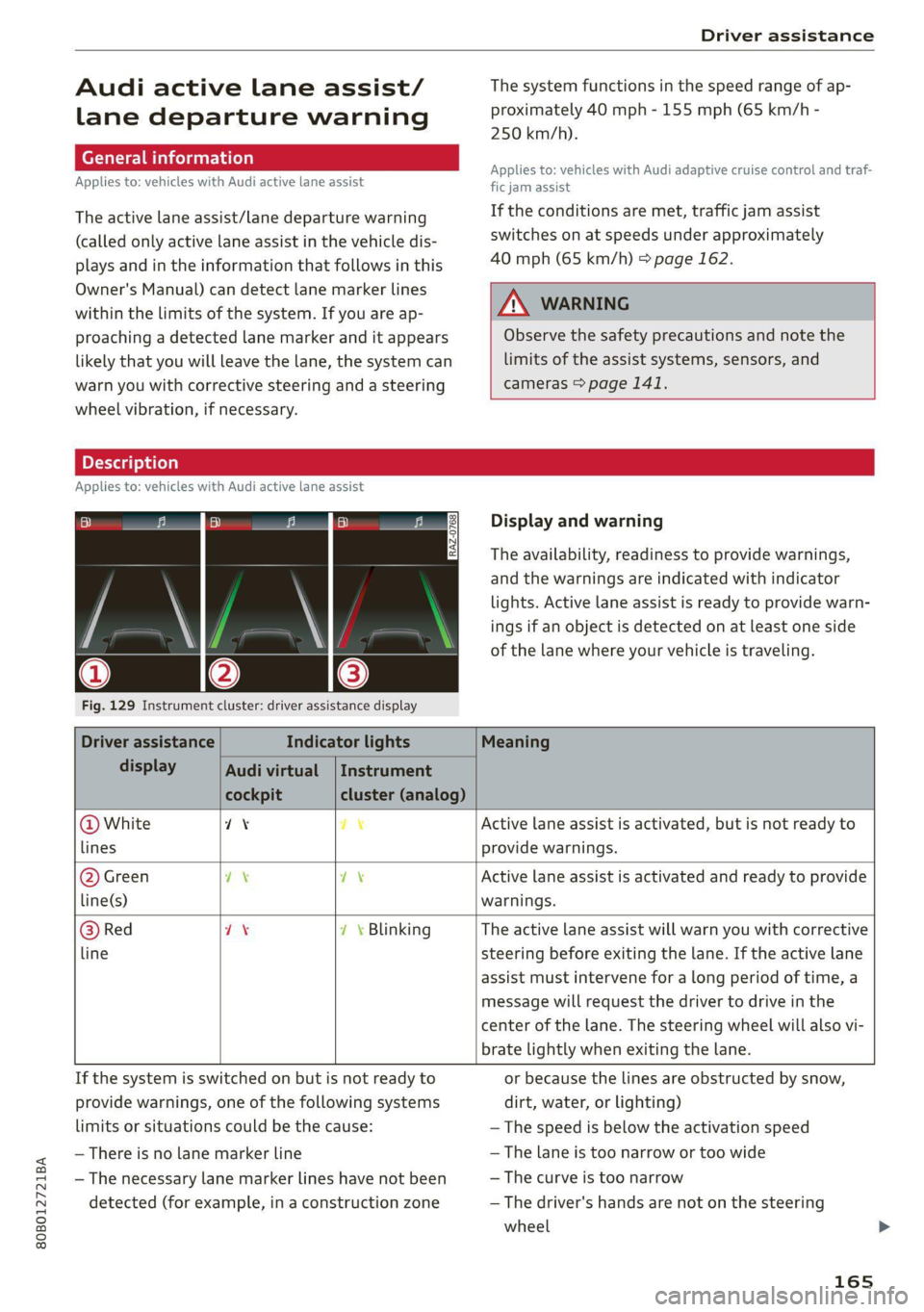
Display and warning
The availability, readiness to provide warnings,
and the warnings are indicated with indicator
lights. Active lane assist is ready to provide warn-
ings if an object is detected on at least one side
of the lane where your vehicle is traveling.
Fig. 129 Instrument cluster: driver assistance display
Driver assistance Indicator lights Meaning
display Audi virtual | Instrument
cockpit cluster (analog)
@ White 71% 7% Active lane assist is activated, but is not ready to
lines provide warnings.
@ Green ex 7\ Active lane assist is activated and ready to provide
line(s) warnings.
@ Red 7X 7 \ Blinking The active lane assist will warn you with corrective
line steering before exiting the lane. If the active lane
assist must intervene for a long period of time, a
message will request the driver to drive in the
center of the lane. The steering wheel will also vi-
brate lightly when exiting the lane.
If the system is switched on but is not ready to or because the lines are obstructed by snow,
provide warnings, one of the following systems dirt, water, or lighting)
limits or situations could be the cause: — The speed is below the activation speed
— There is no lane marker line — The lane is too narrow or too wide
— The necessary lane marker lines have not been — The curve is too narrow
detected (for example, in a construction zone — The driver's hands are not on the steering
wheel
165
Page 168 of 332
Driver assistance
— Visibility is obstructed by a rise or dip.
Steering intervention request
If the active lane assist intervenes multiple times
when no steering activity is detected, the steer-
ing intervention request will provide a warning
using audio and visual signals, such as EE. Take
over the steering and keep your hands on the
steering wheel so that you will be ready to steer
at any time. The system may no longer be ready
to provide warnings after a short time, and it will
only become active again later.
If the driver does not take over steering, active
lane assist will be switched off.
Behavior when a turn signal is active
Applies to: vehicles with side assist: The system
will not warn you if you activate a turn signal be-
fore crossing the lane marker line. In this case, it
assumes that you are changing lanes intentional-
ly.
Applies to: vehicles with side assist: If the turn
signal is activated, lane assist is ready, and a lane
change has been classified as critical by lane as-
sist due to vehicles traveling beside you or due to
approaching vehicles, then a noticeable correc-
tive steering movement will occur briefly before
exiting the lane. This will attempt to keep your
vehicle in the lane.
Z\ WARNING
— Observe the safety precautions and note the
limits of the assist systems, sensors, and
cameras > page 141.
— The system warns the driver that the vehicle
is leaving the lane using corrective steering.
The driver is always responsible for keeping
the vehicle within the lane.
— Corrective steering may not occur at all in
certain situations, such as during heavy
braking. Always be ready to intervene.
@) Tips
— Always keep your hands on the steering
wheel so you can be ready to steer at any
time. The driver is always responsible for
adhering to the regulations applicable in
166
the country where the vehicle is being oper-
ated.
— The system does not provide any corrective
steering or steering wheel vibrations if it de-
tects that you are passing another vehicle.
— The image in the Driver assistance display
only appears if it was opened in the on-
board computer > page 17.
See moll
Applies to: vehicles with Audi active lane assist
B8V-0692
Fig. 130 Turn signal lever: button for Audi active lane as-
sist
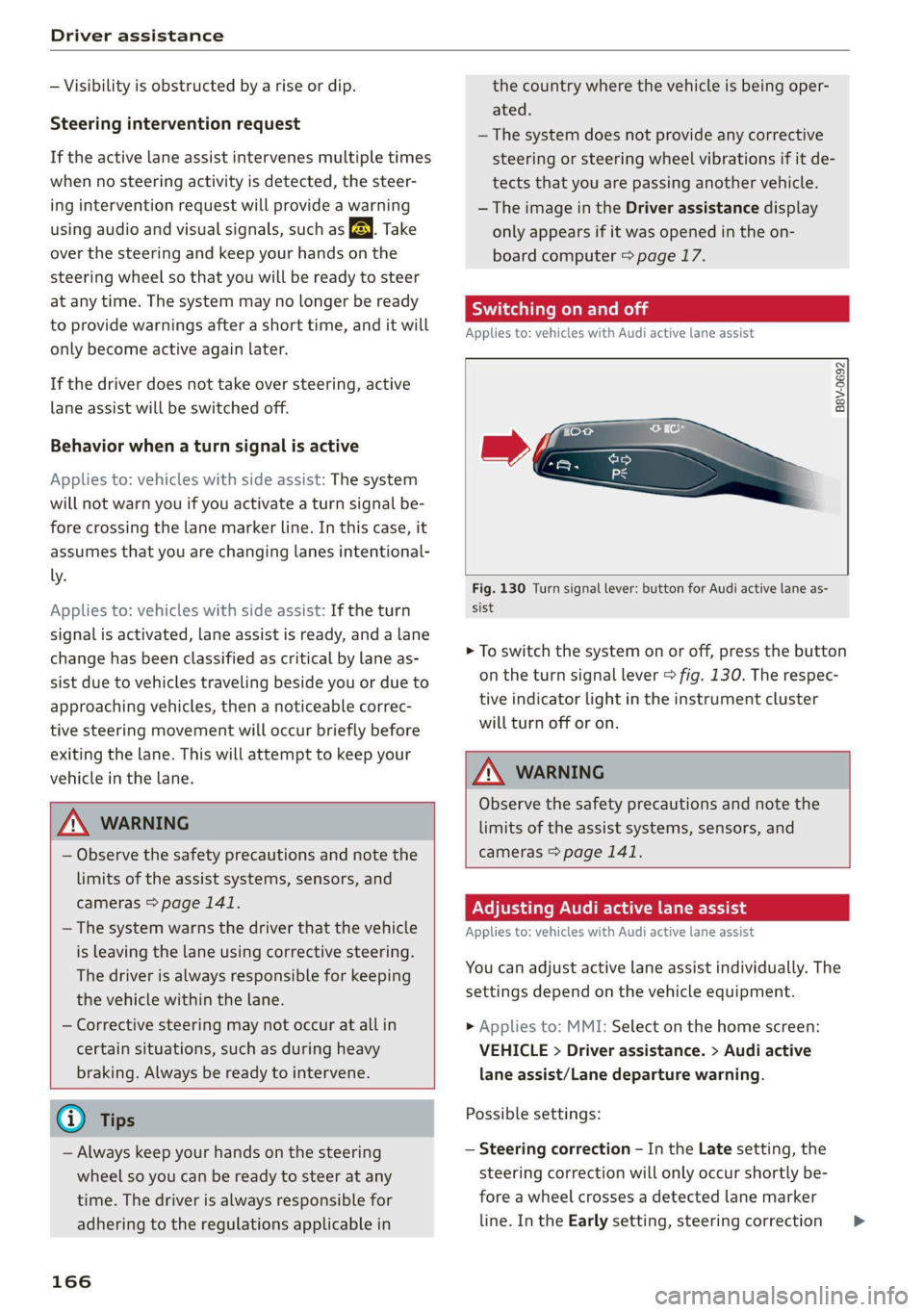
> To switch the system on or off, press the button
on the turn signal lever > fig. 130. The respec-
tive indicator light in the instrument cluster
will turn off or on.
Z\ WARNING
Observe the safety precautions and note the
limits of the assist systems, sensors, and
cameras > page 141.
Adjusting Audi active lane assist
Applies to: vehicles with Audi active lane assist
You can adjust active lane assist individually. The
settings depend on the vehicle equipment.
» Applies to: MMI: Select on the home screen:
VEHICLE > Driver assistance. > Audi active
lane assist/Lane departure warning.
Possible settings:
— Steering correction - In the Late setting, the
steering correction will only occur shortly be-
fore a wheel crosses a detected lane marker
line. In the Early setting, steering correction >
Page 170 of 332
Driver assistance
— There is an airbag control module mal-
function
— System functions may not be available if
the ESC is limited or switched off, or if
there is a malfunction.
Audi pre sense basic
Applies to: vehicles with Audi pre sense basic
Audi pre sense basic is automatically active at
speeds of approximately 20 mph (30 km/h) and
higher. Audi pre sense basic can trigger preemp-
tive safety measures during emergency braking
and dangerous braking maneuvers as well as in
unstable driving situations, such as oversteering
or understeering > page 167, Audi pre sense
safety measures.
The message Audi pre sense oa /{@) will warn
you about the danger.
ZA\ WARNING
Observe the safety precautions and note the
limits of the assist systems, sensors, and
cameras > page 141.
PNU Ce ema ial
Applies to: vehicles with Audi pre sense city
Within the limits of the system, Audi pre sense
city can warn about an impending front end colli-
sion and brake the vehicle strongly, if necessary.
The system uses the camera behind the wind-
shield and is available at speeds above approxi-
mately 6 mph (10 km/h).
Driving situations
The situations to which the system reacts de-
pends on the vehicle speed.
Automatic braking interventions are available at
vehicle speeds up to approximately 50 mph
(85 km/h).
Up to speeds of approximately 50 mph
(85 km/h), the system may react to the following
situations:
— Pedestrians are moving inside your lane
— When approaching a stationary vehicle
168
Up to speeds of approximately 155 mph
(250 km/h), the system may react to the follow-
ing situations:
—Avehicle driving ahead clearly applies the
brakes
— When approaching a vehicle ahead that is clear-
ly traveling more slowly
Prewarning
To warn about detected dangers, Audi pre
sense © / {@) will appear in the instrument clus-
ter and an audio signal will sound.
A brief application of the brakes
If a collision is imminent, there may be an acute
warning using a brief application of the brakes.
You
will also be warned about the danger by an
indicator in the instrument cluster display. You
may only be able to avoid a collision by swerving
or braking strongly.
Automatic braking force increase
If there is an impending collision and you are not
applying the brakes enough, the braking force
may be increased, depending on the situation.
Automatic braking
If you do not react to the acute warning, the sys-
tem may apply the brakes with strong braking
force within the limits of the system in order to
reduce the speed of impact in the event of a colli-
sion.
If the brakes are applied until the vehicle is sta-
tionary, © / Please take over! will appear in
the instrument cluster and you must take over
control of the vehicle.
ZA, WARNING
— Observe the safety precautions and note the
limits of the assist systems, sensors, and
cameras > page 141.
— Audi pre sense cannot overcome natural
physical laws. It is a system designed to as-
sist and it cannot prevent a collision in every
circumstance. The driver must always inter-
vene. The driver is always responsible for
braking at the correct time. Do not let the
increased safety provided tempt you into >
Page 172 of 332
Driver assistance
ZA\ WARNING
— Observe the safety precautions and note the
limits of the assist systems, sensors, and
cameras > page 141.
— Swerve assist does not react to pedestrians,
animals, crossing objects, and objects not
detected as vehicles.
@) Tips
— System functions may not be available if the
ESC is limited or switched off, or if there is a
malfunction.
— An indicator in the instrument cluster will
inform you when there is an intervention.
seg
Applies to: vehicles with turn assist
When turning left), turn assist can help to re-
duce the risk of a collision with an oncoming ve-
hicle by using braking action to keep your vehicle
in its lane. The function is only available when
the turn signal is turned on and at speeds up to
approximately 6 mph (10 km/h).
ZA\ WARNING
— Observe the safety precautions and note the
limits of the assist systems, sensors, and
cameras > page 141.
— The turn assist does not react to pedes-
trians, animals, crossing objects, and ob-
jects
not detected as vehicles.
@ Tips
— System functions may not be available if the
ESC is limited or switched off, or if there is a
malfunction.
— An indicator in the instrument cluster will
inform you when there is an intervention.
2) When making a right turn in countries with left-hand drive
vehicles.
2) Incertain countries
170
Adjusting Audi pre sense
Applies to: vehicles with Audi pre sense
You can switch Audi pre sense and the associated
systems on or off, or adjust them individually.
The adjustment options depend on the vehicle
equipment.
> Applies to MMI: Select on the home screen: VE-
HICLE > Driver assistance > Audi pre sense.
Setting the prewarning
You can adjust the warning time for the prewarn-
ing2) individually (Early/Medium/Late) or switch
the prewarning off.
Set the warning time for the early warning to
Early at first. If you feel that the prewarnings ap-
pear too early, then set the warning time to Me-
dium. The Late warning time should only be set
in special circumstances.
G) Tips
— If Audi pre sense is switched off, it switches
on again automatically once the ignition is
switched on again2).
— Switch Audi pre sense off when you are not
using public streets, when loading the vehi-
cle onto a vehicle carrier, train, ship, or oth-
er type of transportation, or when towing
the vehicle. This can help to prevent an un-
desired intervention from the Audi pre
sense system.
— Certain settings are automatically stored
and assigned to the remote control key be-
ing used.
Messages
Applies to: vehicles with Audi pre sense
rs or is displayed when there is a malfunc-
tion, the Audi pre sense functions may be un-
available or may be limited.
A message that indicates the cause and possible
solution
may appear with some displays. The
weather conditions may be too poor orasensor >
Page 174 of 332

Driver assistance
— Curves
— High barriers on the side of the road
ZA\ WARNING
— Observe the safety precautions and note the
limits of the assist systems, sensors, and
cameras © page 141.
— The display may not appear on time when
vehicles are approaching or being passed
very quickly.
@) Tips
— If the window glass in the driver's door or
front passenger's door has been tinted, the
display in the exterior mirror may be incor-
rect.
— The system is not available when towing a
trailer. There is no guarantee the system
will switch off when using a retrofitted trail-
er hitch. Do not use these functions when
towing a trailer.
— The system complies with United States FCC
regulations and ISED regulations
=> page 311.
Adjusting side assist
Applies to: vehicles with side assist
You can adjust the side assist to your preferences.
The settings depend on the vehicle equipment.
> Applies to: MMI: Select on the home screen:
VEHICLE > Driver assistance > Side assist.
Possible settings:
The system can be switched on and off. If the sys-
tem is switched on, the displays in the exterior
mirrors will turn on briefly each time the ignition
is switched on.
Brightness - Change the brightness only when
side assist is switched on, so that the selected
setting can be checked in the exterior mirror dis-
plays. Adjust the brightness to a level where the
display will not interfere with your view ahead.
Because the display brightness automatically
adapts to the ambient light, it may have already
been adjusted to the highest or lowest setting
during the automatic adaptation.
172
G) Tips
— If you switch side assist on or off, the exit
warning will also switch on or off.
— Certain settings are automatically stored
and assigned to the remote control key be-
ing used.
Messages
Applies to: vehicles with side assist
fg ° is displayed when there is a malfunc-
tion, the side assist and exit warning system
functions may be unavailable or may be limited.
A message that indicates the cause and possible
solution
may appear with some displays. The
weather conditions may be too poor or a sensor
may be covered. Clean the sensor area at the rear
corners of the vehicle > page 143, fig. 113 and
try to turn the systems on again later.
If the malfunction remains, drive to an author-
ized Audi dealer or authorized Audi Service Facili-
ty immediately to have the malfunction correct-
ed.
Page 175 of 332
80B012721BA
Driver assistance
Exit warning
Applies to: vehicles with exit warning system
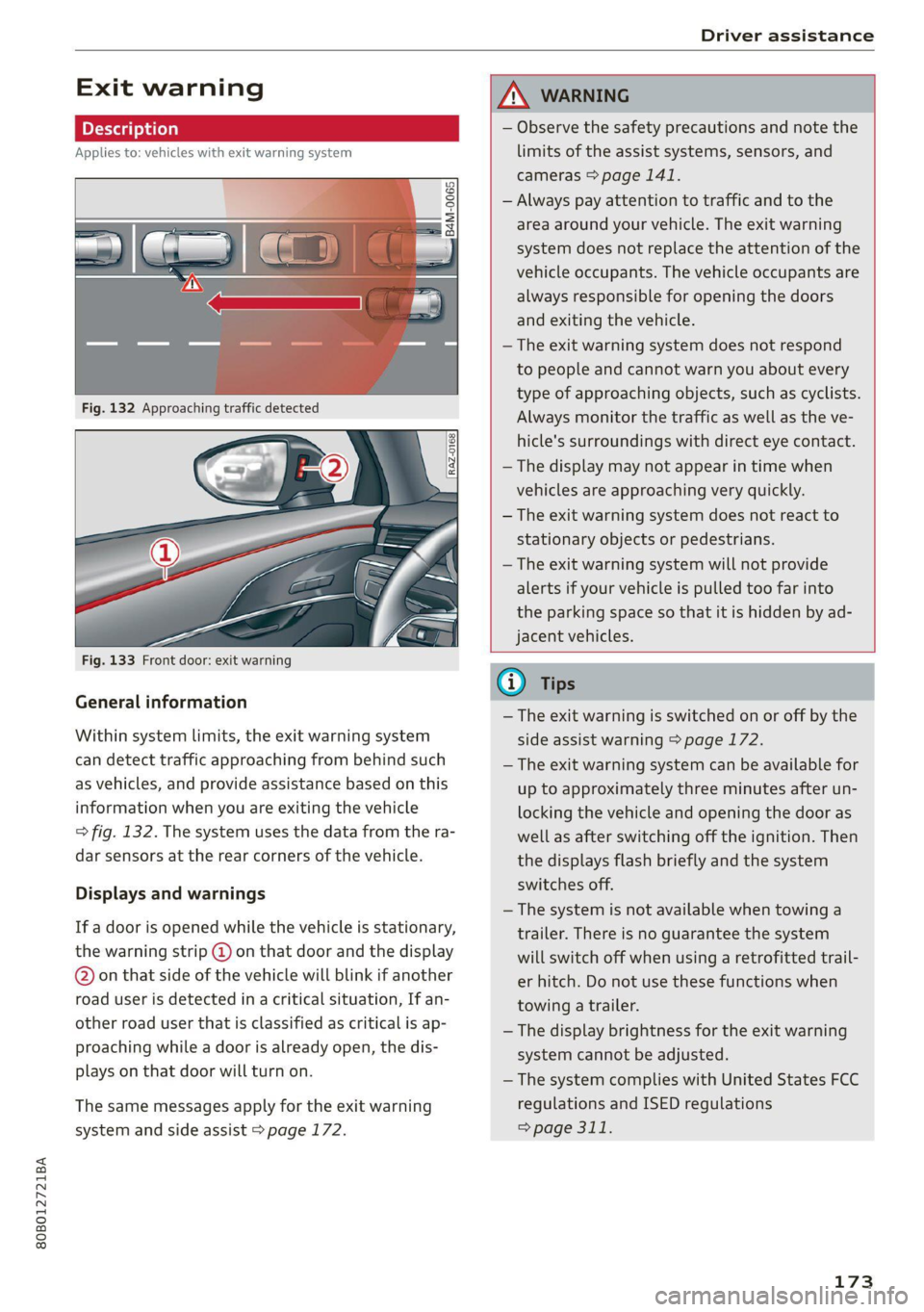
Fig. 133 Front door: exit warning
General information
Within system limits, the exit warning system
can detect traffic approaching from behind such
as vehicles, and provide assistance based on this
information when you are exiting the vehicle
=> fig. 132. The system uses the data from the ra-
dar sensors at the rear corners of the vehicle.
Displays and warnings
If a door is opened while the vehicle is stationary,
the warning strip @ on that door and the display
@ on that side of the vehicle will blink if another
road user is detected in a critical situation, If an-
other road user that is classified as critical is ap-
proaching while a door is already open, the dis-
plays on that door will turn on.
The same messages apply for the exit warning
system and side assist > page 172.
ZX WARNING
— Observe the safety precautions and note the
limits of the assist systems, sensors, and
cameras > page 141.
— Always pay attention to traffic and to the
area around your vehicle. The exit warning
system does not replace the attention of the
vehicle occupants. The vehicle occupants are
always responsible for opening the doors
and exiting the vehicle.
— The exit warning system does not respond
to people and cannot warn you about every
type of approaching objects, such as cyclists.
Always monitor the traffic as well as the ve-
hicle's surroundings with direct eye contact.
— The display may not appear in time when
vehicles are approaching very quickly.
— The exit warning system does not react to
stationary objects or pedestrians.
— The exit warning system will not provide
alerts if your vehicle is pulled too far into
the parking space so that it is hidden by ad-
jacent vehicles.
iG) Tips
— The exit warning is switched on or off by the
side assist warning > page 172.
— The exit warning system can be available for
up to approximately three minutes after un-
locking the vehicle and opening the door as
well as after switching off the ignition. Then
the displays flash briefly and the system
switches off.
— The system is not available when towing a
trailer. There is no guarantee the system
will switch off when using a retrofitted trail-
er hitch. Do not use these functions when
towing a trailer.
— The display brightness for the exit warning
system cannot be adjusted.
— The system complies with United States FCC
regulations and ISED regulations
=> page 311.
173
Page 177 of 332

80B012721BA
Parking and maneuvering
speeds below approximately 6 mph (10 km/h),
the parking aid will switch on automatically. Au-
dible signals will sound once the obstacle is with-
in the sensor detection area.
» Applies to: MMI: To switch Automatic activa-
tion on or off, select on the home screen: VEHI-
CLE > Parking aid > Automatic activation.
Automatic deactivation
The distance indicator for the parking aid plus
will deactivate automatically when driving for-
ward faster than approximately 6 mph (10
km/h).
ZA\ WARNING
Observe the safety precautions and note the
limits of the assist systems, sensors, and
cameras > page 141.
©) Note
Keep enough distance from the curb to avoid
damage to the rims.
@ Tips
— If the parking aid is switched off, it can only
be reactivated automatically when one of
the following conditions is met:
— The vehicle speed exceeds 6 mph (10 km/h)
— The ignition was switched off and back on
again
— The parking brake was set and then released
— The “P” gear was engaged and released
again
Applies to: vehicles with parking aid plus
Fig. 135 Center display: distance display
If the sensors detect an obstacle, audible and vis-
ual signals will warn you.
Visual warnings
The visual warnings in the center display help you
to detect the critical vehicle area and to estimate
the distance to an obstacle.
Red segments (@) show detected obstacles that
are in your vehicle's path. The red lines @) mark
the expected direction of travel based on the
steering angle. A white segment (3) indicates a
detected obstacle that is outside of the vehicle's
path. The closer your vehicle comes to the obsta-
cle, the closer the segments will move to the ve-
hicle. The collision area has been reached when
the next to last segment is displayed. Obstacles
in the collision area, including those outside of
the vehicle's path, are shown in red. Do not con-
tinue driving farther.
Audio signals
The closer your vehicle gets to a detected obsta-
cle, the shorter the time between the audible sig-
nals. A continuous tone sounds when an obstacle
is less than approximately 1 foot (0.30 m) away
from the front or rear of the vehicle. A continu-
ous tone sounds when an obstacle is less than
approximately 0.7 feet (0.20 m) away from the
sides* of the vehicle. Do not continue driving for-
ward or in reverse >@).
> To deactivate audio signals while parking, press
«Jin the center display. The audio signals will
be automatically activated again the next time
the parking aid is activated.
Adjusting the volume
You can adjust the volume to your preferences.
The settings depend on the vehicle equipment.
> Applies to MMI: Select on the home screen: VE-
HICLE > Parking aid. Or:
> Press|] in the center display when the parking
aid is active.
Possible settings:
Front volume - Volume for the front and side*
area.
Rear volume - Volume for the rear area.
175
Page 178 of 332

Parking and maneuvering
Entertainment fader - The volume of the audio/
video source is Lowered when the parking aid is
activated.
The new level is demonstrated briefly* when the
volume is adjusted.
Error messages
If P4 appears, the sensor in the respective area
or the speaker is faulty. Drive immediately to an
authorized Audi dealer or authorized Audi Service
Facility to have the malfunction repaired.
iffy or is displayed when there is a malfunc-
tion, the parking aid functions may be unavaila-
ble or may be limited.
A message that indicates the cause and possible
solution may appear with some displays. The
weather conditions may be too poor or a sensor
may be covered. Clean the area in front of the
sensors > page 143 and try to turn on the sys-
tems again later.
If the malfunction remains, drive to an author-
ized Audi dealer or authorized Audi Service Facili-
ty immediately to have the malfunction correct-
ed.
ZA\ WARNING
— Observe the safety precautions and note the
limits of the assist systems, sensors, and
cameras > page 141.
— Sensors and cameras have spots in which
the surrounding area cannot be detected.
Objects, animals, and people may only be
detected with limitations may not be detect-
ed at all. Always monitor the traffic and the
vehicle's surroundings directly and do not
become distracted.
@) Note
— Keep enough distance from the curb to
avoid damage to the rims.
— Applies to: vehicles with park assist: If you
park in short parking spaces using park as-
sist, a continuous tone sounds from the
parking aid when the distance to an object is
less than approximately 0.7 ft (0.20 m). Do
not continue driving farther.
176
G) Tips
— The segments in the side area* are detected
and analyzed when passing. If you switch
the ignition off and on again or open the
door, or if the vehicle is stationary for a peri-
od of time, the surrounding area may have
changed in the meantime. In this scenario,
the side area* will appear black until the
area has been detected and evaluated.
— If the distance to an obstacle remains con-
stant, the volume of the distance warning
gradually lowers after a few seconds until it
is muted (this does not apply to the continu-
ous tone). If the obstacle comes closer than
it was before the sound was muted, the
tone will sound again. If the obstacle be-
comes farther away than it was before the
sound was muted, no tone will sound. Pay
attention to the vehicle's surroundings
when you start to drive.
— There is no distance warning for the rear
and the sides* when trailer towing mode is
detected. The front sensors remain activat-
ed. There is no guarantee the functions will
be deactivated when using a retrofitted
trailer hitch.
Rearview camera and
peripheral cameras
Introduction
Applies to: vehicles with rearview camera/peripheral cameras
B8V-0629
Fig. 136 Orientation line display when parking
Depending on the vehicle equipment, a rearview
camera or multiple peripheral cameras may be
available.
Page 185 of 332

80B012721BA
Parking and maneuvering
be displayed. The system automatically suggests
a parking option @.
If the parking space allows different parking op-
tions, they can be selected manually. Press one of
the suggested parking options @ in the center
display.
Starting the parking process
As soon as the vehicle has reached the correct po-
sition, a P will appear in the center display above
the selected parking space @). The roof in the
parking aid display @) may show the required
braking or driving direction.
> Keep the vehicle as parallel as possible to the
parked vehicles or to the side of the road.
> Make sure that the parking space is suitable for
your vehicle >@.
> Start the assisted parking process > page 184.
Maneuvering area
The vehicle can go off course during the parking
process > A\. If there are obstacles within the
maneuvering area that block or endanger the
parking process, for example on the opposite
side of the street, a message may appear. You
may need to drive farther forward and stay closer
to the row of parking spaces.
ZA WARNING
— Observe the safety precautions and note the
limits of the assist systems, sensors, and
cameras > page 141.
— The driver is always responsible when enter-
ing or exiting a parking space and during
similar maneuvers.
— Sensors and cameras have spots in which
the surrounding area cannot be detected.
Objects, animals, and people may only be
detected with limitations may not be detect-
ed at all. Always monitor the traffic and the
vehicle's surroundings directly and do not
become distracted.
@) Note
— Parking spaces classified as suitable by the
system may have been detected incorrectly.
The driver must decide if the parking space
displayed is suitable for the vehicle.
— Certain conditions near the parking space
may cause the parking process to fail, such
as if the parking space is near trees or posts,
or if the ground is covered, for example,
with gravel, snow, or ice.
(i) Tips
— If you did not drive past a suitable parking
space
too quickly, the parking space search
can also be activated afterward by pressing
Pe.
—The Electronic Stabilization Control (ESC)
must not be switched off during the parking
process. If the ESC intervenes, the parking
process
will be canceled.
— You can also drive into a perpendicular park-
ing space yourself and then activate the sys-
tem. If this is the case, the front of the vehi-
cle should already be in the space @)
=> page 182, fig. 143 so that the sensors
can measure the space.
— You cannot park with the parking assist sys-
tems when you are towing a trailer or have
the connector inserted in the trailer socket.
— The system is not available when certain as-
sist systems are switched on.
—If there are suitable parking spaces on both
sides of the street, for example on a one-
way street, you can change the side where
the system is searching for parking spaces
by activating the turn signal for the other
side or by pressing on that side in the center
display.
— The park systems do not provide support for
assisted parking on tight curves.
Park assist
General information
Applies to: vehicles with park assist
The park assist helps you when parking and exit-
ing parking spaces after the parking space
search. The park assist takes over the steering of
the vehicle while the driver accelerates, brakes,
and monitors the vehicle's surroundings. Park as-
sist can be interrupted at any time.
183
>