warning AUDI Q7 2009 Owner´s Manual
[x] Cancel search | Manufacturer: AUDI, Model Year: 2009, Model line: Q7, Model: AUDI Q7 2009Pages: 426, PDF Size: 97.13 MB
Page 187 of 426

_______________________________________________ A-- u_t :..:o _ m_ a-- ti _c __ t_r _a _n_ s-- m.,;,,;_: is:..s::.. i :..:o:.. n ---""
T he selector lever must be in Nor P. If one of the driving positions
is engaged a safety switch w ill preven t the eng ine from being
started. See also=>
page 143.
Before you move the selector lever from the P position, you must
a lways apply the brake pedal before and while depressing the
button in the hand le of the se lector lever .
_& WARNING
• Unintended v ehicle movement c an cause serious injury .
- When the selector lever i s in a driving po sition , the vehicle
ma y creep, even at idle speed . Therefore do not release the
parking brake or foot brake until you are ready to move ,
be cau se power is tran smitted to the wheel s as soon as a
driving po sition i s engaged.
- Do not accelerate while selecting a driving pos ition . At this
time the engine must be at idle speed so that undue stress is
not placed on the clut che s in the t ransmi ssion .
-Remember : - even when stopped briefly with the automatic
transmi ssion in "D ", "S " or "R ", eng ine power is being trans
mitted to the wheels. Your vehicle could "creep " forward or
b ac kwa rd . When stopped , keep the brake pedal fully depre ssed
and u se the parking brake if nece ssary to keep the veh icle from
rolling .
• If the selector lever i s unintentionally moved into N while you
are dr iving , take your foot off the ac cele rator pedal and wait for
the engine to return to idle speed before selecting a driving posi
tion .
• Never shift into "R " or "P " when the vehicle i s in motion .
• Never get out of the driver 's seat when the engine is running .
• If you mu st get out of the vehi cle , move the selector le ver
s ecurel y into the P po sition and apply the park ing brake firmly.
• If the engine must rem ain runn ing , neve r have any dr iving p osi
tion engaged when che cking under the hood . M ake sure the
s elector le ver ha s securel y engaged and i s loc ked in "P " with the
Controls and equip
ment
& W ARNING (continued )
park ing brake firmly set=> page 324 , "Engine compartment ".
Otherwi se , any increa se in engine speed may set the vehi cle in
motion , even with the parking b rake appl ied . •
Selector lever positions
T his secti on describes t he select or lever positions an d
driving ranges.
F ig . 198 D ispla y in th e
instrument clu ste r:
sele ctor lev er in pos i
ti on D
The instrument cluster display shows the current selector lever
position and current gear .
P -Park
In this selector lever pos it ion the transmission is mechanica lly
locked . Engage
P on ly when the vehicle is completely stopped=> &
in "Driving the automatic transm ission" on page 184 .
To shift in or out of position P, you must first press and hold the
brake peda l
and then press the re lease bu tton in t he se lecto r leve r
handle while moving the selector lever to or from
P . You can shift
out of this position only with the ignit ion on.
R -Re ver se
The transmission wi ll au tomatically select the lowest gear ratio
when you shift into reverse .
I • •
Page 188 of 426
• ..__A_ u_ t _o_ m_ a_ t_ i_ c _ t_r _a _n_ s_ m_ is_ s_io _ n ________________________________________________ _
Select R only when the vehicle is at a full stop and the engine is
running at idle speed=>
& in "Driving the automatic transmission"
on
page 184.
Before you move the selector lever to R, press both the button in the
handle of the selector lever
and the brake pedal at the same time.
When the ignition is on, the backup lights illuminate when the
selector lever is moved into R.
N -Neutral
The transmission is in neutral in this position. Shift to this position
for standing with the brakes applied =>
page 186 .
When the vehicle is stationary or at speeds below 3 mph (5 km/h),
you must always apply the footbrake before and while moving the
lever out of
N.
D -Normal position for driving forward
Position Dis for normal city and highway driving. It ranges from zero
to top speed and all gears shift automatically, depending on engine
load, driving speed and automatically selected shift programs.
When the vehicle is stationary or at speeds below 3 mph (5 km/h),
you must always apply the foot brake before and while moving the lever to
D out of N.
In certain circumstances it may be advantageous to temporarily
switch to the manual shift program to manually select gear ratios to
match specific driving conditions=>
page 788.
S -Sport position
Select this position for sportier performance. In this position, the
transmission will not upshift as soon, allowing the vehicle to use the
increased power available at higher engine speeds to achieve live
lier acceleration.
When the vehicle is stationary or at speeds below 3 mph (5 km/h),
you must always apply the foot brake before and while moving the lever to
S out of N.
& WARNING
Read and follow all WARNINGS => & in "Driving the automatic
transmission" on
page 184.
0 Note
Coasting downhill with the transmission in N and the engine not
running will result in damage to the automatic transmission and
possibly the catalytic converter. •
Automatic Shift Lock (ASL)
The Automatic Shift Lock safeguards you against acciden
tally shifting into a forward or the reverse gear and
causing the vehicle to move unintentionally.
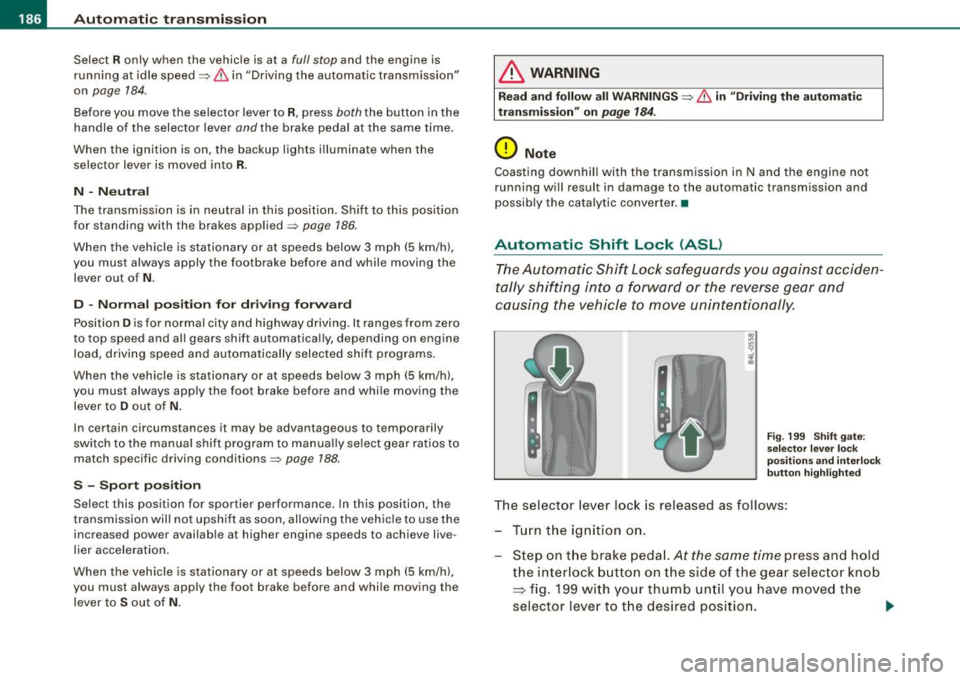
Fig. 199 Shift gate:
selector lever lock
positions and interlock
button highlighted
The selector lever lock is released as follows:
- Turn the ignition on.
Step on the brake pedal.
At the same time press and hold
the interlock button on the side of the gear selector knob
=> fig. 199 with your thumb until you have moved the
selector lever to the desired position.
~
Page 189 of 426
_______________________________________________ A_ u_t _o _ m_ a_ t _i_ c_ t_r _a _n _ s_ m __ is_s_ i _o _ n __ !II
Autom ati c selec to r l eve r lock
The se lector lever is locked in the P and N positions when the igni
tion is turned on. To move the lever from these positions the driver
must depress the brake pedal. As a reminder to the driver, the
follow ing warning appears in the instrument cluster disp lay when
the selector is in
P and N:
When stationary app ly foot brake while s electing gear
A time delay e lement prevents the selector lever from locking when
it is moved through the
N position (going from R to Dl. The locking
e lement will lock the selector lever if the lever is left in N (Neutral)
for more than approximately 1 second, without the brake peda l
being pressed.
At speeds above about 3 mph (5 km/h) the Automatic Shift Lock is
automatically deactivated in the
N posi tion .
Interl ock button
The lock button on the selector lever prevents the lever from being
accidentally shifted into certain positions. Pressing this button
deactivates the selector leve r lock. Dependi ng on the direction of
the shift, the selector lever locks at different positions. The positions
are highligh ted in the illus trati on =>
page 186, fig . 199.
Igniti on k ey saf ety in te rlo ck
The key canno t be removed from the ignition un less the selector
lever is in the
P park position. When the ignition key is removed, the
selector lever wil l be l ocked in the
P posi tion .•
Kick -down
T he kick-down feature allows the vehicle to genera te
maximum accelera tion.
When you press the acce lerator pedal beyond the resistance point
that is reached at ful l throttle, the transmission wi ll select a lower
gear ratio based on vehic le speed and engine RPM . The engine RPM
wil l be control led to produce maximum vehic le acceleration as long
Controls and equip
ment
as you continue to press the acce lerator pedal beyond this resis
t ance poin t.
& WARNING
Be careful when u sing the ki ck -down feature on slippery road s.
Rapid acceleration ma y cause the vehicle to skid . •
Dynamic shift program (DSP)
T he aut omatic tr ans mission is electro nically c ontrolle d.
The transmission is se lf adapting and will automaticall y select the
b est shi ft program su ited to the driving conditio ns and driving style.
The transmission will select one of the
e conomy programs when
you drive at a s teady speed or a g radually changing speed without
heavy acceleration. This achieves optimum fuel efficiency, with ear ly
upshifting and delayed downshifting .
The trans mission will au tomatically select the
sporty shift progra ms
when you drive at higher speeds, or with heavy acce leration and
frequent ly cha nging speeds . Upshifts ar e delayed t o make f ull use
of engine power . Downshifting takes place at higher engine speeds
than in t he ec onomy p rograms .
The selection of the most su itable shift program is a continuous,
automatic process . The driver can a lso make the transmission
sw itch to a sporty progra m by
quickly pressing down the gas peda l.
This causes the transmission to shift down to a lower gear to
achiev e rapid acc elerati on, e.g . fo r q uickly pass ing another vehicle .
You do not need to press the gas pedal into the kick-down range.
After the transm ission has upshifted, the original progra m is
selected according to your driving sty le.
An additiona l shift program allows the automatic transmission to
select the proper gear fo r uph ill and downhi ll gradients.
This keeps the transmission from shifting up and down unneces sari ly on hi lls. The transmissio n will shift down t o a lowe r gear when _,.
I • •
Page 194 of 426
• .___A_ d_v_ a_ n_c_ e_ d_ P _a_r_k _i_ n -=g,_ S-=y"- s_ t_ e_ m __________________________________________ _
-Press the sw itch PJJJ! in the cente r console ~ page 191,
fig. 206 t o activate the A udi pa rking system m anually .
Activation of the acoustic parking system is confirmed by
a brief acknowledgement sound . The indicator light in
the switch lights up.
D ea ctivation
If you drive forwards faster tha n approx. 6 mph (10 km/h),
or
- if you switch the ign ition off, the entire acoustic parking
assist is automatically deactivated, or
- you can press the sw itch
P111! i n the center console
=> page 191, fig. 206 to deact ivate the Audi parking
system. The indicator light in the switch goes out.
You have to turn on the acoustic parking assist m anuall y if you wish
to park the vehicle forwards or if you w ish to approach an obstacle
forwards and want a distance warning .
The range at which the sensors start to measu re is
about:
Front
Rear
W arning ton es side
cen
te r
side
cen ter 3 ft (0
.90 ml
4ft (1.20 ml
2 ft (0.60 ml
5 .2 ft (1.60 ml
Distance warning is given by chimes which are generated by a
signal generator . The volume and the pitch of the chimes can be
adjusted in the MMI => page 201.
Mute In the case of vehic les with automa tic transmission, an acoustic
distance warning is discontinued when the transmission selector lever is moved to the P position. However, the system remains
active
. As soon as the selector lever is moved from the
P posi tion
and the vehicle approaches an obstacle, the acoustic distance
warning resumes .
Dri ving fo rward/ba ckvv ard
Distance warning when driving forward/backward is based o n
detection of an obstacle in the range of the parking assist . As the
distance dec reases, the time interval between the audible tones
becomes shorter.
When the distance is less than approx . 1 ft (0.30 m), the tone
becomes continuous. At this point you shou ld s top backing up or
driving forward .
If the distance to an obstac le remains the same, the vo lume of the
distance warning is gradually reduced after about
4 seconds (does
not app ly to the zone for the cont inuous tone). If you sta rt to
approach the detected obstacle again, the distance warning will
sound at the normal volume again .
P a rk ing
When you selec t ano ther gear when parki ng (e .g . reverse/forward),
the warning tones are temporarily suppressed, but the visual display remains on the MMI display . If you start approaching a
detected obstacle again, the distance warning wi ll sound at the
normal vo lume again .
Vi sual disp lay
T he segments on the MMI display indicate a change in the distance
between the vehicle and an obstacle . The number of segments
displayed depends on the obstacles in front of or behind the
vehic le. The c loser the vehic le comes to the obstacle, the closer the
segments approach the vehic le => page 191, fig. 207. When the
segment before last is disp layed, the veh icle has reached the colli
sion zone. At this point you should stop backing up or driving
forward =>
&,. ..,.
Page 195 of 426

____________________________________________ A_d_ v_ a_n_ c_ e_d _ P_a_ r_ k_ i_ n ..::g==-- S_ y=- s_t _e _m __ lllll
T he image in the visua l display can be switched off on the MMI
display ::::> page
203. The acoustic distance warning remains active.
If you press a function button on the MMI termina l, the visual
display disappears . Manually switching the parking assist on again
via the
p ,y 1 switch shows the visual image on the MM I display aga in.
Further information regarding the MMI terminal is included in the
MMI user's manual.
R ear-view camera (rear view )
The rear-view camera picture::::> page 196, fig. 2 12 appears on the
MM I display as a mirror image. The rear -view camera picture has
orientation lines and marked s urfaces projected into it as an aid to
the parking process ::::> page
194. The red line in the picture
::::> pag e
194, fig. 208 or ::::, page 194, fig. 209 indicates th e collis ion
area . You shou ld stop backing up, preferably before you reach this
point ::::>
&.
If your vehicle is close to an obstacle, the visual distance display
a lso appears in the picture from the rear -view camera . This superim
posed display is intended to help d isplay the relevan t critica l vehicle
area.
I f the visual d isplay is shown on the MMI display and you press the
control button with the Rear view function::::> page
191, fig. 207, the
pictu re from the rear -v iew came ra is displayed.
If the picture from the rear -view camera is s hown a nd you press the
control button w ith the Graphic function ::::, page
196, fig. 212, the
visual display is shown.
T he picture from the rear -view camera can be switched off on the
M MI display ::::, page
203 . The acoustic distance warn ing re mains
active.
I f you press a function button on the MMI te rmina l, the rear-view
camera p icture disappears. The rear -v iew came ra picture reappears
the next time you park. But the picture from the rear -view camera
can also be shown aga in on the MM I display by manually switching
off and on with the
P •1A switch . Further information regarding the
MMI terminal is included in the MM I user's ma nual.
Controls and equip
ment
& WARNING
• Sensor s have dead space s in which obje cts cannot be
detected. Be e spe cially careful to check for small children and
an imals before ba cking up . Small children and animals will not
always be detected by the sensors.
• The Audi parking system is not a substitute for being careful
and alert when backing up. Be e spe cially careful during parking
and similar maneuver s. A lways watch where you are dri ving and
make sure that nothing is in the way.
• Remember that low ob sta cles which have already been
s ignaled may pass below the system' s sen sing zone when the
v ehi cle is ba cking up . The fa ct that the signal stop s doe s not mean
that you have cleared the obstacle . When the signal stops , impact
is imminent . Obje cts su ch as trailer hit che s, chain s, narrow posts
or fences covered by a thin l ayer of paint may not always be
detected by the sy stem. They can still damage your vehicle
without warning .
• Alway s make sure that the volume and frequency of the chime s
is adjusted so that you can eas ily hear the acoustic distance signal
even if the radio is playing , the air -conditioner blower is on High or
there is a high level of out side noise .
- Check the setting s whenever someone else has dri ven the
vehicle before you.
• Improper relian ce on the Aud i parking sy stem can cau se colli
sions and serious per sonal injury .
- Never rely only on parking assi st when ba cking up .
- Always check rear view mirrors to make sure it is safe to back
up .
[ i ] Tips
• The rear -view camera picture is available as soon as the MMI
Disp lay or the MMI is swi tch ed o n, or the start -up phase is
completed.
I • •
Page 197 of 426

__________________________________________ A___;_ d_v _a_ n___;_ c __ e _d _ P_a_ r_ k_ i_n -=g ~ S_,y:... s_ t_ e_ m ___ llll
T he rear -v iew cam era can be turned on and off in the MMI
~ page 203 . The acous tic dista nce wa rning rem ains ac tive .
& WARNING
• The rear -view camera has blind spots, in which objects cannot
be detected . Be especially careful to check for small children and
animals before backing up. Small children and animals will not
always be detected by the sensors .
• The Audi parking system is not a substitute for being careful
and alert when backing up. Be especially careful during parking
and similar maneuvers . Always watch where you are driving and
make sure that nothing is in the way .
• Remember that low obstacles which have already been
signaled may pass below the system's sensing zone when the
vehicle is backing up . The fact that the signal stops does not mean
that you have cleared the obstacle. When the signal stops , impact
is imminent . Objects such as trailer hitches, chains , narrow posts
or fences covered by a thin layer of paint may not always be
detected by the system. They can still damage your vehicle
without warning .
• Always make sure that the volume and frequency of the chimes
is adjusted so that you can easily hear the acoustic distan ce signal
even if the radio is playing , the air-conditioner blower is on High or
there is a high level of outs ide noise .
- Check the settings whenever someone else has driven the
vehicle before you.
• Improper reliance on the Audi parking system can cause colli
sions and serious personal injury .
- Never rely only on parking assist when changing backing up.
- Always check rear view mirrors to make sure it is safe to back
up.
Controls and equip
ment
[ i ] Tips
• B efore par king w it h the rea r-view camera, the Adapti ve Ai r
S uspen sion * co mfort or automatic mode m ust be switched on
~ page 2 1.
• The rea r-vie w camera p ict ure i s avai la ble as soon as the M MI
Di sp lay or t he MMI is sw itched o n, o r the sta rt- up p hase is
completed.
• I n order for th e rear -view camera to function properly, the
came ra lens ~
page 191, fig. 205 mus t be ke pt clean, and free of
s n ow and ice . P lease fo llo w th e ad ditional notes on
~ p age 204.
• The camera c ove rage a ngle c hange s w hen the trun k lid is ope n.
Therefore, the rear -view camera picture is disp layed without orien
tati on lines an d without b lue s urfaces .
• Observe and fol low th e not es on towing mode * on~
page 201 . •
A pplies to vehic les : w it h Ad va nced Par kin g Sys te m with re ar view camer a
Rear-view camera coverage area
I • •
Fig. 210 Top view:
Rear-view camera
coverage area
Page 198 of 426
• ..__A_ d_v _ a_ n_c _e _ d_ P_ a_r _k _in ---== g'-- S...:y _ s_ t_ e_ m ___________________________________________ _
®
Fig. 211 Side view:
Covered area
G) and
uncovered area
0 of
the rear -view camera
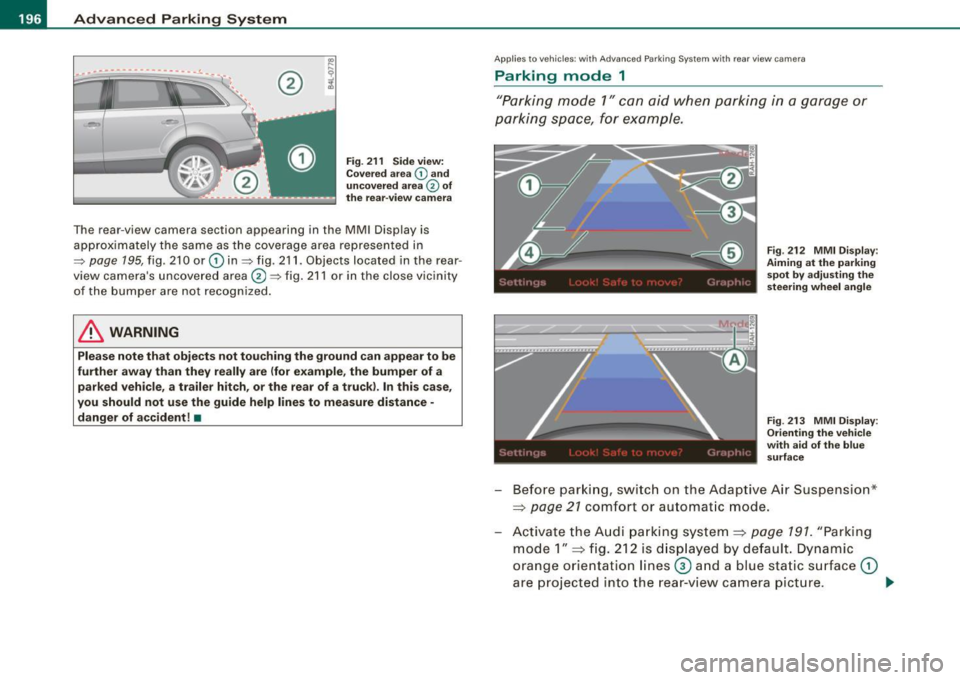
The rear-view camera section appearing in th e MMI Display is
approximately the same as the coverage area represented in
=>
page 195, fig. 210 or G) in=> fig. 211 . Objects located in the rear
view camera's uncovered area®=> fig. 211 or in the close vicinity
of the bumper are not recognized.
& WARNING
Please note that objects not touching the ground can appear to be
further away than they really are (for example, the bumper of a
parked vehicle, a trailer hitch, or the rear of a truck). In this case,
you should not use the guide help lines to measure distance -
danger of accident!•
App lies to vehic les: with Advanced Par king System with rea r view camera
Parking mode 1
"Parking mode 1" can aid when parking in a garage or
parking space, for example .
Fig. 212 MMI Display :
Aiming at the parking
spot by adjusting the
steering wheel angle
Fig . 213 MMI Display:
Orienting the vehicle
with aid of the blue
surface
- Before parking, sw itch on the Adaptive Air Suspension *
==>
page 21 comfort or automatic mode .
Activate the Audi parking system==>
page 191. "Parking
mode 1"
==> fig. 212 is displayed by default. Dynam ic
orange orientation lines
0 and a blue static surface G)
are projected into the rear -view camera picture. _..
Page 199 of 426
__________________________________________ A___;_ d_v _a_ n___;_ c __ e _d _ P_a_ r_ k_ i_n -=g ~ S_,y:... s_ t_ e_ m ___ !II
- With the ve hicle stationary, select the proper s teering
whee l ang le for the parking spo t wit h the aid of t he
orange o rienta tion l ines.
- Wh ile driving in reve rse gear, ad just the stee ring wheel
angle to fit t he parking space with the a id of t he orange
ori entati on lines ~
0.
- Align your vehicle correspo nding to t he blue surface. The
blue su rfa ce s hould be parallel to the par kin g spot lines
~ page 196, fig . 213 .
G) Blue surfa ce
The surface beh ind the vehicle, identified by various shades of blue,
represents an ex tension of the outer vehic le outline by approxi
mately 16 ft (5 ml to the rear. The transitions of the blue surfaces are
distanced approxima te ly 3 ft (1 ml, 6 ft (2 m), and 16 ft (5 m) away
from the vehicle .
@ and 0 Orange orientation lines
The orientation lines change direction with the steering wheel
ang le . These lines identi fy t he direction of travel the rear o f the
vehicle would be taking, driving in reverse gear with the current
steering whee l ang le .
The dynamic orientation lines are provided with markers@. These
markers are each placed at a distance of approx. 3 ft ( 1 ml from one
another. Through these markers, the distance to an obstacle can be
estimated .
©Redline
The distance between your rear bumper© and the red line is
approximately 16 inches (40 cm):::::,&. Here, at the latest, you
should stop backing up:::::,
page 200.
© Rear bumper
The rear bumper of your vehic le also appears in the MMI Display, for
better orientation .
Controls and equip
ment
& WARNING
Plea se note that objects not to uching the grou nd can appe ar to be
further away than they really are (for ex ample , the bumper of a
par ked veh icle, a trailer h itch , or the rear of a tru ck). In this ca se ,
you should not u se the guide h elp lines to mea sure distan ce -
d anger of accident !
0 Note
In the MM I Disp lay, the direct ion of travel of the vehicle rear is
shown depending on the steering whee l angle . The vehicle front
sw ings out more than the vehic le rear.
[ i ] Tips
• I n order for the rear -view camera to funct ion properly, the
camera lens:::::,
page 191, fig. 205 must be kept clean, and free of
snow and ice. Please foll ow the additional no tes on :::::,
page 204 .
• The positions of the orientation lines/ surfaces are displaced up
or down if the parking process is carried out with the rear -view
camera in Adaptive Air Suspension*:::::,
page 21 dynamic, offroad, or
lift mode. Therefore, the accuracy is reduced .•
I • •
Page 201 of 426

__________________________________________ A_ d_v _a_ n_ c_e _d _ P_a_ r_ k_ i_n ..:g =-- S...:y:- s_ t_ e_ m ___ JIII
When the turn signal is switched on, only the necessary surfaces
and curves are shown . To change the s ide that is shown, simp ly
change the turn signa l.
The displayed light b lue
0 or dark blue © curved line identifies the
turn-around point when maneuvering to park. If the curved line
touches the curb, the steering wheel turn -around point has been
reached => page 198, fig. 215.
T he distance from the rear bumper © to the red line © is approxi
mate ly 1.3 ft (40 cm). Here, at the latest, you shou ld s top bac king up
=> page
200 .
& WARNING
Please note that objects not tou ching the g round ca n appear to be
further away than they really are (for example , the bumper of a
parked vehi cle , a trailer hitch , or the re ar of a truck ). In th is case ,
you should not u se the guide h elp lines to mea sure distance -
danger of a ccident !
0 Note
In the MMI Display, the direction of travel of the vehicle rear is repre
sented depending on the steering w heel angle. The veh ic le front
swings out more than the veh icle rear.
[ i ] Tips
• I n order for the rear -v iew camera to function properly, the
camera lens=> page 191, fig. 205 must be kept clean, and free of
snow and ice . P lease follow the additional notes on => page
204 .
• T he positions of the orientation lines/ surfaces are disp laced up
or down if the pa rk ing process is carried out with the rear-view
camera in Adaptive Air Suspension*=> page 21 dynamic, off road, or
l if t m ode. Therefore, the accuracy is reduced. •
Controls and equip
ment
Special parking situations
A pplies to veh ic les : wit h Advance d Pa rk in g S yste m w it h rear view c amera
Parking next to obstacles
When parking next to an obstacle, enough distance mus t
left on the side.
Fig . 216 Top view:
P arki ng ne xt t o a brick
wall
With "parking mode 2", you can park very c losely to a sidewalk curb
with your vehicle=> page 194, fig. 209.
However, when parking next to an obstacle, such as a brick wall , a
larger side distance must be selected in order to prevent col lisio n
damage to the vehicle. Position the long side of the marked blue
s u rface so that there is enoug h distance from the curb; the surface
must not touch the curb=> fig. 216.
A lso, the turning process has to occur considerab ly sooner . This
means that the corresponding blue curved line=> page 198, fig. 215
must not touch the curb, but shou ld rather be at a distance far
enough from the curb=>& .
& WARNING
• Keep plenty of di sta nce from an obstacle , so that your out side
mirror or a corner of your vehi cle does not collide with any obsta-
cle s -danger of accident!
~
I • •
Page 202 of 426
IIIII..__A_ d_v _ a_ n_c _e _ d_ P_ a_r _k _in ---== g'-- S...:y _ s_ t_ e_ m ___________________________________________ _
& WARNING (continued )
• The Audi parking system is not a substitute for being careful
and alert when backing up. Be especially careful during parking
and similar maneuvers . Always watch where you are driving and
make sure that nothing is in the way.
• When maneuvering or parking, do not only use the MMI Display
for orientation . Certain objects • depending on the screen resolu
tion -may not , or not entirely , be displayed ; for example trailer
hitches , chains , narrow posts , or fence s.
• Improper reliance on the Audi parking system can cause colli
sions and serious personal injury.
- Never rely only on parking assist when changing backing up .
- Always check rear view mirrors to make sure it is safe to ba ck
up. •
Applies to veh icles : wit h Ad vanced Pa rk ing System w ith rea r view c ame ra
Notes on distance information
Fig . 21 7 MMI Displ ay:
di splayed red l ine
touche s the bumpe r F
ig . 218 Actu al
distan ce from bumpe r
The red line in the MMI Display~ fig. 217 indicates the distance you
should maintain from an obstacle, when parking. If an obs tac le is
l ocated at road l eve l, you can approach the obstacle unti l the red
l ine to uche s the obstac le ( 1.3
ft, or 4 0 cm , distance). On the o the r
h a n d, if an obstacle is no t locat ed a t road level (the bu mpe r of a
vehic le, for examp le), you should not approach this obstac le unti l
t h e red line touc hes the obstacle.
F or instance, if you back u p toward another vehicle, it will a ppear as
thou gh the gui de help line s and s urface s are be ing pushed over the
vehic le behind you~ fig. 217. In this example, it can be reco gnized
in the M MI Display that t he re d l in e exac tly touc hes the bum per o f
th e ve hicle behind you . Ind eed, however, the red line@~ fig. 218
does not touch the bumper, b ut has rather been pushed underneath
t h e b umpe r. T h e actual d istance (dashed line G) l to the vehicle
behind you is meanwhile less than 1.3 ft ( 40 cm). Your vehicle
bu mper must als o be taken into co nsiderat ion for the d istance
~&. .
& WARNING
• Please note that objects not touch ing the ground can appear to
be further away than they really are (for example , the bumper of a
parked vehicle , a trailer hitch, or the rear of a truck) . In this case ,
you should not use the guide help lines to measure distance -
danger of accident ! .,_