warning AUDI Q7 2009 Owner´s Manual
[x] Cancel search | Manufacturer: AUDI, Model Year: 2009, Model line: Q7, Model: AUDI Q7 2009Pages: 426, PDF Size: 97.13 MB
Page 203 of 426
____________________________________________ A_d_ v_ a_n_ c_ e_d _ P_a_ r_ k_ i_ n ..::g==-- S_ y=- s_t _e _m __ lJII
& WARNING (continued)
• Maintain plenty of distance from an obstacle, so that your
outside mirror or a corner of your vehicle does not collide with any
obstacles -danger of accident!
• The Audi parking system is not a substitute for being careful
and alert when backing up. Be especially careful during parking
and similar maneuvers. Always watch where you are driving and
make sure that nothing is in the way.
• When maneuvering or parking , do not only use the MMI Display
for orientation. Certain objects -depending on the screen resolu
tion -may not, or not entirely, be displayed; for example trailer
hitches , chains, narrow posts, or fences . •
Appl ies to vehic les : with Audi Pa rk ing System and factory insta lled tow ing h itch
Towing hitch
For vehicles with a factory installed towing hitch, or a trailer hitch
installed according to factory specifications , the rear acoustic
parking sensors are not activated when the vehicle is put in reverse
gear while an electrical connection to the trailer socket* is estab
lished. No distance alert occurs in the rear =:>
page 191. The rear
view camera picture=:>
page 194 is displayed without orientation
lines and without blue surfaces. •
Controls and equip
ment
Settings in the MMI
A pplies to v ehicles: with A dvanc ed Park ing System with rear view camera
Adjusting the chimes -option 1
The volume and the pitch (frequency) of the chimes can
be adjusted in the MM!.
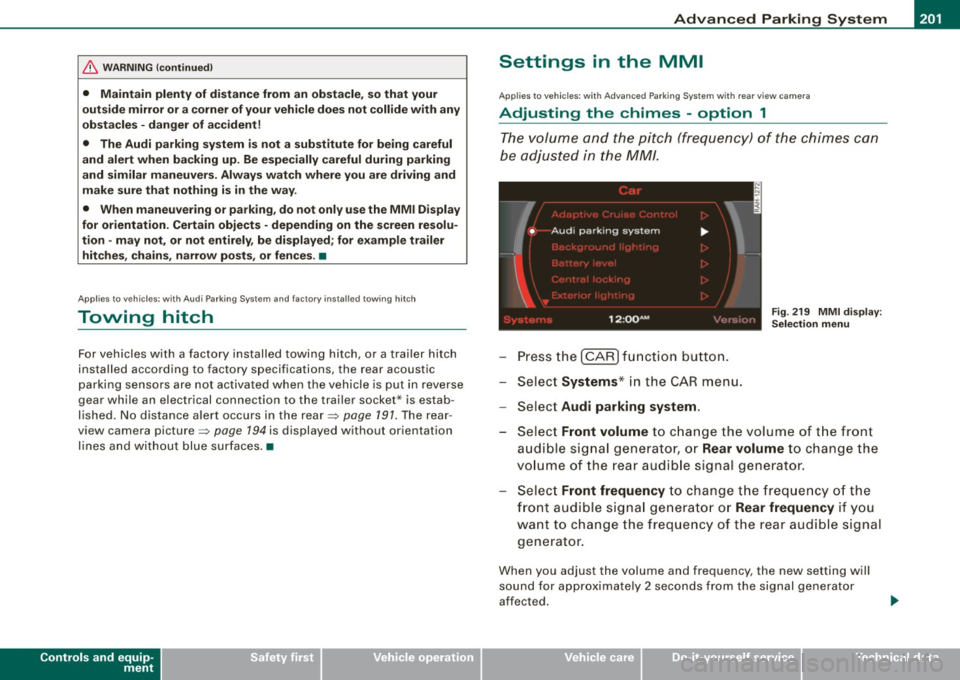
Press the [CAR] function button.
Select
Systems* in the CAR menu.
- Select
Audi parking system .
Fig. 219 MMI display :
Selection menu
- Select Front volume to change the volume of the front
audible signal generator, or
Rear volume to change the
volume of the rear audible signal generator.
Select
Front frequency to change the frequency of the
front audible signal generator or
Rear frequency if you
want to change the frequency of the rear audible signal
generator.
When you adjust the volume and frequency, the new setting will
sound for approximately 2 seconds from the signal generator
affected.
I • •
Page 204 of 426
IIIII..__A_ d_v _ a_ n_c _e _ d_ P_ a_r _k _in ---== g'-- S...:y _ s_ t_ e_ m ___________________________________________ _
The volume and frequency settings are automatically stored and
assigned to the remote master key.
& WARNING
Always make sure that the volume and frequency of the chimes is
adjusted so that you can easily hear the acoustic distance signal
even if the radio is playing, the air-conditioner blower is on High or
there is a high level of outside noise. Check the settings whenever
someone else has driven the vehicle before you. •
Applies to veh icles: with Advanced Parking System with rear view ca me ra
Adjusting the chimes -option 2
The menu for adjusting signal sounds can also be called
up via the control button with the "settings" function.
Fig . 220 MMI Display:
Rear-view camera
picture Fig
. 221 MMI Display:
Audi parking system
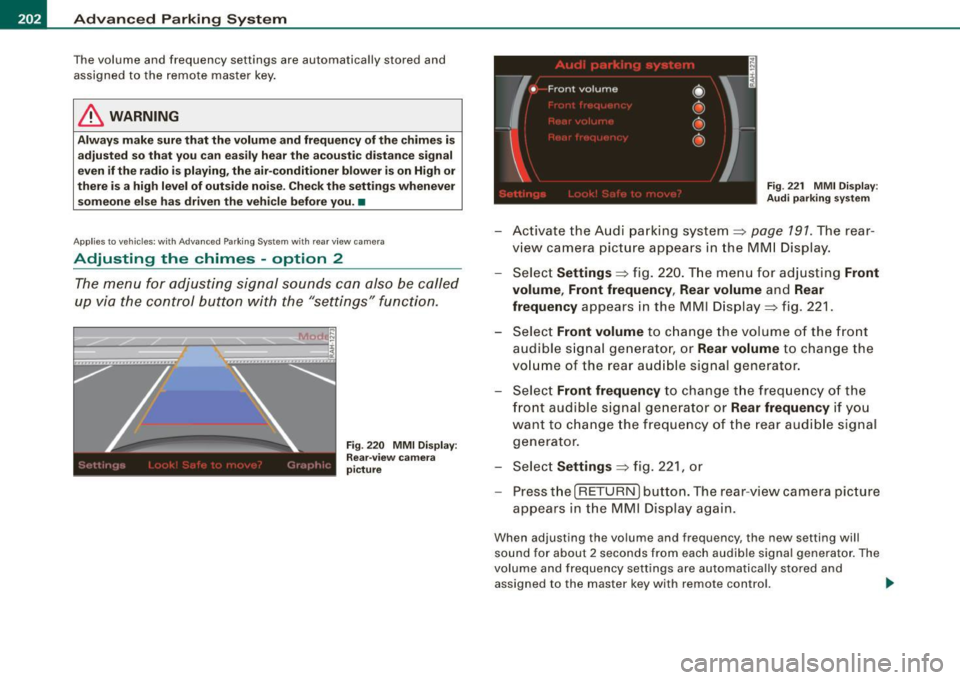
-Activate the Audi parking system:::::, page 791 . The rear
view camera picture appears in the MMI Display.
- Select
Settings :::::, fig. 220. The menu for adjusting Front
volume, Front frequency , Rear volume
and Rear
frequency
appears in the MMI Display:::::, fig. 221.
Select
Front volume to change the volume of the front
audible signal generator, or
Rear volume to change the
volume of the rear audible signal generator.
- Select
Front frequency to change the frequency of the
front audible signal generator or
Rear frequency if you
want to change the frequency of the rear audible signal
generator.
- Select
Settings :::::, fig. 221, or
- Pressthe[RETURN]button. The rear -view camera picture
appears in the MMI Display again.
When adjusting the volume and frequency, the new setting will
sound for about 2 seconds from each audible signal generator. The
volume and frequency settings are automatically stored and
assigned to the master key with remote control. _..
Page 205 of 426

___________________________________________ A_ d_ v_ a_n _ c_ e_ d_ P_a _ r_ k_ i_n -=g=-- S_ yc..,_ s_t _ e _m _ __.fflll
& WARNING
Alwa ys make sure that the volu me and frequen cy of the ch ime s is
adjusted so that y ou can ea sily he ar the a coustic di stance signal
eve n if the r adi o i s pl aying , the air -condit io ne r blo wer i s on High o r
there i s a high level of outside noi se . Check the settings when ever
s omeon e el se ha s dri ven th e vehi cle before you .•
A pp lies to vehicles: w ith Adva nce d Par kin g S ystem with rear view camera
Switching the visual display /rear-view
camera on and off
The visual display and rear-view camera are preset in the
MM!.
Con tro ls and eq uip
ment
F ig . 2 2 2 MMI di splay:
Dis play A PS -su bmenu
Fig . 2 2 3 M MI di spl ay:
vi su al di splay o f
di sta nce to a detec te d
ob st ac le
Press the I CAR I function b utton.
Selec t Systems * in the
CAR menu .
Select Audi parking system .
Select Display APS
=> fig. 222 .
Select Graphic , Rear View , automati c or off.
The rear-view camera and the visual display can be used separately
or in combination for parking .
When you switch manually to the rear -view camera v ia the control
button with the
Rear V ie w function => fig. 223, the control button
with the
Graphic function => page 198, fig. 215 appears . You can
switch back and forth between the rear-view camera and visua l
parking assist at any
time via the disp layed control button function .
The presettings in the MMI are retained .
"Graphic " setting
If you have set the Graphi c function, the visual display will be
displayed in the MMI display by defau lt upon activation of the
parking assis t system => fig . 223 .
"Rear Vi evv " s ett ing
If you have set the R ear View function , the picture from the rear
v iew camera =>
page 196, fig. 213 will be displayed when driving
backward and forward whenever the parking assist system is acti
vated.
" Autom atic" sett in g
If you have set the automat ic function, the picture fro m the rear
view camera will automatically be displayed when reverse gear is engaged and the visual disp lay will be displayed on the MM I display
when you drive forward . .,.
Vehicle care I I Technical data
Page 206 of 426
IIII.___A_ d_v_ a_ n_c_ e_ d_ P _a_r_k _i_ n -=g ,_ S-=y"- s_ t_ e_ m __________________________________________ _
"Off" sett ing
If you have set the off function, both the rear -view camera and the
visual display will be deac tiva ted . The acous tic pa rking assist
remains active .
[ i J Tip s
If you change the sett ings in the MM I, the new settings do not
become active unti l the parking assist is switched on aga in. •
Safety tips
Applie s to ve hic le s: wit h Advance d Par king Sy ste m wit h re ar vie w ca me ra
Acoustic parking system error message
If you hear a continuous tone for several seconds while the front
and back parking assist with visual display is activated and the LED
in the switch
P wA flashes when you engage the reverse gear , there is
a malfunction in the acoustic parking assist .
This system error is immediately output after: • Every manual activation via the switch
P wA ~ pag e 191,
• Reverse gear is engaged for the first time during an ign ition
cycle, or
• An error is detected during operation.
[ i J Tips
If the system reports an error, have an Audi dea ler or an authorized
dea le rship corr ect this system error. •
Applies to vehicles: w it h A dvanced Par king S ystem w it h rea r view ca mera
Rear-view camera tips
We recommend that you practice park ing with the rear -view camera
in a traffic -free location , or parking lot , to become familiar with the
system, the orientation lines, and their function . When doing this,
there should be good light and weather conditions .
I n the MM I Display, objects or vehicles appea r c loser or further away
if :
• you are driving in reverse g ear from a level surface onto an
incline, or a downward slope,
• you are driv ing in reverse gear toward protruding objects,
• the vehic le is carrying too much load in the rear.
T he accuracy of the orientation lines and b lue surfaces diminishes
if :
• the Adaptive Air Suspension * is defective, or the dynamic,
off road, o r lift mode is sw itched on,
• the rear -view camera does not provide a reliable image, for
example, in poor visibility condit ions or if the lens is d irty,
• the image on the screen is not visible due to sun glare and reflec
tion .
Car ing for the rear- vie w c amera l en s:
• Damp en the lens with a hous ehold a lcohol -based glass cleaner,
and c lean the lens w ith a dry cloth.
• Remove snow with a hand brush.
• Remove ice , preferably with de -icing spray~
0.
ln. WARNING
• The rear-view ca m era doe s not replace the view to the rear and
the rear view mirror s.
• The rea r-view camer a - be cause of t echni cal limit ation s - does
not show the ent ire area behind the vehicle~
page 196 , fig. 211. ~
Page 207 of 426

____________________________________________ A_d_ v_ a_n_ c_ e_d _ P_a_ r_ k_ i_ n ..::g==-- S_ y=- s_t _e _m __ flll
& WARNING (continued )
Be especially careful to check for small children and animals
before backing up . Small children and animals will not always be
shown in the rear-view display .
• The Audi parking system is not a substitute for being careful
and alert when backing up . Be especially careful during parking
and similar maneuvers . Always watch where you are driving and
make sure that nothing is in the way .
• Do not allow yourself to be distracted from traffic by the rear
v iew camera pictures.
• When maneuvering or parking , do not only use the MMI Display
for or ientation . Certa in objects -depending on the screen resolu
tion -may not , or not entirely , be di splayed; for example trailer
hitches , chains , narrow posts , or fences .
• Only use the rear -view camera for aid if it shows a good, clear
picture . The image may be obscured , for example , by the sun
shining into the lens, dirt on the lens , or as the result of a defect ·
danger of accident!
• If the image is hazy when the MMI Display is switched on or the
area behind the vehicle is not visible (for example , as the result of
a dirty or defective lens ), the rear -view camera must not be used
for aid in maneuvering -danger of ac cident!
• The rear -view camera generates two -dimensional images . For
this reason, please note that recesses in the ground and
protruding parts on another vehicle , or protruding objects fixed to
the ground , will be more difficult or impossible to recognize on the
MMI Display, due to the missing spacial depth.
• If the position and the installation angle of the camera has
changed , for example, after a rear end collision, do not continue to
use the system for safety reasons . Have it checked by an autho
rized Audi dealer or qualified workshop .
• Only use the rear-v iew camera when the rear lid is fully closed.
Make sure that objects mounted on the rear are not obscuring the
camera v iew .
Controls and equip
ment
& WARNING (continued )
• Remove ice, preferably with de-icing spray .
0 Note
• Never use warm or hot water to remove snow or ice from the
rear -view camera lens -danger of crack format ion on t he lens!
• Whe n cleani ng t he le ns, neve r use care p ro d uc ts wi th a n abr a
s ive effect.
[ i ] Tips
The positio ns of t he orientation lines/ surfaces are disp laced up or
down if the par king p rocess is car ried out with the rear -view camera
i n Adap tive A ir Suspen sio n*:::::>
page 21 dy namic, o ffro ad , or lift
mode. Therefo re, the accuracy is reduced. •
I • •
Page 208 of 426
1111 ...... _A_ d_ a --=- p_t_ i_v _e_ A_ ir_ S_u_ s__,_ p_e_ n_ s_io _ n _____________________________________________ _
Adaptive Air Suspension
Air suspension and damping
Applies to vehicles: with Adaptive A ir Suspens ion
Description
Air suspension and damping can be regulated as desired
by driver, and they adapt automatically to the driving situ
ation at the time.
Adaptive Air Suspension is an electronica lly contro lled springing
and damping system. This chassis system makes it easier on the
driver by adapting to the particular situation through imperceptible
control processes.
The
Adaptive Air Suspension component regulates ground clear
ance depending on vehic le speed and driver inpu t. It functions inde
pendently from the load condition. Accelerating to a speed above a
predetermined limit will make the vehic le lower itself . On the other
hand, driving more slowly results in the vehicle raising again at
specific speeds.
The
damping component provides individual control of the
damping forces. For example, with damping characteristics set to
provide greater comfort, damping is set somewhat harder for a brief
period only as required, for example, when going around a curve or
when braking.
Settings
Adaptive Air Suspension prov ides the driver with the opportunity to
set the chassis characteristics a lso to their individual preference.
With the driving modes
comfort, automatic and dynamic the driver
has three chassis settings available, ranging from comfort to sporty.
The
offroad mode can be selected for driving on poor qua lity
stretches of road. In addition, lift provides a fifth mode, which can
be selected when exceptionally high ground clearance is needed
=> page 207, "Chassis controls". The modes are set in
MMI:::::,
page 208.
& WARNING
The height of the parked vehicle can change due to temperature
fluctuations or changes in load.
0 Note
• Whenever you park your vehicle, always make sure there is
adequate clearance above and below the vehic le. The height of the
parked vehicle can change as the result of temperature fluctuations,
changes in load condition and changes in the driving mode (ground
clearance!.
• If the vehicle is being transported (e.g. by tow truck, train, ship,
etc.), mount the tie -down chains/cables over the running surface
(circumference) of the tires . Never secure the veh icle by the axle, the
suspension struts or the front or rear towline eye. For technical
reasons, the pressure in the suspension struts may change during
the transport, which could result in the vehic le no longer being
secured properly.
• If you are going to tow a trailer with a trailer hitch that was
not
installed according to factory specifications, you must activate the
trailer operation mode manually:::::,
page 211.
[ i ] Tips
• Before you can raise your vehic le using the vehicle jack (for
example, when changing a flat tire) or a vehicle lift, you must acti
vate the jacking mode:::::,
page 210.
• On some models, the vehicle can reach its maximum speed only
in the
automatic and dynamic modes. •
Page 209 of 426
____________________________________________ A_ d_a--' p=-- t_iv _e_ A_ ir_ S_u_ s-=- p_e _ n_ s _ io_ n __ lll
Ap plies to vehicl es: with Adap tive Air Su sp ension
Chassis controls
Fi ve differen t driving modes can be set by the driver.
The automatic contro l processes are speed -and time -dependent.
For example, it is not possible to raise the suspension to a high level
above certain speeds.
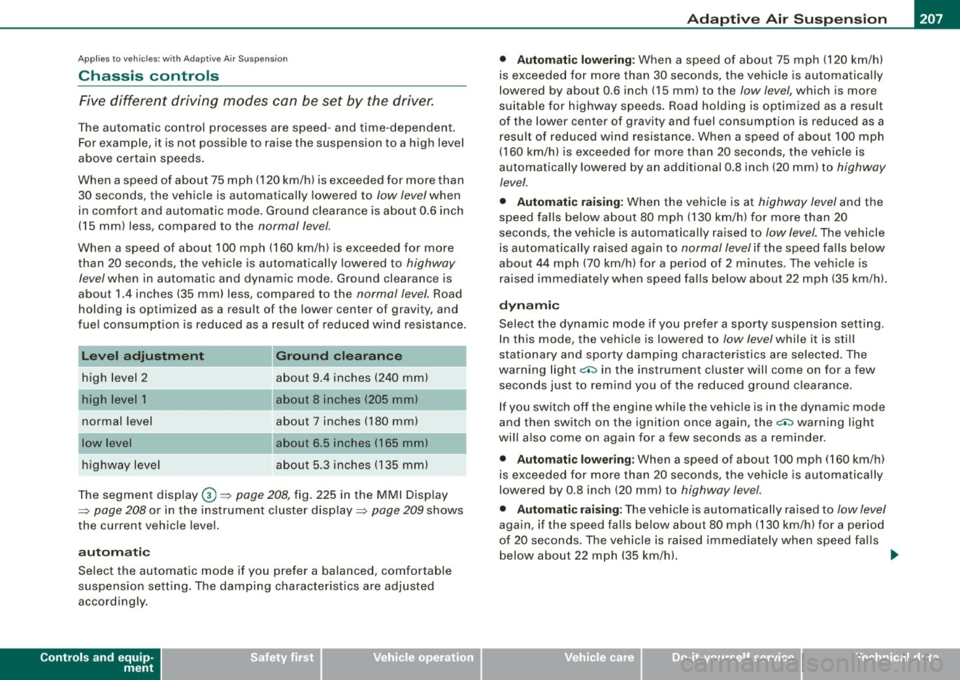
When a speed of about 75 mph (120 km/hl is exceeded for more than 30 seconds, the vehicle is automatically lowered to
low level when
in com fort and automatic mode . Ground clearance is about 0 .6 inch
(15 mm) less, compared to the
normal level.
When a speed of about 100 mph (160 km/h) is exceeded for more
than 20 seconds, the vehicle is automatically lowered to
highway
/eve/when in automatic and dynamic mode. Ground clearance is
about 1.4 inches (35 mm) less, compared to the
normal level. Road
holding is optimized as a resu lt of the lower center of gravity, and
fue l consumpt ion is reduced as a result of reduced wind resistance .
Level adjustment
high level 2
normal level
highway level
Ground clearance
about 9 .4 inches (240 mml
a bout 8 inches (205 mm)
about 7 inches (180 mm)
about 6.5 inches ( 165 mml
a bou t 5.3 inches (135 mm)
The segment display
G) ~ page 208, fig. 225 in the MMI Display
~ page 208 or in the instrument cluster display~ page 209 shows
the current vehicle level.
a ut omati c
Select the automatic mode if you prefer a ba lanced, comfortable
suspension se tt ing. The damp ing characteristics are adjusted
accordingly.
Controls and equip
ment •
Aut omatic l ower ing :
When a speed of about 75 mph (120 km/h)
is exceeded for more than 30 seconds, the vehicle is automatica lly
lowered by about 0 .6 inch (15 mm) to the
low level, which is more
suitable for highway speeds . Road holding is opt im ized as a result
of the lower center of gravity and fuel consumption is reduced as a
result of reduced wind resistance. When a speed of about 100 mph
(160 km/h) is exceeded for more than 20 seconds, the vehicle is
automatically lowered by an additional 0 .8 inch (20 mm) to
highway
level.
• Automatic rai sing: When the vehicle is at highway level and the
speed fa lls be low about 80 mph (130 km/h) for more than 20
seconds, the vehic le is automatica lly raised to
low level. The vehicle
is automatically raised again to
normal level if the speed fa lls be low
about 44 mph (70 km/h) for a period of 2 minutes. The vehicle is
ra ised immediate ly when speed fa lls below about 22 mph (35 km/h).
dynamic
Select the dynamic mode if you prefer a sporty suspension sett ing.
I n this mode, the vehic le is lowered to
/ow level while it is sti ll
stationary and sporty damping characteristics are selected . The
warning light~ in the instrument cluster will come on for a few
seconds jus t to remi nd you of the reduced ground clearance .
I f you switch off the engine while the vehicle is in the dynamic mode
and then switch on the ignition once again, the~ warning light
wi ll also come on again for a few seconds as a reminder.
• Automatic lowering : When a speed of about 100 mph (160 km/h)
is exceeded for more than 20 seconds, the ve hicle is auto matica lly
lowered by 0.8 inch (20 mm) to
highway level.
• Automatic rai sing: The vehic le is automatically raised to low level
again, if the speed falls below about 80 mph (130 km/h) for a period
o f 20 secon ds. The ve hicle is ra ised i mmediately whe n speed falls
below about 22 mph (35 km/h). .,_
I • •
Page 216 of 426

111....__H_ o_ m _ e _L_i _ n _k _® ____________________________________________________ _
Homelink®
Universal remote control
Applies to vehic les: w ith Home link ® universal remote cont ro l
General information
The HomeLink® fe ature can le arn up to th ree r adio
fre quency codes for m ost c urrent transmitters used for
operating garage doors, es tate gates , home or outdoor
ligh ting sy stems, and other devices .
You m ust first pro gram the H omel in k® trans mitter befor e you can
use the system=>
page 215, "Programm ing th e Homelink® trans
m itter".
In order to pro gram t he Homelink® transmitter fo r devices utilizing
ro lling code, a second person on a ladder who can safe ly reach the
ga rage door o pene r m oto r is rec omm ended . It is also necessa ry to
locate the "learn" button on your garage door opener motor. Refer
to t he op era ting instructions for the opene r, as the loca tion and
co lor of this button may vary by manufacturer .
Y ou can still use the o rigina l remote c ontrol fo r th e dev ice at any
time.
& WARNING
• Never use the Homelinkl1JI transmitter with any garage door
opener that does have not the safety stop and reverse feature as
requ ired by federal safety standards . This in cludes any garage
door opener model manufactured before April 1, 1982.
• A garage door opener which cannot detect an object , signaling
the door to stop and reverse does not meet current federal safety
standards . Using a garage door opener without these features
increases risk of serious injury or death .
& WARNING (continued)
• For safety reasons never release the parking brake or start the
engine while anyone is standing in front of the vehicle.
• A garage door or an estate gate may sometimes be set in
motion when the Homelink ® remote control is being
programmed . If the devi ce is repeatedly activated , this can over
strain motor and damage its electrical components -an over
heated motor is a fire hazard!
• To avoid possible injuries or property damage , please always
make absolutely certain that no persons or objects are located
in
the range of motion of any equipment being operated.
[ i ] Tips
• I f you wou ld l ik e mor e infor mation o n Hom elink®, w here to
purchase the Homelink ® compatib le products, or wou ld li k e to
pu rchase the Homeli nk® Home Ligh ting Package, please call t oll
free: 1 -8 0 0 -355 -3515.
• F or Dec lara tion of Compliance to U nite d Sta tes FCC an d Indu stry
C anada regulations=>
page 404 . •
Page 222 of 426
llffl..,___D_ r_iv _i_ n""' g::;._ S_ a_f _e _ly =---------------------------------------------------
Driving Safely
General notes
Safe driving habits
Please remember -safety first!
This chapter contains important information, tips, instructions and
warnings that you need to read and observe for your own safety, the safety of your passengers and others. We have summarized here
what you need to know about safety belts, airbags, child restraints as well as child safety. Your safety is for us
priority number 1. Always
observe the information and warnings in this section -for your own
safety as well as that of your passengers.
The information in this section applies to all model versions of your
vehicle. Some of the features described in this sections may be
standard equipment on some models, or may be optional equip
ment on others. If you are not sure, ask your authorized Audi dealer.
& WARNING
• Always make sure that you follow the instructions and heed
the WARNINGS in this Manual. It is in your interest and in the interest of your passengers.
• Always keep the complete Owner's Literature in your Audi
when you lend or sell your vehicle so that this important informa
tion will always be available to the driver and passengers.
• Always keep the Owner's literature handy so that you can find
it easily if you have questions. •
Safety equipment
The safety features are part of the occupant restraint
system and work together to help reduce the risk of injury
in a wide variety of accident situations.
Your safety and the safety of your passengers should not be left to
chance. Advances in technology have made a variety of features
available to help reduce the risk of injury in an accident. The
following is a list of just a few of the safety features in your Audi:
• sophisticated safety belts for driver and all passenger seating
positions,
• belt force limiters on the front seats and the outer seating posi
tions in the second row seating,
• belt tensioners for the front seats and the outer seating posi
tions in the second row seating,
• belt height adjustment for the front seats and the outer seating
positions in the second row seating,
• head restraints for each seating position,
• optimized protection against thoracic vertebrae injuries in all
seats,
• front airbags,
• side airbags in the front seats and the outer seating positions in
the second row seating*,
• side curtain airbags,
• special LATCH anchorages for child restraints,
• adjustable steering column .
These individual safety features, can work together as a system to
help protect you and your passengers in a wide range of accidents.
These features cannot work as a system if they are not always
correctly adjusted and correctly used.
~
Page 223 of 426

Driving Safely -
----------------
Safety is everybody's responsibility! •
Important things to do before driv ing
Safety is everybody's job! Vehicle and occupant safety
always depends on the informed and careful driver.
For your safety and the safety of your passengers, before
driving always:
- Make sure that al l lights and signals are operat ing
correctly.
- Make sure that the tire pressure is correct.
- Make sure that all windows are clean and afford good
visibility to the outside.
- Secure all luggage and other items carefully :::>
page 119.
-Make sure that noth ing can interf ere w ith the pedals.
Adjust fro nt seat, head restraint and mirrors correctly for
your height .
Instruct passengers to adjust the head restraints
according to their height.
- Make sure to use the right ch ild restraint correctly to
protect children :::>
page 263, "Child Safety".
- Sit properly in your seat and make sure that your passen
gers do the same :::>
page 92, "General recommenda
tions".
- Fasten your safety belt and wear it p roperly. Also instruct
your passengers to fasten their safety belts properly
~ page 231. •
Controls and equip
ment Safety first Vehicle operation
What impa
irs driving safety?
Safe driving is directly related to the condition of the
vehicle, the driver as well as the driver's ability to concen
trate on the road without being distracted.
The driver is responsible for the safety of the vehicle and all
of its occupants. If your ability to drive is impaired, safety
risks for everybody in the vehicle increase and you also
become a hazard to everyone else on the road :::>& .There
fore:
- Do not let yourself be distracted by passengers or by
using a cellula r telephone .
NEVER drive when your driving ability is impaired (by
medications, alcohol, drugs, etc.).
Observe all traffic laws, rules of the road and speed limits
and plain common sense .
- ALWAYS adjust your speed to road, traffic and weather
conditions.
- Take frequent breaks on long trips. Do not drive for more
than two hours at a stretch.
- Do NOT drive when you are tired, under pressure or when
you are stressed .
& WARNING
Impaired driving safety increases the risk of serious personal
injury and death whenever a vehicle is being used. •
Vehicle care Do-it-yourself service Technical data