warning AUDI Q7 2009 Owner´s Manual
[x] Cancel search | Manufacturer: AUDI, Model Year: 2009, Model line: Q7, Model: AUDI Q7 2009Pages: 426, PDF Size: 97.13 MB
Page 157 of 426
Adaptive Cruise Control -
---------------=-------'
preparation. This function does not perform any emergency braking
m aneuv ers by i tse lf ; t he driver m ust alw ays app ly the b rake s.
& WARNING
If ACC initiates a braking maneuver, the brake pedal will be
retracted . Interference with the brake pedal can prevent ACC from
slowing the vehicle down and cause a crash and serious personal
injury .
• Never put anything in the driver 's footwell or let anything fall
into it . An object in the driver 's footwell can interfere with the
pedals and prevent the accelerator from being used to override
ACC or prevent ACC from being swit ched off when the brake pedal
is depressed and also prevent the vehicle from being slowed down
or stopped .
• Only u se floor mats that keep the area around the pedals free
and that can be securely fastened to the footwell.
• Never drive with your foot underneath the brake pedal.
• Always read and heed the information and WARNINGS=>
& in
" Description " on
page 152.
& WARNING
• Never rely on the distance control feature of ACC alone to
prevent rear -end collisions. Always be prepared to brake and take
evasive action to avoid collisions and other accident situations .
• Never allow the closing speed between you and other vehicles
to be so high that the Adapt ive Cruise Control may not be able to
slow your vehicle safely .
If closing speed is too high , you must
apply the brakes yourself to reduce the risk of a rear -end cra sh.
[ i ] Tips
Please note that the amount of acceleration the Adaptive Cruise
Control uses depends on the Distance setting selected. DISTA NCE 1
gives you accel erati on that is dy na mi c a nd sporty. DISTA NCE
4, on
Con tro ls and eq uip
ment
the other hand , gives more moderate acceleration . For more infor
m ati on about th e tim e in te rvals =>
page 758, "How i s the d istance
(time interval) set?" .
• Please not e th at if th e Ada ptive Cru ise Control has begun bra king
the vehicle and the driver chooses to brake th e vehicle additionally,
t he brakes may fe e l "har d". Th is is simply due t o th e pr essu re build
up of the initial braking .
• Adap tiv e Crui se Co ntrol is switc hed off aft er pr essing th e foot
brake. The speed saved up this point can be resumed . T o resume the
saved spee d, rel ease the brake pedal a nd pull t he control le ve r
toward you=>
page 757, " Turning Adaptive Cru ise Contro l off
t empo ra rily" .•
A pplies to veh ic les: with Adaptive C ru ise Contro l
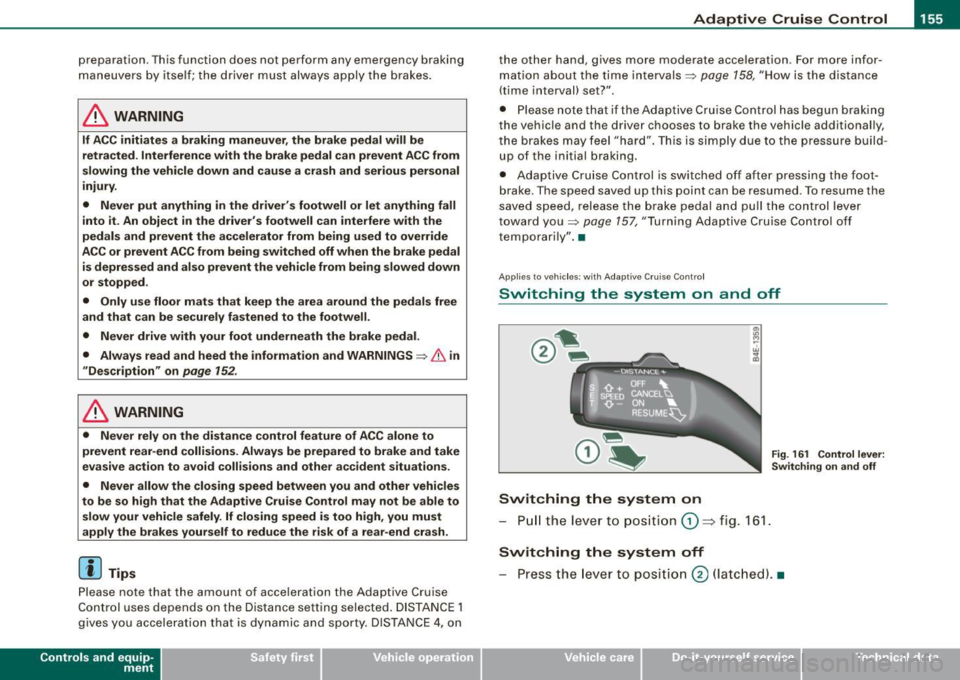
Switching the system on and off
Fig. 161 Control lever:
S w itc hing on and off
Switching the system on
- Pull t he leve r to p ositi on G) => fig . 1 61.
Switching the system off
- Press the lev er to posi tion 0 (la tc h ed). •
Vehicle care I I irechnical data
Page 159 of 426
_____________________________________________ A_ d..:.a....! p..:. t _i_ v _ e_;_ C.:...._ ru.:...._ is..:.e_;_ C.:...: o..:.n..:.. t:.; r..:. o ..:. I_---J_
- Press the lever downwards Q and hold it. As long as you
hold the control switch down, the light diode display in
the speedometer LED display moves backward and the speed is reduced.
After releasing the control switch, the system regulates the speed to
the value just set .
After each adjustment, the newly -set speed is shown for a short
time in the Information line=> page
163.
& WARNING
Improper use of the Adaptive Cruise Control features and inatten
tion can lead to an accident causing serious personal injury.
• It is dangerous to use the "RESUME" feature when the previ
ously set speed is too high for existing road, traffic or weather
conditions.
• Always read and heed the information and WARNINGS =>
& in
"Description" on
page 152.
[ i] Tips
You can increase your speed at any time by stepping on the acceler
ator pedal. After you release the accelerator pedal, the system
adjusts back down to the speed you previously set . A new desired
speed can be stored at any time by pressing the [SET ] button
=> page
756 , fig. 162. •
Con tro ls and eq uip
ment
A pp lies to veh icles: with Ad aptive Crui se Co ntro l
Turning Adaptive Cruise Control off
temporarily
In some situations it makes sense to turn Adaptive Cruise
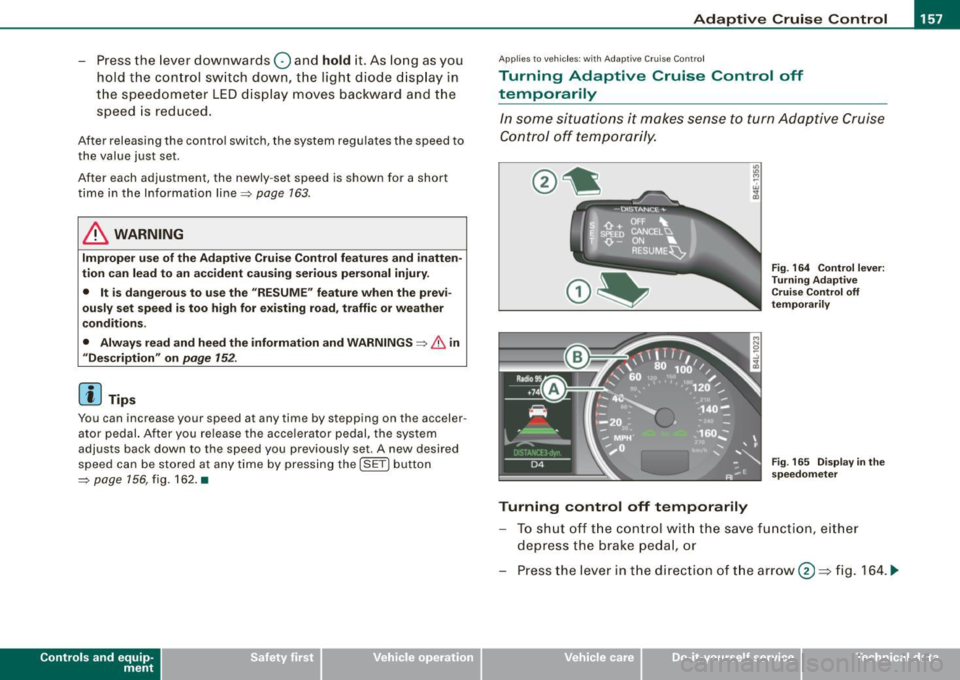
Control off temporarily.
Turning control off temporarily
Fig. 164 Control lever:
Turning Adaptive
Cruise Control off
temporarily
Fig . 165 Display in the
speedometer
To shut off the control with the save function, either
depress the brake pedal, or
Press the lever in the direction of the arrow@=> fig. 164 . ._
Vehicle care I I irechnical data
Page 160 of 426
• ..__A_ d_a"'"' p:,..._ ti_v_ e_ C_ ru_ is_ e_ C_ o_n_ t_ r_ o_ l ___________________________________________ _
Reactivating control
-To resume the speed and distance control, release the
brake pedal and press the lever in the direction of the
arrow (D.
Display in the speedometer
© Current vehicle speed => page 7 57, fig. 165
@ Saved speed
As long as a speed is saved the set desired speed will be displayed in the LED display in the speedometer by one or two illuminated red
light diodes. When the control function is resumed the Adaptive
App lies to vehicles: with Adaptive Cruise Cont rol
How is the distance (time interval) set?
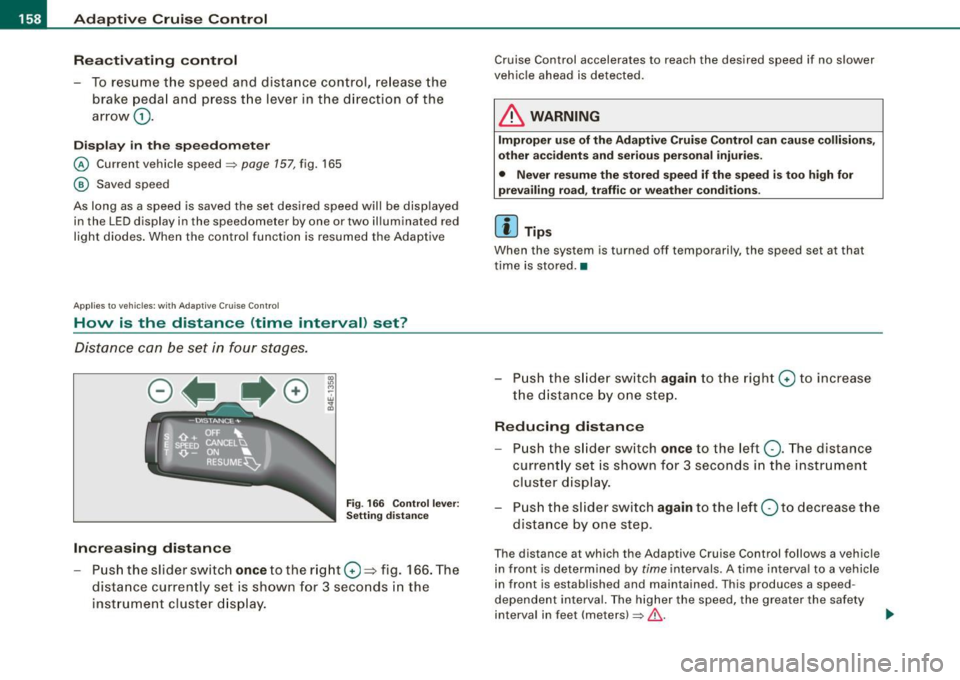
Distance can be set in four stages.
Fig . 166 Control lever:
Setting distance
Increasing distance
-Push the slider switch once to the right 0 ~ fig. 166. The
distance currently set is shown for 3 seconds in the instrument cluster display.
Cruise Control accelerates to reach the desired speed if no slower
vehicle ahead is detected.
& WARNING
Improper use of the Adaptive Cruise Control can cause collisions,
other accidents and serious personal injuries.
• Never resume the stored speed if the speed is too high for
prevailing road, traffic or weather conditions.
[ i ] Tips
When the system is turned off temporarily, the speed set at that
time is stored. •
- Push the slider switch again to the right 0 to increase
the distance by one step.
Reducing distance
Push the slider switch once to the left Q. The distance
currently set is shown for 3 seconds in the instrument
cluster display.
- Push the slider switch
again to the left Oto decrease the
distance by one step .
The distance at which the Adaptive Cruise Control follows a vehicle
in front is determined by
time intervals. A time interval to a vehicle
in front is established and maintained . This produces a speed
dependent interval. The higher the speed, the greater the safety
interval in feet (meters)
=> &- _,.
Page 162 of 426
• ..__A_ d_ a-:.. p_t _iv _ e_ C_r_ u_ i _s _ e_ C_ o_n_ t_ r_ o_ l _____________________________________________ _
& WARNING
Following other vehicles too closely increases the risk of a crash
and serious personal injury .
• Following other vehi cles too closely , particularly at h igher
speeds increases the risk of colli sions and serious personal injury.
• Setting short distances to the traffic ahead reduces the time
and distance available to bring your vehicle to a safe stop and
makes it even more necessary to pay close attention to traffic .
• Always select a speed and distance to traffic ahead that is safe
and appropriate under the prevailing traffic , road , weather and
lighting conditions .
• Never rely on the distan ce control feature of ACC alone to
prevent rear-end collisions. Always be prepared to brake and take
evasive action to avoid collisions and other acc ident situations .
• Never allow the closing speed between you and other vehicles
to be so h igh that the Adaptive Cruise Control may not be able to
slow your vehicle safely. If closing speed is too high , you must
apply the brakes yourself to reduce the risk of a rear-end crash .
• Always select a greater following distance to the vehicle ahead
on wet roads than on dry roads .
• Always re ad and heed the informat ion and WARNINGS ::::>
& in
"Description" on
page 152.
[ i J Tips
The distance setting i s re set to the factory default DISTANCE 3 the
next time the i gnition is turned on. •
Driver information
Applies to veh icles : w ith Adapt ive Cru ise Cont rol
Displays in the instrument cluster
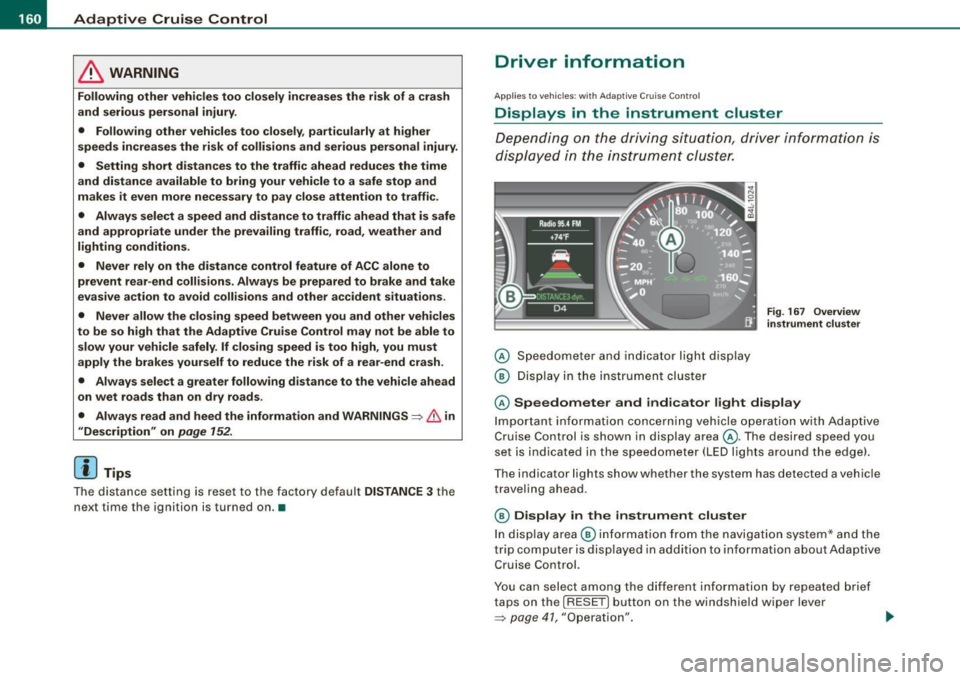
Depen din g o n the driving si tuati on, driver inf ormation is
dis played in the ins trumen t clus ter.
@ Spe ed om eter and indicator lig ht displ ay
@ Display in the instru ment clu ster
Fig . 16 7 Overview
in strument clu ste r
© Speedometer and ind icator light display
Im por tan t in fo rm ati on co ncerni ng veh icle ope ration w ith Ada ptiv e
Cruise Control is shown in display area@. T he desired speed you
s et is in dica te d in the spee dome ter (LED l igh ts aro un d t he edg e).
T he indicator lights show whether the system has detected a v ehic le
trave ling ahead .
© Display in the instrument cluster
In di sp lay area @ informati on fr om the navigati on syste m* a nd t he
trip computer is disp layed in addition to information about Adaptive
Cru ise Control.
You can s ele ct amo ng th e di ffer ent i nformati on by repeat ed br ief
taps on the [R ESET] button on the windshield wiper lever
=> p ag e 41 , "O peration". ~
Page 163 of 426

_____________________________________________ A_ d_a ...: p_ t_ i_ v _e_ C_ ru_ is_ e_ C_ o_n _ t_ r_o _ l _ __._
Certain pieces of information in the bottom part of the display are
not shown permanent ly . Informa tion is displayed on ly if you set or
change the speed set ting, change the time interval , when messages
are displayed or if the Adaptive C ruise Co ntrol is turned off for safety
reasons. •
Applies to vehicles: with Ada ptive C rui se Cont rol
Display in the speedometer
Desired speed
Fig. 16 8 Displa y in th e
s p ee do mete r
The desired speed set by the driver is displayed by a red LED .
If the desired speed was set between two lines on the speedomete r
using the
[SET I button, the two closest light emitting diodes will
come on
=> fig . 168.
T he system allows on ly speeds to be set between 20 to 95 mph (30
to 150 km/h) to be set . This speed range is faintly illuminated in the
speedometer (LED l ights).
Indi cator light s (sy mbols )
• ""c:::::> Open road : The indicator light ""c:::::> shows that ACC is active
and that no moving vehic le has been detected with in range of the
radar sensor up ahead in your lane of trave l. The set speed is main
tained.
Con tro ls and eq uip
ment
• c:::::>1n ,c:::::> Dri ving in traffi c: The indicator light c:::::>11, ,c::::, shows that a
ve hicle moving in your lane of travel has been detec ted up front in
your lane of travel. Your speed is adjusted according to the speed of
t he vehicle up front . ACC accelerates and brakes automa tically
within the system's capabilities.
• c:::::>11 "c:::::> Driver intervention prompt : The red flash ing warning
light
~11 .. .::::::, means Reque st for driver to a ssume control . You as the
driver mus t slow the vehic le with the foot b rake . The symbol
.::::::,11 .. c:::::>
tells you that the Adaptive Cruise Con trol is not able to s low the
vehic le down enough to keep a enough distance to the vehic le in
front of you. A warn ing tone wi ll also sound when the symbo l
appears . For more information about the driver intervention prompt
=> page 764.
& WARNING
Improper u se of the Adap tive Cr uise Contr ol features and inat ten
tion can lead to a crash and serious person al injury .
• Never allow t he clo sing speed between you and other vehi cle s
to be so high that the Adapt ive Cruise Control may not be able to
s lo w your vehi cle safely .
If clos ing speed is too h igh , you must
apply the brakes your self to reduce the risk of a rear-end crash .
• Alway s s ele ct a greater follo wing di stance to the veh icle up
ahead on wet ro ads than on dry road s.
• Always re ad and heed the information and WARNINGS=>
& in
" Description " on
pag e 152.
[ i ] Tips
• I f you use the accelerator to go faster than the speed of the
vehicle ahead of you, the driver intervention p rompt wil l not be
accompanied by a wa rning tone .
• I f the speed you previously set is exceeded, the indicator light in
the speedometer wi ll swi tch off .•
Vehicle care I I Technical data
Page 164 of 426
• ..__A_ d_a...: p:,..._ ti_v _ e_ C_ ru_ is_ e_ C_ o_n_ t_ r_ o _ l ___________________________________________ _
Applies to veh ic les: with Adapt ive Cruise Contro l
Display in the instrument cluster
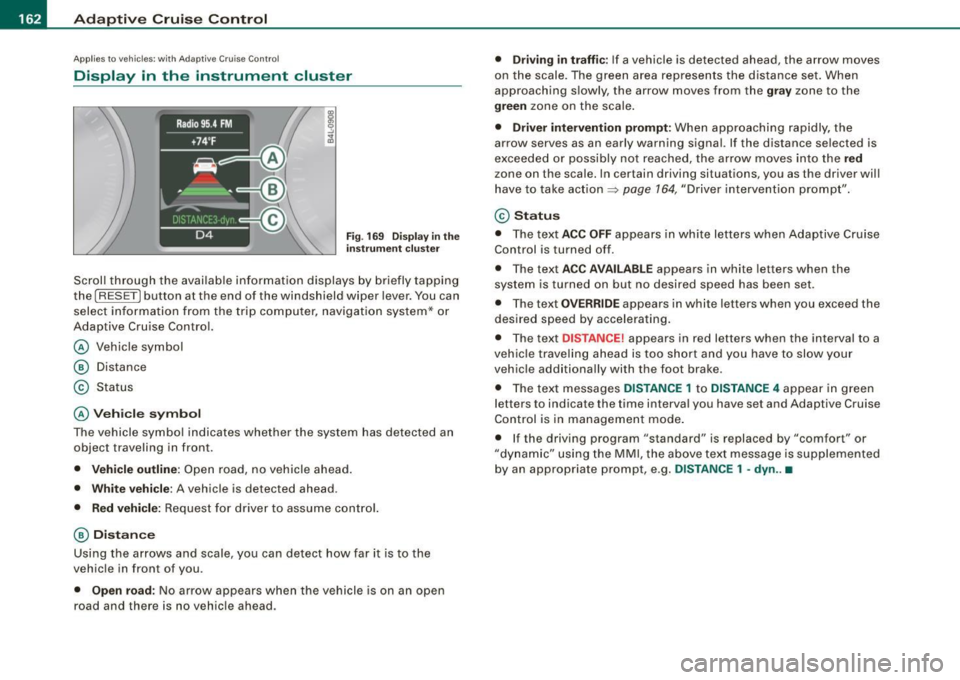
Fig . 169 Displ ay in the
in strumen t cluster
Scroll through the avai lab le information displays by briefly tapping
the
I RESET] button at the end of the windshield wiper lever. You can
select information from the trip compu ter, navigation system* or
Adaptive Cruise Contro l.
@ Vehicle symbol
@ Dis tance
© Status
@ Veh icle sy mbol
The vehicle symbol indicates whether the system has detected an
object traveling in front.
• Vehicle outl in e: Open road, no vehicle ahead .
• Whit e vehi cle : A vehicle is detec ted ahead .
• Red vehicle: Request for driver to assume contro l.
@ Distance
Using the arrows and scale, you can detect how far it is to the
vehic le in front of you .
• Open road: No arrow appears when the vehicle is on an open
road and there is no vehicle ahead .
• Driving in traff ic: If a vehicle is detected ahead, the arrow moves
on the scale . The green area represents the d istance set . When
approaching s lowly, the arrow moves from the
gray zone to the
green zone on the scale .
• Driver intervention prompt : When approaching rapidly, the
arrow serves as an early warning signal. If the distance selected is
exceeded or possibly no t reached, the arrow
moves into the red
z one on the scale. In certain driving situations, you as the driver will
have to take action ::::,
page 764, "Driver interventio n prompt" .
© Status
• The tex t ACC OFF appears in white letters when Adaptive Cruise
Control is turned off.
• The text
ACC AVAILABL E appears in white letters when the
system is turned on but no desired speed has been set .
• The text
OVE RRIDE appears in white letters when you exceed the
desired speed by accelerating .
• The text
DISTANCE! appears in red letters when the interval to a
vehic le trave ling ahead is too short and you have to slow y our
vehic le additionally with the foot brake .
• The text messages
DISTANCE 1 to DISTANCE 4 appear in green
letters to indicate the time interval you have set and Adaptive Cruise
Control is in management mode .
• I f the driving program "standard" is replaced by "comfor t" or
"dynamic" using the MMI, the
above text message is supplemented
by an appropriate prompt, e .g.
DISTANCE 1 -dyn .. •
Page 165 of 426
Adaptiv e Crui se Contro l ""' __________________________ ___;__;~-------
Applies to vehic les: w it h Ad aptive Crui se Co nt rol
System status indicator
The text messages and symbols shown in this area of the
display are not displayed permanently.
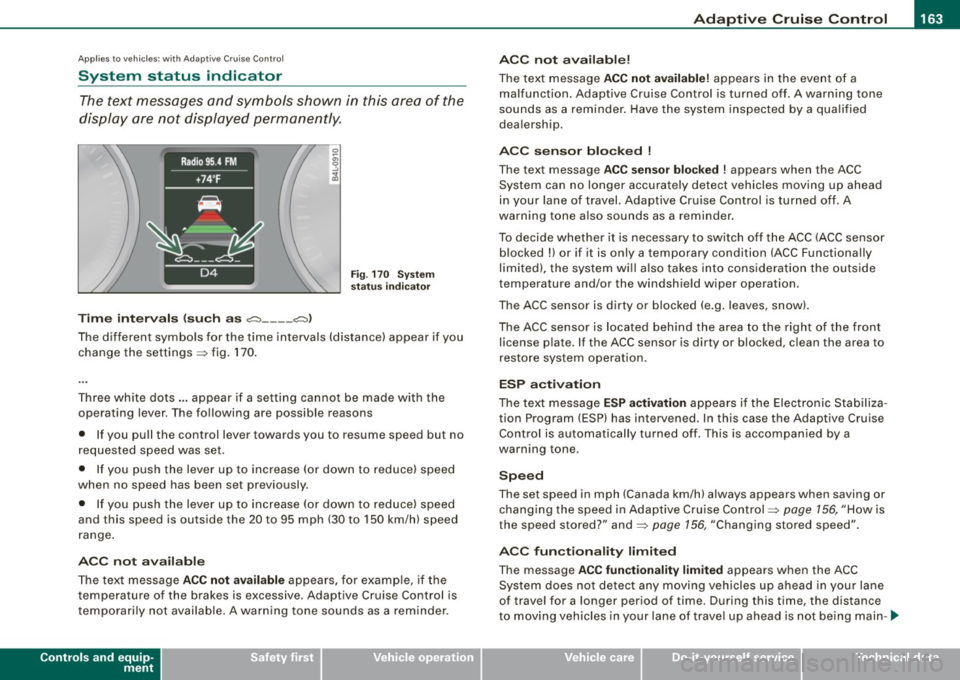
T ime in ter va ls (s uch a s c::;, __ __ c::;, }
Fig . 170 System
sta tus in dicator
The different symbols for the time intervals (distance) appear if you
change the settings:::;, fig. 170 .
Three white dots .. . appear if a setting canno t be made with the
operating lever . The following are possible reasons
• If you pull the control lever towards you to resume speed but no
requested speed was set.
• I f you push the lever up to increase (or down to reduce) speed
when no speed has been set previously.
• If you push the lever up to increase (or dow n to reduce) speed
and this speed is outside the 20 to 95 mph (30 to 150 km/h) speed
range .
A CC no t ava ila bl e
The text message ACC not av aila ble appears, for examp le, if the
temperature of the brakes is excessive. Adaptive Cruise Control is
t emporarily not available . A warning tone sounds as a reminder.
Controls and equip
ment A
CC not ava ilable!
The text message ACC not availabl e! appears in the event of a
malfunction. Adaptive Cruise Control is turned off. A warning tone
sounds as a reminder . Have the system inspected by a qua lified
dea lership.
ACC s ensor bl ocked
!
The text message ACC se nsor blo cke d ! appears when the ACC
System can no longer accurately detect vehicles moving up ahead
in your lane of
travel. Adaptive Cruise Control is turned off. A
warning tone a lso sounds as a reminder.
To decide whether it is necessary to switch off the ACC (ACC sensor b locked
!) or if it is only a temporary condition (ACC Functionally
limited), the system wi ll also takes into consideration the ou tside
temperature and/or the windshield wiper operation.
The ACC sensor is dirty or b locked (e .g . leaves, snow).
The ACC sensor is located behind the area to the right of the front license p late. If the ACC sensor is dirty or b locked, c lean the area to
restore system operat ion.
ESP activ at ion
The text message ES P activ ation appears i f the E lectronic Stabiliza
tion Program (ESP} has intervened. In this case the Adaptive Cruise
Control is automatically turned off . This is accompanied by a
warning tone.
S peed
The set speed in mph (Canada km/h) always appears when saving or
changing the speed in Adaptive Cru ise Control :::;, page 156, "How is
the speed stored?" and:::;, page 156, "Changing stored speed".
A CC function alit y limited
The message ACC functionalit y lim ited appears when the ACC
System does not detect any moving vehicles up ahead in your lane
of trave l for a longer period of time. During this time, the distance
t o moving vehicles in your lane of trave l up ahead is not be ing main -~
I • •
Page 166 of 426
• ..__A_ d_a...: p:,..._ ti_v _ e_ C_ ru_ is_ e_ C_ o_n_ t_ r_ o _ l ___________________________________________ _
tained. The ACC system is not switched off, and increased attention
to the traffic situation is absolutely necessary. The following may be
reasons why the message
ACC functionality limited appears:
• The ACC sensor is dirty . The ACC system is not reacting, or is not
reacting correctly, to moving vehicles up ahead in your lane of
travel.
• There may be very light traffic on and there is nothing that marks
the side of the road (for example, guard rails, traffic signs, trees). As
soon as a moving vehicle up ahead is detected again, ACC becomes
active again and the message disappears .
The ACC sensor is located behind the area to the right of the front
license pla te . If the ACC sensor is dirty or blocked, clean the area to
restore system operation.
Parking brake !
The text message Parking brake ! appears, when the parking brake
is applied. ACC is turned off. A warning tone sounds as a reminder.
Stationary object ahead
The text messag e Stationary object ahead appears, when you want
to activate the system and there is a stationary vehicle or an object
immediately in front of you.
Gradient too steep
The text message Gradient too steep appears when the maximum
gradient for proper ACC operation has been exceeded. Adaptive
Cruise Control is turned off. A warning tone also sounds as a
reminder.
ACC off: manual control!
The text message ACC off: manual control! appears after the vehicle
has been brought to a standstill by the Adaptive Cruise Control. In
this case you must depress the brake pedal to prevent the vehicle
from rolling. A warning tone sounds as a reminder .
Selector lever position!
The text message Selector lever position! appears when the
selector lever is moved to position
N. In this position, Adaptive
Cruise Control is not available. •
Applies to vehi cles : wi th Ad aptive Cr uise Co ntro l
Driver intervention prompt
The driver intervention prompt calls on the driver to take
over the situation.
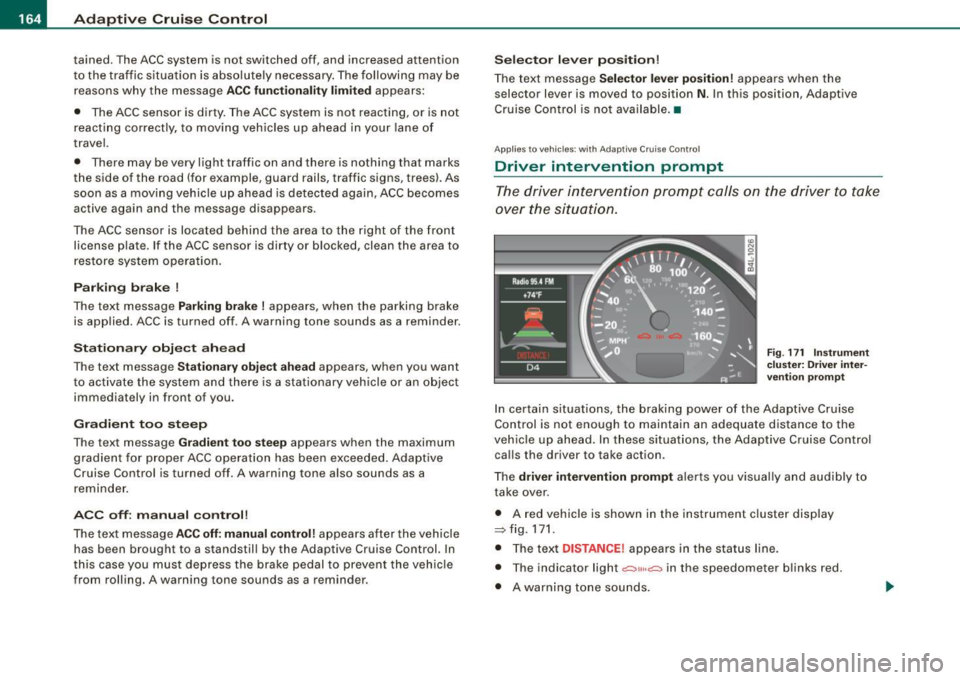
Fig. 171 Instrument
cluster: Driver inter
vention prompt
In certain situations , the braking power of the Adaptive Cruise
Control is not enough to maintain an adequate distance to the
vehicle up ahead. In these situations, the Adaptive Cruise Control
calls the driver to take action .
The
driver intervention prompt alerts you visually and audibly to
take over .
• A red vehicle is shown in the instrument cluster display
::::::,fig.171.
• The text DISTANCE! appears in the status line .
• The indicator light
.:=:,1,, ,.:=:> in the speedometer blinks red.
• A warning tone sounds.
Page 167 of 426
![AUDI Q7 2009 Owner´s Manual _____________________________________________ A_ d_a ...: pc.. t _i_ v _e_ C_ ru_ is_ e_ C_ o_n_ t_ r_ o _ l __ lllll
[ i ] Tip s
• Adaptive Cruise Contro l is switched off after pressing t](/img/6/40274/w960_40274-166.png "AUDI Q7 2009 Owner´s Manual _____________________________________________ A_ d_a ...: pc.. t _i_ v _e_ C_ ru_ is_ e_ C_ o_n_ t_ r_ o _ l __ lllll
[ i ] Tip s
• Adaptive Cruise Contro l is switched off after pressing t")
_____________________________________________ A_ d_a ...: pc.. t _i_ v _e_ C_ ru_ is_ e_ C_ o_n_ t_ r_ o _ l __ lllll
[ i ] Tip s
• Adaptive Cruise Contro l is switched off after pressing the foot
brake . The speed saved up this point can be resumed.
• To resume the saved speed, release the brake pedal and press
the control lever=>
page 157, "Turning Adaptive Cruise Control off
temporarily".
• If you use the accelerator to go faster than the speed of the
vehicle ahead of you , the
dr iver i nterve ntion pr ompt will not be
accompanied by a warning signal.
• If the speed you previously set is exceeded , the indica tor light in
the speedometer wi ll switch off. •
Applies to v ehi cles: with Ad aptive Crui se Co nt rol
MMI settings
Individual settings for Adaptive Cruise Control can be
selected in the MM/ .
Fig. 172 M MI Display:
A dapti ve C ruise
Co ntrol
Settings for the driving program can be adjusted indiv idu
ally to the particular user and saved in the MMI. This can
only be done with the eng ine running.
- Press the
I CAR] funct ion button.
Controls and equip
ment
Select Sy stem s* in the CAR menu.
- Select
Adaptive Crui se Control . The Adaptive C ruise
Control
menu appears.
Select
driving program .
Select the desired driv ing program .
Sett in g t he d riving p rogram
In the driving progr am menu you can adjust the characteristics of
Adaptive Cruise Contro l to your own preferences using
d yn ami c,
s ta nd ard
or comfort .
Sav ing sett ing s
Your individua l settings are automatical ly saved and assigned to the
remote control key being used (remote key storage). If the key is
given to another person, the saved settings remain as they are. •
System limitations
Applies to veh ic les : w ith Ada ptiv e Crui se Cont ro l
General information
The radar sensor has limits that the driver must know to
be able to use ACC properly.
The Adaptive Cruise Control works within limits that ar e also related
to radar sensor range and sight distance . In some situations ACC
may react unusually or late from the driver's point of view . There
fore, always be attentive to what is happening around you and always be ready to intervene, if necessary :
• when driving around curves=>
page 166
• when vehicles up front are not in line with your vehicle
=>
page 166
• when other vehic le s are changing lanes=> page 167
I • •
Page 168 of 426
• ..__A_ d_a...: p:,..._ ti_v _ e_ C_ ru_ is_ e_ C_ o_n_ t_ r_ o _ l ___________________________________________ _
• when other vehicles are difficu lt to dete ct~ page 167
• when vehicles up ahead are not moving or obs tacles are in your
trave l lane ~ page
167
& WARNING
The radar sensor's fun ction and range can be redu ced by rain ,
s now and hea vy spray. Mo ving vehicle s up ahead may not be
promptl y dete cted or m ay not be detected at all.
• Alway s pay careful attention to the traffic situ atio n and be
ready to inter vene and be ready to take compl ete control wh en
ever ne ce ssa ry . •
App lies to vehicles : wi th Ada ptive Cruise Contro l
When driving around curves
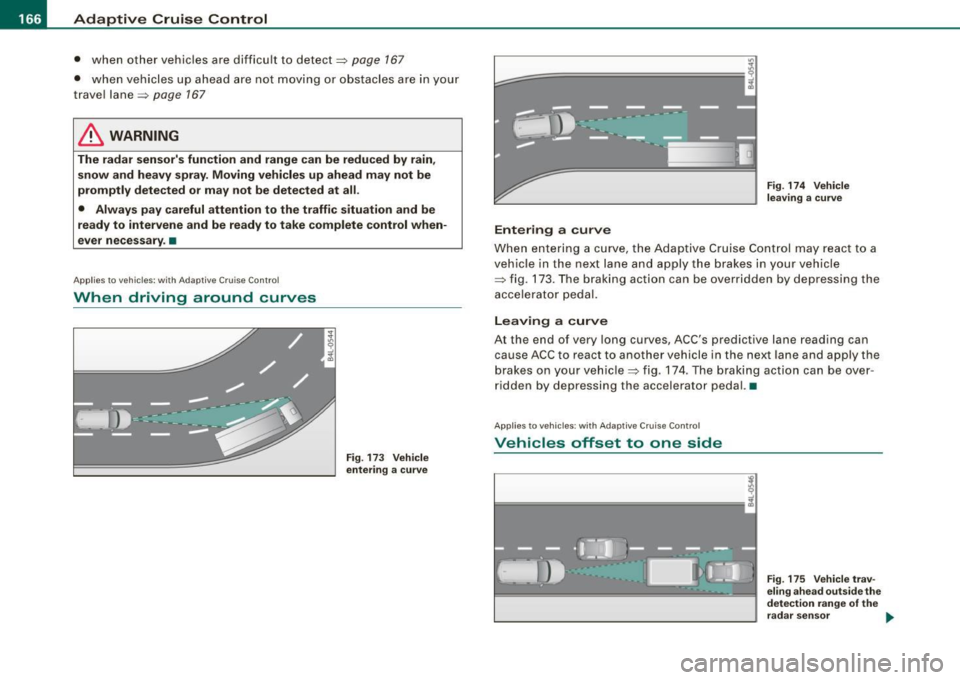
Fig . 17 3 Ve hicle
e nt erin g a curv e
Entering a cur ve
Fig . 174 Vehicle
l eav ing a curve
When entering a curve, the Adaptive Cruise Control may react to a
vehicle in the next lane and apply the brakes in your vehicle
~ fig. 173. The braking action can be overridden by depressing the
accelerator pedal.
Leaving a curve
At the end of very long curves, ACC's predictive lane reading can
cause ACC to react to another vehicle in the next lane and apply the
brakes on your vehicle~ fig. 174. The braking action can be over
ridden by depressing the accelerator pedal. •
Applie s to vehic les : w ith Ad aptiv e Crui se Cont rol
Vehicles offset to one side
~
l==================1 i
Fig. 175 V ehicle trav
e lin g ahe ad o uts ide th e
de tec tion rang e of th e
r ad ar sen sor ..