lock AUDI Q7 2009 Owner´s Manual
[x] Cancel search | Manufacturer: AUDI, Model Year: 2009, Model line: Q7, Model: AUDI Q7 2009Pages: 426, PDF Size: 97.13 MB
Page 32 of 426

Driver information display
& WARNING
Always observe the posted speed limits and adjust your speed to
suit prevailing road, traffic and weather conditions. Never drive
your vehicle faster than the maximum speed rating of the tires
installed. •
Auto Check Control
Introduction
The Auto -Check control monitors the function of certain vehicle
features and components . It simply makes sure these features and
components are working properly . The Auto -Check control works as
long as the ignition is on, as well as whenever the vehicle is driven.
If a component is malfunctioning or if the need for an urgent repair
has been detected, this will appear in the instrument cluster display.
You will also hear an audible warning tone . The displays are color
coded in either red or yellow depending on their level of priority .
A red symbol means
Danger, a yellow symbol indicates Warning. In
certain situations, information message for the driver appear in
addition to the red and yellow symbols.
Function test: automatic transmission
The Auto-Check Control will automatically perform a test each time
you switch on the ignition. With the selector lever in
P or N, the
following message appears in the display:
When stationary apply footbrake while selecting gear.
When you a select a different gear (for example: R, D, etc.), the
message will disappear and the Auto-Check function is displayed.
If there is a malfunction, then the malfunction message will appear
about 15 seconds after the you start the vehicle. At the same time
you will hear a warning tone .•
Driver information messages
Driver information messages are shown in the instrument
cluster display in addition to the red and yellow symbols.
Fig. 17 Instrument
cluster: CHECK button
For example, if the transmission selector lever is not in the P posi
tion when the engine is turned off, the following message appears:
Shift to P, otherwise vehicle can roll away. Doors do not lock if
lever is not in P.
The ignition key can only be removed with the selector in this posi
tion. This and other messages are brought up if a function cannot
be carried out.
Driver messages and red symbols
If a red symbol appears in the display, a driver message can be
shown by pressing the [
CHECK) button.
For example, the symbol for a problem with engine oil pressure
"1::71
appears in the display . If you then press the [ CHECK) button, the
following driver message appears in the display:
Switch off engine and check oil level
The driver message in the display goes out after about 5 seconds.
The driver message can be displayed again by briefly pressing the
!CHECK) button. ..
Page 34 of 426

Driver information display
• Speed warnings threshold 1 8 (USA modelsl/8 (Canada
models) and threshold
2 e , (USA modelsl/ 8 (Canada models) are
also shown as red symbols. The warning is always shown as a small
symbol in the upper area of the display=>
page 38. •
Alternator malfunction 0
If the O symbol in the instrument panel display flashes, then there
is a malfunction in the alternator or the vehicle electronics. A
warning to the driver will appear, too. The driver warning goes out
after about
5 seconds, but it can be brought up at any time by
pressing the
( CHECK ] button again.
Usually, you can still drive to the next dealership. Turn off all but the
most necessary electrical consumers, since these drain the vehicle's
battery.
0 Note
If the _t warning symbol (coolant system malfunction) also lights
up on the instrument panel during the trip=>
page 33, then you
have to stop immediately and turn off the engine. The coolant pump
is not working anymore -danger of damage to the engine! •
Brake system malfunction
A malfunction in the brake system must be repaired as
soon as possible.
If the warning/indicator light BRAKE (USA models)/ (©)
(Canada models) in the instrument cluster flashes, there is
a brake system malfunction. By pressing the [ CHECK]
button, you can bring up a driver message which explains
the malfunction in more detail.
Stop vehicle and check brake fluid level
-Pull off the road.
- Stop the vehicle.
- Turn off the engine.
- Check the brake fluid level=>
page 341.
-Contact your nearest authorized Audi dealer or qualified
workshop if necessary.
Warning! Fault in ABS brake system. Contact
workshop
- Drive carefully to the nearest authorized Audi dealer or
qualified workshop and have the malfunction corrected
=> & .
If the ABS system malfunctions, the ABS warning/indicator light illu
minates together with the brake system malfunction warning/indi
cator light=>& .
& WARNING
• Always observe the warnings in => page 324, "Engine compart
ment", before opening the hood and checking the brake fluid .
• Driving with low brake fluid is a safety hazard. Stop the car and
get professional assistance .
• USA models: If the BRAKE warning light and the .-..-warning
light come on together, the rear wheels could lock up first under
hard braking. Rear wheel lock-up can cause loss of vehicle control
and an accident . Have your vehicle repaired immediately by your
authorized Audi dealer or a qualified workshop. Drive slowly and
avoid sudden, hard brake applications.
• Canada models: If the brake warning light
warning light come on together, the rear wheels could lock up
first under hard braking. Rear wheel lock-up can cause loss of _.,
Page 36 of 426

Driver information display
-Stop the vehicle.
- Turn off the engine .
-Check the engine oil level with the dipstick=:, page 335.
Dipstick readings checks too low
-Top off oil to the proper level =:, page 336.
-Make sure that the oil pressure warning symbol "t=7':
appears no longer in the display before you start driving
again.
Dipstick reading checks OK
If the oil pressure warning symbol "t=7': starts flashing
again even though the engine oil level checks OK on the
dipstick,
do not continue driving and do not let the
engine run in idle.
Instead, contact your authorized Audi
dealer for assistance .
[ i] Tips
• The engine oil pressure symbol ~ is not an indicator for a low
engine oil level. Do not rely on it . Instead, check the oil level in your
engine at regular intervals, preferably each time you refuel, and
always before going on a long trip .
• The yellow oil level warning indication requires oil refill or
workshop service without delay . Do not wait until the red oil pres
sure warning
~ starts to flash before you respond to the low oil
level warning _ . By then, your engine may already have suffered
serious damage. •
Steering malfunction i
If there is a malfunction in the electronic steering column
lock, the steering cannot be unlocked.
If the i symbol in the display blinks, there is a malfunction
i n the electronic steering column lock. An additional dr iver
message can also be displayed by pressing the
I CHECK]
button:
Do not drive vehicle: Steering defective
-Contact your nearest authorized Audi dealer or qualified
workshop .
- Do
not tow your vehicle.
& WARNING
Your vehicle must not be towed in the event of a malfunction in the
electronic steering column lock because it cannot be steered due
to the locked steering .
If it is towed with the steering locked, there
is the risk of an accident. •
Ignition lock malfunction ~
A malfunction in the ignition lock must be repaired imme
diately.
If the .Pe symbol in the display blinks, there is a malfunction
in the electronic ignition lock. An additional driver message
can also be displayed by pressing the
(CHECK] button:
Ignition lock defective. Contact workshop!
-Do not turn the eng ine off.
- Drive immediately to an authorized Audi dealer to have
the malfunction corrected.
~
Page 37 of 426

If there is a malfunction in the electronic ignition lock, the ignition
cannot be turned off. Drive immediately to an authorized Audi
dea ler to have the cause of the malfunction corrected .
On vehicles with Convenience key*, the engine should not be
switched off using the
I S T OP! button because the engine cannot be
started again after the ignition is switched off. •
Yellow symbols
A yellow symbol means WARNING.
Fig. 19 Display: low
fu el leve l wa rnin g
(pr io rity 2)
Yellow symbols indicate a priority 2 malfunction -Warning!
When a yel low warning symbol appears,
one warning tone sounds .
A driver message appears as well to explain the malfunction in more
detail. The driver warning goes out after about 5 seconds, but it can
be brought up again at any time by pressing the
I CH ECK! button.
Check the displayed function as soon as possible . If
more than one
priority 2 malfunction is detected, all symbols will appear one after
the other for about 2 seconds.
Yellow symbols mean:
Con tro ls and eq uip
ment
Dri ver inf orm atio n di spl ay
Convenience key* ~ page 146
Key not in vehicle
IIUSA model s: ~ page27
Defective brake light
Canad a mod els: ~ page27
Defective brake light
Defective light bulb
~ page27
Light/rain sensor defective* ~ page36
Windshield washer fluid ~ page36
level low
L ow fue l leve l
~ page36
Battery voltag e ~ page36
Worn brake pads ~ page37
Dynamic headlight range => page 37
control defective
Check engine oil level
~ page 37
~ page335
IIEngine oil sensor malfunction ~ page 37
-
Engine speed limitation* ~ page37
-
Adaptive Light d efective* ~ page37
Ignition lock malfunction => page 38
]iwindshield wiper defect ive ~ page38
Vehicle care I I irechnical data
Page 38 of 426
Driver information display
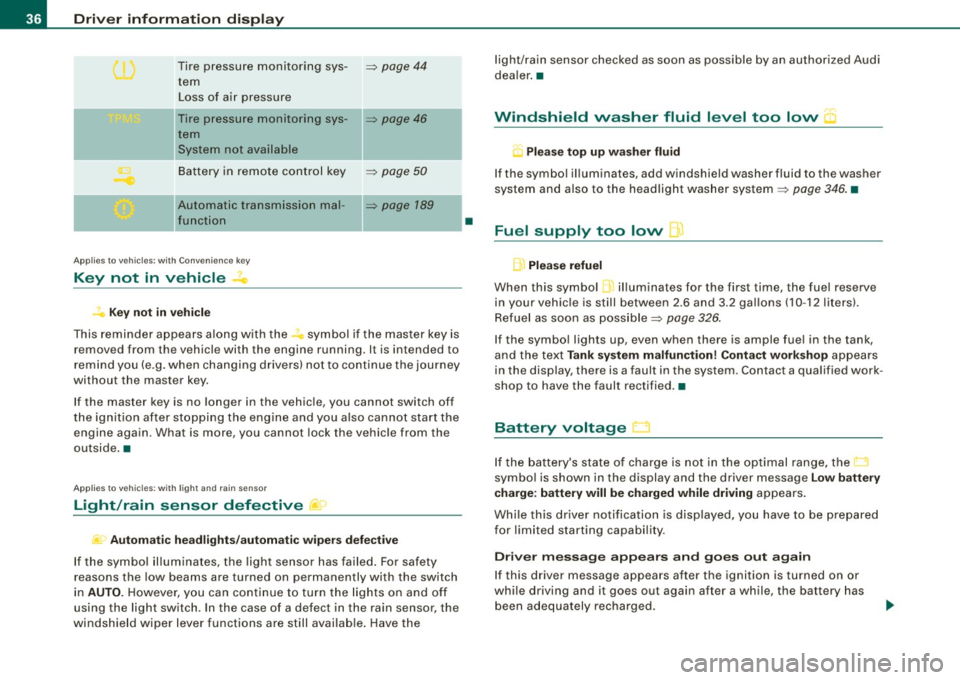
Tire pressure monitoring sys-=> page 44
tern
Loss of air pressure
- -
Tire pressure monitoring sys-=> page 46
tern
System not available
Battery in remote control key
=> page 50
- -
Automatic transmission mal-=> page 789
function
Applies to veh icles: with Conven ience key
Key not in vehicle
? Key not in vehicle
This reminder appears along with the -symbol if the master key is
removed from the vehicle with the engine running. It is intended to
remind you (e.g. when changing drivers) not to continue the journey
without the master key.
If the master key is no longer in the vehicle, you cannot switch off
the ignition after stopping the engine and you also cannot start the
engine again. What is more, you cannot lock the vehicle from the
outside. •
Applies to vehicles: w ith light and ra in sensor
Light /rain sensor defective )
Automatic headlights/automatic wipers defective
If the symbol illuminates, the light sensor has failed. For safety
reasons the low beams are turned on permanently with the switch
in
AUTO. However, you can continue to turn the lights on and off
using the light switch . In the case of a defect in the rain sensor, the
windshield wiper lever functions are still available. Have the
•
light/rain sensor checked as soon as possible by an authorized Audi
dealer. •
Windshield washer fluid level too low "'·
Q Please top up washer fluid
If the symbol illuminates, add windshield washer fluid to the washer
system and also to the headlight washer system=>
page 346. •
Fuel supply too low I]
Please refuel
When this symbol ...1 illuminates for the first time, the fuel reserve
in your vehicle is still between 2.6 and 3 .2 gallons (10 -12 liters) .
Refuel as soon as possible=>
page 326.
If the symbol lights up, even when there is ample fuel in the tank,
and the text
Tank system malfunction! Contact workshop appears
in the display, there is a fault in the system . Contact a qualified work
shop to have the fault rectified. •
Battery voltage
If the battery's state of charge is not in the optimal range, the
symbol is shown in the display and the driver message
Low battery
charge: battery will be charged while driving
appears.
While this driver notification is displayed, you have to be prepared
for limited starting capability.
Driver message appears and goes out again
If this driver message appears after the ignition is turned on or
while driving and it goes out again after a while, the battery has
been adequately recharged.
Page 40 of 426

Driver information display
When this symbol illuminates, it means that Adaptive Light is
defective . Go to an authorized Audi dealer to have the headlights or
the control unit for the Adaptive Light repaired.•
Ignition lock malfunction ~
If the symbol in the display comes on, there is a malfunc-
tion in the e lectronic ignition lock. An additional driver
message can be displayed by pressing the [ CHECK) button:
Ignition lock defective
-Drive to an authorized Audi dealer or qualified workshop
at your earliest convenience to have the malfunction
corrected. •
Windshield wipers faulty --->
....... Windscreen wiper defective !
When this symbol ' illuminates, it means that the electronics for
the windshield wipers are defective. P lease go to an authorized Audi
dea ler or qua lified workshop to have the windshield wiper system
repaired .•
Speed warning system
Overview
The speed warning system helps you to keep your driving
speed below a set speed limit.
The speed warning system warns the driver if he exceeds a previ
ously stored maximum speed. A warning tone wi ll sound as soon as the vehicle speed exceeds the set speed by about 3 mph (3 km/h). At
th
e same time, a warning symbol appears in the display.
The speed warning system has
two warning thresholds that func
tion independently of each other and that have somewhat different
purposes:
Speed warning 1
You can use speed warning 1 to set the maximum speed while you
are driving. This setting will remain in effect until you turn off the
ignition, assuming that you have not changed or reset the setting.
Th e speed warning symbol
9 (USA models)/ 8 (Canada models) in
the warning 1 display appears when you exceed the maximum
speed . It goes out when the speed falls below the stored maximum
speed.
The speed warning symbol will also go out if the speed
exceeds the
stored maximum speed by more than about 25 mph ( 40 km/h) for at
least 10 seconds. The stored maximum speed is deleted.
Setting speed warning 1
~ page 39 .
Speed warning 2
Storing warning 2 is recommended if you always want to be
reminded of a certain speed, for example when you are traveling in
a country that has a general maximum speed limit, or if you do not
want to exceed a specified speed for winter tires.
The speed warning 2 symbol,
8, (USA modelsl/ 8, (Canada models)
appears in the display when you exceed the stored speed limit.
Un like warning 1, it wil l not go out unti l the vehicle speed drops
below the stored speed limit.
Setting speed warning 2
~ page 39.
[ i ] Tips
Even though your vehicle is equipped with a speed warning system,
you should still watch the speedometer to make sure you are not
driving faster than the speed limit. •
Page 50 of 426
Opening and closing
Opening and closing
Keys
Key set
C !
@ Master key with remote control
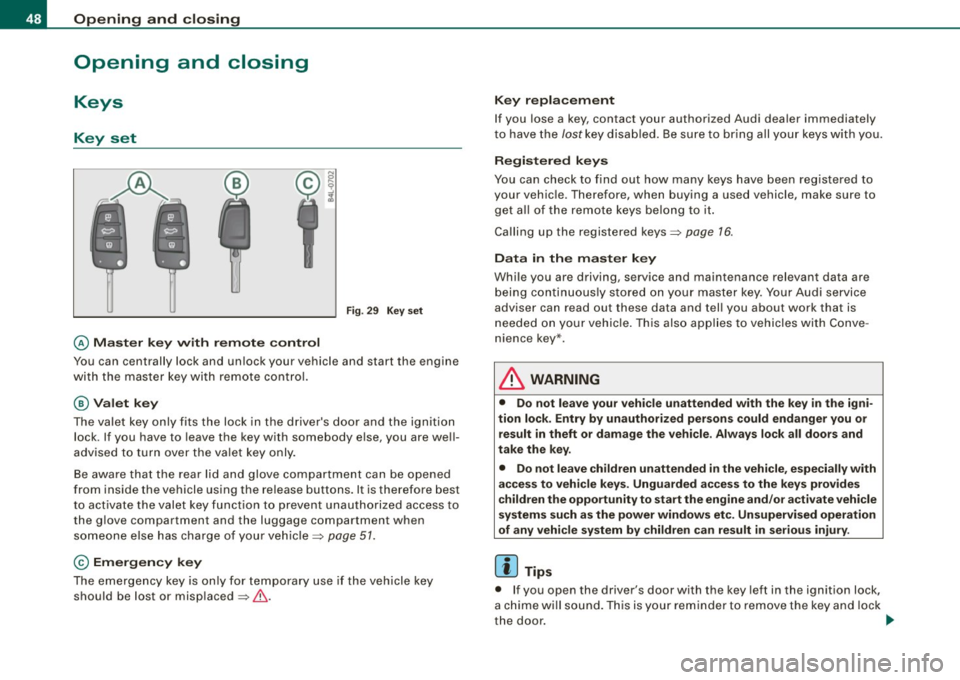
Fig. 29 Key set
You can centrally lock and unlock your vehicle and start the engine
with the master key with remote control.
@Valet key
The valet key only fits the lock in the driver's door and the ignition
lock . If you have to leave the key with somebody else, you are well
advised to turn over the valet key only.
Be aware that the rear lid and glove compartment can be opened
from inside the vehicle using the release buttons. It is therefore best
to activate the valet key function to prevent unauthorized access to
the glove compartment and the luggage compartment when
someone else has charge of your vehicle~
page 51.
© Emergency key
The emergency key is only for temporary use if the vehicle key
should be lost or misplaced ~& .
Key replacement
If you lose a key, contact your authorized Audi dealer immediately
to have the
lost key disabled. Be sure to bring all your keys with you.
Registered keys
You can check to find out how many keys have been registered to
your vehicle. Therefore, when buying a used vehicle, make sure to
get all of the remote keys belong to it.
Calling up the registered keys~
page 76.
Data in the master key
While you are driving, service and maintenance relevant data are
being continuously stored on your master key. Your Audi service
adviser can read out these data and tell you about work that is
needed on your vehicle. This also applies to vehicles with Conve
nience key*.
L1}. WARNING
• Do not leave your vehicle unattended with the key in the igni
tion lock. Entry by unauthorized persons could endanger you or result in theft or damage the vehicle. Always lock all doors and
take the key.
• Do not leave children unattended
in the vehicle, especially with
access to vehicle keys. Unguarded access to the keys provides
children the opportunity to start the engine and/or activate vehicle
systems such as the power windows etc. Unsupervised operation
of any vehicle system by children can result in serious injury.
[ i] Tips
• If you open the driver's door with the key left in the ignition lock,
a chime will sound. This is your reminder to remove the key and lock
the door.
~
Page 51 of 426
• For security reasons, replacement keys are only available from
Audi dea lers. •
Master key with remote control
The remote control allows you to lock or unlock the
vehicle electr onically .
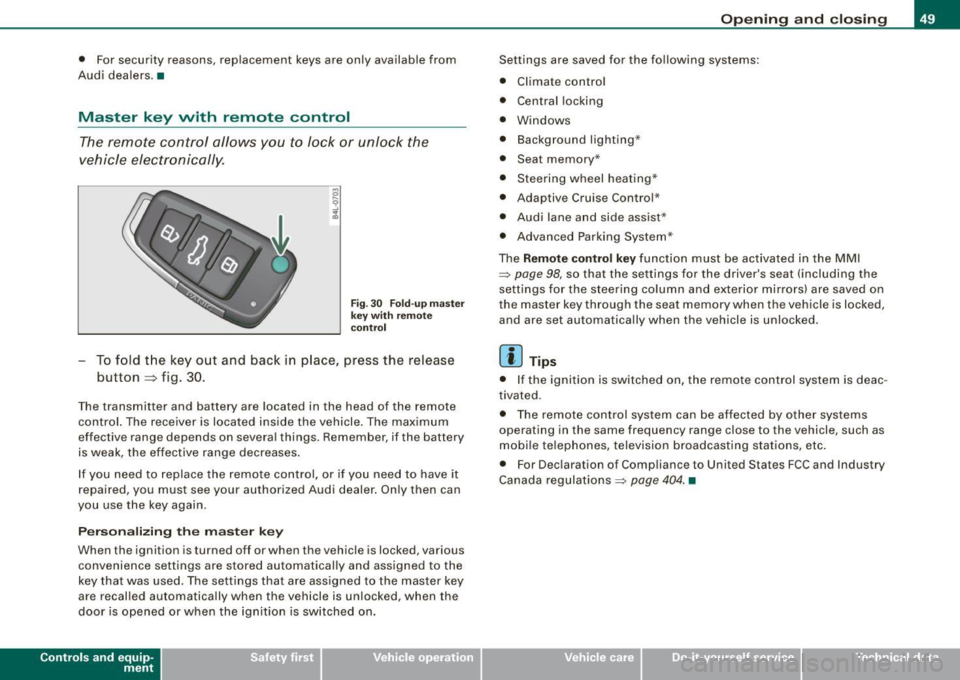
Fig . 3 0 F old -u p mas ter
ke y w ith re mo te
co ntro l
To fold the key out and back in place, press the release
button
~ f ig . 30 .
The transmitter and battery are located in the head of the remote
control. The receiver is loca ted inside the vehicle. The maximum
effective range depends on several things. Remember, if the battery
is weak, the effective range decreases .
I f you need to replace the remote contro l, or if you need to have it
repaired, you must see your authorized Audi dealer . Only then can
you use the key again.
P erson alizing the master key
When the ignition is turned off or when the vehicle is locked, various
convenience settings are stored automatically and assigned to the
key that was used. The se tti ngs that are assigned to the master key
are recalled automatically when the vehicle is unlocked, when the
door is opened or when the ignition is sw itched on .
Contro ls and eq uip
ment
Op ening and clo sing
Settings are saved for the fo llowing systems:
• Climate contro l
• Central locking
• Windows
• Background lighting·"
• Seat memory *
• Steering wheel heating*
• Adaptiv e Cruise Control *
• Audi lane and side assist*
• Advanced Parking System *
The
Remote control key function must be activa ted in the MMI
~ page 98, so that the settings for the driver's seat (including the
settings for the steering column and exterio r mirro rs) are saved on
the master key through the seat m emory when the vehicl e is locked,
and are set automatically whe n the vehicle is unlocked.
[ i ] Tips
• I f the igni tion is switched on, the remote cont rol system is deac
tivated .
• The remote control system can be affected by other sys tems
operating in the same frequency range close to the vehicle, such as
mobi le te lephones, television broadcasting stations, etc .
• For Dec laration o f Compliance to United States FCC and Industry
Canada regulations ~
page 404. •
Vehicle care I I irechnical data
Page 52 of 426

Opening and closing
Check light in the master key
The check light in the m aster key provides information
about different conditions .
Check light functions in the master key:
V eh icle wi thin r an ge of th e key
Fig . 31 Che ck light in
th e m aste r k ey
If the vehic le is within range of the key, the check light comes on
briefly once when a button is pressed .
V ehicle outside the r an ge of th e key
If the vehicle is outs ide the range of the key, the check l ight comes
on briefly once and then shows the status of the vehicle door locks:
• If the light is flashing qu ickly, the vehicle is not locked .
• If the light is flashing slowly, the vehicle is locked .
St ate o f ma ste r ke y batt ery
If the check light does not come on, the battery is dead and has to
be rep laced. In addition, when the battery is dead the,.. symbol
appears in the instrument cluster display as well as the message :
Please change key battery
Battery replacement~ page 50.
[ i ] Tips
P lease note that the current state of the vehicle door locks can only
be recalled with the master key that was last used to lock the
vehic le. It is possib le that a different state is shown for the door
locks on the other master key which is not the same as that of the
vehic le .•
Master key battery replacement
Each mas ter key contains a battery housed under the
cover.
F ig. 3 2 Master key :
open ing the cov er
We recomme nd having the battery changed by an autho
ri zed Audi dealer. However, if yo u w ish to rep lace the dead
battery yourself, proceed as follows:
- Pry apart t he base => fig . 32 @and the cover ®
carefully
with a coin .
- Remov e th e co ve r (arr ow).
- Remove the dead battery from the cover .
- Insta ll the new battery. Please make certain t hat the"+"
sign o n the batte ry faces down. Correct pola rity is shown
on t he cover. _,,,
Page 53 of 426
-Place the cover w ith the new battery on the key base and
press both parts together .
<£> For the sake of the environment
Dispose of dead batteries proper ly so as not to pol lute the environ
ment.
[ i ] Tips
The rep lacement battery must be the same specificat ion as the
original. •
Electronic immobilizer
The immobilizer helps to prevent unauthorized use of
your vehicle.
A computer chip inside your key automatically deact ivates the e lec
tronic immobilizer when you insert the key in the ignition lock, or on
veh ic les with Convenience key *, when the key is inside the vehicle.
When you remove the key from the ignition lock, or on vehicles with
Convenience key, when you remove the key from the vehic le, the
e lectronic immobilizer is automatica lly activated once again.
I f an unauthorized key was used, SAFE is disp layed continuously in
the odomete r disp lay field .
& WARNING
Always take the key wi th you when you leave the v ehicle. The ke y
ca n dis arm the ele ctro nic engine im mob iliz er and permit an unau
t hori zed per son to start the engine and enable operati on of the
v ehi cle sys tem s such a s pow er win dow o r Panor ami c s liding
sunroof * leading t o serious personal injury.
Controls and equip
ment
Opening and clo sing
[ i ] Tip s
• Your engine can on ly be started using the factory -equipped key.
• You may not be ab le to start your vehicle if an ignition key of a
different vehicle make is also located on your set of keys.
• For Dec laration of Compliance to Uni ted States FCC and Industry
Canada regulations~
page 404. •
Valet key function
The valet key fun ction prevents unauthorized persons
from opening the glove compartment or rear lid.
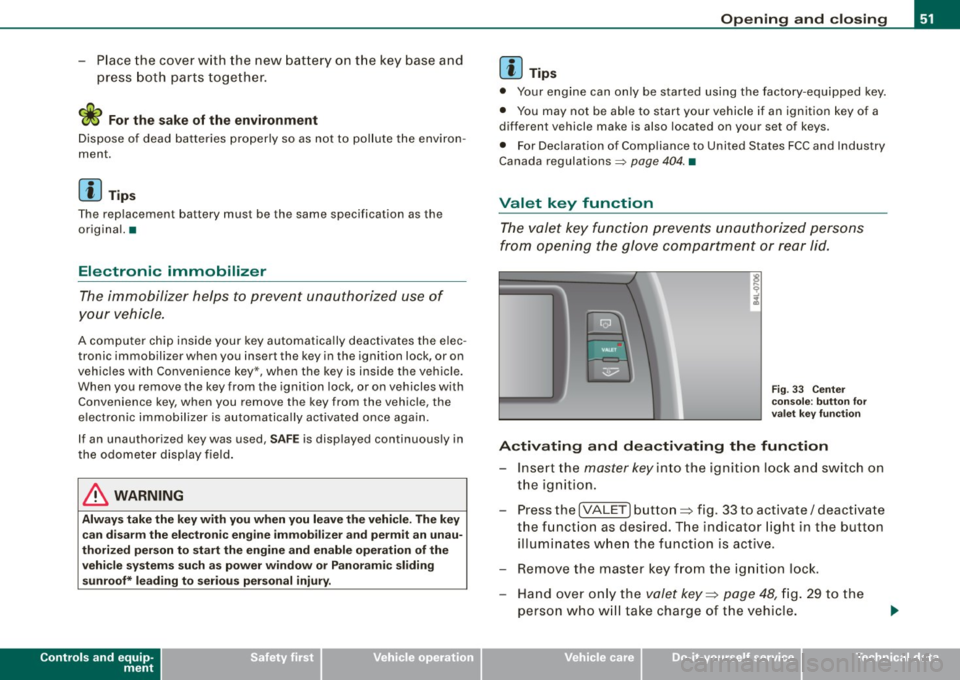
Fi g. 33 Ce nter
co nso le: butto n fo r
v ale t key f unction
Activating and dea ctivating the fun ction
- Insert the master key in to the ignition lock and switch on
the ignition.
- Press the
[VALE T] button ~ fig. 33 to activate/ deactivate
the funct ion as desired. T he indicator light in the button
illumi nates w hen the function is active.
- Remove the master key f rom the ign ition lock.
- Hand over on ly the
valet key~ page 48, fig. 29 to the
person who w ill tak e charge of the vehicle.
I • •