lock AUDI Q7 2009 Owner´s Manual
[x] Cancel search | Manufacturer: AUDI, Model Year: 2009, Model line: Q7, Model: AUDI Q7 2009Pages: 426, PDF Size: 97.13 MB
Page 137 of 426

Warm and cold -
-------------------'
concentrations of pollutants, the air conditioning system is
switched automatically to recirculation mode and the supply of
outside air is blocked. As soon as the concentration of pollutants in
the outside air drops , fresh air is supplied to the vehicle interior
again.
In the event that the windows fog up during automatic air recircula
tion, you must press the® button immediately.
Under certain operating conditions, automatic air recirculation is
switched off automatically . With outside temperatures below about
+10 °C, automatic air recirculation is limited to 30 seconds . With
outside temperatures below about -1 °C and in the ECON mode,
automatic air recirculation is limited to 15 seconds. •
Synchronization
One climate control setting for the driver and front
passenger seats.
With synchronization active, the driver's settings are adopted for
the passenger or vice versa. All the other settings that were made are transferred to the other seat. This includes all the clima te control
settings, except for the Seat heating *.
If a different setting is selected at a "synchronized seat", synchroni
z ation is cancelled. •
Applies to vehicles: with four-zone automatic comfort ai r cond itioning
Synchronization
One climate control setting for all seats.
With synchronization active, the driver's settings are adopted for
the front passenger and the rear left and right seats . All the other
settings that were made are transferred to the other seats. This
includes all the climate control settings, except for the Seat
heating*.
Con tro ls and eq uip
ment
If a different setting is selected at a "synchronized seat", synchroni
zation is cancelled. •
Applies to vehicles : wit h fo ur-zone autom atic comfort air co ndi tioning
Rear operation
Using the "Rear operation" function, settings can be made
in the center console control element for the rear left and
right sides of the vehicle.
Fig. 143 MMI Display:
Rear operation
Fig . 144 MMI Display:
Temperature setting
for rear left side
Press the [SETUP) button in the controls to access the
menu.
~
Vehicle care I I Technical data
Page 142 of 426
• ..__O_ n_ t_h _e _ r_o _a _ d __________________________________________________ _
On the road
Steering
Applies to vehicles : w ith manua lly ad justab le steering whee l
Manually adjusted steering wheel
The height and reach of the steering wheel can be
adjusted.
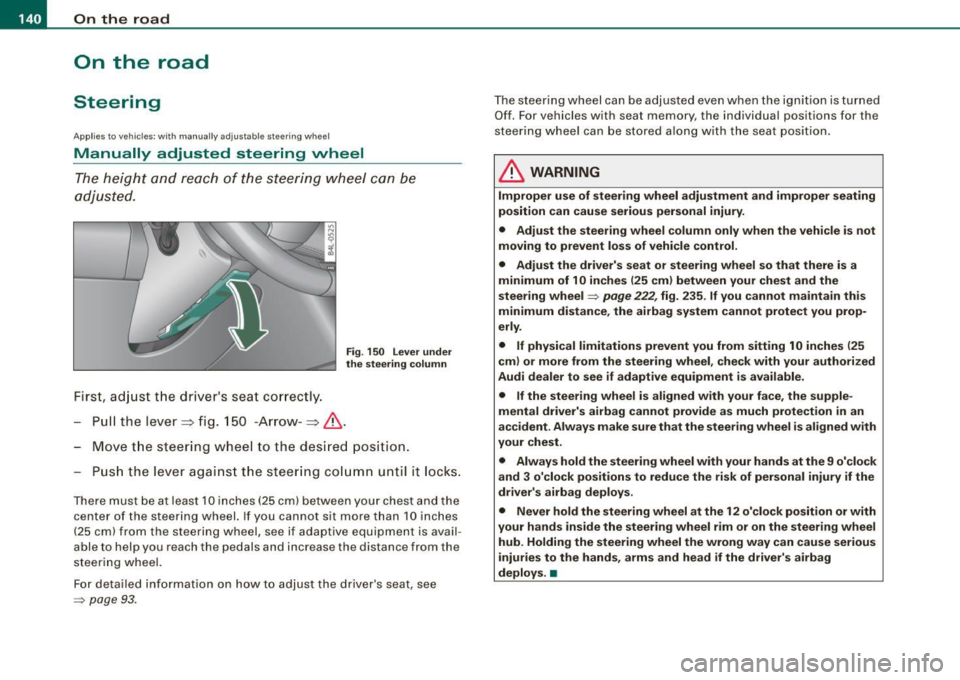
First, adjust the driver's seat correctly.
Fig . 150 Lever under
the steering column
Pull the lever~ fig. 150 -Arrow -~&.
Move the steering wheel to the des ired position.
Push the lever against the steering column until it lock s.
There must be at leas t 10 inch es (25 cm) between your chest and the
center of the steering wheel. If you cannot sit more than 10 inches
(25 cm) from the steering wheel, see if adaptive equipment is avail
able to help you reach the pedals and increase the distance from the
steering wheel.
For detailed information on how to adjust the driver's seat, see
=> page 93.
The steering wheel can be adjusted even when the ignition is turned
Off. For vehicles with seat memory, the individual positions for the
steering wheel can be stored along with the seat position.
& WARNING
Improper use of steering wheel adjustment and improper seating
position can cause serious personal injury .
• Adjust the steering wheel column only when the vehicle is not
moving to prevent loss of vehicle control.
• Adjust the driver's seat or steering wheel so that there is a
minimum of 10 inches (25 cm) between your chest and the
steering wheel
=> page 222 , fig . 235 . If you cannot maintain this
minimum distance, the airbag system cannot protect you prop
erly .
• If physical limitations prevent you from sitting 10 inches (25
cm) or more from the steering wheel, check with your authorized
Audi dealer to see if adaptive equipment is available .
• If the steering wheel is aligned with your face , the supple
mental driver's airbag cannot provide as much protection in an
accident . Always make sure that the steering wheel is aligned with
your chest .
• Always hold the steering wheel with your hands at the 9 o'clock
and 3 o'clock positions to reduce the risk of personal injury if the
driver's airbag deploys .
• Never hold the steering wheel at the 12 o'clock position or with
your hands inside the steering wheel rim or on the steering wheel
hub. Holding the steering wheel the wrong way can cause serious
injuries to the hands, arms and head if the driver's airbag
deploys. •
Page 143 of 426
___________________________________________________ O_ n_ t_h _e_ r_o _a_ d _ ___._
Ap plies to v ehi cles : wi th ele ctr ic ally a djuste d steer in g wh eel
Electrically adjusted steering vvheel
The he ight and re ach of the stee ring whe el can b e electr i
cally adj uste d to s uit t he d river .
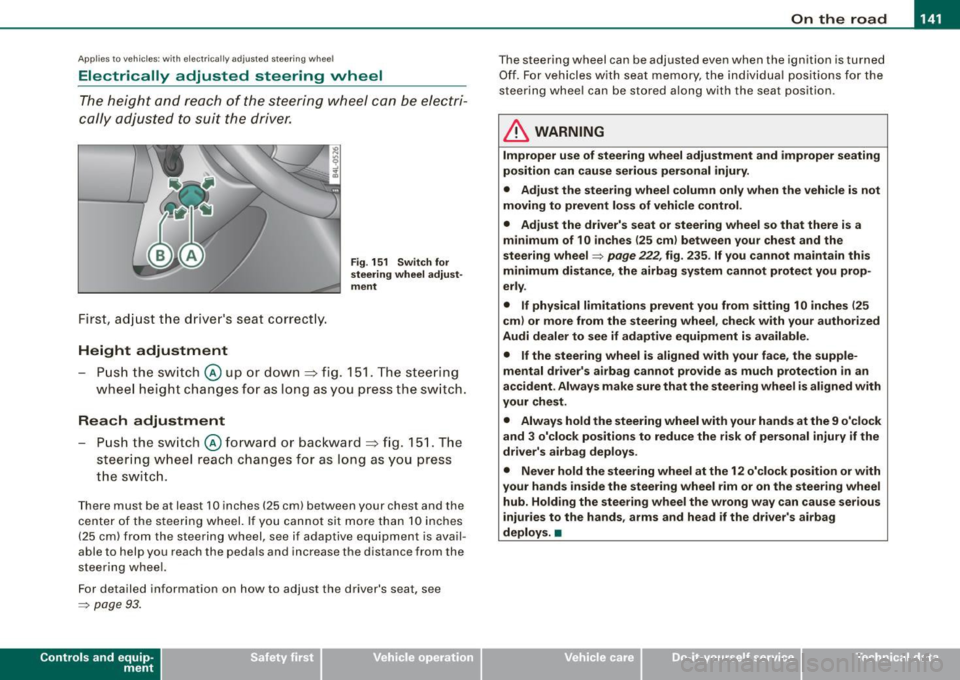
First, adjust the d river's seat co rrect ly.
Height adjustment
Fig . 151 Switch for
steering wheel adjust ·
ment
- Push the switch@ up or dow n=> fig. 1 51. T he steer ing
w heel he ight cha nges for a s long as you pre ss th e swi tc h.
Reach adjustment
- Push the s witch @ forw ard o r backwar d => fig . 151. Th e
s teer ing whe el reach ch an ges for as lon g as you pr ess
t h e s wit c h.
Ther e must b e at least 1 O in ches ( 25 cml betw een your chest and the
cen te r of th e st eer ing w hee l. If you cannot sit mo re than 1 0 in che s
(2 5 cm) from the stee rin g wh eel, se e if adaptive equ ipm ent is ava il
able to help you reach the pedals and increase the distance from the
st eeri ng whe el.
F or detailed info rmation on how to ad just the drive r's seat, see
~ pa ge 93 .
Con tro ls and eq uip
ment
T he steering whe el can be adj ust ed even when the ignition is turn ed
O ff . F or vehi cle s with seat memory , the i ndividu al p osi tions fo r the
st eer in g w he el can be sto red a lon g w ith th e seat position.
& WARNING
Improper use of steering wheel adjustment and improper seating
position can cause serious personal injury.
• Adjust the steering wheel column only when the vehicle is not
moving to prevent loss of vehicle control .
• Adjust the driver's seat or steering wheel so that there is a
minimum of 10 inches (25 cm ) between your chest and the
steering wheel
~ page 222, fig . 235 . If you cannot maintain this
minimum distance , the airbag system cannot protect you prop
erly .
• If physical limitations prevent you from sitting 1 O inches (25
cml or more from the steering wheel , check with your authorized
Audi dealer to see if adaptive equipment is available.
• If the steering wheel is aligned with your face, the supple
mental driver's airbag cannot provide as much protection in an
accident . Always make sure that the steering wheel is aligned with
your chest .
• Always hold the steering wheel with your hands at the 9 o'clock
and 3 o'clock positions to reduce the risk of personal injury if the
driver's airbag deploys .
• Never hold the steering wheel at the 12 o'clock position or with
your hands inside the steering wheel rim or on the steer ing wheel
hub . Holding the steering wheel the wrong way can cause serious
injuries to the hands, arms and head if the driver's airbag
deploys. •
Vehicle care I I Technical data
Page 144 of 426
• ..__O_ n_ t_ h _e _ ro_ a_d __________________________________________________ _
Easy entry feature
The easy entry feature makes it easier to enter and exit the
vehicle by automatically adjusting the steering wheel.
Press the button @~ page 141, fig. 151 to turn the easy
entry feature on or off.
When the easy entry feature is turned on (button depressed), the
steering wheel moves up to the parked position when the ignition is
turned off. After you enter the vehicle, the steering wheel moves to
the stored position as soon as you turn on the ignition .
Easy entry feature on vehicles with memory seat*
For the stored steering wheel position to be recalled, the driver's
seat memory must be switched on
(I ON OFF I switch in depressed
position).
If the easy entry feature is switched off, the steering wheel moves to
the stored position as soon as you press the seat memory button. •
Ignition lock and ignition switch
Ignition key positions
The engine can be started or turned off with the ignition
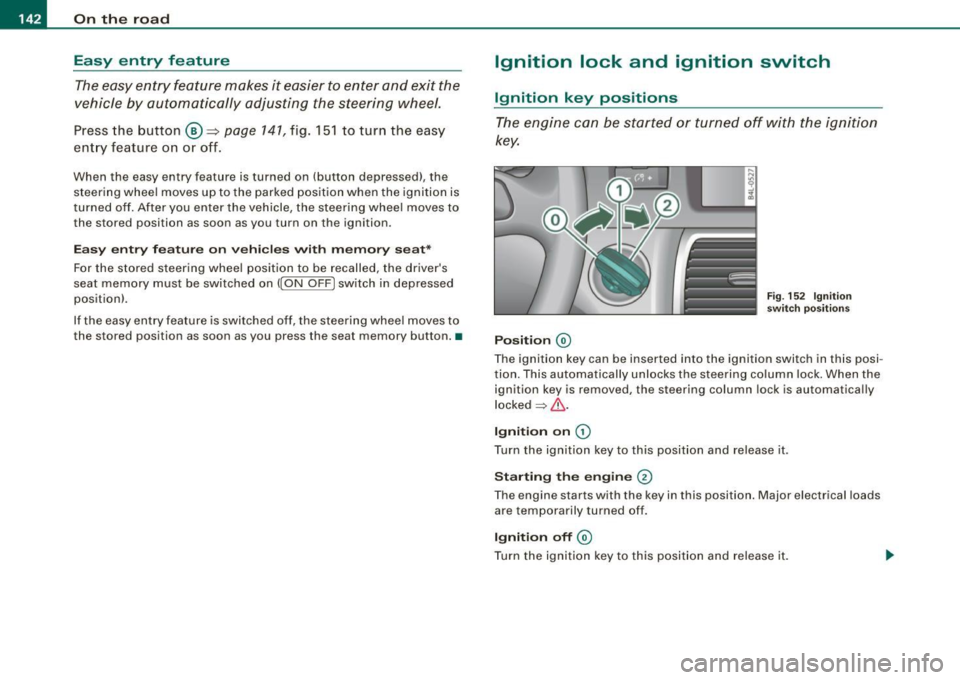
key.
Position @
Fig. 152 Ignition
switch positions
The ignition key can be inserted into the ignition switch in this posi
tion. This automatically unlocks the steering column lock. When the
ignition key is removed, the steering column lock is automatically
locked
~ & .
Ignition on 0
Turn the ignition key to this position and release it .
Starting the engine 0
The engine starts with the key in this position. Major electrical loads
are temporarily turned off.
Ignition off @
Turn the ignition key to this position and release it.
Page 145 of 426
___________________________________________________ O_ n_ t_h _e_ r_o _a_ d _ ___.11111
& WARNING
• Ne ver re m ove the ke y from the ignition lo ck wh ile th e ve hicl e is
movin g. The steering wh eel will l ock , cau sing l oss of contr ol.
• I f yo u have t o le ave y our veh icle, e ven for ju st a mi nute , always
r e m ove the ign ition ke y and t ake it with you. T his is es pe ciall y
import ant if y ou are going t o leave c hildren unatt end ed in the
vehic le. The children could start the engin e or use other ve hicle
c ontr ols. Un sup erv is ed u se of veh icle c ontrol s (for e xam ple, pow er
w indow s) can cause se rious per sonal injurie s.
0 Note
• I f the ~ symbol in the display blinks, there is a malfunction in the
e lectronic steering column lock . Follow the instructions in
~ page 34 , "Steering malfunction i".
• If the ~ symbol in the display blinks , there is a malfunction in
the electronic ignition lock . Follow the instructions in~ page
34,
"Ignition lock malfunction ~"-
[ i ] Tip s
• If you release the ignition key in posit ion @, the key automati
cally r eturns to posit ion
G) .
• If you open the driver's door when the ignition is swi tched on , a
buzzer sounds and the message Ignition is on appears in the instru
ment cluster display. P lease switch the ignition off. •
Ignition key safety lock
The ignition key can only be removed when the selector
lever is in the "P" (Park) position.
After turning off the ignition, the ignition key can only be removed
from the ignition lock when the selec tor lever is in the "P" (Park)
Con tro ls and eq uip
ment position. Af
ter you have removed the key , the sele ctor lever is locked
and cannot be moved. •
Starting and stopping the engine
Starting the engine
The engine can only be started with your original Audi
key.
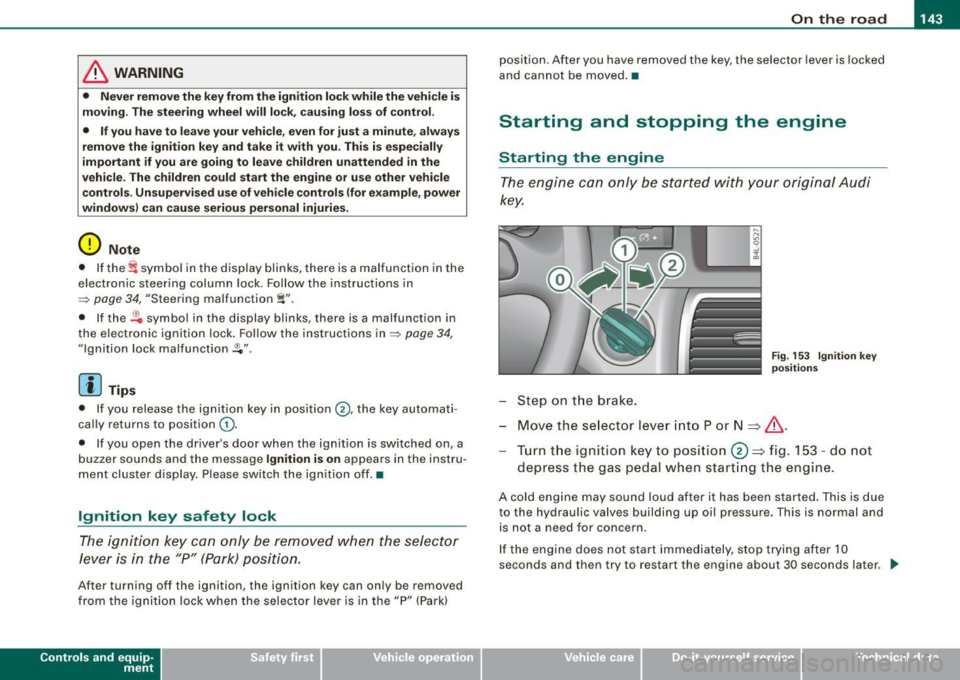
Step on t he brake.
Fig . 153 Ig ni tio n k ey
p osit io n s
Move the selector lever into P or N => &,.
Tu rn the ignition key to pos ition 0 => fig . 153 - do not
depress the gas peda l when start ing the engine.
A co ld engine may sound loud after it has been started . This is due
to the hydrau lic valves building up oi l pressure. This is normal and
is not a n eed for concern .
If the engine does not start immediately, stop trying after 10
seconds and th en try to restart the engine about 30 seconds later . _.,
Vehicle care
I I irechnical data
Page 147 of 426
![AUDI Q7 2009 Owner´s Manual On th e road 11111 _________________________________ __::..:....:.......;,;_;_;_ _ __;____,J
Switching the ignition on
- Press t he [ S TART] button once to the first stage to switch
on](/img/6/40274/w960_40274-146.png "AUDI Q7 2009 Owner´s Manual On th e road 11111 _________________________________ __::..:....:.......;,;_;_;_ _ __;____,J
Switching the ignition on
- Press t he [ S TART] button once to the first stage to switch
on")
On th e road 11111 _________________________________ __::..:....:.......;,;_;_;_ _ __;____,J
Switching the ignition on
- Press t he [ S TART] button once to the first stage to switch
on on ly the ignition.
Starting the engine
- Step on t he brake.
- Move the se lector leve r to t he P or N posit ion
~ & .
- Press the [ STA RT ] button to t he second s tage to star t the
engine.
After a cold engine is started, there may be a brief period of
increased noise because oil pressure must first bui ld up in the
hydraulic valve adjusters . This is norma l and not a cause for
concern.
If the engine does not start immed iately, stop trying after 10
seconds and then try to restart the engine about 30 seconds later.
& WARNING
Nev er allow the engine to run in confined spa ce s · danger of
asphyxi atio n.
0 Note
• Avo id high engi ne rp m, full throttle and heavy engine loads unti l
the engine has reached operating temperature · otherwise you risk
engine damage .
• T he engin e cannot be started by pushing or towing the vehic le.
c£> For the sake of the environment
Do not allow the engine to warm up with the vehicl e stationary . Star t
driving right away . In this way you avo id unnecessary emissions .
Contro ls and eq uip
ment
[ i ] Tip s
If you open the driver's door when t he ign itio n is switched on, a
buzzer sounds and the message
Ign ition i s on appears in the instru
ment cluster display. P lease switch the ignition off. •
Applies to vehic les : w ith C onv en ien ce key
Switching engine off with the [STOP] button
Bring yo ur vehicle to a comp le te sto p.
Fig. 155 Convenien ce
key: E NGIN E STO P
button
Move the se lector lever to the P o r N position .
Press the [
STOP I button ~ fig. 15 5.
Pressing the ( STO P] but ton once switches off the engine and the
ignition . If you press the ( S T O P! button again for more than 1
second, the steering is locked, provided that the selector leve r is in
the P position
~ & .
Emergency OFF function
If necessary , the engine can be switched off with the selector leve r
in the R, Dor S positions. To do so, step on the brake peda l and
press and hold the ( STOP] button (vehicle speed must be less than
6 mph/ 10 km /h. .,,_
Vehicle care I I irechnical data
Page 148 of 426

• .___O_ n_ t_h _e _ r_o _a_ d __________________________________________________ _
& WARNING
• Never turn off the engine until the vehicle has come to a
complete stop.
• The brake booster and servotronic only work when the engine
is running. With the ignition turned off, you have to apply more
force when steering or braking. Since you cannot steer and stop
normally, this can lead to accidents and serious injuries.
• For safety reasons, you should always park your vehicle with
the selector lever in P. Otherwise, the vehicle could inadvertently roll away.
• After the engine has been switched off, the radiator fan can
continue to run for up to 10 minutes -even with the ignition
switched off. It can also switch on again after some time if the
coolant temperature rises as the result of a heat buildup or if the
engine is hot and the engine compartment is additionally heated
by the sun's rays.
0 Note
If the engine has been under heavy load for an extended period,
heat builds up in the engine compartment after the engine is
switched off -there is a risk of damaging the engine. Allow the
engine to run at idle for about 2 minutes before switching it off. •
Applies to vehicles: w ith Conven ience key
Driver messages in the instrument cluster
display
If a function is not present, a driver message appears.
No key identified
This message appears when the [STAR T) button is pressed if there
is no master key inside the vehicle or if the system does not recog
nize it . For example, the master key cannot be recognized if it is
covered by an object (e.g. aluminum brief case) which
screens the radio signal. Electronic devices such as cell phones can also inter
fere with the radio signal.
Press brake pedal to start engine
This message appears if you press the [ START) button to start the
engine and do not depress the brake pedal. The engine can only be
started if the brake pedal is depressed.
Engage N or P to start engine
This message appears when the engine is started if the selector
lever for the automatic transmission is not in the P or N position.
The engine can only be started with the selector in these positions.
? Key not in vehicle
This message appears along with the symbol if the master key is
removed from the vehicle with the engine running. It is intended to
remind you (e.g. when changing drivers) not to continue the journey
without the master key.
If the master key is no longer in the vehicle, you cannot switch off
the ignition after stopping the engine and you also cannot start the engine again. Moreover, you cannot lock the vehicle from the
outside with the key.
Shift to P, otherwise vehicle can roll away. Doors do not lock if lever
is not in
P.
This message appears for safety reasons along with a warning
buzzer if the selector lever for the automatic transmission is not in
the P position when the ignition is switched off with the
[STOP)
button and the driver's door is opened. Move the selector lever to
the P position, otherwise the vehicle is not secured against rolling
away. You also cannot lock the vehicle using the locking button on
the door handle or using the remote key.
To engage steering lock, press and hold STOP button
This message appears for safety reasons if the engine and the igni
tion have been switched off by pressing the [
STOP) button once, .,,_
Page 149 of 426
_________________________________________________ O_ n_ t_h _e _ ro_ a_d _ __._
and then the driver's door is opened. In this instance, the steering is
not locked . The steering is locked :
• If you press the
I STOP ] button aga in for more than 1 second.
• If you c lose the driver's door and lock your vehicle from the
outside .•
Parking brake
Operation
The parking brake replaces the handbrake.
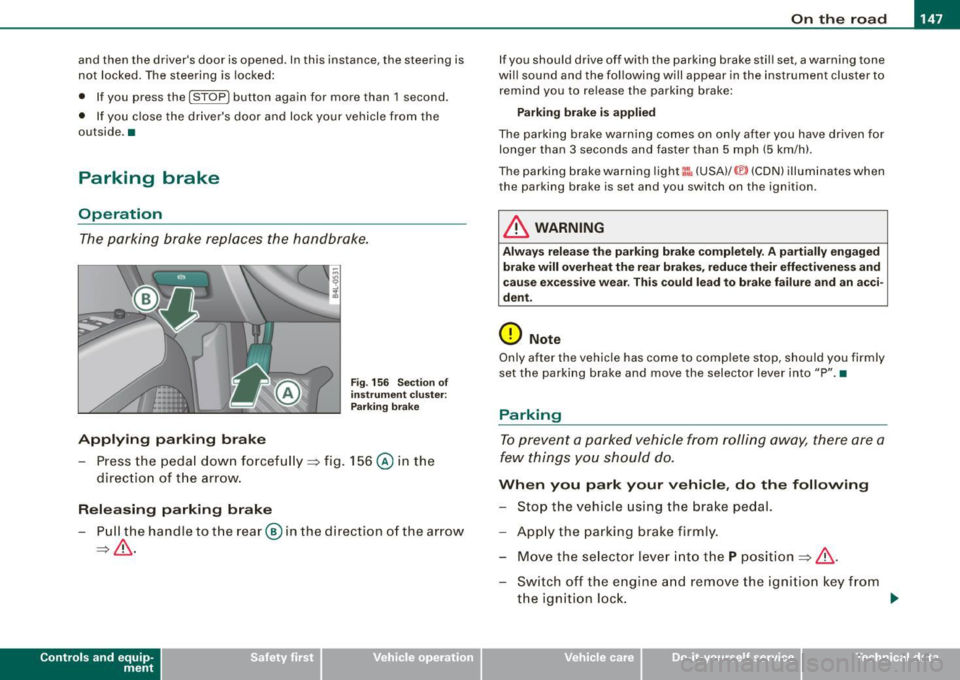
Applying parking brake
F ig . 156 Sec tion of
in strum ent clu ster:
P ark in g brake
- Press the peda l down forcefu lly ~ fig. 156 @ in the
direc tio n of the arrow.
Releasing parking brake
- Pull the handle to t he rear @ in the direction of the a rrow
~ & .
Con tro ls and eq uip
ment
I f you should drive off with the parking brake stil l set, a warning tone
wi ll sound and the following will appear in the instrument cluster to
remind you to release the parking brake:
Parking bra ke i s applied
The parking brake warning comes on on ly after you have driven for
longer than 3 seconds and faster than 5 mph (5 km/h).
The pa rking brake warning light
I:: , (USA) /© (CDN) illum inates when
the parking brake is set and you switch on the ignition .
& WARNING
Always relea se t he parking brake completely. A p artially engaged
brake will overh eat th e rea r brake s, reduce their effe ctiven ess and
ca use e xcessive w ear. Thi s co uld lead to brake failure and an a cci
dent .
(D Note
Only after the vehicle has come to comp lete stop, should you firmly
set the parking bra ke and move the selector lever into "P ". •
Parking
To prevent a parked vehicle from roll ing away, there are a
few things yo u should do.
Wh en you park your vehicle , do the following
- Stop the vehicle using the brake pedal.
- App ly the parking brake firmly.
- Mov e the se lector l ev er in to th e
P pos ition ~ & .
- Switch off the engine a nd remove the ig nitio n key from
the ignition loc k. ..,_
Vehicle care I I irechnical data
Page 150 of 426
• .___O_ n_ t_h _e _ r_o _a_ d __________________________________________________ _
When you park your vehicle on hills , do the
following
- Sto p th e vehicle usi ng the brake pe dal.
- App ly the parkin g brake firml y.
- If you ar e park ing head ed
downhill , turn the fr ont w heels
t o wa rd the curb.
- I f yo u are parkin g hea ded
uphill , turn the fro nt wh ee ls
a way fro m t he c urb.
M ove t he selecto r leve r into the
P p osition .
- Swi tch off the e ngine a nd re move th e igni tio n k ey fro m
t he ignition loc k.
& WARNING
This is how you can reduce the risk of injury when leaving your
vehicle.
• Never park the vehicle where it can come in contact with dry
grass, spilled fuel or any other flammable materials.
• When parking on hills , always turn the wheels so that the front
wheels will first roll into the curb, if the vehicle should start to roll .
• Never allow anyone -especially small children -to remain in the
vehicle when it is locked. Locked doors make it more difficult for
rescuers to access the passenger compartment in the event of an
emergency. Danger to life!
• Never leave children unsupervised in the vehicle. Children
could release the parking brake or move the gearsh ift lever out of
gear . The vehicle could start to roll away and cause an acc ident.
• No matter what the season is, the temperature in a parked
vehicle can reach dangerous levels .
0 Note
• Please e xercise care whe n you pa rk your ve hicle i n par king areas
with parking barrie rs or curbs . Parking barriers and curbs vary in
hei ght a nd could damage you r bum per a nd rela ted componen ts as
the front of your vehicle moves over a barrier or curb that is too
high , as you park o r as y ou bac k out o f a par king s pot. In o rde r to b e
sure that no such damage can occur, you may wish to stop short of
h av ing the fr ont tir es of you r car touch th e parkin g bar rier or cu rb.
• Pl ease a lso exercise exceptional care when you drive up o r down
s tee p ra mp s or drive over curbs o r other ob stacl es, for wh ich th e
vehic le is not designed, because com ponents of the vehicle c lose to
th e gr oun d, suc h as bump er cove rs, s poile rs and suspens io n an d
e x haust syst em compon ents, may become damaged. •
Starting on hills
Hill hold assist ma kes it eas ier to start on hil ls.
T he system is activated when the b ra ke peda l is depressed
for a few
seconds .
Fo r thi s, the veh icle must be stand ing in uphill d riv in g
di rection.
A ft er r elea sin g the bra ke ped al, t he br ake po wer i s held f or a
brief
moment to prevent the vehicle from rolling back when startin g. At
t hi s t ime, yo u ca n ea sily begi n to move yo ur vehicle.
& WARNING
• If you did not begin moving immediately after relea sing the
brake pedal , under certain c ircumstances , the vehicle would begin
to roll backward . Depress the brake pedal immediately or engage
the parking brake .
• Should the engine stall , depress the brake pedal immediately
or engage the parking brake . .,_
Page 155 of 426
___________________________________________ A ;__d_ a.....!.,. p_t _iv _e_ C_ ru_ is_e_ C_ o_ n_t _ro _ l __ lllll
& W ARNING (continu ed )
the veh icle safely when you follow another vehicle too closely .
Always remember that the Adaptive Crui se Control has a braking
power th at is only about 30 % of the vehicle 's maximum braking
ability . The automatic braking function cannot bring the vehicle to
a sudden or emergen cy stop . Always be prepared to bra ke and
take evasive action to avoid collisions and other accident situa
tions .
• Never allow the closing speed between you and other vehicles
to be so high that the Adaptive Cruise Control may not be able to
slow your vehicle safely . If closing speed is too high , you must
apply the brakes yourself to reduce the ri sk of a rear -end crash .
• Never rest your foot on the accelerator pedal , especially when
the Adapt ive Cruise Control is being used . Pressure on the a cceler
ator will override the ACC braking function and prevent the brakes
from being appl ied when ACC detects a situation when the brakes
must be applied.
• Never use Adapt ive Cruise Control when you cannot drive
safely at a steady speed , including on city streets , on winding
roads or when road conditions are poor (for example , on ice,
gravel, in fog , heavy r ain or on wet roads that increase the risk of
hydroplaning
I.
• The radar sensor's vision can be reduced by rain , snow and
heavy road spray . These and similar conditions can prevent vehi
cles up ahead from being accurately detected and in some cases
they may not be detected at all . Do not use ACC when the radar
sensors cannot accurately detect veh icles moving ahead of you in
traffic.
• Always turn off Adaptive Cruise Control when entering turn
lanes , exit lanes and construction zones or in similar situations
because the vehicle will automati cally accelerate to the stored
speed when the road ahead is clear.
• To prevent unintended operation , always switch ACC off when
it is not be ing used .
Controls and equip
ment
[ i ] Tips
• For sa fety reasons , the sto red speed is de leted w he n th e ig nit ion
is turned off.
• The E lectronic Stabilization Program (ESP) and the Anti -Slip
R egu lation (ASR) cannot be deacti vated when the Adaptive Cruise
Co ntrol is sw itc hed on . If the ESP and the Anti-Slip Regula tion (AS R)
has been deactivated and you then switch on the Adaptive C rui se
Contro l, t he ESP func tion w ill also be act iva ted automat ica lly .
• Damage caused by accidents an d so me mino r co llisions can
affect t he radar sensor sett ings and cause the sys tem to ma lfun c
tion or switch off completely.
• The radar sensor cover is heated. In winter conditions, you
should stil l check before driving to make sure it is free of ice and
s n ow. If necessary, clean the area near t he radar sensor carefully
~ page 15 2, fig. 159 .
• To ensure that the radar sensor is not blocked, foreign objects
(e .g. stickers, la rger l icense plate mount s, add -on pa rts) must not
cove r th e area near t he radar sensor~ page 152, fig. 159. The area
nea r the rada r sensor must not be painted, either .
• For Dec laration of Comp liance to United States FCC and Industry
Canada regulations ~ page
404. •
I • •