lock AUDI Q7 2009 Owner´s Manual
[x] Cancel search | Manufacturer: AUDI, Model Year: 2009, Model line: Q7, Model: AUDI Q7 2009Pages: 426, PDF Size: 97.13 MB
Page 78 of 426
Clear vision
[ i J Tips
With the switch in AUTO front fog lights and rear fog lights cannot
be turned on in addition.•
App lies to veh icles: with Adaptive Ligh t
Adaptive Light
When driving around bends, the relevant area of the road
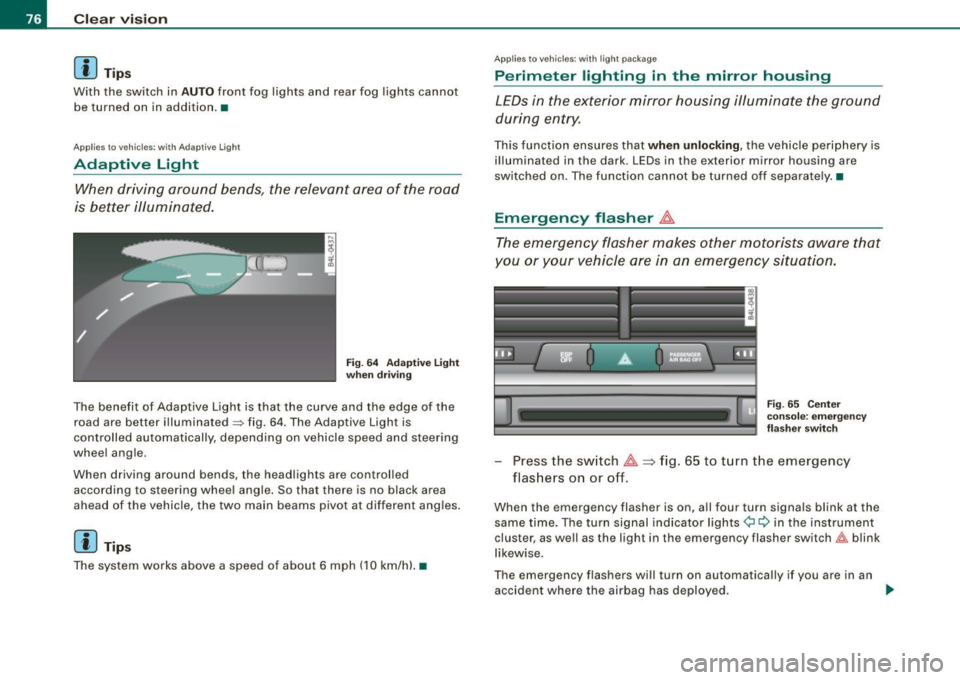
is better illuminated.
Fig. 64 Adaptive light
when driving
The benefit of Adaptive Light is that the curve and the edge of the
road are better illuminated~ fig. 64. The Adaptive Light is
controlled automatically, depending on vehicle speed and steering
wheel angle.
When driving around bends, the headlights are controlled
according to steering wheel angle. So that there is no black area
ahead of the vehicle, the two main beams pivot at different angles.
[ i J Tip s
The system works above a speed of about 6 mph (10 km/h) .•
Appl ies to vehicles: with light package
Perimeter lighting in the mirror housing
LEDs in the exterior mirror housing illuminate the ground
during entry.
This function ensures that when unlocking, the vehicle periphery is
illuminated in the dark. LEDs in the exterior mirror housing are
switched on. The function cannot be turned off separate ly .•
Emergency flasher J1.
The emergency flasher makes other motorists aware that
you or your vehicle are in an emergency situation.
Fig. 65 Center
console: emergency
flasher switch
-Press the switch J1. => fig. 65 to turn the emergency
flashers on or off.
When the emergency flasher is on, all four turn signals blink at the
same time. The turn signal indicator lights¢ Q in the instrument
cluster, as well as the light in the emergency flasher switch&:, blink
likewise.
The emergency flashers will turn on automatically if you are in an
accident where the airbag has deployed.
~
Page 80 of 426
Clear vision
0 Note
Do not use the h igh beam or headlight flasher if you know that these
could blind oncoming traffic. •
Interior lights
Front interior lights
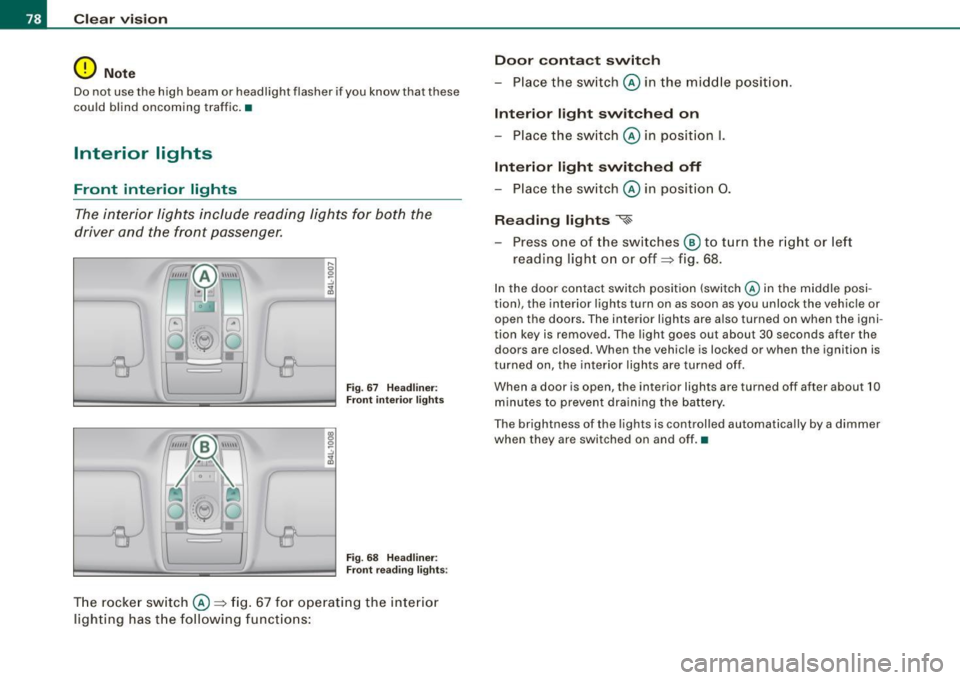
The interior lights inclu de rea ding lights for both the
driver and the front passenger.
I;
S? ..!I ... m
r
~-
~
Fig . 6 7 H eadlin er:
F ron t int erior light s
18 S? ..:.,
~
(
"--8
Fig. 68 H eadlin er:
Front r eadin g li ghts :
T he rocker sw itch ©:::::, fig. 67 for operating the int erior
li gh ting has the following funct ions: Door
conta ct swit ch
- Place the sw itch © in the midd le position.
Interior l ight switched on
- Place the sw itch © in posi tion
I.
Int erior light switch ed off
- Place the switch © in position 0.
Reading lights
«~
- Press one of the switches ® to tu rn the r ig ht or left
reading light on or off:::::, fig. 68.
In the door contact switch position (switch @ in the middle po si
tion) , the interior lights turn on as soon as you unlock the vehicle or
open the doors. The interior lights are a lso turned on when the igni
tion key is removed. The light goes out about 30 seconds after the
doors are closed. When th e vehic le is locked or when the igni tion is
turned on, the interior lights are turned o ff.
When a door is open, the interio r ligh ts are turned off after about 10
minutes to prevent d raining the battery.
The brightness of the l ights is controlled automatically by a dimmer
when they are switched on and off. •
Page 81 of 426

Rear interior lights
There are reading lights in the rear for the passengers.
8QJ
---------
0
Fig. 69 Headliner : Rear
reading lights
Fig . 70 Headliner :
Third row reading light
-Press one of the switches ~ to turn the right or left
reading light on or off=? fig. 69.
For vehicles with third row seating*, the luggage compartment light
can be switched on and off with the button -M-and used as a reading
light => fig. 70. The rear lid has to be closed.
The lights in the luggage compartment and in the rear lid switch on and off automatically when the lid is opened and closed.
Con tro ls and eq uip
ment
Clear vision
[ i] Tips
If the rear lid remains open longer than 10 minutes, the luggage
compartment lights turn off automatically to prevent the vehicle
battery from discharging .•
App lies to veh ic le s: with background lighting
Background lighting
The background lighting can be adjusted in the MM/.
Fig. 71 Car: Back
ground lighting
- Press the Systems * control button in the car menu.
- Select
Background lighting .
-Rotate the control knob clockwise to increase the bright-
ness, and
- Rotate the control knob
count erclockwis e to reduce the
brightness.
When the vehicle is unlocked, the standard lighting turns on auto
matically and dims after approx. 2 minutes, and when the ignition is
turned on it switches off immediately. .,
Vehicle care I I Technical data
Page 99 of 426
Seat memory
Applies to vehicles: w ith seat memory
Driver's seat memory
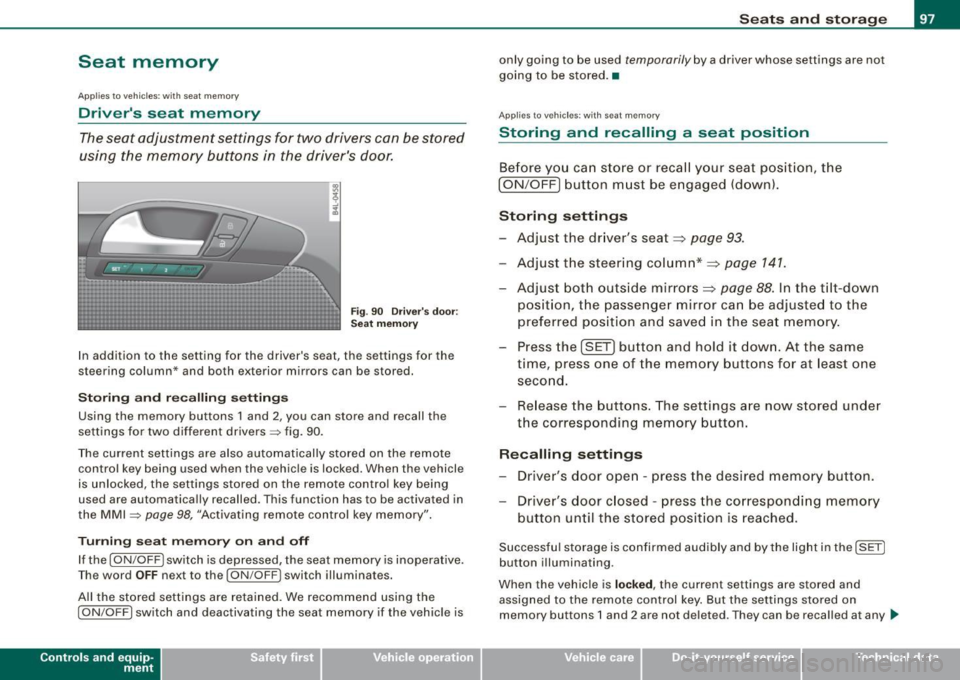
The seat adjustment settings for two drivers con be stored
using the memory buttons in the driver's door.
Fig . 90 Driver's door :
Seat memory
In addition to the setting for the driver's seat, the settings for the
steering column* and both exterior mirrors can be stored.
Storing and recalling settings
Using the memory buttons 1 and 2, you can store and recall the
settings for two different drivers=> fig. 90.
The current settings are also automatically stored on the remote control key being used when the vehicle is locked. When the vehicle
is unlocked, the settings stored on the remote control key being
used are automatically recalled. This function has to be activated in
the MMI =>
page 98, "Activating remote control key memory".
Turning seat memory on and off
If the [ ON/OFF ! switch is depressed, the seat memory is inoperative.
Th e word OFF next to the [ON/OFF) switch illuminates.
All the stored settings are retained. We recommend using the
I ON/OFF] switch and deactivating the seat memory if the vehicle is
Con tro ls and eq uip
ment
Seats and storage
only going to be used temporarily by a driver whose settings are not
going to be stored. •
Applies to veh icles: w ith seat memory
Storing and recalling a seat position
Before you can store or recall your seat position, the
I ON/OFF] button must be engaged (down).
Storing settings
- Adjust the driver's seat~
page 93.
-Adjust the steering column*~ page 141.
Adjust both outside mirrors~ page 88. In the tilt-down
position, the passenger mirror can be adjusted to the
preferred position and saved in the seat memory.
- Press the
!SET) button and hold it down. At the same
time, press one of the memory buttons for at least one
second.
- Release the buttons. The settings are now stored under
the corresponding memory button.
Recalling settings
- Driver's door open -press the desired memory button.
- Driver's door closed -press the corresponding memory
button until the stored position is reached.
Successful storage is confirmed audibly and by the light in the [ SET]
button illuminating.
When the vehicle is
locked , the current settings are stored and
assigned to the remote control key. But the settings stored on
memory buttons 1 and 2 are not deleted. They can be recalled at any
~
Vehicle care I I irechnical data
Page 100 of 426
Seats and storage
time. When the vehicle is unlocked , the settings stored on the
remote control key are restored.
If your vehicle is driven by other persons using your remote control
key, you should save your individual seat position on one of the
memory buttons. You can recall your settings again simply and
conveniently by pressing the corresponding memory button. When
the vehicle is locked, these settings are automatically re-assigned to
the remote control key and stored.
& WARNING
• For safety reasons , the seat setting can only be recalled when
the vehicle is stationary -otherwise you risk having an accident.
• In an emergency, the recall operation can be stopped by
pressing the [
ON/OFF l button or by briefly pressing any given
memory button. •
Applies to vehic les: w ith seat memory
Activating remote control key memory
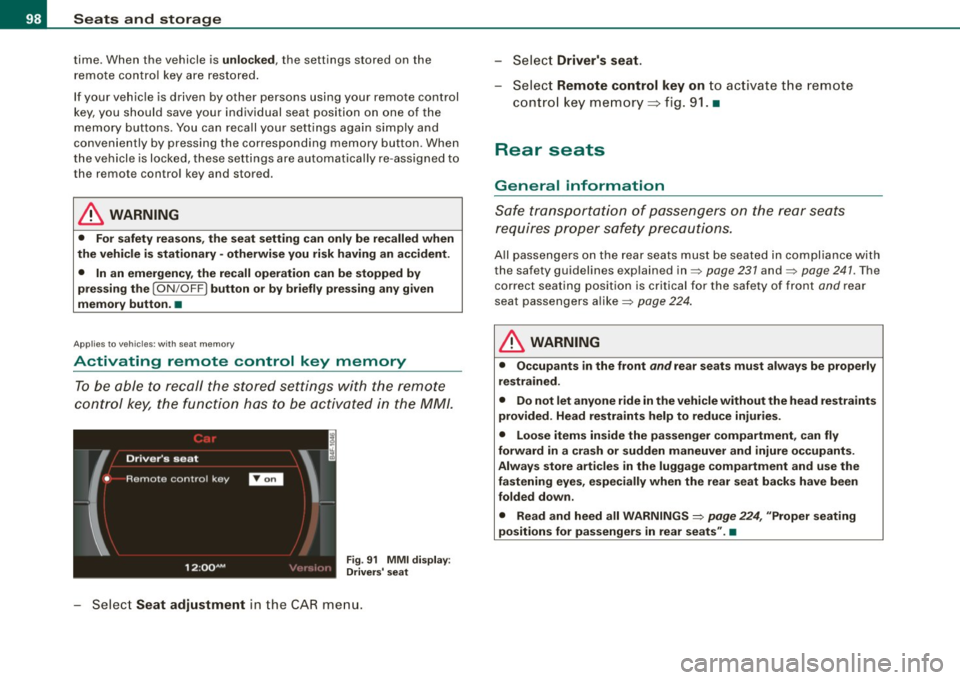
To be able to recall the stored settings with the remote
control key, the function has to be activated in the MM/.
Fig. 91 MMI display :
Drivers' seat
Select Seat adjustment in the CAR menu. -
Select
Driver's seat.
-Select Remote control key on to activate the remote
control key memory=> fig. 91. •
Rear seats
General information
Safe transportation of passengers on the rear seats
requires proper safety precautions.
All passengers on the rear seats must be seated in compliance with
the safety guidelines explained in=> page 231 and=> page 241. The
correct seating position is critical for the safety of front and rear
seat passengers alike=> page 224.
& WARNING
• Occupants in the front and rear seats must always be properly
restrained.
• Do not let anyone ride in the vehicle without the head restraints
provided. Head restraints help to reduce injuries.
• Loose items inside the passenger compartment, can fly
forward in a crash or sudden maneuver and injure occupants.
Always store articles in the luggage compartment and use the
fastening eyes, especially when the rear seat backs have been
folded down .
• Read and heed all WARNINGS =>
page 224, "Proper seating
positions for passengers in rear seats" .•
Page 102 of 426
• ..__S_ e_a_ t_ s_ a_ n_ d_ s_t _o _ r_ a--' g=- e ________________________________________________ _
- Push the seat forward.
Pushing second row of seats back
- Push the seat back.
- Fold the seat back up unt il it latches.
To make entry to and exit from the rear of the vehicle easier, the seat
backs for the second row seating can be folded forward . At the
same time, the seats can be pushed forward and to the rear .•
A pplies to ve hicles: with th ird ro w seati ng
Folding seat back up and down (third row
seating )
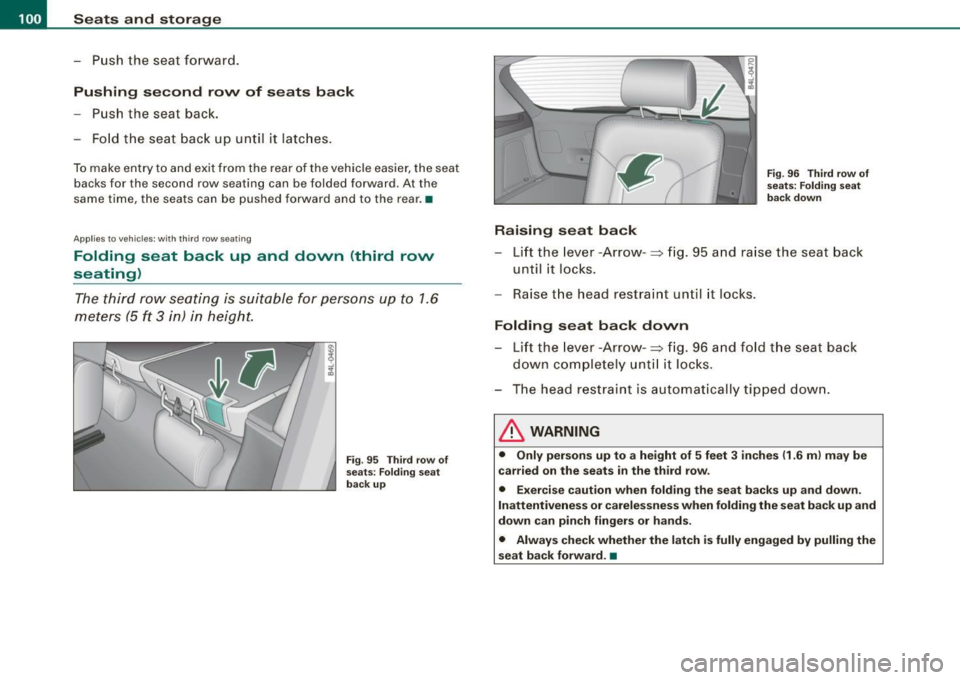
The third row seating is suitable for persons up to 1.6
meters (5
ft 3 in) in height.
Fig. 95 Third row of
seats: Folding seat
back up
•
Raising seat back
Fig . 96 Third row of
seats: Folding seat
back down
- Lift the lever -Arrow -~ fig. 95 and raise the seat back
until it locks.
- Raise the head restraint until it locks .
Folding seat back down
- Lift the lever -Arrow-~ fig. 96 and fold the seat back
down completely until it locks.
- The head restraint is automatically tipped down.
& WARNING
• Only persons up to a height of 5 feet 3 inches (1.6 ml may be
carried on the seats in the third row.
• Exercise caution when folding the seat backs up and down.
Inattentiveness or carelessness when folding the seat back
up and
down can pinch fingers or hands.
• Always check whether the latch is fully engaged by pulling the
seat back forward. •
Page 111 of 426

________________________________________________ S_e_ a_ ts_ a_ n_d _ s_t _o _r_ a ....; g::;. e _ __.ffllll
• The two inner attaching eyes on the left and right in the seatback
~ fig. 108 (Dare not suitable for tying down cargo -risk of damage.
Only the luggage compartment cover should be attached here.
[ i J Tips
• You can use the luggage compartment cover to store light
weight clothing or articles but do not leave any heavy or sharp
objects in the pockets of the clothing.
• Remember that placing clothing or articles on the luggage
compartment cover can block the driver's vision in the rear view
mirror. This also applies especially when you have to transport large
objects.
• So that stale air can escape from the vehicle be sure not to cover
the ventilation slot between the rear lid and the luggage compart
ment cover. •
Protective liner
Dirty or wet objects can be transported under the cargo
floor in a protective tray.
Con tro ls and eq uip
ment
Fig . 110 Cargo floor:
folded upright Fig
. 111 Removing the
cargo floor
Setting up the cargo floor
- Open the rear lid.
- Set up cargo floor with the help of the handle ©
=> fig. 110 and adjust the outside edges in the recesses
@.
Lay the items in the protective tray.
Folding the cargo floor up
- Open the rear lid.
Fold the cargo floor up to the seatback with the help of
the handle @.
Removing the cargo floor, installing
- Open the rear lid.
- Fold the cargo floor up to the seatback with the help of
the handle @.
- To remove, pull the entire cargo floor out of the guides
-arrow-=> fig. 111 in the direction of the rear of the
vehicle.
t,.
Vehicle care I I irechnical data
Page 121 of 426
________________________________________________ S_ e_ a _ t_ s _a_ n_d _ s_t _o _ r_ a...: g==-- e __ llll
Storage
General overview
There are numerous places to store items in your vehicle.
Glove compartment
Cooling box in glove compartment
Storage compartment in roof
Storage in the door panels
Storage net in footwell
Storage net in the front seat backs
Storage net in luggage compartment
Storage compartment beneath cargo
floor
& WARNING
=> page 119
=> page 120
=> page 121
=> page 121
=> page 122
=> page 122
=> page 109
• Always remove objects from the instrument panel. Any items
not stored could slide around inside the vehicle while driving or
when accelerating or when applying the brakes or when driving
around a corner.
• When you are driving make sure that anything you may have
placed in the center console or other storage locations cannot fall
out into the footwells. In case of sudden braking you would not be
able to brake or accelerate.
• Any articles of clothing that you have hung up must not inter
fere with the driver's view. The coat hooks are designed only for
lightweight clothing. Never hang any clothing with hard, pointed
or heavy objects in the pockets on the coat hooks. During sudden
braking or in an accident -especially if the airbag is deployed -
these objects could injure any passengers inside the vehicle. •
Controls and equip
ment
Glove compartment
To open glove compartment
Fig . 125 Unlocking
button for glove
compartment
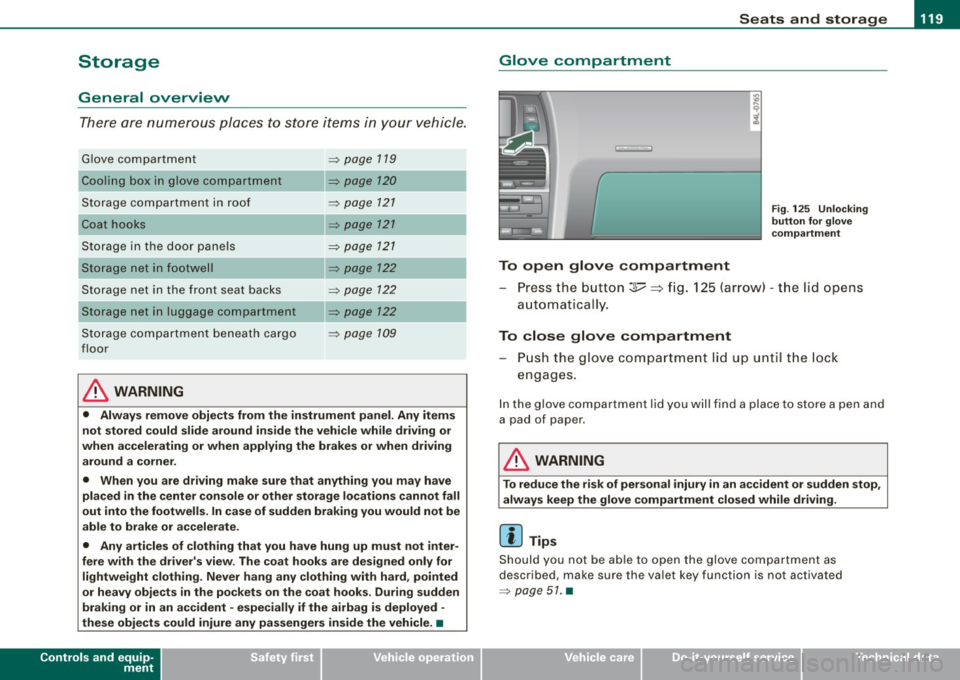
Press the button :];,, ~ fig. 125 (arrow) -the lid opens
automatica I ly.
To close glove compartment
- Push the glove compartment lid up until the lock
engages.
In the glove compartment lid you will find a place to store a pen and
a pad of paper .
& WARNING
To reduce the risk of personal injury in an accident or sudden stop,
always keep the glove compartment closed while driving.
[ i] Tips
Should you not be able to open the glove compartment as
described, make sure the valet key function is not activated
=> page 51. •
I • •
Page 122 of 426
• ..__S_ e_a _ t_ s_ a_ n_ d_ s_t _o _r_ a-' g==- e ________________________________________________ _
Cooling box in glove compartment
The cooling box works only when the air-conditioning is
in cooling mode.
Fig . 126 Glove box
with cooling box open and switched on
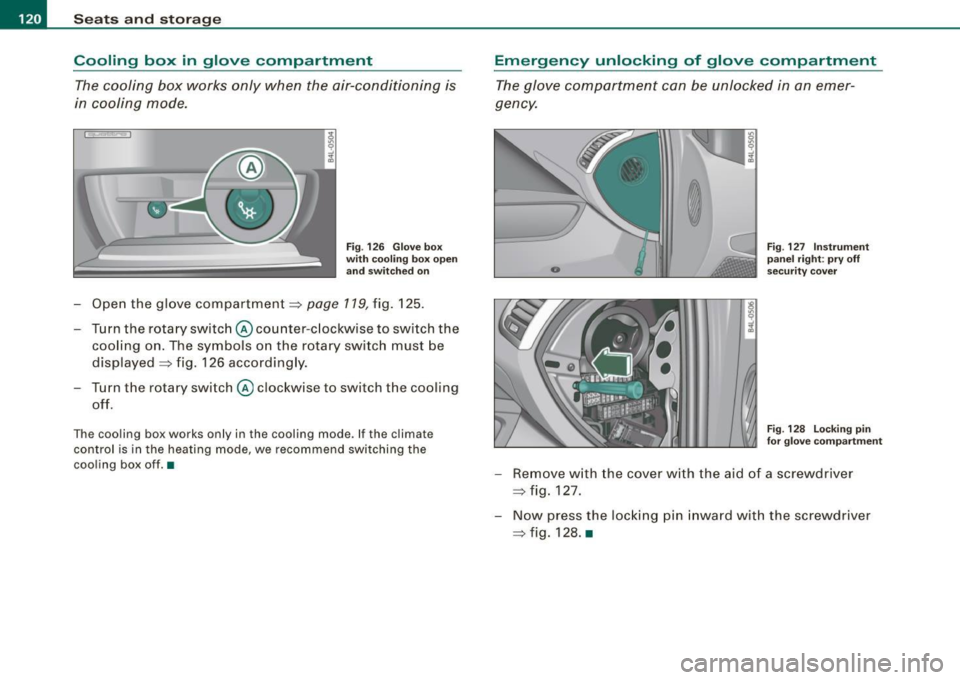
-Open the glove compartment=> page 119, fig. 125.
Turn the rotary switch @ counter-clockwise to switch the
cooling on. The symbols on the rotary switch must be
displayed => fig. 126 accordingly.
Turn the rotary switch@ clockwise to switch the cooling
off.
The cooling box works only in the cooling mode. If the climate
control is in the heating mode, we recommend switching the
cooling box off.•
Emergency unlocking of glove compartment
The glove compartment can be unlocked in an emer
gency.
Fig . 127 Instrument
panel right: pry off
security cover
F ig . 128 Locking pin
for glove compartment
- Remove with the cover with the aid of a screwdriver
=> fig. 127.
- Now press the locking pin inward with the screwdriver
=> fig. 128. •
Page 128 of 426
• .___w_ a_ rm __ a_ n_ d_ c_o _l_d ________________________________________________ _
passenger's side and to the outer rear seats. The new temperature
is shown in the display .
By simultaneously pressing and holding the contro l knobs on the
driver's side and front passenger's side, the temperature setting on
the driver's side can be switched to the front passenger's side. The new temperature is shown in the disp lay.
[ i J Tip s
The gri lle between the (ECON ON/OFF] and (SETUP] buttons must
remain unobstructed and must not be taped over. Measur ing
sensors are located behind it. •
Turning on and off [ECON ON/OFF]
Turning the air conditioning on
- Press [ECON ON/O FF] briefly, or
- Press [AUTO].
Turning the air conditioning off
Press the I ECON ON/OFF I button for at least 2 seconds to
switch the a ir cond itioning off and to block the air supply
f rom t he ou tside .
"OFF" appears in the display .
Switching air conditioning on /off
- Switching the a ir conditioning system on/off is done wit h
c limate control switched on .
- Press the [ECON ON/OFF] button just
briefly.
The air conditioner tu rns back on if you press one of the control
buttons or the control knob.
ECON operation is indicated by the glowing LED on the right next to
the word ECON. T
he air conditioning (compressor) is turned off in ECON mode.
"ECON" means "Economy". You save fuel by switching off the air
conditioning=>
page 131.
Please note that vehic le interior temperature cannot be lower than
t he outside temperature in the ECON mode. The air is not cooled or
dehumidified. This can cause the windows to fog up.
[ i J Tip s
With the ignition turned off, you can activate the residual heat func
tion by pressing the
[ECON ON/OFF] button . The residual heat from
the coolant can be used to heat the vehicle interior. •
Automatic mode [AUTO)
The automatic mode is the standard setting for all
seasons.
Turning on AUTO
Select temperature between 60 °F (+16 °C) and 84 °F
(+28 °C).
P ress [ AUTO I => page 125, fig . 135.
Automatic operation ensures constant temperatures in the interior
and dehumidifies the air inside the vehicle. Air temperature, vo lume
and distribution are contro lled automatica lly to reach or maintain
the desired inter ior temperature as quickly as possible. Fluctuations
in exterior temperature and the effects of temperature from the
pos ition o f the sun are compensated for automatica lly.
T his operating mode works only in the adjustable temperature
r ange, from 60 °F (+ 16 °C) to 84 °F (+28 °C). If a temperature below
60 °F
( + 16 °C) is selected, LO appears in the disp lay. At temperatures
above 84 °F ( +28 °C),
HI is d isplayed . At both extreme settings,
climate contro l runs continuously at maximum cooling or heating
power. There is no temperature regu lation .•