brake light AUDI Q7 2009 Owner´s Manual
[x] Cancel search | Manufacturer: AUDI, Model Year: 2009, Model line: Q7, Model: AUDI Q7 2009Pages: 426, PDF Size: 97.13 MB
Page 160 of 426
• ..__A_ d_a"'"' p:,..._ ti_v_ e_ C_ ru_ is_ e_ C_ o_n_ t_ r_ o_ l ___________________________________________ _
Reactivating control
-To resume the speed and distance control, release the
brake pedal and press the lever in the direction of the
arrow (D.
Display in the speedometer
© Current vehicle speed => page 7 57, fig. 165
@ Saved speed
As long as a speed is saved the set desired speed will be displayed in the LED display in the speedometer by one or two illuminated red
light diodes. When the control function is resumed the Adaptive
App lies to vehicles: with Adaptive Cruise Cont rol
How is the distance (time interval) set?
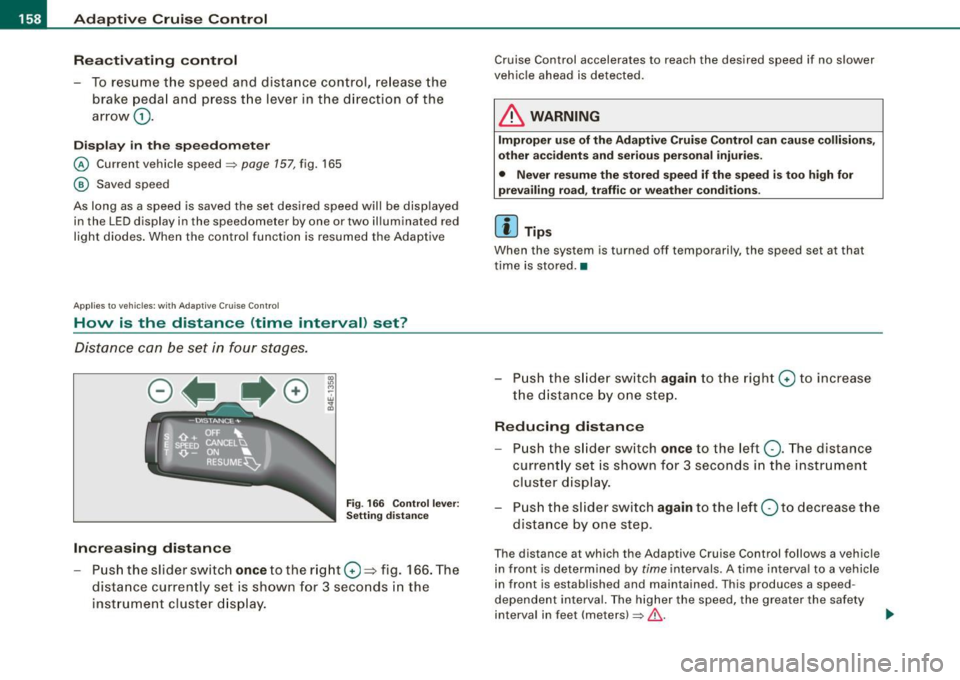
Distance can be set in four stages.
Fig . 166 Control lever:
Setting distance
Increasing distance
-Push the slider switch once to the right 0 ~ fig. 166. The
distance currently set is shown for 3 seconds in the instrument cluster display.
Cruise Control accelerates to reach the desired speed if no slower
vehicle ahead is detected.
& WARNING
Improper use of the Adaptive Cruise Control can cause collisions,
other accidents and serious personal injuries.
• Never resume the stored speed if the speed is too high for
prevailing road, traffic or weather conditions.
[ i ] Tips
When the system is turned off temporarily, the speed set at that
time is stored. •
- Push the slider switch again to the right 0 to increase
the distance by one step.
Reducing distance
Push the slider switch once to the left Q. The distance
currently set is shown for 3 seconds in the instrument
cluster display.
- Push the slider switch
again to the left Oto decrease the
distance by one step .
The distance at which the Adaptive Cruise Control follows a vehicle
in front is determined by
time intervals. A time interval to a vehicle
in front is established and maintained . This produces a speed
dependent interval. The higher the speed, the greater the safety
interval in feet (meters)
=> &- _,.
Page 162 of 426
• ..__A_ d_ a-:.. p_t _iv _ e_ C_r_ u_ i _s _ e_ C_ o_n_ t_ r_ o_ l _____________________________________________ _
& WARNING
Following other vehicles too closely increases the risk of a crash
and serious personal injury .
• Following other vehi cles too closely , particularly at h igher
speeds increases the risk of colli sions and serious personal injury.
• Setting short distances to the traffic ahead reduces the time
and distance available to bring your vehicle to a safe stop and
makes it even more necessary to pay close attention to traffic .
• Always select a speed and distance to traffic ahead that is safe
and appropriate under the prevailing traffic , road , weather and
lighting conditions .
• Never rely on the distan ce control feature of ACC alone to
prevent rear-end collisions. Always be prepared to brake and take
evasive action to avoid collisions and other acc ident situations .
• Never allow the closing speed between you and other vehicles
to be so h igh that the Adaptive Cruise Control may not be able to
slow your vehicle safely. If closing speed is too high , you must
apply the brakes yourself to reduce the risk of a rear-end crash .
• Always select a greater following distance to the vehicle ahead
on wet roads than on dry roads .
• Always re ad and heed the informat ion and WARNINGS ::::>
& in
"Description" on
page 152.
[ i J Tips
The distance setting i s re set to the factory default DISTANCE 3 the
next time the i gnition is turned on. •
Driver information
Applies to veh icles : w ith Adapt ive Cru ise Cont rol
Displays in the instrument cluster
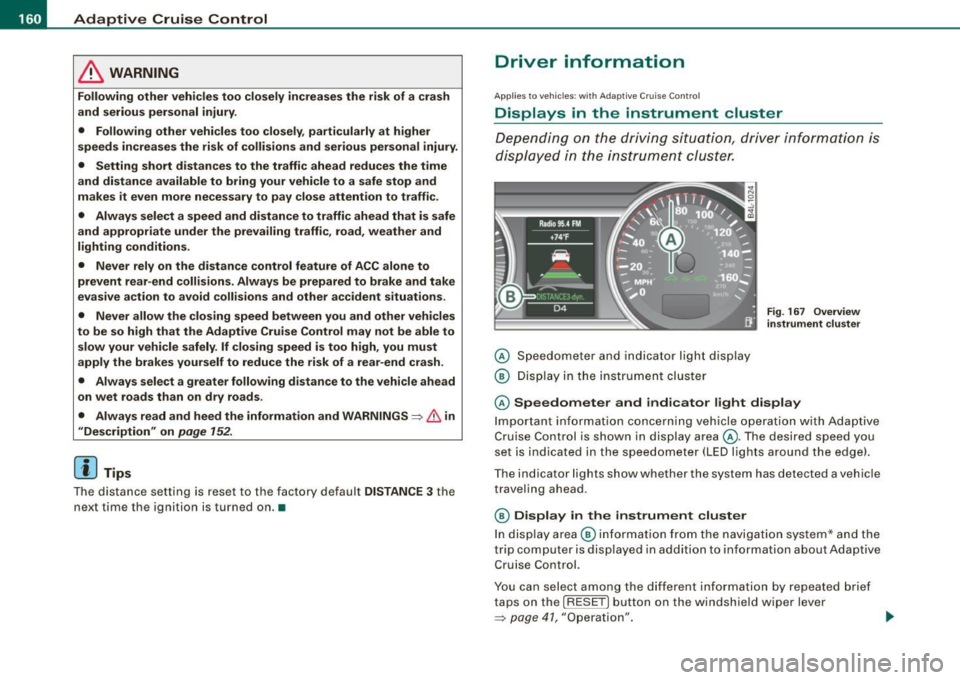
Depen din g o n the driving si tuati on, driver inf ormation is
dis played in the ins trumen t clus ter.
@ Spe ed om eter and indicator lig ht displ ay
@ Display in the instru ment clu ster
Fig . 16 7 Overview
in strument clu ste r
© Speedometer and ind icator light display
Im por tan t in fo rm ati on co ncerni ng veh icle ope ration w ith Ada ptiv e
Cruise Control is shown in display area@. T he desired speed you
s et is in dica te d in the spee dome ter (LED l igh ts aro un d t he edg e).
T he indicator lights show whether the system has detected a v ehic le
trave ling ahead .
© Display in the instrument cluster
In di sp lay area @ informati on fr om the navigati on syste m* a nd t he
trip computer is disp layed in addition to information about Adaptive
Cru ise Control.
You can s ele ct amo ng th e di ffer ent i nformati on by repeat ed br ief
taps on the [R ESET] button on the windshield wiper lever
=> p ag e 41 , "O peration". ~
Page 163 of 426

_____________________________________________ A_ d_a ...: p_ t_ i_ v _e_ C_ ru_ is_ e_ C_ o_n _ t_ r_o _ l _ __._
Certain pieces of information in the bottom part of the display are
not shown permanent ly . Informa tion is displayed on ly if you set or
change the speed set ting, change the time interval , when messages
are displayed or if the Adaptive C ruise Co ntrol is turned off for safety
reasons. •
Applies to vehicles: with Ada ptive C rui se Cont rol
Display in the speedometer
Desired speed
Fig. 16 8 Displa y in th e
s p ee do mete r
The desired speed set by the driver is displayed by a red LED .
If the desired speed was set between two lines on the speedomete r
using the
[SET I button, the two closest light emitting diodes will
come on
=> fig . 168.
T he system allows on ly speeds to be set between 20 to 95 mph (30
to 150 km/h) to be set . This speed range is faintly illuminated in the
speedometer (LED l ights).
Indi cator light s (sy mbols )
• ""c:::::> Open road : The indicator light ""c:::::> shows that ACC is active
and that no moving vehic le has been detected with in range of the
radar sensor up ahead in your lane of trave l. The set speed is main
tained.
Con tro ls and eq uip
ment
• c:::::>1n ,c:::::> Dri ving in traffi c: The indicator light c:::::>11, ,c::::, shows that a
ve hicle moving in your lane of travel has been detec ted up front in
your lane of travel. Your speed is adjusted according to the speed of
t he vehicle up front . ACC accelerates and brakes automa tically
within the system's capabilities.
• c:::::>11 "c:::::> Driver intervention prompt : The red flash ing warning
light
~11 .. .::::::, means Reque st for driver to a ssume control . You as the
driver mus t slow the vehic le with the foot b rake . The symbol
.::::::,11 .. c:::::>
tells you that the Adaptive Cruise Con trol is not able to s low the
vehic le down enough to keep a enough distance to the vehic le in
front of you. A warn ing tone wi ll also sound when the symbo l
appears . For more information about the driver intervention prompt
=> page 764.
& WARNING
Improper u se of the Adap tive Cr uise Contr ol features and inat ten
tion can lead to a crash and serious person al injury .
• Never allow t he clo sing speed between you and other vehi cle s
to be so high that the Adapt ive Cruise Control may not be able to
s lo w your vehi cle safely .
If clos ing speed is too h igh , you must
apply the brakes your self to reduce the risk of a rear-end crash .
• Alway s s ele ct a greater follo wing di stance to the veh icle up
ahead on wet ro ads than on dry road s.
• Always re ad and heed the information and WARNINGS=>
& in
" Description " on
pag e 152.
[ i ] Tips
• I f you use the accelerator to go faster than the speed of the
vehicle ahead of you, the driver intervention p rompt wil l not be
accompanied by a wa rning tone .
• I f the speed you previously set is exceeded, the indicator light in
the speedometer wi ll swi tch off .•
Vehicle care I I Technical data
Page 166 of 426
• ..__A_ d_a...: p:,..._ ti_v _ e_ C_ ru_ is_ e_ C_ o_n_ t_ r_ o _ l ___________________________________________ _
tained. The ACC system is not switched off, and increased attention
to the traffic situation is absolutely necessary. The following may be
reasons why the message
ACC functionality limited appears:
• The ACC sensor is dirty . The ACC system is not reacting, or is not
reacting correctly, to moving vehicles up ahead in your lane of
travel.
• There may be very light traffic on and there is nothing that marks
the side of the road (for example, guard rails, traffic signs, trees). As
soon as a moving vehicle up ahead is detected again, ACC becomes
active again and the message disappears .
The ACC sensor is located behind the area to the right of the front
license pla te . If the ACC sensor is dirty or blocked, clean the area to
restore system operation.
Parking brake !
The text message Parking brake ! appears, when the parking brake
is applied. ACC is turned off. A warning tone sounds as a reminder.
Stationary object ahead
The text messag e Stationary object ahead appears, when you want
to activate the system and there is a stationary vehicle or an object
immediately in front of you.
Gradient too steep
The text message Gradient too steep appears when the maximum
gradient for proper ACC operation has been exceeded. Adaptive
Cruise Control is turned off. A warning tone also sounds as a
reminder.
ACC off: manual control!
The text message ACC off: manual control! appears after the vehicle
has been brought to a standstill by the Adaptive Cruise Control. In
this case you must depress the brake pedal to prevent the vehicle
from rolling. A warning tone sounds as a reminder .
Selector lever position!
The text message Selector lever position! appears when the
selector lever is moved to position
N. In this position, Adaptive
Cruise Control is not available. •
Applies to vehi cles : wi th Ad aptive Cr uise Co ntro l
Driver intervention prompt
The driver intervention prompt calls on the driver to take
over the situation.
Fig. 171 Instrument
cluster: Driver inter
vention prompt
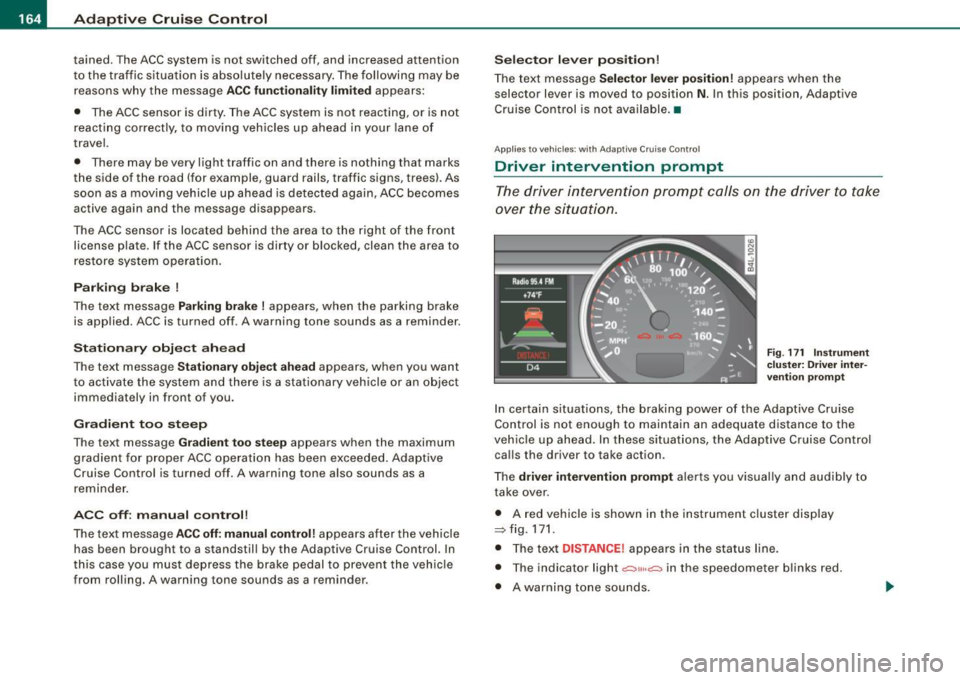
In certain situations , the braking power of the Adaptive Cruise
Control is not enough to maintain an adequate distance to the
vehicle up ahead. In these situations, the Adaptive Cruise Control
calls the driver to take action .
The
driver intervention prompt alerts you visually and audibly to
take over .
• A red vehicle is shown in the instrument cluster display
::::::,fig.171.
• The text DISTANCE! appears in the status line .
• The indicator light
.:=:,1,, ,.:=:> in the speedometer blinks red.
• A warning tone sounds.
Page 167 of 426
![AUDI Q7 2009 Owner´s Manual _____________________________________________ A_ d_a ...: pc.. t _i_ v _e_ C_ ru_ is_ e_ C_ o_n_ t_ r_ o _ l __ lllll
[ i ] Tip s
• Adaptive Cruise Contro l is switched off after pressing t](/img/6/40274/w960_40274-166.png "AUDI Q7 2009 Owner´s Manual _____________________________________________ A_ d_a ...: pc.. t _i_ v _e_ C_ ru_ is_ e_ C_ o_n_ t_ r_ o _ l __ lllll
[ i ] Tip s
• Adaptive Cruise Contro l is switched off after pressing t")
_____________________________________________ A_ d_a ...: pc.. t _i_ v _e_ C_ ru_ is_ e_ C_ o_n_ t_ r_ o _ l __ lllll
[ i ] Tip s
• Adaptive Cruise Contro l is switched off after pressing the foot
brake . The speed saved up this point can be resumed.
• To resume the saved speed, release the brake pedal and press
the control lever=>
page 157, "Turning Adaptive Cruise Control off
temporarily".
• If you use the accelerator to go faster than the speed of the
vehicle ahead of you , the
dr iver i nterve ntion pr ompt will not be
accompanied by a warning signal.
• If the speed you previously set is exceeded , the indica tor light in
the speedometer wi ll switch off. •
Applies to v ehi cles: with Ad aptive Crui se Co nt rol
MMI settings
Individual settings for Adaptive Cruise Control can be
selected in the MM/ .
Fig. 172 M MI Display:
A dapti ve C ruise
Co ntrol
Settings for the driving program can be adjusted indiv idu
ally to the particular user and saved in the MMI. This can
only be done with the eng ine running.
- Press the
I CAR] funct ion button.
Controls and equip
ment
Select Sy stem s* in the CAR menu.
- Select
Adaptive Crui se Control . The Adaptive C ruise
Control
menu appears.
Select
driving program .
Select the desired driv ing program .
Sett in g t he d riving p rogram
In the driving progr am menu you can adjust the characteristics of
Adaptive Cruise Contro l to your own preferences using
d yn ami c,
s ta nd ard
or comfort .
Sav ing sett ing s
Your individua l settings are automatical ly saved and assigned to the
remote control key being used (remote key storage). If the key is
given to another person, the saved settings remain as they are. •
System limitations
Applies to veh ic les : w ith Ada ptiv e Crui se Cont ro l
General information
The radar sensor has limits that the driver must know to
be able to use ACC properly.
The Adaptive Cruise Control works within limits that ar e also related
to radar sensor range and sight distance . In some situations ACC
may react unusually or late from the driver's point of view . There
fore, always be attentive to what is happening around you and always be ready to intervene, if necessary :
• when driving around curves=>
page 166
• when vehicles up front are not in line with your vehicle
=>
page 166
• when other vehic le s are changing lanes=> page 167
I • •
Page 188 of 426
• ..__A_ u_ t _o_ m_ a_ t_ i_ c _ t_r _a _n_ s_ m_ is_ s_io _ n ________________________________________________ _
Select R only when the vehicle is at a full stop and the engine is
running at idle speed=>
& in "Driving the automatic transmission"
on
page 184.
Before you move the selector lever to R, press both the button in the
handle of the selector lever
and the brake pedal at the same time.
When the ignition is on, the backup lights illuminate when the
selector lever is moved into R.
N -Neutral
The transmission is in neutral in this position. Shift to this position
for standing with the brakes applied =>
page 186 .
When the vehicle is stationary or at speeds below 3 mph (5 km/h),
you must always apply the footbrake before and while moving the
lever out of
N.
D -Normal position for driving forward
Position Dis for normal city and highway driving. It ranges from zero
to top speed and all gears shift automatically, depending on engine
load, driving speed and automatically selected shift programs.
When the vehicle is stationary or at speeds below 3 mph (5 km/h),
you must always apply the foot brake before and while moving the lever to
D out of N.
In certain circumstances it may be advantageous to temporarily
switch to the manual shift program to manually select gear ratios to
match specific driving conditions=>
page 788.
S -Sport position
Select this position for sportier performance. In this position, the
transmission will not upshift as soon, allowing the vehicle to use the
increased power available at higher engine speeds to achieve live
lier acceleration.
When the vehicle is stationary or at speeds below 3 mph (5 km/h),
you must always apply the foot brake before and while moving the lever to
S out of N.
& WARNING
Read and follow all WARNINGS => & in "Driving the automatic
transmission" on
page 184.
0 Note
Coasting downhill with the transmission in N and the engine not
running will result in damage to the automatic transmission and
possibly the catalytic converter. •
Automatic Shift Lock (ASL)
The Automatic Shift Lock safeguards you against acciden
tally shifting into a forward or the reverse gear and
causing the vehicle to move unintentionally.
Fig. 199 Shift gate:
selector lever lock
positions and interlock
button highlighted
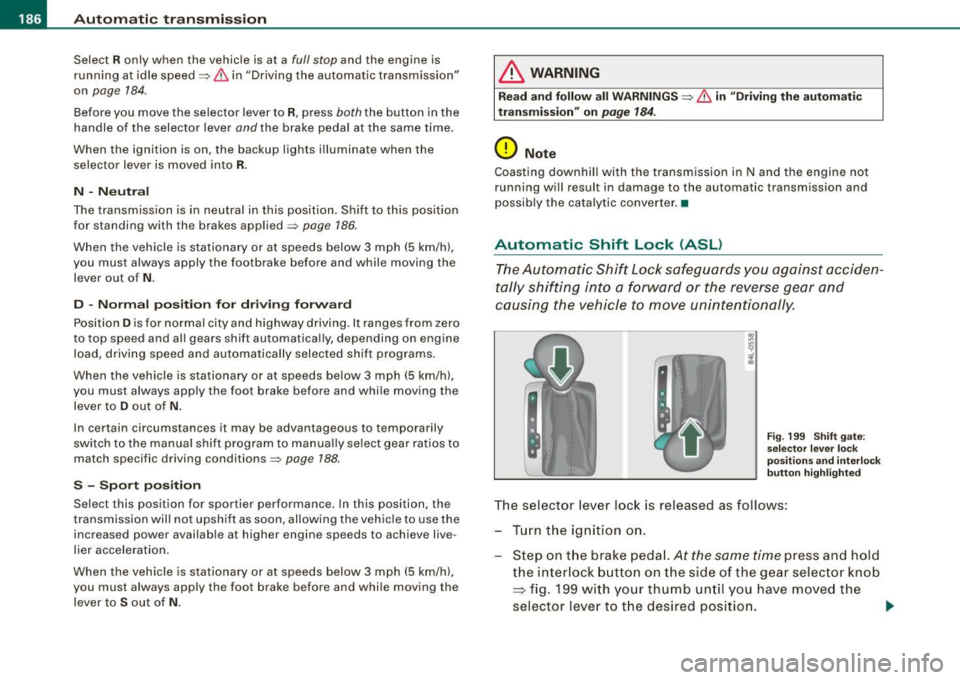
The selector lever lock is released as follows:
- Turn the ignition on.
Step on the brake pedal.
At the same time press and hold
the interlock button on the side of the gear selector knob
=> fig. 199 with your thumb until you have moved the
selector lever to the desired position.
~
Page 190 of 426
111..__A_ u_ t _o_ m_ a_ t_ i_ c _ t_r _a _n_ s_ m_ is_ s_i o _ n ________________________________________________ _
the driver presses the brake pedal on a downhill gradient. This
makes use of the braking effect of the engine without the need to
shift down manually. •
Manual shift program
Using the manual shift program you can manually select
gears.
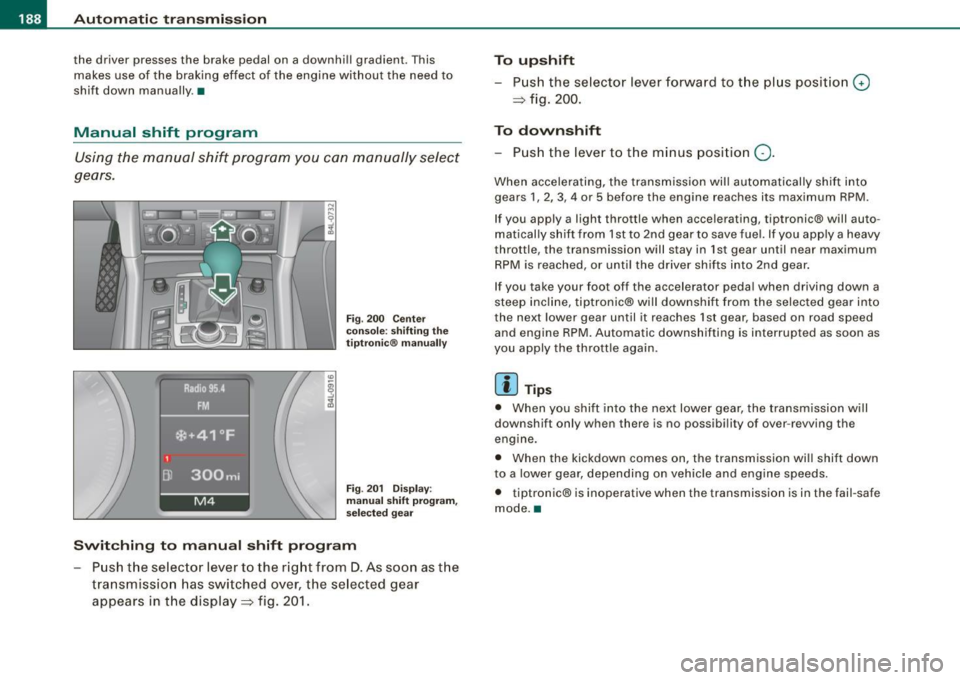
Fi g. 200 Ce nter
co nso le: s hiftin g the
tiptr onic® ma nually
Fi g. 20 1 Disp lay:
man ual s hift progr am ,
selected gear
Swit ching to manual shift program
Push the selector lever to the right from D. As soon as the
transmissio n has switched over, the selected gear
appears in the display => fig. 201.
To upshift
Push the selector lever forward to the plus position 0
=> fig. 200.
To downshift
- Push the lever to the minus position Q.
When accelerating, the transmission will automatically shift into
gears 1 , 2, 3, 4 or 5 before the engine reaches its maximum RPM .
If you apply a light throttle when accelerating, tiptronic® will auto
matically sh ift from 1st to 2nd gear to save fue l. If you app ly a heavy
throttle, the transmission will stay in 1st gear until near maximum
RPM is reached, or unti l the driver shifts into 2nd gear .
If you take your foot off the accelerator peda l when driving down a
steep incline, tiptronic® wi ll downshift from the selected gear into
the next lower gear until it reaches 1st gear, based on road speed
and engine RPM. Automatic downshifting is interrupted as soon as
you apply the thrott le again .
[ i ] Tips
• When you shi ft into the next lower gear, the transmission will
downshift only when there is no possibi lity of over -revving the
engine.
• When the kickdown comes on, the transmission wil l shift down
to a lower gear, depending on vehicle and eng ine speeds.
• tiptronic® is inoperative when the transmission is in the fail-safe
mode. a
Page 217 of 426
HomeLink® -_______________ ___.
Applies to vehicles: with Homelin k® un iversal remote contro l
Programming the Homelink ® transmitter
The transmitter is programmed in two phases. For rolling
code transmitters, a third phase is also necessary.
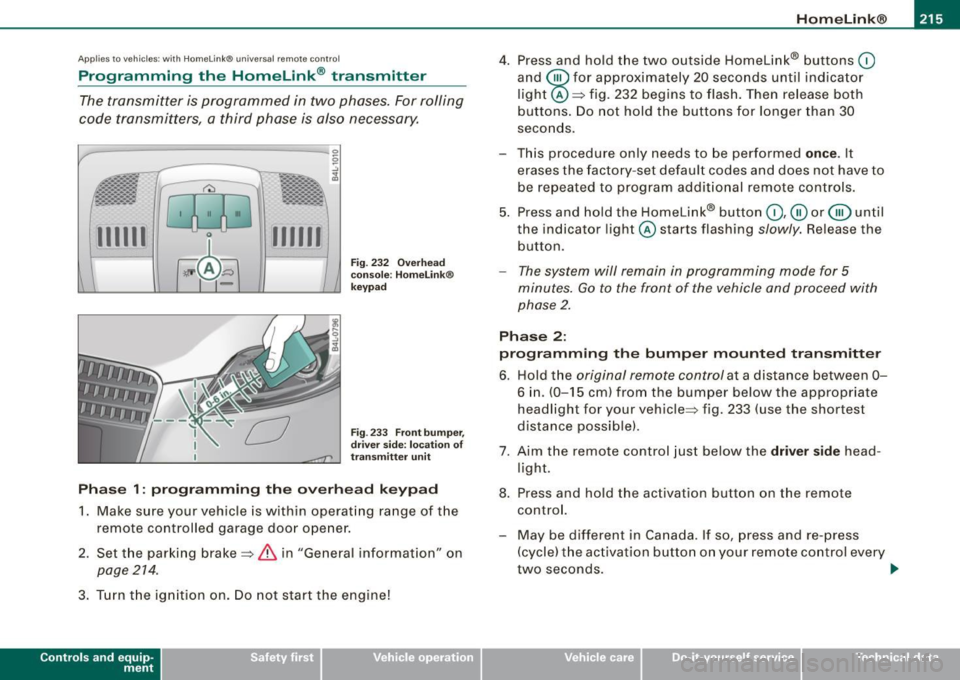
111111 111111
-
Fig . 232 Overhead
console : Homelink®
keypad
Fig . 233 Front bumper,
driver side: location of
transmitter unit
Phase 1: programming the overhead keypad
1. Make sure your vehicle is with in operating range of the
remote controlled garage door opener.
2. Set the parking brake=>
& in "General informat ion" on
page 214 .
3. Turn the ignition on . Do not start the engine!
Contro ls and eq uip
ment
4. Press and hold the two outside Homelink® buttons 0
and @for approximately 20 seconds until indicator
light @=> fig. 232 begins to flash. Then release both
buttons. Do not hold the buttons for longer than 30
seconds.
- This procedure only needs to be performed
once . It
erases the factory-set default codes and does not have to
be repeated to program additional remote controls.
5. Press and hold the Homelink® button
0,@ or @ until
the indicator light @starts flashing
slowly. Release the
button.
- The system will remain in programming mode for 5
minutes.
Go to the front of the vehicle and proceed with
phase 2.
Phase 2:
programming the bumper mounted transmitter
6. Hold the original remote control at a distance between 0-
6 in . (0-15 cm) from the bumper below the appropriate
headlight for your vehicle => fig . 233 (use the shortest
distance possible).
7. Aim the remote control just below the driver side head
light.
8. Press and hold the activation button on the remote control.
- May be different in Canada. If so, press and re-press
(cycle) the activation button on your remote control every
two seconds. .,_
Vehicle care I I irechnical data
Page 292 of 426
--~ln~ t ~e~ ll~ig ;t e~ n~t ...:t~ e::_: c::,: h '..!.'..: n~o ~ l.!::o
3g
:t; yL __________________________________________ _
& WARNING (continued)
tendency to spin and the vehicle may break away -danger of skid
ding!
• Stability is limited in the ESP offroad mode. •
Electronic differential lock (EDL)
The electronic differential lock monitors the rotational
speed of the drive wheels.
General notes
The electronic differential lock (EDU helps the car to start moving,
accelerate and climb a gradient on surfaces providing poor or
almost no grip . Without EDL, this would be difficult, if not impos
sible.
How the system works
The EDL operates automatically. It monitors the rotational speed of
wheels with the help of the ABS sensors=> page 292. If a noticeable
slip is detected at the wheels (e.g. on slippery ground on one side),
the spinning wheels are braked and power is transferred to the
other wheels. This is done up to a speed of about 60 mph (100 km/h).
Noises from the brake system signal that wheel spin is being
controlled.
Driving off
When driving off, always be sure to keep road conditions in mind as
you accelerate. If one drive wheel spins because it is on a surface
with less grip, apply plenty of throttle until the car starts to move.
Overheating of brakes
To prevent the disc brake of the braked wheel from overheating if
subjected to excessive loads on this wheel, the EDL cuts out tempo
rarily. The vehicle remains operational and behaves in the same way
as a vehicle without EDL. As soon as the brake has cooled down, EDL switches on again auto
matically.
& WARNING
• When accelerating on slippery surfaces, such as on ice or snow,
always be careful when depressing the accelerator pedal . Even
with the EDL working, the drive wheels can spin and reduce your ability to control your car. Risk of crash!
• The increased safety afforded by EDL does not mean that you
can take safety risks. Always adapt your driving style to the road
conditions and traffic situation.
[ i] Tips
If a fault occurs in the ABS, the EDL is also not functioning. This is
indicated by the ABS warning light=> page 22. •
Anti-Slip Regulat ion System (ASR)
The Anti-Slip Regulation System prevents the driven
wheels from spinning when the car is accelerating.
General notes
The Anti -Slip Regulation System (ASR) is integrated in the electronic
stabilization program (ESP) . When the vehicle starts up and acceler
ates, the wheels are prevented from spinning by adjusting the
engine power to match the amount of grip available from the road
surface.
How the system works
ASR performs automatically, i.e. without the driver's intervention.
With the aid of the ABS sensors=> page 292, ASR monitors the
speed of the driven wheels. If the wheels start to spin, engine torque
is reduced automatically until the tires find enough grip to lock onto
the road surface. The system is active across the entire speed range . ..,
Page 295 of 426

If an individual wheel begins to rotate too slowly in relation to
vehicle speed and tends to lock, the ABS automatically reduces
brake pressure to prevent that wheel from locking.
This automatic adjustment process will cause a
slight vibration of
the brake pedal and some noises to alert you that vehicle speed
must be adapted to existing road and traffic conditions .
_& WARNING
Although the ABS is very effective, always remember that braking
capability is limited by tire traction. Always adjust your driving
speed according to the road and traffic conditions. Do not let the
extra safety afforded by the ABS tempt you into taking extra risks.
The ABS cannot overcome the laws of physics.
[ i] Tips
• If ABS is not functioning properly , a warning light will come on .
See
=> page 22.
• If a fault occurs in the ABS, the EDL is also not functioning. This
is indicated by the ABS warning light.•
Brake assistant
The brake assistant is designed to achieve the optimum
braking effect.
The brake assistant helps to increase the effective braking power
and thus to achieve
a shorter stopping distance . If the driver
presses the brake pedal very quickly , the brake assistant automati
cally boosts the braking force to the maximum level, up to the point
where the anti-lock brake function (ABS) intervenes to stop the
wheels from locking. You should then keep th e brake pedal pressed
until the vehicle has braked to the required speed. The brake assis
tant swi tches its elf off as soon as you release the brake pedal.
Controls and equip
ment Safety first Vehicle operation
Intelligent technology
Automatic full braking assist
This function allows full braking
in spite of high brake pedal forces
(e.g . when the brakes are severely stressed because the vehicle is
fully loaded) . The driver notices this function through a reduction of
pedal force and increased pedal travel. When the brake pedal is
released, full braking assist switches off again automatically.
If there is an ABS failure, the brake assistant and automatic full
braking assist ar e not available .
The brake assistant will not be operative if there is a malfunction in
the ABS.
_& WARNING
Please remember that the accident risk always increases if you
drive too fast, especially in corners or on a slippery road, or if you
follow the vehicle ahead of you too closely . Increased risk of an
accident cannot be compensated for even by the brake assistant,
so always maintain a safe speed. iJ
Servotronic® -advanced power
steering system
The power steering systems uses the power of the
running engine to allow precise steering with little effort.
The advanced Servotronic ® power steering system senses the road
speed and electronically adjusts power assistance to provide
comfortable and safe steering response exactly matched to the
vehicle speed.
Power steering will not work if the engine is off. As a result, the
s teering whe el will be hard to turn.
The power steering fluid level is checked during the scheduled
maintenance services .
•
Vehicle care Do-it-yourself service Technical data