ignition AUDI Q7 2009 Owner´s Manual
[x] Cancel search | Manufacturer: AUDI, Model Year: 2009, Model line: Q7, Model: AUDI Q7 2009Pages: 426, PDF Size: 97.13 MB
Page 39 of 426

Driver message appears and does not go out again
If this driver notification appears after the ignition is turned on or
while driving and does not go out again , the battery's state of
charge is not in the optimal range . Starting capability is restricted.
Have the battery checked by an authorized Audi dealer as soon as
possible .•
Worn brake pads )
Brake pads!
If the warning light illuminates, immediately contact your autho
ri zed Audi dealer or qualified workshop to have all brak e pads
inspected. On USA models the warning light .,...,,. comes on together
with the warning light
BRAKE. Both sets of brak e pads on an axl e must
always be replaced at the same time.
& WARNING
Driving with bad brakes can cause a collision and serious personal
injury.
• If the warning light and the warning light
BRAKE21 with the
message Brake pads! comes on in the instrument cluster display,
immediately contact your authorized Audi dealer or qualified
workshop to have all brake pads checked or replaced if
necessary. •
Headlight range control defective )
' Headlight range control defective !
If the symbol illuminates , the dynamic headlight range control is no
longer working properly. Have the system checked and repaired at
your authorized Audi dealer. •
21 BRAKE: USA models only
Controls and equip
ment
Driver information display
Engine oil level ~
~ Please check oil level
When the symbol illuminates, check the engine oil level as soon as
possible=>
page 335. Top off the oil at your earliest opportunity
=>
page 336. •
Engine oil sensor defective -
Oil level! Sensor defective
If the symbol illuminates, contact your authorized Audi dealer and
have the oil sensor inspected. Until you have this done, check the oil
level each time you refuel just to be on the safe side=>
page 335. •
Applies to vehi cles : wit h engi ne spee d lim itation
Engine speed limitation f,,.
Engine speed maximum XXXX RPM
The I symbol illuminates when there is an engine control malfunc
tion . The indicator light in the instrument cluster also illumi
nates. The engine speed is limited to the speed displayed in the
driver information system. Keep in mind that the engine speed will
not exceed the value displayed in the driver information system, for
example when downshifting .
Please go to an authorized Audi dealer or other qualified workshop
to have the malfunction repaired. •
Applies to vehic les : with Ada ptive ligh t
Adaptive Light defective ~l
' Adaptive Light defective
I • •
Page 40 of 426

Driver information display
When this symbol illuminates, it means that Adaptive Light is
defective . Go to an authorized Audi dealer to have the headlights or
the control unit for the Adaptive Light repaired.•
Ignition lock malfunction ~
If the symbol in the display comes on, there is a malfunc-
tion in the e lectronic ignition lock. An additional driver
message can be displayed by pressing the [ CHECK) button:
Ignition lock defective
-Drive to an authorized Audi dealer or qualified workshop
at your earliest convenience to have the malfunction
corrected. •
Windshield wipers faulty --->
....... Windscreen wiper defective !
When this symbol ' illuminates, it means that the electronics for
the windshield wipers are defective. P lease go to an authorized Audi
dea ler or qua lified workshop to have the windshield wiper system
repaired .•
Speed warning system
Overview
The speed warning system helps you to keep your driving
speed below a set speed limit.
The speed warning system warns the driver if he exceeds a previ
ously stored maximum speed. A warning tone wi ll sound as soon as the vehicle speed exceeds the set speed by about 3 mph (3 km/h). At
th
e same time, a warning symbol appears in the display.
The speed warning system has
two warning thresholds that func
tion independently of each other and that have somewhat different
purposes:
Speed warning 1
You can use speed warning 1 to set the maximum speed while you
are driving. This setting will remain in effect until you turn off the
ignition, assuming that you have not changed or reset the setting.
Th e speed warning symbol
9 (USA models)/ 8 (Canada models) in
the warning 1 display appears when you exceed the maximum
speed . It goes out when the speed falls below the stored maximum
speed.
The speed warning symbol will also go out if the speed
exceeds the
stored maximum speed by more than about 25 mph ( 40 km/h) for at
least 10 seconds. The stored maximum speed is deleted.
Setting speed warning 1
~ page 39 .
Speed warning 2
Storing warning 2 is recommended if you always want to be
reminded of a certain speed, for example when you are traveling in
a country that has a general maximum speed limit, or if you do not
want to exceed a specified speed for winter tires.
The speed warning 2 symbol,
8, (USA modelsl/ 8, (Canada models)
appears in the display when you exceed the stored speed limit.
Un like warning 1, it wil l not go out unti l the vehicle speed drops
below the stored speed limit.
Setting speed warning 2
~ page 39.
[ i ] Tips
Even though your vehicle is equipped with a speed warning system,
you should still watch the speedometer to make sure you are not
driving faster than the speed limit. •
Page 43 of 426
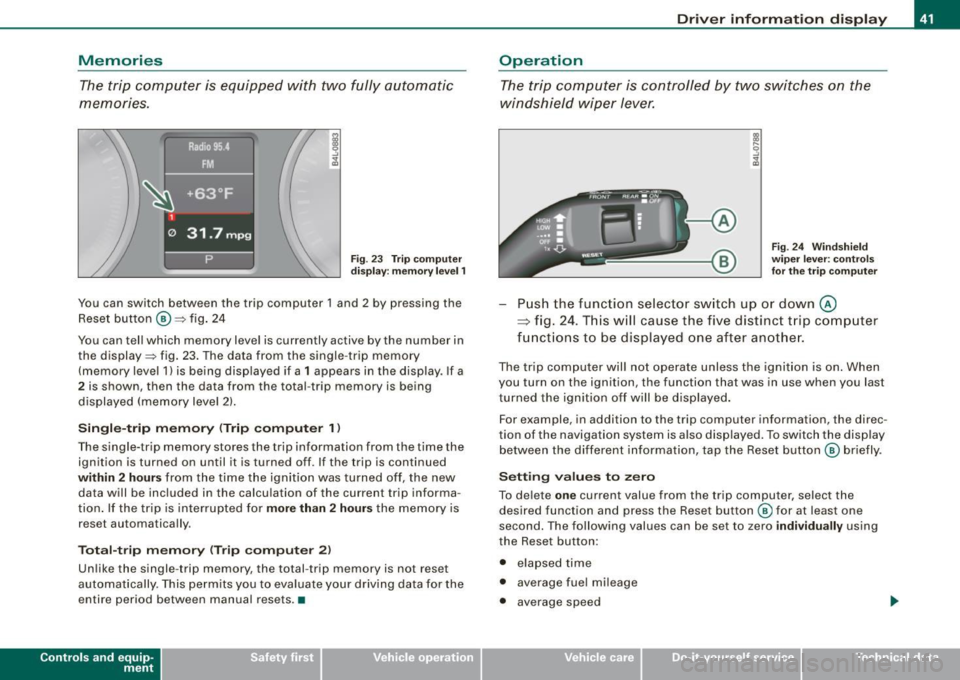
Memories
The trip computer is equipped with two fully automatic
memones.
Fig . 23 Trip computer
display: memory level 1
You can switch between the trip computer 1 and 2 by pressing the
Reset button
@ ::::> fig. 24
You can tell which memory level is currently active by the number in the display ::::> fig. 23. The data from the single -trip memory
(memory level 1) is being displayed if a
1 appears in the display . If a
2 is shown, then the data from the total -trip memory is being
displayed (memory level 2).
Single-trip memory (Trip computer 1)
The single-trip memory stores the trip information from the time the
ignition is turned on until it is turned off. If the trip is continued
within 2 hours from the time the ignition was turned off, the new
data will be included in the calculation of the current trip informa
tion. If the trip is interrupted for
more than 2 hours the memory is
reset automatically .
Total-trip memory (Trip computer 2)
Unlike the single-trip memory, the total -trip memory is not reset
automatically . This permits you to evaluate your driving data for the
entire period between manual resets .•
Con tro ls and eq uip
ment
Driver information display
Operation
The trip computer is controlled by two switches on the
windshield wiper lever.
Fig. 24 Windshield
wiper lever : controls
for the trip computer
Push the function selector switch up or down @
~ fig. 24. This will cause the five distinct trip computer
functions to be displayed one after another.
The trip computer will not operate unless the ignition is on. When
you turn on the ignition, the function that was in use when you last
turned the ignition off will be displayed.
For example, in addition to the trip computer information, the direc
tion of the navigation system is also displayed. To switch the display
between the different information, tap the Reset button
@ briefly .
Setting values to zero
To delete one current value from the trip computer, select the
desired function and press the Reset button
@ for at least one
second. The following values can be set to zero
individually using
the Reset button :
• elapsed time
• average fuel mileage
• average speed
Vehicle care I I irechnical data
Page 47 of 426
![AUDI Q7 2009 Owner´s Manual [ i ] Tip s
• In the case of an intentional loss of air pressure, for example,
when re -adjusting tire pressure, this has to be stored again after
wards:::::,
page 45 .
•](/img/6/40274/w960_40274-46.png "AUDI Q7 2009 Owner´s Manual [ i ] Tip s
• In the case of an intentional loss of air pressure, for example,
when re -adjusting tire pressure, this has to be stored again after
wards:::::,
page 45 .
•")
[ i ] Tip s
• In the case of an intentional loss of air pressure, for example,
when re -adjusting tire pressure, this has to be stored again after
wards:::::,
page 45 .
• Tire pressure must only be adjusted when the temperature of the
tires is about the same as ambient air temperature.
• The ye llow symbol disappears, when the tire pressure is
corrected and the new pressure is stored in the system=:>
page 45.
• After changing a wheel you have to adjust the tire pressures on
all whee ls . In addition, you must then initialize the new tire pres
sures in the tire pressure monitoring system=:>
page 46. •
Storing tire pressures
Correct storage of specified pressure is the basic require
ment for reliable tire pressure monitoring.
Fig. 27 Car: Tire pres
s u re moni to rin g
sys tem
In o rder for the tire pressure mo nitoring system to operate
appropriately, you have to re -save the specified pressures in
the MMI wheneve r you adjust tire press ures, for example
when the load condition o f your vehic le changes. Proceed
as follows:
Controls and equip
ment
Dr ive r informat ion di spl ay
C orr ec ting tir e pr essur e
Check the pressure in the tires.
- Adjust air pressure according to the tire pressure label or the pressures listed in this manual~
page 351 .
Saving tir e pr essures
Turn o n the ignition .
Press the
I CAR] function button.
- Select
Systems in the CAR menu.
- Select
Tire pre ssure monitoring .
-Select Store curr . tir e press ures~ fig . 27.
All pressure warning indicators in the display wi ll be canceled.
Following each intentional change in specified pressures, tire pres
sures must be resaved.
After the pressures are saved, the tire pressure monitoring system measures the current tire pressures and saves them as the new
specified pressures.
[ i ] Tip s
• The tire pressure is shown on the tire pressure label. On USA
vehicles, the tire pressure label is located on the driver 's side B
pillar. On Canada vehicles, the tire pressure label is located either on
the driver's side B -pillar or inside the fuel filler f lap . T he tire pressure
label l ists the recommended cold tire inflation pressures for the
vehic le at its maximum capacity weight and the tires that were on
your vehicle at the time it was manufactured. For recommended tire pressures for normal load conditions, please see chapter
=:>
page 351. ._
I • •
Page 50 of 426
Opening and closing
Opening and closing
Keys
Key set
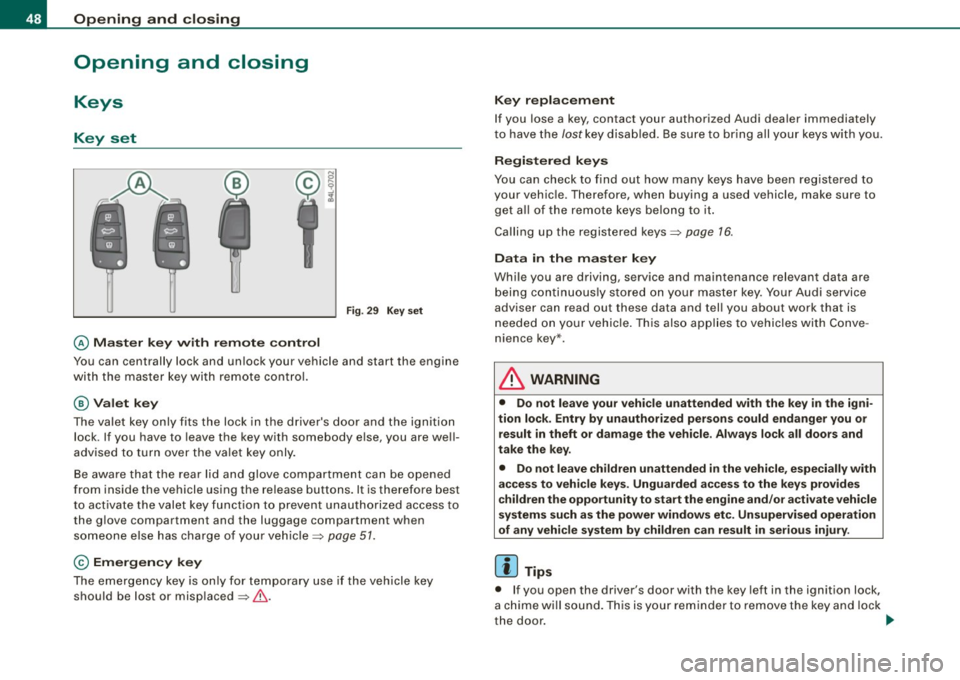
C !
@ Master key with remote control
Fig. 29 Key set
You can centrally lock and unlock your vehicle and start the engine
with the master key with remote control.
@Valet key
The valet key only fits the lock in the driver's door and the ignition
lock . If you have to leave the key with somebody else, you are well
advised to turn over the valet key only.
Be aware that the rear lid and glove compartment can be opened
from inside the vehicle using the release buttons. It is therefore best
to activate the valet key function to prevent unauthorized access to
the glove compartment and the luggage compartment when
someone else has charge of your vehicle~
page 51.
© Emergency key
The emergency key is only for temporary use if the vehicle key
should be lost or misplaced ~& .
Key replacement
If you lose a key, contact your authorized Audi dealer immediately
to have the
lost key disabled. Be sure to bring all your keys with you.
Registered keys
You can check to find out how many keys have been registered to
your vehicle. Therefore, when buying a used vehicle, make sure to
get all of the remote keys belong to it.
Calling up the registered keys~
page 76.
Data in the master key
While you are driving, service and maintenance relevant data are
being continuously stored on your master key. Your Audi service
adviser can read out these data and tell you about work that is
needed on your vehicle. This also applies to vehicles with Conve
nience key*.
L1}. WARNING
• Do not leave your vehicle unattended with the key in the igni
tion lock. Entry by unauthorized persons could endanger you or result in theft or damage the vehicle. Always lock all doors and
take the key.
• Do not leave children unattended
in the vehicle, especially with
access to vehicle keys. Unguarded access to the keys provides
children the opportunity to start the engine and/or activate vehicle
systems such as the power windows etc. Unsupervised operation
of any vehicle system by children can result in serious injury.
[ i] Tips
• If you open the driver's door with the key left in the ignition lock,
a chime will sound. This is your reminder to remove the key and lock
the door.
~
Page 51 of 426
• For security reasons, replacement keys are only available from
Audi dea lers. •
Master key with remote control
The remote control allows you to lock or unlock the
vehicle electr onically .
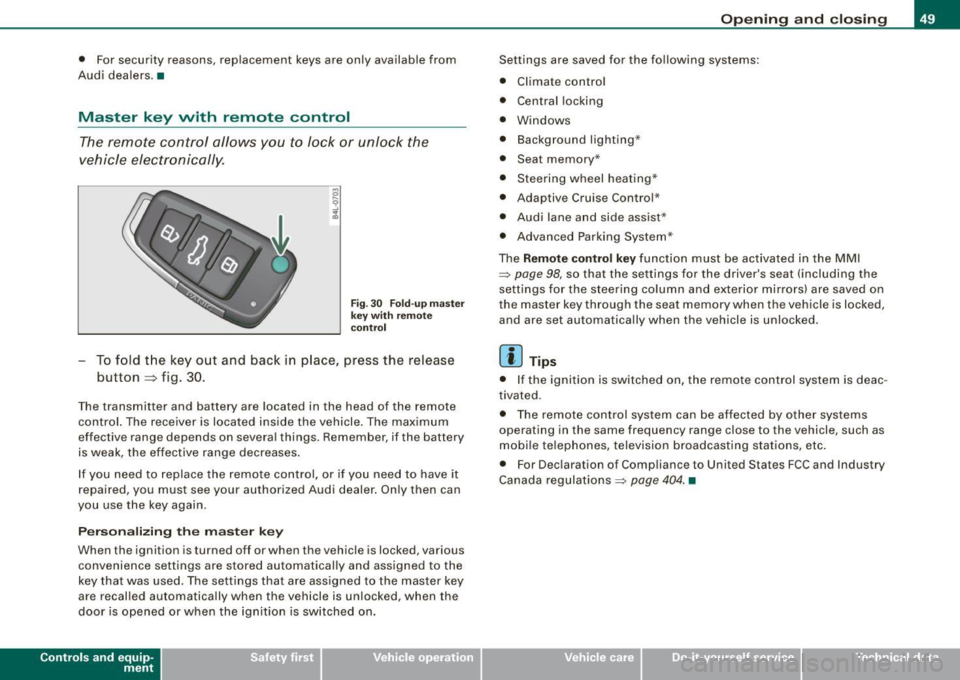
Fig . 3 0 F old -u p mas ter
ke y w ith re mo te
co ntro l
To fold the key out and back in place, press the release
button
~ f ig . 30 .
The transmitter and battery are located in the head of the remote
control. The receiver is loca ted inside the vehicle. The maximum
effective range depends on several things. Remember, if the battery
is weak, the effective range decreases .
I f you need to replace the remote contro l, or if you need to have it
repaired, you must see your authorized Audi dealer . Only then can
you use the key again.
P erson alizing the master key
When the ignition is turned off or when the vehicle is locked, various
convenience settings are stored automatically and assigned to the
key that was used. The se tti ngs that are assigned to the master key
are recalled automatically when the vehicle is unlocked, when the
door is opened or when the ignition is sw itched on .
Contro ls and eq uip
ment
Op ening and clo sing
Settings are saved for the fo llowing systems:
• Climate contro l
• Central locking
• Windows
• Background lighting·"
• Seat memory *
• Steering wheel heating*
• Adaptiv e Cruise Control *
• Audi lane and side assist*
• Advanced Parking System *
The
Remote control key function must be activa ted in the MMI
~ page 98, so that the settings for the driver's seat (including the
settings for the steering column and exterio r mirro rs) are saved on
the master key through the seat m emory when the vehicl e is locked,
and are set automatically whe n the vehicle is unlocked.
[ i ] Tips
• I f the igni tion is switched on, the remote cont rol system is deac
tivated .
• The remote control system can be affected by other sys tems
operating in the same frequency range close to the vehicle, such as
mobi le te lephones, television broadcasting stations, etc .
• For Dec laration o f Compliance to United States FCC and Industry
Canada regulations ~
page 404. •
Vehicle care I I irechnical data
Page 53 of 426
-Place the cover w ith the new battery on the key base and
press both parts together .
<£> For the sake of the environment
Dispose of dead batteries proper ly so as not to pol lute the environ
ment.
[ i ] Tips
The rep lacement battery must be the same specificat ion as the
original. •
Electronic immobilizer
The immobilizer helps to prevent unauthorized use of
your vehicle.
A computer chip inside your key automatically deact ivates the e lec
tronic immobilizer when you insert the key in the ignition lock, or on
veh ic les with Convenience key *, when the key is inside the vehicle.
When you remove the key from the ignition lock, or on vehicles with
Convenience key, when you remove the key from the vehic le, the
e lectronic immobilizer is automatica lly activated once again.
I f an unauthorized key was used, SAFE is disp layed continuously in
the odomete r disp lay field .
& WARNING
Always take the key wi th you when you leave the v ehicle. The ke y
ca n dis arm the ele ctro nic engine im mob iliz er and permit an unau
t hori zed per son to start the engine and enable operati on of the
v ehi cle sys tem s such a s pow er win dow o r Panor ami c s liding
sunroof * leading t o serious personal injury.
Controls and equip
ment
Opening and clo sing
[ i ] Tip s
• Your engine can on ly be started using the factory -equipped key.
• You may not be ab le to start your vehicle if an ignition key of a
different vehicle make is also located on your set of keys.
• For Dec laration of Compliance to Uni ted States FCC and Industry
Canada regulations~
page 404. •
Valet key function
The valet key fun ction prevents unauthorized persons
from opening the glove compartment or rear lid.
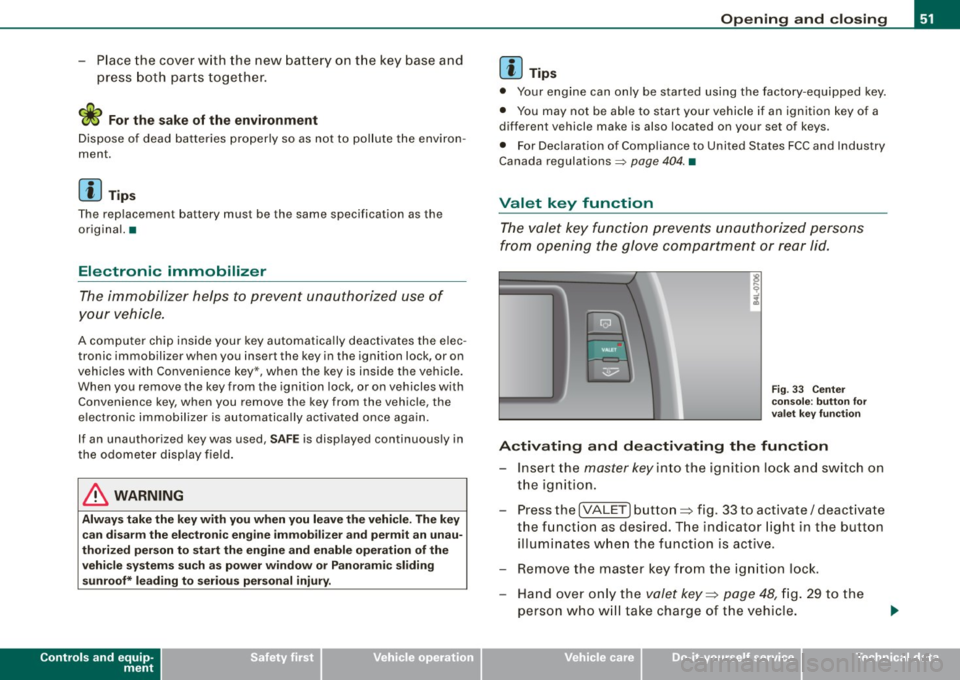
Fi g. 33 Ce nter
co nso le: butto n fo r
v ale t key f unction
Activating and dea ctivating the fun ction
- Insert the master key in to the ignition lock and switch on
the ignition.
- Press the
[VALE T] button ~ fig. 33 to activate/ deactivate
the funct ion as desired. T he indicator light in the button
illumi nates w hen the function is active.
- Remove the master key f rom the ign ition lock.
- Hand over on ly the
valet key~ page 48, fig. 29 to the
person who w ill tak e charge of the vehicle.
I • •
Page 54 of 426
Openin g a nd clo sin g
When the function is switched on, the buttons for opening the rear
lid and glove compartment have no function . However, please note
the following exceptions:
E xc epti ons
If the ignition has been switched on using the master key, you can
sti ll open the glove compartment and the rear lid.
As long as the ignition is switched off, you can still open the rear lid
using the rear lid button on the
master keyc:s. The same holds true
for using the rear lid release handle in conjunction with the Conve
nience key *.
For this reason, be sure to only hand over the
valet key to the person
who wil l take charge of your vehicle .
[ i ) Tip s
Be sure to activate the function before handing over the valet key to
someone else . T he valet key only fits the lock in the driver's door and
the ignition lock .•
Power locking system
General description
The power locking system locks or unlocks all doors and
the rear lid simultaneously.
The power locking system in your vehicle incorporates the following
functions:
• Central locking function
• Selective unlock feature=>
page 55
• Remote contro l feature=> page 49
• Convenience key * => page 67
• Anti -theft alarm system=> page 63
All the doors and the rear lid are locked by the central locking
system when you lock the vehicle. You can set whether genera lly
only the driver's door or all doors and the rear lid should be
unlocked when you open the vehicle in the MMI menu
Central
lock ing
to suit your individual desires=> page 55.
Unlocking the vehicle
You can unlock the vehicle from outside either by using the remote
control or by inse rting and turning the key in the driver's door lock .
When you
unl ock your vehicle:
• The anti -theft alarm system is deactivated briefly .
• The vehicle interior lights i lluminate for approximate ly 30
seconds.
• All turn signal lights will flash twice when the car is unlocked .
• After un lock ing the vehicle, you have 60 seconds to open a door
or the rear lid . After 60 seconds, the vehicle automatically locks and
the a nti -theft a larm system activates again.
The rear lid can be locked or unlocked either by using the remote
control
or by inserting and turning the key in the driver's door lock.
Un locking the vehicle with the remote control w ill only
unlock the
rear lid, to
open it, the lid handle needs to be pressed.
L oc kin g th e vehicle
You can lock the vehic le from outside either by using the remote
control
or by inserting and turning the key in the drivers's door lock .
When you
lo ck the vehicle :
• All doors and the rear lid are locked.
• All turn signal lights will flash once when the car is locked .
• The anti-theft alarm system is activated. The horn of the anti
theft alarm system wi ll sound and the anti -theft alarm system readi
ness light, located in the upper part of the driver's door panel , wi ll
start to blink .
• The vehicle interior lights turn off.
Page 55 of 426
Unl ocking and lo cking with Conve nien ce k ey *
On vehicles wh ich are equipped with the Co nven ienc e key* authori
zation system, the doors are unlocked
without a key by means of a
proximity sensor in the door hand le . The doors are simi lar ly locked
without a key using the locking button. Each door has a proximity
sensor and a locking button .
Autom atic lock ing
The automatic locking feature locks all the vehicle doors and the
rear lid when you drive faster than 9 mph (15 km/h). This function
can be tu rned on and off in the
MMI Central lock ing Menu
=>
page 55.
You can unlock the vehicle from the inside by :
• removing the key from the ignition switch (the vehicle will auto
matically unlock itself) or
• pressing the unlock part of the power lock switch@ or
• pul ling the door handle (twice to open the rear doors).
& WARNING
• When you lock your vehi cle from outside , nobody -especially
c hildren -should rem ain in side the vehi cle. Remember , when you
lock the vehicle from the outs ide the windows cannot b e opened
from the in side.
• Wh en you leav e the vehicle , alw ays r emove the ignition key and
t a ke it with you . This will prevent p assengers (children , for
example ) from ac cidentall y being locked in the veh icle sh ould the y
ac cident ally pre ss the power lock ing swit ch in th e front door s.
• Do not le ave child ren inside the vehicle un supervi sed. In an
emergency it would be impo ssible to open the door s from the
out side without the key.
Con tro ls and eq uip
ment
Op ening and clo sing
[ i ] Tip s
• In the event of a crash with airbag deployment all locked doors
wi ll be automatically unlocked to give access to the vehicle occu
pants from the ou tside.
• I f the power locking system should malfunction, you can lock
each door individually using the vehicle key=>
page 57.
• If the power locking system should fail, you can still open the
fue l tank flap in an emergency=>
page 329.
• You are well advised not to keep va luables inside an unattended
vehicle, visible or not . Even a properly locked vehic le cannot provide
t he security of a safe. •
Unlocking and locking the vehicle with the
remote control
How the remote control works.
F ig . 3 4 Rem ote
c o ntr ol: fu nc tio n
b utt ons
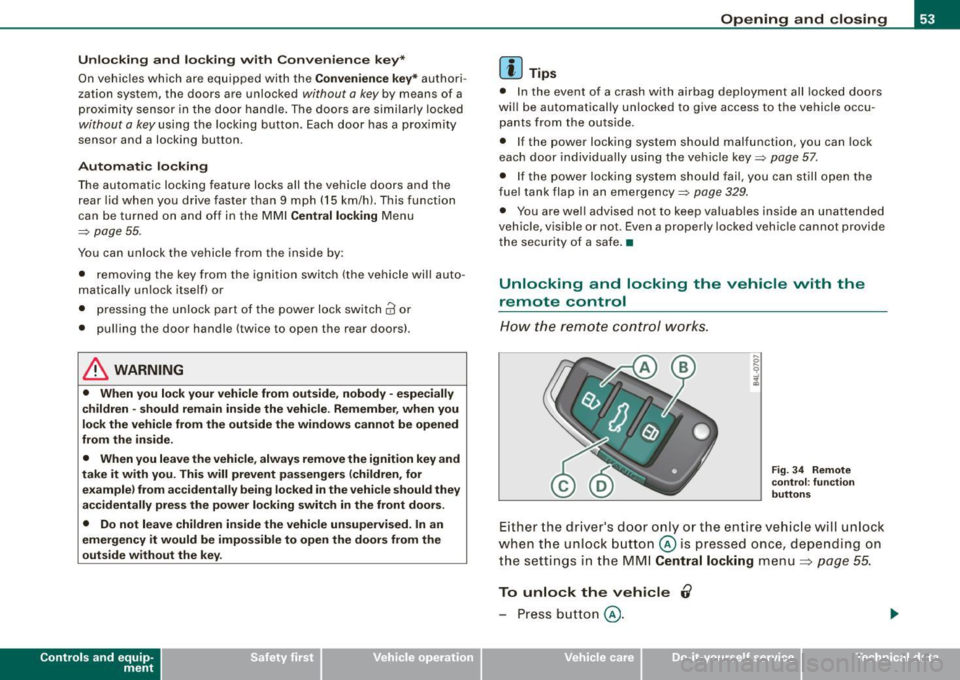
Either the driver's door only or the entire vehic le will unlock
when the unlock button@ is pressed once, depending on
the settings in the MM I
Central locking menu=> page 55.
To unlock the vehicle 0
- Press button @.
Vehicle care I I irechnical data
Page 60 of 426
Opening and closing
- The rear lid unlocks automatically and opens slightly .
- Lift the rear lid .
Closing the rear lid
Pull the rear lid down and allow it to drop gently . The lid
is then closed automatically=>& .
& WARNING
• After closing the rear lid, always pull up on it to make sure that
it is properly closed. Otherwise it could open suddenly when the
vehicle is moving .
• To help prevent poisonous exhaust gas from being drawn into
the vehicle, always keep the rear lid closed while driving. Never
transport objects larger than those which fit completely into the
luggage area, because then the rear lid cannot be fully closed .
• Never leave your vehicle unattended especially with the rear lid
left open. A child could crawl into the car through the luggage
compartment and pull the lid shut, becoming trapped and unable
to get out . To reduce the risk of personal injury, never let children
play in or around your vehicle. Always keep the rear lid as well as
the vehicle doors closed when not in use.
• Always ensure that no one is within range of the rear lid when
it is moving, in particular close to the hinges -fingers or hands can
be pinched.
[ i ] Tips
• If the rea r lid is open or not properly clo sed when the ignition is
turned on , th e door and r ear l id warn ing~
pag e 27 appears in th e
instrument cluster display.
• Should y ou no t be abl e to open th e re a r lid as d esc ribed , mak e
sure the valet key function is not activated~
page 51. •
App lies 10 vehic les: w ith automatic rear lid/trun k lid ope rat ion
Automatic rear lid /trunk lid operation
The trunk lid can be opened and closed automatically.
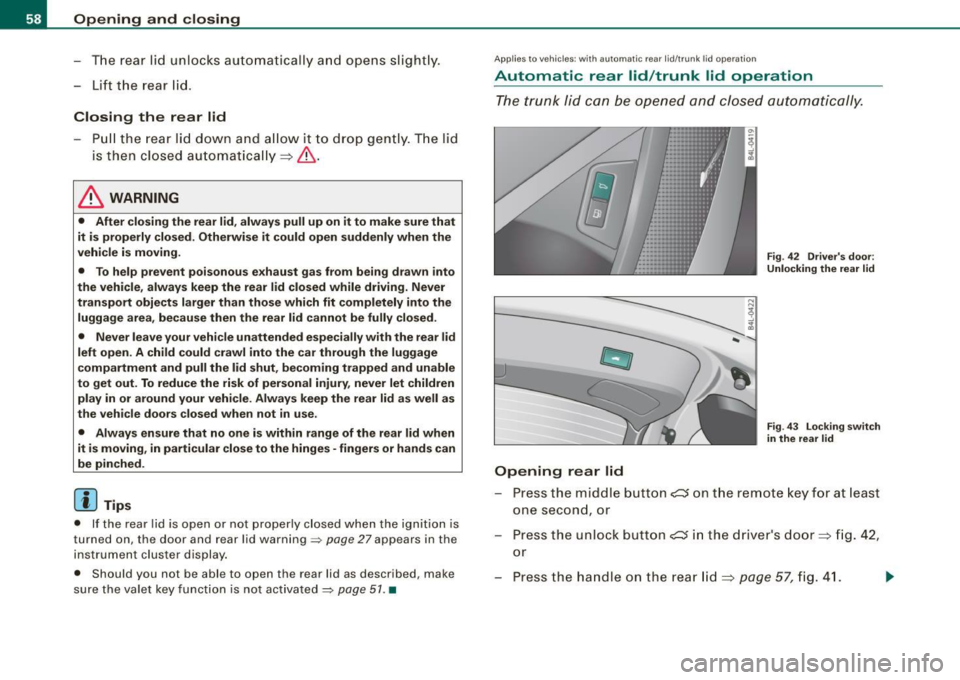
Opening rear lid
Fig. 42 Driver's door:
Unlocking the rear lid
Fig. 43 Locking switch
in the rear lid
Press the m iddle button c:s o n the remote key for at least
one second, or
- Press the unlock button
e::5 in the driver's door=> fig. 42,
or
Press t he handle on the rear lid=>
page 57, fig. 41.