ignition AUDI Q7 2009 Owner´s Manual
[x] Cancel search | Manufacturer: AUDI, Model Year: 2009, Model line: Q7, Model: AUDI Q7 2009Pages: 426, PDF Size: 97.13 MB
Page 75 of 426

Clear vision
Lights
Switching the headlights on and off ·'t!-·
In the "AUTO" position, a light sensor* automatically
switches the head- and taillights on and off in response to
light conditions.
Fig. 60 Instrument
panel : light switch
The light switch must not be overturned past the stops in
either direction.
Switching on automatic headlight control
-Turn the light switch to AUTO=> fig. 60.
Switching on the side marker lights
-Turn the light switch to ~oo:.
Switching on the headlights and high beam
-Turn the light switch to ~D.
- Push the high beam lever forward towards the instru-
ment panel=>
page 77.
Contro ls and eq uip
ment
Switching off the lights
- Turn the light switch to 0. Clear vision
The headlights only work when the
ignition is switched on . While
starting the engine or when switching off the ignition, the head
lights will go off and only the side marker lights will be on.
After starting the engine, the headlights are automatically adjusted* to the load and angle of the vehicle (for example, during
acceleration, braking). This prevents oncoming traffic from experi
encing unnecessary headlight glare from your headlights.
If the system is not operating properly, a warning symbol in the
Auto -Check Control is displayed
=> page 37.
With the side marker lights or headlights switched on, the symbol
next to the light switch illuminates
coo:.
Daytime running lights
• USA models:
On vehicles with xenon lights the daytime running
lights will come on automatically when the ignition is turned on and
the light switch=> fig. 60 is in the
O position or the AUTO position
(only in daylight conditions). The
Daytime running lights function
can be turned on and off in the MMI menu
Exterior lighting
=> page 74. On vehicles with halogen fights, daytime running lights
can be activated by your authorized Audi dealer=>
f.1.
• Canada models: The daytime running lights will come on auto
matically when the ignition is turned on and the light switch
=> fig. 60 is in the O position or the AUTO position (only in daylight
conditions)
=> /.1 .
Automatic headlight control*
In the switch position AUTO the automatic headlight control is
turned on . The low beams and tail lights are turned on automatically
through a light sensor as soon as ambient brightness (e.g . when
driving into a tunnel) falls below a value preset at the factory. When ..,_
Vehicle care I I irechnical data
Page 76 of 426

Clear vision
ambient brightness increases again, the low beams are turned off
again automatica lly => & .
In the
AUTO pos ition the low beams are switched off automatically
when the ignition is turned off .
L ight S ensor M alfu nction *
In the event of a ligh t sensor mal func tion, the drive r is notified in the
ins trument cluster display :
e. Automatic headlights /autom ati c w ipers defe ctive
For safety reasons the low beams are turned on permanently with
the switch in
AUTO . However , you can continue to turn the lights on
and off using the light switch . Have the light sensor checked as soon
as possible at an authorized Audi dealer or qualified workshop.
& WARNING
• Never use d ayt ime running lights to see where you are going.
The y are no t bright enough and will not let you see far enough
ahead for safety , espe cially at du sk or when it is d ark . Al way s
switch on the low beams at du sk or when it is dark .
• Automati c he adlights* are onl y intended to assist the driver .
They do not relieve the driver of his re sponsibility to check the
headlight s and to turn them on manually a ccording t o th e cur rent
light and visibility condit ion s. For example , fog and ra in cannot be
dete cted by the l ight sen sor s. S o alwa ys sw itch on the headlight s
under th ese weather condition s and wh en driv ing in the dark
t D .
• Cras hes c an happen when y ou cannot see th e road ahead and
when you cannot be seen by other motori sts.
- Alway s turn on the headlights s o that you can see ahead a nd
s o that others can see your c ar from the ba ck.
[ i ] Tips
• With the switch in AUTO front fog lights and rear f og lights
cannot be turned on in addition . • T
he light sensor * for headlight control is located in the rear view
mirror mount . Do no t apply any stickers to the windshie ld in this
area to prevent malfunctions or failures .
• I f you remove the ign itio n from the ign ition lock while the head
lights are still on, a bu zzer will sound as long as the driver's door is
open to remind you to turn off the lig hts.
• Always observe the specific local regulations for your ar ea as to
when to use you r lights .•
Adjusting exterior lighting
The functions are set in the MM/ .
Fig . 61 MM I display :
E x te rior lighting
- Press the [ CAR ] fu nct io n butto n.
- Selec t
Exterior lighting . The menu Exterior lighting
appears=> fig. 61.
C oming h om e*
T he
Com ing home function ensures that after turn ing off the igni
tion and op ening the driver's doo r
the vehicle periphery is il lumi
nated in the dark. In addition , the front fog lights, the tail lights and
the license plate light are turned on . On- time can be set fo r a period
from
O (off) to 60 seconds. .,,_
Page 77 of 426
Le avi ng hom e*
The Leaving home function ensures that when unlocking the vehicle
periphery is illuminated in the dark. In addit ion, the front fog lights,
t he tail lights and the licen se plate light are tu rned on . This func tion
can be turned on and off.
Daytime running light s
USA models :
On vehicles with xenon lights the daytime running
lights can be turned on or off using this function . On vehicles with
halogen lights , daytime running lights can be activated by your
authorized Audi dea ler .
Canada model s: The function cannot be turned off. It is activate d
automatically each time the ignition is turned on. This menu item is
shown "greyed out". •
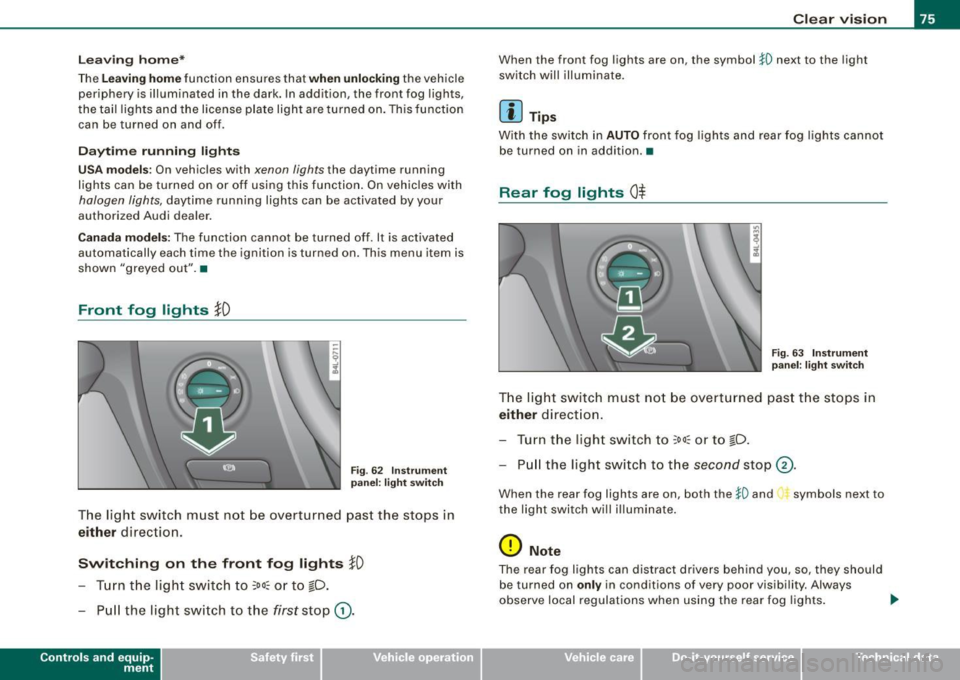
Front fog lights }0
Fig. 6 2 Instru ment
pane l: light switch
The light switch must not be overturned past the stops in
either direction.
Switching on the front fog lights tD
- Tur n t he light switch to ;oo~ o r to io .
- P ull the light switch to t he first sto p G).
Con tro ls and eq uip
ment
Clear vision
When the front fog lights are on, the symbo l }0 next to the light
switch will illuminate .
[ i ] Tips
Wi th the switch i n AUTO front fog lights and rear fog lights cannot
be turned on in addition .•
Rear fog lights 0$
Fig . 6 3 Instrument
p anel : light switch
The ligh t switch must no t be overt urned pas t th e stops in
either direct ion.
- Tu rn t he ligh t sw itch to
;oo~ or to io .
- Pull the ligh t switch to t he second sto p (v.
When the rear fog lights are on, both the }O and symbols next to
the light switch wi ll i lluminate .
0 Note
The rear fog lights can distract dr ive rs beh ind you, so, they should
be turned on
only in cond itions of very poor visibility. Always
obse rve local regulations when u sing the rea r fog lights . ...
Vehicle care I I irechnical data
Page 79 of 426
[ i J Ti ps
You should turn on the emergency flashers when:
• you are the last vehicle standing in a traffic jam so that any other
vehicles coming can see you, or when
• your vehicle has broken down or you are in an emergency s itua
tion, or when
• your vehicle is being towed by a tow truck or if you are towing
another vehicle behind you .•
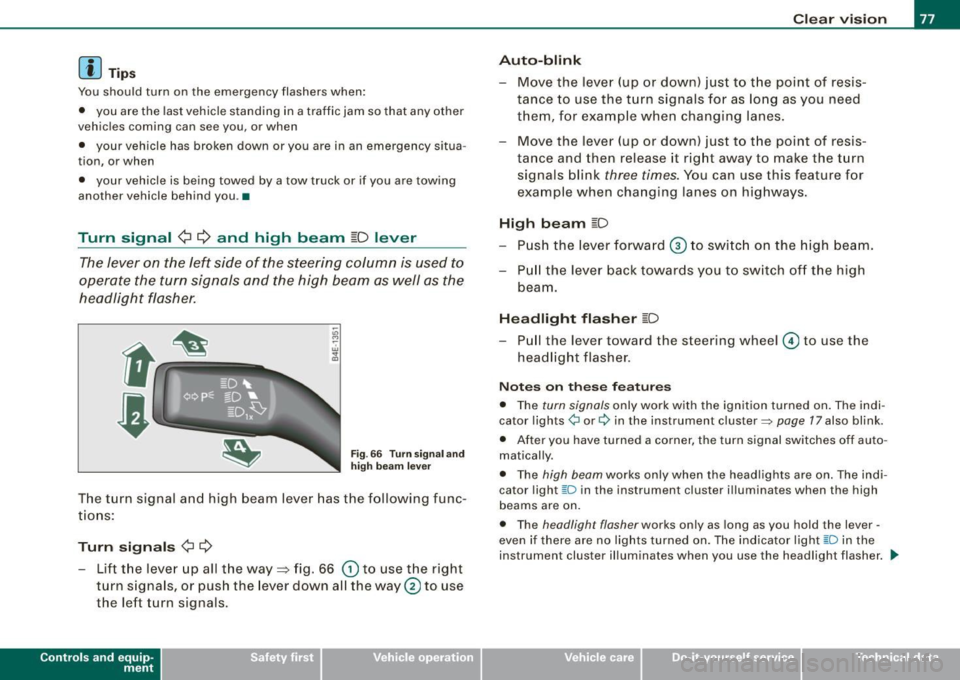
Turn signal ¢ ¢ and high beam ~D lever
The lever on the left side of the steering column is used to
operate the turn signals and the high beam as well as the
headlight flasher .
-"' M
-w ... m
Fig. 66 Tu rn sign al and
hig h bea m lever
The turn signal and high beam lever has the following func
tions:
Turn sign als ¢ ¢
- Lift the lever up all the way=> fig. 66 (D to use the right
turn s ignals, or push the lever down all the way@ to use
the left turn signals.
Con tro ls and eq uip
ment
C lea r v is ion
Au to-blink
- Move the lever (up or down) just to the point of resis
tance to use the turn signals for as long as you need
them, for example when changing lanes .
- Move the lever (up or down) just to the point of resis
tance and then release it right away to make the turn signals blink
three times . You can use this feature for
example when changing lanes on highways.
High b eam ~D
- P ush the lever forward ® to switc h on the high beam.
- P ull the lever back towards you to switch off the high
beam.
H ea dlight fl asher ~D
Pull the lever toward the steering wheel © to use the
headlight flasher.
N otes o n these fea tures
• The turn signals only work with the ignition turned on . The indi
cator lights ¢ or¢ in the instrument cluster=> page 17 also blink.
• After you have turned a corner , the turn signal sw itches off auto
matically .
• The high beam works only when the head lights are on . The indi
cator light [D in the instru ment cluster i llum inates when the high
beams are on.
• The headligh t flash er works only as long as you hold the lever -
even if there are no lights turned on. The indicator light [0 in the
instrument cluster illuminates when you use the headlight flasher . .,,_
Vehicle care I I Technical data
Page 81 of 426

Rear interior lights
There are reading lights in the rear for the passengers.
8QJ
---------
0
Fig. 69 Headliner : Rear
reading lights
Fig . 70 Headliner :
Third row reading light
-Press one of the switches ~ to turn the right or left
reading light on or off=? fig. 69.
For vehicles with third row seating*, the luggage compartment light
can be switched on and off with the button -M-and used as a reading
light => fig. 70. The rear lid has to be closed.
The lights in the luggage compartment and in the rear lid switch on and off automatically when the lid is opened and closed.
Con tro ls and eq uip
ment
Clear vision
[ i] Tips
If the rear lid remains open longer than 10 minutes, the luggage
compartment lights turn off automatically to prevent the vehicle
battery from discharging .•
App lies to veh ic le s: with background lighting
Background lighting
The background lighting can be adjusted in the MM/.
Fig. 71 Car: Back
ground lighting
- Press the Systems * control button in the car menu.
- Select
Background lighting .
-Rotate the control knob clockwise to increase the bright-
ness, and
- Rotate the control knob
count erclockwis e to reduce the
brightness.
When the vehicle is unlocked, the standard lighting turns on auto
matically and dims after approx. 2 minutes, and when the ignition is
turned on it switches off immediately. .,
Vehicle care I I Technical data
Page 83 of 426
Wiper and washer system
Front windshield wipers ~
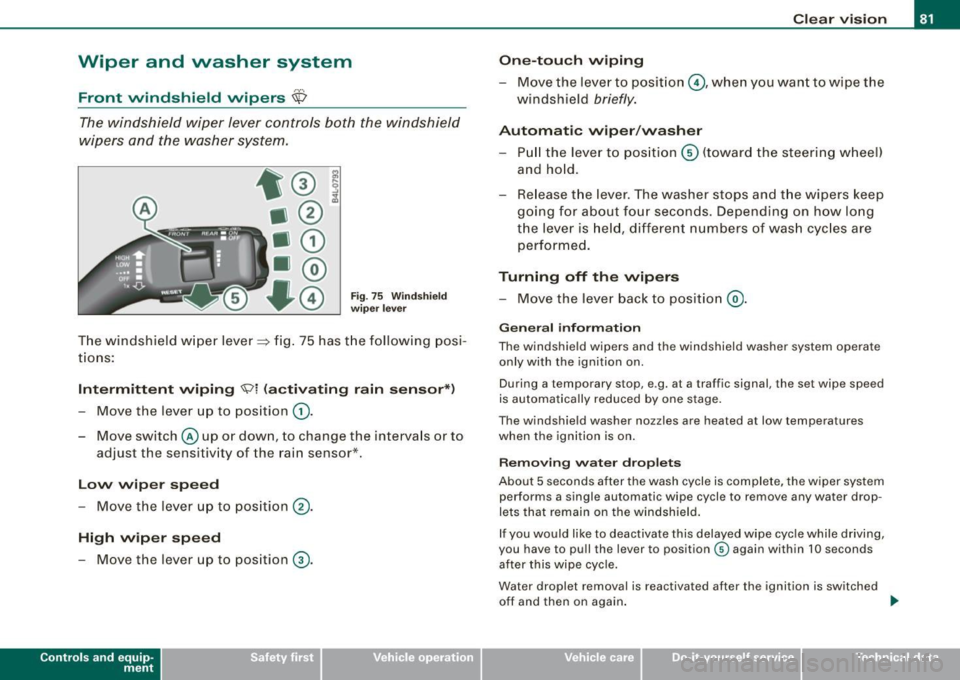
The windshield wiper lever controls both the windshield
wipers and the washer system.
Fig. 75 Windshield
wiper lever
The windshield wiper lever~ fig. 75 has the following posi
tions:
Intermittent wiping <5;?1 (activating rain sensor*)
- Move the lever up to position 0).
- Move switch @up or down, to change the intervals or to
adjust the sensitivity of the rain sensor*.
Low wiper speed
-Move the lever up to position ®·
High wiper speed
- Move the lever up to position G).
Con tro ls and eq uip
ment
Clear vision
One-touch wiping
- Move the lever to position @, when you want to wipe the
windshield
briefly.
Automatic wiper/washer
- Pull the lever to position © (toward the steering wheel)
and hold.
- Release the lever. The washer stops and the wipers keep
going for about four seconds. Depending on how long
the lever is held, different numbers of wash cycles are
performed.
Turning off the wipers
- Move the lever back to position @).
General information
The windshield wipers and the windshield washer system operate
only with the ignition on.
During a temporary stop, e .g. at a tra ffic signal, the set wipe speed
is automatically reduced by one stage.
The windshield washer nozzles are heated at low temperatures
when the ignition is on.
Removing water droplets
About 5 seconds after the wash cycle is complete, the wiper system performs a single automatic wipe cycle to remove any water drop
lets that remain on the windshield.
If you would like to deactivate this delayed wipe cycle while driving,
you have to pull the lever to position © again within 10 seconds
after this wipe cycle.
Water droplet removal is reactivated after the ignition is switched off and then on again.
~
Vehicle care I I irechnical data
Page 84 of 426
Clear vision
Wint er p osition
To speed up de -icing of the windshie ld w ipers, they move to the
winter position when the ignition is switched off and at an outside
temperature below 39 °F (4 °C). In this position, the windshie ld
w ipers are in an area on the glass which is reached by the air vents
below the glass . It is a lso easier to remove snow and ice from the
windshield wipers in this position .
The wipers leave the winter position, when the ignition is switched on, if the wi ndshield wiper lever is ope rated or the active rain
sensor* reacts to moisture.
Rain sen sor*
The rain sensor operates only in the interval wiper position. When it
s tarts to rai n, the interval wiper m ode is ac tivated aut omatically.
If the windshield wiper lever is in the interval wipe position with the
igni tion switched off, the rain sensor is not activated unti l vehic le
speed is above 4 mph (6 km/h).
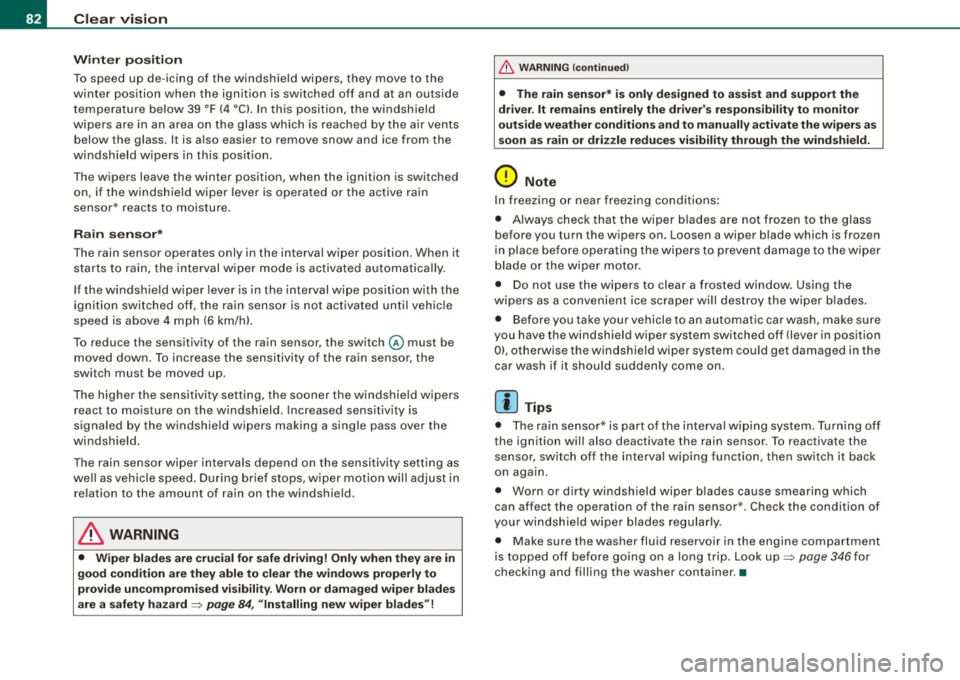
To reduce the sensitivity of the rain sensor, the switch@ must be
moved down . T o in crease the se nsitivity of the rain sens or, the
switch must be moved up .
The higher the sensi tiv ity se tting, the so oner the w indshield wipe rs
react to mo isture on the windsh ield. Increased sensitivity is
signa led by the windshie ld wipers making a single pass over the
windsh ield.
The rain sensor wiper intervals depend on the sensitivity setting as
we ll as veh icle speed . D uring b rie f stops, wiper m otio n will adjust in
relation to the amount of rain on the windshield .
& WARNING
• Wiper blades are cru cial for safe driving! Only when they are in
good condition are they able to clear the window s proper ly to
p rovide un comp romised visibil ity . Worn or damaged wiper blades
are a safety hazard =>
page 84, "In stalling new wiper blades "!
& WARNING (continued )
• The rain sensor* is only designed to assist and support the
driver . It remain s entirely the dr iver' s re spon sibility to monitor
out side weather conditions and to manually activate the wipers as
s oon a s rain or driz zle reduce s vi sibility through the wind sh ield .
0 Note
In freezing o r near freez ing conditions:
• Always check that the wiper blades are not frozen to the glass
before you turn the wipers on. Loosen a wiper blade which is frozen
in place before operating the wipers to prevent damage to the wiper
blade or the wipe r motor.
• Do not use the wipers to clear a frosted window. Using the
wipers as a convenient ice scraper wi ll destroy the wiper blades .
• Before you ta ke you r vehicle to an automatic car was h, ma ke s ure
you have the windshield wiper system switched off (lever in position
0), otherwise the windshield wiper system could get damaged in the
car wash if it should sudden ly come on .
[ i ] Tips
• The rain senso r* is part of the interva l wiping syste m. Turning o ff
the ignition will also deactivate the rain sensor. To reactivate the
s en sor, switch o ff the interval wip ing funct ion, then sw itch it bac k
on again.
• Worn or dirty winds hield wiper b lades cause smearing which
can affect the operation of the rain sensor *. Check the condition of
your windshield wiper blades regularly .
• Make sure the washer fluid reservoir in the engine compartment
is topped o ff be fore go ing on a long trip. Look up=>
page 346 for
check ing and filling the washer container. •
Page 89 of 426

Applies to vehicles : wit h automat ically di mmi ng in side mirr or
Automatically dimming inside mirror
The automatic dimming function can be turned on and off
if required.
Disabling auto dimming
Fi g. 8 1 In side r ear
v iew mirror
- Press butto n @ ~ fig. 8 1 briefly, -th e gree n indicator
light @ goes out .
A ctivating /re activ ating auto dimming
- Press button@
briefly, -the green indicato r light @
goes on.
Automa tic dimming func tio n
The automatic dimming function is activated every time the ignition
is turned on . The green indicator light is lit to indicate auto dimming
is active.
When dim ming is activated, the inside m irror will darken
automati
cally
in response to the amount of light striking the mirror (such as
headlights from rearwa rd approaching vehicles). Even in dimm ing
mode, the mirror surface turns bright when :
• the interior light is switched on
• reverse gear is engaged .
Controls and equip
ment
Cl ea r vision
& WARNING
The glas s of the in side re ar vie w mirror i s layered and cont ain s an
electrolyte to a chieve it s properties. Be aware of liquid electrolyte
leaking from a bro ken mirror gl ass. Thi s liquid can cause irrit ation
to skin , eyes , and re spir atory sy ste m . If you get el ectrolyte in your
e ye s or on your skin , immed iatel y rinse w ith plenty of w ater.
If irri
t a tion per sists, s eek medical attention .
0 Note
Liquid electrolyte leaked from a broken mirror glass wil l damage any
p lastic surfaces it comes in contact with . C lean up sp illed e lectrolyte
immediately with clear water and a sponge .
[ i ] Tip s
• If you sw it c h off the automati c di m mi ng function on the in side
mirror , autom atic dimming of the out side mirrors* will likewise be
dis abled .
• Check to make sure there are no objects preven ting light from
reaching the inside mirror.
• Do not attach any stickers to the windshie ld in front of the light
sensor*, as this would interfere with the automatic operation of the
headlig hts and the automatic d imming of the inside mirror.
• Be aware that automatic dimming of the inside mirror can only
operate properly if the rear window sun b lind* is retracted. •
I • •
Page 90 of 426

Clear vision
Outside mirrors
The ou tside mirrors are electrically adjusted.
Adjusting the outside mirrors
Fi g. 82 Fo rw ard
s e ction o f dr iver's
armr est: powe r mirror
c ontr ols
- Tur n the adjusti ng knob to pos ition (0 ~ fi g. 82 to adjust
t h e outs ide mirror on t he d river 's sid e.
T u rn the adjust ing k nob to p ositi on @ to adjust the
o ut side m irro r on t he p assenger side .
Press the kno b in the appropriate direction to move t he
mir ror surface so t hat you have a good vie w to the rear .
Heated mirrors
-Tur n t he knob to positio n @.
Folding both outside mirrors flat *
- Turn t he knob to @ .
Depending on the outside temperature, the mirror surfaces are
heated until the ignition is switched off -even if the knob is no
longer in position
@ .
We recommend folding * the outside mirrors flat to help when
parking your vehicle o r when maneuvering in very tight spaces.
Memo ry sett ing for th e out side mirrors *
When the seat position is saved in the memory, the posi tion of the
outside mirrors is saved at the same time
=> page 97 .
If the position of the passenger mirror is changed when the vehicle
is in reverse gear and the switch is in the @ pos ition, this new tilted
position wil l be automatically saved to the remote key when the
veh ic le is taken out of reverse gear. To save, the rotary kn ob for
mirror adjustment must be in the @ position, the se lector lever
must be in the P p osition and the ignition must be off . T his will now
become the stored setting when the vehicle is put in reverse gear
again .
Tilting th e passenger' s side out side mirror {only with
seat memory )
When you move the selec tor lever into R (Reverse), the mirror on the
front passenger's door (kn ob turned to @ => fig . 82) will tilt slightly
downward. This make is easier for you to see the curb when you are
backing into a parking space.
The mirror returns to its initial pos ition as soon as reverse gear is
disengaged and vehicle speed is above about 9 mph (15 km/h). The
mirror also returns to its ini tial pos ition if the swi tch is moved to the
driver's outside mirror
(0 or the ignition is switched off.
Automati c anti -glar e for th e outside mirror s*
The outside mirrors dim at the same time as the inside mirror . When
the ignition is switched on, the mirrors automatical ly dim
depending on the amount of light striking the mirrors {such as head
l ights shini ng into the vehicle from the rear).
When you turn on the interior l ight, or when you move the se lector
l ever into R (Reve rse), the anti -g lare function stop s and the mirrors
return to their original condition {not darkened).
(D Note
• Curved {i.e. convex) mirror surfaces increase your fie ld of view .
Remember that vehic les or other objects w ill appear smaller and ...
Page 91 of 426

farther away than when seen in a flat mirror. If you use this mirror to
estimate distances of fol lowing ve hicles when chang ing lanes, you
cou ld estimate incorrect ly and cause an accident .
• I f the mirro r housing is moved uninten tio nal ly ( for example,
while parking your vehicle), then you must first fo ld the mirror elec
tr ically. D o not readj ust the mirro r ho us ing manua lly . You could
damage the motor which contro ls the mirror .
• I f you take the veh ic le to an automatic car wash, y ou mus t fold
the exterior mirrors flat to prevent damaging them . Power folding
ex terior mirr ors* must no t be folded in or out by hand . Use the
power function!
[ i ] Tips
If there shou ld be a malfunction in the electrica l system, you can
sti ll adj ust the outside mi rrors by pressing the edge of the mirro r.•
Appl ie s to v ehicl es: with au tomat ic d imm ing for outs id e m irro rs
Automatic dimming for outside mirrors
The outside mirrors are dimmed together with the automatic
dimming o f the inside mir ror . When the ignition is switched on, the
mirrors dar ken au tomat ical ly dependin g on the light strik ing them
(e .g. head lights from the rear).
When t he in ter ior lig hting is switched on and when reverse gear is
engaged, the m irrors are switched back to the ir original brightness
(n ot di mmed).
& WARNING
The glass of the inside rear view mirror is layered and contain s an
ele ctrolyte to a chieve its propert ies . Be aware of liquid ele ctrolyte
leaking from a broken mirror gla ss. This liquid can cau se irritation
to skin , eyes , and re spiratory system . If you get elect rolyte in your
Controls and equip
ment
Cl ea r vision
& WARNING (continued )
eyes or on your s kin , immed iately rinse with plenty of water . If irri
tation per sists , seek medical attent ion .
0 Note
Electrolyte leak ing fro m a broken mirror g lass attacks the vehic le
paint and plastic surfaces . C lean up spilled electro lyte immediately
with c lear water and a sponge .
[ i ] Tips
• If automatic dimming for the inside mirror i s swit ched off, the
o uts ide mirror s are also not dimmed automatically .
• Automatic di mming for the mirr or only opera tes prop erly if the
sunshade * for the rear window is retracted, or the light striking the
inside mirror is not h inde red by o ther o bjec ts. •
Digital compass
Ap plies t o vehicles : with d ig ita l com pass
Activating or deactivating the compass
The direction is displayed on the interior rear vie w mirror.
I • •
Fig . 8 3 Inside re ar
view mirror : digital
co mp ass ac tivat ed