tow AUDI Q7 2009 Owner´s Manual
[x] Cancel search | Manufacturer: AUDI, Model Year: 2009, Model line: Q7, Model: AUDI Q7 2009Pages: 426, PDF Size: 97.13 MB
Page 177 of 426

________________________________________________ ....:..A.:.:u=- d =-=- i ..:S:.: i.=d :.:e::....: a:.: S::.: S:::: i:.:: S :.:t:....__1111
Deactivating
- Press t he button again . T he ind icato r light on the butto n
goes out.
T he system works at speeds faster than 19 mph (30 km/h) .
& WARNING
• Improper reliance on the side assist system can cause colli
sions and seriou s per sonal injury:
- Never rely only on side assist when changing lanes .
- Always check rear view mirrors to make sure that it is safe to
c hange lanes.
• Side assist cannot detect all vehicles under all conditions
danger of accident!
• Side assist cannot detect vehicles in time to alert you when
they approach from behind at very high speed , or fall drop back
very quickly.
• The radar sensor's
vision can be reduced or entirely blocked by
rain , snow, and heavy spray . This can result in side assist not
adequately detecting veh icles or , in some cases, not detecting
them at all . Always keep an eye on the direction you are traveling
and the relevant area around the vehicle.
• Please note that side assi st indicates there are approaching
vehicles, or vehicles in your bl ind spot , only after your vehicle has
reached a driving speed of at lea st 19 mph (30 km /h).
• Side assist signal does not work around tight corners (turning
radiu s less than 328 feet , or 100 m l.
• Side assist is no replacement for the driver's full attention . The
d river alone is responsible for lane changes and similar driv ing
maneuvers. Always keep an eye on the d ire ction you are travel ing
and the relevant area around the vehicle .
Controls and equip
ment
0 Note
• To e nsu re t hat you do not adverse ly a ffect s ide assist, do not
b lock the area on the rear bumper where the radar sensors are
located w it h f oreign objects (s uch as st ickers or bicycle rac ks).
• M ake su re that the signal light on the o utside mi rror is not
b loc ked by st ic ke rs or ot her items.
[ i ] Tips
• Side ass ist automaticall y deact ivates i f it detects t hat t he ra dar
sensors are blocked=>
page 181. The indicator light on the button
goes out.
• The area on the bumper whe re the rada r sen so rs a re loca ted
must cons iste ntly re mai n fr ee o f snow, ice, and heavy so iling so t hat
side assist can function properly. Follow the additiona l notes on
=>
page 182.
• F or vehicle s with a factory insta lled towing hitch* or a t railer
hi tc h* th at was installed later accordi ng to factory speci ficat ions,
side assist is automatically deactivated as soon as the electrical
co nnect ion to the tra iler elec trical socket is m ade =>
page 181 .
• For vehicle s with a t raile r hitch that was not insta lled acco rding
t o factory speci ficat io ns, sw itch off t he side assis t w hen towi ng a
trai le r.
• Add itiona l tin ting on the front side w indows can make it harder
to see and co rrect ly understand the signal light on the outside
mi rror.
• Fo r Decla ration of Comp liance to Uni ted States FCC and Ind ust ry
Canada regula tions=>
page 404. •
I • •
Page 184 of 426

• .___A_ u_ d_ i_s_ i_ d _e_ a_ s_ s_is _ t __________________________________________________ _
objects (such as stic kers o r bicyc le rac ks) shou ld no t be attach ed to
th e ar ea on the rea r bump er where t he sen so rs ar e loca ted. I f side
assist functions are adve rsely aff ect ed, you will see this m essage in
th e ins trum ent clu ster dis pla y. Remove an ything that may be
blocking the sensors.
If no veh ic le is detected for a longer period of time while d riving,
s id e ass ist w ill a lso sw itc h off aut omat ica lly.
Audi side assist currently not available If th ere is a tem porary prob le m (such as the veh ic le 's battery char ge
being low), side ass ist cannot be activated tem porar ily .
Audi side assist: system fault H ave the sys te m chec ked by an a uthorize d A udi dea ler o r qua lified
wor ks h op.
Audi side assist not available when towing
T he radar sensor 's view is limited when towing a trailer . Fo r vehicles
wi th a fac tory insta lle d t owi ng hitc h or a tra ile r h it c h th at was
install ed later according to factory specificat ions, side assist is
a uto matica lly deact iva te d as so on as the e lect ric a l c onn ectio n to
t h e trai ler's elect rical soc ket is m ade, and th is sta tus m essage
a ppears in the instrument c luster disp lay . Deactivat ion cannot be
gua ra nte ed w hen usin g a retro fitted to wi ng hitch that was not
insta lled according to factory specifications .•
Ap plies to vehic les : w it h side assist
Safety tips
T he s ide ass is t de tect io n may be limited whe n drivi ng a round
narrow street corners, on hilly streets, and under poor weather
c o ndition s.
It is possibl e that the radar sensors may also detect other ob jects,
suc h as h igh or s tagge re d guar drails. S
ide assist does not measure actua l lane width . The sys tem
assumes a fixed la ne wid th. Dete cti on in th e le ft an d rig ht l anes is
based on this assumed lane width . When d riv ing on narrow roads or
w hen driving to t he left or right of the ce nte r of a travel la ne, it i s
possible that vehicles will be detected that are
not in th e lane next
to the lane yo u are us ing.
& WARNING
• Improper reliance on the side assist system can cause colli
sions and serious personal injury :
- Never rely only on side assist when changing lanes.
- Always check rear view mirrors to make sure that it is safe to
change lanes .
• Side assist cannot detect all vehicles under all conditions
danger of accident!
• Side assist cannot detect vehicles in time to alert you when
they approach from behind at very high speed , or fall drop back
very quickly .
• The radar sensor's
vision can be reduced or entirely blocked by
rain , snow , and heavy spray . This can result in side assist not
adequately detecting vehicles or , in some cases, not detecting
them at all . Always keep an eye on the direction you are traveling
and the relevant area around the vehicle .
• Please note that side assist indicates there are approaching
vehicles , or vehicles in your blind spot , only after your vehicle has
reached a driving speed of at least 19 mph (30 km /h).
• Side assist signal does not work around tight corners (turning
radius less than 328 feet , or 100 ml.
• Side assist is no replacement for the driver's full attention. The
driver alone is responsible for lane changes and similar driving
maneuvers . Always keep an eye on the direction you are traveling
and the relevant area around the vehicle. .,,_
Page 192 of 426
• ..__A_ u_ t_ o_ m_ a_t _i c_ t_ r_ a _ n_ s_m _ is_ s _ io_ n _____________________________________________ _
Fig. 204 E merge ncy
re lease for sel ecto r
l ever
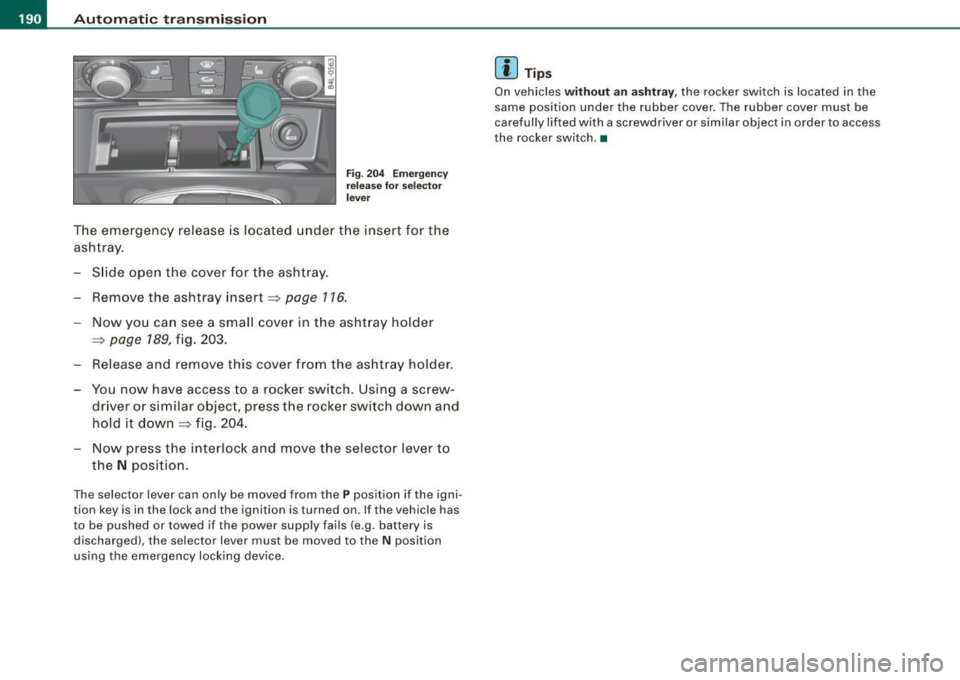
T he emergency release is located under the insert for the
ashtray.
- Slide open the cover for the ashtray.
- Remove the ashtray insert ~
page 116.
-Now you can see a small cover in the ashtray holder
~ page 189, fig. 203.
- Release and remove this cover from the ashtray holder .
- You now have access to a rocker switch. Using a screw-
driver or similar objec t, press the rocker switch down and
hold it down~ fig. 204.
- Now press the interlock and move the selector lever to
the
N position .
The selector lever can only be moved from the P position if the igni
tion key is in the lock and the ignition is turned on. If the vehicle has
to be pushed or towed if the power supply fails (e.g. battery is
discharged), the selector lever must be moved to the
N position
using the emergency lock ing device .
[ i ] Tip s
On vehicles without an ashtray, the rocker switch is located in the
same position under the rubber cover . The rubber cover must be
carefully lifted with a screwdriver or similar object in order to access
the rocker switch. •
Page 197 of 426

__________________________________________ A___;_ d_v _a_ n___;_ c __ e _d _ P_a_ r_ k_ i_n -=g ~ S_,y:... s_ t_ e_ m ___ llll
T he rear -v iew cam era can be turned on and off in the MMI
~ page 203 . The acous tic dista nce wa rning rem ains ac tive .
& WARNING
• The rear -view camera has blind spots, in which objects cannot
be detected . Be especially careful to check for small children and
animals before backing up. Small children and animals will not
always be detected by the sensors .
• The Audi parking system is not a substitute for being careful
and alert when backing up. Be especially careful during parking
and similar maneuvers . Always watch where you are driving and
make sure that nothing is in the way .
• Remember that low obstacles which have already been
signaled may pass below the system's sensing zone when the
vehicle is backing up . The fact that the signal stops does not mean
that you have cleared the obstacle. When the signal stops , impact
is imminent . Objects such as trailer hitches, chains , narrow posts
or fences covered by a thin layer of paint may not always be
detected by the system. They can still damage your vehicle
without warning .
• Always make sure that the volume and frequency of the chimes
is adjusted so that you can easily hear the acoustic distan ce signal
even if the radio is playing , the air-conditioner blower is on High or
there is a high level of outs ide noise .
- Check the settings whenever someone else has driven the
vehicle before you.
• Improper reliance on the Audi parking system can cause colli
sions and serious personal injury .
- Never rely only on parking assist when changing backing up.
- Always check rear view mirrors to make sure it is safe to back
up.
Controls and equip
ment
[ i ] Tips
• B efore par king w it h the rea r-view camera, the Adapti ve Ai r
S uspen sion * co mfort or automatic mode m ust be switched on
~ page 2 1.
• The rea r-vie w camera p ict ure i s avai la ble as soon as the M MI
Di sp lay or t he MMI is sw itched o n, o r the sta rt- up p hase is
completed.
• I n order for th e rear -view camera to function properly, the
came ra lens ~
page 191, fig. 205 mus t be ke pt clean, and free of
s n ow and ice . P lease fo llo w th e ad ditional notes on
~ p age 204.
• The camera c ove rage a ngle c hange s w hen the trun k lid is ope n.
Therefore, the rear -view camera picture is disp layed without orien
tati on lines an d without b lue s urfaces .
• Observe and fol low th e not es on towing mode * on~
page 201 . •
A pplies to vehic les : w it h Ad va nced Par kin g Sys te m with re ar view camer a
Rear-view camera coverage area
I • •
Fig. 210 Top view:
Rear-view camera
coverage area
Page 202 of 426
IIIII..__A_ d_v _ a_ n_c _e _ d_ P_ a_r _k _in ---== g'-- S...:y _ s_ t_ e_ m ___________________________________________ _
& WARNING (continued )
• The Audi parking system is not a substitute for being careful
and alert when backing up. Be especially careful during parking
and similar maneuvers . Always watch where you are driving and
make sure that nothing is in the way.
• When maneuvering or parking, do not only use the MMI Display
for orientation . Certain objects • depending on the screen resolu
tion -may not , or not entirely , be displayed ; for example trailer
hitches , chains , narrow posts , or fence s.
• Improper reliance on the Audi parking system can cause colli
sions and serious personal injury.
- Never rely only on parking assist when changing backing up .
- Always check rear view mirrors to make sure it is safe to ba ck
up. •
Applies to veh icles : wit h Ad vanced Pa rk ing System w ith rea r view c ame ra
Notes on distance information
Fig . 21 7 MMI Displ ay:
di splayed red l ine
touche s the bumpe r F
ig . 218 Actu al
distan ce from bumpe r
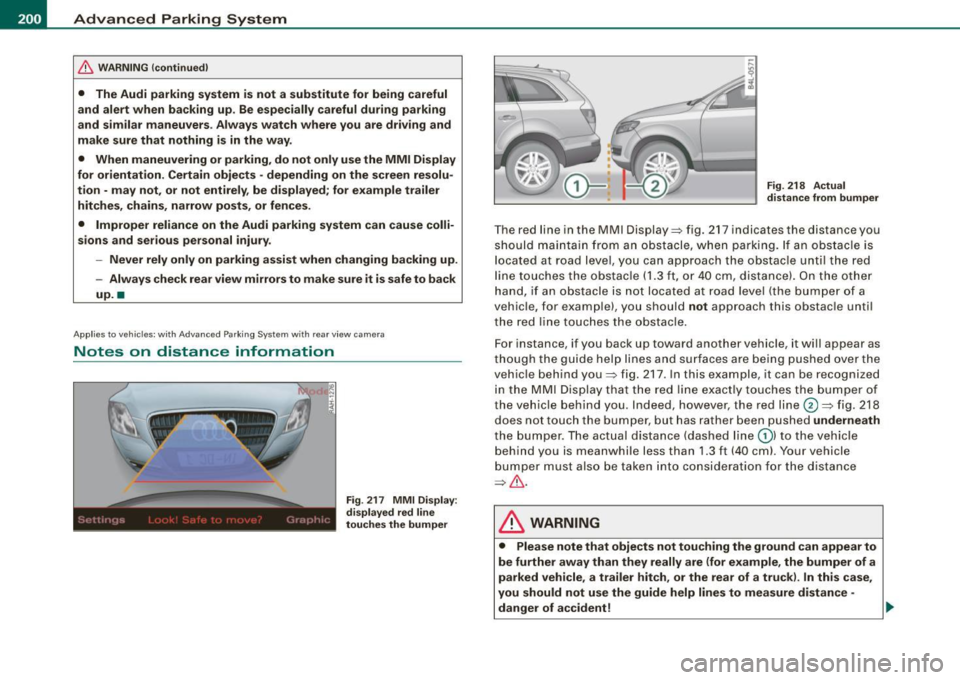
The red line in the MMI Display~ fig. 217 indicates the distance you
should maintain from an obstacle, when parking. If an obs tac le is
l ocated at road l eve l, you can approach the obstacle unti l the red
l ine to uche s the obstac le ( 1.3
ft, or 4 0 cm , distance). On the o the r
h a n d, if an obstacle is no t locat ed a t road level (the bu mpe r of a
vehic le, for examp le), you should not approach this obstac le unti l
t h e red line touc hes the obstacle.
F or instance, if you back u p toward another vehicle, it will a ppear as
thou gh the gui de help line s and s urface s are be ing pushed over the
vehic le behind you~ fig. 217. In this example, it can be reco gnized
in the M MI Display that t he re d l in e exac tly touc hes the bum per o f
th e ve hicle behind you . Ind eed, however, the red line@~ fig. 218
does not touch the bumper, b ut has rather been pushed underneath
t h e b umpe r. T h e actual d istance (dashed line G) l to the vehicle
behind you is meanwhile less than 1.3 ft ( 40 cm). Your vehicle
bu mper must als o be taken into co nsiderat ion for the d istance
~&. .
& WARNING
• Please note that objects not touch ing the ground can appear to
be further away than they really are (for example , the bumper of a
parked vehicle , a trailer hitch, or the rear of a truck) . In this case ,
you should not use the guide help lines to measure distance -
danger of accident ! .,_
Page 203 of 426
____________________________________________ A_d_ v_ a_n_ c_ e_d _ P_a_ r_ k_ i_ n ..::g==-- S_ y=- s_t _e _m __ lJII
& WARNING (continued)
• Maintain plenty of distance from an obstacle, so that your
outside mirror or a corner of your vehicle does not collide with any
obstacles -danger of accident!
• The Audi parking system is not a substitute for being careful
and alert when backing up. Be especially careful during parking
and similar maneuvers. Always watch where you are driving and
make sure that nothing is in the way.
• When maneuvering or parking , do not only use the MMI Display
for orientation. Certain objects -depending on the screen resolu
tion -may not, or not entirely, be displayed; for example trailer
hitches , chains, narrow posts, or fences . •
Appl ies to vehic les : with Audi Pa rk ing System and factory insta lled tow ing h itch
Towing hitch
For vehicles with a factory installed towing hitch, or a trailer hitch
installed according to factory specifications , the rear acoustic
parking sensors are not activated when the vehicle is put in reverse
gear while an electrical connection to the trailer socket* is estab
lished. No distance alert occurs in the rear =:>
page 191. The rear
view camera picture=:>
page 194 is displayed without orientation
lines and without blue surfaces. •
Controls and equip
ment
Settings in the MMI
A pplies to v ehicles: with A dvanc ed Park ing System with rear view camera
Adjusting the chimes -option 1
The volume and the pitch (frequency) of the chimes can
be adjusted in the MM!.
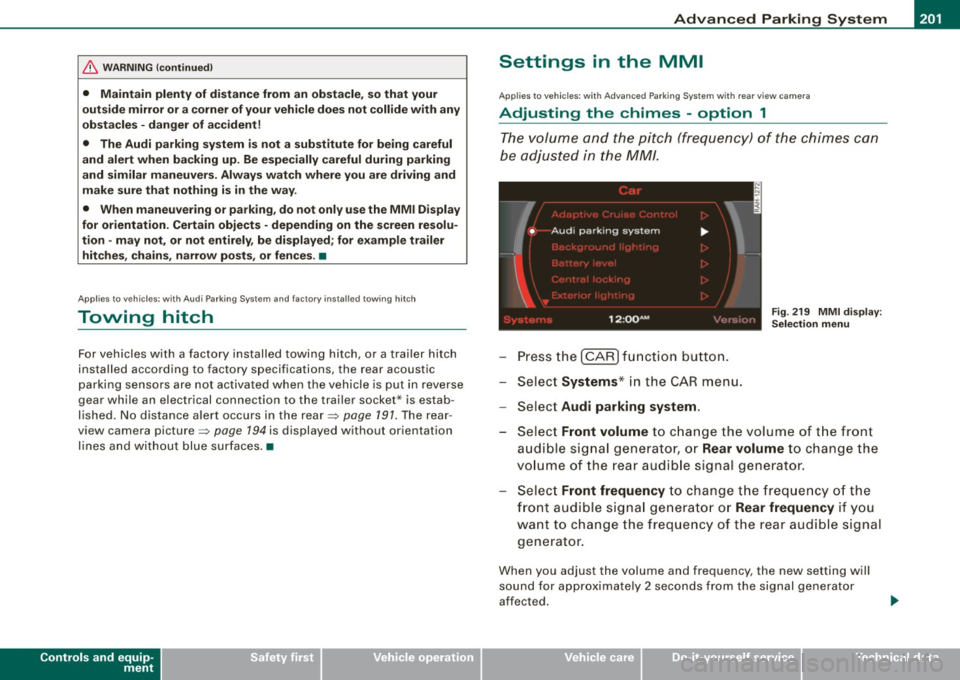
Press the [CAR] function button.
Select
Systems* in the CAR menu.
- Select
Audi parking system .
Fig. 219 MMI display :
Selection menu
- Select Front volume to change the volume of the front
audible signal generator, or
Rear volume to change the
volume of the rear audible signal generator.
Select
Front frequency to change the frequency of the
front audible signal generator or
Rear frequency if you
want to change the frequency of the rear audible signal
generator.
When you adjust the volume and frequency, the new setting will
sound for approximately 2 seconds from the signal generator
affected.
I • •
Page 206 of 426
IIII.___A_ d_v_ a_ n_c_ e_ d_ P _a_r_k _i_ n -=g ,_ S-=y"- s_ t_ e_ m __________________________________________ _
"Off" sett ing
If you have set the off function, both the rear -view camera and the
visual display will be deac tiva ted . The acous tic pa rking assist
remains active .
[ i J Tip s
If you change the sett ings in the MM I, the new settings do not
become active unti l the parking assist is switched on aga in. •
Safety tips
Applie s to ve hic le s: wit h Advance d Par king Sy ste m wit h re ar vie w ca me ra
Acoustic parking system error message
If you hear a continuous tone for several seconds while the front
and back parking assist with visual display is activated and the LED
in the switch
P wA flashes when you engage the reverse gear , there is
a malfunction in the acoustic parking assist .
This system error is immediately output after: • Every manual activation via the switch
P wA ~ pag e 191,
• Reverse gear is engaged for the first time during an ign ition
cycle, or
• An error is detected during operation.
[ i J Tips
If the system reports an error, have an Audi dea ler or an authorized
dea le rship corr ect this system error. •
Applies to vehicles: w it h A dvanced Par king S ystem w it h rea r view ca mera
Rear-view camera tips
We recommend that you practice park ing with the rear -view camera
in a traffic -free location , or parking lot , to become familiar with the
system, the orientation lines, and their function . When doing this,
there should be good light and weather conditions .
I n the MM I Display, objects or vehicles appea r c loser or further away
if :
• you are driving in reverse g ear from a level surface onto an
incline, or a downward slope,
• you are driv ing in reverse gear toward protruding objects,
• the vehic le is carrying too much load in the rear.
T he accuracy of the orientation lines and b lue surfaces diminishes
if :
• the Adaptive Air Suspension * is defective, or the dynamic,
off road, o r lift mode is sw itched on,
• the rear -view camera does not provide a reliable image, for
example, in poor visibility condit ions or if the lens is d irty,
• the image on the screen is not visible due to sun glare and reflec
tion .
Car ing for the rear- vie w c amera l en s:
• Damp en the lens with a hous ehold a lcohol -based glass cleaner,
and c lean the lens w ith a dry cloth.
• Remove snow with a hand brush.
• Remove ice , preferably with de -icing spray~
0.
ln. WARNING
• The rear-view ca m era doe s not replace the view to the rear and
the rear view mirror s.
• The rea r-view camer a - be cause of t echni cal limit ation s - does
not show the ent ire area behind the vehicle~
page 196 , fig. 211. ~
Page 208 of 426
1111 ...... _A_ d_ a --=- p_t_ i_v _e_ A_ ir_ S_u_ s__,_ p_e_ n_ s_io _ n _____________________________________________ _
Adaptive Air Suspension
Air suspension and damping
Applies to vehicles: with Adaptive A ir Suspens ion
Description
Air suspension and damping can be regulated as desired
by driver, and they adapt automatically to the driving situ
ation at the time.
Adaptive Air Suspension is an electronica lly contro lled springing
and damping system. This chassis system makes it easier on the
driver by adapting to the particular situation through imperceptible
control processes.
The
Adaptive Air Suspension component regulates ground clear
ance depending on vehic le speed and driver inpu t. It functions inde
pendently from the load condition. Accelerating to a speed above a
predetermined limit will make the vehic le lower itself . On the other
hand, driving more slowly results in the vehicle raising again at
specific speeds.
The
damping component provides individual control of the
damping forces. For example, with damping characteristics set to
provide greater comfort, damping is set somewhat harder for a brief
period only as required, for example, when going around a curve or
when braking.
Settings
Adaptive Air Suspension prov ides the driver with the opportunity to
set the chassis characteristics a lso to their individual preference.
With the driving modes
comfort, automatic and dynamic the driver
has three chassis settings available, ranging from comfort to sporty.
The
offroad mode can be selected for driving on poor qua lity
stretches of road. In addition, lift provides a fifth mode, which can
be selected when exceptionally high ground clearance is needed
=> page 207, "Chassis controls". The modes are set in
MMI:::::,
page 208.
& WARNING
The height of the parked vehicle can change due to temperature
fluctuations or changes in load.
0 Note
• Whenever you park your vehicle, always make sure there is
adequate clearance above and below the vehic le. The height of the
parked vehicle can change as the result of temperature fluctuations,
changes in load condition and changes in the driving mode (ground
clearance!.
• If the vehicle is being transported (e.g. by tow truck, train, ship,
etc.), mount the tie -down chains/cables over the running surface
(circumference) of the tires . Never secure the veh icle by the axle, the
suspension struts or the front or rear towline eye. For technical
reasons, the pressure in the suspension struts may change during
the transport, which could result in the vehic le no longer being
secured properly.
• If you are going to tow a trailer with a trailer hitch that was
not
installed according to factory specifications, you must activate the
trailer operation mode manually:::::,
page 211.
[ i ] Tips
• Before you can raise your vehic le using the vehicle jack (for
example, when changing a flat tire) or a vehicle lift, you must acti
vate the jacking mode:::::,
page 210.
• On some models, the vehicle can reach its maximum speed only
in the
automatic and dynamic modes. •
Page 213 of 426
___________________________________________ ___:A~d~ a~p~t~iv~ e=-.:A~ir~ S~u~ s ~p~ e~n~ s~io~n ~_ffllll
Applies to vehicles : w it h towi ng h itch and Adapt ive Air Su spens io n
Towing a trailer
Automatic lowering is not desirable when towing a trailer.
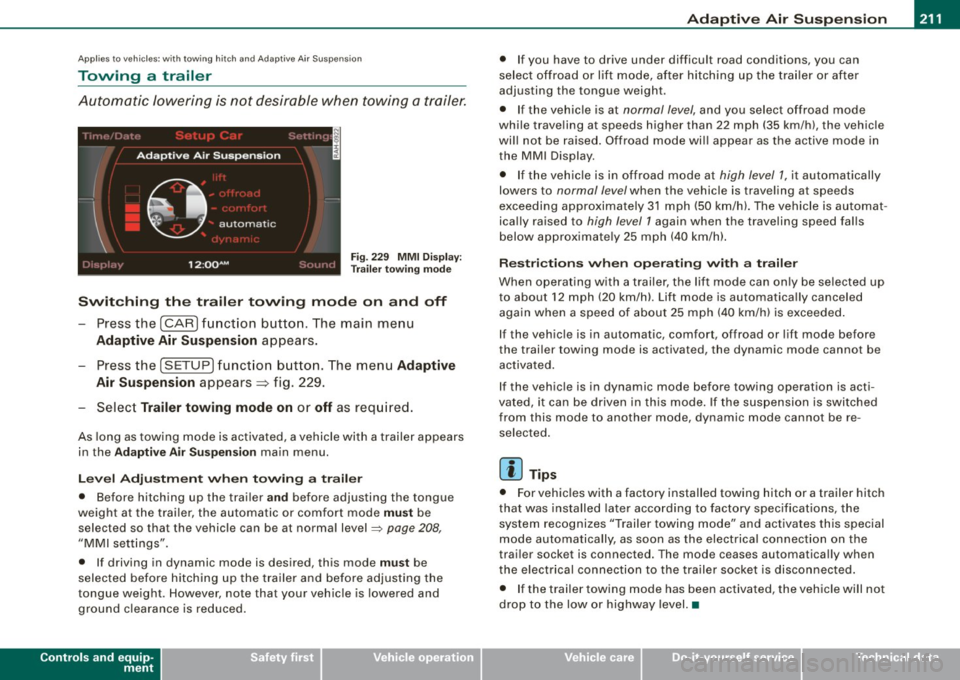
Fig . 22 9 MMI D isplay:
T rai le r t ow ing mode
Swi tching th e trail er towing mode on and off
Press the (CARI function button. The main menu
Adaptive Air Su spension appears .
-Press the (SETUP I funct ion button. The menu Adaptiv e
Air Susp ension
appears~ fig. 229.
- Select
Trailer towing mod e on or off as req uired .
As long as towing mode is activated, a vehicle with a trailer appears
in the
Ad apti ve Air Sus pension main menu.
Le ve l Ad jus tm ent w hen t owing a tra ile r
• Before hitching up the trai ler a nd before adjusting the tongue
weight at the trai ler, the automatic or comfort mode
mu st be
selected so that the vehicle can be at normal level
=> page 208 ,
"MMI settings".
• If driving in dynamic mode is desired, this mode
mus t be
selected before hitching up the trailer and before adjusting the
tongue weight . However , note that your vehicle is lowered and
ground clearance is reduced.
Controls and equip
ment
• If you have to drive under difficult road conditions, you can
se lect offroad or lift mode, af ter hitching up the trai ler or after
adjusting the tongue weigh t.
• If the vehic le is at
normal level, and you select offroad mode
while trave ling a t speeds higher than 22 mph (35 km /h) , t he vehicle
wi ll not be raised . Offroad mode wi ll appear as the active mode in
the MMI Display .
• If the vehic le is in offroad mode at
high level 1 , it automatically
lowers to
normal level when the vehicle is trave ling a t speeds
exceeding approxima tely 31 mph (50 km/h). The vehicle is automat
ica lly raised to
high level 1 again when the t raveling speed falls
below approximate ly 25 mph (40 km/h).
R es tric tions when ope ra ti ng w ith a tra iler
When opera ting with a trailer, the lift mode can on ly be se lected up
to about 12 mph (20 km/h). Lift mode is au tomatica lly canceled
again when a speed of about 25 mph (40 km/h) is exceeded .
If the vehicle is in automatic, comfort, offroad or lift mode before
the trai ler towing mode is act iv a te d , the dynamic mod e cannot b e
activated.
If the vehicle is in dynamic mode before tow ing operation is acti
vated, it can be driven in this mode. If the suspension is switched
from this mode to another mode , dynamic mode canno t be re
selected .
[ i ] Tips
• For vehicles with a factory installed towing hitch or a trailer hitch
that was installed later acco rding to factory specificat ions , the
system recognizes "Trailer towing mode" and activates this special
mode automatically, as soon as the electrica l connection on the
trai le r sock et is connected. The mode c eases au tomat ica lly wh en
the electrical connection to the trailer socket is disconnected.
• I f the trailer tow ing mode has been activated, the vehicle w ill not
drop to the low or highway level. •
I • •
Page 225 of 426

Driving Safely -
----------------
& WARNING (continued)
to help reduce the risk of personal injury if the driver's airbag
inflates.
• Never hold the steering wheel at the 12 o'clock position or with
your hands at other positions inside the steering wheel rim or on
the steering wheel hub . Holding the steering wheel the wrong way
can cause serious injuries to the hands, arms and head if the
driver's airbag deploys .
• Pointing the steering wheel toward your face decreases the
ability of the supplemental driver's airbag to protect you in a colli
sion.
• Always sit in an upright position and never lean against or
place any part of your body too close to the area where the airbags
are located .
• Before driving, always adjust the front seats and head
restraints properly and make sure that all passengers are properly
restrained.
• Never adjust the seats while the vehicle is moving. Your seat
may move unexpectedly and you could lose control of the vehicle.
• Never drive with the backrest reclined or tilted far back! The
farther the backrests are tilted back, the greater the risk of injury
due to incorrect positioning of the safety belt and improper
seating position.
• Children must always ride in child safety seats
=> page 263.
Special precautions apply when installing a child safety seat on
the front passenger seat
=> page 241 . •
Controls and equip
ment Safety first
Vehicle operation
Proper seating position for the front
passenger
The proper front passenger seating position is important
for safe, relaxed driving.
For your own safety and to reduce the risk of injury in the
event of an accident, we recommend that you adjust the
seat for the front passenger to the following pos ition:
- Move the front passenger seat back as far as possible.
There must be a minimum of 10 inches (25 cm) between
the breastbone and the instrument panel =>
&.
- Adjust the angle of the seatback so that it is in an upright
position and your back comes in full contact with it
whenever the vehicle is moving.
- Adjust the head restraint so that the upper edge is as
even with the top of your head as possible but not lower
than eye level and so that it is as close to the back of your
head as possible =>
page 225.
-Keep both feet flat on the floor in front of the front
passenger seat.
- Fasten and wear safety belts correctly=:>
page 235.
For detailed information on how to adjust the front passenger's
seat, see
=> page 92.
& WARNING
Front seat passengers who are unbelted, out of position or too
close to the airbag can be seriously injured or killed by the airbag
as it unfolds. To help reduce the risk of serious personal injury : .,
Vehicle care Do-it-yourself service Technical data