tow AUDI Q7 2009 Owner´s Manual
[x] Cancel search | Manufacturer: AUDI, Model Year: 2009, Model line: Q7, Model: AUDI Q7 2009Pages: 426, PDF Size: 97.13 MB
Page 101 of 426
Adjusting seat (second rovv seating)
The fore-and-aft adjustment* of the seat cushion and the
seat back angle can be adjusted.
Adjusting seat back angle
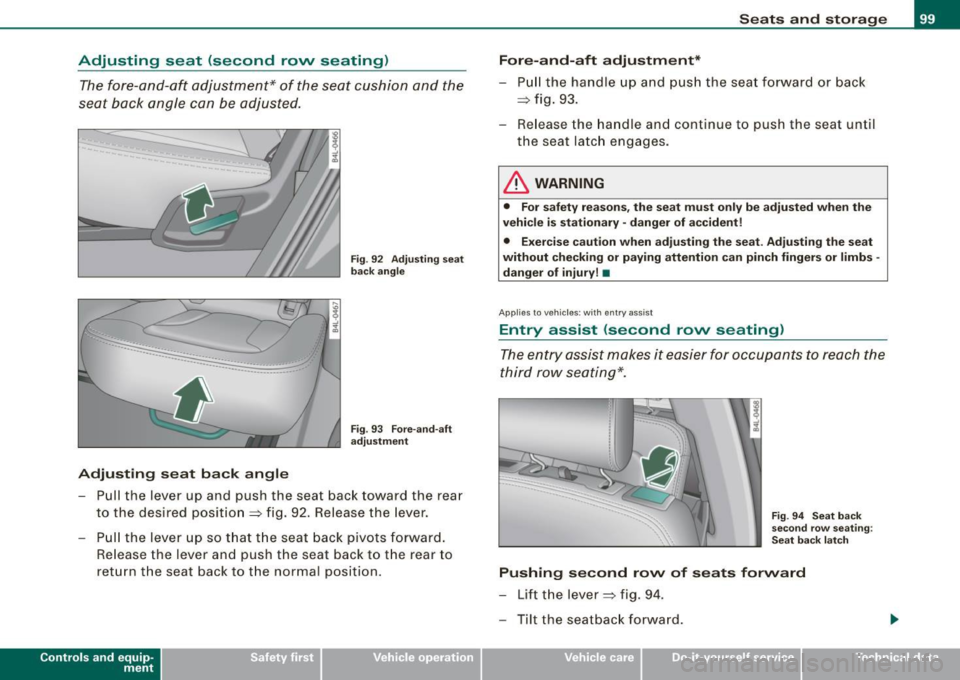
Fig. 92 Adjusting seat
back angle
Fig . 93 Fore-and-aft
adjustment
- Pull the lever up and push the seat back toward the rear
to the desired position
=> fig. 92 . Release the lever.
- Pull the lever up so that the seat back pivots forward.
Release the lever and push the seat back to the rear to
return the seat back to the normal position .
Contro ls and eq uip
ment
Seats and storage
Fore-and-aft adjustment*
- Pull the handle up and push the seat forward or back
=> fig. 93 .
- Release the handle and continue to push the seat until
the seat latch engages.
& WARNING
• For safety reasons, the seat must only be adjusted when the
vehicle is stationary· danger of accident!
• Exercise caution when adjusting the seat. Adjusting the seat
without checking or paying attention can pinch fingers or limbs -
danger of injury! •
Applies to ve hicles: wit h entr y ass ist
Entry assist (second rovv seating)
The entry assist makes it easier for occupants to reach the
third row seating*.
Fig . 94 Seat back
second row seating :
Seat back latch
Pushing second row of seats forward
- Lift the lever => fig. 94.
- Tilt the seatback forward .
Vehicle care I I irechnical data
Page 110 of 426
• ..__S_ e_a _ t_ s_ a_ n_ d_ s_t _o _r_ a-' g==- e ________________________________________________ _
Retractable luggage compartment cover
The luggage compartment cover keeps luggage or other
objects out of view.
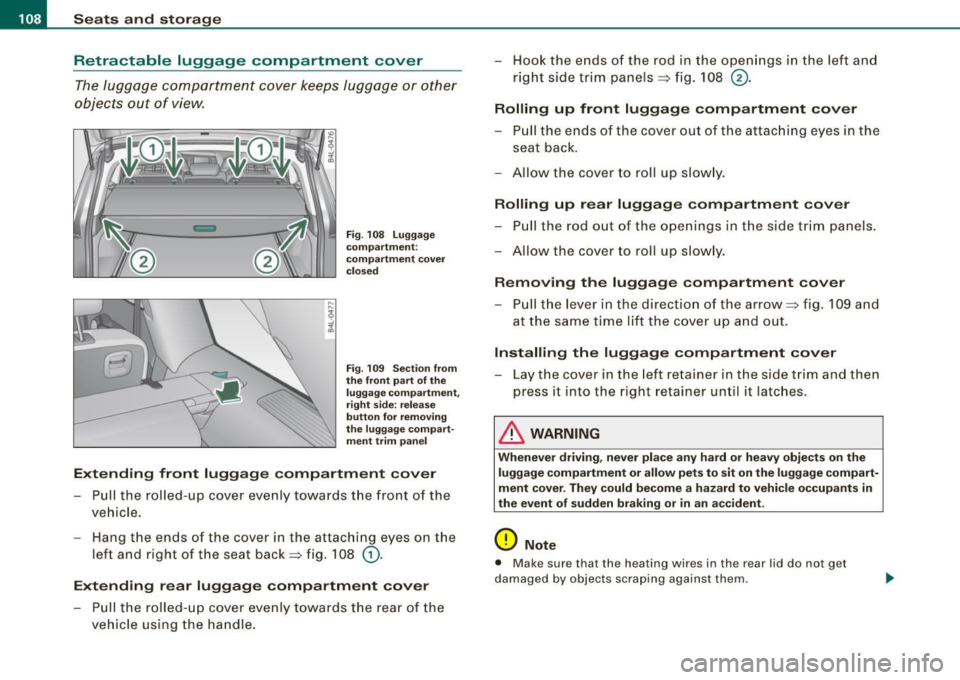
Fig . 108 Luggage
compartment :
compartment cover
closed
Fig . 109 Section from
the front part of the
luggage compartment,
right side: release
button for removing
the luggage compart ment trim panel
Extending front luggage compartment cover
Pull the rolled-up cover evenly towards the front of the
vehicle.
- Hang the ends of the cover in the attaching eyes on the
left and right of the seat back=> fig. 108
G).
Extending rear luggage compartment cover
- Pull the rolled-up cover evenly towards the rear of the
vehicle using the handle. - Hook the ends of the rod in the openings in the left and
right side trim panels=> fig. 108
®·
Rolling up front luggage compartment cover
-Pull the ends of the cover out of the attaching eyes in the
seat back.
- Allow the cover to roll up slowly.
Rolling up rear luggage compartment cover
- Pull the rod out of the openings in the side trim panels.
-Allow the cover to roll up slowly.
Removing the luggage compartment cover
- Pull the lever in the direction of the arrow=> fig. 109 and
at the same time lift the cover up and out.
Installing the luggage compartment cover
-Lay the cover in the left retainer in the side trim and then
press it into the right retainer until it latches .
& WARNING
Whenever driving, never place any hard or heavy objects on the
luggage compartment or allow pets to sit on the luggage compart
ment cover. They could become a hazard to vehicle occupants in
the event of sudden braking or in an accident.
0 Note
• Make sure that the heating wires in the rear lid do not get
damaged by objects scraping against them.
Page 114 of 426
_L-_S::..:: e..:a :..:t:.:s :....:: a:.:.n .:.. d::....: s:.. t.:.. o::..:.. ra= g:..:e :...._ _____________________________________________ _
- Vehicles with 6 seats*: The ski sack has two straps with
hooks on the underside. Hang the hooks into the luggage
compartment by the rear fastening eyes and pull the
securing strap tight by the free end@.
Storage
- Release the securing strap for the sack.
- Pull the sack to the rear over the folded down seatback .
- Raise the seatback until it is securely latched.
- Fold up the empty sack.
- Stow the ski sack in the luggage compartment so that it
cannot slide around .
& WARNING
• The ski sack is intended only for the transportation of skis,
snowboards and other light objects. To reduce the risk of serious
personal injury never transport heavy or pointed objects in the ski
sack.
• When braking rapidly or during an accident the load could be
displaced and cause injury to occupants.
• Sharp edges on the load must be covered for protection.
Always fasten the belt tightly around the sack and its contents
=> page 111, fig . 114.
[ i] Tips
Never stow the ski sack away if it 's wet or damp (for example, snow
melting from skis). Let it dry completely before you stow it away. •
Roof rack
First things first
A roof rack can be fitted to carry additional luggage on
the roof.
Always read and follow the instructions provided by the
roof rack manufacturer when the roof rack system must
be installed.
If you are transporting luggage or other objects on the roof, please
note the following :
• Your vehicle has specially designed aerodynamic roof rails. Only
install a roof rack specifically designed for your model. Contact the
nearest authorized Audi dealer for information on approved
modular roof racks for your vehicle.
• These approved roof racks are the basis for a complete roof rack
system. Additional attachments for the basic roof rack are neces
sary to safely transport luggage, bicycles, surf boards, skis or small
boats . All necessary hardware for these systems is available at your
authori zed Audi dealer .
• We recommend that you keep the installation instructions for
your roof rack system together with your Owner's literature in the
vehicle.
When should the roof rack be removed?
• Before going through an automatic car wash (it is best to ask the
car wash operator for advice).
• When not in use , to reduce fuel consump tion, wind noise and to
guard against theft. _.,,
Page 129 of 426

_________________________________________________ W_ a_ r_ m __ a_n_ d_ c_ o_ld _ __._
Setting the temperature
Separate temperatures can be selected for the driver's and front passenger's side.
- Rotate the control knob=> page 125, fig. 135 to the left to
reduce the temperature, or to the right to increase the
tern pera tu re .
[ i ] Tips
When you briefly press the con tro l knob on the driver or front
passenger air conditioning control element, the temperature
appears for a short time on the MM I Disp lay. •
Air distribution 00
The automatically controlled air distribution can be
changed manually.
Fi g. 136 M MI Displ ay :
Air distributi on
-Press the Distribution (!) button .
- Rotate the climate control knob to the desired sett ing
=>
fig. 1 36.
Con tro ls and eq uip
ment
You can adjust the air circulation so that air flows from specific
vents
~ page 130, fig. 139 .
• In position
-0, air flows on ly to the windows; the vents G) are
open.
• In position
(z], air flows only to the driver/passenger; the vents
0 and @are open.
• In position
-0-, air flows only to the footwe ll; the vents © are
open.
• In position ~,airflows only to the windows and footwell; the
vents
G) and © are open.
There are additiona l combinations avai lable to adjust air distribu
tion as needed.
To regulate air distribution automatically, swi tch to !AUTO]. •
Defrosting (@]
The windshield and side windows are rapidly defrosted or
defogged.
To t urn on the defogger/defroster, press the[@] button
=>
page 125, fi g. 135.
Press [@]again or press
[AUTO] to turn off the
defogge r/defr oster.
The temperature is automatically contro lled . Maximum airflow is
primarily blown in through outlets
G) ~ page 125, fig. 135. To
defrost the driver and front passenger side windows most effec
tively, the vents
0 should be directed toward the side windows.
To de fog the rear side windows, the air vents in the door pi llars
should be open and directed at the w indows. The vents in the rear
center console should be c losed.
By pressing!@ ], both air recirculation an d ECON a re switched off. •
Vehicle care I I Technical data
Page 147 of 426
![AUDI Q7 2009 Owner´s Manual On th e road 11111 _________________________________ __::..:....:.......;,;_;_;_ _ __;____,J
Switching the ignition on
- Press t he [ S TART] button once to the first stage to switch
on](/img/6/40274/w960_40274-146.png "AUDI Q7 2009 Owner´s Manual On th e road 11111 _________________________________ __::..:....:.......;,;_;_;_ _ __;____,J
Switching the ignition on
- Press t he [ S TART] button once to the first stage to switch
on")
On th e road 11111 _________________________________ __::..:....:.......;,;_;_;_ _ __;____,J
Switching the ignition on
- Press t he [ S TART] button once to the first stage to switch
on on ly the ignition.
Starting the engine
- Step on t he brake.
- Move the se lector leve r to t he P or N posit ion
~ & .
- Press the [ STA RT ] button to t he second s tage to star t the
engine.
After a cold engine is started, there may be a brief period of
increased noise because oil pressure must first bui ld up in the
hydraulic valve adjusters . This is norma l and not a cause for
concern.
If the engine does not start immed iately, stop trying after 10
seconds and then try to restart the engine about 30 seconds later.
& WARNING
Nev er allow the engine to run in confined spa ce s · danger of
asphyxi atio n.
0 Note
• Avo id high engi ne rp m, full throttle and heavy engine loads unti l
the engine has reached operating temperature · otherwise you risk
engine damage .
• T he engin e cannot be started by pushing or towing the vehic le.
c£> For the sake of the environment
Do not allow the engine to warm up with the vehicl e stationary . Star t
driving right away . In this way you avo id unnecessary emissions .
Contro ls and eq uip
ment
[ i ] Tip s
If you open the driver's door when t he ign itio n is switched on, a
buzzer sounds and the message
Ign ition i s on appears in the instru
ment cluster display. P lease switch the ignition off. •
Applies to vehic les : w ith C onv en ien ce key
Switching engine off with the [STOP] button
Bring yo ur vehicle to a comp le te sto p.
Fig. 155 Convenien ce
key: E NGIN E STO P
button
Move the se lector lever to the P o r N position .
Press the [
STOP I button ~ fig. 15 5.
Pressing the ( STO P] but ton once switches off the engine and the
ignition . If you press the ( S T O P! button again for more than 1
second, the steering is locked, provided that the selector leve r is in
the P position
~ & .
Emergency OFF function
If necessary , the engine can be switched off with the selector leve r
in the R, Dor S positions. To do so, step on the brake peda l and
press and hold the ( STOP] button (vehicle speed must be less than
6 mph/ 10 km /h. .,,_
Vehicle care I I irechnical data
Page 152 of 426
• .___O_ n_ t_ h_ e_ r_ o_ a_d ____________________________________________________ _
& WARNING (continued)
• Never use the cruise control when driving off-road or on
unpaved roads. The Cruise control is intended for use only when
the vehicle is being operated on paved roads , and is not suitable
for use off -road or on unpaved roads .
[ i J Tips
The cruise control cannot maintain a constant speed when driving
downhill. The vehicle will accelerate under its own weight. Down
shift to a lower gear or use the brakes to slow down. •
Changing speed
-Press lever in the 0 or O direction ~ page 149, fig. 157
to increase or decrease your speed.
- Release the lever to save that speed.
Change speed in increments of 1 mph (1 km/h) by lightly pressing
the lever . If you keep the lever pressed down, you will alter your
speed in 5 mph (10 km/h) increments.
You can also press the accelerator pedal down to increase your
speed, e.g. if you want to pass someone. The speed you saved
earlier will resume as soon as you release the accelerator pedal.
If, however, you exceed your saved speed by 5 mph (10 km/h) for
longer than 5 minutes, the cruise control will turn off temporarily.
The symbol will go out but the saved speed will be retained. •
Presetting your speed
You can preset your desired speed while the vehicle is not
moving.
- Turn on the ignition.
- Pull lever into position
G) ~ page 149, fig. 157.
- Press the lever in the
0 or O direction to increase or
decrease your speed.
- Release the lever to save that speed.
This function makes it possible, for example, to save the speed you
want before driving on the highway. Once on the highway, activate
the cruise control by pulling the lever toward
G). •
Swit ching th e syst em off
Temporary deactivation
- Press the brake pedal, or
- Press the lever into posit ion
0 (not clicked into place)
~ page 149, fig. 157, or
- Drive for longer than 5 minutes at more than 5 mph
(10 km/h) above the stored speed .
Switching off completely
- Press lever into position
0 (clicked into place), or
- Switch the ignition off.
The system retains the saved speed if you deactivate the cruise
control temporarily . To resume the saved speed, release the brake
pedal and pull the lever to position
G).
Switching the ignition off erases the saved speed.
Page 154 of 426
-L----=.A....:..:: d:..:a::.! p~ ti:..v :.. e::.._ C=-:_ ru.:.;.:.: is=- e-=-- C-=--= o...:n.:.. t.:.: r...: o :.. I:...._ __________________________________________ _
Adaptive Cruise Control
Speed and distance control system
Applies to vehicles: with Adaptive Cruise Control
Description
The Adaptive Cr uise Contr ol driver assi stance program is
a combined speed and distance control system .
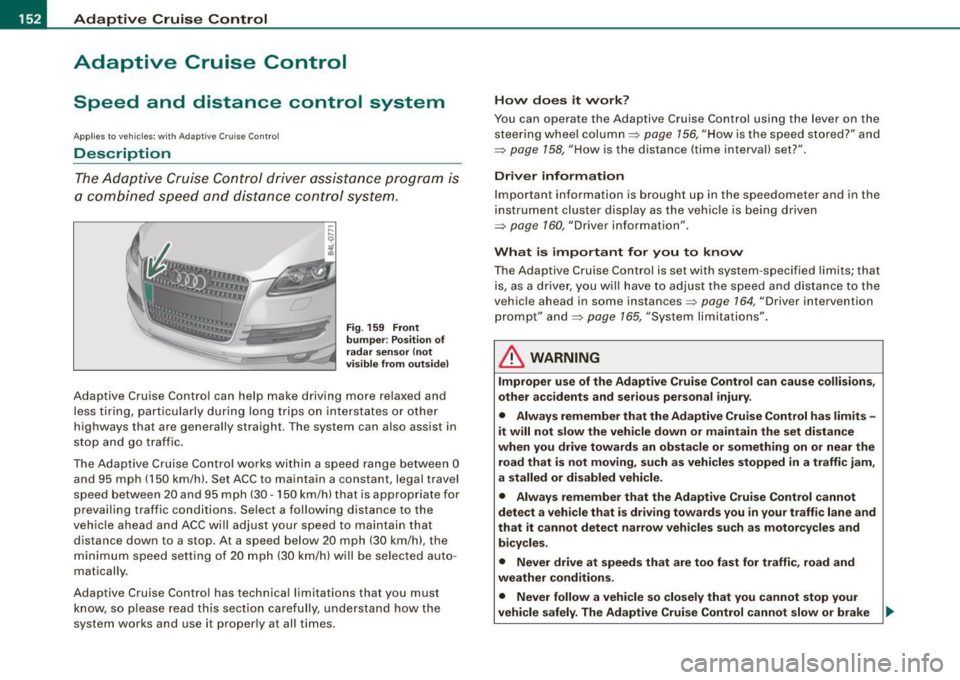
Fig . 159 Fron t
bu mper : Po siti on of
r a d ar sen sor (n ot
vi sibl e from out side)
Adaptive Cruise Contro l can help make driving more relaxed and
less tiring, particularly during long trips on interstates or other
highways that are generally straight . T he system can also assist in
stop and go traffic.
The Adaptive Cruise Control works within a speed range between 0 and 95 mph (150 km/h). Set ACC to maintain a constant, legal travel
speed between 20 and 95 mph (30 -150 km/h) that is appropriate for
prevailing traffic conditions. Se lect a following distance to the
vehic le ahead and ACC will adjust your speed to maintain that
d istance down to a stop . At a speed below 20 mph (30 km/h), the
m ini mum speed setti ng of 20 mph (30 km/h) will be selected auto
matically.
Adaptive Cruise Contro l has technical limitations that you must
know, so please read this section carefully, understand how the
system works and use it proper ly at all times. H
ow doe s it work ?
You can operate the Adaptive Cruise Control using the lever on the steering whee l column =:>
page 156, "How is the speed st ored?" and
=:>
page 158, "How is the distance (time interval) set? ".
Driver information
I mportant informa tion is brought up in the speedometer and in the
instrument clus ter d isplay as the vehic le is being driven
=:>
page 160, "Driver information".
What is import ant for you to know
T he Adaptive Cruise Contro l is set with system -specified limits; that
is, as a drive r, you will have to adjust the speed and distance to the
vehic le ahead in some instances=:>
page 164, "Driver intervention
prompt" and ~
page 165, "Sys tem li mita tions" .
& WARNING
Improper u se of the Adaptive Cruise Control can cause collisions ,
other a ccidents and serious personal injury .
• Alway s re member that the Adaptive Crui se Control has limit s -
it will not slow the vehicle down or maintain the set distance
whe n you driv e to wards an ob stacle or something on or ne ar the
road that is not moving , such as vehi cle s stopped in a tr affic j am ,
a stalled or disabled vehicle.
• Alway s rem ember that the Adaptive Cruise Control cannot
detect a veh icle that i s dri ving towards you in your traffic lane and
that it cannot detect narrow v eh icles su ch a s motorcycles and
bicycle s.
• Never driv e at speed s that are too fa st for tr affic , road and
weather condition s.
• Never follow a vehicle so closely th at you cannot stop your
vehicle safel y. The Adaptive Cruise Control cannot slow or br ake _.,
Page 157 of 426
Adaptive Cruise Control -
---------------=-------'
preparation. This function does not perform any emergency braking
m aneuv ers by i tse lf ; t he driver m ust alw ays app ly the b rake s.
& WARNING
If ACC initiates a braking maneuver, the brake pedal will be
retracted . Interference with the brake pedal can prevent ACC from
slowing the vehicle down and cause a crash and serious personal
injury .
• Never put anything in the driver 's footwell or let anything fall
into it . An object in the driver 's footwell can interfere with the
pedals and prevent the accelerator from being used to override
ACC or prevent ACC from being swit ched off when the brake pedal
is depressed and also prevent the vehicle from being slowed down
or stopped .
• Only u se floor mats that keep the area around the pedals free
and that can be securely fastened to the footwell.
• Never drive with your foot underneath the brake pedal.
• Always read and heed the information and WARNINGS=>
& in
" Description " on
page 152.
& WARNING
• Never rely on the distance control feature of ACC alone to
prevent rear -end collisions. Always be prepared to brake and take
evasive action to avoid collisions and other accident situations .
• Never allow the closing speed between you and other vehicles
to be so high that the Adapt ive Cruise Control may not be able to
slow your vehicle safely .
If closing speed is too high , you must
apply the brakes yourself to reduce the risk of a rear -end cra sh.
[ i ] Tips
Please note that the amount of acceleration the Adaptive Cruise
Control uses depends on the Distance setting selected. DISTA NCE 1
gives you accel erati on that is dy na mi c a nd sporty. DISTA NCE
4, on
Con tro ls and eq uip
ment
the other hand , gives more moderate acceleration . For more infor
m ati on about th e tim e in te rvals =>
page 758, "How i s the d istance
(time interval) set?" .
• Please not e th at if th e Ada ptive Cru ise Control has begun bra king
the vehicle and the driver chooses to brake th e vehicle additionally,
t he brakes may fe e l "har d". Th is is simply due t o th e pr essu re build
up of the initial braking .
• Adap tiv e Crui se Co ntrol is switc hed off aft er pr essing th e foot
brake. The speed saved up this point can be resumed . T o resume the
saved spee d, rel ease the brake pedal a nd pull t he control le ve r
toward you=>
page 757, " Turning Adaptive Cru ise Contro l off
t empo ra rily" .•
A pplies to veh ic les: with Adaptive C ru ise Contro l
Switching the system on and off
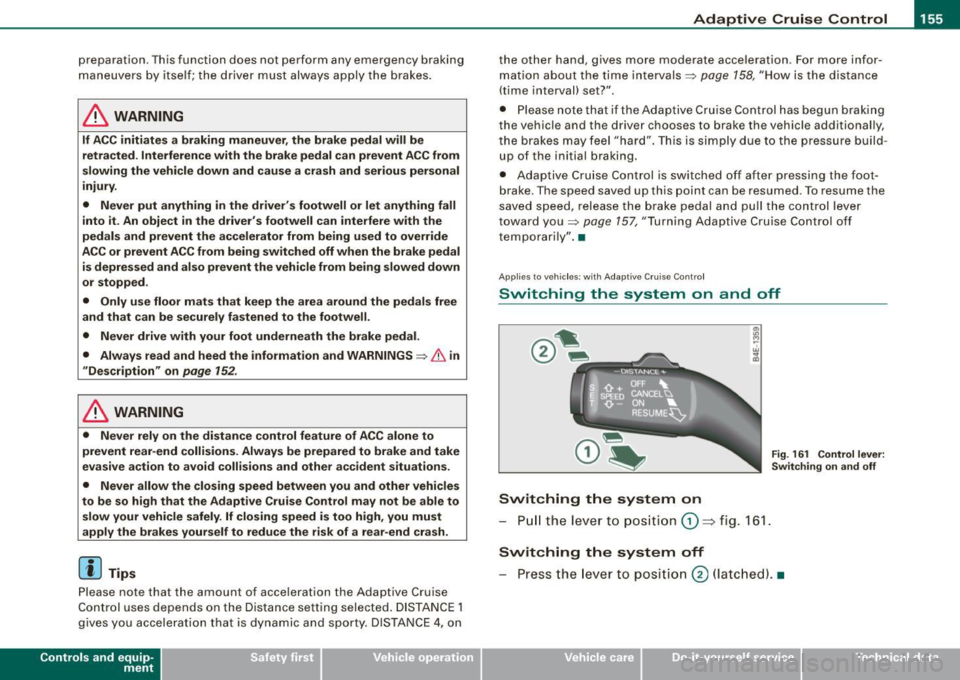
Fig. 161 Control lever:
S w itc hing on and off
Switching the system on
- Pull t he leve r to p ositi on G) => fig . 1 61.
Switching the system off
- Press the lev er to posi tion 0 (la tc h ed). •
Vehicle care I I irechnical data
Page 165 of 426
Adaptiv e Crui se Contro l ""' __________________________ ___;__;~-------
Applies to vehic les: w it h Ad aptive Crui se Co nt rol
System status indicator
The text messages and symbols shown in this area of the
display are not displayed permanently.
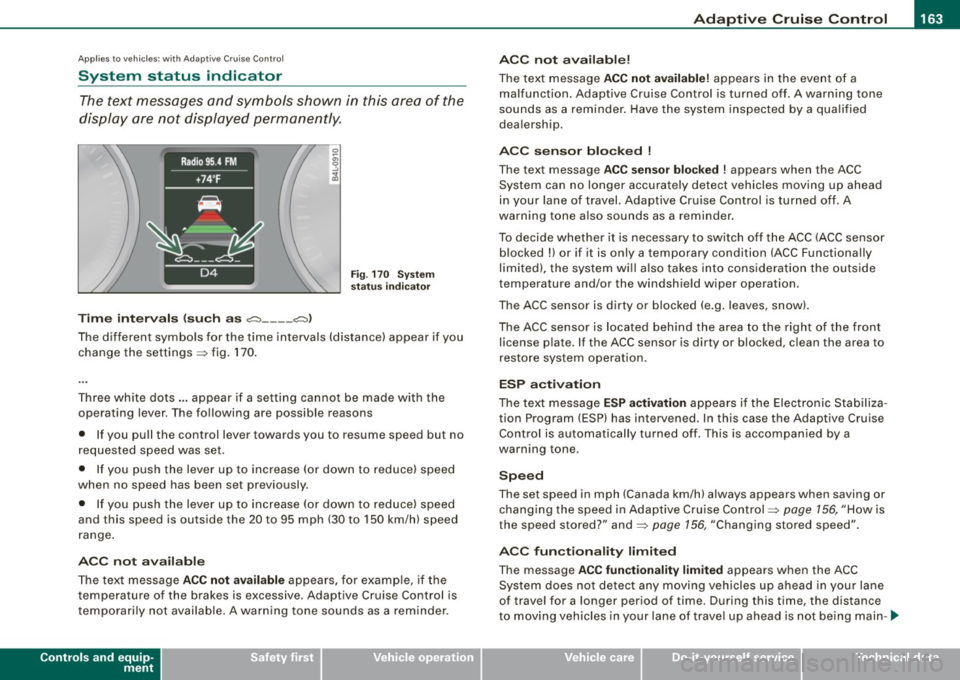
T ime in ter va ls (s uch a s c::;, __ __ c::;, }
Fig . 170 System
sta tus in dicator
The different symbols for the time intervals (distance) appear if you
change the settings:::;, fig. 170 .
Three white dots .. . appear if a setting canno t be made with the
operating lever . The following are possible reasons
• If you pull the control lever towards you to resume speed but no
requested speed was set.
• I f you push the lever up to increase (or down to reduce) speed
when no speed has been set previously.
• If you push the lever up to increase (or dow n to reduce) speed
and this speed is outside the 20 to 95 mph (30 to 150 km/h) speed
range .
A CC no t ava ila bl e
The text message ACC not av aila ble appears, for examp le, if the
temperature of the brakes is excessive. Adaptive Cruise Control is
t emporarily not available . A warning tone sounds as a reminder.
Controls and equip
ment A
CC not ava ilable!
The text message ACC not availabl e! appears in the event of a
malfunction. Adaptive Cruise Control is turned off. A warning tone
sounds as a reminder . Have the system inspected by a qua lified
dea lership.
ACC s ensor bl ocked
!
The text message ACC se nsor blo cke d ! appears when the ACC
System can no longer accurately detect vehicles moving up ahead
in your lane of
travel. Adaptive Cruise Control is turned off. A
warning tone a lso sounds as a reminder.
To decide whether it is necessary to switch off the ACC (ACC sensor b locked
!) or if it is only a temporary condition (ACC Functionally
limited), the system wi ll also takes into consideration the ou tside
temperature and/or the windshield wiper operation.
The ACC sensor is dirty or b locked (e .g . leaves, snow).
The ACC sensor is located behind the area to the right of the front license p late. If the ACC sensor is dirty or b locked, c lean the area to
restore system operat ion.
ESP activ at ion
The text message ES P activ ation appears i f the E lectronic Stabiliza
tion Program (ESP} has intervened. In this case the Adaptive Cruise
Control is automatically turned off . This is accompanied by a
warning tone.
S peed
The set speed in mph (Canada km/h) always appears when saving or
changing the speed in Adaptive Cru ise Control :::;, page 156, "How is
the speed stored?" and:::;, page 156, "Changing stored speed".
A CC function alit y limited
The message ACC functionalit y lim ited appears when the ACC
System does not detect any moving vehicles up ahead in your lane
of trave l for a longer period of time. During this time, the distance
t o moving vehicles in your lane of trave l up ahead is not be ing main -~
I • •
Page 170 of 426
• .___A_ d_a_ p:- t_i v_ e_ C_ r_u _is _ e_C_ o_ n_ t_ r_ o_ l --------------------------------------------
Audi braking guard
App lies to vehicles: with Adaptive Cruise Contro l
Description
Audi braking guard warns you of a possible collision with
a moving vehicle up ahead.
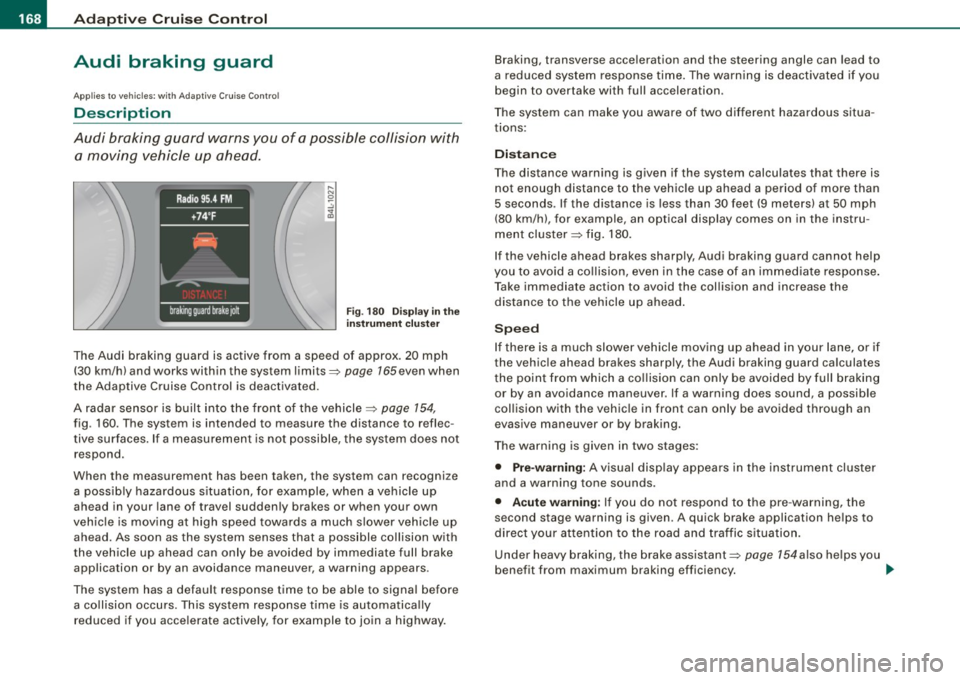
F ig. 180 Disp lay in t he
i nstrumen t cluster
The Audi braking guard is active from a speed of approx. 20 mph
(30 km/h) and works within the system limits=>
page 165 even when
the Adaptive Cruise Control is deactivated.
A radar sensor is built into the front of the vehicle=>
page 154,
fig. 160. The system is intended to measure the distance to reflec
tive surfaces. If a measurement is not possible, the system does not respond.
When the measurement has been taken, the system can recognize a possib ly hazardous s ituation, for example, when a vehicle up
ahead in your lane of travel sudden ly brakes or when your own
vehic le is mov ing at high speed towards a much s lower vehic le up
ahead. As soon as the system senses that a possible collision with
t he vehicle up ahead can only be avoided by immediate full brake
application or by an avoidance maneuver, a warning appears.
The system has a default response time to be able to signal before a co llision occurs. This system response time is automatica lly
reduced if you acce lerate actively, for example to join a highway. Braking, transverse acceleration and the steering angle can lead to
a reduced system response time. The warning is deact
ivated if you
begin to overtake with full acceleration.
The system can make you aware of two different hazardous situa
t ions:
Distan ce
The distance warning is g iven if the system calculates that there is
not enough distance to the vehic le up ahead a period of more than
5 seconds . If the distance is less than 30 feet (9 meters) at 50 mph
(80 km/h), for example, an optical display comes on in the instru
ment cluster=> fig. 180.
If the vehicle ahead brakes sharply, Audi braking guard cannot help
you to avoid a co llision, even in the case of an immed iate response .
T ake immediate action to avoid the collision and increase the
distance to the vehicle up ahead .
Speed
If there is a much slower vehicle moving up ahead in your lane, or if
the vehic le ahead brakes sharply, the Aud i braking guard calculates
t he point from which a co llision can only be avoided by full braking
or by an avoidance maneuver. If a warning does sound, a possible
collision with the vehicle in front can only be avoided through an
evasive maneuver or by braking.
The warning is given in two stages :
• Pre-warning: A visual disp lay appears in the instrument cl uster
and a warning tone sounds.
• Acut e warning : If you do not respond to the pre -warning, the
second stage warning is given . A quick brake application helps to
direct your attention to the road and traffic situation .
Under heavy braking, the brake assistant::::>
page 154also he lps you
benefit from maximum braking efficiency. _..