lights AUDI Q7 2009 Owner´s Manual
[x] Cancel search | Manufacturer: AUDI, Model Year: 2009, Model line: Q7, Model: AUDI Q7 2009Pages: 426, PDF Size: 97.13 MB
Page 176 of 426
•L---=A.....:...: u::.. d=.:... i ..:s :.::i-=d :.::e:......: a::.. s::.. s .::....:...: is::.. t.:._ _________________________________________________ _
Audi side assist
Lane Change Assistant
Applies to vehicles: with side ass ist
Description
The side assist helps you when changing lanes.
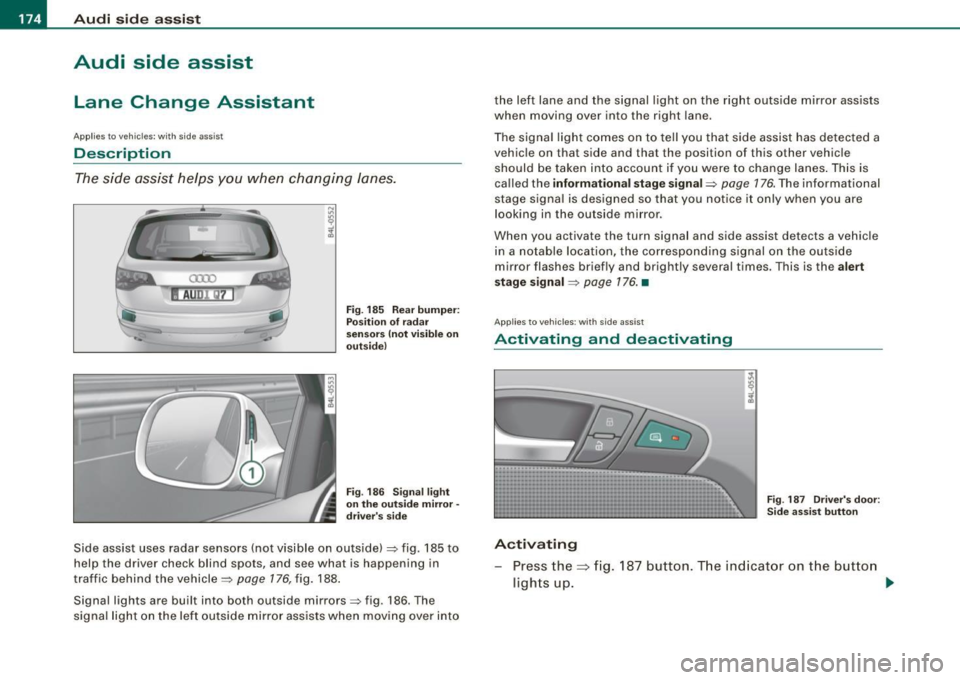
Fig. 185 Rear bumper:
Position of radar
sensors (not visible on
outside)
Fig . 186 Signal light
on the outside mirror -
driver's side
Side assist uses radar sensors (not visible on outside) => fig. 185 to
help the driver check blind spots, and see what is happening in
traffic behind the vehicle =>
page 176, fig. 188.
Signal lights are built into both outside mirrors=> fig. 186. The
signal light on the left outside mir ror assists when moving over into the left lane and the signal light on the right outside mirror assists
when moving over into the right
lane.
The signal light comes on to tell you that side assist has detected a
vehicle on that side and that the position of this other vehicle
should be taken into account if you were to change lanes. This is
called the
informational stage signal=> page 176. The informational
stage signal is designed so that you notice it only when you are
looking in the outside mirror .
When you activate the turn signal and side assist detects a vehicle
in a notable location, the corresponding signal on the outside
mirror flashes briefly and brightly several times. This is the
alert
stage signal
=> page 176. •
Appl ies to veh icles: with side assist
Activating and deactivating
Fig . 187 Driver's door:
Side assist button
Activating
Press the=> fig. 187 button. The indicator on the button
ligh ts up. ..,
Page 179 of 426
_________________________________________________ A_ u_ d_ i _s _i_ d _e _ a_s_ s_ i_ s _t _ __._
When you look in the outside mirror, you can clea rly see the infor
mational s tage signal.
Ale rt sta ge sign al
When you ac tivate the turn signal, and side assist has detected a
vehic le in a notab le location on that particu lar sid e, the signal light
on this side mirror flashes brightly. The repea ted brief and bright
flash ing of the aler t stage signa l reminds you to carefully check
t raffic to the rear in the outside mirror and over your shoulder, so
that you can safely complete the lane change=>
& in "Safety tips"
on
page 182.
[ i ] Tips
T he brightness of the signal light on the outside mirrors can be
adjusted with the
MMI => page 180 . •
Con tro ls and eq uip
ment
A pp lies to veh ic les: with s ide ass ist
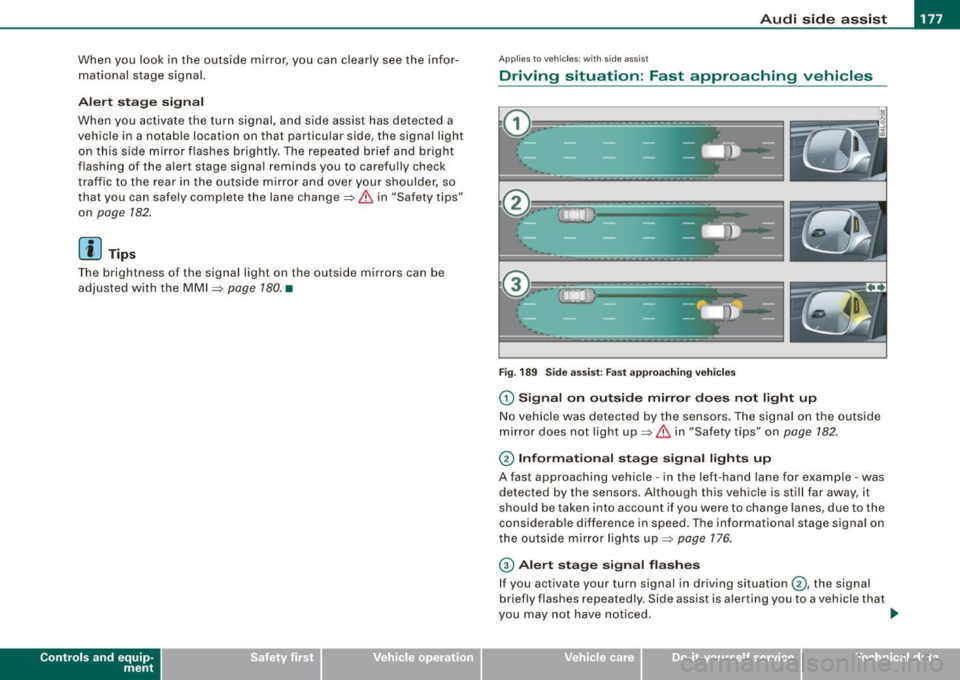
Driving situation : Fast approaching vehicles
Fig . 189 Side a ssist : Fas t ap pro achin g veh ic les
G) Sign al on outside mirror does not l ight up
No vehicle was detected by the sensors. The signa l on the outside
mirror does not light up=>
& in "Safety tips" on page 182.
0 Informa tio nal stage signal lights up
A fast approaching vehicle -in the left-hand lane for example -was
detected by the sensors. Although this vehicle is still far away, it
should be taken into account if you we re to change lanes , due to the
considerable difference in speed. The informational stage signal on
t he outside mirror lights up=>
page 176 .
© Alert stag e signal flashe s
If you activate your turn signal in driving situation @, the signal
briefly flashes repeated ly. Side assist is alerting you to a vehicle that
you may not have noticed .
~
Vehicle care I I irechnical data
Page 180 of 426
• ..__A_ u_ d_ i _s _i_d _e_ a_ s_ s _ is_ t __________________________________________________ _
[ i J Tips
• The faster a vehicle approaches from the rear, the sooner the
s ignal on the outside mirror lights up . Side assist will signal, at the
latest, when a detected vehicle enters your "blind spot".
• When vehicles approach very quickly, changing lanes can be
dangerous even if the signal on the outside mirror does not light
up. •
Applies to vehicles: with side assist
Driving situation : Slowly approaching
vehicles
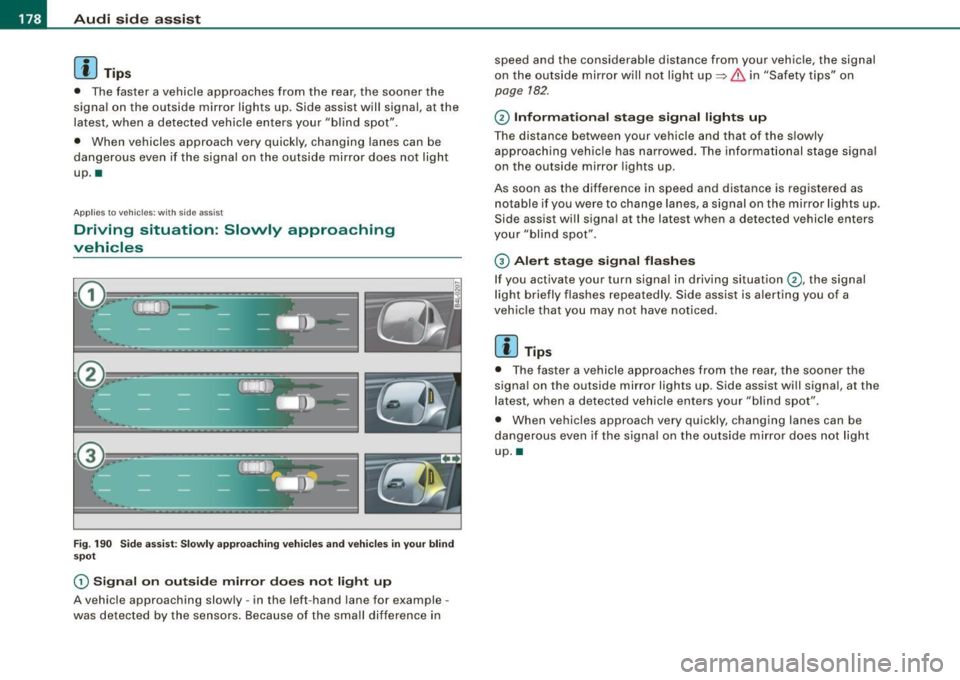
Fig. 190 Side assist: Slowly approaching vehicles and vehicles in your blind
spot
(D Signal on outside mirror does not light up
A vehicle approaching slowly -in the left -hand lane for example -
was detected by the sensors. Because of the small difference in speed and the considerable distance from your vehicle, the signal
on
the outside mirror will not light up
~ & in "Safety tips" on
page 182.
© Informational stage signal lights up
The distance between your vehicle and that of the slowly
approaching vehicle has narrowed. The informational stage signal
on the outside mi rror lights up.
As soon as the difference in speed and distance is registered as notable if you were to change lanes, a signal on the mirror lights up .
Side assis t will signal a t the latest when a detected vehicle enters
your "blind spot".
© Alert stage signal flashes
If you activate your turn signal in driving situation©, the signal
light briefly flashes repeatedly . Side assist is alerting you of a
vehicle that you may not have noticed.
[ i J Tips
• The faster a vehicle approaches from the rear, the sooner the
signal on the outside mirror lights up . Side assist will signal , at the
latest, when a detected vehicle enters your "blind spot".
• When veh icles approach very quickly, changing lanes can be
dangerous even if the signal on the outside mirror does not light
up. •
Page 181 of 426
___________________________________________________ A_u_ d_i_ s_ id_e_ a_ s_s _i_s _t _ __.11111
Ap plies to vehicle s: with side assist
Driving situation : Vehicles dropping back
slowly
@
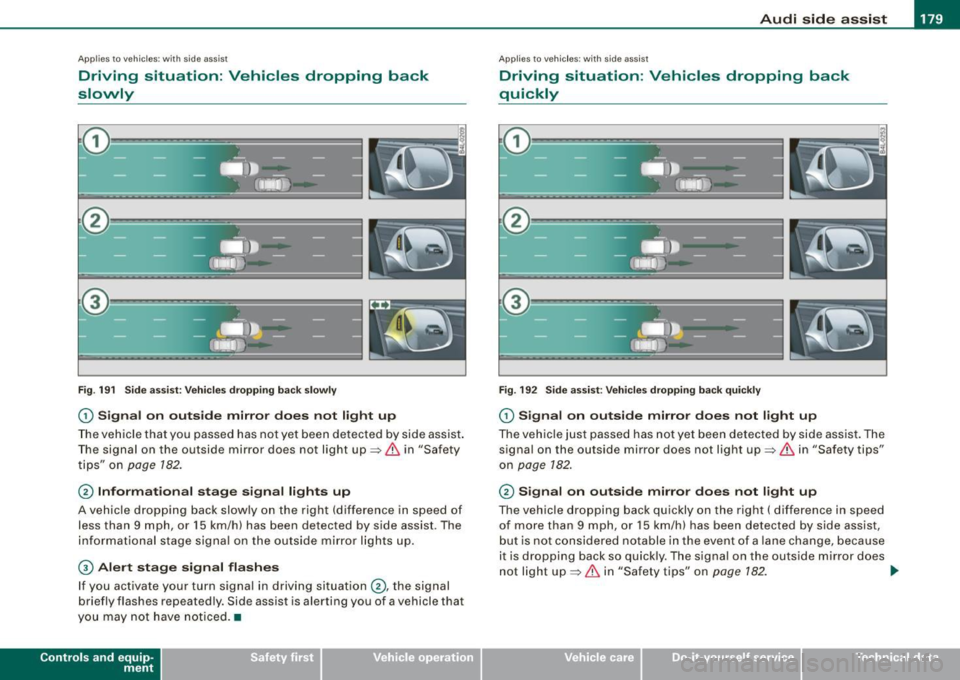
Fig. 191 Side assist: Vehicles dropping back slowly
G) Signal on outside mirror does not light up
The vehicle that you passed has not yet been detected by side assist.
The signal on the outside mirror does not light up~
& in "Safety
tips " on
page 182.
@ Informational stage signal lights up
A vehicle dropping back slowly on the right (difference in speed of
less than 9 mph, or 15 km/h) has been detected by side assist. The
informational stage signal on the outside mirror lights up.
G) Alert stage signal flashes
If you activate your turn signal in driving situation @, the signal
briefly flashes repeatedly . Side assist is alerting you of a vehicle that
you may not have noticed. •
Contro ls and eq uip
ment
Ap plies to vehi cle s: wi th si de a ssist
Driving situation : Vehicles dropping back
quickly
Fig. 192 Side assist: Vehicles dropping back quickly
G) Signal on outside mirror does not light up
The vehicle just passed has not yet been detected by side assist. The
signal on the outside mirror does not light up~
& in "Safety tips"
on
page 182.
@ Signal on outside mirror does not light up
The vehicle dropping back quickly on the right ( difference in speed
of more than 9 mph, or 15 km/h) has been detected by side assist,
but is not considered notable in the event of a lane change, because
it is dropping back so quickly. The signal on the outside mirror does
not light up~
& in "Safety tips" on page 182. ..,_
Vehicle care I I irechnical data
Page 188 of 426
• ..__A_ u_ t _o_ m_ a_ t_ i_ c _ t_r _a _n_ s_ m_ is_ s_io _ n ________________________________________________ _
Select R only when the vehicle is at a full stop and the engine is
running at idle speed=>
& in "Driving the automatic transmission"
on
page 184.
Before you move the selector lever to R, press both the button in the
handle of the selector lever
and the brake pedal at the same time.
When the ignition is on, the backup lights illuminate when the
selector lever is moved into R.
N -Neutral
The transmission is in neutral in this position. Shift to this position
for standing with the brakes applied =>
page 186 .
When the vehicle is stationary or at speeds below 3 mph (5 km/h),
you must always apply the footbrake before and while moving the
lever out of
N.
D -Normal position for driving forward
Position Dis for normal city and highway driving. It ranges from zero
to top speed and all gears shift automatically, depending on engine
load, driving speed and automatically selected shift programs.
When the vehicle is stationary or at speeds below 3 mph (5 km/h),
you must always apply the foot brake before and while moving the lever to
D out of N.
In certain circumstances it may be advantageous to temporarily
switch to the manual shift program to manually select gear ratios to
match specific driving conditions=>
page 788.
S -Sport position
Select this position for sportier performance. In this position, the
transmission will not upshift as soon, allowing the vehicle to use the
increased power available at higher engine speeds to achieve live
lier acceleration.
When the vehicle is stationary or at speeds below 3 mph (5 km/h),
you must always apply the foot brake before and while moving the lever to
S out of N.
& WARNING
Read and follow all WARNINGS => & in "Driving the automatic
transmission" on
page 184.
0 Note
Coasting downhill with the transmission in N and the engine not
running will result in damage to the automatic transmission and
possibly the catalytic converter. •
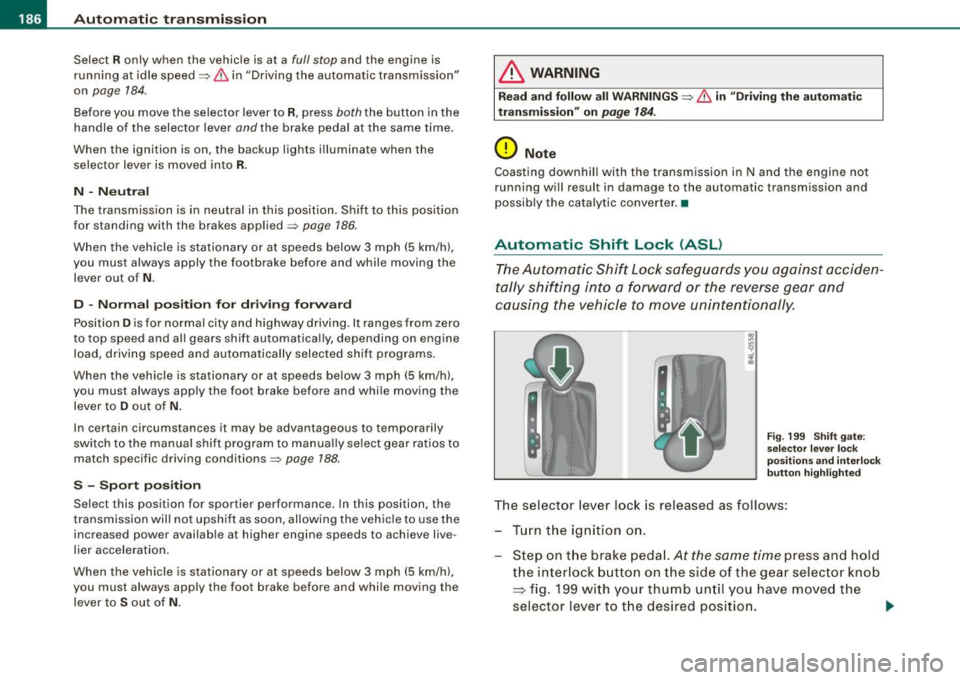
Automatic Shift Lock (ASL)
The Automatic Shift Lock safeguards you against acciden
tally shifting into a forward or the reverse gear and
causing the vehicle to move unintentionally.
Fig. 199 Shift gate:
selector lever lock
positions and interlock
button highlighted
The selector lever lock is released as follows:
- Turn the ignition on.
Step on the brake pedal.
At the same time press and hold
the interlock button on the side of the gear selector knob
=> fig. 199 with your thumb until you have moved the
selector lever to the desired position.
~
Page 194 of 426
• .___A_ d_v_ a_ n_c_ e_ d_ P _a_r_k _i_ n -=g,_ S-=y"- s_ t_ e_ m __________________________________________ _
-Press the sw itch PJJJ! in the cente r console ~ page 191,
fig. 206 t o activate the A udi pa rking system m anually .
Activation of the acoustic parking system is confirmed by
a brief acknowledgement sound . The indicator light in
the switch lights up.
D ea ctivation
If you drive forwards faster tha n approx. 6 mph (10 km/h),
or
- if you switch the ign ition off, the entire acoustic parking
assist is automatically deactivated, or
- you can press the sw itch
P111! i n the center console
=> page 191, fig. 206 to deact ivate the Audi parking
system. The indicator light in the switch goes out.
You have to turn on the acoustic parking assist m anuall y if you wish
to park the vehicle forwards or if you w ish to approach an obstacle
forwards and want a distance warning .
The range at which the sensors start to measu re is
about:
Front
Rear
W arning ton es side
cen
te r
side
cen ter 3 ft (0
.90 ml
4ft (1.20 ml
2 ft (0.60 ml
5 .2 ft (1.60 ml
Distance warning is given by chimes which are generated by a
signal generator . The volume and the pitch of the chimes can be
adjusted in the MMI => page 201.
Mute In the case of vehic les with automa tic transmission, an acoustic
distance warning is discontinued when the transmission selector lever is moved to the P position. However, the system remains
active
. As soon as the selector lever is moved from the
P posi tion
and the vehicle approaches an obstacle, the acoustic distance
warning resumes .
Dri ving fo rward/ba ckvv ard
Distance warning when driving forward/backward is based o n
detection of an obstacle in the range of the parking assist . As the
distance dec reases, the time interval between the audible tones
becomes shorter.
When the distance is less than approx . 1 ft (0.30 m), the tone
becomes continuous. At this point you shou ld s top backing up or
driving forward .
If the distance to an obstac le remains the same, the vo lume of the
distance warning is gradually reduced after about
4 seconds (does
not app ly to the zone for the cont inuous tone). If you sta rt to
approach the detected obstacle again, the distance warning will
sound at the normal volume again .
P a rk ing
When you selec t ano ther gear when parki ng (e .g . reverse/forward),
the warning tones are temporarily suppressed, but the visual display remains on the MMI display . If you start approaching a
detected obstacle again, the distance warning wi ll sound at the
normal vo lume again .
Vi sual disp lay
T he segments on the MMI display indicate a change in the distance
between the vehicle and an obstacle . The number of segments
displayed depends on the obstacles in front of or behind the
vehic le. The c loser the vehic le comes to the obstacle, the closer the
segments approach the vehic le => page 191, fig. 207. When the
segment before last is disp layed, the veh icle has reached the colli
sion zone. At this point you should stop backing up or driving
forward =>
&,. ..,.
Page 223 of 426

Driving Safely -
----------------
Safety is everybody's responsibility! •
Important things to do before driv ing
Safety is everybody's job! Vehicle and occupant safety
always depends on the informed and careful driver.
For your safety and the safety of your passengers, before
driving always:
- Make sure that al l lights and signals are operat ing
correctly.
- Make sure that the tire pressure is correct.
- Make sure that all windows are clean and afford good
visibility to the outside.
- Secure all luggage and other items carefully :::>
page 119.
-Make sure that noth ing can interf ere w ith the pedals.
Adjust fro nt seat, head restraint and mirrors correctly for
your height .
Instruct passengers to adjust the head restraints
according to their height.
- Make sure to use the right ch ild restraint correctly to
protect children :::>
page 263, "Child Safety".
- Sit properly in your seat and make sure that your passen
gers do the same :::>
page 92, "General recommenda
tions".
- Fasten your safety belt and wear it p roperly. Also instruct
your passengers to fasten their safety belts properly
~ page 231. •
Controls and equip
ment Safety first Vehicle operation
What impa
irs driving safety?
Safe driving is directly related to the condition of the
vehicle, the driver as well as the driver's ability to concen
trate on the road without being distracted.
The driver is responsible for the safety of the vehicle and all
of its occupants. If your ability to drive is impaired, safety
risks for everybody in the vehicle increase and you also
become a hazard to everyone else on the road :::>& .There
fore:
- Do not let yourself be distracted by passengers or by
using a cellula r telephone .
NEVER drive when your driving ability is impaired (by
medications, alcohol, drugs, etc.).
Observe all traffic laws, rules of the road and speed limits
and plain common sense .
- ALWAYS adjust your speed to road, traffic and weather
conditions.
- Take frequent breaks on long trips. Do not drive for more
than two hours at a stretch.
- Do NOT drive when you are tired, under pressure or when
you are stressed .
& WARNING
Impaired driving safety increases the risk of serious personal
injury and death whenever a vehicle is being used. •
Vehicle care Do-it-yourself service Technical data
Page 234 of 426
-Safety belts ----=-----------------
Before driving off
, always:
Fasten your safety belt and make sure you are wearing it
properly.
Make sure that your passengers also buckle up and prop
erly wear their safety belts.
- Protect children with a child restraint sys tem appropriate
for the size and age.
The warning light .ft in the instrument cluster lights up when the
ignition is switched on as a reminder to fasten the safety belts. In
addition, you will hear a warning tone.
After the ignition is switched on, the warning light in the instrument
cluster will a lways come on for about 6 seconds and if the driver has
not fastened the safety belt, a warning tone will also sound for
about 6 seconds. As soon as the driver has fastened the safety belt,
the warning tone will stop and the warning light will go out.
If the driver or front seat passenger have not buckled-up within
about 10 seconds after the warning tone has stopped and the
vehicle is moving faster than about 15 mph, the warning tone will
sound again for about 6 seconds and then stop for 24 seconds and
then repeat this reminder sequence for a maximum of 2 minutes. At
speeds be low 5 mph, the warning tone will not sound .
Fasten your safety belt and make sure that your passengers also
properly put on their safety belts.
& WARNING
• Safety belts are the single most effective means available to
reduce the risk of serious injury and death in automobile acci
dents . For your protection and that of your passengers , always
correctly wear safety belts when the vehicle is moving.
• Failure to pay attention to the warning light that come on,
could lead to personal injury.
a
Why safety belts?
Frontal co11isions and the law of physics
Frontal crashes create very strong forces for people riding
in vehicles.
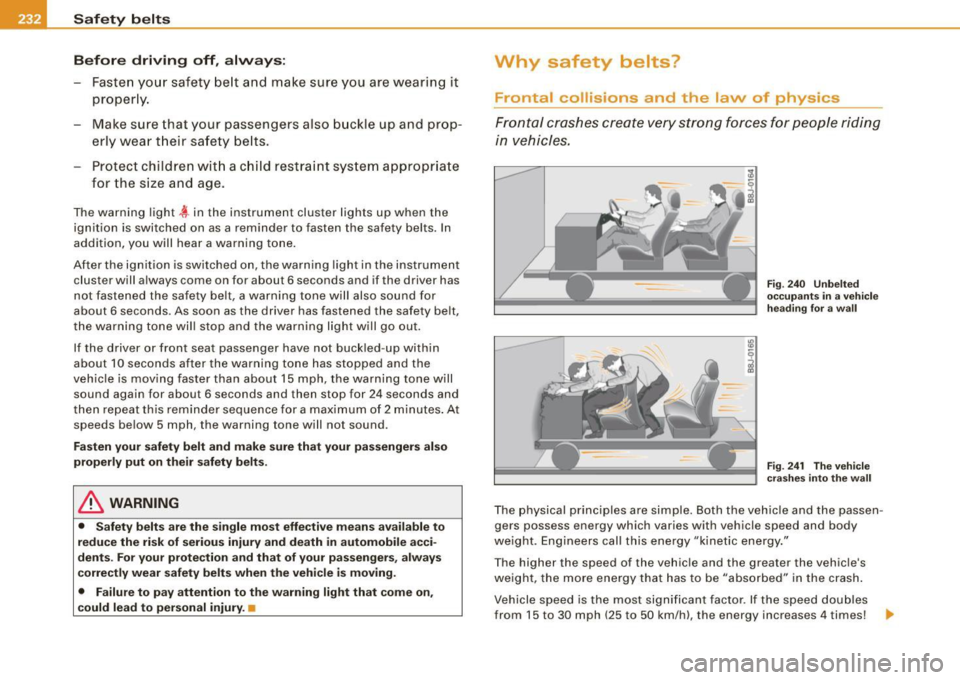
Fig. 240 Unbelted
occupants in a vehicle
heading for a wall
Fig. 241 The vehicle
crashes into the wall
The physical principles are simple. Both the vehicle and the passen
gers possess energy which varies with vehicle speed and body
we ight . Engineers call this energy "kinetic energy."
T he higher the speed of the vehicle and the greater the vehic le's
we ight, the more energy that has to be "absorbed" in the crash .
Vehicle speed is the most significan t factor . If the speed doubles
from 15 to 30 mph (25 to 50 km /h), the energy increases 4 times! .,
Page 302 of 426
___ D_ r_i v_ in_... g"'- a_ n_ d_ e_ n_ v_i_r _ o _n_ m __ e_n _ t _______________________________________________ _
one half. Never drive faster than the posted speed limit and weather
conditions permit. •
Reducing unnecessary =citing
Even when your car is just idling it burns up fuel.
- Shut the eng ine off when you are not driving the vehicle .
- Do not warm up the vehicle by letting the engine run at
idle.
It makes sense to shut off the engine in traffic jams, when waiting
for trains to pass at rai lroad crossings , or at traffic lights that have
long waits on red. Turning the engine off for just 30 -40 seconds
saves more fuel than is burned starting the engine again .
It takes a long time for the engine to warm up fu lly when it is
running at idle. However, wear and noxious emissions are especially
high when the engine is warming up. So you should drive away as
soon as you start the engine and avoid running at high rpms while
the engine is still warming up.
0 Note
Do not leave engine idling unattended after starting . If warning
lights should come on to indicate improper operation, they would
go unheeded. Extended idling also produces heat, which could result in overheating or other damage to the vehicle or other
property .•
Regu1ar ma1--.tenance
A badly tuned engine unnecessarily wastes a lot of fuel.
- Have your vehic le serviced at regular intervals . By having your vehicle regularly serviced by an authori
zed Audi
dea ler helps to ensure that it runs properly and economica lly. The
condition of your vehicle not only affects its safety and ability to
hold its value, it a lso affects
fu el con sumpti on.
C he ck your oil each time you fill your t ank .
The amount of oil used is related to engine load and speed.
It is norma l for the oil consumption of a new engine to reach its
lowest va lue after a certain mileage has been driven.
You must drive your vehicle about 3,000 miles (5,000 kilometers) before you can properly assess oil consumption .
T his also applies to fuel consumption and engine output .
0 Note
• Have your vehicle maintained properly and in accordance with
the service recommendations in your Warranty
& Maintenance
booklet. Lack of proper ma intenance as well as improper use of the
vehic le wi ll impair the function of the emission control system and
cou ld lead to damage.
• Do not alter or remove any component of the Emiss ion Control
System unless approved by the manufacturer.
• Do not alter or remove any device, such as heat shields,
switches, ignition wires, valves, which are designed to protect your
vehicle 's Em ission Control System and other important vehicle
components .•
Fewer short tr ips
Fuel consumption will always be relatively high on short
trips.
- Try to avoid driving short dista nces wi th a cold engine. _,
Page 304 of 426

llffl!I Driving off road __ _...,______;, _____________________________ _
Driving off road
Driving in difficult road conditions
and offroad
General information
The operat ion o f the Elect ronic Stab ilizat ion Prog ram ( ESP) is
e x panded for operation away from paved roads . In situations where
s lip o r a di fferential lockin g function is required, the ESP o ffroad
mode can be activated~
page 288. Hill descent contro l is also avai l
able in the ESP off road m ode, w hich a utomat ical ly bra kes t he
vehicle and thereby keeps speed constant when different whee l
speeds are de tected whe n descend ing a hill ~
page 289 . You r Audi
a lso has permanent all -wheel drive in add ition .
Howeve r, your Audi is not a pure offroad vehicle . It was n ot bu ilt fo r
dr ivin g und er ex tre me cond itions, e.g . for tr ips t hat ar e in t he n atu re
of an expedition.
Drive only on roads and offroad sections which match the design of
your vehicle and your abilitie s as a driver . Never take r isks!
Before driving offr oad
• Check the engine oil level, tire pressure, coolant level, and the
fl uid level in t he windshie ld wash er r eservo ir.
• Stow luggage items and other objects in the luggage compart
ment, and secure the m aga inst sl iding around .
After driving offroad • After trips offroad, remove any twigs and other forei gn ob jects
from the gri ll, the underbody and the whee ls. Pay special attention
t o foreig n objects (stones) which have become lodged in t he tire
tread.
• Clean the body and the vehicle underside, and inspect the
veh ic le for possible damage. •
Clean dirty windows, headlamp lenses, rea r lights, and license
plates.
• Perform a bra ke check (particularly af ter travel ling through
wa ter).
& WARNING
• Drive especially attentively and plan ahead in difficult road
c onditions and when offroad . Excessive speed or in correct maneu
vers can cause injuries and damage to the vehicle.
• Alway s adapt your speed and d riv ing style to road , offroad,
traffic, and weather conditions. Drive especially slowly offroad
when your v iew is restri cted .
• Please be aware that in ESP offroad mode , particularly on a
smooth and slippery road , the wheels may have an in creased
tendency to spin and the vehicle may break away -danger of skid
ding !
• Stability is limited in the ESP offroad mode.
[ i ] Tips
On ly dr ive where it is perm itted and s tay on marked roads a nd
paths.
Explanation of some technical terms
T he fol lowing data refer to idea l conditions. Depending on vehic le
lo ad and g round cond itions and the environ ment, t he num ber s may ...