mirror AUDI Q7 2010 Owner´s Manual
[x] Cancel search | Manufacturer: AUDI, Model Year: 2010, Model line: Q7, Model: AUDI Q7 2010Pages: 390, PDF Size: 93.04 MB
Page 154 of 390
-Audi side assist .n,..__ ______________ _
Audi side assist
Lane Change Assistant
Applies to vehicles : w ith s ide ass ist
Description
The side assist helps you when changing lanes.
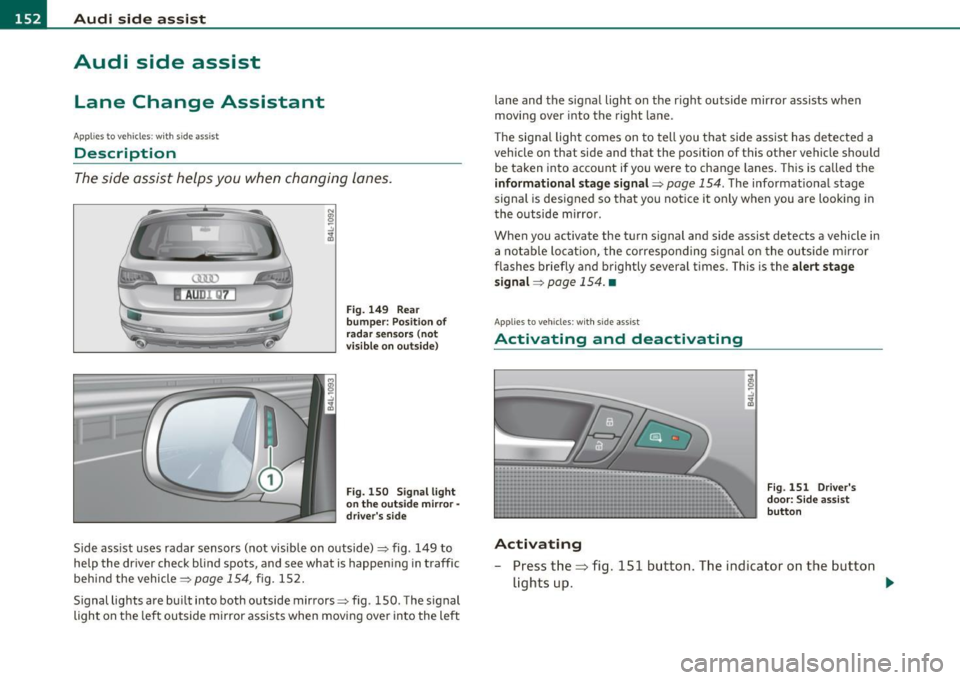
AUDr Q7
Fig . 149 Rear
bumper: Position of
radar sensors (not
visible on outside)
Fig . 150 Signal light
on the outside mirror -
driver's side
Side ass ist uses radar sensors (not visible on outside)=> fig. 149 to
help the driver check blind spots, and see what is happening in traffic
behind the vehicle=>
page 154, fig. 152.
Signal lights are built into both outside mirrors=> fig. 150. The s ignal
light on the left outside mirror assists when moving ove r into the left lane and
the signal light on the r ight outside mirror assists when
moving over into the right lane.
Th e sig nal light comes on to tell you that side assist has detected a
vehicle on that side and that the position of this other vehicle should
be taken into account if you were to change lanes. Thi s is called the
informational stage signal =>
page 154. The informationa l stage
signal is designed so that you not ice it only when you are looking in
the outside m irror.
When you activate the turn s ignal and side assist detects a vehicle in
a notable location, the correspo nding signal on the outside mirror
flashes briefly and brightly several times. This is the alert stage
signal =>
page 154. •
Applies to veh icles: w ith side ass ist
Activating and deactivating
Activating
Fig . 151 Driver's
door: Side assist
button
- Press the=> fig. 151 button. The indicator on the button
lights up. ..,
Page 155 of 390
Audi side assist Ill
----------------
Deactivating
-Pre ss th e b utton again . Th e ind icator light on the button
goes o ut.
The system works at speeds faster than 19 mph (30 km/h) .
& WARNING
• Improper reliance on the side assist system can cause collisions
and seriou s per sonal injury:
- Never rely only on side assist when changing lanes.
- Alway s check rear view mirrors to make sure that it is safe to
change lanes.
• Side assist cannot detect all vehicles under all condition s
danger of accident!
• Side a ssist cannot detect vehicle s in time to alert you when
they approach from behind at very high speed , or fall drop bac;k
very quickly .
• The radar sensor's
vision can be reduced o r entirely blocked by
rain, snow, and heavy spray . Thi s can result in side a ssist not
adequately detecting vehicles o r, in some cases , not detecting
them at all. Always keep an eye on the direction you are traveling
and the relevant area around the vehicle.
• Plea se note that side assi st indi cates there are approaching
veh icles, or vehicles in your blind spot, only after your vehicle has
reached a driving speed of at lea st 19 mph (30 km/h).
• Side assist signal does not work around tight corners (turning
radius le ss than 328 feet, or 100 m ).
• Side assist is no replacement for the driver's full attention. The
driver alone is respon sible for lane changes and similar driving
maneuvers. Always keep an eye on the direction you are traveling
and the relevant area around the vehicle .
Controls and equip
ment Safety first
0 Note
• T
o ens ure t hat you do not adve rsely affec t side assist, do not blo ck
the area on the rear bumper where the radar sensors are located with
foreign obje cts (s uch as stickers or bicy cle ra cks).
• Make s ure that the s ignal light on the outside mirror is not
blo cked by st ickers or o ther ite ms.
W Tips
• Side assist a utoma tically deact iva tes if it de tects that the rada r
sensors are blocked=>
page 159. The indicator light on the button
goe s out.
• Th e area on the bumpe r w here the ra dar sensors are located must
c o nsistent ly remain free of snow, i ce, a nd heavy soiling so tha t side
assist can funct ion p roper ly. Follow the add itiona l notes on
=>
page 160 .
• F or vehicles with a factory installed towing hitc h* or a tra ile r
hi tc h* that was i nstalled late r according to f actory specifications,
side ass ist is automat ically deact ivated as soon as the electrical
c o nne ct io n to the tra ile r electr ical socket is made=>
page 15 9.
• For vehicles with a trai le r h itch that was not installed accor ding to
fac tory spe cifica tions, sw itch off the s ide ass ist whe n tow ing a tra iler.
• Additiona l t int ing on the front si de windows can make it ha rder to
se e and co rrectly unde rs tand t he signa l light o n the outs ide m irro r.
• For Declaration of Compliance to United States FCC an d Industry
Canada regulations=>
page 369 . •
Vehicle care Technical data
Page 157 of 390
Audi side assist Ill _______________ ____.
you look in the outside ·mirror, you can clearly see the informational
stage signal.
Alert stage signal
When you act ivate the turn signal , and side assist has detected a
vehicle in a notable location on that part icular side, the signal light on
this side mirror flashes brightly. The repeated brief and bright
flashing of the alert stage signal reminds you to carefully check
traff ic to the rear in the outside mirror and over your shoulder, so that
you can safely complete the lane change~
& in "Safety tips" on
pag e 160.
[ i ] Tips
The brightness of the signal light on the outside mirrors can be
adjusted with the MMI
~ page 158. •
Con tro ls a nd e quip
m en t Vehicle
OP-eration
Applies to vehicles : with side assist
Driving situation: Fast approaching
vehicles
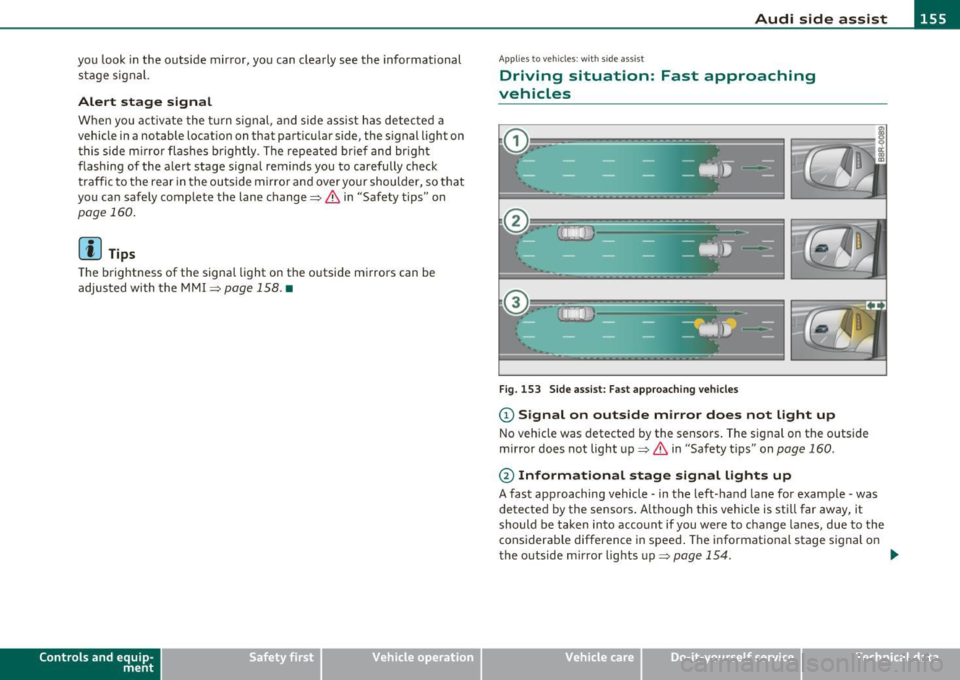
Fig . 153 Side assist: Fast approaching vehicles
(D Signal on outside mirror does not light up
No vehicle was detected by the sensors. The signal on the outside
mirror does not light up~
& in "Safety tips" on page 160 .
@ Informational stage signal lights up
A fast approaching vehicle -in the left-hand lane for example -was
de tected by the sensors. A lthough this vehicle is still far away, it
should be taken into account if you were to change lanes, due to the
considerable difference in speed . The informational stage signal on
the outside mirror lights up~
page 154. _,,,
Vehicle care Do-it-yourselt service iTechnical data
Page 158 of 390
1111..__A_ u_d_ i _s _id _ e_ a_s _ s_ i_ s _t _______________________________________________ _
@ Alert stage signal flashes
If you activate your turn signal in driving situation @, the signal
briefly flashes repeatedly. Side assist is alerting you to a veh icle that
you may not have noticed .
l i] Tips
• The faster a vehicle approaches from the rear, the sooner the
signal on the outs ide mirror lights up. S ide assist will signa l, at the
latest, when a detected vehicle enters your "blind spot" .
• When vehicles approach very quickly, changing lanes can be
dangerous even if the signal on the outside mirror does not light up.•
Applies to vehicles : w ith side a ssist
Driving situation: Slowly approaching
vehicles
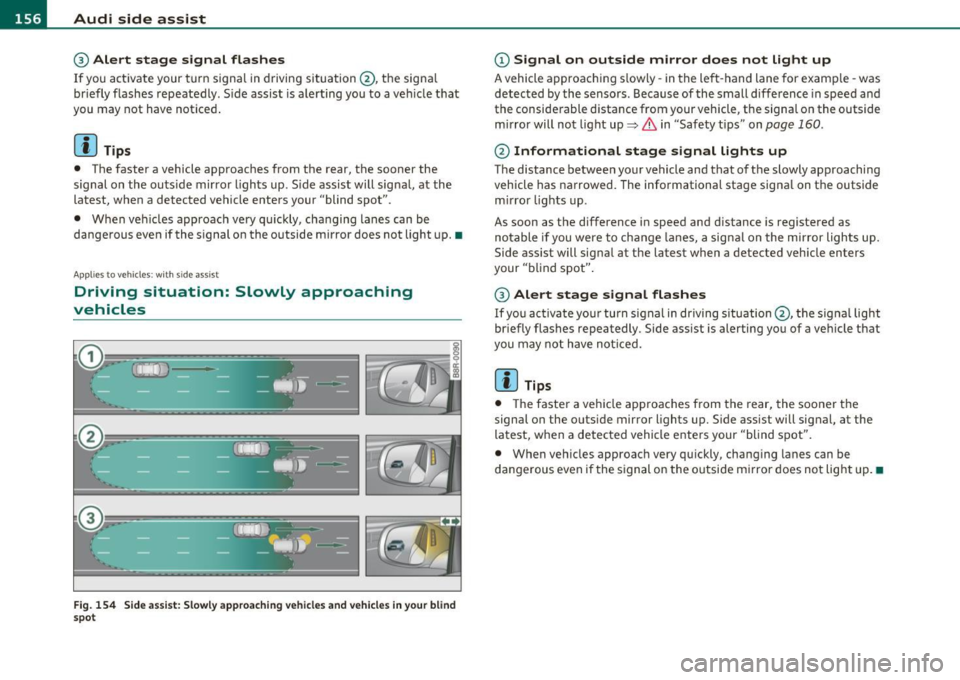
Fig. 154 Side assist: Slowly approaching vehicles and vehicles in your blind
spot
(D Signal on outside mirror does not light up
A vehicle approaching s lowly -in the left-hand lane for examp le -was
detected by the sensors . Because of the small difference in speed and
the considerable distance from your vehicle, the signa l on the outside
mirror will not light up:::::,
& in "Safety t ips" on page 160 .
@ Informational stage signal lights up
The distance between your vehicle and that of the slowly approaching
vehicle has narrowed. The informational stage signal on the outside
m irror lights up.
As soon as the difference in speed and distance is registered as
notable if you were to change lanes, a signal on the mirror lights up.
Side assist will signal at the latest when a detected vehicle enters
your "blind spot".
@ Alert stage signal flashes
If you activate your turn signal in driving situation@, the signal light
briefly flashes repeatedly . Side assist is alerting you of a vehicle that
you may not have noticed.
[ i ] Tips
• Th e faste r a vehicle approaches from the rear, the sooner the
signal on the outside mirror lights up. Side assist will signal, at the
latest, when a detected vehicle enters your "blind spot".
• When vehicles approach very quickly, changing lanes can be
dangerous even if the s ignal on the outside m irror does not light up.•
Page 159 of 390
_________________________________________________ A_ u _ d_ i_ s_ id_ e_ a _ s_s _ i_s _t _ __.fflll
A ppli es to vehicles : w ith side assist
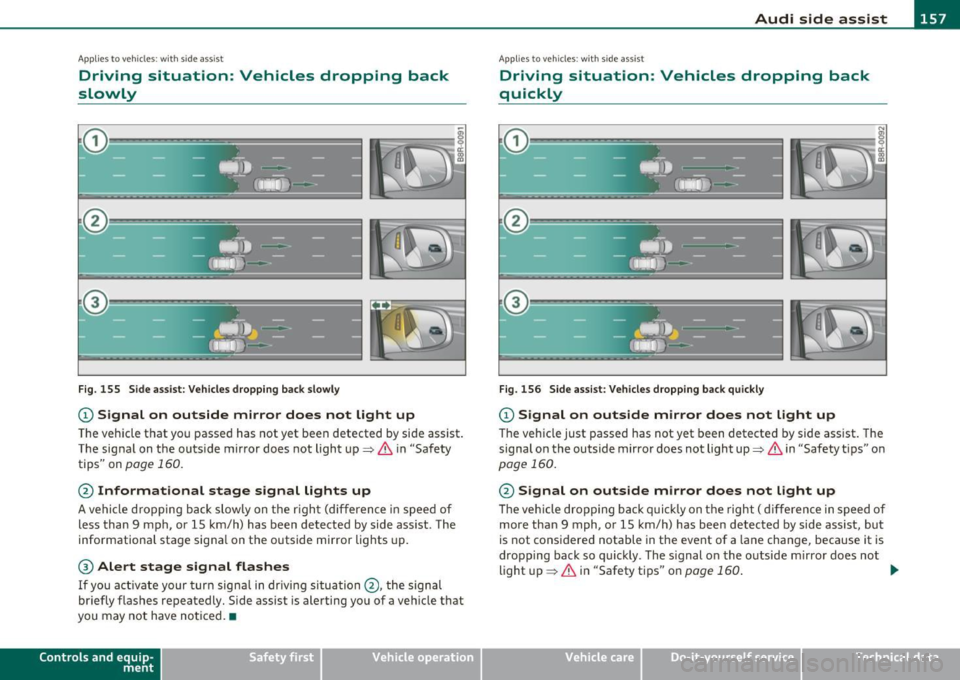
Driving situation: Vehicles dropping back
slowly
Fig . 155 Side assist : Vehicles dropping back slowly
CD Signal on outside mirror does not light up
The vehicle that you passed has not yet been detected by side assist .
The signal on the outside mirror does not light up~
& in "Safety
tips" on
page 160.
@ Informational stage signal lights up
A vehicle dropping back slowly on the rig ht (difference in speed of
less than 9 mph, or 15 km/h) has been detected by side ass ist. The
informationa l stage signa l on the outside mirror lights up.
® Alert stage signal flashes
If you activate your turn signal in driving situation @, the signal
briefly flashes repeatedly. Side assist is alerting you of a vehicle that
you may not have noticed. •
Contro ls a nd e quip
m en t Vehicle
OP-eration
App lies to vehicles : w it h sid e assist
Driving situation: Vehicles dropping back
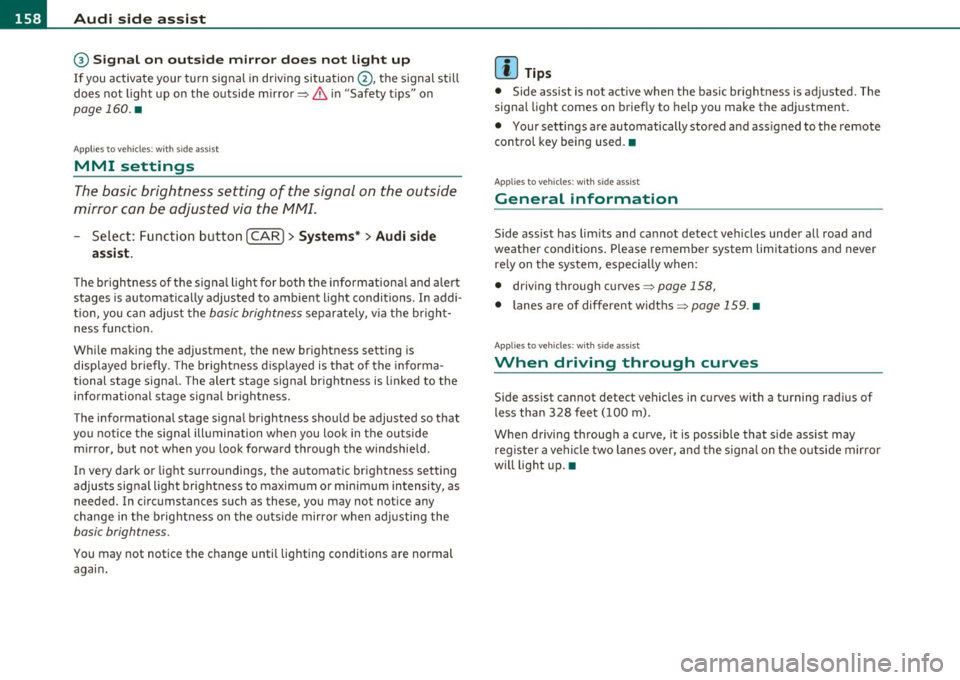
quickly
Fig . 156 Side assist: Vehicles dropping back quickly
CD Signal on outside mirror does not light up
The vehicle just passed has not yet been detected by side assist. The
signal on the outside mirror does not light up~
& in "Safety tips" on
page 160.
@ Signal on outside mirror does not light up
The veh icle dropping back quickly on the right ( difference in speed of
more than 9 mph, or 15 km/h) has been detected by side assist, but
is not cons idered notable in the event of a lane change , because it is
dropping back so quickly . The s ignal on the outside m irror does not
light up~
& in "Safety tips" on page 160 . tJ,,,
Vehicle care Do-it-yourselt service iTechnical data
Page 160 of 390
1111....__A_ u_ d_i_ s_ id_ e_ a_s _s_ i_ s _t _________________________________________________ _
@ Signal on outside mirror does not light up
If you activate your turn signa l in driving situation @, the signal still
does not light up on the outside mirror~
& in "Safety tips" on
page 160. •
Applies to vehicles : w ith side assist
MMI settings
The basic brightness setting of the signal on the outside
mirror can be adjusted via the MMI.
-Select: Function button ( CAR j > Systems * > Audi side
assist .
The brightness of the signal l ight for both the info rmationa l and alert
stages is automatically adjusted to ambient light conditions . In addi
tion , you can adjust the
basic brightness separate ly, via the bright
ness function.
Whi le mak ing the adjustment, the new brightness setting is
displayed briefly . The br ightness d isplayed is that of the informa
tional stage signal. The alert stage signal br ightness is linked to the
info rmational stage signal brightness.
The informational stage signal brightness should be adjusted so that
you notice the signal illumination when you look in the outside
mirror, but not when you look forward through the windshield.
In very dark or light surroundings, the automatic brightness setting
adjusts signal light brightness to maximum or minimum intensity, as
needed. In circumstances such as these, you may not notice any
change in the brightness on the outside mirror when adjusting the
basic brightness.
You may not notice the change until lighting conditions are normal
again.
W Tips
• Side assist is not active when the basic br ightness is adjusted. The
signal light comes on brief ly to help you make the adjustment.
• Your settings are automatically stored and ass igned to the remote
control key being used. •
Appli es to vehicles: w it h si de assis t
General information
Side ass ist has limits and cannot detect vehicles under all road and
weather conditions . Please remember system limitations and never
rely on the system, especially when:
• driving through curves~
page 158,
• lanes a re of different width s~ page 159 . •
Ap plies to vehicles: w ith side ass ist
When driving through curves
Side assist cannot detect vehicles in curves with a turning radius of
less than 328 feet (100 m).
When driving through a curve, it is poss ible that side assist may
registe r a vehicle two lanes over, and the signal on the outside mir ror
will light up.•
Page 162 of 390
lffl!I.___A_ u_ d_ i_s_ i_d _e_ a_ s_ s_ is_t _______________________________________________ _
when usin g a retrofitted tow ing hitc h that was not installed
acc ording to factory speci ficati ons. •
Applies to vehicles: w ith sid e assis t
Safety tips
T he s ide assist detect ion may be limited w hen driving aro und narrow
st reet corners, on hilly st ree ts, and un der poo r wea the r condit ions.
It is possible that the radar sensors may also detect o ther objects,
such as high or staggered g ua rdrails .
S ide assi st does not me asure actual lane wid th. The sy stem assume s
a fixed lane w idt h. Detection in the left and right lanes is based on
t his assumed lane wid th. W hen drivi ng o n nar row ro ads o r whe n
dr iving to the left o r right of the center of a travel lane, it is possib le
that vehicles will be detected that are
not i n the lane next to the lane
you a re us ing.
& WARNING
• Improper reliance on the side assist system can cause collisions
and serious personal injury:
-Never rely only on side assist when changing lanes.
- Always che ck rear view mirrors to make sure that it is safe to
change lanes.
• Side as sist cannot detect all vehicles under all conditions
danger of accident!
• Side assi st cannot detect vehicle s in time to alert you when
they approach from behind at very high speed, or fall drop back
very quickly.
• The radar sensor's
vision can be reduced or entirely blocked by
rain , snow , and heavy spray. This can result in side assi st not
adequately detecting vehicles or , in some cases, not detecting
them at all. Alway s keep an eye on the direction you are traveling
and the relevant area around the vehicle .
& WARNING (co ntinued )
• Please note that side assist indicates there are approaching
vehicles, or vehicles in your blind spot, only after your vehicle has reached a driving speed of at least 19 mph (30 km/h).
• Side assist signal does not work around tight corners (turning
radius less than 328 feet , or 100 m).
• Side assist is no replacement for the driver's full attention. The
driver alone i s responsible for lane changes and similar driving
maneuvers . Always keep an eye on the direction you are traveling
and the relevant area around the vehicle.
0 Note
T o ensure that s ide ass ist is not a dversely affected, yo u should not
bloc k the ar ea on the rear bumper w he re the radar sensors are
locate d w it h foreign objects (such as w it h sticke rs or b icycle racks).
[ i ] Tips
If the positions o f the radar sensors have been c hanged as a result of
a r ear end -colli sion, fo r instan ce, h ave side assis t che cked b y an
author ized Audi dea ler for safety reasons. •
Page 170 of 390
lffll.___P_ a_r_k _ i_n ...::g::- s_, y...._ s_t _e _m ________________________________________________ _
Parking system
Applies to vehicles: w it h rear park ass ist/parking system advanced
General information
T here are two different park assist systems ava ilab le depending on
your veh icle's equipment leve l.
The
r ear park ass ist is an acoust ic park assist system that will give you
a sou nd warn ing to let you know the re is something
behind t h e
veh icle=>
page 168.
T he parking system advanced audibly and visually te lls you there is
something
in front of a nd behind the vehicle. A rearv iew camera also
shows you what is behind the vehicle. This image helps you when
para lle l par king or reverse parking=>
page 169.
[I) Tips
The senso rs must be ke pt cl ean and free of snow and ice fo r the park
assist to operate.•
Rear park assist
Applies to vehicles: with rear park assist
Description
The rear park assist is an audible system.
Sensors are located in the rear bumpers. If these detect an obstacle,
audib le signa ls warn you . The ra nge at wh ic h the sensors begin to
measure is approximate ly:
rear side
cen
ter
2 ft (0 .60 m)
5.2 ft (1.60 m)
The close r you get to the obstacle, t he shorte r the interval between
the audible s ignals. A continuous tone sounds when the obstacle is
less than approximate ly 1 foot (0.30 meters) away. Do not continue
dr iving farther .
If the dis tance to an obstacle remains constant, the volume of the
distance warning gradually drops after about four seconds (this does
no t app ly in the co ntin uous tone range).
Th e pa rk assist is act ivated automat ically when reve rse gear is
engaged. A short confirmation tone sounds.
& WARNING
• The pa rking system cannot repla ce the dri ve r's attention . The
driver alone i s re sponsible for parking and similar driv ing man eu
v ers.
• Sen sor s have blind spots in which objects cannot be detected .
Pay special attention to small children and animal s becau se the
s ensors cannot alwa ys detect them .
• Always keep your e yes on the vehicle' s surrounding s, using the
rear view mirror as w ell.
0 Note
Low obstacles a lready s ignaled by a warning can disappea r from the
system's detection range as they are approached and will not
cont inue to be s ignaled . Objects such as bar rier chai ns, trai ler draw
bars, thin pa inted vertical po les or fences may not be detected by the
system , posing risk of damage .
[I) Tips
• Please follow the ins truc tion s fo r towing a trailer=> page 175.
• You can change the volume and pitch of the signals =>
page 174. •
Page 172 of 390
lffl!IL-___;P:....:: a:.:.r..:.k .:.: i.:..n .:.:g:!....: s:.: y~ s..:t ..:e ..:.m .:..:... _______________________________________________ _
The closer you get to the obstacle, the shorter the interval between
t he audible s ignals. A contin uous tone sounds whe n the obstacle is
less than approximately 1 foot (0 .30 meters) away . Do not co ntin ue
driving farther.
If the distance to an obstacle remains constant, the volume of the
distance warning gradually drops after about four seconds (this does
no t a pply in the co nti nuous to ne range).
Rear view camer a coverage area
The MMI display shows the area covered by the rear v iew camera
=> page 169, fig . 168 (D. Objects that are not in the area covered@
are not shown on the M MI display.
We recommend that you practice parking with the rear v iew camera
in a traff ic -free location o r parki ng lo t to become fam iliar wi th t he
system, the orientation lines, and the ir funct ion . When do ing th is,
there should be good lig ht and weather cond itions.
In the MM I disp lay, objects o r vehicles appea r closer or fu rther away
if:
• you are dr iv ing in r everse gea r from a level surface onto an incline,
or a downwa rd slope,
• you a re driving i n reve rse gear toward p rot ruding objec ts,
• the vehicle is carry ing too much load in the rear.
T he accur acy of the or ien tat io n lines and blue su rf a ces dimin ishes if:
• the Adaptive Air Suspens ion* is faulty or the dynamic, offroad or
lift mode is on,
• the rear view camera does not prov ide a reliable image, for
example, in poor visib ility conditions or if the lens is dirty,
• the image on the screen is not visible due to sun g lare and ref lec
ti on .
Caring for the rear view camera lens
The rear view came ra is lo cated above the rea r license plate bracke t.
For the parking system to ope rate, the lens=>
page 169, fig. 169
must be kept clean: •
Dampen the lens with a househo ld alcoho l-based glass cleaner,
and then wipe the lens clean with a dry cloth =>
CD.
• Remove snow with a hand brush and ice preferably with a de-ic ing
spray =>
CD.
& WARNING
• The parking sy stem cannot replace the dri ver's attention . The
d river alone i s respo nsible for p arking and sim ila r dri ving maneu
ver s.
• Sensor s hav e blind spots in which objects cannot be detected.
Pa y s peci al att ention to small children and animal s beca u se the
sen so rs cannot al ways detect them.
• Alway s keep your e yes on the v ehicle's surr ound ing s, u sing the
r ear view mirror as well.
• Do not all ow your self to be distract ed from traffic by the r ear
v iew camera pictu res .
• If the position and the installation angle of th e camera has
changed , for e xample, after a rear end colli sion, do not continu e
to use th e system for safety r ea son s. Hav e it check ed by a qualified
deale rship.
0 Note
• Low obstacles a lready signaled by a warning can disappear from
the system's detection range as they are approached and will not
continue to be signaled . Objects such as barrier chains, trai ler draw
bars, th in pa inted vertical po les or fences may not be detec ted by the
system, posing risk of damage.
• Never use warm or hot water to remove snow or ice from the rear
view camera lens -this co uld cause the lens to crack!
• When cleaning the lens , never use products that are abrasive .•
Page 175 of 390
Parking system -
----------------=-------'
& WARNING (continued )
you should not use the help lines to help with parking, which
poses danger of an accident!
0 Note
In the MMI display , the direction of travel of the vehicle rear is repre
sen te d dependin g on the s teering wheel ang le . The vehicle fron t
swings out more than the vehicle rear. Maintain plenty of distance so
that your outside mirror or a corner of your vehicle does not collide
with any obstacles. This can damage to your vehicle. •
Applies to ve hicles : w ith pa rk ing system advanced
Parallel Parking
Use parking mode 2 to help you parallel pork along the
side of a street.
Con tro ls a nd e quip
m en t
Fig . 174 MMI display:
blue surface in the
parking spot
Vehicle OP-eration
Fig. 175 MMI display:
Blue curve on the curb
The following steps apply only when there is no obstacle such
as a wall near the parking spot. Otherwise, please read the information provided in the "Parking Next to Obstacles"
section.
- Activate the turn signal.
- Position your vehicle parallel to the edge of the street,
approximately 3 ft (1 meter) from a parked vehicle.
- Switch the MMI on and select reverse gear . The parking aid
turns on and parking mode 1 appears on the display .
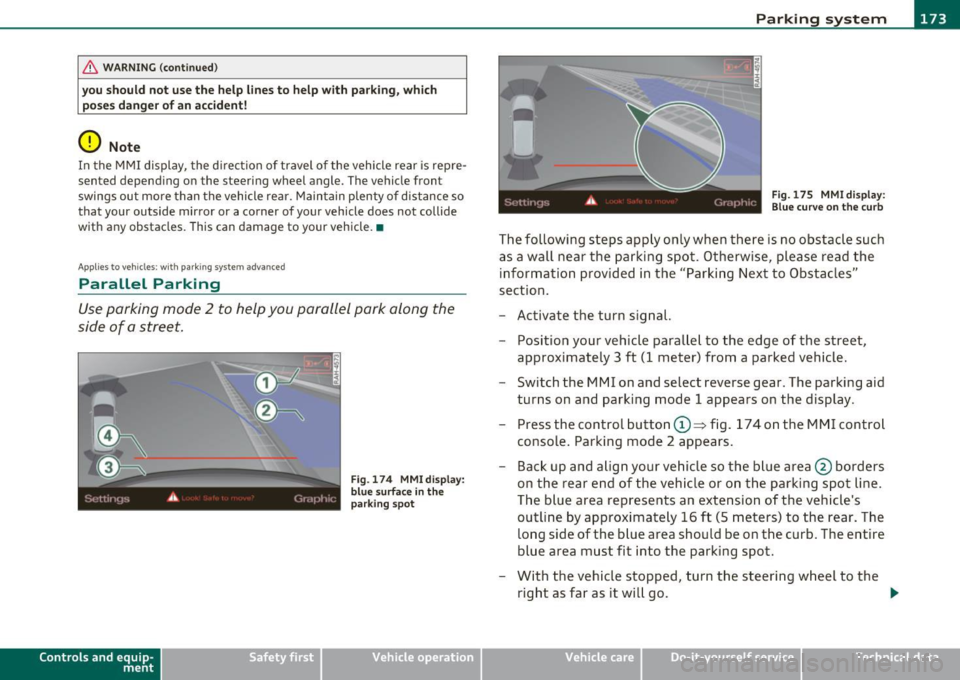
Press the control button©~ fig. 174 on the MMI control
console. Parking mode 2 appears.
- Back up and align your vehicle so the blue area @ borders
on the rear end of the vehicle or on the parking spot line.
The blue area represents an extension of the vehicle's
outline by approximately 16 ft (5 meters) to the rear. The
long side of the blue area should be on the curb. The entire
blue area must fit into the parking spot.
- With the vehicle stopped, turn the steering wheel to the
right as far as it will go. _.,
Vehicle care Do-it-yourselt service iTechnical data